reset FORD F150 2014 12.G User Guide
[x] Cancel search | Manufacturer: FORD, Model Year: 2014, Model line: F150, Model: FORD F150 2014 12.GPages: 472, PDF Size: 4.62 MB
Page 93 of 472
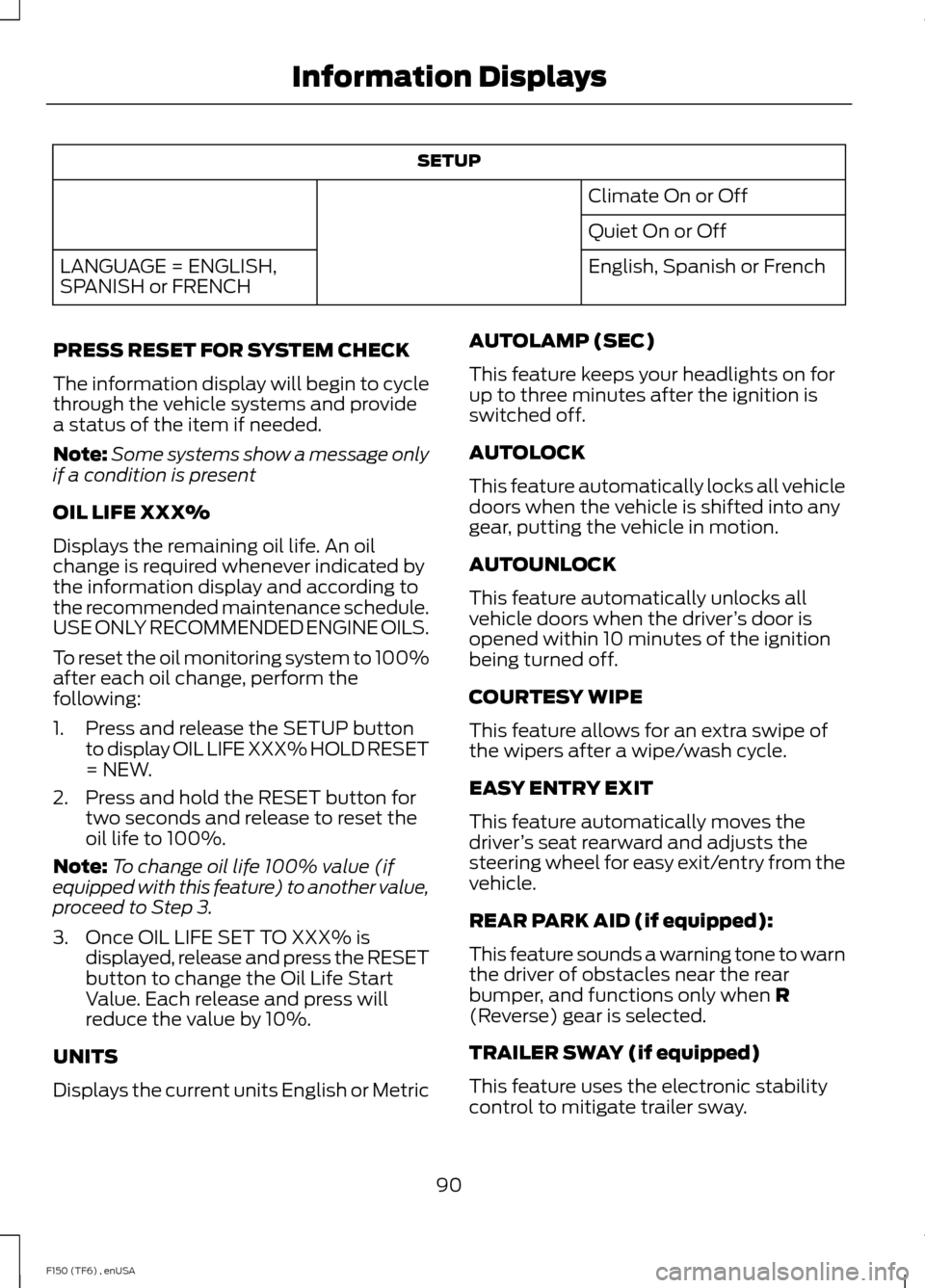
SETUP
Climate On or Off
Quiet On or Off
English, Spanish or French
LANGUAGE = ENGLISH,
SPANISH or FRENCH
PRESS RESET FOR SYSTEM CHECK
The information display will begin to cycle
through the vehicle systems and provide
a status of the item if needed.
Note: Some systems show a message only
if a condition is present
OIL LIFE XXX%
Displays the remaining oil life. An oil
change is required whenever indicated by
the information display and according to
the recommended maintenance schedule.
USE ONLY RECOMMENDED ENGINE OILS.
To reset the oil monitoring system to 100%
after each oil change, perform the
following:
1. Press and release the SETUP button to display OIL LIFE XXX% HOLD RESET
= NEW.
2. Press and hold the RESET button for two seconds and release to reset the
oil life to 100%.
Note: To change oil life 100% value (if
equipped with this feature) to another value,
proceed to Step 3.
3. Once OIL LIFE SET TO XXX% is displayed, release and press the RESET
button to change the Oil Life Start
Value. Each release and press will
reduce the value by 10%.
UNITS
Displays the current units English or Metric AUTOLAMP (SEC)
This feature keeps your headlights on for
up to three minutes after the ignition is
switched off.
AUTOLOCK
This feature automatically locks all vehicle
doors when the vehicle is shifted into any
gear, putting the vehicle in motion.
AUTOUNLOCK
This feature automatically unlocks all
vehicle doors when the driver
’s door is
opened within 10 minutes of the ignition
being turned off.
COURTESY WIPE
This feature allows for an extra swipe of
the wipers after a wipe/wash cycle.
EASY ENTRY EXIT
This feature automatically moves the
driver ’s seat rearward and adjusts the
steering wheel for easy exit/entry from the
vehicle.
REAR PARK AID (if equipped):
This feature sounds a warning tone to warn
the driver of obstacles near the rear
bumper, and functions only when R
(Reverse) gear is selected.
TRAILER SWAY (if equipped)
This feature uses the electronic stability
control to mitigate trailer sway.
90
F150 (TF6) , enUSA Information Displays
Page 94 of 472
CREATE MYKEY, MYKEY SETUP or
CLEAR MYKEY
For more information, See Creating a
MyKey (page 53).
RESET FOR REMOTE START (if
equipped)
LANGUAGE = ENGLISH, SPANISH or
FRENCH
Allows you to choose which language the
message center will display in.
Waiting four seconds or pressing the
RESET button cycles the message center
through each of the language choices.
Press the RESET button to set the
language choice.
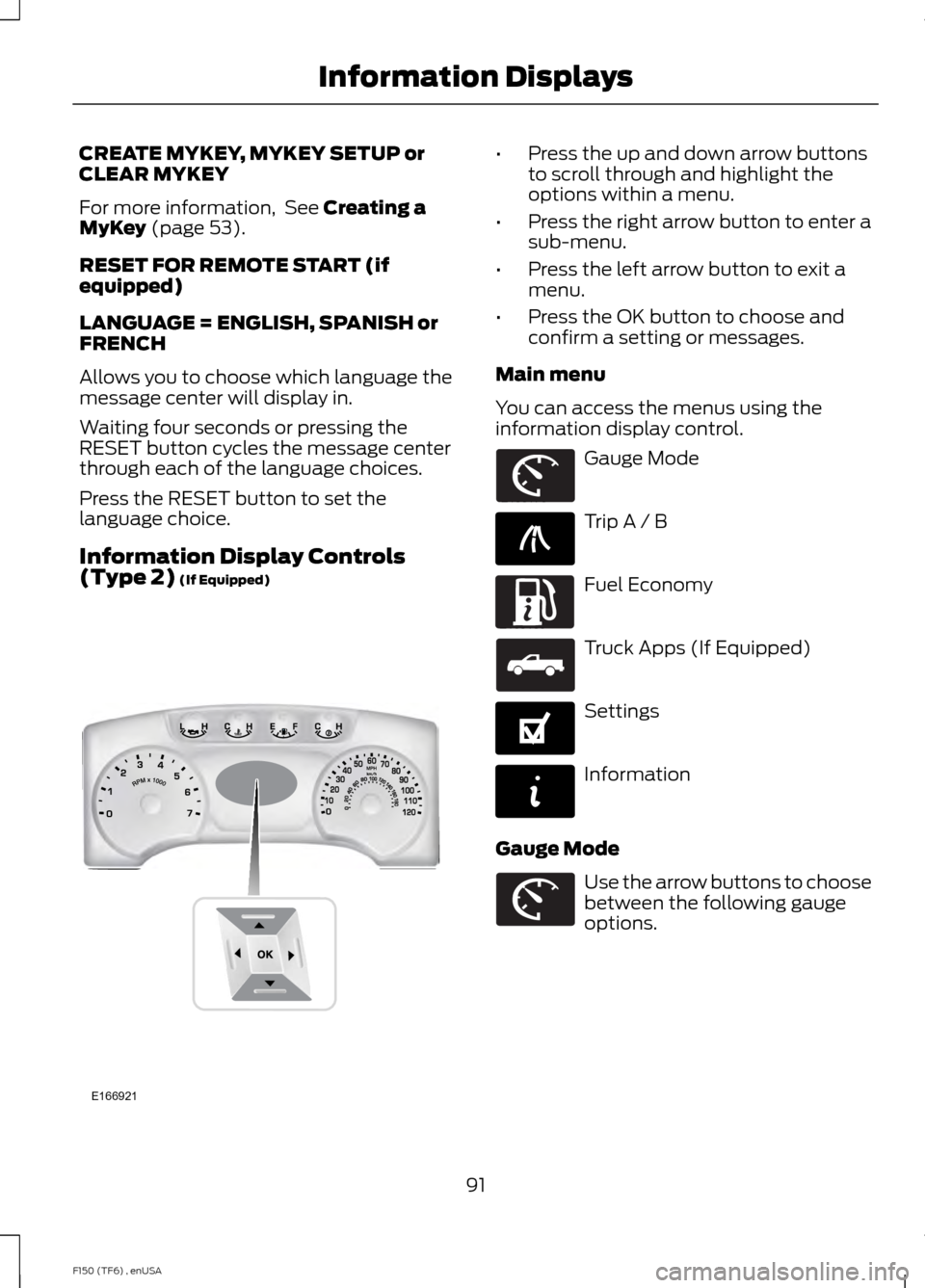
Information Display Controls
(Type 2)
(If Equipped) •
Press the up and down arrow buttons
to scroll through and highlight the
options within a menu.
• Press the right arrow button to enter a
sub-menu.
• Press the left arrow button to exit a
menu.
• Press the OK button to choose and
confirm a setting or messages.
Main menu
You can access the menus using the
information display control. Gauge Mode
Trip A / B
Fuel Economy
Truck Apps (If Equipped)
Settings
Information
Gauge Mode Use the arrow buttons to choose
between the following gauge
options.
91
F150 (TF6) , enUSA Information DisplaysE166921 E163179 E138660 E163180 E163181 E144641 E144642 E163179
Page 95 of 472
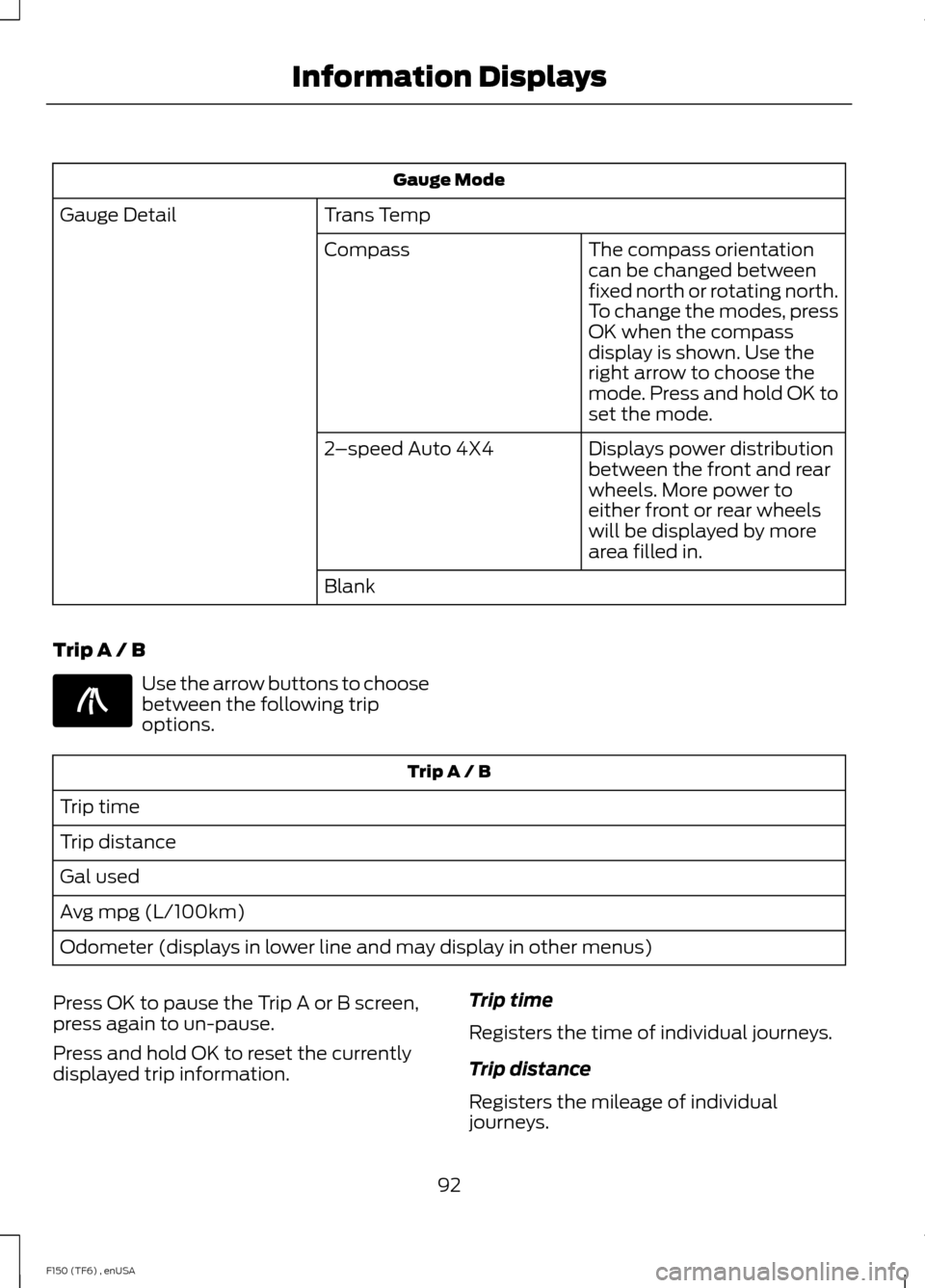
Gauge Mode
Trans Temp
Gauge Detail
The compass orientation
can be changed between
fixed north or rotating north.
To change the modes, press
OK when the compass
display is shown. Use the
right arrow to choose the
mode. Press and hold OK to
set the mode.
Compass
Displays power distribution
between the front and rear
wheels. More power to
either front or rear wheels
will be displayed by more
area filled in.
2
–speed Auto 4X4
Blank
Trip A / B Use the arrow buttons to choose
between the following trip
options.
Trip A / B
Trip time
Trip distance
Gal used
Avg mpg (L/100km)
Odometer (displays in lower line and may display in other menus)
Press OK to pause the Trip A or B screen,
press again to un-pause.
Press and hold OK to reset the currently
displayed trip information. Trip time
Registers the time of individual journeys.
Trip distance
Registers the mileage of individual
journeys.
92
F150 (TF6) , enUSA Information DisplaysE138660
Page 96 of 472
Gal used
Shows the amount of fuel used for a given
trip.
Avg MPG
Shows the average distance traveled per
unit of fuel used for a given trip.
Fuel Economy Use the arrow buttons to choose
the desired fuel economy
display.
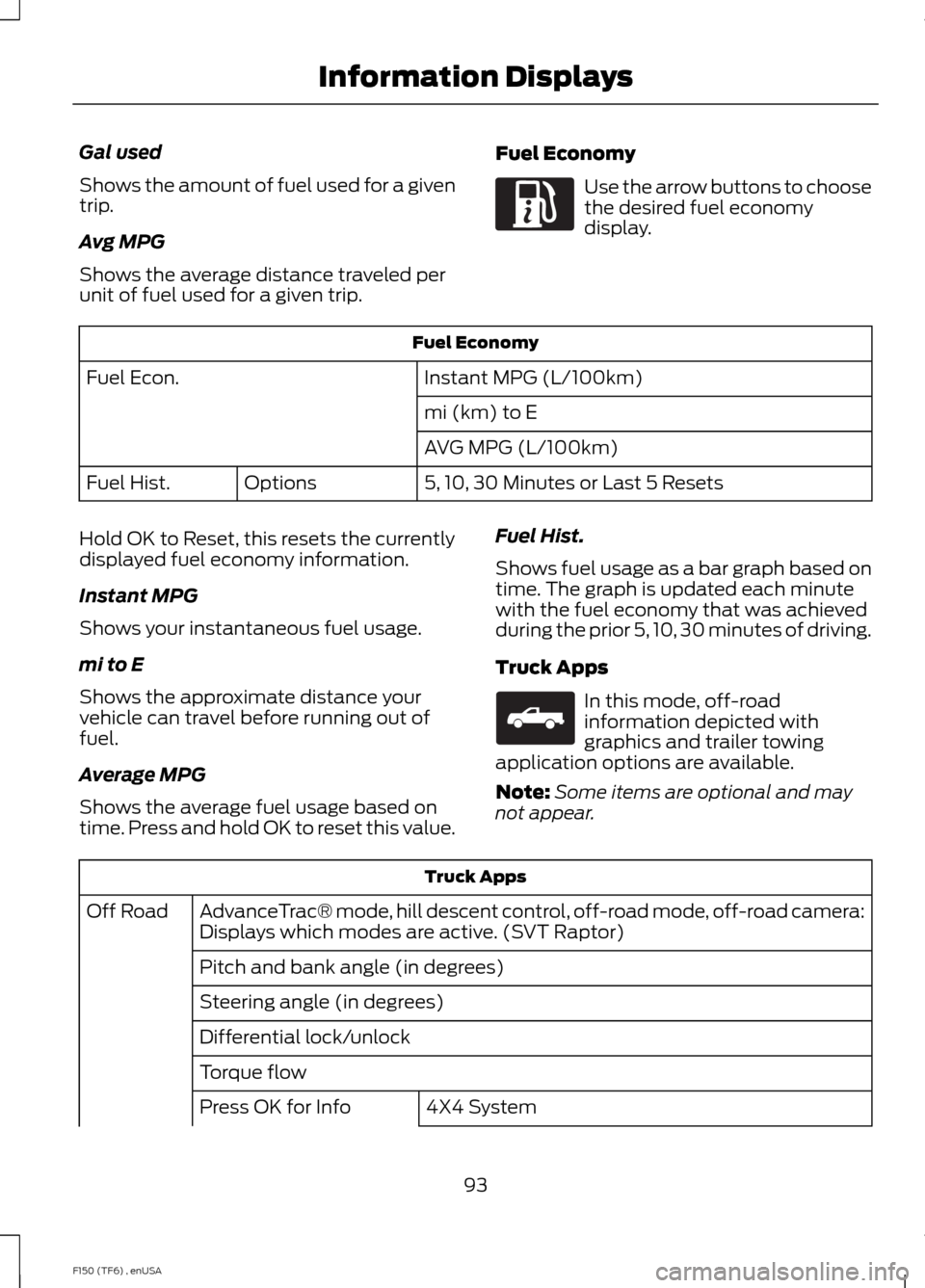
Fuel Economy
Instant MPG (L/100km)
Fuel Econ.
mi (km) to E
AVG MPG (L/100km)
5, 10, 30 Minutes or Last 5 Resets
Options
Fuel Hist.
Hold OK to Reset, this resets the currently
displayed fuel economy information.
Instant MPG
Shows your instantaneous fuel usage.
mi to E
Shows the approximate distance your
vehicle can travel before running out of
fuel.
Average MPG
Shows the average fuel usage based on
time. Press and hold OK to reset this value. Fuel Hist.
Shows fuel usage as a bar graph based on
time. The graph is updated each minute
with the fuel economy that was achieved
during the prior 5, 10, 30 minutes of driving.
Truck Apps In this mode, off-road
information depicted with
graphics and trailer towing
application options are available.
Note: Some items are optional and may
not appear. Truck Apps
AdvanceTrac® mode, hill descent control, off-road mode, off-road camera:
Displays which modes are active. (SVT Raptor)
Off Road
Pitch and bank angle (in degrees)
Steering angle (in degrees)
Differential lock/unlock
Torque flow 4X4 System
Press OK for Info
93
F150 (TF6) , enUSA Information DisplaysE163180 E163181
Page 97 of 472
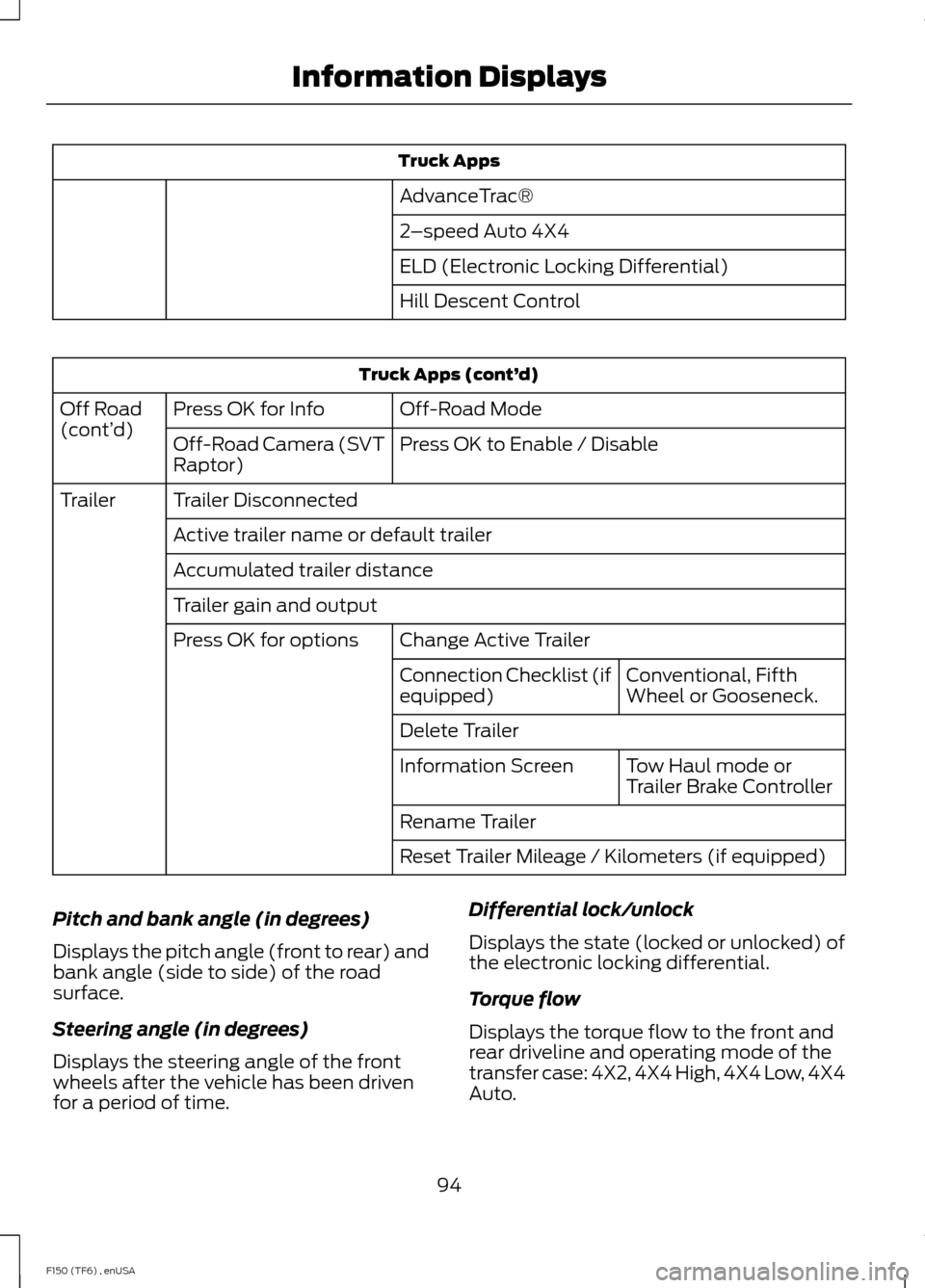
Truck Apps
AdvanceTrac®
2 –speed Auto 4X4
ELD (Electronic Locking Differential)
Hill Descent Control Truck Apps (cont’
d)
Off-Road Mode
Press OK for Info
Off Road
(cont’ d)
Press OK to Enable / Disable
Off-Road Camera (SVT
Raptor)
Trailer Disconnected
Trailer
Active trailer name or default trailer
Accumulated trailer distance
Trailer gain and output Change Active Trailer
Press OK for options
Conventional, Fifth
Wheel or Gooseneck.
Connection Checklist (if
equipped)
Delete Trailer
Tow Haul mode or
Trailer Brake Controller
Information Screen
Rename Trailer
Reset Trailer Mileage / Kilometers (if equipped)
Pitch and bank angle (in degrees)
Displays the pitch angle (front to rear) and
bank angle (side to side) of the road
surface.
Steering angle (in degrees)
Displays the steering angle of the front
wheels after the vehicle has been driven
for a period of time. Differential lock/unlock
Displays the state (locked or unlocked) of
the electronic locking differential.
Torque flow
Displays the torque flow to the front and
rear driveline and operating mode of the
transfer case: 4X2, 4X4 High, 4X4 Low, 4X4
Auto.
94
F150 (TF6) , enUSA Information Displays
Page 98 of 472
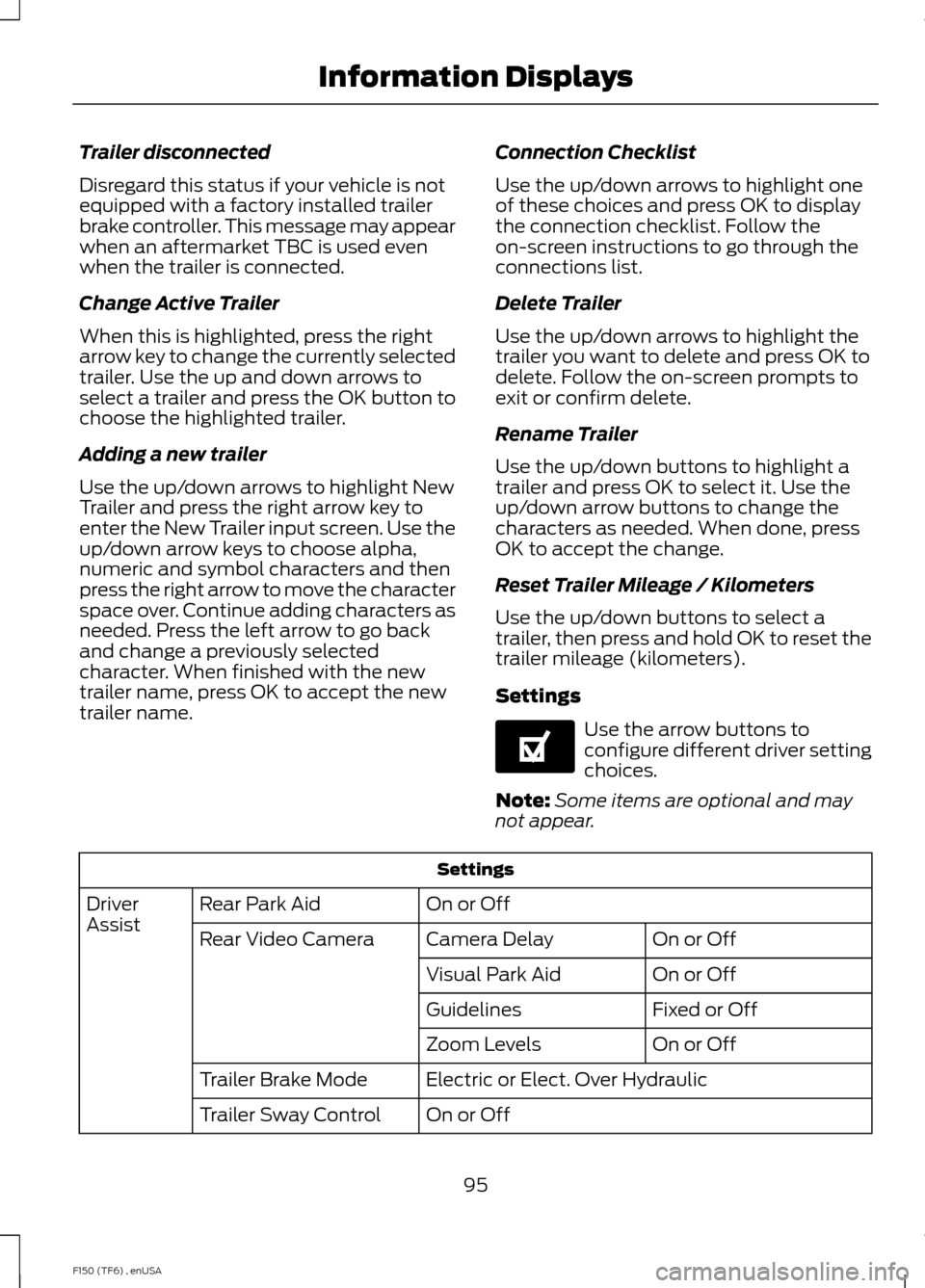
Trailer disconnected
Disregard this status if your vehicle is not
equipped with a factory installed trailer
brake controller. This message may appear
when an aftermarket TBC is used even
when the trailer is connected.
Change Active Trailer
When this is highlighted, press the right
arrow key to change the currently selected
trailer. Use the up and down arrows to
select a trailer and press the OK button to
choose the highlighted trailer.
Adding a new trailer
Use the up/down arrows to highlight New
Trailer and press the right arrow key to
enter the New Trailer input screen. Use the
up/down arrow keys to choose alpha,
numeric and symbol characters and then
press the right arrow to move the character
space over. Continue adding characters as
needed. Press the left arrow to go back
and change a previously selected
character. When finished with the new
trailer name, press OK to accept the new
trailer name.
Connection Checklist
Use the up/down arrows to highlight one
of these choices and press OK to display
the connection checklist. Follow the
on-screen instructions to go through the
connections list.
Delete Trailer
Use the up/down arrows to highlight the
trailer you want to delete and press OK to
delete. Follow the on-screen prompts to
exit or confirm delete.
Rename Trailer
Use the up/down buttons to highlight a
trailer and press OK to select it. Use the
up/down arrow buttons to change the
characters as needed. When done, press
OK to accept the change.
Reset Trailer Mileage / Kilometers
Use the up/down buttons to select a
trailer, then press and hold OK to reset the
trailer mileage (kilometers).
Settings
Use the arrow buttons to
configure different driver setting
choices.
Note: Some items are optional and may
not appear. Settings
On or Off
Rear Park Aid
Driver
Assist
On or Off
Camera Delay
Rear Video Camera
On or Off
Visual Park Aid
Fixed or Off
Guidelines
On or Off
Zoom Levels
Electric or Elect. Over Hydraulic
Trailer Brake Mode
On or Off
Trailer Sway Control
95
F150 (TF6) , enUSA Information DisplaysE144641
Page 99 of 472
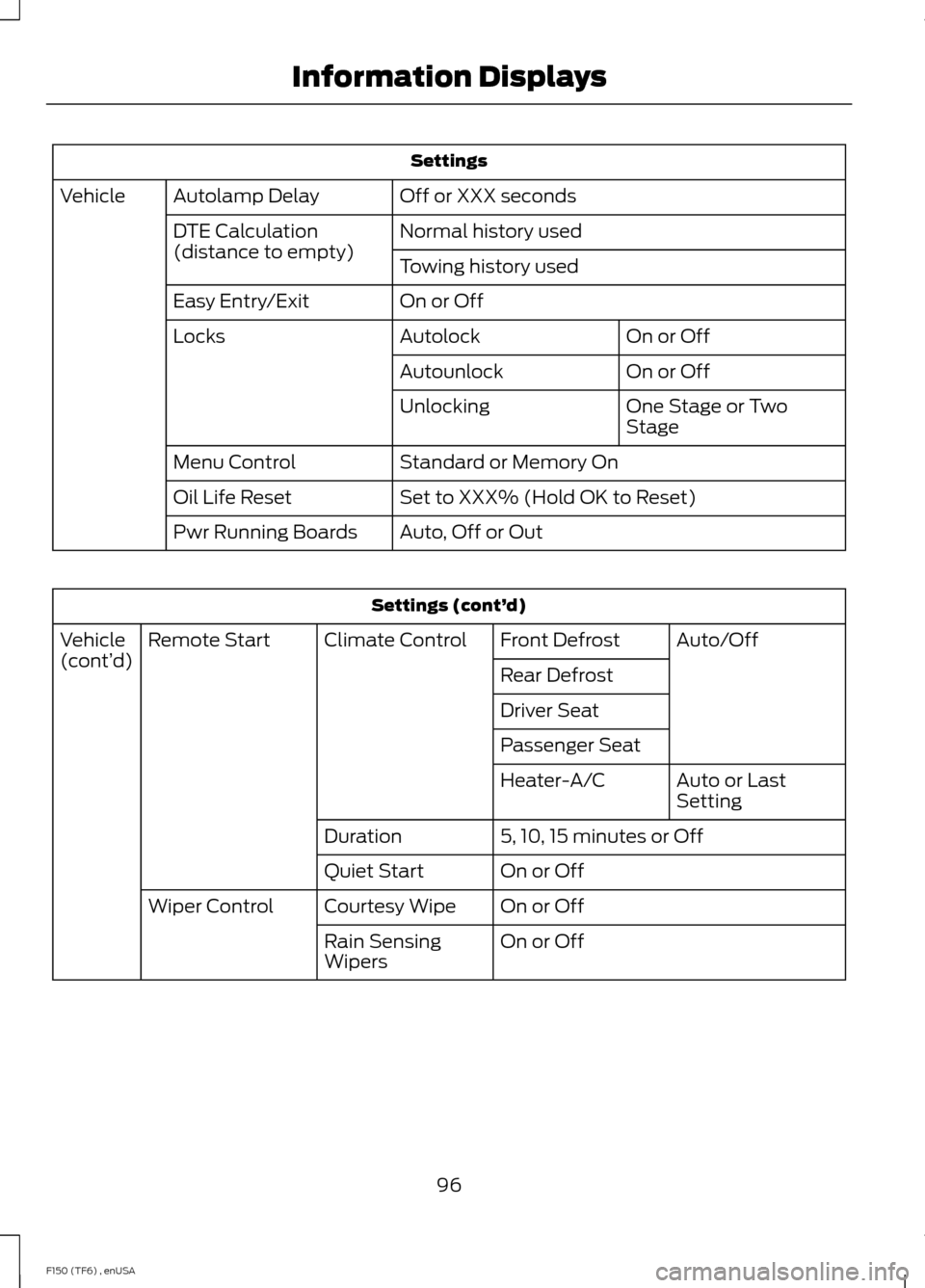
Settings
Off or XXX seconds
Autolamp Delay
Vehicle
Normal history used
DTE Calculation
(distance to empty)
Towing history used
On or Off
Easy Entry/Exit
On or Off
Autolock
Locks
On or Off
Autounlock
One Stage or Two
Stage
Unlocking
Standard or Memory On
Menu Control
Set to XXX% (Hold OK to Reset)
Oil Life Reset
Auto, Off or Out
Pwr Running Boards Settings (cont’
d)
Auto/Off
Front Defrost
Climate Control
Remote Start
Vehicle
(cont’ d)
Rear Defrost
Driver Seat
Passenger Seat
Auto or Last
Setting
Heater-A/C
5, 10, 15 minutes or Off
Duration
On or Off
Quiet Start
On or Off
Courtesy Wipe
Wiper Control
On or Off
Rain Sensing
Wipers
96
F150 (TF6) , enUSA Information Displays
Page 101 of 472
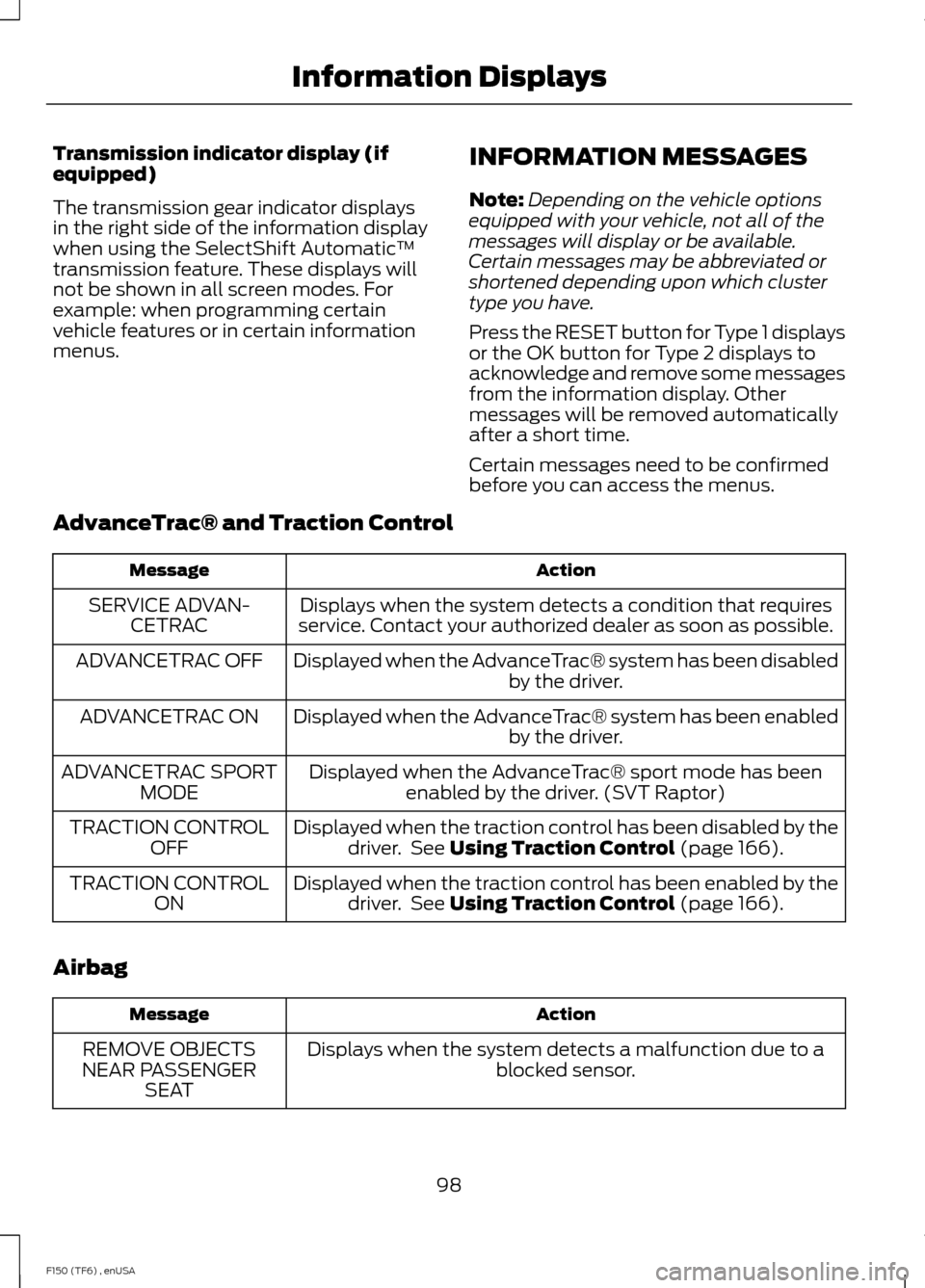
Transmission indicator display (if
equipped)
The transmission gear indicator displays
in the right side of the information display
when using the SelectShift Automatic
™
transmission feature. These displays will
not be shown in all screen modes. For
example: when programming certain
vehicle features or in certain information
menus. INFORMATION MESSAGES
Note:
Depending on the vehicle options
equipped with your vehicle, not all of the
messages will display or be available.
Certain messages may be abbreviated or
shortened depending upon which cluster
type you have.
Press the RESET button for Type 1 displays
or the OK button for Type 2 displays to
acknowledge and remove some messages
from the information display. Other
messages will be removed automatically
after a short time.
Certain messages need to be confirmed
before you can access the menus.
AdvanceTrac® and Traction Control Action
Message
Displays when the system detects a condition that requires
service. Contact your authorized dealer as soon as possible.
SERVICE ADVAN-
CETRAC
Displayed when the AdvanceTrac® system has been disabled by the driver.
ADVANCETRAC OFF
Displayed when the AdvanceTrac® system has been enabledby the driver.
ADVANCETRAC ON
Displayed when the AdvanceTrac® sport mode has beenenabled by the driver. (SVT Raptor)
ADVANCETRAC SPORT
MODE
Displayed when the traction control has been disabled by thedriver. See Using Traction Control (page 166).
TRACTION CONTROL
OFF
Displayed when the traction control has been enabled by thedriver. See
Using Traction Control (page 166).
TRACTION CONTROL
ON
Airbag Action
Message
Displays when the system detects a malfunction due to a blocked sensor.
REMOVE OBJECTS
NEAR PASSENGER SEAT
98
F150 (TF6) , enUSA Information Displays
Page 119 of 472
Installing the Head Restraint
Align the steel stems into the guide sleeves
and push the head restraint down until it
locks.
Folding the Head Restraint
Note:
The rear seat outboard head
restraints may fold forward for improved
visibility.
1. Press and hold button E.
2. Pull it back up to reset.
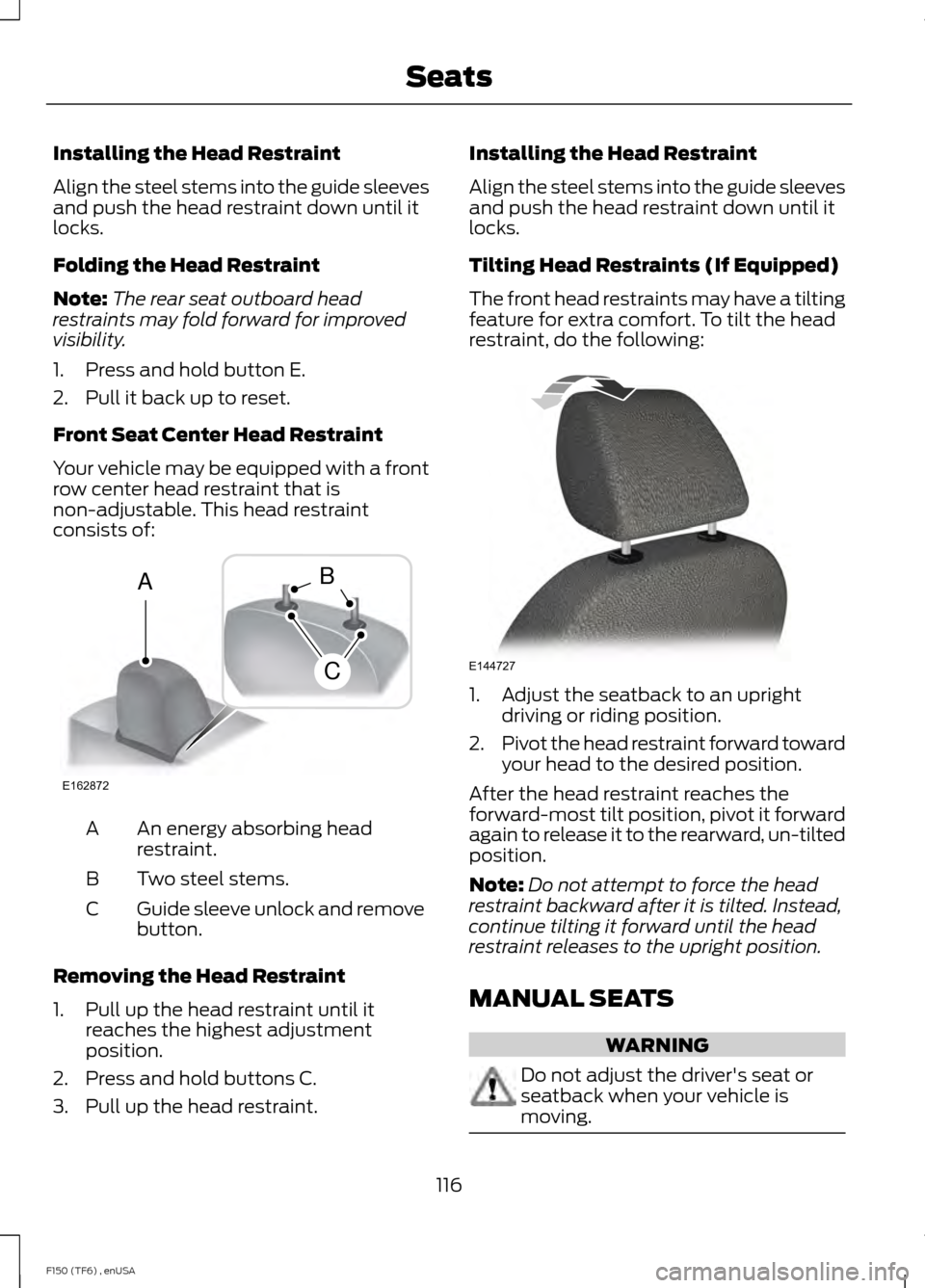
Front Seat Center Head Restraint
Your vehicle may be equipped with a front
row center head restraint that is
non-adjustable. This head restraint
consists of: An energy absorbing head
restraint.
A
Two steel stems.
B
Guide sleeve unlock and remove
button.
C
Removing the Head Restraint
1. Pull up the head restraint until it reaches the highest adjustment
position.
2. Press and hold buttons C.
3. Pull up the head restraint. Installing the Head Restraint
Align the steel stems into the guide sleeves
and push the head restraint down until it
locks.
Tilting Head Restraints (If Equipped)
The front head restraints may have a tilting
feature for extra comfort. To tilt the head
restraint, do the following:
1. Adjust the seatback to an upright
driving or riding position.
2. Pivot the head restraint forward toward
your head to the desired position.
After the head restraint reaches the
forward-most tilt position, pivot it forward
again to release it to the rearward, un-tilted
position.
Note: Do not attempt to force the head
restraint backward after it is tilted. Instead,
continue tilting it forward until the head
restraint releases to the upright position.
MANUAL SEATS WARNING
Do not adjust the driver's seat or
seatback when your vehicle is
moving.
116
F150 (TF6) , enUSA SeatsE162872
A
C
B E144727
Page 124 of 472
Rear Heated Seats (If Equipped)
WARNING
People who are unable to feel pain
to the skin because of advanced age,
chronic illness, diabetes, spinal cord
injury, medication, alcohol use, exhaustion,
or other physical conditions, must exercise
care when using the seat heater. The seat
heater may cause burns even at low
temperatures, especially if used for long
periods of time. Do not place anything on
the seat that insulates against heat, such
as a blanket or cushion, because this may
cause the seat heater to overheat. Do not
puncture the seat with pins, needles, or
other pointed objects because this may
damage the heating element which may
cause the seat heater to overheat. An
overheated seat may cause serious
personal injury. Do not do the following:
•
Place heavy objects on the seat.
• Operate the seat heater if water or any
other liquid is spilled on the seat. Allow
the seat to dry thoroughly.
The rear seat heat controls are located on
the rear door armrest.
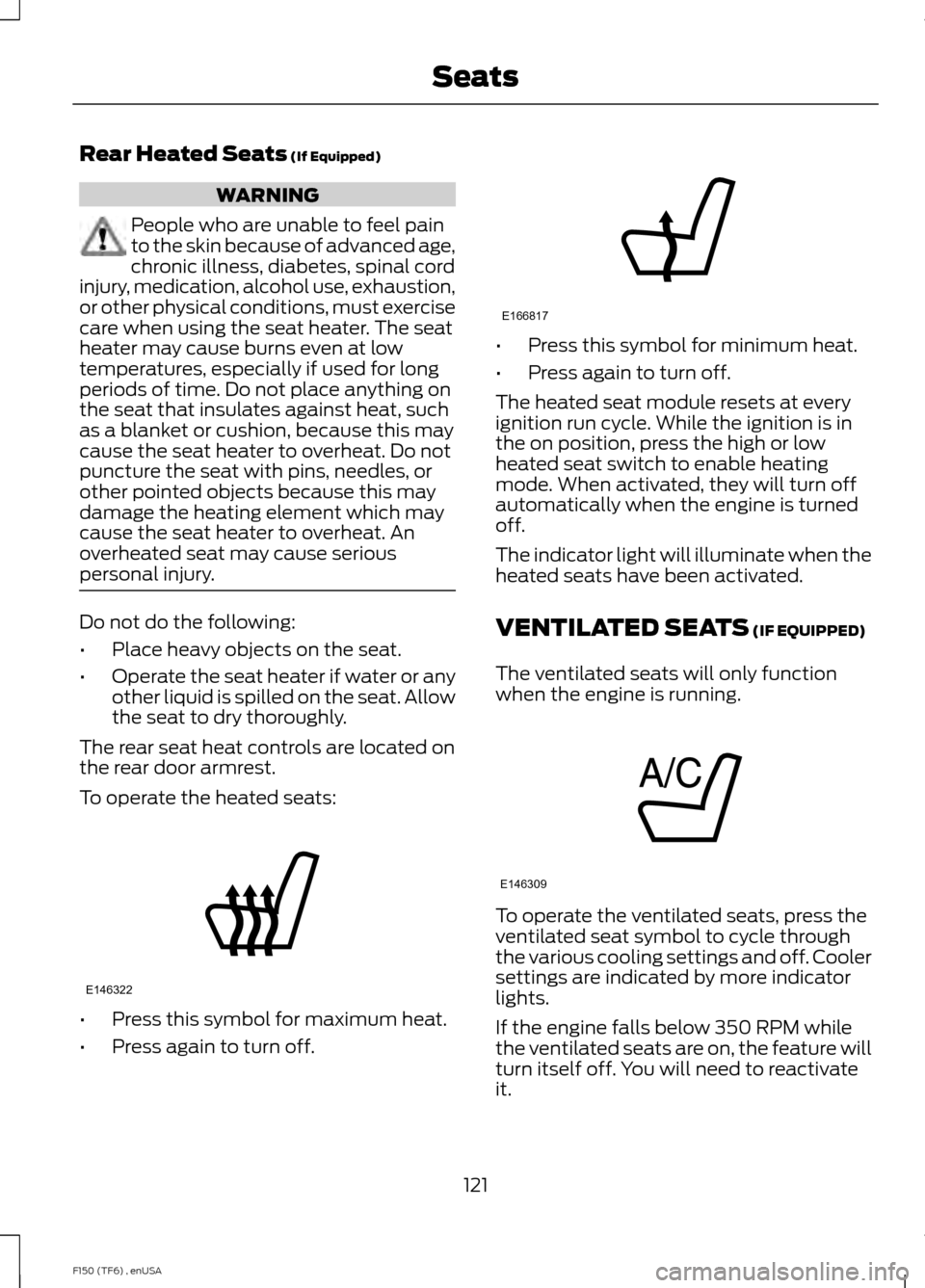
To operate the heated seats: •
Press this symbol for maximum heat.
• Press again to turn off. •
Press this symbol for minimum heat.
• Press again to turn off.
The heated seat module resets at every
ignition run cycle. While the ignition is in
the on position, press the high or low
heated seat switch to enable heating
mode. When activated, they will turn off
automatically when the engine is turned
off.
The indicator light will illuminate when the
heated seats have been activated.
VENTILATED SEATS
(IF EQUIPPED)
The ventilated seats will only function
when the engine is running. To operate the ventilated seats, press the
ventilated seat symbol to cycle through
the various cooling settings and off. Cooler
settings are indicated by more indicator
lights.
If the engine falls below 350 RPM while
the ventilated seats are on, the feature will
turn itself off. You will need to reactivate
it.
121
F150 (TF6) , enUSA SeatsE146322 E166817 E146309