clock FORD F150 2015 13.G User Guide
[x] Cancel search | Manufacturer: FORD, Model Year: 2015, Model line: F150, Model: FORD F150 2015 13.GPages: 549, PDF Size: 5.97 MB
Page 357 of 549
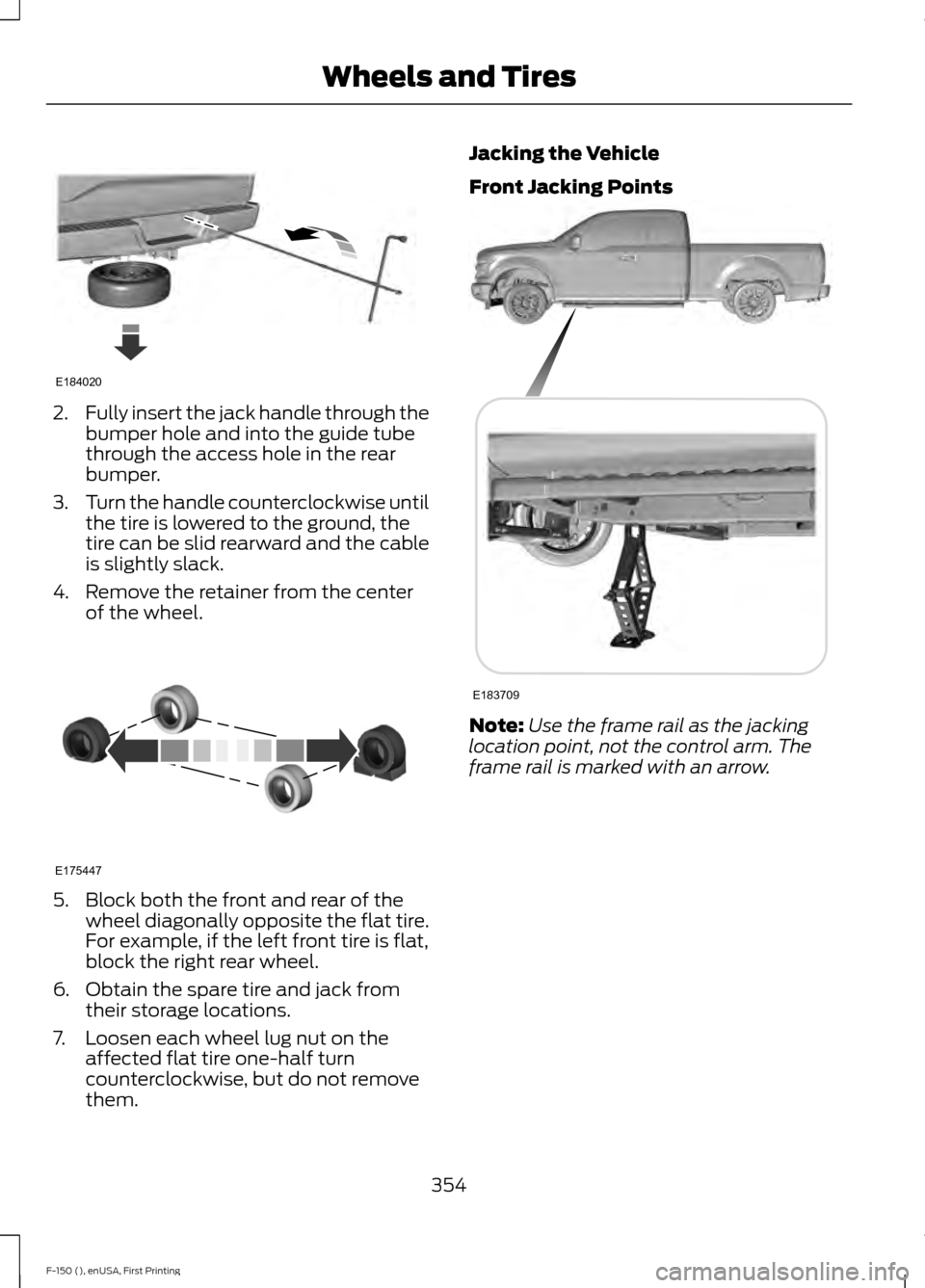
2.
Fully insert the jack handle through the
bumper hole and into the guide tube
through the access hole in the rear
bumper.
3. Turn the handle counterclockwise until
the tire is lowered to the ground, the
tire can be slid rearward and the cable
is slightly slack.
4. Remove the retainer from the center of the wheel. 5. Block both the front and rear of the
wheel diagonally opposite the flat tire.
For example, if the left front tire is flat,
block the right rear wheel.
6. Obtain the spare tire and jack from their storage locations.
7. Loosen each wheel lug nut on the affected flat tire one-half turn
counterclockwise, but do not remove
them. Jacking the Vehicle
Front Jacking Points
Note:
Use the frame rail as the jacking
location point, not the control arm. The
frame rail is marked with an arrow.
354
F-150 (), enUSA, First Printing Wheels and TiresE184020 E175447 E183709
Page 358 of 549
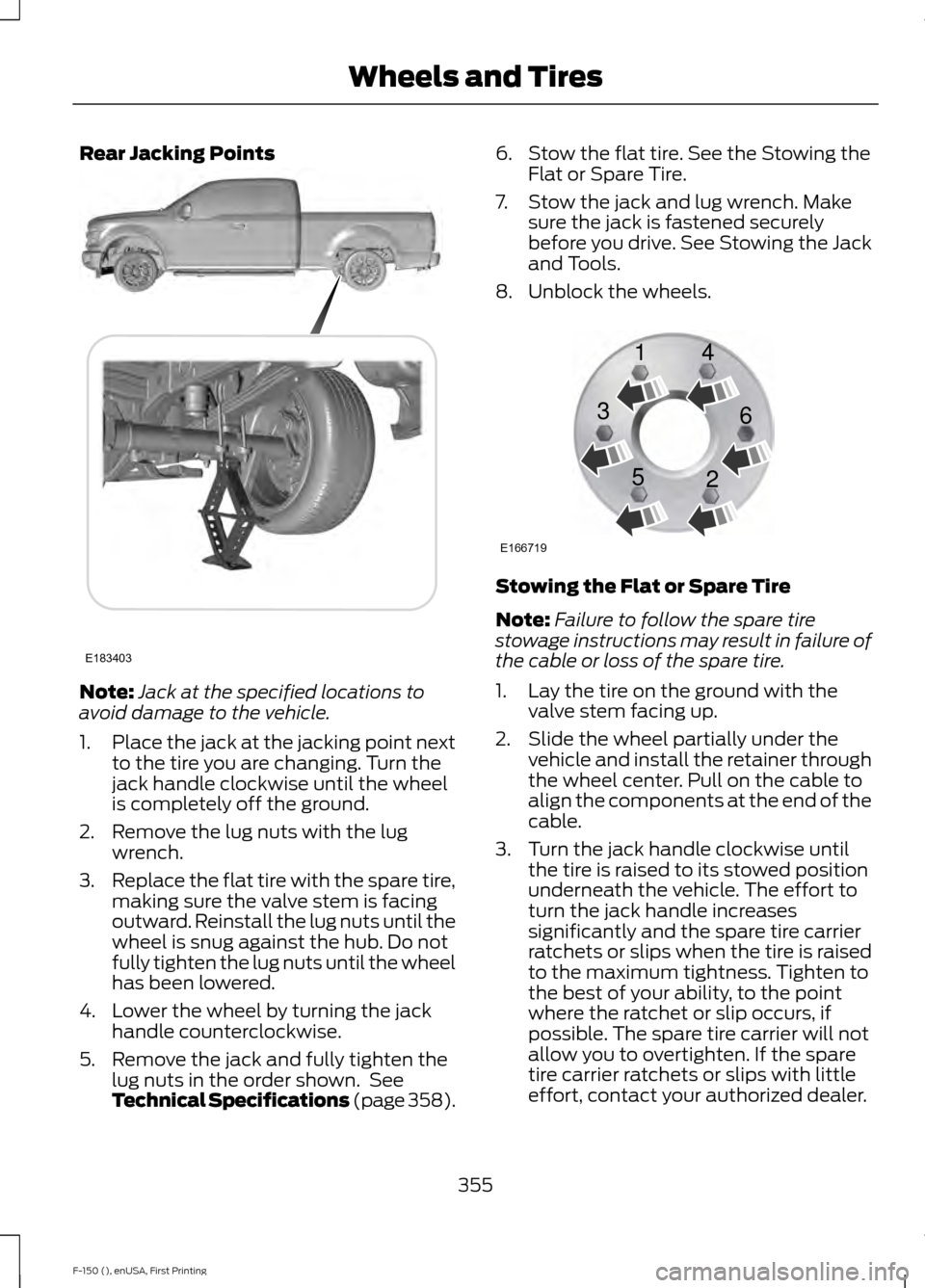
Rear Jacking Points
Note:
Jack at the specified locations to
avoid damage to the vehicle.
1. Place the jack at the jacking point next
to the tire you are changing. Turn the
jack handle clockwise until the wheel
is completely off the ground.
2. Remove the lug nuts with the lug wrench.
3. Replace the flat tire with the spare tire,
making sure the valve stem is facing
outward. Reinstall the lug nuts until the
wheel is snug against the hub. Do not
fully tighten the lug nuts until the wheel
has been lowered.
4. Lower the wheel by turning the jack handle counterclockwise.
5. Remove the jack and fully tighten the lug nuts in the order shown. See
Technical Specifications (page 358). 6. Stow the flat tire. See the Stowing the
Flat or Spare Tire.
7. Stow the jack and lug wrench. Make sure the jack is fastened securely
before you drive. See Stowing the Jack
and Tools.
8. Unblock the wheels. Stowing the Flat or Spare Tire
Note:
Failure to follow the spare tire
stowage instructions may result in failure of
the cable or loss of the spare tire.
1. Lay the tire on the ground with the valve stem facing up.
2. Slide the wheel partially under the vehicle and install the retainer through
the wheel center. Pull on the cable to
align the components at the end of the
cable.
3. Turn the jack handle clockwise until the tire is raised to its stowed position
underneath the vehicle. The effort to
turn the jack handle increases
significantly and the spare tire carrier
ratchets or slips when the tire is raised
to the maximum tightness. Tighten to
the best of your ability, to the point
where the ratchet or slip occurs, if
possible. The spare tire carrier will not
allow you to overtighten. If the spare
tire carrier ratchets or slips with little
effort, contact your authorized dealer.
355
F-150 (), enUSA, First Printing Wheels and TiresE183403 E166719
1
3
5 4
6
2
Page 387 of 549
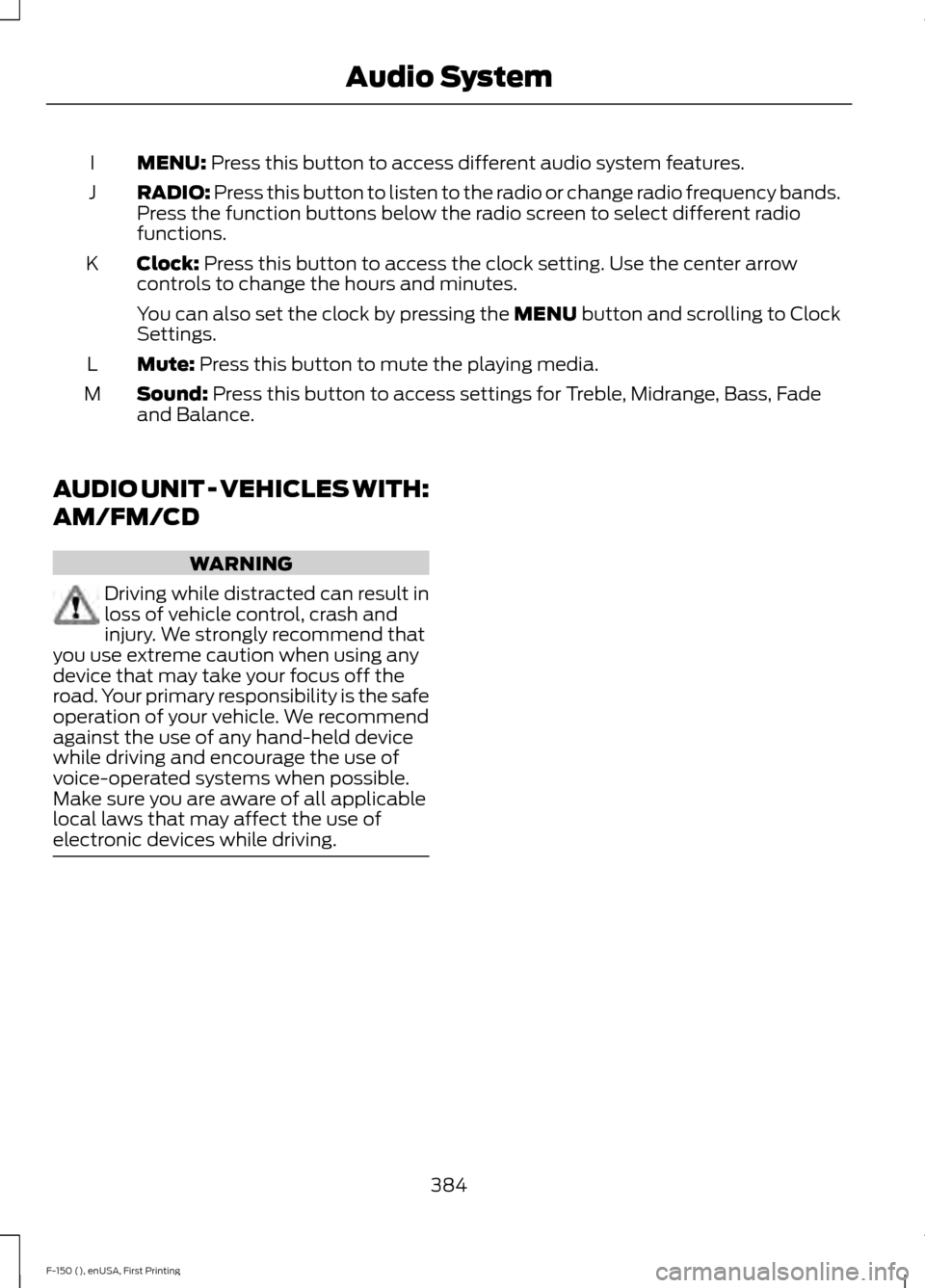
MENU: Press this button to access different audio system features.
I
RADIO:
Press this button to listen to the radio or change radio frequency bands.
Press the function buttons below the radio screen to select different radio
functions.
J
Clock:
Press this button to access the clock setting. Use the center arrow
controls to change the hours and minutes.
K
You can also set the clock by pressing the MENU button and scrolling to Clock
Settings.
Mute:
Press this button to mute the playing media.
L
Sound:
Press this button to access settings for Treble, Midrange, Bass, Fade
and Balance.
M
AUDIO UNIT - VEHICLES WITH:
AM/FM/CD WARNING
Driving while distracted can result in
loss of vehicle control, crash and
injury. We strongly recommend that
you use extreme caution when using any
device that may take your focus off the
road. Your primary responsibility is the safe
operation of your vehicle. We recommend
against the use of any hand-held device
while driving and encourage the use of
voice-operated systems when possible.
Make sure you are aware of all applicable
local laws that may affect the use of
electronic devices while driving. 384
F-150 (), enUSA, First Printing Audio System
Page 389 of 549
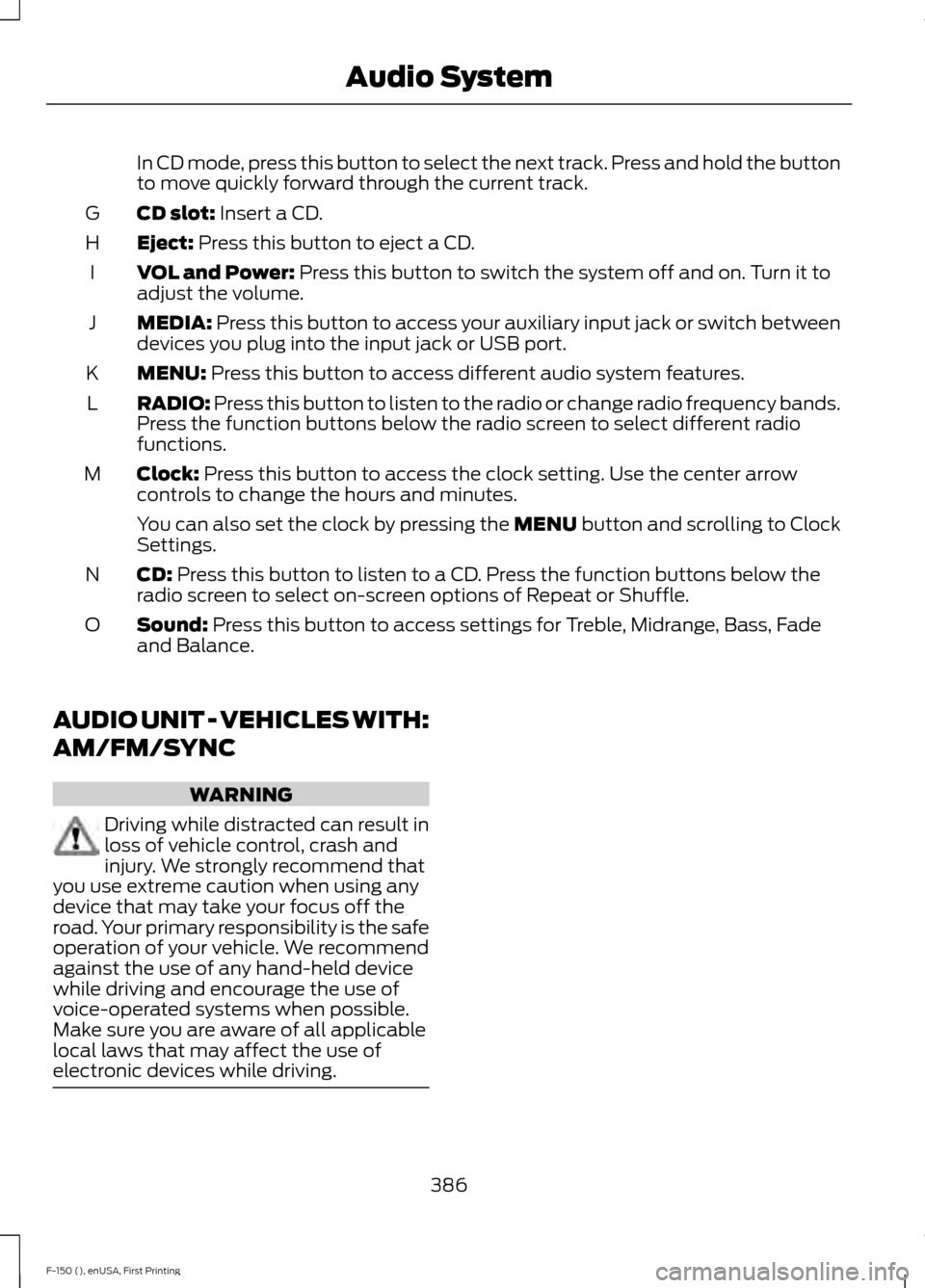
In CD mode, press this button to select the next track. Press and hold the button
to move quickly forward through the current track.
CD slot: Insert a CD.
G
Eject:
Press this button to eject a CD.
H
VOL and Power:
Press this button to switch the system off and on. Turn it to
adjust the volume.
I
MEDIA:
Press this button to access your auxiliary input jack or switch between
devices you plug into the input jack or USB port.
J
MENU:
Press this button to access different audio system features.
K
RADIO:
Press this button to listen to the radio or change radio frequency bands.
Press the function buttons below the radio screen to select different radio
functions.
L
Clock:
Press this button to access the clock setting. Use the center arrow
controls to change the hours and minutes.
M
You can also set the clock by pressing the MENU button and scrolling to Clock
Settings.
CD:
Press this button to listen to a CD. Press the function buttons below the
radio screen to select on-screen options of Repeat or Shuffle.
N
Sound:
Press this button to access settings for Treble, Midrange, Bass, Fade
and Balance.
O
AUDIO UNIT - VEHICLES WITH:
AM/FM/SYNC WARNING
Driving while distracted can result in
loss of vehicle control, crash and
injury. We strongly recommend that
you use extreme caution when using any
device that may take your focus off the
road. Your primary responsibility is the safe
operation of your vehicle. We recommend
against the use of any hand-held device
while driving and encourage the use of
voice-operated systems when possible.
Make sure you are aware of all applicable
local laws that may affect the use of
electronic devices while driving. 386
F-150 (), enUSA, First Printing Audio System
Page 391 of 549
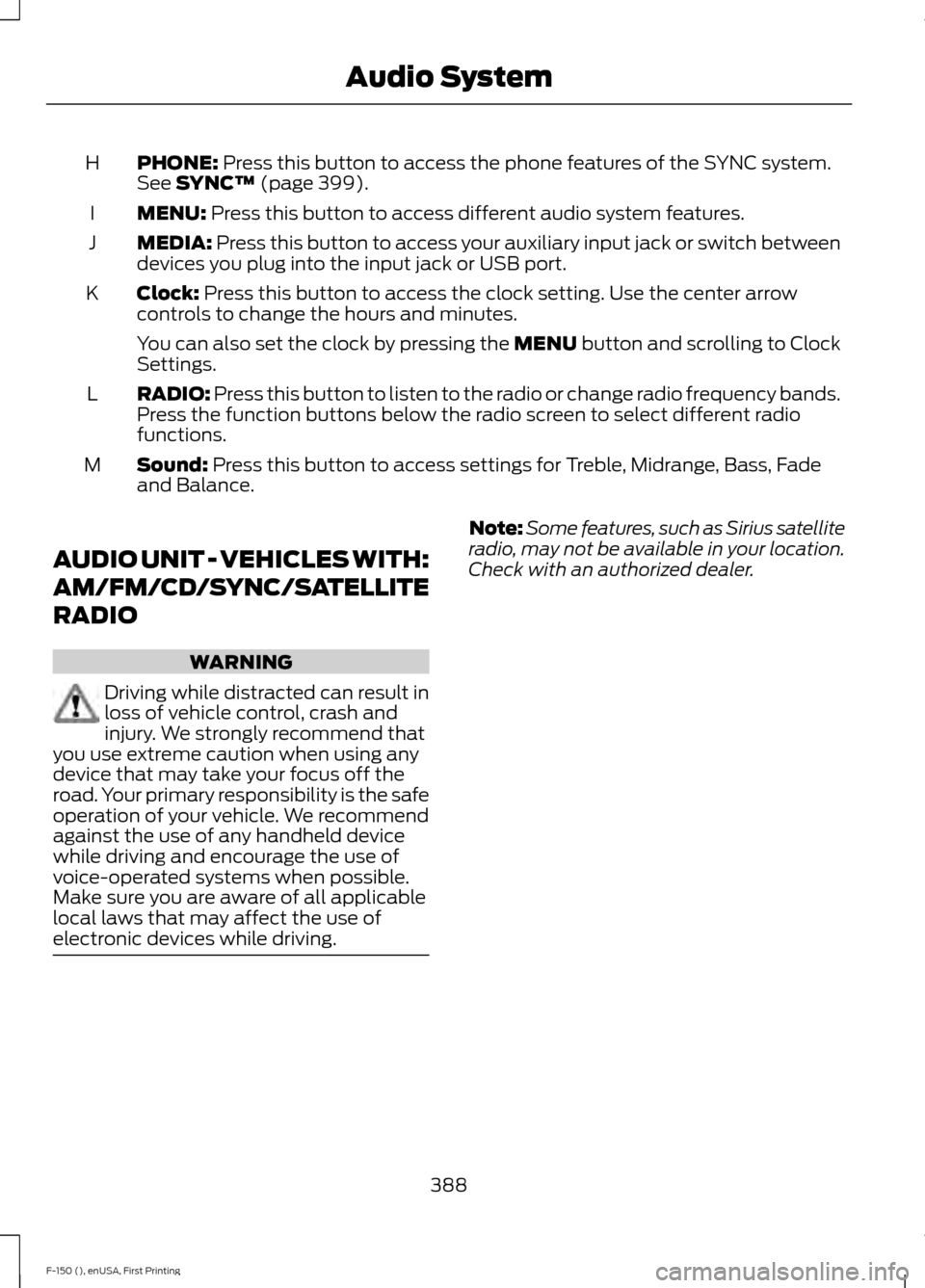
PHONE: Press this button to access the phone features of the SYNC system.
See SYNC™ (page 399).
H
MENU:
Press this button to access different audio system features.
I
MEDIA:
Press this button to access your auxiliary input jack or switch between
devices you plug into the input jack or USB port.
J
Clock:
Press this button to access the clock setting. Use the center arrow
controls to change the hours and minutes.
K
You can also set the clock by pressing the MENU button and scrolling to Clock
Settings.
RADIO:
Press this button to listen to the radio or change radio frequency bands.
Press the function buttons below the radio screen to select different radio
functions.
L
Sound:
Press this button to access settings for Treble, Midrange, Bass, Fade
and Balance.
M
AUDIO UNIT - VEHICLES WITH:
AM/FM/CD/SYNC/SATELLITE
RADIO WARNING
Driving while distracted can result in
loss of vehicle control, crash and
injury. We strongly recommend that
you use extreme caution when using any
device that may take your focus off the
road. Your primary responsibility is the safe
operation of your vehicle. We recommend
against the use of any handheld device
while driving and encourage the use of
voice-operated systems when possible.
Make sure you are aware of all applicable
local laws that may affect the use of
electronic devices while driving. Note:
Some features, such as Sirius satellite
radio, may not be available in your location.
Check with an authorized dealer.
388
F-150 (), enUSA, First Printing Audio System
Page 393 of 549
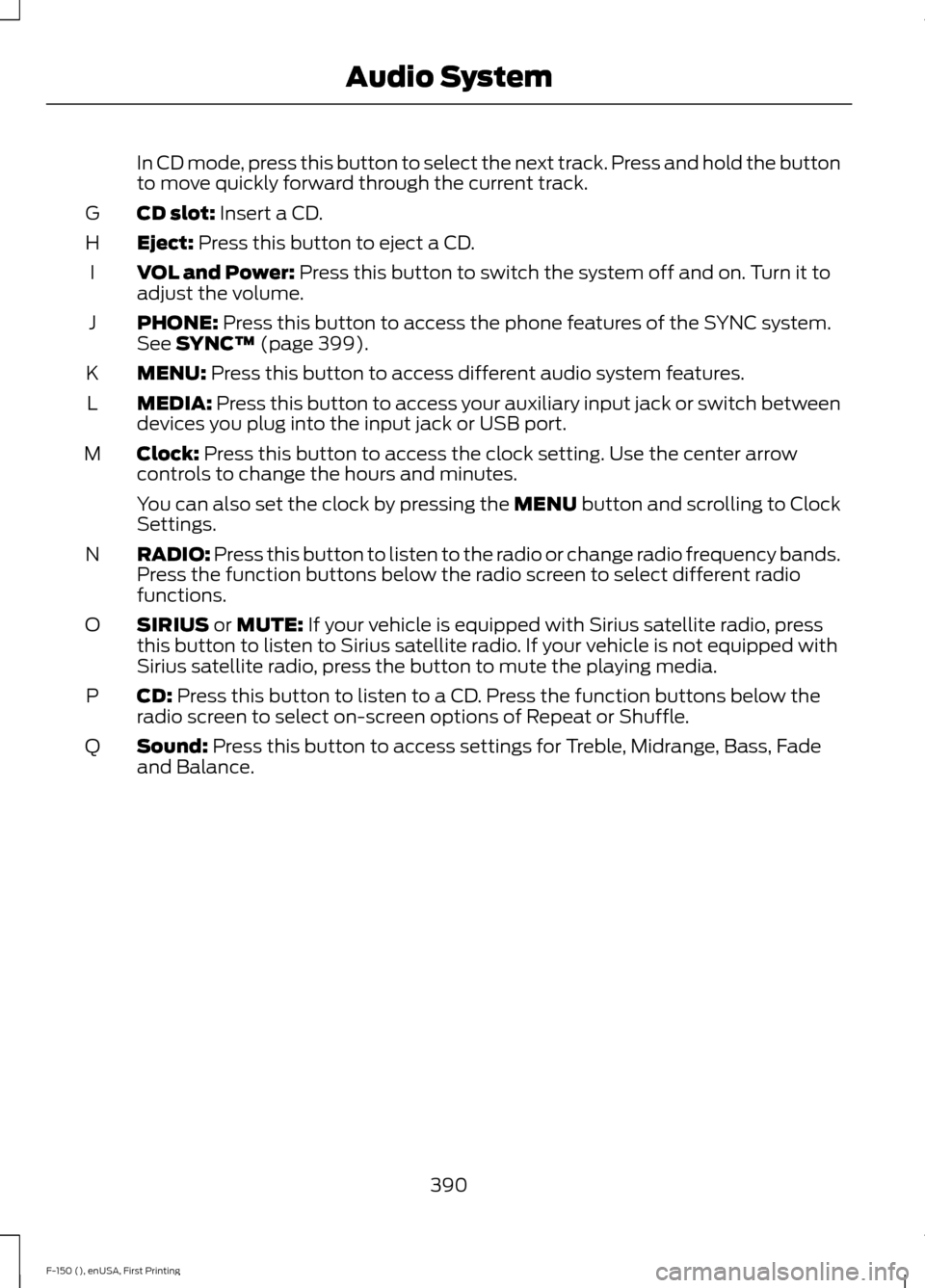
In CD mode, press this button to select the next track. Press and hold the button
to move quickly forward through the current track.
CD slot: Insert a CD.
G
Eject:
Press this button to eject a CD.
H
VOL and Power:
Press this button to switch the system off and on. Turn it to
adjust the volume.
I
PHONE:
Press this button to access the phone features of the SYNC system.
See SYNC™ (page 399).
J
MENU:
Press this button to access different audio system features.
K
MEDIA:
Press this button to access your auxiliary input jack or switch between
devices you plug into the input jack or USB port.
L
Clock:
Press this button to access the clock setting. Use the center arrow
controls to change the hours and minutes.
M
You can also set the clock by pressing the MENU button and scrolling to Clock
Settings.
RADIO:
Press this button to listen to the radio or change radio frequency bands.
Press the function buttons below the radio screen to select different radio
functions.
N
SIRIUS
or MUTE: If your vehicle is equipped with Sirius satellite radio, press
this button to listen to Sirius satellite radio. If your vehicle is not equipped with
Sirius satellite radio, press the button to mute the playing media.
O
CD:
Press this button to listen to a CD. Press the function buttons below the
radio screen to select on-screen options of Repeat or Shuffle.
P
Sound:
Press this button to access settings for Treble, Midrange, Bass, Fade
and Balance.
Q
390
F-150 (), enUSA, First Printing Audio System
Page 442 of 549
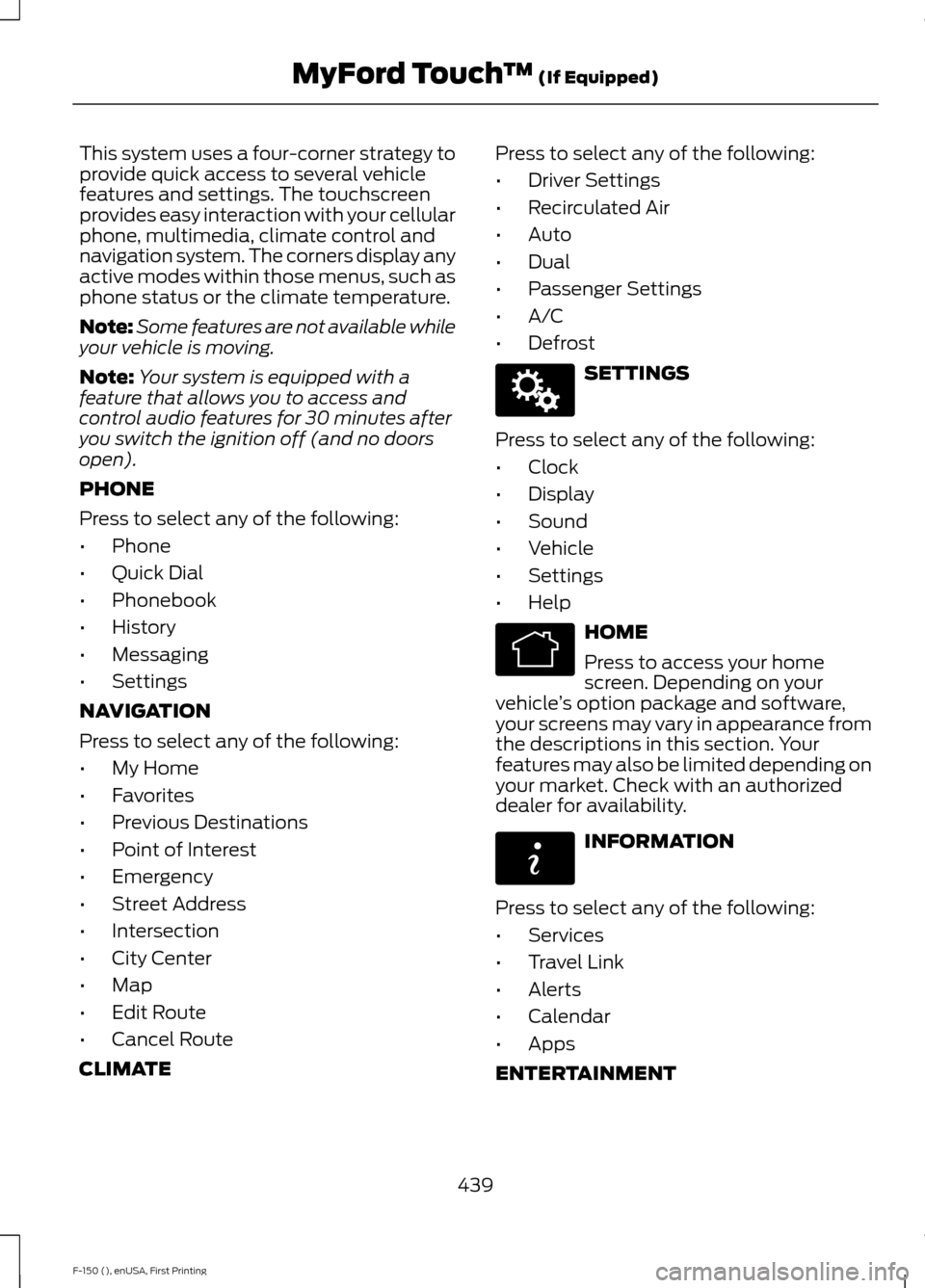
This system uses a four-corner strategy to
provide quick access to several vehicle
features and settings. The touchscreen
provides easy interaction with your cellular
phone, multimedia, climate control and
navigation system. The corners display any
active modes within those menus, such as
phone status or the climate temperature.
Note:
Some features are not available while
your vehicle is moving.
Note: Your system is equipped with a
feature that allows you to access and
control audio features for 30 minutes after
you switch the ignition off (and no doors
open).
PHONE
Press to select any of the following:
• Phone
• Quick Dial
• Phonebook
• History
• Messaging
• Settings
NAVIGATION
Press to select any of the following:
• My Home
• Favorites
• Previous Destinations
• Point of Interest
• Emergency
• Street Address
• Intersection
• City Center
• Map
• Edit Route
• Cancel Route
CLIMATE Press to select any of the following:
•
Driver Settings
• Recirculated Air
• Auto
• Dual
• Passenger Settings
• A/C
• Defrost SETTINGS
Press to select any of the following:
• Clock
• Display
• Sound
• Vehicle
• Settings
• Help HOME
Press to access your home
screen. Depending on your
vehicle ’s option package and software,
your screens may vary in appearance from
the descriptions in this section. Your
features may also be limited depending on
your market. Check with an authorized
dealer for availability. INFORMATION
Press to select any of the following:
• Services
• Travel Link
• Alerts
• Calendar
• Apps
ENTERTAINMENT
439
F-150 (), enUSA, First Printing MyFord Touch
™ (If Equipped)E142607 E142613 E142608
Page 448 of 549
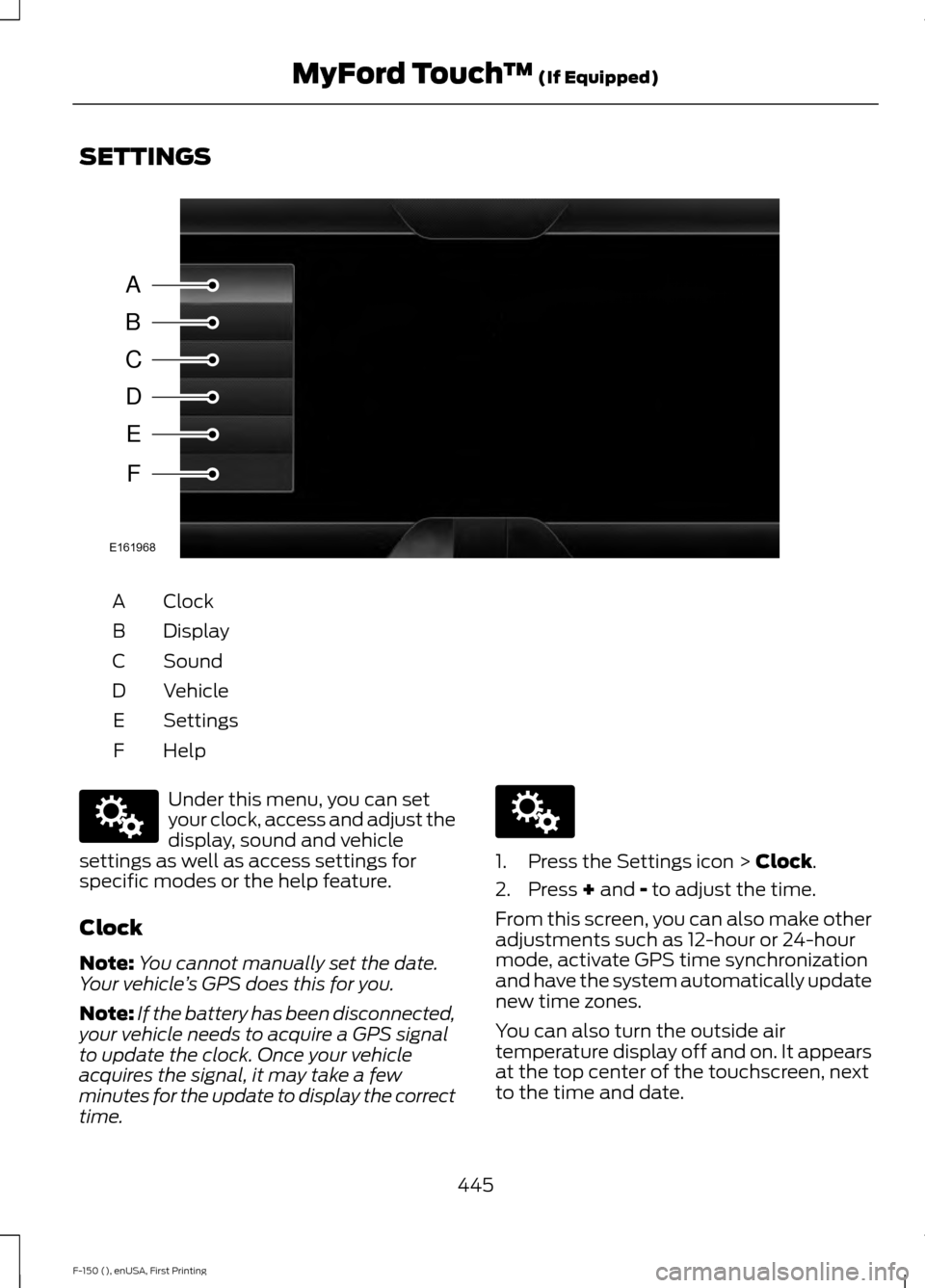
SETTINGS
Clock
A
Display
B
Sound
C
Vehicle
D
Settings
E
HelpF Under this menu, you can set
your clock, access and adjust the
display, sound and vehicle
settings as well as access settings for
specific modes or the help feature.
Clock
Note: You cannot manually set the date.
Your vehicle ’s GPS does this for you.
Note: If the battery has been disconnected,
your vehicle needs to acquire a GPS signal
to update the clock. Once your vehicle
acquires the signal, it may take a few
minutes for the update to display the correct
time. 1. Press the Settings icon > Clock.
2. Press
+ and - to adjust the time.
From this screen, you can also make other
adjustments such as 12-hour or 24-hour
mode, activate GPS time synchronization
and have the system automatically update
new time zones.
You can also turn the outside air
temperature display off and on. It appears
at the top center of the touchscreen, next
to the time and date.
445
F-150 (), enUSA, First Printing MyFord Touch
™
(If Equipped)A
B
C
D
E
F
E161968 E142607 E142607
Page 492 of 549
Air distribution control: Touch these buttons to turn airflow from the
windshield, instrument panel, or footwell vents on or off. The system can
distribute air through any combination of these vents.
J
Driver settings:
K
Touch the
+ or – to increase or decrease the air temperature on the driver side
of the vehicle.
Touch the heated seat icon to turn the heated seat off and on (if equipped).
Touch the climate-controlled seat icon to turn the climate-controlled seat off
and on (if equipped).
Touch
MyTemp to select your preset temperature setpoint. Touch and hold
MyTemp to save a new preset temperature setpoint.
Touch the heated steering wheel icon to turn the heated steering wheel on and
off (if equipped).
Note: If your vehicle is equipped with a
wood-trimmed steering wheel, it does not
heat between the 10 o'clock and 2 o'clock
positions.
Climate Control Voice Commands
Note: The fan speed will automatically
decrease when you start a voice command
session or phone call through SYNC. This
feature is dependent on the current climate
control settings and helps to reduce the
background noise in the vehicle. The fan
speed returns to normal when the voice
session has ended. You can adjust the fan
speed manually during this time by using
the fan button or knob to reach the desired
setting. To disable or enable automatic fan
speed, press and hold the
AC and
Recirculated air buttons at the same time.
Release the buttons and immediately
increase the fan speed. Press the voice button on the
steering wheel controls. When
prompted, say any of the
following commands: Climate control commands
"Climate automatic"
"Climate my temperature" "Climate off""Climate on"
"Climate temperature <15.5-29.5> degrees"
"Climate temperature <60-85> degrees" "Help"
There are additional climate control
commands but in order to access them,
you have to say "Climate" first. When the
system is ready to listen, you may say any
of the following commands: "CLIMATE"
"A/C off""A/C on"
"Automatic"
"Defrost off"
489
F-150 (), enUSA, First Printing MyFord Touch
™
(If Equipped)E142599
Page 546 of 549
Safety Belt Warning Lamp and Indicator
Chime..............................................................43
Conditions of operation..................................... 43
Safety Canopy ™.............................................52
Safety Precautions......................................168
Satellite Radio..............................................394 Satellite Radio Electronic Serial Number
(ESN)................................................................ 396
Satellite Radio Reception Factors..............395
SIRIUS® Satellite Radio Service.................. 395
Troubleshooting................................................. 396
Scheduled Maintenance Record............527
Scheduled Maintenance
...........................518
Seats...................................................................141
Security................................................................71
Settings...........................................................445 Clock....................................................................... 445
Display................................................................... 446
Settings.................................................................. 447
Sound.................................................................... 446
Vehicle.................................................................... 447
Side Airbags
......................................................51
Sitting in the Correct Position...................141
Snow Chains See: Using Snow Chains................................. 344
Snowplowing.................................................274 Engine Temperature while Plowing............276
Installing the Snowplow.................................. 274
Operating the Vehicle with the Snowplow Attached........................................................... 275
Outside Air Temperature While Plowing............................................................. 276
Snowplowing with your Airbag Equipped Vehicle............................................................... 275
Snowplow Mode................................................ 275
Transmission Operation while Plowing............................................................. 276
Special Notices................................................12 New Vehicle Limited Warranty......................... 12
Special Instructions.............................................. 12
Special Operating Conditions Scheduled Maintenance...............................................524
Exceptions............................................................ 526
Speed Control See: Cruise Control............................................. 213
Spot Lamps
......................................................87
Cargo and Trailer Hookup Lamps.................. 87Stability Control............................................198
Principle of Operation...................................... 198
Starter Switch See: Ignition Switch........................................... 160
Starting a Gasoline Engine........................161 Automatic Engine Shutdown......................... 163
Failure to Start..................................................... 162
Guarding Against Exhaust Fumes...............164
Important Ventilating Information..............164
Stopping the Engine When Your Vehicle is Moving............................................................... 163
Stopping the Engine When Your Vehicle is Stationary......................................................... 163
Vehicles with an Ignition Key........................... 161
Vehicles with Keyless Start............................. 162
Starting and Stopping the Engine.........160 General Information.......................................... 160
Steering...........................................................229 Electric Power Steering................................... 229
Steering Wheel
................................................77
Storage Compartments.............................158
Sunroof See: Moonroof....................................................... 95
Sun Visors.........................................................95 Illuminated Vanity Mirror................................... 95
Supplementary Restraints System..........47 Principle of Operation......................................... 47
Symbols Glossary
.............................................7
SYNC™ Applications and Services.......413
911 Assist................................................................ 413
SYNC Mobile Apps............................................. 419
SYNC Services: Traffic, Directions & Information (TDI) (If Equipped, United
States Only).................................................... 416
Vehicle Health Report....................................... 415
SYNC™...........................................................399 General Information......................................... 399
SYNC™ Troubleshooting
.........................428
543
F-150 (), enUSA, First Printing Index