wipers FORD F150 2015 13.G Owners Manual
[x] Cancel search | Manufacturer: FORD, Model Year: 2015, Model line: F150, Model: FORD F150 2015 13.GPages: 549, PDF Size: 5.97 MB
Page 5 of 549
Voice Control....................................................79
Cruise Control..................................................79
Information Display Control
.......................79
Pedals
Adjusting the Pedals....................................80
Wipers and Washers
Windshield Wipers
.........................................81
Autowipers........................................................81
Windshield Washers.....................................82
Lighting
Lighting Control
..............................................83
Autolamps
........................................................83
Instrument Lighting Dimmer.....................84
Daytime Running Lamps............................85
Automatic High Beam Control.................85
Front Fog Lamps............................................86
Direction Indicators
........................................87
Spot Lamps
......................................................87
Interior Lamps
.................................................88
Ambient Lighting
...........................................89
Windows and Mirrors
Power Windows.............................................90
Exterior Mirrors.................................................91
Interior Mirror...................................................94
Sun Visors.........................................................95
Moonroof..........................................................95
Instrument Cluster
Gauges................................................................97
Warning Lamps and Indicators..............100
Audible Warnings and Indicators
...........104
Information Displays
General Information....................................105
Information Messages................................120 Climate Control
Manual Climate Control.............................133
Automatic Climate Control.......................135
Hints on Controlling the Interior
Climate
..........................................................137
Heated Windows and Mirrors..................139
Remote Start.................................................139
Seats
Sitting in the Correct Position...................141
Head Restraints..............................................141
Manual Seats
.................................................143
Power Seats
...................................................144
Memory Function
.........................................146
Rear Seats
.......................................................147
Heated Seats
..................................................147
Climate Controlled Seats..........................148
Front Seat Armrest......................................149
Rear Seat Armrest.......................................150
Universal Garage Door Opener
Universal Garage Door Opener................151
Auxiliary Power Points
Auxiliary Power Points................................156
Storage Compartments
Center Console
..............................................158
Overhead Console
.......................................159
Starting and Stopping the Engine
General Information
....................................160
Ignition Switch
..............................................160
Keyless Starting
............................................160
Starting a Gasoline Engine........................161
Engine Block Heater....................................164
2
F-150 (), enUSA, First Printing Table of Contents
Page 20 of 549
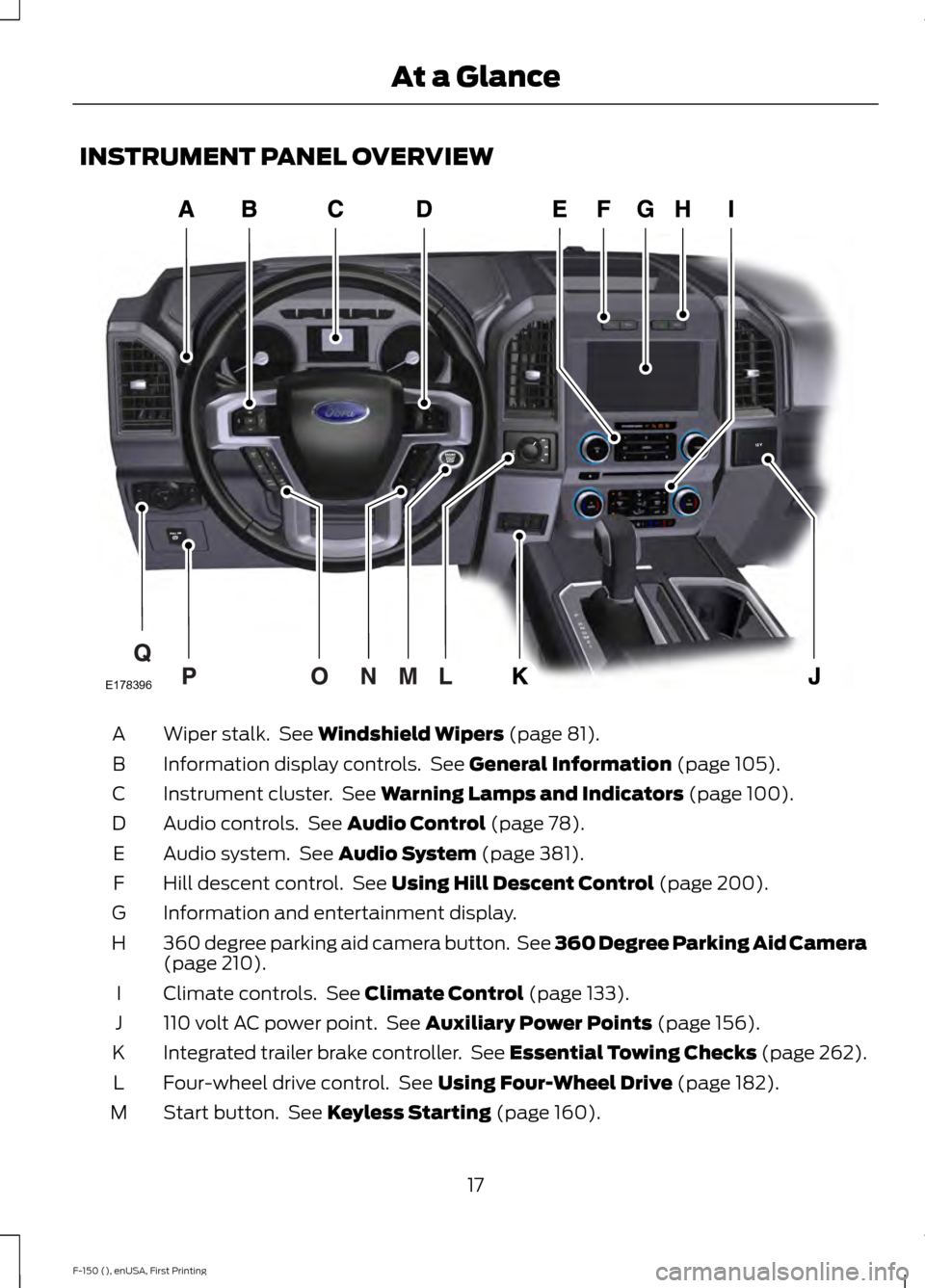
INSTRUMENT PANEL OVERVIEW
Wiper stalk. See Windshield Wipers (page 81).
A
Information display controls. See
General Information (page 105).
B
Instrument cluster. See
Warning Lamps and Indicators (page 100).
C
Audio controls. See
Audio Control (page 78).
D
Audio system. See
Audio System (page 381).
E
Hill descent control. See
Using Hill Descent Control (page 200).
F
Information and entertainment display.
G
360 degree parking aid camera button. See 360 Degree Parking Aid Camera
(page
210).
H
Climate controls. See
Climate Control (page 133).
I
110 volt AC power point. See
Auxiliary Power Points (page 156).
J
Integrated trailer brake controller. See Essential Towing Checks (page 262).
K
Four-wheel drive control. See
Using Four-Wheel Drive (page 182).
L
Start button. See
Keyless Starting (page 160).
M
17
F-150 (), enUSA, First Printing At a GlanceE178396
Page 84 of 549
WINDSHIELD WIPERS
Note:
Fully defrost the windshield before
switching on the windshield wipers.
Note: Make sure you switch off the
windshield wipers before entering a car
wash.
Note: Clean the windshield and wiper
blades if they begin to leave streaks or
smears. If that does not resolve the issue,
install new wiper blades.
Note: Do not operate the wipers on a dry
windshield. This may scratch the glass,
damage the wiper blades or cause the wiper
motor to burn out. Always use the
windshield washers before wiping a dry
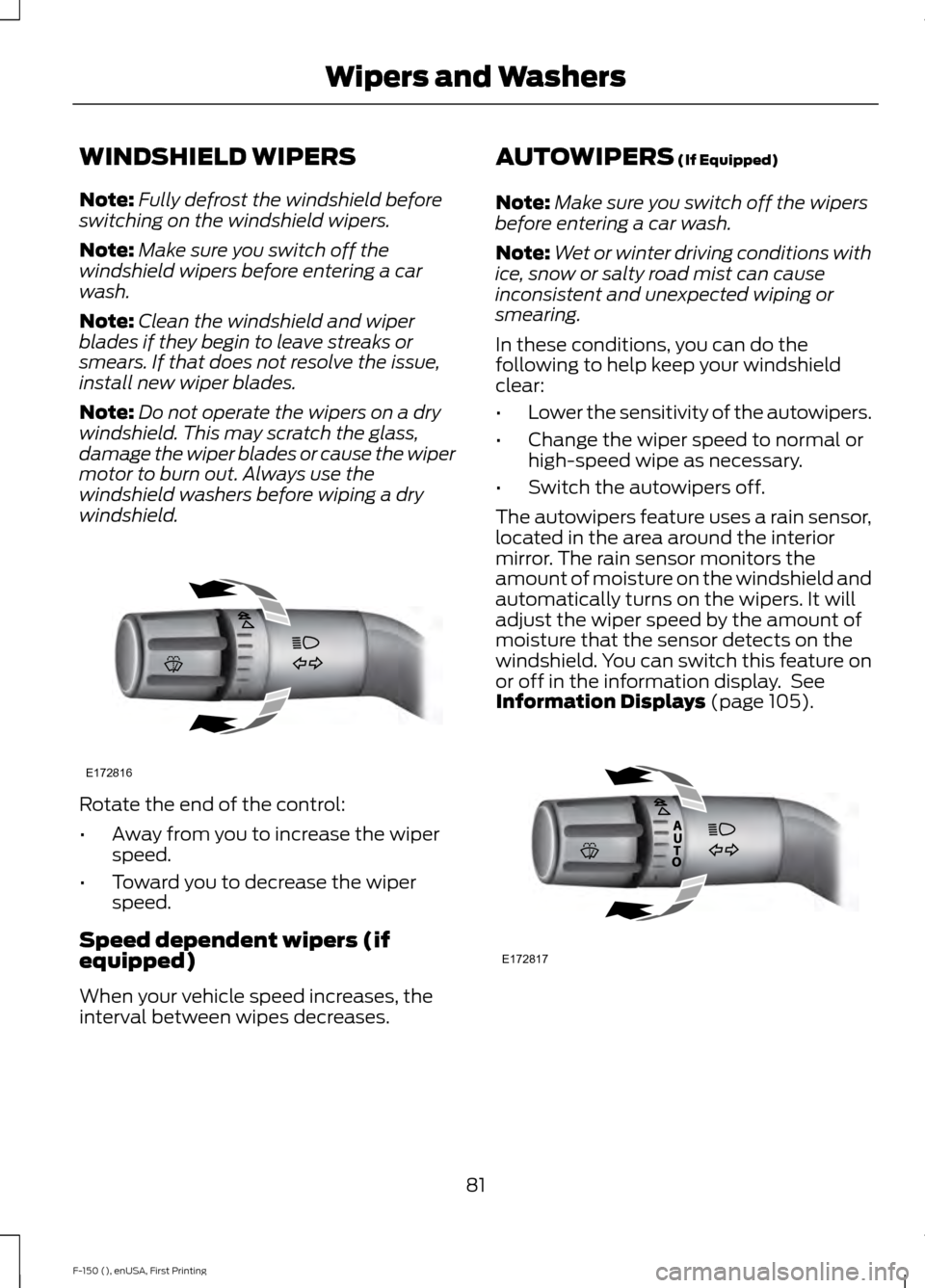
windshield. Rotate the end of the control:
•
Away from you to increase the wiper
speed.
• Toward you to decrease the wiper
speed.
Speed dependent wipers (if
equipped)
When your vehicle speed increases, the
interval between wipes decreases. AUTOWIPERS (If Equipped)
Note: Make sure you switch off the wipers
before entering a car wash.
Note: Wet or winter driving conditions with
ice, snow or salty road mist can cause
inconsistent and unexpected wiping or
smearing.
In these conditions, you can do the
following to help keep your windshield
clear:
• Lower the sensitivity of the autowipers.
• Change the wiper speed to normal or
high-speed wipe as necessary.
• Switch the autowipers off.
The autowipers feature uses a rain sensor,
located in the area around the interior
mirror. The rain sensor monitors the
amount of moisture on the windshield and
automatically turns on the wipers. It will
adjust the wiper speed by the amount of
moisture that the sensor detects on the
windshield. You can switch this feature on
or off in the information display. See
Information Displays
(page 105). 81
F-150 (), enUSA, First Printing Wipers and WashersE172816 E172817
Page 85 of 549
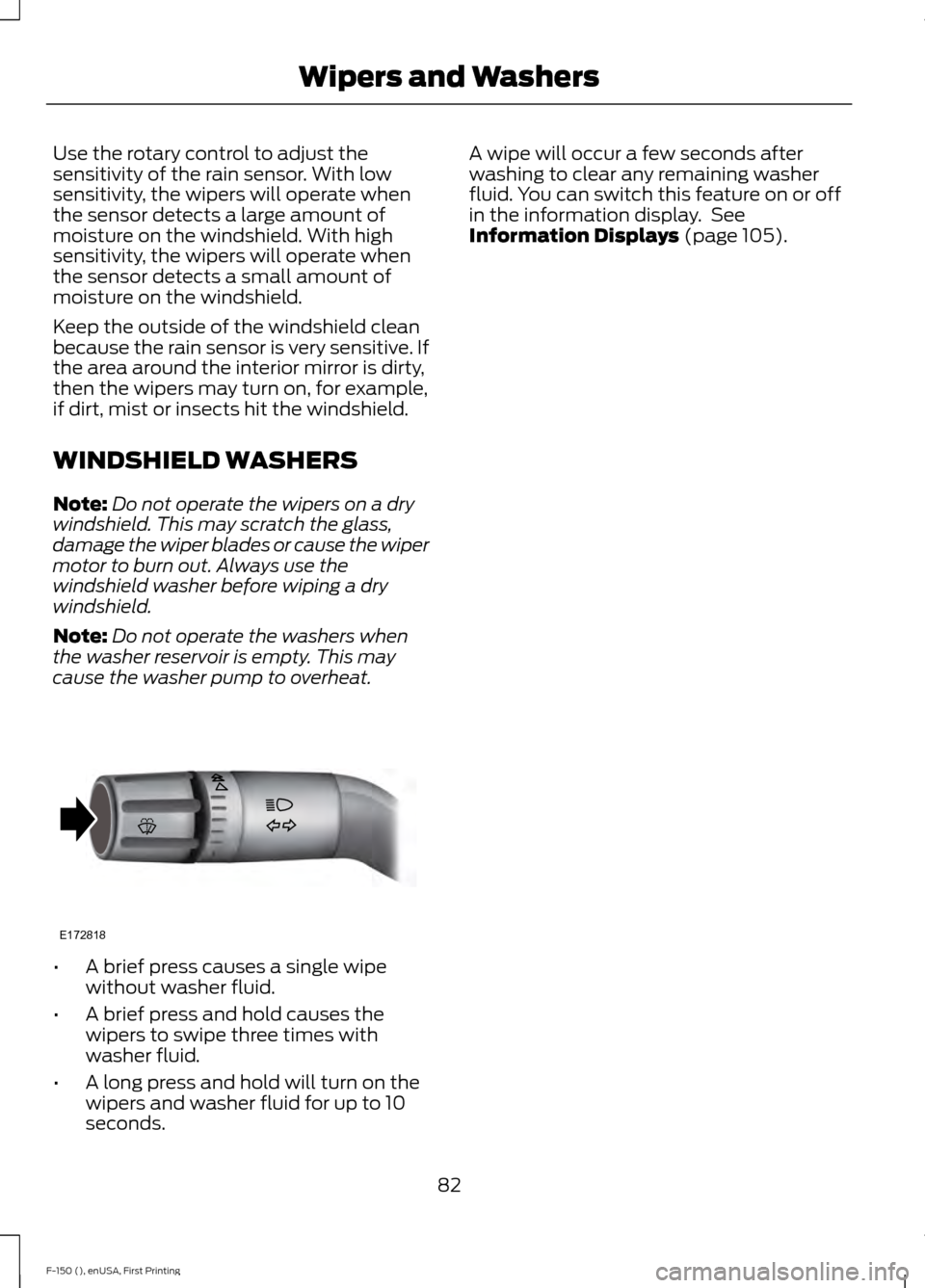
Use the rotary control to adjust the
sensitivity of the rain sensor. With low
sensitivity, the wipers will operate when
the sensor detects a large amount of
moisture on the windshield. With high
sensitivity, the wipers will operate when
the sensor detects a small amount of
moisture on the windshield.
Keep the outside of the windshield clean
because the rain sensor is very sensitive. If
the area around the interior mirror is dirty,
then the wipers may turn on, for example,
if dirt, mist or insects hit the windshield.
WINDSHIELD WASHERS
Note:
Do not operate the wipers on a dry
windshield. This may scratch the glass,
damage the wiper blades or cause the wiper
motor to burn out. Always use the
windshield washer before wiping a dry
windshield.
Note: Do not operate the washers when
the washer reservoir is empty. This may
cause the washer pump to overheat. •
A brief press causes a single wipe
without washer fluid.
• A brief press and hold causes the
wipers to swipe three times with
washer fluid.
• A long press and hold will turn on the
wipers and washer fluid for up to 10
seconds. A wipe will occur a few seconds after
washing to clear any remaining washer
fluid. You can switch this feature on or off
in the information display. See
Information Displays (page 105).
82
F-150 (), enUSA, First Printing Wipers and WashersE172818
Page 86 of 549
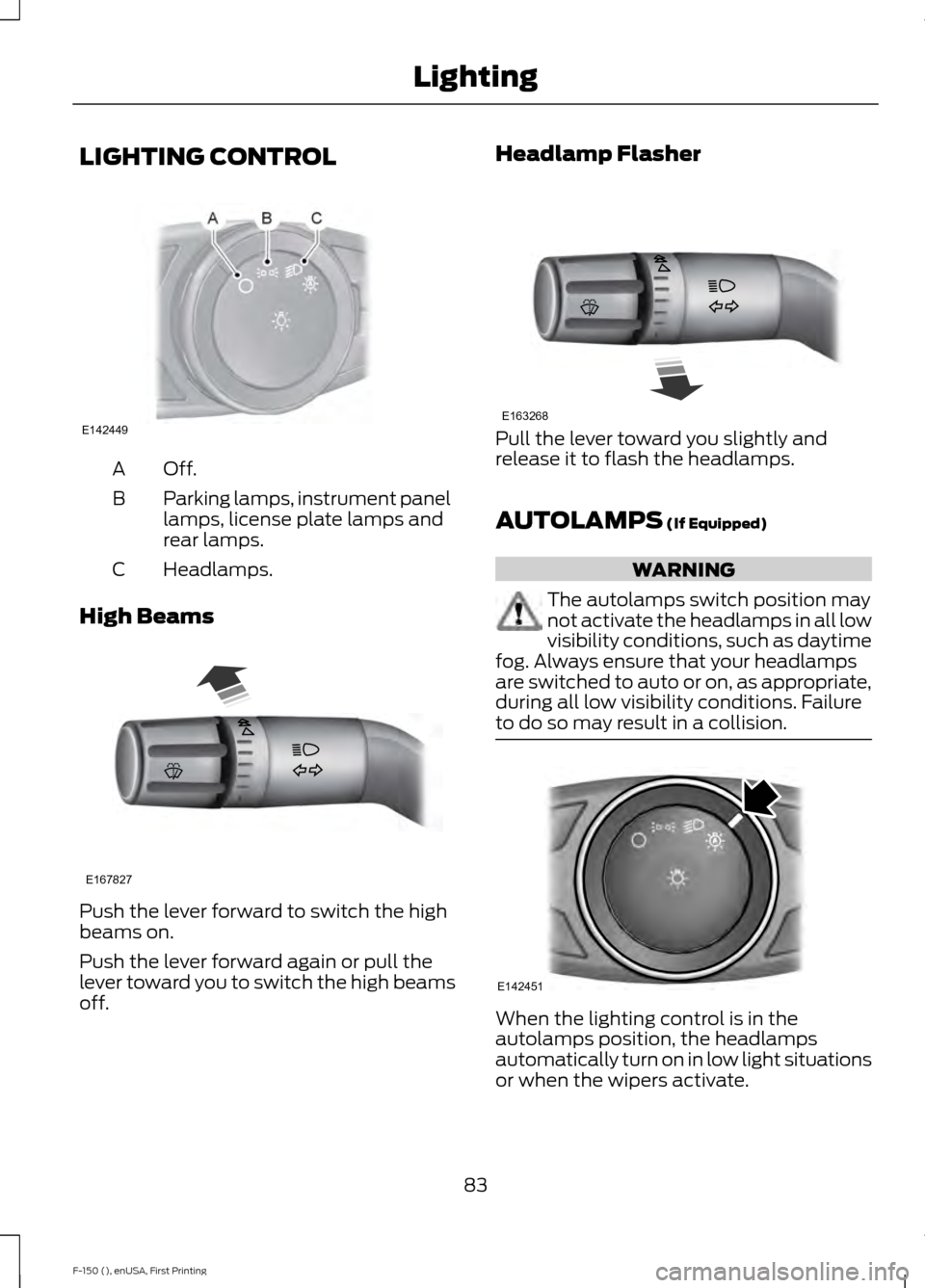
LIGHTING CONTROL
Off.A
Parking lamps, instrument panel
lamps, license plate lamps and
rear lamps.
B
Headlamps.
C
High Beams Push the lever forward to switch the high
beams on.
Push the lever forward again or pull the
lever toward you to switch the high beams
off. Headlamp Flasher
Pull the lever toward you slightly and
release it to flash the headlamps.
AUTOLAMPS (If Equipped)
WARNING
The autolamps switch position may
not activate the headlamps in all low
visibility conditions, such as daytime
fog. Always ensure that your headlamps
are switched to auto or on, as appropriate,
during all low visibility conditions. Failure
to do so may result in a collision. When the lighting control is in the
autolamps position, the headlamps
automatically turn on in low light situations
or when the wipers activate.
83
F-150 (), enUSA, First Printing LightingE142449 E167827 E163268 E142451
Page 87 of 549
If equipped, the following also activate
when the lighting control is in the
autolamps position and you switch them
on in the information display:
•
Configurable daytime running lamps.
• Automatic high beam control.
• Adaptive headlamp control.
The headlamps remain on for a period of
time after you switch the ignition off. Use
the information display controls to adjust
the period of time that the headlamps
remain on. See Information Displays
(page 105).
Note: With the headlamps in the
autolamps position, you cannot switch the
high beam headlamps on until the
autolamps system turns the low beam
headlamps on.
Windshield Wiper Activated
Headlamps
The windshield wiper activated headlamps
turn on within 10 seconds when you switch
the windshield wipers on and the lighting
control is in the autolamps position. They
turn off approximately 60 seconds after
you switch the windshield wipers off.
The headlamps will not turn on by wiper
activation:
• During a mist wipe.
• When the wipers are on to clear washer
fluid during a wash condition.
• If the wipers are in intermittent mode.
Note: If you switch autolamps and
autowipers on, the headlamps will
automatically turn on when the windshield
wipers continuously operate. INSTRUMENT LIGHTING
DIMMER
Note:
You disable the manual dimmer
when you adjust the setting to Auto
Dimming in the information display. See
Information Displays
(page 105).
Note: If you disconnect the battery or it
becomes discharged, the illuminated
components will switch to the maximum
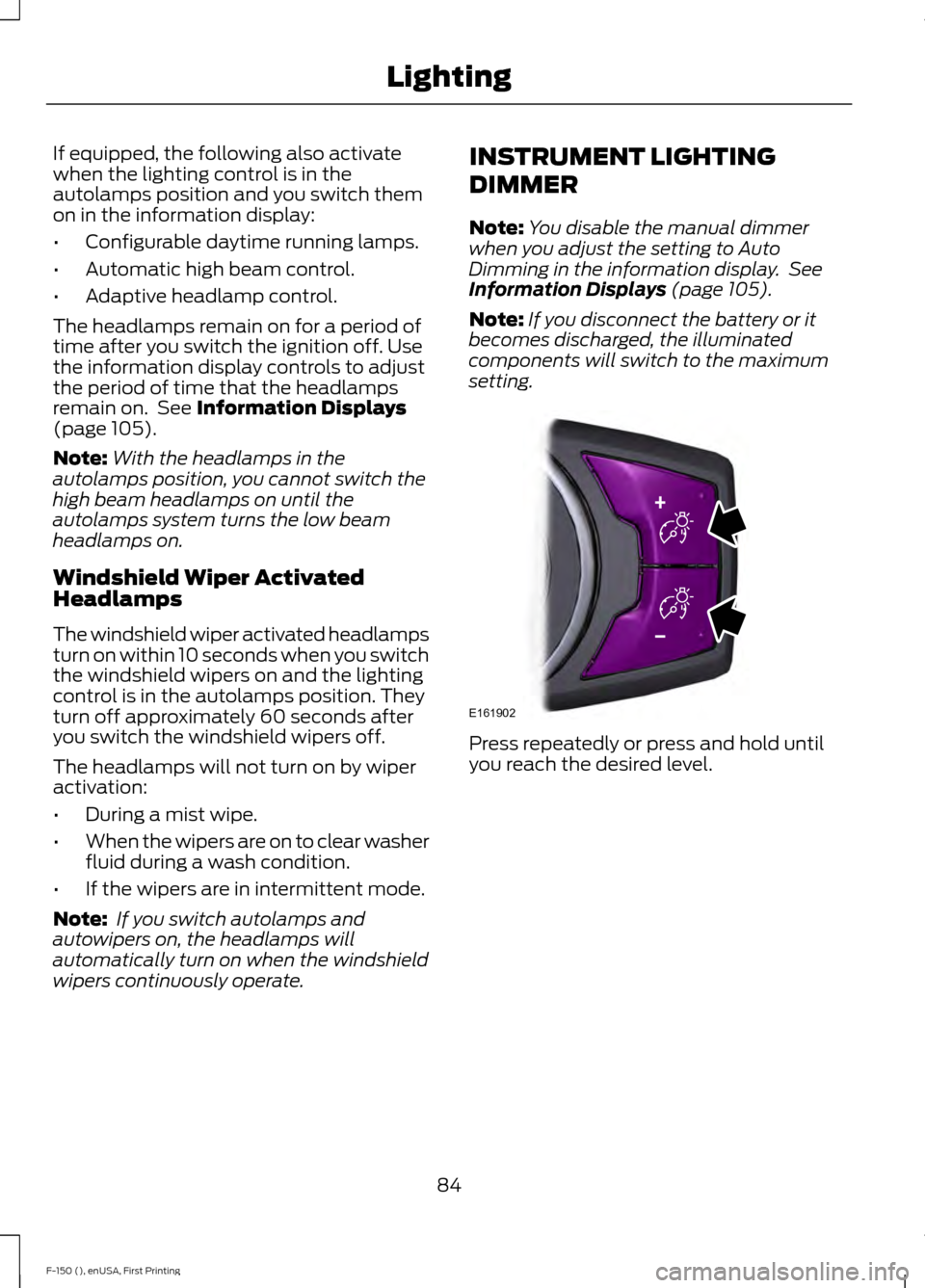
setting. Press repeatedly or press and hold until
you reach the desired level.
84
F-150 (), enUSA, First Printing LightingE161902
Page 111 of 549
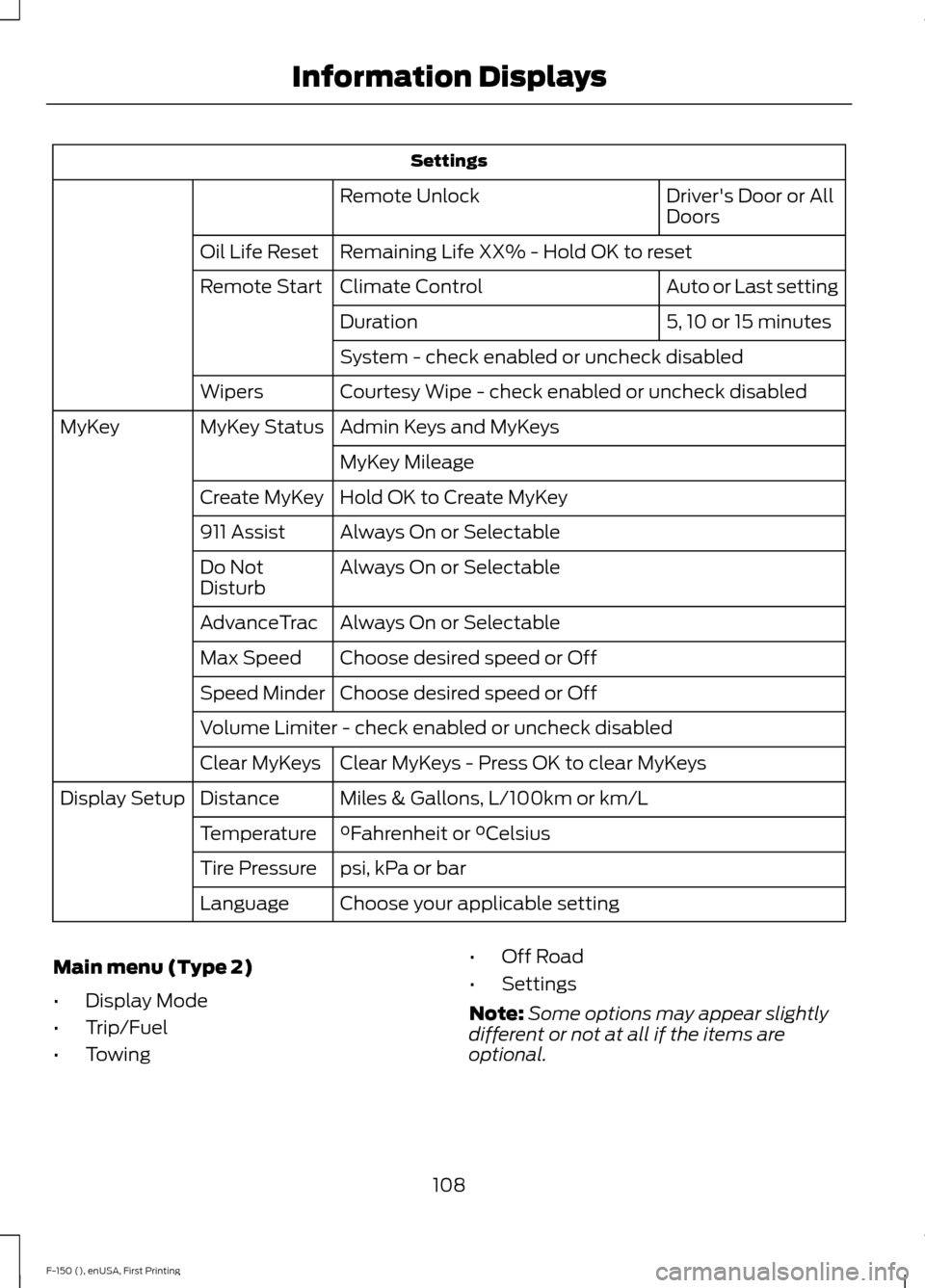
Settings
Driver's Door or All
Doors
Remote Unlock
Remaining Life XX% - Hold OK to reset
Oil Life Reset
Auto or Last setting
Climate Control
Remote Start
5, 10 or 15 minutes
Duration
System - check enabled or uncheck disabled
Courtesy Wipe - check enabled or uncheck disabled
Wipers
Admin Keys and MyKeys
MyKey Status
MyKey
MyKey Mileage
Hold OK to Create MyKey
Create MyKey
Always On or Selectable
911 Assist
Always On or Selectable
Do Not
Disturb
Always On or Selectable
AdvanceTrac
Choose desired speed or Off
Max Speed
Choose desired speed or Off
Speed Minder
Volume Limiter - check enabled or uncheck disabled
Clear MyKeys - Press OK to clear MyKeys
Clear MyKeys
Miles & Gallons, L/100km or km/L
Distance
Display Setup
°Fahrenheit or °Celsius
Temperature
psi, kPa or bar
Tire Pressure
Choose your applicable setting
Language
Main menu (Type 2)
• Display Mode
• Trip/Fuel
• Towing •
Off Road
• Settings
Note: Some options may appear slightly
different or not at all if the items are
optional.
108
F-150 (), enUSA, First Printing Information Displays
Page 115 of 549
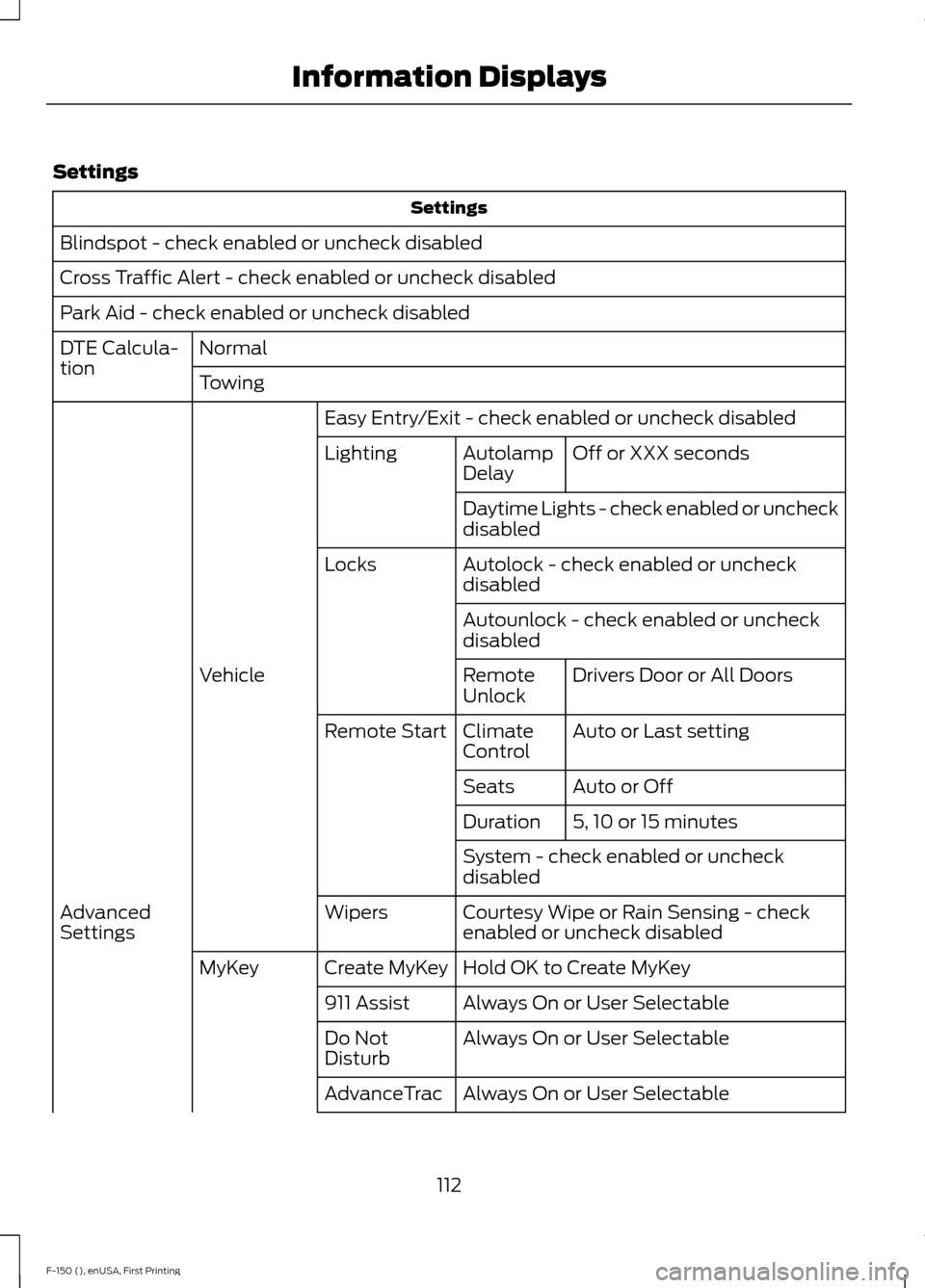
Settings
Settings
Blindspot - check enabled or uncheck disabled
Cross Traffic Alert - check enabled or uncheck disabled
Park Aid - check enabled or uncheck disabled Normal
DTE Calcula-
tion
Towing
Easy Entry/Exit - check enabled or uncheck disabled Off or XXX seconds
Autolamp
Delay
Lighting
Daytime Lights - check enabled or uncheck
disabled
Autolock - check enabled or uncheck
disabled
Locks
Autounlock - check enabled or uncheck
disabledDrivers Door or All Doors
Remote
Unlock
Vehicle
Auto or Last setting
Climate
Control
Remote Start
Auto or Off
Seats
5, 10 or 15 minutes
Duration
System - check enabled or uncheck
disabled
Courtesy Wipe or Rain Sensing - check
enabled or uncheck disabled
Wipers
Advanced
Settings
Hold OK to Create MyKey
Create MyKey
MyKey
Always On or User Selectable
911 Assist
Always On or User Selectable
Do Not
Disturb
Always On or User Selectable
AdvanceTrac
112
F-150 (), enUSA, First Printing Information Displays
Page 324 of 549
•
Never wash or rinse any ignition coil,
spark plug wire or spark plug well, or
the area in and around these locations.
• Cover the battery, power distribution
box, and air filter assembly to prevent
water damage when cleaning the
engine.
CLEANING THE WINDOWS AND
WIPER BLADES
Car wash chemicals and environmental
fallout can result in windshield and wiper
blade contamination. Dirty windshield and
wipers will result in poor windshield wiper
operation. Keep the windshield and wiper
blades clean to maintain windshield wiper
performance.
To clean the windshield and wiper blades:
• Clean the windshield with a
non-abrasive glass cleaner.
• For windshields contaminated with
tree sap, chemicals, wax or bugs, clean
the entire windshield using steel wool
(no greater than 0000 grade) in a
circular motion and rinse with water.
• Clean the wiper blades with isopropyl
rubbing alcohol or windshield washer
concentrate.
Note: Do not use razor blades or other
sharp objects to clean or remove decals
from the inside of the heated rear window.
The vehicle warranty does not cover
damage caused to the heated rear window
grid lines.
CLEANING THE INTERIOR WARNINGS
Do not use cleaning solvents, bleach
or dye on the vehicle
’s safety belts,
as these actions may weaken the
belt webbing. WARNINGS
On vehicles equipped with
seat-mounted airbags, do not use
chemical solvents or strong
detergents. Such products could
contaminate the side airbag system and
affect performance of the side airbag in a
collision. For fabric, carpets, cloth seats, safety belts
and seats equipped with side airbags:
•
Remove dust and loose dirt with a
vacuum cleaner.
• Remove light stains and soil with
Motorcraft Professional Strength
Carpet & Upholstery Cleaner.
• If grease or tar is present on the
material, spot-clean the area first with
Motorcraft Spot and Stain Remover. In
Canada, use Motorcraft Multi-Purpose
Cleaner.
• If a ring forms on the fabric after spot
cleaning, clean the entire area
immediately (but do not oversaturate)
or the ring will set.
• Do not use household cleaning
products or glass cleaners, which can
stain and discolor the fabric and affect
the flame retardant abilities of the seat
materials.
CLEANING THE INSTRUMENT
PANEL AND INSTRUMENT
CLUSTER LENS WARNING
Do not use chemical solvents or
strong detergents when cleaning the
steering wheel or instrument panel
to avoid contamination of the airbag
system. 321
F-150 (), enUSA, First Printing Vehicle Care
Page 328 of 549
Engine
•
Change the engine oil and filter prior to
storage because used engine oil
contains contaminates which may
cause engine damage.
• Start the engine every 15 days for a
minimum of 15 minutes. Run at fast idle
with the climate controls set to defrost
until the engine reaches normal
operating temperature.
• With your foot on the brake, shift
through all the gears while the engine
is running.
• We recommend that you change the
engine oil before you use your vehicle
again.
Fuel system
• Fill the fuel tank with high-quality fuel
until the first automatic shutoff of the
fuel pump nozzle.
Cooling system
• Protect against freezing temperatures.
• When removing your vehicle from
storage, check coolant fluid level.
Confirm that there are no cooling
system leaks and that fluid is at the
recommended level.
Battery
• Check and recharge as necessary. Keep
connections clean.
• If storing your vehicle for more than 30
days without recharging the battery,
we recommend that you disconnect
the battery cables to maintain battery
charge for quick starting.
Note: It is necessary to reset memory
features if battery cables are disconnected. Brakes
•
Make sure the brakes and parking brake
release fully.
Tires
• Maintain recommended air pressure.
Miscellaneous
• Make sure all linkages, cables, levers
and pins under your vehicle are covered
with grease to prevent rust.
• Move vehicles at least 25 ft (7.5 m)
every 15 days to lubricate working parts
and prevent corrosion.
Removing Vehicle From Storage
When your vehicle is ready to come out of
storage, do the following:
• Wash your vehicle to remove any dirt
or grease film build-up on window
surfaces.
• Check windshield wipers for any
deterioration.
• Check under the hood for any foreign
material that may have collected
during storage such as mice or squirrel
nests.
• Check the exhaust for any foreign
material that may have collected
during storage.
• Check tire pressures and set tire
inflation per the Tire Label.
• Check brake pedal operation. Drive
your vehicle
15 ft (4.5 m) back and
forth to remove rust build-up.
• Check fluid levels (including coolant,
oil and gas) to make sure there are no
leaks, and fluids are at recommended
levels.
• If you remove the battery, clean the
battery cable ends and check for
damage.
325
F-150 (), enUSA, First Printing Vehicle Care