door lock FORD F150 2016 13.G User Guide
[x] Cancel search | Manufacturer: FORD, Model Year: 2016, Model line: F150, Model: FORD F150 2016 13.GPages: 505, PDF Size: 6.27 MB
Page 70 of 505
TAILGATE LOCK (If Equipped)
The tailgate lock can help prevent tailgate
theft.
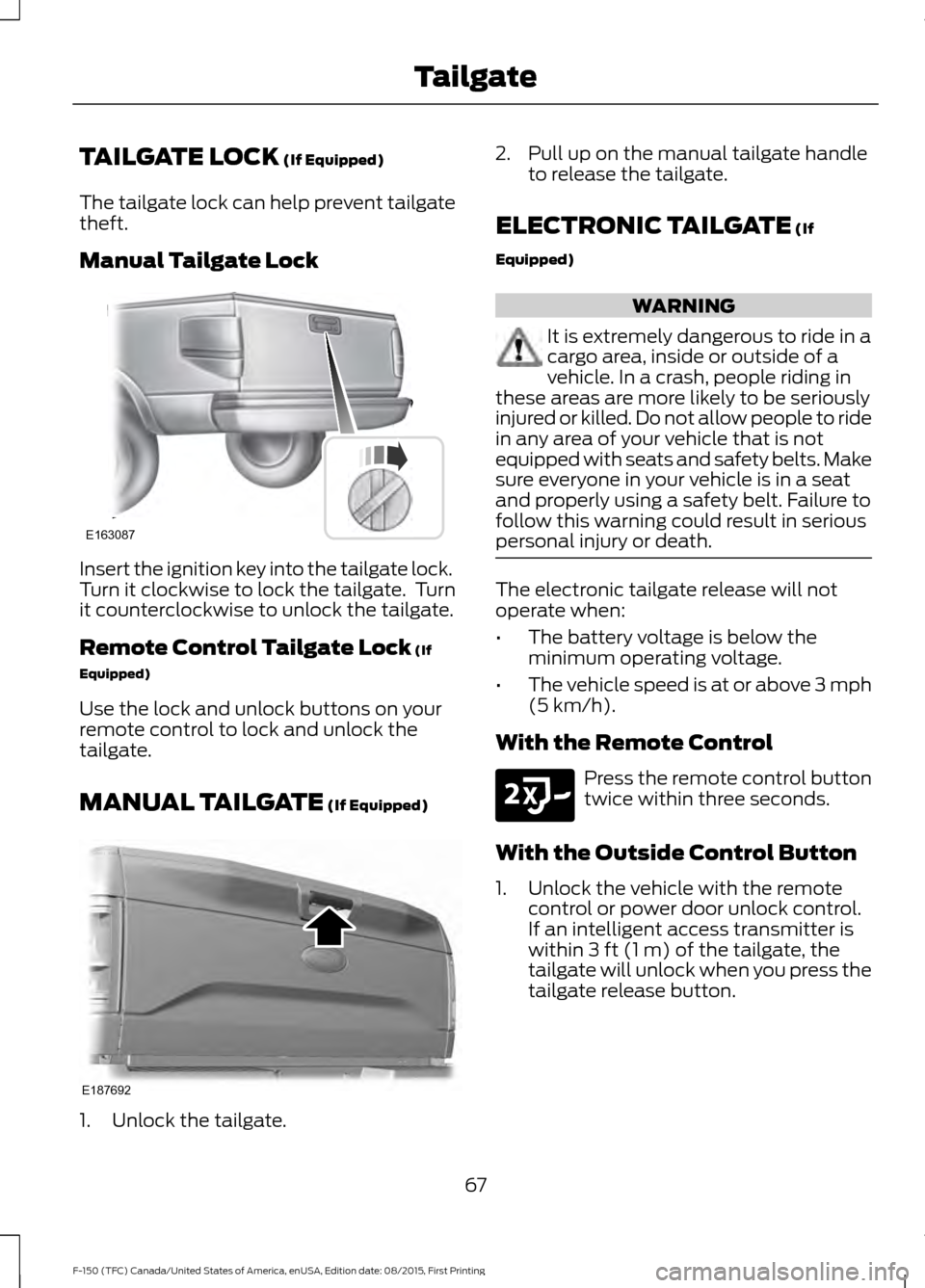
Manual Tailgate Lock Insert the ignition key into the tailgate lock.
Turn it clockwise to lock the tailgate. Turn
it counterclockwise to unlock the tailgate.
Remote Control Tailgate Lock
(If
Equipped)
Use the lock and unlock buttons on your
remote control to lock and unlock the
tailgate.
MANUAL TAILGATE
(If Equipped) 1. Unlock the tailgate. 2. Pull up on the manual tailgate handle
to release the tailgate.
ELECTRONIC TAILGATE
(If
Equipped) WARNING
It is extremely dangerous to ride in a
cargo area, inside or outside of a
vehicle. In a crash, people riding in
these areas are more likely to be seriously
injured or killed. Do not allow people to ride
in any area of your vehicle that is not
equipped with seats and safety belts. Make
sure everyone in your vehicle is in a seat
and properly using a safety belt. Failure to
follow this warning could result in serious
personal injury or death. The electronic tailgate release will not
operate when:
•
The battery voltage is below the
minimum operating voltage.
• The vehicle speed is at or above 3 mph
(5 km/h)
.
With the Remote Control Press the remote control button
twice within three seconds.
With the Outside Control Button
1. Unlock the vehicle with the remote control or power door unlock control.
If an intelligent access transmitter is
within
3 ft (1 m) of the tailgate, the
tailgate will unlock when you press the
tailgate release button.
67
F-150 (TFC) Canada/United States of America, enUSA, Edition date: 08/2015, First Printing TailgateE163087 E187692 E191530
Page 75 of 505
PASSIVE ANTI-THEFT
SYSTEM (If Equipped)
Note: The system is not compatible with
non-Ford aftermarket remote start systems.
Use of these systems may result in vehicle
starting problems and a loss of security
protection.
Note: Metallic objects, electronic devices
or a second coded key on the same key
chain may cause vehicle starting problems
if they are too close to the key when starting
the engine. Prevent these objects from
touching the coded key while starting the
engine. Switch the ignition off, move all
objects on the key chain away from the
coded key and restart the engine if a
problem occurs.
Note: Do not leave a duplicate coded key
in the vehicle. Always take your keys and
lock all doors when leaving the vehicle.
SecuriLock ™
The system is an engine immobilization
system. It helps prevent the engine from
starting unless you use a coded key
programmed to your vehicle. Using the
wrong key may prevent the engine from
starting. A message may appear in the
information display.
If you are unable to start the engine with a
correctly coded key, the system has
malfunctioned. A message may appear in
the information display.
Automatic Arming
The system arms immediately after you
switch the ignition off.
Automatic Disarming
Switching the ignition on with a coded key
disarms the system. Replacement Keys
Note:
Your vehicle may have two integrated
keyhead transmitters.
The integrated keyhead transmitter
functions as a programmed ignition key. It
operates all the locks, starts the vehicle
and acts as a remote control.
If your programmed transmitters or
standard SecuriLock coded keys are lost
or stolen and you do not have an extra
coded key, you need to have your vehicle
towed to an authorized dealer. You need
to erase the key codes from your vehicle
and program new coded keys.
Store an extra programmed key away from
your vehicle in a safe place to help prevent
any inconveniences. Contact an authorized
dealer to purchase additional spare or
replacement keys.
Programming a Spare Integrated
Keyhead Transmitter
Note: You can program a maximum of
eight coded keys to your vehicle. All eight
can be integrated keyhead transmitters.
You can program your own integrated
keyhead transmitter or standard
SecuriLock coded keys to your vehicle. This
procedure programs both the engine
immobilizer keycode and the remote entry
portion of the remote control to your
vehicle.
Only use integrated keyhead transmitters
or standard SecuriLock keys.
You must have two previously
programmed coded keys and the new
unprogrammed key readily accessible.
Contact an authorized dealer to have the
spare key programmed if two previously
programmed coded keys are not available.
Read and understand the entire procedure
before you begin.
72
F-150 (TFC) Canada/United States of America, enUSA, Edition date: 08/2015, First Printing Security
Page 76 of 505
1.
Insert the first previously programmed
coded key into the ignition.
2. Switch the ignition from off to on. Keep
the ignition on for at least three
seconds, but no more than 10 seconds.
3. Switch the ignition off and remove the
first coded key from the ignition.
4. After three seconds but within 10 seconds of switching the ignition off,
insert the second previously coded key
into the ignition.
5. Switch the ignition from off to on. Keep
the ignition on for at least three
seconds, but no more than 10 seconds.
6. Switch the ignition off and remove the
second previously programmed coded
key from the ignition.
7. After three seconds but within 10 seconds of switching the ignition off
and removing the previously
programmed coded key, insert the new
unprogrammed key into the ignition.
8. Switch the ignition from off to on. Keep
the ignition on for at least six seconds
until you hear the door locks cycle.
9. Remove the newly programmed coded
key from the ignition.
The key starts the engine if programming
is successful. You can operate the remote
entry system if the new key is an integrated
keyhead transmitter.
If programming was not successful, wait
20 seconds and repeat Steps 1 through 8.
If you are still unsuccessful, take your
vehicle to an authorized dealer.
Programming a Spare Intelligent
Access Key
Note: You can program a maximum of four
intelligent access keys to your vehicle. Note:
If your programmed transmitters are
lost or stolen and you do not have an extra
coded key, you need to have your vehicle
towed to an authorized dealer. You need to
erase the key codes from your vehicle and
program new coded keys. Store an extra
programmed key away from your vehicle in
a safe place to help prevent any
inconvenience. Contact an authorized dealer
to purchase additional spare or replacement
keys.
You must have two previously
programmed intelligent access keys inside
your vehicle and the new unprogrammed
intelligent access keys readily accessible.
Contact an authorized dealer to have the
spare key programmed if two previously
programmed keys are not available.
Make sure that your vehicle is off before
beginning this procedure. Make sure that
you close all the doors before beginning
and that they remain closed throughout
the procedure. Perform all steps within 30
seconds of starting the sequence. Stop
and wait for at least one minute before
starting again if you perform any steps out
of sequence.
Read and understand the entire procedure
before you begin.
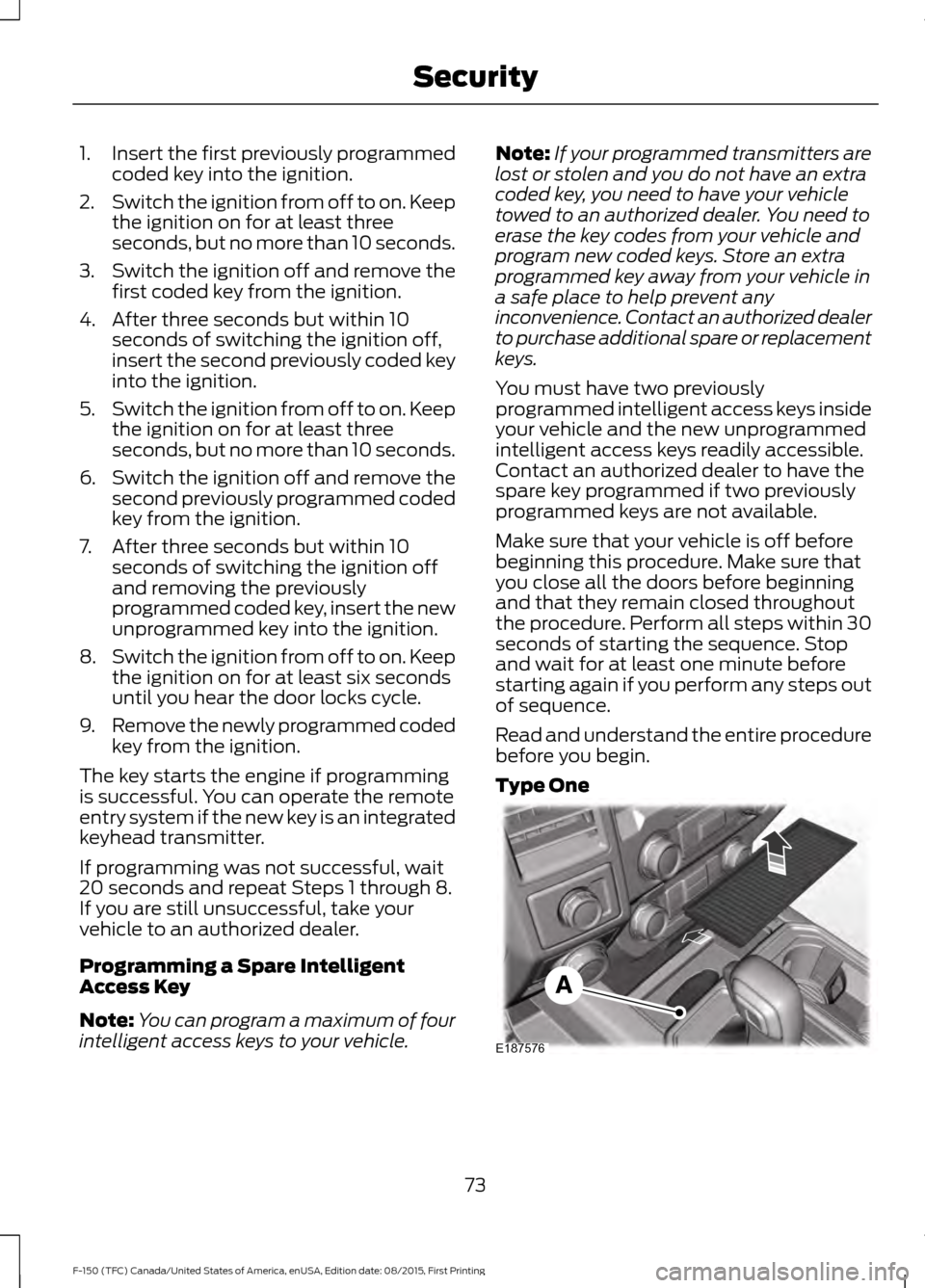
Type One 73
F-150 (TFC) Canada/United States of America, enUSA, Edition date: 08/2015, First Printing SecurityE187576
Page 77 of 505
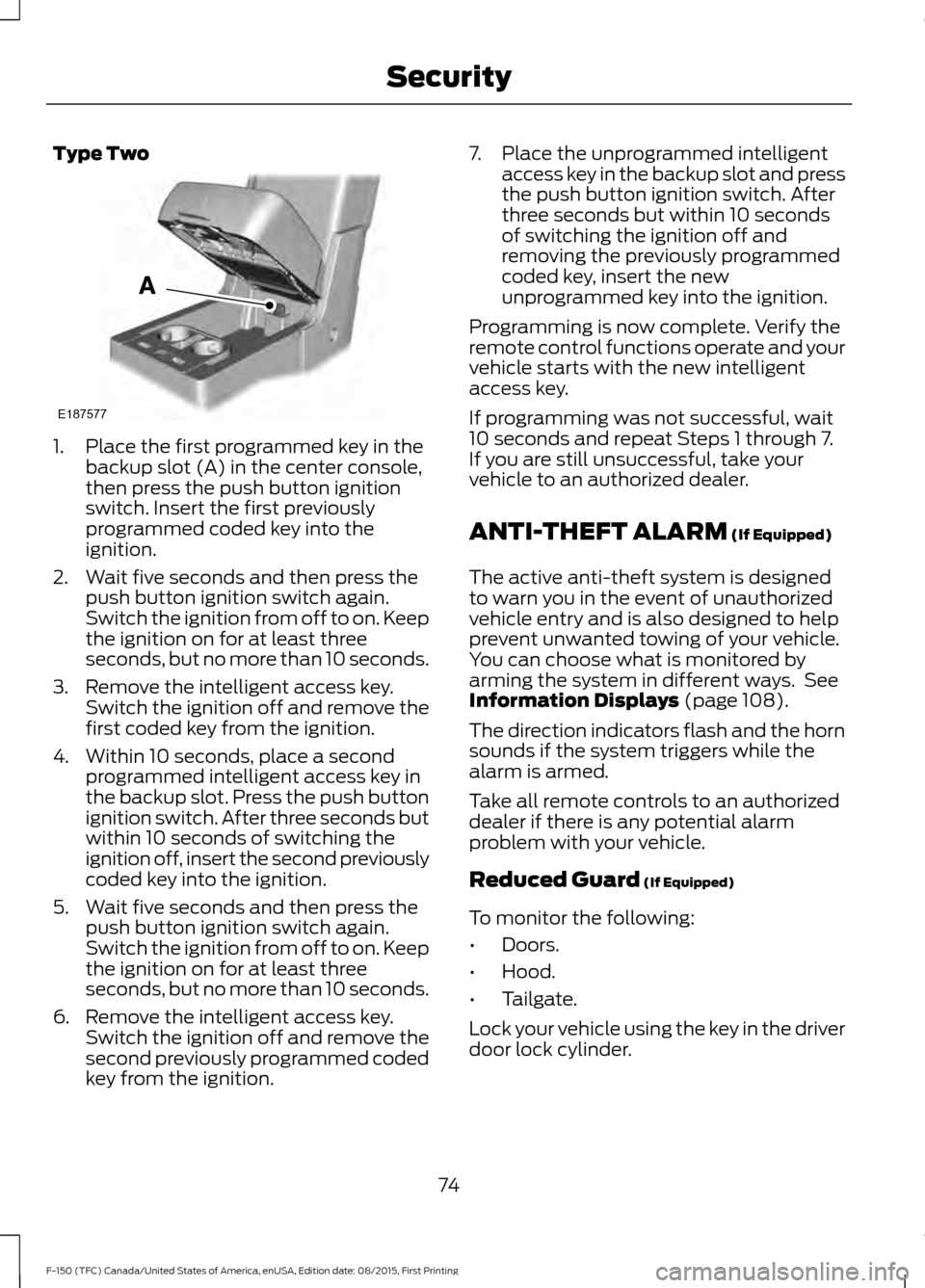
Type Two
1. Place the first programmed key in the
backup slot (A) in the center console,
then press the push button ignition
switch. Insert the first previously
programmed coded key into the
ignition.
2. Wait five seconds and then press the push button ignition switch again.
Switch the ignition from off to on. Keep
the ignition on for at least three
seconds, but no more than 10 seconds.
3. Remove the intelligent access key. Switch the ignition off and remove the
first coded key from the ignition.
4. Within 10 seconds, place a second programmed intelligent access key in
the backup slot. Press the push button
ignition switch. After three seconds but
within 10 seconds of switching the
ignition off, insert the second previously
coded key into the ignition.
5. Wait five seconds and then press the push button ignition switch again.
Switch the ignition from off to on. Keep
the ignition on for at least three
seconds, but no more than 10 seconds.
6. Remove the intelligent access key. Switch the ignition off and remove the
second previously programmed coded
key from the ignition. 7. Place the unprogrammed intelligent
access key in the backup slot and press
the push button ignition switch. After
three seconds but within 10 seconds
of switching the ignition off and
removing the previously programmed
coded key, insert the new
unprogrammed key into the ignition.
Programming is now complete. Verify the
remote control functions operate and your
vehicle starts with the new intelligent
access key.
If programming was not successful, wait
10 seconds and repeat Steps 1 through 7.
If you are still unsuccessful, take your
vehicle to an authorized dealer.
ANTI-THEFT ALARM (If Equipped)
The active anti-theft system is designed
to warn you in the event of unauthorized
vehicle entry and is also designed to help
prevent unwanted towing of your vehicle.
You can choose what is monitored by
arming the system in different ways. See
Information Displays
(page 108).
The direction indicators flash and the horn
sounds if the system triggers while the
alarm is armed.
Take all remote controls to an authorized
dealer if there is any potential alarm
problem with your vehicle.
Reduced Guard
(If Equipped)
To monitor the following:
• Doors.
• Hood.
• Tailgate.
Lock your vehicle using the key in the driver
door lock cylinder.
74
F-150 (TFC) Canada/United States of America, enUSA, Edition date: 08/2015, First Printing SecurityE187577
Page 78 of 505
Full Guard (If Equipped)
To monitor the following:
• Doors.
• Hood.
• Tailgate.
• Movement inside your vehicle.
• Change in vehicle inclination, for
example, unwanted towing.
Lock your vehicle using the remote control
or the power door lock control with the
accompanying door open and then close
all doors.
Note: Do not choose full monitor mode if
movement within the vehicle is likely to
occur or when the vehicle is in transport.
Note: For correct operation of the interior
motion detection system, make sure all
windows are closed prior to arming the
system. This helps prevent accidental alarm
activation due to external influences and
make sure of correct interior motion
detection. Additionally, the interior motion
sensing system will not arm if any door is
ajar.
Arming the Alarm
The alarm is ready to arm when there is
not a key in the ignition. Lock your vehicle
to arm the alarm.
The direction indicators flash once after
you lock your vehicle. This indicates the
alarm is in the pre-armed mode. It fully
arms after 20 seconds.
Disarming the Alarm
Disarm the alarm by any of the following
actions:
• Press the power door unlock button
within the 20-second pre-armed mode.
• Unlock the doors with the remote
control or keyless entry keypad. •
Switch the ignition on or start your
vehicle.
• Use a key in the driver door lock
cylinder to unlock your vehicle, then
switch the ignition on within 12
seconds.
Note: Pressing the panic button on the
remote control stops the horn and direction
indicators, but will not disarm the system.
75
F-150 (TFC) Canada/United States of America, enUSA, Edition date: 08/2015, First Printing Security
Page 79 of 505
USING POWER RUNNING
BOARDS
WARNINGS
In extreme climates, excessive ice
buildup may occur, causing the
running boards not to deploy. Make
sure that the running boards have
deployed, and have finished moving before
attempting to step on them. The running
boards will resume normal function once
the blockage is cleared. Turn off the running boards before
jacking or placing any object under
your vehicle. Never place your hand
between the extended running board and
your vehicle. A moving running board may
cause injury. Note:
Do not use the running boards, front
and rear hinge assemblies, running board
motors, or the running board underbody
mounts to lift your vehicle when jacking.
Always use proper jacking points.
Note: The running boards may operate
more slowly in cool temperatures.
Note: The running board mechanism may
trap debris such as mud, dirt, snow, ice and
salt. This may cause unwanted noise. If this
happens, manually set the running boards
to the deployed position. Then, wash the
system, in particular the front and rear hinge
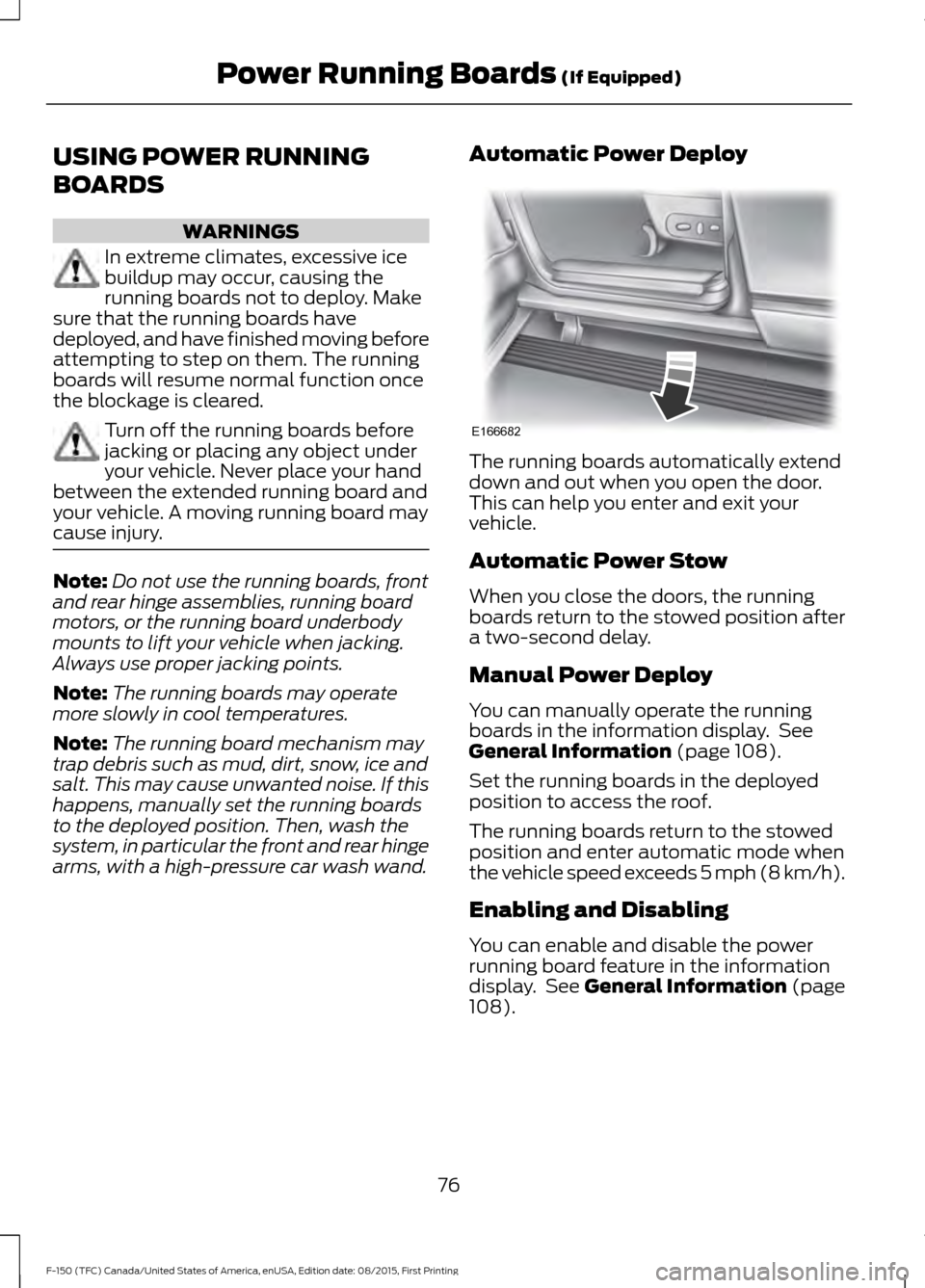
arms, with a high-pressure car wash wand. Automatic Power Deploy The running boards automatically extend
down and out when you open the door.
This can help you enter and exit your
vehicle.
Automatic Power Stow
When you close the doors, the running
boards return to the stowed position after
a two-second delay.
Manual Power Deploy
You can manually operate the running
boards in the information display. See
General Information (page 108).
Set the running boards in the deployed
position to access the roof.
The running boards return to the stowed
position and enter automatic mode when
the vehicle speed exceeds 5 mph (8 km/h).
Enabling and Disabling
You can enable and disable the power
running board feature in the information
display. See
General Information (page
108).
76
F-150 (TFC) Canada/United States of America, enUSA, Edition date: 08/2015, First Printing Power Running Boards
(If Equipped)E166682
Page 96 of 505
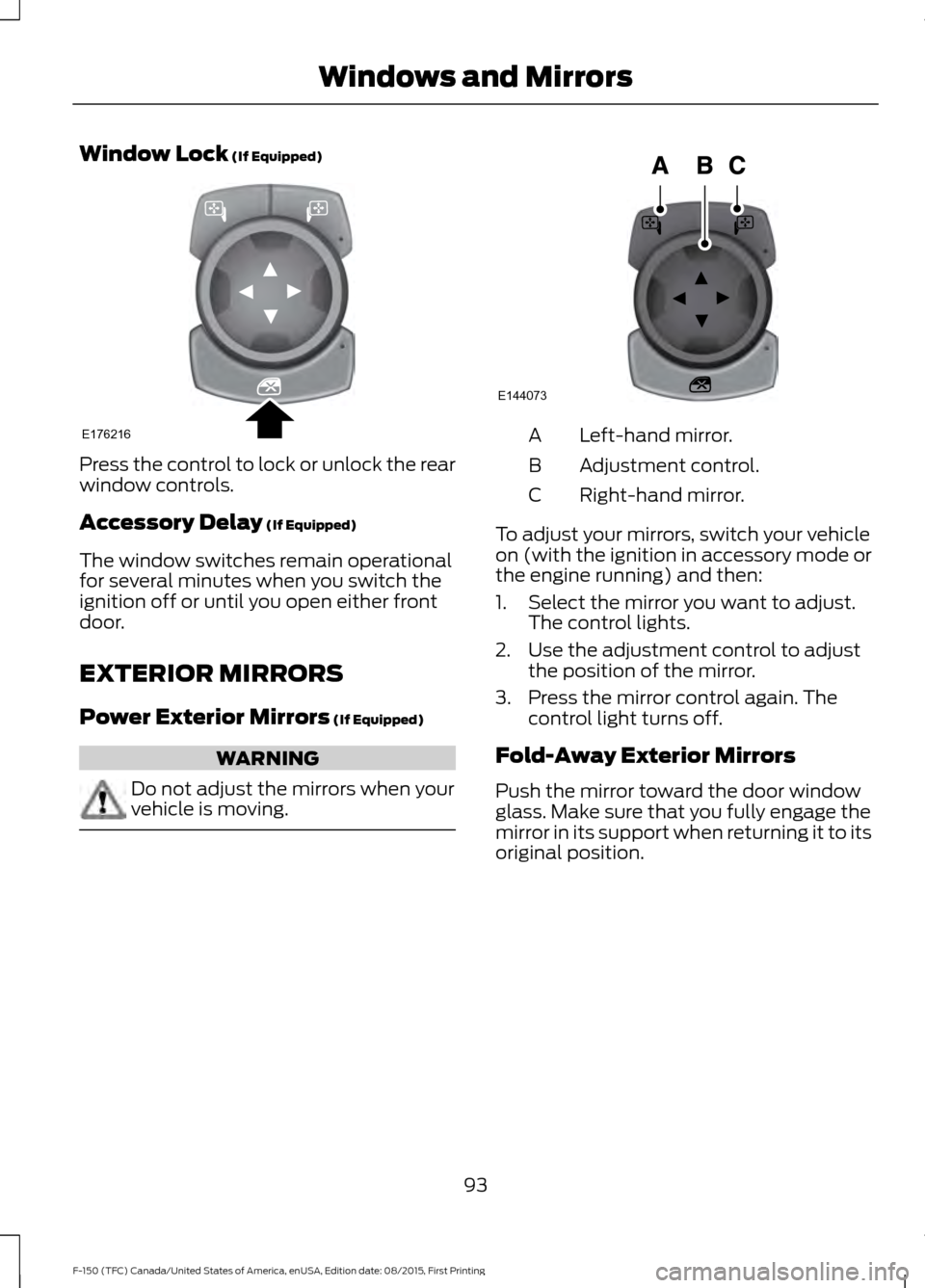
Window Lock (If Equipped)
Press the control to lock or unlock the rear
window controls.
Accessory Delay
(If Equipped)
The window switches remain operational
for several minutes when you switch the
ignition off or until you open either front
door.
EXTERIOR MIRRORS
Power Exterior Mirrors
(If Equipped) WARNING
Do not adjust the mirrors when your
vehicle is moving. Left-hand mirror.
A
Adjustment control.
B
Right-hand mirror.
C
To adjust your mirrors, switch your vehicle
on (with the ignition in accessory mode or
the engine running) and then:
1. Select the mirror you want to adjust. The control lights.
2. Use the adjustment control to adjust the position of the mirror.
3. Press the mirror control again. The control light turns off.
Fold-Away Exterior Mirrors
Push the mirror toward the door window
glass. Make sure that you fully engage the
mirror in its support when returning it to its
original position.
93
F-150 (TFC) Canada/United States of America, enUSA, Edition date: 08/2015, First Printing Windows and MirrorsE176216 E144073
Page 98 of 505
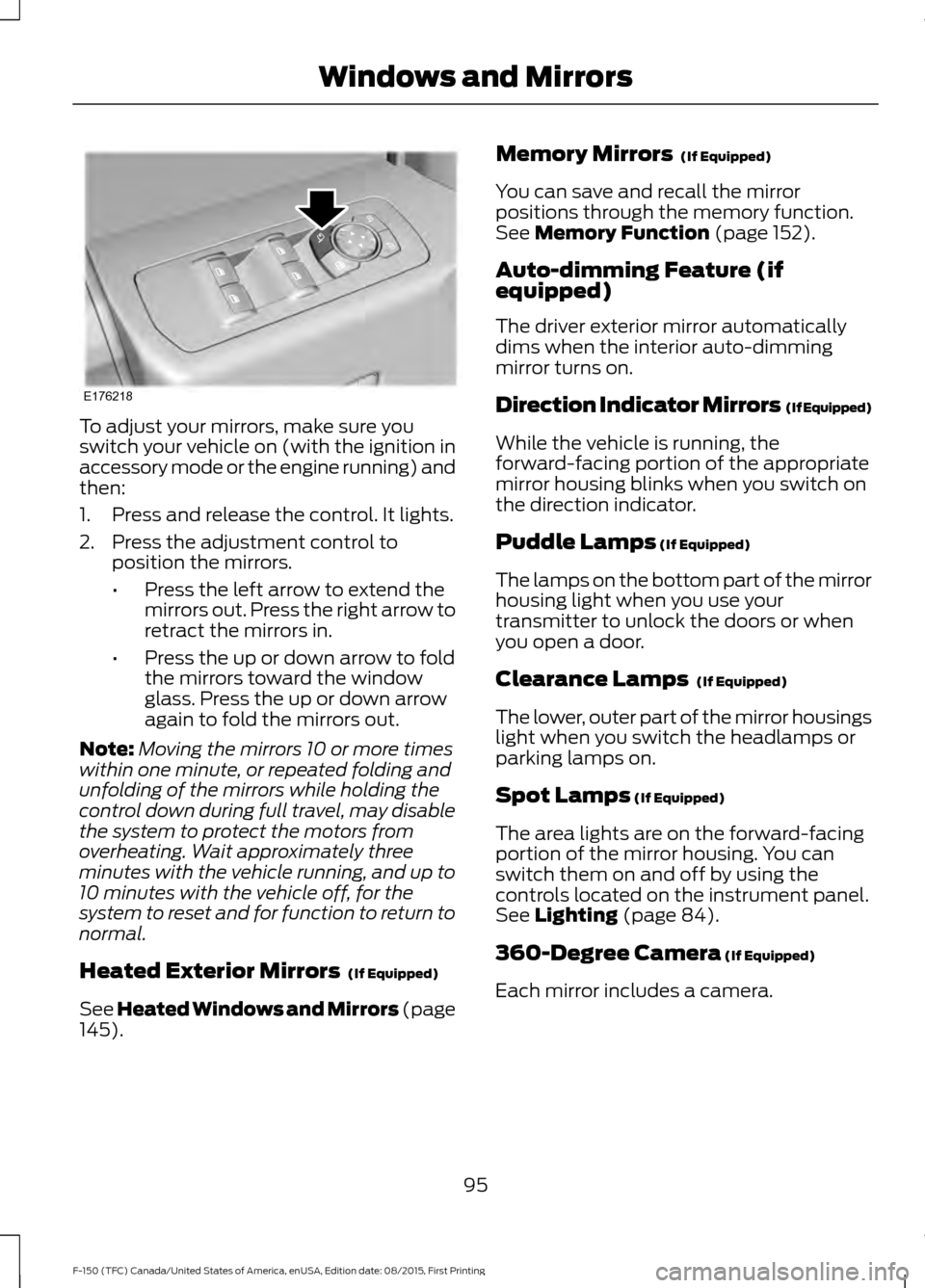
To adjust your mirrors, make sure you
switch your vehicle on (with the ignition in
accessory mode or the engine running) and
then:
1. Press and release the control. It lights.
2. Press the adjustment control to
position the mirrors.
•Press the left arrow to extend the
mirrors out. Press the right arrow to
retract the mirrors in.
• Press the up or down arrow to fold
the mirrors toward the window
glass. Press the up or down arrow
again to fold the mirrors out.
Note: Moving the mirrors 10 or more times
within one minute, or repeated folding and
unfolding of the mirrors while holding the
control down during full travel, may disable
the system to protect the motors from
overheating. Wait approximately three
minutes with the vehicle running, and up to
10 minutes with the vehicle off, for the
system to reset and for function to return to
normal.
Heated Exterior Mirrors (If Equipped)
See Heated Windows and Mirrors (page
145
). Memory Mirrors
(If Equipped)
You can save and recall the mirror
positions through the memory function.
See
Memory Function (page 152).
Auto-dimming Feature (if
equipped)
The driver exterior mirror automatically
dims when the interior auto-dimming
mirror turns on.
Direction Indicator Mirrors (If Equipped)
While the vehicle is running, the
forward-facing portion of the appropriate
mirror housing blinks when you switch on
the direction indicator.
Puddle Lamps
(If Equipped)
The lamps on the bottom part of the mirror
housing light when you use your
transmitter to unlock the doors or when
you open a door.
Clearance Lamps
(If Equipped)
The lower, outer part of the mirror housings
light when you switch the headlamps or
parking lamps on.
Spot Lamps
(If Equipped)
The area lights are on the forward-facing
portion of the mirror housing. You can
switch them on and off by using the
controls located on the instrument panel.
See
Lighting (page 84).
360-Degree Camera
(If Equipped)
Each mirror includes a camera.
95
F-150 (TFC) Canada/United States of America, enUSA, Edition date: 08/2015, First Printing Windows and MirrorsE176218
Page 107 of 505
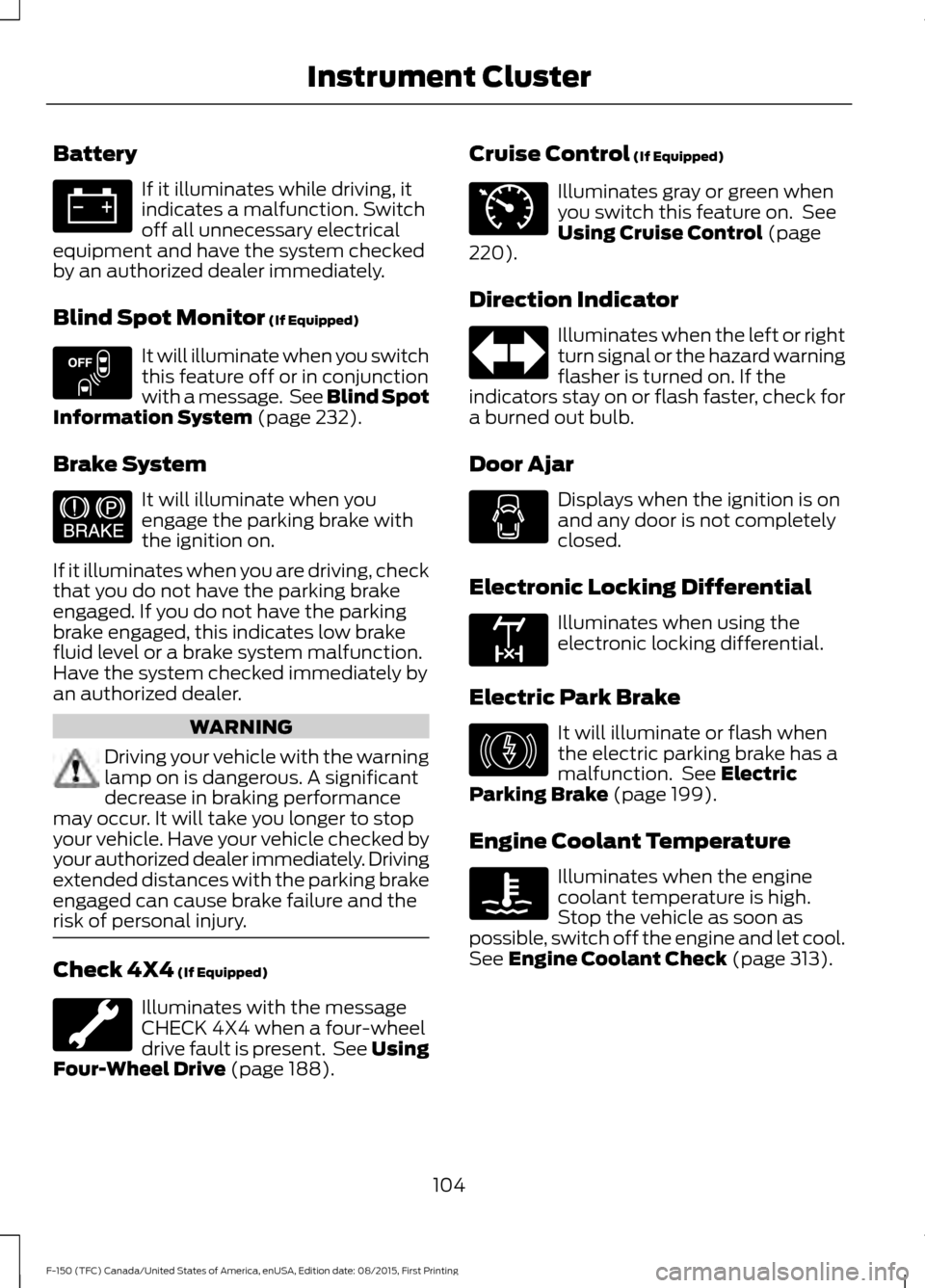
Battery
If it illuminates while driving, it
indicates a malfunction. Switch
off all unnecessary electrical
equipment and have the system checked
by an authorized dealer immediately.
Blind Spot Monitor (If Equipped) It will illuminate when you switch
this feature off or in conjunction
with a message. See Blind Spot
Information System
(page 232).
Brake System It will illuminate when you
engage the parking brake with
the ignition on.
If it illuminates when you are driving, check
that you do not have the parking brake
engaged. If you do not have the parking
brake engaged, this indicates low brake
fluid level or a brake system malfunction.
Have the system checked immediately by
an authorized dealer. WARNING
Driving your vehicle with the warning
lamp on is dangerous. A significant
decrease in braking performance
may occur. It will take you longer to stop
your vehicle. Have your vehicle checked by
your authorized dealer immediately. Driving
extended distances with the parking brake
engaged can cause brake failure and the
risk of personal injury. Check 4X4
(If Equipped)
Illuminates with the message
CHECK 4X4 when a four-wheel
drive fault is present. See
Using
Four-Wheel Drive (page 188). Cruise Control
(If Equipped) Illuminates gray or green when
you switch this feature on. See
Using Cruise Control
(page
220).
Direction Indicator Illuminates when the left or right
turn signal or the hazard warning
flasher is turned on. If the
indicators stay on or flash faster, check for
a burned out bulb.
Door Ajar Displays when the ignition is on
and any door is not completely
closed.
Electronic Locking Differential Illuminates when using the
electronic locking differential.
Electric Park Brake It will illuminate or flash when
the electric parking brake has a
malfunction. See
Electric
Parking Brake (page 199).
Engine Coolant Temperature Illuminates when the engine
coolant temperature is high.
Stop the vehicle as soon as
possible, switch off the engine and let cool.
See
Engine Coolant Check (page 313).
104
F-150 (TFC) Canada/United States of America, enUSA, Edition date: 08/2015, First Printing Instrument Cluster E151262 E144522 E71340 E163170 E146190
Page 131 of 505
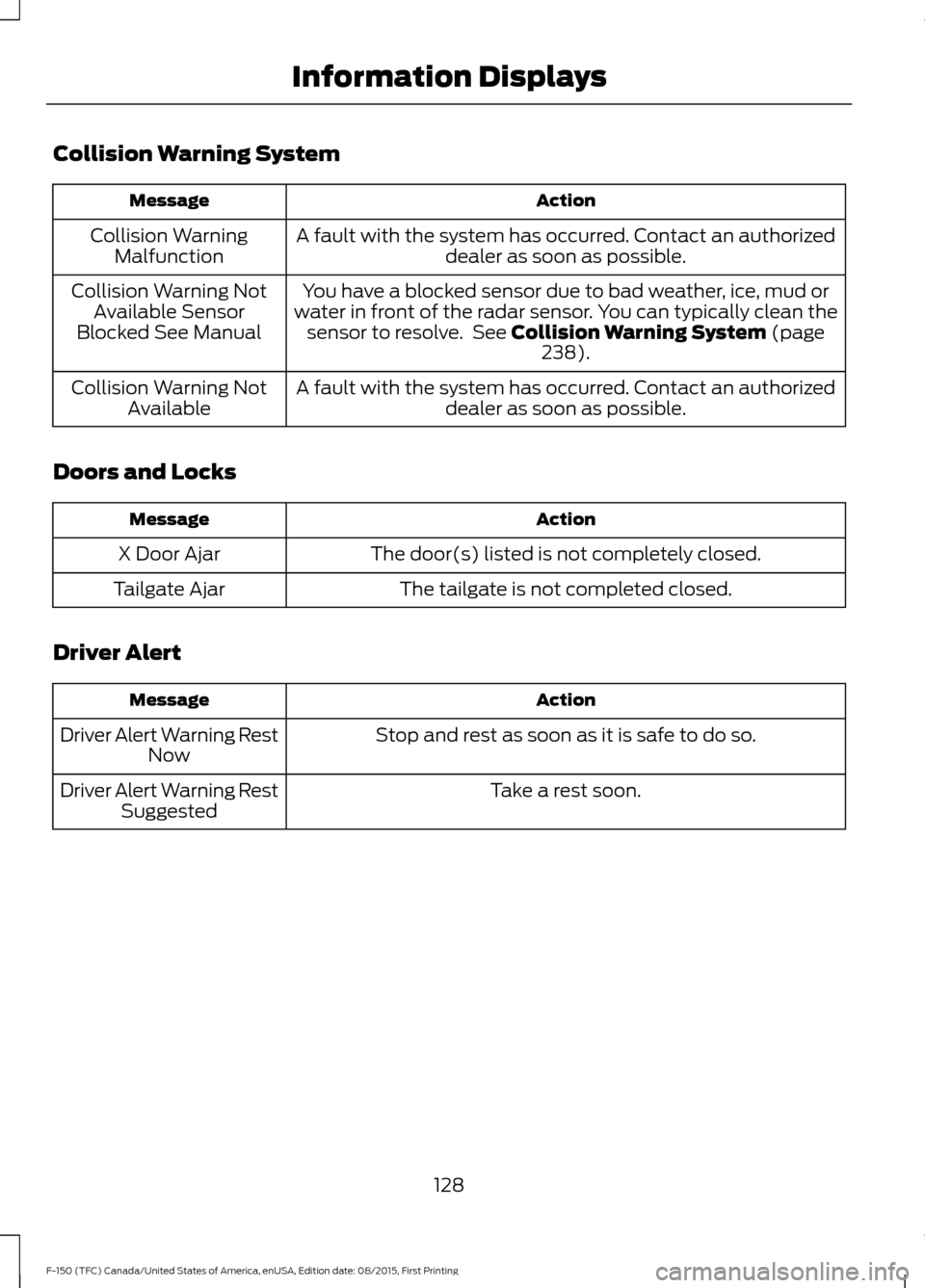
Collision Warning System
Action
Message
A fault with the system has occurred. Contact an authorizeddealer as soon as possible.
Collision Warning
Malfunction
You have a blocked sensor due to bad weather, ice, mud or
water in front of the radar sensor. You can typically clean the sensor to resolve. See Collision Warning System (page
238).
Collision Warning Not
Available Sensor
Blocked See Manual
A fault with the system has occurred. Contact an authorizeddealer as soon as possible.
Collision Warning Not
Available
Doors and Locks Action
Message
The door(s) listed is not completely closed.
X Door Ajar
The tailgate is not completed closed.
Tailgate Ajar
Driver Alert Action
Message
Stop and rest as soon as it is safe to do so.
Driver Alert Warning Rest
Now
Take a rest soon.
Driver Alert Warning Rest
Suggested
128
F-150 (TFC) Canada/United States of America, enUSA, Edition date: 08/2015, First Printing Information Displays