battery FORD F150 2023 User Guide
[x] Cancel search | Manufacturer: FORD, Model Year: 2023, Model line: F150, Model: FORD F150 2023Pages: 786, PDF Size: 23.15 MB
Page 96 of 786
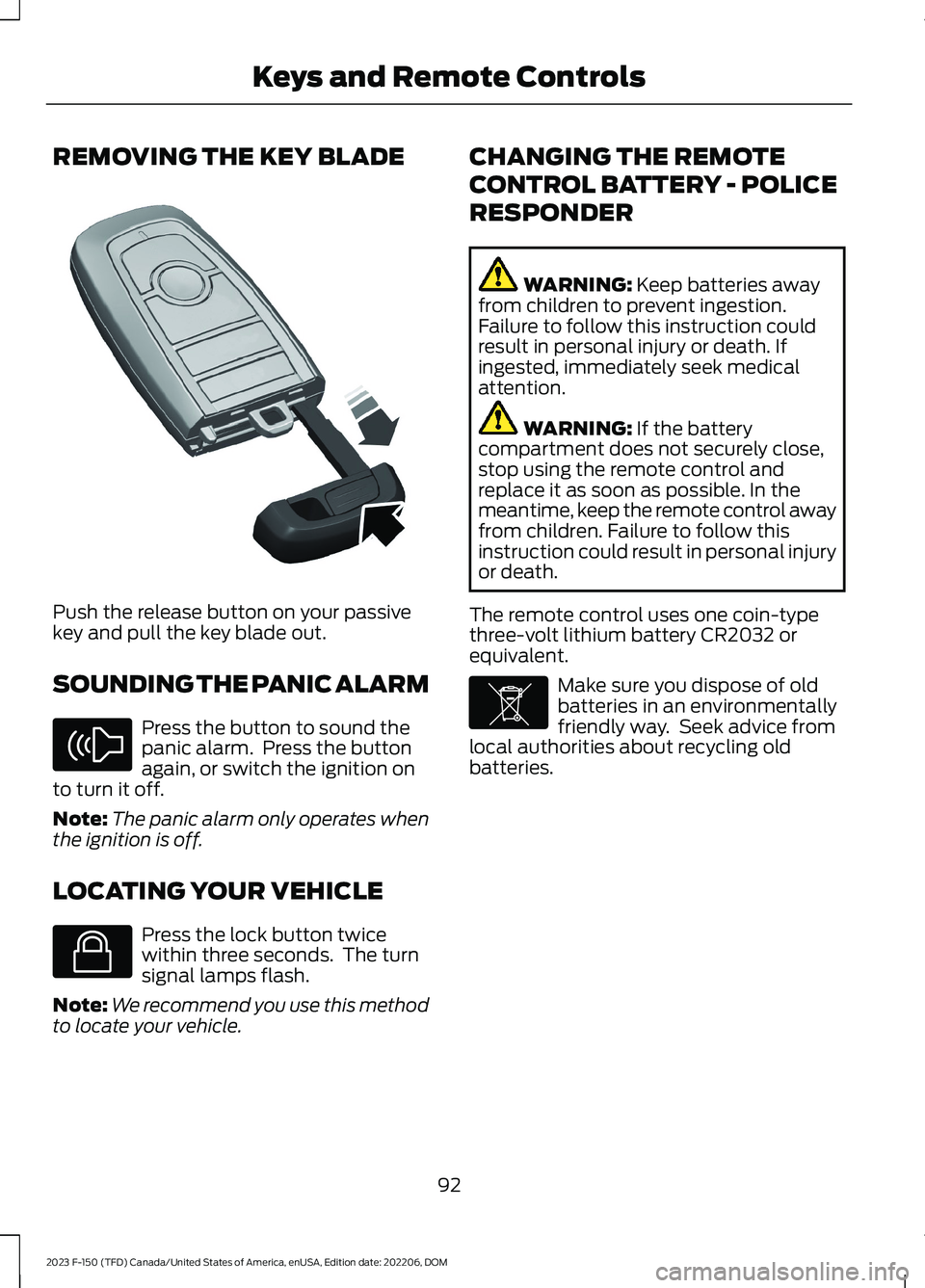
REMOVING THE KEY BLADE
Push the release button on your passivekey and pull the key blade out.
SOUNDING THE PANIC ALARM
Press the button to sound thepanic alarm. Press the buttonagain, or switch the ignition onto turn it off.
Note:The panic alarm only operates whenthe ignition is off.
LOCATING YOUR VEHICLE
Press the lock button twicewithin three seconds. The turnsignal lamps flash.
Note:We recommend you use this methodto locate your vehicle.
CHANGING THE REMOTE
CONTROL BATTERY - POLICE
RESPONDER
WARNING: Keep batteries awayfrom children to prevent ingestion.Failure to follow this instruction couldresult in personal injury or death. Ifingested, immediately seek medicalattention.
WARNING: If the batterycompartment does not securely close,stop using the remote control andreplace it as soon as possible. In themeantime, keep the remote control awayfrom children. Failure to follow thisinstruction could result in personal injuryor death.
The remote control uses one coin-typethree-volt lithium battery CR2032 orequivalent.
Make sure you dispose of oldbatteries in an environmentallyfriendly way. Seek advice fromlocal authorities about recycling oldbatteries.
92
2023 F-150 (TFD) Canada/United States of America, enUSA, Edition date: 202206, DOMKeys and Remote ControlsE322866 E138624 E138623 E107998
Page 97 of 786
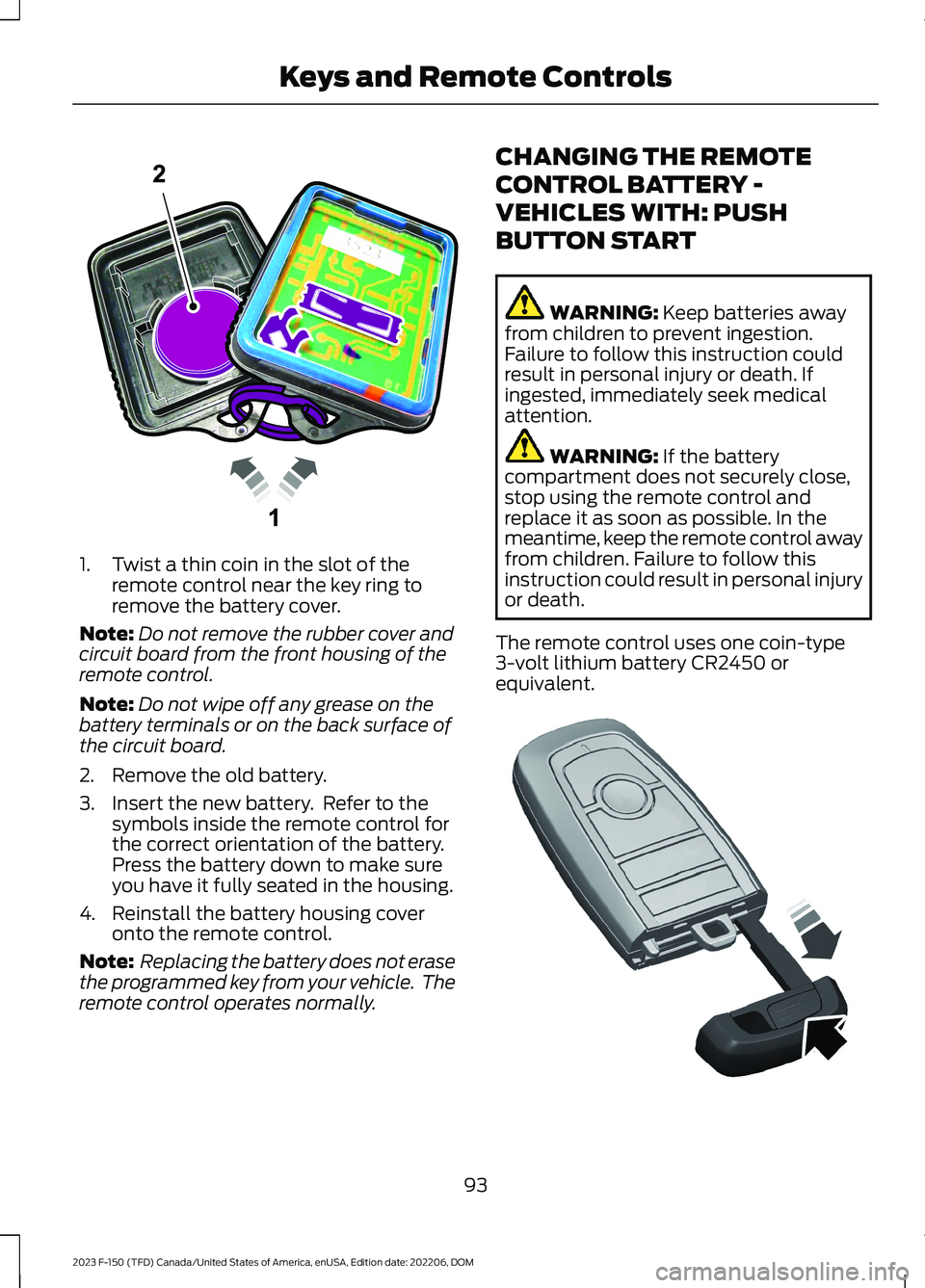
1.Twist a thin coin in the slot of theremote control near the key ring toremove the battery cover.
Note:Do not remove the rubber cover andcircuit board from the front housing of theremote control.
Note:Do not wipe off any grease on thebattery terminals or on the back surface ofthe circuit board.
2.Remove the old battery.
3.Insert the new battery. Refer to thesymbols inside the remote control forthe correct orientation of the battery.Press the battery down to make sureyou have it fully seated in the housing.
4.Reinstall the battery housing coveronto the remote control.
Note: Replacing the battery does not erasethe programmed key from your vehicle. Theremote control operates normally.
CHANGING THE REMOTE
CONTROL BATTERY -
VEHICLES WITH: PUSH
BUTTON START
WARNING: Keep batteries awayfrom children to prevent ingestion.Failure to follow this instruction couldresult in personal injury or death. Ifingested, immediately seek medicalattention.
WARNING: If the batterycompartment does not securely close,stop using the remote control andreplace it as soon as possible. In themeantime, keep the remote control awayfrom children. Failure to follow thisinstruction could result in personal injuryor death.
The remote control uses one coin-type3-volt lithium battery CR2450 orequivalent.
93
2023 F-150 (TFD) Canada/United States of America, enUSA, Edition date: 202206, DOMKeys and Remote ControlsE203601 E322866
Page 98 of 786
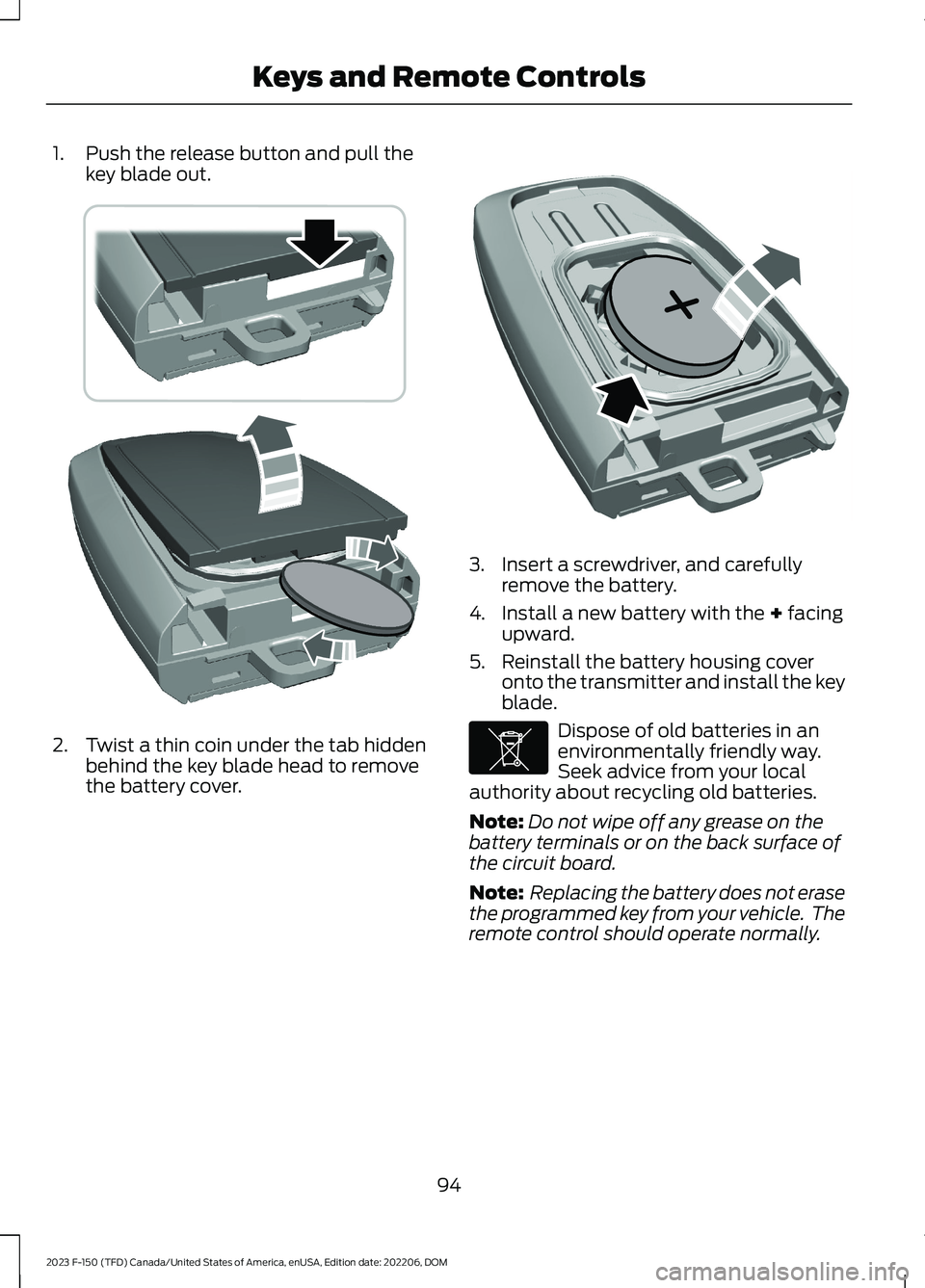
1.Push the release button and pull thekey blade out.
2.Twist a thin coin under the tab hiddenbehind the key blade head to removethe battery cover.
3.Insert a screwdriver, and carefullyremove the battery.
4.Install a new battery with the + facingupward.
5.Reinstall the battery housing coveronto the transmitter and install the keyblade.
Dispose of old batteries in anenvironmentally friendly way.Seek advice from your localauthority about recycling old batteries.
Note:Do not wipe off any grease on thebattery terminals or on the back surface ofthe circuit board.
Note: Replacing the battery does not erasethe programmed key from your vehicle. Theremote control should operate normally.
94
2023 F-150 (TFD) Canada/United States of America, enUSA, Edition date: 202206, DOMKeys and Remote ControlsE303824 E218402 E107998
Page 99 of 786
CHANGING THE REMOTE
CONTROL BATTERY -
VEHICLES WITH: FLIP KEY
WARNING: Keep batteries awayfrom children to prevent ingestion.Failure to follow this instruction couldresult in personal injury or death. Ifingested, immediately seek medicalattention.
WARNING: If the batterycompartment does not securely close,stop using the remote control andreplace it as soon as possible. In themeantime, keep the remote control awayfrom children. Failure to follow thisinstruction could result in personal injuryor death.
Battery Replacement Procedure
The remote control uses one coin-type3-volt lithium battery CR2032 orequivalent.
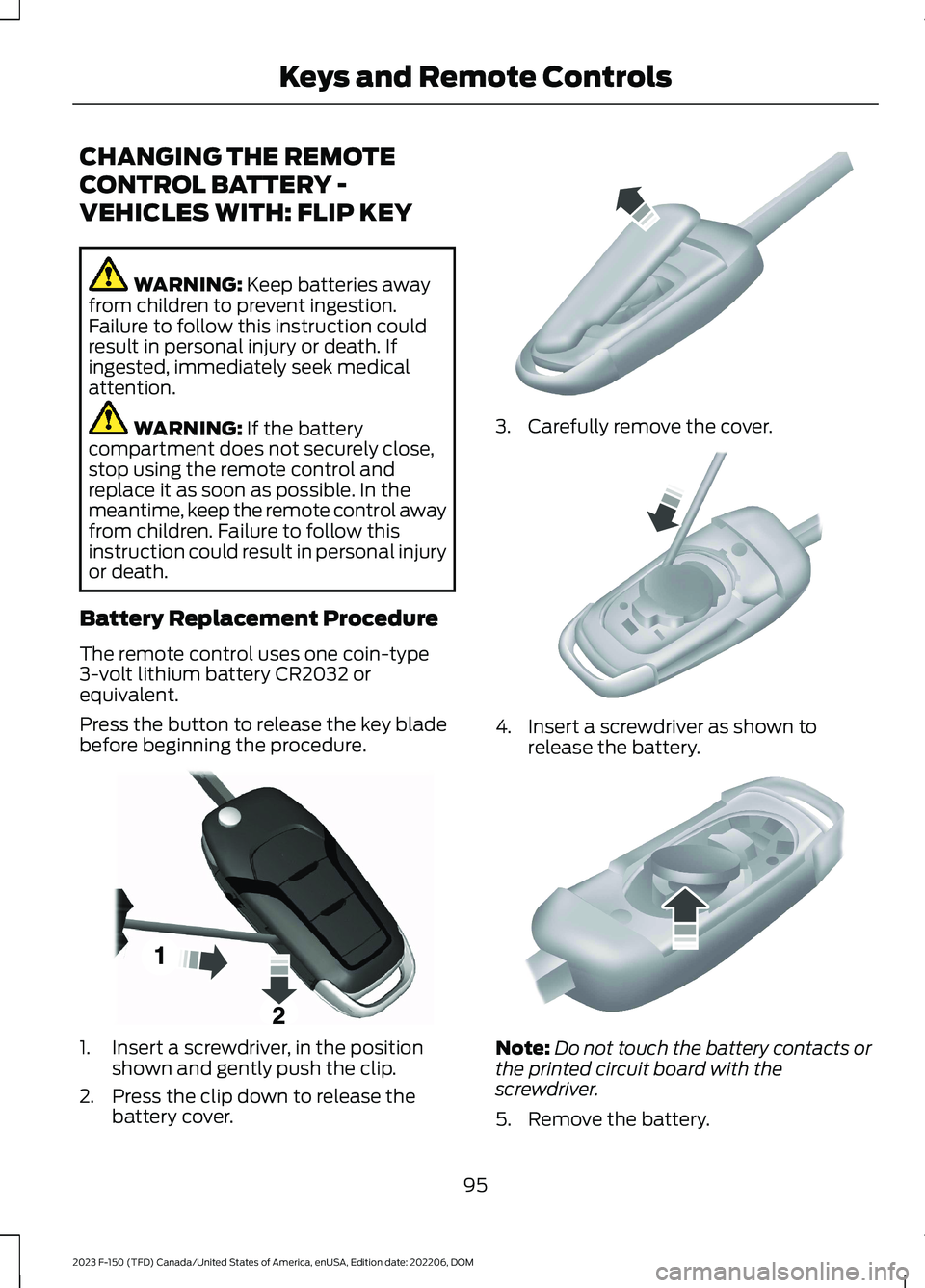
Press the button to release the key bladebefore beginning the procedure.
1.Insert a screwdriver, in the positionshown and gently push the clip.
2.Press the clip down to release thebattery cover.
3.Carefully remove the cover.
4.Insert a screwdriver as shown torelease the battery.
Note:Do not touch the battery contacts orthe printed circuit board with thescrewdriver.
5.Remove the battery.
95
2023 F-150 (TFD) Canada/United States of America, enUSA, Edition date: 202206, DOMKeys and Remote ControlsE191533 E151799 E151800 E151801
Page 100 of 786
6.Install a new battery with the + facingup.
7.Replace the battery cover.
Dispose of old batteries in anenvironmentally friendly way.Seek advice from your localauthority about recycling old batteries.
Note:Do not wipe off any grease on thebattery terminals or on the back surface ofthe circuit board.
Note: Replacing the battery does not erasethe programmed key from your vehicle. Theremote control should operate normally.
REPLACING A LOST KEY OR
REMOTE CONTROL
You can purchase replacement keys orremote controls from an authorized dealer.Authorized dealers can program remotecontrols for your vehicle.
Note: Your vehicle keys came with asecurity label that provides important keycut information. Keep the label in a safeplace for future reference.
PROGRAMMING THE REMOTE
CONTROL - VEHICLES WITH:
PUSH BUTTON START
General Information
You must have two previouslyprogrammed remote controls inside yourvehicle and the new unprogrammedremote controls readily accessible. Contactan authorized dealer to have the spareremote control programmed if twopreviously programmed remotes are notavailable. Make sure that your vehicle isoff before beginning this procedure. Makesure that you close all the doors beforebeginning and that they remain closedthroughout the procedure. Perform allsteps within 30 seconds of starting thesequence. Stop and wait for at least oneminute before starting again if you performany steps out of sequence.
Read and understand the entire procedurebefore you begin.
Note:You can program a maximum of fourremote controls to your vehicle.
Note:If your programmed remote controlsare lost or stolen and you do not have anextra coded remote, you need to have yourvehicle towed to an authorized dealer. Storean extra programmed remote away fromyour vehicle in a safe place to help preventany inconvenience. Contact an authorizeddealer to purchase additional spare orreplacement remotes.
Steps for Programming Your SpareRemote Control
Note:Your vehicle is equipped with one ofthe following center consoles.
96
2023 F-150 (TFD) Canada/United States of America, enUSA, Edition date: 202206, DOMKeys and Remote ControlsE107998 E151795
Page 102 of 786
2.Switch the ignition from off to on. Keepthe ignition on for at least threeseconds, but no more than 10 seconds.
3.Switch the ignition off and remove thefirst coded key from the ignition.
4.After three seconds but within 10seconds of switching the ignition off,insert the second previously coded keyinto the ignition.
5.Switch the ignition from off to on. Keepthe ignition on for at least threeseconds, but no more than 10 seconds.
6.Switch the ignition off and remove thesecond previously programmed codedkey from the ignition.
7.After three seconds but within 10seconds of switching the ignition offand removing the previouslyprogrammed coded key, insert the newun–programmed key into the ignition.
8.Switch the ignition from off to on. Keepthe ignition on for at least six secondsuntil you hear the door locks cycle.
9.Remove the newly programmed codedkey from the ignition.
The key starts the engine if programmingis successful. You can operate the keylessremote entry system with the new remotecontrol with integrated key.
If programming was not successful, wait20 seconds and repeat Steps 1 through 8.If you are still unsuccessful, take yourvehicle to an authorized dealer.
Note:You can program a maximum of sixcoded remote controls to your vehicle.
KEYS AND REMOTE CONTROLS – TROUBLESHOOTING
KEYS AND REMOTE CONTROLS – INFORMATION MESSAGES
ActionMessage
Replace remote control battery.Key Battery Low ReplaceSoon
98
2023 F-150 (TFD) Canada/United States of America, enUSA, Edition date: 202206, DOMKeys and Remote Controls
Page 112 of 786
WHAT IS KEYLESS ENTRY
The system allows you to lock and unlockyour vehicle without taking the passive keyout of your pocket or purse.
KEYLESS ENTRY LIMITATIONS
Make sure your remote control is within 3 ft(1 m) from the front door handles and thetailgate.
The system could not function if:
•The remote control remains stationaryfor about a minute.
•The vehicle battery has no charge.
•The remote control battery has nocharge.
•There is interference causing issueswith the remote control frequencies.
•The remote control is too close tometal objects or electronic devices, forexample keys or a cell phone.
KEYLESS ENTRY SETTINGS
Switching Keyless Entry On andOff
1.Switch the ignition on using an originalkey that has not been created as aMyKey.
2.Press Settings on the touchscreen.
3.Press Vehicle Settings.
4.Press Locks.
Reprogramming the UnlockingFunction
You can enable two-stage unlockingfunction allowing you to unlock only thedriver door when you touch the unlocksensor.
Press and hold both the lock and unlockbuttons on the remote control for fourseconds to disable or enable two-stageunlocking.
If you program the unlocking function sothat only the driver door unlocks, you canunlock all of the other doors from insideyour vehicle using the power door lockcontrol. You can unlock individual doorsby pulling the interior door handles onthose doors.
USING KEYLESS ENTRY
Unlocking the Doors
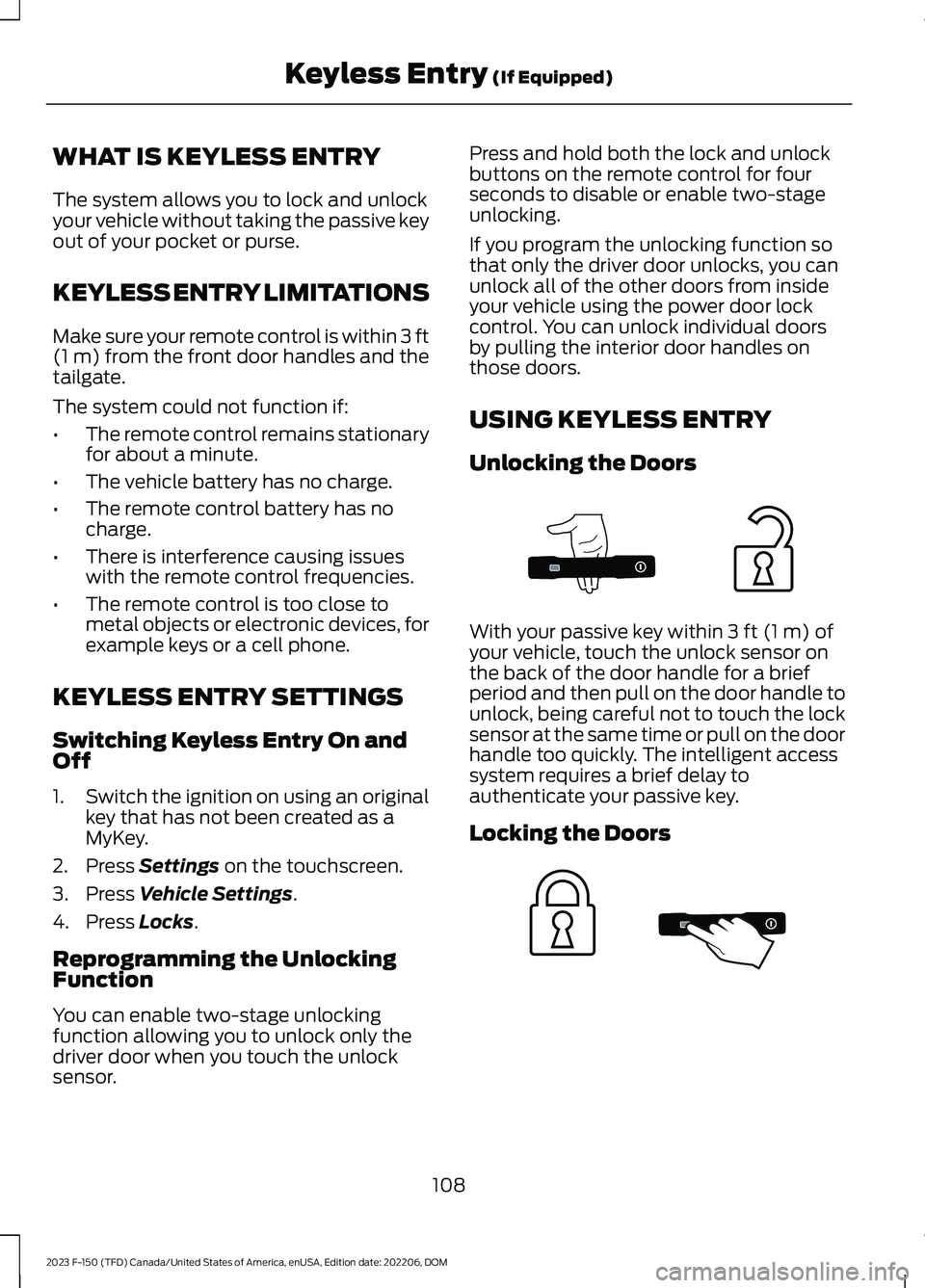
With your passive key within 3 ft (1 m) ofyour vehicle, touch the unlock sensor onthe back of the door handle for a briefperiod and then pull on the door handle tounlock, being careful not to touch the locksensor at the same time or pull on the doorhandle too quickly. The intelligent accesssystem requires a brief delay toauthenticate your passive key.
Locking the Doors
108
2023 F-150 (TFD) Canada/United States of America, enUSA, Edition date: 202206, DOMKeyless Entry (If Equipped)E333747 E333746
Page 114 of 786
WHAT IS THE KEYLESS ENTRY
KEYPAD
The keyless entry keypad allows you tolock and unlock your vehicle using thekeypad on the window trim.
KEYLESS ENTRY KEYPAD
LIMITATIONS
The system may not function if:
•The vehicle battery has no charge.
LOCATING THE KEYLESS
ENTRY KEYPAD
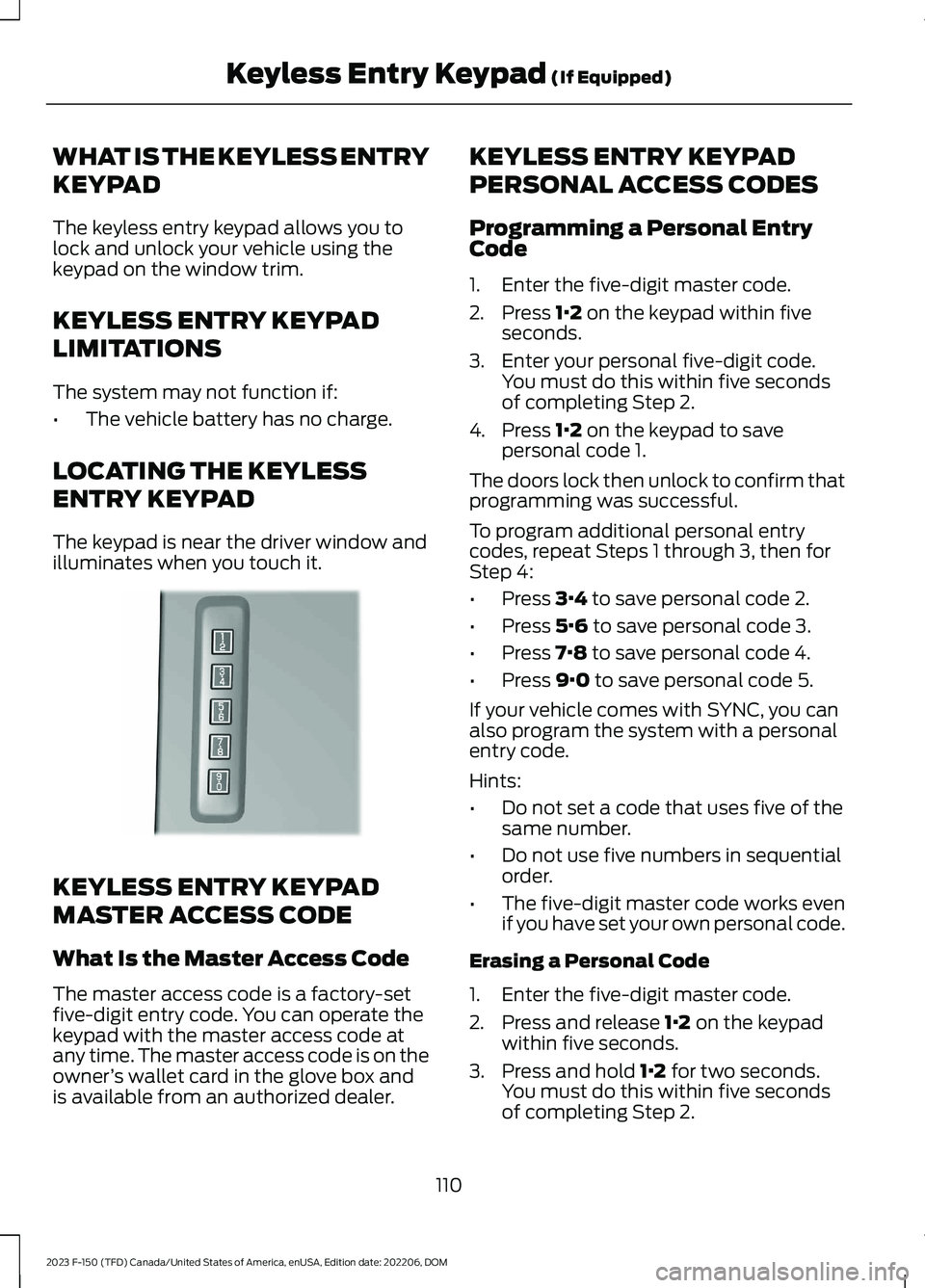
The keypad is near the driver window andilluminates when you touch it.
KEYLESS ENTRY KEYPAD
MASTER ACCESS CODE
What Is the Master Access Code
The master access code is a factory-setfive-digit entry code. You can operate thekeypad with the master access code atany time. The master access code is on theowner’s wallet card in the glove box andis available from an authorized dealer.
KEYLESS ENTRY KEYPAD
PERSONAL ACCESS CODES
Programming a Personal EntryCode
1.Enter the five-digit master code.
2.Press 1·2 on the keypad within fiveseconds.
3.Enter your personal five-digit code.You must do this within five secondsof completing Step 2.
4.Press 1·2 on the keypad to savepersonal code 1.
The doors lock then unlock to confirm thatprogramming was successful.
To program additional personal entrycodes, repeat Steps 1 through 3, then forStep 4:
•Press 3·4 to save personal code 2.
•Press 5·6 to save personal code 3.
•Press 7·8 to save personal code 4.
•Press 9·0 to save personal code 5.
If your vehicle comes with SYNC, you canalso program the system with a personalentry code.
Hints:
•Do not set a code that uses five of thesame number.
•Do not use five numbers in sequentialorder.
•The five-digit master code works evenif you have set your own personal code.
Erasing a Personal Code
1.Enter the five-digit master code.
2.Press and release 1·2 on the keypadwithin five seconds.
3.Press and hold 1·2 for two seconds.You must do this within five secondsof completing Step 2.
110
2023 F-150 (TFD) Canada/United States of America, enUSA, Edition date: 202206, DOMKeyless Entry Keypad (If Equipped)E190936
Page 130 of 786
TAILGATE – FREQUENTLY ASKEDQUESTIONS
Why won't my power tailgate open?
Make sure the tailgate is in powermode. Make sure the transmission isin park (P), ensure nothing isobstructing the tailgate path and orcausing resistance (tonneau cover orother aftermarket accessory, freezingconditions or being parked downhill).If you have continued issues, thebattery voltage may be low or othersystem issues. See an authorizeddealer.
Why won't my power tailgate close?
Make sure the tailgate is in powermode. Your vehicle speed is at orabove 2.5 mph (4 km/h), the tailgateencountered an obstacle or freezingconditions. After removing theobstacles, manually close the tailgateto resume normal operation. If youhave continued issues, the batteryvoltage may be low or other systemissues. See an authorized dealer.
126
2023 F-150 (TFD) Canada/United States of America, enUSA, Edition date: 202206, DOMTailgate - Vehicles With: Power Tailgate
Page 137 of 786

TAILGATE – FREQUENTLY ASKEDQUESTIONS
Why won't my tailgate open?
Make sure the transmission is in park(P), ensure nothing is obstructing thetailgate path and or causing resistance(tonneau cover or other aftermarketaccessories, freezing conditions orbeing parked downhill). If you havecontinued issues, the battery voltagemay be low or other system issues.See an authorized dealer.
133
2023 F-150 (TFD) Canada/United States of America, enUSA, Edition date: 202206, DOMTailgate - Vehicles With: Remote Release Tailgate