climate control FORD F150 2023 User Guide
[x] Cancel search | Manufacturer: FORD, Model Year: 2023, Model line: F150, Model: FORD F150 2023Pages: 786, PDF Size: 23.15 MB
Page 189 of 786
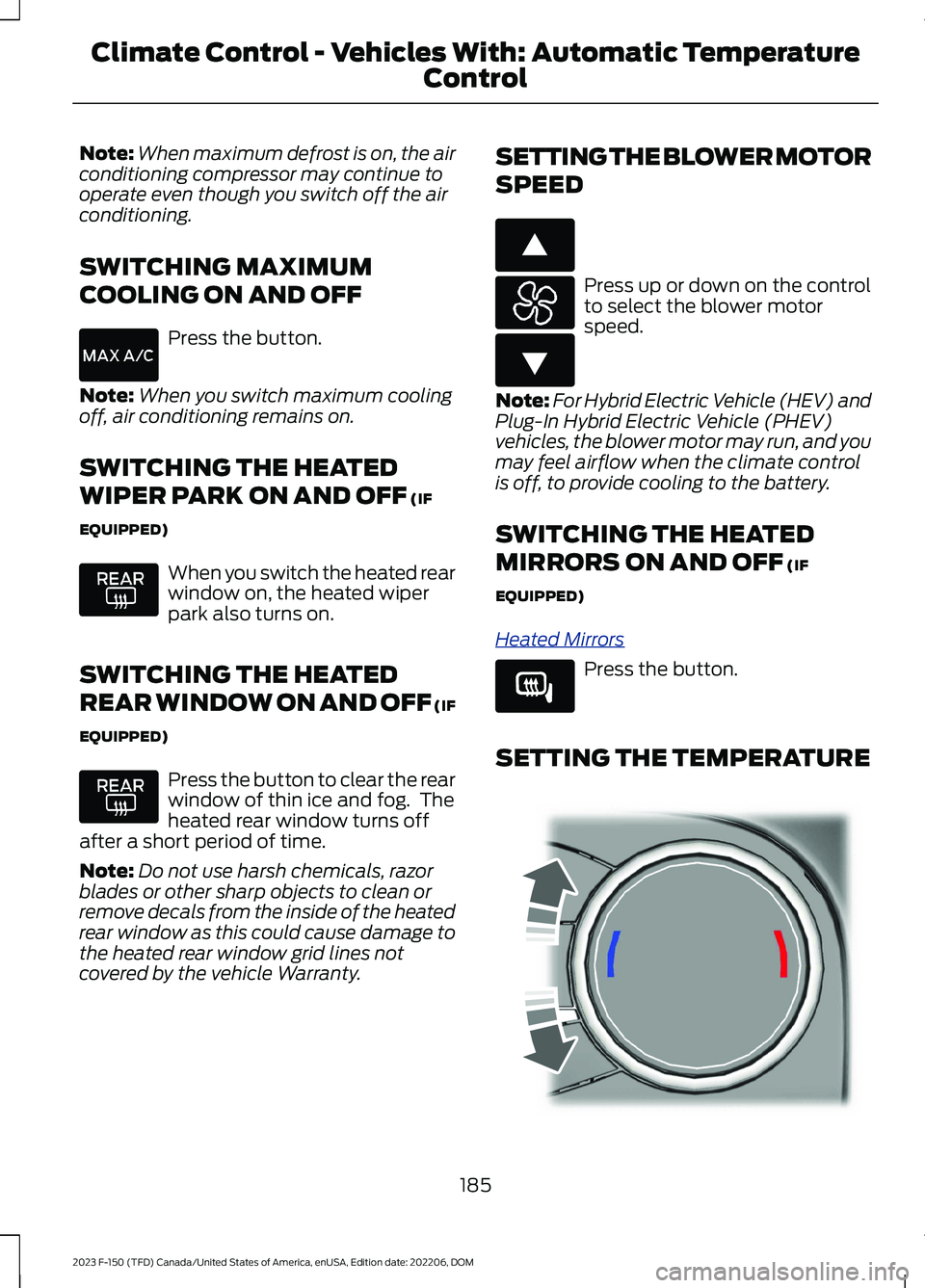
Note:When maximum defrost is on, the airconditioning compressor may continue tooperate even though you switch off the airconditioning.
SWITCHING MAXIMUM
COOLING ON AND OFF
Press the button.
Note:When you switch maximum coolingoff, air conditioning remains on.
SWITCHING THE HEATED
WIPER PARK ON AND OFF (IF
EQUIPPED)
When you switch the heated rearwindow on, the heated wiperpark also turns on.
SWITCHING THE HEATED
REAR WINDOW ON AND OFF (IF
EQUIPPED)
Press the button to clear the rearwindow of thin ice and fog. Theheated rear window turns offafter a short period of time.
Note:Do not use harsh chemicals, razorblades or other sharp objects to clean orremove decals from the inside of the heatedrear window as this could cause damage tothe heated rear window grid lines notcovered by the vehicle Warranty.
SETTING THE BLOWER MOTOR
SPEED
Press up or down on the controlto select the blower motorspeed.
Note:For Hybrid Electric Vehicle (HEV) andPlug-In Hybrid Electric Vehicle (PHEV)vehicles, the blower motor may run, and youmay feel airflow when the climate controlis off, to provide cooling to the battery.
SWITCHING THE HEATED
MIRRORS ON AND OFF (IF
EQUIPPED)
Heated Mirrors
Press the button.
SETTING THE TEMPERATURE
185
2023 F-150 (TFD) Canada/United States of America, enUSA, Edition date: 202206, DOMClimate Control - Vehicles With: Automatic Temperature
Control E266187 E266186 E266189 E244115
Page 190 of 786
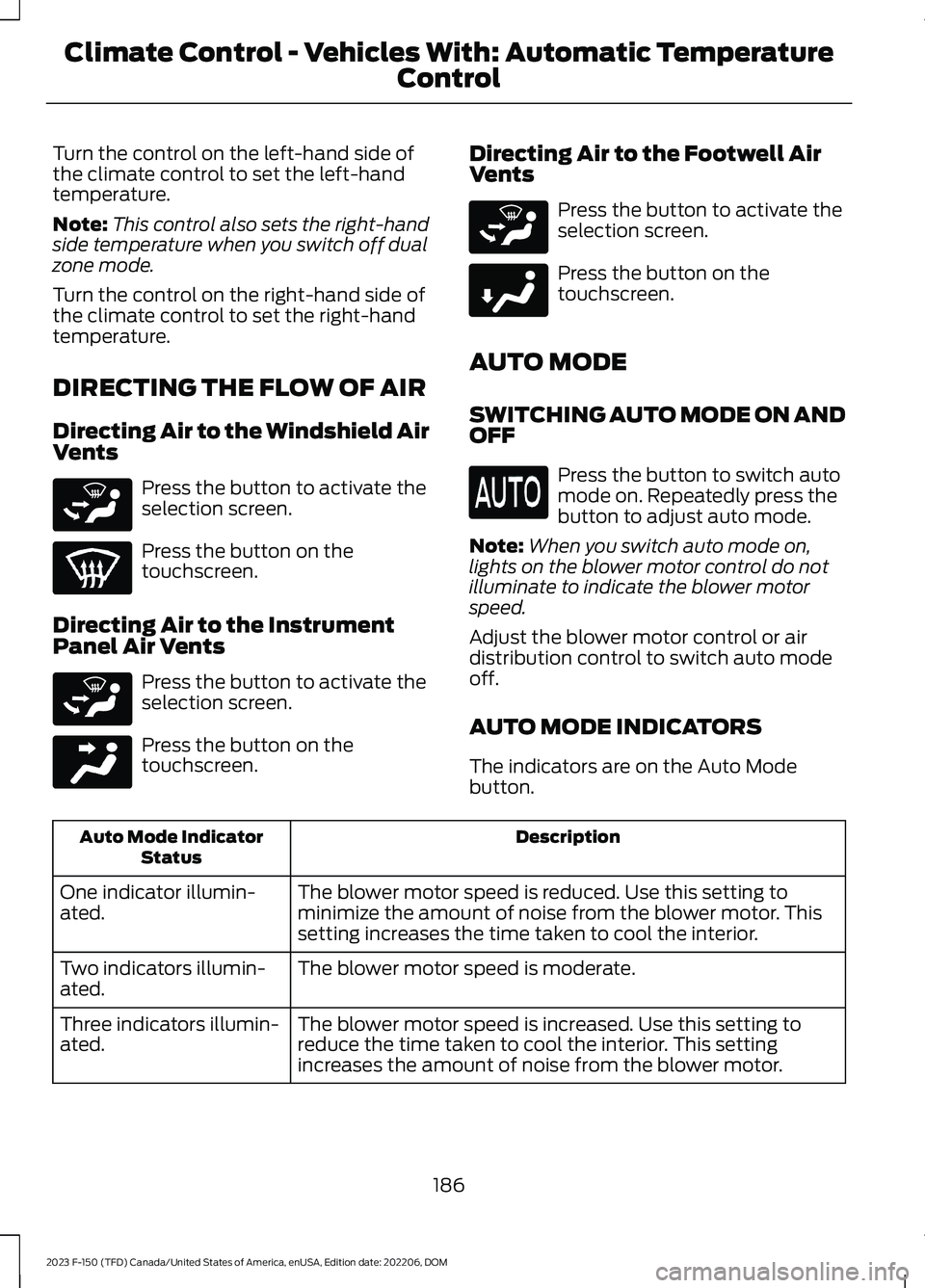
Turn the control on the left-hand side ofthe climate control to set the left-handtemperature.
Note:This control also sets the right-handside temperature when you switch off dualzone mode.
Turn the control on the right-hand side ofthe climate control to set the right-handtemperature.
DIRECTING THE FLOW OF AIR
Directing Air to the Windshield AirVents
Press the button to activate theselection screen.
Press the button on thetouchscreen.
Directing Air to the InstrumentPanel Air Vents
Press the button to activate theselection screen.
Press the button on thetouchscreen.
Directing Air to the Footwell AirVents
Press the button to activate theselection screen.
Press the button on thetouchscreen.
AUTO MODE
SWITCHING AUTO MODE ON ANDOFF
Press the button to switch automode on. Repeatedly press thebutton to adjust auto mode.
Note:When you switch auto mode on,lights on the blower motor control do notilluminate to indicate the blower motorspeed.
Adjust the blower motor control or airdistribution control to switch auto modeoff.
AUTO MODE INDICATORS
The indicators are on the Auto Modebutton.
DescriptionAuto Mode IndicatorStatus
The blower motor speed is reduced. Use this setting tominimize the amount of noise from the blower motor. Thissetting increases the time taken to cool the interior.
One indicator illumin-ated.
The blower motor speed is moderate.Two indicators illumin-ated.
The blower motor speed is increased. Use this setting toreduce the time taken to cool the interior. This settingincreases the amount of noise from the blower motor.
Three indicators illumin-ated.
186
2023 F-150 (TFD) Canada/United States of America, enUSA, Edition date: 202206, DOMClimate Control - Vehicles With: Automatic Temperature
ControlE265283 E265283 E244097 E265283 E244098
Page 191 of 786
SWITCHING DUAL MODE ON ANDOFF
Press the button.
CLIMATE CONTROL HINTS
General Hints
•Prolonged use of recirculated air maycause the windows to fog up.
•You may feel a small amount of airfrom the footwell air vents regardlessof the air distribution setting.
•To reduce humidity build-up inside yourvehicle, do not drive with the systemswitched off or with recirculated airalways switched on.
•Do not place objects under the frontseats as this may interfere with theairflow to the rear seats.
•Remove any snow, ice or leaves fromthe air intake area at the base of thewindshield.
•To improve the time to reach acomfortable temperature in hotweather, drive with the windows openuntil you feel cold air through the airvents.
Automatic Climate Control
•Adjusting the settings when yourvehicle interior is extremely hot or coldis not necessary. Automatic mode isbest recommended to maintain settemperature.
•The system adjusts to heat or cool theinterior to the temperature you selectas quickly as possible.
•For the system to function efficiently,the instrument panel and side air ventsshould be fully open.
•If you press AUTO during cold outsidetemperatures, the system directs airflow to the windshield and side windowair vents.In addition, the blower motormay run at a slower speed until theengine warms up.
•If you press AUTO during hottemperatures and the inside of thevehicle is hot, the system usesrecirculated air to maximize interiorcooling. Blower motor speed may alsoreduce until the air cools.
Quickly Heating the Interior
1.Press AUTO.
2.Adjust the temperature function to thesetting you prefer.
Recommended Settings forHeating
1.Press AUTO.
2.Adjust the temperature function to thesetting you prefer. Use 72°F (22°C) asa starting point, then adjust the settingas necessary.
Quickly Cooling the Interior
1.Press MAX A/C.
2.Drive with the windows open for a shortperiod of time.
Recommended Settings forCooling
1.Press AUTO.
2.Adjust the temperature function to thesetting you prefer. Use 72°F (22°C) asa starting point, then adjust the settingas necessary.
Defogging the Side Windows inCold Weather
1.Press and release defrost or maximumdefrost.
187
2023 F-150 (TFD) Canada/United States of America, enUSA, Edition date: 202206, DOMClimate Control - Vehicles With: Automatic Temperature
ControlE265280
Page 192 of 786
2.Adjust the temperature control to thesetting you prefer. Use 72°F (22°C) asa starting point, then adjust the settingas necessary.
188
2023 F-150 (TFD) Canada/United States of America, enUSA, Edition date: 202206, DOMClimate Control - Vehicles With: Automatic Temperature
Control
Page 193 of 786
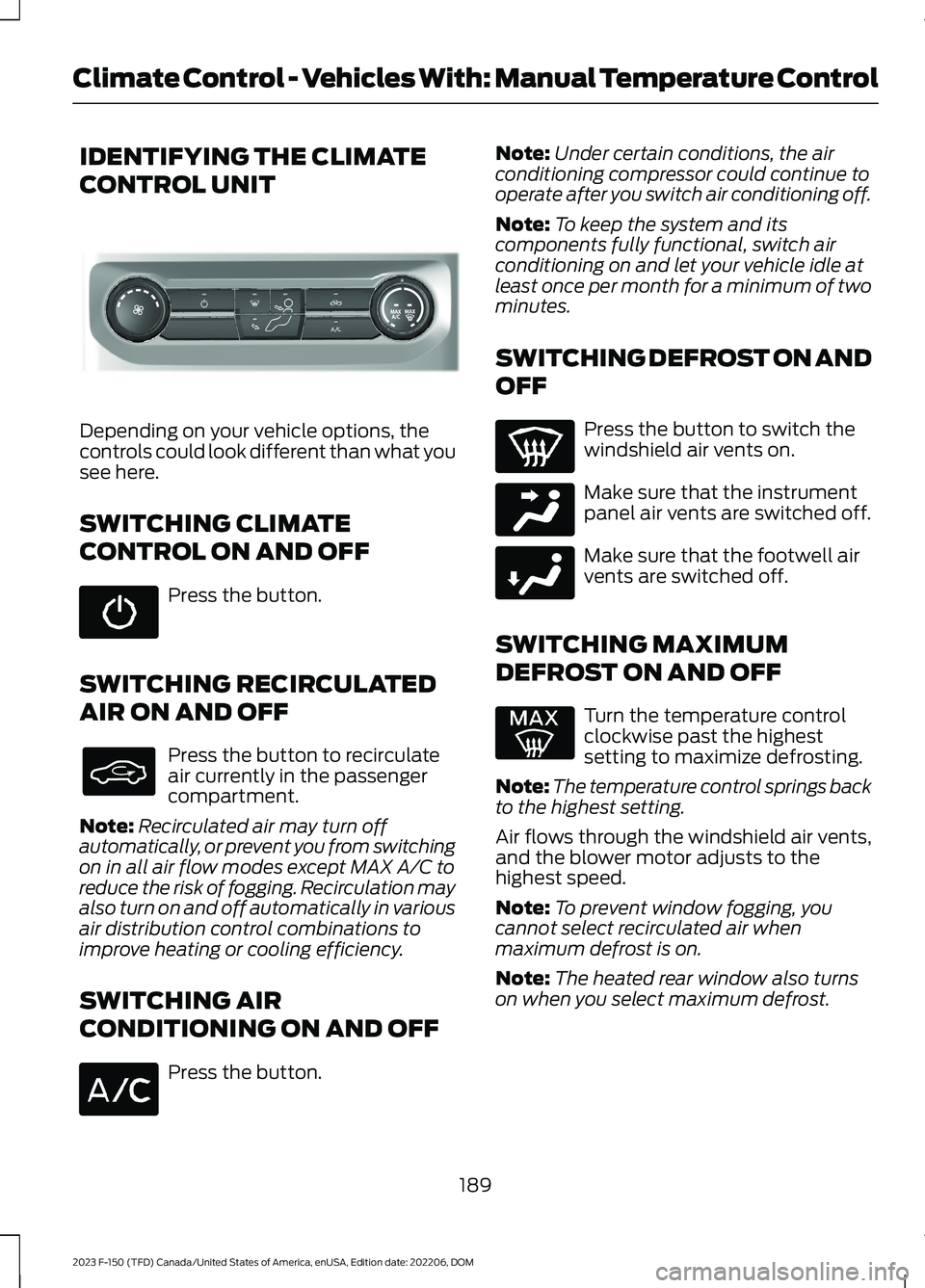
IDENTIFYING THE CLIMATE
CONTROL UNIT
Depending on your vehicle options, thecontrols could look different than what yousee here.
SWITCHING CLIMATE
CONTROL ON AND OFF
Press the button.
SWITCHING RECIRCULATED
AIR ON AND OFF
Press the button to recirculateair currently in the passengercompartment.
Note:Recirculated air may turn offautomatically, or prevent you from switchingon in all air flow modes except MAX A/C toreduce the risk of fogging. Recirculation mayalso turn on and off automatically in variousair distribution control combinations toimprove heating or cooling efficiency.
SWITCHING AIR
CONDITIONING ON AND OFF
Press the button.
Note:Under certain conditions, the airconditioning compressor could continue tooperate after you switch air conditioning off.
Note:To keep the system and itscomponents fully functional, switch airconditioning on and let your vehicle idle atleast once per month for a minimum of twominutes.
SWITCHING DEFROST ON AND
OFF
Press the button to switch thewindshield air vents on.
Make sure that the instrumentpanel air vents are switched off.
Make sure that the footwell airvents are switched off.
SWITCHING MAXIMUM
DEFROST ON AND OFF
Turn the temperature controlclockwise past the highestsetting to maximize defrosting.
Note:The temperature control springs backto the highest setting.
Air flows through the windshield air vents,and the blower motor adjusts to thehighest speed.
Note:To prevent window fogging, youcannot select recirculated air whenmaximum defrost is on.
Note:The heated rear window also turnson when you select maximum defrost.
189
2023 F-150 (TFD) Canada/United States of America, enUSA, Edition date: 202206, DOMClimate Control - Vehicles With: Manual Temperature ControlE308141 E244097 E244098
Page 194 of 786
SWITCHING MAXIMUM
COOLING ON AND OFF
Turn the temperature controlcounterclockwise past thelowest setting to maximizecooling.
Note:The temperature control springs backto the lowest setting.
Note:When you switch maximum coolingoff, air conditioning remains on.
SWITCHING THE HEATED
REAR WINDOW ON AND OFF
Press the button to clear the rearwindow of thin ice and fog. Theheated rear window turns offafter a short period of time.
Note:Do not use harsh chemicals, razorblades or other sharp objects to clean orremove decals from the inside of the heatedrear window as this could cause damage tothe heated rear window grid lines notcovered by the vehicle Warranty.
SETTING THE BLOWER MOTOR
SPEED
Note:Lights on the control illuminate toindicate the blower motor speed.
Note: When you switch the blower motoroff, air conditioning turns off and thewindows could fog up.
SWITCHING THE HEATED
MIRRORS ON AND OFF
Heated Mirrors
Press the button.
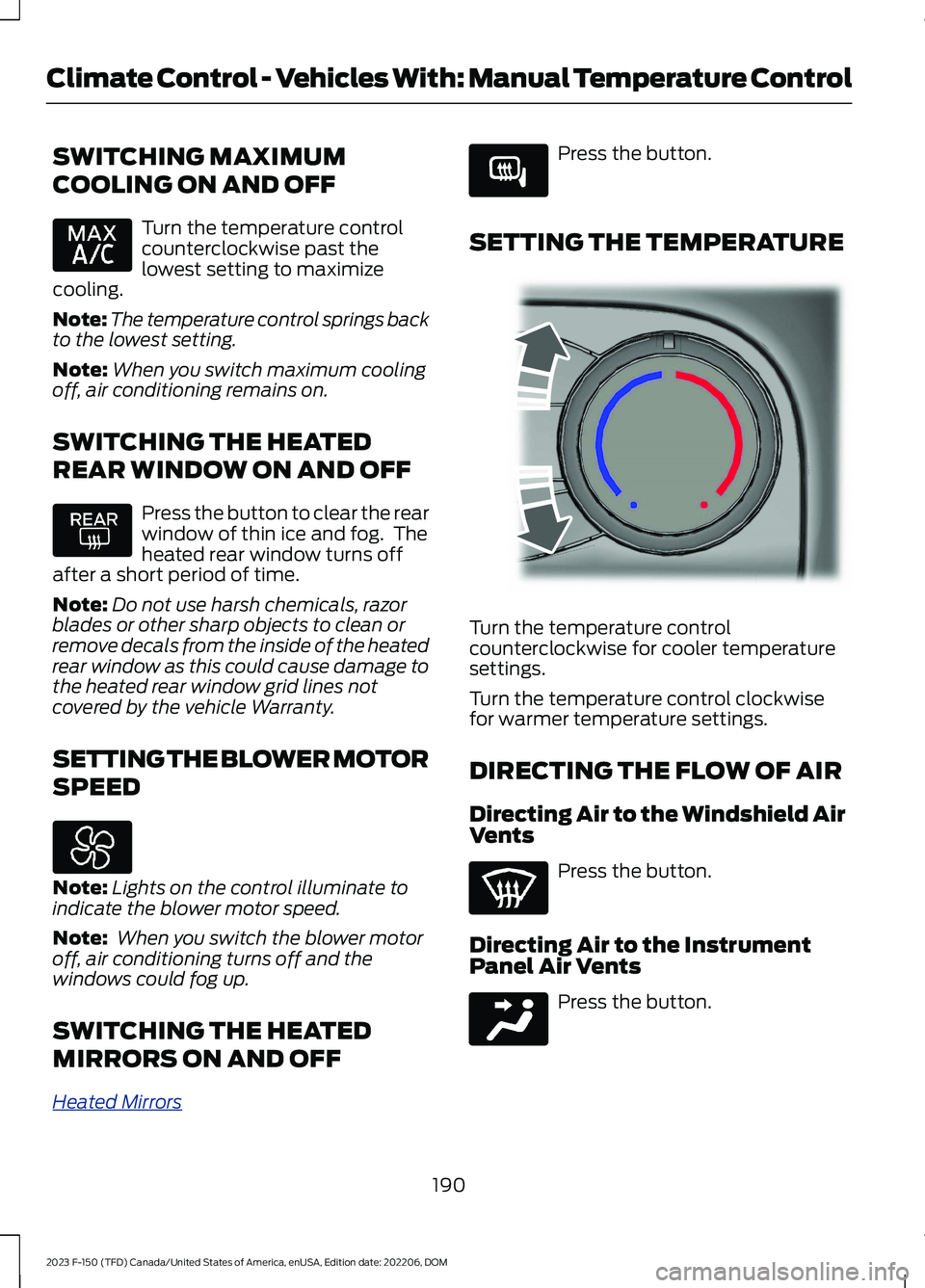
SETTING THE TEMPERATURE
Turn the temperature controlcounterclockwise for cooler temperaturesettings.
Turn the temperature control clockwisefor warmer temperature settings.
DIRECTING THE FLOW OF AIR
Directing Air to the Windshield AirVents
Press the button.
Directing Air to the InstrumentPanel Air Vents
Press the button.
190
2023 F-150 (TFD) Canada/United States of America, enUSA, Edition date: 202206, DOMClimate Control - Vehicles With: Manual Temperature Control E266189 E244106 E244097
Page 195 of 786
Directing Air to the Footwell AirVents
Press the button.
CLIMATE CONTROL HINTS
General Hints
•Prolonged use of recirculated air maycause the windows to fog up.
•You may feel a small amount of airfrom the footwell air vents regardlessof the air distribution setting.
•To reduce humidity build-up inside yourvehicle, do not drive with the systemswitched off or with recirculated airalways switched on.
•Do not place objects under the frontseats as this may interfere with theairflow to the rear seats.
•Remove any snow, ice or leaves fromthe air intake area at the base of thewindshield.
•To improve the time to reach acomfortable temperature in hotweather, drive with the windows openuntil you feel cold air through the airvents.
Quickly Heating the Interior
1.Adjust the blower motor speed to thehighest speed setting.
2.Adjust the temperature control to thehighest setting.
3.Direct air to the footwell air vents.
Recommended Settings forHeating
1.Adjust the blower motor speed to thecenter setting.
2.Adjust the temperature control to themidway point of the hot settings.
3.Direct air to the footwell air vents.
Quickly Cooling the Interior
1.Press MAX A/C.
2.Drive with the windows open for a shortperiod of time.
Recommended Settings forCooling
1.Adjust the blower motor speed to thecenter setting.
2.Adjust the temperature control to themidway point of the cold settings.
3.Direct air to the instrument panel airvents.
Defogging the Side Windows inCold Weather
1.Direct air to the instrument panel andwindshield air vents.
2.Press and release A/C.
3.Adjust the temperature control to thesetting you prefer.
4.Adjust the blower motor speed to thehighest setting.
5.Direct air toward the side windows.
6.Close the instrument panel air vents.
191
2023 F-150 (TFD) Canada/United States of America, enUSA, Edition date: 202206, DOMClimate Control - Vehicles With: Manual Temperature ControlE244098
Page 204 of 786
HEATED SEATS (IF EQUIPPED)
HEATED SEAT PRECAUTIONS
WARNING: Use caution when usingthe heated seat if you are unable to feelpain to your skin because of advancedage, chronic illness, diabetes, spinal cordinjury, medication, alcohol use,exhaustion or other physical conditions.The heated seat could cause burns evenat low temperatures, especially if usedfor long periods of time. Failure to followthis instruction could result in personalinjury.
WARNING: Do not poke sharpobjects into the seat cushion or seatbackrest. This could damage the heatedseat element and cause it to overheat.Failure to follow this instruction couldresult in personal injury.
WARNING: Do not place anythingon the seat that blocks the heat, forexample a seat cover or a cushion. Thiscould cause the seat to overheat. Failureto follow this instruction could result inpersonal injury.
Do not:
•Place heavy objects on the seat.
•Operate the heated seat if water or anyother liquid spills on the seat. Allow theseat to dry.
SWITCHING THE HEATED SEATSON AND OFF
The vehicle must be running to use thisfeature.
Press the heated seat symbol on theclimate controls or touchscreen to cyclethrough the various heat settings and off.The more indicators that display, thewarmer the temperature of the seat.
Note:The heated seats may remain onafter you remote start your vehicle, basedon your remote start settings. The heatedseats may also turn on when you start yourvehicle if they were on when you switchedyour vehicle off.
VENTILATED SEATS (IF EQUIPPED)
VENTILATED SEAT PRECAUTIONS
Do not:
•Spill liquid on the front seats. This maycause the air vent holes to becomeblocked and not work properly.
•Place cargo or objects under the seats.They may block the air intake causingthe air vents to not work properly.
SWITCHING THE VENTILATEDSEATS ON AND OFF
The vehicle must be running to use thisfeature.
200
2023 F-150 (TFD) Canada/United States of America, enUSA, Edition date: 202206, DOMFront SeatsE146322 E224689
Page 205 of 786
Press this symbol on the climate controlsor the touchscreen to cycle through thevarious ventilation settings and off. Moreindicator lights indicate higher fan speeds.
Note:When you switch the climate controlfan speed and the ventilated seats to theirmaximum settings, the ventilated seatsprovide increased cooling.
If the engine falls below 350 RPM whilethe ventilated seats are on, the featureturns itself off unless the vehicle is inAuto-Start-Stop mode. You may need toreactivate the ventilated seats.
Note:The ventilated seats may remain onafter you remote start your vehicle, basedon your remote start settings. The ventilatedseats may also turn on when you start yourvehicle if they were on when you switchedyour vehicle off.
201
2023 F-150 (TFD) Canada/United States of America, enUSA, Edition date: 202206, DOMFront Seats
Page 221 of 786

WHAT IS THE ONBOARD
GENERATOR
Pro-Power On-Board
The vehicle functions as a portablegenerator and can power devices thatrequire up to the rating listed on the poweroutlet label.
ONBOARD GENERATOR
PRECAUTIONS - VEHICLES
WITH: 2KW
WARNING: Do not connect anyvehicle power outlets to any premises.This can create a backfeed to utility lines.Failure to follow this instruction couldresult in property damage, fire, electricalshock or death.
WARNING: Do not keep electricaldevices plugged into the power outletwhenever the device is not in use. Theoutlet provides power when the vehicleis on. Failure to follow this instructioncould result in personal injury.
WARNING: Do not start the enginein a closed garage or in other enclosedareas. Exhaust fumes are toxic. Alwaysopen the garage door before you startthe engine. Failure to follow thisinstruction could result in personal injuryor death.
WARNING: Exhaust leaks mayresult in entry of harmful and potentiallylethal fumes into the passengercompartment. If you smell exhaustfumes inside your vehicle, have yourvehicle inspected immediately. Do notdrive if you smell exhaust fumes.
WARNING: The vehicle's engineruns while the generator is switched on.Running engines emit carbon monoxide.Only use the generator when the vehicleis outdoors. Failure to follow thisinstruction could result in personal injuryor death.
When you switch the power outlets on, thevehicle power down timer is disabled andthe vehicle continues to be powered on.
Note:We recommend using UL approveddevices for use with the power outlet.
Note:Make sure that plugged in devices donot exceed the ratings displayed on theoutlet covers.
Note:Unplug electrical devices from thepower outlet when they are not switchedon.
Note:Make sure there is no damage to theoutlets before driving your vehicle.
Note:Power could be limited duringextreme hot or cold temperatures tooptimize system performance.
Note:Close all outlet covers when not inuse.
Note:Automatic engine stop is disabledand the gasoline engine will continue to idlewhen the outlet is switched on.
Note:Make sure that objects are notblocking the inverter inlet and exhaust nearthe rear underseat storage compartment.
Note:The climate control system may turnon and power may be limited during extremehot or cold temperatures to optimize systemperformance.
Note:When the outlet is switched on andthe vehicle is in park (P) the engine turns off30 minutes after the low fuel warning isdisplayed. After the vehicle is turned off,generator mode only operates while drivingor until the vehicle is refueled.
217
2023 F-150 (TFD) Canada/United States of America, enUSA, Edition date: 202206, DOMOnboard Generator (If Equipped)