cruise control FORD F150 2023 User Guide
[x] Cancel search | Manufacturer: FORD, Model Year: 2023, Model line: F150, Model: FORD F150 2023Pages: 786, PDF Size: 23.15 MB
Page 291 of 786
Note:The electronic locking differential isfor off-road use only and is not for use ondry pavement. Using the electronic lockingdifferential on dry pavement results inincreased tire wear, noise and vibration.
Note:Do not perform this operation whencruise control or trail control are selectedand active. The system may not engage asexpected.
SWITCHING THE ELECTRONIC
LOCKING DIFFERENTIAL ON
AND OFF - RAPTOR
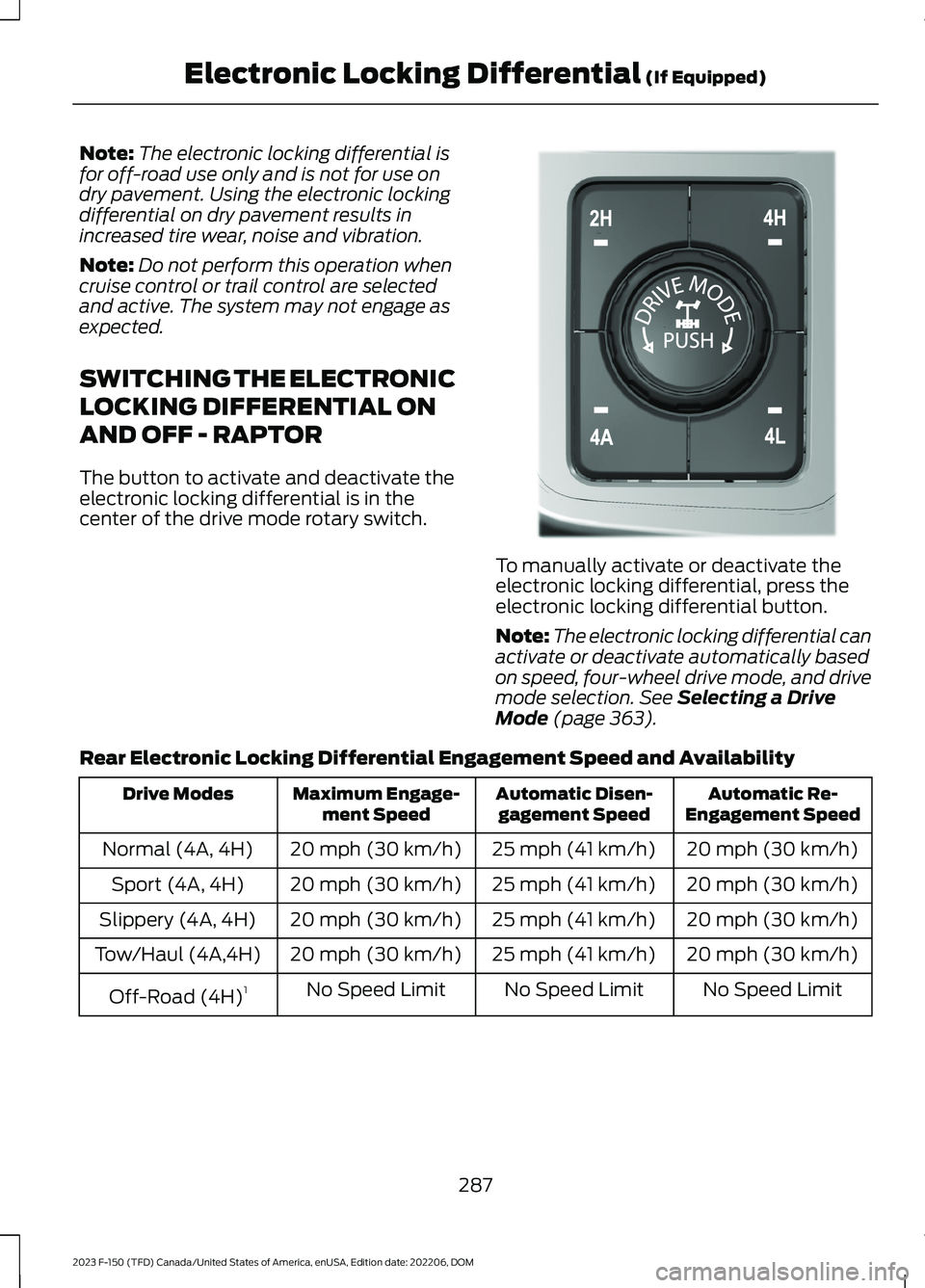
The button to activate and deactivate theelectronic locking differential is in thecenter of the drive mode rotary switch.
To manually activate or deactivate theelectronic locking differential, press theelectronic locking differential button.
Note:The electronic locking differential canactivate or deactivate automatically basedon speed, four-wheel drive mode, and drivemode selection. See Selecting a DriveMode (page 363).
Rear Electronic Locking Differential Engagement Speed and Availability
Automatic Re-Engagement SpeedAutomatic Disen-gagement SpeedMaximum Engage-ment SpeedDrive Modes
20 mph (30 km/h)25 mph (41 km/h)20 mph (30 km/h)Normal (4A, 4H)
20 mph (30 km/h)25 mph (41 km/h)20 mph (30 km/h)Sport (4A, 4H)
20 mph (30 km/h)25 mph (41 km/h)20 mph (30 km/h)Slippery (4A, 4H)
20 mph (30 km/h)25 mph (41 km/h)20 mph (30 km/h)Tow/Haul (4A,4H)
No Speed LimitNo Speed LimitNo Speed LimitOff-Road (4H)1
287
2023 F-150 (TFD) Canada/United States of America, enUSA, Edition date: 202206, DOMElectronic Locking Differential (If Equipped)E308146
Page 292 of 786
Automatic Re-Engagement SpeedAutomatic Disen-gagement SpeedMaximum Engage-ment SpeedDrive Modes
No Speed LimitNo Speed LimitNo Speed LimitBaja (4H)
No Speed LimitNo Speed LimitNo Speed LimitRock Crawl (4L)1
1Automatically engages when you select this drive mode. You have the ability to manuallyoverride the automatic engagement by pressing the electronic locking differential button.
Automatic Re-Engagement SpeedAutomatic Disen-gagement SpeedMaximum Engage-ment Speed4WD Mode
No speed LimitNo speed LimitNo speed LimitFour-Wheel DriveLow (4L)
Note:The electronic locking differentialmay not engage if you press your acceleratorpedal during an engagement attempt. Amessage could display in the instrumentdisplay guiding you to release theaccelerator pedal.
Note:If the electronic locking differentialhas difficulty disengaging, release theaccelerator pedal and turn the steeringwheel in the opposite direction while rolling.
Note:The electronic locking differential isfor off-road use only and is not for use ondry pavement. Using the electronic lockingdifferential on dry pavement results inincreased tire wear, noise and vibration.
Note:Do not perform this operation whencruise control or trail control are selectedand active. The system may not engage asexpected.
SWITCHING THE ELECTRONIC
LOCKING DIFFERENTIAL ON
AND OFF - 4X2
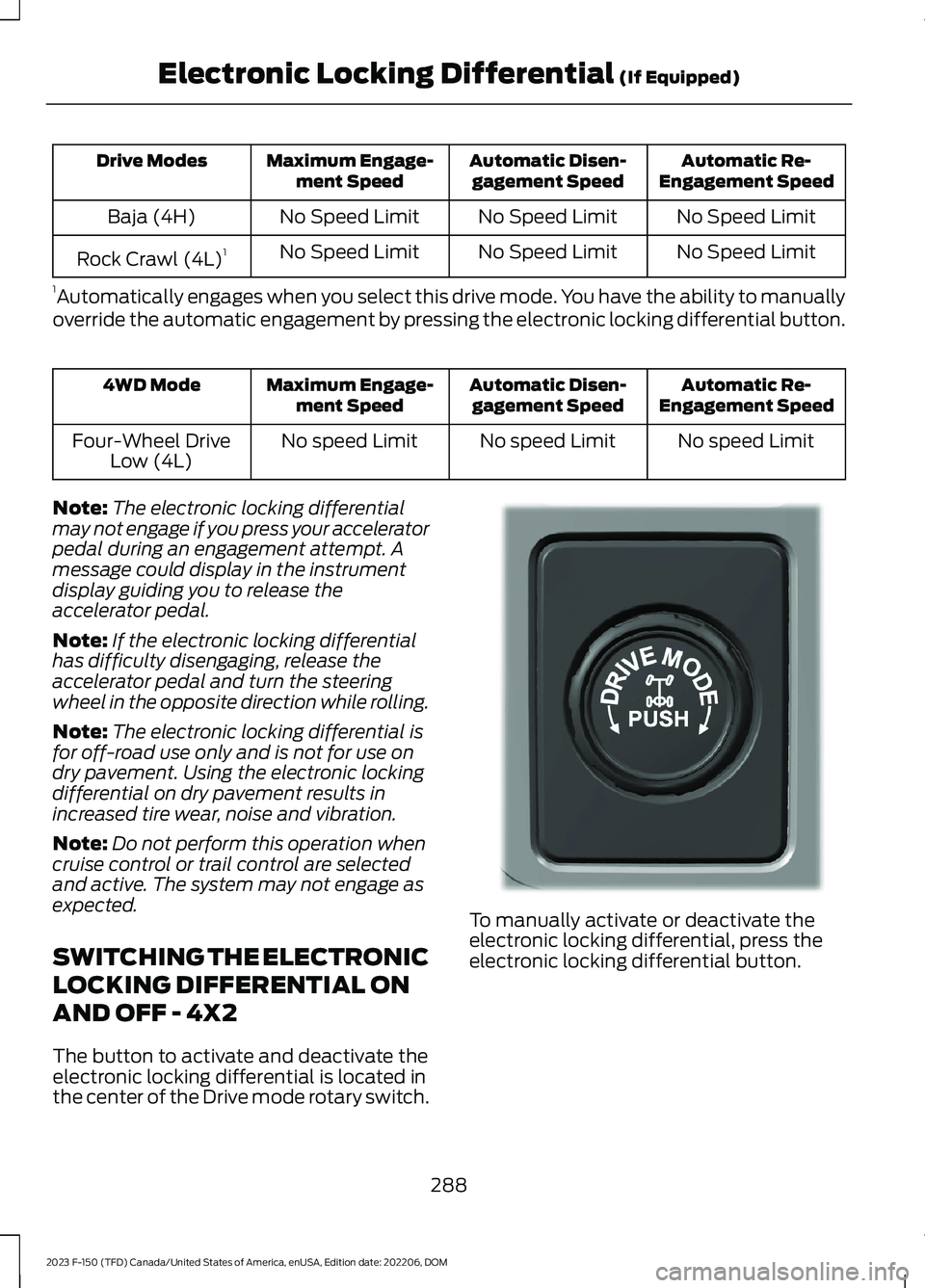
The button to activate and deactivate theelectronic locking differential is located inthe center of the Drive mode rotary switch.
To manually activate or deactivate theelectronic locking differential, press theelectronic locking differential button.
288
2023 F-150 (TFD) Canada/United States of America, enUSA, Edition date: 202206, DOMElectronic Locking Differential (If Equipped)E333748
Page 293 of 786
4X2 Rear Electronic Locking Differential Engagement Speed and Availability
Automatic Re-EngagementSpeedAutomatic DisengagementSpeedMaximum EngagementSpeed
20 mph (30 km/h)25 mph (41 km/h)20 mph (30 km/h)
Note:The electronic locking differentialmay not engage if you press your acceleratorpedal during an engagement attempt. Amessage could display in the instrumentdisplay guiding you to release theaccelerator pedal.
Note:If the electronic locking differentialhas difficulty disengaging, release theaccelerator pedal and turn the steeringwheel in the opposite direction while rolling.
Note:The electronic locking differential isfor off-road use only and is not for use ondry pavement. Using the electronic lockingdifferential on dry pavement results inincreased tire wear, noise and vibration.
Note:Do not perform this operation whencruise control or trail control are selectedand active. The system may not engage asexpected.
ELECTRONIC LOCKING
DIFFERENTIAL INDICATORS
If both rear wheel axle shaftslock together, the indicator in thecluster is amber, providingadditional traction.
If you select the electronic lockingdifferential and the indicator in the clusteris gray or turns from amber to gray whiledriving, one of the following has occurred:
•The vehicle speed is too high.
•The accelerator pedal is too high duringan engagement attempt.
•The vehicle is experiencing an anti-lockbrake activation.
•The left and right wheel speeddifference is too high during anengagement attempt.
•The system has malfunctioned andaccompanies a check lockingdifferential message in the informationdisplay. See your dealer as soon aspossible.
Note:If the vehicle is experiencing ananti-lock braking event, the electroniclocking differential could momentarilydisengage.
289
2023 F-150 (TFD) Canada/United States of America, enUSA, Edition date: 202206, DOMElectronic Locking Differential (If Equipped)E325779
Page 316 of 786
WHAT IS TRAIL CONTROL
WARNING: The system does notcontrol speed in low traction conditionsor extremely steep slopes. The systemis designed to be an aid and does notrelieve you of your responsibility to drivewith due care and attention. Failure tofollow this instruction could result inpersonal injury.
Trail control lets you focus on steeringduring low-speed and off-road use bycontrolling your vehicle's acceleration andbraking to maintain the speed that you set.
You may hear a noise from the anti-lockbrake system pump motor when you usethe system. This is normal.
TRAIL CONTROL LIMITATIONS
Trail control is unavailable when any of thefollowing occur:
•Your vehicle speed is greater than20 mph (32 km/h) in two-wheel drivehigh (2H) or four-wheel drive high (4H)modes.
•Your vehicle speed is greater than9 mph (15 km/h) in four-wheel drivelow (4L) mode.
•Your vehicle speed is greater than5 mph (8 km/h) in reverse (R).
•The transmission is in park (P).
•The driver side door is open or yourseatbelt is off when the driver side dooris removed.
•Cruise control is on.
•Pro trailer backup assist is on.
SWITCHING TRAIL CONTROL
ON AND OFF
Press the button.
The system switches off if you press thebutton again or exceed 40 mph (64 km/h).
SETTING THE TRAIL CONTROL
SPEED
Note:The buttons are located on thesteering wheel.
Drive to your preferred speed.
Press button to increase the setcurrent speed.
Press button to decrease the setcurrent speed.
Note:The indicator changes color.
You can adjust the set speed in small orlarge increments. Press the toggle buttonupward or downward once to adjust theset speed in small increments. Press andhold the toggle button upward ordownward to adjust the set speed in largeincrements.
You can also adjust the set speed bybraking.
Note:Pressing the brake pedal does notswitch off the system.
CANCELING THE SET SPEED
Press the button.
312
2023 F-150 (TFD) Canada/United States of America, enUSA, Edition date: 202206, DOMTrail Control - Raptor/Tremor (If Equipped)E332910 E246884 E246885 E350925
Page 317 of 786
TRAIL CONTROL INDICATORS
TRAIL ONE PEDAL DRIVE
WHAT IS TRAIL ONE PEDAL DRIVE
Trail one pedal drive allows you toaccelerate and brake using only theaccelerator pedal. The system assistswhen driving through difficult off-roadterrain. Pressing the accelerator pedaldown accelerates your vehicle andreleasing pressure on the acceleratorpedal, with your foot still on the pedal,slows your vehicle down. Releasing theaccelerator pedal may allow your vehicleto come to a complete stop, somesituations may require you to press thebrake pedal to come to a complete stop.
TRAIL ONE PEDAL DRIVEPRECAUTIONS
WARNING: This system is an extradriving aid. It does not replace yourattention and judgment, or the need toapply the brakes. This system does NOTautomatically brake your vehicle. If youfail to press the brake pedal whennecessary, you may collide with anothervehicle.
Shifting into drive (D) or reverse (R) doesnot cause the vehicle to move.
You can press the brake pedal to increasebraking. This does not turn the system off.
Trail one pedal drive could apply theparking brake when your vehicle is notmoving and not in park (P).
Note:Always check the transmissionselection before accelerating.
Note:Only use trail one pedal drive onslippery or loose surfaces. Using trail onepedal drive on dry, hard surfaces couldproduce some vibration, driveline bind upand potential excessive tire and vehiclewear.
TRAIL ONE PEDAL DRIVELIMITATIONS
Trail one pedal drive is unavailable whenany of the following occur:
•Your vehicle is not in four-wheel drivehigh (4H) or four-wheel drive low (4L)modes.
•Using cruise control.
•Using trail control.
•You exceed 30 mph (48 km/h).
Releasing the accelerator pedal may allowyour vehicle to come to a complete stop,some situations may require you to pressthe brake pedal to come to a completestop.
SWITCHING TRAIL ONE PEDALDRIVE ON AND OFF
Switching Trail One Pedal Drive On
Press the trail features buttonwhen in four-wheel drive high orfour-wheel drive low to activatetrail one pedal drive.
Switching Trail One Pedal DriveOff
Press the trail features button again toswitch trail one pedal drive off.
Selecting a driveline mode other thanfour-wheel drive high or four-wheel drivelow switches trail one pedal drive off.
313
2023 F-150 (TFD) Canada/United States of America, enUSA, Edition date: 202206, DOMTrail Control - Raptor/Tremor (If Equipped)E272858 E332910
Page 319 of 786
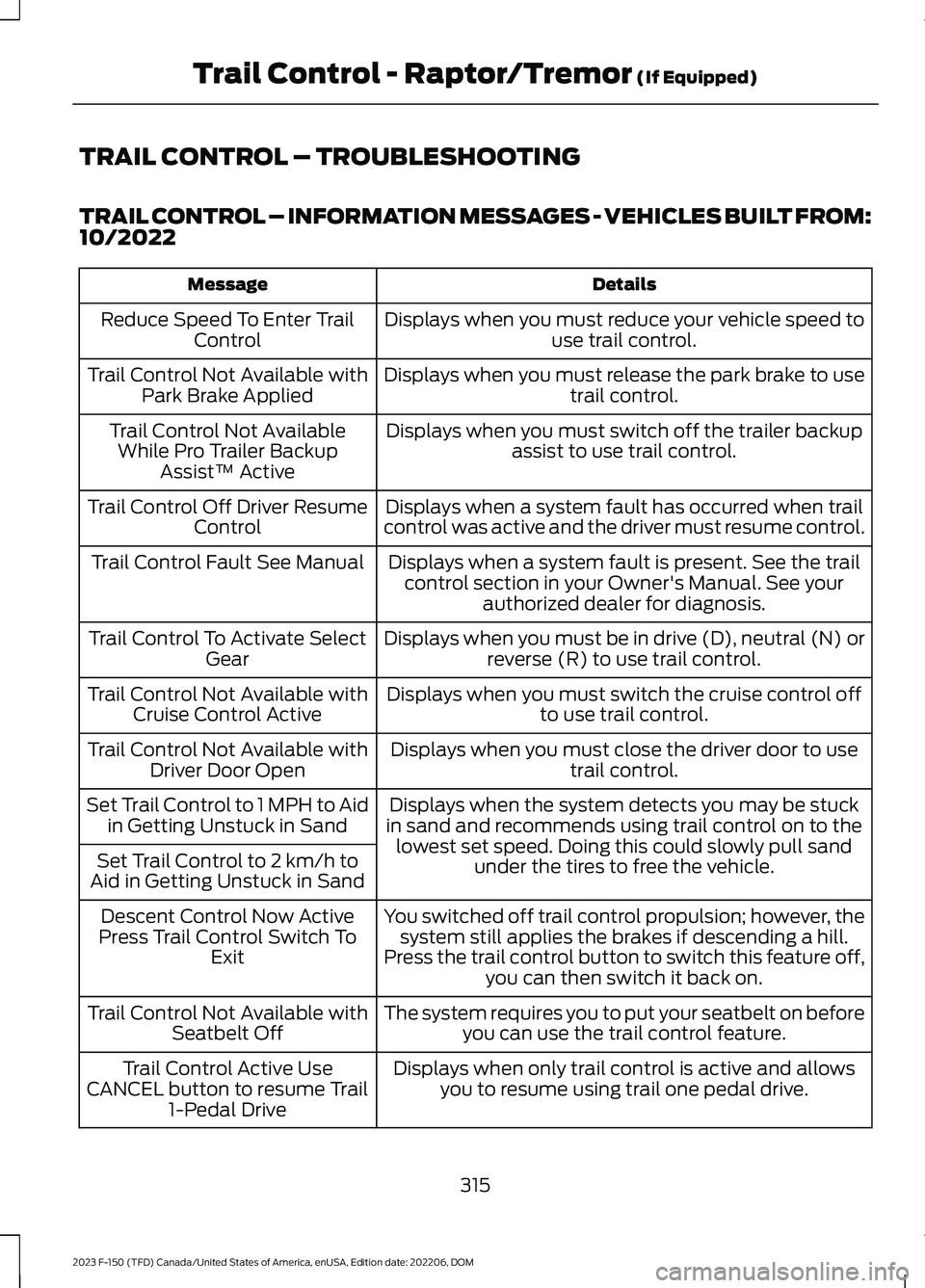
TRAIL CONTROL – TROUBLESHOOTING
TRAIL CONTROL – INFORMATION MESSAGES - VEHICLES BUILT FROM:10/2022
DetailsMessage
Displays when you must reduce your vehicle speed touse trail control.Reduce Speed To Enter TrailControl
Displays when you must release the park brake to usetrail control.Trail Control Not Available withPark Brake Applied
Displays when you must switch off the trailer backupassist to use trail control.Trail Control Not AvailableWhile Pro Trailer BackupAssist™ Active
Displays when a system fault has occurred when trailcontrol was active and the driver must resume control.Trail Control Off Driver ResumeControl
Displays when a system fault is present. See the trailcontrol section in your Owner's Manual. See yourauthorized dealer for diagnosis.
Trail Control Fault See Manual
Displays when you must be in drive (D), neutral (N) orreverse (R) to use trail control.Trail Control To Activate SelectGear
Displays when you must switch the cruise control offto use trail control.Trail Control Not Available withCruise Control Active
Displays when you must close the driver door to usetrail control.Trail Control Not Available withDriver Door Open
Displays when the system detects you may be stuckin sand and recommends using trail control on to thelowest set speed. Doing this could slowly pull sandunder the tires to free the vehicle.
Set Trail Control to 1 MPH to Aidin Getting Unstuck in Sand
Set Trail Control to 2 km/h toAid in Getting Unstuck in Sand
You switched off trail control propulsion; however, thesystem still applies the brakes if descending a hill.Press the trail control button to switch this feature off,you can then switch it back on.
Descent Control Now ActivePress Trail Control Switch ToExit
The system requires you to put your seatbelt on beforeyou can use the trail control feature.Trail Control Not Available withSeatbelt Off
Displays when only trail control is active and allowsyou to resume using trail one pedal drive.Trail Control Active UseCANCEL button to resume Trail1-Pedal Drive
315
2023 F-150 (TFD) Canada/United States of America, enUSA, Edition date: 202206, DOMTrail Control - Raptor/Tremor (If Equipped)
Page 323 of 786
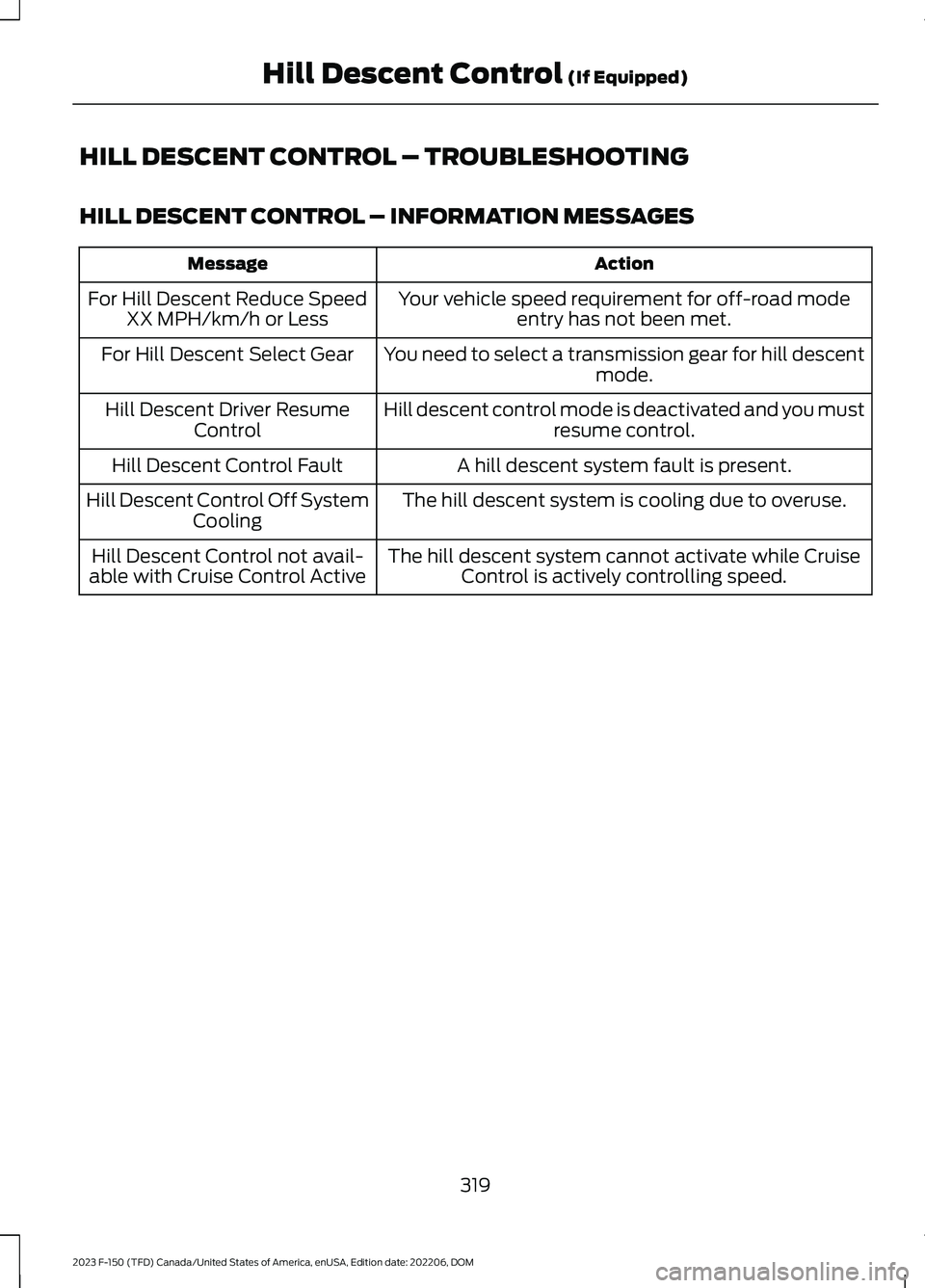
HILL DESCENT CONTROL – TROUBLESHOOTING
HILL DESCENT CONTROL – INFORMATION MESSAGES
ActionMessage
Your vehicle speed requirement for off-road modeentry has not been met.For Hill Descent Reduce SpeedXX MPH/km/h or Less
You need to select a transmission gear for hill descentmode.For Hill Descent Select Gear
Hill descent control mode is deactivated and you mustresume control.Hill Descent Driver ResumeControl
A hill descent system fault is present.Hill Descent Control Fault
The hill descent system is cooling due to overuse.Hill Descent Control Off SystemCooling
The hill descent system cannot activate while CruiseControl is actively controlling speed.Hill Descent Control not avail-able with Cruise Control Active
319
2023 F-150 (TFD) Canada/United States of America, enUSA, Edition date: 202206, DOMHill Descent Control (If Equipped)
Page 344 of 786
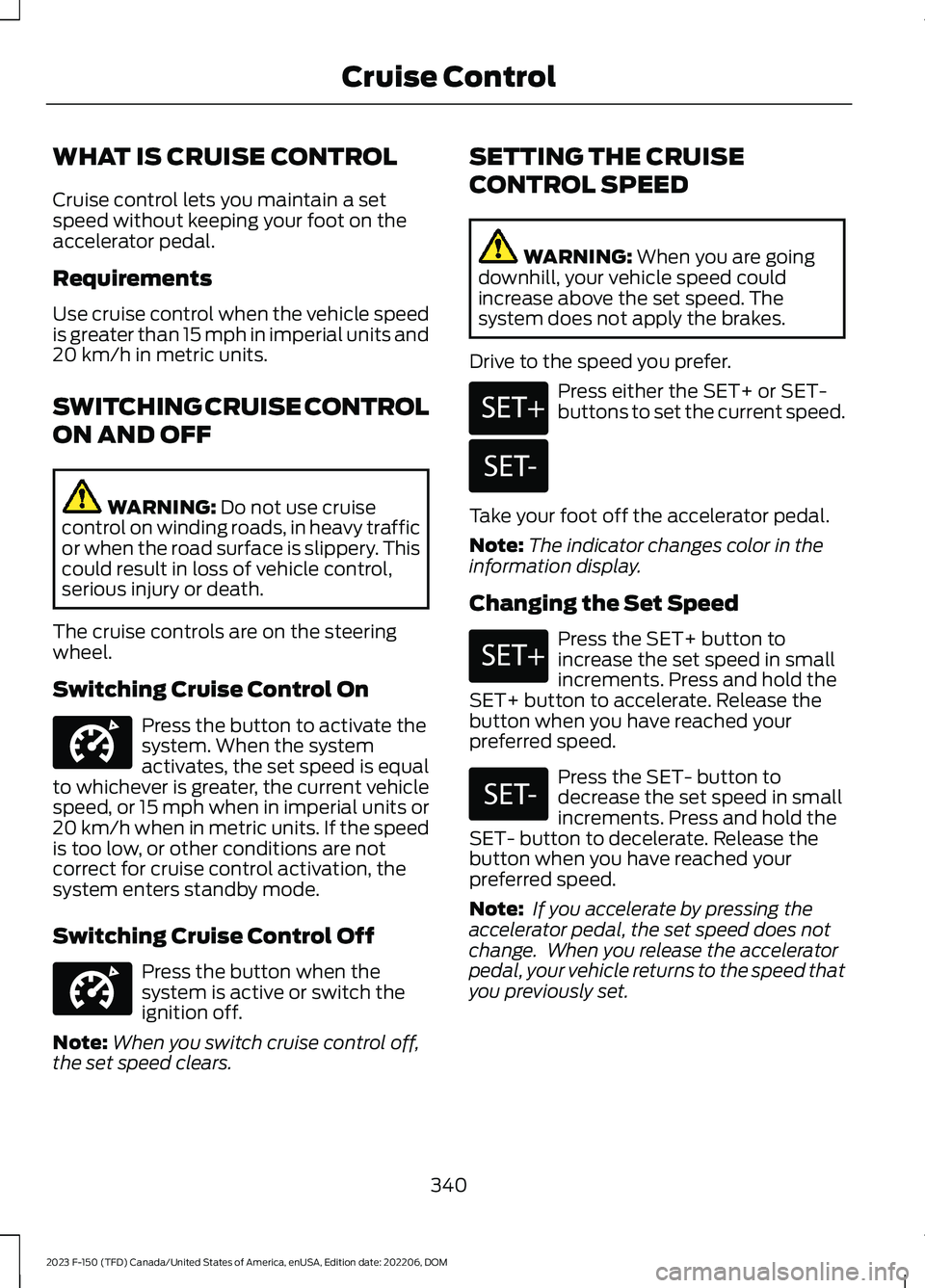
WHAT IS CRUISE CONTROL
Cruise control lets you maintain a setspeed without keeping your foot on theaccelerator pedal.
Requirements
Use cruise control when the vehicle speedis greater than 15 mph in imperial units and20 km/h in metric units.
SWITCHING CRUISE CONTROL
ON AND OFF
WARNING: Do not use cruisecontrol on winding roads, in heavy trafficor when the road surface is slippery. Thiscould result in loss of vehicle control,serious injury or death.
The cruise controls are on the steeringwheel.
Switching Cruise Control On
Press the button to activate thesystem. When the systemactivates, the set speed is equalto whichever is greater, the current vehiclespeed, or 15 mph when in imperial units or20 km/h when in metric units. If the speedis too low, or other conditions are notcorrect for cruise control activation, thesystem enters standby mode.
Switching Cruise Control Off
Press the button when thesystem is active or switch theignition off.
Note:When you switch cruise control off,the set speed clears.
SETTING THE CRUISE
CONTROL SPEED
WARNING: When you are goingdownhill, your vehicle speed couldincrease above the set speed. Thesystem does not apply the brakes.
Drive to the speed you prefer.
Press either the SET+ or SET-buttons to set the current speed.
Take your foot off the accelerator pedal.
Note:The indicator changes color in theinformation display.
Changing the Set Speed
Press the SET+ button toincrease the set speed in smallincrements. Press and hold theSET+ button to accelerate. Release thebutton when you have reached yourpreferred speed.
Press the SET- button todecrease the set speed in smallincrements. Press and hold theSET- button to decelerate. Release thebutton when you have reached yourpreferred speed.
Note: If you accelerate by pressing theaccelerator pedal, the set speed does notchange. When you release the acceleratorpedal, your vehicle returns to the speed thatyou previously set.
340
2023 F-150 (TFD) Canada/United States of America, enUSA, Edition date: 202206, DOMCruise ControlE332905 E332905 E246884 E246885 E246884 E246885
Page 345 of 786
CANCELING THE SET SPEED
Press the button, or tap thebrake pedal to cancel the setspeed.
Note:The system remembers the setspeed.
Note:The system cancels if the vehiclespeed drops below 10 mph (16 km/h) underthe set speed when driving uphill.
RESUMING THE SET SPEED
Press the button.
CRUISE CONTROL
INDICATORS
Illuminates when you switch thesystem on.
341
2023 F-150 (TFD) Canada/United States of America, enUSA, Edition date: 202206, DOMCruise ControlE308130 E308130 E71340
Page 346 of 786
HOW DOES ADAPTIVE CRUISE
CONTROL WITH STOP AND GO
WORK
Adaptive cruise control with stop and gouses radar and camera sensors to maintaina set gap between your vehicle and thevehicle in front of you while following it toa complete stop. Stop and go can also beset to follow a vehicle directly in front ofyou and adjust the set speed, while you areat a complete stop.
ADAPTIVE CRUISE CONTROL
PRECAUTIONS
WARNING: You are responsible forcontrolling your vehicle at all times. Thesystem is designed to be an aid and doesnot relieve you of your responsibility todrive with due care and attention. Failureto follow this instruction could result inthe loss of control of your vehicle,personal injury or death.
WARNING: Do not use adaptivecruise control on winding roads, in heavytraffic or when the road surface isslippery. This could result in loss ofvehicle control, serious injury or death.
WARNING: Pay close attention tochanging road conditions such asentering or leaving a highway, on roadswith intersections or roundabouts, roadswithout visible lanes of travel, roads thatare unpaved, or steep slopes. Failure tofollow this instruction could result in theloss of control of your vehicle, personalinjury or death.
WARNING: The system is not acrash warning or avoidance system.
WARNING: Do not use the systemwhen towing a trailer that hasaftermarket electronic trailer brakecontrols. Failure to follow this instructioncould result in the loss of control of yourvehicle, personal injury or death.
WARNING: Do not use tire sizesother than those recommended becausethis can affect the normal operation ofthe system. Failure to do so may resultin a loss of vehicle control, which couldresult in serious injury.
WARNING: Do not use the systemwith a snow plow blade installed.
WARNING: Do not use the systemin poor visibility, for example fog, heavyrain, spray or snow.
When Following a Vehicle
WARNING: When following avehicle that is braking, your vehicle doesnot always decelerate quickly enough toavoid a crash without driver intervention.Apply the brakes when necessary. Failureto follow this instruction could result inpersonal injury or death.
Hilly Condition Usage
Select a lower gear when the system isactive in situations such as prolongeddownhill driving on steep slopes, forexample in mountainous areas.
342
2023 F-150 (TFD) Canada/United States of America, enUSA, Edition date: 202206, DOMAdaptive Cruise Control (If Equipped)