engine oil FORD F150 2023 User Guide
[x] Cancel search | Manufacturer: FORD, Model Year: 2023, Model line: F150, Model: FORD F150 2023Pages: 786, PDF Size: 23.15 MB
Page 503 of 786
3.Raise the hood until the lift cylindershold it open.
4.To close, lower the hood and makesure that it fully latches.
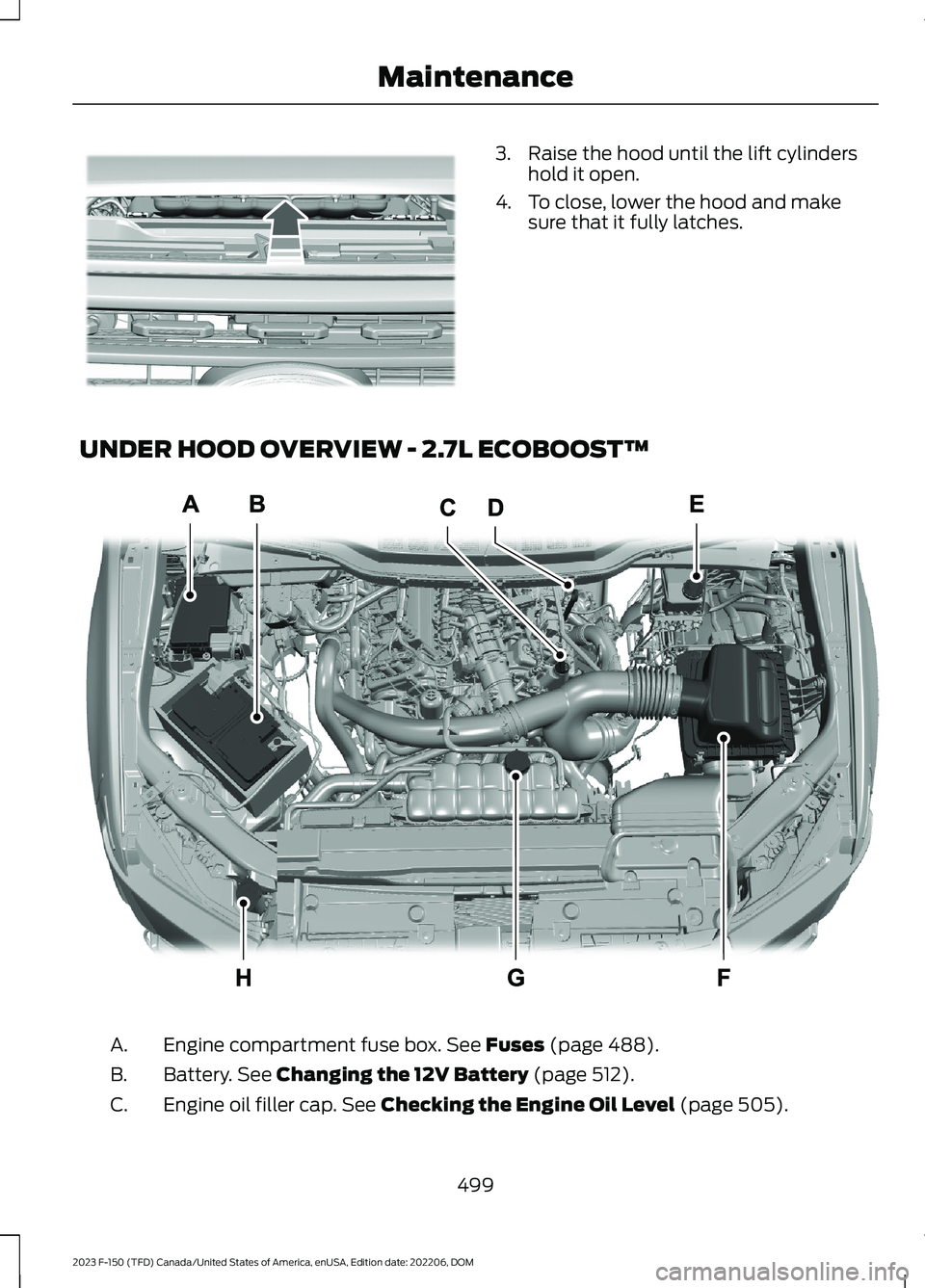
UNDER HOOD OVERVIEW - 2.7L ECOBOOST™
Engine compartment fuse box. See Fuses (page 488).A.
Battery. See Changing the 12V Battery (page 512).B.
Engine oil filler cap. See Checking the Engine Oil Level (page 505).C.
499
2023 F-150 (TFD) Canada/United States of America, enUSA, Edition date: 202206, DOMMaintenanceE338089 E337516
Page 504 of 786
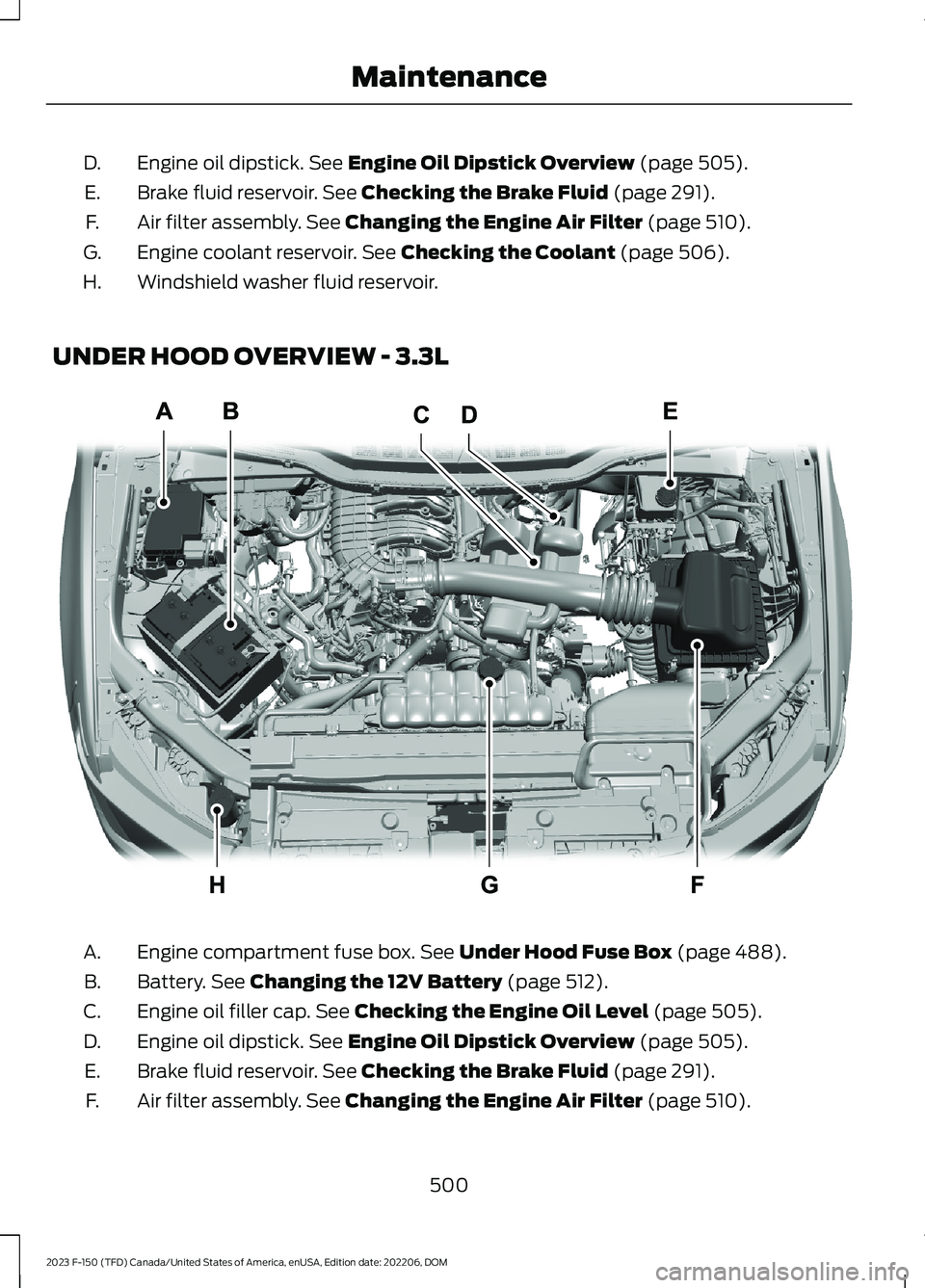
Engine oil dipstick. See Engine Oil Dipstick Overview (page 505).D.
Brake fluid reservoir. See Checking the Brake Fluid (page 291).E.
Air filter assembly. See Changing the Engine Air Filter (page 510).F.
Engine coolant reservoir. See Checking the Coolant (page 506).G.
Windshield washer fluid reservoir.H.
UNDER HOOD OVERVIEW - 3.3L
Engine compartment fuse box. See Under Hood Fuse Box (page 488).A.
Battery. See Changing the 12V Battery (page 512).B.
Engine oil filler cap. See Checking the Engine Oil Level (page 505).C.
Engine oil dipstick. See Engine Oil Dipstick Overview (page 505).D.
Brake fluid reservoir. See Checking the Brake Fluid (page 291).E.
Air filter assembly. See Changing the Engine Air Filter (page 510).F.
500
2023 F-150 (TFD) Canada/United States of America, enUSA, Edition date: 202206, DOMMaintenanceE337514
Page 505 of 786
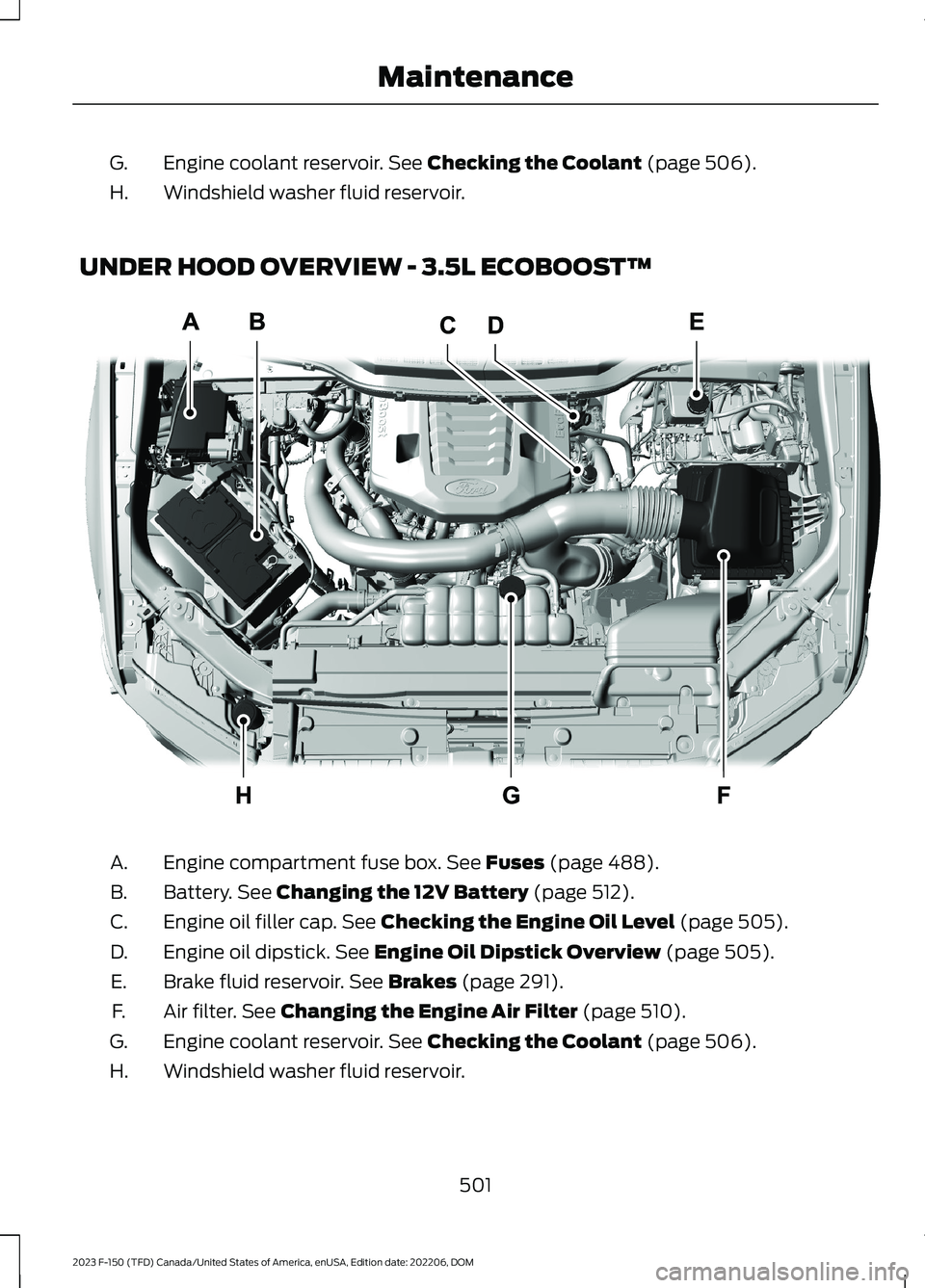
Engine coolant reservoir. See Checking the Coolant (page 506).G.
Windshield washer fluid reservoir.H.
UNDER HOOD OVERVIEW - 3.5L ECOBOOST™
Engine compartment fuse box. See Fuses (page 488).A.
Battery. See Changing the 12V Battery (page 512).B.
Engine oil filler cap. See Checking the Engine Oil Level (page 505).C.
Engine oil dipstick. See Engine Oil Dipstick Overview (page 505).D.
Brake fluid reservoir. See Brakes (page 291).E.
Air filter. See Changing the Engine Air Filter (page 510).F.
Engine coolant reservoir. See Checking the Coolant (page 506).G.
Windshield washer fluid reservoir.H.
501
2023 F-150 (TFD) Canada/United States of America, enUSA, Edition date: 202206, DOMMaintenanceE313722
Page 506 of 786
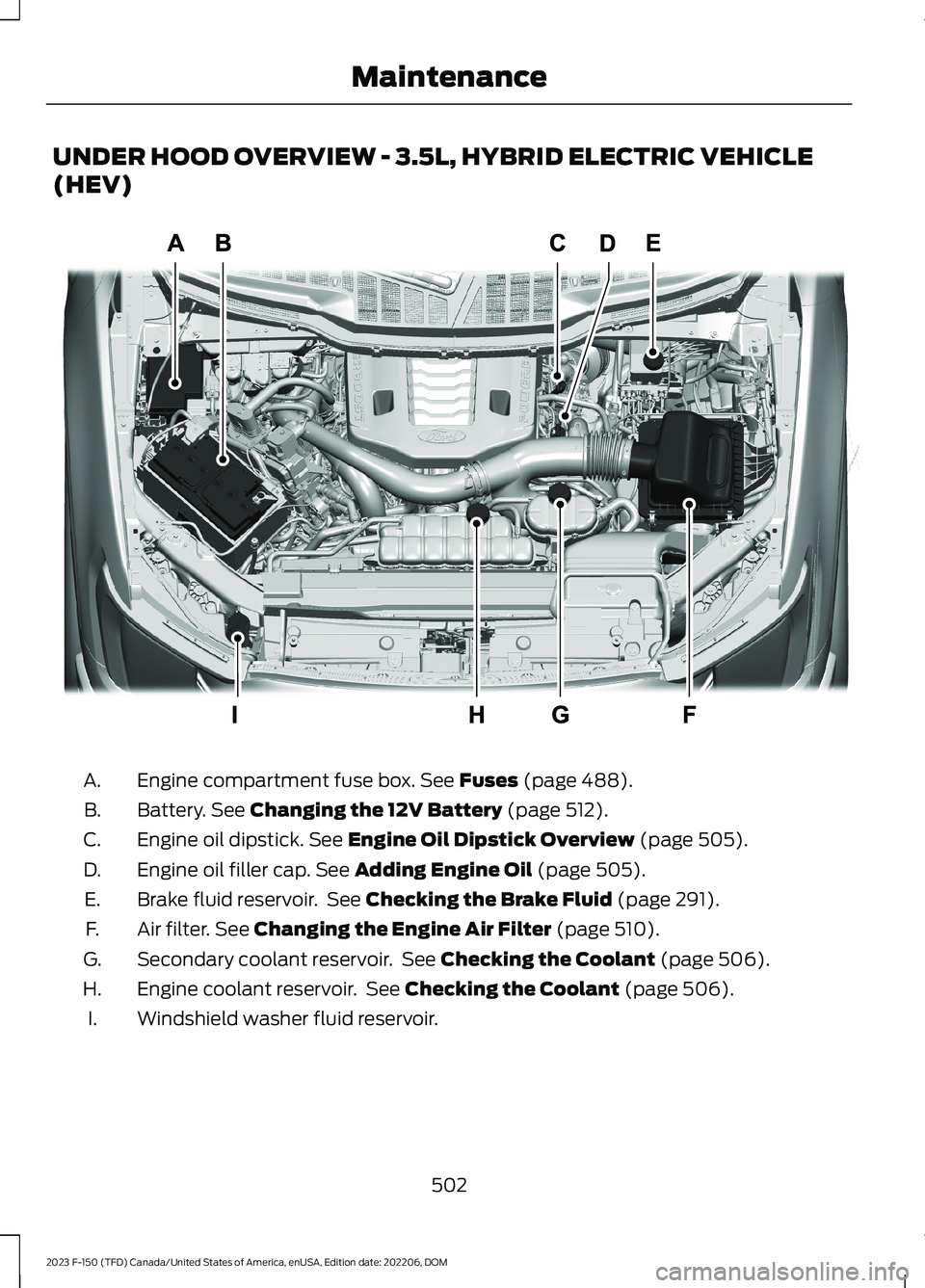
UNDER HOOD OVERVIEW - 3.5L, HYBRID ELECTRIC VEHICLE
(HEV)
Engine compartment fuse box. See Fuses (page 488).A.
Battery. See Changing the 12V Battery (page 512).B.
Engine oil dipstick. See Engine Oil Dipstick Overview (page 505).C.
Engine oil filler cap. See Adding Engine Oil (page 505).D.
Brake fluid reservoir. See Checking the Brake Fluid (page 291).E.
Air filter. See Changing the Engine Air Filter (page 510).F.
Secondary coolant reservoir. See Checking the Coolant (page 506).G.
Engine coolant reservoir. See Checking the Coolant (page 506).H.
Windshield washer fluid reservoir.I.
502
2023 F-150 (TFD) Canada/United States of America, enUSA, Edition date: 202206, DOMMaintenanceE333718
Page 507 of 786
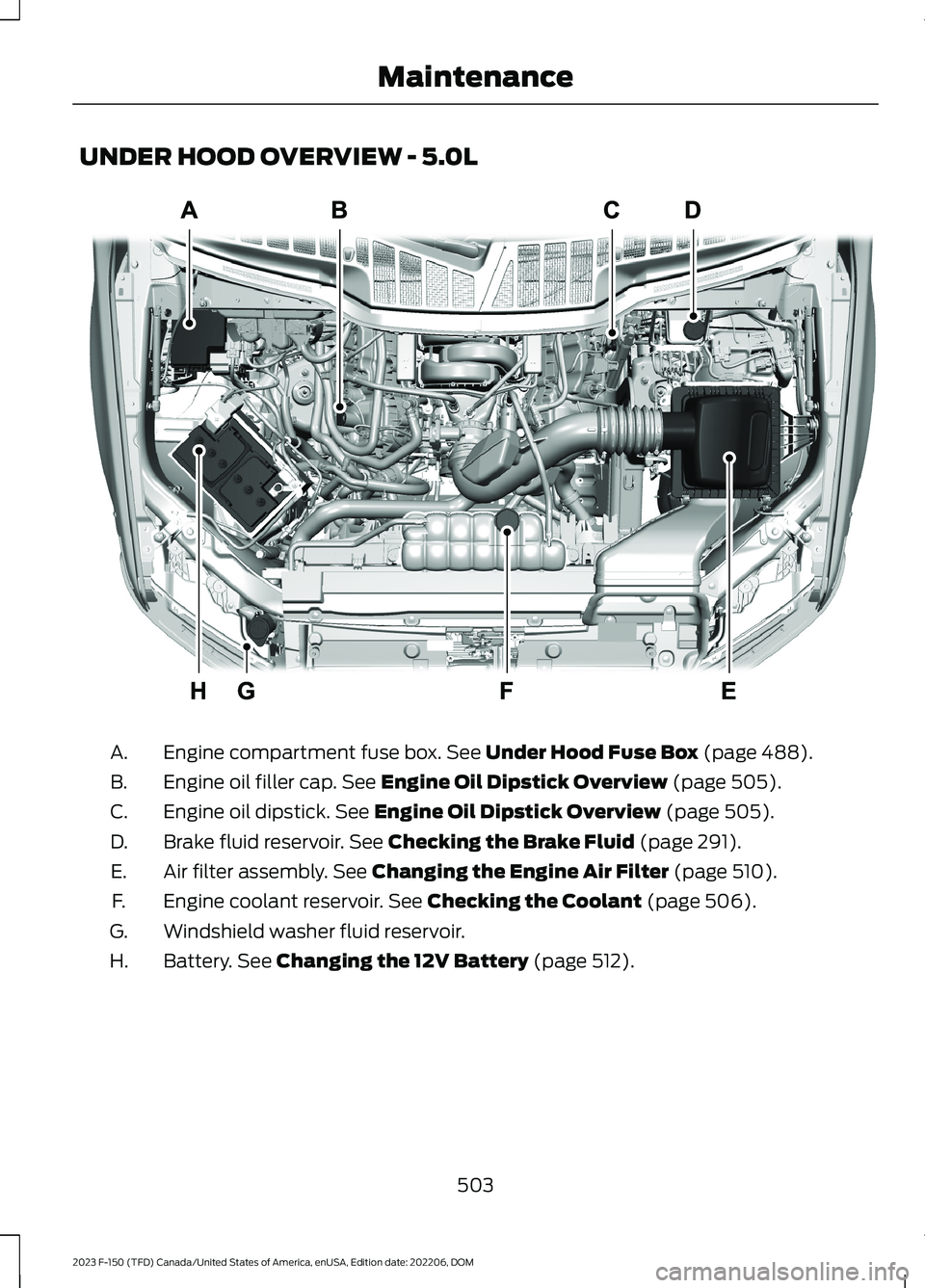
UNDER HOOD OVERVIEW - 5.0L
Engine compartment fuse box. See Under Hood Fuse Box (page 488).A.
Engine oil filler cap. See Engine Oil Dipstick Overview (page 505).B.
Engine oil dipstick. See Engine Oil Dipstick Overview (page 505).C.
Brake fluid reservoir. See Checking the Brake Fluid (page 291).D.
Air filter assembly. See Changing the Engine Air Filter (page 510).E.
Engine coolant reservoir. See Checking the Coolant (page 506).F.
Windshield washer fluid reservoir.G.
Battery. See Changing the 12V Battery (page 512).H.
503
2023 F-150 (TFD) Canada/United States of America, enUSA, Edition date: 202206, DOMMaintenanceE346494
Page 508 of 786
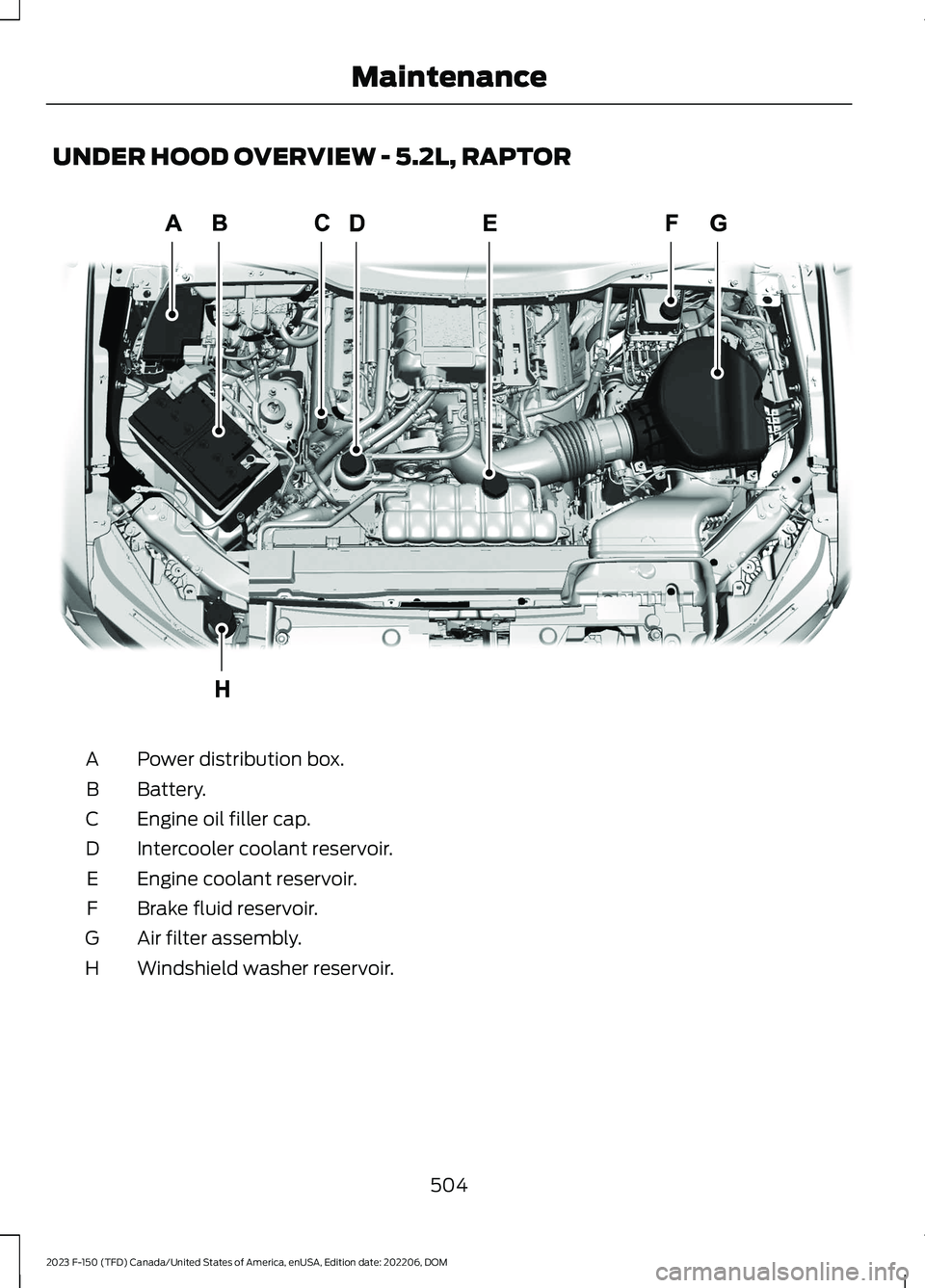
UNDER HOOD OVERVIEW - 5.2L, RAPTOR
Power distribution box.A
Battery.B
Engine oil filler cap.C
Intercooler coolant reservoir.D
Engine coolant reservoir.E
Brake fluid reservoir.F
Air filter assembly.G
Windshield washer reservoir.H
504
2023 F-150 (TFD) Canada/United States of America, enUSA, Edition date: 202206, DOMMaintenanceE364310
Page 509 of 786
ENGINE OIL
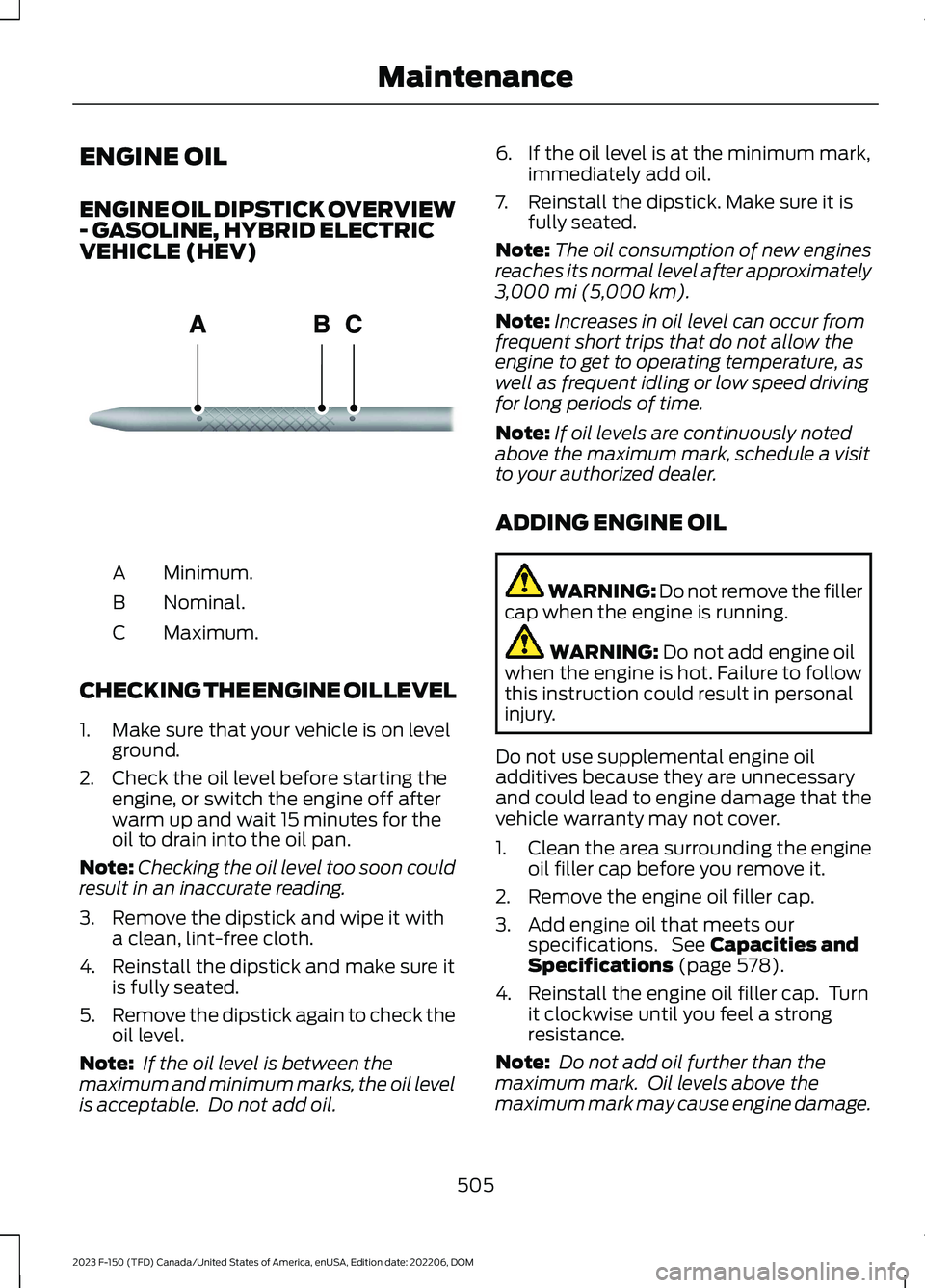
ENGINE OIL DIPSTICK OVERVIEW- GASOLINE, HYBRID ELECTRICVEHICLE (HEV)
Minimum.A
Nominal.B
Maximum.C
CHECKING THE ENGINE OIL LEVEL
1.Make sure that your vehicle is on levelground.
2.Check the oil level before starting theengine, or switch the engine off afterwarm up and wait 15 minutes for theoil to drain into the oil pan.
Note:Checking the oil level too soon couldresult in an inaccurate reading.
3.Remove the dipstick and wipe it witha clean, lint-free cloth.
4.Reinstall the dipstick and make sure itis fully seated.
5.Remove the dipstick again to check theoil level.
Note: If the oil level is between themaximum and minimum marks, the oil levelis acceptable. Do not add oil.
6.If the oil level is at the minimum mark,immediately add oil.
7.Reinstall the dipstick. Make sure it isfully seated.
Note:The oil consumption of new enginesreaches its normal level after approximately3,000 mi (5,000 km).
Note:Increases in oil level can occur fromfrequent short trips that do not allow theengine to get to operating temperature, aswell as frequent idling or low speed drivingfor long periods of time.
Note:If oil levels are continuously notedabove the maximum mark, schedule a visitto your authorized dealer.
ADDING ENGINE OIL
WARNING: Do not remove the fillercap when the engine is running.
WARNING: Do not add engine oilwhen the engine is hot. Failure to followthis instruction could result in personalinjury.
Do not use supplemental engine oiladditives because they are unnecessaryand could lead to engine damage that thevehicle warranty may not cover.
1.Clean the area surrounding the engineoil filler cap before you remove it.
2.Remove the engine oil filler cap.
3.Add engine oil that meets ourspecifications. See Capacities andSpecifications (page 578).
4.Reinstall the engine oil filler cap. Turnit clockwise until you feel a strongresistance.
Note: Do not add oil further than themaximum mark. Oil levels above themaximum mark may cause engine damage.
505
2023 F-150 (TFD) Canada/United States of America, enUSA, Edition date: 202206, DOMMaintenanceE270482
Page 510 of 786
Note:Immediately soak up any oil spillagewith an absorbent cloth.
RESETTING THE INTELLIGENT OILLIFE MONITOR - VEHICLES WITH:4.2 INCH SCREEN
1.Press the Menu button on the steeringwheel to enter the information displaymain menu.
2.Select Truck Info.
3.Select Oil Life.
4.Select Reset Oil Life.
5.Press and hold the OK button until thesystem reset confirmation appears.
RESETTING THE INTELLIGENT OILLIFE MONITOR - VEHICLES WITH:8 INCH SCREEN/12 INCH SCREEN
Depending on your cluster, there are twopaths to reset the engine oil changereminder.
Path 1
1.Press the Menu button on the steeringwheel to enter the information displaymain menu.
2.Select Settings.
3.Select Vehicle Maintenance.
4.Select Oil Life.
5.Press and hold the OK button until thesystem reset confirmation appears.
Path 2
1.Press the Menu button on the steeringwheel to enter the information displaymain menu.
2.Select Truck Info.
3.Select Engine Information.
4.Press and hold the OK button until thesystem reset confirmation appears.
ENGINE OIL CAPACITY ANDSPECIFICATION
For filling information, please refer to theCapacities and Specifications section ofyour owner's manual. See Engine OilCapacity and Specification (page 506).
CHECKING THE COOLANT
When the engine is cold, check theconcentration and level of the coolant atthe intervals listed in the scheduledmaintenance information. See ScheduledMaintenance (page 667).
Note:Make sure that the coolant level isbetween the minimum and maximum markson the coolant reservoir.
Note: Coolant expands when it is hot. Thelevel may extend beyond the MAX mark.
If the coolant level is at or below theminimum mark, add prediluted coolantimmediately.
Maintain coolant concentration within48% to 50%, which equates to a freezepoint between -29°F (-34°C) and -35°F(-37°C). Coolant concentration should bechecked using a refractometer. We do notrecommend the use of hydrometers orcoolant test strips for measuring coolantconcentration.
Adding Coolant
WARNING: Keep your hands andclothing clear of the cooling fan.
506
2023 F-150 (TFD) Canada/United States of America, enUSA, Edition date: 202206, DOMMaintenance
Page 535 of 786
If you intend on parking your vehicle for anextended period after cleaning the wheelswith a wheel cleaner, drive your vehicle fora few minutes before parking your vehicle.This reduces the risk of corrosion of thebrake discs, brake pads and linings.
Do not clean the wheels when they are hot.
Note: Some car washes could damagewheel rims and covers.
Note: Using non-recommended cleaners,harsh cleaning products, chrome wheelcleaners or abrasive materials coulddamage wheel rims and covers.
CLEANING THE ENGINECOMPARTMENT
Use a vacuum cleaner to remove debrisfrom the screen area below windshield.
Note:If you are not familiar with the partsaround the engine do not wash the enginecompartment. Avoid frequent enginewashes.
When washing the engine compartment:
•Never wash or rinse the engine while itis hot or running.
•Never wash or rinse any ignition coil,spark plug wire or spark plug well.
•Cover the battery, power distributionbox, and air filter assembly to preventwater damage.
Note:If your vehicle has an engine coverremove the cover before application ofshampoo and degreaser.
•Spray an approved engine shampooand degreaser on all parts that requirecleaning and rinse with water.
CLEANING STRIPES ORGRAPHICS
It is recommended to wash your vehicle byhand however, pressure washing may beused under the following conditions:
•Use a spray with a 40° wide sprayangle pattern.
•Keep the nozzle at a 12 in (305 mm)distance and 90° angle to yourvehicle's surface.
•Do not use water pressure higher than2,000 psi (14,000 kPa).
•Do not use water hotter than 179°F(82°C).
Note:Holding the pressure washer nozzleat an angle to the vehicle's surface maydamage graphics and cause the edges topeel away from the vehicle's surface.
CLEANING CAMERA LENSES ANDSENSORS
We recommend that you only uselukewarm or cold water and a soft clothto clean the camera lens and sensors.
Note:Do not pressure wash camera lensand sensors.
CLEANING THE UNDERBODY
Flush the complete underside of yourvehicle frequently. Keep body and doordrain holes free from packed dirt.
Rear suspension components may requireregular cleaning with a power washer or athorough rinse with a strong stream ofwater if the vehicle is operated in dusty ormuddy environments. Rear leaf springs orother suspension components may emitsqueaking or popping noises whileoperating the vehicle if particles, such asdirt, rocks, or other debris, are present inthe components.
531
2023 F-150 (TFD) Canada/United States of America, enUSA, Edition date: 202206, DOMVehicle Care
Page 539 of 786
PREPARING YOUR VEHICLE
FOR STORAGE
If you plan on storing your vehicle for 30days or more, the following maintenancerecommendations ensures your vehiclestays in good operating condition.
Under various conditions, long-termstorage may lead to degraded engineperformance or failure unless you usespecific precautions to preserve yourvehicle.
General
•Store all vehicles in a dry, ventilatedplace.
•If vehicles are stored outside, theyrequire regular maintenance to protectagainst rust and weather damage.
•Make sure all linkages, cables, leversand pins under your vehicle are coveredwith grease to prevent rust.
•Move vehicles at least 25 ft (7.5 m)every 15 days to lubricate working partsand prevent corrosion.
•Fill the fuel tank with high-quality fueluntil the first automatic shutoff of thefuel pump nozzle.
Engine
•Change the engine oil and filter prior tostorage because used engine oilcontains contaminants which maycause engine damage.
•Start the engine every 15 days for aminimum of 15 minutes. Run at fastidle with the climate controls set todefrost until the engine reaches normaloperating temperature.
•With your foot on the brake, shiftthrough all the gears while the engineis running.
Body
•Wash your vehicle thoroughly toremove dirt, grease, oil, tar or mud fromexterior surfaces, rear wheel housingsand the underside of front fenders.
•Periodically wash your vehicle if it isstored in exposed locations.
•Touch-up exposed or primed metal toprevent rust.
•Cover chrome and stainless steel partswith a thick coat of auto wax to preventdiscoloration. Rewax as necessarywhen you wash your vehicle.
•Lubricate all hood, door and luggagecompartment hinges and latches witha light grade oil.
•Cover interior trim to prevent fading.
•Keep all rubber parts free from oil andsolvents.
12 Volt Battery
•When storing your vehicle for greaterthan 30 days the state of chargeshould be approximately 50%.Additionally, we recommenddisconnecting the 12v battery whichwill reduce system loads on thebattery.
•Check and recharge as necessary. Keepconnections clean.
Note:It is necessary to reset memoryfeatures if you disconnect the batterycables.
Brakes
Make sure the brakes and parking brakerelease fully.
Note:If you intend on parking your vehiclefor an extended period after cleaning thewheels with a wheel cleaner, drive yourvehicle for a few minutes before doing so toreduce the risk of increased corrosion of thebrake discs, brake pads and linings.
535
2023 F-150 (TFD) Canada/United States of America, enUSA, Edition date: 202206, DOMStoring Your Vehicle