reset FORD F150 2023 User Guide
[x] Cancel search | Manufacturer: FORD, Model Year: 2023, Model line: F150, Model: FORD F150 2023Pages: 786, PDF Size: 23.15 MB
Page 36 of 786
Note:The service can be unavailable orinterrupted for a number of reasons, forexample environmental or topographicalconditions and data plan coverage.
Note:To find out if your vehicle has amodem, visit www.FordConnected.com.
MOBILE DEVICE DATA
If you connect a mobile device to yourvehicle, you can display data from yourdevice on the touchscreen for example,music and album art. You can share yourvehicle data with mobile apps on yourdevice through the system. See AppRequirements (page 650).
The mobile apps function operates by yourconnected device sending data to us in theUnited States. The data is encrypted andincludes, for example, the vehicleidentification number of your vehicle, theSYNC module serial number, odometer,enabled apps, usage statistics anddebugging information. We retain it onlyas long as necessary to provide the service,to troubleshoot, for continuousimprovement and to offer you productsand services that may be of interest to youaccording to your preferences and whereallowed by law.
If you connect a cell phone to the system,the system creates a profile that links tothat cell phone. The cell phone profileenables more mobile features and efficientoperation. The profile contains, forexample data from your phonebook, readand unread text messages and call history,including history of calls when your cellphone was not connected to the system.
If you connect a media device, the systemcreates and retains a media device indexof supported media content. The systemalso records a short diagnostic log ofapproximately 10 minutes of all recentsystem activity.
The cell phone profile, media device indexand diagnostic log remain in your vehicleunless you delete them and are generallyaccessible only in your vehicle when youconnect your cell phone or media device.If you no longer plan to use the system oryour vehicle, we recommend you use themaster reset function to erase the storedinformation. See Performing a SystemReset (page 659).
System data cannot be accessed withoutspecial equipment and access to yourvehicle's module.
For additional information about ourprivacy policy, refer to the local Fordwebsite.
Note:To find out if your vehicle hasconnectivity technology, visitwww.FordConnected.com.
EMERGENCY CALL SYSTEM
DATA
When the emergency call system is active,it may disclose to emergency services thatyour vehicle has been in a crash involvingthe deployment of an airbag or activationof the fuel pump shut-off. Certain versionsor updates to the emergency call systemmay also be capable of electronically orverbally disclosing to emergency servicesoperators your vehicle location or otherdetails about your vehicle or crash to assistemergency services operators to providethe most appropriate emergency services.If you do not want to disclose thisinformation, do not activate the emergencycall system.
Note:You cannot deactivate emergencycall systems that are required by law.
32
2023 F-150 (TFD) Canada/United States of America, enUSA, Edition date: 202206, DOMData Privacy
Page 144 of 786

ADJUSTING THE STEERING
WHEEL - VEHICLES WITH:
MANUAL ADJUSTABLE
STEERING COLUMN
Adjusting the Steering Wheel
WARNING: Do not adjust thesteering wheel when your vehicle ismoving.
Note: Make sure that you are sitting in thecorrect position. See Sitting in the CorrectPosition (page 193).
1.Unlock the steering column.
2.Adjust the steering wheel to theposition you prefer.
3.Lock the steering column.
ADJUSTING THE STEERING
WHEEL - VEHICLES WITH:
POWER ADJUSTABLE
STEERING COLUMN
WARNING: Do not adjust thesteering wheel when your vehicle ismoving.
Note: Make sure that you are sitting in thecorrect position. See Sitting in the CorrectPosition (page 193).
Press the top or bottom of the control tomove the steering wheel up or down.
Press the front or rear of the control tomove the steering wheel in or out.
You can save and recall the steering wheelposition with the memory function. SeeRecalling a Preset Position (page 207).
140
2023 F-150 (TFD) Canada/United States of America, enUSA, Edition date: 202206, DOMSteering WheelE359744 E261582
Page 145 of 786
RESETTING THE STOPPING
POSITION - VEHICLES WITH:
POWER ADJUSTABLE
STEERING COLUMN
Note:The steering wheel stops when itdetects an obstruction. This sets a newstopping position.
To reset the steering column to its normalstopping position:
1.Confirm there is nothing obstructingthe motion of the steering column.
2.Press and hold the steering columncontrol until the steering column stopsmoving.
3.Press the steering column controlagain.
Note:The steering column may start tomove again.
4.When the steering column stops,continue holding the control for a fewseconds.
5.Repeat for each direction, as necessary.
HORN
Press on the center of thesteering wheel near the horn iconto activate the horn.
SWITCHING THE HEATED
STEERING WHEEL ON AND OFF
- VEHICLES WITH: HEATED
STEERING WHEEL
To activate the heated steeringwheel, press the button on theclimate control unit.
On some vehicles, an indicator on thebutton illuminates when the heatedsteering wheel is on.
Note:A sensor regulates the temperatureof the steering wheel.
141
2023 F-150 (TFD) Canada/United States of America, enUSA, Edition date: 202206, DOMSteering WheelE270945 E256621
Page 165 of 786
OPENING AND CLOSING THE
WINDOWS
WARNING: Do not leave childrenunattended in your vehicle and do notlet them play with the power windows.Failure to follow this instruction couldresult in personal injury.
WARNING: When closing thepower windows, verify they are free ofobstruction and make sure that childrenand pets are not in the proximity of thewindow openings.
Press the window control switchto open the window. Lift thewindow control switch to closethe window.
Note:The power windows operate with theignition on, and for several minutes after youswitch the ignition off or until you open afront door.
To reduce wind noise or pulsing noise whenone window is open, slightly open theopposite window.
One-Touch Open (If Equipped)
Fully press the window control switch andrelease it. Press again or lift it to stop thewindow.
One-Touch Close (If Equipped)
Fully lift the window control switch andrelease it. Press again or lift it to stop thewindow.
Resetting One-Touch Close
Carry out all steps within 30 seconds ofstarting the sequence.
1.Close the window.
2.Press and hold the window controlswitch until the window is fully open.Keep the window control switchpressed for a few seconds.
3.Lift and hold the window control switchuntil the window is fully closed. Keepthe window control switch held for afew seconds.
4.Press and hold the window controlswitch until the window is fully open.Keep the window control switchpressed for a few seconds.
5.Lift and hold the window control switchuntil the window is fully closed. Keepthe window control switch held for afew seconds.
Note:Repeat the procedure if the windowdoes not close when you use one-touch.
Accessory Delay
The window switches remain operationalfor several minutes when you switch theignition off or until you open either frontdoor.
GLOBAL OPENING
WHAT IS GLOBAL OPENING
You can use the remote control to openthe windows with the ignition off.
USING GLOBAL OPENING
1.Press and release the unlock button onthe remote control.
2.Press and hold the unlock button onthe remote control.
3.Release the button when the windowsstart to open.
Press the lock or the unlock button on theremote control to stop global opening.
161
2023 F-150 (TFD) Canada/United States of America, enUSA, Edition date: 202206, DOMWindows
Page 169 of 786
Switching Auto fold On and Off
1.Press Settings on the touchscreen.
2.Press Vehicle Settings.
3.Press Mirrors.
4.Switch Autofold on or off.
Loose Mirror
If your power folding mirrors are manuallyfolded, they may not work properly evenafter you reposition them. You need toreset them if:
•The mirrors vibrate when you drive.
•The mirrors feel loose.
•The mirrors do not stay in the folded orunfolded position.
•One of the mirrors is not in its normaldriving position.
To reset the mirrors perform the followingsteps:
1.Fold or retract both mirrors manually.
2.Using the power folding/powertelescoping mirror control switch,operate the mirrors until you hear anaudible click.
3.Operate the power folding or powertelescoping mirrors an additional 3 to4 times to synchronize the mirrors.
EXTENDING THE EXTERIOR
MIRRORS
This optional feature lets you extend themirror approximately 3 in (75 mm). It isuseful when towing a trailer. You canmanually pull out or push in the mirrors tovarious positions.
Power Telescoping Mirrors (If
Equipped)
This feature allows you to position bothmirrors at the same time.
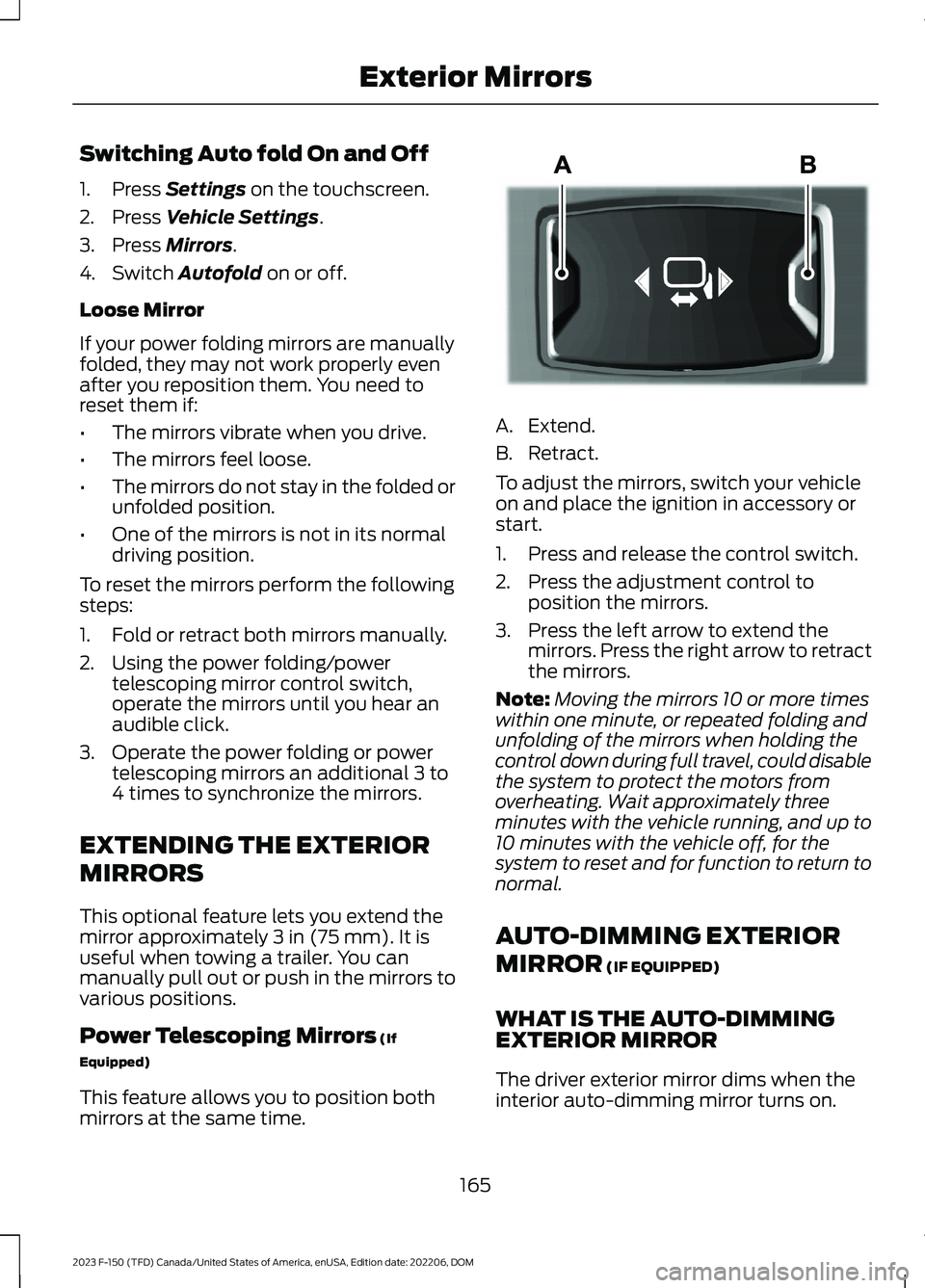
A.Extend.
B.Retract.
To adjust the mirrors, switch your vehicleon and place the ignition in accessory orstart.
1.Press and release the control switch.
2.Press the adjustment control toposition the mirrors.
3.Press the left arrow to extend themirrors. Press the right arrow to retractthe mirrors.
Note:Moving the mirrors 10 or more timeswithin one minute, or repeated folding andunfolding of the mirrors when holding thecontrol down during full travel, could disablethe system to protect the motors fromoverheating. Wait approximately threeminutes with the vehicle running, and up to10 minutes with the vehicle off, for thesystem to reset and for function to return tonormal.
AUTO-DIMMING EXTERIOR
MIRROR (IF EQUIPPED)
WHAT IS THE AUTO-DIMMINGEXTERIOR MIRROR
The driver exterior mirror dims when theinterior auto-dimming mirror turns on.
165
2023 F-150 (TFD) Canada/United States of America, enUSA, Edition date: 202206, DOMExterior MirrorsE218902
Page 184 of 786
ACCESSING THE TRIP
COMPUTER - VEHICLES WITH:
4.2 INCH SCREEN
1.Use the instrument cluster displaycontrols to navigate the home screen.
2.Select the trip screen.
3.Press the menu button on the steeringwheel.
4.Select Trip 1 or Trip 2.
ACCESSING THE TRIP
COMPUTER - VEHICLES WITH:
8 INCH SCREEN/12 INCH
SCREEN
1.Using the instrument cluster displaycontrols on the steering wheel, selectTrip/Fuel.
2.Select This Trip, Trip 1 or Trip 2.
RESETTING THE TRIP
COMPUTER - VEHICLES WITH:
4.2 INCH SCREEN
1.Use the controls on the steering wheelto navigate the home screen.
2.Select Trip 1 or Trip 2.
3.Press and hold the OK button for a fewseconds.
RESETTING THE TRIP
COMPUTER - VEHICLES WITH:
8 INCH SCREEN/12 INCH
SCREEN
1.Select Trip/Fuel.
2.Select Trip 1 or Trip 2.
3.Press and hold the OK button for a fewseconds.
Note:This Trip resets every time you startyour vehicle.
180
2023 F-150 (TFD) Canada/United States of America, enUSA, Edition date: 202206, DOMTrip Computer
Page 186 of 786
Remotely Stopping the Vehicle
Within three seconds, press thebutton on the remote control.
Within three seconds, press thebutton again.
EXTENDING THE REMOTE
START DURATION
To extend the remote start duration duringremote start, do the following:
Press the button on the remotecontrol.
Within three seconds, press thebutton on the remote control.
Within three seconds, press thebutton again.
If the duration is set to 15 minutes, theduration extends by another 15 minutes.This provides a total of 30 minutes.
Note:Remote start can only be extendedonce.
Note:A maximum of two remote starts, orone remote start with an extension, areallowed. To reset the restart procedureswitch the vehicle to on, then to off.
REMOTE START REMOTE
CONTROL INDICATORS
Remote Control Feedback
An LED on the remote control providesstatus feedback of remote start or stopcommands.
StatusLED
Remote startsuccessful.Solid green.
Remote stopsuccessful.Solid red.
Request failed orstatus not received.Blinking red.
Status incomplete.Blinking green.
REMOTE START SETTINGS
Climate Control Settings
1.Press Settings on the touchscreen.
2.Press Vehicle Settings.
3.Press Remote Start Setup.
4.Press Climate Control.
5.Press Auto or Last settings.
Note:If you switch the auto mode on, thesystem attempts to heat or cool the interiorto 72°F (22°C). When you switch the vehicleon, the climate control system returns tothe last used settings.
Note:If you switch the last settings on, thesystem remembers the last used settings.
Heated Seat Settings (If Equipped)
1.Press Settings on the touchscreen.
2.Press Vehicle Settings.
3.Press Remote Start Setup.
4.Press Seats.
5.Press Auto or Off.
Note:If you switch the heated seat settingson, the heated seats turn on during coldweather.
Note:You cannot adjust the heated seatsettings when you remotely start yourvehicle.
182
2023 F-150 (TFD) Canada/United States of America, enUSA, Edition date: 202206, DOMRemote Start (If Equipped)E138625 E138623 E138625
Page 194 of 786
SWITCHING MAXIMUM
COOLING ON AND OFF
Turn the temperature controlcounterclockwise past thelowest setting to maximizecooling.
Note:The temperature control springs backto the lowest setting.
Note:When you switch maximum coolingoff, air conditioning remains on.
SWITCHING THE HEATED
REAR WINDOW ON AND OFF
Press the button to clear the rearwindow of thin ice and fog. Theheated rear window turns offafter a short period of time.
Note:Do not use harsh chemicals, razorblades or other sharp objects to clean orremove decals from the inside of the heatedrear window as this could cause damage tothe heated rear window grid lines notcovered by the vehicle Warranty.
SETTING THE BLOWER MOTOR
SPEED
Note:Lights on the control illuminate toindicate the blower motor speed.
Note: When you switch the blower motoroff, air conditioning turns off and thewindows could fog up.
SWITCHING THE HEATED
MIRRORS ON AND OFF
Heated Mirrors
Press the button.
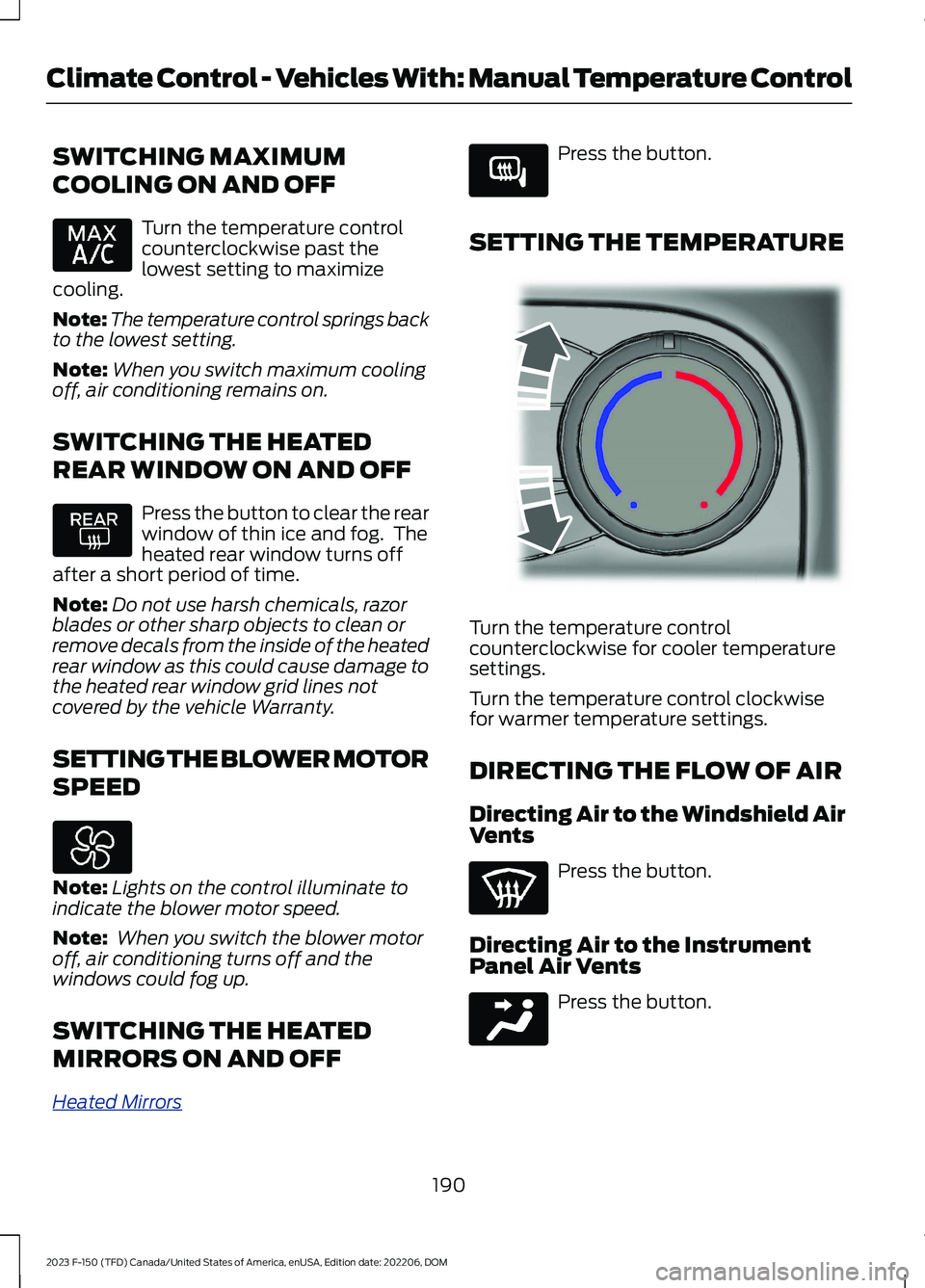
SETTING THE TEMPERATURE
Turn the temperature controlcounterclockwise for cooler temperaturesettings.
Turn the temperature control clockwisefor warmer temperature settings.
DIRECTING THE FLOW OF AIR
Directing Air to the Windshield AirVents
Press the button.
Directing Air to the InstrumentPanel Air Vents
Press the button.
190
2023 F-150 (TFD) Canada/United States of America, enUSA, Edition date: 202206, DOMClimate Control - Vehicles With: Manual Temperature Control E266189 E244106 E244097
Page 201 of 786
After the head restraint reaches theforward-most tilt position, pivot it forwardagain to release it to the rearward, untiltedposition.
Note:Do not attempt to force the headrestraint backward after it is tilted. Instead,continue tilting it forward until the headrestraint releases to the upright position.
REMOVING THE HEAD RESTRAINT
1.Pull up the head restraint until itreaches its highest position.
2.Press and hold the adjust and releasebutton and the unlock and removebutton.
3.Pull up the head restraint.
Note:You cannot remove head restraintsthat have audio system speakers.
INSTALLING THE HEADRESTRAINT
Align the steel stems into the guide sleevesand push the head restraint down until itlocks.
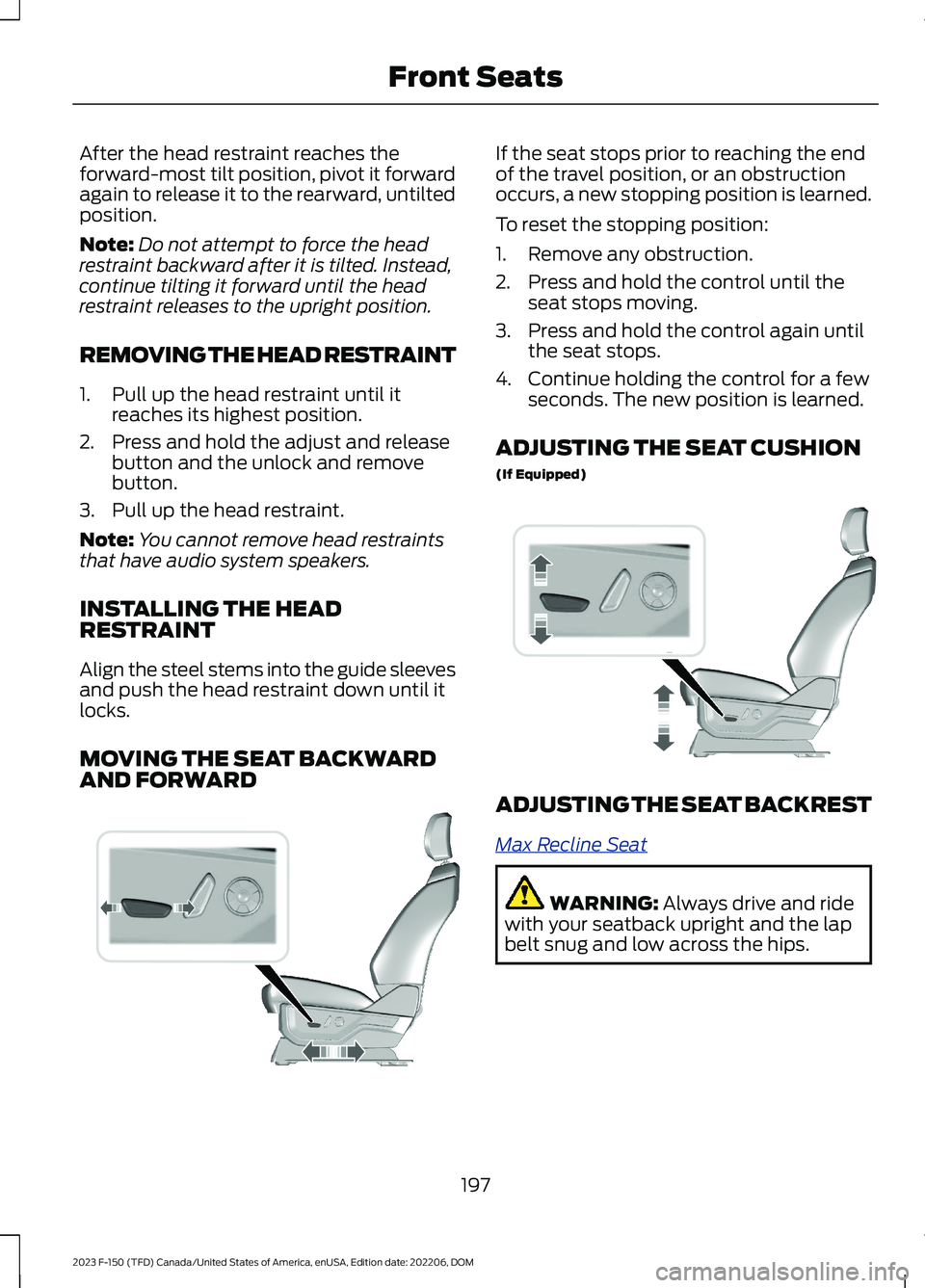
MOVING THE SEAT BACKWARDAND FORWARD
If the seat stops prior to reaching the endof the travel position, or an obstructionoccurs, a new stopping position is learned.
To reset the stopping position:
1.Remove any obstruction.
2.Press and hold the control until theseat stops moving.
3.Press and hold the control again untilthe seat stops.
4.Continue holding the control for a fewseconds. The new position is learned.
ADJUSTING THE SEAT CUSHION
(If Equipped)
ADJUSTING THE SEAT BACKREST
Max Recline Seat
WARNING: Always drive and ridewith your seatback upright and the lapbelt snug and low across the hips.
197
2023 F-150 (TFD) Canada/United States of America, enUSA, Edition date: 202206, DOMFront SeatsE308339 E308336
Page 209 of 786
WHAT IS THE REAR
OCCUPANT ALERT SYSTEM
The rear occupant alert system monitorsvehicle conditions and notifies you to checkfor rear seat occupants when you switchthe ignition off.
HOW DOES THE REAR
OCCUPANT ALERT SYSTEM
WORK
The system monitors when rear doors havebeen opened and closed to indicate thepotential presence of an occupant in therear seat.
A message displays in the information andentertainment display screen and anaudible warning sounds when you switchthe ignition off after any of the followingconditions have been met:
•A rear door is opened or closed whilethe ignition is on.
•You switch the ignition on within 15minutes of a rear door opening andclosing.
•You switch the ignition on within 15minutes of the alert having displayedor sounded.
REAR OCCUPANT ALERT
SYSTEM PRECAUTIONS
WARNING: On hot days, thetemperature inside the vehicle can risevery quickly. Exposure of people oranimals to these high temperatures foreven a short time can cause death orserious heat related injuries, includingbrain damage. Small children areparticularly at risk.
WARNING: Do not leave childrenor pets unattended in your vehicle.Failure to follow this instruction couldresult in personal injury or death.
REAR OCCUPANT ALERT
SYSTEM LIMITATIONS
The system does not detect the presenceof objects or passengers in the rear seat.It monitors when rear doors are openedand closed.
Note:It is possible to receive an alert whenthere is no rear seat occupant, but alertconditions are met.
Note:It is possible to receive no alert whenthere is an occupant in the rear seat, if alertconditions are not met. For example, if a rearseat occupant does not enter the vehiclethrough a rear door.
Note:The audible warning does not soundwhen the front door is opened before youswitch the ignition off.
SWITCHING REAR OCCUPANT
ALERT SYSTEM ON AND OFF
1.Press Settings on the touchscreen.
2.Press Vehicle.
3.Switch Rear Occupant Alert on or off.
Note:The default setting is on.
Note:Performing a master reset causes thesystem to switch on again.
Semiannual Reminder (If Equipped)
When you switch the system off, amessage appears every six months as areminder that the system is off. You canswitch the system back on or leave it off.
205
2023 F-150 (TFD) Canada/United States of America, enUSA, Edition date: 202206, DOMRear Occupant Alert System (If Equipped)