reset FORD F150 2023 Owner's Manual
[x] Cancel search | Manufacturer: FORD, Model Year: 2023, Model line: F150, Model: FORD F150 2023Pages: 786, PDF Size: 23.15 MB
Page 211 of 786
WHAT IS THE MEMORY
FUNCTION
The memory function recalls the positionof these features:
•Driver seat.
•Power mirrors.
•Optional power steering column.
•Optional power adjustable pedals.
MEMORY FUNCTION
PRECAUTIONS
WARNING: Before activating thememory seat, make sure that the areaimmediately surrounding the seat is clearof obstructions and that all occupantsare clear of moving parts.
WARNING: Do not use the memoryfunction when your vehicle is moving.
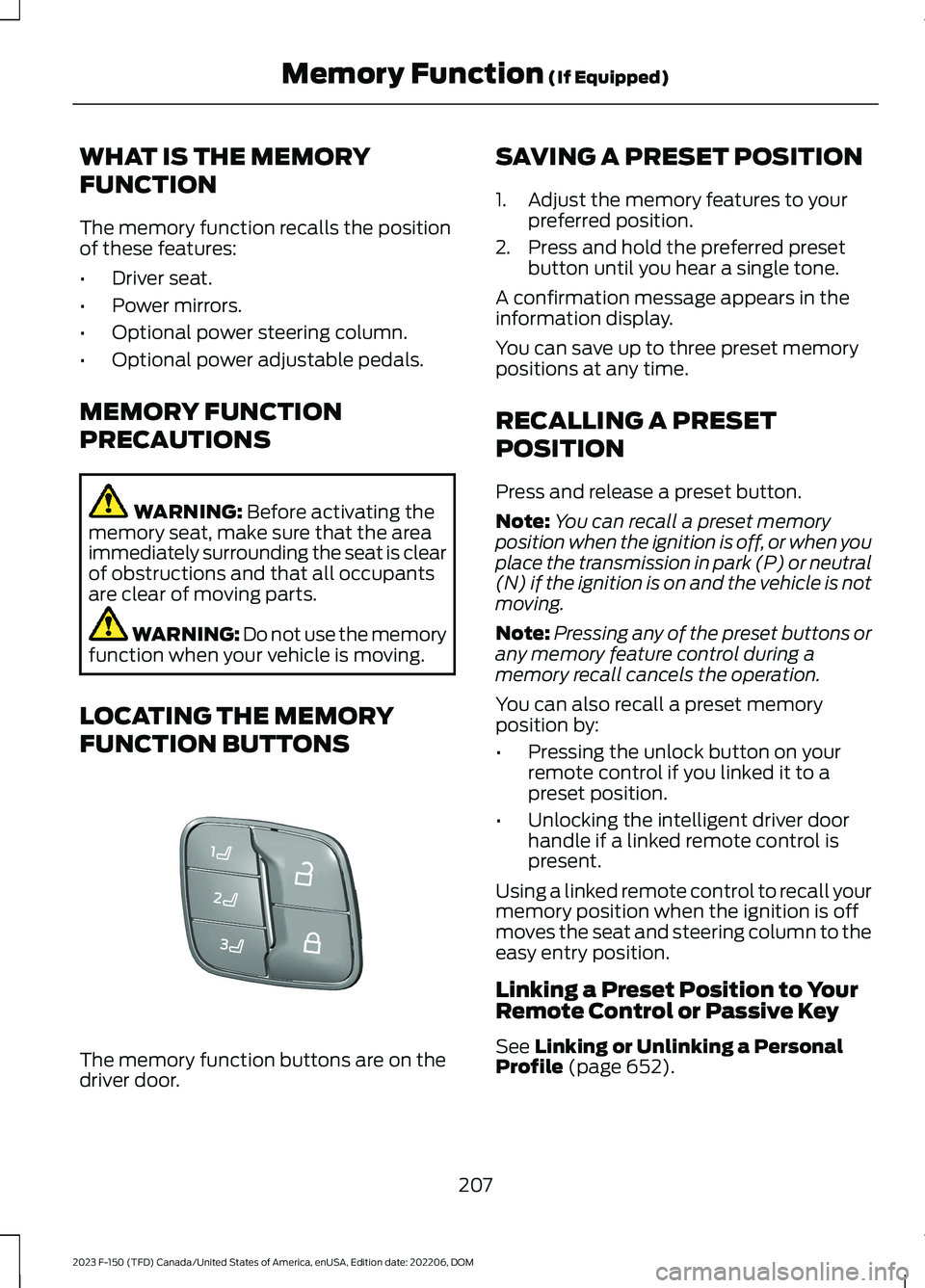
LOCATING THE MEMORY
FUNCTION BUTTONS
The memory function buttons are on thedriver door.
SAVING A PRESET POSITION
1.Adjust the memory features to yourpreferred position.
2.Press and hold the preferred presetbutton until you hear a single tone.
A confirmation message appears in theinformation display.
You can save up to three preset memorypositions at any time.
RECALLING A PRESET
POSITION
Press and release a preset button.
Note:You can recall a preset memoryposition when the ignition is off, or when youplace the transmission in park (P) or neutral(N) if the ignition is on and the vehicle is notmoving.
Note:Pressing any of the preset buttons orany memory feature control during amemory recall cancels the operation.
You can also recall a preset memoryposition by:
•Pressing the unlock button on yourremote control if you linked it to apreset position.
•Unlocking the intelligent driver doorhandle if a linked remote control ispresent.
Using a linked remote control to recall yourmemory position when the ignition is offmoves the seat and steering column to theeasy entry position.
Linking a Preset Position to YourRemote Control or Passive Key
See Linking or Unlinking a PersonalProfile (page 652).
207
2023 F-150 (TFD) Canada/United States of America, enUSA, Edition date: 202206, DOMMemory Function (If Equipped)E332006
Page 219 of 786
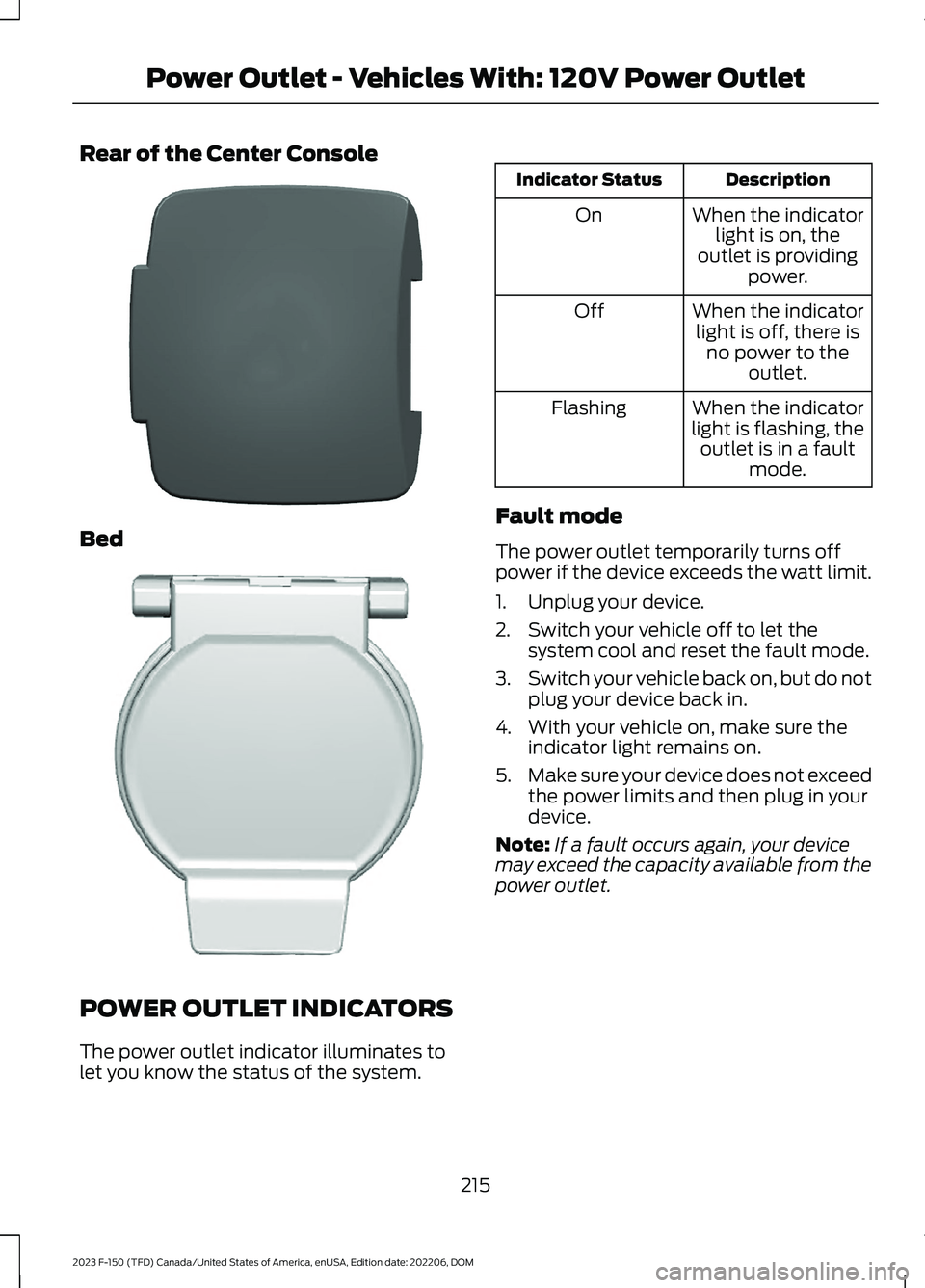
Rear of the Center Console
Bed
POWER OUTLET INDICATORS
The power outlet indicator illuminates tolet you know the status of the system.
DescriptionIndicator Status
When the indicatorlight is on, theoutlet is providingpower.
On
When the indicatorlight is off, there isno power to theoutlet.
Off
When the indicatorlight is flashing, theoutlet is in a faultmode.
Flashing
Fault mode
The power outlet temporarily turns offpower if the device exceeds the watt limit.
1.Unplug your device.
2.Switch your vehicle off to let thesystem cool and reset the fault mode.
3.Switch your vehicle back on, but do notplug your device back in.
4.With your vehicle on, make sure theindicator light remains on.
5.Make sure your device does not exceedthe power limits and then plug in yourdevice.
Note:If a fault occurs again, your devicemay exceed the capacity available from thepower outlet.
215
2023 F-150 (TFD) Canada/United States of America, enUSA, Edition date: 202206, DOMPower Outlet - Vehicles With: 120V Power OutletE337926 E338700
Page 224 of 786

DescriptionIndicator Status
The power point isworking and thevehicle is on.
On
The power point isoff and the vehicleis off.
Off
The power point isin fault mode.Flashing
Fault Mode
The power outlet temporarily turns offpower if the device exceeds the watt limit.
1.Unplug your device.
2.Switch your vehicle off to let thesystem cool and reset the fault mode.
3.Switch your vehicle back on, but do notplug your device back in.
4.With your vehicle on, make sure theindicator light remains on.
5.Make sure your device does not exceedthe power limits and then plug in yourdevice.
Note:If a fault occurs again, your devicemay exceed the capacity available from thepower outlet.
Generator Mode Power Indicator
The generator mode power indicatordisplays the currently used power and totalavailable power level on the touchscreen.When Generator Mode is switched off theindicator displays a reduced availablepower level. When generator mode isswitched on the indicator displays the fullavailable power.
Note:Additional indicators may beavailable based on vehicle configuration.
Note:Make sure that plugged in devices donot exceed the available power displayedon the power mode indicator.
Note:Maximum power may be reducedwhen the vehicle is in drive (D).
SWITCHING THE OUTLETS ON
AND OFF
Using the Center Display Screen
1.Switch the vehicle on.
2.Press Features on the touchscreen.
3.Press Pro Power Onboard.
Using the Bed Controls
Press the button to switch the poweroutlet on and off.
220
2023 F-150 (TFD) Canada/United States of America, enUSA, Edition date: 202206, DOMOnboard Generator (If Equipped)E335469 E337175
Page 225 of 786
WHAT IS UTILITY IDLE MODE -
VEHICLES WITH: FLIP KEY
Utility idle mode allows you to remove thekey from the ignition and keep the vehicleand bed power point running.
SWITCHING UTILITY IDLE
MODE ON AND OFF - VEHICLES
WITH: FLIP KEY
Switching Utility Idle On
1.Start the vehicle. See Starting andStopping the Engine (page 233).
2.Press Features on the touchscreen.
3.Press Pro Power Onboard.
4.Press Generator Mode.
5.Press Utility Idle.
6.Turn the key to position 0.
7.Remove the key from the ignition.
Switching Utility Idle Off using theKey
1.Insert the key into the ignition.
2.Turn the key to position III.
Switching Utility Idle Off using theCenter Display Screen
1.Start the vehicle. See Starting andStopping the Engine (page 233).
2.Press Features on the touchscreen.
3.Press Pro Power Onboard.
4.Press Generator Mode.
5.Press Utility Idle.
6.Press Turn Vehicle Off.
WHAT IS GENERATOR MODE
Pro-Power On-Board
Generator mode uses the vehicle engineto increase power to the bed power outletsup to the rating listed on the power outletlabel.
SWITCHING GENERATOR
MODE ON AND OFF
Using the Center Display Screen
1.Start the vehicle. See Starting andStopping the Engine (page 233).
2.Press Features on the touchscreen.
3.Press Pro Power Onboard.
4.Press Generator Mode.
Using the Instrument Panel
Press the button to switchbetween off, convenience mode,and generator mode.
RESETTING GROUND FAULT
DETECTION
After disconnecting all electrical loads theground fault can be reset using theswitches on the power point, on theinstrument panel or on the touchscreen.
Use the controls on the touchscreen to testthe ground fault detection circuit.
221
2023 F-150 (TFD) Canada/United States of America, enUSA, Edition date: 202206, DOMOnboard Generator (If Equipped)E311311
Page 226 of 786
RESETTING THE CIRCUIT
BREAKER - VEHICLES WITH:
7.2KW
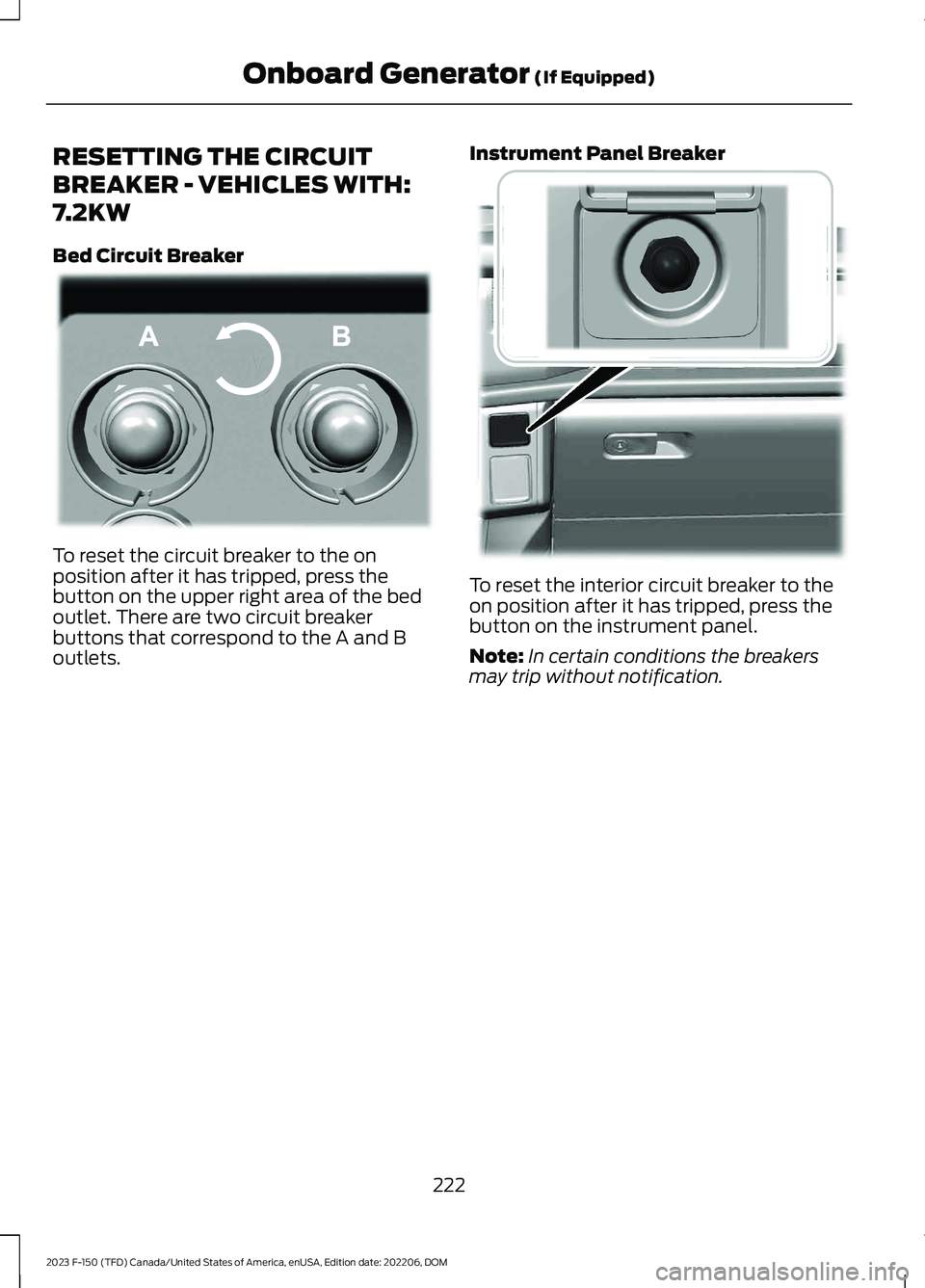
Bed Circuit Breaker
To reset the circuit breaker to the onposition after it has tripped, press thebutton on the upper right area of the bedoutlet. There are two circuit breakerbuttons that correspond to the A and Boutlets.
Instrument Panel Breaker
To reset the interior circuit breaker to theon position after it has tripped, press thebutton on the instrument panel.
Note:In certain conditions the breakersmay trip without notification.
222
2023 F-150 (TFD) Canada/United States of America, enUSA, Edition date: 202206, DOMOnboard Generator (If Equipped)E337774 E384653
Page 227 of 786
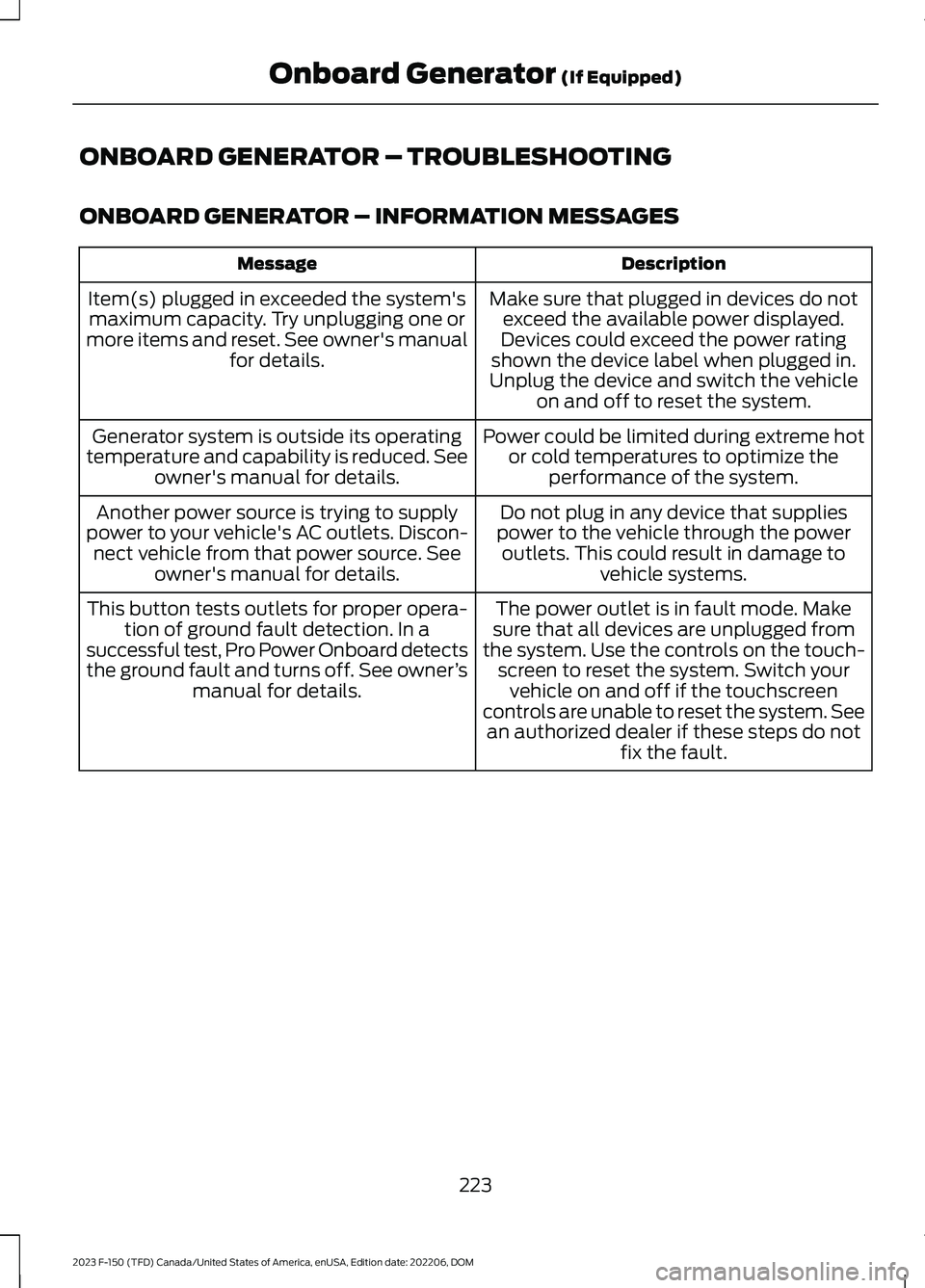
ONBOARD GENERATOR – TROUBLESHOOTING
ONBOARD GENERATOR – INFORMATION MESSAGES
DescriptionMessage
Make sure that plugged in devices do notexceed the available power displayed.Devices could exceed the power ratingshown the device label when plugged in.Unplug the device and switch the vehicleon and off to reset the system.
Item(s) plugged in exceeded the system'smaximum capacity. Try unplugging one ormore items and reset. See owner's manualfor details.
Power could be limited during extreme hotor cold temperatures to optimize theperformance of the system.
Generator system is outside its operatingtemperature and capability is reduced. Seeowner's manual for details.
Do not plug in any device that suppliespower to the vehicle through the poweroutlets. This could result in damage tovehicle systems.
Another power source is trying to supplypower to your vehicle's AC outlets. Discon-nect vehicle from that power source. Seeowner's manual for details.
The power outlet is in fault mode. Makesure that all devices are unplugged fromthe system. Use the controls on the touch-screen to reset the system. Switch yourvehicle on and off if the touchscreencontrols are unable to reset the system. Seean authorized dealer if these steps do notfix the fault.
This button tests outlets for proper opera-tion of ground fault detection. In asuccessful test, Pro Power Onboard detectsthe ground fault and turns off. See owner’smanual for details.
223
2023 F-150 (TFD) Canada/United States of America, enUSA, Edition date: 202206, DOMOnboard Generator (If Equipped)
Page 228 of 786
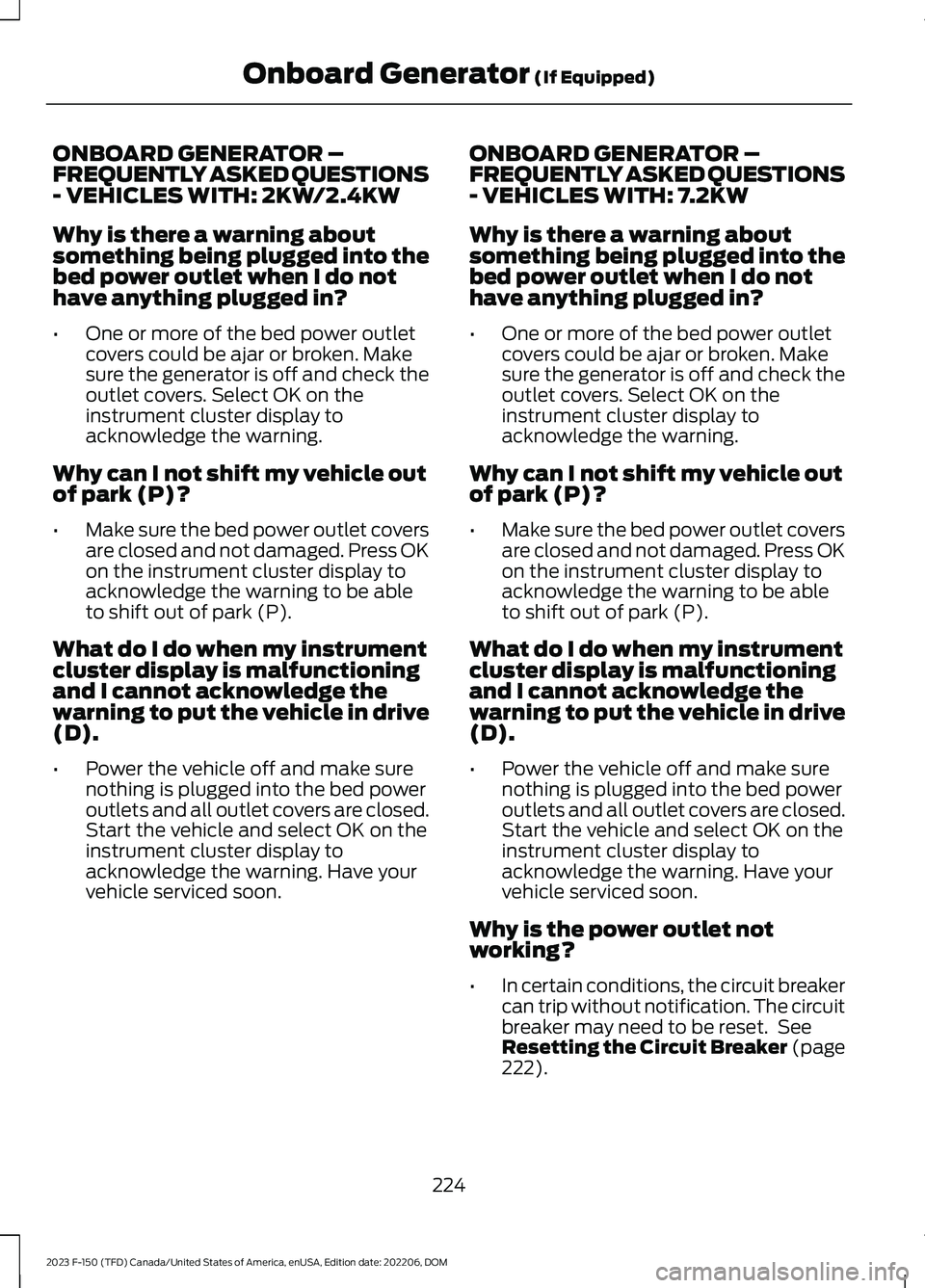
ONBOARD GENERATOR –FREQUENTLY ASKED QUESTIONS- VEHICLES WITH: 2KW/2.4KW
Why is there a warning aboutsomething being plugged into thebed power outlet when I do nothave anything plugged in?
•One or more of the bed power outletcovers could be ajar or broken. Makesure the generator is off and check theoutlet covers. Select OK on theinstrument cluster display toacknowledge the warning.
Why can I not shift my vehicle outof park (P)?
•Make sure the bed power outlet coversare closed and not damaged. Press OKon the instrument cluster display toacknowledge the warning to be ableto shift out of park (P).
What do I do when my instrumentcluster display is malfunctioningand I cannot acknowledge thewarning to put the vehicle in drive(D).
•Power the vehicle off and make surenothing is plugged into the bed poweroutlets and all outlet covers are closed.Start the vehicle and select OK on theinstrument cluster display toacknowledge the warning. Have yourvehicle serviced soon.
ONBOARD GENERATOR –FREQUENTLY ASKED QUESTIONS- VEHICLES WITH: 7.2KW
Why is there a warning aboutsomething being plugged into thebed power outlet when I do nothave anything plugged in?
•One or more of the bed power outletcovers could be ajar or broken. Makesure the generator is off and check theoutlet covers. Select OK on theinstrument cluster display toacknowledge the warning.
Why can I not shift my vehicle outof park (P)?
•Make sure the bed power outlet coversare closed and not damaged. Press OKon the instrument cluster display toacknowledge the warning to be ableto shift out of park (P).
What do I do when my instrumentcluster display is malfunctioningand I cannot acknowledge thewarning to put the vehicle in drive(D).
•Power the vehicle off and make surenothing is plugged into the bed poweroutlets and all outlet covers are closed.Start the vehicle and select OK on theinstrument cluster display toacknowledge the warning. Have yourvehicle serviced soon.
Why is the power outlet notworking?
•In certain conditions, the circuit breakercan trip without notification. The circuitbreaker may need to be reset. SeeResetting the Circuit Breaker (page222).
224
2023 F-150 (TFD) Canada/United States of America, enUSA, Edition date: 202206, DOMOnboard Generator (If Equipped)
Page 243 of 786
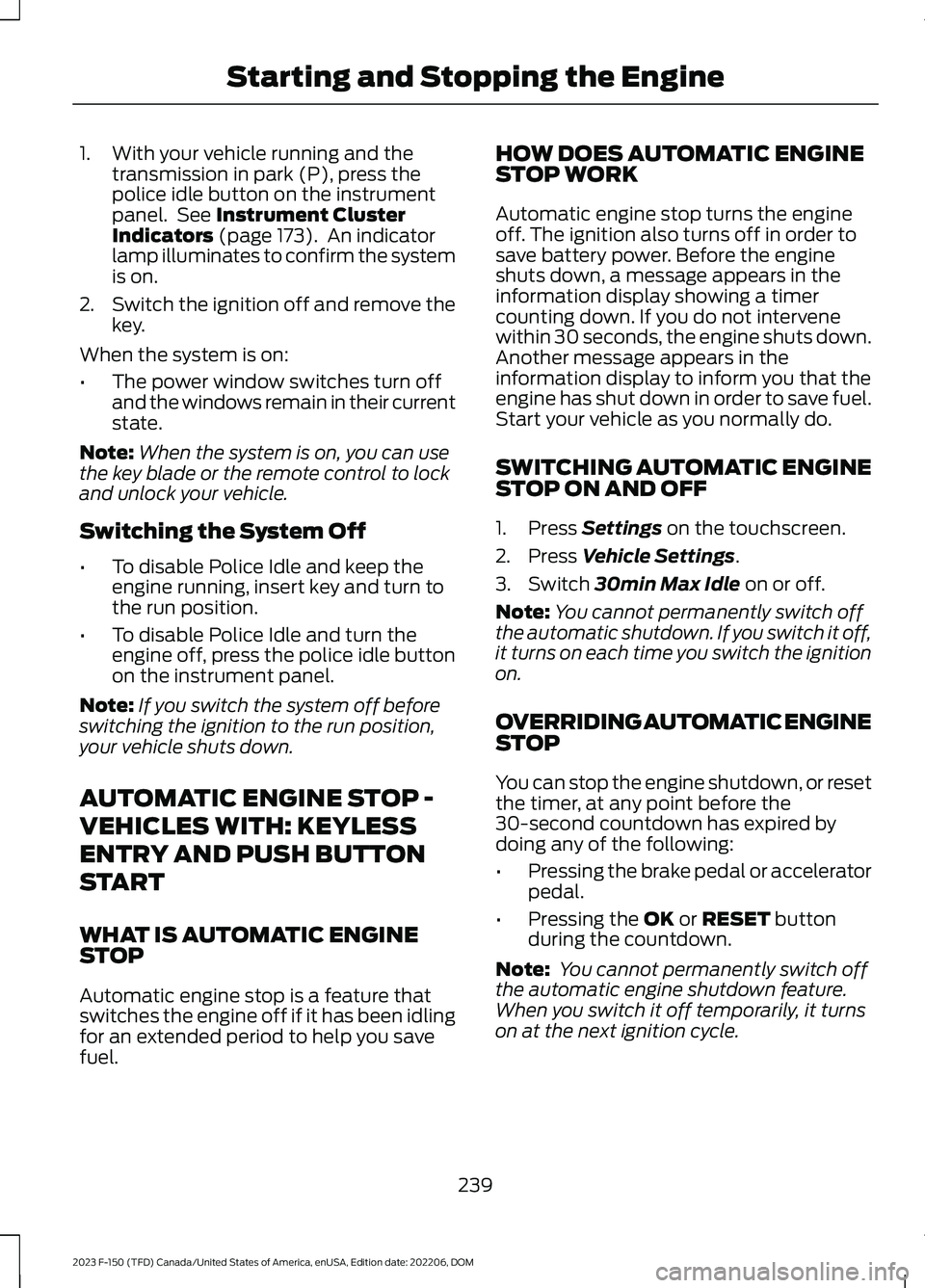
1.With your vehicle running and thetransmission in park (P), press thepolice idle button on the instrumentpanel. See Instrument ClusterIndicators (page 173). An indicatorlamp illuminates to confirm the systemis on.
2.Switch the ignition off and remove thekey.
When the system is on:
•The power window switches turn offand the windows remain in their currentstate.
Note:When the system is on, you can usethe key blade or the remote control to lockand unlock your vehicle.
Switching the System Off
•To disable Police Idle and keep theengine running, insert key and turn tothe run position.
•To disable Police Idle and turn theengine off, press the police idle buttonon the instrument panel.
Note:If you switch the system off beforeswitching the ignition to the run position,your vehicle shuts down.
AUTOMATIC ENGINE STOP -
VEHICLES WITH: KEYLESS
ENTRY AND PUSH BUTTON
START
WHAT IS AUTOMATIC ENGINESTOP
Automatic engine stop is a feature thatswitches the engine off if it has been idlingfor an extended period to help you savefuel.
HOW DOES AUTOMATIC ENGINESTOP WORK
Automatic engine stop turns the engineoff. The ignition also turns off in order tosave battery power. Before the engineshuts down, a message appears in theinformation display showing a timercounting down. If you do not intervenewithin 30 seconds, the engine shuts down.Another message appears in theinformation display to inform you that theengine has shut down in order to save fuel.Start your vehicle as you normally do.
SWITCHING AUTOMATIC ENGINESTOP ON AND OFF
1.Press Settings on the touchscreen.
2.Press Vehicle Settings.
3.Switch 30min Max Idle on or off.
Note:You cannot permanently switch offthe automatic shutdown. If you switch it off,it turns on each time you switch the ignitionon.
OVERRIDING AUTOMATIC ENGINESTOP
You can stop the engine shutdown, or resetthe timer, at any point before the30-second countdown has expired bydoing any of the following:
•Pressing the brake pedal or acceleratorpedal.
•Pressing the OK or RESET buttonduring the countdown.
Note: You cannot permanently switch offthe automatic engine shutdown feature.When you switch it off temporarily, it turnson at the next ignition cycle.
239
2023 F-150 (TFD) Canada/United States of America, enUSA, Edition date: 202206, DOMStarting and Stopping the Engine
Page 330 of 786
The warning tone continuously soundswhen an object is 12 in (30 cm) or less fromthe front bumper.
Note:If the detected object is 12 in (30 cm)or less from your vehicle, visual indicationremains on.
SIDE PARKING AID (IF EQUIPPED)
WHAT IS THE SIDE PARKING AID
The front and rear outermost parking aidsensors map objects that are near to thesides of your vehicle.
SIDE PARKING AID LIMITATIONS
The sensor coverage is up to 24 in (60 cm)from the sides of your vehicle.
The side parking aid may not function if:
•Your vehicle remains stationary for overtwo minutes.
•The anti-lock brake system activates.
•The traction control system activates.
•Your vehicle is in park (P).
•The steering wheel angle informationis not available. You must drive at least492 ft (150 m) above 19 mph(30 km/h) to reset the steering wheelangle information.
Note:If you switch traction control off, theside sensing system also turns off.
To reinitialize the system, drive the lengthof your vehicle.
The side parking aid does not detect anobject that is moving toward the side ofyour vehicle, for example another vehiclemoving at a low speed, if it does not passa front or rear parking aid sensor.
If the transmission is in reverse (R), the sidesensing system provides audible warnings.When your vehicle is moving slowly,obstacles are detected within 24 in(60 cm) and are inside the driving path ofyour vehicle. If your vehicle remainsstationary for a few seconds, the audiblewarning turns off. Visual indication isalways present in reverse (R).
If your vehicle is in neutral (N), the sidesensing system provides visual indicationonly when your vehicle is moving slowlyand there is a front or rear parking aidobstacle detected, and the side obstacleis within 24 in (60 cm) from the side ofyour vehicle. If your vehicle remainsstationary for a few seconds, the visualindication turns off.
If the transmission is in drive (D) or anyother forward gear, the side sensing systemprovides audible and visual warnings.When your vehicle is moving slowly,obstacles are detected within 24 in(60 cm) and are inside the driving path ofyour vehicle. If your vehicle remainsstationary for a few seconds, the visualindication and audible warning turns off.
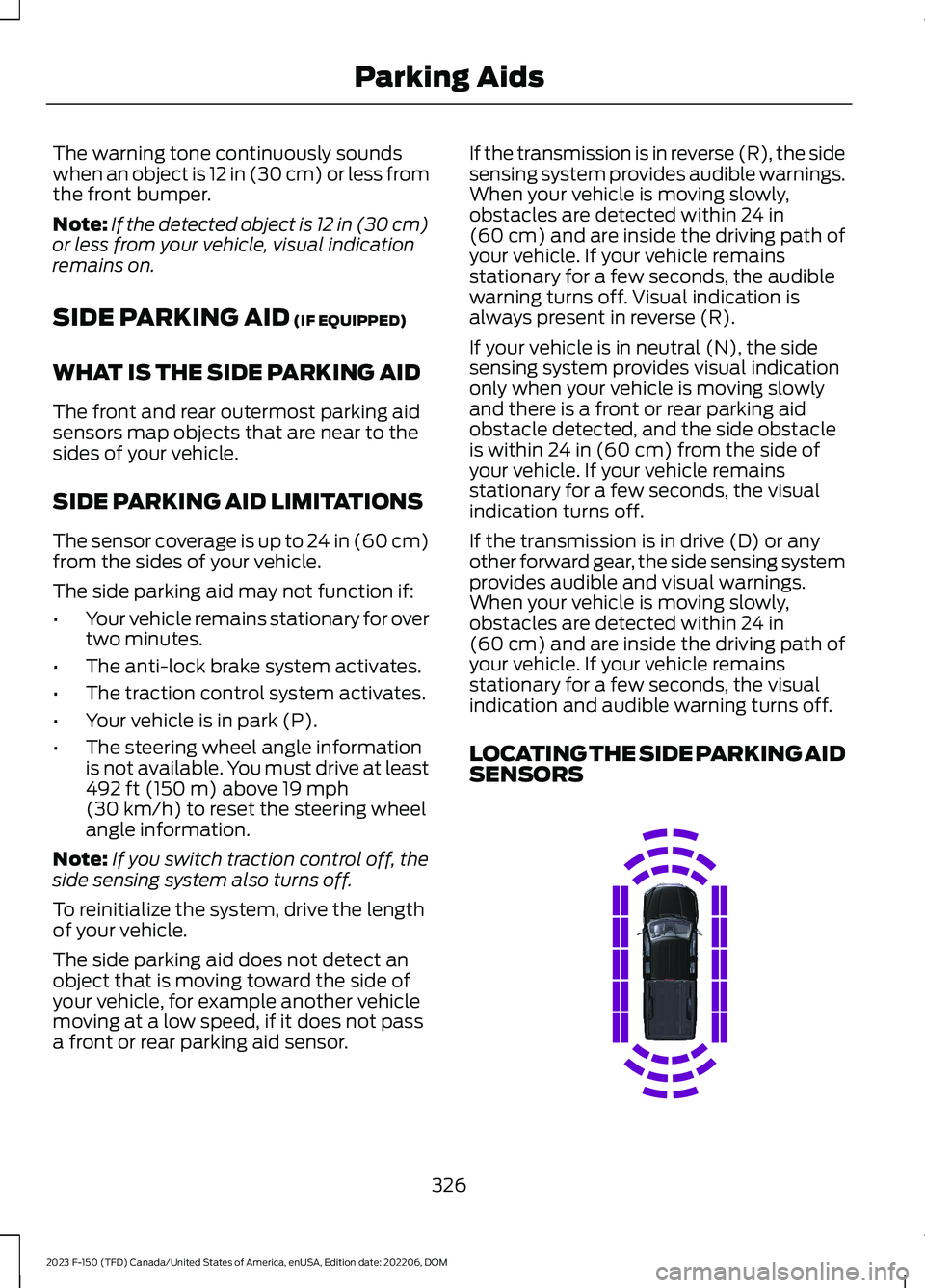
LOCATING THE SIDE PARKING AIDSENSORS
326
2023 F-150 (TFD) Canada/United States of America, enUSA, Edition date: 202206, DOMParking AidsE310321
Page 355 of 786
Automatic cancellation can also occur if:
•The lane becomes too wide or narrow.
•The system cannot detect valid lanemarkings.
•Lane markings cross over one another.
•The curve of the road is too sharp.
Note:If your vehicle slows down due to yourinactivity twice within a key cycle, thesystem disables. To reset the system, whenthe vehicle is stationary, return the gearselector to park (P) and turn the vehicle off.Then, restart the vehicle with your foot onthe brake pedal.
LANE CENTERING MANUALCANCELLATION
When you perform the following actions,adaptive cruise control with lane centeringwill cancel:
•The brake pedal is pressed.
•Adaptive cruise control button isswitched off on the steering wheel.
The lane centering system is momentarilysuppressed when either of the followingactions are performed:
•Turn signal indicator is latched ortapped.
•You steer the vehicle out of lane.
LANE CENTERING INDICATORS
Illuminates when you switchlane centering on. The color ofthe indicator changes to indicatethe system status.
Gray status indicates the system is on butin standby mode.
Green status indicates the system isenabled and applying steering assistanceto keep the vehicle in the center of the lane.
Amber status with an audible tone, thatthen changes to gray status, indicates asystem automatic cancellation.
PREDICTIVE SPEED ASSIST
HOW DOES PREDICTIVE SPEEDASSIST WORK
Predictive Speed Assist works withadaptive cruise control and adjusts thevehicle speed to the road geometry and tothe speed limit detected by the speed signrecognition system. As the systemidentifies curves and highway exits, thevehicle speed temporarily decreases aheadof and during the changing road geometry.When passing new speed signs, the setspeed updates. See Predictive SpeedAssist Precautions (page 351).
There are limitations that affect theaccuracy of the speed sign recognitionsystem and its ability to determine thecurrent speed limit. Predictive speed assistand its ability to determine the currentspeed limit shares these limitations. SeeSpeed Sign Recognition (page 401).
Note:The adaptive cruise control gapsetting operates normally when the featureis enabled.
PREDICTIVE SPEED ASSISTPRECAUTIONS
WARNING: You are responsible forcontrolling your vehicle at all times. Thesystem is designed to be an aid and doesnot relieve you of your responsibility todrive with due care and attention. Failureto follow this instruction could result inthe loss of control of your vehicle,personal injury or death.
351
2023 F-150 (TFD) Canada/United States of America, enUSA, Edition date: 202206, DOMAdaptive Cruise Control (If Equipped)E297977