steering FORD F150 2023 User Guide
[x] Cancel search | Manufacturer: FORD, Model Year: 2023, Model line: F150, Model: FORD F150 2023Pages: 786, PDF Size: 23.15 MB
Page 79 of 786
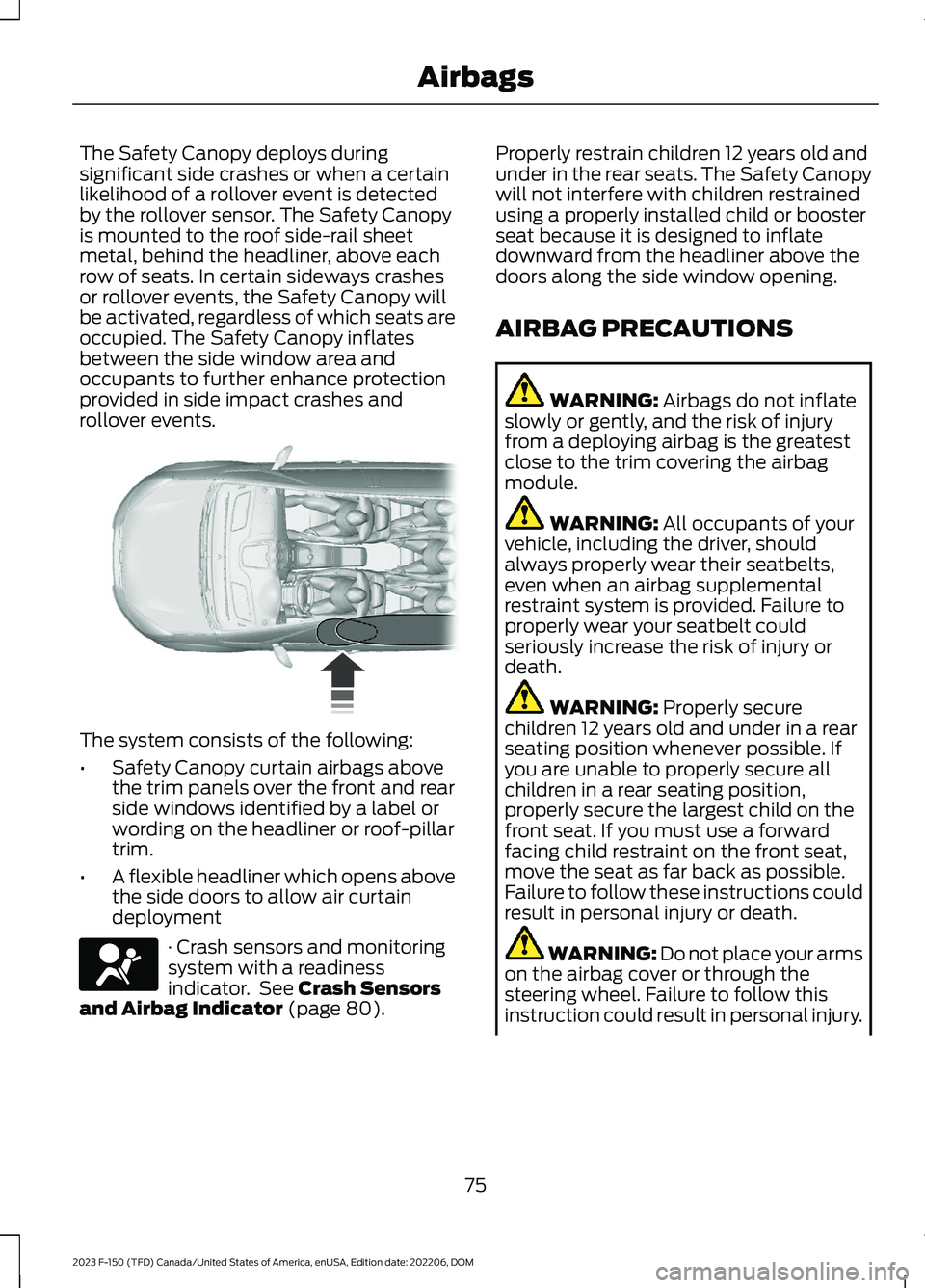
The Safety Canopy deploys duringsignificant side crashes or when a certainlikelihood of a rollover event is detectedby the rollover sensor. The Safety Canopyis mounted to the roof side-rail sheetmetal, behind the headliner, above eachrow of seats. In certain sideways crashesor rollover events, the Safety Canopy willbe activated, regardless of which seats areoccupied. The Safety Canopy inflatesbetween the side window area andoccupants to further enhance protectionprovided in side impact crashes androllover events.
The system consists of the following:
•Safety Canopy curtain airbags abovethe trim panels over the front and rearside windows identified by a label orwording on the headliner or roof-pillartrim.
•A flexible headliner which opens abovethe side doors to allow air curtaindeployment
· Crash sensors and monitoringsystem with a readinessindicator. See Crash Sensorsand Airbag Indicator (page 80).
Properly restrain children 12 years old andunder in the rear seats. The Safety Canopywill not interfere with children restrainedusing a properly installed child or boosterseat because it is designed to inflatedownward from the headliner above thedoors along the side window opening.
AIRBAG PRECAUTIONS
WARNING: Airbags do not inflateslowly or gently, and the risk of injuryfrom a deploying airbag is the greatestclose to the trim covering the airbagmodule.
WARNING: All occupants of yourvehicle, including the driver, shouldalways properly wear their seatbelts,even when an airbag supplementalrestraint system is provided. Failure toproperly wear your seatbelt couldseriously increase the risk of injury ordeath.
WARNING: Properly securechildren 12 years old and under in a rearseating position whenever possible. Ifyou are unable to properly secure allchildren in a rear seating position,properly secure the largest child on thefront seat. If you must use a forwardfacing child restraint on the front seat,move the seat as far back as possible.Failure to follow these instructions couldresult in personal injury or death.
WARNING: Do not place your armson the airbag cover or through thesteering wheel. Failure to follow thisinstruction could result in personal injury.
75
2023 F-150 (TFD) Canada/United States of America, enUSA, Edition date: 202206, DOMAirbags E75004 E67017
Page 87 of 786
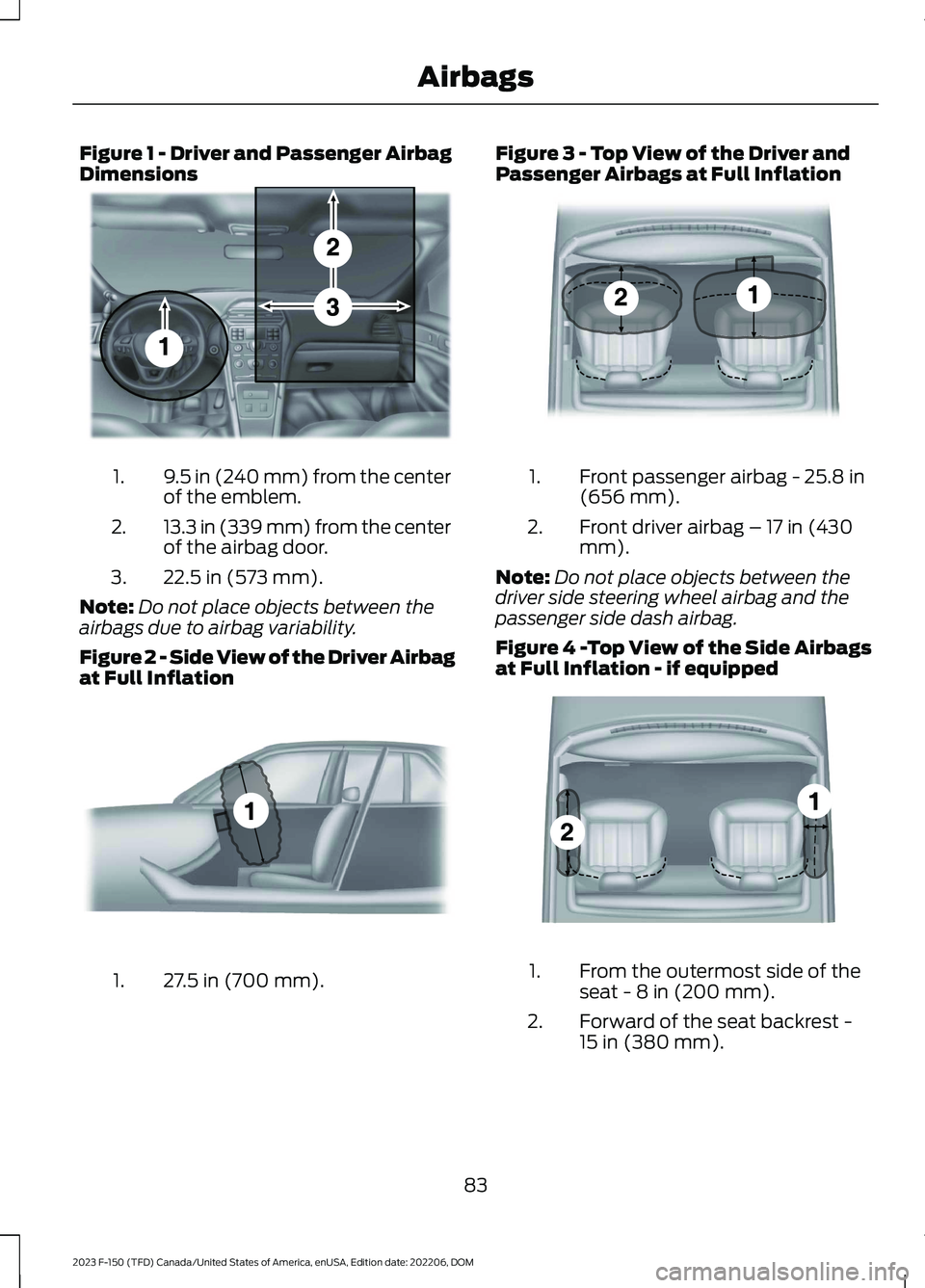
Figure 1 - Driver and Passenger AirbagDimensions
9.5 in (240 mm) from the centerof the emblem.1.
13.3 in (339 mm) from the centerof the airbag door.2.
22.5 in (573 mm).3.
Note:Do not place objects between theairbags due to airbag variability.
Figure 2 - Side View of the Driver Airbagat Full Inflation
27.5 in (700 mm).1.
Figure 3 - Top View of the Driver andPassenger Airbags at Full Inflation
Front passenger airbag - 25.8 in(656 mm).1.
Front driver airbag – 17 in (430mm).2.
Note:Do not place objects between thedriver side steering wheel airbag and thepassenger side dash airbag.
Figure 4 -Top View of the Side Airbagsat Full Inflation - if equipped
From the outermost side of theseat - 8 in (200 mm).1.
Forward of the seat backrest -15 in (380 mm).2.
83
2023 F-150 (TFD) Canada/United States of America, enUSA, Edition date: 202206, DOMAirbagsE201575 E201576 E201577 E201578
Page 92 of 786
WHAT IS 911 ASSIST
911 Assist is a SYNC system feature thatcan call for help.
For more information, visitwww.owner.ford.com.
HOW DOES 911 ASSIST WORK
If a crash deploys an airbag, excluding kneeairbags and rear inflatable seatbelts, oractivates the fuel pump shut-off, yourvehicle may be able to contact emergencyservices by dialing 911 through a paired andconnected Bluetooth® enabled phone.
Not all crashes deploy an airbag or activatethe fuel pump shut-off. If a connected cellphone sustains damage or loses itsconnection to SYNC during a crash, SYNCsearches for and tries to connect to apreviously paired cell phone. SYNC thenattempts to call the emergency services.
Before making the call:
•SYNC provides about 10 seconds tocancel the call. If you fail to cancel thecall, SYNC attempts to dial 911.
•SYNC says the following, or a similarmessage: SYNC will attempt to call 911,to cancel the call, press Cancel on yourscreen or press and hold the phonebutton on your steering wheel.
If you do not cancel the call and SYNCmakes a successful call a pre-recordedmessage plays for the 911 operator. Theoccupants in your vehicle are able to talkwith the operator. Be prepared to provideyour name, phone number and locationimmediately because not all 911 systemsare capable of receiving this informationelectronically.
During an emergency call the systemtransmits vehicle data to the emergencyservice.
EMERGENCY CALL
REQUIREMENTS
WARNING: Do not wait for 911Assist to make an emergency call if youcan do it yourself. Dial emergencyservices immediately to avoid delayedresponse time which could increase therisk of serious injury or death after acrash. If you do not hear 911 Assist withinfive seconds of the crash, the system orphone may be damaged ornon-functional.
WARNING: Always place yourphone in a secure location in your vehicleso it does not become a projectile or getdamaged in a crash. Failure to do so maycause serious injury to someone ordamage the phone which could prevent911 Assist from working properly.
WARNING: Unless the 911 Assistsetting is set on before a crash, thesystem will not dial for help which coulddelay response time, potentiallyincreasing the risk of serious injury ordeath after a crash.
•SYNC is powered and working properlyat the time of the incident andthroughout feature activation and use.
•The 911 Assist feature must be set onbefore the incident.
•You must pair and connect aBluetooth® enabled and compatiblecell phone to SYNC.
•A connected Bluetooth® enabledphone must have the ability to makeand maintain an outgoing call at thetime of the incident.
88
2023 F-150 (TFD) Canada/United States of America, enUSA, Edition date: 202206, DOM911 Assist
Page 116 of 786
HOW DOES EASY ENTRY AND
EXIT WORK
Easy entry and exit moves the driver seatrearward up to 2 in (5 cm) and the steeringcolumn up when you switch the ignitionoff. The driver seat and steering columnreturn to their previous positions when youswitch the ignition on.
Note:Depending on your vehicle, thecolumn may move up and in.
SWITCHING EASY ENTRY AND
EXIT ON AND OFF
1.Press Settings on the touchscreen.
2.Press Vehicle.
3.Select Easy Entry/Exit.
If you press any adjustment or memorybutton when in easy exit mode, the systemcancels the operation.
112
2023 F-150 (TFD) Canada/United States of America, enUSA, Edition date: 202206, DOMEasy Entry and Exit (If Equipped)
Page 136 of 786

Tablet stand.A
Tool inset.B
Clamp pocket.C
Standard and metric ruler.D
Cup holder.E
Tailgate anchors.F
The tailgate work surface contains clamppockets that allows you to secure workmaterial.
Note:Damage could occur to the tailgateif you overload the vertical clamp arm in anydirection.
Note:When you finish using the tailgatework surface, make sure you remove all ofyour belongings, then close the tailgate.
TAILGATE – TROUBLESHOOTING
TAILGATE – INFORMATION MESSAGES
ActionMessage
Reminder to check the tailgate due to it recently being openedfrom the remote control or the button on the instrument panelwhile the vehicle is on and the transmission is not in Park (P).
Check Tailgate Ajar
You must clear the message using the steering wheel controls.Repeatedly closing the tailgate will not clear the message.
Reminder to check if tailgate is closed securely. If messagepersists contact an authorized dealer.Power Tailgate SystemFault Service Now
132
2023 F-150 (TFD) Canada/United States of America, enUSA, Edition date: 202206, DOMTailgate - Vehicles With: Remote Release TailgateE308677 E336605
Page 144 of 786

ADJUSTING THE STEERING
WHEEL - VEHICLES WITH:
MANUAL ADJUSTABLE
STEERING COLUMN
Adjusting the Steering Wheel
WARNING: Do not adjust thesteering wheel when your vehicle ismoving.
Note: Make sure that you are sitting in thecorrect position. See Sitting in the CorrectPosition (page 193).
1.Unlock the steering column.
2.Adjust the steering wheel to theposition you prefer.
3.Lock the steering column.
ADJUSTING THE STEERING
WHEEL - VEHICLES WITH:
POWER ADJUSTABLE
STEERING COLUMN
WARNING: Do not adjust thesteering wheel when your vehicle ismoving.
Note: Make sure that you are sitting in thecorrect position. See Sitting in the CorrectPosition (page 193).
Press the top or bottom of the control tomove the steering wheel up or down.
Press the front or rear of the control tomove the steering wheel in or out.
You can save and recall the steering wheelposition with the memory function. SeeRecalling a Preset Position (page 207).
140
2023 F-150 (TFD) Canada/United States of America, enUSA, Edition date: 202206, DOMSteering WheelE359744 E261582
Page 145 of 786
RESETTING THE STOPPING
POSITION - VEHICLES WITH:
POWER ADJUSTABLE
STEERING COLUMN
Note:The steering wheel stops when itdetects an obstruction. This sets a newstopping position.
To reset the steering column to its normalstopping position:
1.Confirm there is nothing obstructingthe motion of the steering column.
2.Press and hold the steering columncontrol until the steering column stopsmoving.
3.Press the steering column controlagain.
Note:The steering column may start tomove again.
4.When the steering column stops,continue holding the control for a fewseconds.
5.Repeat for each direction, as necessary.
HORN
Press on the center of thesteering wheel near the horn iconto activate the horn.
SWITCHING THE HEATED
STEERING WHEEL ON AND OFF
- VEHICLES WITH: HEATED
STEERING WHEEL
To activate the heated steeringwheel, press the button on theclimate control unit.
On some vehicles, an indicator on thebutton illuminates when the heatedsteering wheel is on.
Note:A sensor regulates the temperatureof the steering wheel.
141
2023 F-150 (TFD) Canada/United States of America, enUSA, Edition date: 202206, DOMSteering WheelE270945 E256621
Page 146 of 786

ADJUSTING THE PEDALS
WARNING: Do not use the pedaladjustment controls when the vehicle ismoving. Failure to follow this instructioncould result in personal injury or death.
Your control is on the left-hand side of thesteering column or on the instrumentpanel.
Farther away from you.A.
Closer to you.B.
You can save and recall the pedal positionswith the memory feature. See MemoryFunction (page 207).
142
2023 F-150 (TFD) Canada/United States of America, enUSA, Edition date: 202206, DOMAdjustable Pedals (If Equipped)E176213
Page 153 of 786

Push the lever up or down toswitch the turn signal lamps on.
Set the lever to the middle position toswitch the turn signal lamps off.
Note:Tap the lever up or down to make theturn signal lamps flash three times.
Turn Signal Lamp Indicator
It flashes when you switch theturn signal lamps on.
Note:An increase in the rate of flashingwarns of a failed turn signal lamp.
HOW DO CORNERING LAMPSWORK (If Equipped)
The cornering lamps illuminate the insideof a corner when you are turning thesteering wheel or when you switch the turnsignal lamps on. They turn on when thevehicle speed is below 25 mph (40 km/h).
Note:Only the cornering lamp on the sideyour vehicle is turning illuminates.
Note:Cornering lamps do not operate ifyou switch the front fog lamps on.
Headlamp beam.A
Cornering lamp beam.B
SWITCHING THE DAYTIMERUNNING LAMPS ON AND OFF -VEHICLES WITH: CONFIGURABLEDAYTIME RUNNING LAMPS/8INCH SCREEN/12 INCH SCREEN
WARNING: The daytime runninglamps system does not activate the rearlamps and may not provide adequatelighting during low visibility drivingconditions. Make sure you switch theheadlamps on, as appropriate, during alllow visibility conditions. Failure to do somay result in a crash.
1.Press Settings on the touchscreen.
2.Press Vehicle Settings.
149
2023 F-150 (TFD) Canada/United States of America, enUSA, Edition date: 202206, DOMExterior LightingE311431 E67018 E67018 E327599
Page 161 of 786
GLARE FREE LIGHTING – TROUBLESHOOTING (IF EQUIPPED)
GLARE FREE LIGHTING – INFORMATION MESSAGES
DescriptionMessage
The camera has reduced visibility. Clean the windshield. Ifthe message continues to appear, have your vehicle checkedas soon as possible.
Front Camera Low Visib-ility Clean Screen
The camera has malfunctioned. Wait a short period of timefor the camera to cool down. If the message continues toappear, have your vehicle checked as soon as possible.
Front Camera Tempor-arily Not Available
The camera has malfunctioned. Have your vehicle checkedas soon as possible.Front Camera Malfunc-tion Service Required
ADAPTIVE FRONT LIGHTING (IF
EQUIPPED)
HOW DOES ADAPTIVE FRONTLIGHTING WORK
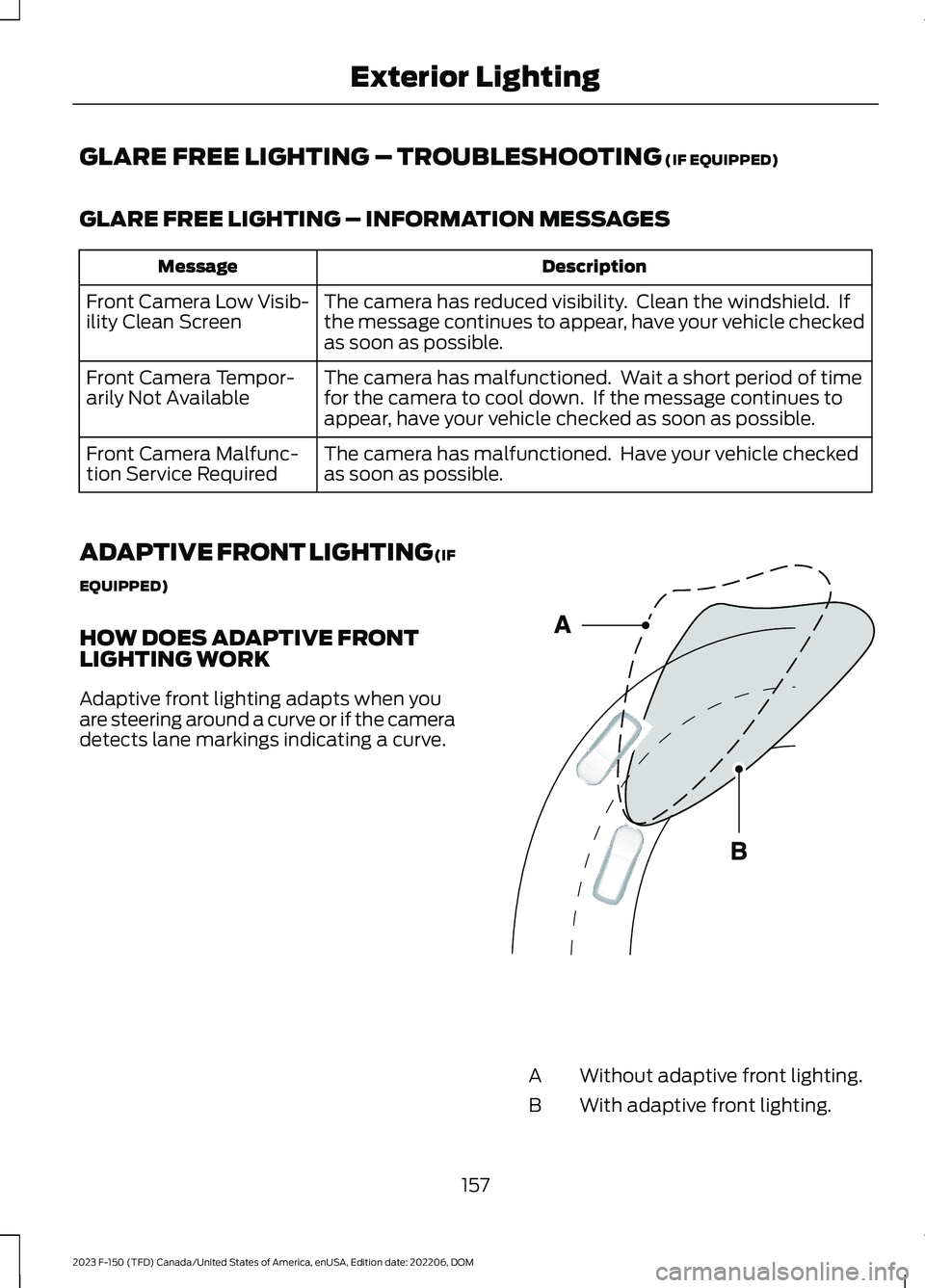
Adaptive front lighting adapts when youare steering around a curve or if the cameradetects lane markings indicating a curve.
Without adaptive front lighting.A
With adaptive front lighting.B
157
2023 F-150 (TFD) Canada/United States of America, enUSA, Edition date: 202206, DOMExterior LightingE161714