steering FORD F150 2023 Owner's Manual
[x] Cancel search | Manufacturer: FORD, Model Year: 2023, Model line: F150, Model: FORD F150 2023Pages: 786, PDF Size: 23.15 MB
Page 166 of 786
Note:You can use global opening for ashort period of time when you unlock yourvehicle using the remote control.
SWITCHING GLOBAL OPENING ONAND OFF
1.Using the information display controlson the steering wheel, select Settings.
2.Select Vehicle.
3.Select Windows.
4.Switch Remote Open on or off.
WINDOW BOUNCE-BACK (IF
EQUIPPED)
WHAT IS WINDOW BOUNCE-BACK
The window stops and reverses if it detectsan obstruction when closing.
OVERRIDING WINDOW BOUNCE-BACK
WARNING: If you overridebounce-back, the window does notreverse if it detects an obstacle. Takecare when closing the windows to avoidpersonal injury or damage to yourvehicle.
1.Close the window until it reaches thepoint of resistance and let it reverse.
2.Lift and hold the window control switchwithin two seconds to overridebounce-back and close the window.Bounce-back is now disabled and youcan close the window manually.
Note:The window goes past the point ofresistance and you can fully close it.
Note:If the window does not close, haveyour vehicle checked as soon as possible.
LOCKING THE REAR WINDOW
CONTROLS (IF EQUIPPED)
Press the window control switchto lock or unlock the rear windowcontrols. It illuminates when youlock the rear window controls.
OPENING AND CLOSING THE
SLIDING WINDOWS (IF EQUIPPED)
WARNING: When closing thepower windows, verify they are free ofobstruction and make sure that childrenand pets are not in the proximity of thewindow openings.
WARNING: Do not leave childrenunattended in your vehicle and do notlet them play with the power windows.Failure to follow this instruction couldresult in personal injury.
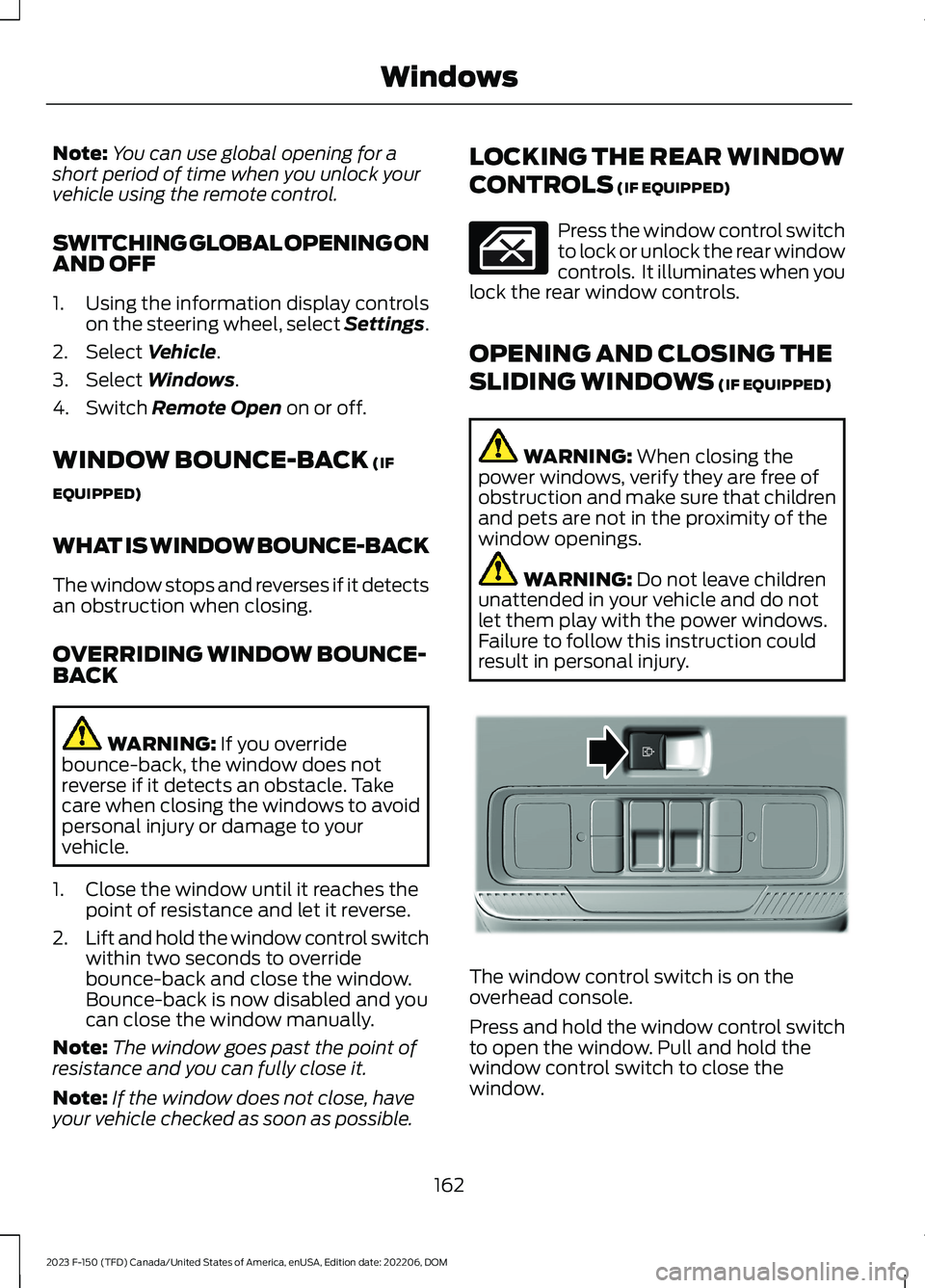
The window control switch is on theoverhead console.
Press and hold the window control switchto open the window. Pull and hold thewindow control switch to close thewindow.
162
2023 F-150 (TFD) Canada/United States of America, enUSA, Edition date: 202206, DOMWindows E311430
Page 179 of 786
USING THE INSTRUMENT
CLUSTER DISPLAY CONTROLS
WARNING: Driving while distractedcan result in loss of vehicle control, crashand injury. We strongly recommend thatyou use extreme caution when using anydevice that may take your focus off theroad. Your primary responsibility is thesafe operation of your vehicle. Werecommend against the use of anyhand-held device while driving andencourage the use of voice-operatedsystems when possible. Make sure youare aware of all applicable local lawsthat may affect the use of electronicdevices while driving.
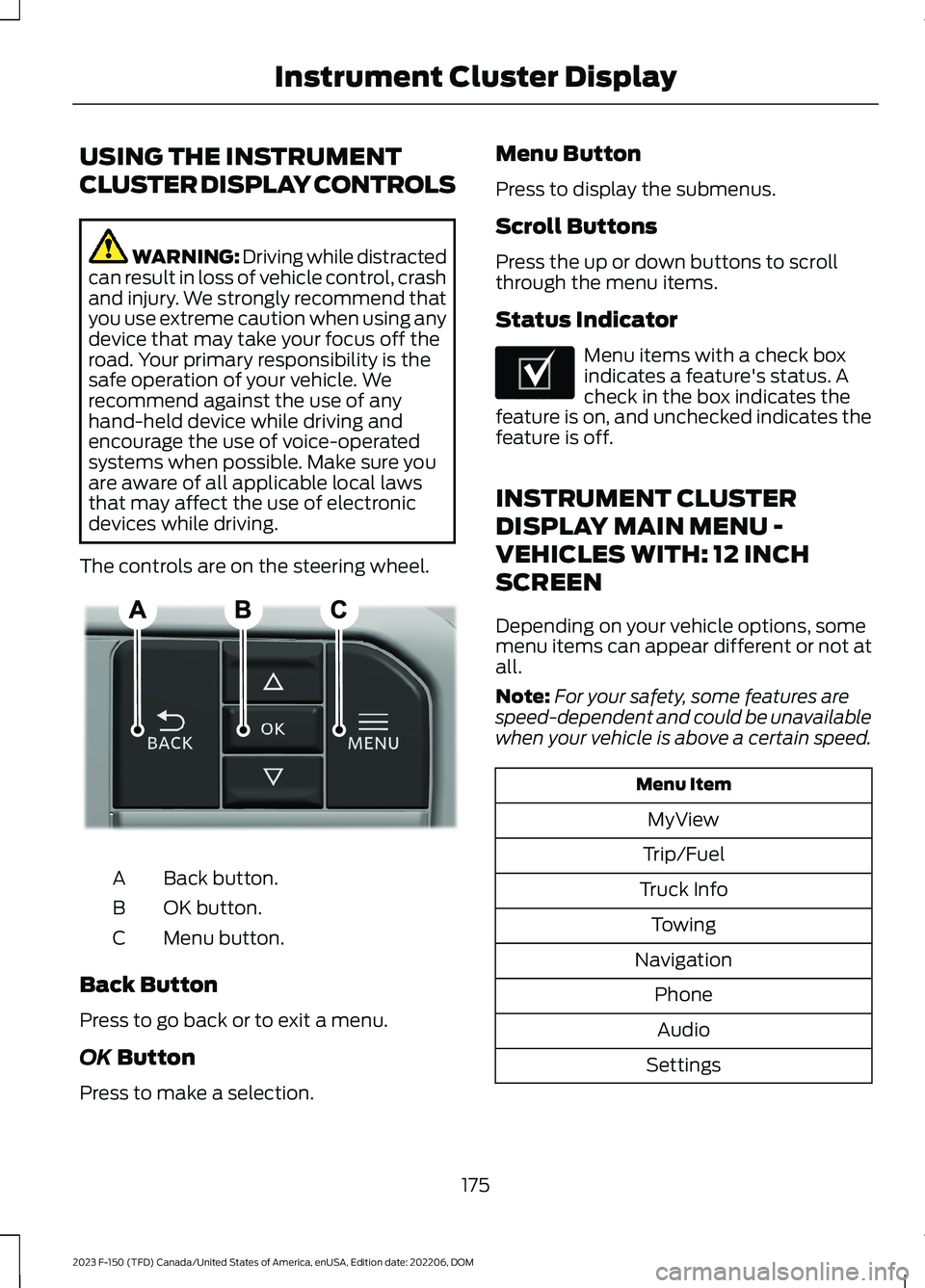
The controls are on the steering wheel.
Back button.A
OK button.B
Menu button.C
Back Button
Press to go back or to exit a menu.
OK Button
Press to make a selection.
Menu Button
Press to display the submenus.
Scroll Buttons
Press the up or down buttons to scrollthrough the menu items.
Status Indicator
Menu items with a check boxindicates a feature's status. Acheck in the box indicates thefeature is on, and unchecked indicates thefeature is off.
INSTRUMENT CLUSTER
DISPLAY MAIN MENU -
VEHICLES WITH: 12 INCH
SCREEN
Depending on your vehicle options, somemenu items can appear different or not atall.
Note:For your safety, some features arespeed-dependent and could be unavailablewhen your vehicle is above a certain speed.
Menu Item
MyView
Trip/Fuel
Truck Info
Towing
Navigation
Phone
Audio
Settings
175
2023 F-150 (TFD) Canada/United States of America, enUSA, Edition date: 202206, DOMInstrument Cluster DisplayE309379 E204495
Page 181 of 786
CUSTOMIZING THE
INSTRUMENT CLUSTER
DISPLAY
Adding Screens Using MyView
1.Using the information display controlson the steering wheel, select MyView.
2.Select Configure MyView.
3.Select a screen.
4.Press the OK button.
Note:The number of screens you can addis limited. If the selected screen does notappear you must deselect screens from theMyView menu.
Adding Screens Using SelectScreens
1.Select Select Screens.
2.Use the controls on the steering wheelto highlight a screen to add.
3.Press the OK button.
Note:The number of screens you can addis limited. If the selected screen does notappear you must deselect screens from theSelect Screens menu.
Configuring Gauges
1.Select Settings.
2.Select Configure Gauges.
3.Select to swap or change left-handside and right-hand side gauges.
EV COACH - 3.5L, HYBRID
ELECTRIC VEHICLE (HEV) (IF
EQUIPPED)
EV coach can help you get the most out ofyour vehicle's electric driving capabilities.
Note:EV coach is a selectable screen. SeeCustomizing the Instrument ClusterDisplay (page 177).
When you are accelerating or maintainingspeed you see a blue or white solid barindicating vehicle power. You may also seea blue rectangular box which shows thepower level at which the engine turns on.
•When the power level is within the box,the color of the bar is blue. This meansyou are in electric operation and theengine is off.
•When the power level is outside of thebox, the color of the bar is white. Thismeans you are in hybrid operation witha combination of the electric motorand the engine providing vehicle power.
When you are decelerating with either yourfoot off the accelerator pedal or on thebrake pedal, a green or white solid bardisplays indicating the power being usedto slow down your vehicle. You may alsosee a green rectangular box which showsthe amount of power that can berecaptured by the regenerative brakingsystem and returned to the high voltagebattery.
•When the power level is within the box,the color of the bar is green. Thismeans that the regenerative brakingsystem is being used to efficiently slowyour vehicle down and return themaximum percentage of energy to thehigh voltage battery.
•When the power level is outside of thebox, the color of the bar is white. Thismeans both the regenerative brakingsystem and conventional brakingsystem are being used.
177
2023 F-150 (TFD) Canada/United States of America, enUSA, Edition date: 202206, DOMInstrument Cluster Display
Page 184 of 786
ACCESSING THE TRIP
COMPUTER - VEHICLES WITH:
4.2 INCH SCREEN
1.Use the instrument cluster displaycontrols to navigate the home screen.
2.Select the trip screen.
3.Press the menu button on the steeringwheel.
4.Select Trip 1 or Trip 2.
ACCESSING THE TRIP
COMPUTER - VEHICLES WITH:
8 INCH SCREEN/12 INCH
SCREEN
1.Using the instrument cluster displaycontrols on the steering wheel, selectTrip/Fuel.
2.Select This Trip, Trip 1 or Trip 2.
RESETTING THE TRIP
COMPUTER - VEHICLES WITH:
4.2 INCH SCREEN
1.Use the controls on the steering wheelto navigate the home screen.
2.Select Trip 1 or Trip 2.
3.Press and hold the OK button for a fewseconds.
RESETTING THE TRIP
COMPUTER - VEHICLES WITH:
8 INCH SCREEN/12 INCH
SCREEN
1.Select Trip/Fuel.
2.Select Trip 1 or Trip 2.
3.Press and hold the OK button for a fewseconds.
Note:This Trip resets every time you startyour vehicle.
180
2023 F-150 (TFD) Canada/United States of America, enUSA, Edition date: 202206, DOMTrip Computer
Page 187 of 786
Heated Steering Wheel Settings (If
Equipped)
1.Press Settings on the touchscreen.
2.Press Vehicle Settings.
3.Press Remote Start Setup.
4.Press Seats and Steering Wheel.
5.Press Auto or Off.
Note:If you switch the heated steeringwheel settings on, the heated steering wheelturns on during cold weather.
Note:You cannot adjust the heatedsteering wheel settings when you remotelystart your vehicle.
Remote Start Duration
1.Press Settings on the touchscreen.
2.Press Vehicle Settings.
3.Press Remote Start Setup.
4.Press Duration.
5.Press the duration you prefer.
183
2023 F-150 (TFD) Canada/United States of America, enUSA, Edition date: 202206, DOMRemote Start (If Equipped)
Page 197 of 786
FRONT SEAT PRECAUTIONS
WARNING: Sitting improperly, outof position or with the seatback reclinedtoo far can take weight off the seatcushion and affect the decision of thepassenger sensing system, resulting inserious injury or death in the event of acrash. Always sit upright against yourseat back, with your feet on the floor.
WARNING: Do not recline the seatbackrest too far as this can cause theoccupant to slide under the seatbelt,resulting in personal injury in the eventof a crash.
WARNING: Do not place objectshigher than the top of the seat backrest.Failure to follow this instruction couldresult in personal injury or death in theevent of a sudden stop or crash.
WARNING: Do not adjust the driverseat or seat backrest when your vehicleis moving. This may result in sudden seatmovement, causing the loss of controlof your vehicle.
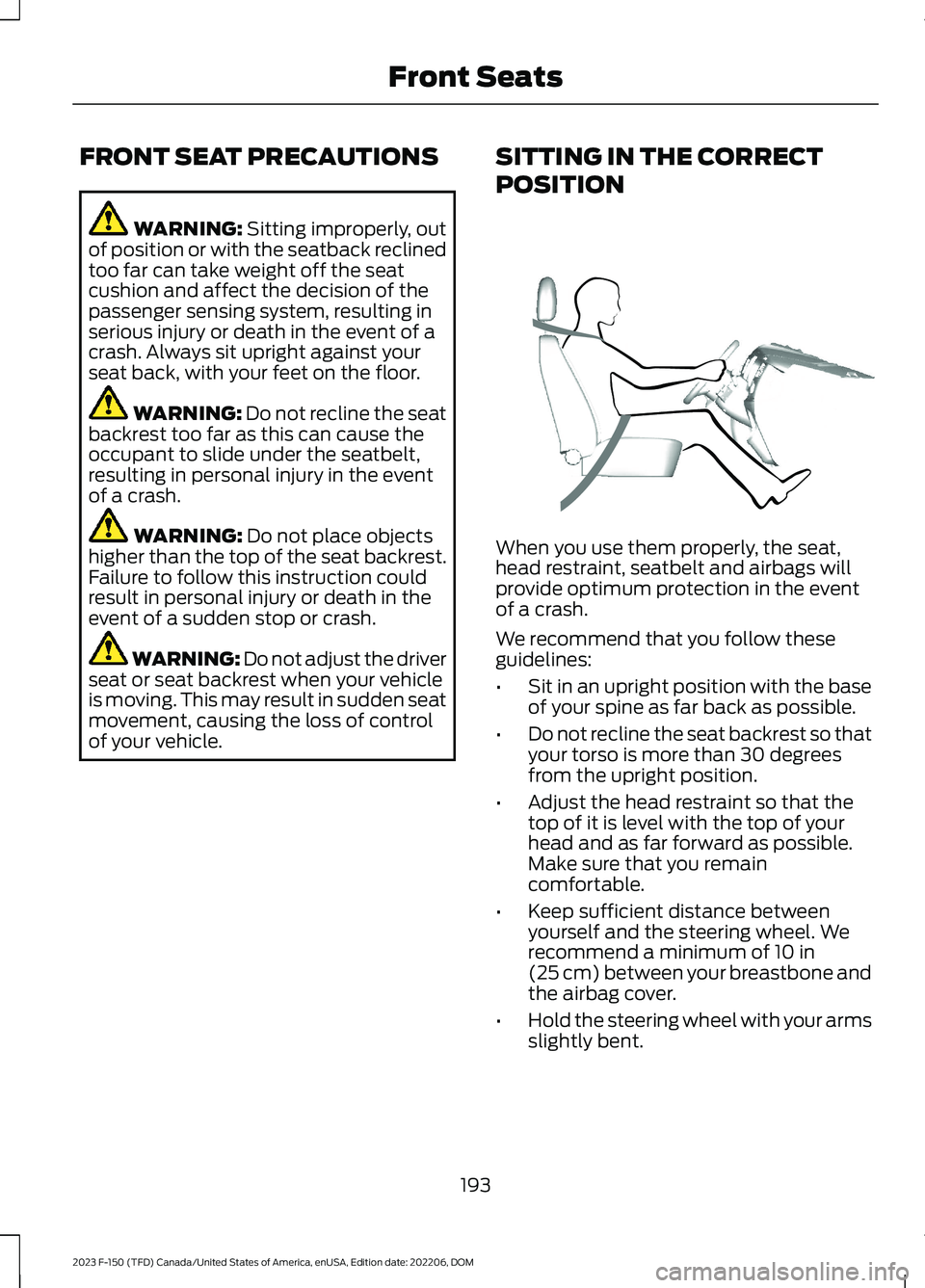
SITTING IN THE CORRECT
POSITION
When you use them properly, the seat,head restraint, seatbelt and airbags willprovide optimum protection in the eventof a crash.
We recommend that you follow theseguidelines:
•Sit in an upright position with the baseof your spine as far back as possible.
•Do not recline the seat backrest so thatyour torso is more than 30 degreesfrom the upright position.
•Adjust the head restraint so that thetop of it is level with the top of yourhead and as far forward as possible.Make sure that you remaincomfortable.
•Keep sufficient distance betweenyourself and the steering wheel. Werecommend a minimum of 10 in(25 cm) between your breastbone andthe airbag cover.
•Hold the steering wheel with your armsslightly bent.
193
2023 F-150 (TFD) Canada/United States of America, enUSA, Edition date: 202206, DOMFront SeatsE68595
Page 211 of 786
WHAT IS THE MEMORY
FUNCTION
The memory function recalls the positionof these features:
•Driver seat.
•Power mirrors.
•Optional power steering column.
•Optional power adjustable pedals.
MEMORY FUNCTION
PRECAUTIONS
WARNING: Before activating thememory seat, make sure that the areaimmediately surrounding the seat is clearof obstructions and that all occupantsare clear of moving parts.
WARNING: Do not use the memoryfunction when your vehicle is moving.
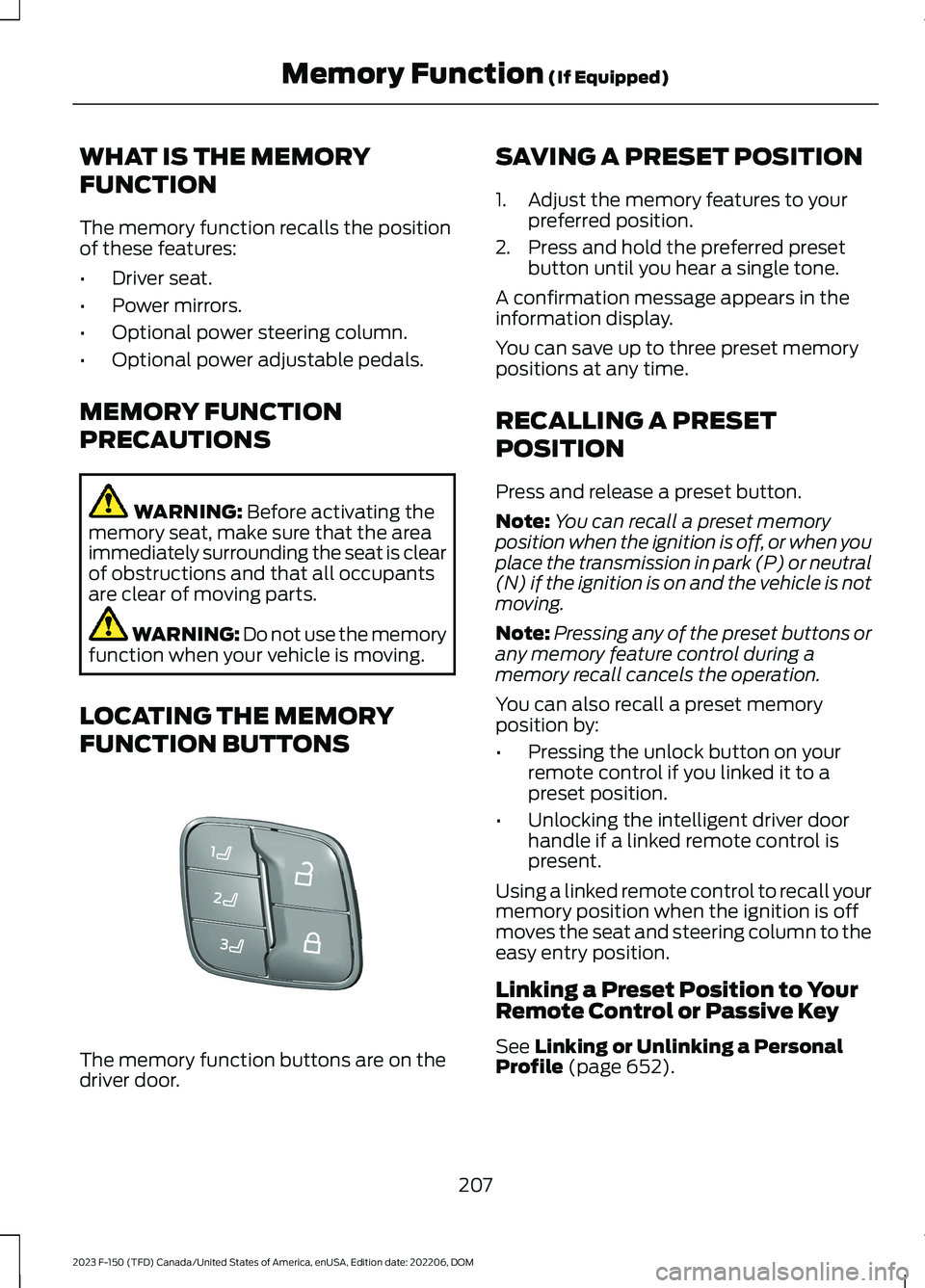
LOCATING THE MEMORY
FUNCTION BUTTONS
The memory function buttons are on thedriver door.
SAVING A PRESET POSITION
1.Adjust the memory features to yourpreferred position.
2.Press and hold the preferred presetbutton until you hear a single tone.
A confirmation message appears in theinformation display.
You can save up to three preset memorypositions at any time.
RECALLING A PRESET
POSITION
Press and release a preset button.
Note:You can recall a preset memoryposition when the ignition is off, or when youplace the transmission in park (P) or neutral(N) if the ignition is on and the vehicle is notmoving.
Note:Pressing any of the preset buttons orany memory feature control during amemory recall cancels the operation.
You can also recall a preset memoryposition by:
•Pressing the unlock button on yourremote control if you linked it to apreset position.
•Unlocking the intelligent driver doorhandle if a linked remote control ispresent.
Using a linked remote control to recall yourmemory position when the ignition is offmoves the seat and steering column to theeasy entry position.
Linking a Preset Position to YourRemote Control or Passive Key
See Linking or Unlinking a PersonalProfile (page 652).
207
2023 F-150 (TFD) Canada/United States of America, enUSA, Edition date: 202206, DOMMemory Function (If Equipped)E332006
Page 230 of 786
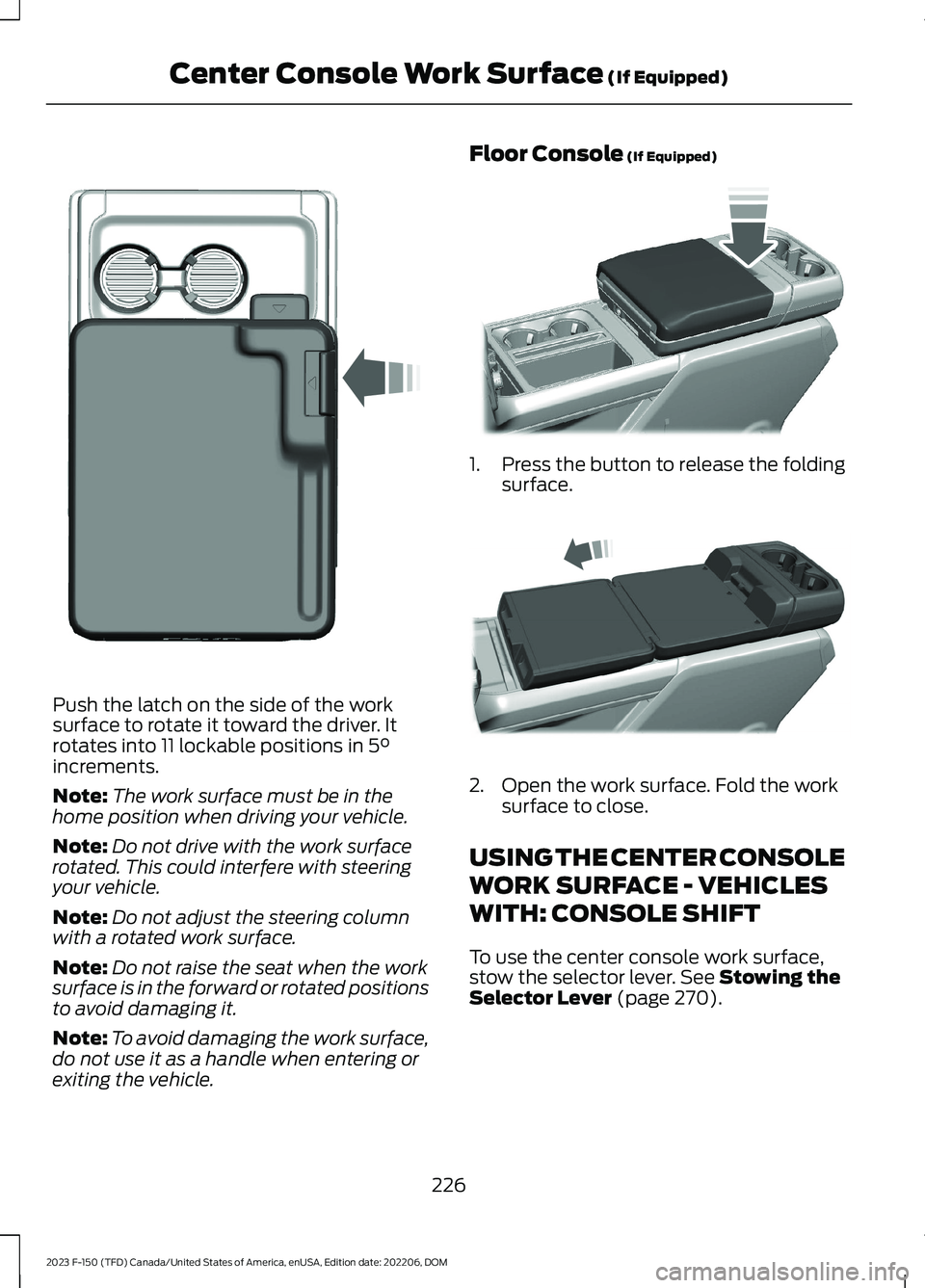
Push the latch on the side of the worksurface to rotate it toward the driver. Itrotates into 11 lockable positions in 5°increments.
Note:The work surface must be in thehome position when driving your vehicle.
Note:Do not drive with the work surfacerotated. This could interfere with steeringyour vehicle.
Note:Do not adjust the steering columnwith a rotated work surface.
Note:Do not raise the seat when the worksurface is in the forward or rotated positionsto avoid damaging it.
Note:To avoid damaging the work surface,do not use it as a handle when entering orexiting the vehicle.
Floor Console (If Equipped)
1.Press the button to release the foldingsurface.
2.Open the work surface. Fold the worksurface to close.
USING THE CENTER CONSOLE
WORK SURFACE - VEHICLES
WITH: CONSOLE SHIFT
To use the center console work surface,stow the selector lever. See Stowing theSelector Lever (page 270).
226
2023 F-150 (TFD) Canada/United States of America, enUSA, Edition date: 202206, DOMCenter Console Work Surface (If Equipped)E331800 E346160 E327043
Page 241 of 786
HOW DOES THE ENGINE BLOCKHEATER WORK
The engine block heater warms the enginecoolant. This allows the climate controlsystem to quickly respond. The equipmentincludes a heater element installed in theengine block and a wire harness. You canconnect the system to a grounded 110 voltAC electrical source.
Note:The engine block heater is mosteffective when outdoor temperatures arebelow 0°F (-18°C).
USING THE ENGINE BLOCKHEATER
Make sure the receptacle terminals areclean and dry prior to use. Clean them witha dry cloth if necessary.
The heater uses 0.4 to 1.0 kilowatt-hoursof energy per hour of use. The system doesnot have a thermostat. It achievesmaximum temperature afterapproximately three hours of operation.Using the engine block heater longer thanthree hours does not improve systemperformance and unnecessarily useselectricity.
STOPPING THE ENGINE
STOPPING THE ENGINE WHENYOUR VEHICLE IS STATIONARY -VEHICLES WITHOUT: PUSHBUTTON START
1.Shift into park (P).
2.Apply the parking brake.
3.Wait until the engine reaches idlespeed.
4.Turn the key to position 0.
STOPPING THE ENGINE WHENYOUR VEHICLE IS STATIONARY -VEHICLES WITH: PUSH BUTTONSTART
1.Shift into park (P).
2.Apply the parking brake.
3.Wait until the engine reaches idlespeed.
4.Press the push button ignition switch.
STOPPING THE ENGINE WHENYOUR VEHICLE IS MOVING -VEHICLES WITHOUT: PUSHBUTTON START
WARNING: Switching off theengine when your vehicle is still movingresults in a significant decrease inbraking assistance. Higher effort isrequired to apply the brakes and to stopyour vehicle. A significant decrease insteering assistance could also occur. Thesteering does not lock, but higher effort
237
2023 F-150 (TFD) Canada/United States of America, enUSA, Edition date: 202206, DOMStarting and Stopping the EngineE322405 E357998
Page 242 of 786
could be required to steer your vehicle.When you switch the ignition off, someelectrical circuits, for example airbags,also turn off. If you unintentionally switchthe ignition off, shift into neutral (N) andrestart the engine.
1.Turn the key to position 0.
2.Shift into neutral and use the brakes tobring your vehicle to a safe stop.
3.Shift into park (P).
4.Apply the parking brake.
STOPPING THE ENGINE WHENYOUR VEHICLE IS MOVING -VEHICLES WITH: PUSH BUTTONSTART
WARNING: Switching off theengine when your vehicle is still movingresults in a significant decrease inbraking assistance. Higher effort isrequired to apply the brakes and to stopyour vehicle. A significant decrease insteering assistance could also occur. Thesteering does not lock, but higher effortcould be required to steer your vehicle.When you switch the ignition off, someelectrical circuits, for example airbags,also turn off. If you unintentionally switchthe ignition off, shift into neutral (N) andrestart the engine.
1.Press and hold the push button ignitionswitch until the engine stops, or pressit three times within two seconds.
2.Shift into neutral and use the brakes tobring your vehicle to a safe stop.
3.Shift into park (P).
4.Apply the parking brake.
POLICE ENGINE IDLE -
VEHICLES WITH: POLICE PACK
WHAT IS POLICE ENGINE IDLE
This allows you to leave the engine runningand prevents your vehicle fromunauthorized use when you are outside ofyour vehicle.
HOW DOES POLICE ENGINE IDLEWORK
When you remove the key from the ignition,the engine remains idling.
Switching the System On
238
2023 F-150 (TFD) Canada/United States of America, enUSA, Edition date: 202206, DOMStarting and Stopping the EngineE322405 E357998 E227967