wiring FORD F150 2023 User Guide
[x] Cancel search | Manufacturer: FORD, Model Year: 2023, Model line: F150, Model: FORD F150 2023Pages: 786, PDF Size: 23.15 MB
Page 433 of 786
INTEGRATED TRAILER BRAKECONTROLLER – FREQUENTLYASKED QUESTIONS
How do I determine if there is an issuewith the wiring on my vehicle?
A message displays accompanied bya single tone, when no trailer isconnected. This indicates that theissue is between the trailer brakecontroller and the 7-pin connector atthe bumper.
How do I determine if there is an issuewith the wiring on my trailer?
A message only displays with a trailerconnected. Consult your trailer dealerfor assistance.
429
2023 F-150 (TFD) Canada/United States of America, enUSA, Edition date: 202206, DOMIntegrated Trailer Brake Controller (If Equipped)
Page 436 of 786
TRAILER HITCHING
ASSISTANCE LIMITATIONS
The system could not function or couldfunction with reduced performance duringthe following:
•When using trailer hitching assistancein tall grass and weeds.
•When safety chains, cables or wiringare dangling near the coupler.
•When using trailer hitching assistanceon slippery surfaces.
•When using hitches that raise the hitchball more than 4 in (10 cm), lower thehitch ball by more than 6 in (16 cm) orextend the hitch ball away from thevehicle more than 12 in (30 cm).
•When using hitches that are lower than10 in (25 cm) off the ground.
•When using objects taller than 8 in(20 cm), such as large blocks, underthe jack stand.
•When you park the trailer on surfacesthat are similar in color to the trailercoupler and hitch ball.
•A black coupler or hitch ball over adark asphalt surface.
•A light color coupler or hitch ballover a light concrete surface.
•When there are low or no light sources,such as at night.
For additional information, please refer tothe Ford Support Website.
SWITCHING TRAILER
HITCHING ASSISTANCE ON
AND OFF
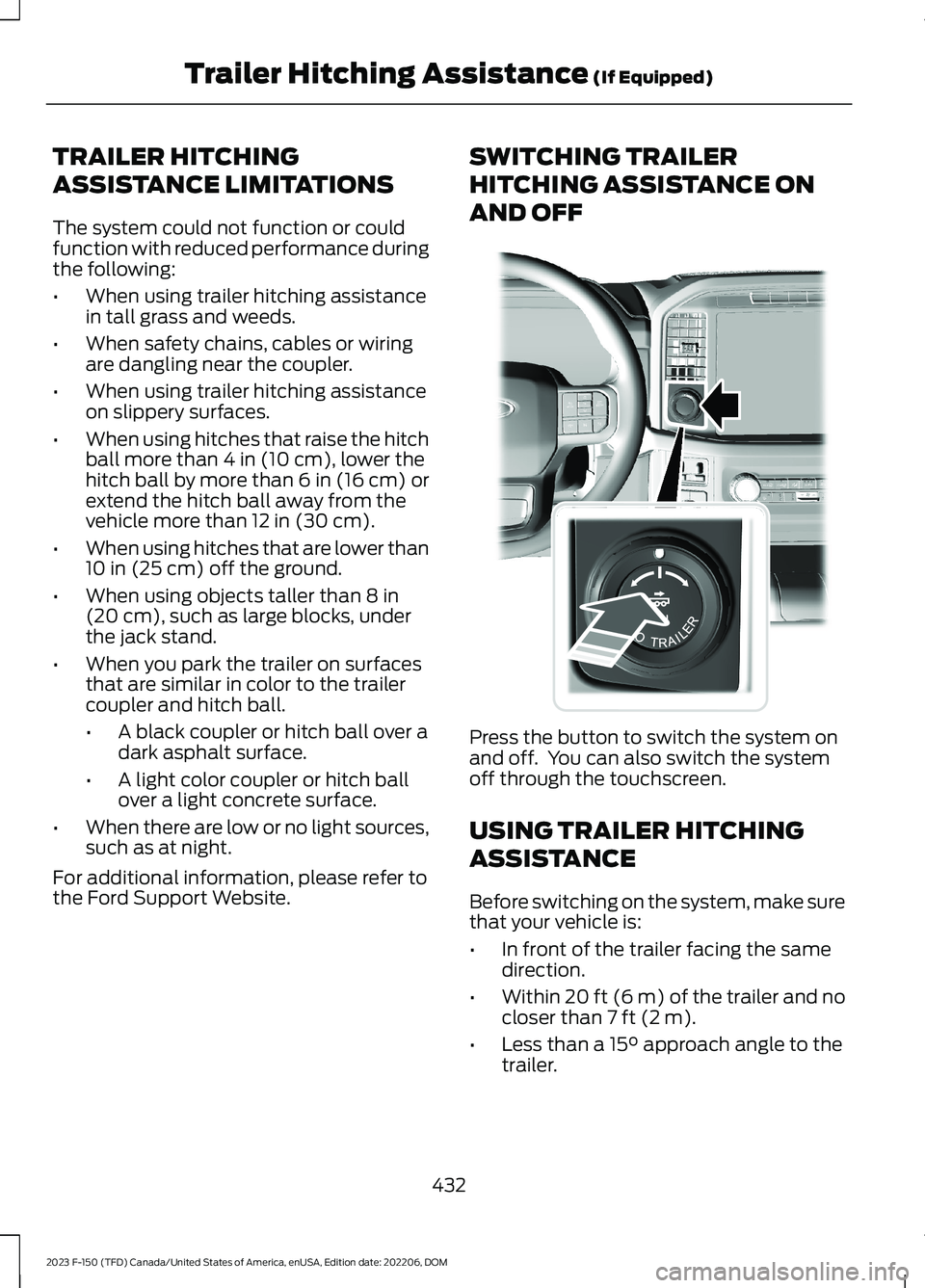
Press the button to switch the system onand off. You can also switch the systemoff through the touchscreen.
USING TRAILER HITCHING
ASSISTANCE
Before switching on the system, make surethat your vehicle is:
•In front of the trailer facing the samedirection.
•Within 20 ft (6 m) of the trailer and nocloser than 7 ft (2 m).
•Less than a 15° approach angle to thetrailer.
432
2023 F-150 (TFD) Canada/United States of America, enUSA, Edition date: 202206, DOMTrailer Hitching Assistance (If Equipped)E310335
Page 444 of 786
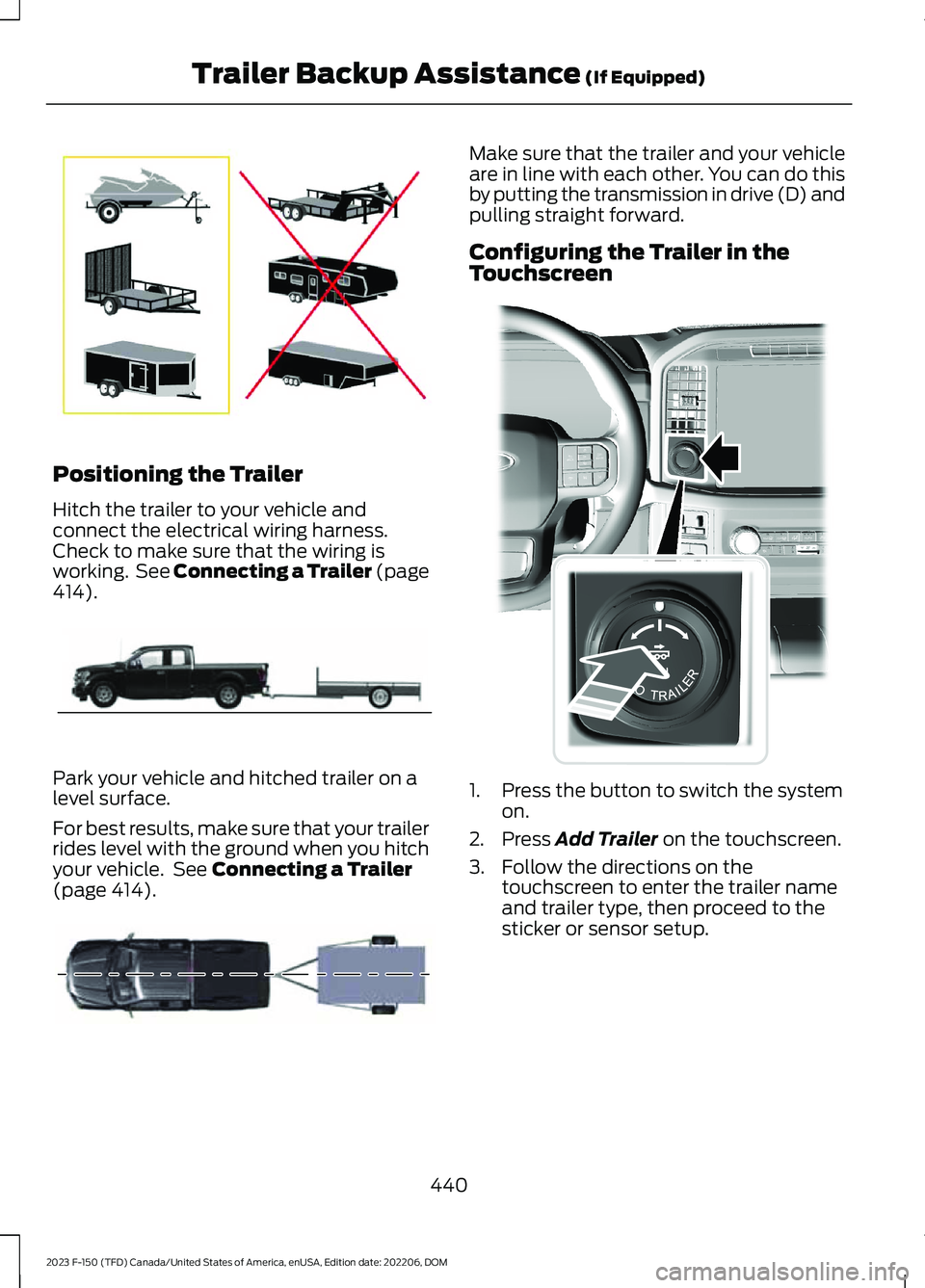
Positioning the Trailer
Hitch the trailer to your vehicle andconnect the electrical wiring harness.Check to make sure that the wiring isworking. See Connecting a Trailer (page414).
Park your vehicle and hitched trailer on alevel surface.
For best results, make sure that your trailerrides level with the ground when you hitchyour vehicle. See Connecting a Trailer(page 414).
Make sure that the trailer and your vehicleare in line with each other. You can do thisby putting the transmission in drive (D) andpulling straight forward.
Configuring the Trailer in theTouchscreen
1.Press the button to switch the systemon.
2.Press Add Trailer on the touchscreen.
3.Follow the directions on thetouchscreen to enter the trailer nameand trailer type, then proceed to thesticker or sensor setup.
440
2023 F-150 (TFD) Canada/United States of America, enUSA, Edition date: 202206, DOMTrailer Backup Assistance (If Equipped)E209766 E209759 E209760 E310335
Page 445 of 786
Note:Your vehicle has two options fortrailer backup assistance set up. The systemdefaults to the camera based system. SeeApplying the Trailer Reversing Aid Sticker(page 441). You can also set up the systemwith the trailer sensor that you can purchasefrom your authorized dealer. You mustconnect the sensor to your vehicle to set upthe system. See Trailer SensorInstallation (page 441).
Note:If you configure the trailer and installa sensor, the system saves the trailer withthat sensor information. If you want to usethis trailer with the sticker, you need todelete the trailer from the system andrepeat the setup process.
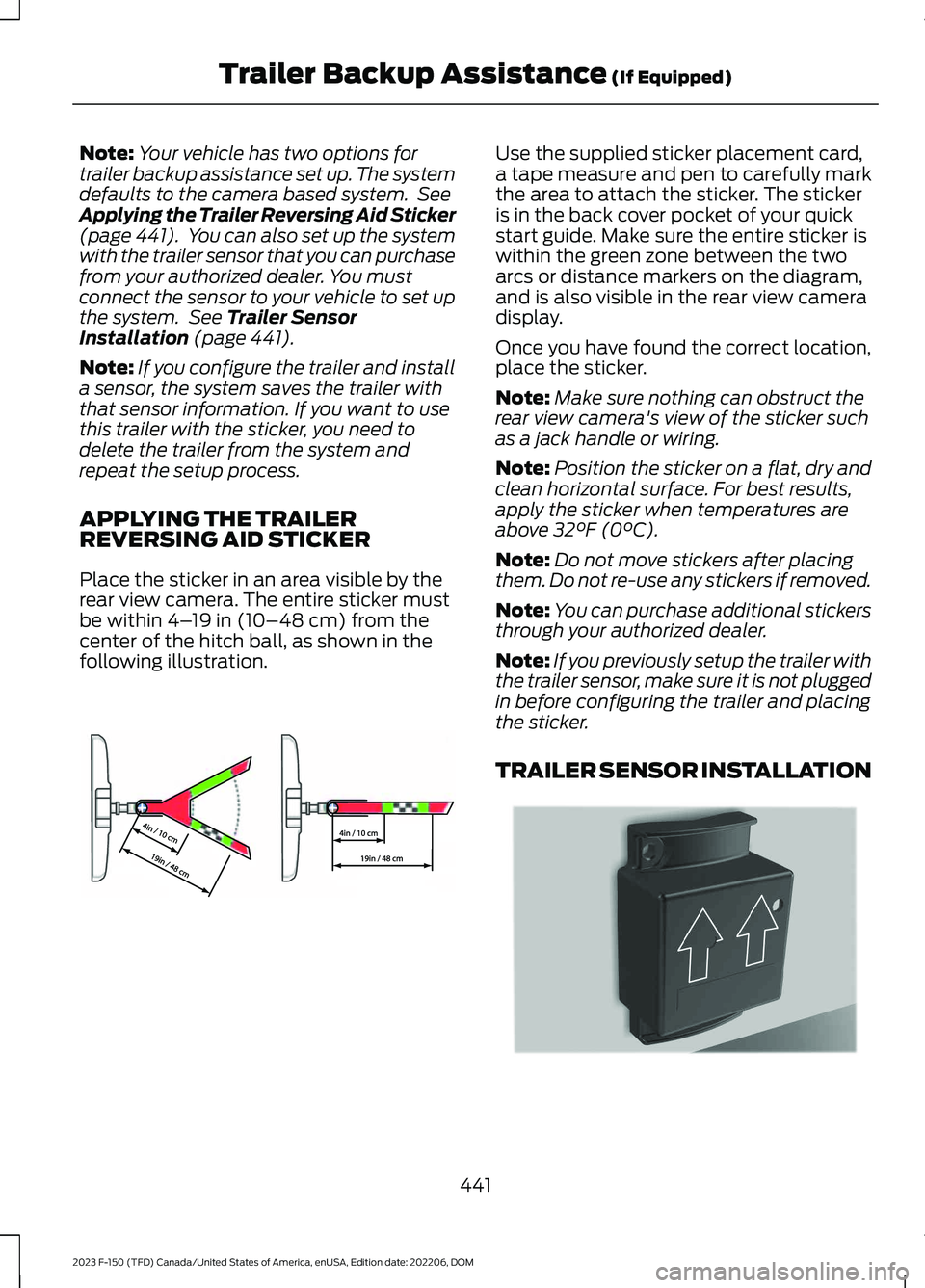
APPLYING THE TRAILERREVERSING AID STICKER
Place the sticker in an area visible by therear view camera. The entire sticker mustbe within 4–19 in (10–48 cm) from thecenter of the hitch ball, as shown in thefollowing illustration.
Use the supplied sticker placement card,a tape measure and pen to carefully markthe area to attach the sticker. The stickeris in the back cover pocket of your quickstart guide. Make sure the entire sticker iswithin the green zone between the twoarcs or distance markers on the diagram,and is also visible in the rear view cameradisplay.
Once you have found the correct location,place the sticker.
Note:Make sure nothing can obstruct therear view camera's view of the sticker suchas a jack handle or wiring.
Note:Position the sticker on a flat, dry andclean horizontal surface. For best results,apply the sticker when temperatures areabove 32°F (0°C).
Note:Do not move stickers after placingthem. Do not re-use any stickers if removed.
Note:You can purchase additional stickersthrough your authorized dealer.
Note:If you previously setup the trailer withthe trailer sensor, make sure it is not pluggedin before configuring the trailer and placingthe sticker.
TRAILER SENSOR INSTALLATION
441
2023 F-150 (TFD) Canada/United States of America, enUSA, Edition date: 202206, DOMTrailer Backup Assistance (If Equipped)E333148 E315959
Page 452 of 786
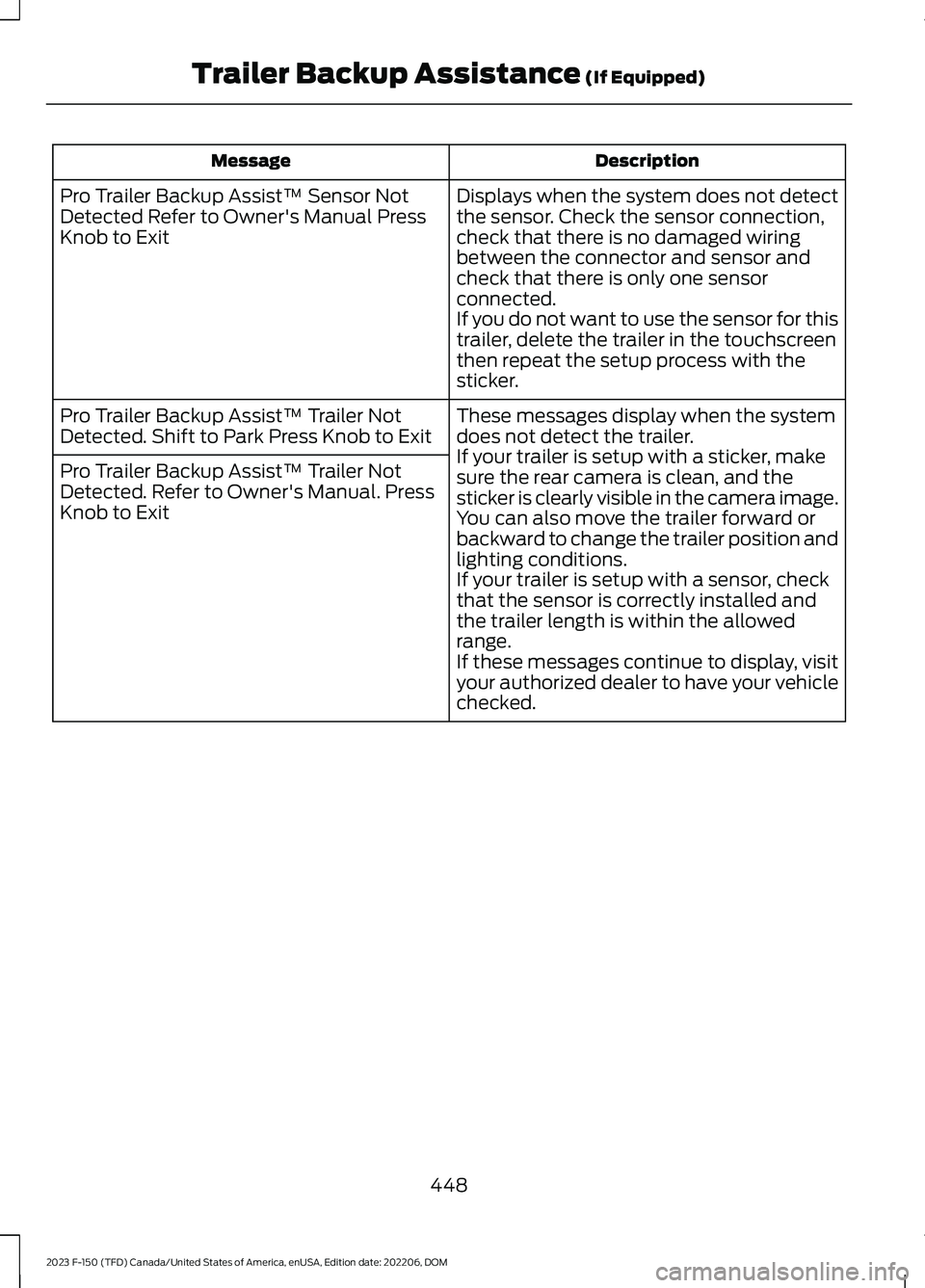
DescriptionMessage
Displays when the system does not detectthe sensor. Check the sensor connection,check that there is no damaged wiringbetween the connector and sensor andcheck that there is only one sensorconnected.If you do not want to use the sensor for thistrailer, delete the trailer in the touchscreenthen repeat the setup process with thesticker.
Pro Trailer Backup Assist™ Sensor NotDetected Refer to Owner's Manual PressKnob to Exit
These messages display when the systemdoes not detect the trailer.If your trailer is setup with a sticker, makesure the rear camera is clean, and thesticker is clearly visible in the camera image.You can also move the trailer forward orbackward to change the trailer position andlighting conditions.If your trailer is setup with a sensor, checkthat the sensor is correctly installed andthe trailer length is within the allowedrange.If these messages continue to display, visityour authorized dealer to have your vehiclechecked.
Pro Trailer Backup Assist™ Trailer NotDetected. Shift to Park Press Knob to Exit
Pro Trailer Backup Assist™ Trailer NotDetected. Refer to Owner's Manual. PressKnob to Exit
448
2023 F-150 (TFD) Canada/United States of America, enUSA, Edition date: 202206, DOMTrailer Backup Assistance (If Equipped)
Page 456 of 786
What does it mean if the trailer isat its maximum angle or thesystem deactivated by trailerangle?
•You are at the maximum controllabletrailer angle for the system. Place yourvehicle in drive (D) and pull forward toget the truck and trailer back to anin-line position.
•The trailer could need to berecalibrated. Check that the correcttrailer is selected in the touchscreen.Verify the sensor is installed accordingto the instructions included in thesensor kit and check that the drawbarand the trailer dimensions are withinthe allowed range. Then, delete thetrailer from the system and repeat thesetup process to calibrate the trailer.
•The drawbar or the trailer dimensionsare outside of the supported range. Thesystem is designed to work withdrawbars that have a license plate tohitch ball center measurement of9–18 in (23–46 cm) when installed.The system is designed to work withtrailers that have a hitch point to centerof the axle or axles measurement of6–33 ft (1.85–10.05 m). Do notattempt to use drawbars or trailers thathave a length outside of this range asthe system performance degrades andcould cause improper system function.
•The sensor could be incorrectlyinstalled. Make sure the sensor iscorrectly installed.
What does it mean when thesystem tells you to take control ofthe steering wheel?
•You have touched the steering wheelwhen the system is steering. Avoidtouching the wheel during systemoperation.
•You have exceeded the maximumspeed for the feature. The system is nolonger steering the vehicle and youmust take over steering.
•The system does not detect the trailer.The system is no longer steering thevehicle and you must take oversteering.
•An internal condition for systemoperation is not met that requires yourvehicle to return to manual control ofthe steering.
How do I use a sticker if I havepreviously setup a trailer with thesensor?
•Disconnect the sensor wiring and adda new trailer to the system and followthe instructions for setup with a sticker.See Applying the Trailer ReversingAid Sticker (page 441). If your vehicledoes not support the sticker option, thetouchscreen instructs you to install thesensor again.
452
2023 F-150 (TFD) Canada/United States of America, enUSA, Edition date: 202206, DOMTrailer Backup Assistance (If Equipped)
Page 457 of 786
Why does the system not detect asensor?
•There could be an issue with theconnection. Make sure that the 12-wayconnector is fully inserted into the12-way socket, that the red rubber sealis not visible when the connector is fullyinserted and that the wiring harnesssensor connection is fully inserted atthe trailer sensor.
•The wiring harness could be damaged.Check for damaged wiring between the12-way connector and the trailersensor.
•There could be multiple sensorsconnected to your vehicle. Make sureonly one sensor is connected at a time.
•The sensor could be incorrectlyinstalled. Make sure the sensor isinstalled on a vertical surface with thearrows pointing straight up.
What does it mean if the systemremains on one message for anextended time during calibrationwhen setting up the system withthe sensor?
•The trailer length could be outside theallowed range. The system is designedto work with trailers that have a hitchpoint to center of the axle or axlesmeasurement of 6–33 ft(1.85–10.05 m).
•The road surface could be too rough orbumpy. Try calibrating the system ona smoother road surface, such as anopen parking lot.
•The sensor could be incorrectlyinstalled. Make sure the sensor isinstalled on a vertical surface with thearrows pointing straight up.
What does it mean if the systemdoes not detect a trailer whenconfigured with a sensor?
•Verify that you properly connected thesensor. See Trailer SensorInstallation (page 441). Repeatcalibration on a different route if youhave verified sensor installation.
What if I want to use a sensor forthe trailer instead of a sticker?
•Install the sensor and connect thesensor wiring before adding the newtrailer to the system. You must connectthe sensor before you add the trailer.If your vehicle did not come with asensor, you can purchase one from yourauthorized dealer.
453
2023 F-150 (TFD) Canada/United States of America, enUSA, Edition date: 202206, DOMTrailer Backup Assistance (If Equipped)
Page 459 of 786
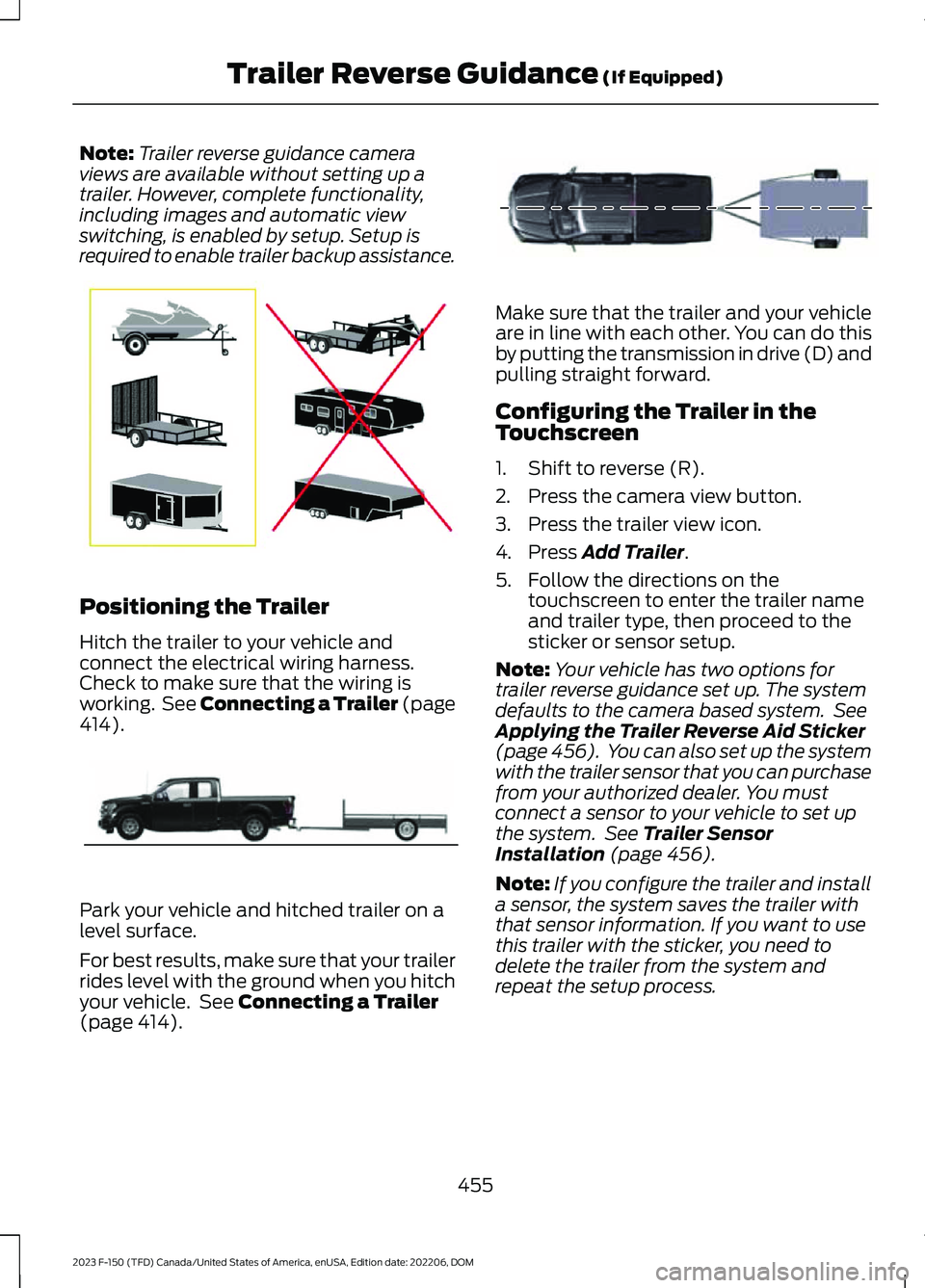
Note:Trailer reverse guidance cameraviews are available without setting up atrailer. However, complete functionality,including images and automatic viewswitching, is enabled by setup. Setup isrequired to enable trailer backup assistance.
Positioning the Trailer
Hitch the trailer to your vehicle andconnect the electrical wiring harness.Check to make sure that the wiring isworking. See Connecting a Trailer (page414).
Park your vehicle and hitched trailer on alevel surface.
For best results, make sure that your trailerrides level with the ground when you hitchyour vehicle. See Connecting a Trailer(page 414).
Make sure that the trailer and your vehicleare in line with each other. You can do thisby putting the transmission in drive (D) andpulling straight forward.
Configuring the Trailer in theTouchscreen
1.Shift to reverse (R).
2.Press the camera view button.
3.Press the trailer view icon.
4.Press Add Trailer.
5.Follow the directions on thetouchscreen to enter the trailer nameand trailer type, then proceed to thesticker or sensor setup.
Note:Your vehicle has two options fortrailer reverse guidance set up. The systemdefaults to the camera based system. SeeApplying the Trailer Reverse Aid Sticker(page 456). You can also set up the systemwith the trailer sensor that you can purchasefrom your authorized dealer. You mustconnect a sensor to your vehicle to set upthe system. See Trailer SensorInstallation (page 456).
Note:If you configure the trailer and installa sensor, the system saves the trailer withthat sensor information. If you want to usethis trailer with the sticker, you need todelete the trailer from the system andrepeat the setup process.
455
2023 F-150 (TFD) Canada/United States of America, enUSA, Edition date: 202206, DOMTrailer Reverse Guidance (If Equipped)E209766 E209759 E209760
Page 460 of 786
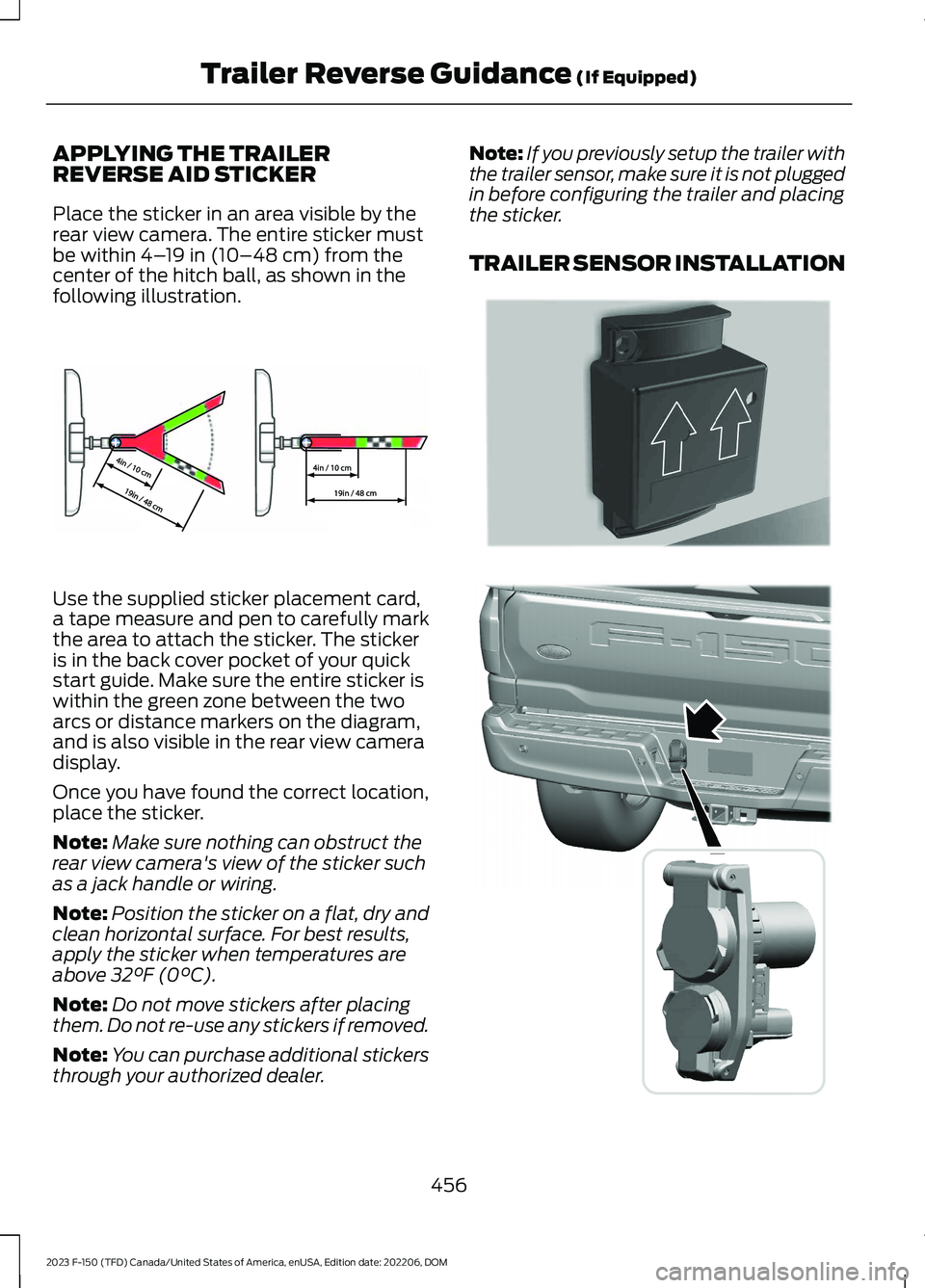
APPLYING THE TRAILERREVERSE AID STICKER
Place the sticker in an area visible by therear view camera. The entire sticker mustbe within 4–19 in (10–48 cm) from thecenter of the hitch ball, as shown in thefollowing illustration.
Use the supplied sticker placement card,a tape measure and pen to carefully markthe area to attach the sticker. The stickeris in the back cover pocket of your quickstart guide. Make sure the entire sticker iswithin the green zone between the twoarcs or distance markers on the diagram,and is also visible in the rear view cameradisplay.
Once you have found the correct location,place the sticker.
Note:Make sure nothing can obstruct therear view camera's view of the sticker suchas a jack handle or wiring.
Note:Position the sticker on a flat, dry andclean horizontal surface. For best results,apply the sticker when temperatures areabove 32°F (0°C).
Note:Do not move stickers after placingthem. Do not re-use any stickers if removed.
Note:You can purchase additional stickersthrough your authorized dealer.
Note:If you previously setup the trailer withthe trailer sensor, make sure it is not pluggedin before configuring the trailer and placingthe sticker.
TRAILER SENSOR INSTALLATION
456
2023 F-150 (TFD) Canada/United States of America, enUSA, Edition date: 202206, DOMTrailer Reverse Guidance (If Equipped)E333148 E315959 E359954
Page 464 of 786
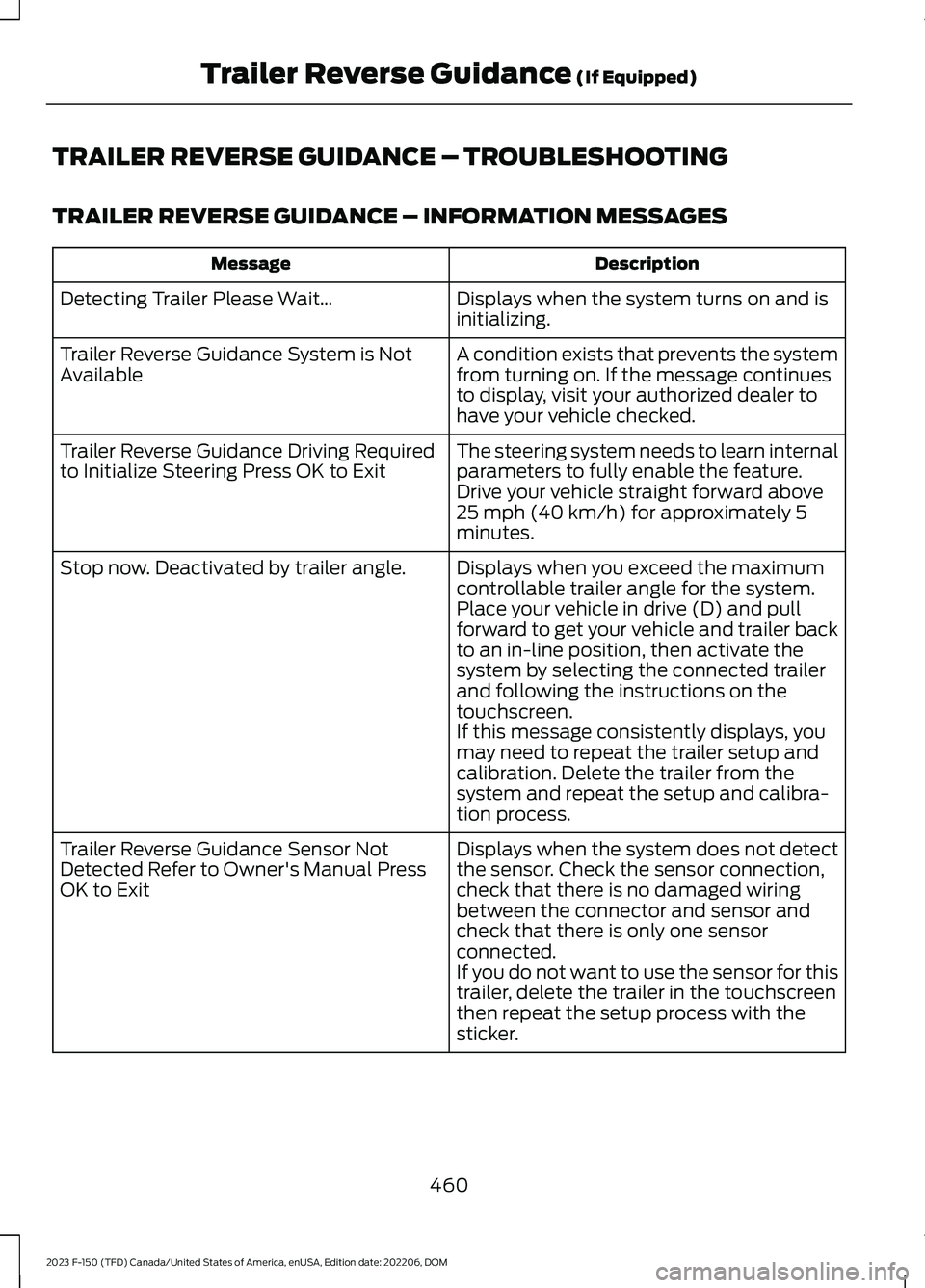
TRAILER REVERSE GUIDANCE – TROUBLESHOOTING
TRAILER REVERSE GUIDANCE – INFORMATION MESSAGES
DescriptionMessage
Displays when the system turns on and isinitializing.Detecting Trailer Please Wait…
A condition exists that prevents the systemfrom turning on. If the message continuesto display, visit your authorized dealer tohave your vehicle checked.
Trailer Reverse Guidance System is NotAvailable
The steering system needs to learn internalparameters to fully enable the feature.Drive your vehicle straight forward above25 mph (40 km/h) for approximately 5minutes.
Trailer Reverse Guidance Driving Requiredto Initialize Steering Press OK to Exit
Displays when you exceed the maximumcontrollable trailer angle for the system.Place your vehicle in drive (D) and pullforward to get your vehicle and trailer backto an in-line position, then activate thesystem by selecting the connected trailerand following the instructions on thetouchscreen.
Stop now. Deactivated by trailer angle.
If this message consistently displays, youmay need to repeat the trailer setup andcalibration. Delete the trailer from thesystem and repeat the setup and calibra-tion process.
Displays when the system does not detectthe sensor. Check the sensor connection,check that there is no damaged wiringbetween the connector and sensor andcheck that there is only one sensorconnected.
Trailer Reverse Guidance Sensor NotDetected Refer to Owner's Manual PressOK to Exit
If you do not want to use the sensor for thistrailer, delete the trailer in the touchscreenthen repeat the setup process with thesticker.
460
2023 F-150 (TFD) Canada/United States of America, enUSA, Edition date: 202206, DOMTrailer Reverse Guidance (If Equipped)