wiring FORD F150 2023 Owner's Manual
[x] Cancel search | Manufacturer: FORD, Model Year: 2023, Model line: F150, Model: FORD F150 2023Pages: 786, PDF Size: 23.15 MB
Page 468 of 786
What does it mean if the trailer isat its maximum angle or thesystem deactivated by trailerangle?
•You are at the maximum controllabletrailer angle for the system. Place yourvehicle in drive (D) and pull forward toget the truck and trailer back to anin-line position.
•The trailer could need to berecalibrated. Check that the correcttrailer is selected in the touchscreen.Verify the sensor is installed accordingto the instructions included in thesensor kit and check that the drawbarand the trailer dimensions are withinthe allowed range. Then, delete thetrailer from the system and repeat thesetup process to calibrate the trailer.
•The drawbar or the trailer dimensionsare outside of the supported range. Thesystem is designed to work withdrawbars that have a license plate tohitch ball center measurement of9–18 in (23–46 cm) when installed.The system is designed to work withtrailers that have a hitch point to centerof the axle or axles measurement of6–33 ft (1.85–10.05 m). Do notattempt to use drawbars or trailers thathave a length outside of this range asthe system performance degrades andcould cause improper system function.
•The sensor could be incorrectlyinstalled. Make sure the sensor iscorrectly installed.
What does it mean when thesystem tells you to take control ofthe steering wheel?
•You have touched the steering wheelwhen the system is steering. Avoidtouching the wheel during systemoperation.
•You have exceeded the maximumspeed for the feature. The system is nolonger steering the vehicle and youmust take over steering.
•The system does not detect the trailer.The system is no longer steering thevehicle and you must take oversteering.
•An internal condition for systemoperation is not met that requires yourvehicle to return to manual control ofthe steering.
How do I use a sticker if I havepreviously setup a trailer with thesensor?
•Disconnect the sensor wiring and adda new trailer to the system and followthe instructions for setup with a sticker.See Applying the Trailer ReverseAid Sticker (page 456). If your vehicledoes not support the sticker option, thetouchscreen instructs you to install thesensor again.
464
2023 F-150 (TFD) Canada/United States of America, enUSA, Edition date: 202206, DOMTrailer Reverse Guidance (If Equipped)
Page 469 of 786
Why does the system not detect asensor?
•There could be an issue with theconnection. Make sure that the 12-wayconnector is fully inserted into the12-way socket, that the red rubber sealis not visible when the connector is fullyinserted and that the wiring harnesssensor connection is fully inserted atthe trailer sensor.
•The wiring harness could be damaged.Check for damaged wiring between the12-way connector and the trailersensor.
•There could be multiple sensorsconnected to your vehicle. Make sureonly one sensor is connected at a time.
•The sensor could be incorrectlyinstalled. Make sure the sensor isinstalled on a vertical surface with thearrows pointing straight up.
What does it mean if the systemremains on one message for anextended time during calibrationwhen setting up the system withthe sensor?
•The trailer length could be outside theallowed range. The system is designedto work with trailers that have a hitchpoint to center of the axle or axlesmeasurement of 6–33 ft(1.85–10.05 m).
•The road surface could be too rough orbumpy. Try calibrating the system ona smoother road surface, such as anopen parking lot.
•The sensor could be incorrectlyinstalled. Make sure the sensor isinstalled on a vertical surface with thearrows pointing straight up.
What does it mean if the systemdoes not detect a trailer whenconfigured with a sensor?
•Verify that you properly connected thesensor. See Trailer SensorInstallation (page 456). Repeatcalibration on a different route if youhave verified sensor installation.
What if I want to use a sensor forthe trailer instead of a sticker?
•Install the sensor and connect thesensor wiring before adding the newtrailer to the system. You must connectthe sensor before you add the trailer.If your vehicle did not come with asensor, you can purchase one from yourauthorized dealer.
465
2023 F-150 (TFD) Canada/United States of America, enUSA, Edition date: 202206, DOMTrailer Reverse Guidance (If Equipped)
Page 666 of 786
LOCATING THE AUXILIARY
SWITCH WIRING
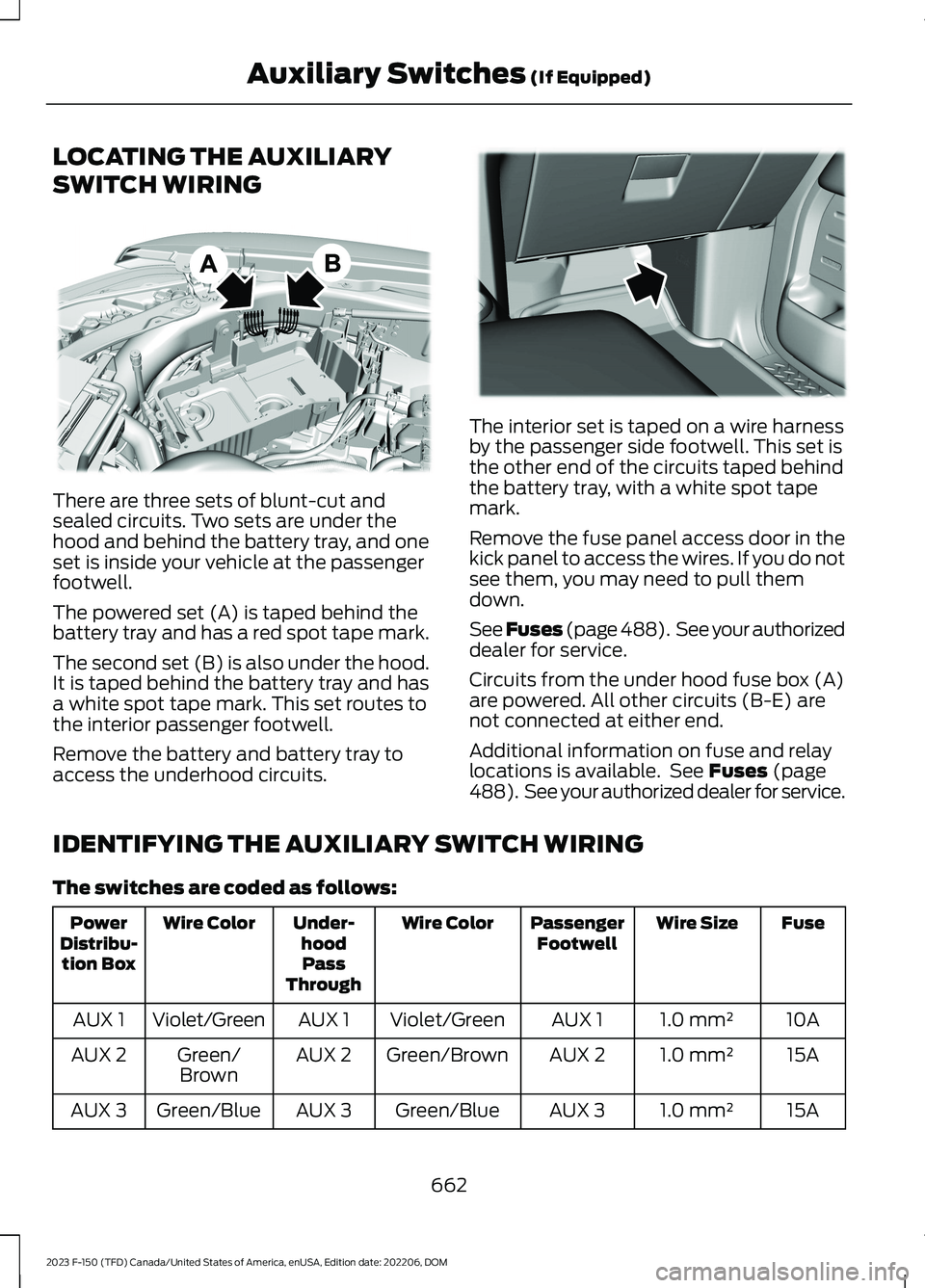
There are three sets of blunt-cut andsealed circuits. Two sets are under thehood and behind the battery tray, and oneset is inside your vehicle at the passengerfootwell.
The powered set (A) is taped behind thebattery tray and has a red spot tape mark.
The second set (B) is also under the hood.It is taped behind the battery tray and hasa white spot tape mark. This set routes tothe interior passenger footwell.
Remove the battery and battery tray toaccess the underhood circuits.
The interior set is taped on a wire harnessby the passenger side footwell. This set isthe other end of the circuits taped behindthe battery tray, with a white spot tapemark.
Remove the fuse panel access door in thekick panel to access the wires. If you do notsee them, you may need to pull themdown.
See Fuses (page 488). See your authorizeddealer for service.
Circuits from the under hood fuse box (A)are powered. All other circuits (B-E) arenot connected at either end.
Additional information on fuse and relaylocations is available. See Fuses (page488). See your authorized dealer for service.
IDENTIFYING THE AUXILIARY SWITCH WIRING
The switches are coded as follows:
FuseWire SizePassengerFootwellWire ColorUnder-hoodPassThrough
Wire ColorPowerDistribu-tion Box
10A1.0 mm²AUX 1Violet/GreenAUX 1Violet/GreenAUX 1
15A1.0 mm²AUX 2Green/BrownAUX 2Green/BrownAUX 2
15A1.0 mm²AUX 3Green/BlueAUX 3Green/BlueAUX 3
662
2023 F-150 (TFD) Canada/United States of America, enUSA, Edition date: 202206, DOMAuxiliary Switches (If Equipped)E347548 E347399
Page 755 of 786
ELECTROMAGNETIC
COMPATIBILITY
WARNING: Do not place objectsor mount equipment on or near theairbag cover, on the side of the front orrear seatbacks, or in areas that maycome into contact with a deployingairbag. Failure to follow theseinstructions may increase the risk ofpersonal injury in the event of a crash.
WARNING: Do not fasten antennacables to vehicle wiring, fuel pipes andbrake pipes.
WARNING: Keep antenna andpower cables at least 4 in (10 cm) fromany electronic modules and airbags.
Note:We test and certify your vehicle tomeet electromagnetic compatibilitylegislation. It is your responsibility to makesure that any equipment an authorizeddealer installs on your vehicle complies withapplicable local legislation and otherrequirements. Installation of someaftermarket electronic devices coulddegrade the performance of vehiclefunctions, which use radio frequency signalssuch as broadcast radio receiver, tirepressure monitoring system, push buttonstart,Bluetooth® connectivity or satellitenavigation.
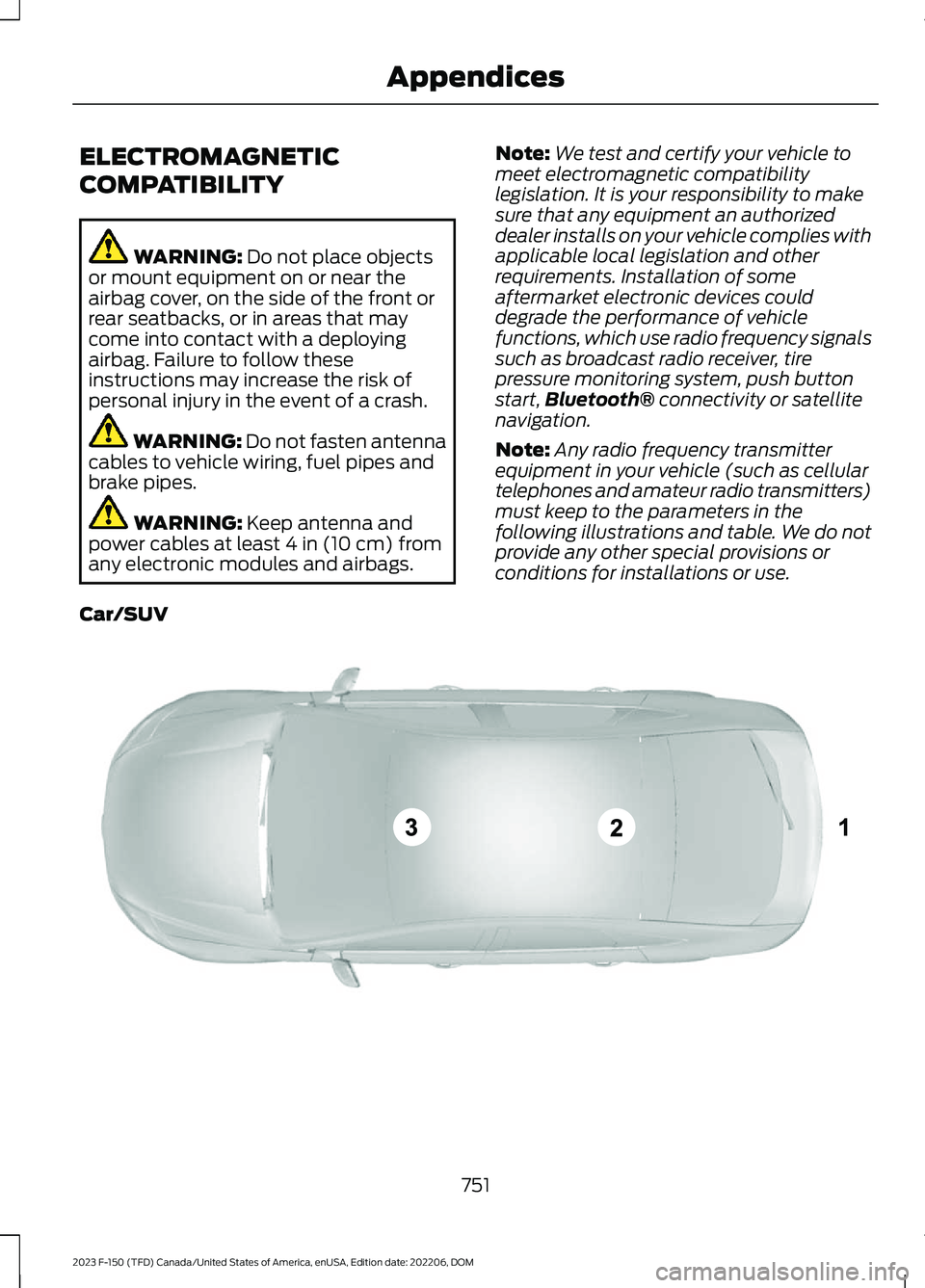
Note:Any radio frequency transmitterequipment in your vehicle (such as cellulartelephones and amateur radio transmitters)must keep to the parameters in thefollowing illustrations and table. We do notprovide any other special provisions orconditions for installations or use.
Car/SUV
751
2023 F-150 (TFD) Canada/United States of America, enUSA, Edition date: 202206, DOMAppendicesE239120
Page 770 of 786
How Does the 360 Degree CameraWork...............................................................332How Does the Electronic LockingDifferential Work - Excluding:Raptor...........................................................284How Does the Electronic LockingDifferential Work - Raptor.....................284How Does the Lane Keeping SystemWork...............................................................375How Does the Personal Safety SystemWork..................................................................72How Does the Rear Occupant AlertSystem Work..............................................205How Does the Safety Canopy™Work..................................................................74How Does Traction Control Work..........307How Does Trailer Backup AssistanceWork..............................................................439How Does Trailer Hitching AssistanceWork...............................................................431How Does Trailer Reverse GuidanceWork..............................................................454How Does Trailer Sway ControlWork..............................................................430How Do Personal Profiles Work.............652How Do the Front Airbags Work...............73How Do the Knee Airbags Work................74How Do the Side Airbags Work.................73Hybrid Electric Vehicle DrivingCharacteristics...........................................244Hybrid Electric Vehicle Indicators..........244Hybrid Electric VehicleInformation.................................................244Eco Idle..................................................................246Eco Idle – Troubleshooting.............................247Hybrid Electric Vehicle Information –Troubleshooting............................................245Power Flow...........................................................245Hybrid Electric Vehicle Information –Troubleshooting........................................245Hybrid Electric Vehicle Information –Frequently Asked Questions....................245
I
Identifying Fuse Types...............................497Identifying the Audio Unit........................626
Identifying the Auxiliary SwitchWiring............................................................662Identifying the Climate ControlUnit.................................................................184Ignition Switch..............................................233Inflating the Tires........................................550Information On Demand Screen...........638Information on the Tire Sidewall...........538Inspecting the Tire for Damage...............551Inspecting the Tire for Wear.....................551Inspecting the Wheel ValveStems............................................................552Installing Child Restraints...........................54Attaching the Front Seat TetherStrap....................................................................59Attaching the Rear Seat Tether Strap.........60Combining the Seatbelt and Lower Anchorsfor Attaching Child Restraints....................59Installing a Child Restraint in a CenterSeat......................................................................58Using Lower Anchors and Tethers forChildren...............................................................58Using Seatbelts.....................................................54Using Tether Straps.............................................59Instrument Cluster Display........................175Instrument Cluster Display Main Menu -Raptor.............................................................176Instrument Cluster Display Main Menu -Vehicles With: 12 Inch Screen................175Instrument Cluster Display Main Menu -Vehicles With: 4.2 Inch Screen..............176Instrument Cluster Display Main Menu -Vehicles With: 8 Inch Screen.................176Instrument Cluster Indicators...................173Instrument Cluster.......................................168Fuel Gauge............................................................170Instrument Cluster Overview - VehiclesWith: 12 Inch Screen..................................170Instrument Cluster Overview - VehiclesWith: 4.2 Inch Screen...............................168Instrument Cluster Overview - VehiclesWith: 8 Inch Screen..................................169Instrument Cluster Warning Lamps........171Instrument Panel - Excluding: Raptor/Police Responder........................................38Instrument Panel - PoliceResponder.....................................................40Instrument Panel - Raptor.........................39
766
2023 F-150 (TFD) Canada/United States of America, enUSA, Edition date: 202206, DOMIndex
Page 772 of 786
Launching or Retrieving a Boat orPersonal Watercraft................................420Linking or Unlinking a PersonalProfile............................................................652Live Traffic......................................................654Switching Live Traffic On and Off...............654What Is Live Traffic...........................................654Load Carrying...............................................404Load Carrying Precautions......................404Loading Your Trailer.....................................419Locating the 360 Degree Cameras -Excluding: Raptor/Tremor.....................332Locating the 360 Degree Cameras -Raptor/Tremor...........................................333Locating the Auxiliary Switches.............661Locating the Auxiliary SwitchWiring............................................................662Locating the Blind Spot InformationSystem Sensors........................................383Locating the Brake Fluid Reservoir.........291Locating the Cross Traffic AlertSensors........................................................388Locating the Fuel Filler Funnel...............254Locating the Keyless Entry Keypad........110Locating the Memory FunctionButtons.........................................................207Locating the Outlets....................................219Locating the Power Outlets......................214Locating the Pre-Collision AssistSensors.........................................................393Locating the Rear View Camera............329Locating the Safety ComplianceCertification Labels.................................405Locating the Tire label...............................537Locating the USB Ports - Excluding:Raptor.............................................................212Locating the USB Ports - Raptor............212Locating the Wireless AccessoryCharger.........................................................228Locating Your Vehicle...................................92Locking and Unlocking the Tailgate........113Locking the Rear Window Controls.......162
M
Maintenance.................................................498Engine Air Filter...................................................510Engine Oil.............................................................505
Exterior Bulbs........................................................517Interior Bulbs.......................................................526Maintenance Precautions........................498Making and Receiving a PhoneCall................................................................646Manually Dimming the InteriorMirror..............................................................163Manually Releasing the Electric ParkingBrake.............................................................294Manually Shifting Gears...........................266Shifting Using the Buttons on the SelectorLever...................................................................267Shifting Using the Paddle Shifters.............266Manual Park Release...................................271Manual Park Release Precautions................271Using Manual Park Release.............................271What Is Manual Park Release.........................271Manual Seats.................................................194Adjusting the Head Restraint.........................194Adjusting the Lumbar Support.....................195Adjusting the Seat Backrest...........................195Folding the Seats...............................................202Head Restraint Components.........................194Installing the Head Restraint.........................195Moving the Seat Backward andForward.............................................................195Removing the Head Restraint.......................194Unfolding the Seats..........................................203Massage Seats..............................................199Adjusting the Massage Seat Settings........199Massage Seat Limitations..............................199Memory Function.........................................207Memory Function Precautions...............207Mislock.............................................................105Mislock Limitations............................................105Switching Mislock On and Off.......................105What Is Mislock...................................................105Mobile CommunicationsEquipment...................................................722Mobile Device Data........................................32Moonroof Bounce-Back.............................167Overriding Moonroof Bounce-Back.............167What Is Moonroof Bounce-Back...................167Moonroof.........................................................166Moonroof Bounce-Back...................................167Motorcraft Parts - 2.7LEcoBoost™.................................................585Motorcraft Parts - 3.3L..............................586
768
2023 F-150 (TFD) Canada/United States of America, enUSA, Edition date: 202206, DOMIndex