park assist FORD F150 2023 Owner's Guide
[x] Cancel search | Manufacturer: FORD, Model Year: 2023, Model line: F150, Model: FORD F150 2023Pages: 786, PDF Size: 23.15 MB
Page 355 of 786
Automatic cancellation can also occur if:
•The lane becomes too wide or narrow.
•The system cannot detect valid lanemarkings.
•Lane markings cross over one another.
•The curve of the road is too sharp.
Note:If your vehicle slows down due to yourinactivity twice within a key cycle, thesystem disables. To reset the system, whenthe vehicle is stationary, return the gearselector to park (P) and turn the vehicle off.Then, restart the vehicle with your foot onthe brake pedal.
LANE CENTERING MANUALCANCELLATION
When you perform the following actions,adaptive cruise control with lane centeringwill cancel:
•The brake pedal is pressed.
•Adaptive cruise control button isswitched off on the steering wheel.
The lane centering system is momentarilysuppressed when either of the followingactions are performed:
•Turn signal indicator is latched ortapped.
•You steer the vehicle out of lane.
LANE CENTERING INDICATORS
Illuminates when you switchlane centering on. The color ofthe indicator changes to indicatethe system status.
Gray status indicates the system is on butin standby mode.
Green status indicates the system isenabled and applying steering assistanceto keep the vehicle in the center of the lane.
Amber status with an audible tone, thatthen changes to gray status, indicates asystem automatic cancellation.
PREDICTIVE SPEED ASSIST
HOW DOES PREDICTIVE SPEEDASSIST WORK
Predictive Speed Assist works withadaptive cruise control and adjusts thevehicle speed to the road geometry and tothe speed limit detected by the speed signrecognition system. As the systemidentifies curves and highway exits, thevehicle speed temporarily decreases aheadof and during the changing road geometry.When passing new speed signs, the setspeed updates. See Predictive SpeedAssist Precautions (page 351).
There are limitations that affect theaccuracy of the speed sign recognitionsystem and its ability to determine thecurrent speed limit. Predictive speed assistand its ability to determine the currentspeed limit shares these limitations. SeeSpeed Sign Recognition (page 401).
Note:The adaptive cruise control gapsetting operates normally when the featureis enabled.
PREDICTIVE SPEED ASSISTPRECAUTIONS
WARNING: You are responsible forcontrolling your vehicle at all times. Thesystem is designed to be an aid and doesnot relieve you of your responsibility todrive with due care and attention. Failureto follow this instruction could result inthe loss of control of your vehicle,personal injury or death.
351
2023 F-150 (TFD) Canada/United States of America, enUSA, Edition date: 202206, DOMAdaptive Cruise Control (If Equipped)E297977
Page 358 of 786
ADAPTIVE CRUISE CONTROL
– TROUBLESHOOTING
ADAPTIVE CRUISE CONTROL –INFORMATION MESSAGES -VEHICLES WITH: LANECENTERING
Note:Depending on your vehicle optionsand instrument cluster type, not allmessages display or are available.
Note:The system could abbreviate orshorten certain messages depending uponwhich cluster type you have.
ActionMessage
Return your hands to the steering wheel and provide steeringinput to cancel the message.Keep Hands on SteeringWheel
To reset the feature when the vehicle is stationary, return thegear selector to park and turn the vehicle off. Restart thevehicle with your foot on the brake pedal.
Lane Centering AssistNot Available
You must immediately take full control of the vehicle.Resume Control
Resume adaptive cruise control with lane centering byapplying foot pressure on the accelerator pedal. You can alsoresume the feature by pressing the resume button on thesteering wheel.
Press Accelerator Pedalto Resume
354
2023 F-150 (TFD) Canada/United States of America, enUSA, Edition date: 202206, DOMAdaptive Cruise Control (If Equipped)
Page 424 of 786
Your vehicle may have a temporary orconventional spare tire. A temporary sparetire is different in diameter or width,tread-type, or is from a differentmanufacturer than the road tires on yourvehicle. Consult information on the tirelabel or Safety Compliance label forlimitations when using.
When towing a trailer:
•Obey country specific regulations fortowing a trailer.
•Do not drive faster than 70 mph(113 km/h) during the first 500 mi(800 km).
•Do not make full-throttle starts.
•Check your hitch, electrical connectionsand trailer wheel lug nuts thoroughlyafter you have traveled 50 mi (80 km).
•When stopped in congested or heavytraffic during hot weather, place thetransmission in park (P) to aid engineand transmission cooling and to helpA/C performance.
•Turn off the speed control with heavyloads or in hilly terrain. The speedcontrol may turn off when you aretowing on long, steep slopes.
•Shift to a lower gear when driving downa long or steep hill. Do not continuouslyapply the brakes, as they may overheatand become less effective.
•If your transmission has Grade Assistor Tow/Haul, use this feature whentowing. This provides engine brakingand helps eliminate excessivetransmission shifting for optimum fueleconomy and transmission cooling.
•Your vehicle has AdvanceTrac with rollstability control. When towing a trailer,additional loads could cause theAdvanceTrac system to engage duringcornering maneuvers. Reduce corneringspeeds to make sure that you canmaintain control of the vehicle andtrailer if the AdvanceTrac systemengages.
•Allow more distance for stopping witha trailer attached. Anticipate stops andgradually brake.
•Avoid parking on a slope. However, ifyou must park on a slope, turn thesteering wheel to point your vehicletires away from traffic flow, set theparking brake, place the transmissionin park (P) and place wheel chocks infront and back of the trailer wheels.
Note:Chocks are not included with yourvehicle.
LAUNCHING OR RETRIEVING
A BOAT OR PERSONAL
WATERCRAFT
When backing down a ramp during boatlaunching or retrieval:
•Do not allow the static water level torise above the bottom edge of the rearbumper.
•Do not allow waves to break higherthan 6 in (15 cm) above the bottomedge of the rear bumper.
Exceeding 6 in (15 cm) could allow waterto enter vehicle components, causinginternal damage to the components andaffecting driveability, emissions andreliability.
Note:Replace the rear axle lubricantanytime the rear axle has been submergedin water.
420
2023 F-150 (TFD) Canada/United States of America, enUSA, Edition date: 202206, DOMTowing a Trailer
Page 435 of 786
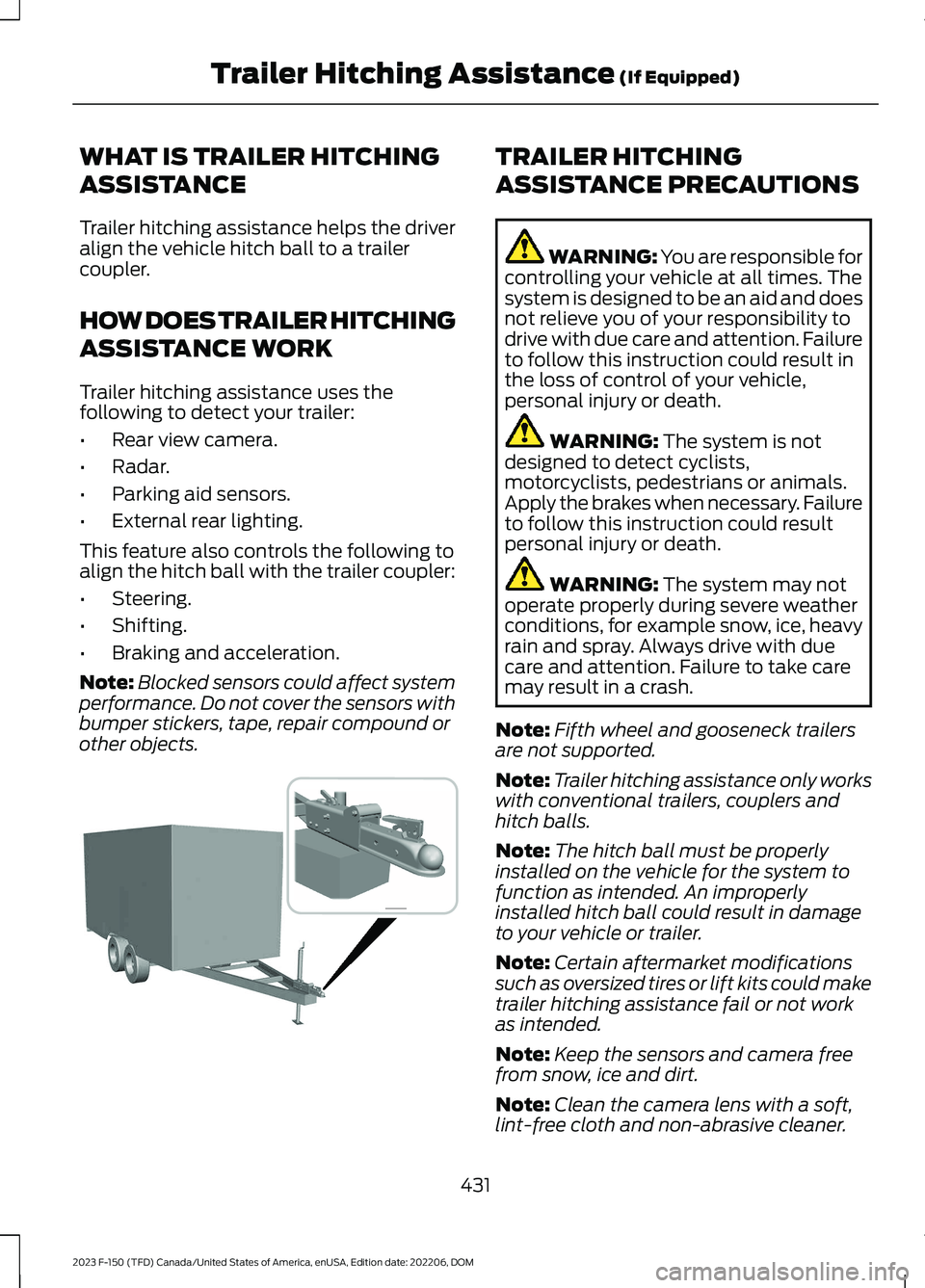
WHAT IS TRAILER HITCHING
ASSISTANCE
Trailer hitching assistance helps the driveralign the vehicle hitch ball to a trailercoupler.
HOW DOES TRAILER HITCHING
ASSISTANCE WORK
Trailer hitching assistance uses thefollowing to detect your trailer:
•Rear view camera.
•Radar.
•Parking aid sensors.
•External rear lighting.
This feature also controls the following toalign the hitch ball with the trailer coupler:
•Steering.
•Shifting.
•Braking and acceleration.
Note:Blocked sensors could affect systemperformance. Do not cover the sensors withbumper stickers, tape, repair compound orother objects.
TRAILER HITCHING
ASSISTANCE PRECAUTIONS
WARNING: You are responsible forcontrolling your vehicle at all times. Thesystem is designed to be an aid and doesnot relieve you of your responsibility todrive with due care and attention. Failureto follow this instruction could result inthe loss of control of your vehicle,personal injury or death.
WARNING: The system is notdesigned to detect cyclists,motorcyclists, pedestrians or animals.Apply the brakes when necessary. Failureto follow this instruction could resultpersonal injury or death.
WARNING: The system may notoperate properly during severe weatherconditions, for example snow, ice, heavyrain and spray. Always drive with duecare and attention. Failure to take caremay result in a crash.
Note:Fifth wheel and gooseneck trailersare not supported.
Note:Trailer hitching assistance only workswith conventional trailers, couplers andhitch balls.
Note:The hitch ball must be properlyinstalled on the vehicle for the system tofunction as intended. An improperlyinstalled hitch ball could result in damageto your vehicle or trailer.
Note:Certain aftermarket modificationssuch as oversized tires or lift kits could maketrailer hitching assistance fail or not workas intended.
Note:Keep the sensors and camera freefrom snow, ice and dirt.
Note:Clean the camera lens with a soft,lint-free cloth and non-abrasive cleaner.
431
2023 F-150 (TFD) Canada/United States of America, enUSA, Edition date: 202206, DOMTrailer Hitching Assistance (If Equipped) E383821
Page 436 of 786
TRAILER HITCHING
ASSISTANCE LIMITATIONS
The system could not function or couldfunction with reduced performance duringthe following:
•When using trailer hitching assistancein tall grass and weeds.
•When safety chains, cables or wiringare dangling near the coupler.
•When using trailer hitching assistanceon slippery surfaces.
•When using hitches that raise the hitchball more than 4 in (10 cm), lower thehitch ball by more than 6 in (16 cm) orextend the hitch ball away from thevehicle more than 12 in (30 cm).
•When using hitches that are lower than10 in (25 cm) off the ground.
•When using objects taller than 8 in(20 cm), such as large blocks, underthe jack stand.
•When you park the trailer on surfacesthat are similar in color to the trailercoupler and hitch ball.
•A black coupler or hitch ball over adark asphalt surface.
•A light color coupler or hitch ballover a light concrete surface.
•When there are low or no light sources,such as at night.
For additional information, please refer tothe Ford Support Website.
SWITCHING TRAILER
HITCHING ASSISTANCE ON
AND OFF
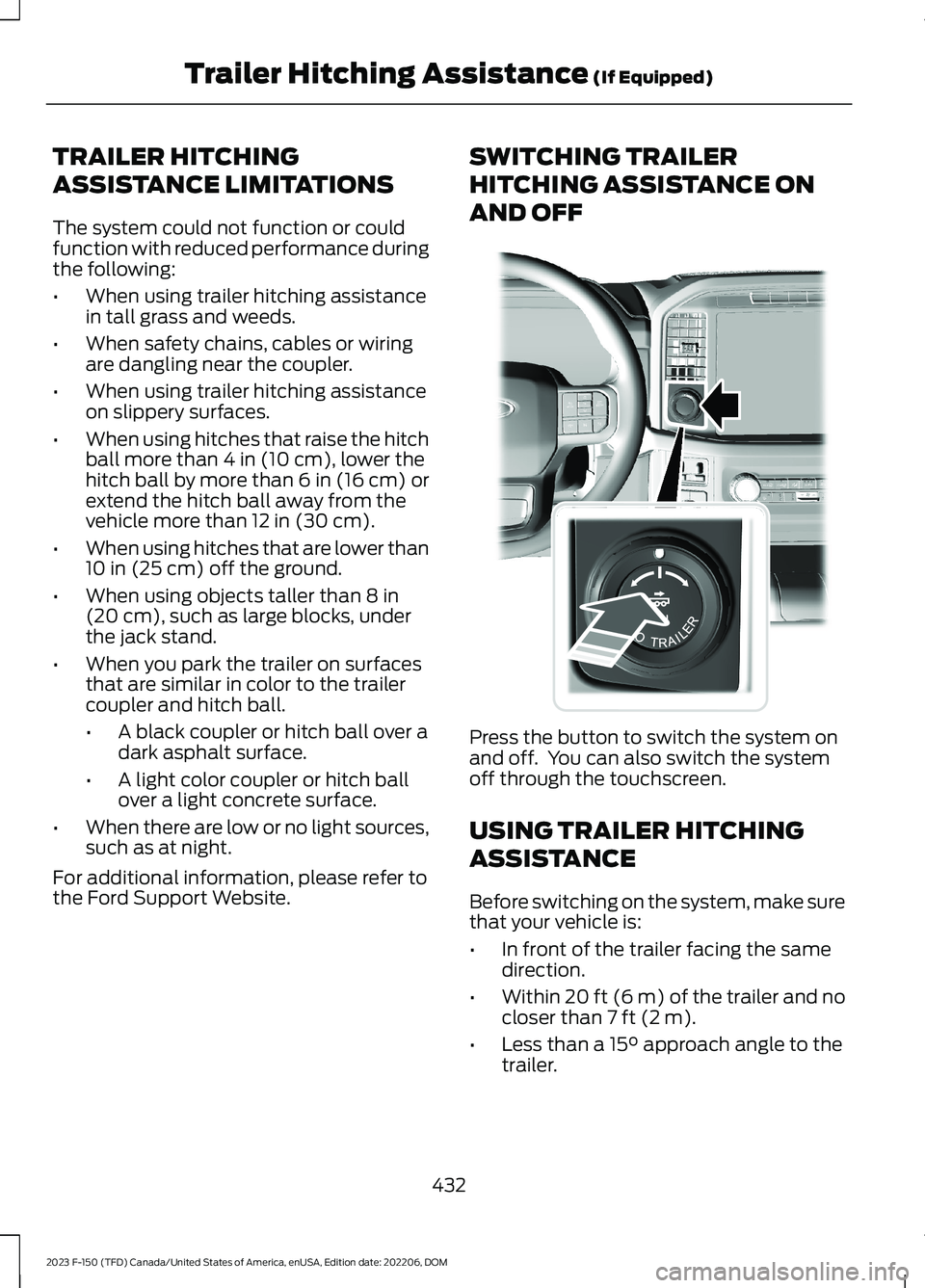
Press the button to switch the system onand off. You can also switch the systemoff through the touchscreen.
USING TRAILER HITCHING
ASSISTANCE
Before switching on the system, make surethat your vehicle is:
•In front of the trailer facing the samedirection.
•Within 20 ft (6 m) of the trailer and nocloser than 7 ft (2 m).
•Less than a 15° approach angle to thetrailer.
432
2023 F-150 (TFD) Canada/United States of America, enUSA, Edition date: 202206, DOMTrailer Hitching Assistance (If Equipped)E310335
Page 444 of 786
Positioning the Trailer
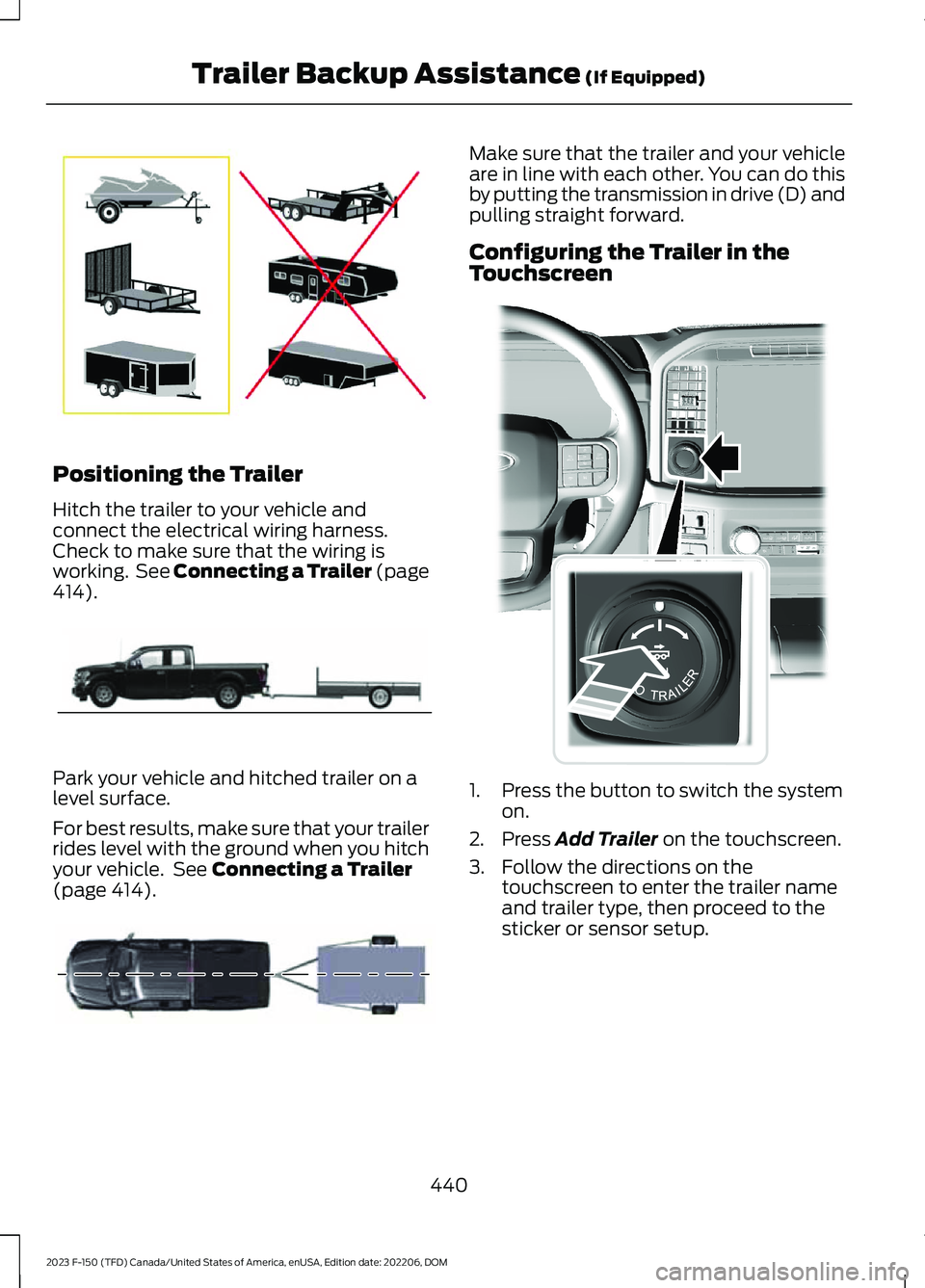
Hitch the trailer to your vehicle andconnect the electrical wiring harness.Check to make sure that the wiring isworking. See Connecting a Trailer (page414).
Park your vehicle and hitched trailer on alevel surface.
For best results, make sure that your trailerrides level with the ground when you hitchyour vehicle. See Connecting a Trailer(page 414).
Make sure that the trailer and your vehicleare in line with each other. You can do thisby putting the transmission in drive (D) andpulling straight forward.
Configuring the Trailer in theTouchscreen
1.Press the button to switch the systemon.
2.Press Add Trailer on the touchscreen.
3.Follow the directions on thetouchscreen to enter the trailer nameand trailer type, then proceed to thesticker or sensor setup.
440
2023 F-150 (TFD) Canada/United States of America, enUSA, Edition date: 202206, DOMTrailer Backup Assistance (If Equipped)E209766 E209759 E209760 E310335
Page 446 of 786
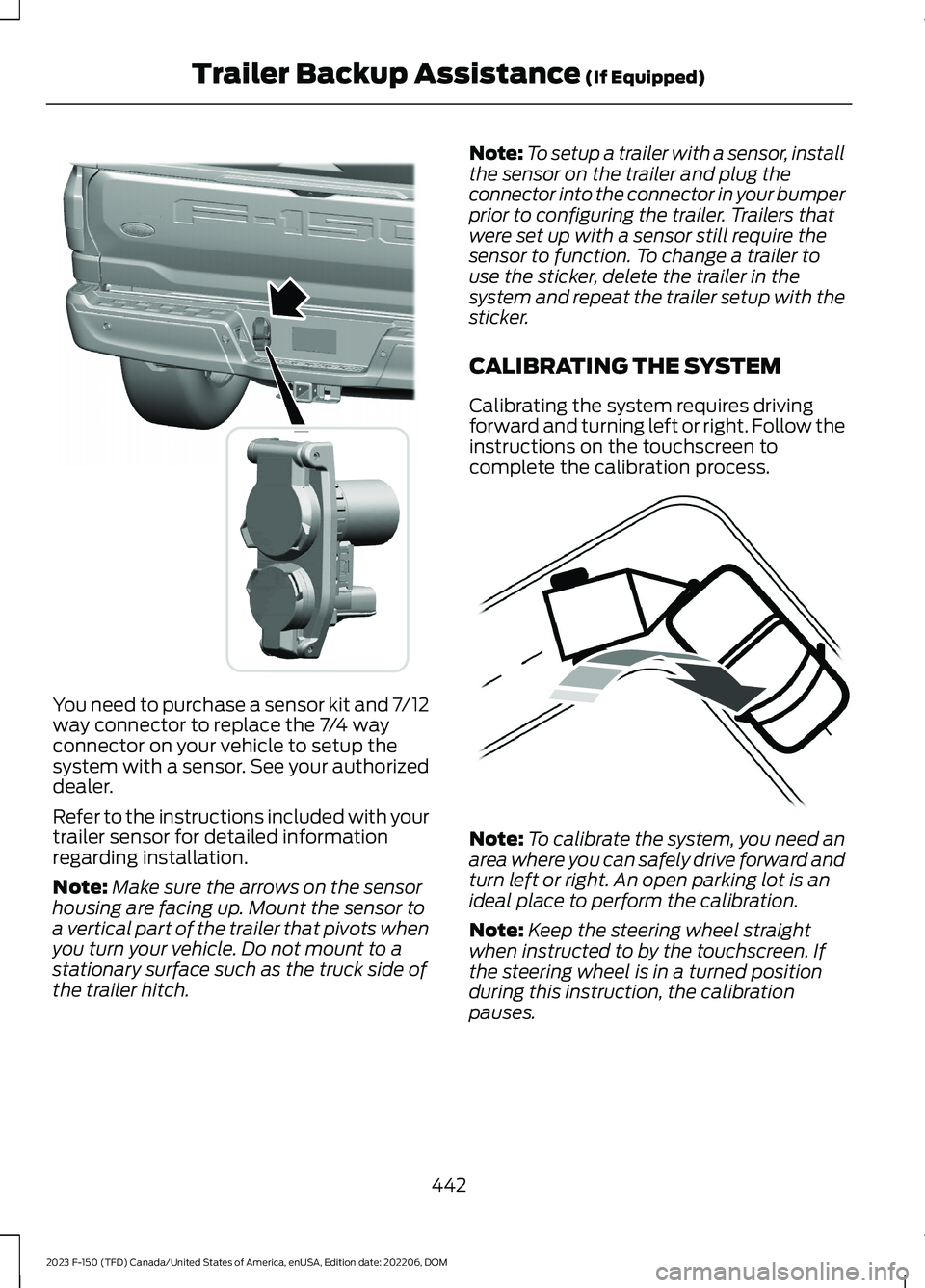
You need to purchase a sensor kit and 7/12way connector to replace the 7/4 wayconnector on your vehicle to setup thesystem with a sensor. See your authorizeddealer.
Refer to the instructions included with yourtrailer sensor for detailed informationregarding installation.
Note:Make sure the arrows on the sensorhousing are facing up. Mount the sensor toa vertical part of the trailer that pivots whenyou turn your vehicle. Do not mount to astationary surface such as the truck side ofthe trailer hitch.
Note:To setup a trailer with a sensor, installthe sensor on the trailer and plug theconnector into the connector in your bumperprior to configuring the trailer. Trailers thatwere set up with a sensor still require thesensor to function. To change a trailer touse the sticker, delete the trailer in thesystem and repeat the trailer setup with thesticker.
CALIBRATING THE SYSTEM
Calibrating the system requires drivingforward and turning left or right. Follow theinstructions on the touchscreen tocomplete the calibration process.
Note:To calibrate the system, you need anarea where you can safely drive forward andturn left or right. An open parking lot is anideal place to perform the calibration.
Note:Keep the steering wheel straightwhen instructed to by the touchscreen. Ifthe steering wheel is in a turned positionduring this instruction, the calibrationpauses.
442
2023 F-150 (TFD) Canada/United States of America, enUSA, Edition date: 202206, DOMTrailer Backup Assistance (If Equipped)E359954 E352329
Page 452 of 786
DescriptionMessage
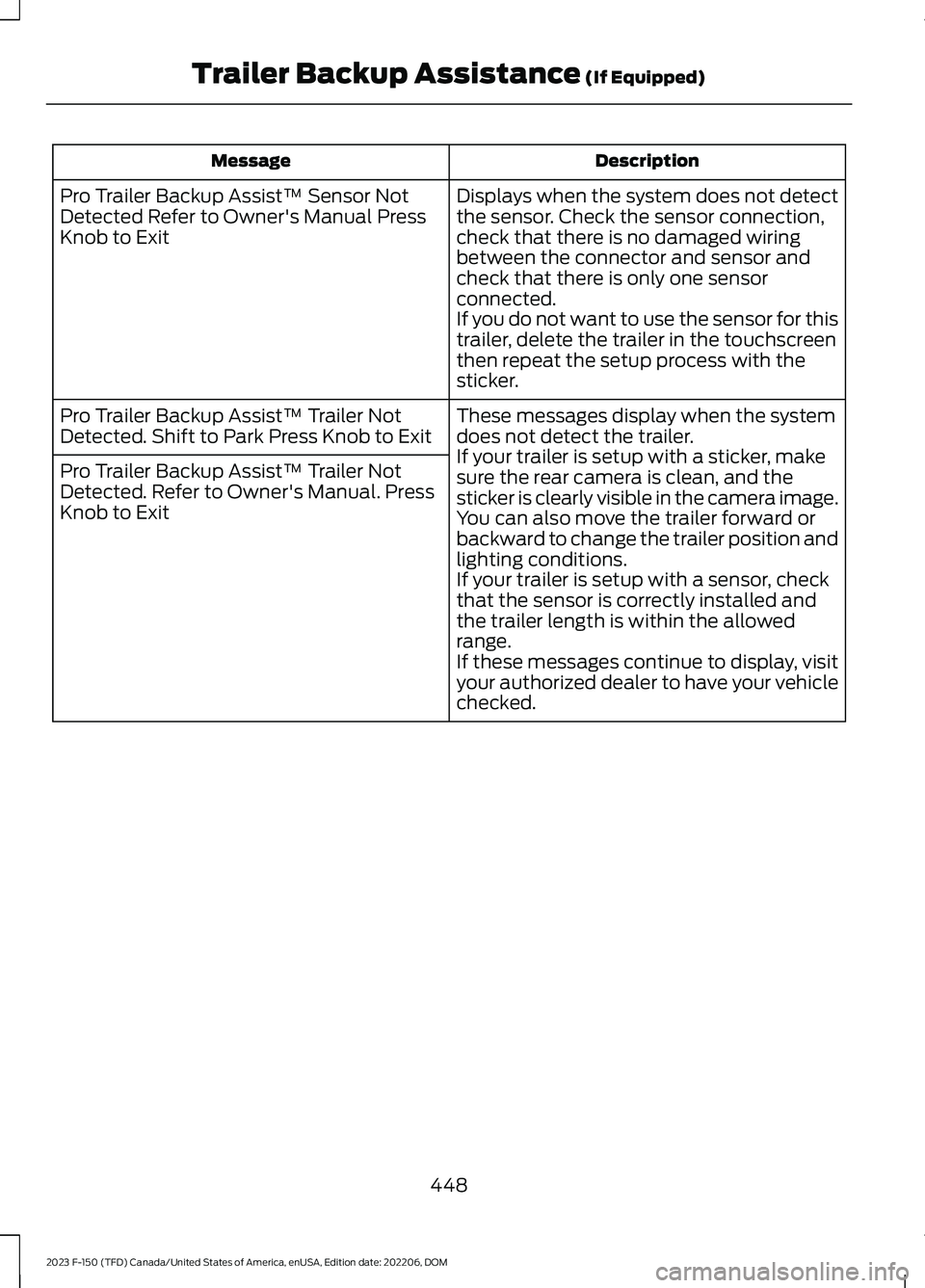
Displays when the system does not detectthe sensor. Check the sensor connection,check that there is no damaged wiringbetween the connector and sensor andcheck that there is only one sensorconnected.If you do not want to use the sensor for thistrailer, delete the trailer in the touchscreenthen repeat the setup process with thesticker.
Pro Trailer Backup Assist™ Sensor NotDetected Refer to Owner's Manual PressKnob to Exit
These messages display when the systemdoes not detect the trailer.If your trailer is setup with a sticker, makesure the rear camera is clean, and thesticker is clearly visible in the camera image.You can also move the trailer forward orbackward to change the trailer position andlighting conditions.If your trailer is setup with a sensor, checkthat the sensor is correctly installed andthe trailer length is within the allowedrange.If these messages continue to display, visityour authorized dealer to have your vehiclechecked.
Pro Trailer Backup Assist™ Trailer NotDetected. Shift to Park Press Knob to Exit
Pro Trailer Backup Assist™ Trailer NotDetected. Refer to Owner's Manual. PressKnob to Exit
448
2023 F-150 (TFD) Canada/United States of America, enUSA, Edition date: 202206, DOMTrailer Backup Assistance (If Equipped)
Page 457 of 786
Why does the system not detect asensor?
•There could be an issue with theconnection. Make sure that the 12-wayconnector is fully inserted into the12-way socket, that the red rubber sealis not visible when the connector is fullyinserted and that the wiring harnesssensor connection is fully inserted atthe trailer sensor.
•The wiring harness could be damaged.Check for damaged wiring between the12-way connector and the trailersensor.
•There could be multiple sensorsconnected to your vehicle. Make sureonly one sensor is connected at a time.
•The sensor could be incorrectlyinstalled. Make sure the sensor isinstalled on a vertical surface with thearrows pointing straight up.
What does it mean if the systemremains on one message for anextended time during calibrationwhen setting up the system withthe sensor?
•The trailer length could be outside theallowed range. The system is designedto work with trailers that have a hitchpoint to center of the axle or axlesmeasurement of 6–33 ft(1.85–10.05 m).
•The road surface could be too rough orbumpy. Try calibrating the system ona smoother road surface, such as anopen parking lot.
•The sensor could be incorrectlyinstalled. Make sure the sensor isinstalled on a vertical surface with thearrows pointing straight up.
What does it mean if the systemdoes not detect a trailer whenconfigured with a sensor?
•Verify that you properly connected thesensor. See Trailer SensorInstallation (page 441). Repeatcalibration on a different route if youhave verified sensor installation.
What if I want to use a sensor forthe trailer instead of a sticker?
•Install the sensor and connect thesensor wiring before adding the newtrailer to the system. You must connectthe sensor before you add the trailer.If your vehicle did not come with asensor, you can purchase one from yourauthorized dealer.
453
2023 F-150 (TFD) Canada/United States of America, enUSA, Edition date: 202206, DOMTrailer Backup Assistance (If Equipped)
Page 459 of 786
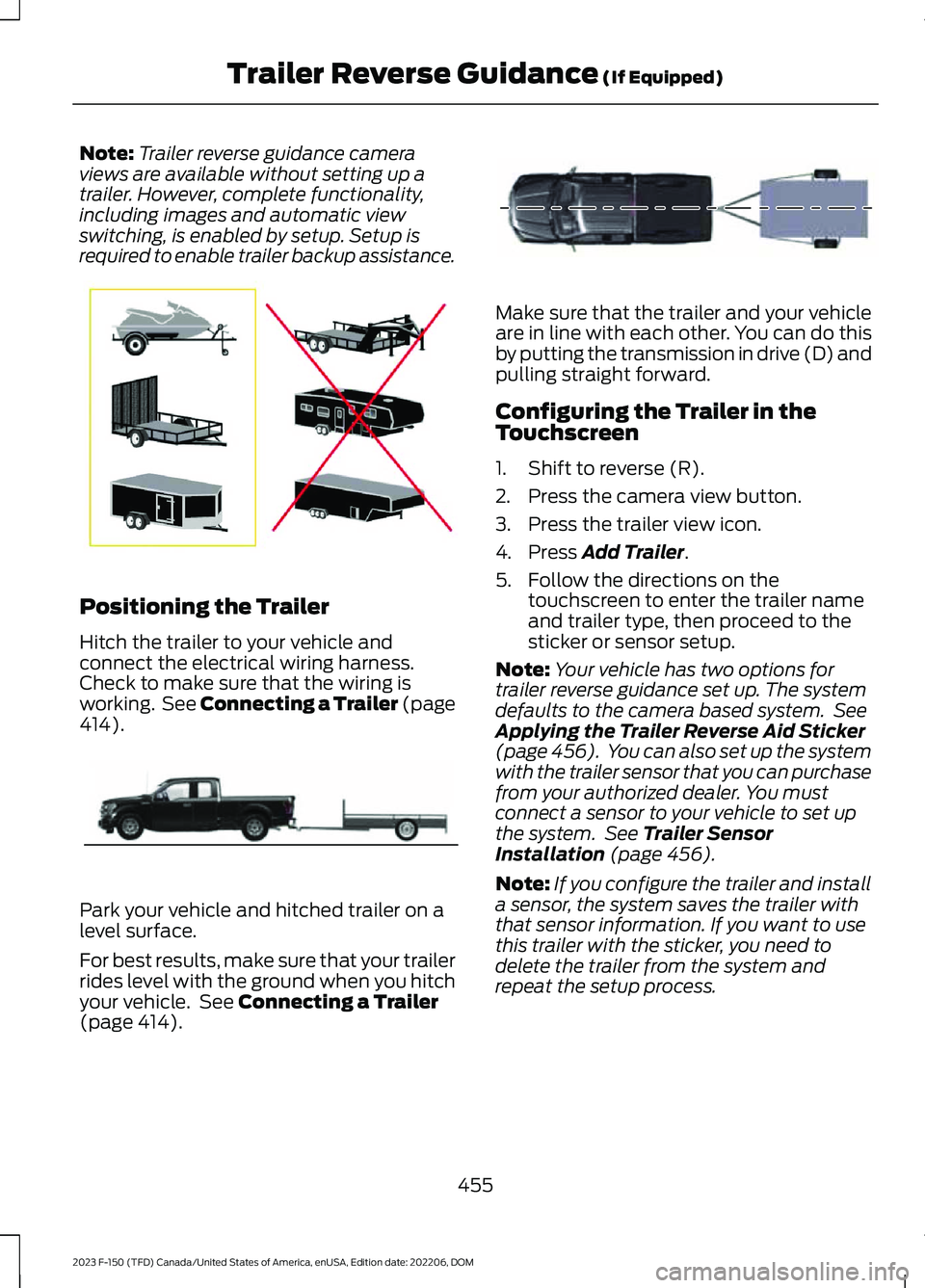
Note:Trailer reverse guidance cameraviews are available without setting up atrailer. However, complete functionality,including images and automatic viewswitching, is enabled by setup. Setup isrequired to enable trailer backup assistance.
Positioning the Trailer
Hitch the trailer to your vehicle andconnect the electrical wiring harness.Check to make sure that the wiring isworking. See Connecting a Trailer (page414).
Park your vehicle and hitched trailer on alevel surface.
For best results, make sure that your trailerrides level with the ground when you hitchyour vehicle. See Connecting a Trailer(page 414).
Make sure that the trailer and your vehicleare in line with each other. You can do thisby putting the transmission in drive (D) andpulling straight forward.
Configuring the Trailer in theTouchscreen
1.Shift to reverse (R).
2.Press the camera view button.
3.Press the trailer view icon.
4.Press Add Trailer.
5.Follow the directions on thetouchscreen to enter the trailer nameand trailer type, then proceed to thesticker or sensor setup.
Note:Your vehicle has two options fortrailer reverse guidance set up. The systemdefaults to the camera based system. SeeApplying the Trailer Reverse Aid Sticker(page 456). You can also set up the systemwith the trailer sensor that you can purchasefrom your authorized dealer. You mustconnect a sensor to your vehicle to set upthe system. See Trailer SensorInstallation (page 456).
Note:If you configure the trailer and installa sensor, the system saves the trailer withthat sensor information. If you want to usethis trailer with the sticker, you need todelete the trailer from the system andrepeat the setup process.
455
2023 F-150 (TFD) Canada/United States of America, enUSA, Edition date: 202206, DOMTrailer Reverse Guidance (If Equipped)E209766 E209759 E209760