ignition FORD F150 2023 Workshop Manual
[x] Cancel search | Manufacturer: FORD, Model Year: 2023, Model line: F150, Model: FORD F150 2023Pages: 786, PDF Size: 23.15 MB
Page 297 of 786
The brake indicator momentarilyilluminates when you switch theignition on to confirm the lampis functional. It may also illuminate whenyou apply the parking brake and theignition is on. If it illuminates when yourvehicle is moving, make sure the parkingbrake is disengaged. If the parking brakeis disengaged, this indicates low brake fluidlevel or a brake system fault. See anauthorized dealer.
BRAKES – FREQUENTLY ASKEDQUESTIONS
Is it normal for my brakes to makenoise?
Occasional brake noise is normal. If ametal-to-metal, continuous grinding,or continuous squeal sound is present,the brake lining could be worn-out.Have the system checked by anauthorized dealer.
There is an electrical motor soundwhen I press on the brake pedal oractivate the park brake switch. Is thisnormal?
Yes, those sounds are the electronicbrake booster or the electronic parkbrake operating.
Note: Brake dust could accumulate on thewheels, even under normal drivingconditions. Some dust is normal as thebrakes wear and does not contribute tobrake noise. See Cleaning Wheels (page530).
293
2023 F-150 (TFD) Canada/United States of America, enUSA, Edition date: 202206, DOMBrakesE270480 E67024
Page 298 of 786
WHAT IS THE ELECTRIC
PARKING BRAKE
The electric parking brake is used to holdyour vehicle on slopes and flat roads.
APPLYING THE ELECTRIC
PARKING BRAKE
WARNING: Apply the parkingbrake, shift into park (P), switch theignition off and remove the key beforeyou leave your vehicle. Failure to followthis instruction could result in personalinjury or death.
WARNING: If you drive extendeddistances with the parking brake applied,you could cause damage to the brakesystem.
WARNING: The electric parkingbrake does not operate if the vehiclebattery has run out of charge.
The switch is on the lower partof the instrument panel.
Pull the switch up to apply the electricparking brake. The red warning lampflashes, then steadily illuminates when theparking brake is applied.
Note:You can apply the electric parkingbrake when the ignition is off.
Note:The electric parking brake couldautomatically apply when park (P) isselected. See Park (P) (page 264).
APPLYING THE ELECTRIC
PARKING BRAKE IN AN
EMERGENCY
You can use the electric parking brake toslow or stop your vehicle in an emergency.
Pull the switch up and hold it.
The red warning lamp illuminates, a tonesounds and the stoplamps turn on whenyou use the electric parking brake in anemergency.
The electric parking brake continues toslow your vehicle down unless you releasethe switch.
Note:Do not apply the electric parkingbrake when your vehicle is moving, exceptin an emergency. If you repeatedly use theelectric parking brake to slow or stop yourvehicle, you could cause damage to thebrake system.
MANUALLY RELEASING THE
ELECTRIC PARKING BRAKE
1.Switch the ignition on.
2.Press and hold the brake pedal.
3.Push the switch down.
The red warning lamp turns off.
Pulling Away on a Hill When Towing aTrailer
1.Press and hold the brake pedal.
2.Pull the switch upward and hold it.
3.Shift into gear.
4.Press the accelerator pedal until enginehas developed sufficient torque toprevent your vehicle from rolling downthe hill.
5.Release the switch and pull away in anormal manner.
294
2023 F-150 (TFD) Canada/United States of America, enUSA, Edition date: 202206, DOMElectric Parking BrakeE267156
Page 311 of 786
WHAT IS TRACTION CONTROL
The traction control system helps to avoiddrive wheel spin and loss of traction.
HOW DOES TRACTION
CONTROL WORK
If your wheels begin to spin, the loss oftraction can compromise steering controland stability of the vehicle. The tractioncontrol system applies the brakes toindividual wheels and when needed,reduces engine power at the same time toincrease traction.
SWITCHING TRACTION
CONTROL ON AND OFF
WARNING: Operating your vehiclewith the traction control disabled couldlead to an increased risk of loss of vehiclecontrol, vehicle rollover, personal injuryand death.
The traction control system turns on eachtime you switch the ignition on.
The button for the stability and tractioncontrol system is on the instrument panel.
Press and release the button to switchtraction control off. The stability controlsystem remains fully active, to switch it off,press and hold the button for a fewseconds, then release.
When you switch traction control off, amessage and an illuminated icon appearon the instrument cluster.
Press the switch again to turn the tractioncontrol system back on to normaloperation.
If your vehicle is stuck in mud or snow,switching traction control off may bebeneficial as this allows the wheels to spin.
TRACTION CONTROL
INDICATOR
Stability and Traction ControlIndicator
If the indicator does notilluminate when you switch theignition on, or remains on whenthe engine is running, this indicates amalfunction. Have your vehicle checkedby an authorized dealer as soon aspossible.
The traction control off indicatorilluminates when you switch thetraction control system off, orwhen an alternative stability control modeis selected that requires the tractioncontrol off depending on the drive modeselected.
307
2023 F-150 (TFD) Canada/United States of America, enUSA, Edition date: 202206, DOMTraction ControlE327252 E138639 E130458
Page 314 of 786
Side Wind Stabilization
Side wind stabilization is an advancedfeature that works by carefully applyingthe brakes on one side of the vehicle toreduce the effect of a side wind gust onthe vehicle's path.
Torque Vectoring by Brakes
Torque vectoring control applies braketorque on the inner driven wheel in a curvefor better traction to avoid an understeer,or oversteer situation. Unlike electronicstability control, enhanced torquevectoring control does not slow thevehicle. It helps control excessive wheelslip and gives the vehicle improvedcornering agility.
Traction Control
Traction control enhances your vehicle’sability to maintain traction of the wheelsby detecting and controlling wheel spin.See What Is Traction Control (page 307).
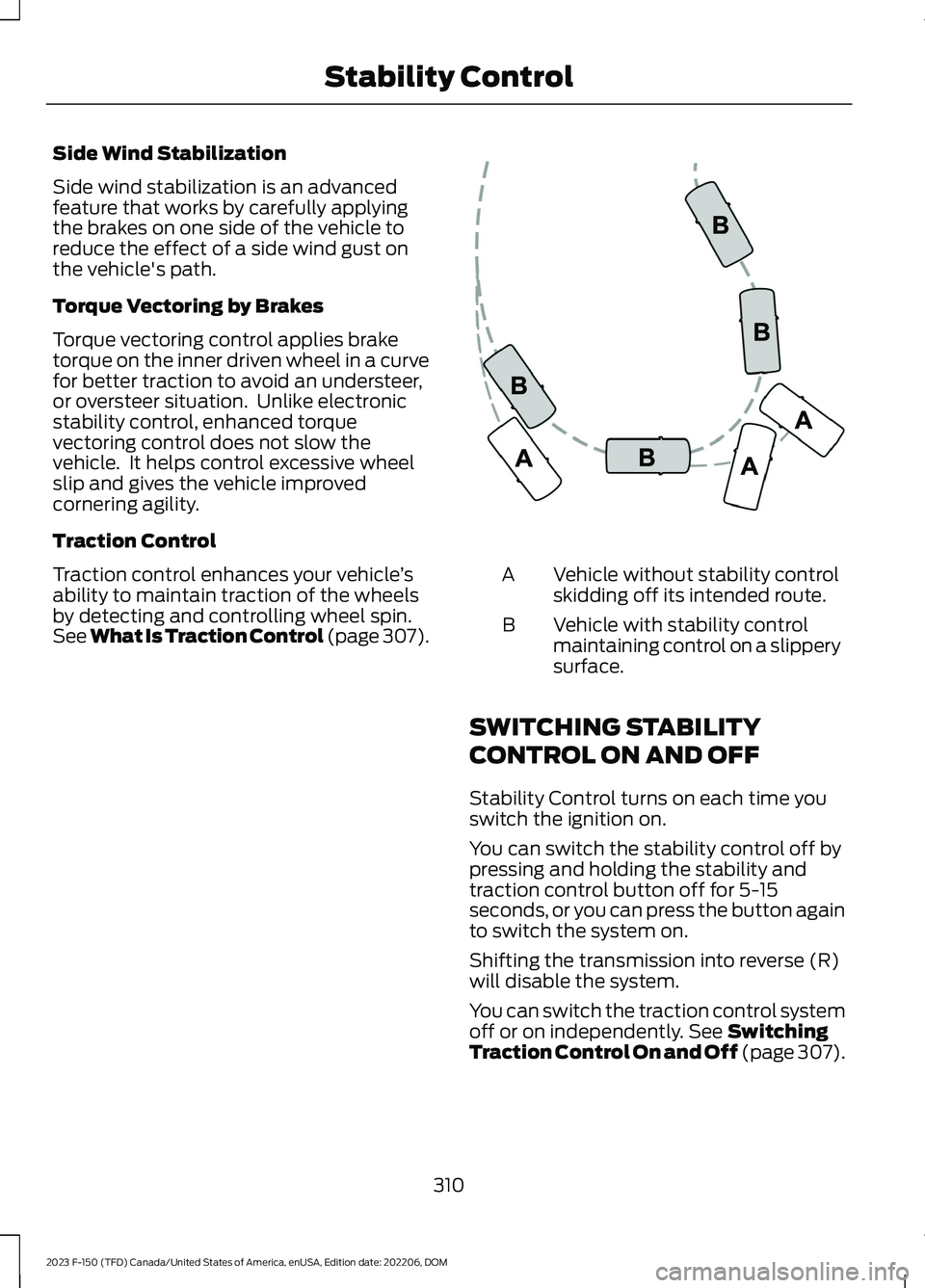
Vehicle without stability controlskidding off its intended route.A
Vehicle with stability controlmaintaining control on a slipperysurface.
B
SWITCHING STABILITY
CONTROL ON AND OFF
Stability Control turns on each time youswitch the ignition on.
You can switch the stability control off bypressing and holding the stability andtraction control button off for 5-15seconds, or you can press the button againto switch the system on.
Shifting the transmission into reverse (R)will disable the system.
You can switch the traction control systemoff or on independently. See SwitchingTraction Control On and Off (page 307).
310
2023 F-150 (TFD) Canada/United States of America, enUSA, Edition date: 202206, DOMStability ControlE72903
Page 328 of 786
Switching Parking Aid On and OffLong-Term
The system can be set to stay disabled inbetween ignition cycles.
1.Press Settings on the touchscreen.
2.Press Driver Assistance.
3.Press Park Aid Sensors.
4.Switch Front Sensors (Always) or RearSensors (Always) on or off.
SWITCHING PARKING AID ON
AND OFF - VEHICLES WITH:
ACTIVE PARK ASSIST
Press the parking aid button anduse the menu to switch thesystem on and off.
Switching Parking Aid On and OffLong-Term
The system can be set to stay disabled inbetween ignition cycles.
1.Press Settings on the touchscreen.
2.Press Driver Assistance.
3.Press Park Aid Sensors.
4.Switch Front Sensors (Always) or RearSensors (Always) on or off.
REAR PARKING AID
WHAT IS THE REAR PARKING AID
Rear parking sensors detect objects behindyour vehicle when in reverse (R).
REAR PARKING AID LIMITATIONS
There is a decreased coverage area at theouter corners.
When using a programmed MyKey, youcannot switch the rear parking aid off.
The rear parking aid sensors are activewhen your vehicle is in reverse (R) and thevehicle speed is less than 5 mph (8 km/h).
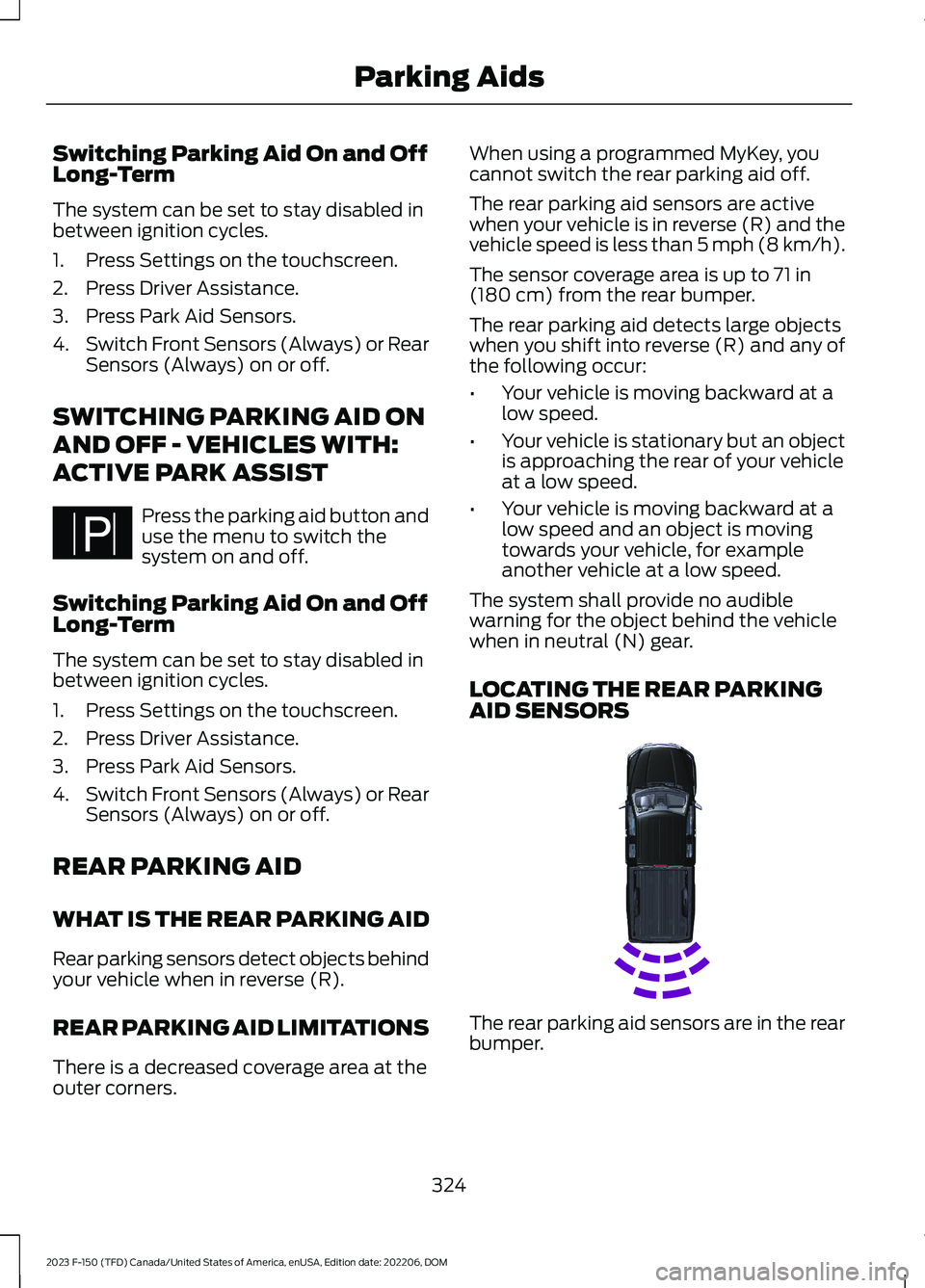
The sensor coverage area is up to 71 in(180 cm) from the rear bumper.
The rear parking aid detects large objectswhen you shift into reverse (R) and any ofthe following occur:
•Your vehicle is moving backward at alow speed.
•Your vehicle is stationary but an objectis approaching the rear of your vehicleat a low speed.
•Your vehicle is moving backward at alow speed and an object is movingtowards your vehicle, for exampleanother vehicle at a low speed.
The system shall provide no audiblewarning for the object behind the vehiclewhen in neutral (N) gear.
LOCATING THE REAR PARKINGAID SENSORS
The rear parking aid sensors are in the rearbumper.
324
2023 F-150 (TFD) Canada/United States of America, enUSA, Edition date: 202206, DOMParking AidsPE326188 E231381
Page 332 of 786
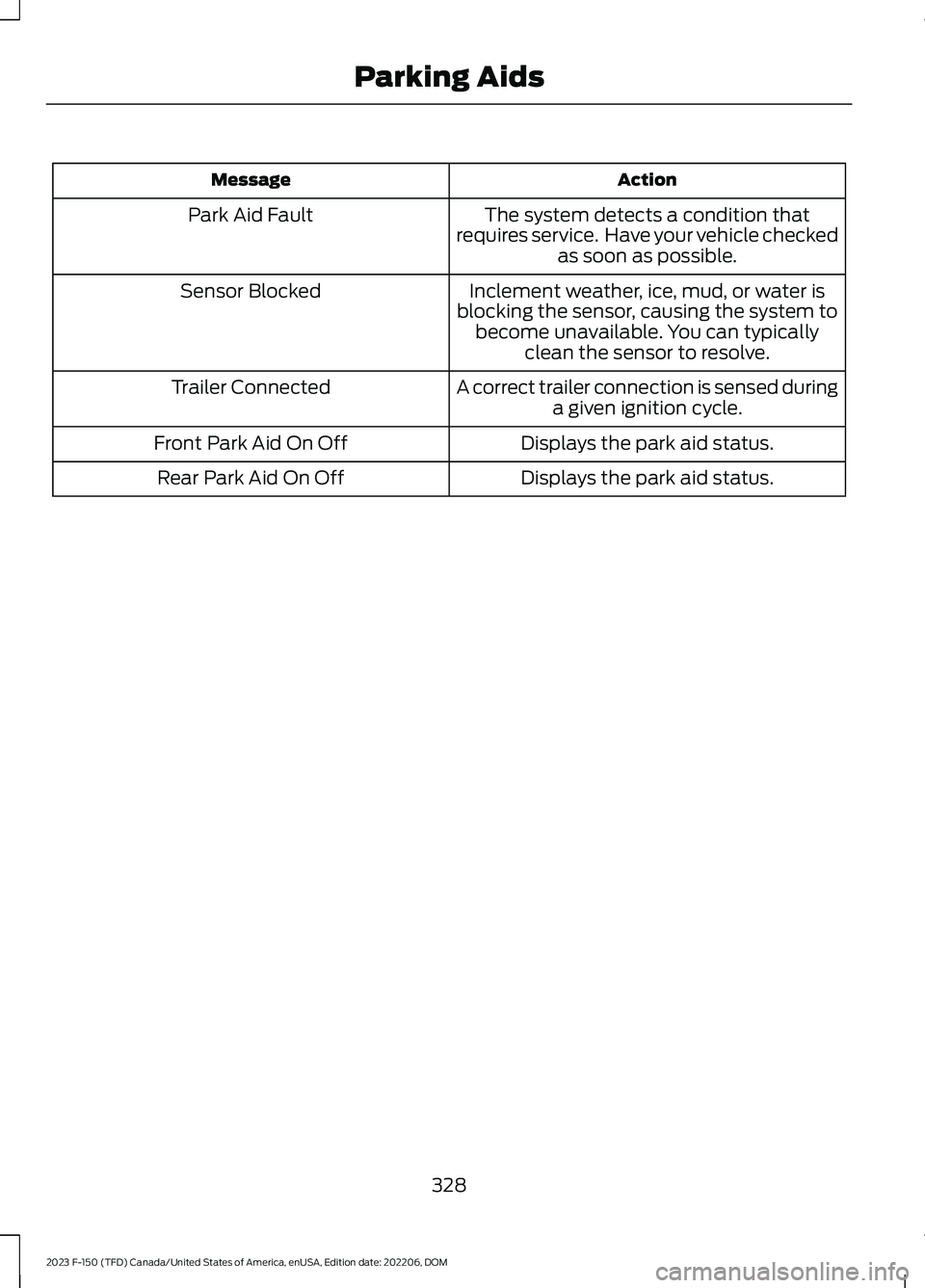
ActionMessage
The system detects a condition thatrequires service. Have your vehicle checkedas soon as possible.
Park Aid Fault
Inclement weather, ice, mud, or water isblocking the sensor, causing the system tobecome unavailable. You can typicallyclean the sensor to resolve.
Sensor Blocked
A correct trailer connection is sensed duringa given ignition cycle.Trailer Connected
Displays the park aid status.Front Park Aid On Off
Displays the park aid status.Rear Park Aid On Off
328
2023 F-150 (TFD) Canada/United States of America, enUSA, Edition date: 202206, DOMParking Aids
Page 344 of 786
WHAT IS CRUISE CONTROL
Cruise control lets you maintain a setspeed without keeping your foot on theaccelerator pedal.
Requirements
Use cruise control when the vehicle speedis greater than 15 mph in imperial units and20 km/h in metric units.
SWITCHING CRUISE CONTROL
ON AND OFF
WARNING: Do not use cruisecontrol on winding roads, in heavy trafficor when the road surface is slippery. Thiscould result in loss of vehicle control,serious injury or death.
The cruise controls are on the steeringwheel.
Switching Cruise Control On
Press the button to activate thesystem. When the systemactivates, the set speed is equalto whichever is greater, the current vehiclespeed, or 15 mph when in imperial units or20 km/h when in metric units. If the speedis too low, or other conditions are notcorrect for cruise control activation, thesystem enters standby mode.
Switching Cruise Control Off
Press the button when thesystem is active or switch theignition off.
Note:When you switch cruise control off,the set speed clears.
SETTING THE CRUISE
CONTROL SPEED
WARNING: When you are goingdownhill, your vehicle speed couldincrease above the set speed. Thesystem does not apply the brakes.
Drive to the speed you prefer.
Press either the SET+ or SET-buttons to set the current speed.
Take your foot off the accelerator pedal.
Note:The indicator changes color in theinformation display.
Changing the Set Speed
Press the SET+ button toincrease the set speed in smallincrements. Press and hold theSET+ button to accelerate. Release thebutton when you have reached yourpreferred speed.
Press the SET- button todecrease the set speed in smallincrements. Press and hold theSET- button to decelerate. Release thebutton when you have reached yourpreferred speed.
Note: If you accelerate by pressing theaccelerator pedal, the set speed does notchange. When you release the acceleratorpedal, your vehicle returns to the speed thatyou previously set.
340
2023 F-150 (TFD) Canada/United States of America, enUSA, Edition date: 202206, DOMCruise ControlE332905 E332905 E246884 E246885 E246884 E246885
Page 349 of 786
Switching Adaptive Cruise ControlOff
Press the button when thesystem is in standby mode orswitch the ignition off.
Note:When you switch the system off, theset speed clears.
ADAPTIVE CRUISE CONTROL
AUTOMATIC CANCELLATION
The system may cancel if:
•The tires lose traction.
•You apply the parking brake.
The system may cancel and set the parkingbrake if:
•You unbuckle the seatbelt and openthe driver door after adaptive cruisecontrol stops your vehicle.
•Adaptive cruise control holds yourvehicle at a stop continuously for morethan three minutes.
The system may deactivate or preventactivating when requested if:
•The vehicle has a blocked sensor.
•The brake temperature is too high.
•There is a failure in the system or arelated system.
SETTING THE ADAPTIVE
CRUISE CONTROL SPEED
Drive to the speed you prefer.
Press the SET+ or SET- buttonsto set the current speed.
Take your foot off the accelerator pedal.
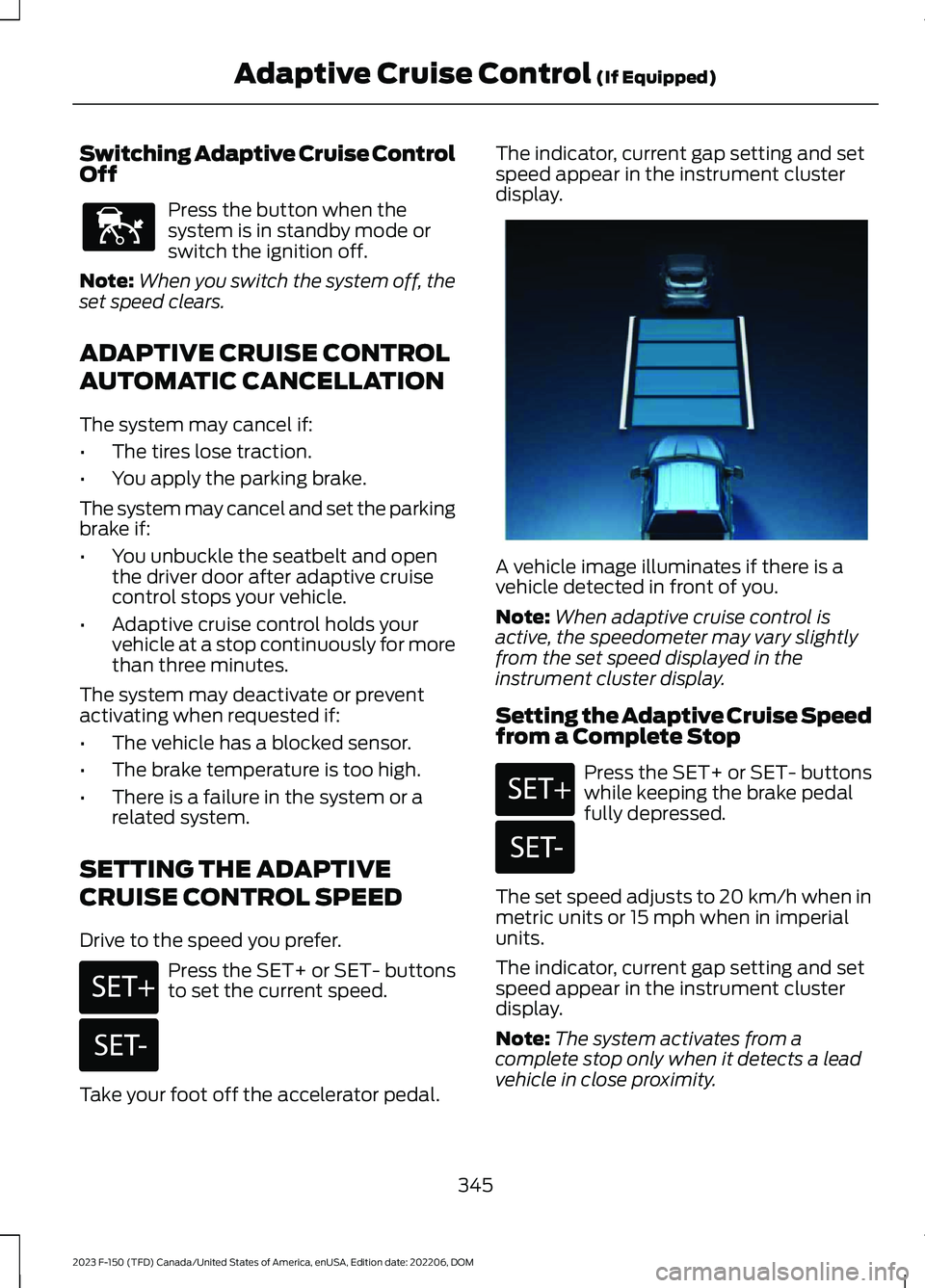
The indicator, current gap setting and setspeed appear in the instrument clusterdisplay.
A vehicle image illuminates if there is avehicle detected in front of you.
Note:When adaptive cruise control isactive, the speedometer may vary slightlyfrom the set speed displayed in theinstrument cluster display.
Setting the Adaptive Cruise Speedfrom a Complete Stop
Press the SET+ or SET- buttonswhile keeping the brake pedalfully depressed.
The set speed adjusts to 20 km/h when inmetric units or 15 mph when in imperialunits.
The indicator, current gap setting and setspeed appear in the instrument clusterdisplay.
Note:The system activates from acomplete stop only when it detects a leadvehicle in close proximity.
345
2023 F-150 (TFD) Canada/United States of America, enUSA, Edition date: 202206, DOMAdaptive Cruise Control (If Equipped)E144529 E246884 E246885 E337576 E246884 E246885
Page 362 of 786
The driver-facing camera may not operatecorrectly due to any of the following:
•You have a pre-existing eye condition,such as an eye misalignment, or havehad eye surgery.
•You cover your facial features by amask, hat or other items.
•The lighting conditions changesignificantly.
•You are not in the field of view of thecamera.
•You position or tilt yourself to one side.
•You are moving around extensively.
•You are wearing glasses or sunglassesthat are too dark or reflective.
Note:The system has limited steeringassistance and may not be sufficient for alldriving situations.
Note:In exceptional conditions, such asinclement weather or direct sunlight, thesystem could deviate from the center line.
Note:The information provided by thenavigation map data could be inaccurate orout of date.
BLUECRUISE SETTINGS
Enabling BlueCruise
1.Press Features on the touchscreen.
2.Press Driver Assistance.
3.Press Cruise Control.
4.Press Lane Centering withHands-Free.
Enabling Activation Prompts
1.Press Features on the touchscreen.
2.Press Driver Assistance.
3.Press Cruise Control.
4.Press Activation Prompts.
SWITCHING BLUECRUISE ON
AND OFF
Switching BlueCruise On
The controls are on the steering wheel.
Using Activation Prompts
When the prompt appears, pressthe button to switch BlueCruiseon.
The indicator appears in the instrumentcluster. When the system is on, the colorof the indicator changes to indicate thesystem status.
Note:You must enable activation promptsin the touchscreen.
Using Steering Wheel Controls
Using the adaptive cruise controland lateral support buttons,make sure both systems areactive. BlueCruise activates.
Switching BlueCruise Off
Press either the lateral supportor adaptive cruise control buttonwhen system is active or instandby mode.
BlueCruise turns off througheach ignition cycle.
358
2023 F-150 (TFD) Canada/United States of America, enUSA, Edition date: 202206, DOMBlueCruise (If Equipped)E144529 E308131 E144529 E308131 E144529
Page 371 of 786
MUD/RUTS - LHD 4WD/4X4,VEHICLES WITHOUT: RAPTORPERFORMANCE PACKAGE
For off-road driving. This modeenhances vehicle performanceto traverse muddy, rutted oruneven terrains.
Four-wheel drive high is the defaultfour-wheel drive mode. Four-wheel drivelow is selectable in mud/rut mode.
The electronic locking differential engageswhen you select this mode at any speed,and you can disengage it at any time usingthe button. See Switching the ElectronicLocking Differential On and Off (page285).
Note:Do not use this mode when drivingon pavement or packed snow. This couldcause driveline bind up and damage thesystem depending on the four-wheel drivemode selection. See Four-Wheel Drive(page 274).
NORMAL - RAPTOR
For everyday driving. This modeis the perfect balance ofexcitement, comfort andconvenience. This is the default mode aftereach ignition cycle.
Two-wheel drive high is the defaultfour-wheel drive mode. All four-wheel drivemodes are selectable when in normalmode.
Normal is the default steering, suspension,and exhaust modes. Off-road steeringmode is not available. All suspension andexhaust modes are available.
The system tunes the engine andtransmission controls to normal mode.
The system tunes the stability and tractioncontrols to normal mode.
The electronic locking differential isavailable below 25 mph (40 km/h) infour-wheel drive. See Switching theElectronic Locking Differential On andOff (page 285).
NORMAL - LHD 4WD/4X4,VEHICLES WITHOUT: RAPTORPERFORMANCE PACKAGE
For everyday driving. This modeis the perfect balance ofexcitement, comfort andconvenience. This is the default mode aftereach ignition cycle.
Two-wheel drive high is the defaultfour-wheel drive mode. All four-wheel drivemodes are selectable when in normalmode.
The electronic locking differential isavailable below 25 mph (40 km/h). SeeSwitching the Electronic LockingDifferential On and Off (page 285).
NORMAL - LHD RWD/4X2
For everyday driving. This modeis the perfect balance ofexcitement, comfort andconvenience. This is the default mode aftereach ignition cycle.
The electronic locking differential isavailable below 25 mph (40 km/h). SeeSwitching the Electronic LockingDifferential On and Off (page 288).
367
2023 F-150 (TFD) Canada/United States of America, enUSA, Edition date: 202206, DOMDrive Mode ControlE296606 E347003 E225310 E225310