air conditioning FORD F150 2023 Owners Manual
[x] Cancel search | Manufacturer: FORD, Model Year: 2023, Model line: F150, Model: FORD F150 2023Pages: 786, PDF Size: 23.15 MB
Page 9 of 786
Tachometer...................................................170
Speedometer................................................170
Fuel Gauge.....................................................170
Engine Coolant Temperature Gauge..........................................................................171
Engine Oil Pressure Gauge........................171
Transmission Fluid Temperature Gauge..........................................................................171
Turbo Boost Gauge......................................171
What Are the Instrument ClusterWarning Lamps.........................................171
Instrument Cluster Warning Lamps.......171
What Are the Instrument ClusterIndicators....................................................173
Instrument Cluster Indicators..................173
Instrument Cluster Display
Using the Instrument Cluster DisplayControls.......................................................175
Instrument Cluster Display Main Menu -Vehicles With: 12 Inch Screen..............175
Instrument Cluster Display Main Menu -Raptor..........................................................176
Instrument Cluster Display Main Menu -Vehicles With: 4.2 Inch Screen...........176
Instrument Cluster Display Main Menu -Vehicles With: 8 Inch Screen...............176
Customizing the Instrument ClusterDisplay..........................................................177
EV Coach - 3.5L, Hybrid Electric Vehicle(HEV)............................................................177
Brake Coach - Hybrid Electric Vehicle(HEV)...........................................................178
Trip Summary................................................178
Personalized Settings
Changing the Language............................179
Changing the Measurement Unit..........179
Changing the Temperature Unit............179
Changing the Tire Pressure Unit............179
Trip Computer
Accessing the Trip Computer - VehiclesWith: 4.2 Inch Screen.............................180
Accessing the Trip Computer - VehiclesWith: 8 Inch Screen/12 Inch Screen........................................................................180
Resetting the Trip Computer - VehiclesWith: 4.2 Inch Screen.............................180
Resetting the Trip Computer - VehiclesWith: 8 Inch Screen/12 Inch Screen........................................................................180
Remote Start
What Is Remote Start.................................181
Remote Start Precautions........................181
Remote Start Limitations..........................181
Enabling Remote Start...............................181
Remotely Starting and Stopping theVehicle..........................................................181
Extending the Remote Start Duration.........................................................................182
Remote Start Remote Control Indicators.........................................................................182
Remote Start Settings...............................182
Climate Control - VehiclesWith: AutomaticTemperature Control
Identifying the Climate Control Unit.....184
Switching Climate Control On and Off.........................................................................184
Switching Recirculated Air On and Off.........................................................................184
Switching Air Conditioning On and Off.........................................................................184
Switching Defrost On and Off................184
Switching Maximum Defrost On and Off.........................................................................184
Switching Maximum Cooling On and Off.........................................................................185
Switching the Heated Wiper Park On andOff.................................................................185
5
2023 F-150 (TFD) Canada/United States of America, enUSA, Edition date: 202206, DOMTable of Contents
Page 10 of 786
Switching the Heated Rear Window Onand Off........................................................185
Setting the Blower Motor Speed...........185
Switching the Heated Mirrors On and Off.........................................................................185
Setting the Temperature..........................185
Directing the Flow of Air...........................186
Auto Mode.....................................................186
Climate Control Hints.................................187
Climate Control - VehiclesWith: Manual TemperatureControl
Identifying the Climate Control Unit.....189
Switching Climate Control On and Off........................................................................189
Switching Recirculated Air On and Off........................................................................189
Switching Air Conditioning On and Off........................................................................189
Switching Defrost On and Off................189
Switching Maximum Defrost On and Off........................................................................189
Switching Maximum Cooling On and Off........................................................................190
Switching the Heated Rear Window Onand Off........................................................190
Setting the Blower Motor Speed..........190
Switching the Heated Mirrors On and Off........................................................................190
Setting the Temperature..........................190
Directing the Flow of Air...........................190
Climate Control Hints.................................191
Interior Air Quality
What Is the Cabin Air Filter......................192
Replacing the Cabin Air Filter..................192
Front Seats
Front Seat Precautions.............................193
Sitting in the Correct Position.................193
Manual Seats................................................194
Power Seats..................................................196
Massage Seats.............................................199
Heated Seats...............................................200
Ventilated Seats.........................................200
Rear Seats - Crew Cab/SuperCab
Manual Seats...............................................202
Heated Seats...............................................203
Rear Occupant Alert System
What is the Rear Occupant Alert System........................................................................205
How Does the Rear Occupant AlertSystem Work............................................205
Rear Occupant Alert System Precautions........................................................................205
Rear Occupant Alert System Limitations........................................................................205
Switching Rear Occupant Alert SystemOn and Off................................................205
Rear Occupant Alert System Indicators.......................................................................206
Rear Occupant Alert System AudibleWarnings...................................................206
Memory Function
What Is the Memory Function...............207
Memory Function Precautions..............207
Locating the Memory Function Buttons........................................................................207
Saving a Preset Position..........................207
Recalling a Preset Position.....................207
Garage Door Opener
Garage Door Opener Introduction.......208
Garage Door Opener Precautions andFrequencies..............................................208
Programming the Garage Door Opener.......................................................................209
6
2023 F-150 (TFD) Canada/United States of America, enUSA, Edition date: 202206, DOMTable of Contents
Page 21 of 786
Air Conditioning System Capacity andSpecification - 5.2L...............................609
Air Conditioning System Capacity andSpecification - 2.7L EcoBoost™........610
Air Conditioning System Capacity andSpecification - 3.3L..................................611
Air Conditioning System Capacity andSpecification - 3.5L Ecoboost™........612
Air Conditioning System Capacity andSpecification - 3.5L, Hybrid ElectricVehicle (HEV)...........................................613
Air Conditioning System Capacity andSpecification - 5.0L................................614
Washer Fluid Specification......................614
Brake Fluid Specification..........................615
Transfer Case Fluid Capacity andSpecification.............................................616
Transfer Case Fluid Capacity andSpecification - Raptor...........................616
Front Axle Fluid Capacity andSpecification.............................................617
Rear Axle Fluid Capacity andSpecification.............................................618
Rear Axle Fluid Capacity andSpecification - Raptor...........................618
Rear Axle Fluid Capacity andSpecification - Police Responder......619
Vehicle Identification
Vehicle Identification Number..............620
Connected Vehicle
What Is a Connected Vehicle..................621
Connected Vehicle Requirements.........621
Connected Vehicle Limitations..............621
Connecting the Vehicle to a MobileNetwork.......................................................621
Connecting the Vehicle to a Wi-FiNetwork.......................................................621
Connected Vehicle – Troubleshooting........................................................................622
Vehicle Wi-Fi Hotspot
Creating a Vehicle Wi-Fi Hotspot.........624
Changing the Vehicle Wi-Fi HotspotName or Password................................624
Vehicle Wi-Fi Hotspot – Troubleshooting........................................................................625
Audio System
Audio System Precautions.....................626
Identifying the Audio Unit.......................626
Switching the Audio Unit On and Off........................................................................626
Selecting the Audio Source....................626
Playing or Pausing the Audio Source........................................................................626
Adjusting the Volume................................627
Switching Shuffle Mode On and Off........................................................................627
Switching Repeat Mode On and Off........................................................................627
Setting a Memory Preset.........................627
Muting the Audio.........................................627
Adjusting the Sound Settings................627
Setting the Clock and Date....................628
AM/FM Radio...............................................628
Switching the Display On and Off.......629
Digital Radio.................................................629
Satellite Radio.............................................630
Audio System – Troubleshooting.........633
Center Display Overview
Center Display Precautions.....................637
Center Display Limitations......................637
Status Bar......................................................637
Feature Bar...................................................638
Information On Demand Screen..........638
Rebooting the Center Display...............639
Voice Interaction
Ford Assistant.............................................640
17
2023 F-150 (TFD) Canada/United States of America, enUSA, Edition date: 202206, DOMTable of Contents
Page 30 of 786
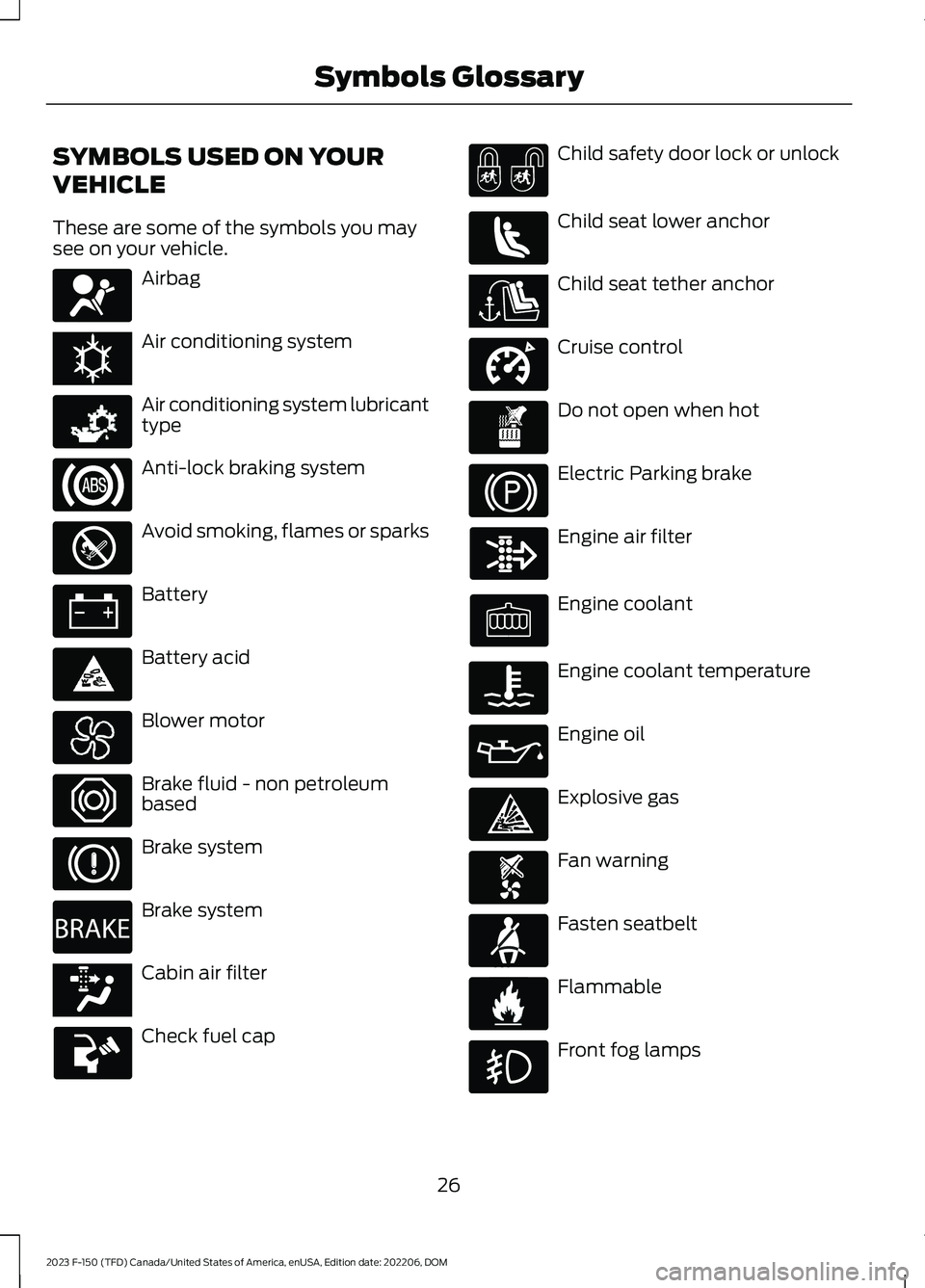
SYMBOLS USED ON YOUR
VEHICLE
These are some of the symbols you maysee on your vehicle.
Airbag
Air conditioning system
Air conditioning system lubricanttype
Anti-lock braking system
Avoid smoking, flames or sparks
Battery
Battery acid
Blower motor
Brake fluid - non petroleumbased
Brake system
Brake system
Cabin air filter
Check fuel cap
Child safety door lock or unlock
Child seat lower anchor
Child seat tether anchor
Cruise control
Do not open when hot
Electric Parking brake
Engine air filter
Engine coolant
Engine coolant temperature
Engine oil
Explosive gas
Fan warning
Fasten seatbelt
Flammable
Front fog lamps
26
2023 F-150 (TFD) Canada/United States of America, enUSA, Edition date: 202206, DOMSymbols GlossaryE67017 E162384 E231157 E67020 E139220 E67021 E139227 E139209 E67024 E270480 E139223 E139211 E141128 E332905 E139219 E139212 E103308 E67022 E139221 E139228 E71880 E231160
Page 188 of 786
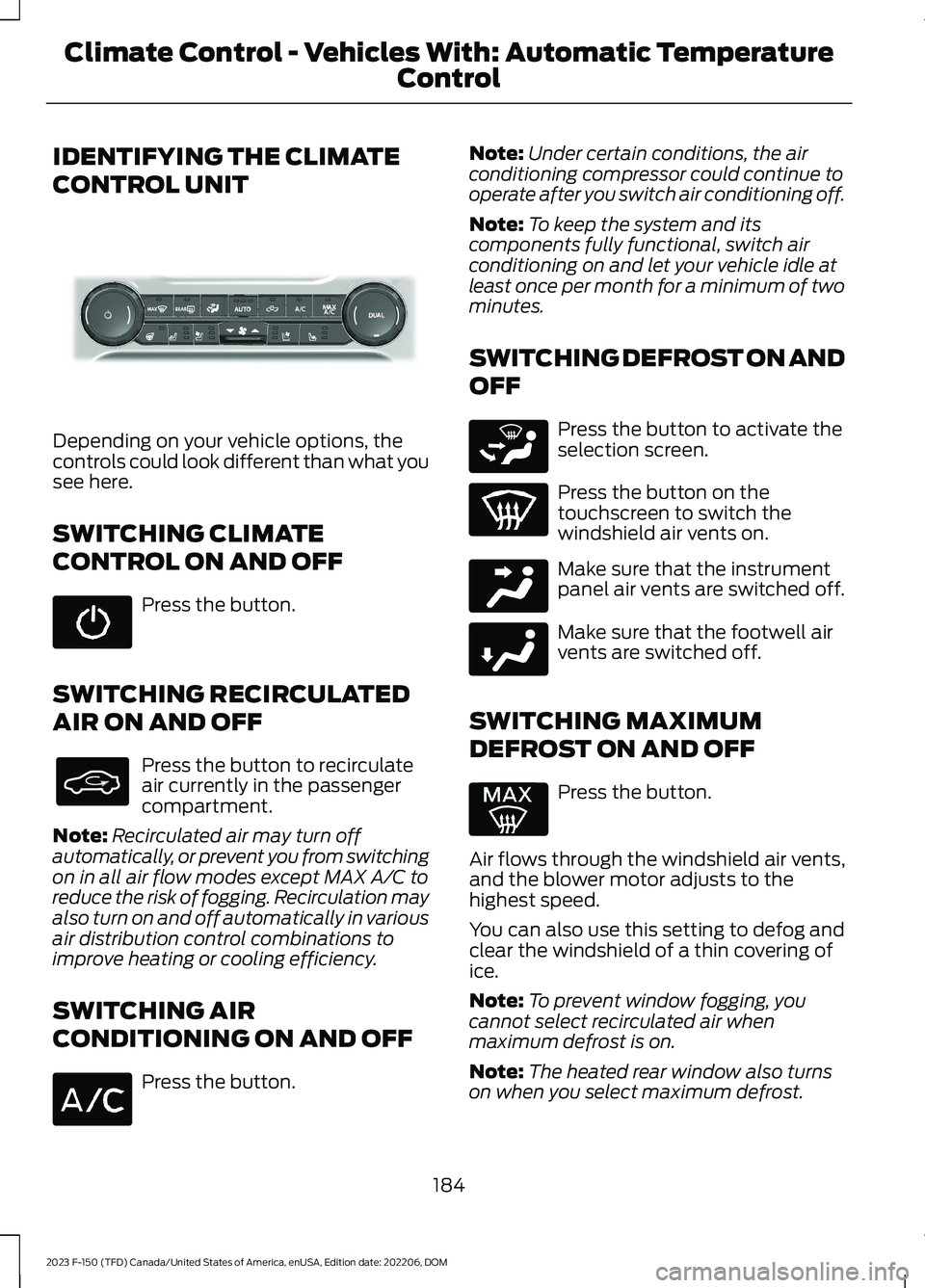
IDENTIFYING THE CLIMATE
CONTROL UNIT
Depending on your vehicle options, thecontrols could look different than what yousee here.
SWITCHING CLIMATE
CONTROL ON AND OFF
Press the button.
SWITCHING RECIRCULATED
AIR ON AND OFF
Press the button to recirculateair currently in the passengercompartment.
Note:Recirculated air may turn offautomatically, or prevent you from switchingon in all air flow modes except MAX A/C toreduce the risk of fogging. Recirculation mayalso turn on and off automatically in variousair distribution control combinations toimprove heating or cooling efficiency.
SWITCHING AIR
CONDITIONING ON AND OFF
Press the button.
Note:Under certain conditions, the airconditioning compressor could continue tooperate after you switch air conditioning off.
Note:To keep the system and itscomponents fully functional, switch airconditioning on and let your vehicle idle atleast once per month for a minimum of twominutes.
SWITCHING DEFROST ON AND
OFF
Press the button to activate theselection screen.
Press the button on thetouchscreen to switch thewindshield air vents on.
Make sure that the instrumentpanel air vents are switched off.
Make sure that the footwell airvents are switched off.
SWITCHING MAXIMUM
DEFROST ON AND OFF
Press the button.
Air flows through the windshield air vents,and the blower motor adjusts to thehighest speed.
You can also use this setting to defog andclear the windshield of a thin covering ofice.
Note:To prevent window fogging, youcannot select recirculated air whenmaximum defrost is on.
Note:The heated rear window also turnson when you select maximum defrost.
184
2023 F-150 (TFD) Canada/United States of America, enUSA, Edition date: 202206, DOMClimate Control - Vehicles With: Automatic Temperature
ControlE377934 E265283 E244097 E244098
Page 189 of 786
Note:When maximum defrost is on, the airconditioning compressor may continue tooperate even though you switch off the airconditioning.
SWITCHING MAXIMUM
COOLING ON AND OFF
Press the button.
Note:When you switch maximum coolingoff, air conditioning remains on.
SWITCHING THE HEATED
WIPER PARK ON AND OFF (IF
EQUIPPED)
When you switch the heated rearwindow on, the heated wiperpark also turns on.
SWITCHING THE HEATED
REAR WINDOW ON AND OFF (IF
EQUIPPED)
Press the button to clear the rearwindow of thin ice and fog. Theheated rear window turns offafter a short period of time.
Note:Do not use harsh chemicals, razorblades or other sharp objects to clean orremove decals from the inside of the heatedrear window as this could cause damage tothe heated rear window grid lines notcovered by the vehicle Warranty.
SETTING THE BLOWER MOTOR
SPEED
Press up or down on the controlto select the blower motorspeed.
Note:For Hybrid Electric Vehicle (HEV) andPlug-In Hybrid Electric Vehicle (PHEV)vehicles, the blower motor may run, and youmay feel airflow when the climate controlis off, to provide cooling to the battery.
SWITCHING THE HEATED
MIRRORS ON AND OFF (IF
EQUIPPED)
Heated Mirrors
Press the button.
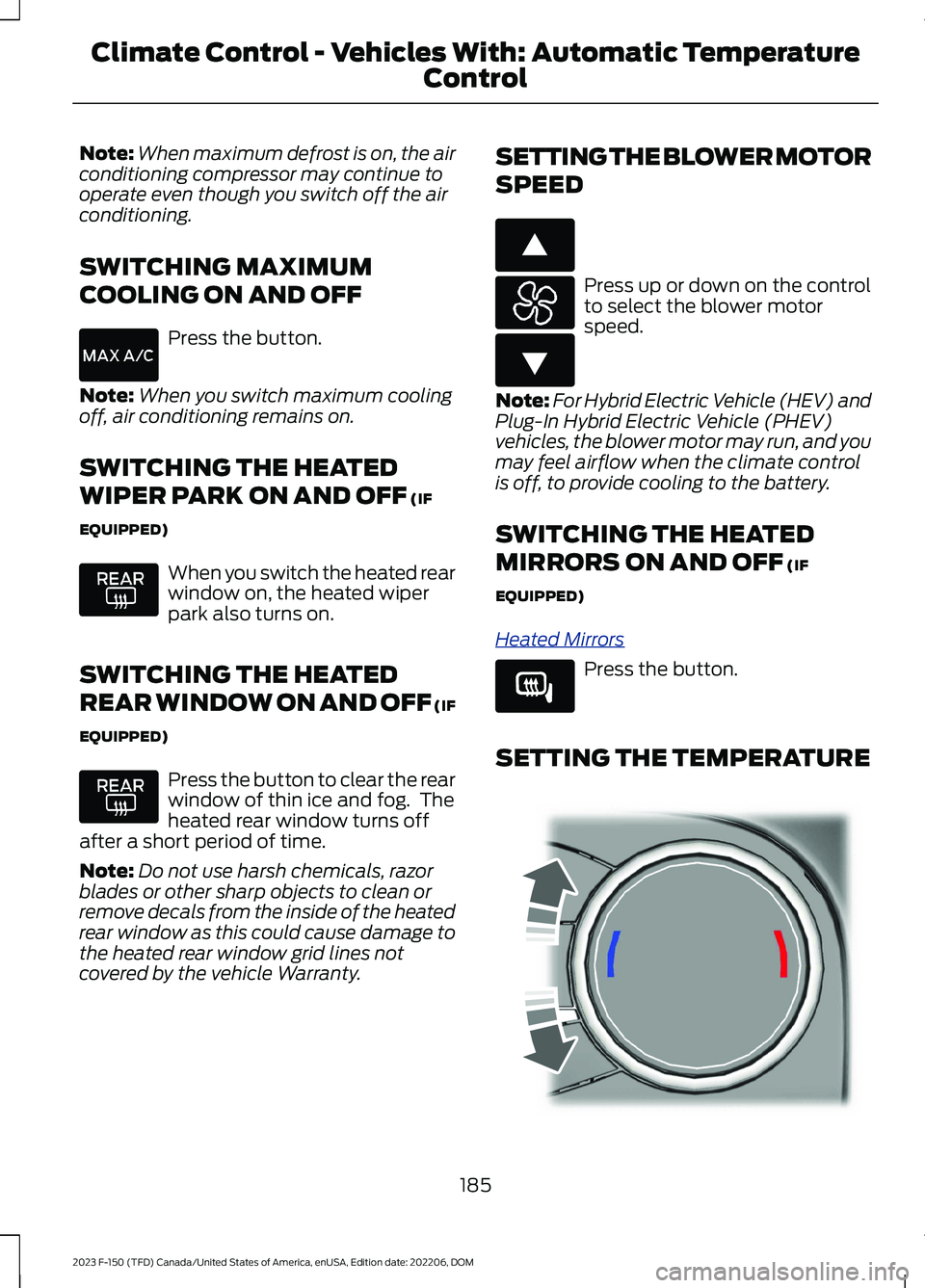
SETTING THE TEMPERATURE
185
2023 F-150 (TFD) Canada/United States of America, enUSA, Edition date: 202206, DOMClimate Control - Vehicles With: Automatic Temperature
Control E266187 E266186 E266189 E244115
Page 193 of 786
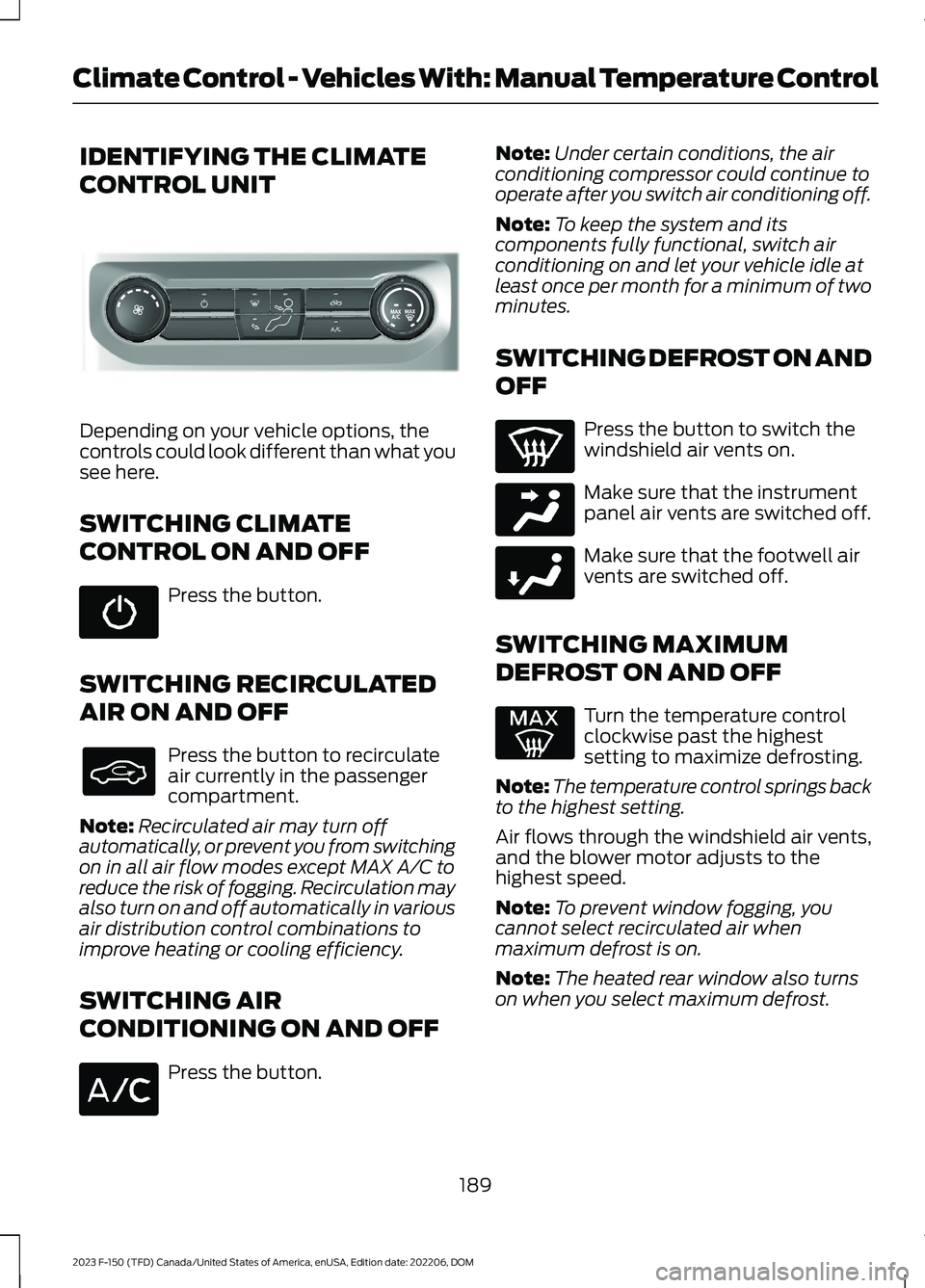
IDENTIFYING THE CLIMATE
CONTROL UNIT
Depending on your vehicle options, thecontrols could look different than what yousee here.
SWITCHING CLIMATE
CONTROL ON AND OFF
Press the button.
SWITCHING RECIRCULATED
AIR ON AND OFF
Press the button to recirculateair currently in the passengercompartment.
Note:Recirculated air may turn offautomatically, or prevent you from switchingon in all air flow modes except MAX A/C toreduce the risk of fogging. Recirculation mayalso turn on and off automatically in variousair distribution control combinations toimprove heating or cooling efficiency.
SWITCHING AIR
CONDITIONING ON AND OFF
Press the button.
Note:Under certain conditions, the airconditioning compressor could continue tooperate after you switch air conditioning off.
Note:To keep the system and itscomponents fully functional, switch airconditioning on and let your vehicle idle atleast once per month for a minimum of twominutes.
SWITCHING DEFROST ON AND
OFF
Press the button to switch thewindshield air vents on.
Make sure that the instrumentpanel air vents are switched off.
Make sure that the footwell airvents are switched off.
SWITCHING MAXIMUM
DEFROST ON AND OFF
Turn the temperature controlclockwise past the highestsetting to maximize defrosting.
Note:The temperature control springs backto the highest setting.
Air flows through the windshield air vents,and the blower motor adjusts to thehighest speed.
Note:To prevent window fogging, youcannot select recirculated air whenmaximum defrost is on.
Note:The heated rear window also turnson when you select maximum defrost.
189
2023 F-150 (TFD) Canada/United States of America, enUSA, Edition date: 202206, DOMClimate Control - Vehicles With: Manual Temperature ControlE308141 E244097 E244098
Page 194 of 786
SWITCHING MAXIMUM
COOLING ON AND OFF
Turn the temperature controlcounterclockwise past thelowest setting to maximizecooling.
Note:The temperature control springs backto the lowest setting.
Note:When you switch maximum coolingoff, air conditioning remains on.
SWITCHING THE HEATED
REAR WINDOW ON AND OFF
Press the button to clear the rearwindow of thin ice and fog. Theheated rear window turns offafter a short period of time.
Note:Do not use harsh chemicals, razorblades or other sharp objects to clean orremove decals from the inside of the heatedrear window as this could cause damage tothe heated rear window grid lines notcovered by the vehicle Warranty.
SETTING THE BLOWER MOTOR
SPEED
Note:Lights on the control illuminate toindicate the blower motor speed.
Note: When you switch the blower motoroff, air conditioning turns off and thewindows could fog up.
SWITCHING THE HEATED
MIRRORS ON AND OFF
Heated Mirrors
Press the button.
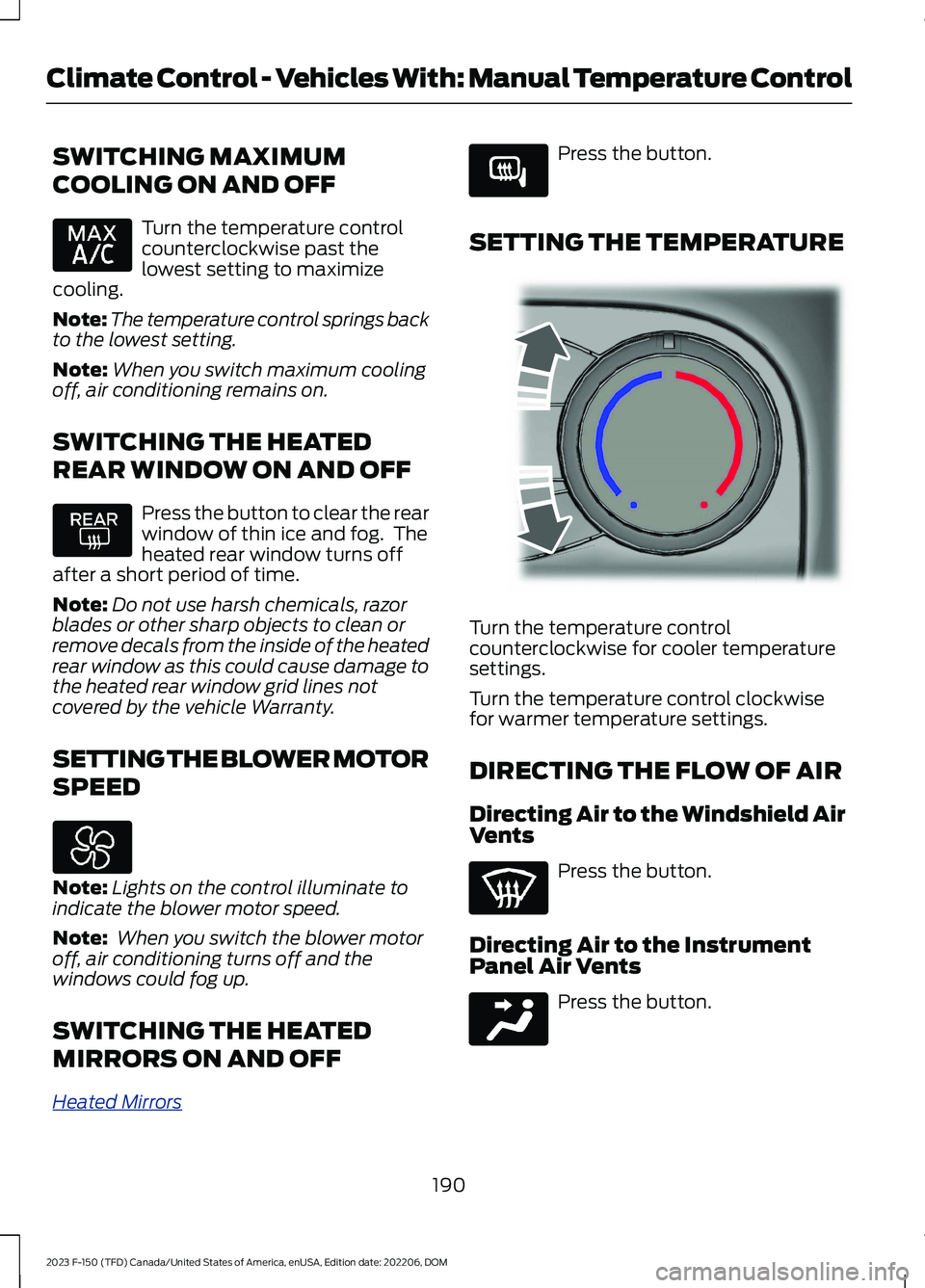
SETTING THE TEMPERATURE
Turn the temperature controlcounterclockwise for cooler temperaturesettings.
Turn the temperature control clockwisefor warmer temperature settings.
DIRECTING THE FLOW OF AIR
Directing Air to the Windshield AirVents
Press the button.
Directing Air to the InstrumentPanel Air Vents
Press the button.
190
2023 F-150 (TFD) Canada/United States of America, enUSA, Edition date: 202206, DOMClimate Control - Vehicles With: Manual Temperature Control E266189 E244106 E244097
Page 477 of 786
DRIVING ON SNOW AND ICE
WARNING: If you are driving inslippery conditions that require tirechains or cables, then it is critical thatyou drive cautiously. Keep speeds down,allow for longer stopping distances andavoid aggressive steering to reduce thechances of a loss of vehicle controlwhich can lead to serious injury or death.If the rear end of your vehicle slides whilecornering, steer in the direction of theslide until you regain control of yourvehicle.
On ice and snow, you should drive moreslowly than usual. Your vehicle has a fourwheel anti-lock brake system, do not pumpthe brake pedal. See Anti-Lock BrakingSystem Limitations (page 291).
BREAKING-IN
Your vehicle requires a break-in period. Forthe first 1,000 mi (1,600 km), avoid drivingat high speeds, heavy braking, aggressiveshifting or using your vehicle to tow. Duringthis time, your vehicle may exhibit someunusual driving characteristics.
DRIVING ECONOMICALLY
The following helps to improve fuelconsumption:
•Drive smoothly, accelerate gently andanticipate the road ahead to avoidheavy braking.
•Regularly check your tire pressures andmake sure that they are inflated to thecorrect pressure.
•Follow the recommended maintenanceschedule and carry out therecommended checks.
•Plan your journey and check the trafficbefore you set off. It is more efficientto combine errands into a single tripwhenever possible.
•Avoid idling the engine in cold weatheror for extended periods. Start theengine only when you are ready to setoff.
•Do not carry unnecessary weight in yourvehicle as extra weight wastes fuel.
•Do not add unnecessary accessoriesto the exterior of your vehicle, forexample running boards. If you use aroof rack, remember to fold it down orremove it when not in use.
•Do not shift into neutral when you arebraking or when your vehicle is slowingdown.
•Shut all windows when driving at highspeeds.
•Switch off all electric systems whennot in use, for example air conditioning.Make sure that you unplug anyaccessories from the auxiliary powerpoints when not in use.
FLOOR MATS
WARNING: Use a floor matdesigned to fit the footwell of yourvehicle that does not obstruct the pedalarea. Failure to follow this instructioncould result in the loss of control of yourvehicle, personal injury or death.
WARNING: Pedals that cannotmove freely can cause loss of vehiclecontrol and increase the risk of seriouspersonal injury.
473
2023 F-150 (TFD) Canada/United States of America, enUSA, Edition date: 202206, DOMDriving Hints
Page 512 of 786
Water alone, without engine coolant, cancause engine damage from corrosion,overheating or freezing.
Do not use the following as a coolantsubstitute, as they can cause enginedamage from overheating or freezing:
•Alcohol.
•Methanol.
•Brine.
•Any coolant mixed with alcohol ormethanol antifreeze.
Do not add extra inhibitors or additives tothe coolant. These can be harmful andcompromise the corrosion protection ofthe coolant.
Severe Climates
If you drive in extremely cold climates, youmay need to increase the coolantconcentration above 50%.
Note:A coolant concentration of 60%provides improved freeze point protection.Coolant concentrations above 60%decrease the overheat protectioncharacteristics of the coolant and couldcause engine damage.
If you drive in extremely hot climates, youmay need to decrease the coolantconcentration to 40%.
Note:A coolant concentration of 40%provides improved overheat protection.Coolant concentrations below 40%decrease the overheat and corrosionprotection characteristics of the coolant andcould cause engine damage.
Coolant Change
WARNING: Do not dispose ofcoolant in the household refuse or thepublic sewage system. Use an authorizedwaste disposal facility.
Change the coolant at specific mileageintervals. Refer to the scheduledmaintenance information. See NormalScheduled Maintenance (page 670).
Note:Dispose of used coolant in theappropriate manner.
Follow your community's regulations andstandards for recycling and disposing ofautomotive fluids.
Fail-Safe Cooling
Fail-safe cooling allows you to temporarilydrive your vehicle before any incrementalcomponent damage occurs. The fail-safedistance depends on ambienttemperature, vehicle load and terrain.
How Fail-Safe Cooling Works
WARNING: If you continue to driveyour vehicle when the engine isoverheating, the engine could stopwithout warning. Failure to follow thisinstruction could result in the loss ofcontrol of your vehicle.
If the engine begins to overheat,the coolant temperature gaugemoves toward the red zone:
A warning lamp illuminates anda message may appear in theinformation display.
If the engine reaches a presetover-temperature condition, the engineautomatically switches to alternatingcylinder operation. Each disabled cylinderacts as an air pump and cools the engine.
When this occurs, your vehicle stilloperates, however:
•Engine power is limited.
•The air conditioning system turns off.
508
2023 F-150 (TFD) Canada/United States of America, enUSA, Edition date: 202206, DOMMaintenanceE103308 E67028