battery FORD F250 1998 User Guide
[x] Cancel search | Manufacturer: FORD, Model Year: 1998, Model line: F250, Model: FORD F250 1998Pages: 219, PDF Size: 1.65 MB
Page 147 of 219
JUMP STARTING YOUR
VEHICLE
The gases around the
battery can explode if
exposed to flames, sparks, or lit
cigarettes. An explosion could
result in injury or vehicle
damage.
Do not push start your
vehicle. You could damage
the catalytic converter.
Batteries contain sulfuric
acid which burns skin,
eyes, and clothing.
Preparing your vehicle
Also see the label on the battery.
1. Use only a 12±volt supply to
start your vehicle. If you connect
your battery to a 24±volt power
supply you can damage your
starter, ignition system and other
electrical components.
2. Do not disconnect the battery of
the disabled vehicle as this could
damage the vehicle's electrical
system.
3. Park the booster vehicle close to
the hood of the disabled vehicle
making sure theydo nottouch.
Set the parking brake on both
vehicles and stay clear of the
engine cooling fan and other
moving parts.
Roadside emergencies
147
ProCarManuals.com
Page 148 of 219
4. Check all battery terminals and
remove any excessive corrosion
before you attach the battery
cables.
5. Turn the heater fan on in both
vehicles to protect any electrical
surges. Turn all other accessories
off.
Connecting the jumper cables
1. Position the vehicles so that
they do not touch one another.
2. Switch off the engine. Switch off
any unnecessary electrical
equipment.
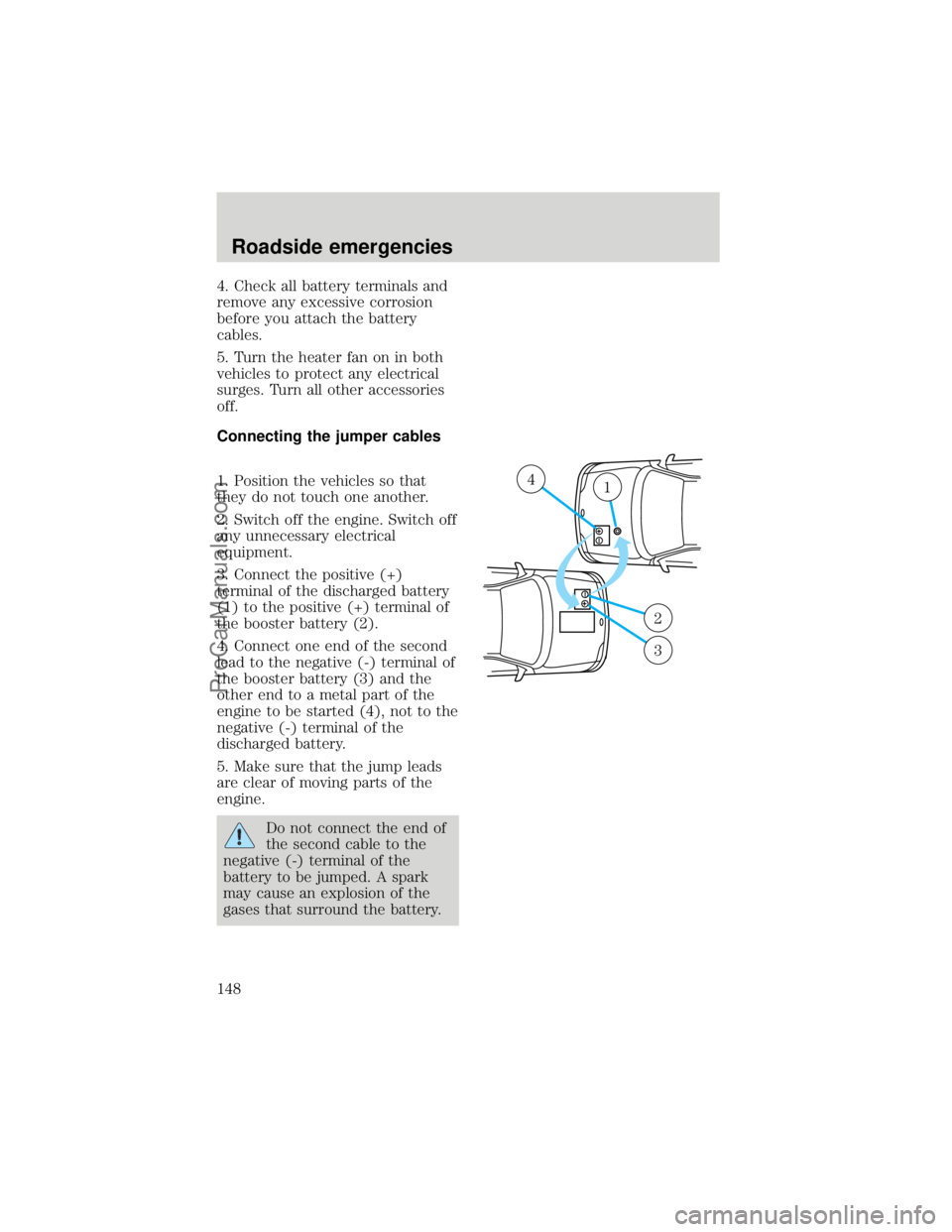
3. Connect the positive (+)
terminal of the discharged battery
(1) to the positive (+) terminal of
the booster battery (2).
4. Connect one end of the second
lead to the negative (-) terminal of
the booster battery (3) and the
other end to a metal part of the
engine to be started (4), not to the
negative (-) terminal of the
discharged battery.
5. Make sure that the jump leads
are clear of moving parts of the
engine.
Do not connect the end of
the second cable to the
negative (-) terminal of the
battery to be jumped. A spark
may cause an explosion of the
gases that surround the battery.
+–
+–
41
2
3
Roadside emergencies
148
ProCarManuals.com
Page 149 of 219
Jump starting
1. Start the booster vehicle and
run the engine at moderately
increased speed.
2. Start the engine of the vehicle
with the discharged battery.
3. Once the engine has been
started, run both vehicles for a
further three minutes before
disconnecting the leads.
Removing the jumper cables
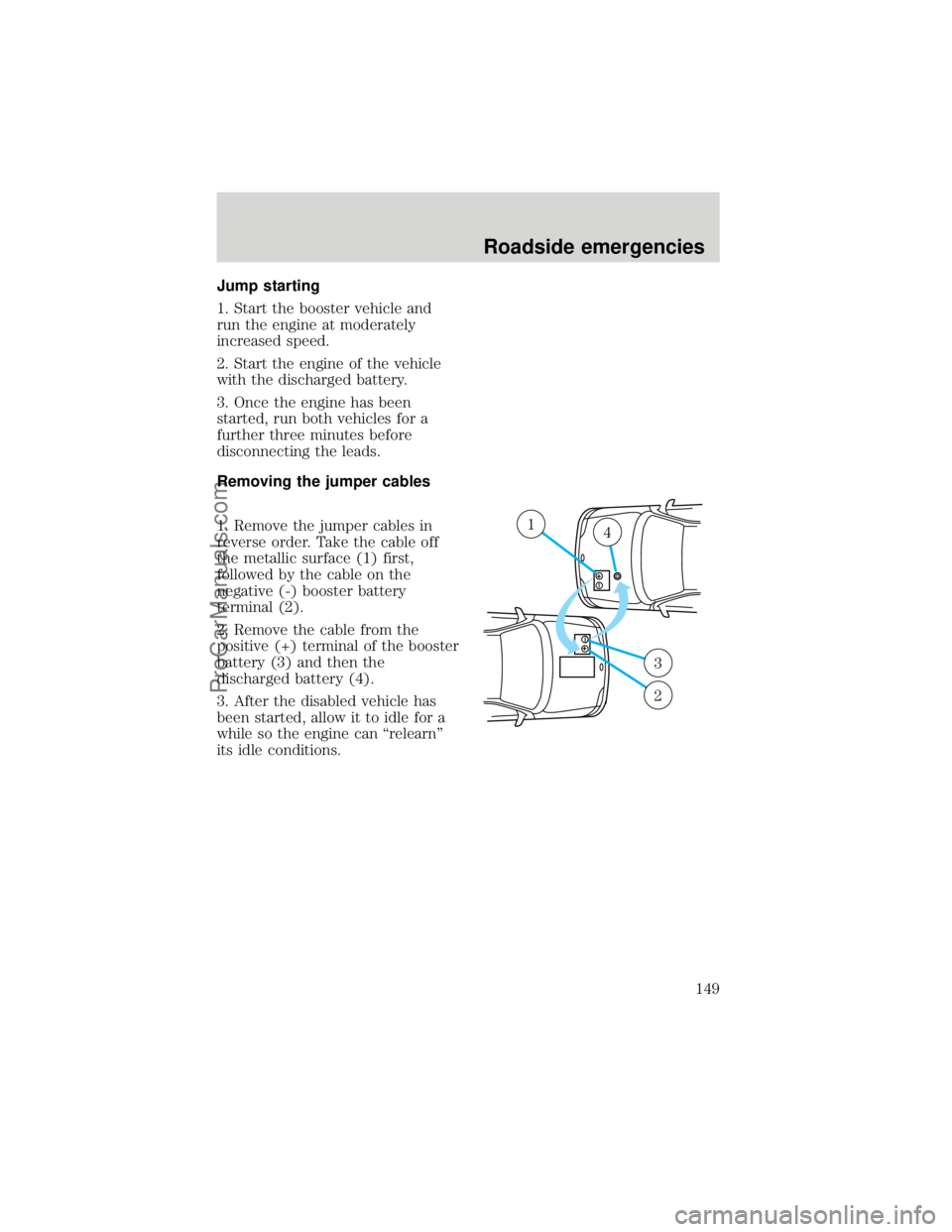
1. Remove the jumper cables in
reverse order. Take the cable off
the metallic surface (1) first,
followed by the cable on the
negative (-) booster battery
terminal (2).
2. Remove the cable from the
positive (+) terminal of the booster
battery (3) and then the
discharged battery (4).
3. After the disabled vehicle has
been started, allow it to idle for a
while so the engine can ªrelearnº
its idle conditions.
+–
+–
14
3
2
Roadside emergencies
149
ProCarManuals.com
Page 152 of 219
SERVICE RECOMMENDATIONS
To help you service your vehicle:
²We highlight do-it-yourself items
in the engine compartment for
easy location.
²We provide a ªService Guideº
which makes tracking routine
service easy.
If your vehicle requires
professional service, your
dealership can provide necessary
parts and service. Check your
ªWarranty Guideº to find out which
parts and services are covered.
Use only recommended fuels,
lubricants, fluids and service parts
conforming to specifications.
Motorcraft parts are designed and
built to provide the best
performance in your vehicle.
PRECAUTIONS WHEN
SERVICING YOUR VEHICLE
Be especially careful when
inspecting or servicing your
vehicle.
²Do not work on a hot engine.
The cooling fan is
automatic and may come
on at any time. Always
disconnect the negative terminal
of the battery before working
near the fan.
²When the engine is running, pay
attention loose clothing, jewelry
or long hair do not get caught
up in moving parts.
Maintenance and care
152
ProCarManuals.com
Page 153 of 219

²Do not work on a vehicle with
the engine running in an
enclosed space, unless you are
sure you have enough
ventilation.
²Keep all lit cigarettes, open
flames and other lit material
away from the battery and all
fuel related parts.
If you disconnect the battery, the
engine must ªrelearnº its idle
conditions before your vehicle will
drive properly, as explained in
Batteryin this chapter.
Working with the engine off
²Automatic transmission:
1. Set the parking brake fully and
ensure the gearshift is securely
latched in P (Park).
2. Turn off the engine and remove
the key.
3. Block the wheels to prevent the
vehicle from moving unexpectedly.
²Manual transmission:
1. Set the parking brake, depress
the clutch and place the gearshift
in 1 (First).
2. Turn off the engine and remove
the key.
3. Block the wheels to prevent the
vehicle from moving unexpectedly.
Maintenance and care
153
ProCarManuals.com
Page 155 of 219
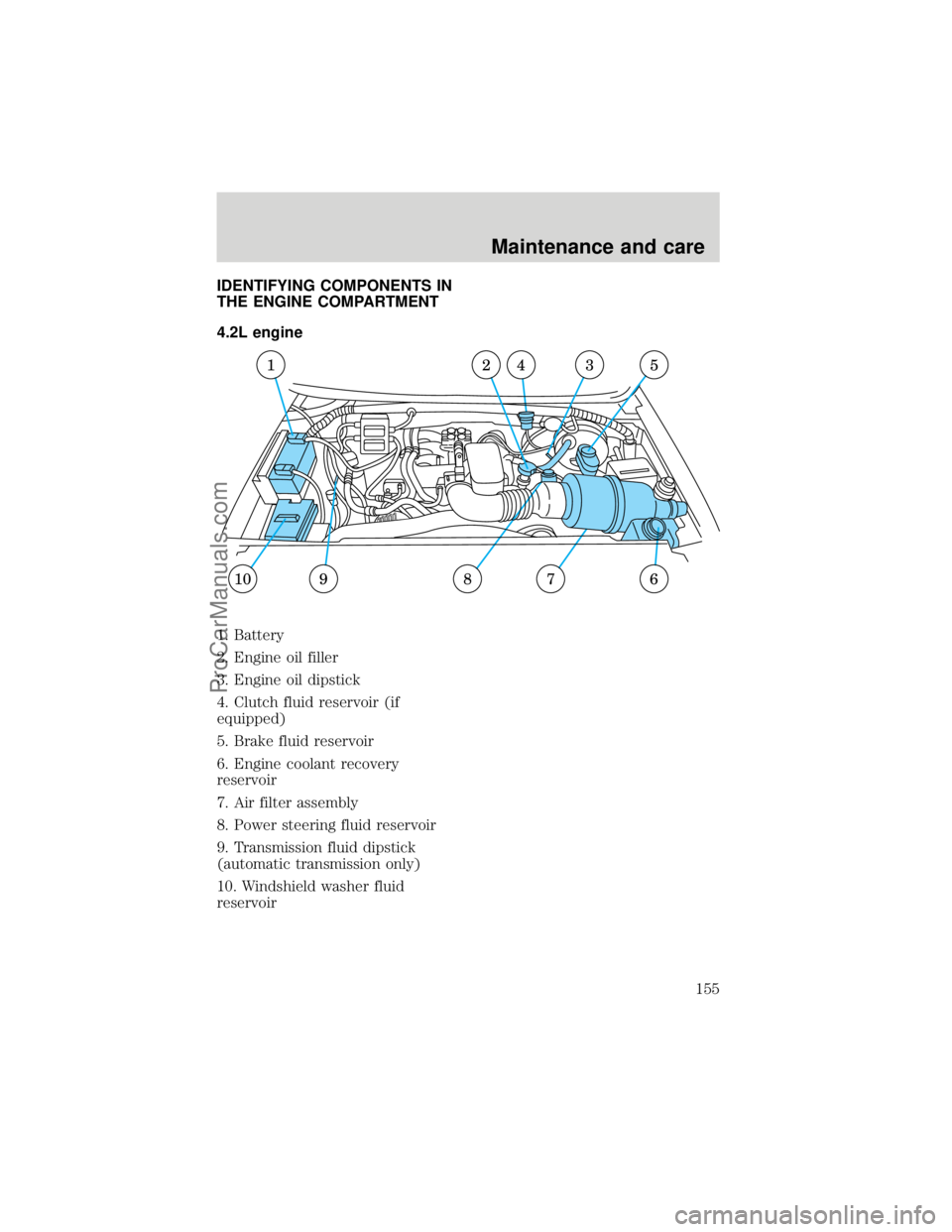
IDENTIFYING COMPONENTS IN
THE ENGINE COMPARTMENT
4.2L engine
1. Battery
2. Engine oil filler
3. Engine oil dipstick
4. Clutch fluid reservoir (if
equipped)
5. Brake fluid reservoir
6. Engine coolant recovery
reservoir
7. Air filter assembly
8. Power steering fluid reservoir
9. Transmission fluid dipstick
(automatic transmission only)
10. Windshield washer fluid
reservoir
67
1245
8910
3
Maintenance and care
155
ProCarManuals.com
Page 156 of 219
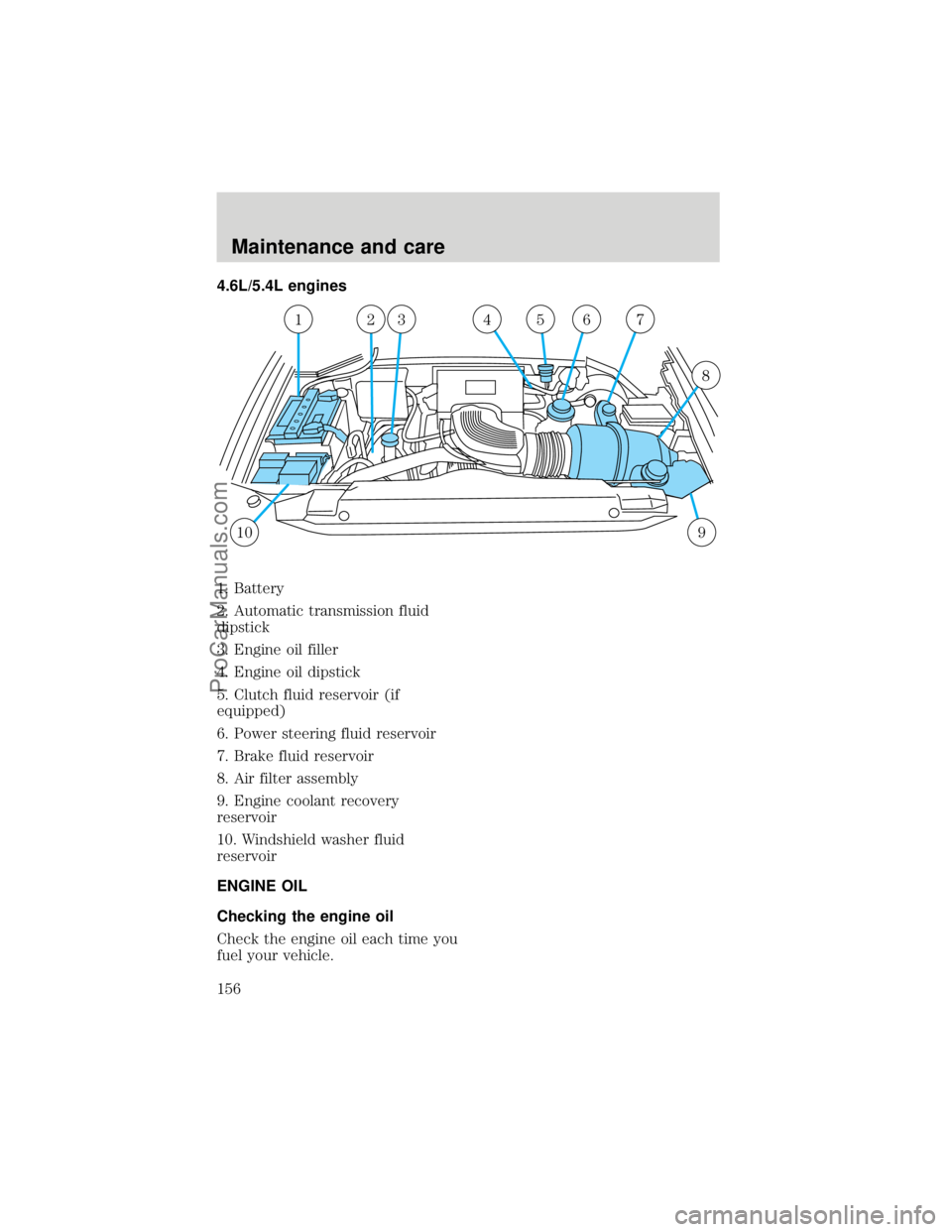
4.6L/5.4L engines
1. Battery
2. Automatic transmission fluid
dipstick
3. Engine oil filler
4. Engine oil dipstick
5. Clutch fluid reservoir (if
equipped)
6. Power steering fluid reservoir
7. Brake fluid reservoir
8. Air filter assembly
9. Engine coolant recovery
reservoir
10. Windshield washer fluid
reservoir
ENGINE OIL
Checking the engine oil
Check the engine oil each time you
fuel your vehicle.
109
1234657
8
Maintenance and care
156
ProCarManuals.com
Page 175 of 219
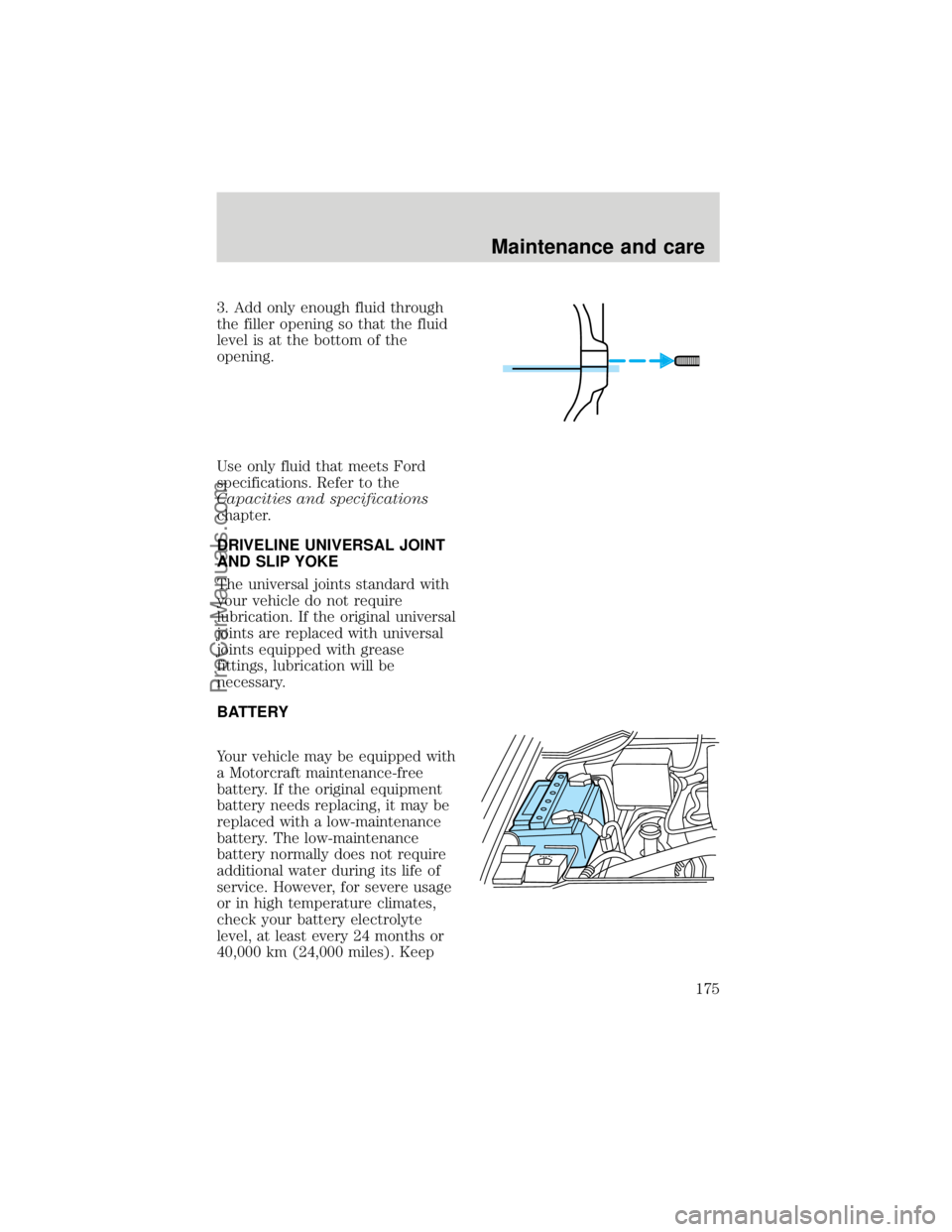
3. Add only enough fluid through
the filler opening so that the fluid
level is at the bottom of the
opening.
Use only fluid that meets Ford
specifications. Refer to the
Capacities and specifications
chapter.
DRIVELINE UNIVERSAL JOINT
AND SLIP YOKE
The universal joints standard with
your vehicle do not require
lubrication. If the original universal
joints are replaced with universal
joints equipped with grease
fittings, lubrication will be
necessary.
BATTERY
Your vehicle may be equipped with
a Motorcraft maintenance-free
battery. If the original equipment
battery needs replacing, it may be
replaced with a low-maintenance
battery. The low-maintenance
battery normally does not require
additional water during its life of
service. However, for severe usage
or in high temperature climates,
check your battery electrolyte
level, at least every 24 months or
40,000 km (24,000 miles). Keep
Maintenance and care
175
ProCarManuals.com
Page 176 of 219

the electrolyte in each cell up to
the ªlevelº indicator. Do not overfill
the battery cells.
If the electrolyte level in the
battery is low, you can add plain
tap water to the battery, as long as
you do not use hard water (water
with a high alkali content). If
possible, however, try to only fill
the battery cells with distilled
water. If the battery needs water
often, have the charging system
checked.
For longer, trouble-free operation,
keep the top of the battery clean
and dry. Also, make certain the
battery cables are always tightly
fastened to the battery terminals.
If you see any corrosion on the
battery or terminals, remove the
cables from the terminal(s) and
clean with a wire brush. You can
neutralize the acid with a solution
of baking soda and water. Reinstall
the cables when you are done
cleaning them, and apply a small
quantity of grease to the top of
each battery terminal to help
prevent corrosion.
If your battery has a
cover/shield, make sure it is
reinstalled after the battery is
replaced.
Because your vehicle's engine is
electronically controlled by a
computer, some control conditions
are maintained by power from the
battery. When the battery is
disconnected or a new battery is
installed, the engine must relearn
Maintenance and care
176
ProCarManuals.com
Page 177 of 219
its idle conditions before your
vehicle will drive properly. To
begin this process:
1. Put the gearshift in P (Park)
(automatic transmissions) or the
neutral position (manual
transmissions), turn off all
accessories and start the vehicle.
2. Let the engine idle for at least
one minute.
3. The relearning process will
automatically complete as you
drive the vehicle.
²If you do not allow the engine to
relearn its idle, the idle quality
of your vehicle may be adversely
affected until the idle is
eventually relearned.
²If the battery has been
disconnected or a new battery
has been installed, the clock and
the preset radio stations must
be reset once the battery is
reconnected.
²Always dispose of automotive
batteries in a responsible
manner. Follow your
communities standards for
disposal. Call your local
recycling center to find out
more about recycling automotive
batteries.
WINDSHIELD WIPER BLADES
Check the wiper blades at least
twice a year or when they seem
less effective. Substances such as
tree sap and some hot wax
Maintenance and care
177
ProCarManuals.com