reset FORD F250 2013 User Guide
[x] Cancel search | Manufacturer: FORD, Model Year: 2013, Model line: F250, Model: FORD F250 2013Pages: 577, PDF Size: 7.74 MB
Page 107 of 577
•TIMER: Displays the trip elapsed drive time. Press and release RESET
to pause the timer. Press and hold RESET to reset the timer.
•TBC GAIN (if equipped): Displays the level of trailer brake gain or if
the trailer is not connected.
•EXHAUST FILTER (Diesel only): For more information, refer to the
Diesel exhaust system: oxidation catalyst/diesel particulate filter
systemin your diesel supplement for more information.
System Check and Vehicle Feature Customization
Press the SETUP button repeatedly to cycle the message center through
the following features:
Note:Some options may appear slightly different or not at all if the
items are optional.
Note:When returning to the SETUP menu and a non-English language
has been selected, HOLD RESET FOR ENGLISH will be displayed to
change back to English. Press and hold the RESET button to change
back to English.
SETUP
RESET FOR
SYSTEM CHECKpress the
RESET buttonOIL LIFE
EXHAUST FLUID LEVEL
(Diesel only)
ENGINE HOURS
ENGINE IDLE HOURS
CHARGING SYSTEM
DOOR
BRAKE SYSTEM
TBC GAIN = XX.X
FUEL LEVEL
MYKEY DISTANCE
MYKEY(S) PROGRAMMED
ADMIN KEYS PROGRAMMED
106Information Displays
2013 F-250/350/450/550(f23)
Owners Guide gf, 3rd Printing, December 2012
USA(fus)
Page 108 of 577
SETUP
OIL LIFE
UNITS press the
RESET buttonDistance English
Metric
Temperature Fahrenheit
Celsius
AUTOLAMP
(SEC)0 to 180 seconds
AUTOLOCK On or Off
AUTOUNLOCK On or Off
COURTESY
WIPEOn or Off
REMOTE
WINDOW OPENOn or Off
CREATE MYKEY / MYKEY SETUP / CLEAR MYKEY
RESET FOR ZONE SETTING (if equipped)
ZONE XX RESET = CHANGE (if equipped)
RESET FOR CALIBRATION (if equipped)
RESET FOR
REMOTE START
(if equipped)press the
RESET buttonOn or Off
5, 10, 15 minutes
TBC MODE (if
equipped)Electric or EOH
TRAILER SWAY
(if equipped)On or Off
LANGUAGE =
ENGLISH /
SPANISH /
FRENCHEnglish / Spanish / French
•RESET FOR SYSTEM CHECK: The message center will begin to cycle
through the vehicle systems and provide a status of the item if
needed. Some systems show a message only if a condition is present.
•
OIL LIFE: This displays the remaining oil life. An oil change is required
whenever indicated by the message center and according to the
recommended maintenance schedule. USE ONLY RECOMMENDED
ENGINE OILS.
Information Displays107
2013 F-250/350/450/550(f23)
Owners Guide gf, 3rd Printing, December 2012
USA(fus)
Page 109 of 577
To reset the oil monitoring system to 100% after each oil change,
perform the following:
1. Press and release the SETUP button to display OIL LIFE XXX% HOLD
RESET = NEW.
2. Press and hold the RESET button for two seconds and release to reset
the oil life to 100%.
Note:To change oil life 100% value (if equipped with this feature) to
another value, proceed to Step 3.
3. Once OIL LIFE SET TO XXX% is displayed, release and press the
RESET button to change the Oil Life Start Value. Each release and press
will reduce the value by 10%.
•UNITS: Displays the current units in English or Metric.
•AUTOLAMP (SEC): This feature keeps your headlights on for up to
three minutes after the ignition is switched off.
•AUTOLOCK: This feature automatically locks all vehicle doors when
the vehicle is shifted into any gear, putting the vehicle in motion.
•AUTOUNLOCK: This feature automatically unlocks all vehicle doors
when the driver’s door is opened within 10 minutes of the ignition
being turned off.
•COURTESY WIPE: This feature allows for an extra swipe of the wipers
after a wipe/wash cycle.
•REMOTE WINDOW OPEN: This feature allows for all windows to be
opened remotely.
•CREATE MYKEY / MYKEY SETUP / CLEAR MYKEY: For more
information refer toMyKey®in theLocks and Securitychapter.
•RESET FOR ZONE SETTING (if equipped): This feature changes the
compass zone setting.
Most geographic areas (zones) have a magnetic north compass point
that varies slightly from the northerly direction on maps. This variation
is four degrees between adjacent zones and will become noticeable
as the vehicle crosses multiple zones. A correct zone setting will
eliminate this error.
Refer toCompass zone/calibration adjustment.
•ZONE XX RESET = CHANGE (if equipped): The compass heading is
displayed as one of N, NE, E, SE, S, SW, W and NW in the message
center display.
Refer toCompass zone/calibration adjustment.
108Information Displays
2013 F-250/350/450/550(f23)
Owners Guide gf, 3rd Printing, December 2012
USA(fus)
Page 110 of 577
•RESET FOR CALIBRATION (if equipped): This feature calibrates the
compass.
The compass reading may be affected when you drive near large
buildings, bridges, power lines and powerful broadcast antenna.
Magnetic or metallic objects placed in, on or near the vehicle may
also affect compass accuracy. If the compass appears to be inaccurate,
a manual calibration may be necessary.
Refer toCompass zone/calibration adjustment.
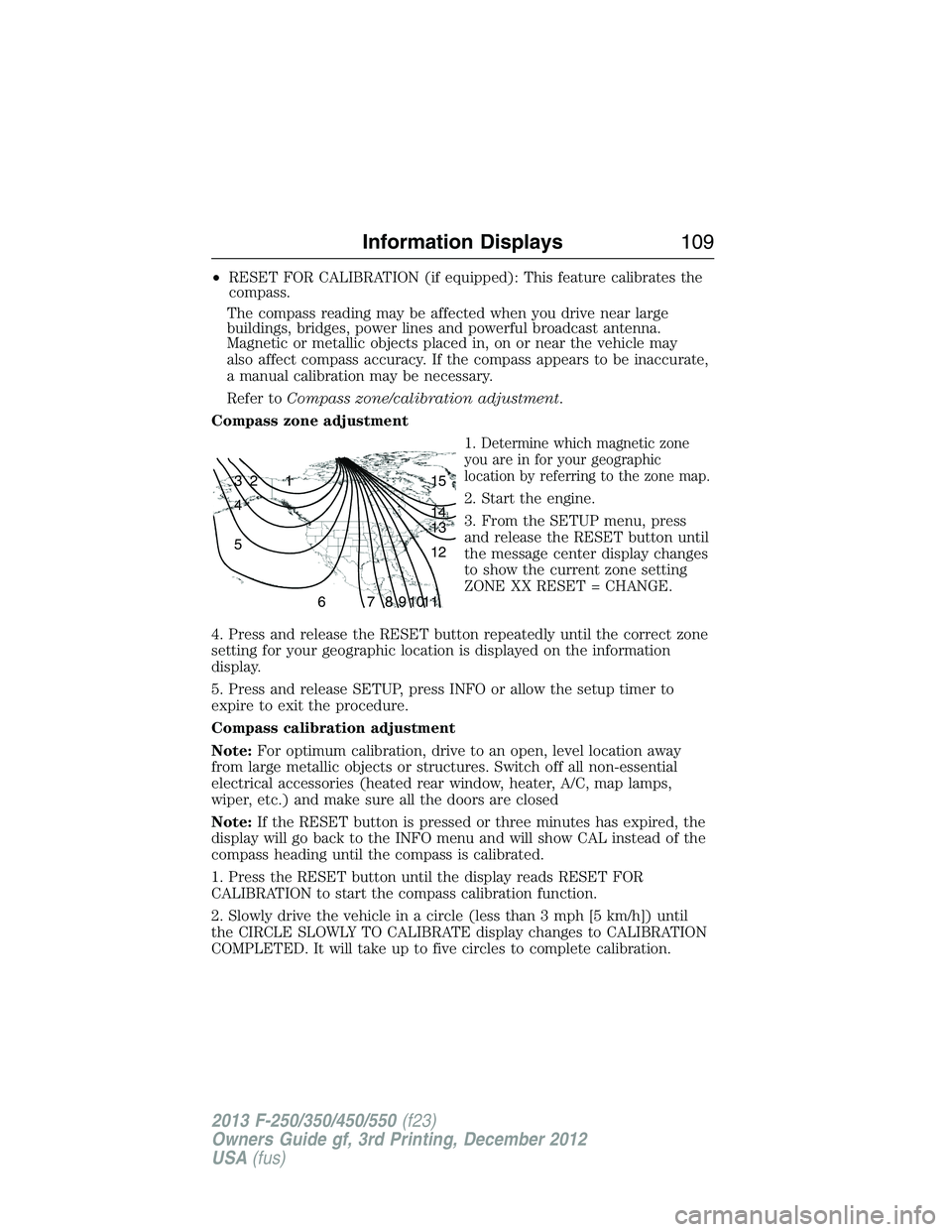
Compass zone adjustment
1.
Determine which magnetic zone
you are in for your geographic
location by referring to the zone map.
2. Start the engine.
3. From the SETUP menu, press
and release the RESET button until
the message center display changes
to show the current zone setting
ZONE XX RESET = CHANGE.
4. Press and release the RESET button repeatedly until the correct zone
setting for your geographic location is displayed on the information
display.
5. Press and release SETUP, press INFO or allow the setup timer to
expire to exit the procedure.
Compass calibration adjustment
Note:For optimum calibration, drive to an open, level location away
from large metallic objects or structures. Switch off all non-essential
electrical accessories (heated rear window, heater, A/C, map lamps,
wiper, etc.) and make sure all the doors are closed
Note:If the RESET button is pressed or three minutes has expired, the
display will go back to the INFO menu and will show CAL instead of the
compass heading until the compass is calibrated.
1. Press the RESET button until the display reads RESET FOR
CALIBRATION to start the compass calibration function.
2. Slowly drive the vehicle in a circle (less than 3 mph [5 km/h]) until
the CIRCLE SLOWLY TO CALIBRATE display changes to CALIBRATION
COMPLETED. It will take up to five circles to complete calibration.
1 2 3
4
5
6 7 8 9 101112 13 14 15
Information Displays109
2013 F-250/350/450/550(f23)
Owners Guide gf, 3rd Printing, December 2012
USA(fus)
Page 111 of 577
3. The compass is now calibrated.
•RESET FOR REMOTE START (if equipped)
•REAR PARK AID (if equipped): This feature sounds a warning tone to
warn the driver of obstacles near the rear bumper, and functions only
when R (Reverse) gear is selected.
•TBC MODE (if equipped): Allows you to choose the trailer brake
mode.
•TRAILER SWAY (if equipped): This feature uses the electronic
stability control to mitigate trailer sway.
•LANGUAGE = ENGLISH / SPANISH / FRENCH: Allows you to choose
which language the message center will display in.
Waiting four seconds or pressing the RESET button cycles the message
center through each of the language choices.
Press the RESET button to set the language choice.
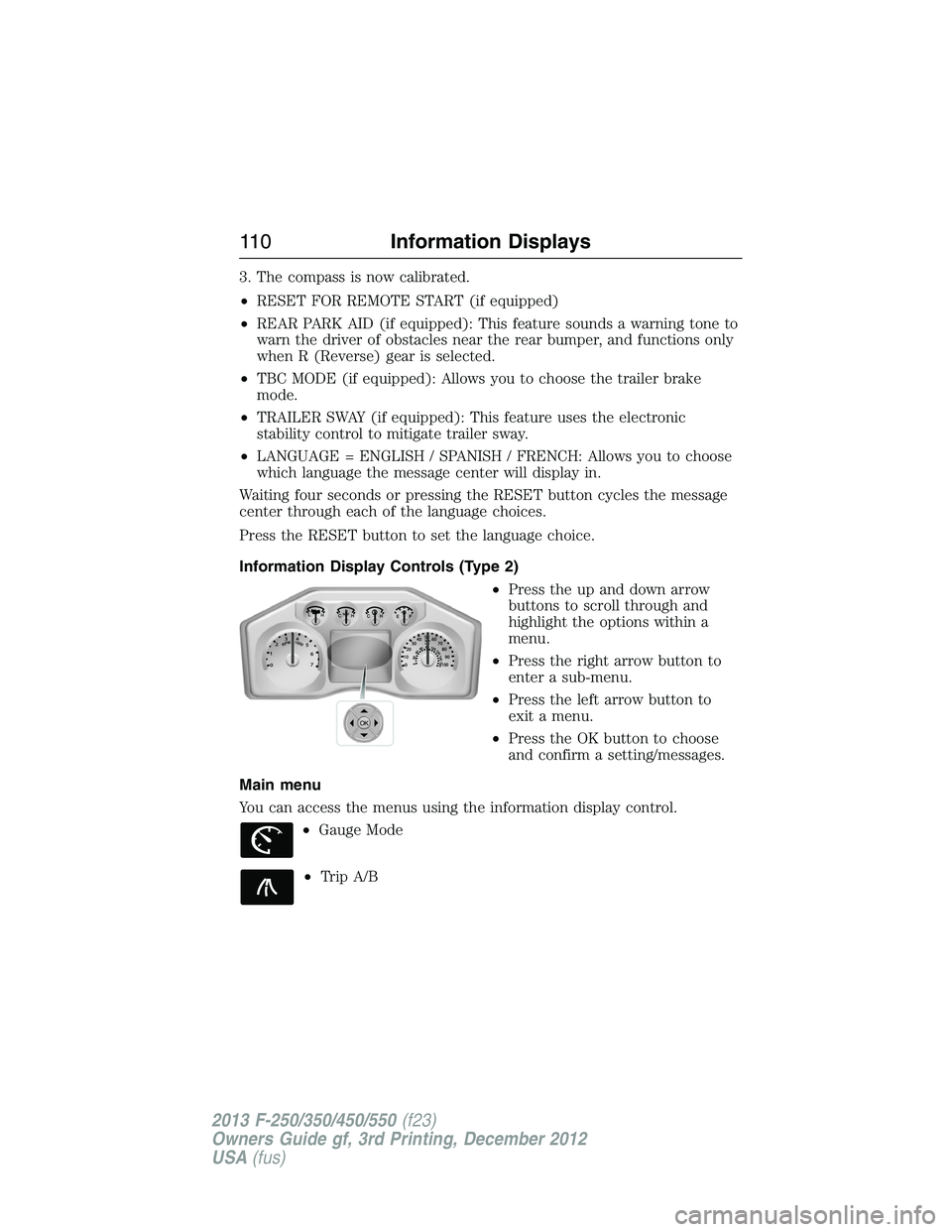
Information Display Controls (Type 2)
•Press the up and down arrow
buttons to scroll through and
highlight the options within a
menu.
•Press the right arrow button to
enter a sub-menu.
•Press the left arrow button to
exit a menu.
•Press the OK button to choose
and confirm a setting/messages.
Main menu
You can access the menus using the information display control.
•Gauge Mode
•Trip A/B
OK
11 0Information Displays
2013 F-250/350/450/550(f23)
Owners Guide gf, 3rd Printing, December 2012
USA(fus)
Page 113 of 577
Trip A/ B
Use the arrow buttons to choose between the following trip
options.
Trip A/ B
Trip time
Trip distance
Fuel used
Avg MPG (L/100km)
Odometer
Press OK to pause the Trip A or B screen/press again to un-pause.
Press and hold OK to reset the currently displayed trip information.
•Trip time: shows the elapsed trip time. This timer will stop when the
vehicle is turned off and will restart when the vehicle is restarted.
•Trip distance: Registers the mileage of individual journeys.
•Fuel used: Shows the amount of fuel used for a given trip.
•Average MPG: Shows the average distance traveled per unit of fuel
used for a given trip.
Fuel Economy
Use the arrow buttons to choose the desired fuel economy
display.
Fuel Economy
Fuel Econ. Instant MPG (L/100km)
Miles (kilometers) to Empty
AVG MPG (L/100km)
Fuel Hist.: shows
fuel usage as a
bar graph based
on time. The
duration time can
be changed.Duration: 5 Minutes, 10 Minutes, 30 Minutes, Last 5
Resets. The graph is updated each minute with the
fuel economy that was achieved during the prior 5,
10, 30 minutes of driving.
11 2Information Displays
2013 F-250/350/450/550(f23)
Owners Guide gf, 3rd Printing, December 2012
USA(fus)
Page 114 of 577
•Instant MPG: shows instantaneous fuel usage.
•Miles to empty: shows the approximate distance the vehicle can travel
before running out of fuel.
•Average MPG: shows the average fuel usage based on time. See Fuel
Hist. to change the time interval. Press and hold OK to reset this
value.
Truck Apps
In this mode, off-road information depicted with graphics and
trailer towing application options are available.
Note:Some items are optional and may not appear.
Truck Apps
Off Road Pitch and bank angle (in degrees): Displays the pitch angle
(front to rear) and bank angle (side to side) of the road
surface.
Steering angle (in degrees): Displays the steering angle of
the front wheels after the vehicle has been driven for a
period of time.
Differential lock/unlock: Displays the state (locked or
unlocked) of the electronic locking differential.
Energy flow: Displays the operating mode of the transfer
case: 4X2, 4X4 High or 4X4 Low.
Press OK for
InfoELD (Electronic Locking Differential)
Hill Descent Control
4X4 System
Traction Control
AdvanceTrac® + RSC
Information Displays11 3
2013 F-250/350/450/550(f23)
Owners Guide gf, 3rd Printing, December 2012
USA(fus)
Page 116 of 577
Truck Apps (cont’d)
Trailer
(cont’d)Press OK for
optionsConnection
Checklist
(if equipped)
Conventional, Fifth Wheel
and Gooseneck. Use the
up/down arrows to highlight
one of these choices and
press OK to display the
connection checklist.
Follow the on-screen
instructions to go through
the connections list.
Delete
TrailerUse the up/down arrows to
highlight the trailer you
want to delete and press
OK to delete. Follow the
on-screen prompts to exit
or confirm delete.
Information
ScreenTow Haul mode, Trailer
Brake Controller.
Rename
TrailerUse the up/down buttons
to highlight a trailer and
press OK to select it. Use
the up/down arrow buttons
to change the characters
as needed. When done,
press OK to accept the
change.
Reset Trailer
Mileage /
Kilometers
(if equipped)Use the up/down buttons
to select a trailer, then
press and hold OK to
reset the trailer mileage
(kilometers).
Information Displays11 5
2013 F-250/350/450/550(f23)
Owners Guide gf, 3rd Printing, December 2012
USA(fus)
Page 118 of 577
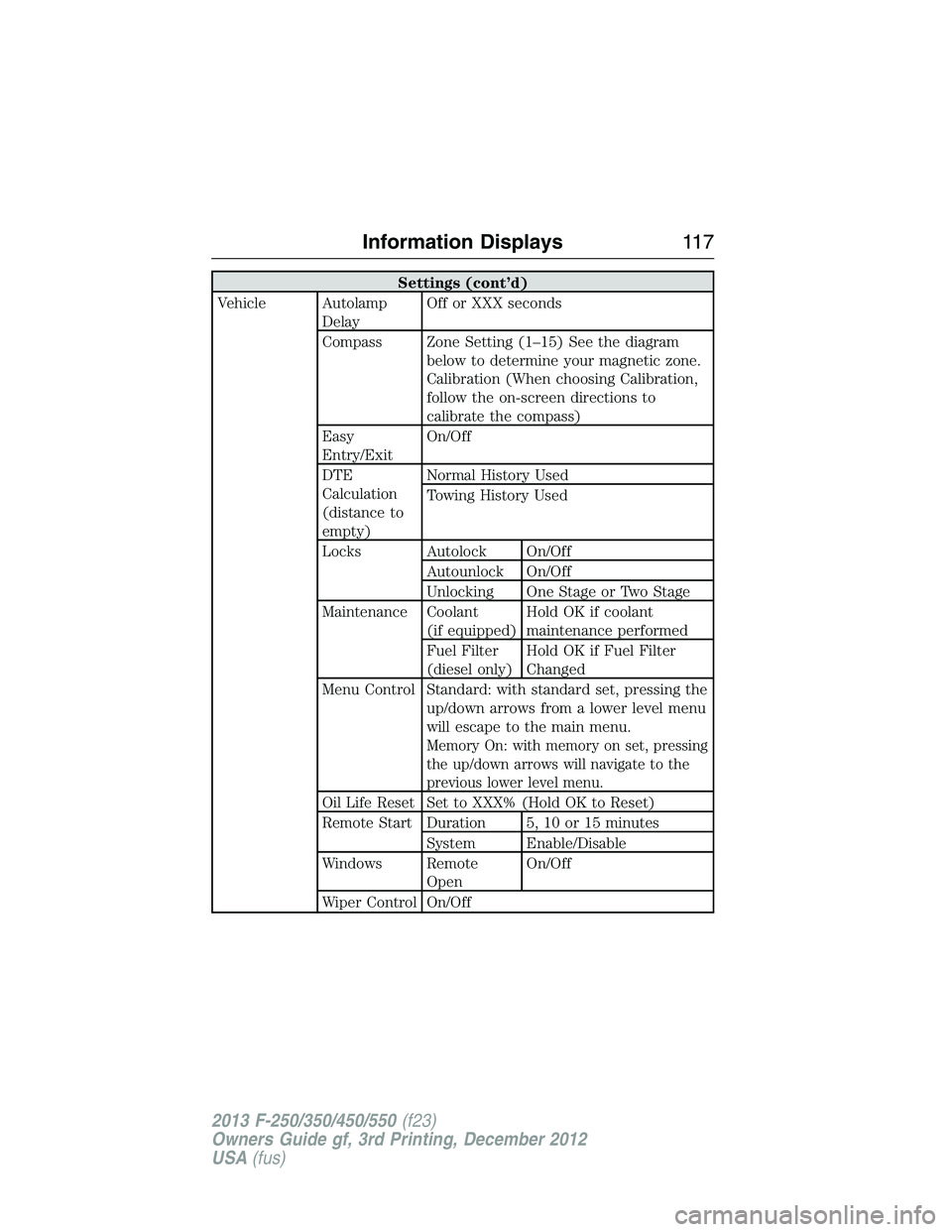
Settings (cont’d)
Vehicle Autolamp
DelayOff or XXX seconds
Compass Zone Setting (1–15) See the diagram
below to determine your magnetic zone.
Calibration (When choosing Calibration,
follow the on-screen directions to
calibrate the compass)
Easy
Entry/ExitOn/Off
DTE
Calculation
(distance to
empty)Normal History Used
Towing History Used
Locks Autolock On/Off
Autounlock On/Off
Unlocking One Stage or Two Stage
Maintenance Coolant
(if equipped)Hold OK if coolant
maintenance performed
Fuel Filter
(diesel only)Hold OK if Fuel Filter
Changed
Menu Control Standard: with standard set, pressing the
up/down arrows from a lower level menu
will escape to the main menu.
Memory On: with memory on set, pressing
the up/down arrows will navigate to the
previous lower level menu.
Oil Life Reset Set to XXX% (Hold OK to Reset)
Remote Start Duration 5, 10 or 15 minutes
System Enable/Disable
Windows Remote
OpenOn/Off
Wiper Control On/Off
Information Displays11 7
2013 F-250/350/450/550(f23)
Owners Guide gf, 3rd Printing, December 2012
USA(fus)
Page 120 of 577
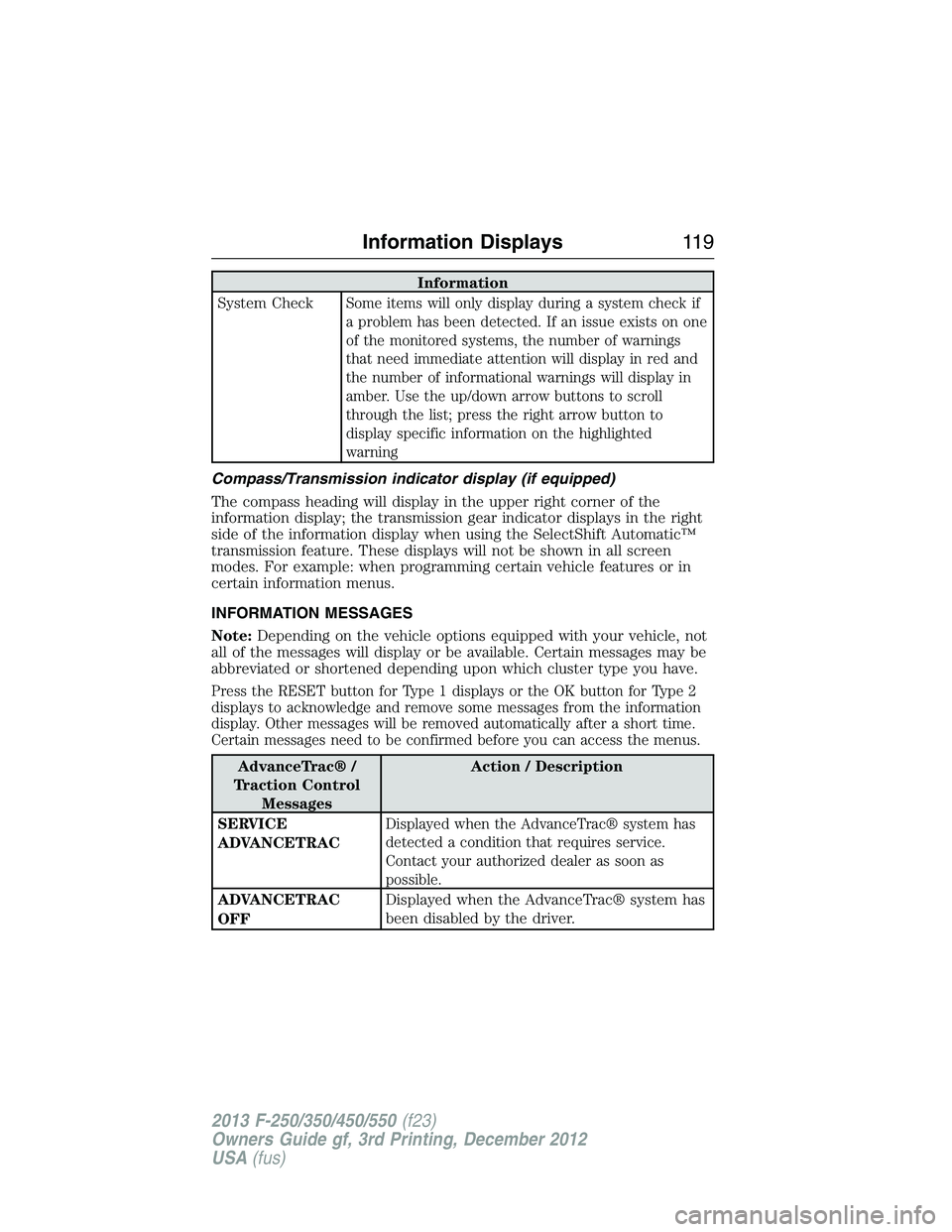
Information
System Check
Some items will only display during a system check if
a problem has been detected. If an issue exists on one
of the monitored systems, the number of warnings
that need immediate attention will display in red and
the number of informational warnings will display in
amber. Use the up/down arrow buttons to scroll
through the list; press the right arrow button to
display specific information on the highlighted
warning
Compass/Transmission indicator display (if equipped)
The compass heading will display in the upper right corner of the
information display; the transmission gear indicator displays in the right
side of the information display when using the SelectShift Automatic™
transmission feature. These displays will not be shown in all screen
modes. For example: when programming certain vehicle features or in
certain information menus.
INFORMATION MESSAGES
Note:Depending on the vehicle options equipped with your vehicle, not
all of the messages will display or be available. Certain messages may be
abbreviated or shortened depending upon which cluster type you have.
Press the RESET button for Type 1 displays or the OK button for Type 2
displays to acknowledge and remove some messages from the information
display. Other messages will be removed automatically after a short time.
Certain messages need to be confirmed before you can access the menus.
AdvanceTrac® /
Traction Control
MessagesAction / Description
SERVICE
ADVANCETRAC
Displayed when the AdvanceTrac® system has
detected a condition that requires service.
Contact your authorized dealer as soon as
possible.
ADVANCETRAC
OFFDisplayed when the AdvanceTrac® system has
been disabled by the driver.
Information Displays11 9
2013 F-250/350/450/550(f23)
Owners Guide gf, 3rd Printing, December 2012
USA(fus)