brake FORD F250 2015 Owner's Manual
[x] Cancel search | Manufacturer: FORD, Model Year: 2015, Model line: F250, Model: FORD F250 2015Pages: 485, PDF Size: 5.35 MB
Page 96 of 485
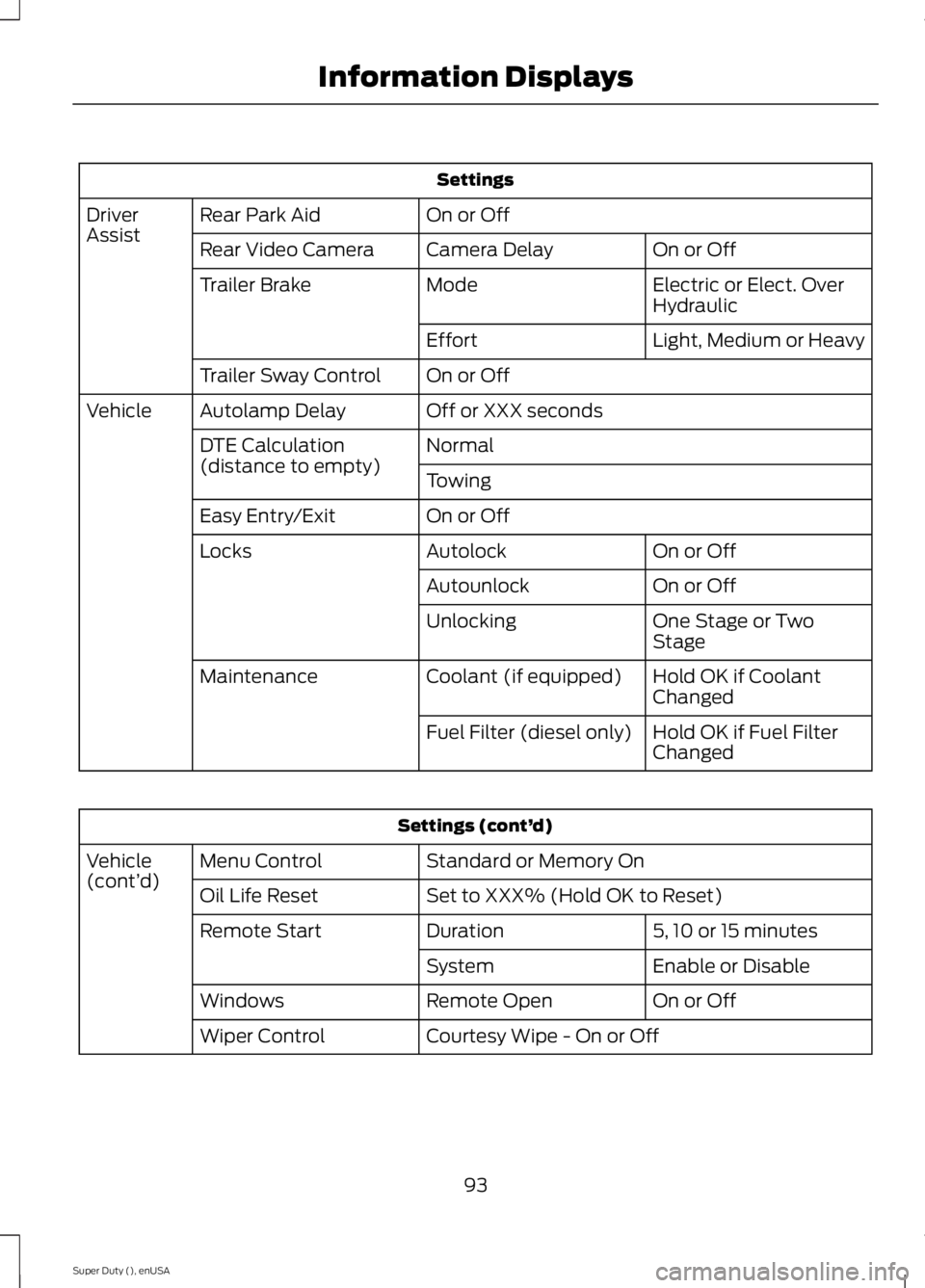
Settings
On or Off
Rear Park Aid
Driver
Assist
On or Off
Camera Delay
Rear Video Camera
Electric or Elect. Over
Hydraulic
Mode
Trailer Brake
Light, Medium or Heavy
Effort
On or Off
Trailer Sway Control
Off or XXX seconds
Autolamp Delay
Vehicle
Normal
DTE Calculation
(distance to empty)
Towing
On or Off
Easy Entry/Exit
On or Off
Autolock
Locks
On or Off
Autounlock
One Stage or Two
Stage
Unlocking
Hold OK if Coolant
Changed
Coolant (if equipped)
Maintenance
Hold OK if Fuel Filter
Changed
Fuel Filter (diesel only) Settings (cont’
d)
Standard or Memory On
Menu Control
Vehicle
(cont’ d)
Set to XXX% (Hold OK to Reset)
Oil Life Reset
5, 10 or 15 minutes
Duration
Remote Start
Enable or Disable
System
On or Off
Remote Open
Windows
Courtesy Wipe - On or Off
Wiper Control
93
Super Duty (), enUSA Information Displays
Page 104 of 485
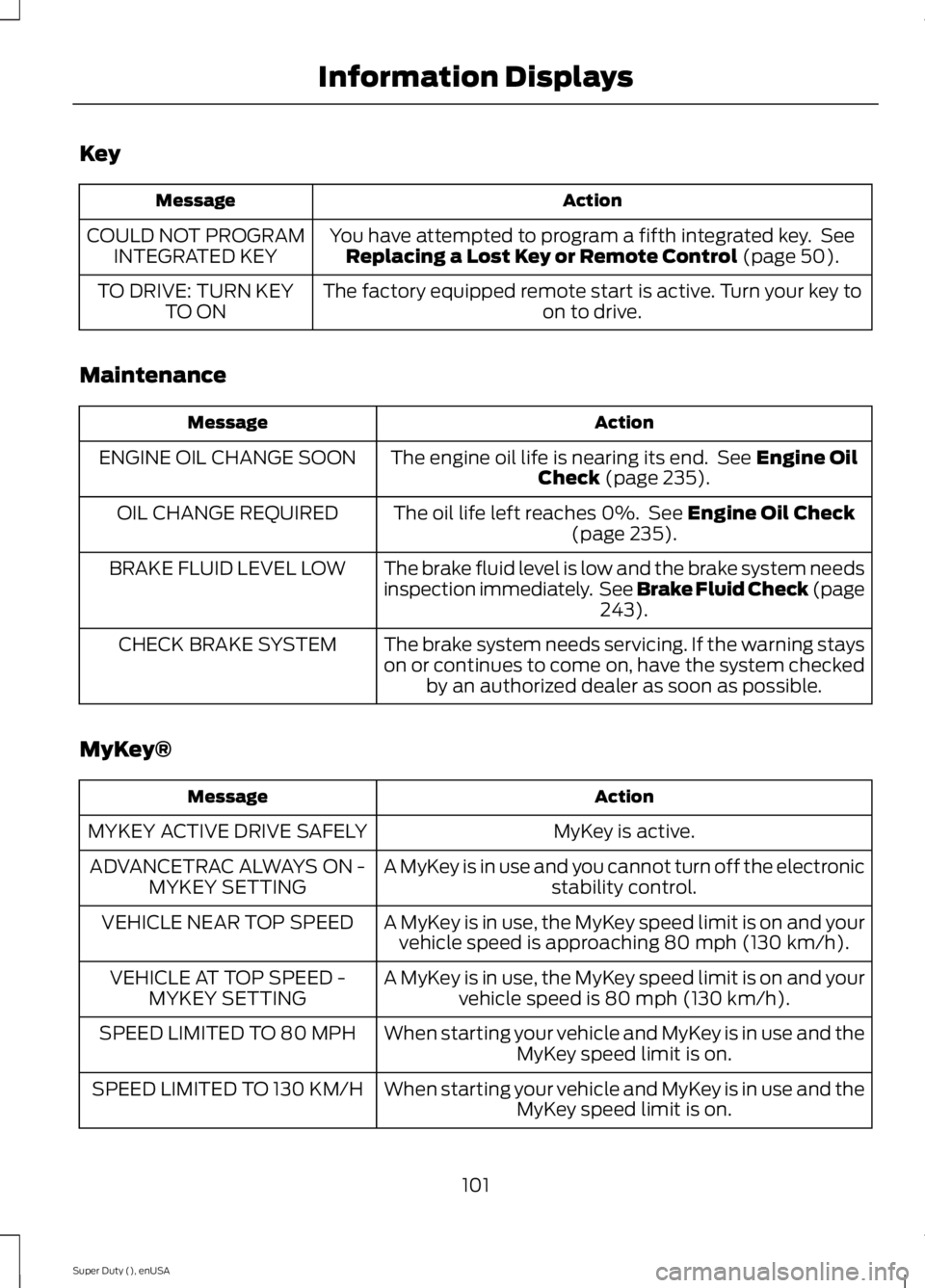
Key
Action
Message
You have attempted to program a fifth integrated key. SeeReplacing a Lost Key or Remote Control (page 50).
COULD NOT PROGRAM
INTEGRATED KEY
The factory equipped remote start is active. Turn your key to on to drive.
TO DRIVE: TURN KEY
TO ON
Maintenance Action
Message
The engine oil life is nearing its end. See
Engine Oil
Check (page 235).
ENGINE OIL CHANGE SOON
The oil life left reaches 0%. See
Engine Oil Check
(page 235).
OIL CHANGE REQUIRED
The brake fluid level is low and the brake system needs
inspection immediately. See Brake Fluid Check (page243
).
BRAKE FLUID LEVEL LOW
The brake system needs servicing. If the warning stays
on or continues to come on, have the system checkedby an authorized dealer as soon as possible.
CHECK BRAKE SYSTEM
MyKey® Action
Message
MyKey is active.
MYKEY ACTIVE DRIVE SAFELY
A MyKey is in use and you cannot turn off the electronicstability control.
ADVANCETRAC ALWAYS ON -
MYKEY SETTING
A MyKey is in use, the MyKey speed limit is on and yourvehicle speed is approaching 80 mph (130 km/h).
VEHICLE NEAR TOP SPEED
A MyKey is in use, the MyKey speed limit is on and yourvehicle speed is 80 mph (130 km/h).
VEHICLE AT TOP SPEED -
MYKEY SETTING
When starting your vehicle and MyKey is in use and theMyKey speed limit is on.
SPEED LIMITED TO 80 MPH
When starting your vehicle and MyKey is in use and theMyKey speed limit is on.
SPEED LIMITED TO 130 KM/H
101
Super Duty (), enUSA Information Displays
Page 105 of 485
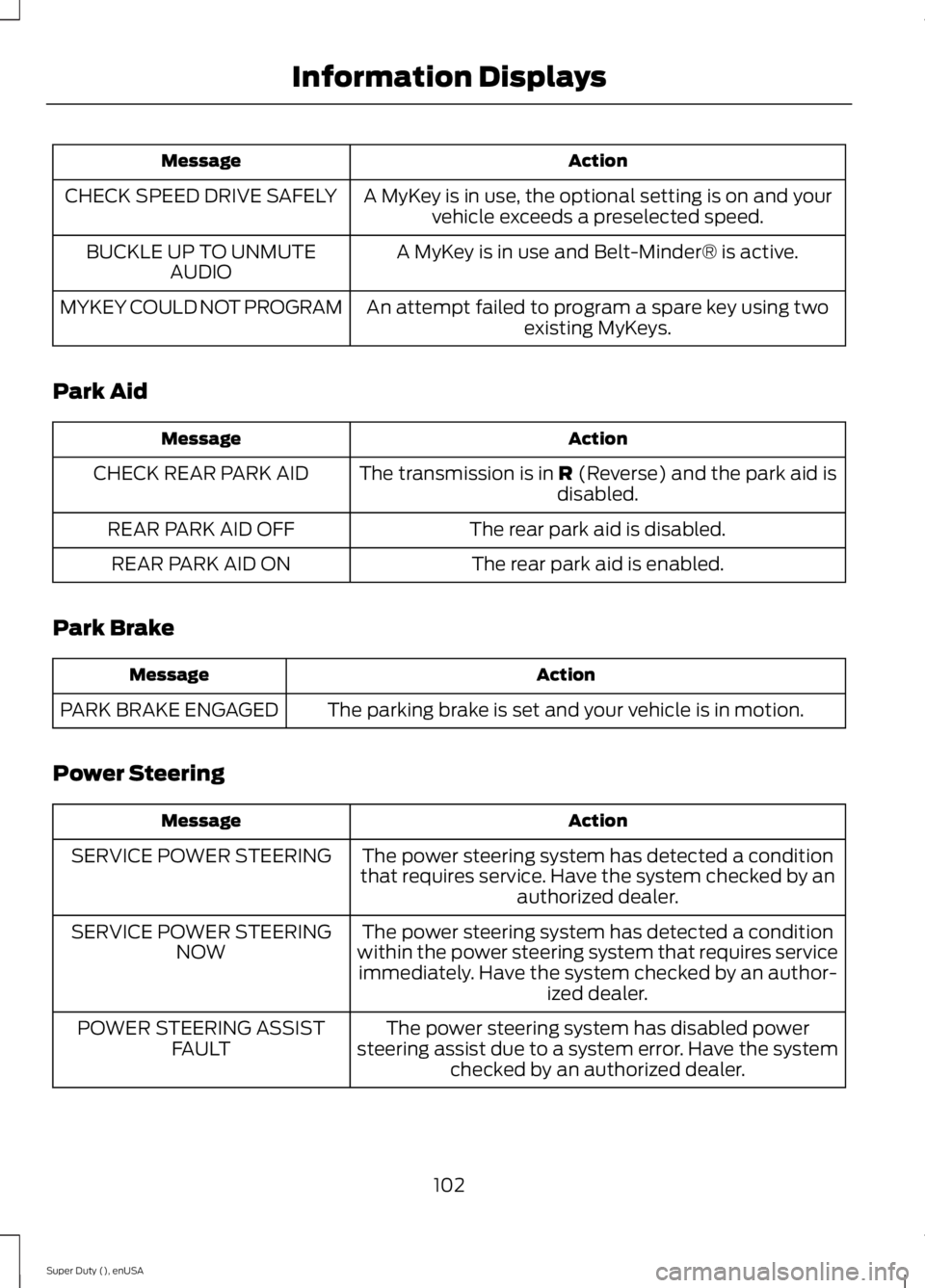
Action
Message
A MyKey is in use, the optional setting is on and yourvehicle exceeds a preselected speed.
CHECK SPEED DRIVE SAFELY
A MyKey is in use and Belt-Minder® is active.
BUCKLE UP TO UNMUTE
AUDIO
An attempt failed to program a spare key using twoexisting MyKeys.
MYKEY COULD NOT PROGRAM
Park Aid Action
Message
The transmission is in R (Reverse) and the park aid is
disabled.
CHECK REAR PARK AID
The rear park aid is disabled.
REAR PARK AID OFF
The rear park aid is enabled.
REAR PARK AID ON
Park Brake Action
Message
The parking brake is set and your vehicle is in motion.
PARK BRAKE ENGAGED
Power Steering Action
Message
The power steering system has detected a condition
that requires service. Have the system checked by an authorized dealer.
SERVICE POWER STEERING
The power steering system has detected a condition
within the power steering system that requires service immediately. Have the system checked by an author- ized dealer.
SERVICE POWER STEERING
NOW
The power steering system has disabled power
steering assist due to a system error. Have the system checked by an authorized dealer.
POWER STEERING ASSIST
FAULT
102
Super Duty (), enUSA Information Displays
Page 107 of 485
![FORD F250 2015 Owners Manual Trailer
Action
Message
The current gain setting for the trailer brake.
TRAILER BRAKE GAIN: XX.X
[OUTPUT]
The current gain setting for the trailer brake when atrailer is not connected.
TRAILER BRAKE GA](/img/11/58776/w960_58776-106.png "FORD F250 2015 Owners Manual Trailer
Action
Message
The current gain setting for the trailer brake.
TRAILER BRAKE GAIN: XX.X
[OUTPUT]
The current gain setting for the trailer brake when atrailer is not connected.
TRAILER BRAKE GA")
Trailer
Action
Message
The current gain setting for the trailer brake.
TRAILER BRAKE GAIN: XX.X
[OUTPUT]
The current gain setting for the trailer brake when atrailer is not connected.
TRAILER BRAKE GAIN: XX.X NO
TRAILER
Accompanied by a single chime, in response to faults
sensed by the TBC. See Trailer Sway Control (page 192).
TRAILER BRAKE MODULE
FAULT
A correct trailer connection (a trailer with electric trailerbrakes) is sensed during a given ignition cycle.
TRAILER CONNECTED
A trailer connection becomes disconnected, either
intentionally or unintentionally, and has been sensed during a given ignition cycle. Disregard this status if
your vehicle is not equipped with a factory installed
trailer brake controller. This message may appear when an aftermarket TBC is used even when the trailer is connected.
TRAILER DISCONNECTED
Your trailer sway control has detected trailer sway soyou need to reduce your speed.
TRAILER SWAY REDUCE
SPEED
Faults with your vehicle wiring and trailer wiring orbrake system. See
Towing a Trailer (page 191).
WIRING FAULT ON TRAILER
4WD Action
Message
A fault is present in your 4X4 system. See
Using
Four-Wheel Drive (page 153).
CHECK 4X4
Your 4X4 system is making a shift.
4X4 SHIFT IN PROGRESS
You need to apply the brake in order to shift into4X4 LOW.
FOR 4X4 LOW APPLY BRAKE
When your vehicle is at a stop and you need to shiftinto Neutral before you select 4X4 LOW.
FOR 4X4 LOW SHIFT TO N
When your vehicle is moving and you need toreduce your speed to select 4X4 LOW.
FOR 4X4 LOW SLOW TO 3 MPH
104
Super Duty (), enUSA Information Displays
Page 108 of 485
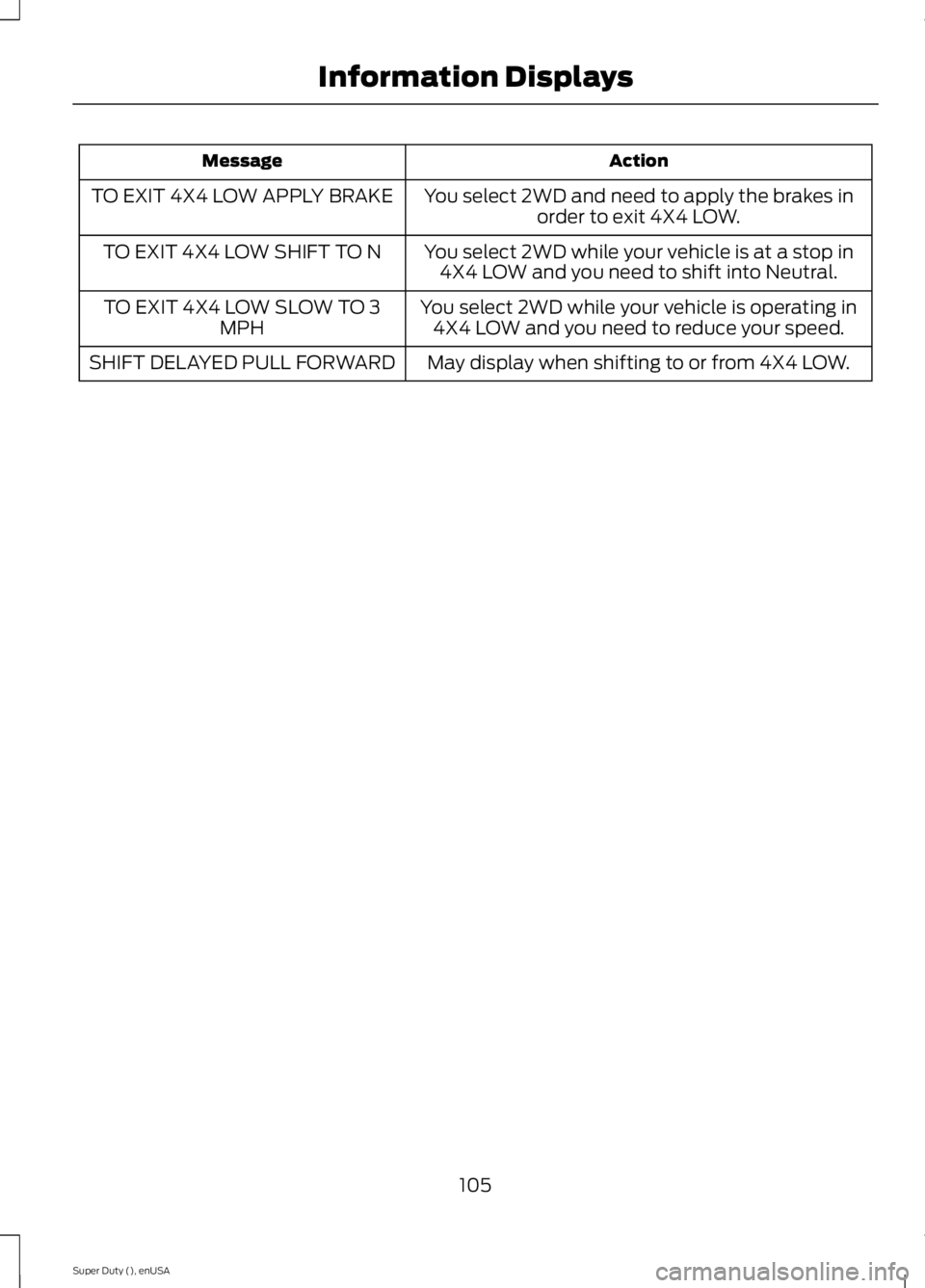
Action
Message
You select 2WD and need to apply the brakes inorder to exit 4X4 LOW.
TO EXIT 4X4 LOW APPLY BRAKE
You select 2WD while your vehicle is at a stop in4X4 LOW and you need to shift into Neutral.
TO EXIT 4X4 LOW SHIFT TO N
You select 2WD while your vehicle is operating in4X4 LOW and you need to reduce your speed.
TO EXIT 4X4 LOW SLOW TO 3
MPH
May display when shifting to or from 4X4 LOW.
SHIFT DELAYED PULL FORWARD
105
Super Duty (), enUSA Information Displays
Page 139 of 485

STARTING A GASOLINE
ENGINE
When you start the engine, the idle speed
increases, this helps to warm up the
engine. If the engine idle speed does not
slow down automatically, have your
vehicle checked by an authorized dealer.
Before starting the engine check the
following:
•
Make sure all occupants have fastened
their safety belts.
• Make sure the headlamps and
electrical accessories are off.
• Make sure the parking brake is on.
• Move the transmission selector lever
to position P.
• Turn the ignition key to the on position.
Note: Do not touch the accelerator pedal.
1. Fully press the brake pedal.
2. Turn the key to the start position to start the engine. Release the key when
the engine starts.
Note: The engine may continue cranking
for up to 15 seconds or until it starts.
Note: If you cannot start the engine on the
first try, wait for a short period and try again.
Failure to Start
If you cannot start the engine after three
attempts, wait 10 seconds and follow this
procedure:
1. Fully press the brake pedal.
2. Fully press the accelerator pedal and hold it there.
3. Start the engine.
Stopping the Engine When Your
Vehicle is Stationary
1. Move the transmission selector lever to position
P. 2. Turn the key to the off position.
3. Apply the parking brake.
Stopping the Engine When Your
Vehicle is Moving
WARNING
Switching off the engine when the
vehicle is still moving will result in a
loss of brake and steering assistance.
The steering will not lock, but higher effort
will be required. When the ignition is
switched off, some electrical circuits,
including air bags, warning lamps and
indicators may also be off. If the ignition
was turned off accidentally, you can shift
into neutral (N) and re-start the engine. 1. Move the transmission selector lever
to position
N and use the brakes to
bring your vehicle to a safe stop.
2. When your vehicle has stopped, move the transmission selector lever to
position
P and turn the key to the off
position.
3. Apply the parking brake.
Cold Weather Starting (Flexible
Fuel Vehicles Only)
The starting characteristics of all grades
of E85 ethanol make it unsuitable for use
when ambient temperatures fall below
0°F (-18°C). Consult your fuel distributor
for the availability of winter grade ethanol.
As the outside temperature approaches
freezing, ethanol fuel distributors should
supply winter grade ethanol (same as with
unleaded gasoline). If summer grade
ethanol is used in cold weather conditions,
0°F to 32°F (-18°C to 0°C), you may
experience increased cranking times, rough
idle or hesitation until the engine has
warmed up.
136
Super Duty (), enUSA Starting and Stopping the Engine
Page 150 of 485
AUTOMATIC TRANSMISSION
WARNING
Always set the parking brake fully
and make sure the gearshift is
latched in park (P). Turn the ignition
to the off position and remove the key
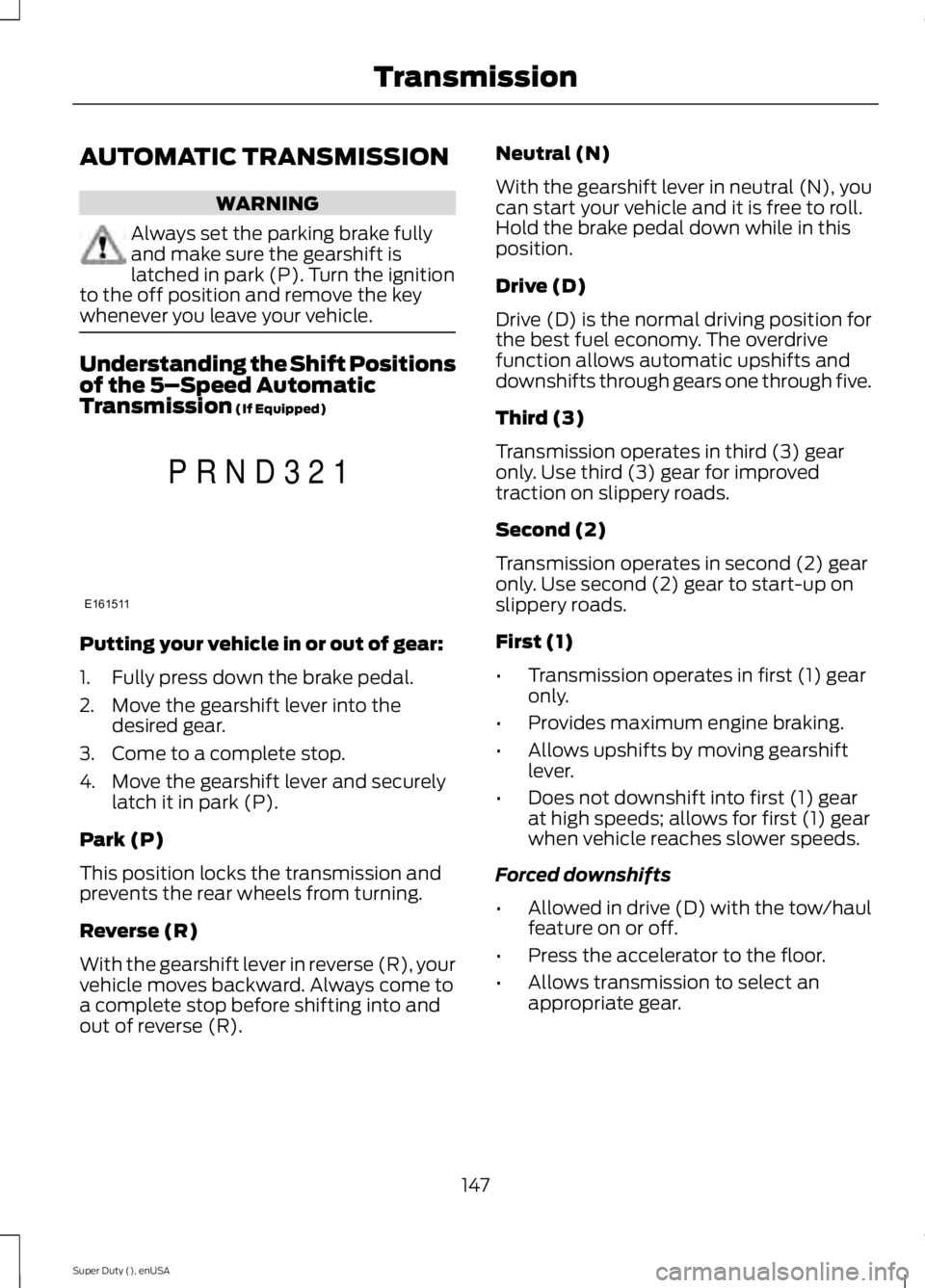
whenever you leave your vehicle. Understanding the Shift Positions
of the 5–
Speed Automatic
Transmission (If Equipped) Putting your vehicle in or out of gear:
1. Fully press down the brake pedal.
2. Move the gearshift lever into the
desired gear.
3. Come to a complete stop.
4. Move the gearshift lever and securely latch it in park (P).
Park (P)
This position locks the transmission and
prevents the rear wheels from turning.
Reverse (R)
With the gearshift lever in reverse (R), your
vehicle moves backward. Always come to
a complete stop before shifting into and
out of reverse (R). Neutral (N)
With the gearshift lever in neutral (N), you
can start your vehicle and it is free to roll.
Hold the brake pedal down while in this
position.
Drive (D)
Drive (D) is the normal driving position for
the best fuel economy. The overdrive
function allows automatic upshifts and
downshifts through gears one through five.
Third (3)
Transmission operates in third (3) gear
only. Use third (3) gear for improved
traction on slippery roads.
Second (2)
Transmission operates in second (2) gear
only. Use second (2) gear to start-up on
slippery roads.
First (1)
•
Transmission operates in first (1) gear
only.
• Provides maximum engine braking.
• Allows upshifts by moving gearshift
lever.
• Does not downshift into first (1) gear
at high speeds; allows for first (1) gear
when vehicle reaches slower speeds.
Forced downshifts
• Allowed in drive (D) with the tow/haul
feature on or off.
• Press the accelerator to the floor.
• Allows transmission to select an
appropriate gear.
147
Super Duty (), enUSA TransmissionE161511
P R N D 3 2 1
Page 151 of 485
Tow/Haul Mode
To activate tow/haul, press the
button on the gearshift lever
once. The TOW HAUL indicator
light illuminates in the instrument cluster.
The tow/haul feature:
• Delays upshifts to reduce the frequency
of transmission shifting.
• Provides engine braking in all forward
gears, which slows your vehicle and
assists you in controlling your vehicle
when descending a grade.
• Depending on driving conditions and
load conditions, may downshift the
transmission, slow your vehicle and
control your vehicle speed when
descending a hill, without pressing the
accelerator pedal. The amount of
downshift braking provided varies
based upon the amount you press the
brake pedal.
The tow/haul feature improves
transmission operation when towing a
trailer or a heavy load. All transmission
gear ranges are available when using
tow/haul.
To deactivate the tow/haul feature and
return to normal driving mode, press the
button on the gearshift lever twice. The
TOW HAUL light deactivates. Tow/haul
also deactivates when you power down
your vehicle. WARNING
Do not use the tow/haul feature
when driving in icy or slippery
conditions as the increased engine
braking can cause the rear wheels to slide
and your vehicle to swing around with the
possible loss of vehicle control. Understanding the Shift Positions
of a 6–
Speed Automatic
Transmission (If Equipped) Putting your vehicle in or out of gear:
1. Fully press down the brake pedal.
2. Move the gearshift lever into the
desired gear.
3. Come to a complete stop.
4. Move the gearshift lever and securely latch it in park (P).
Park (P)
This position locks the transmission and
prevents the rear wheels from turning.
Reverse (R)
With the gearshift lever in reverse (R), your
vehicle moves backward. Always come to
a complete stop before shifting into and
out of reverse (R).
Neutral (N)
With the gearshift lever in neutral (N), you
can start your vehicle and it is free to roll.
Hold the brake pedal down while in this
position.
Drive (D)
Drive (D) is the normal driving position for
the best fuel economy. The overdrive
function allows automatic upshifts and
downshifts through gears one through six.
148
Super Duty (), enUSA TransmissionE161509 E163183
Page 152 of 485
M (Manual)
With the gearshift lever in manual (M), the
driver can change gears up or down as
desired. By moving the gearshift lever from
drive position drive (D) to manual (M) you
now have control of selecting the gear you
desire using buttons on the shift lever. See
Understanding your SelectShift
Automatic
™ transmission later in this
section.
To return to normal drive (D) position,
move the shift lever back from manual (M)
to drive (D).
The transmission operates in gears one
through six.
Second (2)
Transmission operates in second (2) gear
only. Use second (2) gear to start-up on
slippery roads.
First (1)
• Transmission operates in first (1) gear
only.
• Provides maximum engine braking.
• Allows upshifts by moving gearshift
lever.
• Does not downshift into first (1) gear
at high speeds; allows for first (1) gear
when vehicle reaches slower speeds.
Forced downshifts
• Allowed in drive (D) with the tow/haul
feature on or off.
• Press the accelerator to the floor.
• Allows transmission to select an
appropriate gear.
Tow/Haul Mode To activate tow/haul, press the
button on the gearshift lever
once. The TOW HAUL indicator
light illuminates in the instrument cluster. The tow/haul feature:
•
Delays upshifts to reduce the frequency
of transmission shifting.
• Provides engine braking in all forward
gears, which slows your vehicle and
assists you in controlling your vehicle
when descending a grade.
• Depending on driving conditions and
load conditions, may downshift the
transmission, slow your vehicle and
control your vehicle speed when
descending a hill, without pressing the
accelerator pedal. The amount of
downshift braking provided will vary
based upon the amount you press the
brake pedal.
The tow/haul feature improves
transmission operation when towing a
trailer or a heavy load. All transmission
gear ranges are available when using
tow/haul.
To deactivate the tow/haul feature and
return to normal driving mode, press the
button on the gearshift lever twice. The
TOW HAUL light deactivates. Tow/haul
also deactivates when you power down
your vehicle. WARNING
Do not use the tow/haul feature
when driving in icy or slippery
conditions as the increased engine
braking can cause the rear wheels to slide
and your vehicle to swing around with the
possible loss of vehicle control. Understanding your SelectShift
Automatic
™ transmission (If Equipped)
Your vehicle is equipped with a SelectShift
Automatic transmission gearshift lever.
SelectShift Automatic transmission gives
you the ability to change gears up or down
(without a clutch) as desired.
149
Super Duty (), enUSA TransmissionE161509
Page 154 of 485
In order to prevent the engine from running
at too low an RPM, which may cause it to
stall, SelectShift still automatically makes
some downshifts if it has determined that
you have not downshifted in time.
Although SelectShift makes some
downshifts for you, it still allows you to
downshift at any time as long as the
SelectShift determines that there is no
damage to the engine from over-revving.
SelectShift does not automatically upshift,
even if the engine is approaching the RPM
limit. You must shift manually by pressing
the + button.
Note:
Engine damage may occur if you rev
the engine excessively and hold it without
shifting.
Automatic Transmission Adaptive
Learning
This feature's design is to increase
durability and provide consistent shift feel
over the life of your vehicle. A new vehicle
or transmission may have firm shifts, soft
shifts or both. This operation is normal and
does not affect function or durability of the
transmission. Over time, the adaptive
learning process fully updates transmission
operation. Additionally, whenever you
disconnect the battery or install a new
battery, the system must relearn the
strategy.
Brake-Shift Interlock WARNINGS
Do not drive your vehicle until you
verify that the brake lamps are
working.
When doing this procedure, you will
be taking your vehicle out of park
which means your vehicle can roll
freely. To avoid unwanted vehicle
movement, always fully set the parking
brake prior to doing this procedure. Use
wheel chocks if appropriate. WARNINGS
If the parking brake is fully released,
but the brake warning lamp remains
illuminated, the brakes may not be
working properly. See your authorized
dealer. Your vehicle is equipped with a brake-shift
interlock feature that prevents the
gearshift lever from moving from park (P)
when the ignition is in the 3 (on) position
and the brake pedal is not pressed.
If you cannot move the gearshift lever out
of park (P) position with the ignition in the
4 (on) position and the brake pedal
pressed, a malfunction may have occurred.
It is possible that a fuse has blown or your
vehicle
’s brake lamps are not operating
properly. See Fuse Specification Chart
(page 223).
If the fuse is not blown and the brake
lamps are working properly, the following
procedure allows you to move the gearshift
lever from park (P):
1. Apply the parking brake. Switch the ignition key to 1 (off), then remove the
key.
2. Move the steering column to the full down and full rearward position
(toward the driver ’s seat).
3. Remove the gearshift lever boot.
4. Place fingers into hole where you removed the gearshift lever boot and
pull top half of shroud up and forward
to separate it from the lower half of the
shroud. There is a hinge at the forward
edge of the top shroud. Roll the top
half of the shroud upward on the hinge
point to clear the hazard flasher button,
then pull straight rearward toward the
driver ’s seat to remove.
5. Remove the top half of the shroud.
151
Super Duty (), enUSA Transmission