display FORD F250 SUPER DUTY 2016 Owners Manual
[x] Cancel search | Manufacturer: FORD, Model Year: 2016, Model line: F250 SUPER DUTY, Model: FORD F250 SUPER DUTY 2016Pages: 507, PDF Size: 8.13 MB
Page 412 of 507
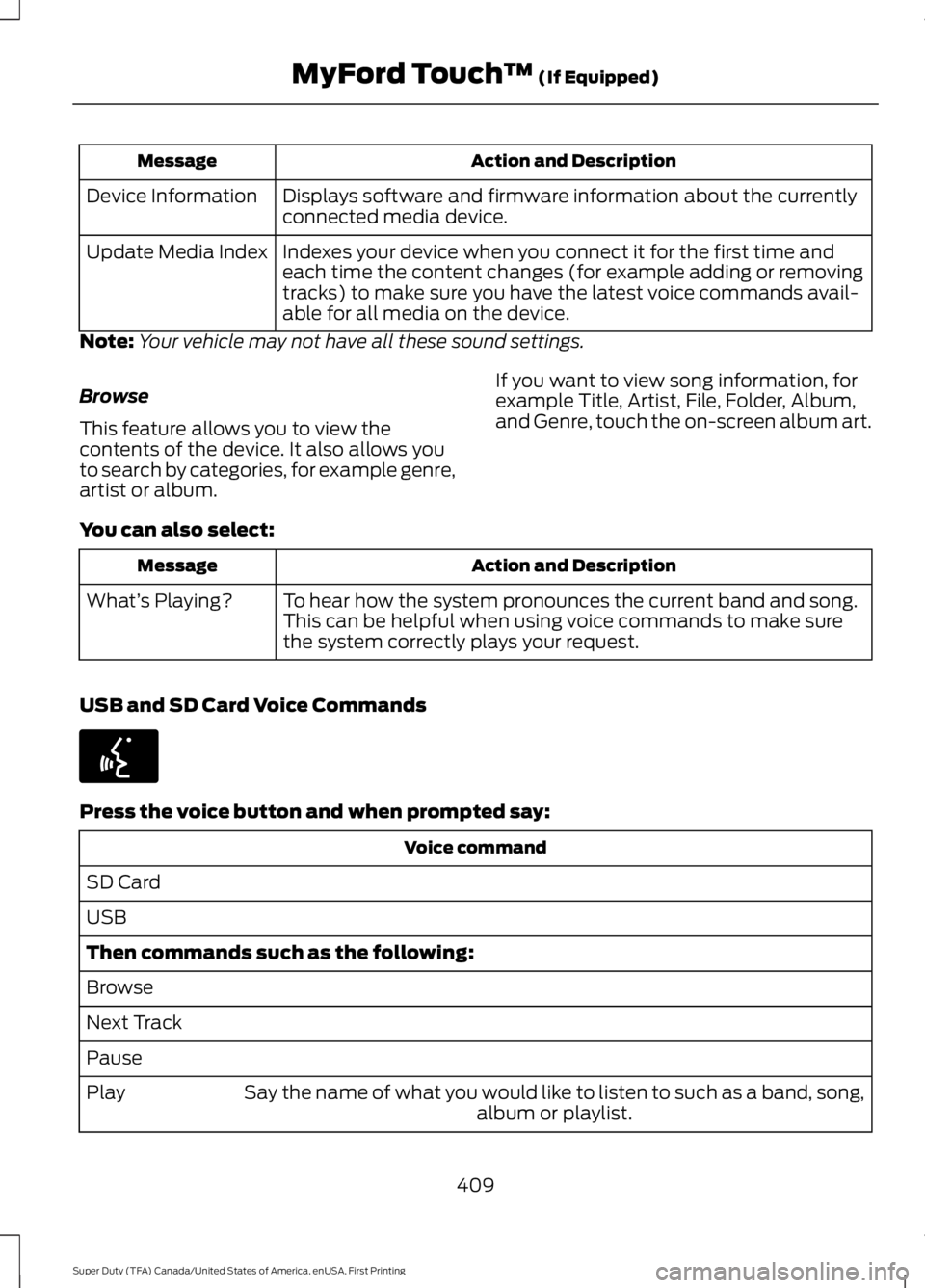
Action and DescriptionMessage
Displays software and firmware information about the currentlyconnected media device.Device Information
Indexes your device when you connect it for the first time andeach time the content changes (for example adding or removingtracks) to make sure you have the latest voice commands avail-able for all media on the device.
Update Media Index
Note:Your vehicle may not have all these sound settings.
Browse
This feature allows you to view thecontents of the device. It also allows youto search by categories, for example genre,artist or album.
If you want to view song information, forexample Title, Artist, File, Folder, Album,and Genre, touch the on-screen album art.
You can also select:
Action and DescriptionMessage
To hear how the system pronounces the current band and song.This can be helpful when using voice commands to make surethe system correctly plays your request.
What’s Playing?
USB and SD Card Voice Commands
Press the voice button and when prompted say:
Voice command
SD Card
USB
Then commands such as the following:
Browse
Next Track
Pause
Say the name of what you would like to listen to such as a band, song,album or playlist.Play
409
Super Duty (TFA) Canada/United States of America, enUSA, First Printing
MyFord Touch™ (If Equipped)E142599
Page 415 of 507
Pairing Your Cell Phone for theFirst Time
WARNING
Driving while distracted can result inloss of vehicle control, crash andinjury. We strongly recommend thatyou use extreme caution when using anydevice that may take your focus off theroad. Your primary responsibility is the safeoperation of your vehicle. We recommendagainst the use of any hand-held devicewhile driving and encourage the use ofvoice-operated systems when possible.Make sure you are aware of all applicablelocal laws that may affect the use ofelectronic devices while driving.
The first thing you must do to use thephone features of SYNC is to pair yourBluetooth-enabled cell phone with SYNC.This allows you to use your cell phone in ahands-free manner.
Note:This is a speed-dependent feature.It is unavailable when your vehicle istraveling at speeds over 3 mph (5 km/h).
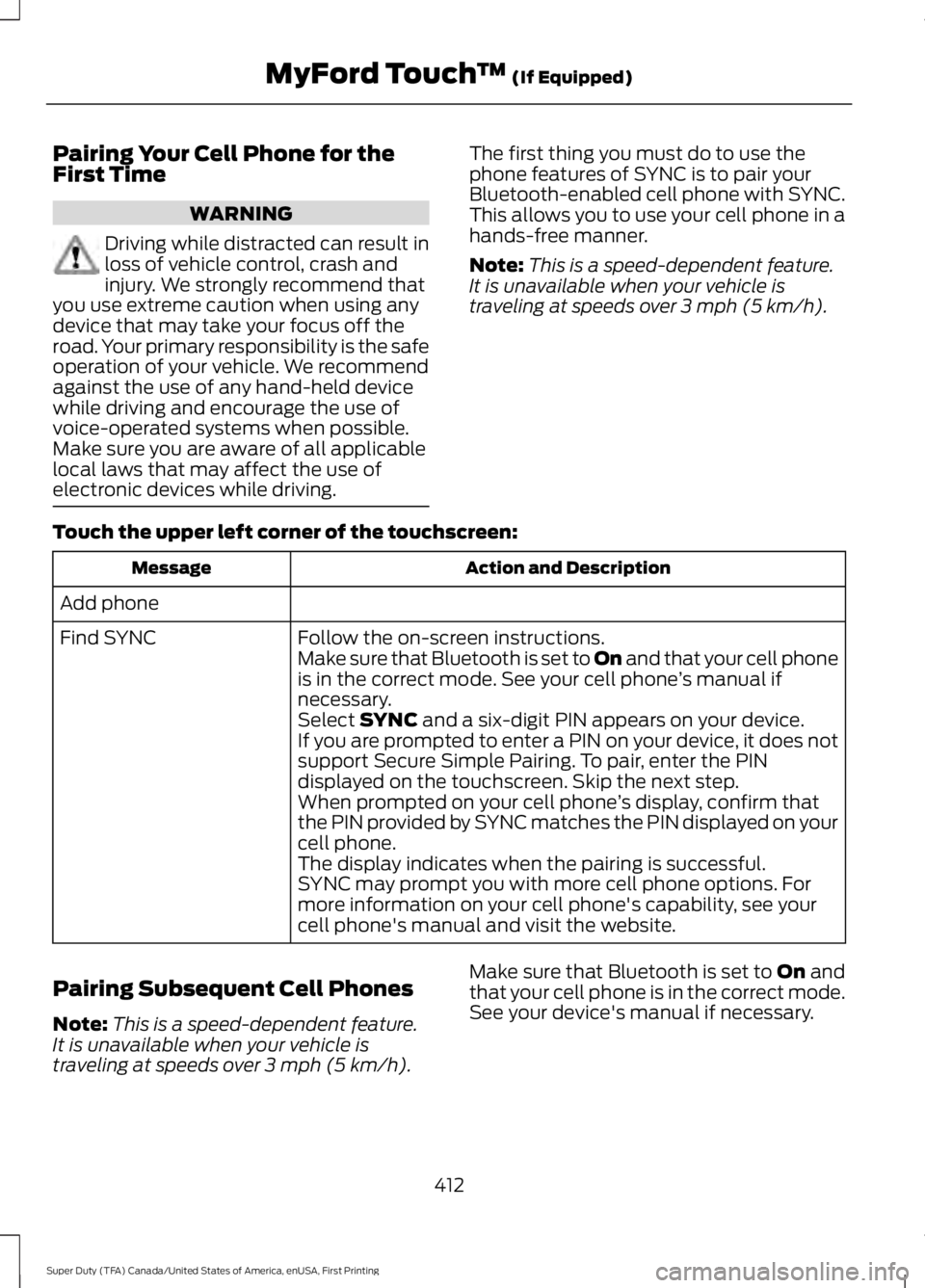
Touch the upper left corner of the touchscreen:
Action and DescriptionMessage
Add phone
Follow the on-screen instructions.Find SYNCMake sure that Bluetooth is set to On and that your cell phoneis in the correct mode. See your cell phone’s manual ifnecessary.Select SYNC and a six-digit PIN appears on your device.If you are prompted to enter a PIN on your device, it does notsupport Secure Simple Pairing. To pair, enter the PINdisplayed on the touchscreen. Skip the next step.When prompted on your cell phone’s display, confirm thatthe PIN provided by SYNC matches the PIN displayed on yourcell phone.The display indicates when the pairing is successful.SYNC may prompt you with more cell phone options. Formore information on your cell phone's capability, see yourcell phone's manual and visit the website.
Pairing Subsequent Cell Phones
Note:This is a speed-dependent feature.It is unavailable when your vehicle istraveling at speeds over 3 mph (5 km/h).
Make sure that Bluetooth is set to On andthat your cell phone is in the correct mode.See your device's manual if necessary.
412
Super Duty (TFA) Canada/United States of America, enUSA, First Printing
MyFord Touch™ (If Equipped)
Page 416 of 507
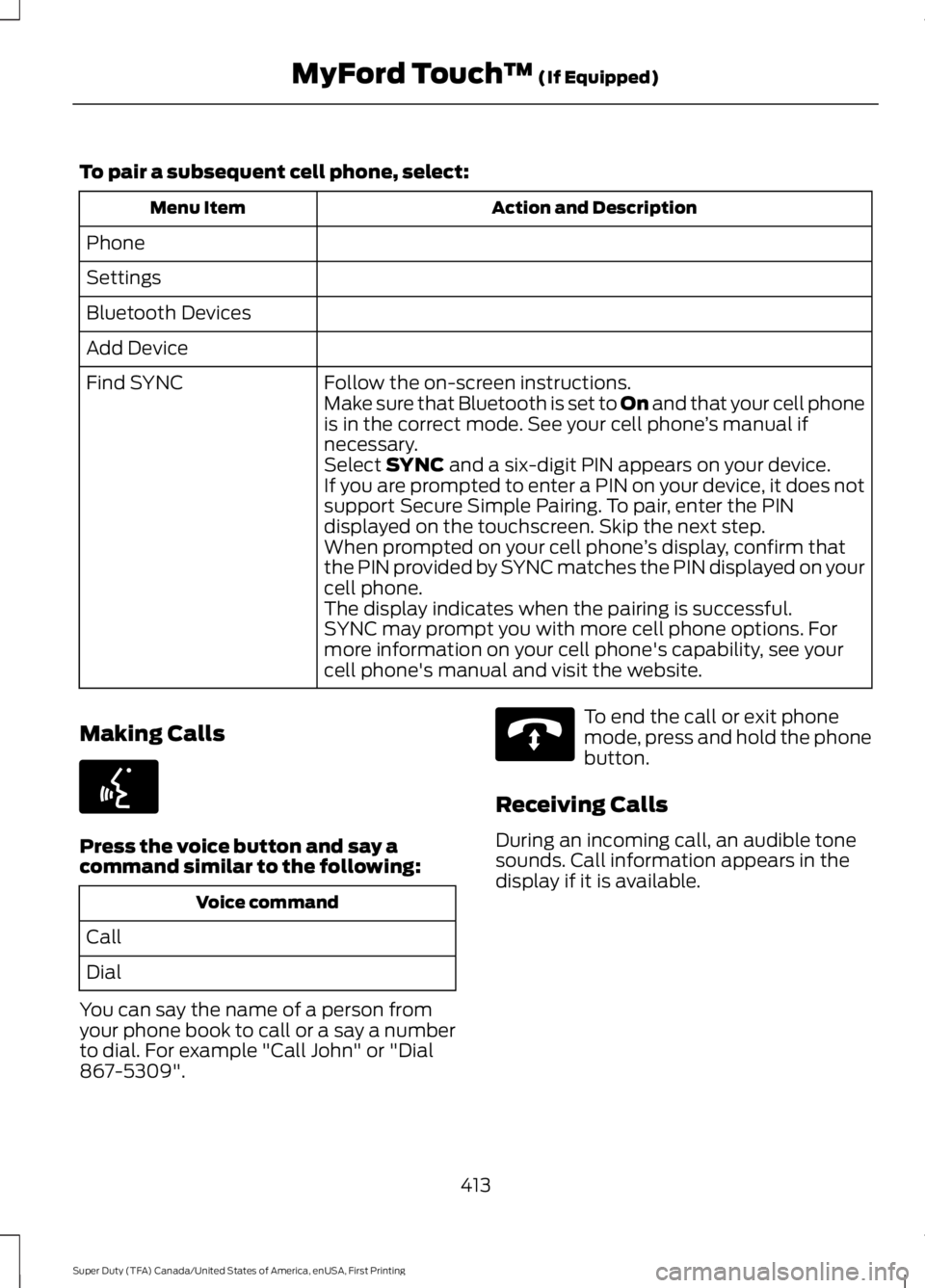
To pair a subsequent cell phone, select:
Action and DescriptionMenu Item
Phone
Settings
Bluetooth Devices
Add Device
Follow the on-screen instructions.Find SYNCMake sure that Bluetooth is set to On and that your cell phoneis in the correct mode. See your cell phone’s manual ifnecessary.Select SYNC and a six-digit PIN appears on your device.If you are prompted to enter a PIN on your device, it does notsupport Secure Simple Pairing. To pair, enter the PINdisplayed on the touchscreen. Skip the next step.When prompted on your cell phone’s display, confirm thatthe PIN provided by SYNC matches the PIN displayed on yourcell phone.The display indicates when the pairing is successful.SYNC may prompt you with more cell phone options. Formore information on your cell phone's capability, see yourcell phone's manual and visit the website.
Making Calls
Press the voice button and say acommand similar to the following:
Voice command
Call
Dial
You can say the name of a person fromyour phone book to call or a say a numberto dial. For example "Call John" or "Dial867-5309".
To end the call or exit phonemode, press and hold the phonebutton.
Receiving Calls
During an incoming call, an audible tonesounds. Call information appears in thedisplay if it is available.
413
Super Duty (TFA) Canada/United States of America, enUSA, First Printing
MyFord Touch™ (If Equipped)E142599 E142632
Page 418 of 507
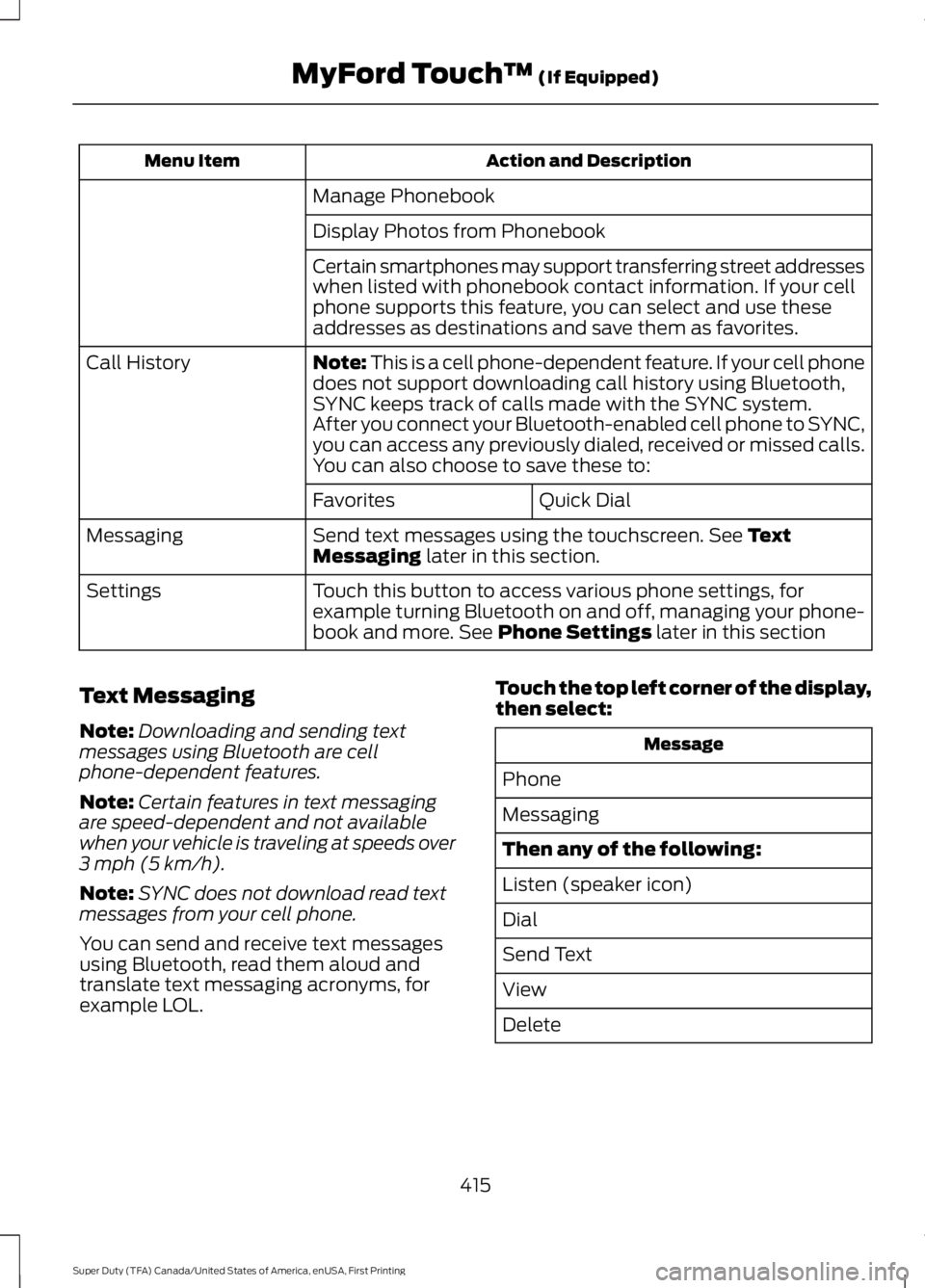
Action and DescriptionMenu Item
Manage Phonebook
Display Photos from Phonebook
Certain smartphones may support transferring street addresseswhen listed with phonebook contact information. If your cellphone supports this feature, you can select and use theseaddresses as destinations and save them as favorites.
Note: This is a cell phone-dependent feature. If your cell phonedoes not support downloading call history using Bluetooth,SYNC keeps track of calls made with the SYNC system.
Call History
After you connect your Bluetooth-enabled cell phone to SYNC,you can access any previously dialed, received or missed calls.You can also choose to save these to:
Quick DialFavorites
Send text messages using the touchscreen. See TextMessaging later in this section.Messaging
Touch this button to access various phone settings, forexample turning Bluetooth on and off, managing your phone-book and more. See Phone Settings later in this section
Settings
Text Messaging
Note:Downloading and sending textmessages using Bluetooth are cellphone-dependent features.
Note:Certain features in text messagingare speed-dependent and not availablewhen your vehicle is traveling at speeds over3 mph (5 km/h).
Note:SYNC does not download read textmessages from your cell phone.
You can send and receive text messagesusing Bluetooth, read them aloud andtranslate text messaging acronyms, forexample LOL.
Touch the top left corner of the display,then select:
Message
Phone
Messaging
Then any of the following:
Listen (speaker icon)
Dial
Send Text
View
Delete
415
Super Duty (TFA) Canada/United States of America, enUSA, First Printing
MyFord Touch™ (If Equipped)
Page 419 of 507
Composing a Text Message
Note:This is a speed-dependent feature.It is unavailable when your vehicle istraveling at speeds over 3 mph (5 km/h).
Note:Downloading and sending textmessages using Bluetooth are cellphone-dependent features.
To compose and send a text message, select:
Action and DescriptionMessage
Phone
Messaging
Enter a cell phone number or choose from your phonebook.Send Text
Allows you to customize the pre-defined message or createa message on your own.Edit Text
Sends the message as it is.Send
You can then preview the message, verifythe recipient as well as update themessage list.
Text Message Options
Message
I’ll call you back in a few minutes.
I just left, I’ll be there soon.
Can you give me a call?
I’m on my way.
I’m running a few minutes late.
I’m ahead of schedule, so I’ll be thereearly.
I’m outside.
I’ll call you when I get there.
OK
Yes
No
Thanks
Message
Stuck in traffic.
Call me later.
LOL
Receiving a Text Message
Note:If you select View and your vehicle istraveling over 3 mph (5 km/h), the systemoffers to read the message to you insteadof allowing you to view it while driving.
When a new message arrives, anaudible tone sounds and the screendisplays a pop-up with the caller nameand ID, if supported by your cell phone.You can select:
Action and DescriptionMessage
To view the text message.View
For SYNC to read themessage to you.Listen
To call the contact.Dial
To exit the screen.Ignore
416
Super Duty (TFA) Canada/United States of America, enUSA, First Printing
MyFord Touch™ (If Equipped)
Page 427 of 507
Action and DescriptionMenu Item
Select to choose from a listing ofweather locations.Area
Touch this button to view scores and schedules from a varietyof sports. You can also save up to 10 favorite teams for easieraccess. The score automatically refreshes when a game is inprogress.
Sports Info
Touch this button to view ski conditions for a specific area.Ski Conditions
Sirius Travel Link Voice Commands
Press the voice button on the steeringwheel controls. When prompted, sayany of the following or a similarcommand:
Voice command
Show Traffic
Show Weather
Help
Alerts
If your vehicle is equipped withNavigation, touch the I(Information) button to accessthese features. If your vehicle is notequipped with Navigation, touch the cornerof the touchscreen with the green tab.
Press Alerts, then choose from any ofthe following services:
Action and DescriptionMessage
The complete messageView
The messageDelete
MessagesDelete All
This screen displays any system messages(such as an SD card fault).
Note:The system alerts you to anymessages by turning the information iconyellow. After you read or delete themessages, the icon returns to white.
Calendar
If your vehicle is equipped withNavigation, touch the I(Information) button to accessthese features. If your vehicle is notequipped with Navigation, touch the cornerof the touchscreen with the green tab.
Press Calendar. You can view the currentcalendar by day, week or month.
424
Super Duty (TFA) Canada/United States of America, enUSA, First Printing
MyFord Touch™ (If Equipped)E142599 E142608 E142608
Page 428 of 507
911 Assist
WARNINGS
Unless the 911 Assist setting is set onbefore a crash, the system will notdial for help, which could delayresponse time, potentially increasing therisk of serious injury or death after a crash.
Do not wait for 911 Assist to make anemergency call if you can do ityourself. Dial emergency servicesimmediately to avoid delayed responsetime, which could increase the risk ofserious injury or death after a crash. If youdo not hear 911 Assist within five secondsof the crash, the system or phone may bedamaged or non-functional.
Always place your phone in a securelocation in your vehicle so it does notbecome a projectile or damaged ina crash. Failure to do so may cause seriousinjury to someone or damage the phone,which could prevent 911 Assist fromworking properly.
Note:The SYNC 911 Assist feature must beset on prior to the incident.
Note:Before setting this feature on, makesure that you read the 911 Assist PrivacyNotice later in this section for importantinformation.
Note:If any user turns 911 Assist on or off,that setting applies for all paired phones. If911 Assist is turned off, either a voicemessage plays or a display message (oricon) comes on (or both) when your vehicleis started after a previously paired phoneconnects.
Note:Every phone operates differently.While SYNC 911 Assist works with mostcellular phones, some may have troubleusing this feature.
If a crash deploys an airbag, excluding kneeairbags and rear inflatable safety beltswhere fitted or activates the fuel pumpshut-off, your SYNC-equipped vehicle maybe able to contact emergency services bydialing 911 through a paired and connectedBluetooth-enabled phone. For moreinformation about the 911 Assist featurevisit:
Website
visit www.SYNCMyRide.comwww.SYNCMyRide.cawww.syncmaroute.ca
See Supplementary Restraints System(page 37). Important informationregarding airbag deployment is in thischapter.
See Roadside Emergencies (page 212).Important information regarding the fuelpump shut-off is in this chapter.
Setting 911 Assist On
If your vehicle is equipped withNavigation, touch the I (Information)button to access these features. If yourvehicle is not equipped withNavigation, touch the corner of thetouchscreen with the green tab. Thenselect:
Message
Apps
911 Assist
On
425
Super Duty (TFA) Canada/United States of America, enUSA, First Printing
MyFord Touch™ (If Equipped)
Page 431 of 507
Press the voice button and whenprompted say:
Voice command
Vehicle Health Report
Vehicle Health Report Privacy Notice
When you create a Vehicle Health Report,Ford Motor Company may collect yourcellular phone number (to process yourreport request) and diagnostic informationabout your vehicle. Certain versions orupdates to Vehicle Health Report may alsocollect more vehicle information. Ford mayuse your vehicle information it collects forany purpose. If you do not want to discloseyour cellular phone number or vehicleinformation, do not run the feature or setup your Vehicle Health Report profile atwww.SYNCMyRide.com. Seewww.SYNCMyRide.com (Vehicle HealthReport Terms and Conditions, and PrivacyStatement) for more information.
Where Am I?
For information about your currentlocation, select:
Action and Descrip-tionMessage
View your vehicle'scurrent location, ifyour vehicle isequipped withnavigation. If yourvehicle is notequipped withnavigation, nothingdisplays.
Where Am I?
CLIMATE
Touch the lower right corner on thetouchscreen to access your climate controlfeatures. Depending on your vehicle lineand option package, your climate screenmay look different from this screen.
Note:You can switch temperature unitsbetween Fahrenheit and Celsius. SeeSettings (page 382).
428
Super Duty (TFA) Canada/United States of America, enUSA, First Printing
MyFord Touch™ (If Equipped)
Page 436 of 507
Note:If your vehicle is on a recognized roadand you do not press the Start Routebutton, the system defaults to the FastestRoute option and begins guidance.
Point of Interest (POI) Categories
Main Categories
Food/Drink & Dining
Travel & Transportation
Financial
Emergency
Community
Health & Medicine
Automotive
Shopping
Entertainment & Arts
Recreation & Sports
Government
Domestic Services
Subcategories
Restaurant
Golf
Parking
Home & Garden
Personal Care Services
Auto Dealership
Govt Office
Public Transit
Education
To expand these listings, press the + infront of the listing.
The system also allows you to sortalphabetically, by distance or by cityseekrlistings (if available).
cityseekr
Note:cityseekr point of interest (POI)information is limited to approximately 912cities (881 in the United States, 20 inCanada and 11 in Mexico).
cityseekr, when available, is a service thatprovides more information about certainpoints of interest such as restaurants,hotels and attractions.
When you have selected a point of interest,the location and information appear, suchas address and phone number. If cityseekrlists the point of interest, more informationis available, such as a brief description,check-in and checkout times or restauranthours.
For a longer review, a list of servicesand facilities, the average room, mealprice or the website press:
Menu Item
More Information
This screen displays the point of interesticon such as:
433
Super Duty (TFA) Canada/United States of America, enUSA, First Printing
MyFord Touch™ (If Equipped)E142634
Page 437 of 507
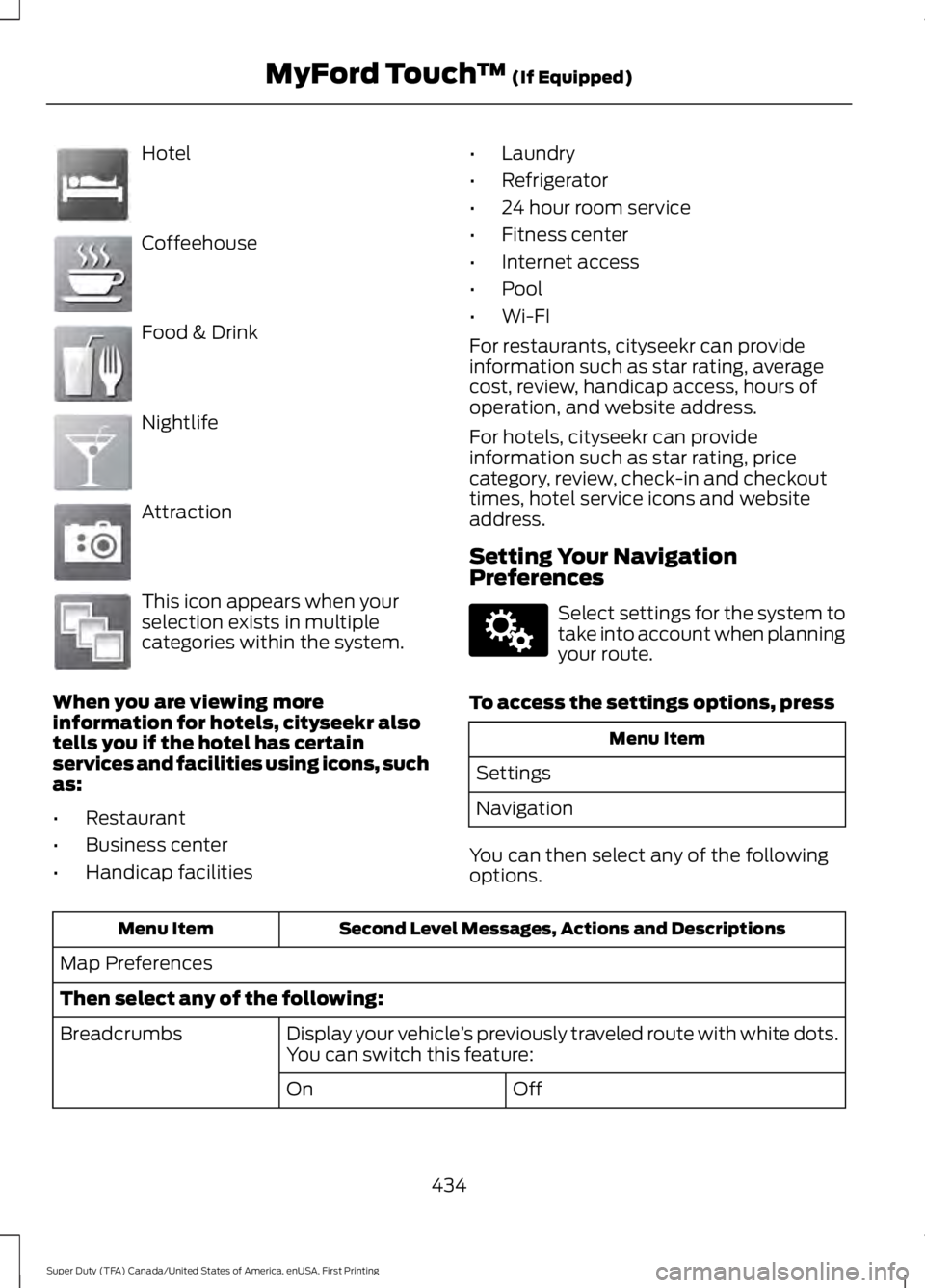
Hotel
Coffeehouse
Food & Drink
Nightlife
Attraction
This icon appears when yourselection exists in multiplecategories within the system.
When you are viewing moreinformation for hotels, cityseekr alsotells you if the hotel has certainservices and facilities using icons, suchas:
•Restaurant
•Business center
•Handicap facilities
•Laundry
•Refrigerator
•24 hour room service
•Fitness center
•Internet access
•Pool
•Wi-FI
For restaurants, cityseekr can provideinformation such as star rating, averagecost, review, handicap access, hours ofoperation, and website address.
For hotels, cityseekr can provideinformation such as star rating, pricecategory, review, check-in and checkouttimes, hotel service icons and websiteaddress.
Setting Your NavigationPreferences
Select settings for the system totake into account when planningyour route.
To access the settings options, press
Menu Item
Settings
Navigation
You can then select any of the followingoptions.
Second Level Messages, Actions and DescriptionsMenu Item
Map Preferences
Then select any of the following:
Display your vehicle’s previously traveled route with white dots.You can switch this feature:Breadcrumbs
OffOn
434
Super Duty (TFA) Canada/United States of America, enUSA, First Printing
MyFord Touch™ (If Equipped)E143884 E142636 E142637 E142638 E142639 E142640 E142607