ECU FORD F450 SUPER DUTY 2017 User Guide
[x] Cancel search | Manufacturer: FORD, Model Year: 2017, Model line: F450 SUPER DUTY, Model: FORD F450 SUPER DUTY 2017Pages: 642, PDF Size: 12.35 MB
Page 29 of 642
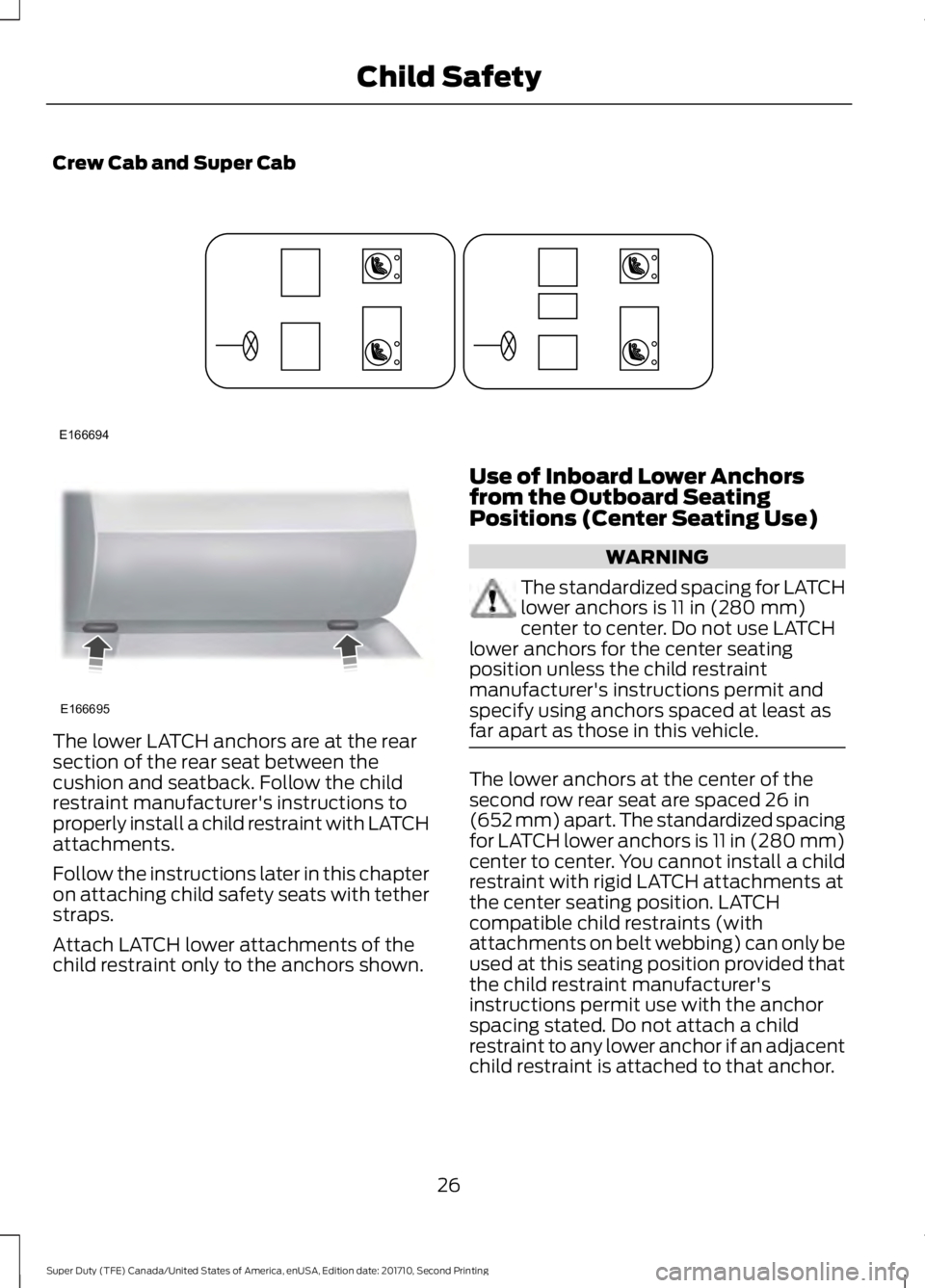
Crew Cab and Super Cab
The lower LATCH anchors are at the rearsection of the rear seat between thecushion and seatback. Follow the childrestraint manufacturer's instructions toproperly install a child restraint with LATCHattachments.
Follow the instructions later in this chapteron attaching child safety seats with tetherstraps.
Attach LATCH lower attachments of thechild restraint only to the anchors shown.
Use of Inboard Lower Anchorsfrom the Outboard SeatingPositions (Center Seating Use)
WARNING
The standardized spacing for LATCHlower anchors is 11 in (280 mm)center to center. Do not use LATCHlower anchors for the center seatingposition unless the child restraintmanufacturer's instructions permit andspecify using anchors spaced at least asfar apart as those in this vehicle.
The lower anchors at the center of thesecond row rear seat are spaced 26 in(652 mm) apart. The standardized spacingfor LATCH lower anchors is 11 in (280 mm)center to center. You cannot install a childrestraint with rigid LATCH attachments atthe center seating position. LATCHcompatible child restraints (withattachments on belt webbing) can only beused at this seating position provided thatthe child restraint manufacturer'sinstructions permit use with the anchorspacing stated. Do not attach a childrestraint to any lower anchor if an adjacentchild restraint is attached to that anchor.
26
Super Duty (TFE) Canada/United States of America, enUSA, Edition date: 201710, Second Printing
Child SafetyE166694 E166695
Page 30 of 642
Each time you use the safety seat, checkthat the seat is properly attached to thelower anchors and tether anchor, ifapplicable. Tug the child restraint from sideto side and forward and back where it issecured to the vehicle. The seat shouldmove less than 1 in (2.5 cm) when you dothis for a proper installation.
If the safety seat is not anchored properly,the risk of a child being injured in a crashgreatly increases.
Combining Seatbelt and LATCHLower Anchors for Attaching ChildSafety Seats
When used in combination, either theseatbelt or the LATCH lower anchors maybe attached first, provided a properinstallation is achieved. Attach the tetherstrap afterward, if included with the childrestraint.
Using Tether Straps
Many forward-facing child safety seatsinclude a tether strap which extends fromthe back of the child safety seat and hooksto an anchoring point called the top tetheranchor. Tether straps are available as anaccessory for many older safety seats.
Contact the manufacturer of your childrestraint for information about ordering atether strap, or to obtain a longer tetherstrap if the tether strap on your safety seatdoes not reach the appropriate top tetheranchor in the vehicle.
The passenger seats of your vehicle mayhave built-in tether strap anchors behindthe seats as described below.
The tether anchors in your vehicle may beloops of webbing above the seatback oran anchor bracket behind the seat on therear edge of the seat cushion.
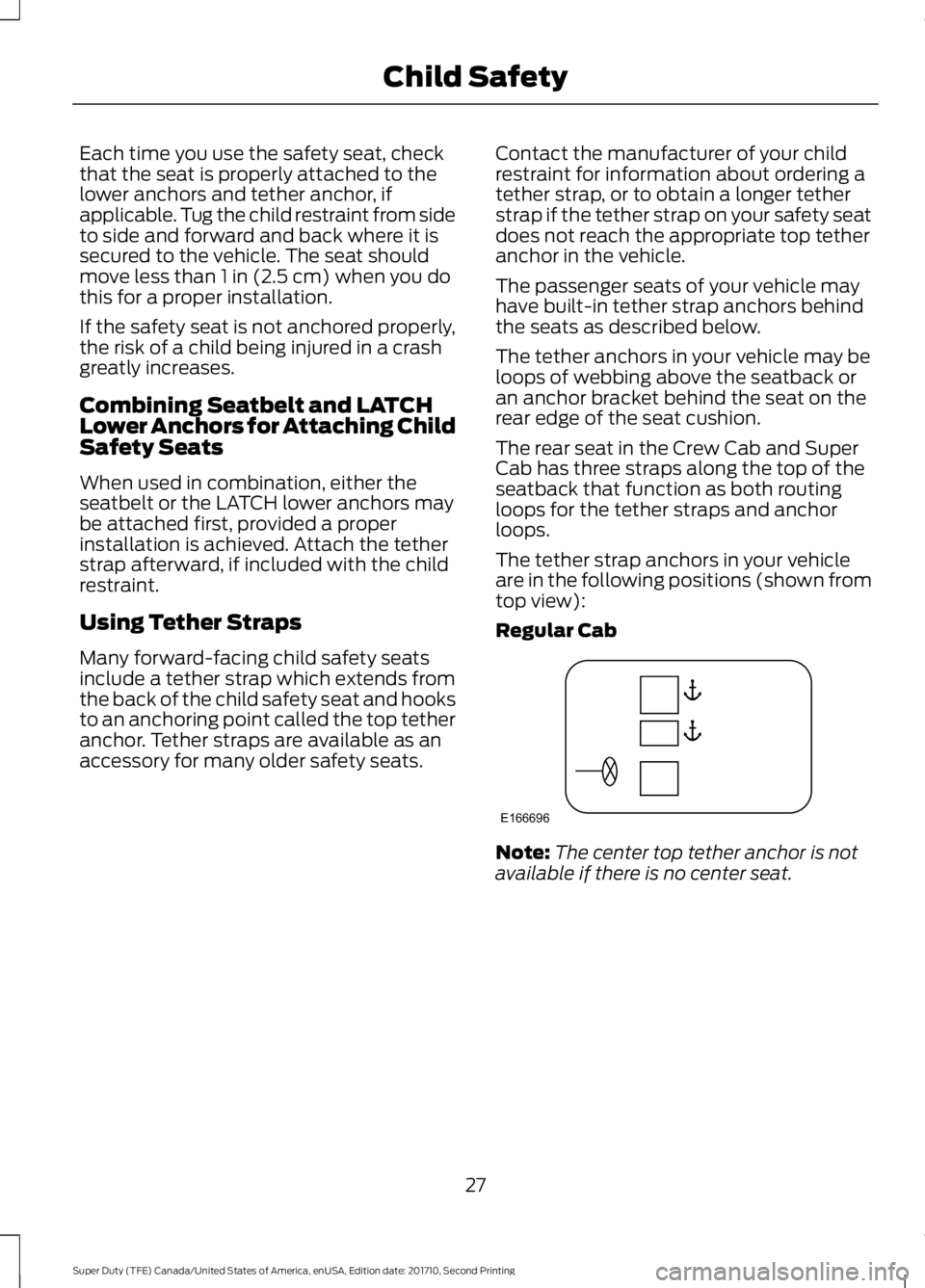
The rear seat in the Crew Cab and SuperCab has three straps along the top of theseatback that function as both routingloops for the tether straps and anchorloops.
The tether strap anchors in your vehicleare in the following positions (shown fromtop view):
Regular Cab
Note:The center top tether anchor is notavailable if there is no center seat.
27
Super Duty (TFE) Canada/United States of America, enUSA, Edition date: 201710, Second Printing
Child SafetyE166696
Page 39 of 642
The seatbelt pretensioners at the frontseating positions are designed to tightenthe seatbelts when activated. In frontaland near-frontal crashes, the seatbeltpretensioners may be activated alone or,if the crash is of sufficient severity, togetherwith the front airbags. In side crashes androllovers, the seatbelt pretensionersactivate when the Safety Canopy isactivated.
FASTENING THE SEATBELTS
Standard belts shown, inflatable beltssimilar
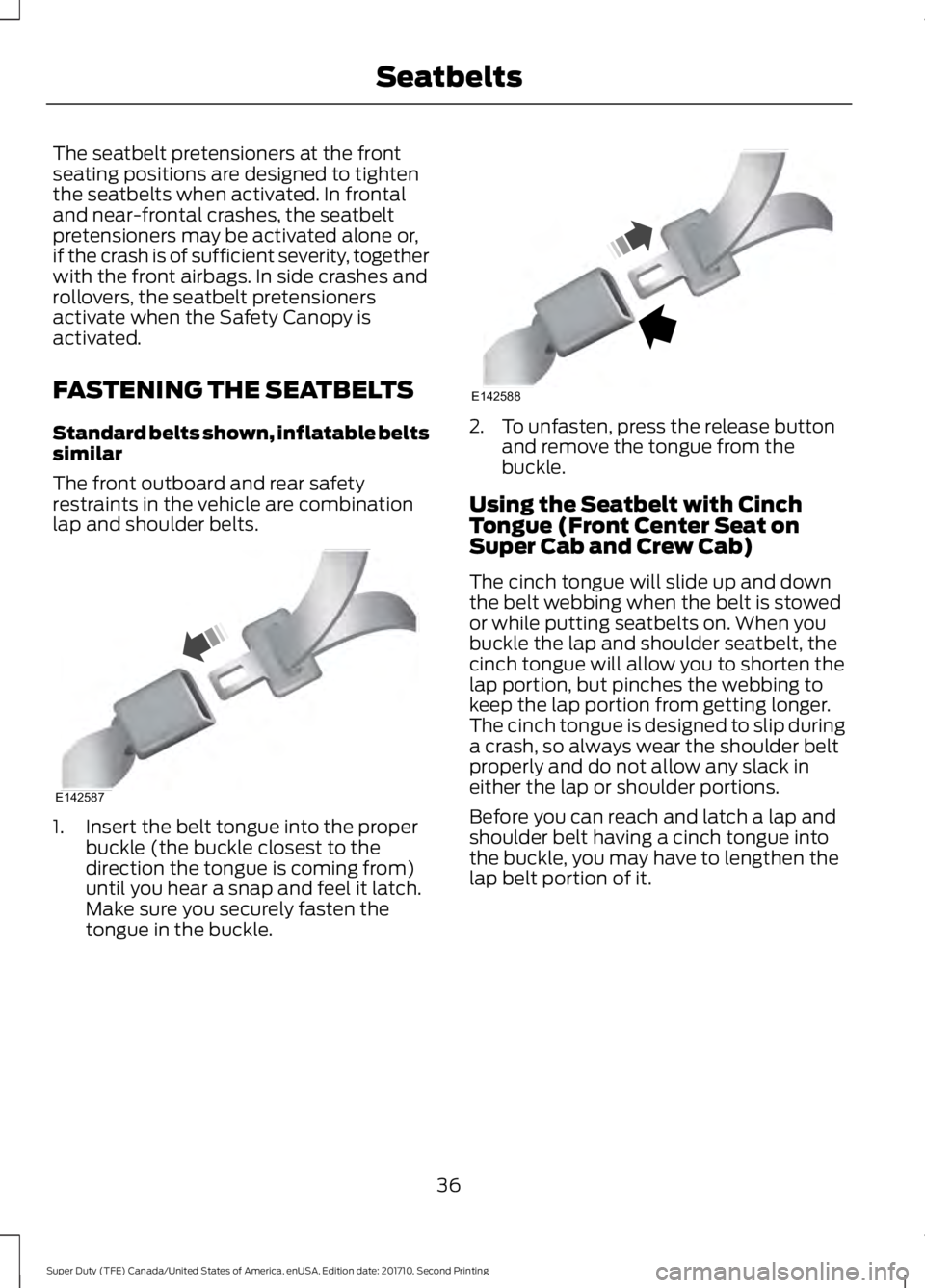
The front outboard and rear safetyrestraints in the vehicle are combinationlap and shoulder belts.
1. Insert the belt tongue into the properbuckle (the buckle closest to thedirection the tongue is coming from)until you hear a snap and feel it latch.Make sure you securely fasten thetongue in the buckle.
2. To unfasten, press the release buttonand remove the tongue from thebuckle.
Using the Seatbelt with CinchTongue (Front Center Seat onSuper Cab and Crew Cab)
The cinch tongue will slide up and downthe belt webbing when the belt is stowedor while putting seatbelts on. When youbuckle the lap and shoulder seatbelt, thecinch tongue will allow you to shorten thelap portion, but pinches the webbing tokeep the lap portion from getting longer.The cinch tongue is designed to slip duringa crash, so always wear the shoulder beltproperly and do not allow any slack ineither the lap or shoulder portions.
Before you can reach and latch a lap andshoulder belt having a cinch tongue intothe buckle, you may have to lengthen thelap belt portion of it.
36
Super Duty (TFE) Canada/United States of America, enUSA, Edition date: 201710, Second Printing
SeatbeltsE142587 E142588
Page 40 of 642
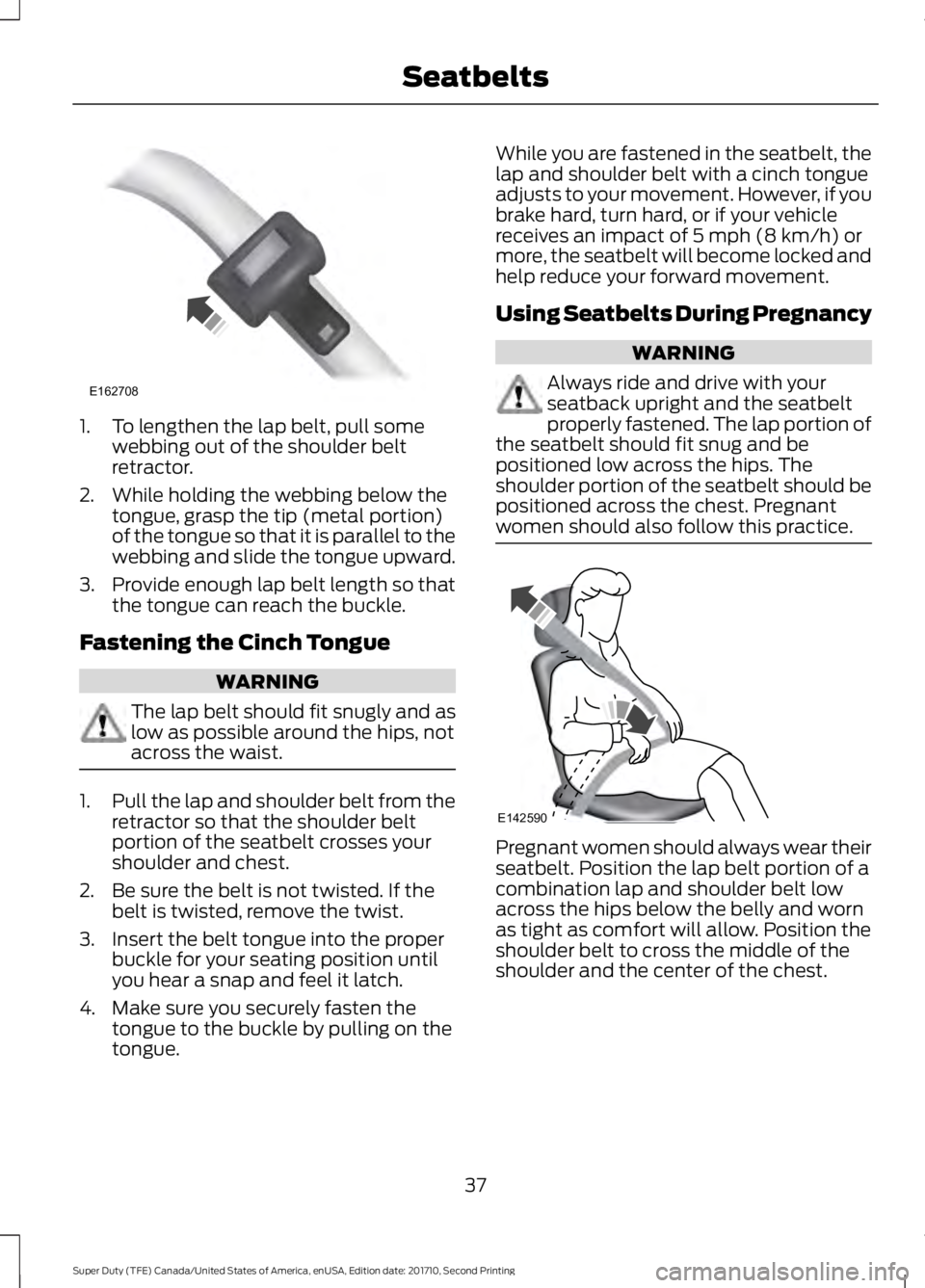
1. To lengthen the lap belt, pull somewebbing out of the shoulder beltretractor.
2. While holding the webbing below thetongue, grasp the tip (metal portion)of the tongue so that it is parallel to thewebbing and slide the tongue upward.
3.Provide enough lap belt length so thatthe tongue can reach the buckle.
Fastening the Cinch Tongue
WARNING
The lap belt should fit snugly and aslow as possible around the hips, notacross the waist.
1.Pull the lap and shoulder belt from theretractor so that the shoulder beltportion of the seatbelt crosses yourshoulder and chest.
2. Be sure the belt is not twisted. If thebelt is twisted, remove the twist.
3. Insert the belt tongue into the properbuckle for your seating position untilyou hear a snap and feel it latch.
4. Make sure you securely fasten thetongue to the buckle by pulling on thetongue.
While you are fastened in the seatbelt, thelap and shoulder belt with a cinch tongueadjusts to your movement. However, if youbrake hard, turn hard, or if your vehiclereceives an impact of 5 mph (8 km/h) ormore, the seatbelt will become locked andhelp reduce your forward movement.
Using Seatbelts During Pregnancy
WARNING
Always ride and drive with yourseatback upright and the seatbeltproperly fastened. The lap portion ofthe seatbelt should fit snug and bepositioned low across the hips. Theshoulder portion of the seatbelt should bepositioned across the chest. Pregnantwomen should also follow this practice.
Pregnant women should always wear theirseatbelt. Position the lap belt portion of acombination lap and shoulder belt lowacross the hips below the belly and wornas tight as comfort will allow. Position theshoulder belt to cross the middle of theshoulder and the center of the chest.
37
Super Duty (TFE) Canada/United States of America, enUSA, Edition date: 201710, Second Printing
SeatbeltsE162708 E142590
Page 58 of 642
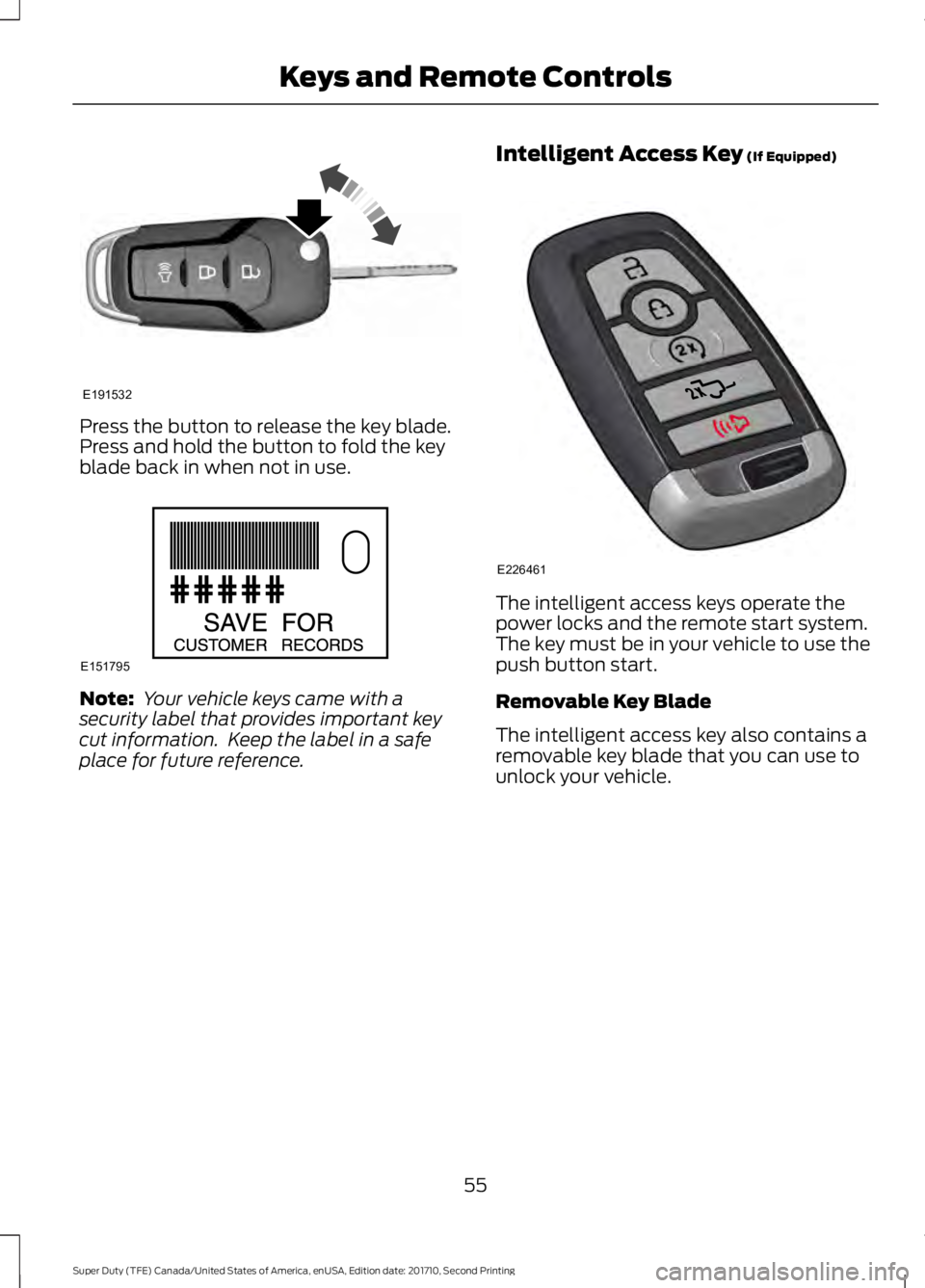
Press the button to release the key blade.Press and hold the button to fold the keyblade back in when not in use.
Note: Your vehicle keys came with asecurity label that provides important keycut information. Keep the label in a safeplace for future reference.
Intelligent Access Key (If Equipped)
The intelligent access keys operate thepower locks and the remote start system.The key must be in your vehicle to use thepush button start.
Removable Key Blade
The intelligent access key also contains aremovable key blade that you can use tounlock your vehicle.
55
Super Duty (TFE) Canada/United States of America, enUSA, Edition date: 201710, Second Printing
Keys and Remote ControlsE191532 E151795 E226461
Page 59 of 642
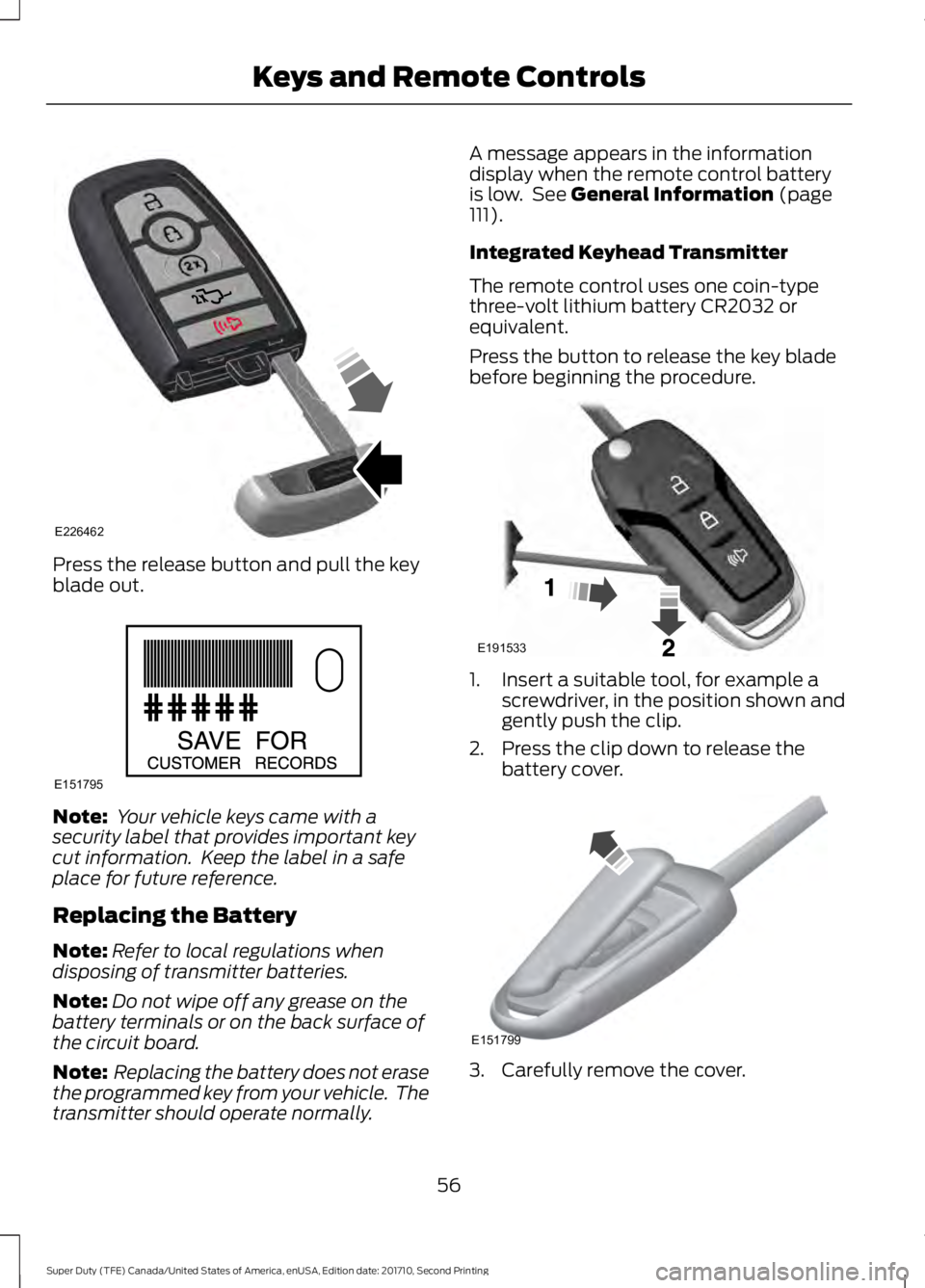
Press the release button and pull the keyblade out.
Note: Your vehicle keys came with asecurity label that provides important keycut information. Keep the label in a safeplace for future reference.
Replacing the Battery
Note:Refer to local regulations whendisposing of transmitter batteries.
Note:Do not wipe off any grease on thebattery terminals or on the back surface ofthe circuit board.
Note: Replacing the battery does not erasethe programmed key from your vehicle. Thetransmitter should operate normally.
A message appears in the informationdisplay when the remote control batteryis low. See General Information (page111).
Integrated Keyhead Transmitter
The remote control uses one coin-typethree-volt lithium battery CR2032 orequivalent.
Press the button to release the key bladebefore beginning the procedure.
1. Insert a suitable tool, for example ascrewdriver, in the position shown andgently push the clip.
2. Press the clip down to release thebattery cover.
3. Carefully remove the cover.
56
Super Duty (TFE) Canada/United States of America, enUSA, Edition date: 201710, Second Printing
Keys and Remote ControlsE226462 E151795 E191533 E151799
Page 67 of 642
MYKEY TROUBLESHOOTING
Potential causesCondition
· The key or transmitter used to start thevehicle does not have admin privileges.I cannot create a MyKey.
· Vehicles with keyless start: Make sure youplace the transmitter into the backup posi-tion. See Starting a Gasoline Engine(page 174).· The key or transmitter used to start thevehicle is the only admin key. There alwayshas to be at least one admin key.· SecuriLock passive anti-theft system isdisabled or in unlimited mode.
· The key or transmitter used to start thevehicle does not have admin privileges.I cannot program the configurable settings.
· There are no MyKeys programmed to thevehicle. See Creating a MyKey (page 62).
· An admin transmitter is present when youstarted your vehicle.For vehicles with keyless start: No MyKeyrestrictions are available when starting thevehicle.· There are no MyKeys programmed to thevehicle. See Creating a MyKey (page 62).
· The key or transmitter used to start thevehicle does not have admin privileges.I cannot clear the MyKeys.
· No MyKeys are created. See Creating aMyKey (page 62).
· Purchase a new key or transmitter fromyour authorized dealer.I lost the only admin key.
· Program a spare key or transmitter. Youmay need to see your authorized dealer.See Passive Anti-Theft System (page74).
I lost a key.
· The MyKey user is not using the MyKey.MyKey distances do not accumulate.· An admin key holder cleared the MyKeysand created new MyKeys.· The key system has been reset.
64
Super Duty (TFE) Canada/United States of America, enUSA, Edition date: 201710, Second Printing
MyKey™
Page 71 of 642
KEYLESS ENTRY (If Equipped)
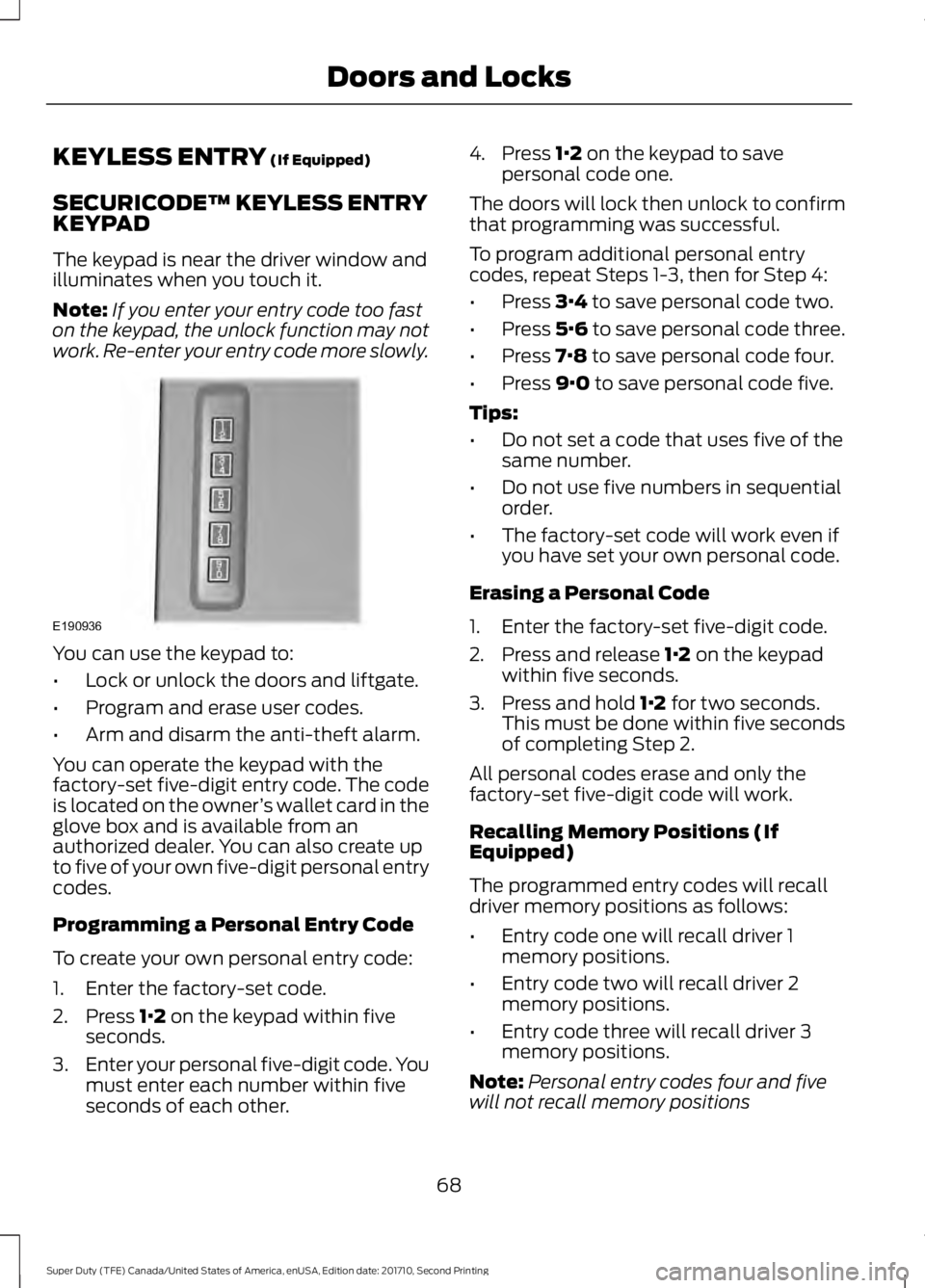
SECURICODE™ KEYLESS ENTRYKEYPAD
The keypad is near the driver window andilluminates when you touch it.
Note:If you enter your entry code too faston the keypad, the unlock function may notwork. Re-enter your entry code more slowly.
You can use the keypad to:
•Lock or unlock the doors and liftgate.
•Program and erase user codes.
•Arm and disarm the anti-theft alarm.
You can operate the keypad with thefactory-set five-digit entry code. The codeis located on the owner’s wallet card in theglove box and is available from anauthorized dealer. You can also create upto five of your own five-digit personal entrycodes.
Programming a Personal Entry Code
To create your own personal entry code:
1. Enter the factory-set code.
2. Press 1·2 on the keypad within fiveseconds.
3.Enter your personal five-digit code. Youmust enter each number within fiveseconds of each other.
4. Press 1·2 on the keypad to savepersonal code one.
The doors will lock then unlock to confirmthat programming was successful.
To program additional personal entrycodes, repeat Steps 1-3, then for Step 4:
•Press 3·4 to save personal code two.
•Press 5·6 to save personal code three.
•Press 7·8 to save personal code four.
•Press 9·0 to save personal code five.
Tips:
•Do not set a code that uses five of thesame number.
•Do not use five numbers in sequentialorder.
•The factory-set code will work even ifyou have set your own personal code.
Erasing a Personal Code
1. Enter the factory-set five-digit code.
2. Press and release 1·2 on the keypadwithin five seconds.
3. Press and hold 1·2 for two seconds.This must be done within five secondsof completing Step 2.
All personal codes erase and only thefactory-set five-digit code will work.
Recalling Memory Positions (IfEquipped)
The programmed entry codes will recalldriver memory positions as follows:
•Entry code one will recall driver 1memory positions.
•Entry code two will recall driver 2memory positions.
•Entry code three will recall driver 3memory positions.
Note:Personal entry codes four and fivewill not recall memory positions
68
Super Duty (TFE) Canada/United States of America, enUSA, Edition date: 201710, Second Printing
Doors and LocksE190936
Page 72 of 642
Anti-Scan Feature
The keypad will go into an anti-scan modeif you enter the wrong code seven times(35 consecutive button presses). Thismode disables the keypad for one minuteand the keypad lamp will flash.
The anti-scan feature will turn off after:
•One minute of keypad inactivity.
•Pressing the unlock button on theremote control.
•Switching the ignition on.
•Unlocking the vehicle using intelligentaccess.
Unlocking and Locking the Doors
To Unlock the Driver Door
Enter the factory-set five-digit code or yourpersonal code. You must press eachnumber within five seconds of each other.The interior lamps illuminate.
Note:All doors unlock if you disable thetwo-stage unlocking feature. See GeneralInformation (page 111).
To Unlock All Doors
Enter the factory-set code or your personalcode, then press 3·4 control within fiveseconds.
To Lock All Doors
Press and hold 7·8 and 9·0 at the sametime with the driver door closed. You donot need to enter the keypad code first.
69
Super Duty (TFE) Canada/United States of America, enUSA, Edition date: 201710, Second Printing
Doors and Locks
Page 73 of 642
TAILGATE LOCK (If Equipped)
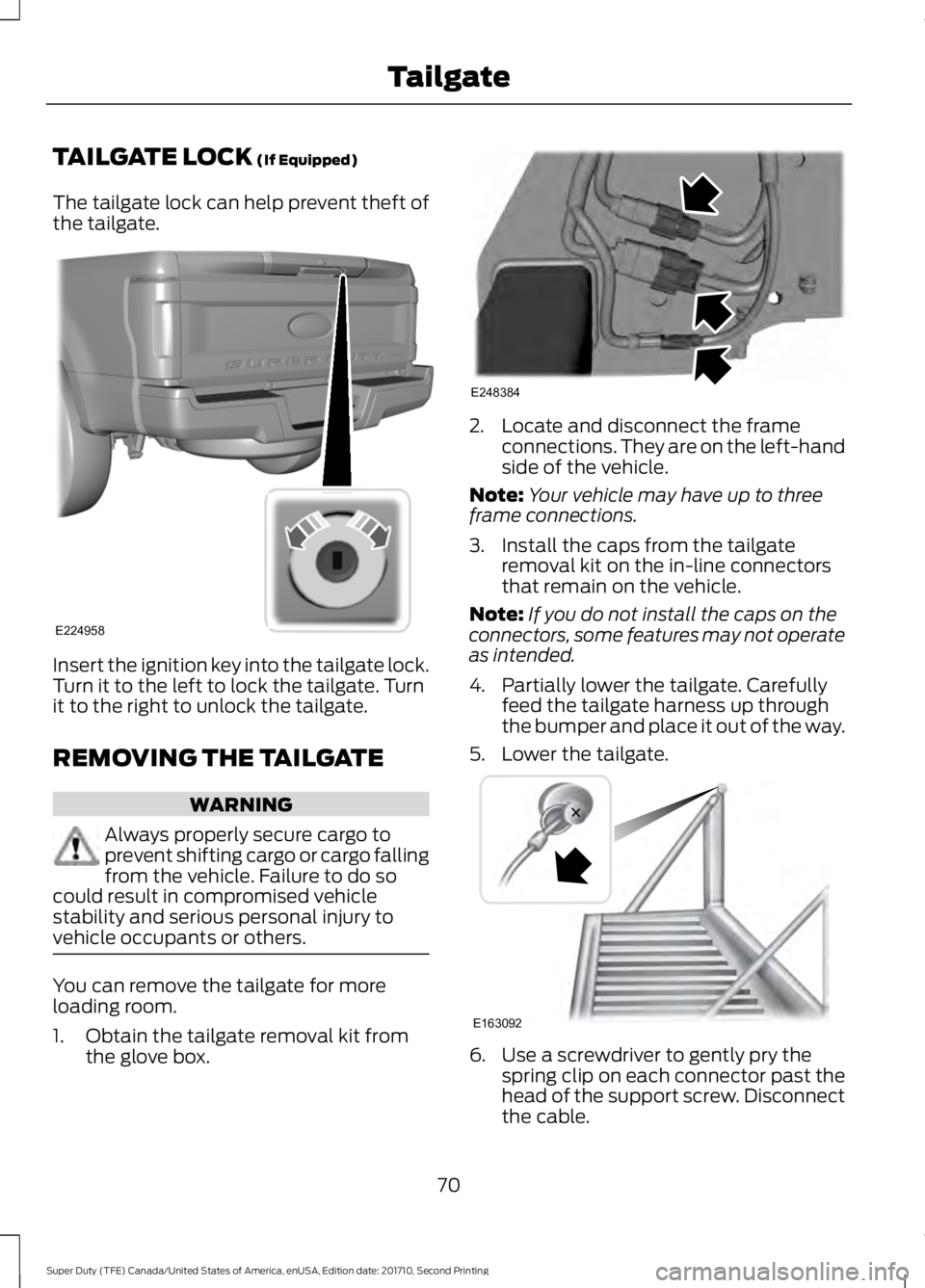
The tailgate lock can help prevent theft ofthe tailgate.
Insert the ignition key into the tailgate lock.Turn it to the left to lock the tailgate. Turnit to the right to unlock the tailgate.
REMOVING THE TAILGATE
WARNING
Always properly secure cargo toprevent shifting cargo or cargo fallingfrom the vehicle. Failure to do socould result in compromised vehiclestability and serious personal injury tovehicle occupants or others.
You can remove the tailgate for moreloading room.
1. Obtain the tailgate removal kit fromthe glove box.
2. Locate and disconnect the frameconnections. They are on the left-handside of the vehicle.
Note:Your vehicle may have up to threeframe connections.
3. Install the caps from the tailgateremoval kit on the in-line connectorsthat remain on the vehicle.
Note:If you do not install the caps on theconnectors, some features may not operateas intended.
4. Partially lower the tailgate. Carefullyfeed the tailgate harness up throughthe bumper and place it out of the way.
5. Lower the tailgate.
6. Use a screwdriver to gently pry thespring clip on each connector past thehead of the support screw. Disconnectthe cable.
70
Super Duty (TFE) Canada/United States of America, enUSA, Edition date: 201710, Second Printing
TailgateE224958 E248384 E163092