ECU FORD F450 SUPER DUTY 2017 Owner's Guide
[x] Cancel search | Manufacturer: FORD, Model Year: 2017, Model line: F450 SUPER DUTY, Model: FORD F450 SUPER DUTY 2017Pages: 642, PDF Size: 12.35 MB
Page 189 of 642
Vehicles with engines configured for usewith high sulfur diesel fuel are onlyavailable for sale in countries where ultralow sulfur diesel fuel is generally notavailable or mandated by the government.Vehicles originally sold in a ultra low sulfurdiesel fuel market that are subsequentlyexported to non- ultra low sulfur diesel fuelmarkets will need to be retrofitted (at thecustomer’s expense using Ford authorizeddealer service parts) in order to be reliablyoperated on non- ultra low sulfur dieselfuel.
Biodiesel
WARNINGS
Do not use home heating oil,agricultural fuel, raw fats and oils,waste cooking greases, biodieselfuels greater than 20% or any diesel fuelnot intended for highway use. Damage tothe fuel injection system, engine andexhaust catalyst can occur if an improperfuel is used. Do not add gasoline, gasoholor alcohol to diesel fuel. This practicecreates a serious fire hazard and engineperformance problems.
Do not mix diesel fuel with gasoline,gasohol or alcohol. This could causean explosion resulting in personalinjury.
Do not add gasoline, gasohol oralcohol to diesel fuel. This practicecreates a serious fire hazard resultingin personal injury and engine performanceproblems.
Do not use home heating oil or anydiesel fuel not intended for highwayuse. Damage to the fuel injectionsystem, engine, exhaust catalyst and dieselparticulate filter can occur if an improperfuel is used. Red dye is used to identifyfuels intended for agricultural andnon-highway use.
You may operate your vehicle on dieselfuels containing up to 20% biodiesel, alsoknown as B20.
Biodiesel fuel is a chemically convertedproduct from renewable fuel sources, suchas vegetable oils, animal fats and wastecooking greases.
To help achieve acceptable engineperformance and durability when usingbiodiesel in your vehicle:
•Confirm the biodiesel content of thefuel to be B20 (20% biodiesel) or less
•Only use biodiesel fuel of good qualitythat complies with industry standards
•Follow the recommended servicemaintenance intervals. SeeScheduled Maintenance (page 573).
•Do not store biodiesel fuel in the fueltank for more than 1 month
•Consider changing brands or reducingbiodiesel content if you have coldtemperature fuel gelling issues or afrequent LOW FUEL PRESSUREmessage appearing
•Do NOT use raw oils, fats or wastecooking greases
Use of biodiesel in concentrations greaterthan 20% may cause damage to yourvehicle, including engine and/or exhaustafter-treatment hardware (exhaustcatalyst and particulate filter) failures.Concentrations greater than 20% can alsocause fuel filter restrictions that may resultin a lack of power or damage to fuelsystem components, including fuel pumpand fuel injector failures.
SAE 5W-40 or SAE 15W-40 oil isrecommended for fuels with greater than5% biodiesel (B5). Refer to the Specialoperating conditions section under theSchedule Maintenance chapter for moreinformation about oil change intervals andother maintenance when operating onbiodiesel.
186
Super Duty (TFE) Canada/United States of America, enUSA, Edition date: 201710, Second Printing
Fuel and Refueling
Page 208 of 642
AUTOMATIC TRANSMISSION
WARNING
Always apply the parking brake fullyand make sure you shift into park (P).Switch the ignition off and removethe key whenever you leave your vehicle.
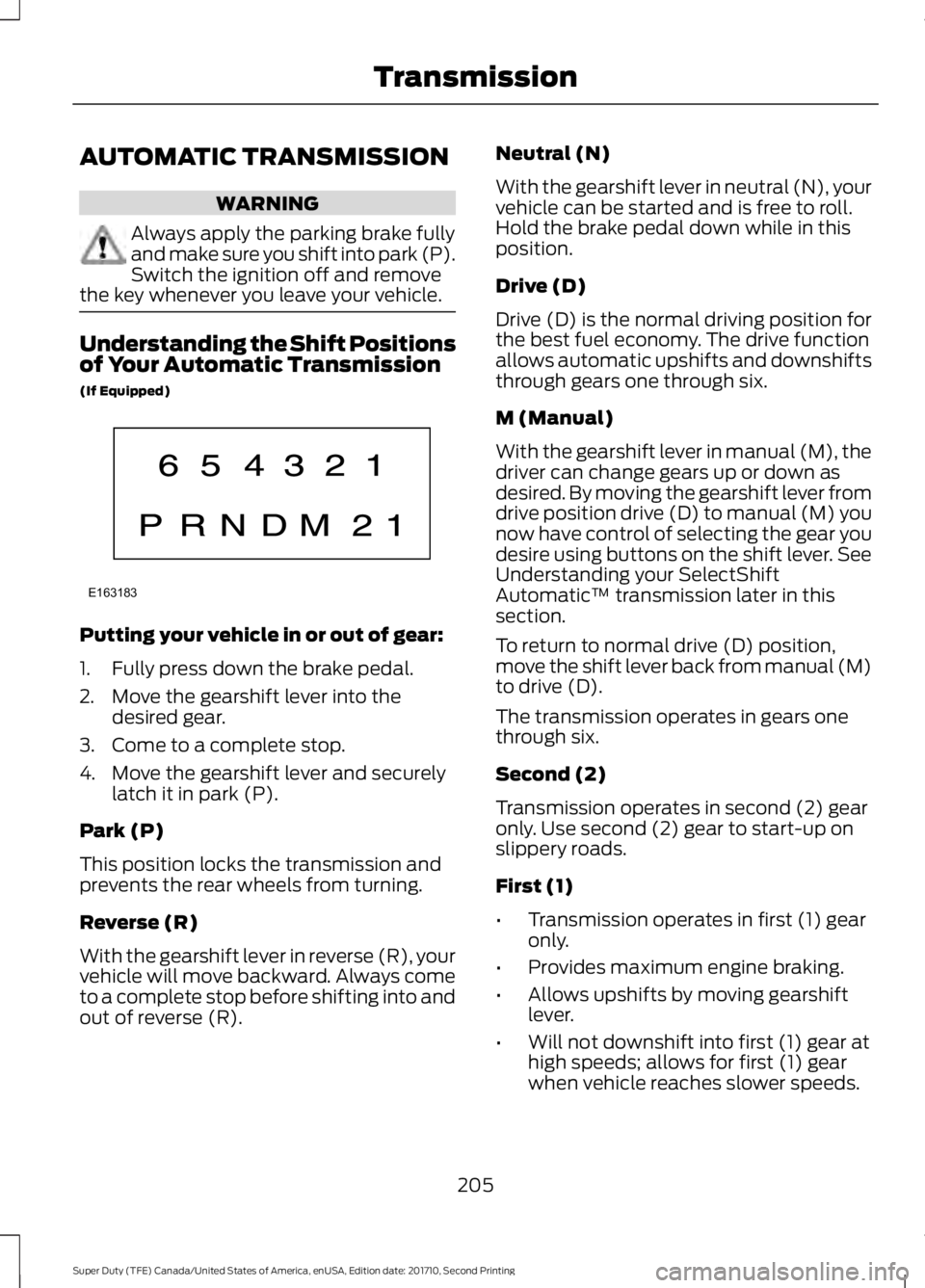
Understanding the Shift Positionsof Your Automatic Transmission
(If Equipped)
Putting your vehicle in or out of gear:
1. Fully press down the brake pedal.
2. Move the gearshift lever into thedesired gear.
3. Come to a complete stop.
4. Move the gearshift lever and securelylatch it in park (P).
Park (P)
This position locks the transmission andprevents the rear wheels from turning.
Reverse (R)
With the gearshift lever in reverse (R), yourvehicle will move backward. Always cometo a complete stop before shifting into andout of reverse (R).
Neutral (N)
With the gearshift lever in neutral (N), yourvehicle can be started and is free to roll.Hold the brake pedal down while in thisposition.
Drive (D)
Drive (D) is the normal driving position forthe best fuel economy. The drive functionallows automatic upshifts and downshiftsthrough gears one through six.
M (Manual)
With the gearshift lever in manual (M), thedriver can change gears up or down asdesired. By moving the gearshift lever fromdrive position drive (D) to manual (M) younow have control of selecting the gear youdesire using buttons on the shift lever. SeeUnderstanding your SelectShiftAutomatic™ transmission later in thissection.
To return to normal drive (D) position,move the shift lever back from manual (M)to drive (D).
The transmission operates in gears onethrough six.
Second (2)
Transmission operates in second (2) gearonly. Use second (2) gear to start-up onslippery roads.
First (1)
•Transmission operates in first (1) gearonly.
•Provides maximum engine braking.
•Allows upshifts by moving gearshiftlever.
•Will not downshift into first (1) gear athigh speeds; allows for first (1) gearwhen vehicle reaches slower speeds.
205
Super Duty (TFE) Canada/United States of America, enUSA, Edition date: 201710, Second Printing
TransmissionE163183
Page 210 of 642
In order to prevent the engine from runningat too low an RPM, which may cause it tostall, SelectShift will still automaticallymake some downshifts if it has determinedthat you have not downshifted in time.Although SelectShift will make somedownshifts for you, it will still allow you todownshift at any time as long as theSelectShift determines that damage willnot be caused to the engine fromover-revving.
SelectShift will not automatically upshift,even if the engine is approaching the RPMlimit. It must be shifted manually bypressing the + button.
Note:Engine damage may occur if youmaintain excessive engine revving withoutshifting.
The SelectShift Automatic transmissionfeature has two modes: PRS and M mode.
PRS (Progressive Range Selection)
Progressive Range Selection gives you theability to lockout gears from the automaticshifting range. This may provide you withan improved driving experience (forexample, in slippery conditions or whenexperiencing a steep grade).
With the gearshift lever in drive (D), pressthe – button to active PRS. The availableand selected gears are indicated on theinstrument cluster.
All available gears will display with thecurrent gear indicated. Press the – buttonagain to lock out gears beginning with thehighest gear. Example: press the – buttontwice to lock out 6th and 5th gears. Onlythe available gears will display and thetransmission will automatically shiftbetween the available gears. Press the +button to unlock gears to allow thetransmission to shift to higher gears. Thetransmission will shift automatically withinthe gear range you select.
Manual (M)
Moving the gearshift lever to the manual(M) position will allow you to manuallyselect the gear you desire. Only the currentgear will display. Use the buttons on thegearshift lever to manually select gears.Press the + button to upshift or the –button to downshift. Return thetransmission to a different gearshiftposition to deactivate manual control.
Recommended shift speeds
Upshift according to the following chart:
Upshifts when accelerating (recommended for best fuel economy)
Diesel enginesGasoline enginesShift from:
12 mph (19 km/h)15 mph (24 km/h)1 – 2
19 mph (31 km/h)25 mph (40 km/h)2 – 3
26 mph (42 km/h)40 mph (64 km/h)3 – 4
34 mph (55 km/h)45 mph (72 km/h)4 – 5
46 mph (74 km/h)50 mph (80 km/h)5 – 6
207
Super Duty (TFE) Canada/United States of America, enUSA, Edition date: 201710, Second Printing
Transmission
Page 211 of 642
Automatic Transmission AdaptiveLearning
This feature's design is to increasedurability and provide consistent shift feelover the life of your vehicle. A new vehicleor transmission may have firm shifts, softshifts or both. This operation is normal anddoes not affect function or durability of thetransmission. Over time, the adaptivelearning process fully updates transmissionoperation. Additionally, whenever youdisconnect the battery or install a newbattery, the system must relearn thestrategy.
Brake-Shift Interlock
WARNINGS
Do not drive your vehicle until youverify that the brake lamps areworking.
When doing this procedure, you needto take the transmission out of park(P) which means your vehicle canroll freely. To avoid unwanted vehiclemovement, always fully apply the parkingbrake prior to doing this procedure. Usewheels chocks if appropriate.
If the parking brake is fully released,but the brake warning lamp remainsilluminated, the brakes may not beworking properly. Have your vehiclechecked as soon as possible.
Your vehicle is equipped with a brake-shiftinterlock feature that prevents thegearshift lever from moving from park (P)when the ignition is on and the brake pedalis not pressed.
If you cannot move the gearshift lever outof park (P) position with the ignition is onand the brake pedal pressed, a malfunctionmay have occurred. It is possible that afuse has blown or your vehicle’s brakelamps are not operating properly. SeeFuse Specification Chart (page 312).
If the fuse is not blown and the brakelamps are working properly, the followingprocedure allows you to move the gearshiftlever from park (P):
1. Apply the parking brake. Switch theignition key to 1 (off), then remove thekey.
2. Move the steering column to the fulldown and full rearward position(toward the driver’s seat).
3. Remove the gearshift lever boot.
4. Place fingers into hole where youremoved the gearshift lever boot andpull top half of shroud up and forwardto separate it from the lower half of theshroud. There is a hinge at the forwardedge of the top shroud. Roll the tophalf of the shroud upward on the hingepoint to clear the hazard flasher button,then pull straight rearward toward thedriver’s seat to remove.
5. Remove the top half of the shroud.
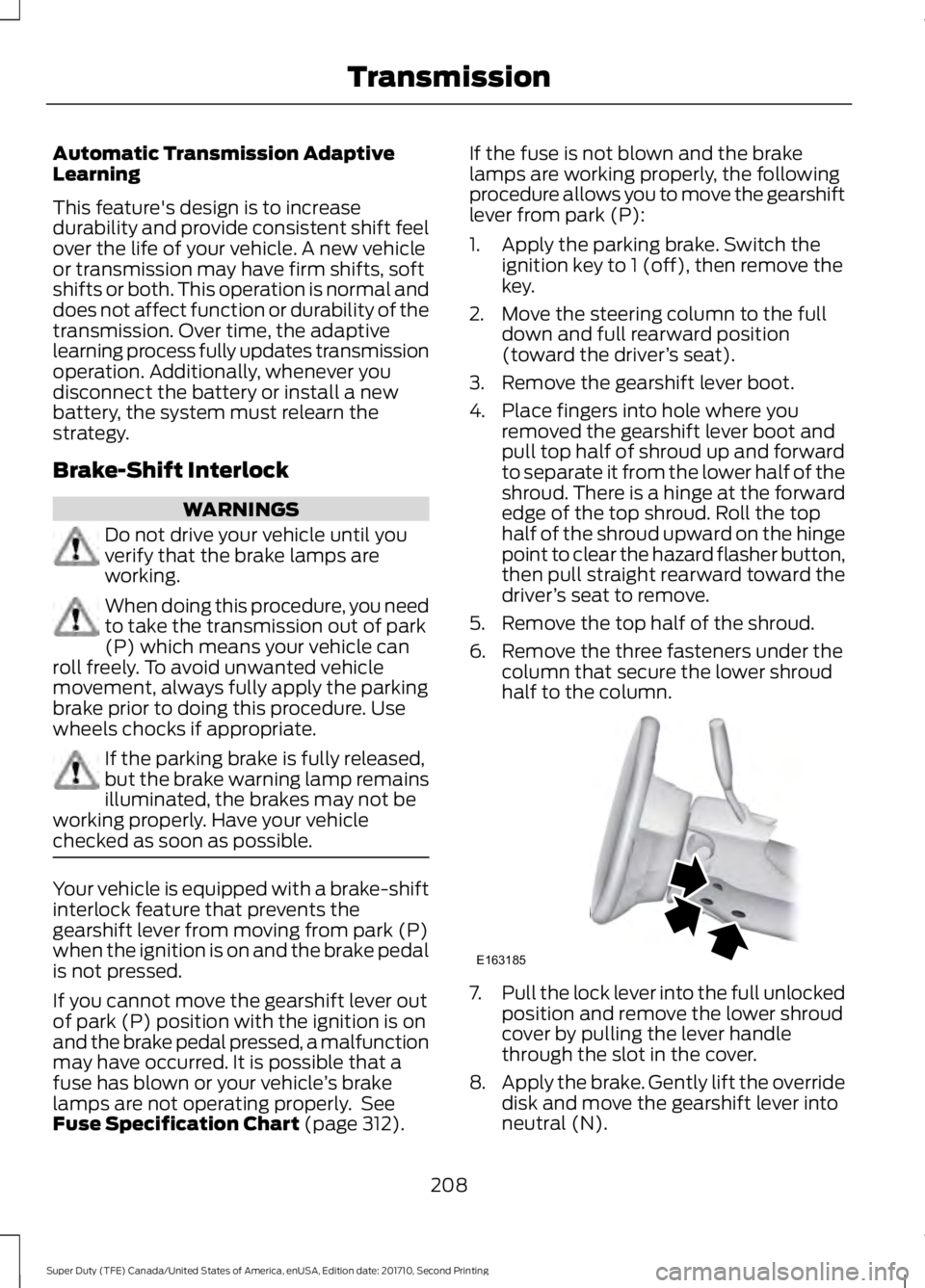
6. Remove the three fasteners under thecolumn that secure the lower shroudhalf to the column.
7.Pull the lock lever into the full unlockedposition and remove the lower shroudcover by pulling the lever handlethrough the slot in the cover.
8.Apply the brake. Gently lift the overridedisk and move the gearshift lever intoneutral (N).
208
Super Duty (TFE) Canada/United States of America, enUSA, Edition date: 201710, Second Printing
TransmissionE163185
Page 254 of 642
The system uses radar sensors that arelocated inside the tail lamp on each sideof your vehicle. Any dirt, mud and snow infront of the sensors or driving in heavy raincan cause system degradation. Also, othertypes of obstructions in front of the sensorcan cause system degradation. This isreferred to as a ‘blocked’ condition.
Note:Do not apply bumper stickers and/orrepair compound to these areas, this cancause degraded system performance.
If the system detects a degradedperformance condition, a message warningappears in the display screen. The alertindicators remain ON and the system willno longer provides any warnings. You canclear the warning but the alert indicatorsremain illuminated.
A "blocked" condition can be cleared intwo ways:
•After the blockage in front of thesensors is removed or therainfall/snowfall rate decreases orstops, drive for a few minutes in trafficto allow the sensors to detect passingvehicles.
•By cycling the ignition from ON to OFFand then back ON.
Note:If your vehicle has a tow bar with afactory equipped trailer tow module and itis towing a trailer, the sensors willautomatically turn the Blind SpotInformation System off. If your vehicle hasa tow bar but no factory equipped trailertow module, it is recommended to turn theBlind Spot Information System offmanually. Operating the Blind SpotInformation System without the Blind SpotTrailer Tow package and a trailer attachedwill cause poor system performance.
Blind Spot Information Systemwith Trailer Tow (If Equipped)
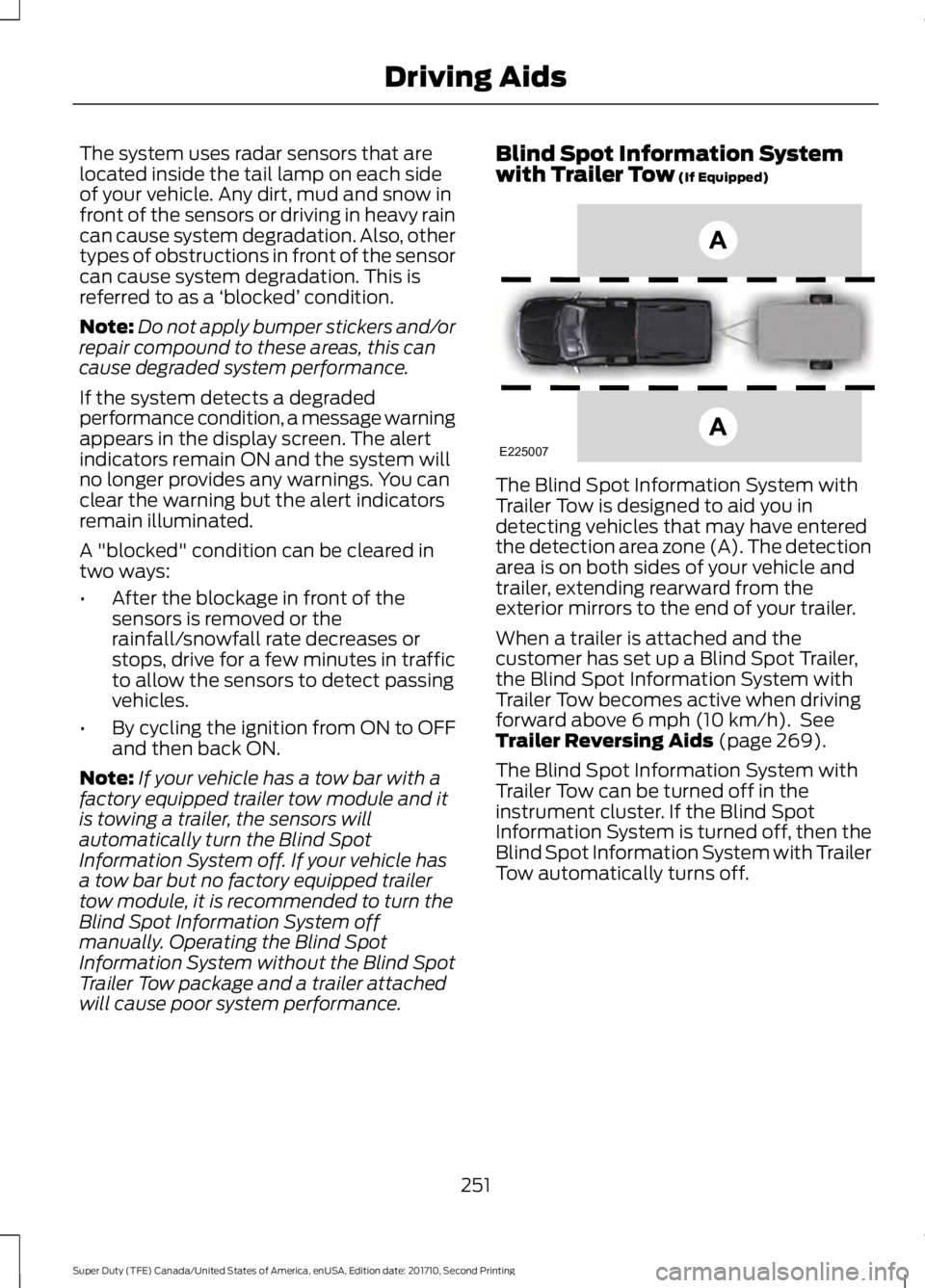
The Blind Spot Information System withTrailer Tow is designed to aid you indetecting vehicles that may have enteredthe detection area zone (A). The detectionarea is on both sides of your vehicle andtrailer, extending rearward from theexterior mirrors to the end of your trailer.
When a trailer is attached and thecustomer has set up a Blind Spot Trailer,the Blind Spot Information System withTrailer Tow becomes active when drivingforward above 6 mph (10 km/h). SeeTrailer Reversing Aids (page 269).
The Blind Spot Information System withTrailer Tow can be turned off in theinstrument cluster. If the Blind SpotInformation System is turned off, then theBlind Spot Information System with TrailerTow automatically turns off.
251
Super Duty (TFE) Canada/United States of America, enUSA, Edition date: 201710, Second Printing
Driving AidsE225007
Page 270 of 642
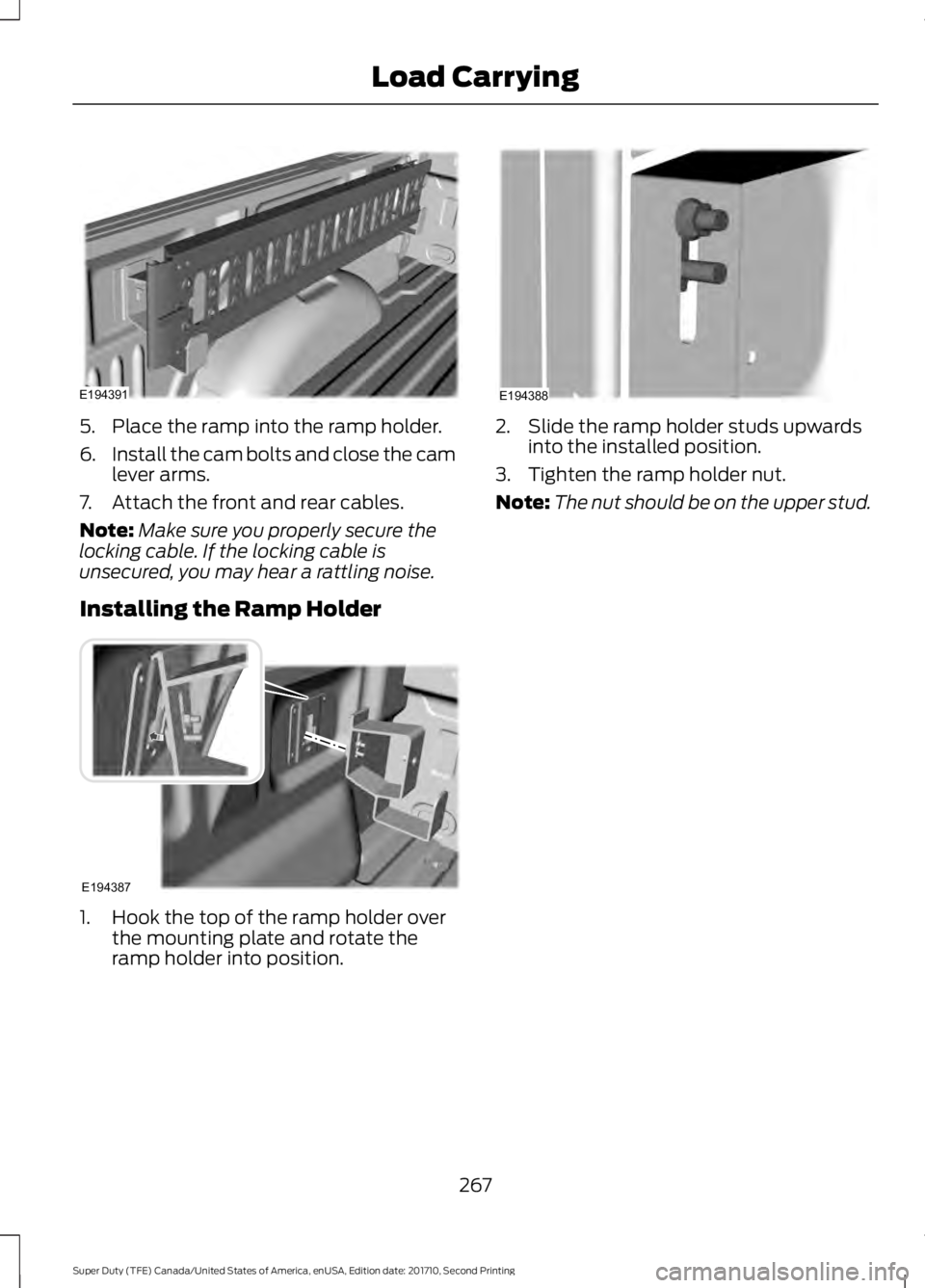
5. Place the ramp into the ramp holder.
6.Install the cam bolts and close the camlever arms.
7. Attach the front and rear cables.
Note:Make sure you properly secure thelocking cable. If the locking cable isunsecured, you may hear a rattling noise.
Installing the Ramp Holder
1. Hook the top of the ramp holder overthe mounting plate and rotate theramp holder into position.
2. Slide the ramp holder studs upwardsinto the installed position.
3. Tighten the ramp holder nut.
Note:The nut should be on the upper stud.
267
Super Duty (TFE) Canada/United States of America, enUSA, Edition date: 201710, Second Printing
Load CarryingE194391 E194387 E194388
Page 287 of 642
Once the trailer is level or slightly nosedown toward the vehicle:
•Lock the bar tension adjuster in place.
•Check that the trailer tongue securelyattaches and locks onto the hitch.
•Install safety chains, lighting, and trailerbrake controls as required by law or thetrailer manufacturer.
Fifth-wheel Trailer Hitch (If Equipped)
Note:The mounting pads in the bed arespecifically designed for certain fifth-wheeltrailer hitches and gooseneck ball hitches.Do not use these mounting pads for otherpurposes.
Note:Contact an authorized dealer topurchase gooseneck and fifth-wheel hitchesthat are compatible with your vehicle.
Your vehicle may be equipped with afifth-wheel prep package. This packageenables your vehicle to accept certainfifth-wheel trailer hitches and gooseneckball hitches. The fifth-wheel trailer hitchattaches to the four mounting pads in thepick-up bed. An optional 7-pin trailer wiringconnector may be in the bed as well. Thegooseneck ball hitch is a separatemounting pad from the fifth-wheel hitch,located in the center of the bed.
Shorter pick-up boxes, such as the 6½-footbox on the F-250 and F-350, provide lessclearance between the cab and thefifth-wheel and gooseneck trailercompared to longer box pick-ups, such asan 8-foot box on the F-250 or F-350. Whenselecting a trailer and tow vehicle, it iscritical to check that this combinationprovides clearance between the front ofthe trailer and tow vehicle for turns up to90 degrees. Failure to follow this
recommendation could result in the trailercontacting the cab of the tow vehicleduring tight turns that are typical duringlow-speed parking and turning maneuvers.This contact could result in damage to thetrailer and tow vehicle.
Safety Chains
Note:Do not attach safety chains to thebumper.
Always connect the safety chains to theframe or hook retainers of your vehiclehitch.
To connect the safety chains, cross thechains under the trailer tongue and allowenough slack for turning tight corners. Donot allow the chains to drag on the ground.
Trailer Brakes
WARNING
Do not connect a trailer's hydraulicbrake system directly to yourvehicle's brake system. Your vehiclemay not have enough braking power andyour chances of having a collision greatlyincrease.
Electric brakes and manual, automatic orsurge-type trailer brakes are safe if youinstall them properly and adjust them tothe manufacturer's specifications. Thetrailer brakes must meet local and federalregulations.
The rating for the tow vehicle's brakingsystem operation is at the gross vehicleweight rating, not the gross combinedweight rating.
Separate functioning brake systemsare required for safe control of towedvehicles and trailers weighing morethan 1500 pounds (680 kilograms)when loaded.
284
Super Duty (TFE) Canada/United States of America, enUSA, Edition date: 201710, Second Printing
Towing
Page 293 of 642
Four-wheel Drive Vehicles Equippedwith a Manual-shift Transfer Case
1. Put the transmission in neutral (N).
2. Put the transfer case in neutral (N).
3.Put the hub locks in the FREE position.Always make sure that both hub locksare set to the same position.
Four-wheel Drive Vehicles Equippedwith an Electronic-shift Transfer Case
Only tow a four-wheel drive vehicle thathas an electronic-shift transfer case withall wheels on the ground. To do this, placethe transfer case in its neutral position andengage the four-wheel-down towingfeature.
Perform the steps in the following sectionafter positioning your vehicle behind thetow vehicle and properly securing themtogether.
Note:Make sure you properly secure yourvehicle to the tow vehicle.
Four-wheel-down Towing
1. Put the ignition in the on position, butdo not start the engine. If your vehiclehas an ignition key, turn the key to on.If your vehicle has intelligent access,press the engine START/STOP buttononce without pressing the brake pedal.
2. Press and hold the brake pedal.
3. Rotate the four-wheel drive switch to2H.
4. Shift the transmission to neutral (N).
5. Rotate the four-wheel drive switchfrom 2H to 4L and back to 2H fivetimes within seven seconds.
Note:If completed successfully, theinformation display shows a messageindicating that your vehicle is safe to towwith all wheels on the ground.
Note:If you do not see the message in thedisplay, you must perform the procedureagain from the beginning.
Note:You may hear an audible noise as thetransfer case shifts into its neutral position.This is normal.
6. Leave the transmission in neutral (N)and turn the ignition as far as it will gotoward the off position (it will not turnfully off when the transmission is inneutral). If your vehicle has an ignitionkey, you must leave the key in theignition while towing. To lock andunlock your vehicle, use the keylessentry keypad or extra set of keys. If yourvehicle has intelligent access, press theengine START/STOP button oncewithout pressing the brake pedal. Youdo not need to leave your keys in thevehicle. You can lock and unlock yourvehicle as you normally do.
7. Release the brake pedal.
WARNINGS
Do not disconnect the battery duringrecreational towing. It prevents thetransfer case from shifting properlyand may cause the vehicle to roll, even ifthe transmission is in park (P).
Shifting the transfer case to itsneutral position for recreationaltowing may cause the vehicle to roll,even if the transmission is in park (P). Itmay injure the driver and others. Make sureyou press the foot brake and the vehicle isin a secure, safe position when you shift toneutral (N).
Note:Failing to put the transfer case in itsneutral position while towing with all fourwheels on the ground will damage vehiclecomponents.
290
Super Duty (TFE) Canada/United States of America, enUSA, Edition date: 201710, Second Printing
Towing
Page 294 of 642
Note:You can check four-wheel-downtowing status at any time by opening thedriver's door or turning the ignition to theaccessory or on position and verifying amessage displays in the cluster.
To exit four-wheel-down towing and returnthe transfer case to its 2H position:
1.With your vehicle still properly securedto the tow vehicle, put the ignition inthe on position, but do not start theengine. If your vehicle has an ignitionkey, switch the key to on. If your vehiclehas intelligent access, press the engineSTART/STOP button once withoutpressing the brake pedal.
2. Press and hold the brake pedal.
3. Shift the transmission out of neutral(N) and into any other gear.
4. Release the brake pedal.
Note:If completed successfully, the 2Hindicator light illuminates and aconfirmation message displays in theinstrument cluster.
Note:If the indicator light and message donot display, you must perform the procedureagain from the beginning.
Note:You may hear an audible noise as thetransfer case shifts out of its neutralposition. This is normal.
Note:If a message displays in theinstrument cluster stating there is a shiftdelay, transfer case gear tooth blockagemay be present. See Resolving the ShiftDelay Issue after this section.
5.Apply the parking brake and disconnectthe vehicle from the tow vehicle.
6. Release the parking brake, start theengine and shift the transmission todrive (D) to make sure the transfercase is out of neutral (N).
7. If the transfer case does notsuccessfully shift out of neutral (N),set the parking brake until you can haveyour vehicle serviced.
Resolving the Shift Delay Issue
If the instrument cluster displays a shiftdelay message, See InformationMessages (page 128). You need toperform the following steps:
1. Press and hold the brake pedal.
2. Put the transmission into neutral (N),and then start the engine.
3. With the engine running, shift thetransmission to drive (D) and let thevehicle roll forward, up to 3 ft (1 m).You may hear an audible noise as thetransfer case shifts out of its neutralposition. This is normal.
4. When the issue is resolved, theinstrument cluster displays a messagestating neutral tow is disabled.
291
Super Duty (TFE) Canada/United States of America, enUSA, Edition date: 201710, Second Printing
Towing
Page 296 of 642
•Fuel economy may decrease with lowertemperatures during the first 8–10miles (12–16 kilometers) of driving.
•Driving on flat terrain offers improvedfuel economy as compared to drivingon hilly terrain.
•Transmissions give their best fueleconomy when operated in the topcruise gear and with steady pressureon the gas pedal.
•Four-wheel-drive operation (ifequipped) is less fuel efficient thantwo-wheel-drive operation.
•Close the windows for high-speeddriving.
DRIVING THROUGH WATER
WARNING
Do not drive through flowing or deepwater as you may lose control of yourvehicle.
Note:Driving through standing water cancause vehicle damage.
Note:Engine damage can occur if waterenters the air filter.
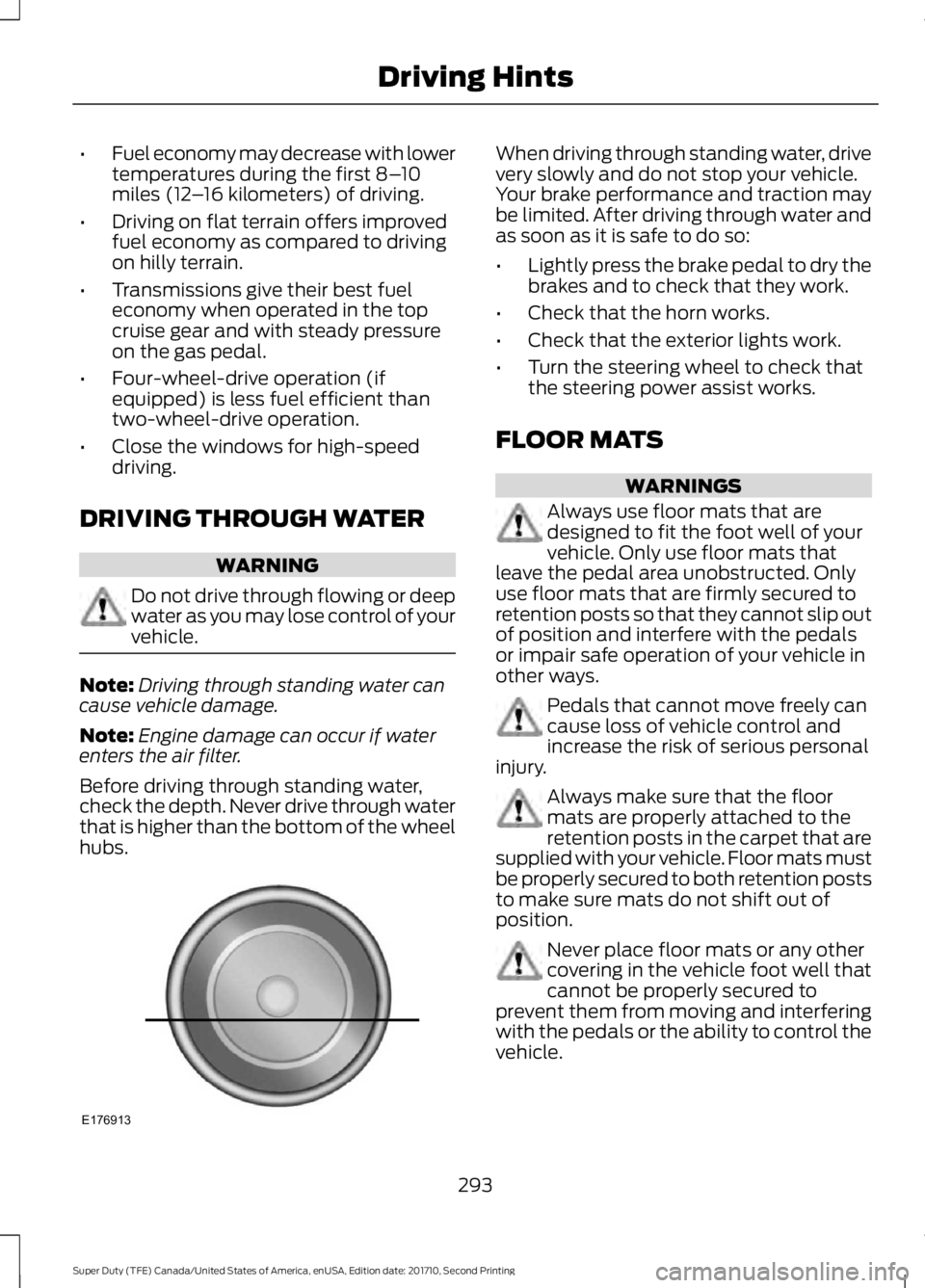
Before driving through standing water,check the depth. Never drive through waterthat is higher than the bottom of the wheelhubs.
When driving through standing water, drivevery slowly and do not stop your vehicle.Your brake performance and traction maybe limited. After driving through water andas soon as it is safe to do so:
•Lightly press the brake pedal to dry thebrakes and to check that they work.
•Check that the horn works.
•Check that the exterior lights work.
•Turn the steering wheel to check thatthe steering power assist works.
FLOOR MATS
WARNINGS
Always use floor mats that aredesigned to fit the foot well of yourvehicle. Only use floor mats thatleave the pedal area unobstructed. Onlyuse floor mats that are firmly secured toretention posts so that they cannot slip outof position and interfere with the pedalsor impair safe operation of your vehicle inother ways.
Pedals that cannot move freely cancause loss of vehicle control andincrease the risk of serious personalinjury.
Always make sure that the floormats are properly attached to theretention posts in the carpet that aresupplied with your vehicle. Floor mats mustbe properly secured to both retention poststo make sure mats do not shift out ofposition.
Never place floor mats or any othercovering in the vehicle foot well thatcannot be properly secured toprevent them from moving and interferingwith the pedals or the ability to control thevehicle.
293
Super Duty (TFE) Canada/United States of America, enUSA, Edition date: 201710, Second Printing
Driving HintsE176913