reset FORD F450 SUPER DUTY 2017 User Guide
[x] Cancel search | Manufacturer: FORD, Model Year: 2017, Model line: F450 SUPER DUTY, Model: FORD F450 SUPER DUTY 2017Pages: 642, PDF Size: 12.35 MB
Page 117 of 642
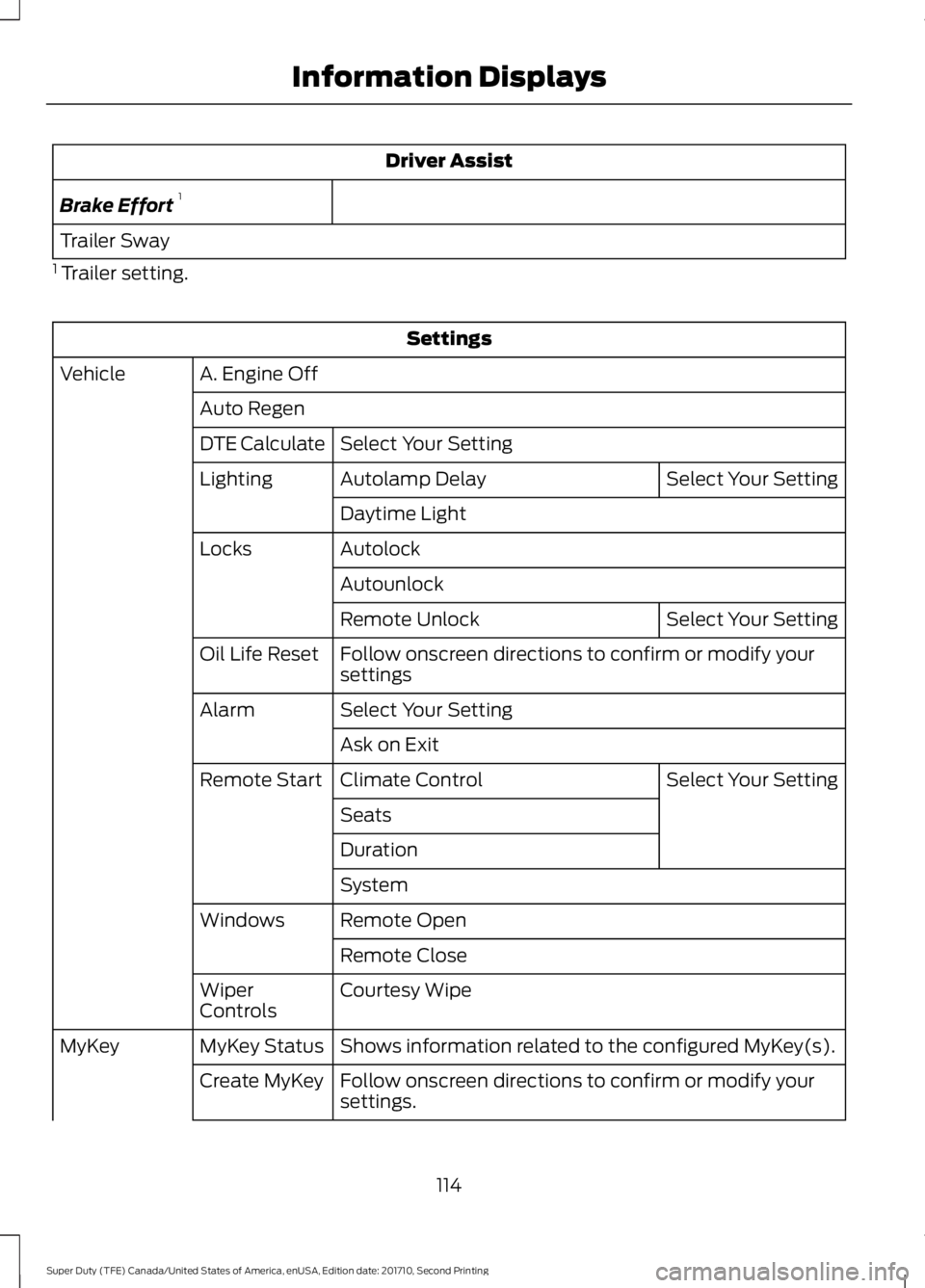
Driver Assist
Brake Effort1
Trailer Sway
1 Trailer setting.
Settings
A. Engine OffVehicle
Auto Regen
Select Your SettingDTE Calculate
Select Your SettingAutolamp DelayLighting
Daytime Light
AutolockLocks
Autounlock
Select Your SettingRemote Unlock
Follow onscreen directions to confirm or modify yoursettingsOil Life Reset
Select Your SettingAlarm
Ask on Exit
Select Your SettingClimate ControlRemote Start
Seats
Duration
System
Remote OpenWindows
Remote Close
Courtesy WipeWiperControls
Shows information related to the configured MyKey(s).MyKey StatusMyKey
Follow onscreen directions to confirm or modify yoursettings.Create MyKey
114
Super Duty (TFE) Canada/United States of America, enUSA, Edition date: 201710, Second Printing
Information Displays
Page 120 of 642
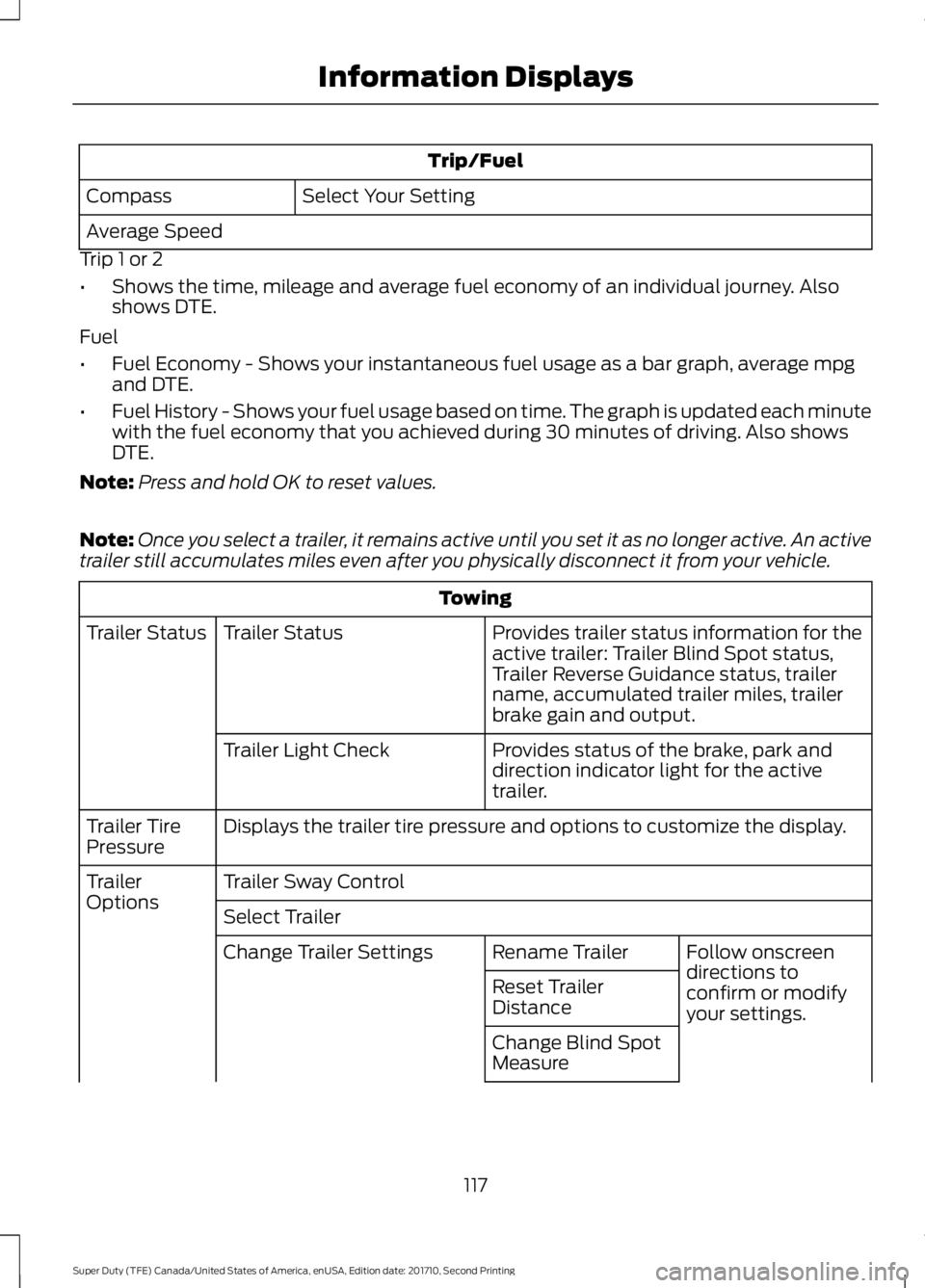
Trip/Fuel
Select Your SettingCompass
Average Speed
Trip 1 or 2
•Shows the time, mileage and average fuel economy of an individual journey. Alsoshows DTE.
Fuel
•Fuel Economy - Shows your instantaneous fuel usage as a bar graph, average mpgand DTE.
•Fuel History - Shows your fuel usage based on time. The graph is updated each minutewith the fuel economy that you achieved during 30 minutes of driving. Also showsDTE.
Note:Press and hold OK to reset values.
Note:Once you select a trailer, it remains active until you set it as no longer active. An activetrailer still accumulates miles even after you physically disconnect it from your vehicle.
Towing
Provides trailer status information for theactive trailer: Trailer Blind Spot status,Trailer Reverse Guidance status, trailername, accumulated trailer miles, trailerbrake gain and output.
Trailer StatusTrailer Status
Provides status of the brake, park anddirection indicator light for the activetrailer.
Trailer Light Check
Displays the trailer tire pressure and options to customize the display.Trailer TirePressure
Trailer Sway ControlTrailerOptionsSelect Trailer
Follow onscreendirections toconfirm or modifyyour settings.
Rename TrailerChange Trailer Settings
Reset TrailerDistance
Change Blind SpotMeasure
117
Super Duty (TFE) Canada/United States of America, enUSA, Edition date: 201710, Second Printing
Information Displays
Page 122 of 642
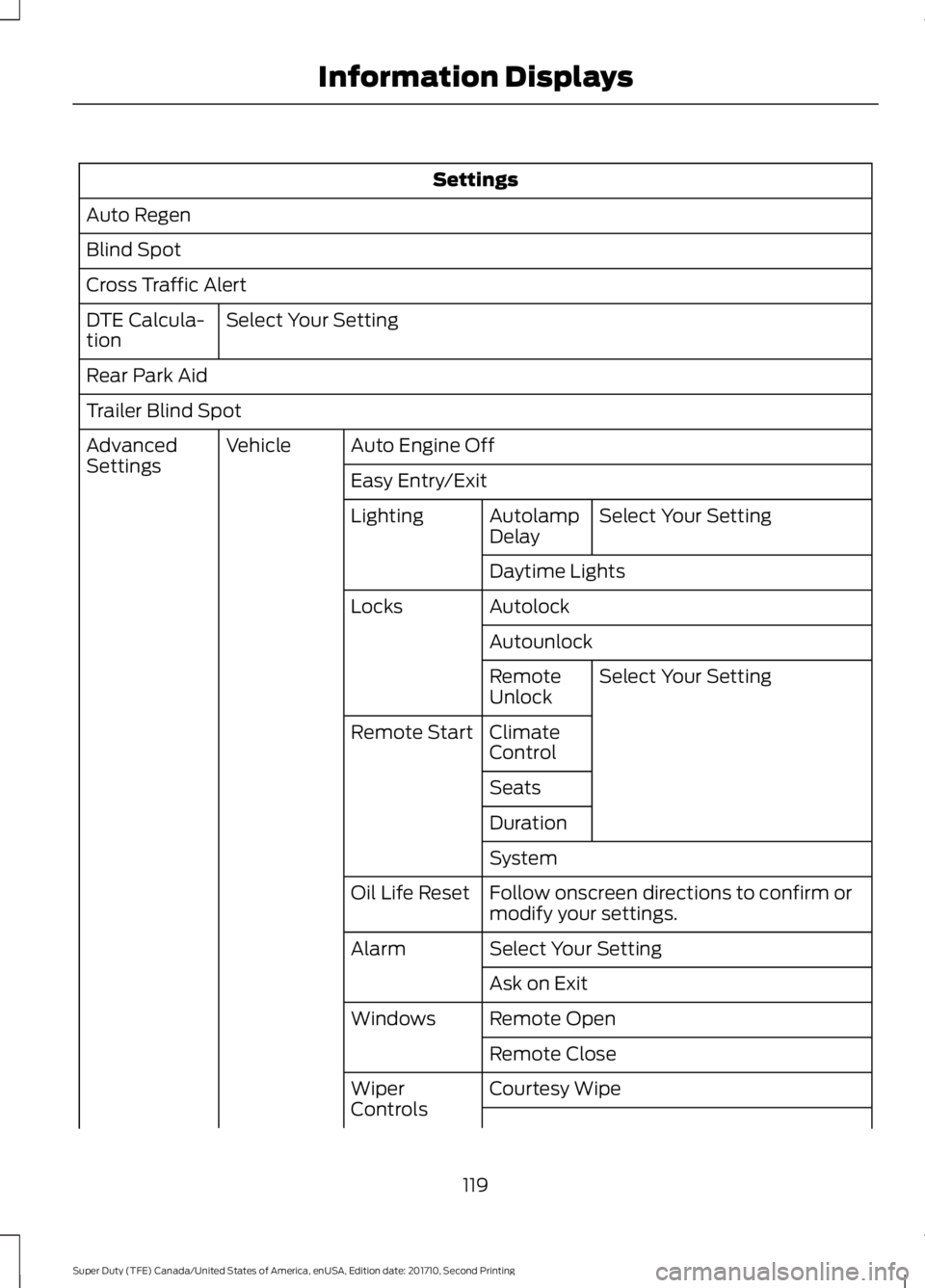
Settings
Auto Regen
Blind Spot
Cross Traffic Alert
Select Your SettingDTE Calcula-tion
Rear Park Aid
Trailer Blind Spot
Auto Engine OffVehicleAdvancedSettingsEasy Entry/Exit
Select Your SettingAutolampDelayLighting
Daytime Lights
AutolockLocks
Autounlock
Select Your SettingRemoteUnlock
ClimateControlRemote Start
Seats
Duration
System
Follow onscreen directions to confirm ormodify your settings.Oil Life Reset
Select Your SettingAlarm
Ask on Exit
Remote OpenWindows
Remote Close
Courtesy WipeWiperControls
119
Super Duty (TFE) Canada/United States of America, enUSA, Edition date: 201710, Second Printing
Information Displays
Page 128 of 642
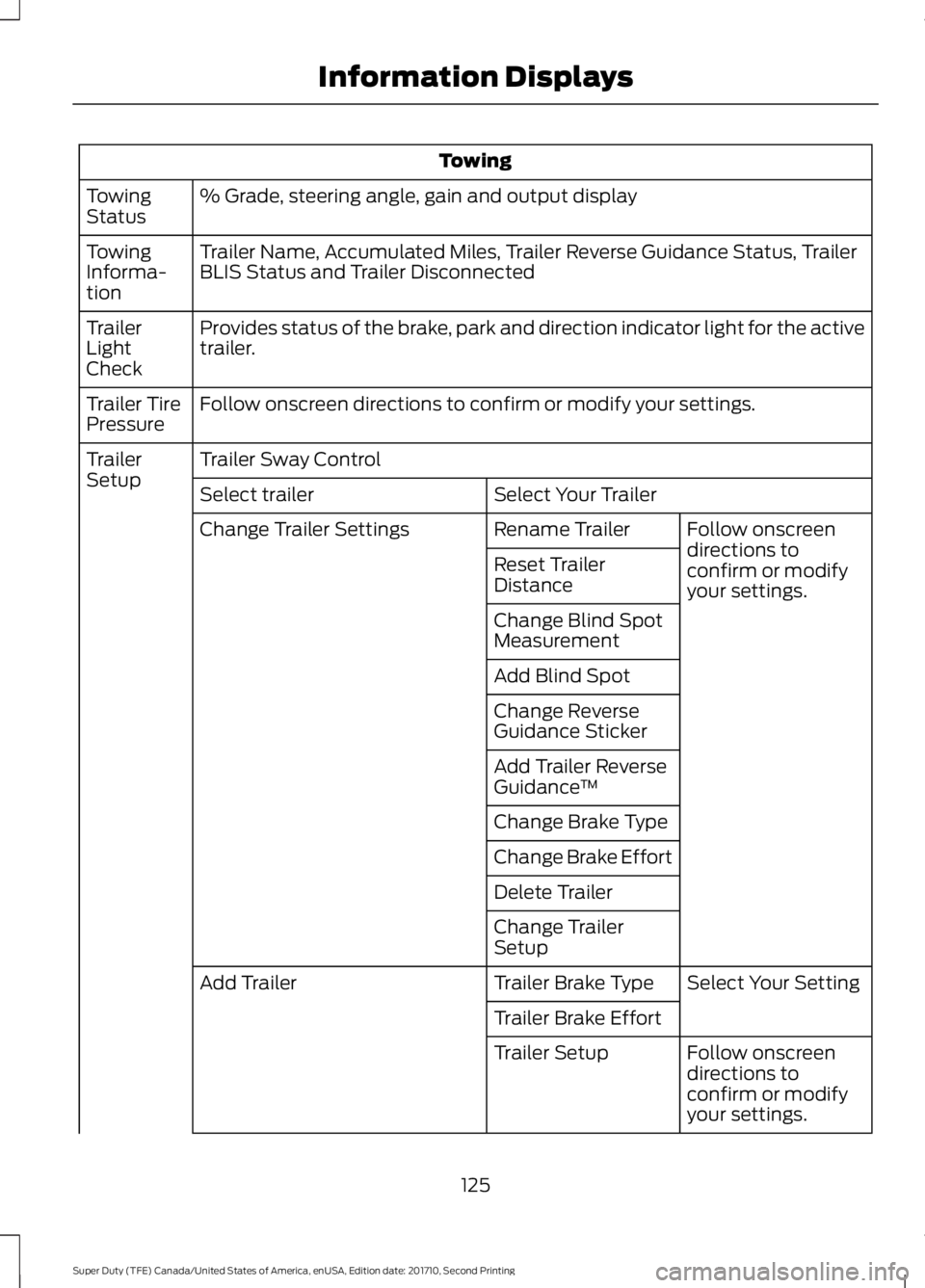
Towing
% Grade, steering angle, gain and output displayTowingStatus
Trailer Name, Accumulated Miles, Trailer Reverse Guidance Status, TrailerBLIS Status and Trailer DisconnectedTowingInforma-tion
Provides status of the brake, park and direction indicator light for the activetrailer.TrailerLightCheck
Follow onscreen directions to confirm or modify your settings.Trailer TirePressure
Trailer Sway ControlTrailerSetupSelect Your TrailerSelect trailer
Follow onscreendirections toconfirm or modifyyour settings.
Rename TrailerChange Trailer Settings
Reset TrailerDistance
Change Blind SpotMeasurement
Add Blind Spot
Change ReverseGuidance Sticker
Add Trailer ReverseGuidance™
Change Brake Type
Change Brake Effort
Delete Trailer
Change TrailerSetup
Select Your SettingTrailer Brake TypeAdd Trailer
Trailer Brake Effort
Follow onscreendirections toconfirm or modifyyour settings.
Trailer Setup
125
Super Duty (TFE) Canada/United States of America, enUSA, Edition date: 201710, Second Printing
Information Displays
Page 130 of 642
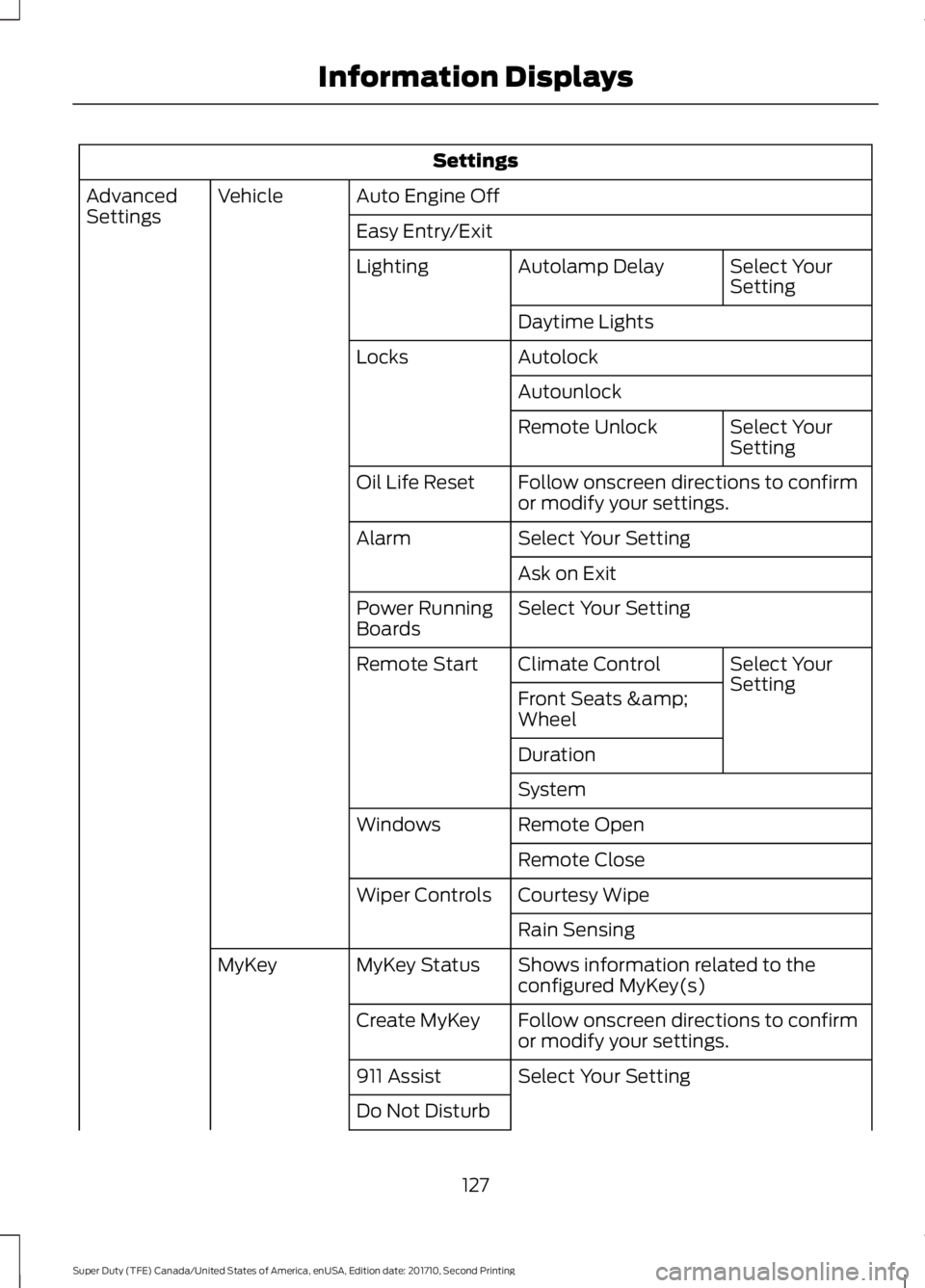
Settings
Auto Engine OffVehicleAdvancedSettingsEasy Entry/Exit
Select YourSettingAutolamp DelayLighting
Daytime Lights
AutolockLocks
Autounlock
Select YourSettingRemote Unlock
Follow onscreen directions to confirmor modify your settings.Oil Life Reset
Select Your SettingAlarm
Ask on Exit
Select Your SettingPower RunningBoards
Select YourSettingClimate ControlRemote Start
Front Seats &Wheel
Duration
System
Remote OpenWindows
Remote Close
Courtesy WipeWiper Controls
Rain Sensing
Shows information related to theconfigured MyKey(s)MyKey StatusMyKey
Follow onscreen directions to confirmor modify your settings.Create MyKey
Select Your Setting911 Assist
Do Not Disturb
127
Super Duty (TFE) Canada/United States of America, enUSA, Edition date: 201710, Second Printing
Information Displays
Page 156 of 642
WARNINGS
Install the head restraint properly tohelp minimize the risk of neck injuryin the event of a crash.
Note:Adjust the seatback to an uprightdriving position before adjusting the headrestraint. Adjust the head restraint so thatthe top of it is level with the top of your headand as far forward as possible. Make surethat you remain comfortable. If you areextremely tall, adjust the head restraint toits highest position.
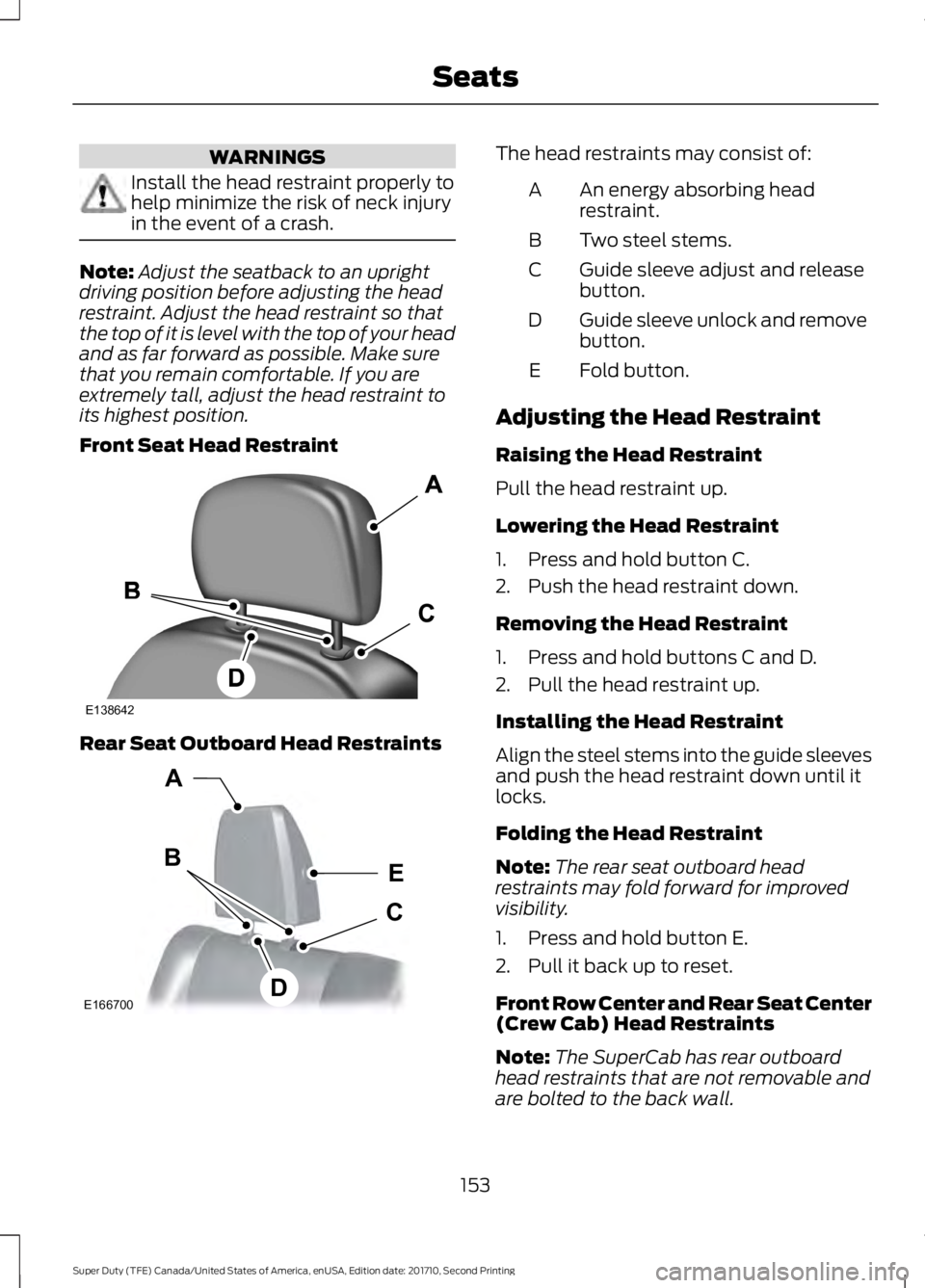
Front Seat Head Restraint
Rear Seat Outboard Head Restraints
The head restraints may consist of:
An energy absorbing headrestraint.A
Two steel stems.B
Guide sleeve adjust and releasebutton.C
Guide sleeve unlock and removebutton.D
Fold button.E
Adjusting the Head Restraint
Raising the Head Restraint
Pull the head restraint up.
Lowering the Head Restraint
1. Press and hold button C.
2. Push the head restraint down.
Removing the Head Restraint
1. Press and hold buttons C and D.
2. Pull the head restraint up.
Installing the Head Restraint
Align the steel stems into the guide sleevesand push the head restraint down until itlocks.
Folding the Head Restraint
Note:The rear seat outboard headrestraints may fold forward for improvedvisibility.
1. Press and hold button E.
2. Pull it back up to reset.
Front Row Center and Rear Seat Center(Crew Cab) Head Restraints
Note:The SuperCab has rear outboardhead restraints that are not removable andare bolted to the back wall.
153
Super Duty (TFE) Canada/United States of America, enUSA, Edition date: 201710, Second Printing
SeatsE138642 E166700
E
D
C
B
A
Page 161 of 642
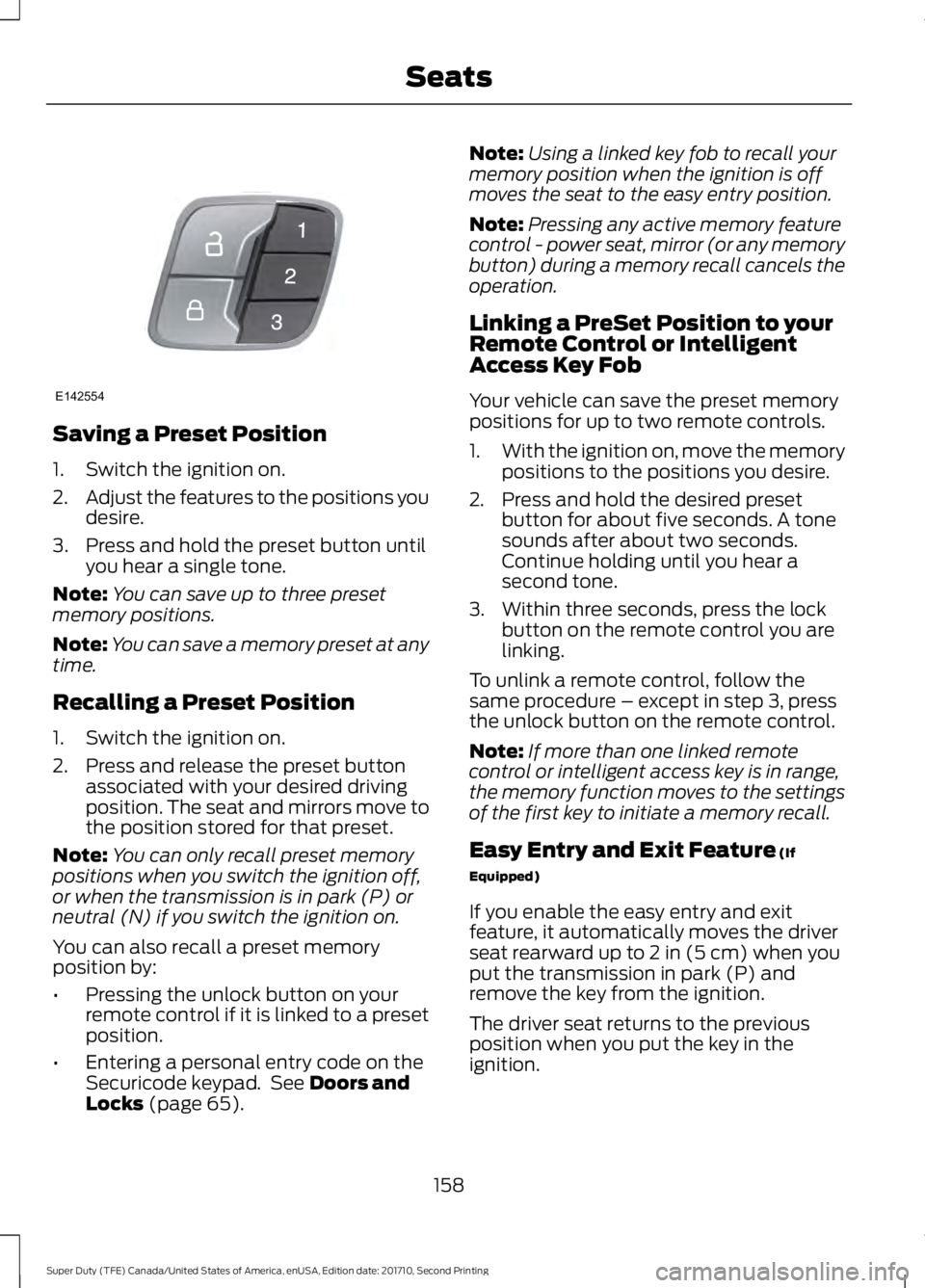
Saving a Preset Position
1. Switch the ignition on.
2.Adjust the features to the positions youdesire.
3. Press and hold the preset button untilyou hear a single tone.
Note:You can save up to three presetmemory positions.
Note:You can save a memory preset at anytime.
Recalling a Preset Position
1. Switch the ignition on.
2. Press and release the preset buttonassociated with your desired drivingposition. The seat and mirrors move tothe position stored for that preset.
Note:You can only recall preset memorypositions when you switch the ignition off,or when the transmission is in park (P) orneutral (N) if you switch the ignition on.
You can also recall a preset memoryposition by:
•Pressing the unlock button on yourremote control if it is linked to a presetposition.
•Entering a personal entry code on theSecuricode keypad. See Doors andLocks (page 65).
Note:Using a linked key fob to recall yourmemory position when the ignition is offmoves the seat to the easy entry position.
Note:Pressing any active memory featurecontrol - power seat, mirror (or any memorybutton) during a memory recall cancels theoperation.
Linking a PreSet Position to yourRemote Control or IntelligentAccess Key Fob
Your vehicle can save the preset memorypositions for up to two remote controls.
1.With the ignition on, move the memorypositions to the positions you desire.
2. Press and hold the desired presetbutton for about five seconds. A tonesounds after about two seconds.Continue holding until you hear asecond tone.
3. Within three seconds, press the lockbutton on the remote control you arelinking.
To unlink a remote control, follow thesame procedure – except in step 3, pressthe unlock button on the remote control.
Note:If more than one linked remotecontrol or intelligent access key is in range,the memory function moves to the settingsof the first key to initiate a memory recall.
Easy Entry and Exit Feature (If
Equipped)
If you enable the easy entry and exitfeature, it automatically moves the driverseat rearward up to 2 in (5 cm) when youput the transmission in park (P) andremove the key from the ignition.
The driver seat returns to the previousposition when you put the key in theignition.
158
Super Duty (TFE) Canada/United States of America, enUSA, Edition date: 201710, Second Printing
SeatsE142554
Page 164 of 642
Press the heated seat symbol to cyclethrough the various heat settings and off.More indicator lights indicate warmersettings.
The heated seat module resets at everyignition run cycle. While the ignition is inthe on position, press the heated seatswitch to enable heating mode. Whenactivated, they turn off automatically whenyou switch off the engine.
CLIMATE CONTROLLED SEATS
(If Equipped)
Heated Seats
WARNING
People who are unable to feel painto their skin because of advancedage, chronic illness, diabetes, spinalcord injury, medication, alcohol use,exhaustion or other physical conditions,must exercise care when using the heatedseat. The heated seat may cause burnseven at low temperatures, especially ifused for long periods of time. Do not placeanything on the seat that insulates againstheat, such as a blanket or cushion. Thismay cause the heated seat to overheat.Do not puncture the seat with pins, needlesor other pointed objects. This may damagethe heating element which may cause theheated seat to overheat. An overheatedseat may cause serious personal injury.
Do not do the following:
•Place heavy objects on the seat.
•Operate the heated seat if water or anyother liquid spills on the seat. Allow theseat to dry thoroughly.
Note:The engine must be running to usethis feature.
Press the heated seat symbol to cyclethrough the various heat settings and off.More indicator lights indicate warmersettings.
Note:The heated seats may remain onafter you remote start your vehicle, basedon your remote start settings. The heatedseats may also turn on when you start yourvehicle if they were on when you switchedyour vehicle off.
Note:After 60 minutes of operation, theheated seats switch off. Press the heatedseat symbol to switch the heated seats on.
Cooled Seats
Note:The engine must be running to usethis feature.
161
Super Duty (TFE) Canada/United States of America, enUSA, Edition date: 201710, Second Printing
SeatsE146322 E146322 E146309
Page 172 of 642
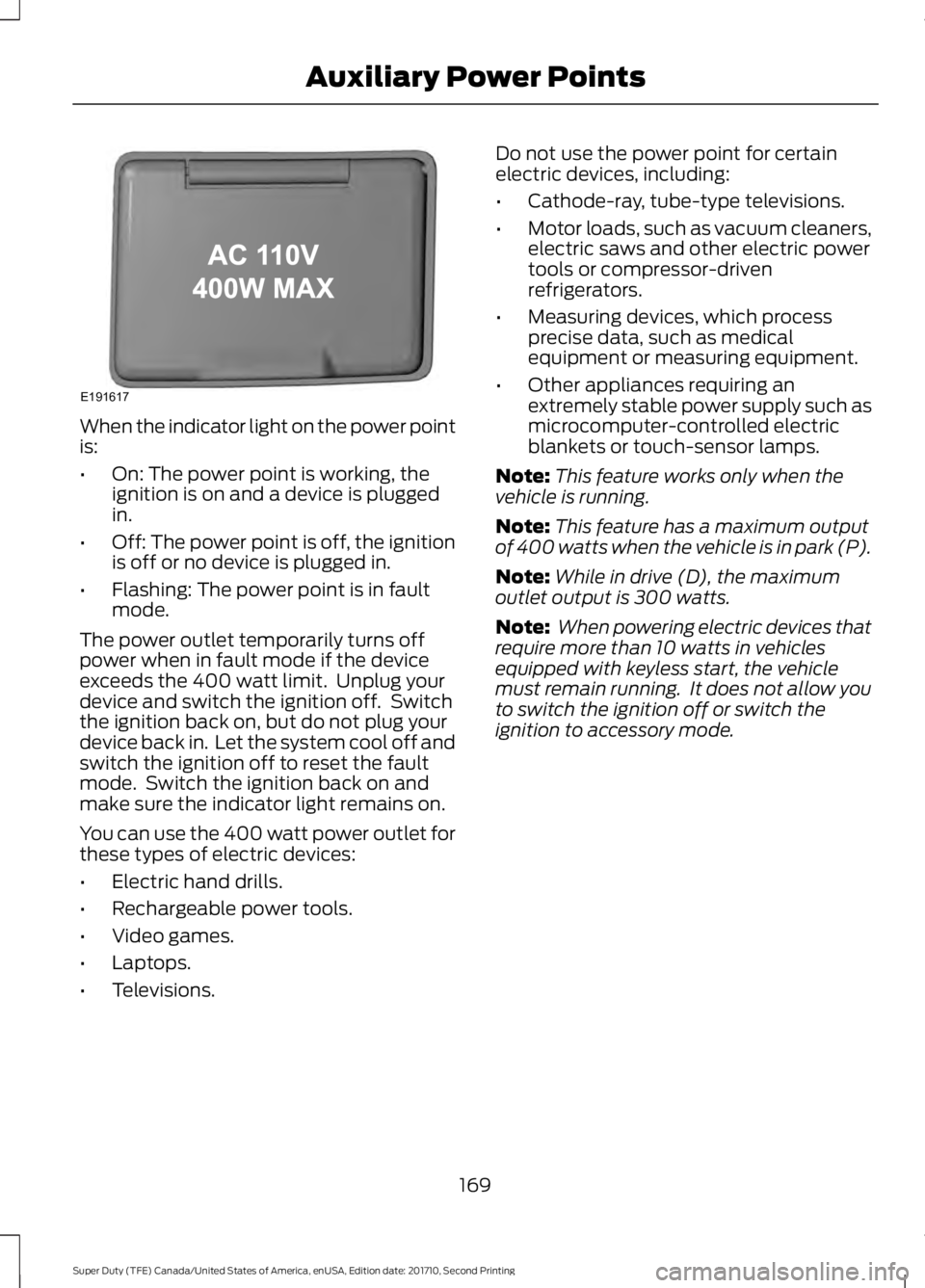
When the indicator light on the power pointis:
•On: The power point is working, theignition is on and a device is pluggedin.
•Off: The power point is off, the ignitionis off or no device is plugged in.
•Flashing: The power point is in faultmode.
The power outlet temporarily turns offpower when in fault mode if the deviceexceeds the 400 watt limit. Unplug yourdevice and switch the ignition off. Switchthe ignition back on, but do not plug yourdevice back in. Let the system cool off andswitch the ignition off to reset the faultmode. Switch the ignition back on andmake sure the indicator light remains on.
You can use the 400 watt power outlet forthese types of electric devices:
•Electric hand drills.
•Rechargeable power tools.
•Video games.
•Laptops.
•Televisions.
Do not use the power point for certainelectric devices, including:
•Cathode-ray, tube-type televisions.
•Motor loads, such as vacuum cleaners,electric saws and other electric powertools or compressor-drivenrefrigerators.
•Measuring devices, which processprecise data, such as medicalequipment or measuring equipment.
•Other appliances requiring anextremely stable power supply such asmicrocomputer-controlled electricblankets or touch-sensor lamps.
Note:This feature works only when thevehicle is running.
Note:This feature has a maximum outputof 400 watts when the vehicle is in park (P).
Note:While in drive (D), the maximumoutlet output is 300 watts.
Note: When powering electric devices thatrequire more than 10 watts in vehiclesequipped with keyless start, the vehiclemust remain running. It does not allow youto switch the ignition off or switch theignition to accessory mode.
169
Super Duty (TFE) Canada/United States of America, enUSA, Edition date: 201710, Second Printing
Auxiliary Power PointsE191617
Page 180 of 642
sensor to determine how long the glowplugs stay energized. The required time forthe glow plugs to be energized decreasesas the coolant temperature, barometricpressure and environmental temperatureincrease.
Cold Weather Starting
WARNINGS
Do not use starting fluid, for exampleether, in the air intake system. Suchfluid could cause immediateexplosive damage to the engine andpossible personal injury.
Do not add gasoline, gasohol, alcoholor kerosene to diesel fuel. Thiscreates a serious fire hazard andcauses engine performance problems.
We recommend that the engine blockheater be used for starting when thetemperature is -9°F (-23°C) or colder. SeeEngine Block Heater (page 181).
When operating in cold weather, you mayuse Motorcraft® cetane improvers ornon-alcohol-based cetane improvers froma reputable manufacturer as needed.
Do not crank the engine for more than 10seconds as starter damage may occur. Ifthe engine does not start, switch theignition off and wait 30 seconds beforetrying again.
Switch the ignition on. Do notstart the engine until theglow-plug indicator turns off.
When the glow plug pre-heat indicatorturns off, turn the key to start. After youstart the engine, the glow plugs mayremain on for a period. If you do not startthe engine before the glow plug activationtime ends, you will need to reset the glowplugs by switching the ignition off. Afterthe engine starts, allow it to idle for about15 seconds. This protects the engine. Donot increase engine speed until the oilpressure gauge indicates normal pressure.
Cold Weather Operation
Note:Idling in cold weather does not heatthe engine to its normal operatingtemperature. Long periods of idling,especially in cold weather, can cause abuildup of deposits which can cause enginedamage.
Change to a lighter grade engine oil tomake starting easier under theseconditions. Refer to engine oilspecifications. See Capacities andSpecifications (page 427).
Diesel fuel is adjusted seasonally for coldtemperatures. Diesel fuel which has notbeen properly formulated for the ambientconditions may gel which can clog the fuelfilters. One indication that the fuel filter(s)may be clogged is if the engine starts, stallsafter a short time, and then does notrestart. If you have been using biodiesel,you may need to use a fuel with lowerbiodiesel content, try another brand, ordiscontinue using biodiesel. Do not usealcohol based additives to correct fuelgelling. This may result in damage to thefuel injectors and system. Use the properanti-gel and performance improvementproduct. See Capacities andSpecifications (page 427).
177
Super Duty (TFE) Canada/United States of America, enUSA, Edition date: 201710, Second Printing
Starting and Stopping the Engine