reset FORD F450 SUPER DUTY 2017 Service Manual
[x] Cancel search | Manufacturer: FORD, Model Year: 2017, Model line: F450 SUPER DUTY, Model: FORD F450 SUPER DUTY 2017Pages: 642, PDF Size: 12.35 MB
Page 404 of 642
12.Turn the ignition off. If two short hornbeeps are heard, the reset procedurewas unsuccessful and you mustrepeat it. If after repeating theprocedure and two short beeps areheard when the ignition is turned tooff, seek assistance from yourauthorized dealer.
13.Set all four tires to the recommendedair pressure as indicated on theSafety Compliance CertificationLabel (affixed to either the door hingepillar, door-latch post, or the dooredge that meets the door-latch post,next to the driver's seating position)or Tire Label located on the B-Pillaror the edge of the driver's door.
Trailer Tire Pressure MonitoringSystem (If Equipped)
Note:Additional equipment may berequired for your vehicle to support trailertire pressure monitoring. See your authorizeddealer for more information.
Note:The trailer tire pressure monitoringsystem is not a substitute for proper tiremaintenance. It is your responsibility tomaintain correct tire pressures at all times.
Note:If a trailer tire is repaired, replaced orbroken down for service, the screw and valveon the trailer tire pressure sensor should bereplaced. See your authorized dealer fordetails.
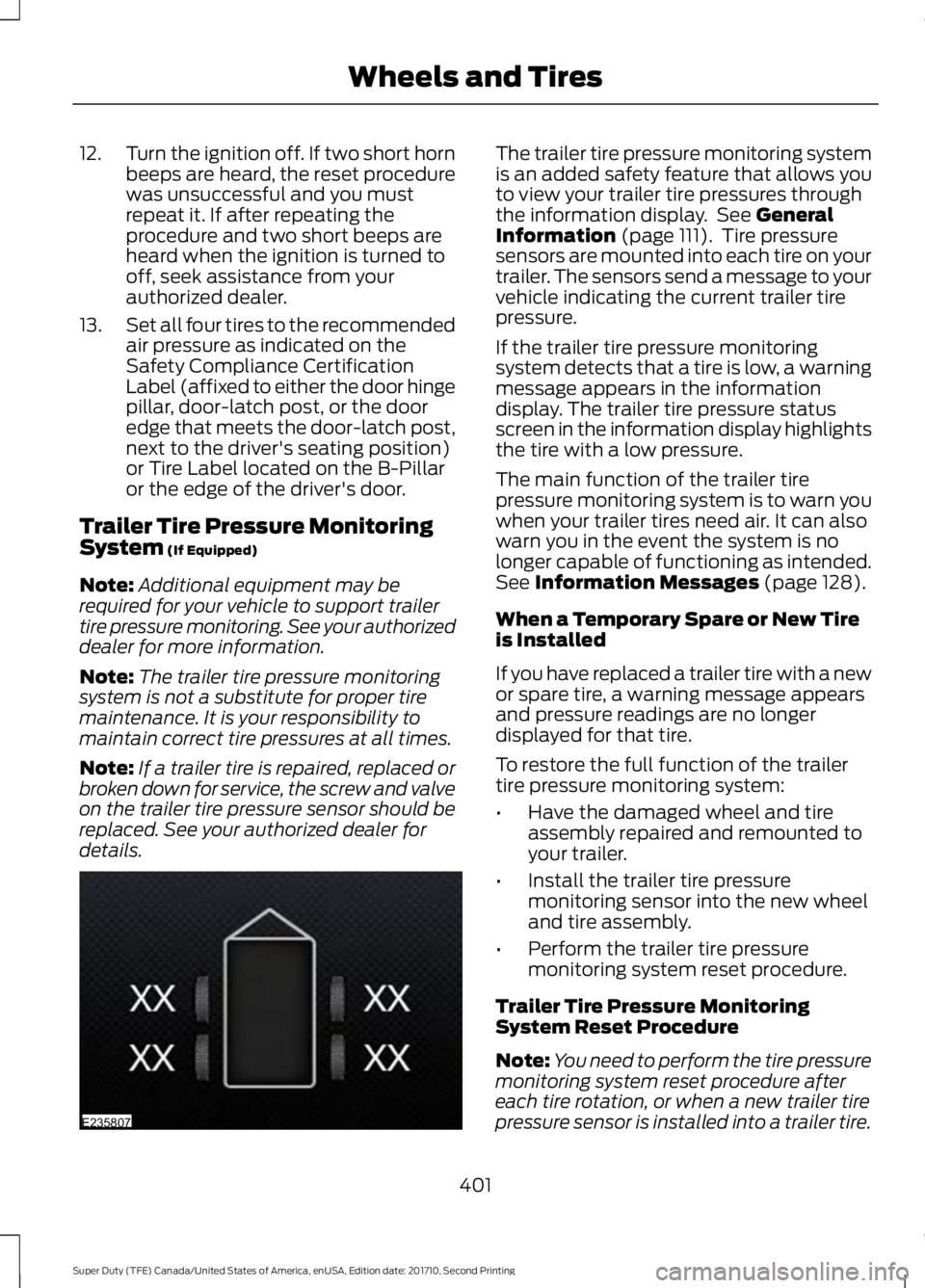
The trailer tire pressure monitoring systemis an added safety feature that allows youto view your trailer tire pressures throughthe information display. See GeneralInformation (page 111). Tire pressuresensors are mounted into each tire on yourtrailer. The sensors send a message to yourvehicle indicating the current trailer tirepressure.
If the trailer tire pressure monitoringsystem detects that a tire is low, a warningmessage appears in the informationdisplay. The trailer tire pressure statusscreen in the information display highlightsthe tire with a low pressure.
The main function of the trailer tirepressure monitoring system is to warn youwhen your trailer tires need air. It can alsowarn you in the event the system is nolonger capable of functioning as intended.See Information Messages (page 128).
When a Temporary Spare or New Tireis Installed
If you have replaced a trailer tire with a newor spare tire, a warning message appearsand pressure readings are no longerdisplayed for that tire.
To restore the full function of the trailertire pressure monitoring system:
•Have the damaged wheel and tireassembly repaired and remounted toyour trailer.
•Install the trailer tire pressuremonitoring sensor into the new wheeland tire assembly.
•Perform the trailer tire pressuremonitoring system reset procedure.
Trailer Tire Pressure MonitoringSystem Reset Procedure
Note:You need to perform the tire pressuremonitoring system reset procedure aftereach tire rotation, or when a new trailer tirepressure sensor is installed into a trailer tire.
401
Super Duty (TFE) Canada/United States of America, enUSA, Edition date: 201710, Second Printing
Wheels and TiresE235807
Page 405 of 642
The trailer tire pressure monitoring systemcan be reset through the menu in theinformation display. See GeneralInformation (page 111). Performing thetrailer setup process also resets the trailertire pressure monitoring system.
CHANGING A ROAD WHEEL
WARNINGS
The use of tire sealant may damageyour tire pressure monitoring systemand should only be used in roadsideemergencies. If you must use a sealant, theFord Tire Mobility Kit sealant should beused. The tire pressure monitoring systemsensor and valve stem on the wheel mustbe replaced by an authorized dealer afteruse of the sealant.
If the tire pressure monitor sensorbecomes damaged, it will no longerfunction. See Tire PressureMonitoring System (page 394).
Note:If your vehicle is equipped with thetire pressure monitoring system, theindicator light will illuminate when the sparetire is in use. To restore the full function ofthe monitoring system, all road wheelsequipped with tire pressure monitoringsensors must be mounted on the vehicle.
If you get a flat tire while driving, do notapply the brake heavily. Instead, graduallydecrease your speed. Hold the steeringwheel firmly and slowly move to a safeplace on the side of the road.
If your vehicle is equipped with the tirepressure monitoring system, have a flatserviced by an authorized dealer in orderto prevent damage to the system sensors.See Tire Pressure Monitoring System(page 394). Replace the spare tire with aroad tire as soon as possible. Duringrepairing or replacing of the flat tire, havethe authorized dealer inspect the systemsensor for damage.
Dissimilar Spare Wheel and TireAssembly Information
WARNING
Failure to follow these guidelinescould result in an increased risk ofloss of vehicle control, injury or death.
If you have a dissimilar spare wheel andtire, then it is intended for temporary useonly. This means that if you need to use it,you should replace it as soon as possiblewith a road wheel and tire assembly thatis the same size and type as the road tiresand wheels that were originally providedby Ford. If the dissimilar spare tire or wheelis damaged, it should be replaced ratherthan repaired.
A dissimilar spare wheel and tire assemblyis defined as a spare wheel and tireassembly that is different in brand, size orappearance from the road tires and wheelsand can be one of three types:
1.T-type mini-spare: This spare tirebegins with the letter T for tire size andmay have Temporary Use Only molded inthe sidewall.
2.Full-size dissimilar spare with labelon wheel: This spare tire has a label onthe wheel that states: THIS WHEEL ANDTIRE ASSEMBLY FOR TEMPORARY USEONLY
When driving with one of the dissimilarspare tires listed above, do not:
402
Super Duty (TFE) Canada/United States of America, enUSA, Edition date: 201710, Second Printing
Wheels and Tires
Page 446 of 642
SOURCE: Press to access different audio modes, for example AM, FM.A
AUX: Press to access the AUX and SYNC features, it will also cancel the menuor list browsing.B
CLOCK: Press to display the clock.C
TUNE: Turn to search manually through the radio frequency band. The systemstops at the first station it finds in that direction.D
Seek, Fast Forward and Reverse: In radio mode, select a frequency bandand press either button. The system stops at the first station it finds in thatdirection. In CD mode, press to select the next or previous track. Press and holdto move quickly forward or backward through the current track.
E
MENU: Press to access different audio system features.F
Memory presets: Store your favorite radio stations. To store a radio station,tune to the station, then press and hold a preset button until sound returns.G
VOL and Power Press to switch the system ON AND OFF. Turn to adjust thevolume.H
AUDIO UNIT - VEHICLES WITH:
AM/FM/CD/SYNC
WARNING
Driving while distracted can result inloss of vehicle control, crash andinjury. We strongly recommend thatyou use extreme caution when using anydevice that may take your focus off theroad. Your primary responsibility is the safeoperation of your vehicle. We recommendagainst the use of any hand-held devicewhile driving and encourage the use ofvoice-operated systems when possible.Make sure you are aware of all applicablelocal laws that may affect the use ofelectronic devices while driving.
Note:Depending on your vehicle optionpackage, your system may look differentfrom what you see here.
443
Super Duty (TFE) Canada/United States of America, enUSA, Edition date: 201710, Second Printing
Audio System
Page 447 of 642
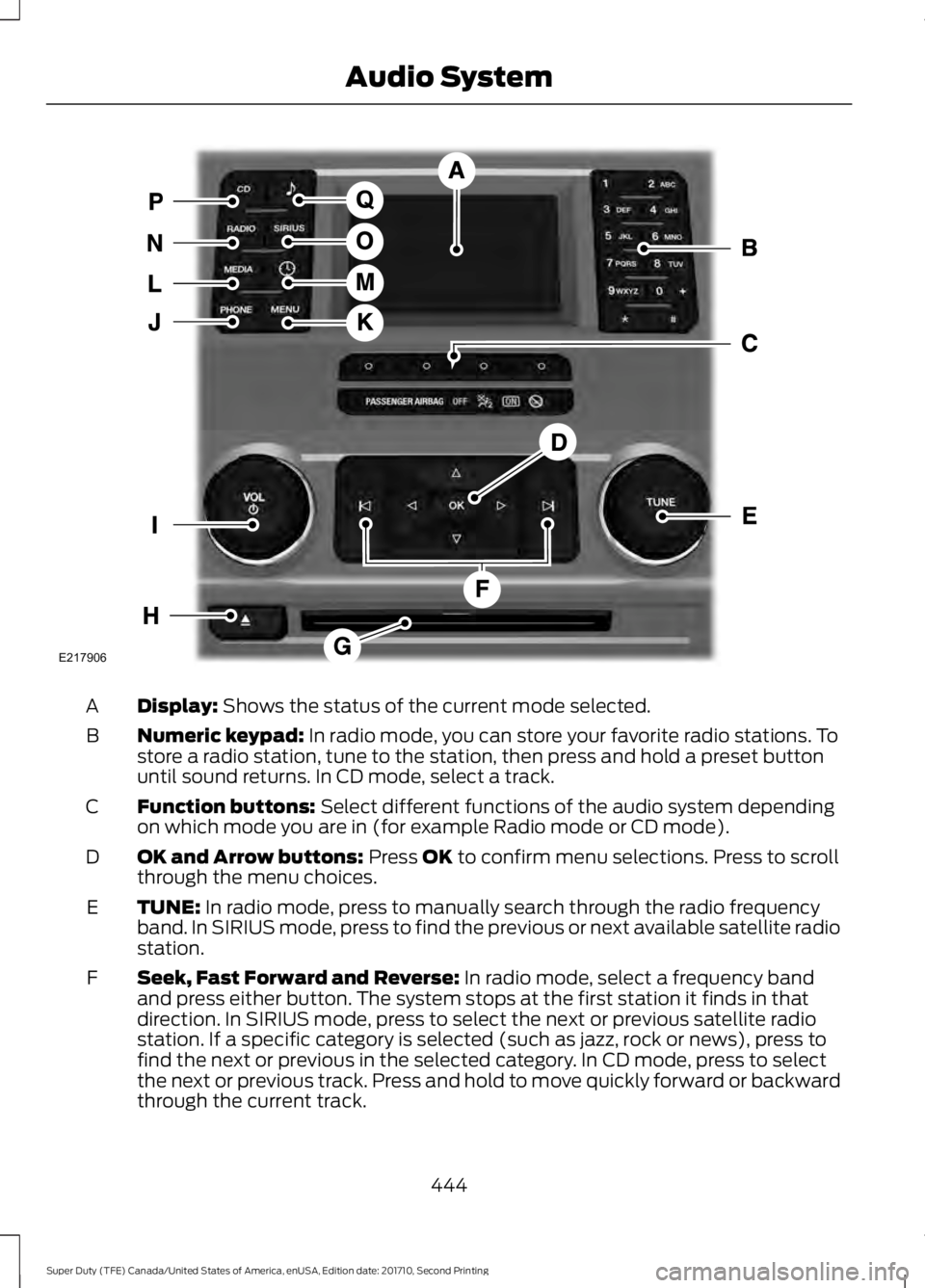
Display: Shows the status of the current mode selected.A
Numeric keypad: In radio mode, you can store your favorite radio stations. Tostore a radio station, tune to the station, then press and hold a preset buttonuntil sound returns. In CD mode, select a track.
B
Function buttons: Select different functions of the audio system dependingon which mode you are in (for example Radio mode or CD mode).C
OK and Arrow buttons: Press OK to confirm menu selections. Press to scrollthrough the menu choices.D
TUNE: In radio mode, press to manually search through the radio frequencyband. In SIRIUS mode, press to find the previous or next available satellite radiostation.
E
Seek, Fast Forward and Reverse: In radio mode, select a frequency bandand press either button. The system stops at the first station it finds in thatdirection. In SIRIUS mode, press to select the next or previous satellite radiostation. If a specific category is selected (such as jazz, rock or news), press tofind the next or previous in the selected category. In CD mode, press to selectthe next or previous track. Press and hold to move quickly forward or backwardthrough the current track.
F
444
Super Duty (TFE) Canada/United States of America, enUSA, Edition date: 201710, Second Printing
Audio SystemE217906
Page 451 of 642
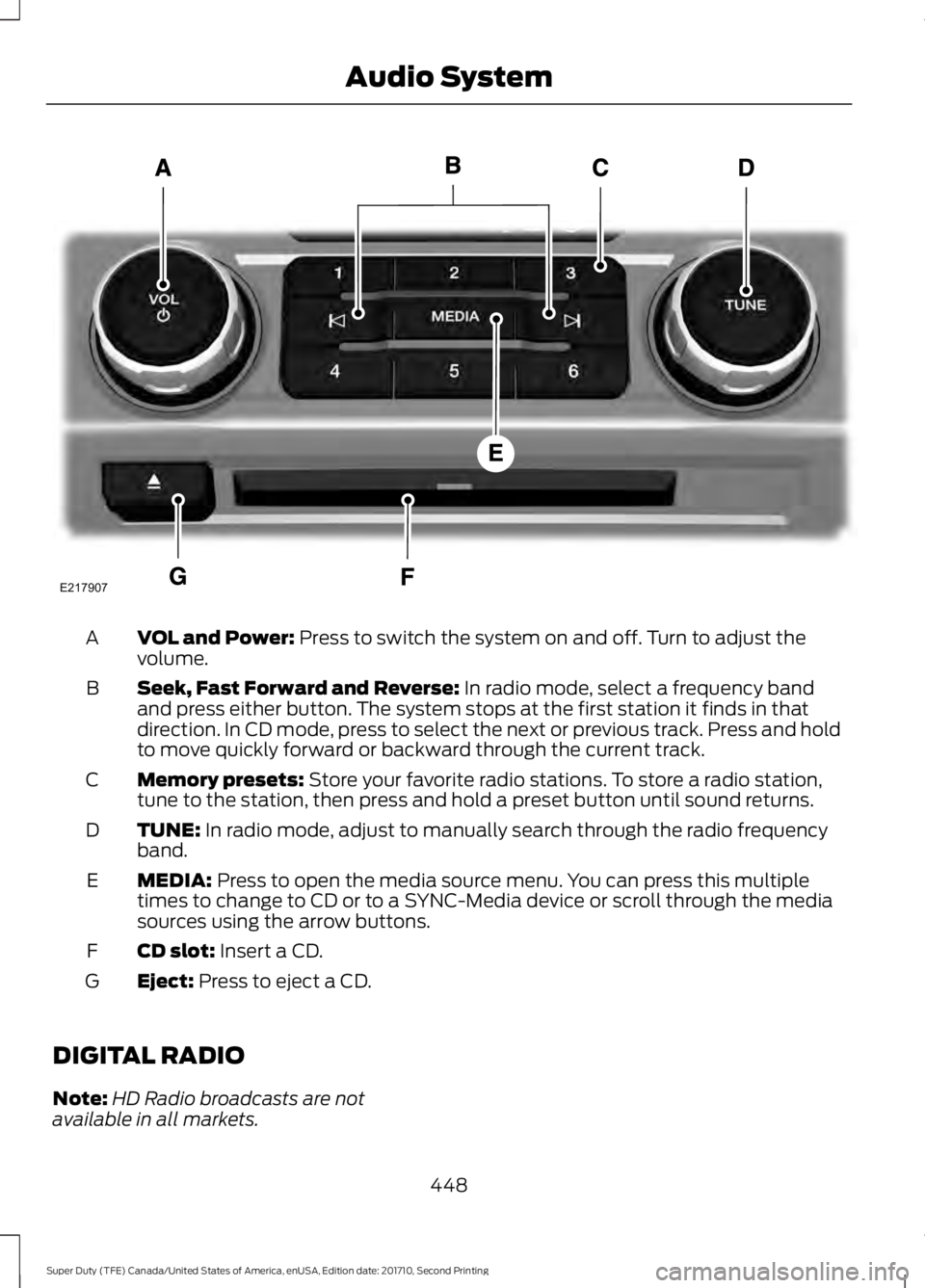
VOL and Power: Press to switch the system on and off. Turn to adjust thevolume.A
Seek, Fast Forward and Reverse: In radio mode, select a frequency bandand press either button. The system stops at the first station it finds in thatdirection. In CD mode, press to select the next or previous track. Press and holdto move quickly forward or backward through the current track.
B
Memory presets: Store your favorite radio stations. To store a radio station,tune to the station, then press and hold a preset button until sound returns.C
TUNE: In radio mode, adjust to manually search through the radio frequencyband.D
MEDIA: Press to open the media source menu. You can press this multipletimes to change to CD or to a SYNC-Media device or scroll through the mediasources using the arrow buttons.
E
CD slot: Insert a CD.F
Eject: Press to eject a CD.G
DIGITAL RADIO
Note:HD Radio broadcasts are notavailable in all markets.
448
Super Duty (TFE) Canada/United States of America, enUSA, Edition date: 201710, Second Printing
Audio SystemE217907
Page 452 of 642
HD Radio technology is the digitalevolution of analog AM/FM radio. Yoursystem has a special receiver that allowsit to receive digital broadcasts (whereavailable) in addition to the analogbroadcasts, it already receives. Digitalbroadcasts provide a better sound qualitythan analog broadcasts with free,crystal-clear audio and no static ordistortion. For more information, and aguide to available stations andprogramming, please visitwww.hdradio.com.
When HD Radio is on and you tune to astation broadcasting HD Radio technology,you may notice the HD Radio logo on yourscreen. When this logo is available, youmay also see Title and Artist fieldson-screen.
The multicast indicator appears in FMmode (only) if the current station isbroadcasting multiple digital broadcasts.The highlighted numbers signify availabledigital channels where new or differentcontent is available. HD1 signifies the mainprogramming status and is available inanalog and digital broadcasts. Othermulticast stations (HD2 through HD7) areonly available digitally.
When HD Radio broadcasts are active, youcan access the following functions:
•Scan allows you to hear a briefsampling of all available stations. Thisfeature still works when HD Radioreception is on, although it does notscan for HD2-HD7 channels. You maysee the HD logo appear if the stationhas a digital broadcast.
•Memory presets allow you to save anactive channel as a memory preset.Touch and hold a memory preset slotuntil the sound returns. There is a briefmute while the radio saves the station.Sound returns when finished. Whenswitching to an HD2 or HD3 memorypreset, the sound mutes before thedigital audio plays, because the systemhas to reacquire the digital signal.
Note:As with any saved radio station, youcannot access a station you save if yourvehicle is outside the station’s receptionarea.
449
Super Duty (TFE) Canada/United States of America, enUSA, Edition date: 201710, Second Printing
Audio System
Page 454 of 642
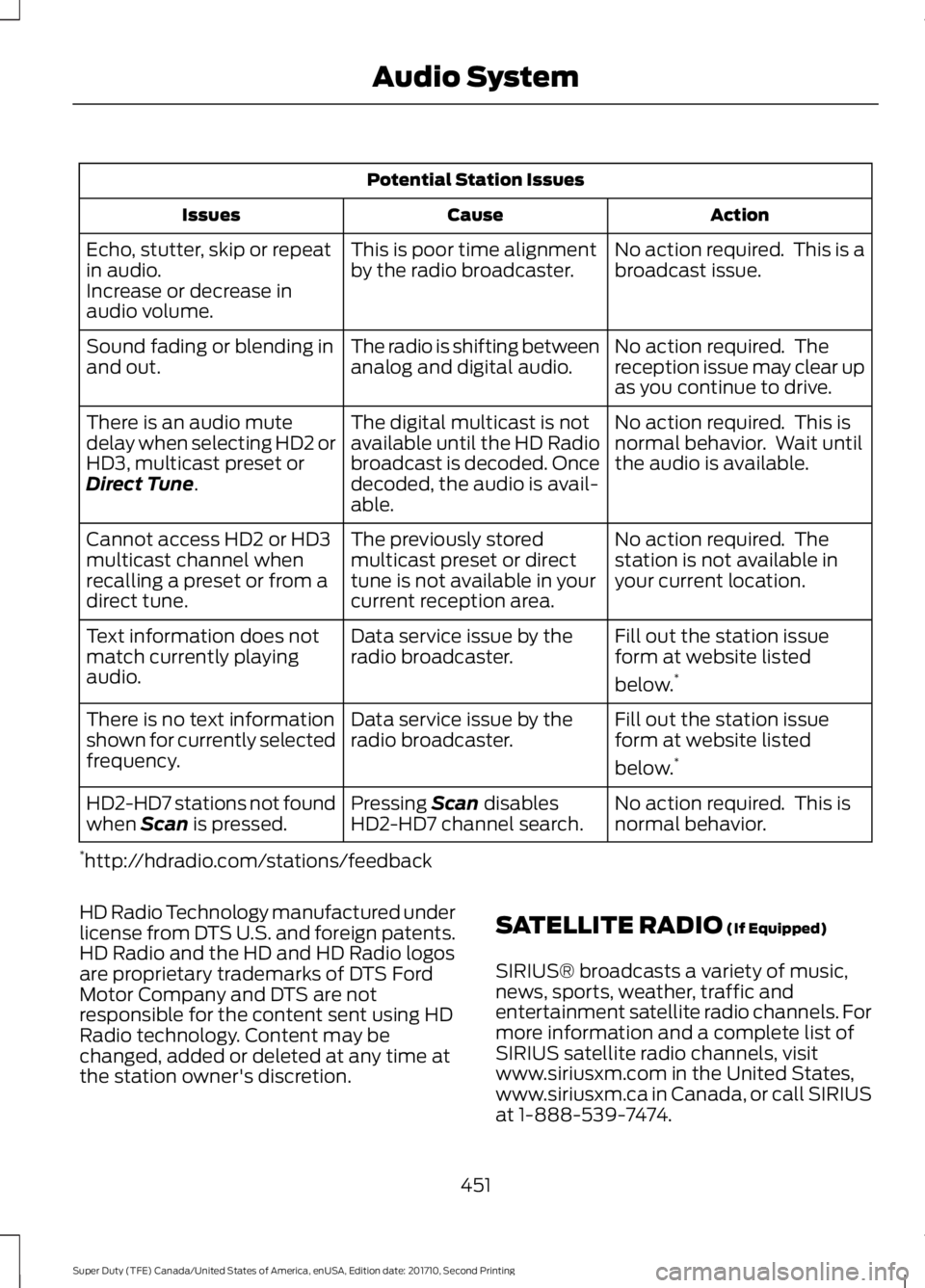
Potential Station Issues
ActionCauseIssues
No action required. This is abroadcast issue.This is poor time alignmentby the radio broadcaster.Echo, stutter, skip or repeatin audio.Increase or decrease inaudio volume.
No action required. Thereception issue may clear upas you continue to drive.
The radio is shifting betweenanalog and digital audio.Sound fading or blending inand out.
No action required. This isnormal behavior. Wait untilthe audio is available.
The digital multicast is notavailable until the HD Radiobroadcast is decoded. Oncedecoded, the audio is avail-able.
There is an audio mutedelay when selecting HD2 orHD3, multicast preset orDirect Tune.
No action required. Thestation is not available inyour current location.
The previously storedmulticast preset or directtune is not available in yourcurrent reception area.
Cannot access HD2 or HD3multicast channel whenrecalling a preset or from adirect tune.
Fill out the station issueform at website listed
below.*
Data service issue by theradio broadcaster.Text information does notmatch currently playingaudio.
Fill out the station issueform at website listed
below.*
Data service issue by theradio broadcaster.There is no text informationshown for currently selectedfrequency.
No action required. This isnormal behavior.Pressing Scan disablesHD2-HD7 channel search.HD2-HD7 stations not foundwhen Scan is pressed.
*http://hdradio.com/stations/feedback
HD Radio Technology manufactured underlicense from DTS U.S. and foreign patents.HD Radio and the HD and HD Radio logosare proprietary trademarks of DTS FordMotor Company and DTS are notresponsible for the content sent using HDRadio technology. Content may bechanged, added or deleted at any time atthe station owner's discretion.
SATELLITE RADIO (If Equipped)
SIRIUS® broadcasts a variety of music,news, sports, weather, traffic andentertainment satellite radio channels. Formore information and a complete list ofSIRIUS satellite radio channels, visitwww.siriusxm.com in the United States,www.siriusxm.ca in Canada, or call SIRIUSat 1-888-539-7474.
451
Super Duty (TFE) Canada/United States of America, enUSA, Edition date: 201710, Second Printing
Audio System
Page 456 of 642
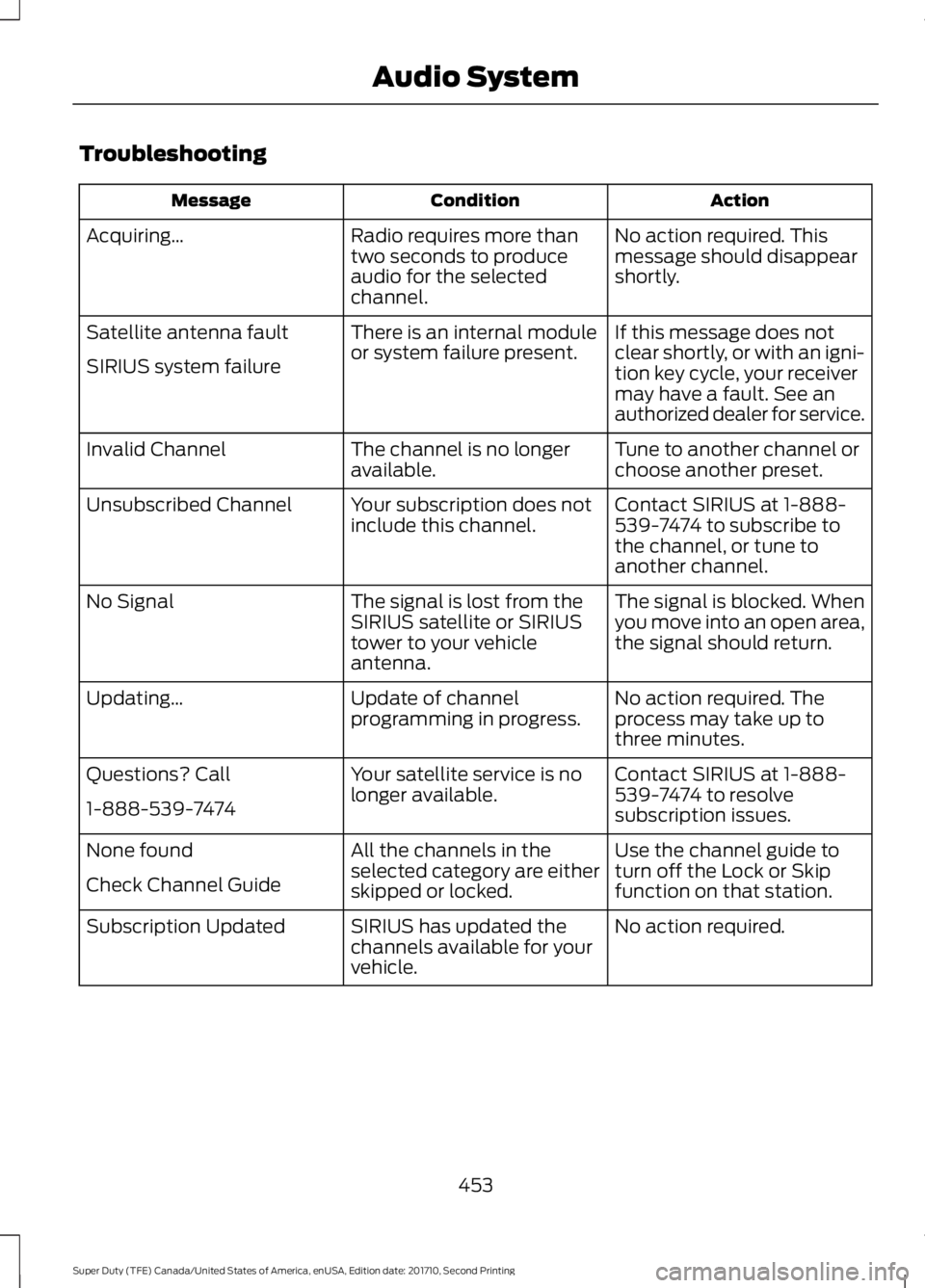
Troubleshooting
ActionConditionMessage
No action required. Thismessage should disappearshortly.
Radio requires more thantwo seconds to produceaudio for the selectedchannel.
Acquiring…
If this message does notclear shortly, or with an igni-tion key cycle, your receivermay have a fault. See anauthorized dealer for service.
There is an internal moduleor system failure present.Satellite antenna fault
SIRIUS system failure
Tune to another channel orchoose another preset.The channel is no longeravailable.Invalid Channel
Contact SIRIUS at 1-888-539-7474 to subscribe tothe channel, or tune toanother channel.
Your subscription does notinclude this channel.Unsubscribed Channel
The signal is blocked. Whenyou move into an open area,the signal should return.
The signal is lost from theSIRIUS satellite or SIRIUStower to your vehicleantenna.
No Signal
No action required. Theprocess may take up tothree minutes.
Update of channelprogramming in progress.Updating…
Contact SIRIUS at 1-888-539-7474 to resolvesubscription issues.
Your satellite service is nolonger available.Questions? Call
1-888-539-7474
Use the channel guide toturn off the Lock or Skipfunction on that station.
All the channels in theselected category are eitherskipped or locked.
None found
Check Channel Guide
No action required.SIRIUS has updated thechannels available for yourvehicle.
Subscription Updated
453
Super Duty (TFE) Canada/United States of America, enUSA, Edition date: 201710, Second Printing
Audio System
Page 459 of 642
Sunday, 10:30am-7:30pm EST.
In the United States, call 1-800-392-3673.
In Canada, call 1-800-565-3673.
Times are subject to change due toholidays.
SYNC Owner Account
Why do I need a SYNC owner account?
•Essential for keeping up with the latestsoftware downloads available forSYNC.
•Access to customer support for anyquestions you may have.
Driving Restrictions
For your safety, certain features arespeed-dependent and restricted when yourvehicle is traveling over 3 mi (5 km).
Safety Information
WARNING
Driving while distracted can result inloss of vehicle control, crash andinjury. We strongly recommend thatyou use extreme caution when using anydevice that may take your focus off theroad. Your primary responsibility is the safeoperation of your vehicle. We recommendagainst the use of any hand-held devicewhile driving and encourage the use ofvoice-operated systems when possible.Make sure you are aware of all applicablelocal laws that may affect the use ofelectronic devices while driving.
When using SYNC:
•Do not operate playing devices if thepower cords or cables are broken, splitor damaged. Place cords and cablesout of the way, so they do not interferewith the operation of pedals, seats,compartments or safe driving abilities.
•Do not leave playing devices in yourvehicle during extreme conditions as itcould cause them damage. See yourdevice's manual for further information.
•Do not attempt to service or repair thesystem. See an authorized dealer.
Privacy Information
When a cellular phone is connected toSYNC, the system creates a profile withinyour vehicle that is linked to that cellularphone. This profile is created in order tooffer you more cellular features and tooperate more efficiently. Among otherthings, this profile may contain data aboutyour cellular phone book, text messages(read and unread), and call history,including history of calls when your cellularphone was not connected to the system.In addition, if you connect a media device,the system creates and retains an index ofsupported media content. The system alsorecords a short development log ofapproximately 10 minutes of all recentsystem activity. The log profile and othersystem data may be used to improve thesystem and help diagnose any problemsthat may occur.
The cellular profile, media device index,and development log will remain in thevehicle unless you delete them and aregenerally accessible only in the vehiclewhen the cellular phone or media playeris connected. If you no longer plan to usethe system or the vehicle, we recommendyou perform a Master Reset to erase allstored information.
456
Super Duty (TFE) Canada/United States of America, enUSA, Edition date: 201710, Second Printing
SYNC™ (If Equipped)
Page 473 of 642
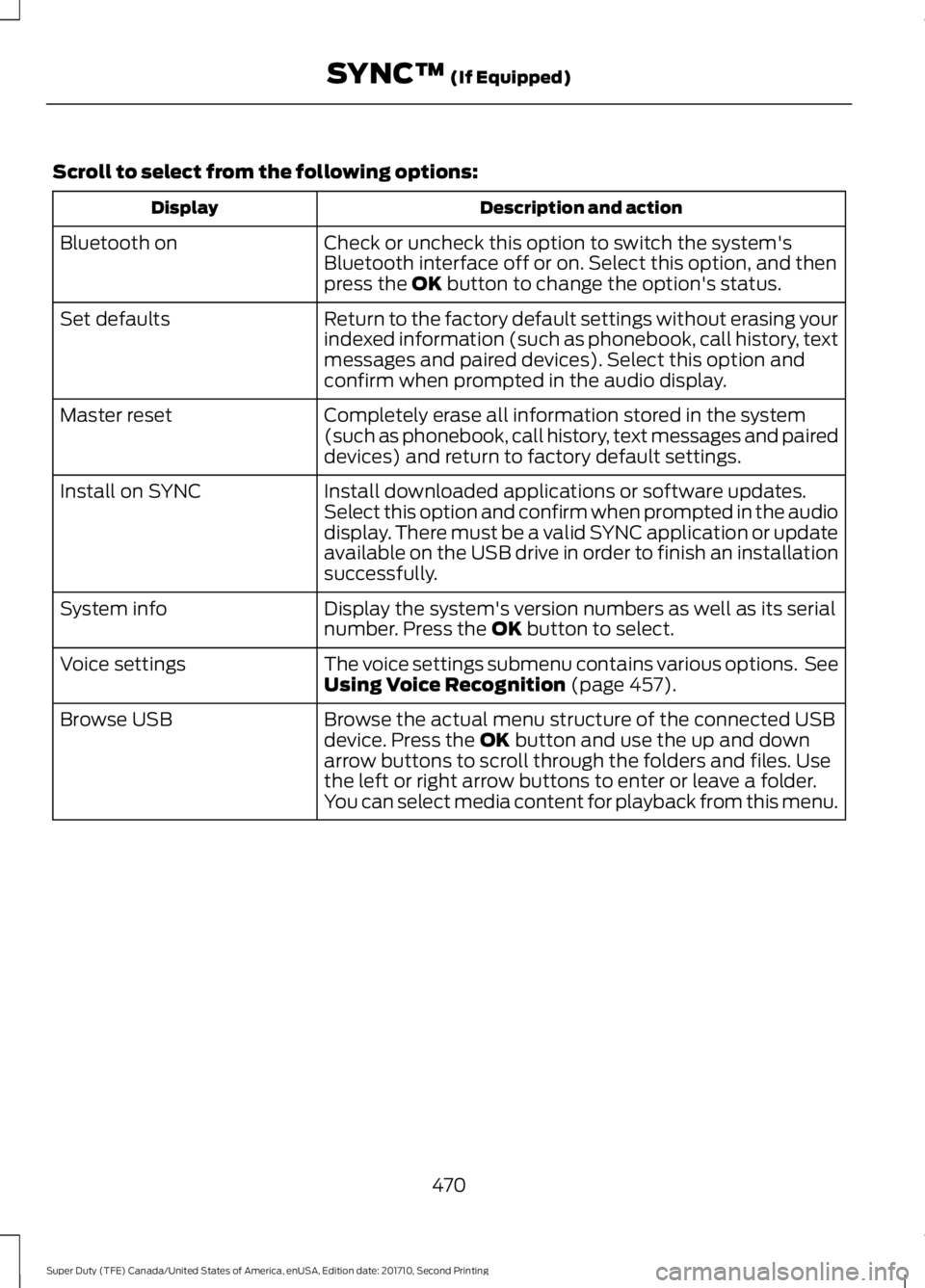
Scroll to select from the following options:
Description and actionDisplay
Check or uncheck this option to switch the system'sBluetooth interface off or on. Select this option, and thenpress the OK button to change the option's status.
Bluetooth on
Return to the factory default settings without erasing yourindexed information (such as phonebook, call history, textmessages and paired devices). Select this option andconfirm when prompted in the audio display.
Set defaults
Completely erase all information stored in the system(such as phonebook, call history, text messages and paireddevices) and return to factory default settings.
Master reset
Install downloaded applications or software updates.Select this option and confirm when prompted in the audiodisplay. There must be a valid SYNC application or updateavailable on the USB drive in order to finish an installationsuccessfully.
Install on SYNC
Display the system's version numbers as well as its serialnumber. Press the OK button to select.System info
The voice settings submenu contains various options. SeeUsing Voice Recognition (page 457).Voice settings
Browse the actual menu structure of the connected USBdevice. Press the OK button and use the up and downarrow buttons to scroll through the folders and files. Usethe left or right arrow buttons to enter or leave a folder.You can select media content for playback from this menu.
Browse USB
470
Super Duty (TFE) Canada/United States of America, enUSA, Edition date: 201710, Second Printing
SYNC™ (If Equipped)