ignition FORD F450 SUPER DUTY 2017 Owner's Manual
[x] Cancel search | Manufacturer: FORD, Model Year: 2017, Model line: F450 SUPER DUTY, Model: FORD F450 SUPER DUTY 2017Pages: 642, PDF Size: 12.35 MB
Page 80 of 642
•Movement inside your vehicle.
•Change in vehicle inclination, forexample, unwanted towing.
Lock your vehicle using the remote controlor the power door lock control with theaccompanying door open and then closeall doors.
Note:Do not choose full monitor mode ifmovement within the vehicle is likely tooccur or when the vehicle is in transport.
Note:For correct operation of the interiormotion detection system, make sure allwindows are closed prior to arming thesystem. This helps prevent accidental alarmactivation due to external influences andmake sure of correct interior motiondetection. Additionally, the interior motionsensing system will not arm if any door isajar.
Arming the Alarm
The alarm is ready to arm when there isnot a key in the ignition. Lock your vehicleto arm the alarm.
The direction indicators flash once afteryou lock your vehicle. This indicates thealarm is in the pre-armed mode. It fullyarms after 20 seconds.
Disarming the Alarm
Disarm the alarm by any of the followingactions:
•Press the power door unlock buttonwithin the 20-second pre-armed mode.
•Unlock the doors with the remotecontrol or keyless entry keypad.
•Switch the ignition on or start yourvehicle.
•Use a key in the driver door lockcylinder to unlock your vehicle, thenswitch the ignition on within 12seconds.
Note:Pressing the panic button on theremote control stops the horn and directionindicators, but will not disarm the system.
77
Super Duty (TFE) Canada/United States of America, enUSA, Edition date: 201710, Second Printing
Security
Page 84 of 642
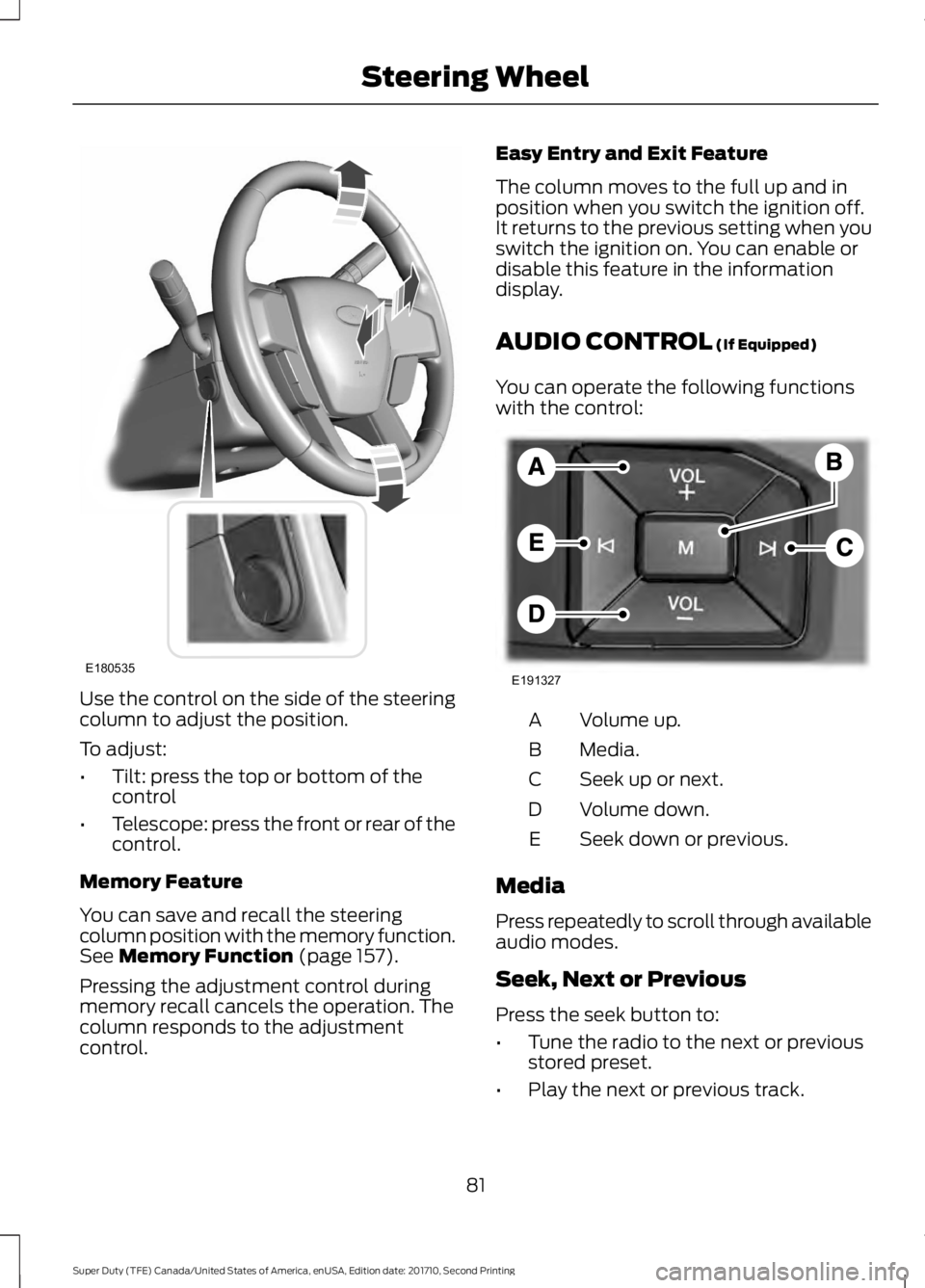
Use the control on the side of the steeringcolumn to adjust the position.
To adjust:
•Tilt: press the top or bottom of thecontrol
•Telescope: press the front or rear of thecontrol.
Memory Feature
You can save and recall the steeringcolumn position with the memory function.See Memory Function (page 157).
Pressing the adjustment control duringmemory recall cancels the operation. Thecolumn responds to the adjustmentcontrol.
Easy Entry and Exit Feature
The column moves to the full up and inposition when you switch the ignition off.It returns to the previous setting when youswitch the ignition on. You can enable ordisable this feature in the informationdisplay.
AUDIO CONTROL (If Equipped)
You can operate the following functionswith the control:
Volume up.A
Media.B
Seek up or next.C
Volume down.D
Seek down or previous.E
Media
Press repeatedly to scroll through availableaudio modes.
Seek, Next or Previous
Press the seek button to:
•Tune the radio to the next or previousstored preset.
•Play the next or previous track.
81
Super Duty (TFE) Canada/United States of America, enUSA, Edition date: 201710, Second Printing
Steering WheelE180535 E191327
Page 90 of 642
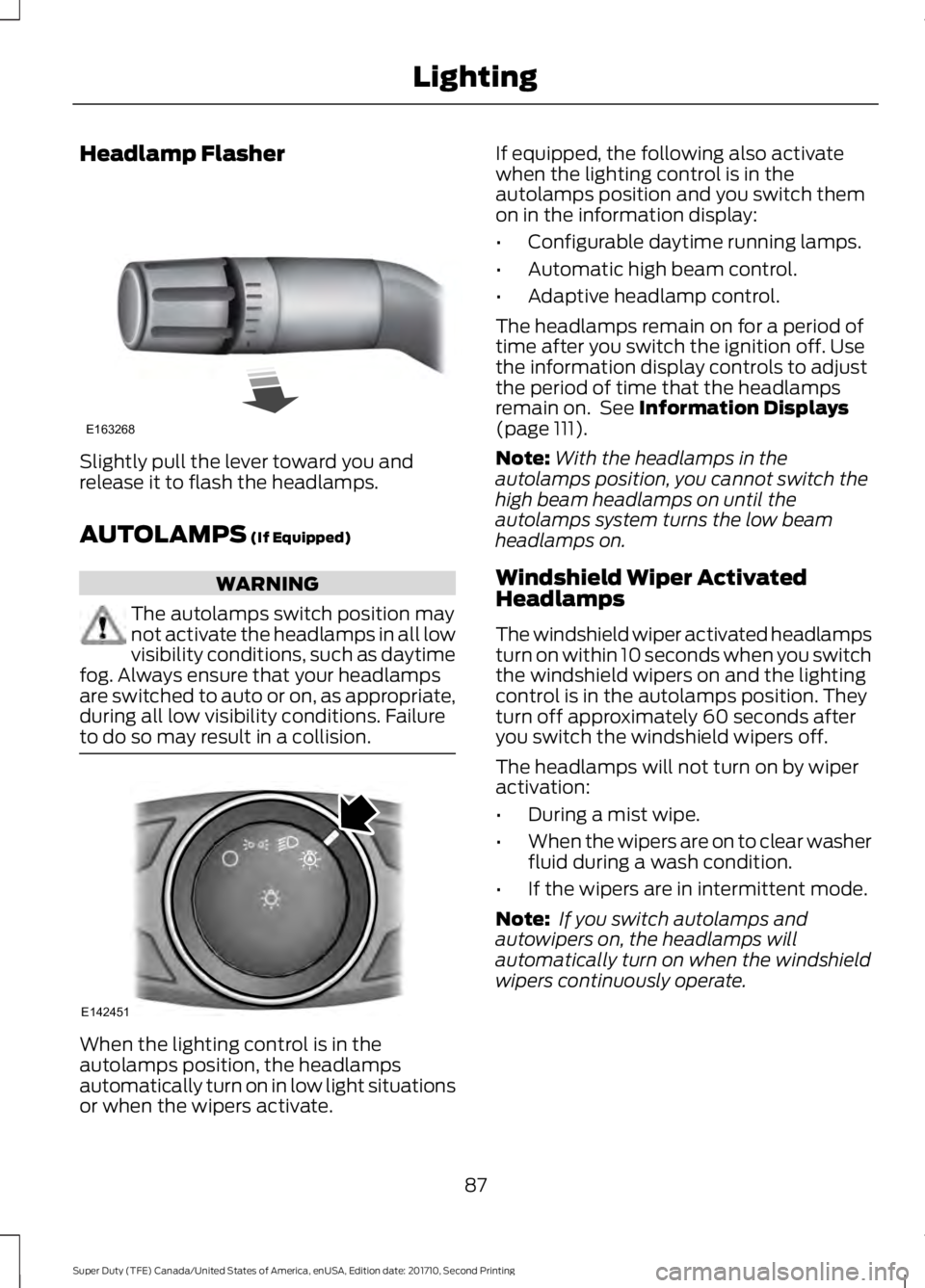
Headlamp Flasher
Slightly pull the lever toward you andrelease it to flash the headlamps.
AUTOLAMPS (If Equipped)
WARNING
The autolamps switch position maynot activate the headlamps in all lowvisibility conditions, such as daytimefog. Always ensure that your headlampsare switched to auto or on, as appropriate,during all low visibility conditions. Failureto do so may result in a collision.
When the lighting control is in theautolamps position, the headlampsautomatically turn on in low light situationsor when the wipers activate.
If equipped, the following also activatewhen the lighting control is in theautolamps position and you switch themon in the information display:
•Configurable daytime running lamps.
•Automatic high beam control.
•Adaptive headlamp control.
The headlamps remain on for a period oftime after you switch the ignition off. Usethe information display controls to adjustthe period of time that the headlampsremain on. See Information Displays(page 111).
Note:With the headlamps in theautolamps position, you cannot switch thehigh beam headlamps on until theautolamps system turns the low beamheadlamps on.
Windshield Wiper ActivatedHeadlamps
The windshield wiper activated headlampsturn on within 10 seconds when you switchthe windshield wipers on and the lightingcontrol is in the autolamps position. Theyturn off approximately 60 seconds afteryou switch the windshield wipers off.
The headlamps will not turn on by wiperactivation:
•During a mist wipe.
•When the wipers are on to clear washerfluid during a wash condition.
•If the wipers are in intermittent mode.
Note: If you switch autolamps andautowipers on, the headlamps willautomatically turn on when the windshieldwipers continuously operate.
87
Super Duty (TFE) Canada/United States of America, enUSA, Edition date: 201710, Second Printing
LightingE163268 E142451
Page 91 of 642
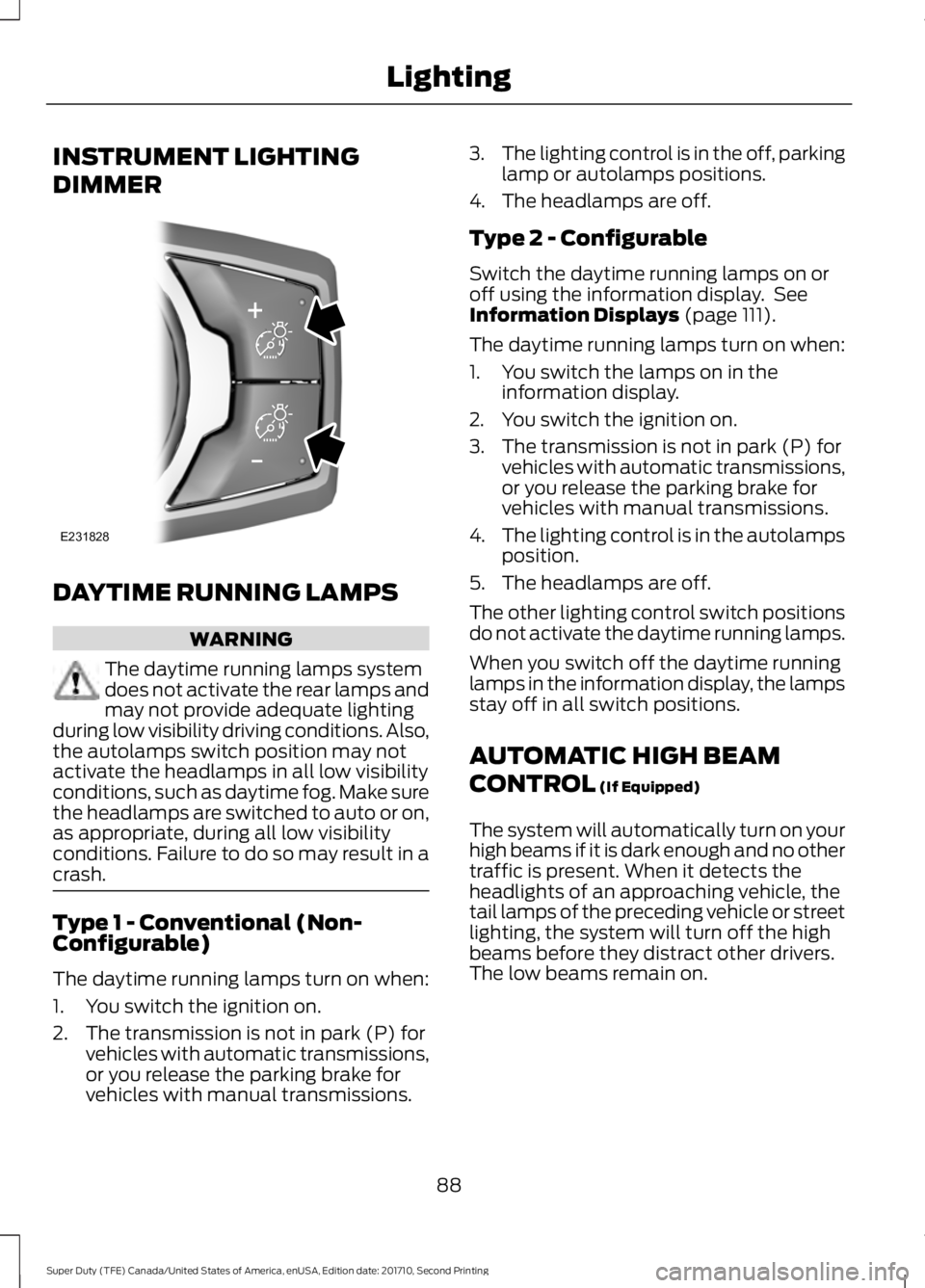
INSTRUMENT LIGHTING
DIMMER
DAYTIME RUNNING LAMPS
WARNING
The daytime running lamps systemdoes not activate the rear lamps andmay not provide adequate lightingduring low visibility driving conditions. Also,the autolamps switch position may notactivate the headlamps in all low visibilityconditions, such as daytime fog. Make surethe headlamps are switched to auto or on,as appropriate, during all low visibilityconditions. Failure to do so may result in acrash.
Type 1 - Conventional (Non-Configurable)
The daytime running lamps turn on when:
1. You switch the ignition on.
2. The transmission is not in park (P) forvehicles with automatic transmissions,or you release the parking brake forvehicles with manual transmissions.
3.The lighting control is in the off, parkinglamp or autolamps positions.
4. The headlamps are off.
Type 2 - Configurable
Switch the daytime running lamps on oroff using the information display. SeeInformation Displays (page 111).
The daytime running lamps turn on when:
1. You switch the lamps on in theinformation display.
2. You switch the ignition on.
3. The transmission is not in park (P) forvehicles with automatic transmissions,or you release the parking brake forvehicles with manual transmissions.
4.The lighting control is in the autolampsposition.
5. The headlamps are off.
The other lighting control switch positionsdo not activate the daytime running lamps.
When you switch off the daytime runninglamps in the information display, the lampsstay off in all switch positions.
AUTOMATIC HIGH BEAM
CONTROL (If Equipped)
The system will automatically turn on yourhigh beams if it is dark enough and no othertraffic is present. When it detects theheadlights of an approaching vehicle, thetail lamps of the preceding vehicle or streetlighting, the system will turn off the highbeams before they distract other drivers.The low beams remain on.
88
Super Duty (TFE) Canada/United States of America, enUSA, Edition date: 201710, Second Printing
LightingE231828
Page 99 of 642
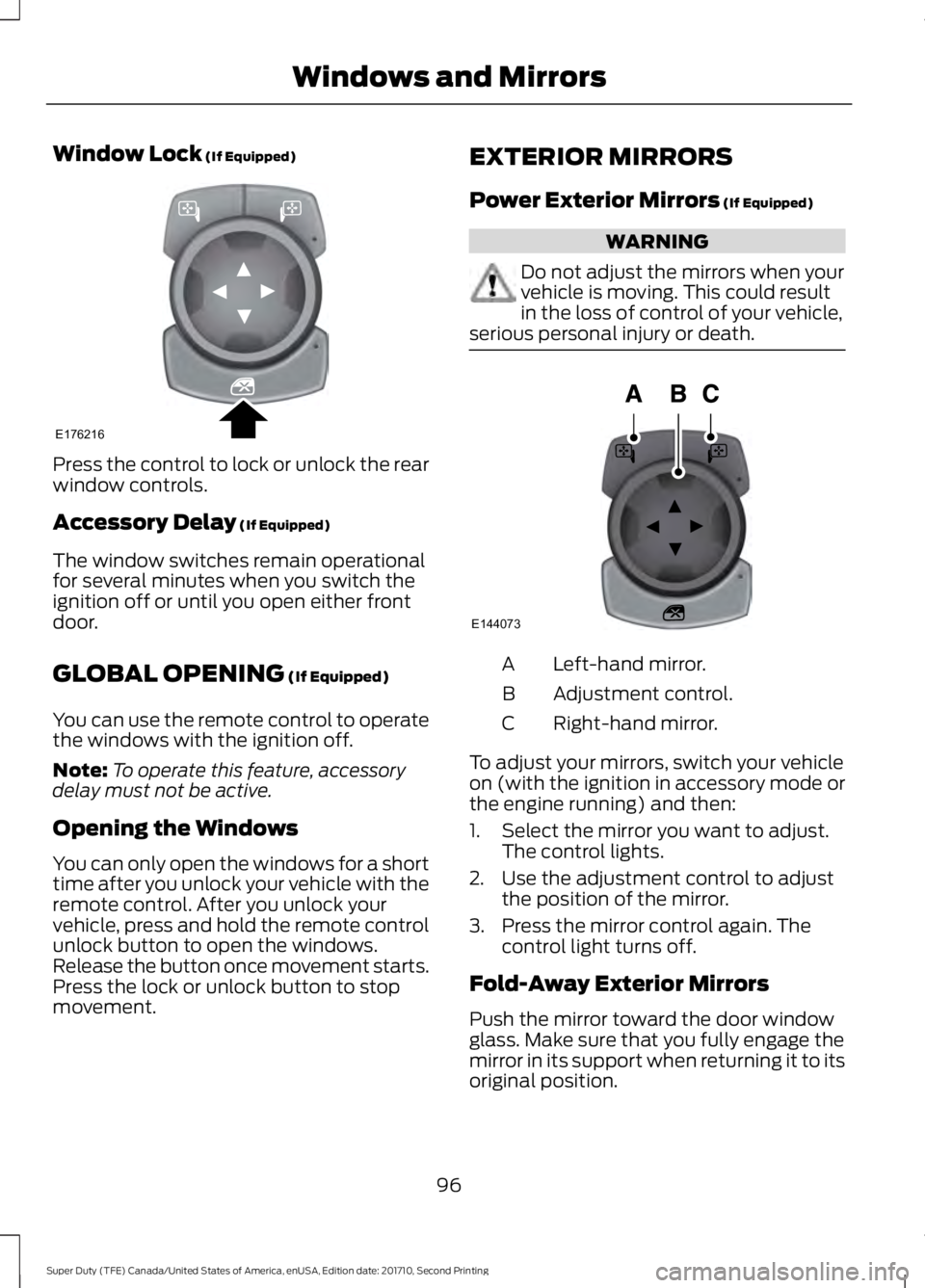
Window Lock (If Equipped)
Press the control to lock or unlock the rearwindow controls.
Accessory Delay (If Equipped)
The window switches remain operationalfor several minutes when you switch theignition off or until you open either frontdoor.
GLOBAL OPENING (If Equipped)
You can use the remote control to operatethe windows with the ignition off.
Note:To operate this feature, accessorydelay must not be active.
Opening the Windows
You can only open the windows for a shorttime after you unlock your vehicle with theremote control. After you unlock yourvehicle, press and hold the remote controlunlock button to open the windows.Release the button once movement starts.Press the lock or unlock button to stopmovement.
EXTERIOR MIRRORS
Power Exterior Mirrors (If Equipped)
WARNING
Do not adjust the mirrors when yourvehicle is moving. This could resultin the loss of control of your vehicle,serious personal injury or death.
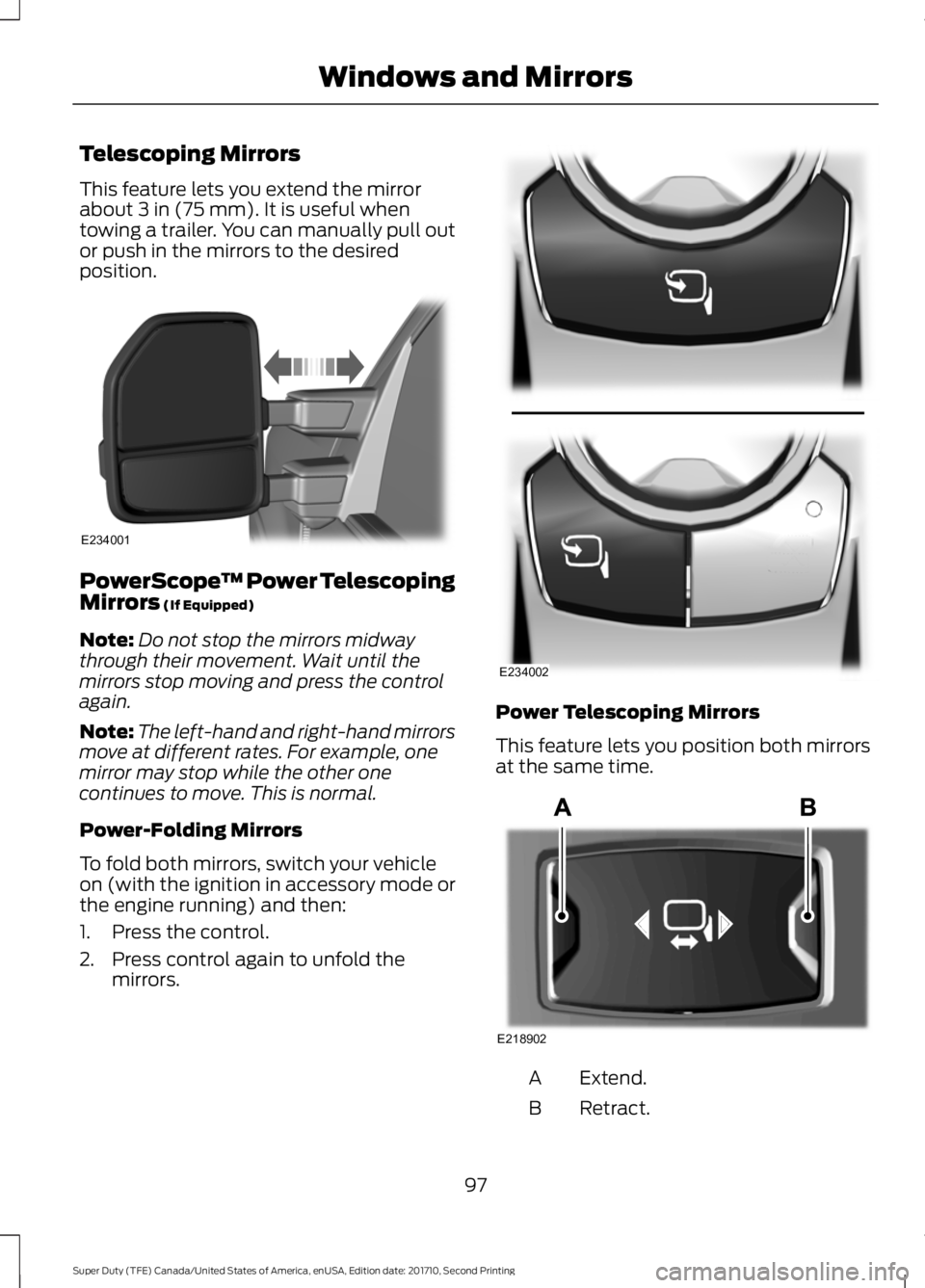
Left-hand mirror.A
Adjustment control.B
Right-hand mirror.C
To adjust your mirrors, switch your vehicleon (with the ignition in accessory mode orthe engine running) and then:
1. Select the mirror you want to adjust.The control lights.
2. Use the adjustment control to adjustthe position of the mirror.
3. Press the mirror control again. Thecontrol light turns off.
Fold-Away Exterior Mirrors
Push the mirror toward the door windowglass. Make sure that you fully engage themirror in its support when returning it to itsoriginal position.
96
Super Duty (TFE) Canada/United States of America, enUSA, Edition date: 201710, Second Printing
Windows and MirrorsE176216 E144073
Page 100 of 642
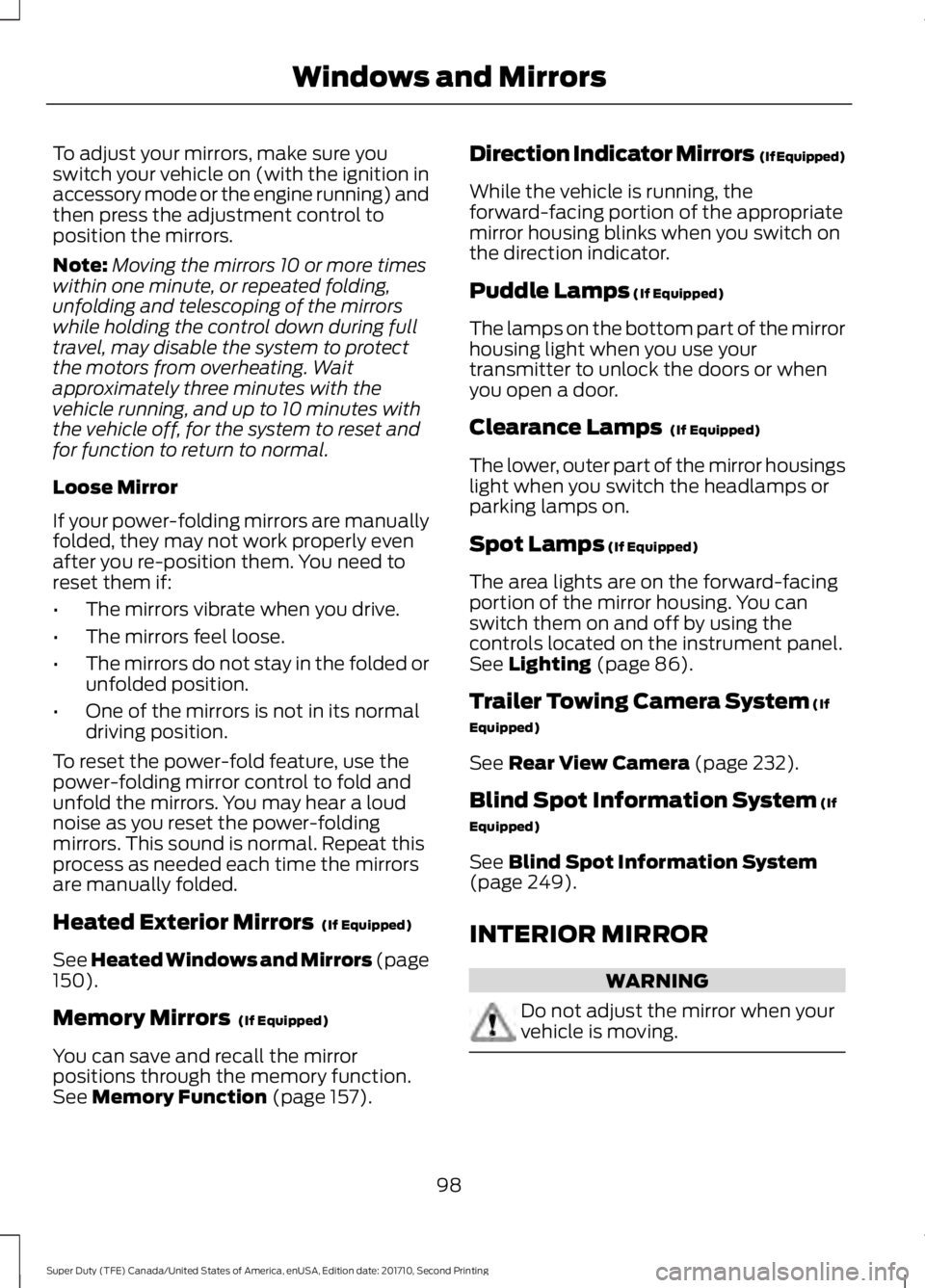
Telescoping Mirrors
This feature lets you extend the mirrorabout 3 in (75 mm). It is useful whentowing a trailer. You can manually pull outor push in the mirrors to the desiredposition.
PowerScope™ Power TelescopingMirrors (If Equipped)
Note:Do not stop the mirrors midwaythrough their movement. Wait until themirrors stop moving and press the controlagain.
Note:The left-hand and right-hand mirrorsmove at different rates. For example, onemirror may stop while the other onecontinues to move. This is normal.
Power-Folding Mirrors
To fold both mirrors, switch your vehicleon (with the ignition in accessory mode orthe engine running) and then:
1. Press the control.
2. Press control again to unfold themirrors.
Power Telescoping Mirrors
This feature lets you position both mirrorsat the same time.
Extend.A
Retract.B
97
Super Duty (TFE) Canada/United States of America, enUSA, Edition date: 201710, Second Printing
Windows and MirrorsE234001 E234002 E218902
Page 101 of 642
To adjust your mirrors, make sure youswitch your vehicle on (with the ignition inaccessory mode or the engine running) andthen press the adjustment control toposition the mirrors.
Note:Moving the mirrors 10 or more timeswithin one minute, or repeated folding,unfolding and telescoping of the mirrorswhile holding the control down during fulltravel, may disable the system to protectthe motors from overheating. Waitapproximately three minutes with thevehicle running, and up to 10 minutes withthe vehicle off, for the system to reset andfor function to return to normal.
Loose Mirror
If your power-folding mirrors are manuallyfolded, they may not work properly evenafter you re-position them. You need toreset them if:
•The mirrors vibrate when you drive.
•The mirrors feel loose.
•The mirrors do not stay in the folded orunfolded position.
•One of the mirrors is not in its normaldriving position.
To reset the power-fold feature, use thepower-folding mirror control to fold andunfold the mirrors. You may hear a loudnoise as you reset the power-foldingmirrors. This sound is normal. Repeat thisprocess as needed each time the mirrorsare manually folded.
Heated Exterior Mirrors (If Equipped)
See Heated Windows and Mirrors (page150).
Memory Mirrors (If Equipped)
You can save and recall the mirrorpositions through the memory function.See Memory Function (page 157).
Direction Indicator Mirrors (If Equipped)
While the vehicle is running, theforward-facing portion of the appropriatemirror housing blinks when you switch onthe direction indicator.
Puddle Lamps (If Equipped)
The lamps on the bottom part of the mirrorhousing light when you use yourtransmitter to unlock the doors or whenyou open a door.
Clearance Lamps (If Equipped)
The lower, outer part of the mirror housingslight when you switch the headlamps orparking lamps on.
Spot Lamps (If Equipped)
The area lights are on the forward-facingportion of the mirror housing. You canswitch them on and off by using thecontrols located on the instrument panel.See Lighting (page 86).
Trailer Towing Camera System (If
Equipped)
See Rear View Camera (page 232).
Blind Spot Information System (If
Equipped)
See Blind Spot Information System(page 249).
INTERIOR MIRROR
WARNING
Do not adjust the mirror when yourvehicle is moving.
98
Super Duty (TFE) Canada/United States of America, enUSA, Edition date: 201710, Second Printing
Windows and Mirrors
Page 107 of 642
Engine Oil Pressure Gauge
Indicates engine oil pressure. The needleshould stay in the normal operating range(between L and H). If the needle fallsbelow the normal range, stop your vehicle,turn off the engine and check the engineoil level. Add oil if needed. If the oil level iscorrect, have your vehicle checked by anauthorized dealer.
Engine Coolant TemperatureGauge
WARNING
Never remove the coolant reservoircap when the engine is running orhot.
Indicates engine coolant temperature. Atnormal operating temperature, the levelindicator will be in the normal range. If theengine coolant temperature exceeds thenormal range, stop your vehicle as soon assafely possible, switch off the engine andlet the engine cool.
Fuel Gauge
Note:The fuel gauge may vary slightlywhen your vehicle is moving or on a gradient.
Switch the ignition on. The fuel gauge willindicate approximately how much fuel isleft in the fuel tank. The arrow adjacent tothe fuel pump symbol indicates on whichside of your vehicle the fuel filler door islocated.
The needle should move toward F whenyou refuel your vehicle. If the needle pointsto E after adding fuel, this indicates yourvehicle needs service soon.
After refueling some variability in needleposition is normal:
•It may take a short time for the needleto reach F after leaving the gas station.This is normal and depends upon theslope of pavement at the gas station.
•The fuel amount dispensed into thetank is a little less or more than thegauge indicated. This is normal anddepends upon the slope of pavementat the gas station.
•If the gas station nozzle shuts offbefore the tank is full, try a differentgas pump nozzle.
Low Fuel Reminder
A low fuel reminder triggers when thedistance to empty value reaches 50 mi(80 km) to empty, with additionalwarnings at 25 mi (40 km), 10 mi (20 km)and 0 mi (0 km) to empty, provided themessage is cleared each time. Anadditional warning at 75 mi (120 km) toempty is provided when the MyKey is beingused.
Variations:
Note:The distance-to-empty warning can appear at different fuel gauge positions dependingon fuel economy conditions. This variation is normal.
104
Super Duty (TFE) Canada/United States of America, enUSA, Edition date: 201710, Second Printing
Instrument Cluster
Page 109 of 642
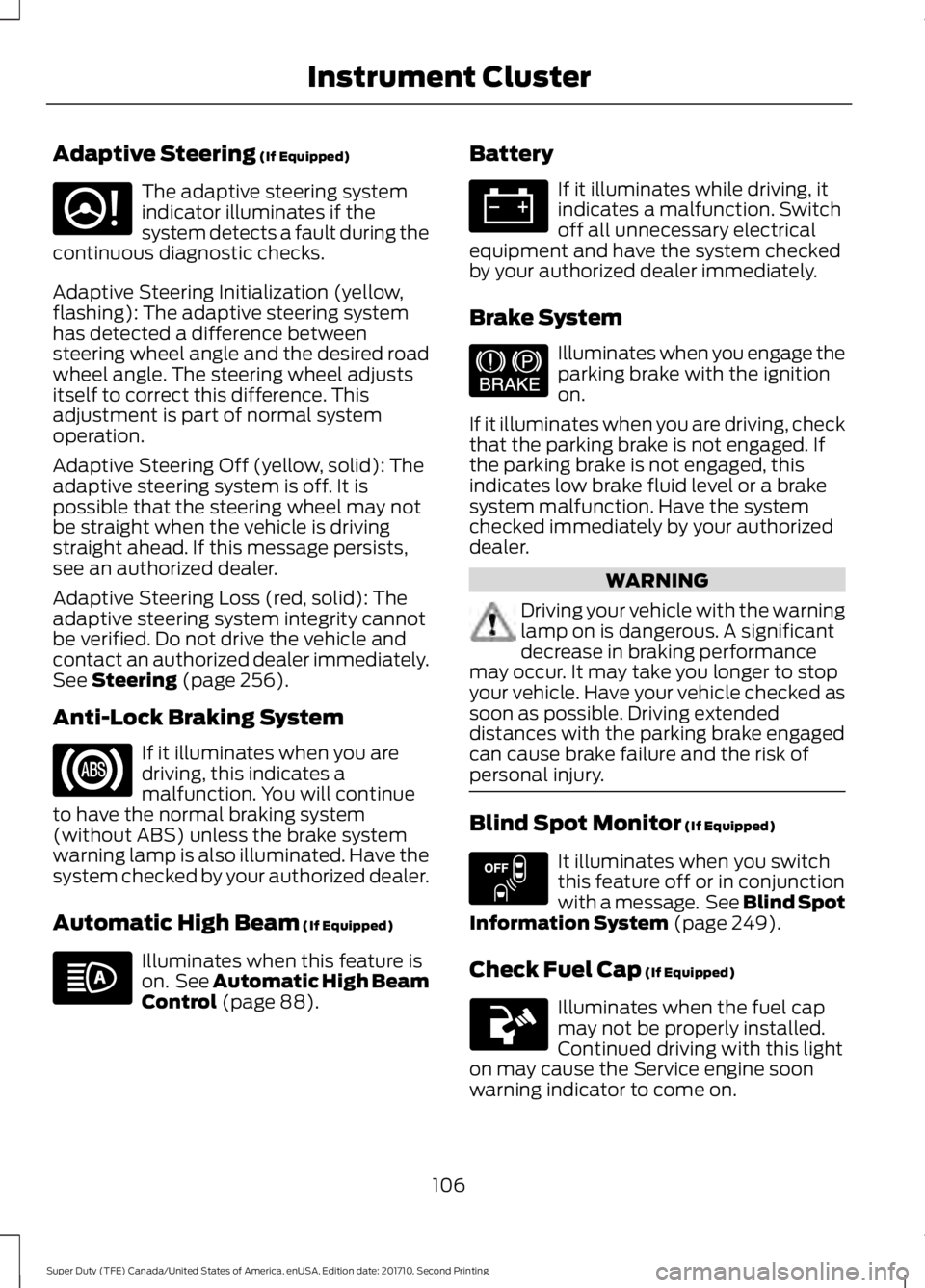
Adaptive Steering (If Equipped)
The adaptive steering systemindicator illuminates if thesystem detects a fault during thecontinuous diagnostic checks.
Adaptive Steering Initialization (yellow,flashing): The adaptive steering systemhas detected a difference betweensteering wheel angle and the desired roadwheel angle. The steering wheel adjustsitself to correct this difference. Thisadjustment is part of normal systemoperation.
Adaptive Steering Off (yellow, solid): Theadaptive steering system is off. It ispossible that the steering wheel may notbe straight when the vehicle is drivingstraight ahead. If this message persists,see an authorized dealer.
Adaptive Steering Loss (red, solid): Theadaptive steering system integrity cannotbe verified. Do not drive the vehicle andcontact an authorized dealer immediately.See Steering (page 256).
Anti-Lock Braking System
If it illuminates when you aredriving, this indicates amalfunction. You will continueto have the normal braking system(without ABS) unless the brake systemwarning lamp is also illuminated. Have thesystem checked by your authorized dealer.
Automatic High Beam (If Equipped)
Illuminates when this feature ison. See Automatic High BeamControl (page 88).
Battery
If it illuminates while driving, itindicates a malfunction. Switchoff all unnecessary electricalequipment and have the system checkedby your authorized dealer immediately.
Brake System
Illuminates when you engage theparking brake with the ignitionon.
If it illuminates when you are driving, checkthat the parking brake is not engaged. Ifthe parking brake is not engaged, thisindicates low brake fluid level or a brakesystem malfunction. Have the systemchecked immediately by your authorizeddealer.
WARNING
Driving your vehicle with the warninglamp on is dangerous. A significantdecrease in braking performancemay occur. It may take you longer to stopyour vehicle. Have your vehicle checked assoon as possible. Driving extendeddistances with the parking brake engagedcan cause brake failure and the risk ofpersonal injury.
Blind Spot Monitor (If Equipped)
It illuminates when you switchthis feature off or in conjunctionwith a message. See Blind SpotInformation System (page 249).
Check Fuel Cap (If Equipped)
Illuminates when the fuel capmay not be properly installed.Continued driving with this lighton may cause the Service engine soonwarning indicator to come on.
106
Super Duty (TFE) Canada/United States of America, enUSA, Edition date: 201710, Second Printing
Instrument ClusterE223375 E144522 E151262
Page 110 of 642
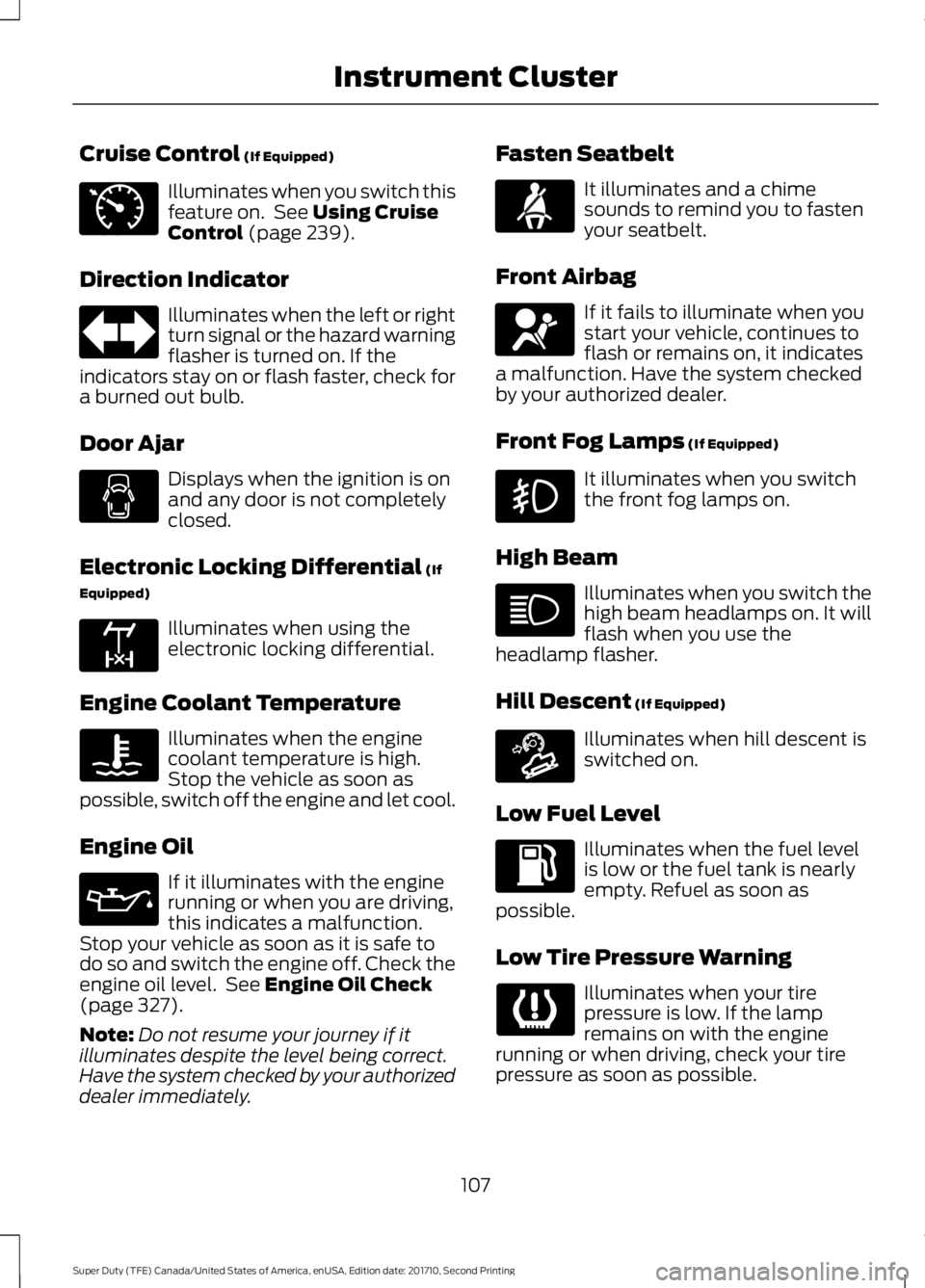
Cruise Control (If Equipped)
Illuminates when you switch thisfeature on. See Using CruiseControl (page 239).
Direction Indicator
Illuminates when the left or rightturn signal or the hazard warningflasher is turned on. If theindicators stay on or flash faster, check fora burned out bulb.
Door Ajar
Displays when the ignition is onand any door is not completelyclosed.
Electronic Locking Differential (If
Equipped)
Illuminates when using theelectronic locking differential.
Engine Coolant Temperature
Illuminates when the enginecoolant temperature is high.Stop the vehicle as soon aspossible, switch off the engine and let cool.
Engine Oil
If it illuminates with the enginerunning or when you are driving,this indicates a malfunction.Stop your vehicle as soon as it is safe todo so and switch the engine off. Check theengine oil level. See Engine Oil Check(page 327).
Note:Do not resume your journey if itilluminates despite the level being correct.Have the system checked by your authorizeddealer immediately.
Fasten Seatbelt
It illuminates and a chimesounds to remind you to fastenyour seatbelt.
Front Airbag
If it fails to illuminate when youstart your vehicle, continues toflash or remains on, it indicatesa malfunction. Have the system checkedby your authorized dealer.
Front Fog Lamps (If Equipped)
It illuminates when you switchthe front fog lamps on.
High Beam
Illuminates when you switch thehigh beam headlamps on. It willflash when you use theheadlamp flasher.
Hill Descent (If Equipped)
Illuminates when hill descent isswitched on.
Low Fuel Level
Illuminates when the fuel levelis low or the fuel tank is nearlyempty. Refuel as soon aspossible.
Low Tire Pressure Warning
Illuminates when your tirepressure is low. If the lampremains on with the enginerunning or when driving, check your tirepressure as soon as possible.
107
Super Duty (TFE) Canada/United States of America, enUSA, Edition date: 201710, Second Printing
Instrument ClusterE71340 E163170 E71880 E67017 E163171