lights FORD F450 SUPER DUTY 2017 Owner's Manual
[x] Cancel search | Manufacturer: FORD, Model Year: 2017, Model line: F450 SUPER DUTY, Model: FORD F450 SUPER DUTY 2017Pages: 642, PDF Size: 12.35 MB
Page 296 of 642
•Fuel economy may decrease with lowertemperatures during the first 8–10miles (12–16 kilometers) of driving.
•Driving on flat terrain offers improvedfuel economy as compared to drivingon hilly terrain.
•Transmissions give their best fueleconomy when operated in the topcruise gear and with steady pressureon the gas pedal.
•Four-wheel-drive operation (ifequipped) is less fuel efficient thantwo-wheel-drive operation.
•Close the windows for high-speeddriving.
DRIVING THROUGH WATER
WARNING
Do not drive through flowing or deepwater as you may lose control of yourvehicle.
Note:Driving through standing water cancause vehicle damage.
Note:Engine damage can occur if waterenters the air filter.
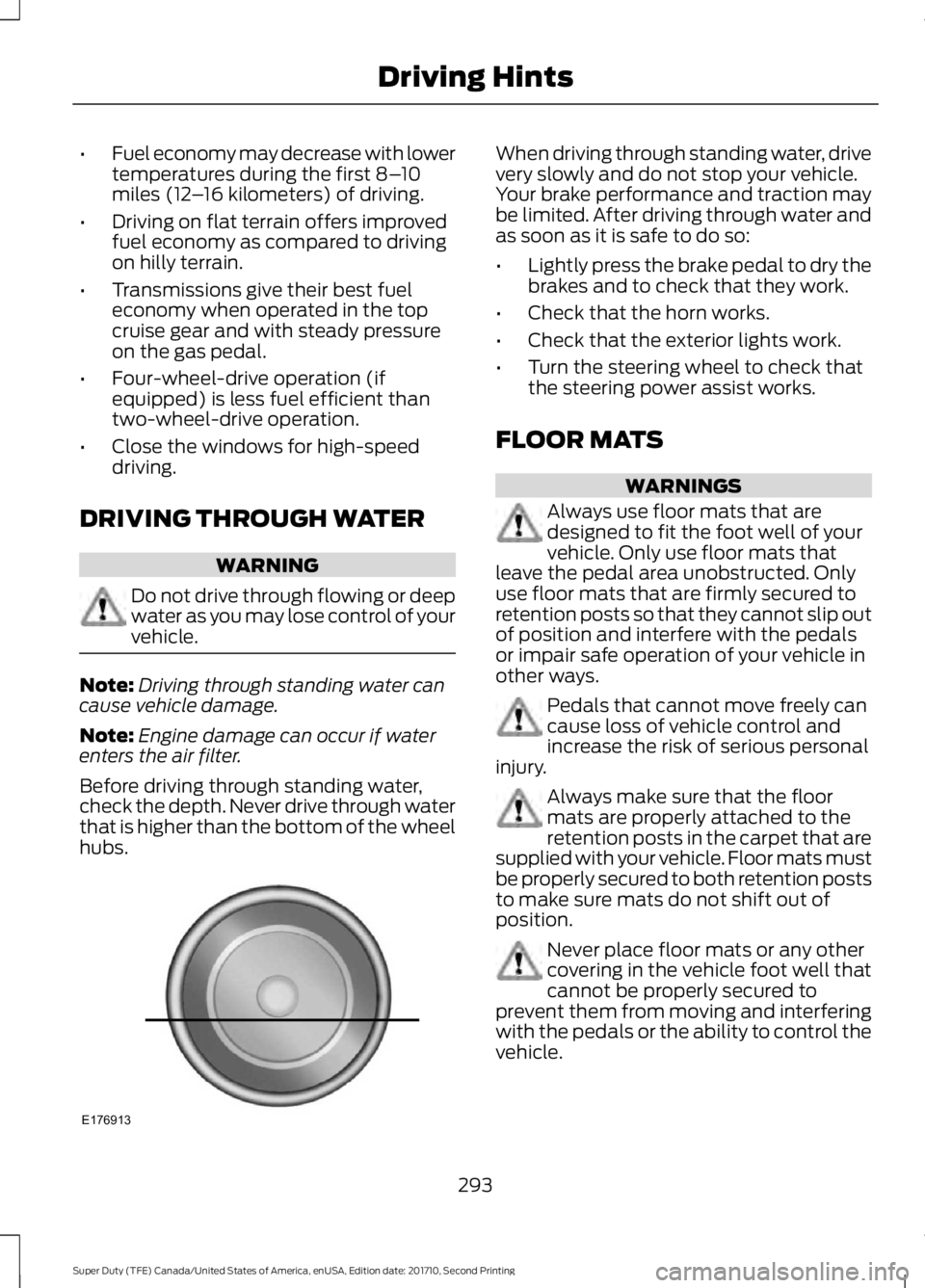
Before driving through standing water,check the depth. Never drive through waterthat is higher than the bottom of the wheelhubs.
When driving through standing water, drivevery slowly and do not stop your vehicle.Your brake performance and traction maybe limited. After driving through water andas soon as it is safe to do so:
•Lightly press the brake pedal to dry thebrakes and to check that they work.
•Check that the horn works.
•Check that the exterior lights work.
•Turn the steering wheel to check thatthe steering power assist works.
FLOOR MATS
WARNINGS
Always use floor mats that aredesigned to fit the foot well of yourvehicle. Only use floor mats thatleave the pedal area unobstructed. Onlyuse floor mats that are firmly secured toretention posts so that they cannot slip outof position and interfere with the pedalsor impair safe operation of your vehicle inother ways.
Pedals that cannot move freely cancause loss of vehicle control andincrease the risk of serious personalinjury.
Always make sure that the floormats are properly attached to theretention posts in the carpet that aresupplied with your vehicle. Floor mats mustbe properly secured to both retention poststo make sure mats do not shift out ofposition.
Never place floor mats or any othercovering in the vehicle foot well thatcannot be properly secured toprevent them from moving and interferingwith the pedals or the ability to control thevehicle.
293
Super Duty (TFE) Canada/United States of America, enUSA, Edition date: 201710, Second Printing
Driving HintsE176913
Page 404 of 642
12.Turn the ignition off. If two short hornbeeps are heard, the reset procedurewas unsuccessful and you mustrepeat it. If after repeating theprocedure and two short beeps areheard when the ignition is turned tooff, seek assistance from yourauthorized dealer.
13.Set all four tires to the recommendedair pressure as indicated on theSafety Compliance CertificationLabel (affixed to either the door hingepillar, door-latch post, or the dooredge that meets the door-latch post,next to the driver's seating position)or Tire Label located on the B-Pillaror the edge of the driver's door.
Trailer Tire Pressure MonitoringSystem (If Equipped)
Note:Additional equipment may berequired for your vehicle to support trailertire pressure monitoring. See your authorizeddealer for more information.
Note:The trailer tire pressure monitoringsystem is not a substitute for proper tiremaintenance. It is your responsibility tomaintain correct tire pressures at all times.
Note:If a trailer tire is repaired, replaced orbroken down for service, the screw and valveon the trailer tire pressure sensor should bereplaced. See your authorized dealer fordetails.
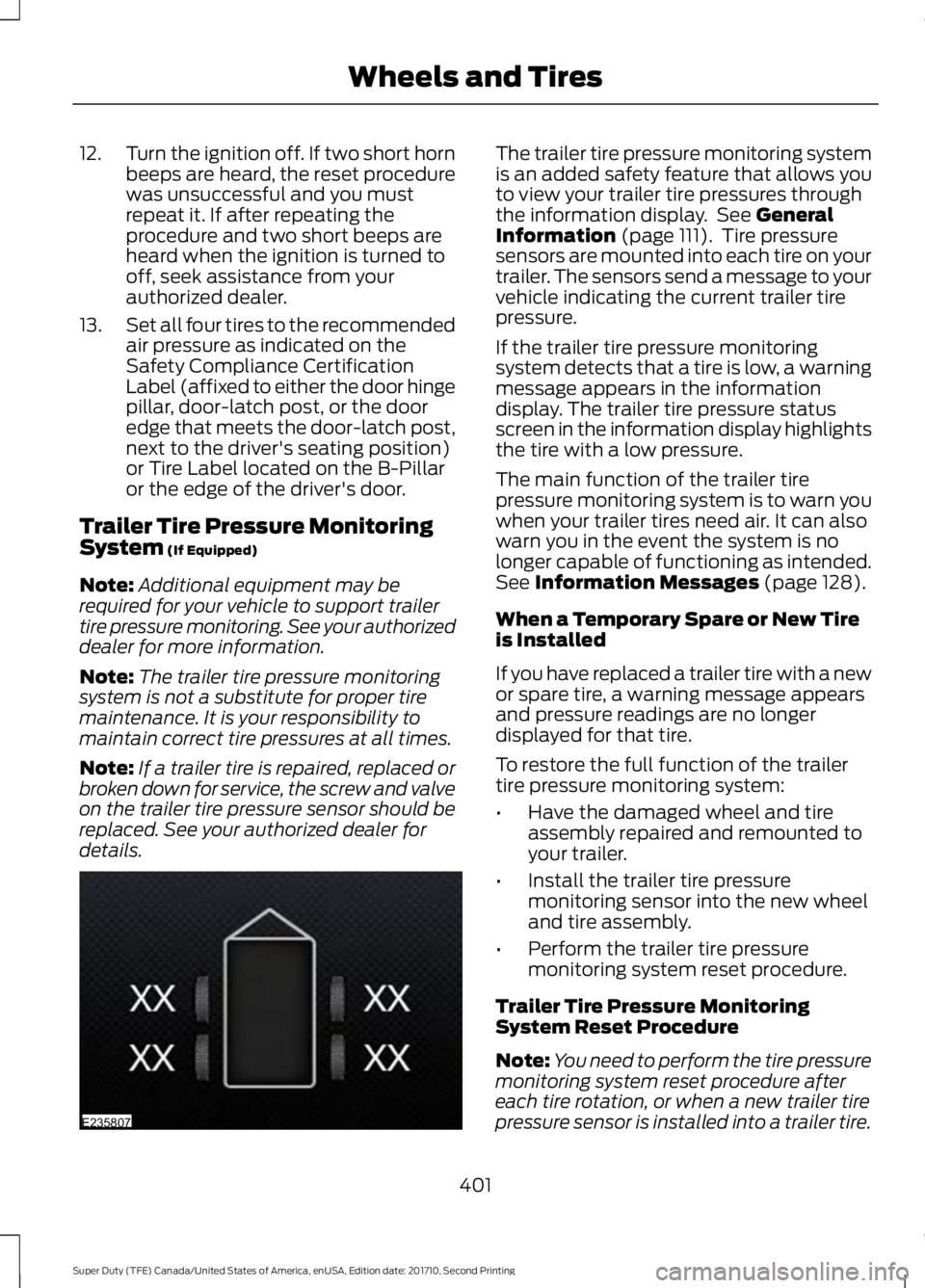
The trailer tire pressure monitoring systemis an added safety feature that allows youto view your trailer tire pressures throughthe information display. See GeneralInformation (page 111). Tire pressuresensors are mounted into each tire on yourtrailer. The sensors send a message to yourvehicle indicating the current trailer tirepressure.
If the trailer tire pressure monitoringsystem detects that a tire is low, a warningmessage appears in the informationdisplay. The trailer tire pressure statusscreen in the information display highlightsthe tire with a low pressure.
The main function of the trailer tirepressure monitoring system is to warn youwhen your trailer tires need air. It can alsowarn you in the event the system is nolonger capable of functioning as intended.See Information Messages (page 128).
When a Temporary Spare or New Tireis Installed
If you have replaced a trailer tire with a newor spare tire, a warning message appearsand pressure readings are no longerdisplayed for that tire.
To restore the full function of the trailertire pressure monitoring system:
•Have the damaged wheel and tireassembly repaired and remounted toyour trailer.
•Install the trailer tire pressuremonitoring sensor into the new wheeland tire assembly.
•Perform the trailer tire pressuremonitoring system reset procedure.
Trailer Tire Pressure MonitoringSystem Reset Procedure
Note:You need to perform the tire pressuremonitoring system reset procedure aftereach tire rotation, or when a new trailer tirepressure sensor is installed into a trailer tire.
401
Super Duty (TFE) Canada/United States of America, enUSA, Edition date: 201710, Second Printing
Wheels and TiresE235807
Page 470 of 642
Sending a Text Message
Note:You can only send a text message toone recipient at a time.
1. Select the send option when thedesired selection highlights in the audiodisplay.
2. Select the confirmation option whenthe contact appears.
3. Press the OK button again to confirmwhen the system asks if you want tosend the message. A pre-definedsignature appears on each textmessage.
Note:You can send text messages eitherby choosing a contact from the phonebookand selecting the text option from the audiodisplay or by replying to a received messagein the inbox.
Accessing Your Phone Settings
These are phone-dependent features. Yourphone settings allow you to access andadjust features such as your ring tone andtext message notification, modify yourphonebook, and set up automaticdownload.
1. Press the PHONE button.
2. Scroll until the phone settings optionappears, and then press the OK button.
Scroll to select from the following options:
Description and actionMenu Item
If this option is checked, the system uses the cellular phoneas the master when there is more than one cellular phonepaired to the system. This option can be changed for allcellular phones (not only the active phone) using theBluetooth Devices menu.
Set as master
See the cellular phone name, provider name, cellularphone number, and signal level. When done, press the leftarrow buttons to return to the phone status menu.
Phone status
Select which ringtone sounds during an incoming call (oneof the system's tones or your cellular phone's). If yourphone supports in-band ringing, your phone's ringtonesounds when you choose the cellular phone ringtoneoption.
Set ringtone
1. Press the OK button to select and scroll to hear eachringtone.2. Press the OK button to select a ringtone.
Have the option of hearing an audible tone to notify youwhen a text message arrives. Press the OK button toswitch the audible tone off or on.
Text msg notify
Modify the contents of your phonebook (such as add,delete or download). Press the OK button to select andscroll between the choices in the phonebook preferencestable below.
Phonebook pref.
467
Super Duty (TFE) Canada/United States of America, enUSA, Edition date: 201710, Second Printing
SYNC™ (If Equipped)
Page 526 of 642
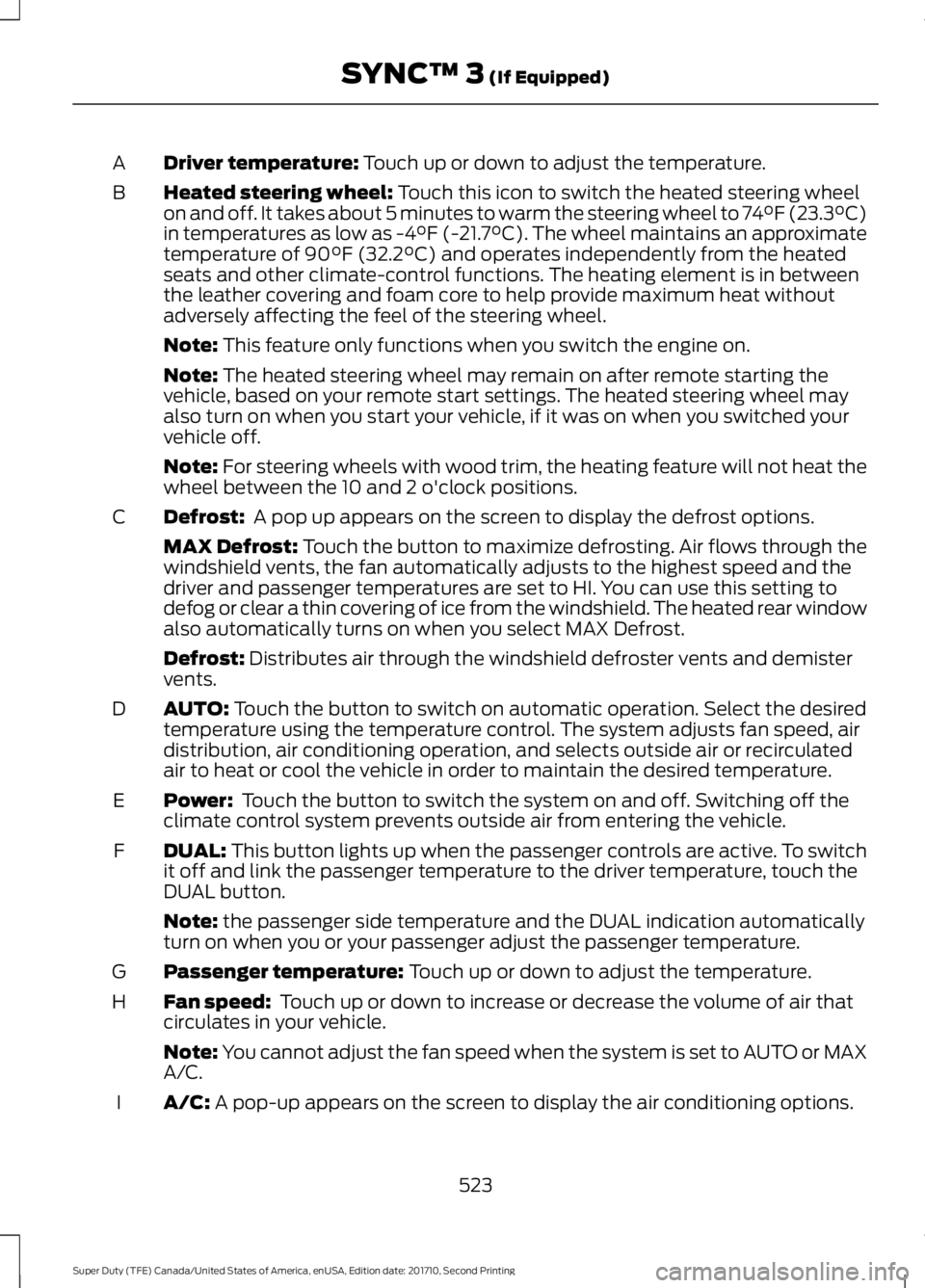
Driver temperature: Touch up or down to adjust the temperature.A
Heated steering wheel: Touch this icon to switch the heated steering wheelon and off. It takes about 5 minutes to warm the steering wheel to 74°F (23.3°C)in temperatures as low as -4°F (-21.7°C). The wheel maintains an approximatetemperature of 90°F (32.2°C) and operates independently from the heatedseats and other climate-control functions. The heating element is in betweenthe leather covering and foam core to help provide maximum heat withoutadversely affecting the feel of the steering wheel.
B
Note: This feature only functions when you switch the engine on.
Note: The heated steering wheel may remain on after remote starting thevehicle, based on your remote start settings. The heated steering wheel mayalso turn on when you start your vehicle, if it was on when you switched yourvehicle off.
Note: For steering wheels with wood trim, the heating feature will not heat thewheel between the 10 and 2 o'clock positions.
Defrost: A pop up appears on the screen to display the defrost options.C
MAX Defrost: Touch the button to maximize defrosting. Air flows through thewindshield vents, the fan automatically adjusts to the highest speed and thedriver and passenger temperatures are set to HI. You can use this setting todefog or clear a thin covering of ice from the windshield. The heated rear windowalso automatically turns on when you select MAX Defrost.
Defrost: Distributes air through the windshield defroster vents and demistervents.
AUTO: Touch the button to switch on automatic operation. Select the desiredtemperature using the temperature control. The system adjusts fan speed, airdistribution, air conditioning operation, and selects outside air or recirculatedair to heat or cool the vehicle in order to maintain the desired temperature.
D
Power: Touch the button to switch the system on and off. Switching off theclimate control system prevents outside air from entering the vehicle.E
DUAL: This button lights up when the passenger controls are active. To switchit off and link the passenger temperature to the driver temperature, touch theDUAL button.
F
Note: the passenger side temperature and the DUAL indication automaticallyturn on when you or your passenger adjust the passenger temperature.
Passenger temperature: Touch up or down to adjust the temperature.G
Fan speed: Touch up or down to increase or decrease the volume of air thatcirculates in your vehicle.H
Note: You cannot adjust the fan speed when the system is set to AUTO or MAXA/C.
A/C: A pop-up appears on the screen to display the air conditioning options.I
523
Super Duty (TFE) Canada/United States of America, enUSA, Edition date: 201710, Second Printing
SYNC™ 3 (If Equipped)
Page 534 of 642
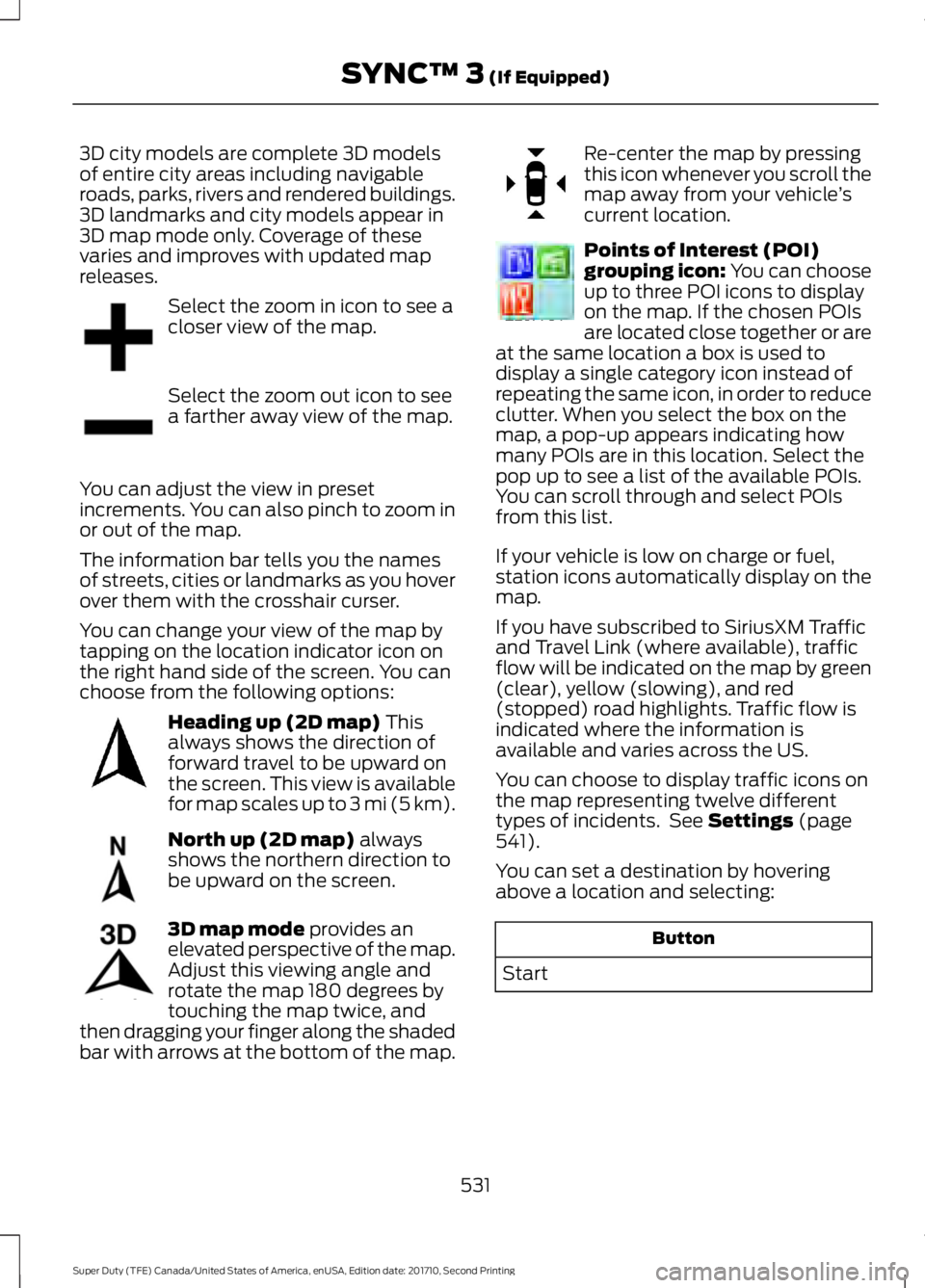
3D city models are complete 3D modelsof entire city areas including navigableroads, parks, rivers and rendered buildings.3D landmarks and city models appear in3D map mode only. Coverage of thesevaries and improves with updated mapreleases.
Select the zoom in icon to see acloser view of the map.
Select the zoom out icon to seea farther away view of the map.
You can adjust the view in presetincrements. You can also pinch to zoom inor out of the map.
The information bar tells you the namesof streets, cities or landmarks as you hoverover them with the crosshair curser.
You can change your view of the map bytapping on the location indicator icon onthe right hand side of the screen. You canchoose from the following options:
Heading up (2D map) Thisalways shows the direction offorward travel to be upward onthe screen. This view is availablefor map scales up to 3 mi (5 km).
North up (2D map) alwaysshows the northern direction tobe upward on the screen.
3D map mode provides anelevated perspective of the map.Adjust this viewing angle androtate the map 180 degrees bytouching the map twice, andthen dragging your finger along the shadedbar with arrows at the bottom of the map.
Re-center the map by pressingthis icon whenever you scroll themap away from your vehicle’scurrent location.
Points of Interest (POI)grouping icon: You can chooseup to three POI icons to displayon the map. If the chosen POIsare located close together or areat the same location a box is used todisplay a single category icon instead ofrepeating the same icon, in order to reduceclutter. When you select the box on themap, a pop-up appears indicating howmany POIs are in this location. Select thepop up to see a list of the available POIs.You can scroll through and select POIsfrom this list.
If your vehicle is low on charge or fuel,station icons automatically display on themap.
If you have subscribed to SiriusXM Trafficand Travel Link (where available), trafficflow will be indicated on the map by green(clear), yellow (slowing), and red(stopped) road highlights. Traffic flow isindicated where the information isavailable and varies across the US.
You can choose to display traffic icons onthe map representing twelve differenttypes of incidents. See Settings (page541).
You can set a destination by hoveringabove a location and selecting:
Button
Start
531
Super Duty (TFE) Canada/United States of America, enUSA, Edition date: 201710, Second Printing
SYNC™ 3 (If Equipped)E207752 E207753 E207750 E207749 E207748 E207751 E207754
Page 569 of 642
For a complete listing of the accessoriesthat are available for your vehicle, pleasecontact your authorized dealer or visit theonline store web site:
Web Address (United States)
www.Accessories.Ford.com
Web Address (Canada)
www.Accessories.Ford.ca
Ford Custom Accessories are available foryour vehicle through an authorized dealer.Ford Motor Company will repair or replaceany properly authorized dealer-installedFord Original Accessory found to bedefective in factory-supplied materials orworkmanship during the warranty period,as well as any component damaged by thedefective accessories.
Ford Motor Company will warrant yourvehicle through the warranty that providesthe greatest benefit:
•24 months, unlimited mileage.
•The remainder of your new vehiclelimited warranty.
Contact an authorized dealer for detailsand a copy of the warranty.
Exterior style
•Bug shields.
•Commercial graphics*.
•Commercial LED warning strobe lights.
•Deflectors.
•Exhaust tip.
•Running boards.
•Splash guards.
•Stainless-steel wheel covers*.
•Step bars.
•Wheel well liners.
Interior style
•Ambient lighting.
•Cargo organizers.
•Custom seat covers*.
•Floor mats.
Lifestyle
•Ash cup/smoker's package.
•Bed cargo net, tie down plates andcleats.
•Bed extender.
•Bedliners and bedmats.
•Racks and carriers*.
•Sportliner cargo liner*.
•Tonneau covers*.
•Tow hooks.
•Trailer back-up camera.
•Trailer brake control.
•Trailer hitches, wiring harnesses andaccessories.
•Truck bed camping tent*.
Peace of mind
•Back-up alarm*.
•Bed hooks*.
•Bumper and hitch-mounted parkingsensors*.
•Ford Telematics.
•Keyless entry keypad.
•Protective seat covers*.
•Remote start and alarms.
•Cruise control.
•Tool or Cargo boxes*.
•Vehicle security system.
•Wheel locks.
566
Super Duty (TFE) Canada/United States of America, enUSA, Edition date: 201710, Second Printing
Accessories
Page 632 of 642
Changing the Engine-Mounted andDiesel Fuel Conditioner Module FuelFilters - 6.7L Diesel...................................359Diesel Fuel Conditioner ModuleFilter...................................................................359Engine-mounted Fuel Filter...........................362Changing the Engine Oil and OilFilter...............................................................329Engine lubrication for severe serviceoperation.........................................................330Changing the Wiper Blades.....................348Checking MyKey System Status...............63MyKey Distance....................................................63Number of Admin Keys......................................63Number of MyKeys..............................................63Checking the Wiper Blades.....................348Child Restraint and SeatbeltMaintenance.................................................42Child Restraint Positioning.........................32Child Safety........................................................17General Information.............................................17Child Safety Locks..........................................33Left-Hand Side......................................................34Right-Hand Side...................................................34Cleaning Leather Seats.............................369With King Ranch Edition.................................370Without King Ranch Edition..........................369Cleaning Products.......................................364Cleaning the Engine...................................366Cleaning the Exhaust - 6.7L Diesel........367Cleaning the Exterior..................................365Exterior Chrome Parts.....................................365Exterior Plastic Parts........................................365Stripes or Graphics...........................................365Underbody...........................................................366Under Hood.........................................................366Cleaning the Instrument Panel andInstrument Cluster Lens........................368Cleaning the Interior...................................368Cleaning the Wheels..................................370Cleaning the Windows and WiperBlades............................................................367Clearing All MyKeys.......................................63Climate............................................................522Climate Control.............................................145Climate Controlled Seats...........................161Cooled Seats.........................................................161Heated Seats.........................................................161
Collision Warning System........................258Principle Of Operation.....................................258Coolant CheckSee: Engine Coolant Check - 6.2L/6.8L.....332See: Engine Coolant Check - 6.7LDiesel.................................................................336Crash Sensors and Airbag Indicator........52Creating a MyKey............................................62Programming or Changing ConfigurableSettings...............................................................62Cross Traffic Alert........................................254False Alerts..........................................................256Switching the System Off and On..............256System Errors......................................................256System Lights, Messages and AudibleAlerts.................................................................255System Limitations...........................................256Using the System...............................................254Cruise Control..................................................82Principle of Operation......................................239Type 1........................................................................82Type 2.......................................................................82Cruise controlSee: Using Cruise Control...............................239Customer Assistance.................................305
D
Data Recording................................................10Event Data Recording..........................................10Service Data Recording......................................10Daytime Running Lamps............................88Type 1 - Conventional(Non-Configurable).......................................88Type 2 - Configurable.........................................88Diesel Particulate Filter..............................180Regeneration.......................................................180Digital Radio..................................................448HD Radio Reception and StationTroubleshooting...........................................450Direction Indicators.......................................90Doors and Locks.............................................65DPFSee: Diesel Particulate Filter..........................180Draining the Fuel Filter Water Trap - 6.7LDiesel.............................................................345Draining the Diesel Fuel ConditionerModule..............................................................345
629
Super Duty (TFE) Canada/United States of America, enUSA, Edition date: 201710, Second Printing
Index
Page 640 of 642
Information About Uniform Tire QualityGrading..............................................................377Information Contained on the TireSidewall............................................................379Temperature A B C............................................378Traction AA A B C...............................................377Treadwear.............................................................377Tire Pressure Monitoring System..........394Trailer Tire Pressure MonitoringSystem..............................................................401Vehicle Tire Pressure MonitoringSystem..............................................................394TiresSee: Wheels and Tires......................................374Towing a Trailer............................................268Load Placement................................................268Towing Points...............................................303Towing the Vehicle on FourWheels.........................................................289Emergency Towing...........................................289Recreational Towing........................................289Towing.............................................................268Traction Control............................................225Principle of Operation......................................225Trailer Reversing Aids.................................269Principle of Operation......................................269Setting Up Trailer Reverse Guidance.........269Trailer Reverse Guidance................................269Troubleshooting..................................................273Using Trailer Reverse Guidance....................272Trailer Sway Control....................................277Transfer Case Fluid Check........................343Transmission Code Designation.............421Transmission.................................................205TransmissionSee: Transmission.............................................205Transporting the Vehicle...........................302
U
Under Hood Overview - 6.2L...................323Under Hood Overview - 6.7LDiesel.............................................................324F-Super Duty.......................................................324Scheduled Maintenance.................................325Under Hood Overview - 6.8L..................326Under Seat Storage.....................................170Rear Under Seat Storage.................................170
Universal Garage Door Opener...............164HomeLink Wireless Control System...........164USB Port.........................................................454Using Adaptive Cruise Control...............240Blocked Sensor...................................................245Changing the Set Speed.................................243Detection Issues.................................................244Disengaging the System.................................243Following a Vehicle............................................241Hilly Condition and Trailer TowUsage................................................................244Low Speed Automatic Cancellation..........244Overriding the System.....................................243Resuming the Set Speed................................243Setting a Speed...................................................241Setting the Gap Distance................................242Switching the System Off..............................244Switching the System On................................241Switching to Normal Cruise Control...........246System Not Available.......................................245Using Cruise Control...................................239Switching Cruise Control Off........................240Switching Cruise Control On.........................239Using Four-Wheel Drive.............................2104WD Indicator Lights..........................................211Driving Off-Road With Truck and UtilityVehicles.............................................................214Electronic Shift-On-the-Fly (ESOF) 4WDsystem...............................................................210How Your Vehicle Differs From OtherVehicles.............................................................214Manual Shift On Stop (MSOS) 4WDsystem...............................................................210Using a Manual Shift On Stop (MSOS)4WD system.....................................................211Using the Electronic Shift on the Fly 4WDsystem................................................................213Using Hill Descent Control.......................229Hill descent modes...........................................229Using MyKey With Remote StartSystems..........................................................63Using Power Running Boards....................78Automatic Power Deploy..................................78Automatic Power Stow......................................78Bounce-back..........................................................79Enabling and Disabling......................................78Manual Power Deploy........................................78Using Snow Chains.....................................394
637
Super Duty (TFE) Canada/United States of America, enUSA, Edition date: 201710, Second Printing
Index
Page 641 of 642
Using Stability Control...............................227AdvanceTrac® with Roll Stability Control™(RSC®)..............................................................227Using SYNC™ With Your MediaPlayer.............................................................476Accessing Your USB Song Library..............480Bluetooth Devices and SystemSettings............................................................482Connecting Your Digital Media Player to theUSB Port...........................................................476Media Menu Features.......................................479Media Voice Commands.................................477USB 2.....................................................................482Voice Commands for Audio Sources.........483Using SYNC™ With Your Phone............459Accessing Features through the PhoneMenu.................................................................464Accessing Your Phone Settings....................467Bluetooth Devices.............................................468Making Calls........................................................463Pairing a Phone for the First Time..............460Pairing Subsequent Phones...........................461Phone Options during an Active Call.........463Phone Voice Commands.................................461Receiving Calls...................................................463System Settings................................................469Text Messaging..................................................465Using Traction Control...............................225Switching the System Off...............................225System Indicator Lights andMessages.........................................................225Using Voice Recognition............................457Audio Voice Commands.................................506Climate Voice Commands.............................507Initiating a Voice Session................................457Mobile App Voice Commands.....................509Navigation Voice Commands.......................508Phone Voice Commands................................507SiriusXM Traffic and Travel Link VoiceCommands......................................................510System Interaction and Feedback..............458Voice Settings Commands.............................510Utilizing the Mediation/ArbitrationProgram (Canada Only)........................308
V
Vehicle Care...................................................364General Information.........................................364Vehicle Certification Label........................421Vehicle Identification Number...............420Vehicle Storage..............................................371Battery....................................................................372Body.........................................................................371Brakes.....................................................................372Cooling system....................................................372Engine.....................................................................372Fuel system..........................................................372General....................................................................371Miscellaneous......................................................372Removing Vehicle From Storage..................372Tires.........................................................................372VentilationSee: Climate Control.........................................145VINSee: Vehicle Identification Number............420Voice Control...................................................82
W
Warning Lamps and Indicators...............1054X2..........................................................................1094X4 HIGH..............................................................1094X4 LOW...............................................................109Adaptive Cruise Control...................................105Adaptive Steering..............................................106Anti-Lock Braking System..............................106Automatic High Beam......................................106Battery....................................................................106Blind Spot Monitor............................................106Brake System.......................................................106Check Fuel Cap...................................................106Cruise Control.......................................................107Diesel Engine Brake...........................................109Diesel Exhaust Fluid..........................................109Direction Indicator..............................................107Door Ajar................................................................107Electronic Locking Differential.......................107Engine Coolant Temperature.........................107Engine Oil...............................................................107Fasten Seatbelt...................................................107Front Airbag..........................................................107Front Fog Lamps.................................................107
638
Super Duty (TFE) Canada/United States of America, enUSA, Edition date: 201710, Second Printing
Index