lights FORD F450 SUPER DUTY 2017 User Guide
[x] Cancel search | Manufacturer: FORD, Model Year: 2017, Model line: F450 SUPER DUTY, Model: FORD F450 SUPER DUTY 2017Pages: 642, PDF Size: 12.35 MB
Page 164 of 642
Press the heated seat symbol to cyclethrough the various heat settings and off.More indicator lights indicate warmersettings.
The heated seat module resets at everyignition run cycle. While the ignition is inthe on position, press the heated seatswitch to enable heating mode. Whenactivated, they turn off automatically whenyou switch off the engine.
CLIMATE CONTROLLED SEATS
(If Equipped)
Heated Seats
WARNING
People who are unable to feel painto their skin because of advancedage, chronic illness, diabetes, spinalcord injury, medication, alcohol use,exhaustion or other physical conditions,must exercise care when using the heatedseat. The heated seat may cause burnseven at low temperatures, especially ifused for long periods of time. Do not placeanything on the seat that insulates againstheat, such as a blanket or cushion. Thismay cause the heated seat to overheat.Do not puncture the seat with pins, needlesor other pointed objects. This may damagethe heating element which may cause theheated seat to overheat. An overheatedseat may cause serious personal injury.
Do not do the following:
•Place heavy objects on the seat.
•Operate the heated seat if water or anyother liquid spills on the seat. Allow theseat to dry thoroughly.
Note:The engine must be running to usethis feature.
Press the heated seat symbol to cyclethrough the various heat settings and off.More indicator lights indicate warmersettings.
Note:The heated seats may remain onafter you remote start your vehicle, basedon your remote start settings. The heatedseats may also turn on when you start yourvehicle if they were on when you switchedyour vehicle off.
Note:After 60 minutes of operation, theheated seats switch off. Press the heatedseat symbol to switch the heated seats on.
Cooled Seats
Note:The engine must be running to usethis feature.
161
Super Duty (TFE) Canada/United States of America, enUSA, Edition date: 201710, Second Printing
SeatsE146322 E146322 E146309
Page 165 of 642
Press the cooled seat symbol to cyclethrough the various cool settings and off.More indicator lights indicate coolersettings.
Note:The cooled seats may remain on afteryou remote start your vehicle, based on yourremote start settings. The heated seats mayalso turn on when you start your vehicle ifthey were on when you switched yourvehicle off.
Note:After 60 minutes of operation, thecooled seats switch off. Press the cooledseat symbol to switch the cooled seats on.
Climate Controlled Seat Air FilterReplacement
The climate controlled seat systemincludes air filters. You must replace themperiodically.
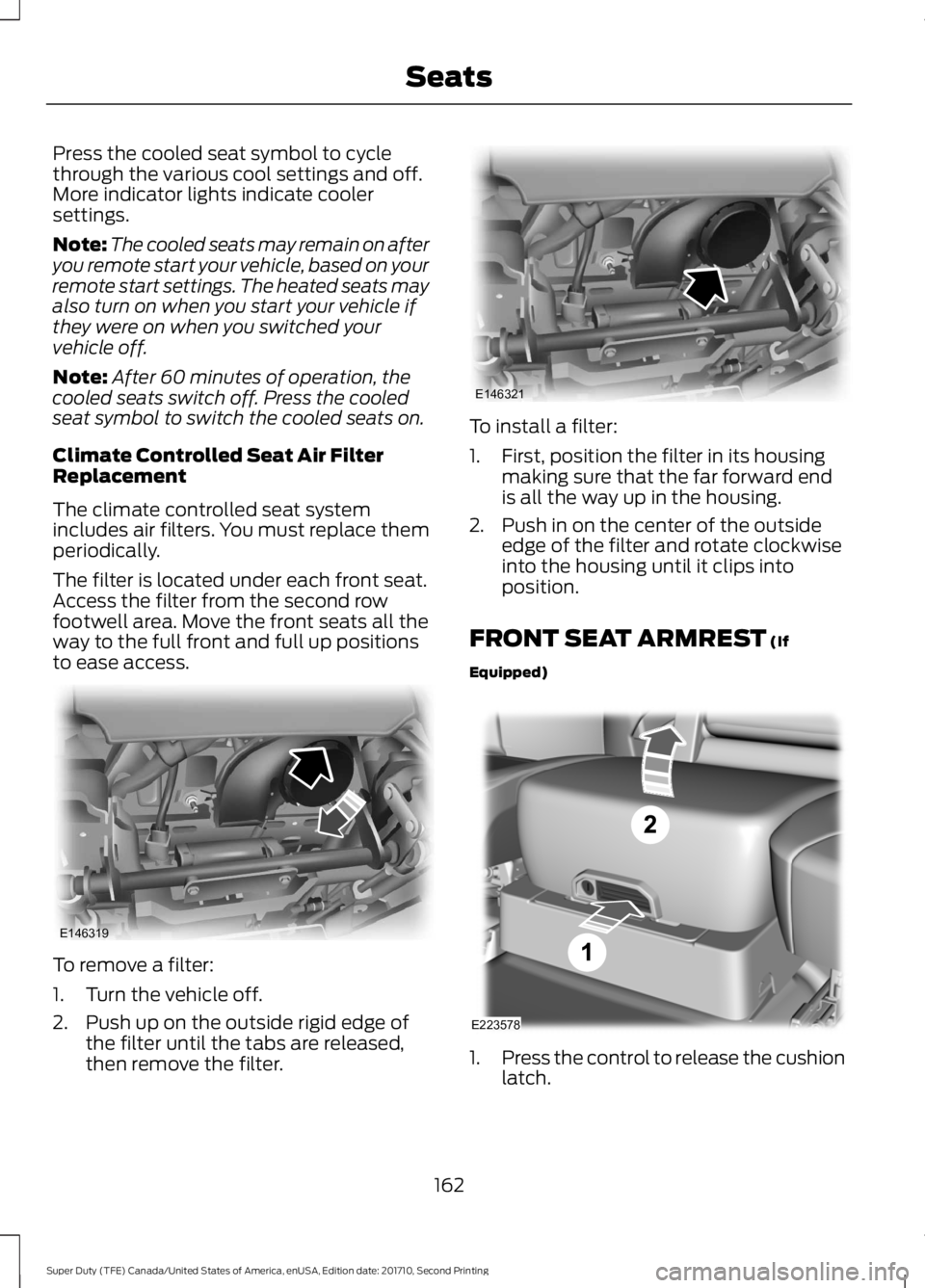
The filter is located under each front seat.Access the filter from the second rowfootwell area. Move the front seats all theway to the full front and full up positionsto ease access.
To remove a filter:
1. Turn the vehicle off.
2. Push up on the outside rigid edge ofthe filter until the tabs are released,then remove the filter.
To install a filter:
1. First, position the filter in its housingmaking sure that the far forward endis all the way up in the housing.
2. Push in on the center of the outsideedge of the filter and rotate clockwiseinto the housing until it clips intoposition.
FRONT SEAT ARMREST (If
Equipped)
1.Press the control to release the cushionlatch.
162
Super Duty (TFE) Canada/United States of America, enUSA, Edition date: 201710, Second Printing
SeatsE146319 E146321 E223578
Page 214 of 642
For proper operation, make sure that eachhub is fully engaged and that both hublocks are set to the same position (bothset to LOCK or both set to AUTO). Toengage LOCK, turn the hub lockscompletely clockwise; to engage AUTO,turn the hub locks completelycounterclockwise.
The ESOF 4WD system:
•provides 4x4 High engagement anddisengagement while the vehicle ismoving.
•is operated by a rotary control locatedon the instrument panel that allowsyou select 4x2, 4x4 High or 4x4 Lowoperation.
•uses auto-manual hub locks that canbe engaged and disengagedautomatically based on the 4x4 modeselected.
•will increase fuel economy when usedin the hub lock's recommended AUTOmode.
4WD Indicator Lights
Note:When a 4X4 system fault is present,the system will typically remain in whichever4X4 mode was selected prior to the faultcondition occurring. It will not default to 4X2in all circumstances. When this warning isdisplayed, have your vehicle serviced by anauthorized dealer.
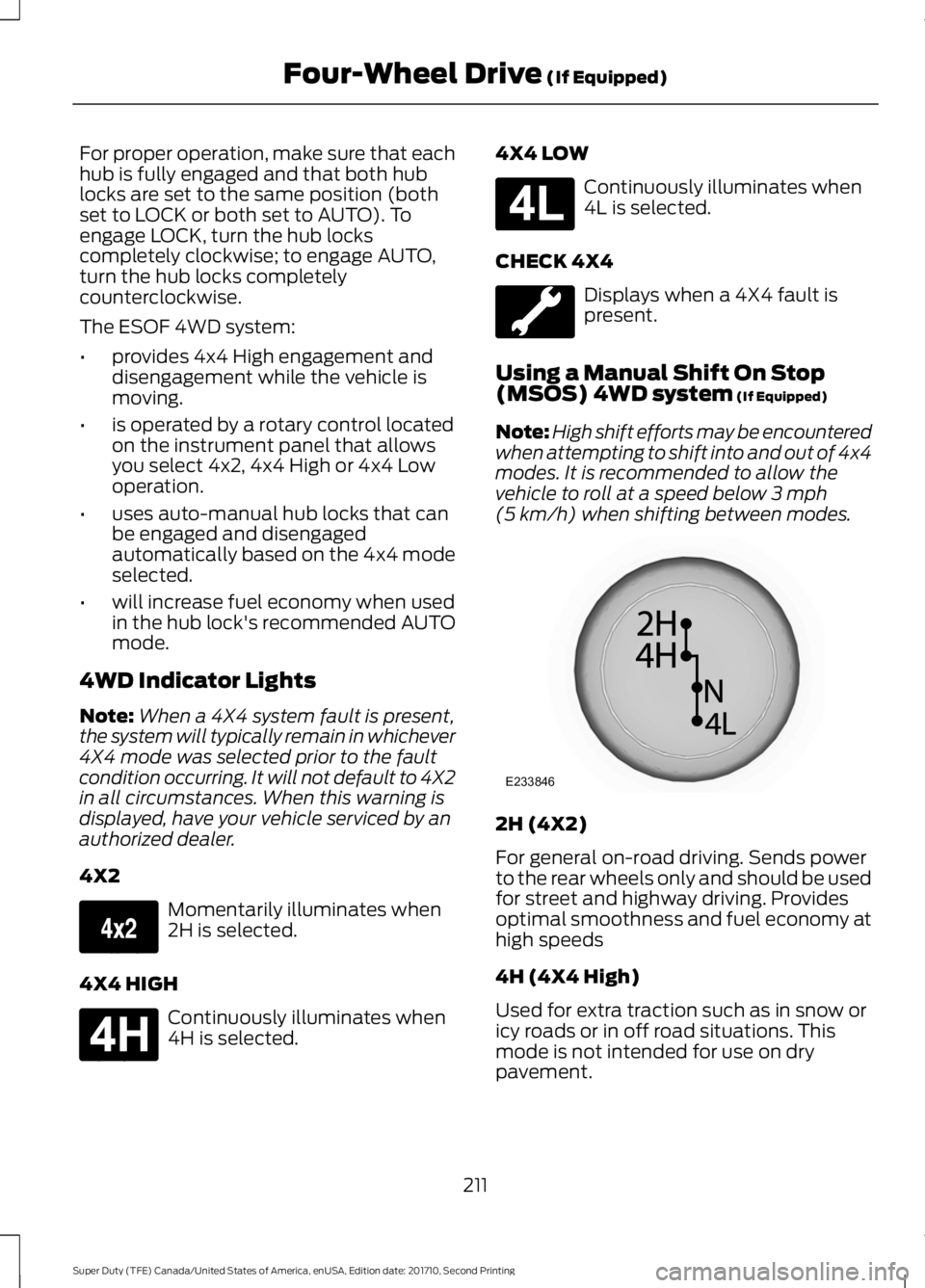
4X2
Momentarily illuminates when2H is selected.
4X4 HIGH
Continuously illuminates when4H is selected.
4X4 LOW
Continuously illuminates when4L is selected.
CHECK 4X4
Displays when a 4X4 fault ispresent.
Using a Manual Shift On Stop(MSOS) 4WD system (If Equipped)
Note:High shift efforts may be encounteredwhen attempting to shift into and out of 4x4modes. It is recommended to allow thevehicle to roll at a speed below 3 mph(5 km/h) when shifting between modes.
2H (4X2)
For general on-road driving. Sends powerto the rear wheels only and should be usedfor street and highway driving. Providesoptimal smoothness and fuel economy athigh speeds
4H (4X4 High)
Used for extra traction such as in snow oricy roads or in off road situations. Thismode is not intended for use on drypavement.
211
Super Duty (TFE) Canada/United States of America, enUSA, Edition date: 201710, Second Printing
Four-Wheel Drive (If Equipped)E163173 E181779 E181780 E233846
Page 226 of 642
Apply the parking brake whenever yourvehicle is parked. Press the pedaldownward to set the parking brake. Thebrake warning lamp in the instrumentcluster will illuminate and remainsilluminated until the parking brake isreleased.
To release, pull the brake release leverlocated at the lower left side of theinstrument panel.
If you are parking your vehicle on a gradeor with a trailer, press and hold the brakepedal down, then set the parking brake.There may be a little vehicle movement asthe parking brake sets to hold the vehicle'sweight. This is normal and should be noreason for concern. If needed, press andhold the service brake pedal down, thentry reapplying the parking brake. Chock thewheels if required. If the parking brakecannot hold the weight of the vehicle, theparking brake may need to be serviced orthe vehicle may be overloaded.
HILL START ASSIST
WARNINGS
The system does not replace theparking brake. When you leave yourvehicle, always apply the parkingbrake and shift the transmission into park(P) (automatic transmission) or first gear(1) (manual transmission).
You must remain in your vehicle onceyou have activated the system.
During all times, you are responsiblefor controlling your vehicle,supervising the system andintervening, if required.
If the engine is revved excessively, orif a malfunction is detected, thesystem will be deactivated.
The system makes it easier to pull awaywhen your vehicle is on a slope without theneed to use the parking brake.
When the system is active, your vehicle willremain stationary on the slope for two tothree seconds after you release the brakepedal. This allows you time to move yourfoot from the brake to the acceleratorpedal. The brakes release automaticallywhen the engine has sufficient torque toprevent your vehicle from rolling down thegrade. This is an advantage when pullingaway on a slope, for example from a carpark ramp, traffic lights or when reversinguphill into a parking space.
The system will activate automatically onany slope that will cause significant vehiclerollback. For vehicles with a manualtransmission, you can switch this featureoff using the information display. SeeInformation Displays (page 111). Thesystem will remain on or off depending onhow it was last set.
Note:There is no warning lamp to indicatethe system is either on or off.
Note:If your vehicle is equipped with AutoHold, Hill Start Assist will not be availablewhile Auto Hold is active.
Using Hill Start Assist
1. Bring your vehicle to a completestandstill. Keep the brake pedalpressed and select an uphill gear (forexample, first (1) when facing uphill orreverse (R) when facing downhill).
2. If the sensors detect that your vehicleis on a slope, the system will activateautomatically.
3. When you remove your foot from thebrake pedal, your vehicle will remainon the slope without rolling away forabout two or three seconds. This holdtime will automatically be extended ifyou are in the process of driving off.
223
Super Duty (TFE) Canada/United States of America, enUSA, Edition date: 201710, Second Printing
Brakes
Page 228 of 642
PRINCIPLE OF OPERATION
The traction control system helps avoiddrive wheel spin and loss of traction.
If your vehicle begins to slide, the systemapplies the brakes to individual wheelsand, when needed, reduces engine powerat the same time. If the wheels spin whenaccelerating on slippery or loose surfaces,the system reduces engine power in orderto increase traction.
USING TRACTION CONTROL
WARNING
The stability and traction controllight illuminates steadily if thesystem detects a failure. Make sureyou did not manually disable the tractioncontrol system using the informationdisplay controls or the switch. If thestability control and traction control lightis still illuminating steadily, have thesystem serviced by an authorized dealerimmediately. Operating your vehicle withthe traction control disabled could lead toan increased risk of loss of vehicle control,vehicle rollover, personal injury and death.
The system automatically turns on eachtime you switch the ignition on.
If your vehicle is stuck in mud or snow,switching traction control off may bebeneficial as this allows the wheels to spin.
Note:When you switch traction control off,stability control remains fully active.
Note:For additional information on thetraction and stability control systems. SeeUsing Stability Control (page 227).
Switching the System Off
When you switch the system off or on, amessage appears in the informationdisplay showing system status.
Use the traction and stability controlswitch on the instrument panel to switchthe system off or on.
The switch illuminates when tractioncontrol is off.
When you place your vehicle intofour-wheel drive low mode the tractioncontrol disables. Traction control resumesfull operation when you put your vehicleback into two-wheel drive mode.
System Indicator Lights andMessages
The stability and traction controllight:
•Temporarily illuminates on enginestart-up.
•Flashes when a driving conditionactivates either of the systems.
•Illuminates if a problem occurs in eitherof the systems.
The stability and traction controloff light temporarily illuminateson engine start-up and stays onwhen you switch the traction controlsystem off.
225
Super Duty (TFE) Canada/United States of America, enUSA, Edition date: 201710, Second Printing
Traction ControlE166706 E225465 E225466
Page 253 of 642
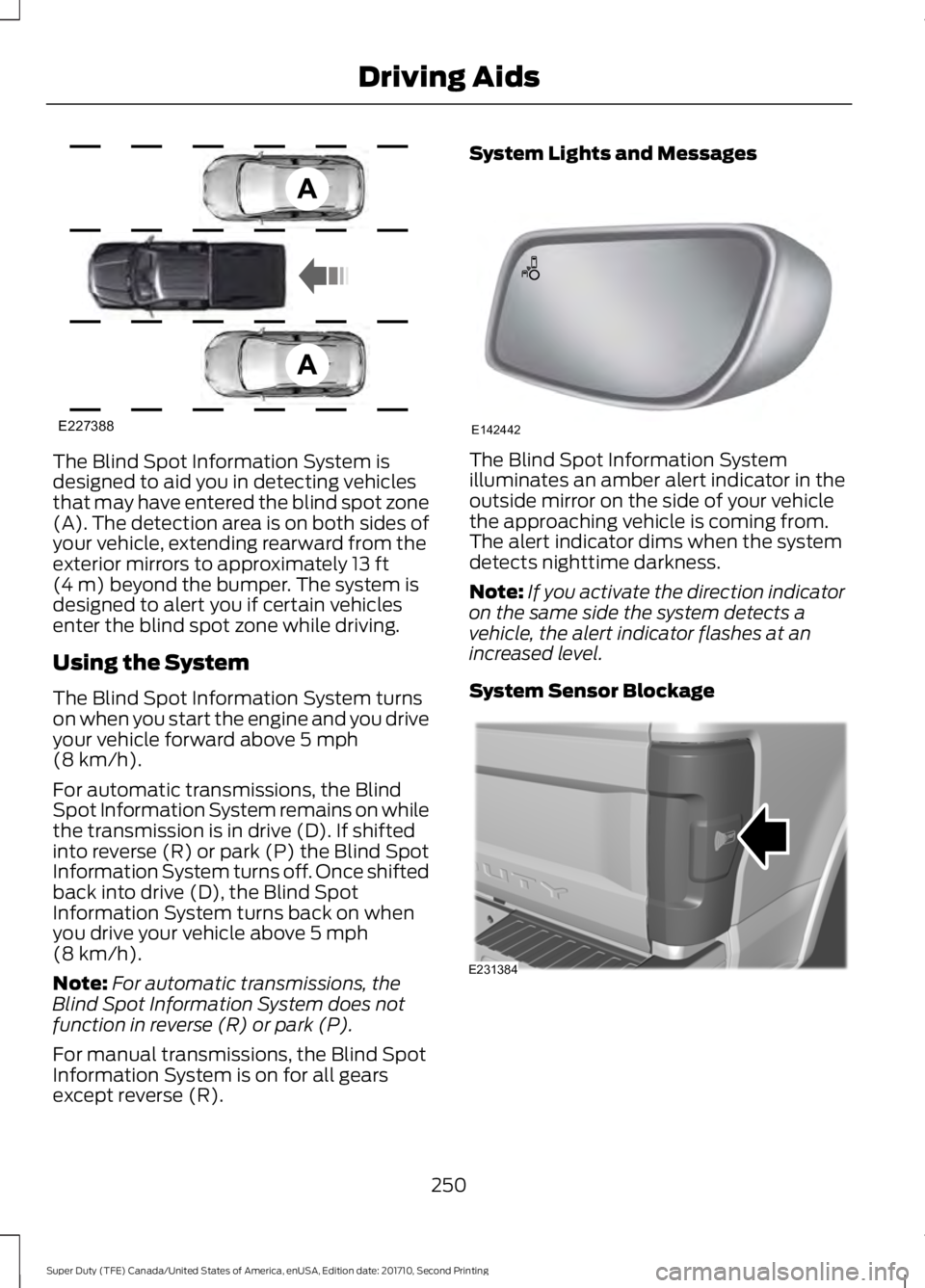
The Blind Spot Information System isdesigned to aid you in detecting vehiclesthat may have entered the blind spot zone(A). The detection area is on both sides ofyour vehicle, extending rearward from theexterior mirrors to approximately 13 ft(4 m) beyond the bumper. The system isdesigned to alert you if certain vehiclesenter the blind spot zone while driving.
Using the System
The Blind Spot Information System turnson when you start the engine and you driveyour vehicle forward above 5 mph(8 km/h).
For automatic transmissions, the BlindSpot Information System remains on whilethe transmission is in drive (D). If shiftedinto reverse (R) or park (P) the Blind SpotInformation System turns off. Once shiftedback into drive (D), the Blind SpotInformation System turns back on whenyou drive your vehicle above 5 mph(8 km/h).
Note:For automatic transmissions, theBlind Spot Information System does notfunction in reverse (R) or park (P).
For manual transmissions, the Blind SpotInformation System is on for all gearsexcept reverse (R).
System Lights and Messages
The Blind Spot Information Systemilluminates an amber alert indicator in theoutside mirror on the side of your vehiclethe approaching vehicle is coming from.The alert indicator dims when the systemdetects nighttime darkness.
Note:If you activate the direction indicatoron the same side the system detects avehicle, the alert indicator flashes at anincreased level.
System Sensor Blockage
250
Super Duty (TFE) Canada/United States of America, enUSA, Edition date: 201710, Second Printing
Driving AidsE227388 E142442 E231384
Page 258 of 642
System Lights, Messages andAudible Alerts
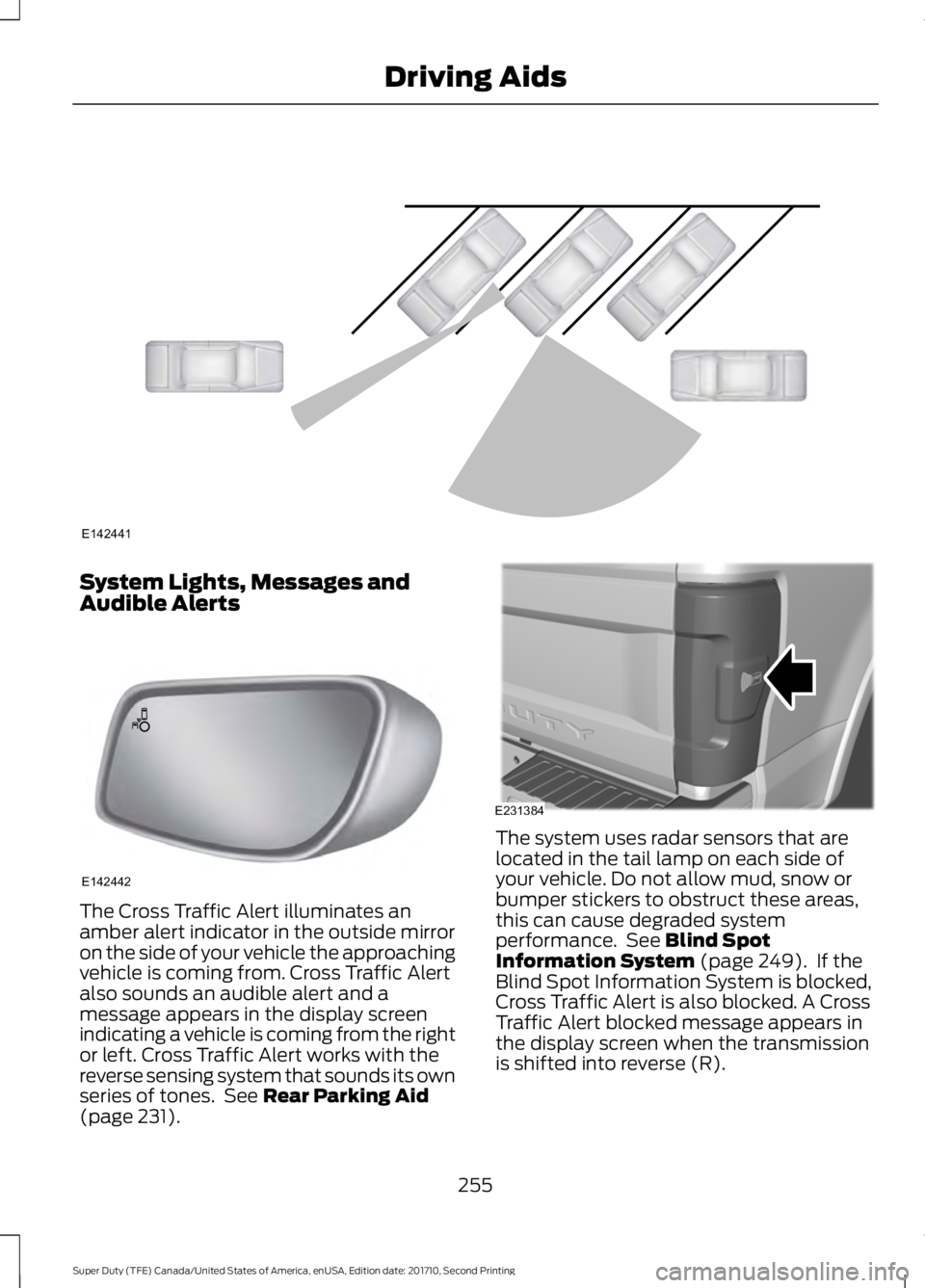
The Cross Traffic Alert illuminates anamber alert indicator in the outside mirroron the side of your vehicle the approachingvehicle is coming from. Cross Traffic Alertalso sounds an audible alert and amessage appears in the display screenindicating a vehicle is coming from the rightor left. Cross Traffic Alert works with thereverse sensing system that sounds its ownseries of tones. See Rear Parking Aid(page 231).
The system uses radar sensors that arelocated in the tail lamp on each side ofyour vehicle. Do not allow mud, snow orbumper stickers to obstruct these areas,this can cause degraded systemperformance. See Blind SpotInformation System (page 249). If theBlind Spot Information System is blocked,Cross Traffic Alert is also blocked. A CrossTraffic Alert blocked message appears inthe display screen when the transmissionis shifted into reverse (R).
255
Super Duty (TFE) Canada/United States of America, enUSA, Edition date: 201710, Second Printing
Driving AidsE142441 E142442 E231384
Page 285 of 642
When attaching the trailer wiring connectorto your vehicle, only use a proper fittingconnector that works with the vehicle andtrailer functions. Some seven-positionconnectors may have the SAE J2863 logo,which confirms that it is the proper wiringconnector and works correctly with yourvehicle.
FunctionColor
Left turn signal and stop lampYellow
Ground (-)White
Electric brakesBlue
Right turn signal and stoplampGreen
Battery (+)Orange
Running lightsBrown
Reverse lightsGrey
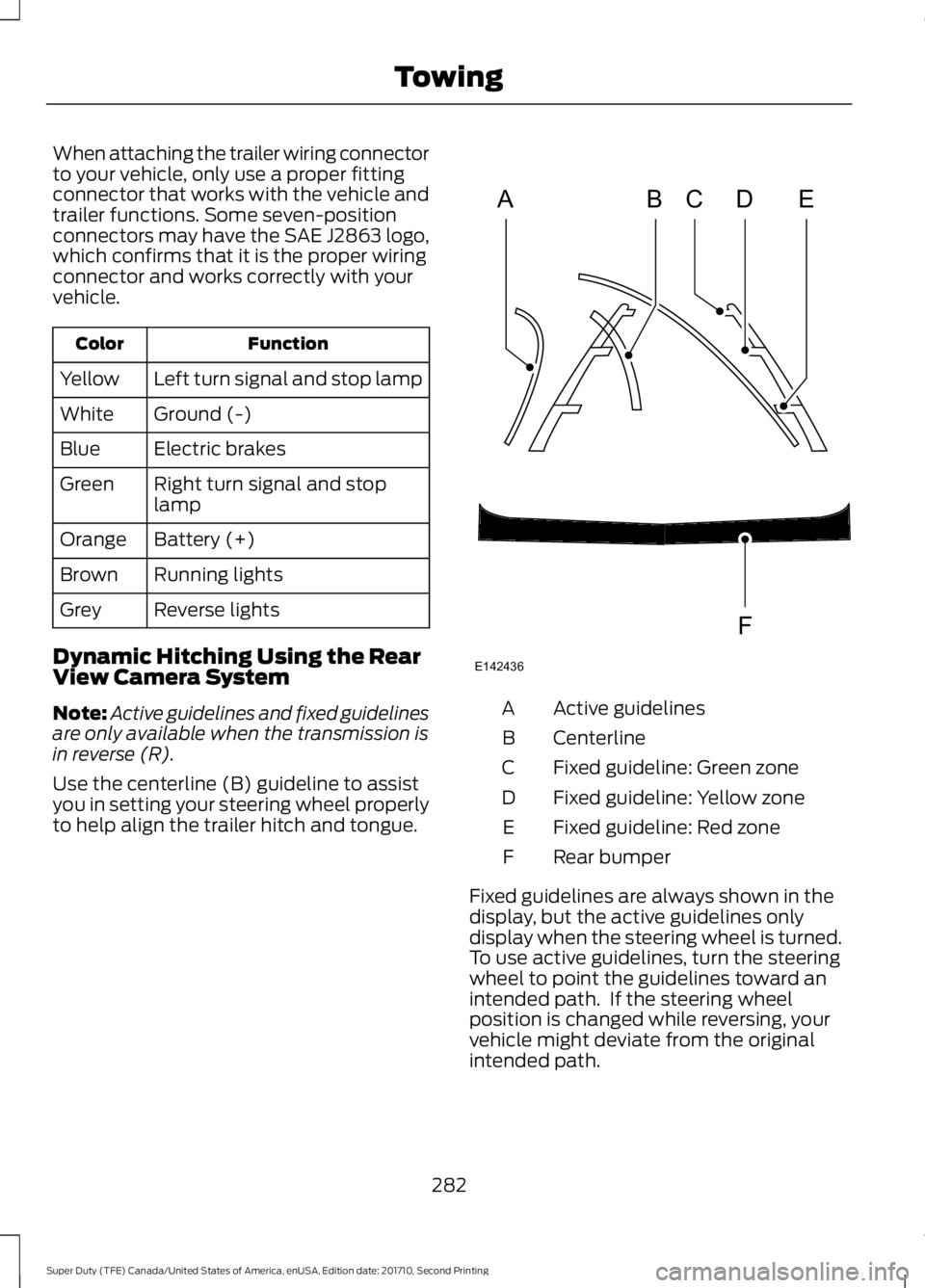
Dynamic Hitching Using the RearView Camera System
Note:Active guidelines and fixed guidelinesare only available when the transmission isin reverse (R).
Use the centerline (B) guideline to assistyou in setting your steering wheel properlyto help align the trailer hitch and tongue.
Active guidelinesA
CenterlineB
Fixed guideline: Green zoneC
Fixed guideline: Yellow zoneD
Fixed guideline: Red zoneE
Rear bumperF
Fixed guidelines are always shown in thedisplay, but the active guidelines onlydisplay when the steering wheel is turned.To use active guidelines, turn the steeringwheel to point the guidelines toward anintended path. If the steering wheelposition is changed while reversing, yourvehicle might deviate from the originalintended path.
282
Super Duty (TFE) Canada/United States of America, enUSA, Edition date: 201710, Second Printing
TowingABCD
F
E
E142436
Page 288 of 642
Integrated Trailer Brake Controller
(If Equipped)
WARNINGS
The anti-lock brake system does notcontrol the trailer brakes.
Use the integrated trailer brakecontroller to properly adjust thetrailer brakes and check allconnections before towing a trailer. Failureto follow this instruction could result in theloss of control of your vehicle, personalinjury or death.
Note:The integrated Ford brake controlleris compatible with trailers equipped withelectric-actuated drum brakes andelectric-over hydraulic brake systems.
Note:The integrated Ford brake controllerdoes not control hydraulic surge-stylebrakes.
When used properly, the trailer brakecontroller assists in smooth and effectivetrailer braking by powering the trailer’selectric or electric-over-hydraulic brakeswith a proportional output based on thetowing vehicle’s brake pressure.
You can adjust the amount of initial trailerbrake output by selecting one of threesettings through the message center.
Ford has tested the trailer brake controllerto be compatible with several majorbrands of electric-over-hydraulic trailerbrakes. Contact an authorized dealer forinformation on which brands you can use.
The controller user interface consists ofthe following:
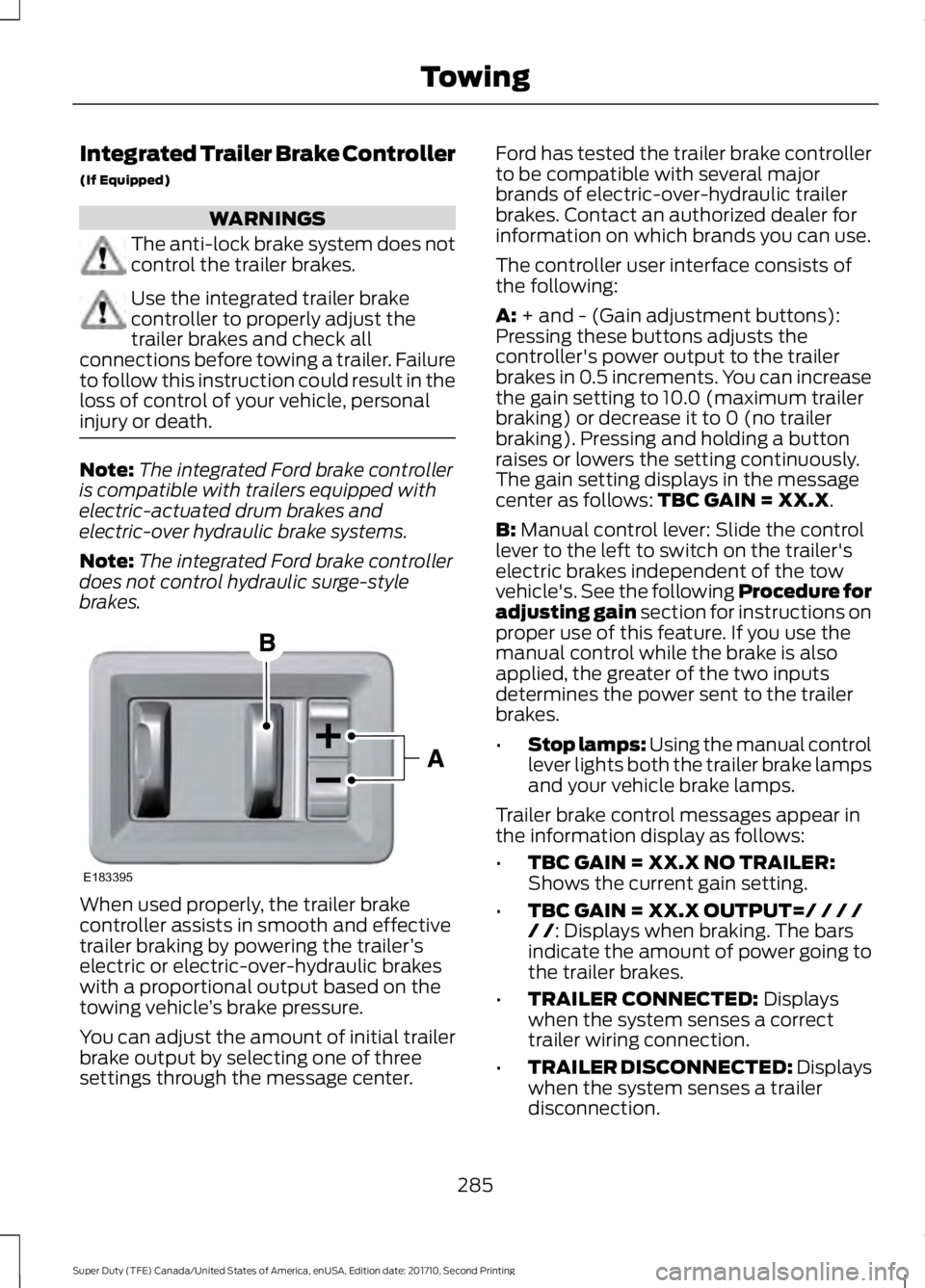
A: + and - (Gain adjustment buttons):Pressing these buttons adjusts thecontroller's power output to the trailerbrakes in 0.5 increments. You can increasethe gain setting to 10.0 (maximum trailerbraking) or decrease it to 0 (no trailerbraking). Pressing and holding a buttonraises or lowers the setting continuously.The gain setting displays in the messagecenter as follows: TBC GAIN = XX.X.
B: Manual control lever: Slide the controllever to the left to switch on the trailer'selectric brakes independent of the towvehicle's. See the following Procedure foradjusting gain section for instructions onproper use of this feature. If you use themanual control while the brake is alsoapplied, the greater of the two inputsdetermines the power sent to the trailerbrakes.
•Stop lamps: Using the manual controllever lights both the trailer brake lampsand your vehicle brake lamps.
Trailer brake control messages appear inthe information display as follows:
•TBC GAIN = XX.X NO TRAILER:Shows the current gain setting.
•TBC GAIN = XX.X OUTPUT=/ / / // /: Displays when braking. The barsindicate the amount of power going tothe trailer brakes.
•TRAILER CONNECTED: Displayswhen the system senses a correcttrailer wiring connection.
•TRAILER DISCONNECTED: Displayswhen the system senses a trailerdisconnection.
285
Super Duty (TFE) Canada/United States of America, enUSA, Edition date: 201710, Second Printing
TowingE183395
Page 290 of 642
If this message displays, with no trailerconnected, the problem is with your vehiclewiring or trailer brake controller. Contactan authorized dealer.
If the message only displays with a trailerconnected, the problem is with the trailerwiring. Consult your trailer dealer forassistance. This can be a short to ground(such as a chaffed wire), short to voltage(such as a pulled pin on trailer emergencybreakaway battery) or the trailer brakesmay be drawing too much current.
Points to Remember
Note:Do not attempt removal of the trailerbrake controller without consulting theWorkshop Manual. Damage to the unit mayresult.
•Adjust gain setting before using thetrailer brake controller.
•Adjust gain setting, using the procedureabove, whenever road, weather, traileror vehicle loading conditions changefrom when the gain was initially set.
•Only use the manual control lever forproper adjustment of the gain duringtrailer setup. Misuse, such asapplication during trailer sway, couldcause instability of trailer or towvehicle.
•Avoid towing in adverse weatherconditions. The trailer brake controllerdoes not provide anti-lock control ofthe trailer wheels. Trailer wheels canlock up on slippery surfaces, resultingin reduced stability of trailer and towvehicle.
•The trailer brake controller is equippedwith a feature that reduces output atvehicle speeds below 11 mph (18 km/h)so trailer and vehicle braking is not jerkyor harsh. This feature is only activewhen applying the brakes using yourvehicle's brake pedal, not thecontroller.
•The controller interacts with the brakecontrol system and powertrain controlsystem of your vehicle to provide thebest performance on different roadconditions.
•Your vehicle's brake system and thetrailer brake system workindependently of each other. Changingthe gain setting on the controller doesnot affect the operation of yourvehicle's brakes.
•When you switch the engine off, thecontroller output is disabled and thedisplay and module shut down.
Trailer Lamps
WARNING
Never connect any trailer lamp wiringto the vehicle's tail lamp wiring; thismay damage the electrical systemresulting in fire. Contact your authorizeddealer as soon as possible for assistancein proper trailer tow wiring installation.Additional electrical equipment may berequired.
Trailer lamps are required on most towedvehicles. Make sure all running lights, brakelights, turn signals and hazard lights areworking.
Before Towing a Trailer
Practice turning, stopping and backing upto get the feel of your vehicle-trailercombination before starting on a trip.When turning, make wider turns so thetrailer wheels clear curbs and otherobstacles.
287
Super Duty (TFE) Canada/United States of America, enUSA, Edition date: 201710, Second Printing
Towing