lock FORD F450 SUPER DUTY 2017 Owner's Manual
[x] Cancel search | Manufacturer: FORD, Model Year: 2017, Model line: F450 SUPER DUTY, Model: FORD F450 SUPER DUTY 2017Pages: 642, PDF Size: 12.35 MB
Page 67 of 642
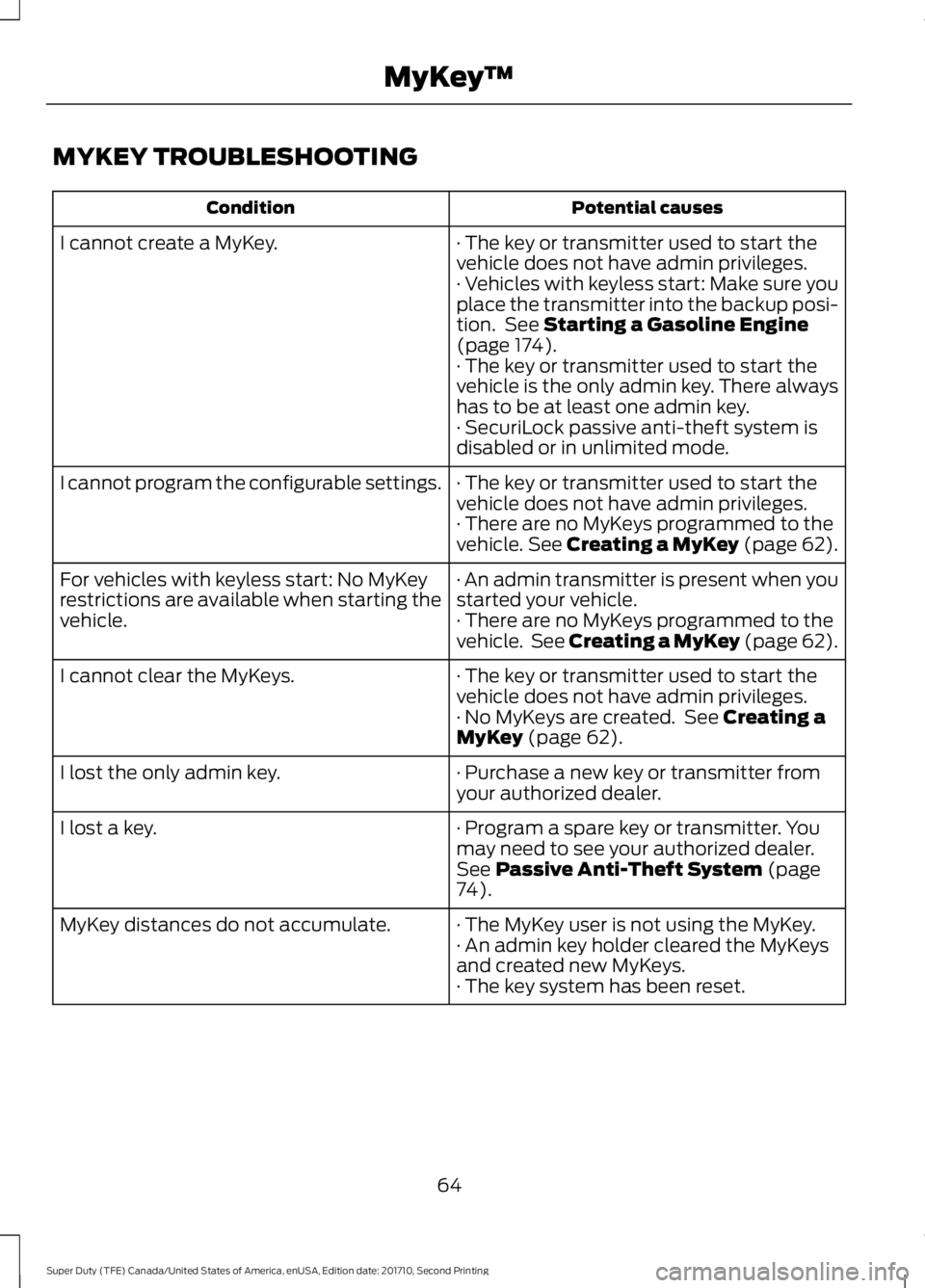
MYKEY TROUBLESHOOTING
Potential causesCondition
· The key or transmitter used to start thevehicle does not have admin privileges.I cannot create a MyKey.
· Vehicles with keyless start: Make sure youplace the transmitter into the backup posi-tion. See Starting a Gasoline Engine(page 174).· The key or transmitter used to start thevehicle is the only admin key. There alwayshas to be at least one admin key.· SecuriLock passive anti-theft system isdisabled or in unlimited mode.
· The key or transmitter used to start thevehicle does not have admin privileges.I cannot program the configurable settings.
· There are no MyKeys programmed to thevehicle. See Creating a MyKey (page 62).
· An admin transmitter is present when youstarted your vehicle.For vehicles with keyless start: No MyKeyrestrictions are available when starting thevehicle.· There are no MyKeys programmed to thevehicle. See Creating a MyKey (page 62).
· The key or transmitter used to start thevehicle does not have admin privileges.I cannot clear the MyKeys.
· No MyKeys are created. See Creating aMyKey (page 62).
· Purchase a new key or transmitter fromyour authorized dealer.I lost the only admin key.
· Program a spare key or transmitter. Youmay need to see your authorized dealer.See Passive Anti-Theft System (page74).
I lost a key.
· The MyKey user is not using the MyKey.MyKey distances do not accumulate.· An admin key holder cleared the MyKeysand created new MyKeys.· The key system has been reset.
64
Super Duty (TFE) Canada/United States of America, enUSA, Edition date: 201710, Second Printing
MyKey™
Page 68 of 642
LOCKING AND UNLOCKING
You can use the power door lock controlor the remote control to lock and unlockyour vehicle.
See Tailgate Lock (page 70).
Power Door Locks (If Equipped)
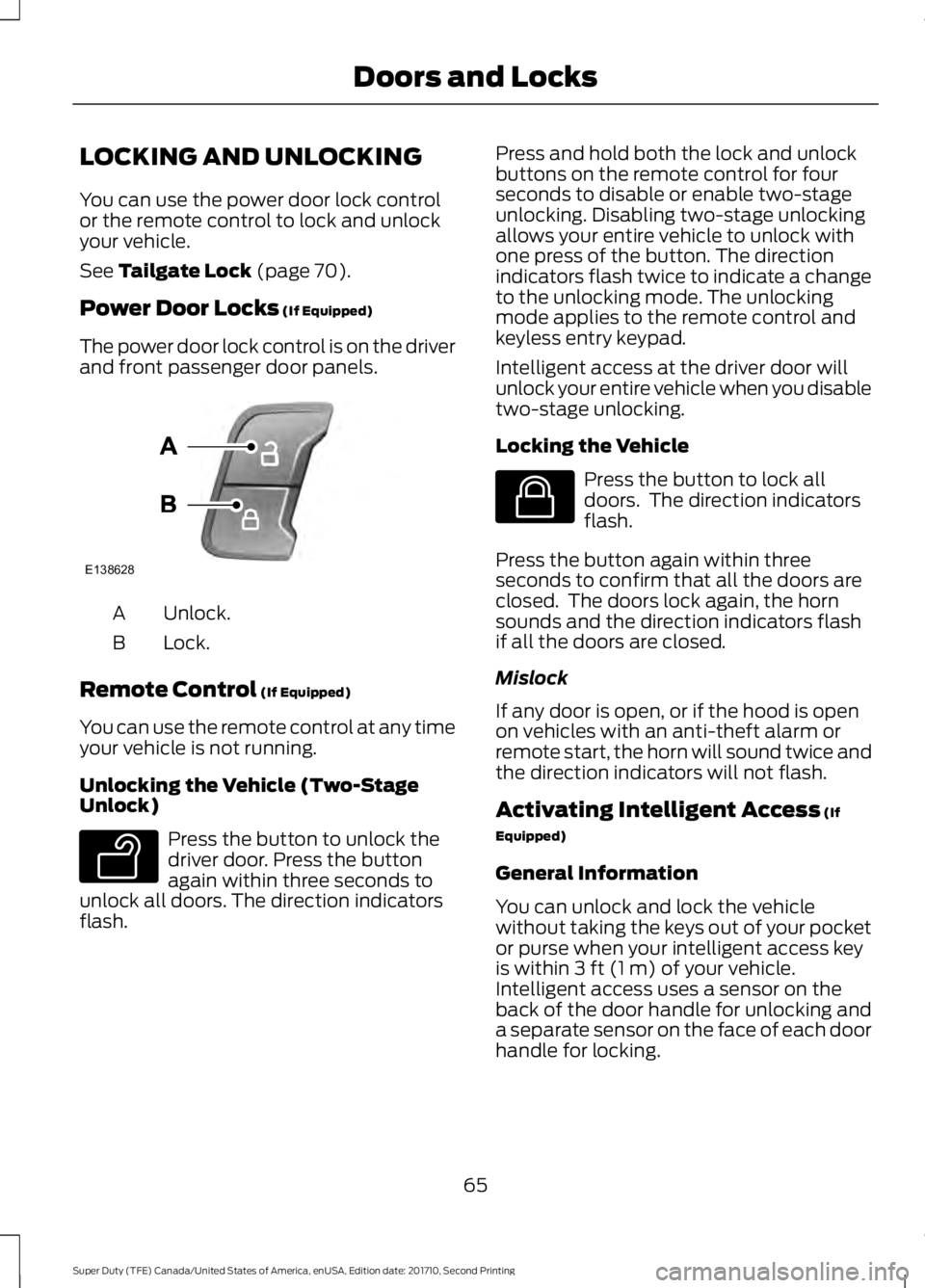
The power door lock control is on the driverand front passenger door panels.
Unlock.A
Lock.B
Remote Control (If Equipped)
You can use the remote control at any timeyour vehicle is not running.
Unlocking the Vehicle (Two-StageUnlock)
Press the button to unlock thedriver door. Press the buttonagain within three seconds tounlock all doors. The direction indicatorsflash.
Press and hold both the lock and unlockbuttons on the remote control for fourseconds to disable or enable two-stageunlocking. Disabling two-stage unlockingallows your entire vehicle to unlock withone press of the button. The directionindicators flash twice to indicate a changeto the unlocking mode. The unlockingmode applies to the remote control andkeyless entry keypad.
Intelligent access at the driver door willunlock your entire vehicle when you disabletwo-stage unlocking.
Locking the Vehicle
Press the button to lock alldoors. The direction indicatorsflash.
Press the button again within threeseconds to confirm that all the doors areclosed. The doors lock again, the hornsounds and the direction indicators flashif all the doors are closed.
Mislock
If any door is open, or if the hood is openon vehicles with an anti-theft alarm orremote start, the horn will sound twice andthe direction indicators will not flash.
Activating Intelligent Access (If
Equipped)
General Information
You can unlock and lock the vehiclewithout taking the keys out of your pocketor purse when your intelligent access keyis within 3 ft (1 m) of your vehicle.Intelligent access uses a sensor on theback of the door handle for unlocking anda separate sensor on the face of each doorhandle for locking.
65
Super Duty (TFE) Canada/United States of America, enUSA, Edition date: 201710, Second Printing
Doors and LocksE138628 E138629 E138623
Page 69 of 642
The system will not function if:
•Your vehicle battery has no charge.
•The key battery has no charge.
•The passive key frequencies arejammed.
Note:The system may not function if thepassive key is close to metal objects orelectronic devices, for example keys or a cellphone.
Note:If the system does not function, usethe key blade to lock and unlock yourvehicle. See Remote Control (page 54).
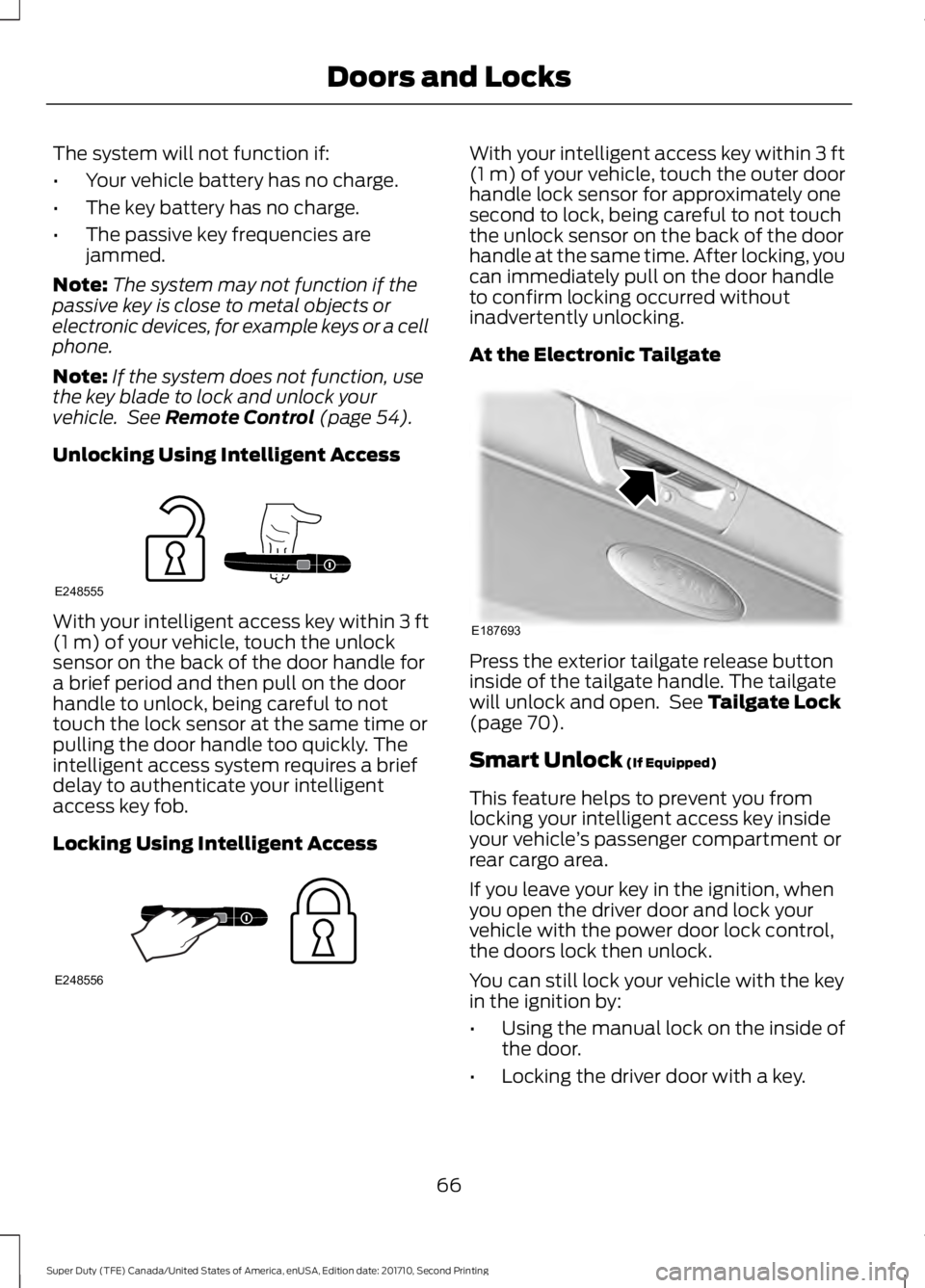
Unlocking Using Intelligent Access
With your intelligent access key within 3 ft(1 m) of your vehicle, touch the unlocksensor on the back of the door handle fora brief period and then pull on the doorhandle to unlock, being careful to nottouch the lock sensor at the same time orpulling the door handle too quickly. Theintelligent access system requires a briefdelay to authenticate your intelligentaccess key fob.
Locking Using Intelligent Access
With your intelligent access key within 3 ft(1 m) of your vehicle, touch the outer doorhandle lock sensor for approximately onesecond to lock, being careful to not touchthe unlock sensor on the back of the doorhandle at the same time. After locking, youcan immediately pull on the door handleto confirm locking occurred withoutinadvertently unlocking.
At the Electronic Tailgate
Press the exterior tailgate release buttoninside of the tailgate handle. The tailgatewill unlock and open. See Tailgate Lock(page 70).
Smart Unlock (If Equipped)
This feature helps to prevent you fromlocking your intelligent access key insideyour vehicle’s passenger compartment orrear cargo area.
If you leave your key in the ignition, whenyou open the driver door and lock yourvehicle with the power door lock control,the doors lock then unlock.
You can still lock your vehicle with the keyin the ignition by:
•Using the manual lock on the inside ofthe door.
•Locking the driver door with a key.
66
Super Duty (TFE) Canada/United States of America, enUSA, Edition date: 201710, Second Printing
Doors and LocksE248555 E248556 E187693
Page 70 of 642
•Using the keyless entry keypad.
•Using the lock button on the remotecontrol.
Smart Unlocks for IntelligentAccess Keys (If Equipped)
This feature helps to prevent you fromlocking your intelligent access key insideyour vehicle’s passenger compartment orrear cargo area.
When you lock your vehicle using thepower door lock control (with the dooropen, vehicle in park and ignition off), yourvehicle will search for an intelligent accesskey in the passenger compartment afteryou close the door. If your vehicle finds akey, all of the doors will immediatelyunlock.
In order to override the smart unlockfeature and intentionally lock theintelligent access key inside your vehicle,you can lock your vehicle after all doorsare closed by using the keyless entrykeypad, pressing the lock button onanother intelligent access key or touchingthe locking area on the handle with anotherintelligent access key in your hand.
When you open one of the front doors andlock your vehicle using the power door lockcontrol, all doors will lock then unlock ifthe ignition is on.
Autolock and Autounlock (If Equipped)
The autolock feature locks all the doorswhen your doors are closed, the ignition ison, and your vehicle reaches a speedgreater than 12 mph (20 km/h).
When your doors autolock while driving,stopping the vehicle then switching theignition off or to accessory and openingthe driver door unlocks all your doors. Thisautounlock feature remains active for 10minutes after stopping.
Note:The doors do not autounlock if youhave electronically locked them beforeopening the driver door.
Enabling or Disabling Autolock andAutounlock
You can enable or disable these featuresindependently of each other using theinformation display. An authorized dealercan also help you enable or disable thesefeatures. See General Information (page111).
Illuminated Entry
The interior lamps and select exteriorlamps illuminate when you unlock thedoors with the remote entry system.
The illuminated entry system turns off thelights if:
•The ignition is on.
•You press the remote control lockbutton.
•After 25 seconds of illumination.
The dome lamp does not turn on if thecontrol is set to the off position.
The lights do not turn off if:
•You switch them on with the dimmercontrol.
•Any door is open.
Battery Saver
The battery saver turns off the interiorlamps 30 minutes after you switch off theignition if a door is open and the domelamp switch is on. It turns off the interiorlamps after 10 minutes if the dome lampswitch is off.
Accessory Mode Battery Saver forIntelligent Access Keys (If Equipped)
If you leave the ignition on after leavingyour vehicle, it turns off 15 minutes afteryou close all of the doors.
67
Super Duty (TFE) Canada/United States of America, enUSA, Edition date: 201710, Second Printing
Doors and Locks
Page 71 of 642
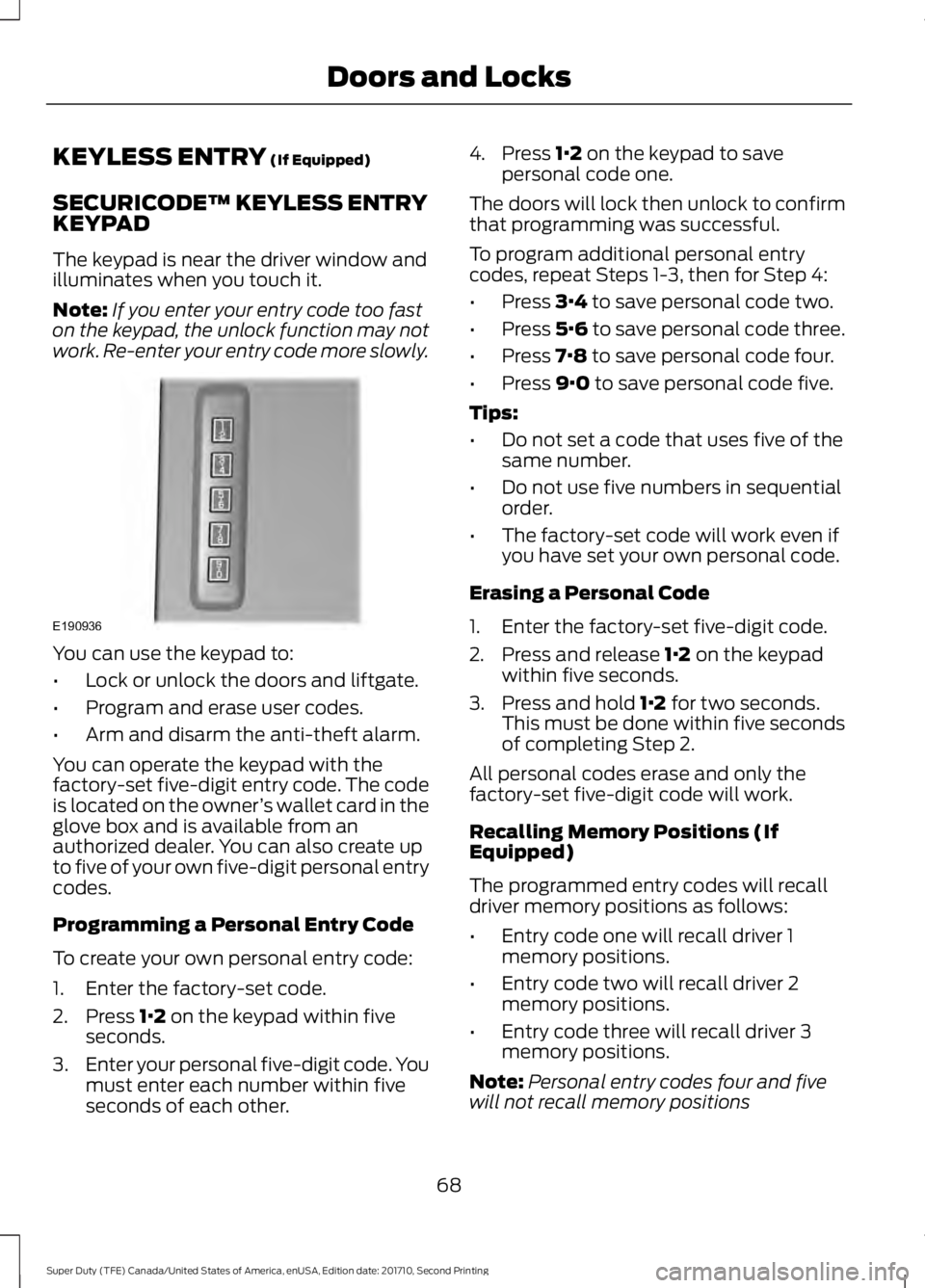
KEYLESS ENTRY (If Equipped)
SECURICODE™ KEYLESS ENTRYKEYPAD
The keypad is near the driver window andilluminates when you touch it.
Note:If you enter your entry code too faston the keypad, the unlock function may notwork. Re-enter your entry code more slowly.
You can use the keypad to:
•Lock or unlock the doors and liftgate.
•Program and erase user codes.
•Arm and disarm the anti-theft alarm.
You can operate the keypad with thefactory-set five-digit entry code. The codeis located on the owner’s wallet card in theglove box and is available from anauthorized dealer. You can also create upto five of your own five-digit personal entrycodes.
Programming a Personal Entry Code
To create your own personal entry code:
1. Enter the factory-set code.
2. Press 1·2 on the keypad within fiveseconds.
3.Enter your personal five-digit code. Youmust enter each number within fiveseconds of each other.
4. Press 1·2 on the keypad to savepersonal code one.
The doors will lock then unlock to confirmthat programming was successful.
To program additional personal entrycodes, repeat Steps 1-3, then for Step 4:
•Press 3·4 to save personal code two.
•Press 5·6 to save personal code three.
•Press 7·8 to save personal code four.
•Press 9·0 to save personal code five.
Tips:
•Do not set a code that uses five of thesame number.
•Do not use five numbers in sequentialorder.
•The factory-set code will work even ifyou have set your own personal code.
Erasing a Personal Code
1. Enter the factory-set five-digit code.
2. Press and release 1·2 on the keypadwithin five seconds.
3. Press and hold 1·2 for two seconds.This must be done within five secondsof completing Step 2.
All personal codes erase and only thefactory-set five-digit code will work.
Recalling Memory Positions (IfEquipped)
The programmed entry codes will recalldriver memory positions as follows:
•Entry code one will recall driver 1memory positions.
•Entry code two will recall driver 2memory positions.
•Entry code three will recall driver 3memory positions.
Note:Personal entry codes four and fivewill not recall memory positions
68
Super Duty (TFE) Canada/United States of America, enUSA, Edition date: 201710, Second Printing
Doors and LocksE190936
Page 72 of 642
Anti-Scan Feature
The keypad will go into an anti-scan modeif you enter the wrong code seven times(35 consecutive button presses). Thismode disables the keypad for one minuteand the keypad lamp will flash.
The anti-scan feature will turn off after:
•One minute of keypad inactivity.
•Pressing the unlock button on theremote control.
•Switching the ignition on.
•Unlocking the vehicle using intelligentaccess.
Unlocking and Locking the Doors
To Unlock the Driver Door
Enter the factory-set five-digit code or yourpersonal code. You must press eachnumber within five seconds of each other.The interior lamps illuminate.
Note:All doors unlock if you disable thetwo-stage unlocking feature. See GeneralInformation (page 111).
To Unlock All Doors
Enter the factory-set code or your personalcode, then press 3·4 control within fiveseconds.
To Lock All Doors
Press and hold 7·8 and 9·0 at the sametime with the driver door closed. You donot need to enter the keypad code first.
69
Super Duty (TFE) Canada/United States of America, enUSA, Edition date: 201710, Second Printing
Doors and Locks
Page 73 of 642
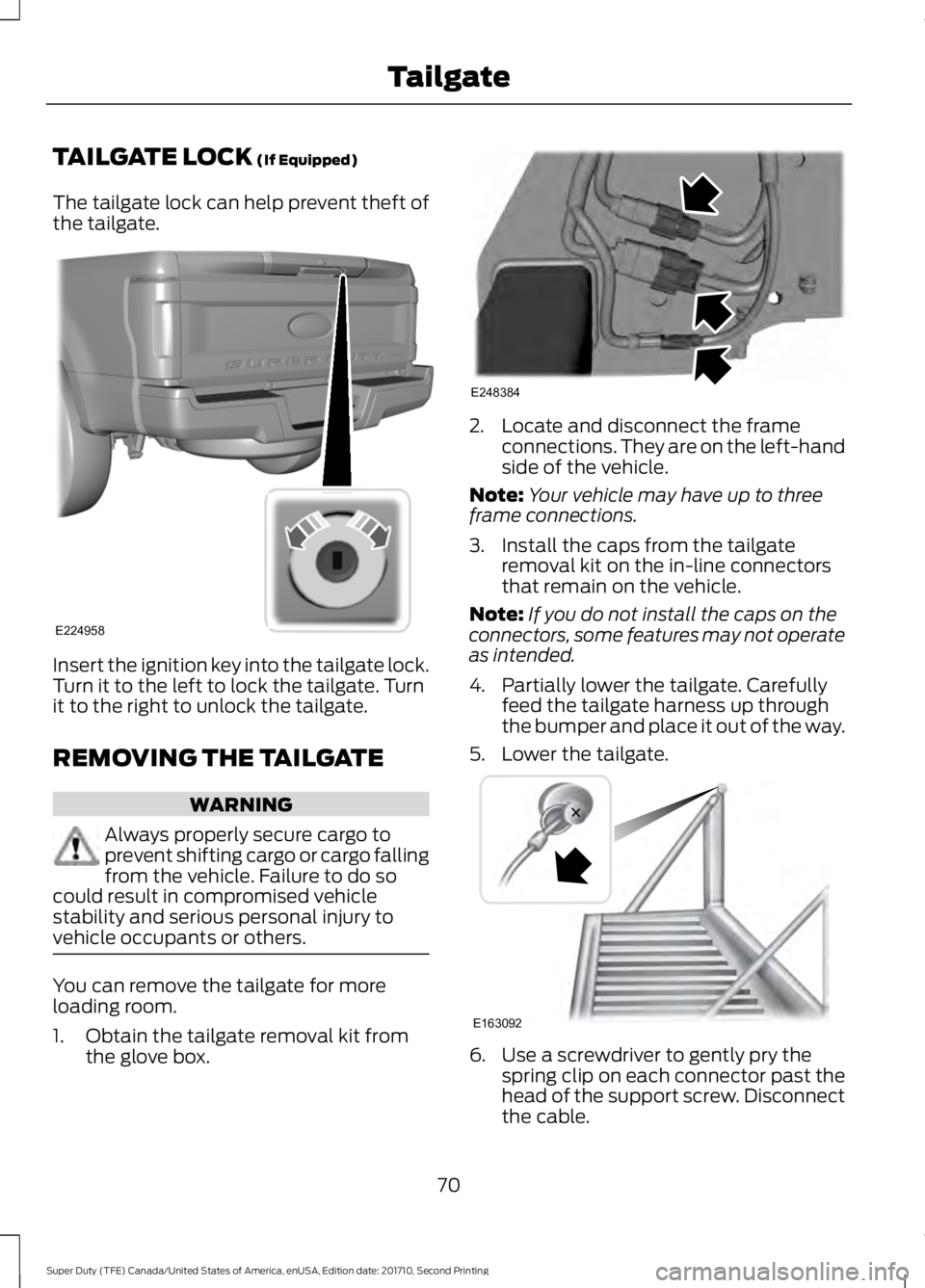
TAILGATE LOCK (If Equipped)
The tailgate lock can help prevent theft ofthe tailgate.
Insert the ignition key into the tailgate lock.Turn it to the left to lock the tailgate. Turnit to the right to unlock the tailgate.
REMOVING THE TAILGATE
WARNING
Always properly secure cargo toprevent shifting cargo or cargo fallingfrom the vehicle. Failure to do socould result in compromised vehiclestability and serious personal injury tovehicle occupants or others.
You can remove the tailgate for moreloading room.
1. Obtain the tailgate removal kit fromthe glove box.
2. Locate and disconnect the frameconnections. They are on the left-handside of the vehicle.
Note:Your vehicle may have up to threeframe connections.
3. Install the caps from the tailgateremoval kit on the in-line connectorsthat remain on the vehicle.
Note:If you do not install the caps on theconnectors, some features may not operateas intended.
4. Partially lower the tailgate. Carefullyfeed the tailgate harness up throughthe bumper and place it out of the way.
5. Lower the tailgate.
6. Use a screwdriver to gently pry thespring clip on each connector past thehead of the support screw. Disconnectthe cable.
70
Super Duty (TFE) Canada/United States of America, enUSA, Edition date: 201710, Second Printing
TailgateE224958 E248384 E163092
Page 74 of 642
7. Disconnect the other cable.
8. Lift the tailgate to a 45° angle fromhorizontal.
9. Lift the right side off its hinge.
10.Lift the tailgate to an 80° angle fromhorizontal.
11.Remove the tailgate from the left sidehinge by sliding it to the right.
Reverse the steps to reinstall the tailgate.
TAILGATE STEP (If Equipped)
Use the step to make entering the truckbed easier.
To reduce the risk of falling:
•Only operate the step when yourvehicle is on a level surface.
•Only operate the step in areas withsufficient lighting.
•Always open the step panel to widenthe step.
•Always use the grab handle whenclimbing on the step.
•Do not use the step with bare feet.
•Make sure the step is clean before use.
•Keep the step load, you plus the load,below 350 lb (159 kg).
Opening the Step
Note:Make sure to close and fully latch thestep before moving your vehicle. Never drivewith the step or grab handle open.
1. Lower the tailgate.
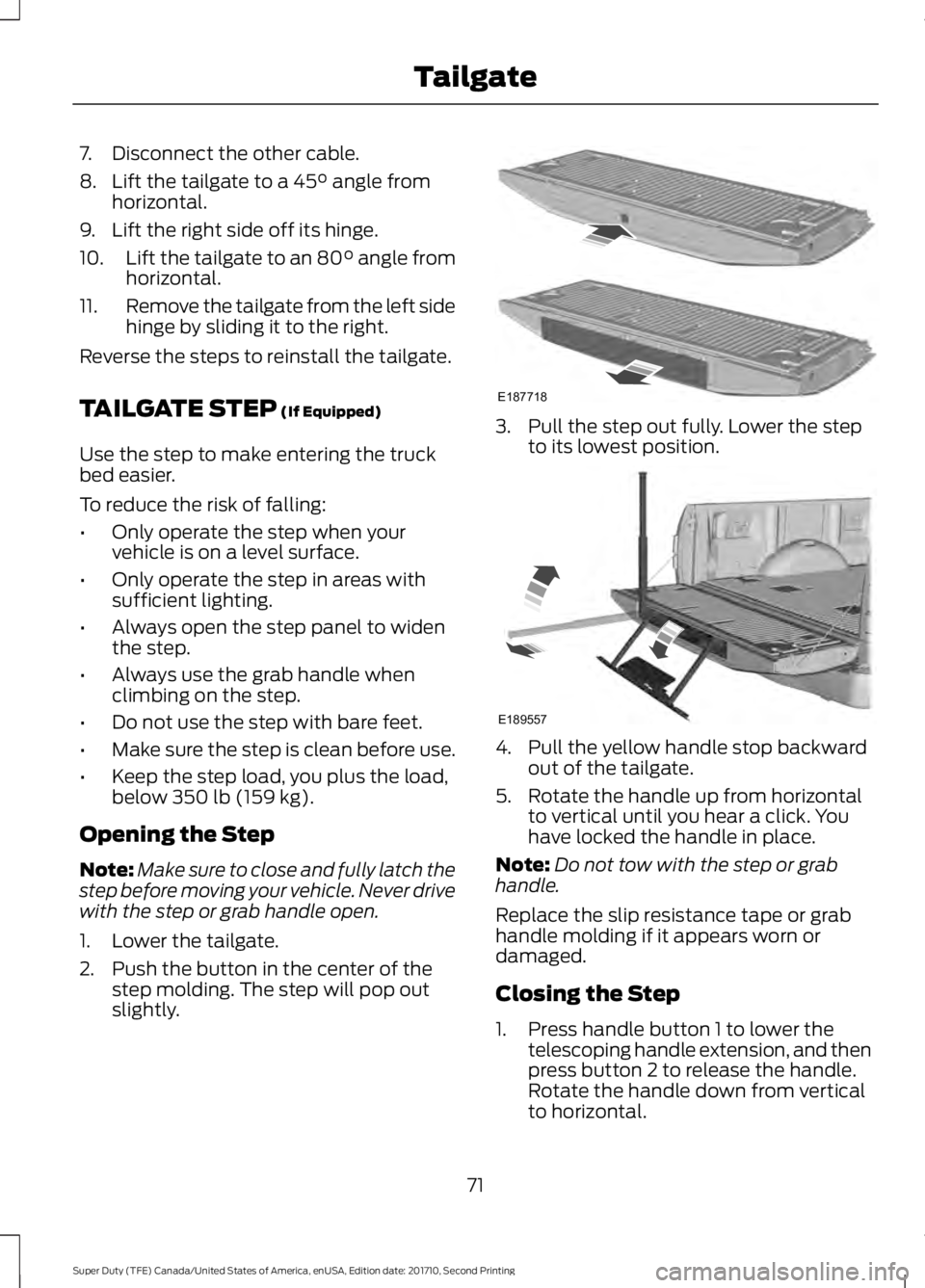
2. Push the button in the center of thestep molding. The step will pop outslightly.
3. Pull the step out fully. Lower the stepto its lowest position.
4. Pull the yellow handle stop backwardout of the tailgate.
5. Rotate the handle up from horizontalto vertical until you hear a click. Youhave locked the handle in place.
Note:Do not tow with the step or grabhandle.
Replace the slip resistance tape or grabhandle molding if it appears worn ordamaged.
Closing the Step
1. Press handle button 1 to lower thetelescoping handle extension, and thenpress button 2 to release the handle.Rotate the handle down from verticalto horizontal.
71
Super Duty (TFE) Canada/United States of America, enUSA, Edition date: 201710, Second Printing
TailgateE187718 E189557
Page 75 of 642
2.Push the handle back into the tailgate.
3.Rotate the step up until it is horizontal,then push it back into the tailgate untilthe step is secure.
BED EXTENDER (If Equipped)
Note:Do not use the bed extender whendriving off road.
Note:Make sure to engage the locking pinsand knobs fully before driving your vehicle.
Note:Make sure to secure all cargo.
Note:Do not exceed 150 pounds (68kilograms) on the tailgate when your vehicleis moving.
Note:Do not keep the bed extender in thetailgate mode when you are not using it forrestraining cargo. Always keep the bedextender in the grocery mode or the stowedposition with the tailgate closed.
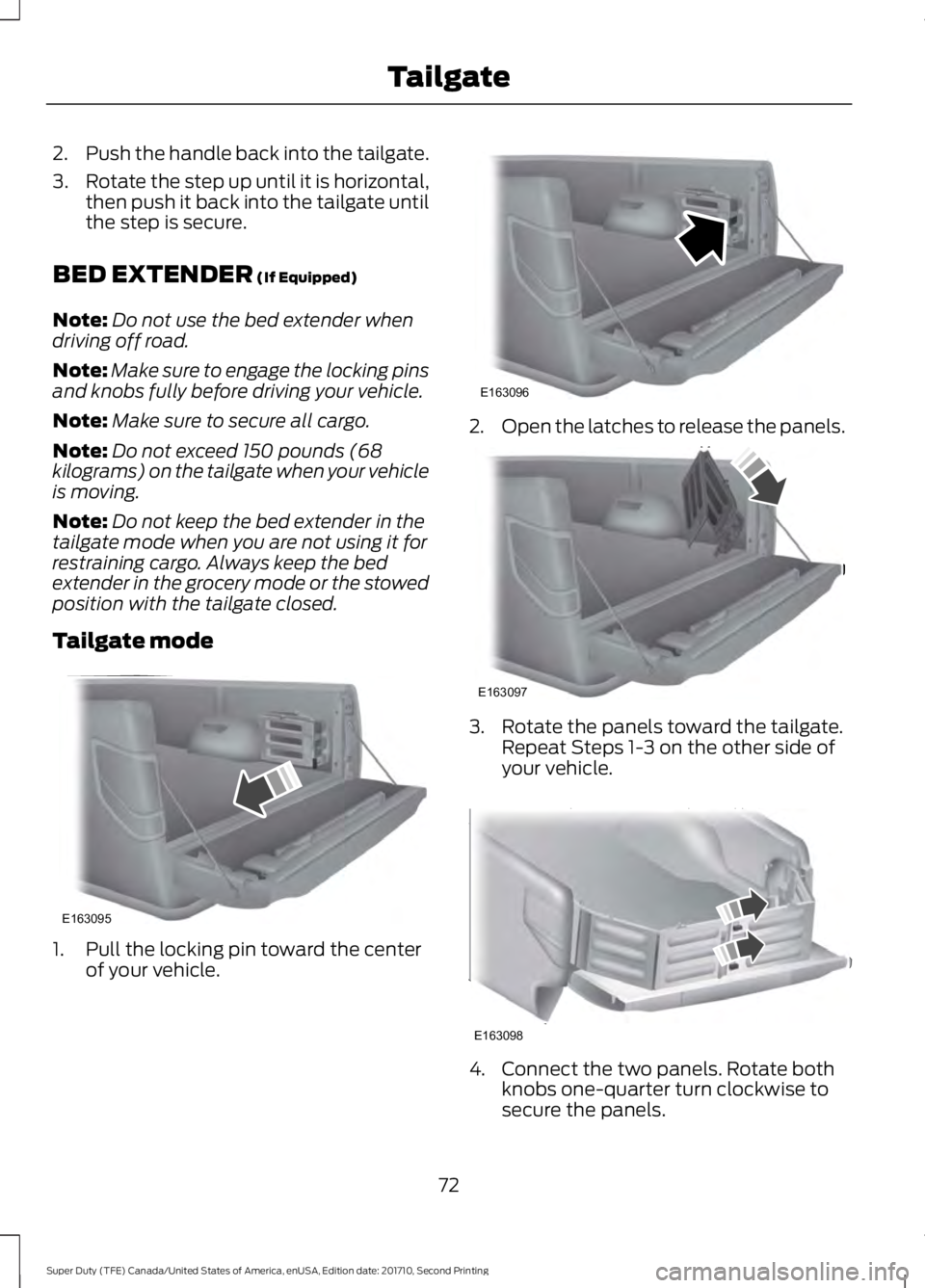
Tailgate mode
1. Pull the locking pin toward the centerof your vehicle.
2.Open the latches to release the panels.
3. Rotate the panels toward the tailgate.Repeat Steps 1-3 on the other side ofyour vehicle.
4. Connect the two panels. Rotate bothknobs one-quarter turn clockwise tosecure the panels.
72
Super Duty (TFE) Canada/United States of America, enUSA, Edition date: 201710, Second Printing
TailgateE163095 E163096 E163097 E163098
Page 76 of 642
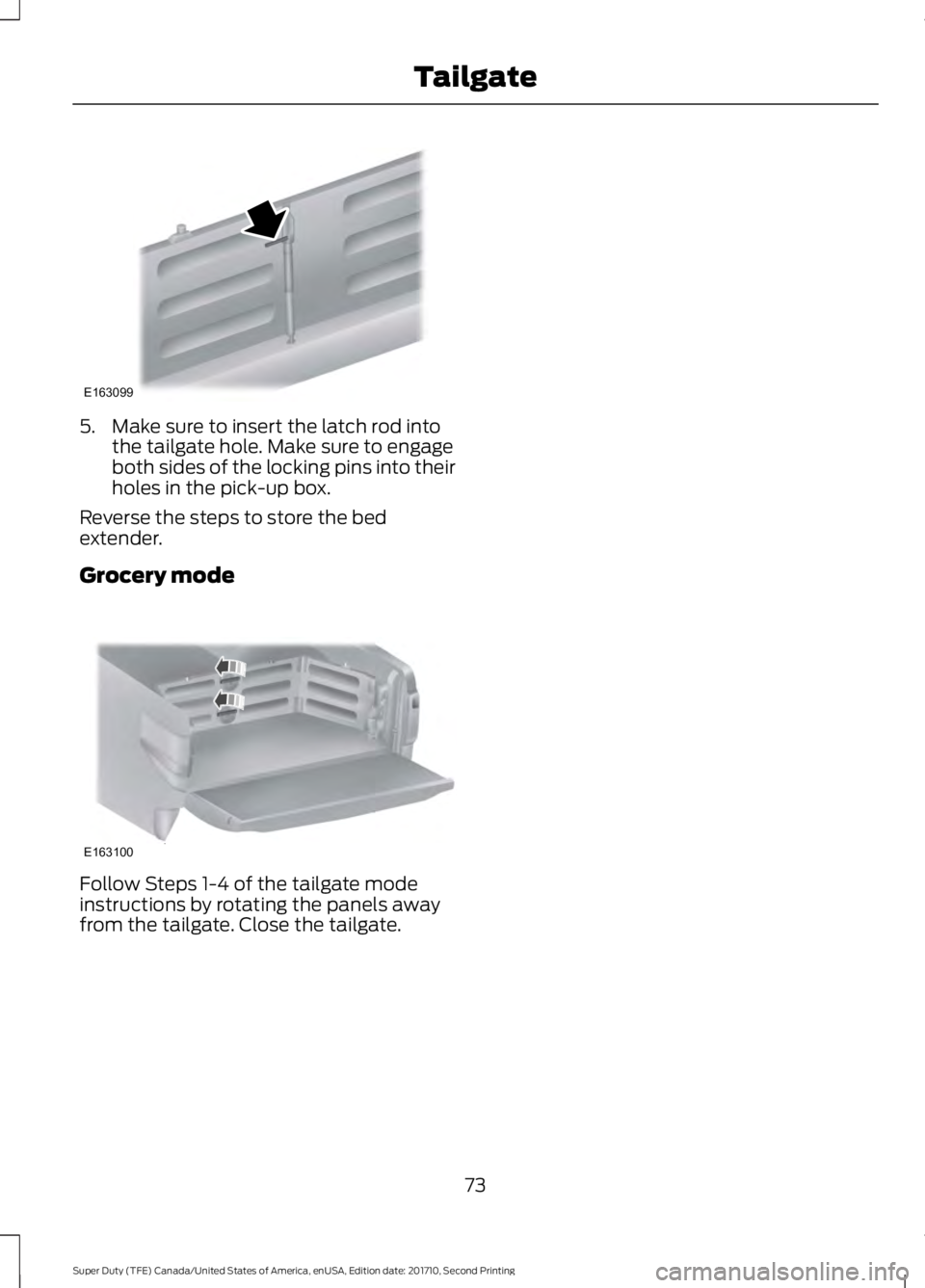
5. Make sure to insert the latch rod intothe tailgate hole. Make sure to engageboth sides of the locking pins into theirholes in the pick-up box.
Reverse the steps to store the bedextender.
Grocery mode
Follow Steps 1-4 of the tailgate modeinstructions by rotating the panels awayfrom the tailgate. Close the tailgate.
73
Super Duty (TFE) Canada/United States of America, enUSA, Edition date: 201710, Second Printing
TailgateE163099 E163100