display FORD F650 2013 12.G Owner's Manual
[x] Cancel search | Manufacturer: FORD, Model Year: 2013, Model line: F650, Model: FORD F650 2013 12.GPages: 378, PDF Size: 3.82 MB
Page 133 of 378
MANUAL TRANSMISSION OPERATION (IF EQUIPPED)
Manual transmission shift patterns are displayed on either the shift lever
knob or the sun visor. Study this information carefully before you drive
the vehicle even though you may be familiar with similar units. Do not
attempt to drive the vehicle without knowing the exact shift pattern of
the transmission. Consult your authorized dealer if any questions exist as
to the shifting instructions posted in your vehicle.
Driving Hints
WARNING:Do not coast the vehicle with the clutch pedal
pressed or with the transmission in neutral. This practice could
result in loss of vehicle control.
The following driving hints are provided as a brief, general guide in
operating the different manual transmissions used in your vehicle.
•When shifting into first gear or reverse with your vehicle standing
still, quickly release and press the clutch pedal (if necessary to
complete gear engagement).
•Always use the lowest (or most appropriate) gear to start the vehicle.
•Always use a gear ratio low enough to allow the engine to operate
above the minimum engine operation speed range.
•Do not lug the engine.
•Do not slam or jerk the gearshift lever into gear.
•When more power is required, shift to a lower gear and accelerate
the engine near the governed speed.
To go forward, press the clutch pedal in and shift into first gear while
the engine is idling. Engage the clutch while pressing the accelerator to
start forward. Operate the clutch and upshift as required by driving
conditions.
To go backward, put the gearshift lever in reverse and engaging the
clutch while pressing lightly on the accelerator.
Shifting with a Synchronized Transmission
With the clutch pedal pressed in, use the second gear synchronizer to
stop the clutch disc rotation; this allows smooth engagement of first gear
or reverse. To complete the gear engagement, it may be necessary to
apply light pressure to the gearshift lever during initial engagement of
the clutch. It takes a second or two to match gear speeds; steady
pressure on the gearshift lever helps the synchronizer perform its job
more quickly. If the gearshift lever is forced into position, this action
defeats the purpose of the synchronizer by causing gear clash.
132Transmission
2013 F-650/750(f67)
Owners Guide gf, 2nd Printing, March 2013
USA(fus)
Page 141 of 378
Allison 2500
WARNING: To avoid sudden, unexpected vehicle movement
and possible personal injury or death:
1. Bring the vehicle to a complete stop.
2. Shift the transmission into positionN.
3. Apply the parking brake and make sure it is holding properly.
4. Turn the engine off when you leave the vehicle.Never leave the
vehicle unattended when the engine is running.
This transmission is available with a column-mounted gearshift lever. The
gear positions are displayed on the RNDL in the instrument cluster.
Allison 3000
Note:For more information regarding this transmission, see the separate
Allison 3000 Series Operator’s Manual.
The Allison 3000 series offers two shift modes: Performance and
Economy.
Performance mode gives the best all-around transmission operation. The
transmission defaults to this mode when you start the engine. Pressing
MODE on the shifter switches to Economy mode and illuminates the
Mode ON lamp.
Economy mode provides operation at lower engine RPM while
maintaining adequate performance.
If the engine speed is above idle when a gear is selected using the
shifter, the vehicle does not move; the shifter must be moved to re-select
a gear after the engine speed returns to idle.
Torque Lock
If your vehicle is parked on an incline and positionPis not properly
engaged (the parking brake is not applied before the transmission is
shifted into positionP),the weight of the vehicle may generate an
excessive amount of torque on the parking pawl, making it difficult to
shift the transmission out of positionP.Hold the brake pedal down while
shifting out of positionP,then release the parking brake.
140Transmission
2013 F-650/750(f67)
Owners Guide gf, 2nd Printing, March 2013
USA(fus)
Page 203 of 378
Relay
LocationRelay Description
R19 Shift interlock/EPRNDL display
R20 Selective Catalyst Reduction (SCR) system (NOx) (diesel
engine only)
R21 Run
R22 Door unlock
R23 ABS warning indicator
R24 DRL #2
R25 Park lights
R26 Spare
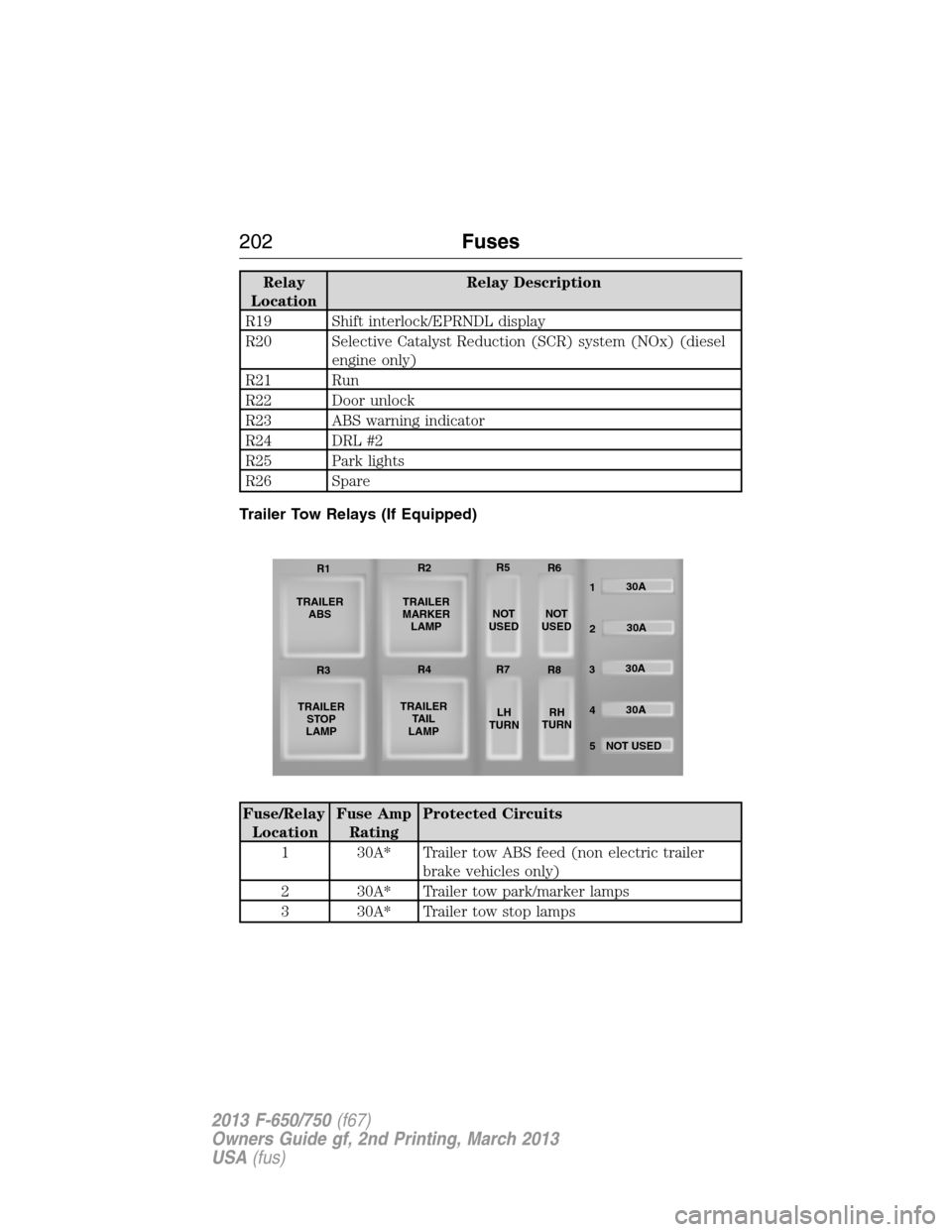
Trailer Tow Relays (If Equipped)
Fuse/Relay
LocationFuse Amp
RatingProtected Circuits
1 30A* Trailer tow ABS feed (non electric trailer
brake vehicles only)
2 30A* Trailer tow park/marker lamps
3 30A* Trailer tow stop lamps
TRAILER
ABS
TRAILER
STOP
LAMPTRAILER
MARKER
LAMP
TRAILER
TA I L
LAMPNOT
USEDNOT
USED
LH
TURNRH
TURN30A
30A
30A
30A
NOT USED
5 4 32 1 R1R2R5
R6
R3R4R7
R8
202Fuses
2013 F-650/750(f67)
Owners Guide gf, 2nd Printing, March 2013
USA(fus)
Page 223 of 378
Vehicles driven year-round in non-extreme climates should use
prediluted engine coolant for optimum cooling system and engine
protection.
What You Should Know About Fail-Safe Cooling (If Equipped)
(Gasoline Engine Only)
WARNING:If fail-safe cooling activates, pull off the road as soon
as safely possible and turn the engine off. The engine may
automatically shut off while driving without further indication.
If the engine coolant supply is depleted, this feature allows the vehicle to
be driven temporarily before incremental component damage is incurred.
The fail-safe distance depends on ambient temperatures, vehicle load and
terrain.
How Fail-Safe Cooling Works
If the engine begins to overheat:
•The engine coolant temperature gauge moves to the red (hot) area.
•The information display indicates the engine is overheating.
•The service engine soon indicator illuminates.
If the engine reaches a preset over-temperature condition, the engine
automatically switches to alternating cylinder operation. Each disabled
cylinder acts as an air pump and cools the engine.
When Fail-Safe Mode Is Activated
WARNING:Never remove the coolant reservoir cap while the
engine is running or hot.
Note:Driving the vehicle without repairing the engine problem increases
the chance of engine damage. Take your vehicle to an authorized dealer
as soon as possible.
You have limited engine power when in the fail-safe mode, so drive the
vehicle with caution. The vehicle is not able to maintain high-speed
operation and the engine runs rough. Remember that the engine is
capable of completely shutting down automatically to prevent engine
damage; therefore:
1. Pull off the road as soon as safely possible and turn off the engine.
2. Arrange for the vehicle to be taken to an authorized dealer.
3. If this is not possible, wait a short period for the engine to cool.
4. Check the coolant level and replenish if low.
5. Restart the engine and take your vehicle to an authorized dealer.
222Maintenance
2013 F-650/750(f67)
Owners Guide gf, 2nd Printing, March 2013
USA(fus)
Page 323 of 378
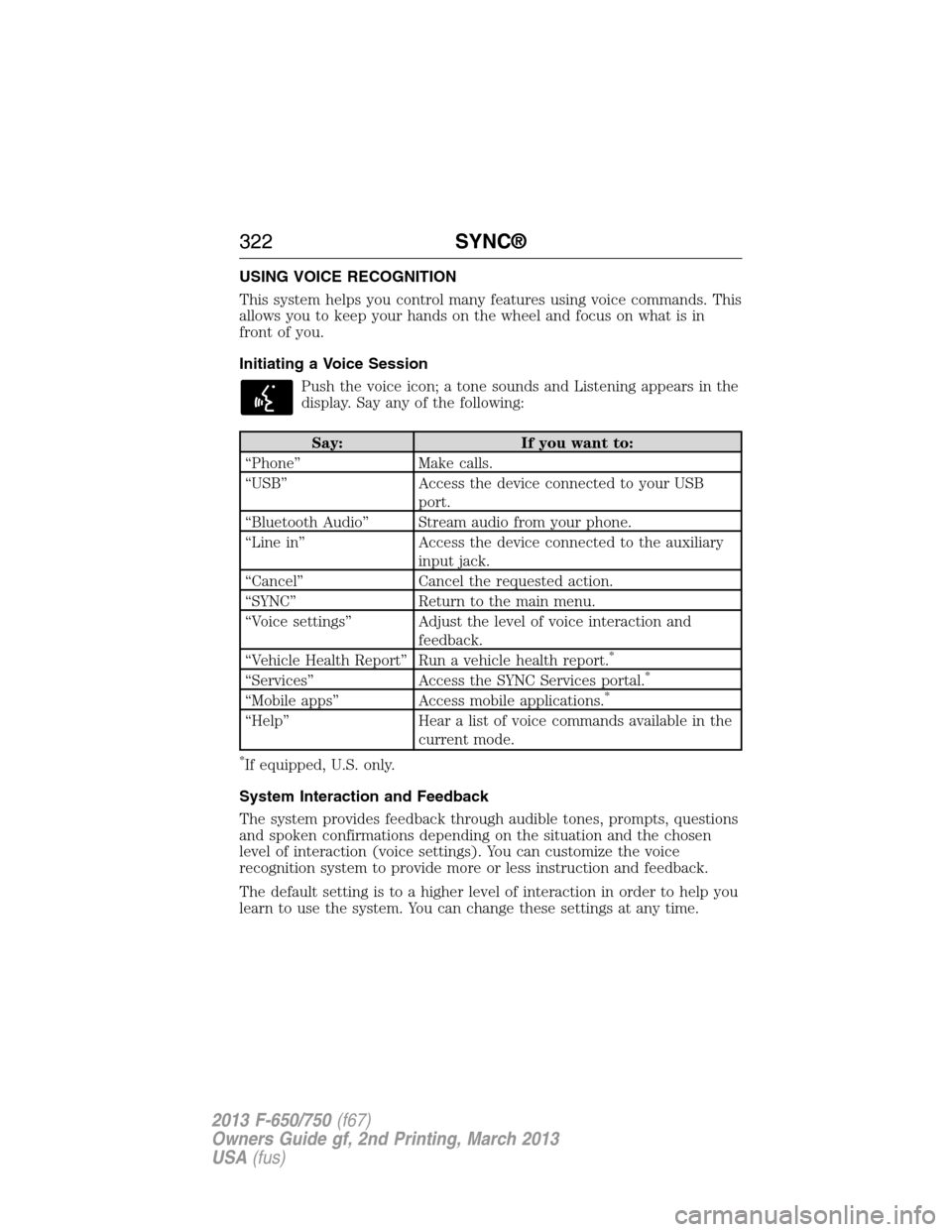
USING VOICE RECOGNITION
This system helps you control many features using voice commands. This
allows you to keep your hands on the wheel and focus on what is in
front of you.
Initiating a Voice Session
Push the voice icon; a tone sounds and Listening appears in the
display. Say any of the following:
Say: If you want to:
“Phone” Make calls.
“USB” Access the device connected to your USB
port.
“Bluetooth Audio” Stream audio from your phone.
“Line in” Access the device connected to the auxiliary
input jack.
“Cancel” Cancel the requested action.
“SYNC” Return to the main menu.
“Voice settings” Adjust the level of voice interaction and
feedback.
“Vehicle Health Report” Run a vehicle health report.
*
“Services” Access the SYNC Services portal.*
“Mobile apps” Access mobile applications.*
“Help” Hear a list of voice commands available in the
current mode.
*If equipped, U.S. only.
System Interaction and Feedback
The system provides feedback through audible tones, prompts, questions
and spoken confirmations depending on the situation and the chosen
level of interaction (voice settings). You can customize the voice
recognition system to provide more or less instruction and feedback.
The default setting is to a higher level of interaction in order to help you
learn to use the system. You can change these settings at any time.
322SYNC®
2013 F-650/750(f67)
Owners Guide gf, 2nd Printing, March 2013
USA(fus)
Page 325 of 378
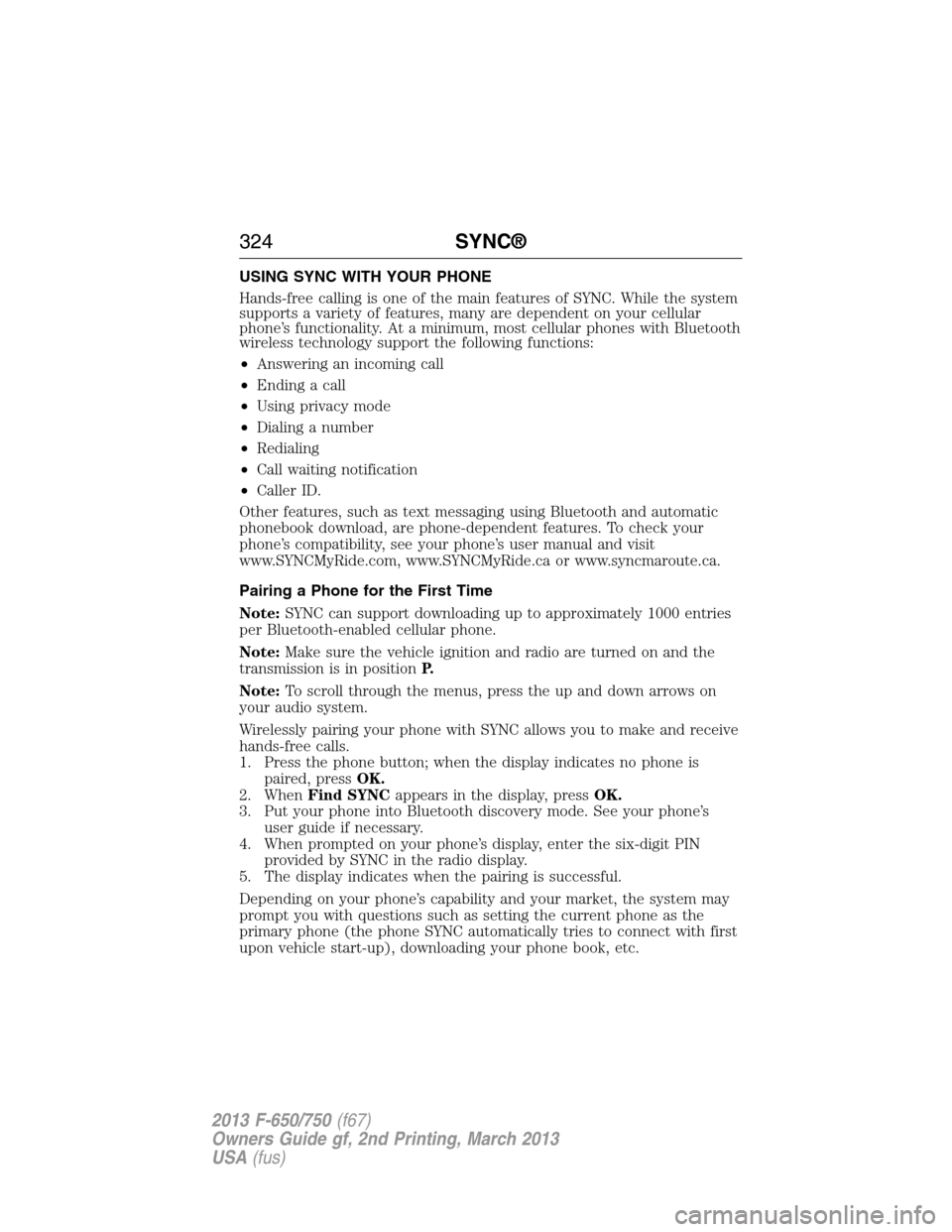
USING SYNC WITH YOUR PHONE
Hands-free calling is one of the main features of SYNC. While the system
supports a variety of features, many are dependent on your cellular
phone’s functionality. At a minimum, most cellular phones with Bluetooth
wireless technology support the following functions:
•Answering an incoming call
•Ending a call
•Using privacy mode
•Dialing a number
•Redialing
•Call waiting notification
•Caller ID.
Other features, such as text messaging using Bluetooth and automatic
phonebook download, are phone-dependent features. To check your
phone’s compatibility, see your phone’s user manual and visit
www.SYNCMyRide.com, www.SYNCMyRide.ca or www.syncmaroute.ca.
Pairing a Phone for the First Time
Note:SYNC can support downloading up to approximately 1000 entries
per Bluetooth-enabled cellular phone.
Note:Make sure the vehicle ignition and radio are turned on and the
transmission is in positionP.
Note:To scroll through the menus, press the up and down arrows on
your audio system.
Wirelessly pairing your phone with SYNC allows you to make and receive
hands-free calls.
1. Press the phone button; when the display indicates no phone is
paired, pressOK.
2. WhenFind SYNCappears in the display, pressOK.
3. Put your phone into Bluetooth discovery mode. See your phone’s
user guide if necessary.
4. When prompted on your phone’s display, enter the six-digit PIN
provided by SYNC in the radio display.
5. The display indicates when the pairing is successful.
Depending on your phone’s capability and your market, the system may
prompt you with questions such as setting the current phone as the
primary phone (the phone SYNC automatically tries to connect with first
upon vehicle start-up), downloading your phone book, etc.
324SYNC®
2013 F-650/750(f67)
Owners Guide gf, 2nd Printing, March 2013
USA(fus)
Page 326 of 378
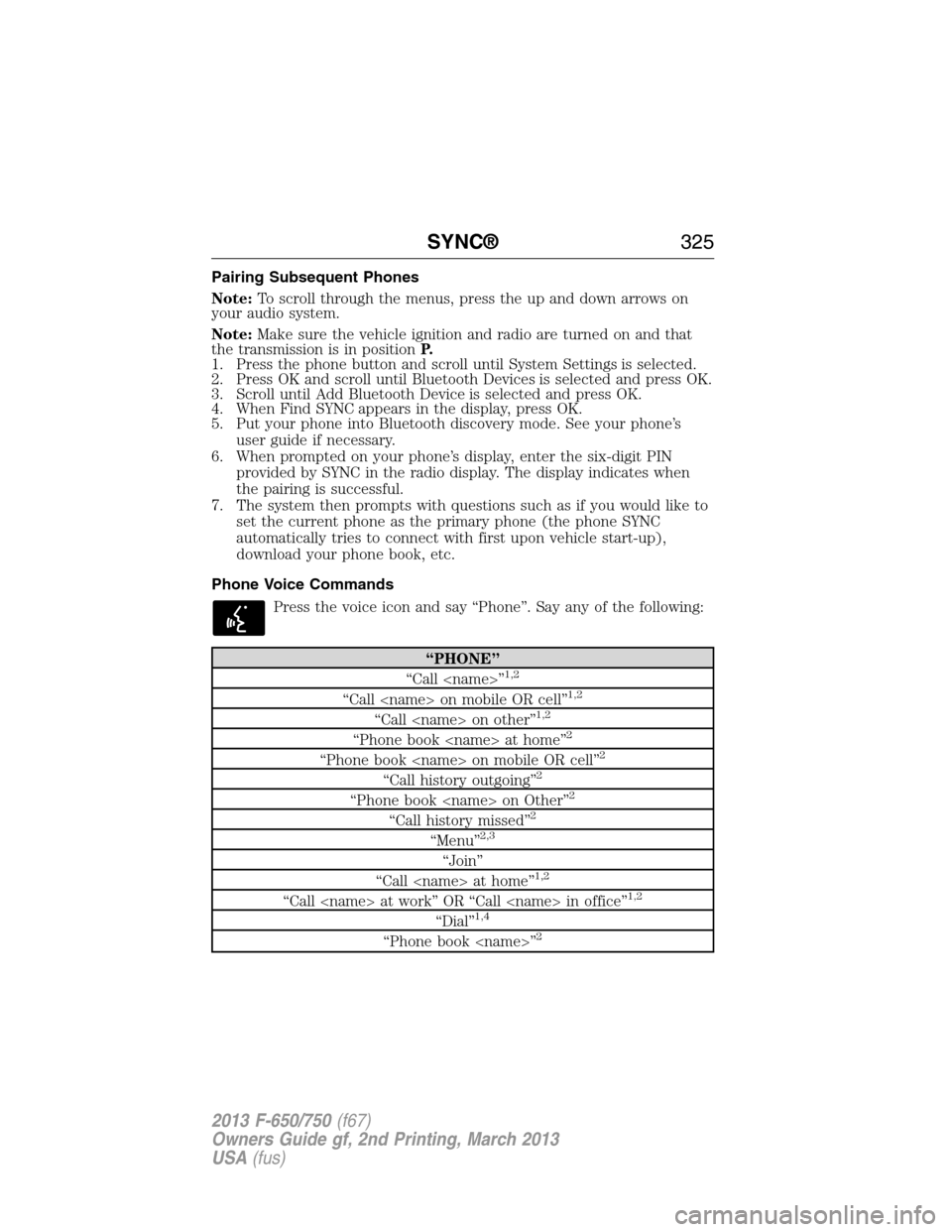
Pairing Subsequent Phones
Note:To scroll through the menus, press the up and down arrows on
your audio system.
Note:Make sure the vehicle ignition and radio are turned on and that
the transmission is in positionP.
1. Press the phone button and scroll until System Settings is selected.
2. Press OK and scroll until Bluetooth Devices is selected and press OK.
3. Scroll until Add Bluetooth Device is selected and press OK.
4. When Find SYNC appears in the display, press OK.
5. Put your phone into Bluetooth discovery mode. See your phone’s
user guide if necessary.
6. When prompted on your phone’s display, enter the six-digit PIN
provided by SYNC in the radio display. The display indicates when
the pairing is successful.
7. The system then prompts with questions such as if you would like to
set the current phone as the primary phone (the phone SYNC
automatically tries to connect with first upon vehicle start-up),
download your phone book, etc.
Phone Voice Commands
Press the voice icon and say “Phone”. Say any of the following:
“PHONE”
“Call
“Call
“Call
“Phone book
“Phone book
“Call history outgoing”2
“Phone book
“Call history missed”2
“Menu”2,3
“Join”
“Call
“Call
“Dial”1,4
“Phone book
SYNC®325
2013 F-650/750(f67)
Owners Guide gf, 2nd Printing, March 2013
USA(fus)
Page 328 of 378
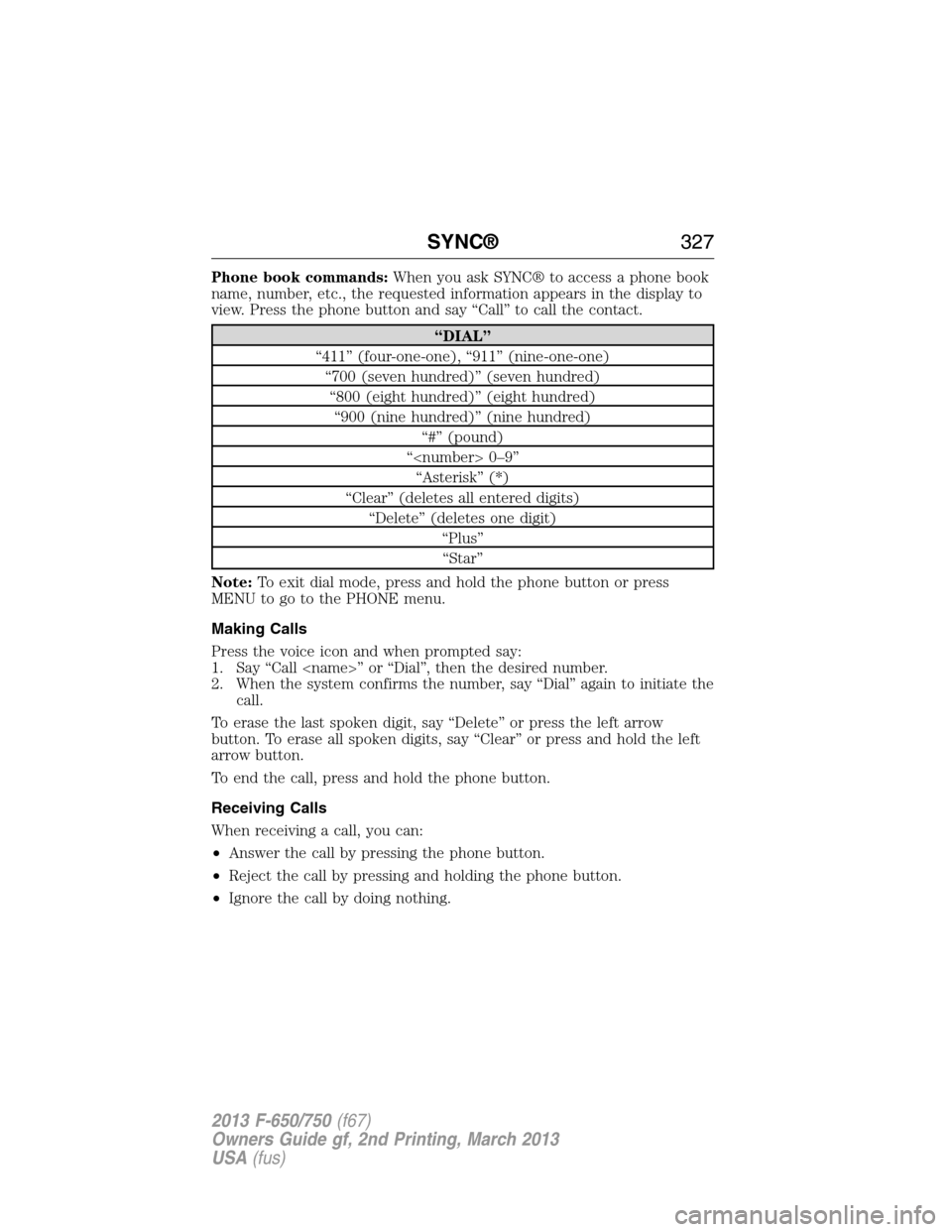
Phone book commands:When you ask SYNC® to access a phone book
name, number, etc., the requested information appears in the display to
view. Press the phone button and say “Call” to call the contact.
“DIAL”
“411” (four-one-one), “911” (nine-one-one)
“700 (seven hundred)” (seven hundred)
“800 (eight hundred)” (eight hundred)
“900 (nine hundred)” (nine hundred)
“#” (pound)
“
“Asterisk” (*)
“Clear” (deletes all entered digits)
“Delete” (deletes one digit)
“Plus”
“Star”
Note:To exit dial mode, press and hold the phone button or press
MENU to go to the PHONE menu.
Making Calls
Press the voice icon and when prompted say:
1. Say “Call
2. When the system confirms the number, say “Dial” again to initiate the
call.
To erase the last spoken digit, say “Delete” or press the left arrow
button. To erase all spoken digits, say “Clear” or press and hold the left
arrow button.
To end the call, press and hold the phone button.
Receiving Calls
When receiving a call, you can:
•Answer the call by pressing the phone button.
•Reject the call by pressing and holding the phone button.
•Ignore the call by doing nothing.
SYNC®327
2013 F-650/750(f67)
Owners Guide gf, 2nd Printing, March 2013
USA(fus)
Page 329 of 378
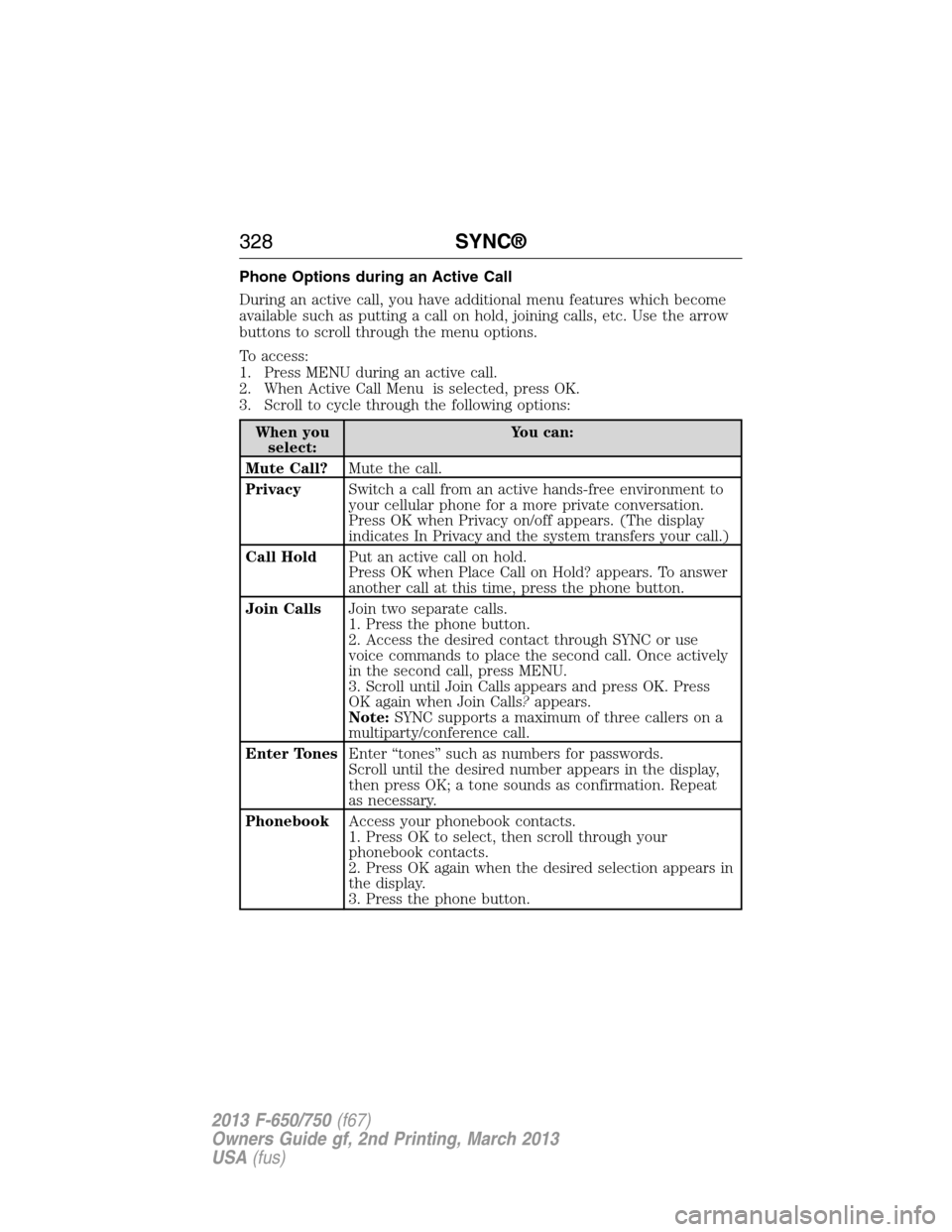
Phone Options during an Active Call
During an active call, you have additional menu features which become
available such as putting a call on hold, joining calls, etc. Use the arrow
buttons to scroll through the menu options.
To access:
1. Press MENU during an active call.
2. When Active Call Menu is selected, press OK.
3. Scroll to cycle through the following options:
When you
select:You can:
Mute Call?Mute the call.
PrivacySwitch a call from an active hands-free environment to
your cellular phone for a more private conversation.
Press OK when Privacy on/off appears. (The display
indicates In Privacy and the system transfers your call.)
Call HoldPut an active call on hold.
Press OK when Place Call on Hold? appears. To answer
another call at this time, press the phone button.
Join CallsJoin two separate calls.
1. Press the phone button.
2. Access the desired contact through SYNC or use
voice commands to place the second call. Once actively
in the second call, press MENU.
3. Scroll until Join Calls appears and press OK. Press
OK again when Join Calls?appears.
Note:SYNC supports a maximum of three callers on a
multiparty/conference call.
Enter TonesEnter “tones” such as numbers for passwords.
Scroll until the desired number appears in the display,
then press OK; a tone sounds as confirmation. Repeat
as necessary.
PhonebookAccess your phonebook contacts.
1. Press OK to select, then scroll through your
phonebook contacts.
2. Press OK again when the desired selection appears in
the display.
3. Press the phone button.
328SYNC®
2013 F-650/750(f67)
Owners Guide gf, 2nd Printing, March 2013
USA(fus)
Page 330 of 378
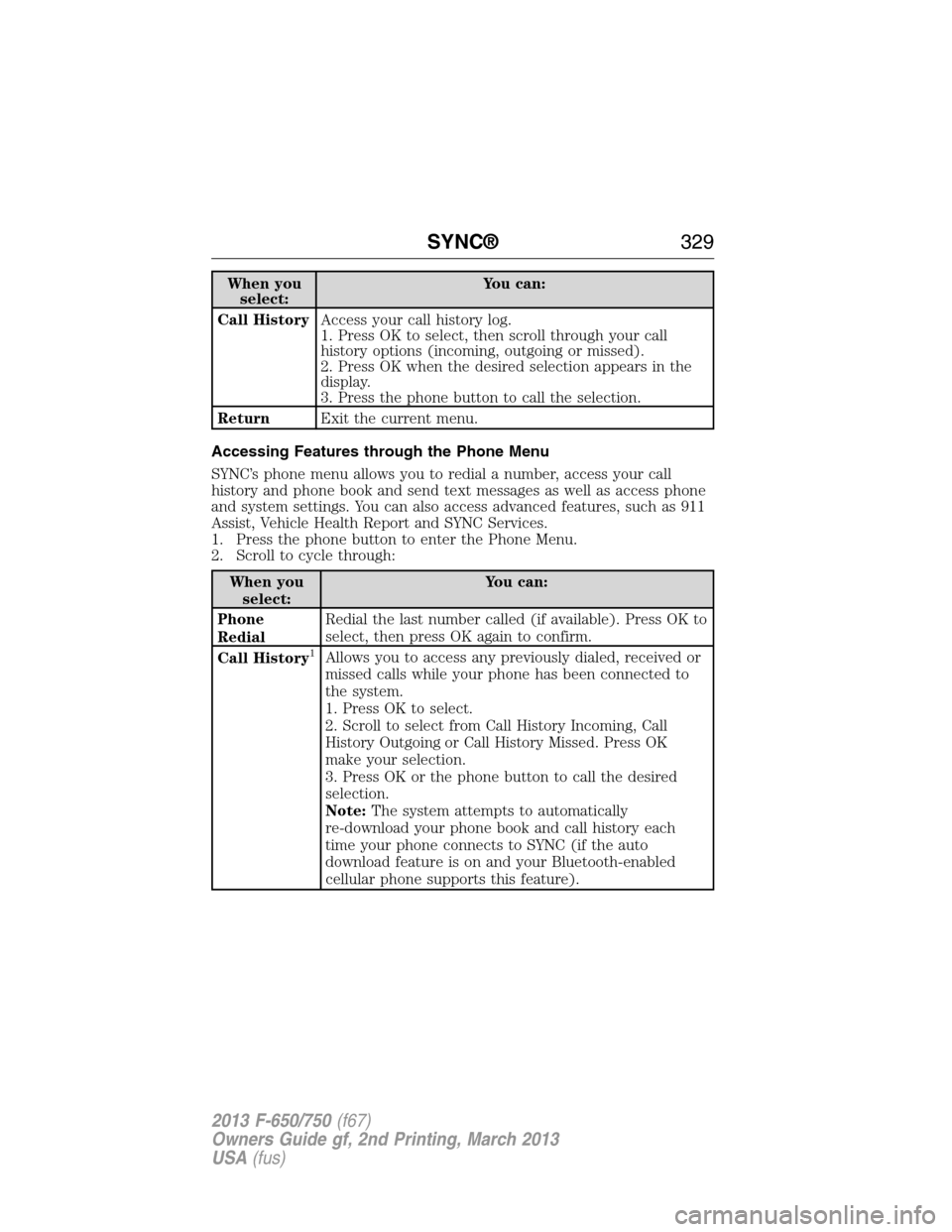
When you
select:You can:
Call HistoryAccess your call history log.
1. Press OK to select, then scroll through your call
history options (incoming, outgoing or missed).
2. Press OK when the desired selection appears in the
display.
3. Press the phone button to call the selection.
ReturnExit the current menu.
Accessing Features through the Phone Menu
SYNC’s phone menu allows you to redial a number, access your call
history and phone book and send text messages as well as access phone
and system settings. You can also access advanced features, such as 911
Assist, Vehicle Health Report and SYNC Services.
1. Press the phone button to enter the Phone Menu.
2. Scroll to cycle through:
When you
select:You can:
Phone
RedialRedial the last number called (if available). Press OK to
select, then press OK again to confirm.
Call History
1Allows you to access any previously dialed, received or
missed calls while your phone has been connected to
the system.
1. Press OK to select.
2. Scroll to select from Call History Incoming, Call
History Outgoing or Call History Missed. Press OK
make your selection.
3. Press OK or the phone button to call the desired
selection.
Note:The system attempts to automatically
re-download your phone book and call history each
time your phone connects to SYNC (if the auto
download feature is on and your Bluetooth-enabled
cellular phone supports this feature).
SYNC®329
2013 F-650/750(f67)
Owners Guide gf, 2nd Printing, March 2013
USA(fus)