display FORD F650 2013 12.G Owner's Guide
[x] Cancel search | Manufacturer: FORD, Model Year: 2013, Model line: F650, Model: FORD F650 2013 12.GPages: 378, PDF Size: 3.82 MB
Page 332 of 378
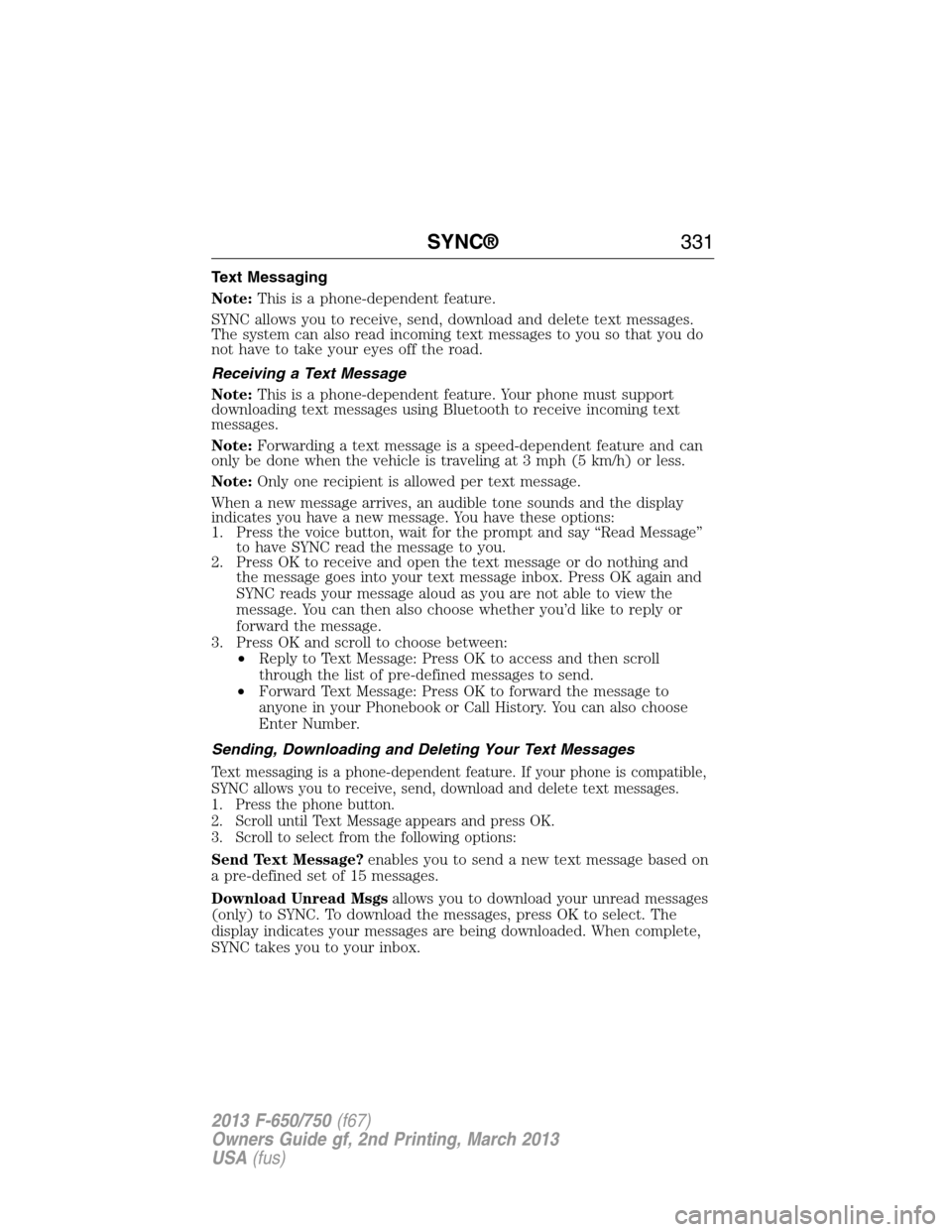
Text Messaging
Note:This is a phone-dependent feature.
SYNC allows you to receive, send, download and delete text messages.
The system can also read incoming text messages to you so that you do
not have to take your eyes off the road.
Receiving a Text Message
Note:This is a phone-dependent feature. Your phone must support
downloading text messages using Bluetooth to receive incoming text
messages.
Note:Forwarding a text message is a speed-dependent feature and can
only be done when the vehicle is traveling at 3 mph (5 km/h) or less.
Note:Only one recipient is allowed per text message.
When a new message arrives, an audible tone sounds and the display
indicates you have a new message. You have these options:
1. Press the voice button, wait for the prompt and say “Read Message”
to have SYNC read the message to you.
2. Press OK to receive and open the text message or do nothing and
the message goes into your text message inbox. Press OK again and
SYNC reads your message aloud as you are not able to view the
message. You can then also choose whether you’d like to reply or
forward the message.
3. Press OK and scroll to choose between:
•Reply to Text Message: Press OK to access and then scroll
through the list of pre-defined messages to send.
•Forward Text Message: Press OK to forward the message to
anyone in your Phonebook or Call History. You can also choose
Enter Number.
Sending, Downloading and Deleting Your Text Messages
Text messaging is a phone-dependent feature. If your phone is compatible,
SYNC allows you to receive, send, download and delete text messages.
1. Press the phone button.
2. Scroll until Text Message appears and press OK.
3. Scroll to select from the following options:
Send Text Message?enables you to send a new text message based on
a pre-defined set of 15 messages.
Download Unread Msgsallows you to download your unread messages
(only) to SYNC. To download the messages, press OK to select. The
display indicates your messages are being downloaded. When complete,
SYNC takes you to your inbox.
SYNC®331
2013 F-650/750(f67)
Owners Guide gf, 2nd Printing, March 2013
USA(fus)
Page 333 of 378
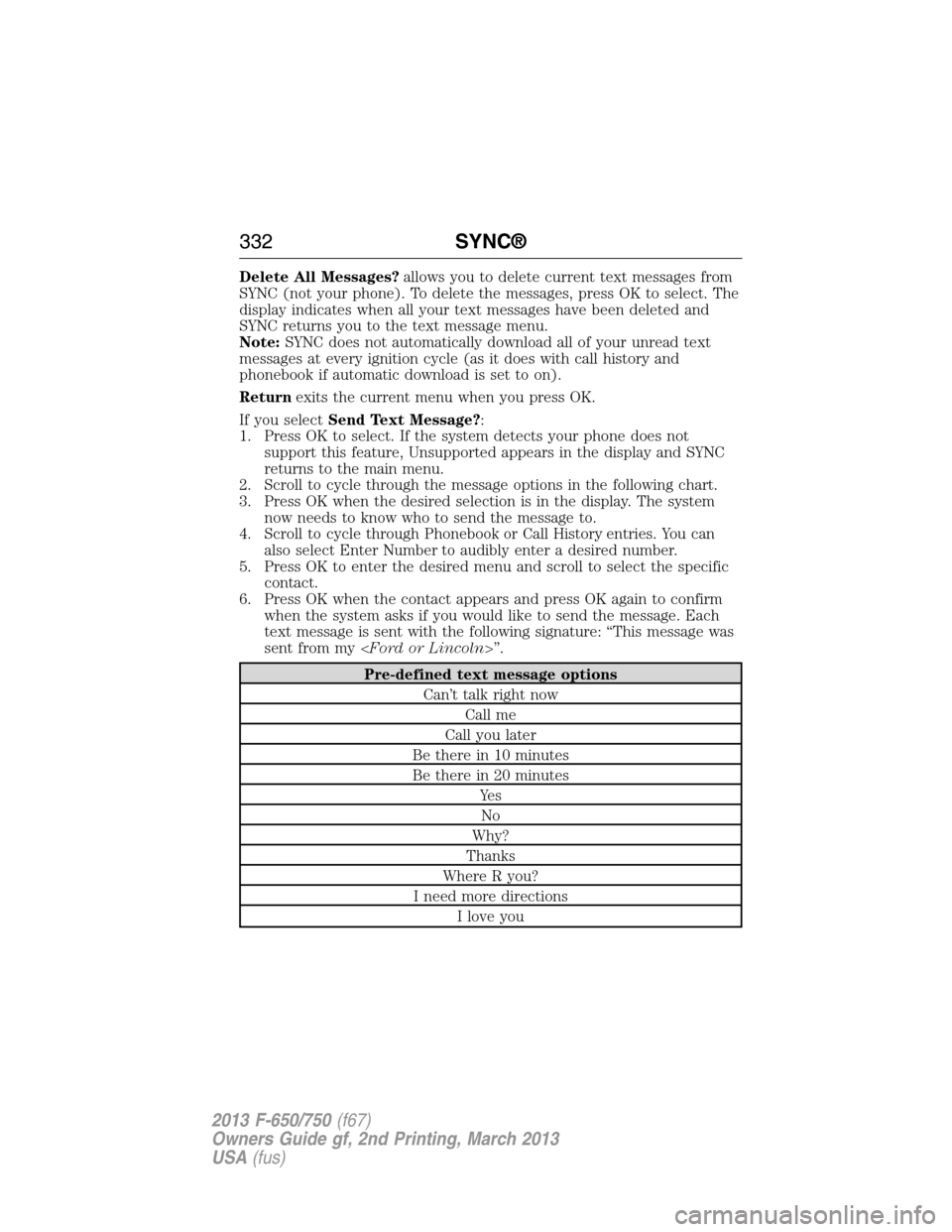
Delete All Messages?allows you to delete current text messages from
SYNC (not your phone). To delete the messages, press OK to select. The
display indicates when all your text messages have been deleted and
SYNC returns you to the text message menu.
Note:SYNC does not automatically download all of your unread text
messages at every ignition cycle (as it does with call history and
phonebook if automatic download is set to on).
Returnexits the current menu when you press OK.
If you selectSend Text Message?:
1. Press OK to select. If the system detects your phone does not
support this feature, Unsupported appears in the display and SYNC
returns to the main menu.
2. Scroll to cycle through the message options in the following chart.
3. Press OK when the desired selection is in the display. The system
now needs to know who to send the message to.
4. Scroll to cycle through Phonebook or Call History entries. You can
also select Enter Number to audibly enter a desired number.
5. Press OK to enter the desired menu and scroll to select the specific
contact.
6. Press OK when the contact appears and press OK again to confirm
when the system asks if you would like to send the message. Each
text message is sent with the following signature: “This message was
sent from my
Pre-defined text message options
Can’t talk right now
Call me
Call you later
Be there in 10 minutes
Be there in 20 minutes
Ye s
No
Why?
Thanks
Where R you?
I need more directions
I love you
332SYNC®
2013 F-650/750(f67)
Owners Guide gf, 2nd Printing, March 2013
USA(fus)
Page 337 of 378
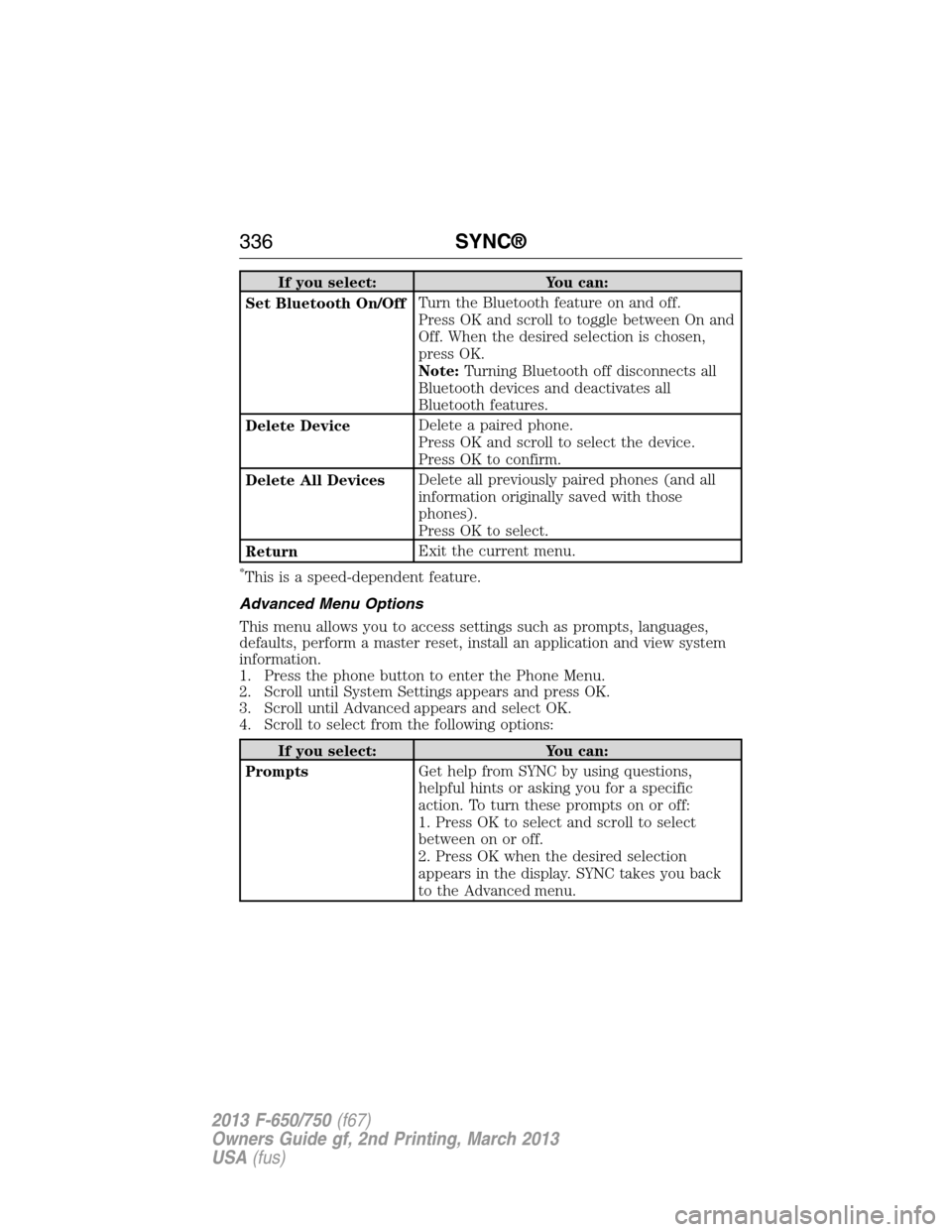
If you select: You can:
Set Bluetooth On/OffTurn the Bluetooth feature on and off.
Press OK and scroll to toggle between On and
Off. When the desired selection is chosen,
press OK.
Note:Turning Bluetooth off disconnects all
Bluetooth devices and deactivates all
Bluetooth features.
Delete DeviceDelete a paired phone.
Press OK and scroll to select the device.
Press OK to confirm.
Delete All DevicesDelete all previously paired phones (and all
information originally saved with those
phones).
Press OK to select.
ReturnExit the current menu.
*This is a speed-dependent feature.
Advanced Menu Options
This menu allows you to access settings such as prompts, languages,
defaults, perform a master reset, install an application and view system
information.
1. Press the phone button to enter the Phone Menu.
2. Scroll until System Settings appears and press OK.
3. Scroll until Advanced appears and select OK.
4. Scroll to select from the following options:
If you select: You can:
PromptsGet help from SYNC by using questions,
helpful hints or asking you for a specific
action. To turn these prompts on or off:
1. Press OK to select and scroll to select
between on or off.
2. Press OK when the desired selection
appears in the display. SYNC takes you back
to the Advanced menu.
336SYNC®
2013 F-650/750(f67)
Owners Guide gf, 2nd Printing, March 2013
USA(fus)
Page 338 of 378
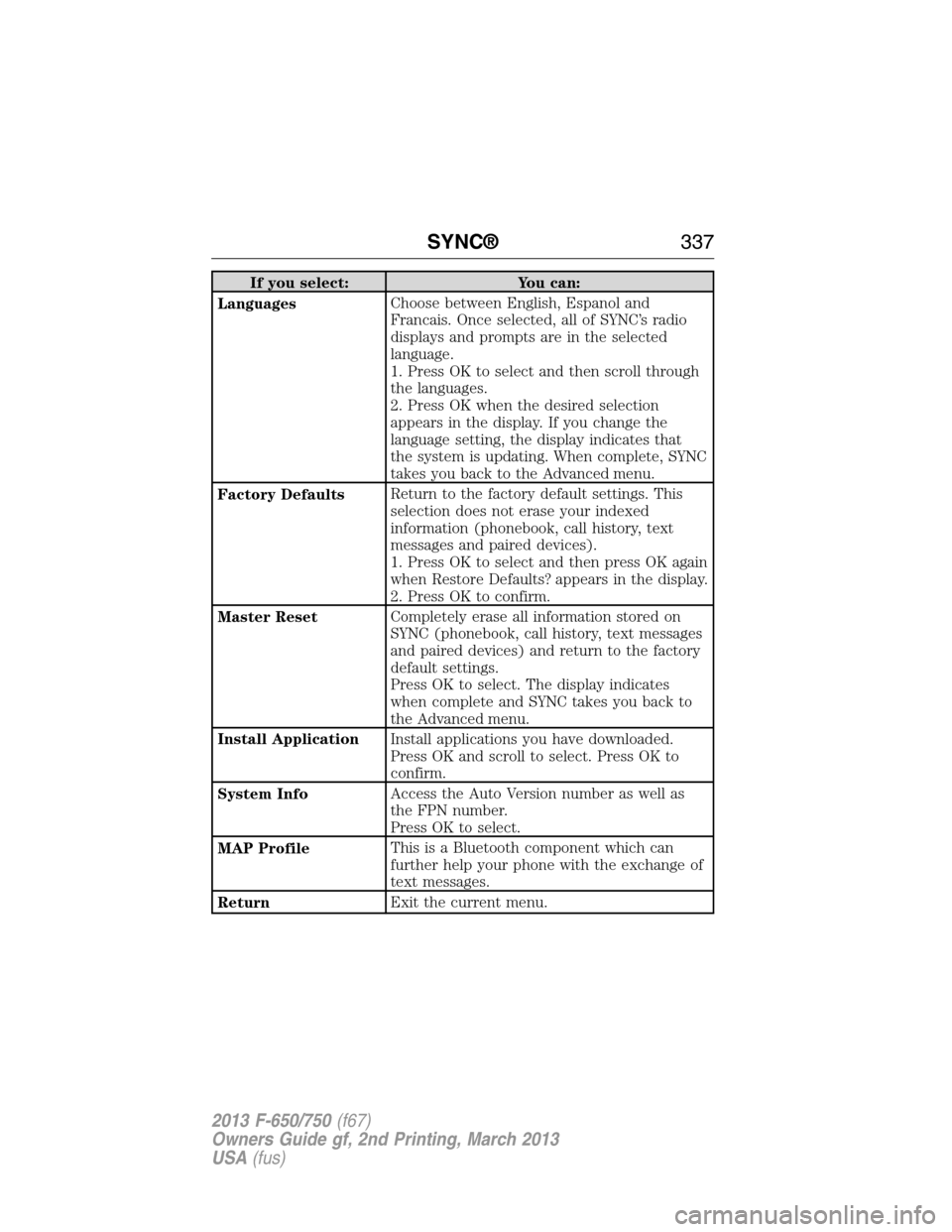
If you select: You can:
LanguagesChoose between English, Espanol and
Francais. Once selected, all of SYNC’s radio
displays and prompts are in the selected
language.
1. Press OK to select and then scroll through
the languages.
2. Press OK when the desired selection
appears in the display. If you change the
language setting, the display indicates that
the system is updating. When complete, SYNC
takes you back to the Advanced menu.
Factory DefaultsReturn to the factory default settings. This
selection does not erase your indexed
information (phonebook, call history, text
messages and paired devices).
1. Press OK to select and then press OK again
when Restore Defaults? appears in the display.
2. Press OK to confirm.
Master ResetCompletely erase all information stored on
SYNC (phonebook, call history, text messages
and paired devices) and return to the factory
default settings.
Press OK to select. The display indicates
when complete and SYNC takes you back to
the Advanced menu.
Install ApplicationInstall applications you have downloaded.
Press OK and scroll to select. Press OK to
confirm.
System InfoAccess the Auto Version number as well as
the FPN number.
Press OK to select.
MAP ProfileThis is a Bluetooth component which can
further help your phone with the exchange of
text messages.
ReturnExit the current menu.
SYNC®337
2013 F-650/750(f67)
Owners Guide gf, 2nd Printing, March 2013
USA(fus)
Page 339 of 378
SYNC APPLICATIONS AND SERVICES (IF EQUIPPED)
Note:In order for the following features to work, your cellular phone
must be compatible with SYNC. To check your phone’s compatibility, visit
www.SYNCMyRide.com, www.SYNCMyRide.ca or www.syncmaroute.ca.
•SYNC Services (if equipped, United States only): Provides access to
traffic, directions and information such as travel, horoscopes, stock
prices and more.
•911 Assist: Can alert 911 in the event of an emergency.
•Vehicle Health Report (if equipped, United States only): Provides a
diagnostic and maintenance report card of your vehicle.
•SYNC AppLink: Allows you to connect to and use certain applications
such as Pandora and Stitcher (if your phone is compatible).
911 Assist®
WARNING:Unless the 911 Assist setting is set on prior to a
crash, the system will not dial for help which could delay
response time, potentially increasing the risk of serious injury or death
after a crash.
WARNING:Do not wait for 911 Assist to make an emergency
call if you can do it yourself. Dial emergency services
immediately to avoid delayed response time which could increase the
risk of serious injury or death after a crash. If you do not hear 911
Assist within five seconds of the crash, the system or phone may be
damaged or non-functional.
WARNING:Always place your phone in a secure location in the
vehicle so it does not become a projectile or get damaged in a
crash. Failure to do so may cause serious injury to someone or damage
the phone which could prevent 911 Assist from working properly.
Note:SYNC 911 Assist feature must be set on prior to the incident.
Note:Before setting this feature on, ensure that you read the 911 Assist
privacy notice later in this section for important information.
Note:If 911 Assist is turned on or off by any user, that setting applies
for all paired phones. If 911 Assist is turned off, a voice message plays
and/or a display message/icon comes on when the vehicle is started after
a previously paired phone connects.
338SYNC®
2013 F-650/750(f67)
Owners Guide gf, 2nd Printing, March 2013
USA(fus)
Page 340 of 378
Note:Every phone operates differently. While SYNC 911 Assist works
with most cellular phones, some may have trouble using this feature.
If a crash deploys an airbag (excludes knee airbags and rear inflatable
safety belts [if equipped]) or activates the fuel pump shut-off, your SYNC
equipped vehicle may be able to contact emergency services by dialing
911 through a paired and connected Bluetooth-enabled phone. For more
information about 911 Assist, visit www.SYNCMyRide.com,
www.SYNCMyRide.ca or www.syncmaroute.ca.
•For information on airbag deployment, see theSupplementary
Restraints Systemchapter.
•For information on the fuel pump shut-off, see theRoadside
Emergencieschapter.
Setting 911 Assist On
Perform the following:
1. Press the phone button to enter the Phone Menu.
2. Scroll until 911 Assist is selected.
3. Press OK to confirm and enter the 911 Assist menu.
4. Scroll to select between On and Off selections.
5. Press OK when the desired option appears in the radio display.
Set On or Set Off appears in the display as confirmation.
Off selections include: Off with reminder and Off without reminder.
Off with reminder provides a display and voice reminder at phone
connection at vehicle start. Off without reminder provides a display
reminder only without a voice reminder at phone connection.
To make sure that 911 Assist works properly:
•SYNC must be powered and working properly at the time of the
incident and throughout feature activation and use.
•SYNC 911 Assist feature must be set on prior to the incident.
•A Bluetooth-enabled and compatible phone has to be paired and
connected to SYNC.
•A connected Bluetooth-enabled phone must have the ability to make
and maintain an outgoing call at the time of the incident.
•A connected Bluetooth-enabled phone must have adequate network
coverage, battery power and signal strength.
•The vehicle must have battery power and be located in the United
States, Canada or in a territory in which 911 is the emergency
number.
SYNC®339
2013 F-650/750(f67)
Owners Guide gf, 2nd Printing, March 2013
USA(fus)
Page 345 of 378
3. Once you are connected to the service, follow the voice prompts to
request the desired service, such as “Traffic” or “Directions”. You can
also say “What are my choices?” to receive a complete list of available
services from which to choose.
4. Say “Services” to return to the services main menu or for help, say
“Help”.
Connecting to SYNC Services Using the Phone Menu
1. Press the phone button to enter the Phone Menu.
2. Scroll untilServicesappears in the display.
3. Press OK to confirm and enter the Services menu. The display
indicates the system is connecting.
4. Press OK. SYNC initiates the call to the Services portal.
5. Once connected, follow the voice prompts to request your desired
Service, such as Traffic or Directions. You can also say “What are my
choices?” to receive a complete list of available services from which
to choose.
6.
To return to the Services menu, say “Services” or for help, say “Help”.
Receiving Turn-by-Turn Directions
1. When connected to SYNC Services, say “Directions” or “Business
search”. To find the closest business or type of business to your
current location, just say “Business search” and then “Search near
me”. If you need further assistance in finding a location you can say
“Operator” at any time within a Directions or Business search to
speak with a live operator. You may also be prompted to speak with
an operator when the automatic system has difficulty matching your
voice request. The live operator can assist you by searching for
businesses by name or by category, residential addresses by street
address or by name or specific street intersections. Operator Assist is
a feature of your SYNC Services subscription. For more information
on Operator Assist visit www.SYNCMyRide.com/support.
2. Follow the voice prompts to select your destination. Once your
destination is selected, your current vehicle location is uploaded and
a route based on current traffic conditions is calculated and sent
back to your vehicle. After the route download is complete, the
phone call is automatically ended. You then receive audible and visual
driving instructions as you travel toward your destination.
3. While on an active route, you can select or say “Route summary” or
“Route status” to view the Route Summary turn list or the Route
Status ETA. You can also turn voice guidance on or off, cancel the
route or update the route.
If you miss a turn, SYNC automatically asks if you want the route
updated. Just say, “Yes” when prompted and a new route will be
delivered to your vehicle.
344SYNC®
2013 F-650/750(f67)
Owners Guide gf, 2nd Printing, March 2013
USA(fus)
Page 347 of 378
SYNC AppLink™
Note:This feature is only available in the United States.
Note:Your smartphone must be paired and connected to SYNC to access
AppLink.
Note:iPhone users need to connect the phone to the USB port in order
to start the application. It is recommended to lock your iPhone after
starting an application.
Note:The AppLink feature is not available if your vehicle is equipped
with the MyFord Touch or MyLincoln Touch system.
Depending on your display type, you can access AppLink from the media
menu, the phone menu, or by using voice commands. Once an app is
running through AppLink, you can control main features of the app
through voice commands and steering wheel controls.
To Access Using the Phone Menu
1. Press the phone button to access the SYNC phone menu on-screen.
2. Scroll to Mobile Apps and pressOKto access a list of available
applications.
3. Scroll through the list of available applications and pressOKto
select a particular app.
4. Once an app is running through SYNC, you can access an app’s menu
by pressing theMENUbutton to first access the SYNC menu.
5. Select “SYNC-Media” by pressingOK.
6. Scroll until “
Menu), then pressOK.From here, you can access an application’s
features, such as Thumbs up, Thumbs down, etc. For more
information, please visit www.SYNCMyRide.com.
To Access Using the Media Menu
1. PressAUXbutton on the center console.
2. Press MENU to access the SYNC menu.
3. Select “SYNC-Media” by pressingOK.
4. Then scroll to Mobile Apps and pressOKto access a list of available
applications.
5. Scroll through the list of available applications and pressOKto
select a particular app.
6. Once an app is running through SYNC, you can access an app’s menu
by pressing theMENUbutton to first access the SYNC menu.
7. Select “SYNC-Media” by pressingOK.
8. Scroll until “
Menu), then pressOK.From here, you can access an application’s
features, such as Thumbs up, Thumbs down, etc. For more
information, please visit www.SYNCMyRide.com.
346SYNC®
2013 F-650/750(f67)
Owners Guide gf, 2nd Printing, March 2013
USA(fus)
Page 348 of 378
To Access Using Voice Commands
1. Press the voice icon.
2. When prompted, say “Mobile Apps”.
3. Say the name of the application after the tone.
4. The app should start. While an app is running through SYNC, you can
press the voice button and speak commands specific to the app, such
as “Play Station Quickmix”. Say “Help” to discover available voice
commands.
USING SYNC WITH YOUR MEDIA PLAYER
You can access and play music from your digital music player over the
vehicle’s speaker system using the system’s media menu or voice
commands. You can also sort and play your music by specific categories,
such as artists, albums, etc.
SYNC is capable of hosting nearly any digital media player including:
iPod, Zune™, Plays from device players, and most USB drives. SYNC also
supports audio formats such as MP3, WMA, WAV and ACC.
Connecting Your Digital Media Player via the USB Port
Note:If your digital media player has a power switch, ensure that the
device is turned on.
To connect using voice commands:
1. Plug the device into the vehicle’s USB port.
2. Press the voice icon and when prompted, say “USB”.
3. You can now play music by saying any of the appropriate voice
commands. See the media voice commands.
To connect using the system menu:
1. Plug the device into the vehicle’s USB port.
2. Press AUX and then MENU to enter the Media Menu.
3. Scroll until Select Source appears and press OK.
4. Scroll to select USB and press OK.
5. Depending on how many digital media files are on your connected
device, Indexing may appear in the radio display. When indexing is
complete, the screen returns to the Play Menu.
SYNC®347
2013 F-650/750(f67)
Owners Guide gf, 2nd Printing, March 2013
USA(fus)
Page 349 of 378
6. Press OK and scroll through selections of:
•Play All
•Artists
•Albums
•Genres
•Playlists
•Tracks
•Explore USB
•Similar Music
•Return
When the desired selection appears in the display, press OK to build
your desired music selection.
What’s Playing?
At any time when a track is playing, you can press the voice
icon and ask the system, “What’s playing?”. The system reads
the metadata tags (if populated) of the playing track to you.
Media Voice Commands
Press the voice icon and, when prompted, say “USB” then any
of the following:
“USB”
“Autoplay off”
“Autoplay on”
“(Phone) (Media) (Bluetooth) Connections”
“Pause”
“Play”
“Play album
1,3
“Play all”
“Play artist
“Play genre
“Play next folder”2
“Play next track”
“Play playlist
“Play previous folder”2
“Play previous track”
“Play song
348SYNC®
2013 F-650/750(f67)
Owners Guide gf, 2nd Printing, March 2013
USA(fus)