lock FORD F650 2013 12.G Manual Online
[x] Cancel search | Manufacturer: FORD, Model Year: 2013, Model line: F650, Model: FORD F650 2013 12.GPages: 378, PDF Size: 3.82 MB
Page 307 of 378
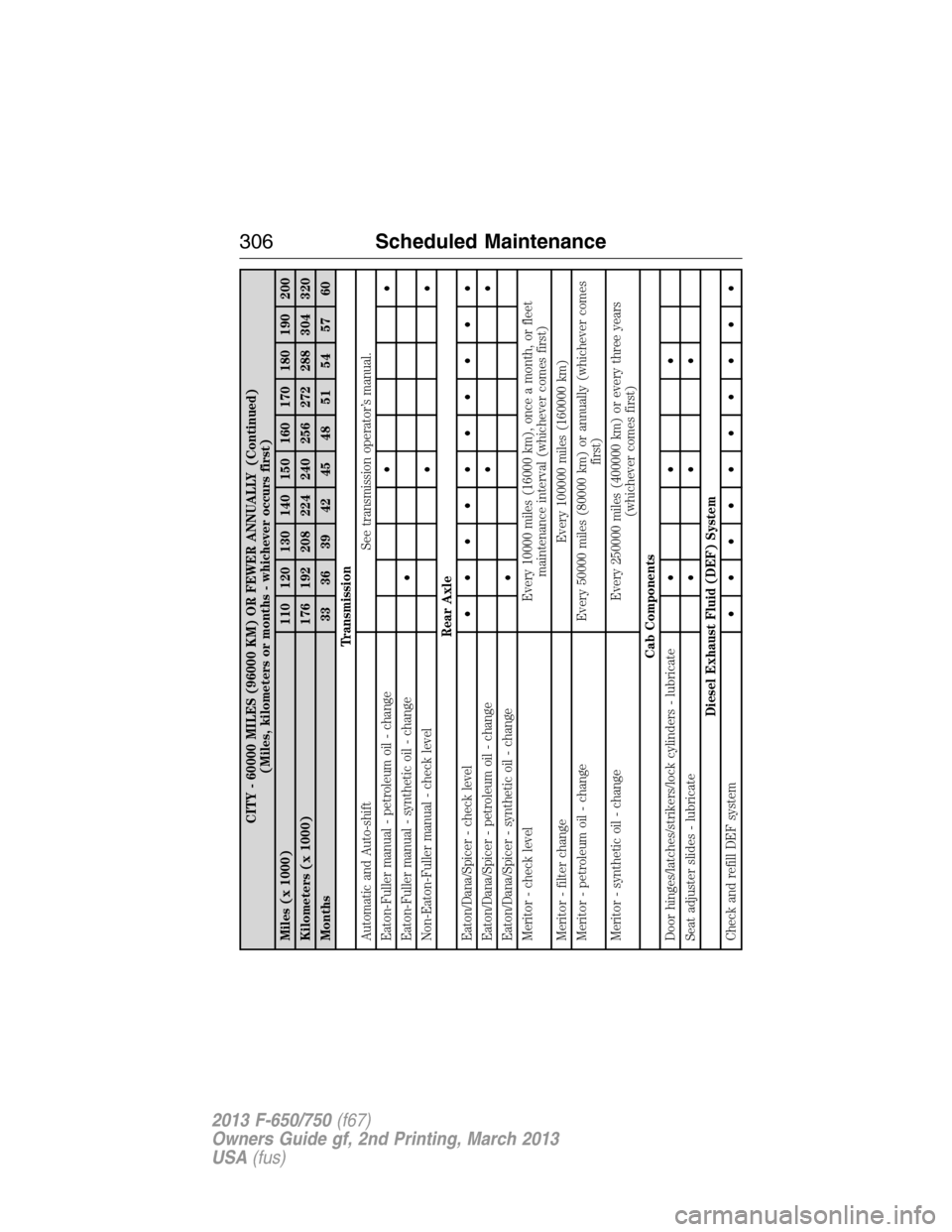
CITY - 60000 MILES (96000 KM) OR FEWER ANNUALLY (Continued)
(Miles, kilometers or months - whichever occurs first)
Miles (x 1000) 110 120 130 140 150 160 170 180 190 200
Kilometers (x 1000) 176 192 208 224 240 256 272 288 304 320
Months 33 36 39 42 45 48 51 54 57 60
Transmission
Automatic and Auto-shift See transmission operator’s manual.
Eaton-Fuller manual - petroleum oil - change••
Eaton-Fuller manual - synthetic oil - change•
Non-Eaton-Fuller manual - check level••
Rear Axle
Eaton/Dana/Spicer - check level••••••••••
Eaton/Dana/Spicer - petroleum oil - change••
Eaton/Dana/Spicer - synthetic oil - change•
Meritor - check level Every 10000 miles (16000 km), once a month, or fleet
maintenance interval (whichever comes first)
Meritor - filter change Every 100000 miles (160000 km)
Meritor - petroleum oil - change Every 50000 miles (80000 km) or annually (whichever comes
first)
Meritor - synthetic oil - change Every 250000 miles (400000 km) or every three years
(whichever comes first)
Cab Components
Door hinges/latches/strikers/lock cylinders - lubricate•••
Seat adjuster slides - lubricate•••
Diesel Exhaust Fluid (DEF) System
Check and refill DEF system••••••••••
306Scheduled Maintenance
2013 F-650/750(f67)
Owners Guide gf, 2nd Printing, March 2013
USA(fus)
Page 311 of 378
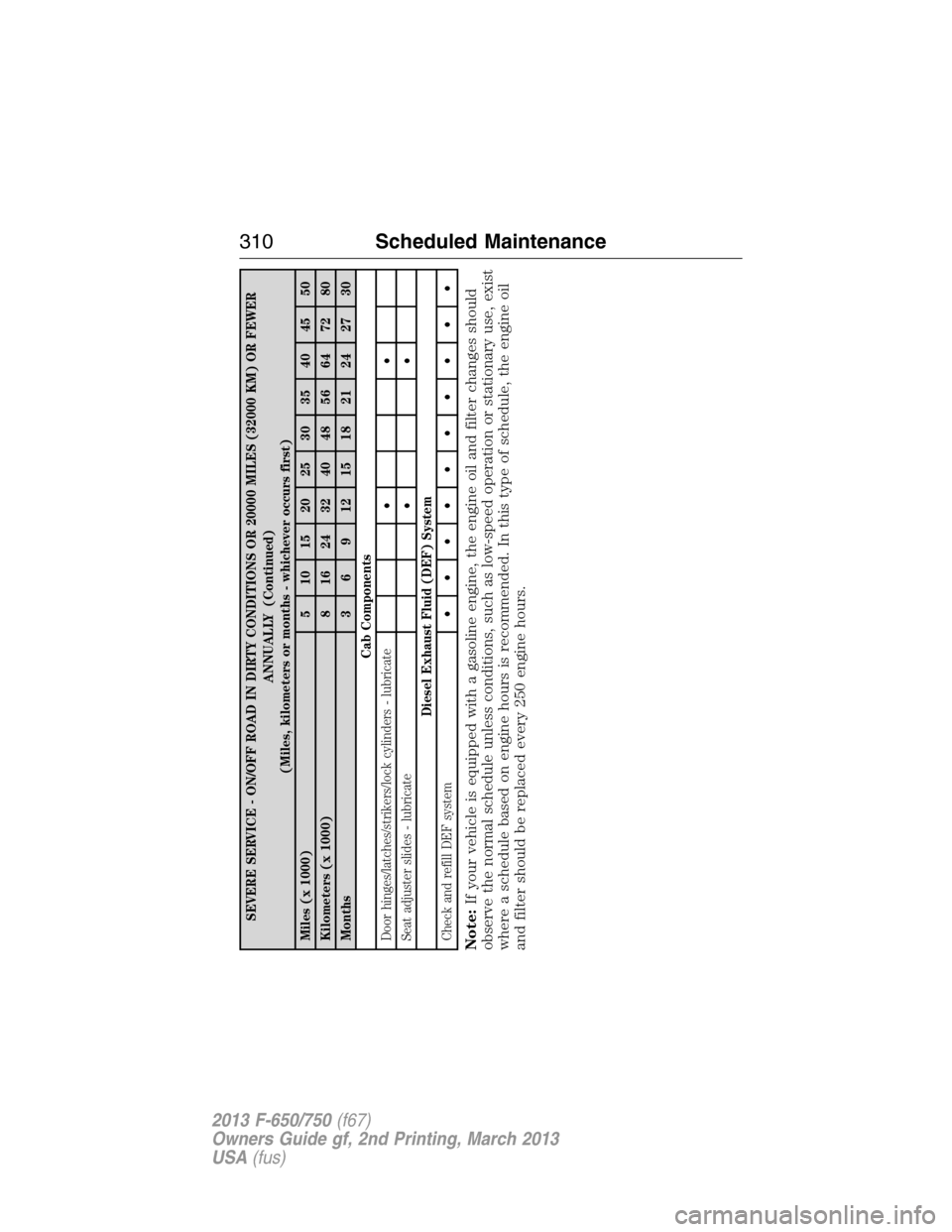
SEVERE SERVICE - ON/OFF ROAD IN DIRTY CONDITIONS OR 20000 MILES (32000 KM) OR FEWER
ANNUALLY (Continued)
(Miles, kilometers or months - whichever occurs first)
Miles (x 1000) 5 10 15 20 25 30 35 40 45 50
Kilometers (x 1000) 8 16 24 32 40 48 56 64 72 80
Months 3 6 9 12 15 18 21 24 27 30
Cab Components
Door hinges/latches/strikers/lock cylinders - lubricate••
Seat adjuster slides - lubricate••
Diesel Exhaust Fluid (DEF) System
Check and refill DEF system••••••••••
Note:If your vehicle is equipped with a gasoline engine, the engine oil and filter changes should
observe the normal schedule unless conditions, such as low-speed operation or stationary use, exist
where a schedule based on engine hours is recommended. In this type of schedule, the engine oil
and filter should be replaced every 250 engine hours.
310Scheduled Maintenance
2013 F-650/750(f67)
Owners Guide gf, 2nd Printing, March 2013
USA(fus)
Page 315 of 378
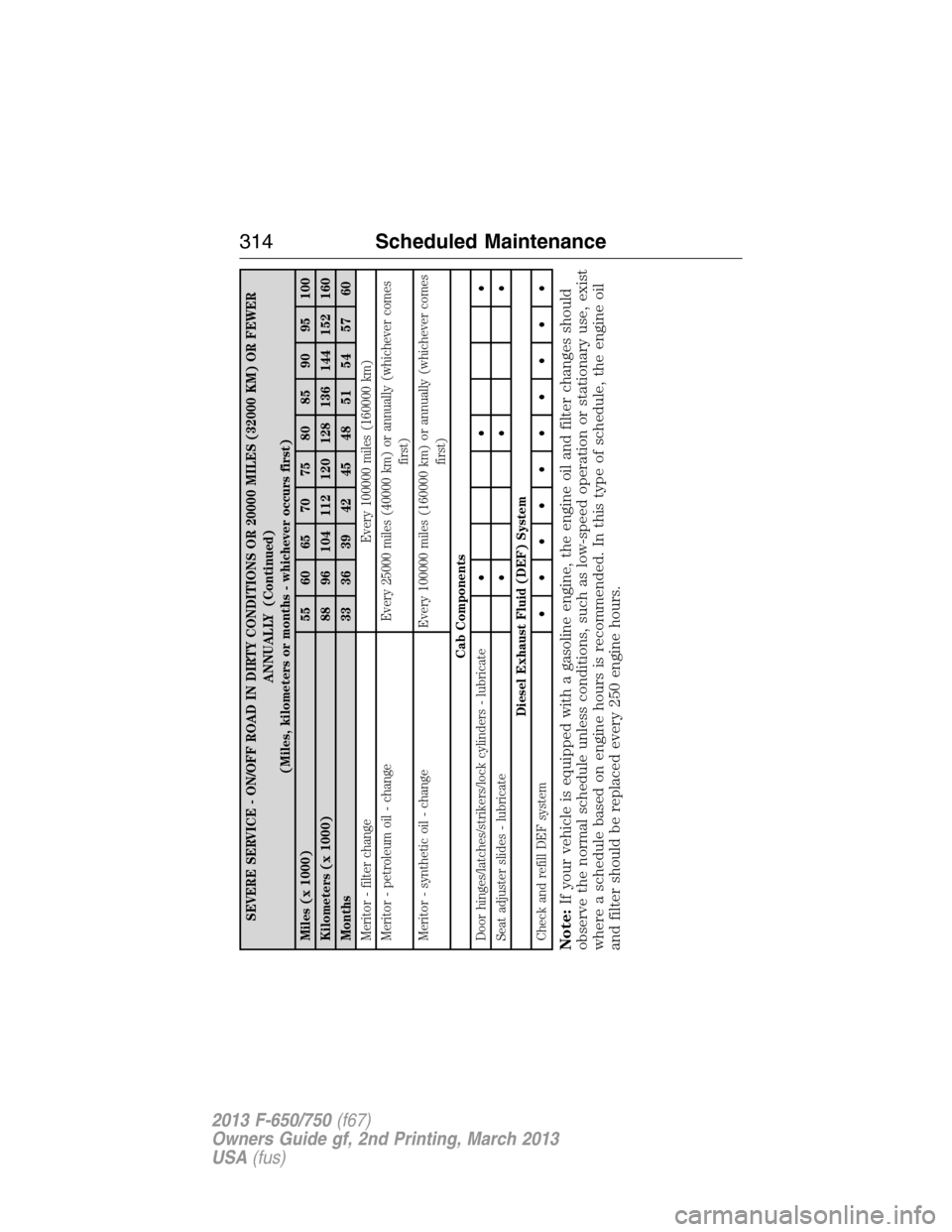
SEVERE SERVICE - ON/OFF ROAD IN DIRTY CONDITIONS OR 20000 MILES (32000 KM) OR FEWER
ANNUALLY (Continued)
(Miles, kilometers or months - whichever occurs first)
Miles (x 1000) 55 60 65 70 75 80 85 90 95 100
Kilometers (x 1000) 88 96 104 112 120 128 136 144 152 160
Months 33 36 39 42 45 48 51 54 57 60
Meritor - filter change Every 100000 miles (160000 km)
Meritor - petroleum oil - change Every 25000 miles (40000 km) or annually (whichever comes
first)
Meritor - synthetic oil - change Every 100000 miles (160000 km) or annually (whichever comes
first)
Cab Components
Door hinges/latches/strikers/lock cylinders - lubricate•••
Seat adjuster slides - lubricate•••
Diesel Exhaust Fluid (DEF) System
Check and refill DEF system••••••••••
Note:If your vehicle is equipped with a gasoline engine, the engine oil and filter changes should
observe the normal schedule unless conditions, such as low-speed operation or stationary use, exist
where a schedule based on engine hours is recommended. In this type of schedule, the engine oil
and filter should be replaced every 250 engine hours.
314Scheduled Maintenance
2013 F-650/750(f67)
Owners Guide gf, 2nd Printing, March 2013
USA(fus)
Page 342 of 378
Vehicle Health Report
WARNING:Always follow scheduled maintenance instructions,
regularly inspect your vehicle, and seek repair for any damage or
problem you suspect. Vehicle Health Report supplements, but cannot
replace normal maintenance and vehicle inspection. Vehicle Health
Report only monitors certain systems that are electronically monitored
by the vehicle and will not monitor or report the status of any other
system, (i.e., brake lining wear). Failure to perform scheduled
maintenance and regularly inspect your vehicle may result in vehicle
damage and serious injury.
Note:Your Vehicle Health Report feature requires activation prior to
use. Visit www.SYNCMyRide.com to register. There is no fee or
subscription associated with Vehicle Health Report, but you must register
to use this feature.
Note:This feature may not function properly if you have enabled caller
ID blocking on your mobile phone. Before running a report, review the
Vehicle Health Report privacy notice.
Note:In order to allow a break-in period for your vehicle, you may not
be able to create a Vehicle Health Report until your vehicle odometer has
reached 200 miles.
Register for Vehicle Health Report and set your report preferences at
www.SYNCMyRide.com. After registering, you can request a Vehicle
Health Report (inside your vehicle). Return to your account at
www.SYNCMyRide.com to view your report. You can also choose for
SYNC to automatically remind you to run reports at specific mileage
intervals. Cellular phone airtime usage may apply when reporting.
The system allows you to check your vehicle’s overall health in the form
of a diagnostic report card. The vehicle health report contains valuable
information such as:
•Vehicle Diagnostic Information
•Scheduled maintenance
•Open Recalls and Field Service Actions
•Unserviced items from vehicle inspections by your authorized dealer.
You can run a report (after the vehicle has been running a minimum of
60 seconds) by pressing the voice button and saying “Vehicle health
report”, or pressing the phone button.
SYNC®341
2013 F-650/750(f67)
Owners Guide gf, 2nd Printing, March 2013
USA(fus)
Page 344 of 378
SYNC Services: Traffic, Directions & Information (TDI)
Note:SYNC Services requires activation prior to use. Visit
www.SYNCMyRide.com to register and check your eligibility for
complimentary services. Standard phone and message rates may apply.
Subscription may be required. You must also have the active SYNC
Services Bluetooth-enabled cellular phone paired and connected to the
system in order to connect to, and use, SYNC Services. SeeUsing SYNC
with your phonefor pairing instructions.
Note:This feature does not function properly if you have enabled caller
ID blocking on your mobile phone. Make sure your mobile phone is not
blocking caller ID before using SYNC Services.
Note:
The driver is ultimately responsible for the safe operation of the
vehicle, and therefore, must evaluate whether it is safe to follow the
suggested directions. Any navigation features are provided only as an aid.
Make your driving decisions based on your observations of local conditions
and existing traffic regulations. Do not follow the route suggestions if
doing so would result in an unsafe or illegal maneuver, if you would be
placed in an unsafe situation, or if you would be directed into an area that
you consider unsafe. Maps used by this system may be inaccurate because
of errors, changes in roads, traffic conditions or driving conditions.
Note:When you connect, the service uses GPS technology and advanced
vehicle sensors to collect the vehicle’s current location, travel direction
and speed to help provide you with the directions, traffic reports, or
business searches you request. Further, to provide the services you
request and for continuous improvement, the service may collect and
record call details and voice communications. For more information, see
SYNC Services Terms and Conditions at www.SYNCMyRide.com. If you
do not want Ford or its service providers to collect the vehicle travel
information or other information identified in the Terms and Conditions,
do not activate or use the service.
SYNC Services uses advanced vehicle sensors, integrated GPS technology
and comprehensive map and traffic data, to give you personalized traffic
reports, precise turn-by-turn directions, business search, news, sports,
weather and more. For a complete list of services, or to learn more,
please visit www.SYNCMyRide.com.
Connecting to SYNC Services Using Voice Commands
1. Press the voice button.
2. When prompted, say “Services”. This initiates an outgoing call to
SYNC Services using your paired and connected Bluetooth-enabled
cellular phone.
SYNC®343
2013 F-650/750(f67)
Owners Guide gf, 2nd Printing, March 2013
USA(fus)
Page 347 of 378
SYNC AppLink™
Note:This feature is only available in the United States.
Note:Your smartphone must be paired and connected to SYNC to access
AppLink.
Note:iPhone users need to connect the phone to the USB port in order
to start the application. It is recommended to lock your iPhone after
starting an application.
Note:The AppLink feature is not available if your vehicle is equipped
with the MyFord Touch or MyLincoln Touch system.
Depending on your display type, you can access AppLink from the media
menu, the phone menu, or by using voice commands. Once an app is
running through AppLink, you can control main features of the app
through voice commands and steering wheel controls.
To Access Using the Phone Menu
1. Press the phone button to access the SYNC phone menu on-screen.
2. Scroll to Mobile Apps and pressOKto access a list of available
applications.
3. Scroll through the list of available applications and pressOKto
select a particular app.
4. Once an app is running through SYNC, you can access an app’s menu
by pressing theMENUbutton to first access the SYNC menu.
5. Select “SYNC-Media” by pressingOK.
6. Scroll until “
Menu), then pressOK.From here, you can access an application’s
features, such as Thumbs up, Thumbs down, etc. For more
information, please visit www.SYNCMyRide.com.
To Access Using the Media Menu
1. PressAUXbutton on the center console.
2. Press MENU to access the SYNC menu.
3. Select “SYNC-Media” by pressingOK.
4. Then scroll to Mobile Apps and pressOKto access a list of available
applications.
5. Scroll through the list of available applications and pressOKto
select a particular app.
6. Once an app is running through SYNC, you can access an app’s menu
by pressing theMENUbutton to first access the SYNC menu.
7. Select “SYNC-Media” by pressingOK.
8. Scroll until “
Menu), then pressOK.From here, you can access an application’s
features, such as Thumbs up, Thumbs down, etc. For more
information, please visit www.SYNCMyRide.com.
346SYNC®
2013 F-650/750(f67)
Owners Guide gf, 2nd Printing, March 2013
USA(fus)
Page 362 of 378
Vehicle Health Report and SYNC Services (Traffic, Directions and
Information) issues
Issue Possible
cause(s)Possible solution(s)
I received a text
that the Vehicle
Health Report is
not activated.•Your account
may not be
activated on the
website, OR
•You may have
the wrong VIN
(vehicle
identification
number) listed.•This is a free feature, but you
must first register online to use it.
•Make sure that your VIN is
correctly listed in your account.
I am unable to
retrieve the report
on the website, or
I receive a system
error.The preferred
dealer information
did not load
correctly.When you register your account,
you must list a preferred dealer. If
one is already listed, try selecting
another dealer and logging out.
Log back in and change it back to
your preferred dealer and retrieve
the report.
I am unable to
submit a report.•This could be
due to your
phone’s
compatibility, OR
•Bad signal
strength, OR
•Your phone may
not be activated
on the website.•Update your mobile number in
your account on the website.
•Make sure you have full signal
strength and that yourBluetooth
volume level has been turned up.
•Try deleting your phone and
performing a clean pairing.
I heard a
commercial when I
tried to use
Traffic, Directions
and Information.•The phone in
use is not
activated, OR
•Your phone has
ID blocker active.•This is a free feature, but you
must first register online to use it.
•Turn off ID blocker on your
phone as the system recognizes
you by your phone number.
•Make sure the currently
connected phone is the same one
that is registered on your
SyncMyRide account.
SYNC®361
2013 F-650/750(f67)
Owners Guide gf, 2nd Printing, March 2013
USA(fus)
Page 373 of 378
911 Assist™ ..............................338
A
ABS (see Brakes) .....................148
Accessing call history/phone
book during active call .............328
Accessing your media menu
features ......................................350
Accessing your phone menu
features ......................................329
Active call menu options .........328
Advanced menu options ...336, 357
Advanced menu options
(prompts, languages, defaults,
master reset, installing
applications) ..............................336
Air cleaner filter ...............236, 280
Air conditioning ..........................88
manual heating and air
conditioning system .................88
Air filter .............................236, 280
Air suspension ...........................171
Antifreeze (see Engine
coolant) .....................................219
Anti-lock brake system
(see Brakes) ..............................148
AppLink™ .................................346
Audio system
Single CD ............................79–80
Audio system (see Radio) ...79–80
Automatic transmission ....136–137
fluid, adding ............................223
fluid, checking ........................223
fluid, refill capacities ..............277
fluid, specification ..................264
Auxiliary input jack (Line in) ....82Auxiliary powerpoint ................101
Axle ............................143, 207, 226
lubricant specifications ..........264
refill capacities ........................277
B
Battery .......................................233
acid, treating emergencies .....233
jumping a disabled battery ....185
maintenance-free ....................233
replacement, specifications ...280
servicing ..................................233
Booster seats ...............................31
Brakelamp
bulb replacement ....................239
Brakes ........................147–148, 208
adjustment ..............................211
anti-lock ...................................148
anti-lock brake system (ABS)
warning light ...........................148
brake warning light ................148
fluid, checking and adding ....229
fluid, specifications .................264
parking ....................158, 161, 211
shift interlock ..........................136
trailer .......................................176
Bulbs ..........................................241
C
Catalytic converter
(see Emission control) .............213
CD ..........................................79–80
CD player ....................................77
Cell phone use ............................12
Child safety seats
attaching with tether straps ....36
LATCH .......................................36
372Index
2013 F-650/750(f67)
Owners Guide gf, 2nd Printing, March 2013
USA(fus)
Page 374 of 378
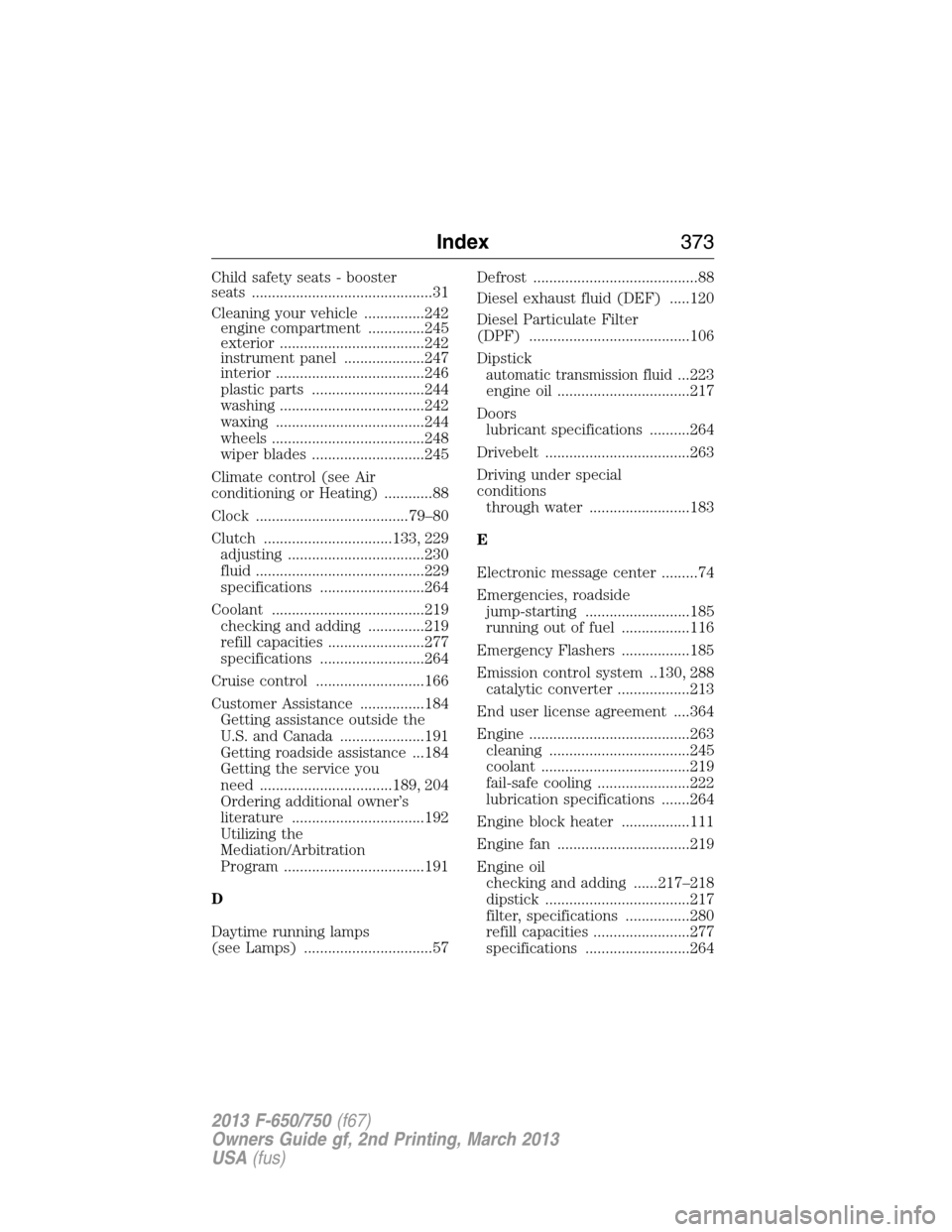
Child safety seats - booster
seats .............................................31
Cleaning your vehicle ...............242
engine compartment ..............245
exterior ....................................242
instrument panel ....................247
interior .....................................246
plastic parts ............................244
washing ....................................242
waxing .....................................244
wheels ......................................248
wiper blades ............................245
Climate control (see Air
conditioning or Heating) ............88
Clock ......................................79–80
Clutch ................................133, 229
adjusting ..................................230
fluid ..........................................229
specifications ..........................264
Coolant ......................................219
checking and adding ..............219
refill capacities ........................277
specifications ..........................264
Cruise control ...........................166
Customer Assistance ................184
Getting assistance outside the
U.S. and Canada .....................191
Getting roadside assistance ...184
Getting the service you
need .................................189, 204
Ordering additional owner’s
literature .................................192
Utilizing the
Mediation/Arbitration
Program ...................................191
D
Daytime running lamps
(see Lamps) ................................57Defrost .........................................88
Diesel exhaust fluid (DEF) .....120
Diesel Particulate Filter
(DPF) ........................................106
Dipstick
automatic transmission fluid...223
engine oil .................................217
Doors
lubricant specifications ..........264
Drivebelt ....................................263
Driving under special
conditions
through water .........................183
E
Electronic message center .........74
Emergencies, roadside
jump-starting ..........................185
running out of fuel .................116
Emergency Flashers .................185
Emission control system ..130, 288
catalytic converter ..................213
End user license agreement ....364
Engine ........................................263
cleaning ...................................245
coolant .....................................219
fail-safe cooling .......................222
lubrication specifications .......264
Engine block heater .................111
Engine fan .................................219
Engine oil
checking and adding ......217–218
dipstick ....................................217
filter, specifications ................280
refill capacities ........................277
specifications ..........................264
Index373
2013 F-650/750(f67)
Owners Guide gf, 2nd Printing, March 2013
USA(fus)
Page 375 of 378
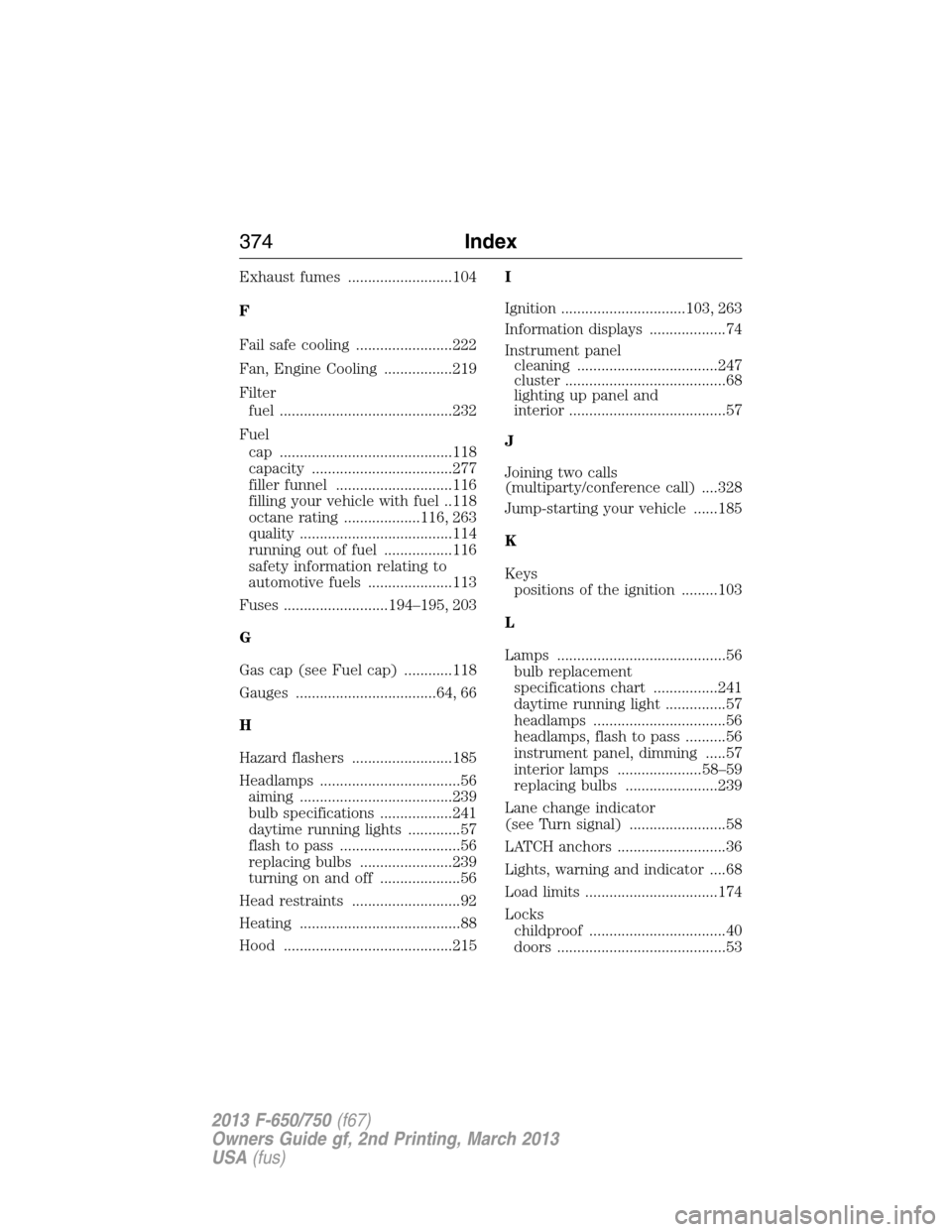
Exhaust fumes ..........................104
F
Fail safe cooling ........................222
Fan, Engine Cooling .................219
Filter
fuel ...........................................232
Fuel
cap ...........................................118
capacity ...................................277
filler funnel .............................116
filling your vehicle with fuel ..118
octane rating ...................116, 263
quality ......................................114
running out of fuel .................116
safety information relating to
automotive fuels .....................113
Fuses ..........................194–195, 203
G
Gas cap (see Fuel cap) ............118
Gauges ...................................64, 66
H
Hazard flashers .........................185
Headlamps ...................................56
aiming ......................................239
bulb specifications ..................241
daytime running lights .............57
flash to pass ..............................56
replacing bulbs .......................239
turning on and off ....................56
Head restraints ...........................92
Heating ........................................88
Hood ..........................................215I
Ignition ...............................103, 263
Information displays ...................74
Instrument panel
cleaning ...................................247
cluster ........................................68
lighting up panel and
interior .......................................57
J
Joining two calls
(multiparty/conference call) ....328
Jump-starting your vehicle ......185
K
Keys
positions of the ignition .........103
L
Lamps ..........................................56
bulb replacement
specifications chart ................241
daytime running light ...............57
headlamps .................................56
headlamps, flash to pass ..........56
instrument panel, dimming .....57
interior lamps .....................58–59
replacing bulbs .......................239
Lane change indicator
(see Turn signal) ........................58
LATCH anchors ...........................36
Lights, warning and indicator ....68
Load limits .................................174
Locks
childproof ..................................40
doors ..........................................53
374Index
2013 F-650/750(f67)
Owners Guide gf, 2nd Printing, March 2013
USA(fus)