display FORD F650 2013 12.G Owners Manual
[x] Cancel search | Manufacturer: FORD, Model Year: 2013, Model line: F650, Model: FORD F650 2013 12.GPages: 378, PDF Size: 3.82 MB
Page 3 of 378
Windows and Mirrors 59
Power windows.......................................59
Exteriormirrors.......................................60
Instrument Cluster 64
Gauges.............................................64
Warning lamps and indicators.............................68
Audible warnings and indicators...........................73
Information Displays 74
Message center.......................................74
Information messages...................................76
Audio System 77
AM/FMstereo ........................................79
AM/FM/CD with SYNC..................................80
Auxiliary input jack....................................82
USB port............................................84
Satellite radio information................................84
Climate Control 88
Manual heating and air conditioning........................88
Seats 91
Sitting in the correct position.............................91
Head restraints........................................92
Manual seats.........................................94
Power seats..........................................96
Rear seats...........................................98
Heated seats.........................................99
Auxiliary Power Points 101
Starting and Stopping the Engine 102
Ignition switch.......................................103
Engine block heater...................................111
2Table of Contents
2013 F-650/750(f67)
Owners Guide gf, 2nd Printing, March 2013
USA(fus)
Page 65 of 378
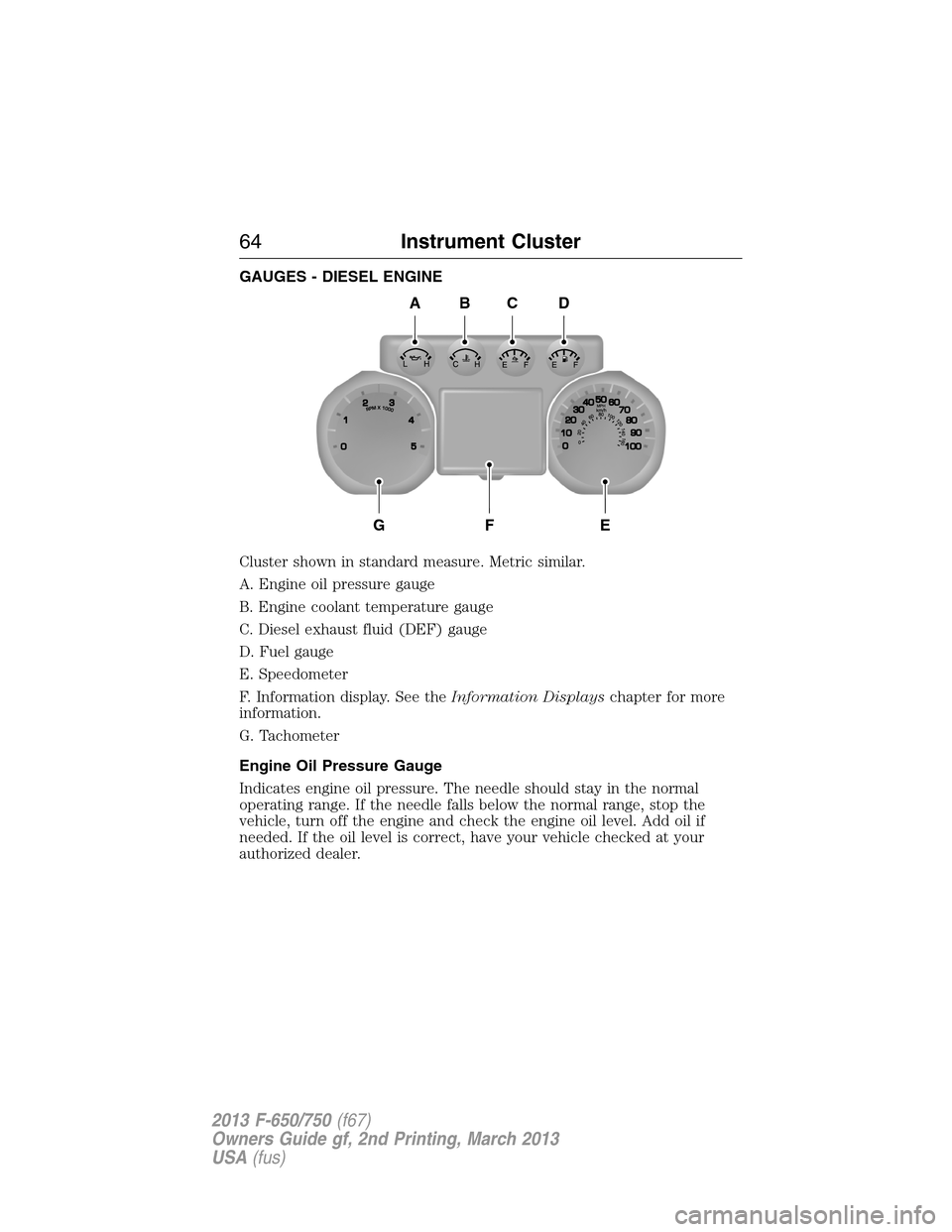
GAUGES - DIESEL ENGINE
Cluster shown in standard measure. Metric similar.
A. Engine oil pressure gauge
B. Engine coolant temperature gauge
C. Diesel exhaust fluid (DEF) gauge
D. Fuel gauge
E. Speedometer
F. Information display. See theInformation Displayschapter for more
information.
G. Tachometer
Engine Oil Pressure Gauge
Indicates engine oil pressure. The needle should stay in the normal
operating range. If the needle falls below the normal range, stop the
vehicle, turn off the engine and check the engine oil level. Add oil if
needed. If the oil level is correct, have your vehicle checked at your
authorized dealer.
A
GFE
BCD
64Instrument Cluster
2013 F-650/750(f67)
Owners Guide gf, 2nd Printing, March 2013
USA(fus)
Page 66 of 378
Engine Coolant Temperature Gauge
Indicates engine coolant temperature. At normal operating temperature,
the level indicator is in the normal range. If the engine coolant
temperature exceeds the normal range, stop the vehicle as soon as safely
possible, switch off the engine and let the engine cool.
WARNING:Never remove the coolant reservoir cap while the
engine is running or hot.
Diesel Exhaust Fluid (DEF) Gauge
Indicates fluid level in DEF tank.
Fuel Gauge
Indicates approximately how much fuel is left in the fuel tank (when the
ignition is on). The fuel gauge may vary slightly when the vehicle is in
motion or on a grade. The fuel icon and arrow indicates which side of
the vehicle the fuel filler door is located.
Information Display
Odometer:Located in the bottom of the information display. Registers
the accumulated distance your vehicle has travelled.
Trip Computer:SeeGeneral informationin theInformation Displays
chapter.
Vehicle Settings and Personalization:SeeGeneral informationin
theInformation Displayschapter.
Instrument Cluster65
2013 F-650/750(f67)
Owners Guide gf, 2nd Printing, March 2013
USA(fus)
Page 67 of 378
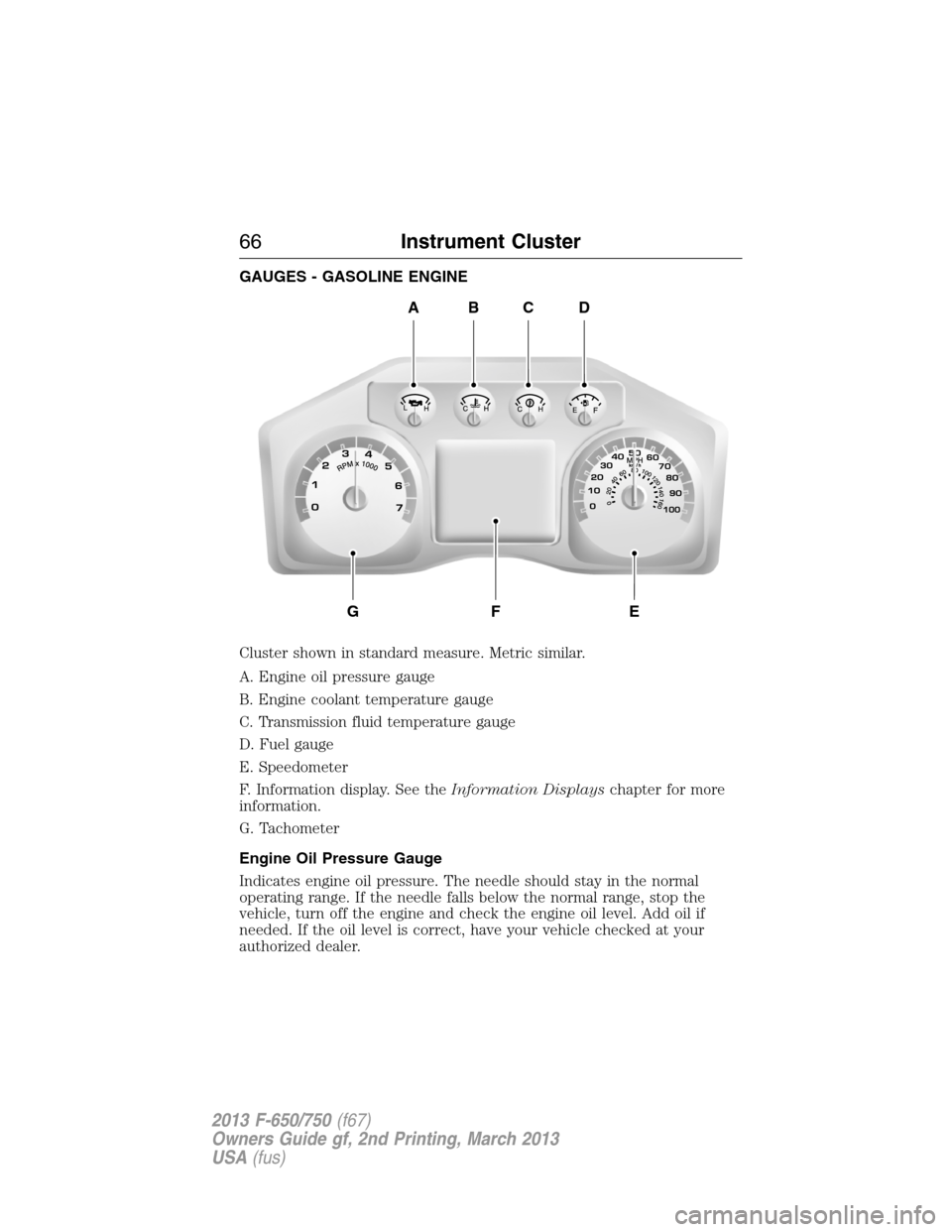
GAUGES - GASOLINE ENGINE
Cluster shown in standard measure. Metric similar.
A. Engine oil pressure gauge
B. Engine coolant temperature gauge
C. Transmission fluid temperature gauge
D. Fuel gauge
E. Speedometer
F. Information display. See theInformation Displayschapter for more
information.
G. Tachometer
Engine Oil Pressure Gauge
Indicates engine oil pressure. The needle should stay in the normal
operating range. If the needle falls below the normal range, stop the
vehicle, turn off the engine and check the engine oil level. Add oil if
needed. If the oil level is correct, have your vehicle checked at your
authorized dealer.
ABCD
GFE
66Instrument Cluster
2013 F-650/750(f67)
Owners Guide gf, 2nd Printing, March 2013
USA(fus)
Page 68 of 378
Engine Coolant Temperature Gauge
Indicates engine coolant temperature. At normal operating temperature,
the level indicator is in the normal range. If the engine coolant
temperature exceeds the normal range, stop the vehicle as soon as safely
possible, switch off the engine and let the engine cool.
WARNING:Never remove the coolant reservoir cap while the
engine is running or hot.
Transmission Fluid Temperature Gauge
Indicates transmission fluid temperature. At normal operating
temperature, the level indicator is in the normal range. If the
transmission fluid temperature exceeds the normal range, stop the
vehicle as soon as safely possible and verify the airflow is not restricted,
such as snow or debris blocking airflow through the grill. Also, higher
than normal operating temperature can be caused by special operation
conditions (i.e., snowplowing, towing or off-road use). Operating the
transmission for extended periods of time with the gauge in the higher
than normal area may cause internal transmission damage. Altering the
severity of the driving conditions is recommended to lower the
transmission temperature into the normal range. If the gauge continues
to show high temperatures, see your authorized dealer.
Fuel Gauge
Indicates approximately how much fuel is left in the fuel tank (when the
ignition is on). The fuel gauge may vary slightly when the vehicle is in
motion or on a grade. The fuel icon and arrow indicates which side of
the vehicle the fuel filler door is located.
Information Display
Odometer:Located in the bottom of the information display. Registers
the accumulated distance your vehicle has travelled.
Trip Computer:SeeGeneral informationin theInformation Displays
chapter.
Vehicle Settings and Personalization:SeeGeneral informationin
theInformation Displayschapter.
Instrument Cluster67
2013 F-650/750(f67)
Owners Guide gf, 2nd Printing, March 2013
USA(fus)
Page 69 of 378
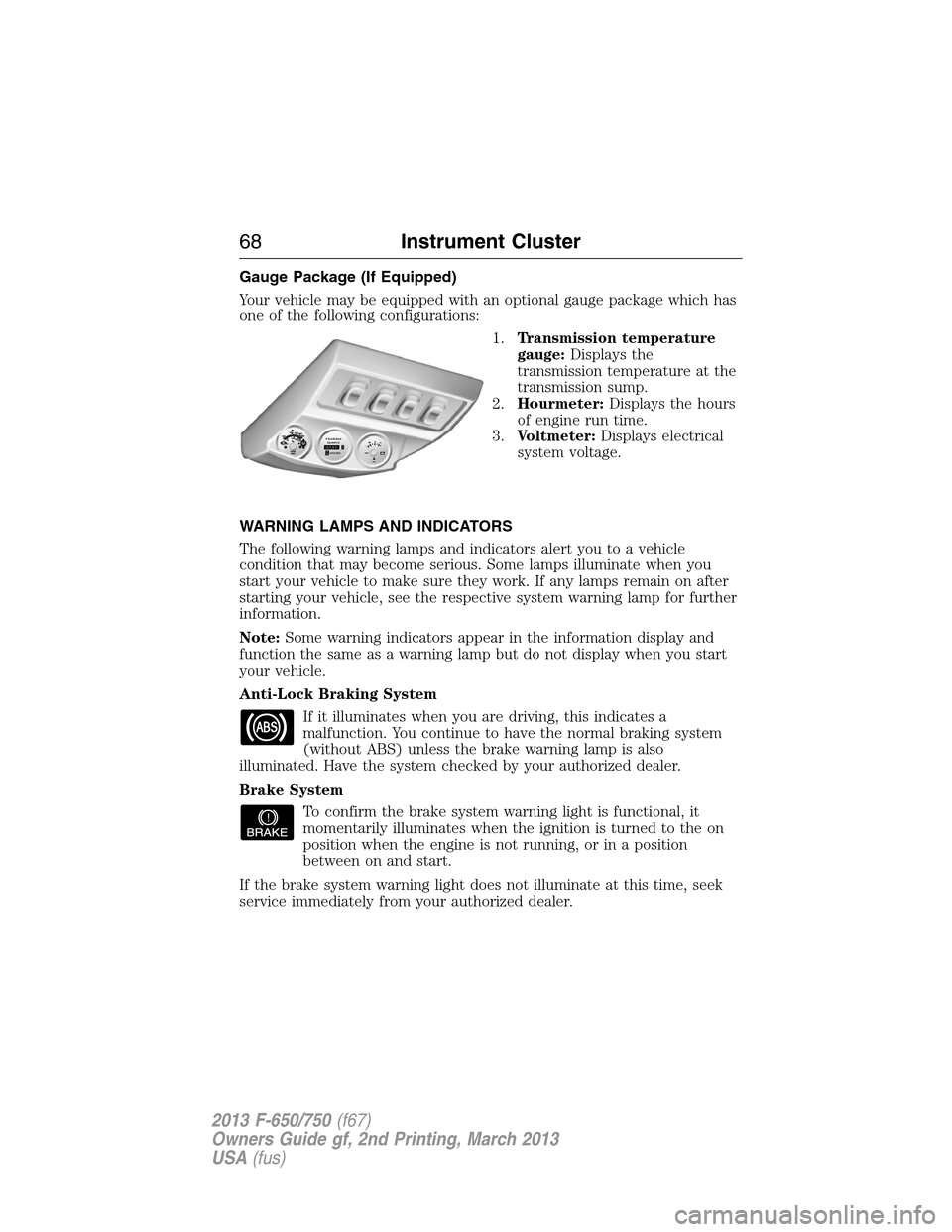
Gauge Package (If Equipped)
Your vehicle may be equipped with an optional gauge package which has
one of the following configurations:
1.Transmission temperature
gauge:Displays the
transmission temperature at the
transmission sump.
2.Hourmeter:Displays the hours
of engine run time.
3.Voltmeter:Displays electrical
system voltage.
WARNING LAMPS AND INDICATORS
The following warning lamps and indicators alert you to a vehicle
condition that may become serious. Some lamps illuminate when you
start your vehicle to make sure they work. If any lamps remain on after
starting your vehicle, see the respective system warning lamp for further
information.
Note:Some warning indicators appear in the information display and
function the same as a warning lamp but do not display when you start
your vehicle.
Anti-Lock Braking System
If it illuminates when you are driving, this indicates a
malfunction. You continue to have the normal braking system
(without ABS) unless the brake warning lamp is also
illuminated. Have the system checked by your authorized dealer.
Brake System
To confirm the brake system warning light is functional, it
momentarily illuminates when the ignition is turned to the on
position when the engine is not running, or in a position
between on and start.
If the brake system warning light does not illuminate at this time, seek
service immediately from your authorized dealer.
68Instrument Cluster
2013 F-650/750(f67)
Owners Guide gf, 2nd Printing, March 2013
USA(fus)
Page 75 of 378
GENERAL INFORMATION
WARNING:Driving while distracted can result in loss of vehicle
control, accident and injury. Ford strongly recommends that
drivers use extreme caution when using any device or feature that may
take their focus off the road. Your primary responsibility is the safe
operation of the vehicle. We recommend against the use of any
handheld device while driving and that you comply with all applicable
laws.
Various systems on your vehicle can be controlled using the information
display controls on the steering wheel. Corresponding information is
displayed in the information display.
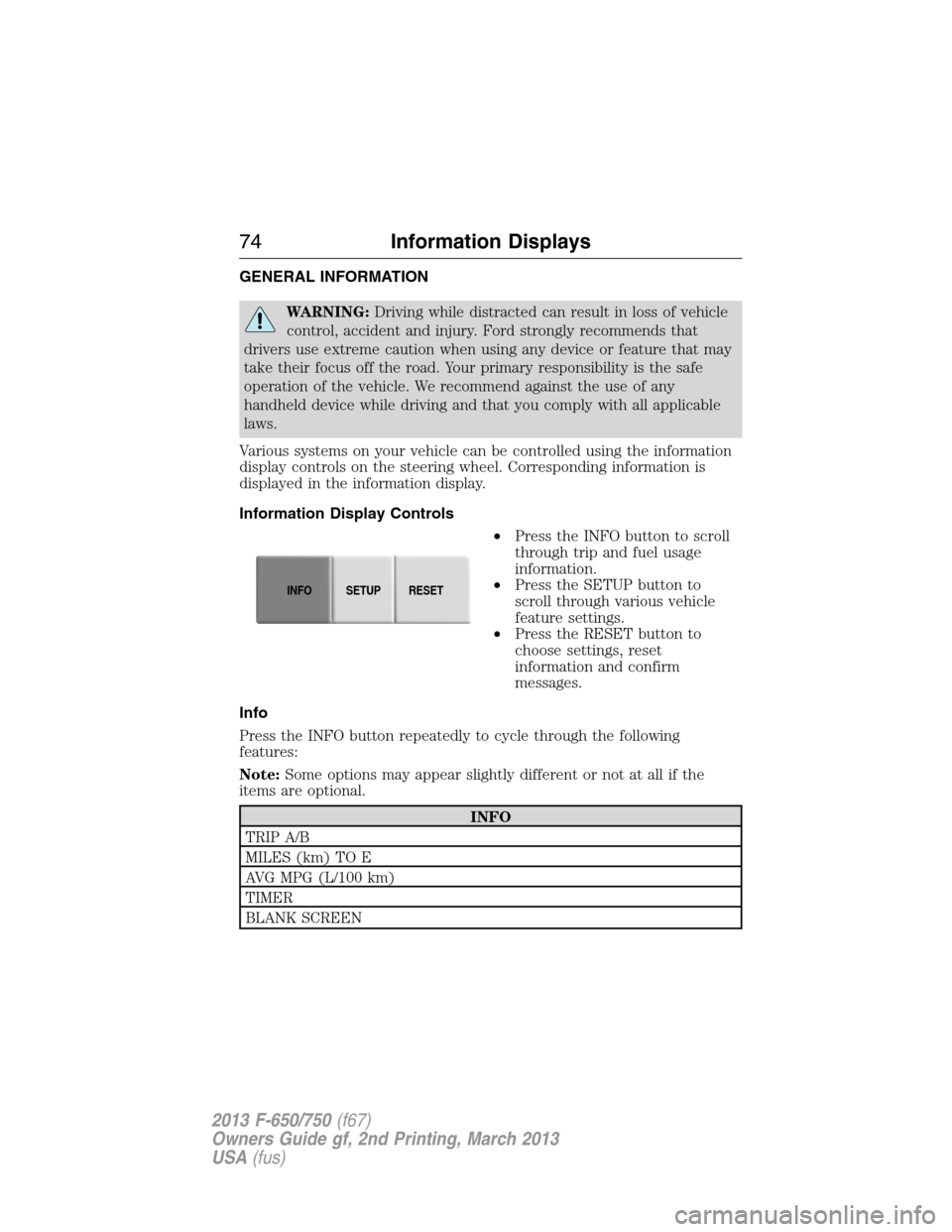
Information Display Controls
•Press the INFO button to scroll
through trip and fuel usage
information.
•Press the SETUP button to
scroll through various vehicle
feature settings.
•Press the RESET button to
choose settings, reset
information and confirm
messages.
Info
Press the INFO button repeatedly to cycle through the following
features:
Note:Some options may appear slightly different or not at all if the
items are optional.
INFO
TRIP A/B
MILES (km) TO E
AVG MPG (L/100 km)
TIMER
BLANK SCREEN
INFOSETUP
RESET
74Information Displays
2013 F-650/750(f67)
Owners Guide gf, 2nd Printing, March 2013
USA(fus)
Page 76 of 378
•TRIP A/B: Registers the distance of individual journeys. Press and
release the INFO button until the A or B trip appears in the display
(this represents the trip mode). Press the RESET button to reset.
SeeSystem check and vehicle feature customizationlater in this
section to switch the display from metric to English.
•MILES (KILOMETERS) TO E: This displays an estimate of
approximately how far you can drive with the fuel remaining in your
tank under normal driving conditions. Remember to turn the ignition
off when refueling to allow this feature to correctly detect the added
fuel. Distance to empty is calculated using a running average fuel
economy, which is based on your recent driving history of 500 miles
(800 kilometers). This value is not the same as the average fuel
economy display. The running average fuel economy is re-initialized
to a factory default value if the battery is disconnected.
•AVG MPG (L/100 km): Average fuel economy displays your average
fuel economy in miles/gallon or liters/100 km.
•TIMER: Displays the trip elapsed drive time. Press and release
RESET to pause the timer. Press and hold RESET to reset the timer.
System Check and Vehicle Feature Customization
Press the SETUP button repeatedly
to cycle the message center through
the following features:
SETUP
RESET FOR
SYSTEM CHECKPress the
RESET button.OIL LIFE
CHARGING SYSTEM
BRAKE SYSTEM
MILES TO EMPTY
UNITS Press the
RESET button.English or Metric
LANGUAGE =
ENGLISH /
SPANISH / FRENCHPress the
RESET button.English / Spanish / French
(Press and hold to set.)
INFOSETUP
RESET
Information Displays75
2013 F-650/750(f67)
Owners Guide gf, 2nd Printing, March 2013
USA(fus)
Page 77 of 378
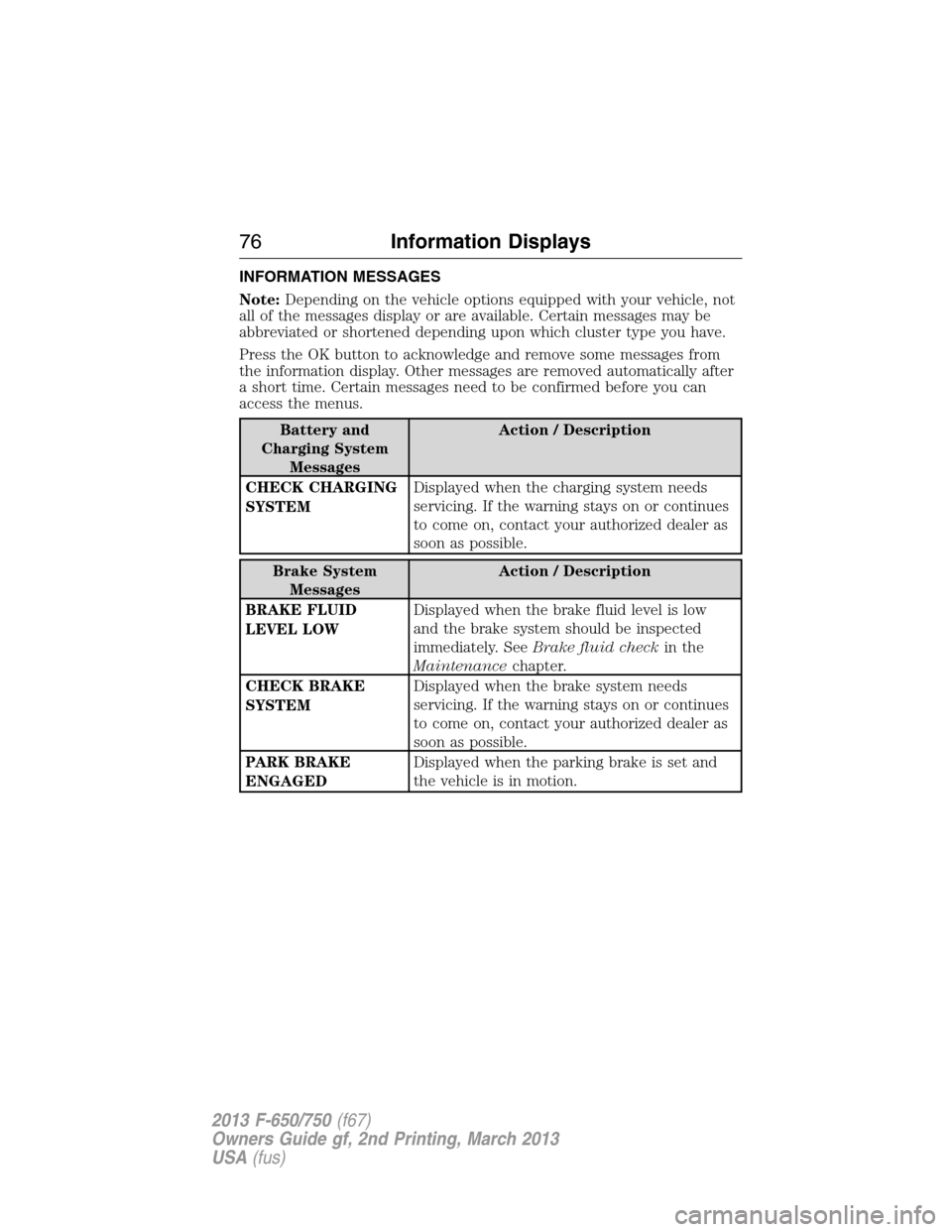
INFORMATION MESSAGES
Note:Depending on the vehicle options equipped with your vehicle, not
all of the messages display or are available. Certain messages may be
abbreviated or shortened depending upon which cluster type you have.
Press the OK button to acknowledge and remove some messages from
the information display. Other messages are removed automatically after
a short time. Certain messages need to be confirmed before you can
access the menus.
Battery and
Charging System
MessagesAction / Description
CHECK CHARGING
SYSTEMDisplayed when the charging system needs
servicing. If the warning stays on or continues
to come on, contact your authorized dealer as
soon as possible.
Brake System
MessagesAction / Description
BRAKE FLUID
LEVEL LOWDisplayed when the brake fluid level is low
and the brake system should be inspected
immediately. SeeBrake fluid checkin the
Maintenancechapter.
CHECK BRAKE
SYSTEMDisplayed when the brake system needs
servicing. If the warning stays on or continues
to come on, contact your authorized dealer as
soon as possible.
PARK BRAKE
ENGAGEDDisplayed when the parking brake is set and
the vehicle is in motion.
76Information Displays
2013 F-650/750(f67)
Owners Guide gf, 2nd Printing, March 2013
USA(fus)
Page 79 of 378
MP3 Track and Folder Structure
Audio systems capable of recognizing and playing MP3 individual tracks
and folder structures work as follows:
•There are two different modes for MP3 disc playback: MP3 track
mode (system default) and MP3 folder mode.
•MP3 track mode ignores any folder structure on the MP3 disc. The
player numbers each MP3 track on the disc (noted by the .mp3 file
extension) from T001 to a maximum of T255.Note:The maximum
number of playable MP3 files may be less depending on the structure
of the CD and exact model of radio present.
•MP3 folder mode represents a folder structure consisting of one level
of folders. The CD player numbers all MP3 tracks on the disc (noted
by the .mp3 file extension) and all folders containing MP3 files, from
F001 (folder) T001 (track) to F253 T255.
•Creating discs with only one level of folders helps with navigation
through the disc files.
If you are burning your own MP3 discs, it is important to understand
how the system reads the structures you create. While various files may
be present, (files with extensions other than mp3), only files with the
.mp3 extension are played; other files are ignored by the system. This
enables you to use the same MP3 disc for a variety of tasks on your work
computer, home computer and your in-vehicle system.
In track mode, the system displays and plays the structure as if it were
only one level deep (all .mp3 files play, regardless of being in a specific
folder). In folder mode, the system only plays the .mp3 files in the
current folder.
78Audio System
2013 F-650/750(f67)
Owners Guide gf, 2nd Printing, March 2013
USA(fus)