trailer FORD F650 2016 13.G Owners Manual
[x] Cancel search | Manufacturer: FORD, Model Year: 2016, Model line: F650, Model: FORD F650 2016 13.GPages: 379, PDF Size: 4.8 MB
Page 5 of 379
Warning Lamps and Indicators................58
Audible Warnings and Indicators..............61
Information Displays
General Information......................................62
Information Messages.................................64
Climate Control
Manual Climate Control
..............................70
Hints on Controlling the Interior Climate............................................................71
Heated Exterior Mirrors
.................................72
Seats
Sitting in the Correct Position....................73
Head Restraints
...............................................73
Manual Seats
...................................................75
Power Seats
.....................................................76
Rear Seats
.........................................................78
Front Seat Armrest........................................79
Rear Seat Armrest.........................................80
Auxiliary Power Points
Auxiliary Power Points..................................81
Storage Compartments
Overhead Console
.........................................83
Starting and Stopping the Engine
General Information
.....................................84
Ignition Switch
................................................84
Starting a Gasoline Engine.........................85
Starting a Diesel Engine..............................86
Diesel Particulate Filter................................87
Switching Off the Engine............................88
Engine Idle Shutdown..................................88
Engine Block Heater
.....................................88 Fuel and Refueling
Safety Precautions
........................................90
Fuel Quality - Gasoline.................................91
Fuel Quality - Diesel......................................92
Running Out of Fuel - 6.8L.........................95
Running Out of Fuel - 6.7L Diesel............95
Selective Catalytic Reduction System...........................................................95
Refueling - 6.8L
............................................100
Refueling - 6.7L Diesel
.................................101
Fuel Consumption.......................................102
Emission Control System - 6.8L.............103
Emission Control System - 6.7L Diesel............................................................105
Fuel Tank Selector Switch..........................112
Transmission
Automatic Transmission.............................113
Power Take-Off
...............................................117
Rear Axle
General Information
.....................................118
Limited Slip Differential..............................118
Electronic Locking Differential.................118
2-Speed Rear Axle........................................119
Brakes
General Information
....................................120
Hints on Driving With Anti-Lock Brakes...........................................................120
Parking Brake
...................................................121
Full Power Brake...........................................124
Air Brakes.........................................................125
Exhaust Brake................................................126
Trailer Brakes..................................................128
Traction Control
Principle of Operation.................................132
Using Traction Control - Vehicles With: Air Brakes
.....................................................132
2
F650750 (TBC), enUSA, First Printing Table of Contents
Page 6 of 379
Using Traction Control - Vehicles With:
Hydraulic Brakes.......................................132
Cruise Control
Principle of Operation.................................134
Using Cruise Control
....................................134
Driving Aids
Steering............................................................136
Load Carrying
Load Limit........................................................137
Air Suspension
...............................................138
Towing
Towing a Trailer.............................................140
Recommended Towing Weights.............141
Essential Towing Checks...........................142
Transporting the Vehicle............................143
Fifth Wheel Operation
................................144
Driving Hints
Breaking-In.....................................................146
General Driving Points................................146
Economical Driving
......................................147
Cold Weather Precautions
........................148
Driving Through Water...............................150
Roadside Emergencies
Roadside Assistance
....................................151
Hazard Warning Flashers...........................152
Fuel Shutoff....................................................152
Jump Starting the Vehicle
.........................153
Customer Assistance
Getting the Services You Need
...............156
In California (U.S. Only)
..............................157
The Better Business Bureau (BBB) Auto Line Program (U.S. Only)......................158 Utilizing the Mediation/Arbitration
Program (Canada Only)
........................158
Getting Assistance Outside the U.S. and Canada.........................................................159
Ordering Additional Owner's Literature.....................................................160
Reporting Safety Defects (U.S. Only).............................................................160
Reporting Safety Defects (Canada Only)..............................................................161
Fuses
Fuse Specification Chart...........................162
Changing a Fuse...........................................170
Vehicle Inspection Guide
Vehicle Inspection Information.................171
Maintenance
General Information....................................180
Opening and Closing the Hood................181
Under Hood Overview - 6.8L...................183
Under Hood Overview - 6.7L Diesel......184
Engine Oil Dipstick - 6.8L..........................185
Engine Oil Dipstick - 6.7L Diesel.............185
Engine Oil Check - 6.8L
..............................185
Engine Oil Check - 6.7L Diesel.................186
Changing the Engine Oil and Oil Filter..............................................................188
Changing the Coalescer Filter Element.......................................................189
Oil Change Indicator Reset.......................190
Engine Coolant Check - 6.8L
...................190
Engine Coolant Check - 6.7L Diesel.......195
Automatic Transmission Fluid Check...........................................................200
Brake Fluid Check.........................................201
Power Steering Fluid Check.....................202
Washer Fluid Check....................................202
Draining the Fuel Filter Water Trap - 6.7L Diesel
...........................................................203
3
F650750 (TBC), enUSA, First Printing Table of Contents
Page 13 of 379
•
The gearshift lever must be in P (Park)
or N (Neutral) in order for the starter
to operate.
• Try operating the starter switch several
times. This operation may clean
potentially corroded contacts or make
the switch temporarily operable until
you can reach the dealer.
• If all electrical connections are tight
and you need assistance to start, See
Jump Starting the Vehicle (page 153).
If engine cranks but won ’t start
Prolonged starter cranking (in excess of 10
seconds) could cause damage to the
starter motor or the high-pressure fuel
pump.
• Check the fuel gauge. You may be out
of fuel. If the gauge shows that there
is fuel in the tank, the trouble may be
in the electrical system or the fuel
system. If equipped with an auxiliary
tank, be sure that the tank control
switch is set for the tank with fuel and
not on an empty tank.
• Leaving your ignition key turned to on
for over two minutes without starting
may make starting difficult because
the glow plugs will cease activation.
Reset the system by turning the ignition
key to off and then back to on again.
Note: If the system is out of fuel and the
engine will not start, do not continue
cranking the engine. Continued cranking can
damage the high-pressure fuel pump.
If the engine runs hot
The following could cause the engine to
overheat:
• Lack of coolant
• Dirty cooling system.
• Plugged radiator fins, A/C condenser
and/or oil cooler
• Malfunctioning fan drive •
Driving with frozen coolant
• Sticking thermostat
• Overloading or pulling heavy trailers
during hot weather
• Grill or radiator air blockage
• Slipping or missing drive belt
• Plugged or very dirty air filter
If fuses burn out WARNING
Replacement fuses and circuit
breakers must always be the same
rating as the original equipment
shown. Never replace a fuse or circuit
breaker with one of a higher rating. Higher
rated fuses or circuit breakers could allow
circuit overloading in the event of a circuit
malfunction, resulting in severe vehicle
damage or personal injury due to fire. Burned-out or blown fuses usually indicate
an electrical short-circuit, although a fuse
may occasionally burn out from vibration.
Insert a second fuse. If this fuse
immediately burns out and you cannot
locate the cause, return your vehicle to
your dealer for a circuit check. See
Changing a Fuse
(page 170).
Selective catalytic reduction system
speed limit and Idle-only modes
If the vehicle ’s speed is limited or in an
idle-only mode, the selective catalytic
reduction system may be limiting the
vehicle ’s functions due to low or
contaminated DEF. Check the DEF. See
Selective Catalytic Reduction System
(page
95).
SYMBOLS GLOSSARY
These are some of the symbols you may
see on your vehicle.
10
F650750 (TBC), enUSA, First Printing Introduction
Page 18 of 379
intend to use the vehicle. It is the
responsibility of the registered owner to
determine the applicability of such laws
and regulations to your intended use for
the vehicle, and to arrange for the
installation of required equipment. Your
dealer has information about the
availability of equipment which may be
ordered for your vehicle.
ENTERING, EXITING OR
CLIMBING ON THIS VEHICLE
WARNING
Do not carry items while entering,
exiting or climbing. Make sure you
keep a firm grip. Always FACE the
VEHICLE STEP and HANDLE SYSTEM
while climbing up and down. Do not climb
behind the cab unless you have three point
contact with a step and handle system at
all times. You must be careful and deliberate to
minimize the possibility of personal injury
from a slip and fall when entering, exiting
or climbing on this vehicle. Always use the
steps and assist handles before climbing.
Do not skip any steps or assist handles.
Use three point contact at all times with
at least two feet and one hand or two
hands and one foot firmly placed during
all phases of entering, exiting or climbing.
Always keep your shoe soles and hands
clean. Keep the steps and assist handles
free of snow, ice, oil, grease, substances or
debris. Be sure to use extra care in bad
weather. Avoid wearing thick gloves.
Always perform trailer hook-up while
standing on the ground.
15
F650750 (TBC), enUSA, First Printing Introduction
Page 55 of 379
Note:
If you repeatedly fold and unfold the
mirrors several times within one minute, the
system may disable to protect the motors
from overheating. It resets to normal
function automatically within three to five
minutes.
You can also fold a mirror manually by
pushing it toward the door window glass.
After you manually adjust the mirror, you
need to reset it.
To reset the power –folding mirror system
and return it to its normal function:
• Fold the mirror manually by pushing it
toward the door window glass.
• Use the power –fold control to fold and
unfold the mirror two or three times.
The mirror makes a sound as it resets.
Heated Exterior Mirrors (If Equipped)
See
Heated Exterior Mirrors (page 72).
Signal Indicator Mirrors
(If Equipped)
The outer portion of the appropriate mirror
housing blinks when you use the direction
indicator.
Clearance Lamps
(If Equipped)
The lower, outer part of the mirror housings
light when you switch on the headlamps
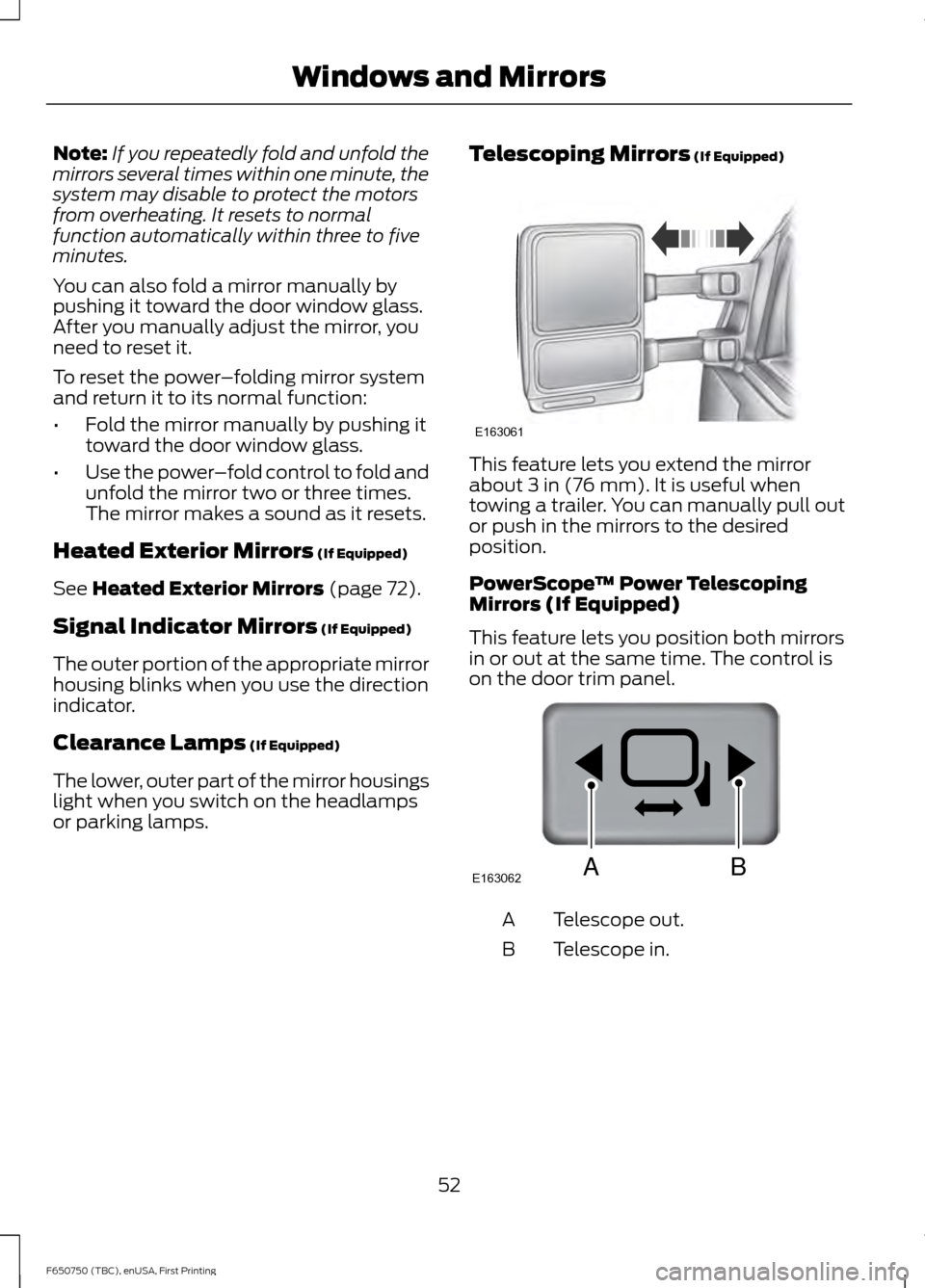
or parking lamps. Telescoping Mirrors
(If Equipped) This feature lets you extend the mirror
about
3 in (76 mm). It is useful when
towing a trailer. You can manually pull out
or push in the mirrors to the desired
position.
PowerScope ™ Power Telescoping
Mirrors (If Equipped)
This feature lets you position both mirrors
in or out at the same time. The control is
on the door trim panel. Telescope out.
A
Telescope in.
B
52
F650750 (TBC), enUSA, First Printing Windows and MirrorsE163061 E163062BA
Page 63 of 379
brake warning lamp begins to blink after
setting the parking brake, this may indicate
a failure in the parking brake system. Seek
service from an authorized dealer
immediately. Driving extended distances
with the parking brake engaged can cause
brake failure and the risk of personal injury.
Powertrain Malfunction/Reduced
Power/Electronic Throttle Control
(Gasoline Engine Only)
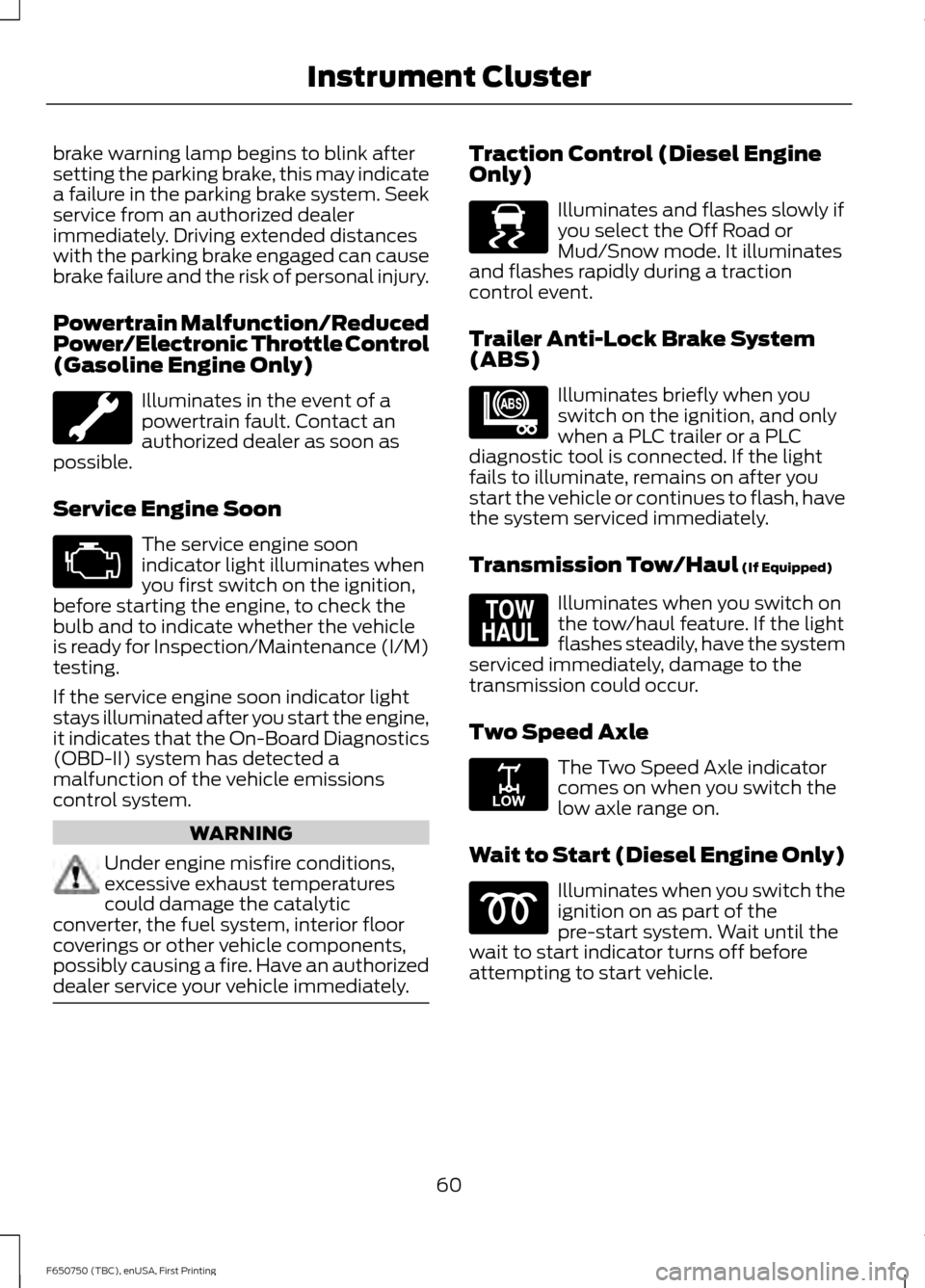
Illuminates in the event of a
powertrain fault. Contact an
authorized dealer as soon as
possible.
Service Engine Soon The service engine soon
indicator light illuminates when
you first switch on the ignition,
before starting the engine, to check the
bulb and to indicate whether the vehicle
is ready for Inspection/Maintenance (I/M)
testing.
If the service engine soon indicator light
stays illuminated after you start the engine,
it indicates that the On-Board Diagnostics
(OBD-II) system has detected a
malfunction of the vehicle emissions
control system. WARNING
Under engine misfire conditions,
excessive exhaust temperatures
could damage the catalytic
converter, the fuel system, interior floor
coverings or other vehicle components,
possibly causing a fire. Have an authorized
dealer service your vehicle immediately. Traction Control (Diesel Engine
Only)
Illuminates and flashes slowly if
you select the Off Road or
Mud/Snow mode. It illuminates
and flashes rapidly during a traction
control event.
Trailer Anti-Lock Brake System
(ABS) Illuminates briefly when you
switch on the ignition, and only
when a PLC trailer or a PLC
diagnostic tool is connected. If the light
fails to illuminate, remains on after you
start the vehicle or continues to flash, have
the system serviced immediately.
Transmission Tow/Haul (If Equipped) Illuminates when you switch on
the tow/haul feature. If the light
flashes steadily, have the system
serviced immediately, damage to the
transmission could occur.
Two Speed Axle The Two Speed Axle indicator
comes on when you switch the
low axle range on.
Wait to Start (Diesel Engine Only) Illuminates when you switch the
ignition on as part of the
pre-start system. Wait until the
wait to start indicator turns off before
attempting to start vehicle.
60
F650750 (TBC), enUSA, First Printing Instrument Cluster E138639 E209040 E161509 E208809
Page 106 of 379
Calculating Fuel Economy
Do not measure fuel economy during the
first 900 mi (1,500 km) of driving (this is
your engine ’s break-in period); a more
accurate measurement is obtained after
1,900 mi (3,000 km)
.
Fuel expense, frequency of fill ups or fuel
gauge readings are not accurate ways to
measure fuel economy.
1. Fill the fuel tank completely and record
the initial odometer reading.
2. Each time you fill the fuel tank, record the amount of fuel added.
3. After at least three fill ups, fill the fuel tank and record the current odometer
reading.
4. Subtract your initial odometer reading from the current odometer reading.
5. Calculate fuel economy by dividing miles traveled by gallons used (For
Metric: Multiply liters used by 100, then
divide by kilometers traveled).
Keep a record for at least one month and
record the type of driving (city or highway).
This provides an accurate estimate of your
vehicle ’s fuel economy under current
driving conditions. Keeping records during
summer and winter will show how
temperature impacts fuel economy. In
general, your vehicle will use more fuel in
cold temperatures.
Conditions That Affect Fuel Economy
• Heavily loading your vehicle or towing
a trailer may reduce fuel economy at
any speed.
• Carrying unnecessary weight in your
vehicle may reduce fuel economy.
• Adding certain accessories to your
vehicle such as bug deflectors, rollbars
or light bars, running boards and ski
racks may reduce fuel economy. •
Using fuel blended with alcohol may
lower fuel economy.
• Fuel economy may decrease with lower
temperatures.
• You will get better fuel economy when
driving on flat terrain than when driving
on hilly terrain.
• Transmissions give their best fuel
economy when operated in the top
cruise gear and with steady pressure
on the accelerator pedal.
• Close the windows for high-speed
driving.
EMISSION CONTROL SYSTEM
- 6.8L WARNINGS
Do not park, idle, or drive your vehicle
in dry grass or other dry ground cover.
The emission system heats up the
engine compartment and exhaust system,
which can start a fire. Exhaust leaks may result in entry of
harmful and potentially lethal fumes
into the passenger compartment. If
you smell exhaust fumes inside your
vehicle, have your dealer inspect your
vehicle immediately. Do not drive if you
smell exhaust fumes. Your vehicle is equipped with various
emission control components and a
catalytic converter that will enable your
vehicle to comply with applicable exhaust
emission standards. To make sure that the
catalytic converter and other emission
control components continue to work
properly:
•
Use only the specified fuel listed.
• Avoid running out of fuel.
103
F650750 (TBC), enUSA, First Printing Fuel and Refueling
Page 117 of 379
Forced downshifts
•
Allowed in drive (D) with the tow/haul
feature on or off.
• Press the accelerator to the floor.
• Allows transmission to select an
appropriate gear.
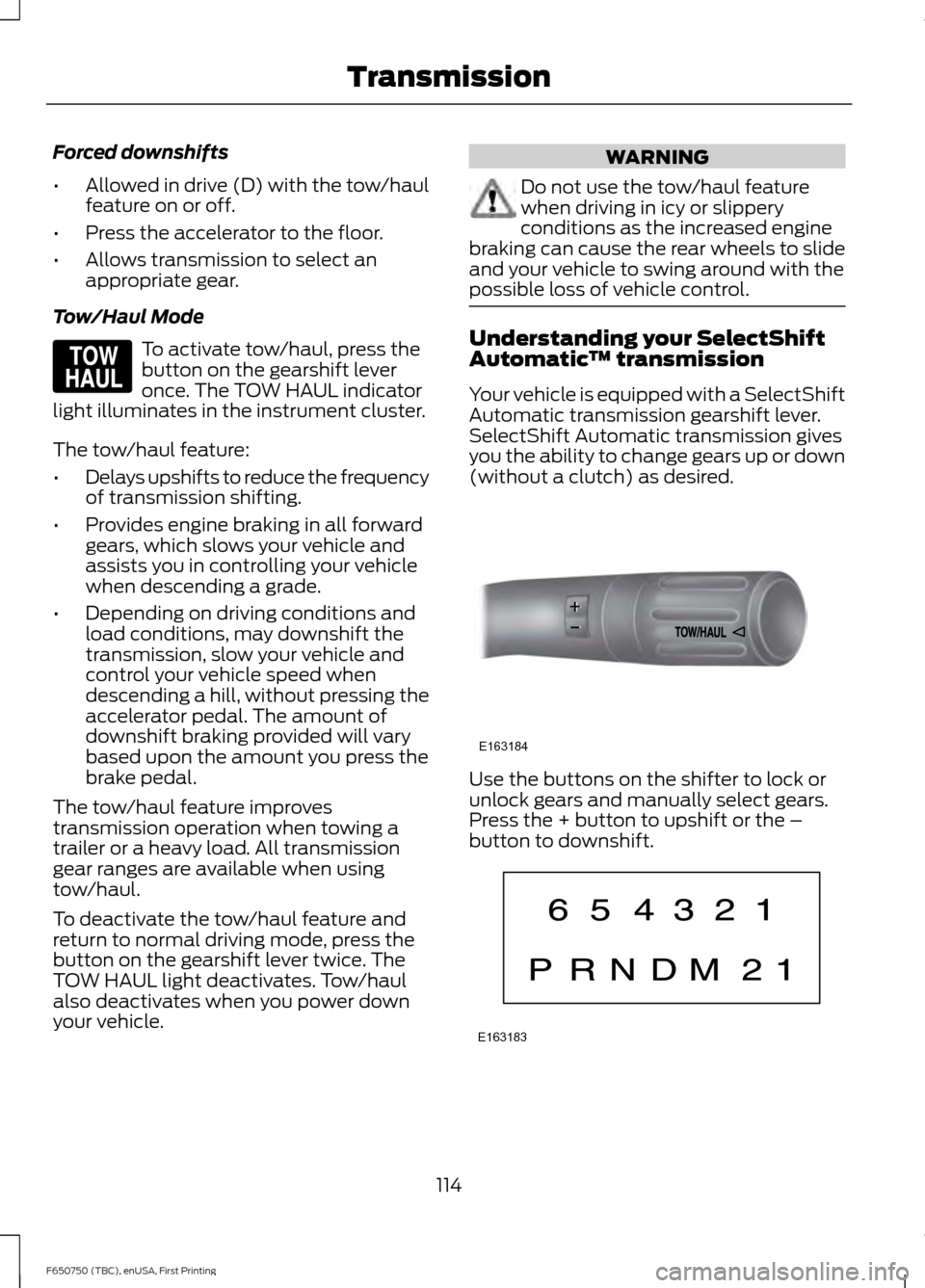
Tow/Haul Mode To activate tow/haul, press the
button on the gearshift lever
once. The TOW HAUL indicator
light illuminates in the instrument cluster.
The tow/haul feature:
• Delays upshifts to reduce the frequency
of transmission shifting.
• Provides engine braking in all forward
gears, which slows your vehicle and
assists you in controlling your vehicle
when descending a grade.
• Depending on driving conditions and
load conditions, may downshift the
transmission, slow your vehicle and
control your vehicle speed when
descending a hill, without pressing the
accelerator pedal. The amount of
downshift braking provided will vary
based upon the amount you press the
brake pedal.
The tow/haul feature improves
transmission operation when towing a
trailer or a heavy load. All transmission
gear ranges are available when using
tow/haul.
To deactivate the tow/haul feature and
return to normal driving mode, press the
button on the gearshift lever twice. The
TOW HAUL light deactivates. Tow/haul
also deactivates when you power down
your vehicle. WARNING
Do not use the tow/haul feature
when driving in icy or slippery
conditions as the increased engine
braking can cause the rear wheels to slide
and your vehicle to swing around with the
possible loss of vehicle control. Understanding your SelectShift
Automatic
™ transmission
Your vehicle is equipped with a SelectShift
Automatic transmission gearshift lever.
SelectShift Automatic transmission gives
you the ability to change gears up or down
(without a clutch) as desired. Use the buttons on the shifter to lock or
unlock gears and manually select gears.
Press the + button to upshift or the –
button to downshift.
114
F650750 (TBC), enUSA, First Printing TransmissionE161509 E163184 E163183
Page 123 of 379
GENERAL INFORMATION
WARNINGS
Do not drive with your foot resting on
the brake pedal. This results in
abnormally high brake temperatures,
excessive lining wear and increased
stopping distance. Continuous application of the brakes
causes the brakes to overheat,
resulting in temporary loss of braking.
Note:
Occasional brake noise is normal. If
a metal-to-metal, continuous grinding or
continuous squeal sound is present, the
brake linings may be worn-out. Have the
system checked by an authorized dealer. If
your vehicle has continuous vibration or
shudder in the steering wheel while braking,
have it checked by an authorized dealer.
All standard equipment brakes are
self-adjusting. Automatic adjustment,
when required, occurs whenever you apply
and release the brakes during forward or
reverse operation.
Know the required stopping distances for
all driving conditions you may encounter.
For longer brake lining life, take full
advantage of engine braking power when
coming to a stop. See Warning Lamps and
Indicators (page 58).
Wet brakes result in reduced braking
efficiency. Gently press the brake pedal a
few times when driving from a car wash or
standing water to dry the brakes.
If brakes do not grip well:
• Check brake adjustment.
• Check brake linings for excessive wear.
• Check system air pressure on vehicle
equipped with air brakes. •
Let the brakes cool if you have been
using them excessively, as in mountain
driving or after several fast, high-speed
stops.
• If you have been driving through deep
water, gently apply the brakes several
times while your vehicle is moving
slowly.
Anti-lock Brake System
This system helps you maintain steering
control during emergency stops by keeping
the brakes from locking. This lamp momentarily
illuminates when you turn the
ignition on. If the light does not
illuminate during start up, remains on or
flashes, the system may be disabled. Have
the system checked by an authorized
dealer. If the system is disabled, normal
braking is still effective. If the
brake warning lamp illuminates
when you release the parking brake, have
the system checked by an authorized
dealer. If you connect a PLC trailer with
the ignition on, the trailer ABS
light also illuminates. If the light
fails to illuminate, if it remains on after you
start the vehicle or continues to flash, have
the system serviced immediately.
HINTS ON DRIVING WITH
ANTI-LOCK BRAKES
Note: When the system is operating, the
brake pedal may pulse and may travel
further. Maintain pressure on the brake
pedal. You may also hear a noise from the
system. This is normal.
120
F650750 (TBC), enUSA, First Printing BrakesE209041 E209041 E210335
Page 131 of 379
TRAILER BRAKES
Trailer Brake Hand Control (If Equipped)
WARNING
The hand control should never be
used to apply the brakes when the
tractor and trailer are parked
unattended. Air may leak from the system
and the vehicle could possibly move,
resulting in possible property damage,
personal injury or death. The hand control is located on the
right-hand side of the instrument panel. It
applies the trailer service brakes, which are
independent of the truck or tractor service
brakes.
It operates a valve that provides gradual
control of air pressure applied. When the
valve is only partially applied, you can
override the trailer brakes by pressing fully
on the brake pedal.
To apply the trailer brakes using the hand
control, move the lever downward. The
further you push the lever down, the
greater the air pressure is applied to the
brakes. The lever remains in place until
manually moved. To release the trailer brakes, move the
lever up completely.
Trailer Air Supply and Parking
Brake Modular Controls (If Equipped)
The trailer air supply valve delivers air to
the trailer supply and automatically pops
out, shutting off the trailer supply, if
pressure decreases to approximately 35 psi
(249 kPa)
.
The parking brake controls the spring
brakes on the tractor. When you pull the
knob out, it causes the trailer supply valve
to pop out, applying both the tractor and
trailer parking brakes. You can
independently release the trailer brakes by
pushing only the trailer air supply valve in.
128
F650750 (TBC), enUSA, First Printing BrakesE210339 E210340
A
B
12
A320
A E210341