wiring FORD FESTIVA 1991 User Guide
[x] Cancel search | Manufacturer: FORD, Model Year: 1991, Model line: FESTIVA, Model: FORD FESTIVA 1991Pages: 454, PDF Size: 9.53 MB
Page 21 of 454
3. Position Steering Wheel Remover (T67L-3600-A) on steering wheel. Tighten bolt on remover until steering wheel is loose. Remove
steering wheel puller, steering wheel retaining bolt, and steering wheel.
Installation
1. Ensure front wheels are in straight-ahead position. Route clockspring wiring harness through steering wheel opening. Position steering
wheel on steering shaft and align reference marks.
2. Ensure clockspring wire is not pinched when positioning steering wheel. Install new steering wheel retaining bolt and tighten to
specification. See TORQUE SPECIFICATIONS table at end of article. Connect horn and speed control wiring connectors (if equipped)
to steering wheel.
3. Connect air bag module-to-clockspring connector. Install air bag module. Tighten air bag module retaining nuts to specification.
Activate SRS. See SAFETY PRECAUTIONS. Check AIR BAG light to ensure system is functioning properly.
Removal (Festiva)
From back of steering wheel, remove 2 screws securing horn pad. Disconnect horn wire from horn pad and remove pad. Remove steering
wheel nut. Scribe reference mark on steering shaft and steering wheel hub for reassembly. Using Steering Wheel Puller (T67L-3600-A),
remove steering wheel.
Installation
Position steering wheel on steering shaft and align reference marks. Be sure cutouts in rear cover engage turn signal canceling cam. To
complete installation, reverse removal procedure.
COMBINATION SW ITCH
Removal (Capri)
1. Disconnect negative battery cable. Remove lower steering column cover. Remove center access panel and trim cover under steering
column. Remove left side defroster connector tube. Remove steering column upper retaining bolts. Column will pivot downward and
rest on instrument panel brace.
2. Remove 2 switch retaining screws and remove switch. Grasp switch and lever and pull lever out of switch. Disconnect switch electrical
connectors and remove switch.
Installation
Align key with slot and install lever in switch assembly. Position switch on steering column and install retaining screws. To complete
installation, reverse removal procedure.
Removal (Festiva)
1. Disconnect negative battery cable. Remove steering wheel. See STEERING WHEEL & HORN PAD under REMOVAL &
INSTALLATION. Remove 4 screws from upper half of lower steering column cover and remove cover. Remove upper steering column
cover. Remove 5 clips from lower half of lower steering column cover and remove cover.
2. Release wiring harness clip and unplug 4 harness connectors from back of combination switch. From below steering column, loosen
band clamp securing switch hub to steering column jacket. Pull switch assembly from steering column.
Installation
Slide combination switch assembly onto steering column. Make sure switch assembly is seated and level against end of column jacket. To
complete installation, reverse removal procedure.
HEADLIGHT SWITCH
Removal & Installation (Capri)
1. Headlight off/on switch is located on left side of instrument panel bezel. Disconnect negative battery cable. Pull out center storage
compartment. Remove 2 upper screws, 2 lower screws and heater/radio bezel. Pull outward and remove trim covers located on both
sides of steering column.
2. Remove retaining screws and carefully pull instrument panel bezel partially away from dash. Disconnect electrical connector from
headlight switch. Depress tangs on both sides of switch and remove switch from bezel. To install, reverse removal procedure.
IGNITION SWITCH & LOCK CYLINDER
Removal (Capri)
1. Disconnect negative battery cable. Remove lower steering column cover. Remove center access panel and trim cover under steering
column. Remove left side defroster connector tube. Remove steering column upper retaining bolts. Column will pivot downward and
rest on instrument panel brace. steering colum n.
CAUT ION: Rem ove steering wheel carefully to avoid dam aging clockspring wiring, air bag m odule connector, or
accidentally turning clockspring. After steering wheel rem oval, tape clockspring in position to prevent
dam age and keep it from being turned accidentally.
CAUTION: Ensure that no wiring is pinched beneath steering colum n when lowered.
Page 4 of 5 MITCHELL 1 ARTICLE - STEERING COLUMN SWITCHES 1991 ACCESSORIES & SAFETY EQUIPMENT Ford Motor C
...
3/10/2009 http://www.eautorepair.net/app/PrintItems.asp?S0=2097152&S1=0&SG=%7B7DD6473C%2DB5BB%2D4F20%2D9D70%2D
...
Page 22 of 454
2. With ignition key inserted in lock assembly, rotate tumbler while pushing release pin with a .125" (3.17 mm) drift punch. Pull tumbler
assembly out of housing. Remove upper column cover. Remove column lock shield. Disconnect ignition switch electrical connector.
Remove switch retaining screws and remove switch.
Installation
Position ignition switch on column lock assembly. Make sure actuator pin of lock assembly fits into slot in ignition switch. To complete
installation, reverse removal procedure.
Removal & Installation (Festiva)
1. Disconnect negative battery cable. Remove 4 screws from upper half of lower steering column cover and remove cover. Remove upper
steering column cover. Remove 5 clips from lower half of lower steering column cover and remove cover.
2. Remove 4 steering column shield nuts and remove shield. Remove 2 shield bracket bolts and remove bracket. Remove air discharge duct
from below steering column. Remove steering column attaching nuts then lower steering column mounting bracket.
3. Remove tie strap securing key warning buzzer switch wires. Remove ignition switch attaching screw. Pull switch loose from switch
housing. Remove switch harness from routing clip and disconnect electrical connectors. Remove switch. To install, reverse removal
procedure.
TURN SIGNAL SWITCH
See COMBINATION SWITCH under REMOVAL & INSTALLATION.
WIPER SWITCH
Removal & Installation (Capri)
Remove center trim panel and lower steering column cover. Disconnect wiper switch electrical connector and pull wiring from routing clip.
Firmly grasp switch and lever and pull out to remove. To install, reverse removal procedure.
Removal & installation (Festiva)
See COMBINATION SWITCH under REMOVAL & INSTALLATION.
TORQUE SPECIFICATIONS
TORQUE SPECIFICATIONS CAUTION: Ensure that no wiring is pinched beneath steering colum n when it is lowered.
ApplicationFt. Lbs. (N.m)
Capri
Column Lock Shield Screw & Nut11-14 (15-19)
Ignition Lock Housing Bolt12-13 (16-18)
Steering Wheel Bolt23-33 (31-45)
Upper Column Retaining Bolts17-23 (23-31)
Festiva
Steering Wheel Nut29-36 (39-49)
Upper Column Retaining Bolts23-34 (31-46)
INCH Lbs. (N.m)
Capri
Ign it io n Swit ch Screw50-70 (5.6-7.9)
Capri & Festiva
Air Bag Module-To-Steering Wheel Nuts35-53 (4-6)
Copyr ight 2009 Mitchell Repair Information Company, LLC. All Rights Reserved.
Article GUID: A00028303
Page 5 of 5 MITCHELL 1 ARTICLE - STEERING COLUMN SWITCHES 1991 ACCESSORIES & SAFETY EQUIPMENT Ford Motor C
...
3/10/2009 http://www.eautorepair.net/app/PrintItems.asp?S0=2097152&S1=0&SG=%7B7DD6473C%2DB5BB%2D4F20%2D9D70%2D
...
Page 26 of 454
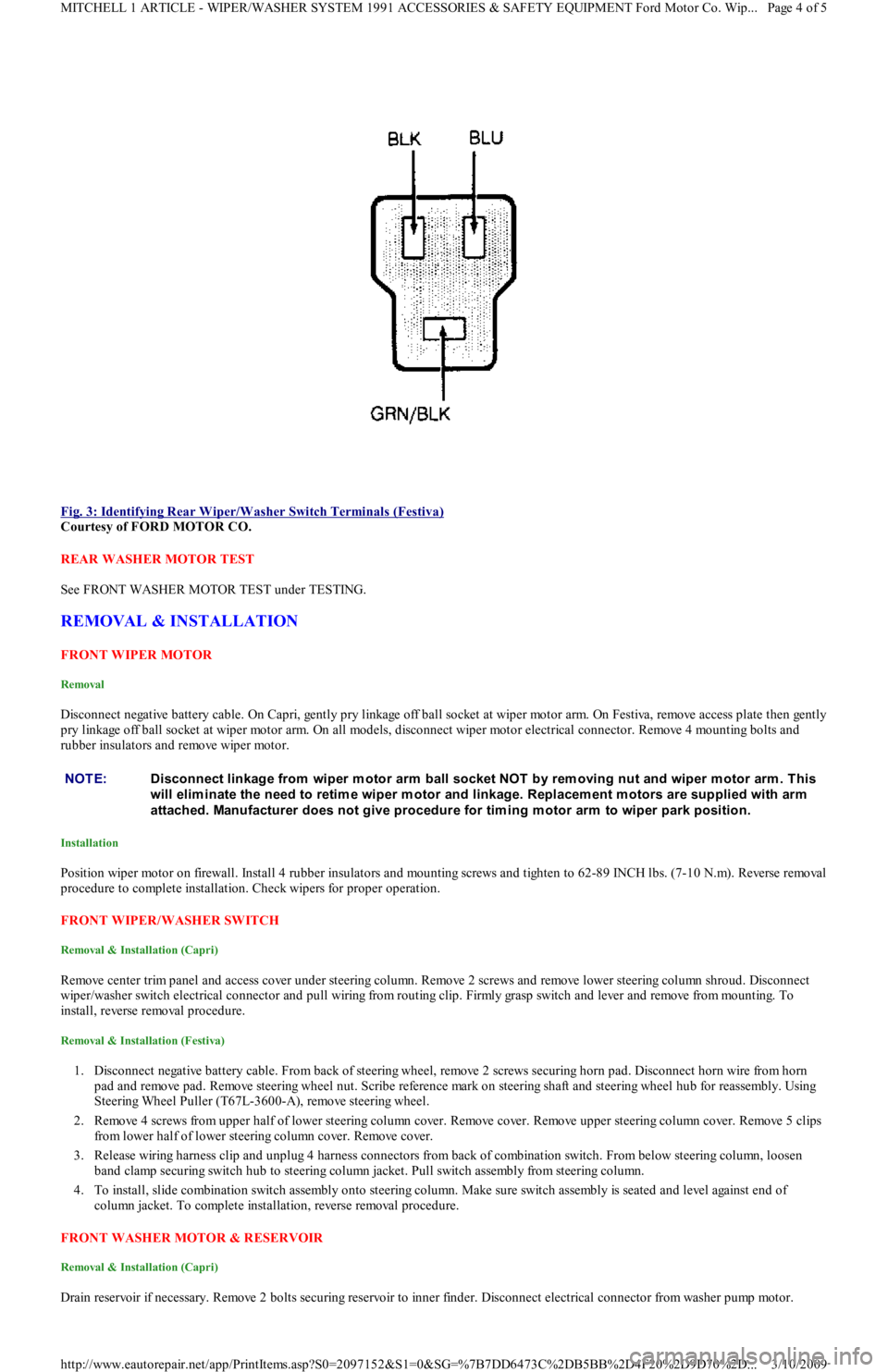
Fig. 3: Identifying Rear Wiper/Washer Switch Terminals (Festiva)
Courtesy of FORD MOTOR CO.
REAR WASHER MOTOR TEST
See FRONT WASHER MOTOR TEST under TESTING.
REMOVAL & INSTALLATION
FRONT WIPER MOTOR
Removal
Disconnect negative battery cable. On Capri, gently pry linkage off ball socket at wiper motor arm. On Festiva, remove access plate then gently
pry linkage off ball socket at wiper motor arm. On all models, disconnect wiper motor electrical connector. Remove 4 mounting bolts and
rubber insulators and remove wiper motor.
Installation
Position wiper motor on firewall. Install 4 rubber insulators and mounting screws and tighten to 62-89 INCH lbs. (7-10 N.m). Reverse removal
procedure to complete installation. Check wipers for proper operation.
FRONT WIPER/WASHER SWITCH
Removal & Installation (Capri)
Remove center trim panel and access cover under steering column. Remove 2 screws and remove lower steering column shroud. Disconnect
wiper/washer switch electrical connector and pull wiring from routing clip. Firmly grasp switch and lever and remove from mounting. To
install, reverse removal procedure.
Removal & Installation (Festiva)
1. Disconnect negative battery cable. From back of steering wheel, remove 2 screws securing horn pad. Disconnect horn wire from horn
pad and remove pad. Remove steering wheel nut. Scribe reference mark on steering shaft and steering wheel hub for reassembly. Using
Steering Wheel Puller (T67L-3600-A), remove steering wheel.
2. Remove 4 screws from upper half of lower steering column cover. Remove cover. Remove upper steering column cover. Remove 5 clips
from lower half of lower steering column cover. Remove cover.
3. Release wiring harness clip and unplug 4 harness connectors from back of combination switch. From below steering column, loosen
band clamp securing switch hub to steering column jacket. Pull switch assembly from steering column.
4. To install, slide combination switch assembly onto steering column. Make sure switch assembly is seated and level against end of
column jacket. To complete installation, reverse removal procedure.
FRONT WASHER MOTOR & RESERVOIR
Removal & Installation (Capri)
Drain reservoir if necessary. Remove 2 bolts securing reservoir to inner finder. Disconnect electrical connector from washer pump mo t o r.
NOTE:Disconnect linkage from wiper m otor arm ball socket NOT by rem oving nut and wiper m otor arm . This
will elim inate the need to retim e wiper m otor and linkage. Replacem ent m otors are supplied with arm
attached. Manufacturer does not give procedure for tim ing m otor arm to wiper park position.
Page 4 of 5 MITCHELL 1 ARTICLE - WIPER/WASHER SYSTEM 1991 ACCESSORIES & SAFETY EQUIPMENT Ford Motor Co. Wip
...
3/10/2009 http://www.eautorepair.net/app/PrintItems.asp?S0=2097152&S1=0&SG=%7B7DD6473C%2DB5BB%2D4F20%2D9D70%2D
...
Page 27 of 454
Disconnect fluid lines and remove reservoir. To install, reverse removal procedure.
Removal & Installation (Festiva)
1. Disconnect negative battery cable. Remove washer reservoir filler neck attaching bolt. Remove coolant expansion reservoir. Disconnect
washer pump electrical connector. Remove left front splash shield.
2. Disconnect washer pump fluid lines and detach lines from reservoir clips. Remove reservoir attaching nuts and bolt. Detach washer
reservoir from filler neck and remove reservoir. To install, reverse removal procedure.
REAR WIPER MOTOR
Removal & Installation (Festiva)
Remove rear wiper arm and blade assembly. Remove boot from outer bushing attaching nut. Remove outer bushing attaching nut and remove
outer bushing. Remove liftgate trim panel. Disconnect wiper motor electrical connector. Remove 4 wiper motor mounting bolts and remove
motor. To install, reverse removal procedure.
REAR WIPER/WASHER SWITCH
Removal & Installation (Festiva)
Disconnect negative battery cable. Remove steering column covers. Remove screws securing instrument panel bezel to instrument panel. Pull
instrument bezel away from instrument panel. Disconnect electrical connectors from switches in bezel. Compress wiper/washer switch lock
tabs and remove switch from bezel. To install, reverse removal procedure.
REAR WASHER MOTOR & RESERVOIR
Removal & Installation (Festiva)
Open liftgate and detach reservoir cap. Remove rear quarter trim panel. Remove reservoir mounting bolts. Disconnect electrical connector
from washer pump. Disconnect fluid lines. Remove reservoir. To install, reverse removal procedure.
TORQUE SPECIFICATIONS
TORQUE SPECIFICATIONS
WIRING DIAGRAMS
See appropriate chassis wiring diagram in the WIRING DIAGRAMS Section.
ApplicationINCH Lbs. (N.m)
Front Wiper Arm Retaining Nut89-124 (10-14)
Front Wiper Motor Mounting Bolts62-89 (7-10)
Rear Outer Bushing Retaining Nut27-44 (3-5)
Rear Wiper Arm Nut53-62 (6-7)
Rear Wiper Motor Mounting Bolts71-97 (8-11)
Copyr ight 2009 Mitchell Repair Information Company, LLC. All Rights Reserved.
Article GUID: A00028304
Page 5 of 5 MITCHELL 1 ARTICLE - WIPER/WASHER SYSTEM 1991 ACCESSORIES & SAFETY EQUIPMENT Ford Motor Co. Wip
...
3/10/2009 http://www.eautorepair.net/app/PrintItems.asp?S0=2097152&S1=0&SG=%7B7DD6473C%2DB5BB%2D4F20%2D9D70%2D
...
Page 32 of 454
lock nut. Discard axle lock nut. Separate tie rod end from knuckle.
2. Disconnect brake hose from strut (if necessary). Remove brake caliper assembly from knuckle and wire out of way. Remove nuts and
bolts holding ball joint and strut to knuckle assembly.
3. Remove knuckle assembly from ball joint and drive shaft. If binding occurs, use a dual-jawed puller to force knuckle/hub/rotor assembly
off drive axle shaft.
4. Using a puller, separate knuckle from wheel hub. Retain original outer bearing preload spacer to maintain bearing preload setting. If
replacing bearing, change spacer to maintain proper bearing preload (if necessary). See FRONT WHEEL BEARINGS under REMOVAL
& INSTALLATION. Scribe match marks between hub and rotor assembly. Remove rotor-to-hub bolts. Separate hub from rotor.
Installation
Align marks and install rotor on hub. Press knuckle and preload spacer into wheel hub assembly. To complete installation, reverse removal
procedure. Tighten axle shaft lock nut to 117-175 ft. lbs. (159-237 N.m).
REAR BRAKE CALIPER & PADS
Removal (Capri)
1. Raise and support vehicle. Remove tire and wheel assembly. Using needle-nose pliers, remove parking brake return spring. Loosen
parking brake cable housing adjusting nut. Remove cable housing from bracket on lower control arm. Loosen parking brake cable
bracket-to-caliper attaching bolt. Remove parking brake cable from caliper.
2. Remove lower caliper retaining bolt. Pivot caliper upward on upper caliper guide pin. Remove brake pad retaining spring, pads and
shims. If replacing rear brake pads only, reverse removal procedure to install. If removing caliper, proceed to next step.
3. Remove attaching clip from brake flex hose. Remove flex hose banjo bolt from caliper and discard copper washers. Remove lower
caliper retaining bolt. Using a cold chisel, remove upper caliper guide pin dust cap. Using an Allen wrench, remove upper caliper guide
pin. Lift caliper off rotor.
Installation
1. To install, fit brake pads and shims into caliper anchor plate. Remove upper guide pin and lower guide pin bushing from caliper.
Remove guide pin and guide pin bushing dust boots. Lubricate upper guide pin and lower guide pin bushing with Disc Brake Caliper
Slide Grease (D7AZ-19590-A).
2. To complete installation, reverse removal procedure. To fit caliper over new brake pads, it may be necessary to rotate caliper piston into
caliper bore. Use NEW copper washers on flex hose. Bleed brakes, and then pump brake pedal several times to seat pads.
REAR BRAKE ROTOR
Removal & Installation (Capri)
See REAR WHEEL BEARINGS under REMOVAL & INSTALLATION.
REAR BRAKE SHOES
Removal & Installation (Festiva)
Remove brake drum. Remove hold-down springs. Remove return springs. Remove self adjuster. See Fig. 8 . To install, reverse removal
procedure. Apply brake grease to all shoe contact points. See REAR BRAKE SHOES under ADJUSTMENTS.
REAR WHEEL CYLINDER
Removal & Installation (Festiva)
Remove rear brake shoes. Disconnect brake line from wheel cylinder. Remove wheel cylinder. To install, reverse removal procedure. Bleed
brake system.
MASTER BRAKE CYLINDER
Removal
Disconnect low fluid level sensor wiring (if equipped). Drain some brake fluid from reservoir. Disconnect brake lines from master cylinder.
Cap lines and master cylinder ports. Remove attaching nuts and master cylinder.
Installation
To install, reverse removal procedure. Fill master cylinder to proper level and bleed hydraulic system (if necessary).
POWER BRAKE UNIT
Removal & Installation
Remove master cylinder. Disconnect vacuum line. Remove clevis pin at brake pedal. Remove power brake unit. To install, reverse removal
procedure.
FRONT WHEEL BEARINGS NOTE:Hub and rotor are a m atched and balanced assem bly. Before rem oving rotor, locate paint or etch
m ark indicating proper hub-to-rotor alignm ent. If m arks are not present, m ark hub and rotor for
assem bly alignm ent. Failure to properly align hub and rotor can result in an im balance condition.
Page 5 of 12 MITCHELL 1 ARTICLE - BRAKE SYSTEM 1991-92 BRAKES Disc & Drum
3/10/2009 http://www.eautorepair.net/app/PrintItems.asp?S0=2097152&S1=0&SG=%7B7DD6473C%2DB5BB%2D4F20%2D9D70%2D
...
Page 43 of 454
Back To Article
ALTERNATOR & REGULATOR
1991 ELECT RICAL Alternators & Regulators
DESCRIPTION
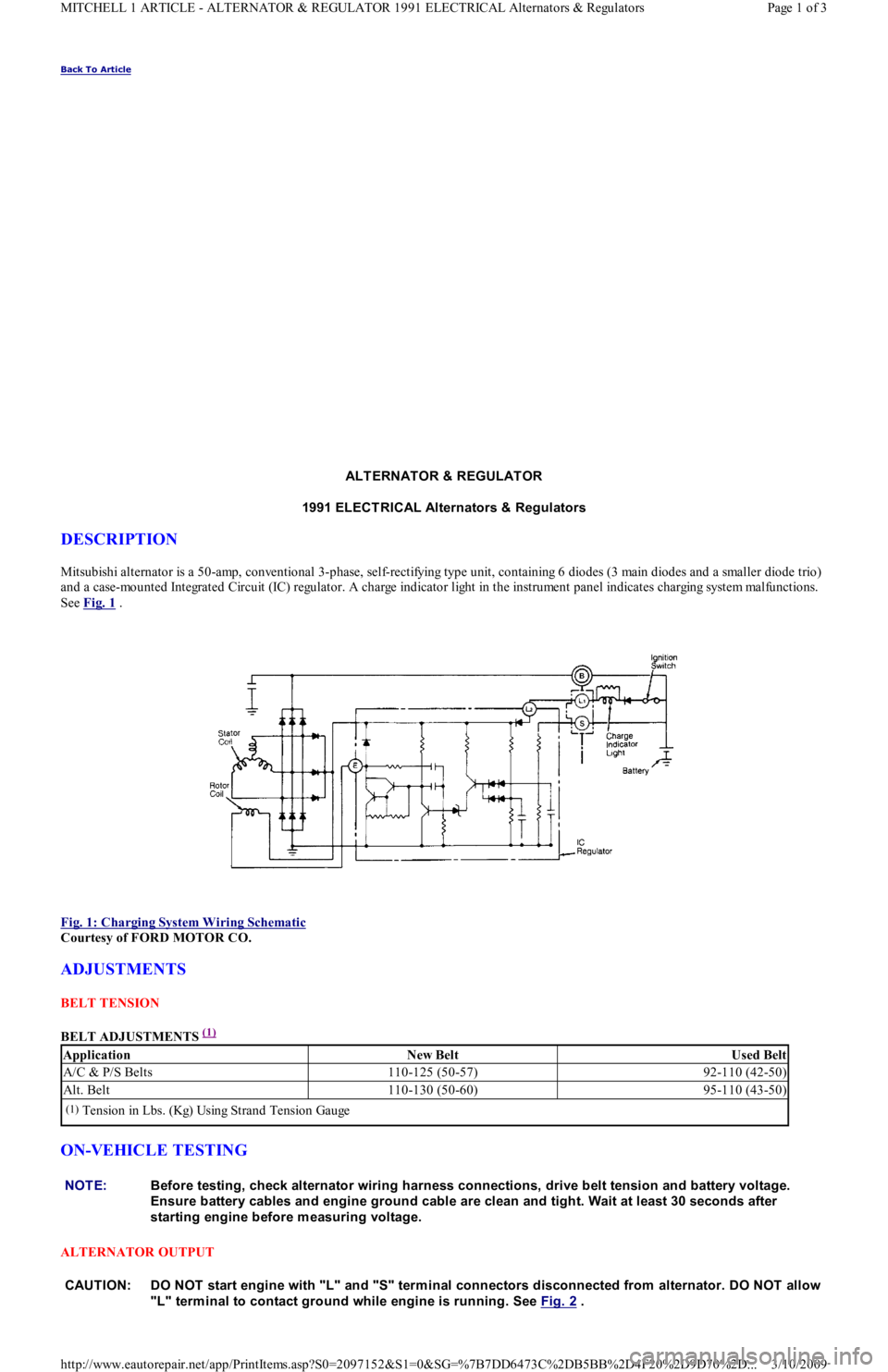
Mitsubishi alternator is a 50-amp, conventional 3-phase, self-rectifying type unit, containing 6 diodes (3 main diodes and a smaller diode trio)
and a case-mounted Integrated Circuit (IC) regulator. A charge indicator light in the instrument panel indicates charging system mal fu n ct io n s.
See Fig. 1
.
Fig. 1: Charging System Wiring Schematic
Courtesy of FORD MOTOR CO.
ADJUSTMENTS
BELT TENSION
BELT ADJUSTMENTS
(1)
ON-VEHICLE TESTING
ALTERNATOR OUTPUT
ApplicationNew BeltUsed Belt
A/C & P/S Belts110-125 (50-57)92-110 (42-50)
Alt. Belt110-130 (50-60)95-110 (43-50)
(1)Tension in Lbs. (Kg) Using Strand Tension Gauge
NOTE:Before testing, check alternator wiring harness connections, drive belt tension and battery voltage.
Ensure battery cables and engine ground cable are clean and tight. Wait at least 30 seconds after
starting engine before m easuring voltage.
CAUT ION: DO NOT start engine with "L" and "S" term inal connectors disconnected from alternator. DO NOT allow
"L" term inal to contact ground while engine is running. See Fig. 2
.
Page 1 of 3 MITCHELL 1 ARTICLE - ALTERNATOR & REGULATOR 1991 ELECTRICAL Alternators & Regulators
3/10/2009 http://www.eautorepair.net/app/PrintItems.asp?S0=2097152&S1=0&SG=%7B7DD6473C%2DB5BB%2D4F20%2D9D70%2D
...
Page 44 of 454
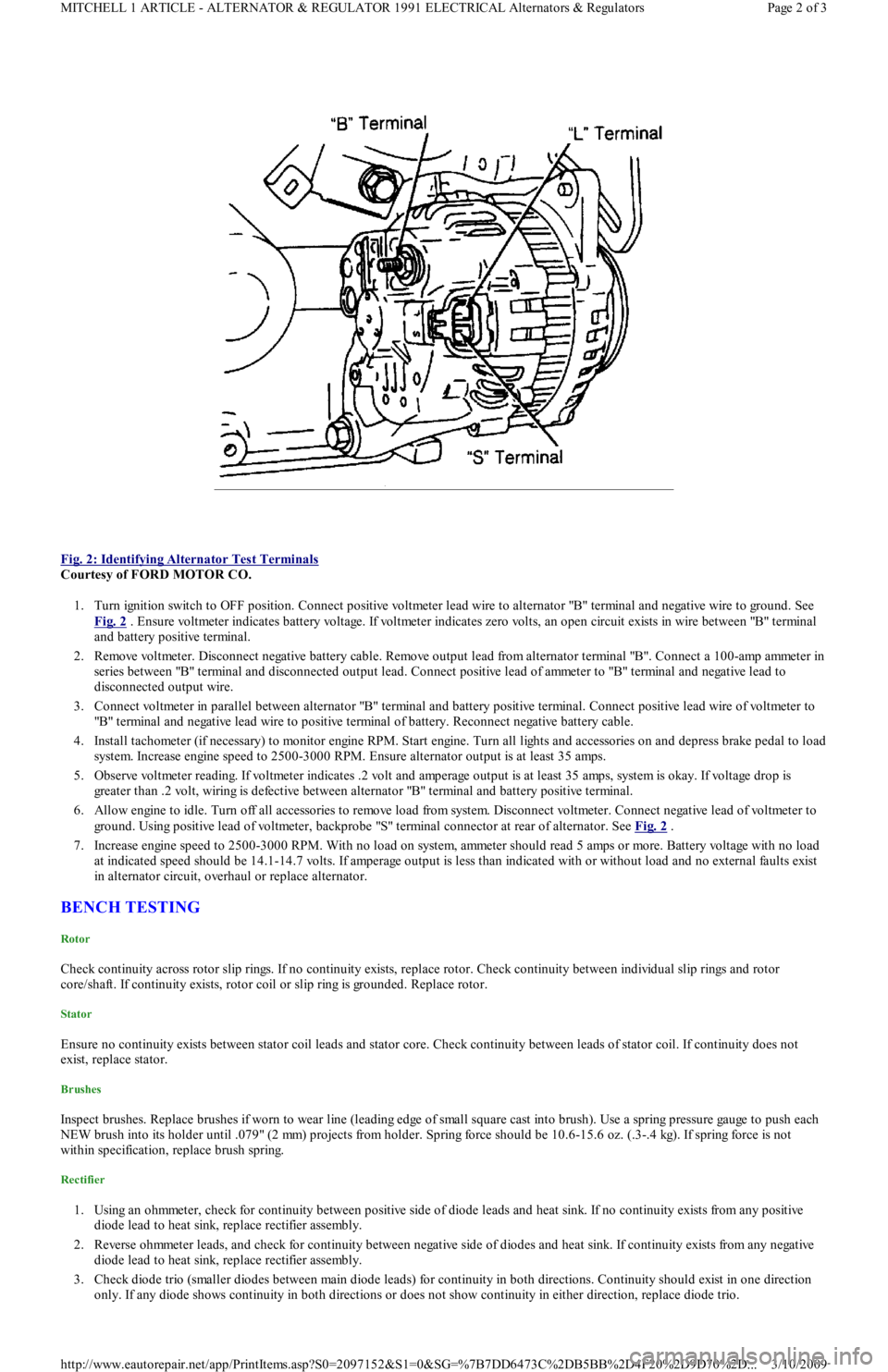
Fig. 2: Identifying Alternator Test Terminals
Courtesy of FORD MOTOR CO.
1. Turn ignition switch to OFF position. Connect positive voltmeter lead wire to alternator "B" terminal and negative wire to ground. See
Fig. 2
. Ensure voltmeter indicates battery voltage. If voltmeter indicates zero volts, an open circuit exists in wire between "B" terminal
and battery positive terminal.
2. Remove voltmeter. Disconnect negative battery cable. Remove output lead from alternator terminal "B". Connect a 100-amp ammeter in
series between "B" terminal and disconnected output lead. Connect positive lead of ammeter to "B" terminal and negative lead to
disconnected output wire.
3. Connect voltmeter in parallel between alternator "B" terminal and battery positive terminal. Connect positive lead wire of voltmeter to
"B" terminal and negative lead wire to positive terminal of battery. Reconnect negative battery cable.
4. Install tachometer (if necessary) to monitor engine RPM. Start engine. Turn all lights and accessories on and depress brake pedal to load
system. Increase engine speed to 2500-3000 RPM. Ensure alternator output is at least 35 amps.
5. Observe voltmeter reading. If voltmeter indicates .2 volt and amperage output is at least 35 amps, system is okay. If voltage drop is
greater than .2 volt, wiring is defective between alternator "B" terminal and battery positive terminal.
6. Allow engine to idle. Turn off all accessories to remove load from system. Disconnect voltmeter. Connect negative lead of voltmeter to
ground. Using positive lead of voltmeter, backprobe "S" terminal connector at rear of alternator. See Fig. 2
.
7. Increase engine speed to 2500-3000 RPM. With no load on system, ammeter should read 5 amps or more. Battery voltage with no load
at indicated speed should be 14.1-14.7 volts. If amperage output is less than indicated with or without load and no external faults exist
in alternator circuit, overhaul or replace alternator.
BENCH TESTING
Rotor
Check continuity across rotor slip rings. If no continuity exists, replace rotor. Check continuity between individual slip rings and rotor
core/shaft. If continuity exists, rotor coil or slip ring is grounded. Replace rotor.
Stator
Ensure no continuity exists between stator coil leads and stator core. Check continuity between leads of stator coil. If continuity does not
exist, replace stator.
Brushes
Inspect brushes. Replace brushes if worn to wear line (leading edge of small square cast into brush). Use a spring pressure gauge to push each
NEW brush into its holder until .079" (2 mm) projects from holder. Spring force should be 10.6-15.6 oz. (.3-.4 kg). If spring force is not
within specification, replace brush spring.
Rectifier
1. Using an ohmmeter, check for continuity between positive side of diode leads and heat sink. If no continuity exists from any positive
diode lead to heat sink, replace rectifier assembly.
2. Reverse ohmmeter leads, and check for continuity between negative side of diodes and heat sink. If continuity exists from any n e ga t ive
diode lead to heat sink, replace rectifier assembly.
3. Check diode trio (smaller diodes between main diode leads) for continuity in both directions. Continuity should exist in one direction
only. If any diode shows continuity in both directions or does not show continuity in either direction, replace diode trio.
Page 2 of 3 MITCHELL 1 ARTICLE - ALTERNATOR & REGULATOR 1991 ELECTRICAL Alternators & Regulators
3/10/2009 http://www.eautorepair.net/app/PrintItems.asp?S0=2097152&S1=0&SG=%7B7DD6473C%2DB5BB%2D4F20%2D9D70%2D
...
Page 53 of 454
3. If voltage is not present or is less than 8 volts at starter solenoid terminal "S", malfunction in circuit to terminal "S" is indicated. Proceed
to the following tests.
IGNITION SWITCH TEST
1. Locate ignition switch connector under dash. Using a 12-volt test light or voltmeter, ensure voltage is present on Black/Yellow wire
when ignition switch is turned to RUN or ON position. This will verify proper operation of ignition switch.
2. If there is no voltage on Black/Yellow wire, the problem is either ignition switch or circuit between battery and ignition switch.
CLUTCH ENGAGE SWITCH (M/T) TEST
Unplug clutch engage switch from main wiring harness. Using an ohmmeter, check for continuity across switch terminals. Continuity should
exist when switch plunger is pushed in and should not exist when switch plunger is released. If clutch engage switch does not operate as
specified, replace switch.
NEUTRAL SAFETY SWITCH (A/T) TEST
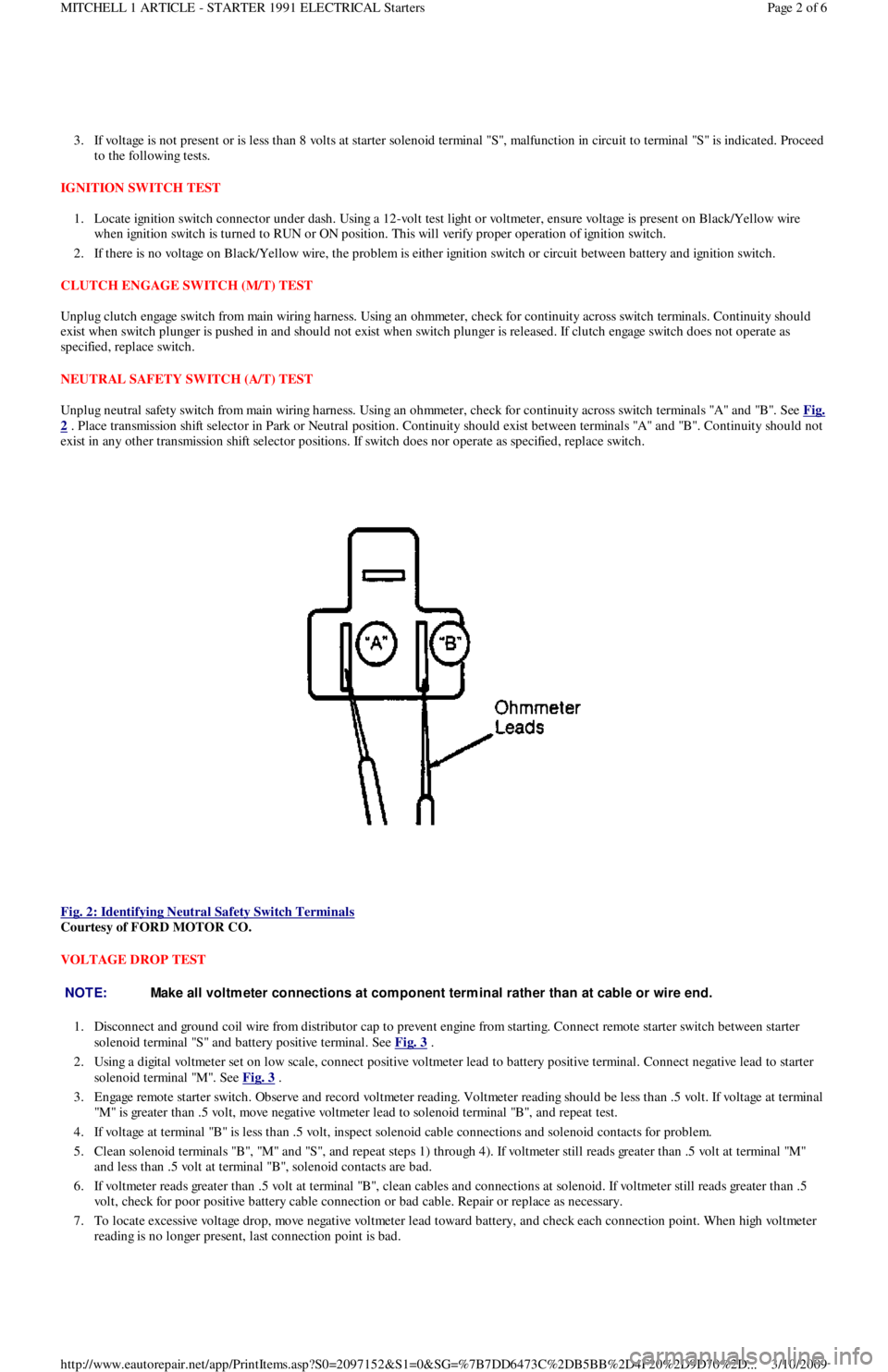
Unplug neutral safety switch from main wiring harness. Using an ohmmeter, check for continuity across switch terminals "A" and "B". See Fig.
2 . Place transmission shift selector in Park or Neutral position. Continuity should exist between terminals "A" and "B". Continuity should not
exist in any other transmission shift selector positions. If switch does nor operate as specified, replace switch.
Fig. 2: Identifying Neutral Safety Switch Terminals
Courtesy of FORD MOTOR CO.
VOLTAGE DROP TEST
1. Disconnect and ground coil wire from distributor cap to prevent engine from starting. Connect remote starter switch between starter
solenoid terminal "S" and battery positive terminal. See Fig. 3
.
2. Using a digital voltmeter set on low scale, connect positive voltmeter lead to battery positive terminal. Connect negative lead to starter
solenoid terminal "M". See Fig. 3
.
3. Engage remote starter switch. Observe and record voltmeter reading. Voltmeter reading should be less than .5 volt. If voltage at terminal
"M" is greater than .5 volt, move negative voltmeter lead to solenoid terminal "B", and repeat test.
4. If voltage at terminal "B" is less than .5 volt, inspect solenoid cable connections and solenoid contacts for problem.
5 . Cl ean so l en o id t ermin al s "B", "M" an d "S", an d rep eat st ep s 1 ) through 4). If voltmeter still reads greater than .5 volt at termin al "M"
and less than .5 volt at terminal "B", solenoid contacts are bad.
6. If voltmeter reads greater than .5 volt at terminal "B", clean cables and connections at solenoid. If voltmeter still reads greater than .5
volt, check for poor positive battery cable connection or bad cable. Repair or replace as necessary.
7. To locate excessive voltage drop, move negative voltmeter lead toward battery, and check each connection point. When high voltmeter
reading is no longer present, last connection point is bad.
NOTE:Make all voltm eter connections at com ponent term inal rather than at cable or wire end.
Page 2 of 6 MITCHELL 1 ARTICLE - STARTER 1991 ELECTRICAL Starters
3/10/2009 http://www.eautorepair.net/app/PrintItems.asp?S0=2097152&S1=0&SG=%7B7DD6473C%2DB5BB%2D4F20%2D9D70%2D
...
Page 56 of 454
SOLENOID TEST
Disconnect wiring and cables from solenoid. Using an ohmmeter, check for continuity between terminal "M" and body of starter solenoid. See
Fig. 1
. Continuity should exist. If continuity does not exist, replace solenoid.
ARMATURE TEST
1. Place armature in growler. Turn on growler and hold a piece of hacksaw blade over armature. Slowly rotate armature. If hacksaw blade
is attracted to core or if it vibrates, replace armature.
2. Remove armature from growler. Using an ohmmeter, check continuity between commutator and core. If continuity exists, replace
armature. Check continuity between commutator and shaft. If continuity exists, replace armature.
3. Check continuity between each commutator segment. If an open exists between any 2 segments, replace armature.
COMMUTATOR TEST
1. Clean surface of commutator and polish with No. 400 grit sandpaper (if required). If surface is scored, out of round or pitted, turn
commutator on a lathe.
2. Maximum commutator runout and minimum diameter of commutator must not exceed specification after turning. See STARTER
MOTOR SPECIFICATIONS table.
3. Commutator mica undercut depth should be .02-.03" (.5-.8 mm). If undercut depth is not within specification, undercut with a hacksaw
blade to standard depth.
BRUSH & SPRING TEST
1. Connect ohmmeter between positive brush holder and negative brush holder. If ohmmeter indicates continuity, brush holder assemb l y is
shorted and must be replaced.
2. Check brush length. See STARTER MOTOR SPECIFICATIONS
table. If brush length is less than specification, replace brushes.
3. Check spring tension. Spring tension should be 2.0-4.3 Lbs. (8.8-19.1 N.m). Ensure brushes move freely in holders.
FIELD COIL TEST
1. Connect ohmmeter between field lead and soldered portion of brush lead. If continuity does not exist, repair or replace field coil.
2. Check field coil for shorts to ground by connecting ohmmeter between field lead and starter housing. If continuity exists, repair or
replace field coil.
OVERHAUL
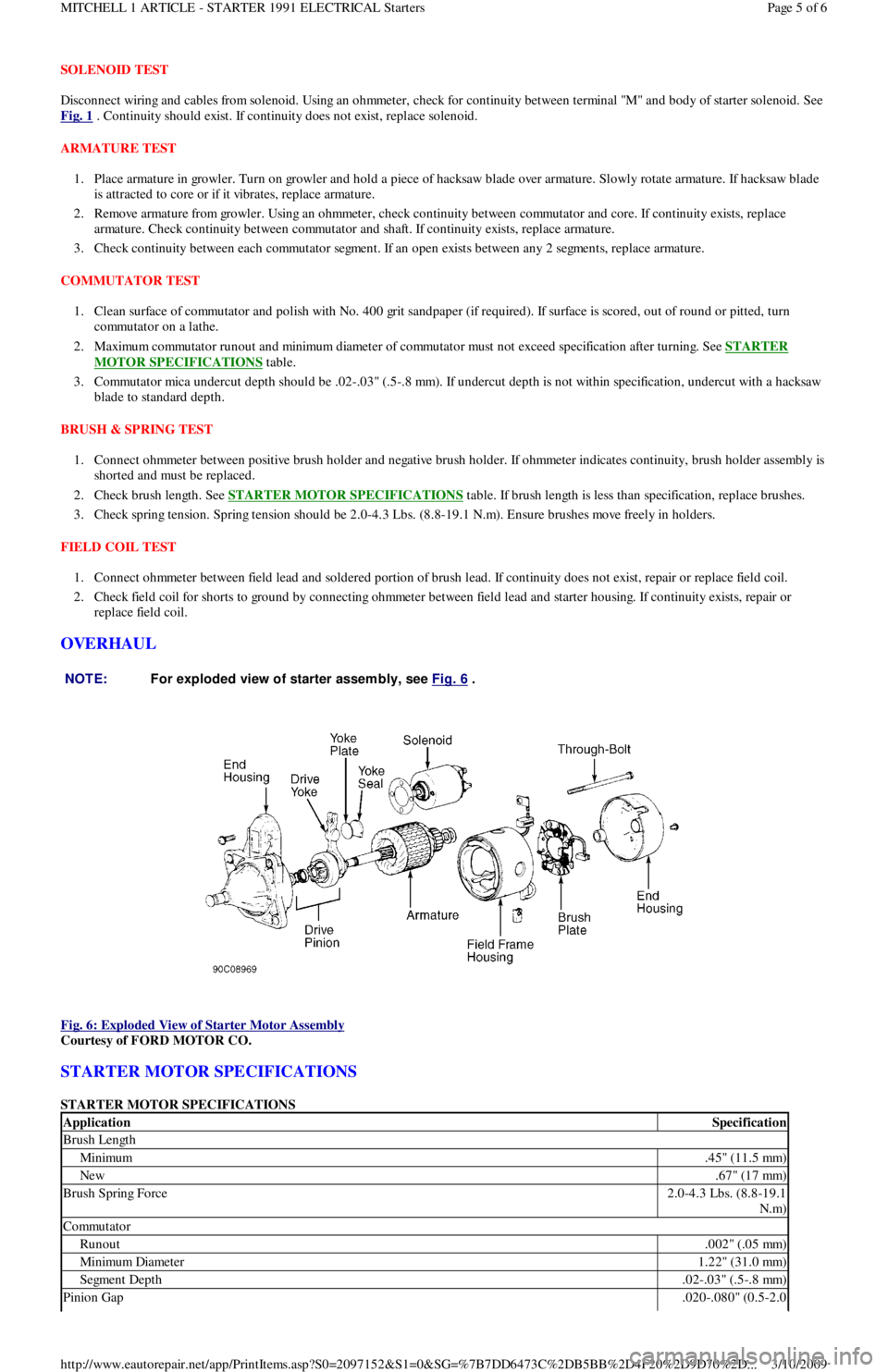
Fig. 6: Exploded View of Starter Motor Assembly
Courtesy of FORD MOTOR CO.
STARTER MOTOR SPECIFICATIONS
STARTER MOTOR SPECIFICATIONS NOTE:For exploded view of starter assem bly, see Fig. 6
.
ApplicationSpecification
Brush Length
Minimum.45" (11.5 mm)
New.67" (17 mm)
Brush Spring Force2.0-4.3 Lbs. (8.8-19.1
N.m)
Commutator
Runout.002" (.05 mm)
Min imu m Diamet er1.22" (31.0 mm)
Segment Depth.02-.03" (.5-.8 mm)
Pinion Gap.020-.080" (0.5-2.0
Page 5 of 6 MITCHELL 1 ARTICLE - STARTER 1991 ELECTRICAL Starters
3/10/2009 http://www.eautorepair.net/app/PrintItems.asp?S0=2097152&S1=0&SG=%7B7DD6473C%2DB5BB%2D4F20%2D9D70%2D
...
Page 58 of 454
Back To Article
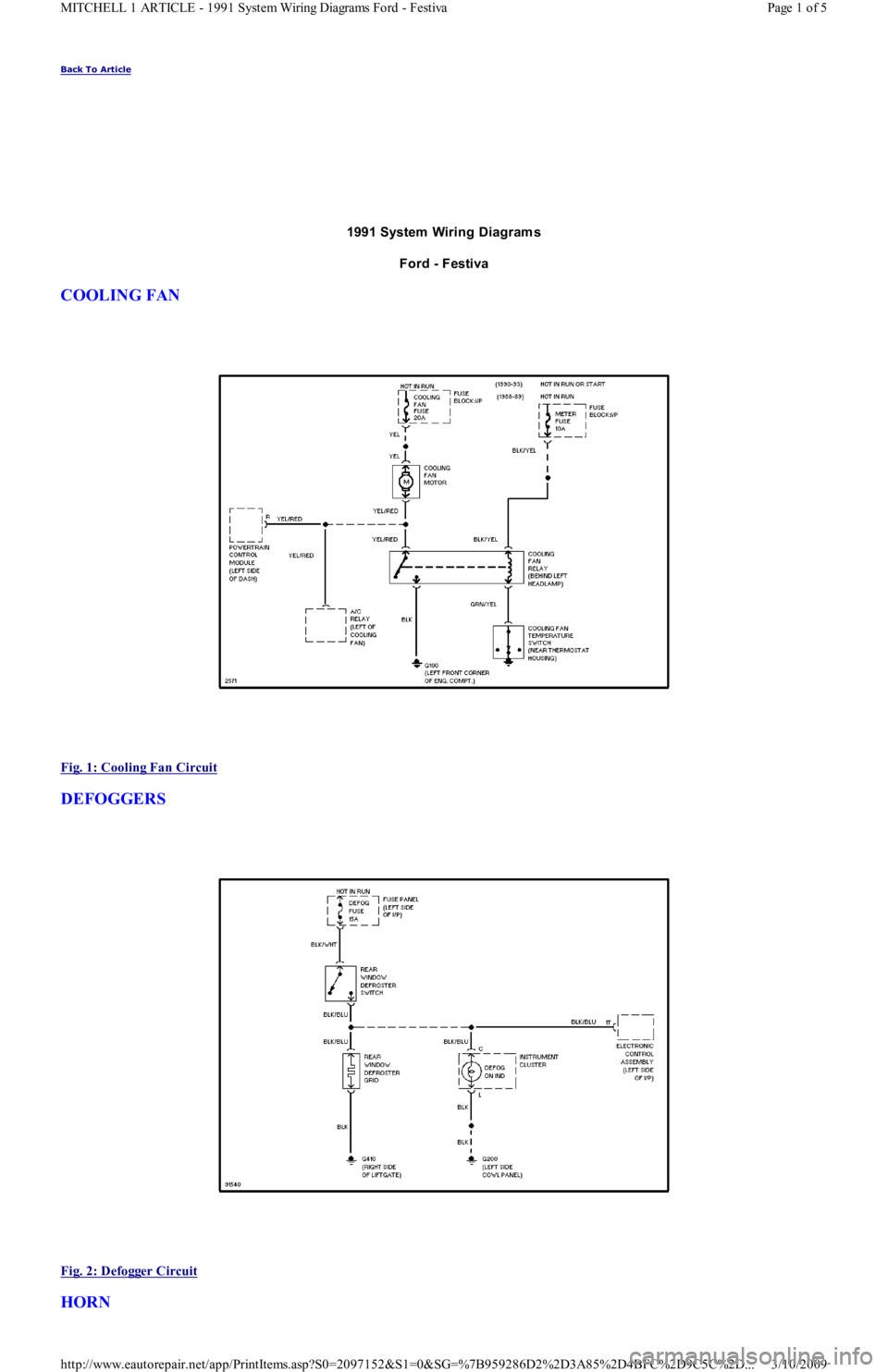
1991 System Wiring Diagram s
Ford - Festiva
COOLING FAN
Fig. 1: Cooling Fan Circuit
DEFOGGERS
Fig. 2: Defogger Circuit
HORN
Page 1 of 5 MITCHELL 1 ARTICLE - 1991 System Wiring Diagrams Ford - Festiva
3/10/2009 http://www.eautorepair.net/app/PrintItems.asp?S0=2097152&S1=0&SG=%7B959286D2%2D3A85%2D4BFC%2D9C5C%2D
...