light FORD FESTIVA 1991 Manual PDF
[x] Cancel search | Manufacturer: FORD, Model Year: 1991, Model line: FESTIVA, Model: FORD FESTIVA 1991Pages: 454, PDF Size: 9.53 MB
Page 288 of 454
If you see more than one hump it is because of a distorted pintle or seat. This faulty condition is known as "pintle float".
It is important to realize that it takes a good digital storage oscilloscope or analog lab scope to see this pintle hump clearly. Unfortunately, it
cannot always be seen.
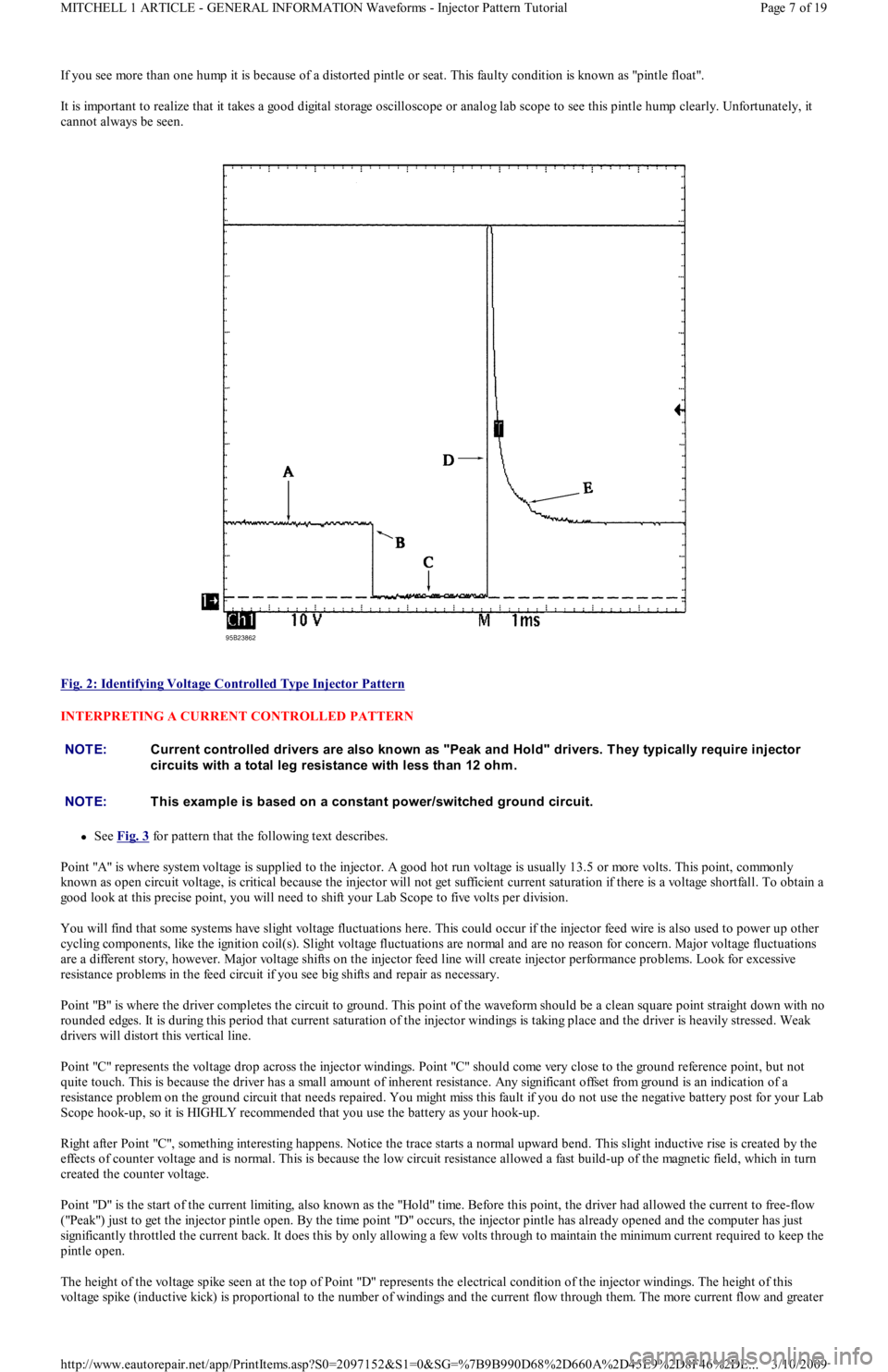
Fig. 2: Identifying Voltage Controlled Type Injector Pattern
INTERPRETING A CURRENT CONTROLLED PATTERN
See Fig. 3 for pattern that the following text describes.
Point "A" is where system voltage is supplied to the injector. A good hot run voltage is usually 13.5 or more volts. This point, commonly
known as open circuit voltage, is critical because the injector will not get sufficient current saturation if there is a voltage shortfall. To obtain a
good look at this precise point, you will need to shift your Lab Scope to five volts per division.
You will find that some systems have slight voltage fluctuations here. This could occur if the injector feed wire is also used to power up other
cycling components, like the ignition coil(s). Slight voltage fluctuations are normal and are no reason for concern. Major voltage fluctuations
are a different story, however. Major voltage shifts on the injector feed line will create injector performance problems. Look for excessive
resistance problems in the feed circuit if you see big shifts and repair as necessary.
Point "B" is where the driver completes the circuit to ground. This point of the waveform should be a clean square point straight down with no
rounded edges. It is during this period that current saturation of the injector windings is taking place and the driver is heavily stressed. Weak
drivers will distort this vertical line.
Point "C" represents the voltage drop across the injector windings. Point "C" should come very close to the ground reference point, but not
quite touch. This is because the driver has a small amount of inherent resistance. Any significant offset from ground is an indication of a
resistance problem on the ground circuit that needs repaired. You might miss this fault if you do not use the negative battery post for your Lab
Scope hook-up, so it is HIGHLY recommended that you use the battery as your hook-up.
Right after Point "C", something interesting happens. Notice the trace starts a normal upward bend. This slight inductive rise is created by the
effects of counter voltage and is normal. This is because the low circuit resistance allowed a fast build-up of the magnetic field, which in turn
created the counter voltage.
Point "D" is the start of the current limiting, also known as the "Hold" time. Before this point, the driver had allowed the curren t t o free-fl o w
("Peak") just to get the injector pintle open. By the time point "D" occurs, the injector pintle has already opened and the computer has just
significantly throttled the current back. It does this by only allowing a few volts through to maintain the minimum current required to keep the
pintle open.
The height of the voltage spike seen at the top of Point "D" represents the electrical condition of the injector windings. The height of this
voltage spike (inductive kick) is proportional to the number of windings and the current flow through them. The more current flow and greater
NOTE:Current controlled drivers are also known as "Peak and Hold" drivers. T hey typically require injector
circuits with a total leg resistance with less than 12 ohm .
NOTE:T his exam ple is based on a constant power/switched ground circuit.
Page 7 of 19 MITCHELL 1 ARTICLE - GENERAL INFORMATION Waveforms - Injector Pattern Tutorial
3/10/2009 http://www.eautorepair.net/app/PrintItems.asp?S0=2097152&S1=0&SG=%7B9B990D68%2D660A%2D45E9%2D8F46%2DE
...
Page 289 of 454
number of windings, the more potential for a greater inductive kick. The opposite is also true. The less current flow or fewer windings means
less inductive kick. Typically you should see a minimum 35 volts.
If you see approximately 35 volts, it is because a zener diode is used with the driver to clamp the voltage. Make sure the beginning top of the
spike is squared off, indicating the zener dumped the remainder of the spike. If it is not squared, that indicates the spike is not strong enough to
make the zener fully dump, meaning there is a problem with a weak injector winding.
If a zener diode is not used in the computer, the spike from a good injector will be 60 or more volts.
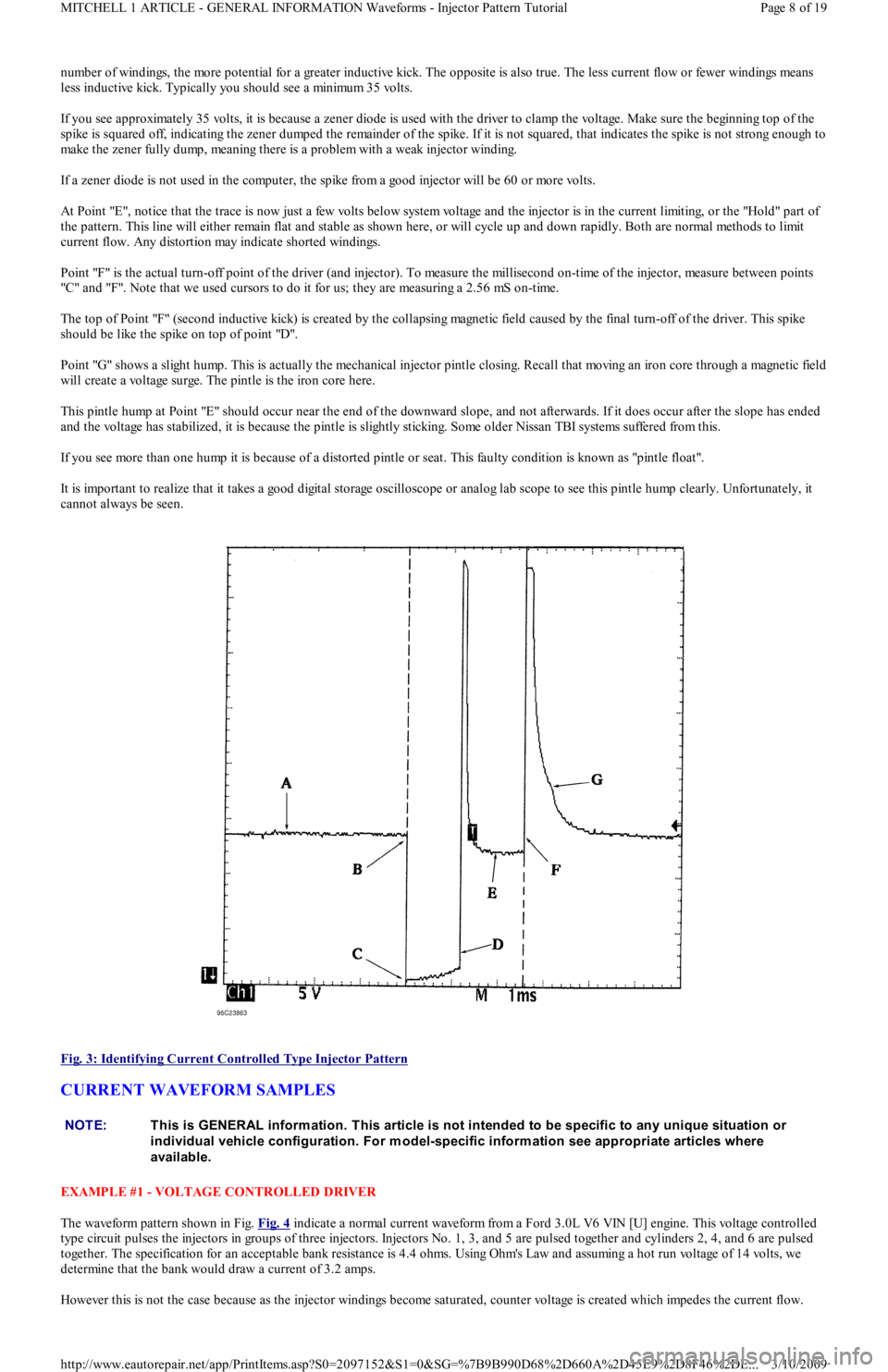
At Point "E", notice that the trace is now just a few volts below system voltage and the injector is in the current limiting, or the "Hold" part of
the pattern. This line will either remain flat and stable as shown here, or will cycle up and down rapidly. Both are normal methods to limit
current flow. Any distortion may indicate shorted windings.
Point "F" is the actual turn-off point of the driver (and injector). To measure the millisecond on-time of the injector, measure between points
"C" an d "F". No t e t h at we u sed cu rso rs t o d o it for us; they are measuring a 2.56 mS on-time.
The top of Point "F" (second inductive kick) is created by the collapsing magnetic field caused by the final turn-off of the driver. This spike
should be like the spike on top of point "D".
Point "G" shows a slight hump. This is actually the mechanical injector pintle closing. Recall that moving an iron core through a magnetic field
will create a voltage surge. The pintle is the iron core here.
This pintle hump at Point "E" should occur near the end of the downward slope, and not afterwards. If it does occur after the slope has ended
and the voltage has stabilized, it is because the pintle is slightly sticking. Some older Nissan TBI systems suffered from this.
If you see more than one hump it is because of a distorted pintle or seat. This faulty condition is known as "pintle float".
It is important to realize that it takes a good digital storage oscilloscope or analog lab scope to see this pintle hump clearly. Unfortunately, it
cannot always be seen.
Fig. 3: Identifying Current Controlled Type Injector Pattern
CURRENT WAVEFORM SAMPLES
EXAMPLE #1 - VOLTAGE CONTROLLED DRIVER
The waveform pattern shown in Fig. Fig. 4
indicate a normal current waveform from a Ford 3.0L V6 VIN [U] engine. This voltage controlled
type circuit pulses the injectors in groups of three injectors. Injectors No. 1, 3, and 5 are pulsed together and cylinders 2, 4, and 6 are pulsed
together. The specification for an acceptable bank resistance is 4.4 ohms. Using Ohm's Law and assuming a hot run voltage of 14 vo l t s, we
determine that the bank would draw a current of 3.2 amps.
However this is not the case because as the injector windings become saturated, counter voltage is created which impedes the current flow.
NOTE:This is GENERAL inform ation. This article is not intended to be specific to any unique situation or
individual vehicle configuration. For m odel-specific inform ation see appropriate articles where
available.
Page 8 of 19 MITCHELL 1 ARTICLE - GENERAL INFORMATION Waveforms - Injector Pattern Tutorial
3/10/2009 http://www.eautorepair.net/app/PrintItems.asp?S0=2097152&S1=0&SG=%7B9B990D68%2D660A%2D45E9%2D8F46%2DE
...
Page 306 of 454
Back To Article
1991 GENERAL SERVICING
A/C Com pressor Refrigerant Oil Checking
ISOLATING COMPRESSOR
1. Connect service gauge set to the compressor service valves and open compressor valves slightly (turn in clockwise). Start engine and
operate air conditioning. Slowly turn compressor suction valve clockwise toward closed (front-seated) position.
2. When suction pressure is reduced to zero or less, turn off engine and compressor and quickly turn suction valve stem in to full front-
seated position. Suction pressure should be slightly above zero. Turn discharge valve into front-seated position.
3. To check oil level, slowly open compressor crankcase plug to relieve any remaining pressure. After oil level is corrected, cap service
gauge ports on both valves. Back-seat suction service valve to allow refrigerant to enter compressor. Open discharge valve halfway.
4. Loosen discharge service valve cap, allowing refrigerant pressure to force air out of compressor. Back-seat service valve and tighten cap.
Compressor is now ready for operation.
REFRIGERANT OIL
Only new, pure, moisture-free refrigerant oil should be used in the air conditioning system. This oil is highly refined and dehydrated to a point
where moisture content is less than 10 parts per million. The oil container must be tightly closed at all times when not in use, or moisture will
be absorbed into the refrigerant oil from the air.
SERVICING PRECAUTIONS
DISCHARGING SYSTEM PRECAUTIONS
If compressor has stem-type service valves, it can be isolated and removed without discharging entire system. See ISOLATING
COMPRESSOR at the beginning of this article. Otherwise, discharge system completely before loosening any fittings.
DISCONNECTING LINES & FITTINGS TEST
After system is discharged, carefully clean area around all fittings to be opened. Always use 2 wrenches when tightening or loosening fittings
to avoid twisting or distorting lines. Cap or plug all openings as soon as lines are removed. DO NOT remove caps until immediately before
connections are made. This will keep entry of air and moisture to a minimum.
CONNECTING LINES AND FITTINGS
A new gasket or "O" ring should be used in all instances when connecting lines or fittings. Dip "O" ring in new refrigerant oil and ensure it is
not twisted during installation. Always use 2 wrenches to prevent damage to lines and fittings.
PLACING SYSTEM IN OPERATION
After component service or replacement has been completed and all connections have been made, evacuate system thoroughly with a vacuum
pump. Charge system with proper amount of refrigerant and perform a leak test. See REFRIGERANT OIL & R-12 SPECIFICATIONS chart in
this section for system capacities. Be sure to check all fittings that have been opened. After system has been leak tested, make a system
performance check.
ATSUGI ROTARY VANE DRAIN & REFILL
1. Before checking and adjusting oil level, operate compressor at engine idling speed, with controls set for maximum cooling and high
blower speed, for 20 to 30 minutes to return oil to compressor.
2. Stop engine, discharge refrigerant and remove compressor from vehicle. See SERVICING PRECAUTIONS at beginning of article. Drain
compressor oil from compressor discharge port and measure the amount. Oil is sometimes hard to drain when compressor is cool.
Remove oil while compressor is warm.
3. If the amount drained is less than 3 ounces, conduct leak tests at system connections, and if necessary, repair or replace faulty parts.
Check purity of oil and adjust oil level as follows.
4. If amount drained was above 3 ounces, oil level is right. Pour in same amount as was drained. If amount drained was below 3 ounces,
pour in 3 ounces of new refrigerant oil.
BOSCH 6-CYL DRAIN & REFILL
1. Before checking and adjusting oil level, operate compressor at engine idling speed, with controls set for maximum cooling and high
blower speed, for 20 to 30 minutes to return oil to compressor.
2. Stop engine and discharge refrigerant. Remove refrigerant oil level inspection plug on side of compressor. Oil should be at lower lip of
threaded hole. Add necessary new refrigerant oil (if low). Replace inspection plug and tighten to 10-12 ft. lbs. (14-16 N.m). NOTE:Only com pressors with stem -type service valves can be isolated.
NOTE:Recent findings by the EPA indicate that refrigerant is harm ful to the earth's protective Ozone layer.
When discharging refrigerant, DO NOT allow refrigerant to enter the atm osphere. If available, use
refrigerant recovery/recycle system s when discharging system . Always follow m anufacturer's
instructions.
NOTE:Air conditioning system s will not norm ally need addition of refrigerant oil unless definite oil loss has
occurred due to ruptured lines, leaking com pressor seals, com pressor overhaul or com ponent
replacem ent.
Page 1 of 4 MITCHELL 1 ARTICLE - 1991 GENERAL SERVICING A/C Compressor Refrigerant Oil Checking
3/10/2009 http://www.eautorepair.net/app/PrintItems.asp?S0=2097152&S1=0&SG=%7B9B990D68%2D660A%2D45E9%2D8F46%2DE
...
Page 317 of 454
Back To Article
A/C COMPRESSOR SERVICING
1991 GENERAL SERVICING Com pressor Service
ISOLATING COMPRESSOR
1. Connect service gauge set to the compressor service valves and open compressor valves slightly (turn in clockwise). Start engine and
operate air conditioning. Slowly turn compressor suction valve clockwise toward closed (front-seated) position.
2. When suction pressure is reduced to zero or less, turn off engine and compressor and quickly turn suction valve stem in to full front-
seated position. Suction pressure should be slightly above zero. Turn discharge valve into front-seated position.
3. To check oil level, slowly open compressor crankcase plug to relieve any remaining pressure. After oil level is corrected, cap service
gauge ports on both valves. Back-seat suction service valve to allow refrigerant to enter compressor. Open discharge valve halfway.
4. Loosen discharge service valve cap, allowing refrigerant pressure to force air out of compressor. Back-seat service valve and tighten cap.
Compressor is now ready for operation.
REFRIGERANT OIL
Only new, pure, moisture-free refrigerant oil should be used in the air conditioning system. This oil is highly refined and dehydrated to a point
where moisture content is less than 10 parts per million. The oil container must be tightly closed at all times when not in use, or moisture will
be absorbed into the refrigerant oil from the air.
DISCHARGING SYSTEM PRECAUTIONS
If compressor has stem-type service valves, it can be isolated and removed without discharging entire system. Otherwise, discharge system
completely using approved refrigerant recovery/recycling equipment before loosening any fittings.
DISCONNECTING LINES & FITTINGS TEST
After system is discharged, carefully clean area around all fittings to be opened. Always use 2 wrenches when tightening or loosening fittings
to avoid twisting or distorting lines. Cap or plug all openings as soon as lines are removed. Do not remove caps until immediately before
connections are made. This will keep entry of air and moisture to a minimum.
CONNECTING LINES AND FITTINGS
A new gasket or "O" ring should be used in all instances when connecting lines or fittings. Dip "O" ring in new refrigerant oil and ensure it is
not twisted during installation. Always use 2 wrenches to prevent damage to lines and fittings.
PLACING SYSTEM IN OPERATION
After component service or replacement has been completed and all connections have been made, evacuate system thoroughly with a vacuum
pump. Charge system with proper amount of refrigerant and perform a leak test. See REFRIGERANT OIL & R-12 SPECIFICATIONS chart in
this section for system capacities. Be sure to check all fittings that have been opened. After system has been leak tested, make a system
performance check.
ATSUGI ROTARY VANE CLUTCH R & I
Removal
When replacing compressor clutch, be careful not to scratch shaft or bend pulley. When removing center bolt, hold clutch disc with Clutch
Holder (KV99231010). Using Hub Puller (KV998VR001 & KV99231010), remove clutch disc. When removing pulley, remove lock nut with
Hub Socket (KV99235160).
Installation
Wipe oil off clutch surface. Adjust disc pulley clearance to .012-.024" (.3-.6 mm). Tighten center bolt to 80-104 INCH lbs. (9.1-11.8 N.m).
Tighten clutch lock nut to 22-29 ft. lbs. (29-39 N.m). See Fig. 1
. CAUT ION: When discharging air conditioning system , use only approved refrigerant recovery/recycling
equipm ent. Make every attem pt to avoid discharging refrigerant into the atm osphere.
NOTE:Only com pressors with stem -type service valves can be isolated.
CAUT ION: When discharging air conditioning system , use only approved refrigerant recovery/recycling
equipm ent. Make every attem pt to avoid discharging refrigerant into the atm osphere.
NOTE:Air conditioning system s will not norm ally need addition of refrigerant oil unless definite oil loss has
occurred due to ruptured lines, leaking com pressor seals, com pressor overhaul or com ponent
replacem ent.
Page 1 of 18 MITCHELL 1 ARTICLE - A/C COMPRESSOR SERVICING 1991 GENERAL SERVICING Compressor Service
3/10/2009 http://www.eautorepair.net/app/PrintItems.asp?S0=2097152&S1=0&SG=%7B9B990D68%2D660A%2D45E9%2D8F46%2DE
...
Page 318 of 454
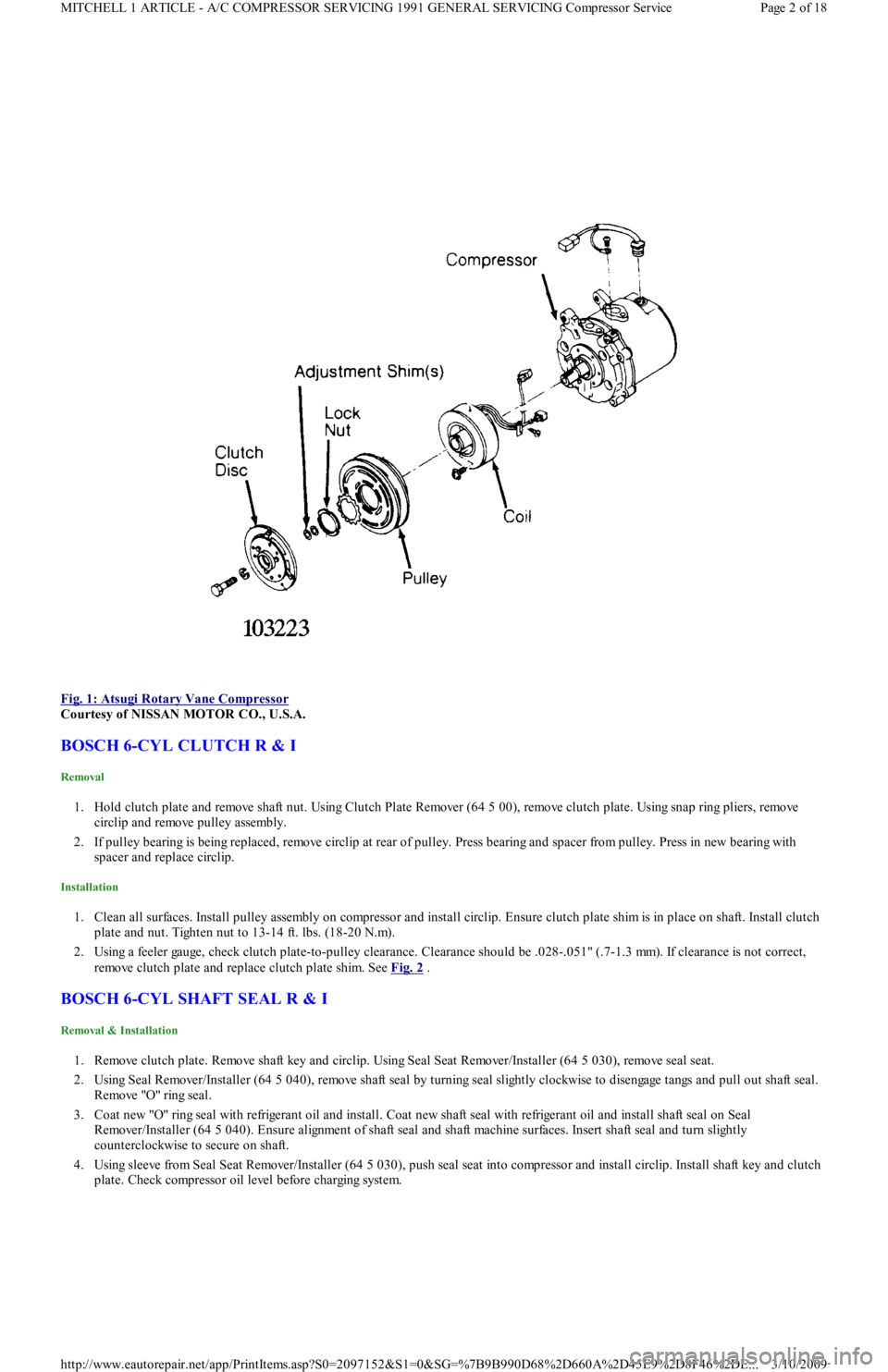
Fig. 1: Atsugi Rotary Vane Compressor
Courtesy of NISSAN MOTOR CO., U.S.A.
BOSCH 6-CYL CLUTCH R & I
Removal
1. Hold clutch plate and remove shaft nut. Using Clutch Plate Remover (64 5 00), remove clutch plate. Using snap ring pliers, remo ve
circlip and remove pulley assembly.
2. If pulley bearing is being replaced, remove circlip at rear of pulley. Press bearing and spacer from pulley. Press in new bearing with
spacer and replace circlip.
Installation
1. Clean all surfaces. Install pulley assembly on compressor and install circlip. Ensure clutch plate shim is in place on shaft. Install clutch
plate and nut. Tighten nut to 13-14 ft. lbs. (18-20 N.m).
2. Using a feeler gauge, check clutch plate-to-pulley clearance. Clearance should be .028-.051" (.7-1.3 mm). If clearance is not correct,
remove clutch plate and replace clutch plate shim. See Fig. 2
.
BOSCH 6-CYL SHAFT SEAL R & I
Removal & Installation
1. Remove clutch plate. Remove shaft key and circlip. Using Seal Seat Remover/Installer (64 5 030), remove seal seat.
2. Using Seal Remover/Installer (64 5 040), remove shaft seal by turning seal slightly clockwise to disengage tangs and pull out shaft seal.
Remo ve "O" rin g seal .
3. Coat new "O" ring seal with refrigerant oil and install. Coat new shaft seal with refrigerant oil and install shaft seal on Seal
Remover/Installer (64 5 040). Ensure alignment of shaft seal and shaft machine surfaces. Insert shaft seal and turn slightly
counterclockwise to secure on shaft.
4. Using sleeve from Seal Seat Remover/Installer (64 5 030), push seal seat into compressor and install circlip. Install shaft key and clutch
plate. Check compressor oil level before charging system.
Page 2 of 18 MITCHELL 1 ARTICLE - A/C COMPRESSOR SERVICING 1991 GENERAL SERVICING Compressor Service
3/10/2009 http://www.eautorepair.net/app/PrintItems.asp?S0=2097152&S1=0&SG=%7B9B990D68%2D660A%2D45E9%2D8F46%2DE
...
Page 323 of 454
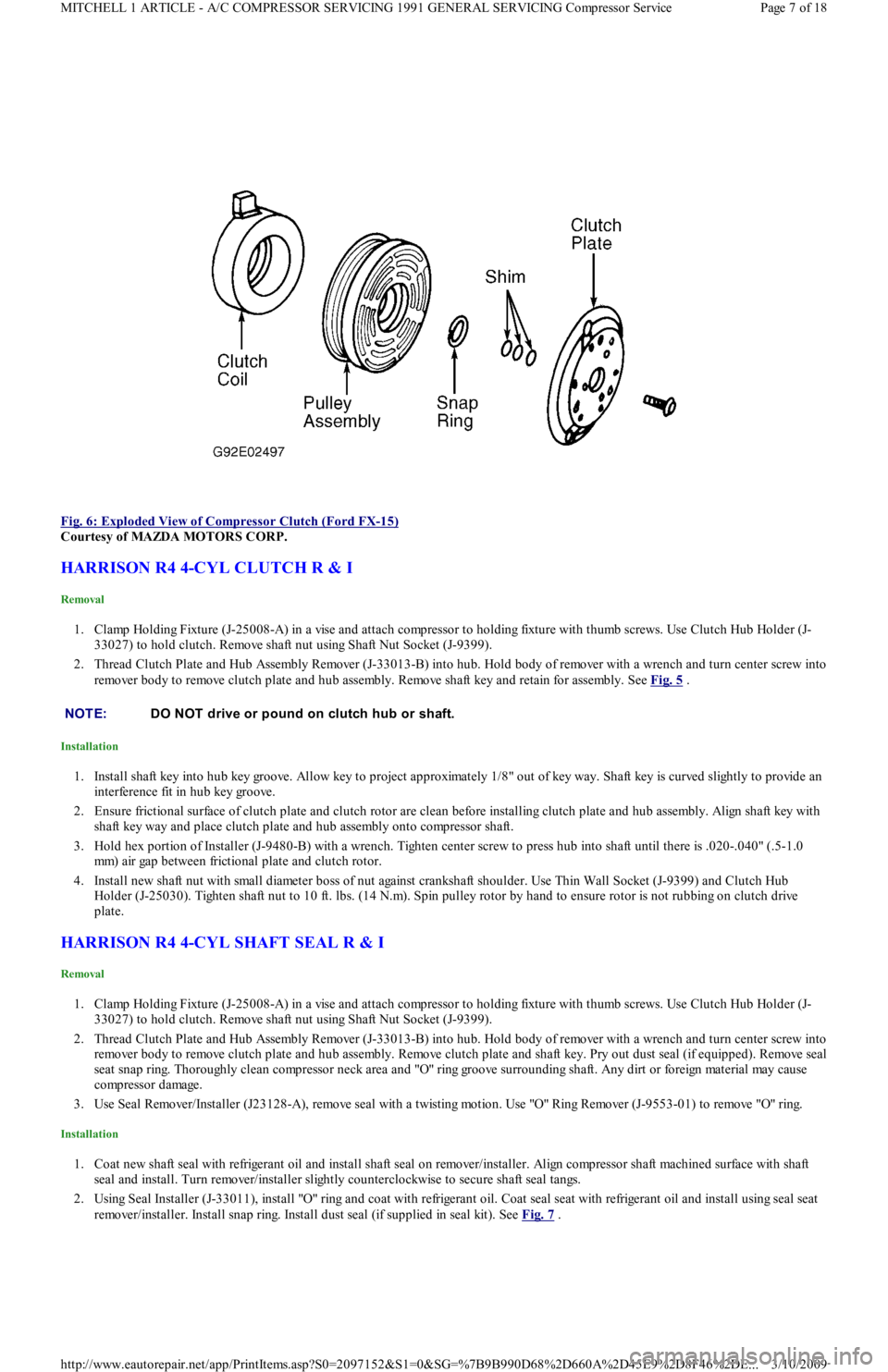
Fig. 6: Exploded View of Compressor Clutch (Ford FX
-15)
Courtesy of MAZDA MOTORS CORP.
HARRISON R4 4-CYL CLUTCH R & I
Removal
1. Clamp Holding Fixture (J-25008-A) in a vise and attach compressor to holding fixture with thumb screws. Use Clutch Hub Holder (J-
33027) to hold clutch. Remove shaft nut using Shaft Nut Socket (J-9399).
2. Thread Clutch Plate and Hub Assembly Remover (J-33013-B) into hub. Hold body of remover with a wrench and turn center screw into
remover body to remove clutch plate and hub assembly. Remove shaft key and retain for assembly. See Fig. 5
.
Installation
1. Install shaft key into hub key groove. Allow key to project approximately 1/8" out of key way. Shaft key is curved slightly to provide an
interference fit in hub key groove.
2. Ensure frictional surface of clutch plate and clutch rotor are clean before installing clutch plate and hub assembly. Align shaft key with
shaft key way and place clutch plate and hub assembly onto compressor shaft.
3. Hold hex portion of Installer (J-9480-B) with a wrench. Tighten center screw to press hub into shaft until there is .020-.040" (.5-1.0
mm) air gap between frictional plate and clutch rotor.
4. Install new shaft nut with small diameter boss of nut against crankshaft shoulder. Use Thin Wall Socket (J-9399) and Clutch Hub
Holder (J-25030). Tighten shaft nut to 10 ft. lbs. (14 N.m). Spin pulley rotor by hand to ensure rotor is not rubbing on clutch drive
plate.
HARRISON R4 4-CYL SHAFT SEAL R & I
Removal
1. Clamp Holding Fixture (J-25008-A) in a vise and attach compressor to holding fixture with thumb screws. Use Clutch Hub Holder (J-
33027) to hold clutch. Remove shaft nut using Shaft Nut Socket (J-9399).
2. Thread Clutch Plate and Hub Assembly Remover (J-33013-B) into hub. Hold body of remover with a wrench and turn center screw into
remover body to remove clutch plate and hub assembly. Remove clutch plate and shaft key. Pry out dust seal (if equipped). Remove seal
seat snap ring. Thoroughly clean compressor neck area and "O" ring groove surrounding shaft. Any dirt or foreign material may cause
compressor damage.
3. Use Seal Remover/Installer (J23128-A), remove seal with a twisting motion. Use "O" Ring Remover (J-9553-01) to remove "O" ring.
Installation
1. Coat new shaft seal with refrigerant oil and install shaft seal on remover/installer. Align compressor shaft machined surface with shaft
seal and install. Turn remover/installer slightly counterclockwise to secure shaft seal tangs.
2. Using Seal Installer (J-33011), install "O" ring and coat with refrigerant oil. Coat seal seat with refrigerant oil and install using seal seat
remover/installer. Install snap ring. Install dust seal (if supplied in seal kit). See Fig. 7
.
NOTE:DO NOT drive or pound on clutch hub or shaft.
Page 7 of 18 MITCHELL 1 ARTICLE - A/C COMPRESSOR SERVICING 1991 GENERAL SERVICING Compressor Service
3/10/2009 http://www.eautorepair.net/app/PrintItems.asp?S0=2097152&S1=0&SG=%7B9B990D68%2D660A%2D45E9%2D8F46%2DE
...
Page 324 of 454
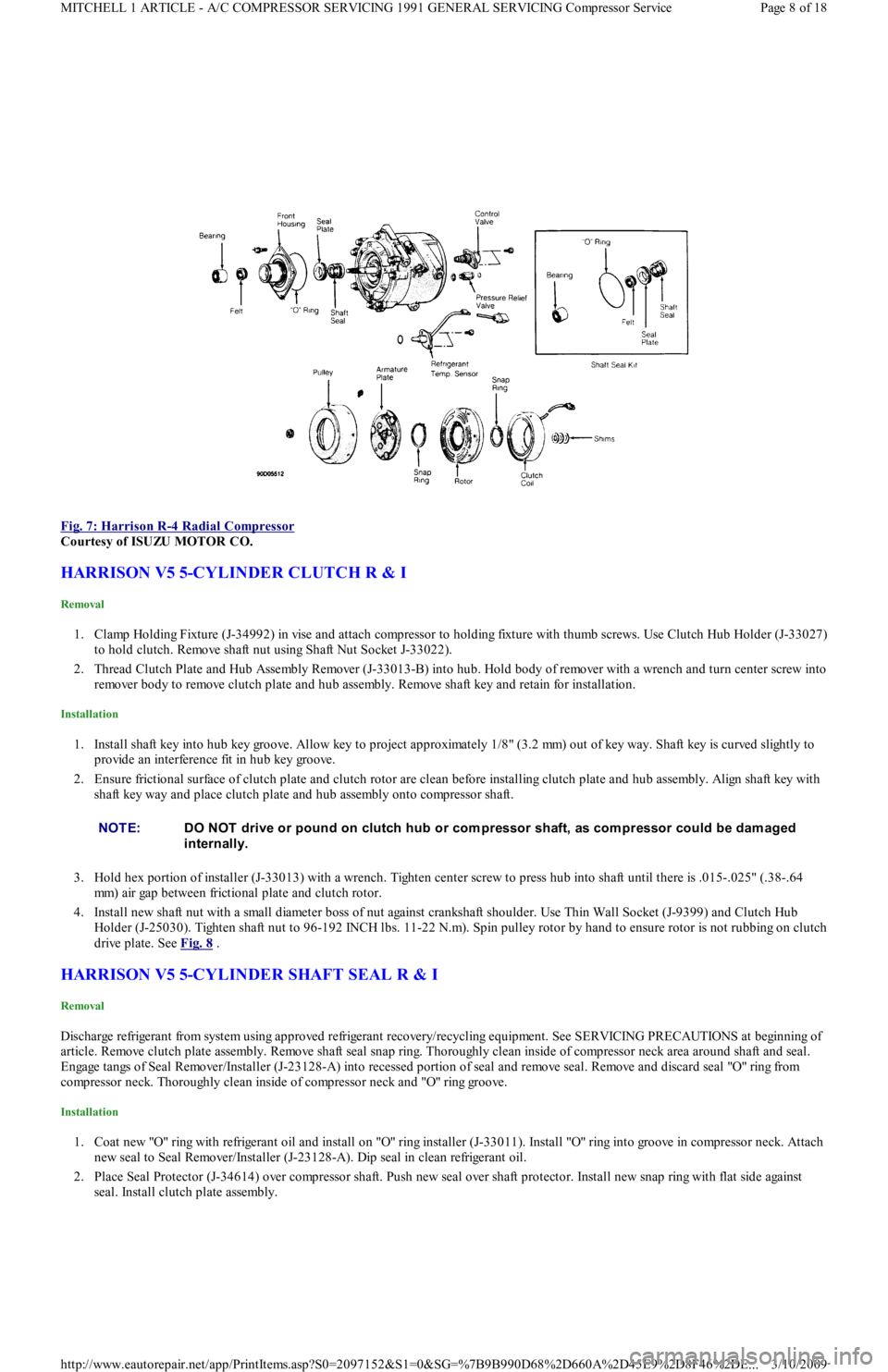
Fig. 7: Harrison R
-4 Radial Compressor
Courtesy of ISUZU MOTOR CO.
HARRISON V5 5-CYLINDER CLUTCH R & I
Removal
1. Clamp Holding Fixture (J-34992) in vise and attach compressor to holding fixture with thumb screws. Use Clutch Hub Holder (J-33027)
to hold clutch. Remove shaft nut using Shaft Nut Socket J-33022).
2. Thread Clutch Plate and Hub Assembly Remover (J-33013-B) into hub. Hold body of remover with a wrench and turn center screw into
remover body to remove clutch plate and hub assembly. Remove shaft key and retain for installation.
Installation
1. Install shaft key into hub key groove. Allow key to project approximately 1/8" (3.2 mm) out of key way. Shaft key is curved slightly to
provide an interference fit in hub key groove.
2. Ensure frictional surface of clutch plate and clutch rotor are clean before installing clutch plate and hub assembly. Align shaft key with
shaft key way and place clutch plate and hub assembly onto compressor shaft.
3. Hold hex portion of installer (J-33013) with a wrench. Tighten center screw to press hub into shaft until there is .015-.025" (.38-.64
mm) air gap between frictional plate and clutch rotor.
4. Install new shaft nut with a small diameter boss of nut against crankshaft shoulder. Use Thin Wall Socket (J-9399) and Clutch Hub
Holder (J-25030). Tighten shaft nut to 96-192 INCH lbs. 11-22 N.m). Spin pulley rotor by hand to ensure rotor is not rubbing on clutch
drive plate. See Fig. 8
.
HARRISON V5 5-CYLINDER SHAFT SEAL R & I
Removal
Discharge refrigerant from system using approved refrigerant recovery/recycling equipment. See SERVICING PRECAUTIONS at beginning of
article. Remove clutch plate assembly. Remove shaft seal snap ring. Thoroughly clean inside of compressor neck area around shaft and seal.
Engage tangs of Seal Remover/Installer (J-23128-A) into recessed portion of seal and remove seal. Remove and discard seal "O" ring from
compressor neck. Thoroughly clean inside of compressor neck and "O" ring groove.
Installation
1. Coat new "O" ring with refrigerant oil and install on "O" ring installer (J-33011). Install "O" ring into groove in compressor neck. Attach
new seal to Seal Remover/Installer (J-23128-A). Dip seal in clean refrigerant oil.
2. Place Seal Protector (J-34614) over compressor shaft. Push new seal over shaft protector. Install new snap ring with flat side against
seal. Install clutch plate assembly.
NOTE:DO NOT drive or pound on clutch hub or com pressor shaft, as com pressor could be dam aged
internally.
Page 8 of 18 MITCHELL 1 ARTICLE - A/C COMPRESSOR SERVICING 1991 GENERAL SERVICING Compressor Service
3/10/2009 http://www.eautorepair.net/app/PrintItems.asp?S0=2097152&S1=0&SG=%7B9B990D68%2D660A%2D45E9%2D8F46%2DE
...
Page 327 of 454
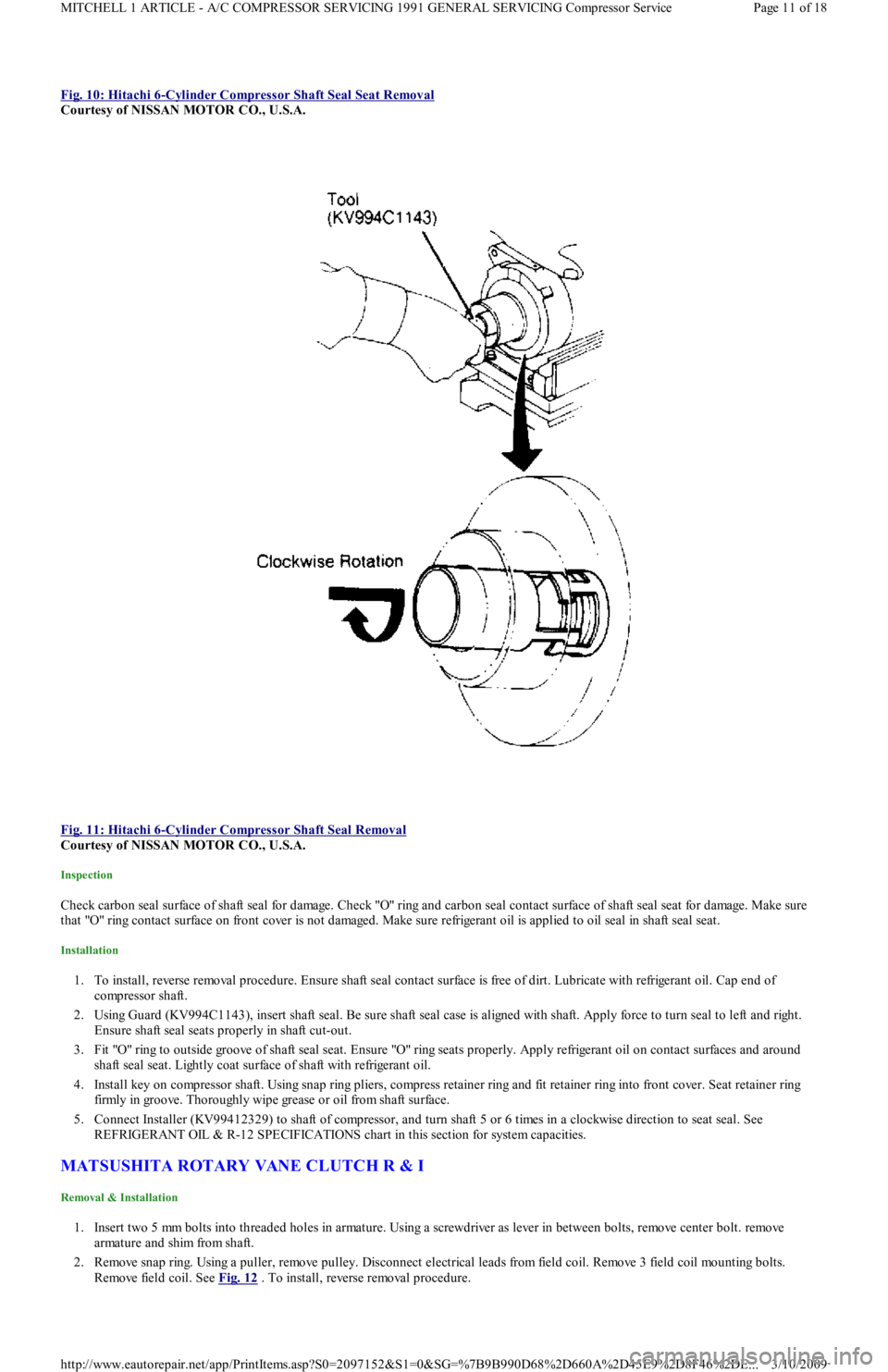
Fig. 10: Hitachi 6-Cylinder Compressor Shaft Seal Seat Removal
Courtesy of NISSAN MOTOR CO., U.S.A.
Fig. 11: Hitachi 6
-Cylinder Compressor Shaft Seal Removal
Courtesy of NISSAN MOTOR CO., U.S.A.
Inspection
Check carbon seal surface of shaft seal for damage. Check "O" ring and carbon seal contact surface of shaft seal seat for damage. Make sure
that "O" ring contact surface on front cover is not damaged. Make sure refrigerant oil is applied to oil seal in shaft seal seat.
Installation
1. To install, reverse removal procedure. Ensure shaft seal contact surface is free of dirt. Lubricate with refrigerant oil. Cap end of
compressor shaft.
2. Using Guard (KV994C1143), insert shaft seal. Be sure shaft seal case is aligned with shaft. Apply force to turn seal to left and right.
Ensure shaft seal seats properly in shaft cut-out.
3. Fit "O" ring to outside groove of shaft seal seat. Ensure "O" ring seats properly. Apply refrigerant oil on contact surfaces and around
shaft seal seat. Lightly coat surface of shaft with refrigerant oil.
4. Install key on compressor shaft. Using snap ring pliers, compress retainer ring and fit retainer ring into front cover. Seat retainer ring
firmly in groove. Thoroughly wipe grease or oil from shaft surface.
5. Connect Installer (KV99412329) to shaft of compressor, and turn shaft 5 or 6 times in a clockwise direction to seat seal. See
REFRIGERANT OIL & R-12 SPECIFICATIONS chart in this section for system capacities.
MATSUSHITA ROTARY VANE CLUTCH R & I
Removal & Installation
1. Insert two 5 mm bolts into threaded holes in armature. Using a screwdriver as lever in between bolts, remove center bolt. remove
armature and shim from shaft.
2. Remove snap ring. Using a puller, remove pulley. Disconnect electrical leads from field coil. Remove 3 field coil mounting bolts.
Remove field coil. See Fig. 12
. To install, reverse removal procedure.
Page 11 of 18 MITCHELL 1 ARTICLE - A/C COMPRESSOR SERVICING 1991 GENERAL SERVICING Compressor Service
3/10/2009 http://www.eautorepair.net/app/PrintItems.asp?S0=2097152&S1=0&SG=%7B9B990D68%2D660A%2D45E9%2D8F46%2DE
...
Page 332 of 454
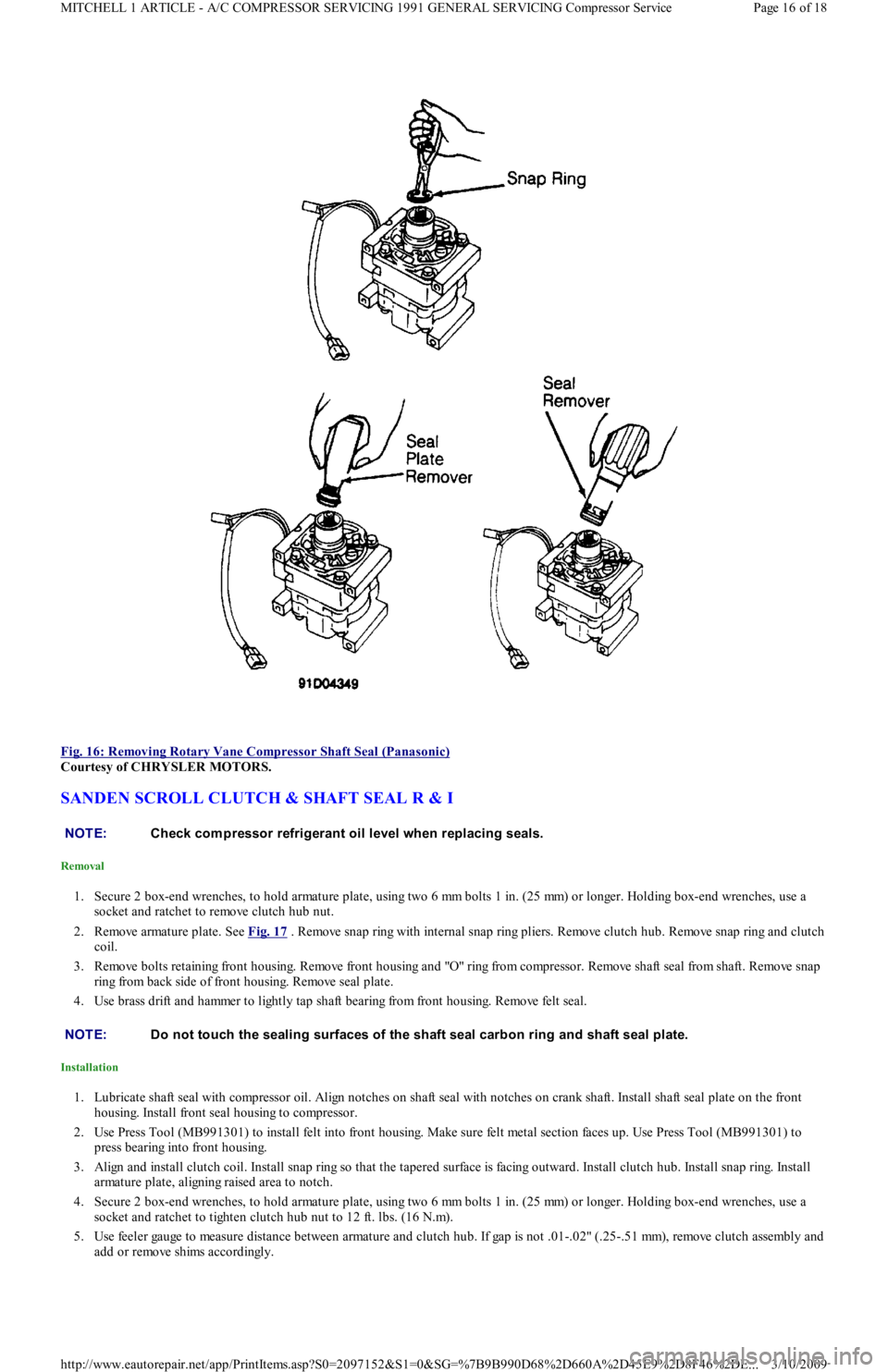
Fig. 16: Removing Rotary Vane Compressor Shaft Seal (Panasonic)
Courtesy of CHRYSLER MOTORS.
SANDEN SCROLL CLUTCH & SHAFT SEAL R & I
Removal
1. Secure 2 box-end wrenches, to hold armature plate, using two 6 mm bolts 1 in. (25 mm) or longer. Holding box-end wrenches, use a
socket and ratchet to remove clutch hub nut.
2. Remove armature plate. See Fig. 17
. Remove snap ring with internal snap ring pliers. Remove clutch hub. Remove snap ring and clutch
coil.
3. Remove bolts retaining front housing. Remove front housing and "O" ring from compressor. Remove shaft seal from shaft. Remove snap
ring from back side of front housing. Remove seal plate.
4. Use brass drift and hammer to lightly tap shaft bearing from front housing. Remove felt seal.
Installation
1. Lubricate shaft seal with compressor oil. Align notches on shaft seal with notches on crank shaft. Install shaft seal plate on the front
housing. Install front seal housing to compressor.
2. Use Press Tool (MB991301) to install felt into front housing. Make sure felt metal section faces up. Use Press Tool (MB991301) to
press bearing into front housing.
3. Align and install clutch coil. Install snap ring so that the tapered surface is facing outward. Install clutch hub. Install snap ring. Install
armature plate, aligning raised area to notch.
4. Secure 2 box-end wrenches, to hold armature plate, using two 6 mm bolts 1 in. (25 mm) or longer. Holding box-end wrenches, use a
socket and ratchet to tighten clutch hub nut to 12 ft. lbs. (16 N.m).
5. Use feeler gauge to measure distance between armature and clutch hub. If gap is not .01-.02" (.25-.51 mm), remove clutch assemb l y an d
add or remove shims accordingly.
NOTE:Check com pressor refrigerant oil level when replacing seals.
NOTE:Do not touch the sealing surfaces of the shaft seal carbon ring and shaft seal plate.
Page 16 of 18 MITCHELL 1 ARTICLE - A/C COMPRESSOR SERVICING 1991 GENERAL SERVICING Compressor Service
3/10/2009 http://www.eautorepair.net/app/PrintItems.asp?S0=2097152&S1=0&SG=%7B9B990D68%2D660A%2D45E9%2D8F46%2DE
...
Page 335 of 454
Back To Article
1991-92 AIR CONDIT IONING & HEAT ING
A/C System General Servicing
HANDLING/SAFETY PRECAUTIONS
1. Always work in a well-ventilated, clean area. Refrigerant R-134a is colorless and is invisible as a gas. Refrigerant (R-12 or R-134a) is
heavier than oxygen and will displace oxygen in a confined area. Avoid breathing refrigerant vapors. Exposure may irritate eyes, nose
and throat.
2. The system's high pressure can cause severe injury to eyes and skin if a hose were to burst. Always wear eye protection when working
around A/C system and refrigerant. If necessary, wear rubber gloves or other protective clothing.
3. Refrigerant evaporates quickly when exposed to atmosphere, freezing anything it contacts. If liquid refrigerant contacts eyes or skin, DO
NOT rub eyes or skin. Immediately flush affected area with cool water for 15 minutes and consult a doctor or hospital.
4. Never use R-134a in combination with compressed air for leak testing. Pressurized R-134a in the presence of oxygen (air concentrations
greater than 60% by volume) may form a combustible mixture. DO NOT introduce compressed air into R-134a containers (full or
empty), A/C system components or service equipment.
5. DO NOT expose A/C system components to high temperatures, steam cleaning for example, as excessive heat will cause
refrigerant/system pressure to increase. Never expose refrigerant directly to open flame. If refrigerant needs to be warmed, place bottom
of refrigerant tank in warm water. Water temperature MUST NOT exceed 125°F (52°C).
6. Use care when handling refrigerant containers. DO NOT drop, strike, puncture or incinerate containers. Use Department Of
Transportation (DOT) approved, DOT 4BW or DOT 4BA, refrigerant containers.
7. Never overfill refrigerant containers. The safe filling level of a refrigerant container MUST NOT exceed 60% of the container's gross
weight rating. Store refrigerant containers at temperature less than 125°F (52°C).
8. R-12 refrigerant (Freon) will be sold and stored in White containers, while R-134a refrigerant will be sold and stored in 30- or 50-
pound Light Blue containers.
9. R-12 and R-134a refrigerants must never be mixed, as their desiccants and lubricants are not compatible. If the refrigerants are mixed,
system cross-contamination or A/C system component failure may occur. Always use separate servicing and refrigerant
recovery/recycling equipment.
10. Follow equipment manufacturer instructions of all service equipment to be used. The Material Safety Data Sheet (MSDS), provided by
refrigerant manufacturer/suppliers, contains valuable information regarding the safe handling of R-12 or R-134a refrigerants.
IDENTIFYING R-134A SYSTEMS & COMPONENTS
To prevent refrigerant cross-contamination, use following methods to identify R-134a based systems and components.
Fittings & "O" Rings
All R-134a based A/C systems use 1/2" - 16 ACME threaded fittings (identifiable by square threads) and quick-connect service couplings. See
Fig. 1
. Besides the use of these fittings, most manufacturers will use Green colored "O" rings in R-134a systems. CAUT ION: When discharging air conditioning system , use only approved refrigerant recovery/recycling
equipm ent. Make every attem pt to avoid discharging refrigerant into the atm osphere.
Page 1 of 6 MITCHELL 1 ARTICLE - 1991-92 AIR CONDITIONING & HEATING A/C System General Servicing
3/10/2009 http://www.eautorepair.net/app/PrintItems.asp?S0=2097152&S1=0&SG=%7B9B990D68%2D660A%2D45E9%2D8F46%2DE
...