wiring FORD FESTIVA 1991 Manual PDF
[x] Cancel search | Manufacturer: FORD, Model Year: 1991, Model line: FESTIVA, Model: FORD FESTIVA 1991Pages: 454, PDF Size: 9.53 MB
Page 250 of 454
Back To Article
GENERAL INFORMATION
T ROUBLE SHOOT ING
* PLEASE READ THIS FIRST *
ENGINE PERFORMANCE
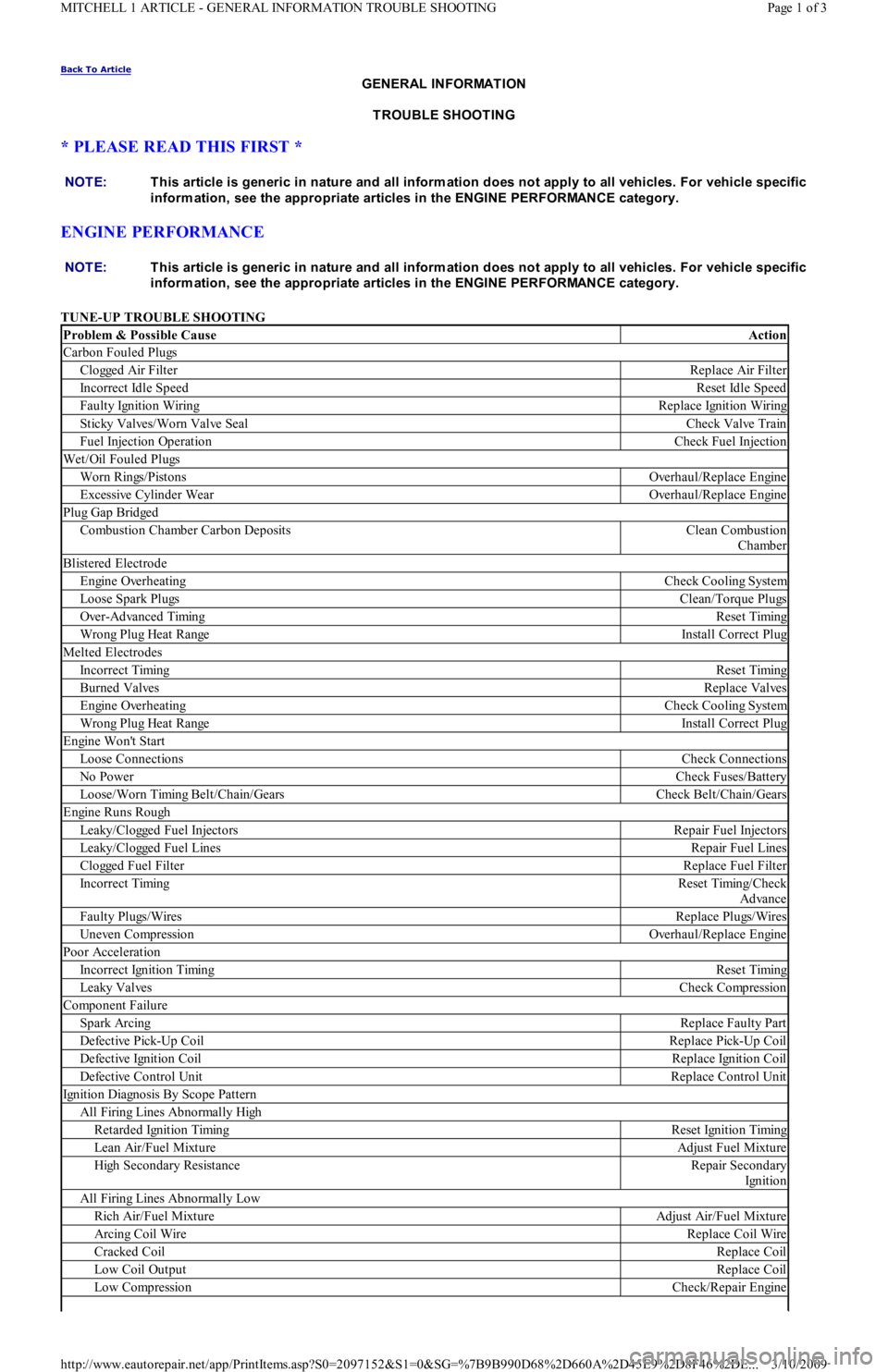
TUNE-UP TROUBLE SHOOTING NOTE:T his article is generic in nature and all inform ation does not apply to all vehicles. For vehicle specific
inform ation, see the appropriate articles in the ENGINE PERFORMANCE category.
NOTE:T his article is generic in nature and all inform ation does not apply to all vehicles. For vehicle specific
inform ation, see the appropriate articles in the ENGINE PERFORMANCE category.
Problem & Possible CauseAction
Carbon Fouled Plugs
C l o gge d Air Fil t e rReplace Air Filter
Incorrect Idle SpeedReset Idle Speed
Faulty Ignition WiringReplace Ignition Wiring
Sticky Valves/Worn Valve SealCheck Valve Train
Fuel Injection OperationCheck Fuel Injection
Wet/Oil Fouled Plugs
Worn Rings/PistonsOverhaul/Replace Engine
Excessive Cylinder WearOverhaul/Replace Engine
Plug Gap Bridged
Combustion Chamber Carbon DepositsClean Combustion
Chamber
Blistered Electrode
Engine OverheatingCheck Cooling System
Loose Spark PlugsClean/Torque Plugs
Over-Advanced TimingReset Timing
Wrong Plug Heat RangeInstall Correct Plug
Melted Electrodes
Incorrect TimingReset Timing
Burned ValvesReplace Valves
Engine OverheatingCheck Cooling System
Wrong Plug Heat RangeInstall Correct Plug
Engine Won't Start
Loose ConnectionsCheck Connections
No PowerCheck Fuses/Battery
Loose/Worn Timing Belt/Chain/GearsCheck Belt/Chain/Gears
Engine Runs Rough
Leaky/Clogged Fuel InjectorsRepair Fuel Injectors
Leaky/Clogged Fuel LinesRepair Fuel Lines
Clogged Fuel FilterReplace Fuel Filter
Incorrect TimingReset Timing/Check
Advance
Faulty Plugs/WiresReplace Plugs/Wires
Uneven CompressionOverhaul/Replace Engine
Poor Acceleration
Incorrect Ignition TimingReset Timing
Leaky ValvesCheck Compression
Component Failure
Spark ArcingReplace Faulty Part
Defective Pick-Up CoilReplace Pick-Up Coil
Defective Ignition CoilReplace Ignition Coil
Defective Control UnitReplace Control Unit
Ignition Diagnosis By Scope Pattern
All Firing Lines Abnormally High
Retarded Ignition TimingReset Ignition Timing
Lean Air/Fuel MixtureAdjust Fuel Mixture
High Secondary ResistanceRepair Secondary
Ign it io n
All Firing Lines Abnormally Low
Rich Air/Fuel MixtureAdjust Air/Fuel Mixture
Arcing Coil WireReplace Coil Wire
Cracked CoilReplace Coil
Low Coil OutputReplace Coil
Low CompressionCheck/Repair Engine
Page 1 of 3 MITCHELL 1 ARTICLE - GENERAL INFORMATION TROUBLE SHOOTING
3/10/2009 http://www.eautorepair.net/app/PrintItems.asp?S0=2097152&S1=0&SG=%7B9B990D68%2D660A%2D45E9%2D8F46%2DE
...
Page 251 of 454
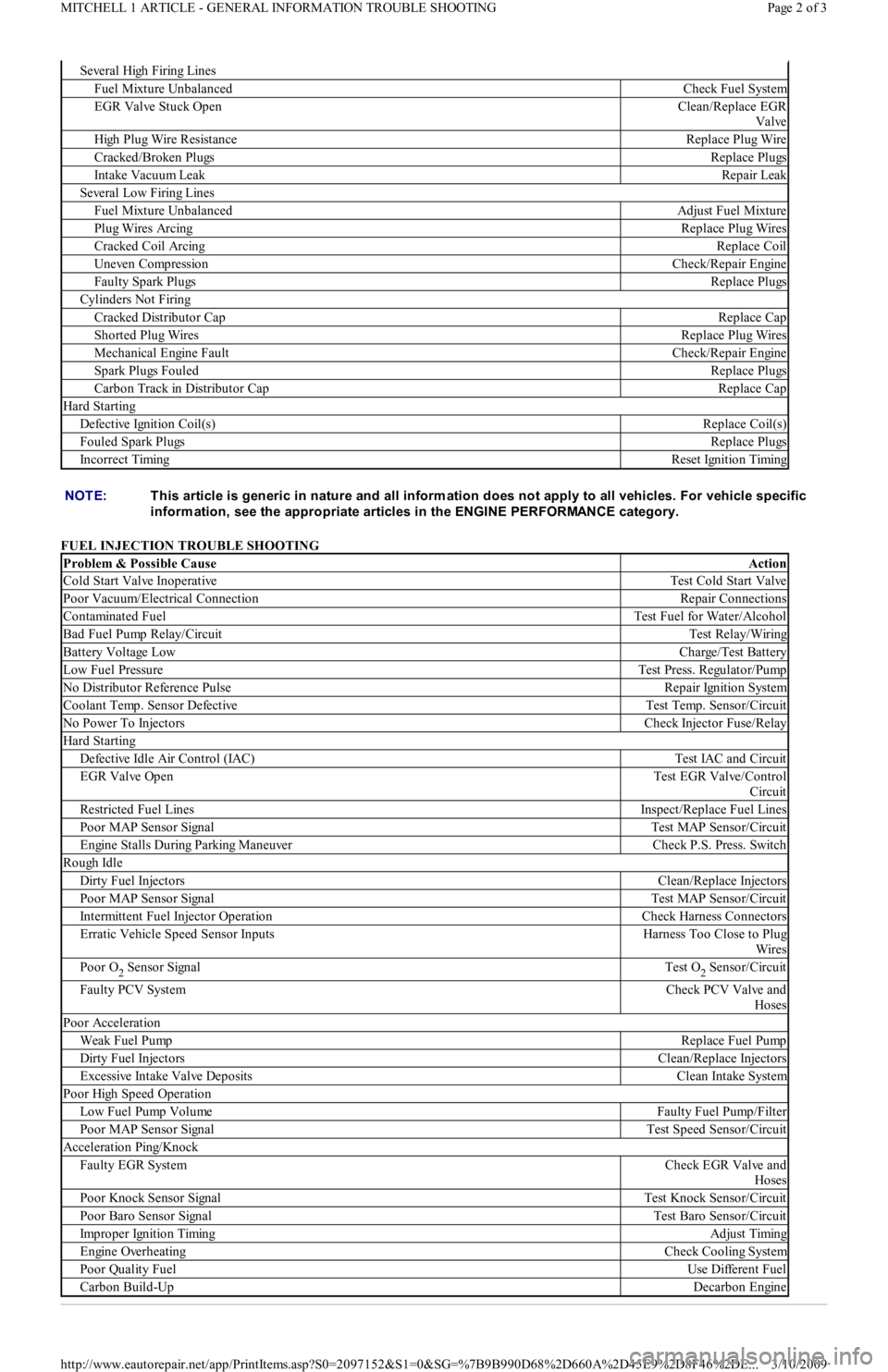
FUEL INJECTION TROUBLE SHOOTING
Se ve r a l High F ir in g Lin e s
Fuel Mixture UnbalancedCheck Fuel System
EGR Valve Stuck OpenClean/Replace EGR
Valve
High Plug Wire ResistanceReplace Plug Wire
Cracked/Broken PlugsReplace Plugs
Intake Vacuum LeakRepair Leak
Several Low Firing Lines
Fuel Mixture UnbalancedAdjust Fuel Mixture
Plug Wires ArcingReplace Plug Wires
Cracked Coil ArcingReplace Coil
Uneven CompressionCheck/Repair Engine
Faulty Spark PlugsReplace Plugs
Cylinders Not Firing
Cracked Distributor CapReplace Cap
Shorted Plug WiresReplace Plug Wires
Mechanical Engine FaultCheck/Repair Engine
Spark Plugs FouledReplace Plugs
Carbon Track in Distributor CapReplace Cap
Hard Starting
Defective Ignition Coil(s)Replace Coil(s)
Fouled Spark PlugsReplace Plugs
Incorrect TimingReset Ignition Timing
NOTE:T his article is generic in nature and all inform ation does not apply to all vehicles. For vehicle specific
inform ation, see the appropriate articles in the ENGINE PERFORMANCE category.
Problem & Possible CauseAction
Cold Start Valve InoperativeTest Cold Start Valve
Poor Vacuum/Electrical ConnectionRepair Connections
Contaminated FuelTest Fuel for Water/Alcohol
Bad Fuel Pump Relay/CircuitTest Relay/Wiring
Battery Voltage LowCharge/Test Battery
Low Fuel PressureTest Press. Regulator/Pump
No Distributor Reference PulseRepair Ignition System
Coolant Temp. Sensor DefectiveTest Temp. Sensor/Circuit
No Power To InjectorsCheck Injector Fuse/Relay
Hard Starting
Defective Idle Air Control (IAC)Test IAC and Circuit
EGR Valve OpenTest EGR Valve/Control
Circuit
Restricted Fuel LinesInspect/Replace Fuel Lines
Poor MAP Sensor SignalTest MAP Sensor/Circuit
Engine Stalls During Parking ManeuverCheck P.S. Press. Switch
Rough Idle
Dirty Fuel InjectorsClean/Replace Injectors
Poor MAP Sensor SignalTest MAP Sensor/Circuit
Intermittent Fuel Injector OperationCheck Harness Connectors
Erratic Vehicle Speed Sensor InputsHarness Too Close to Plug
Wires
Poor O2 Sensor SignalTest O2 Sensor/Circuit
Faulty PCV SystemCheck PCV Valve and
Hoses
Poor Acceleration
Weak Fuel PumpReplace Fuel Pump
Dirty Fuel InjectorsClean/Replace Injectors
Excessive Intake Valve DepositsClean Intake System
Poor High Speed Operation
Low Fuel Pump VolumeFaulty Fuel Pump/Filter
Poor MAP Sensor SignalTest Speed Sensor/Circuit
Acceleration Ping/Knock
Faulty EGR SystemCheck EGR Valve and
Hoses
Poor Knock Sensor SignalTest Knock Sensor/Circuit
Poor Baro Sensor SignalTest Baro Sensor/Circuit
Improper Ignition TimingAdjust Timing
Engine OverheatingCheck Cooling System
Poor Quality FuelUse Different Fuel
Carbon Build-UpDecarbon Engine
Page 2 of 3 MITCHELL 1 ARTICLE - GENERAL INFORMATION TROUBLE SHOOTING
3/10/2009 http://www.eautorepair.net/app/PrintItems.asp?S0=2097152&S1=0&SG=%7B9B990D68%2D660A%2D45E9%2D8F46%2DE
...
Page 275 of 454
Back To Article
GENERAL INFORMATION
How To Use The Engine Perform ance Section - 1989 & Newer Models
* PLEASE READ THIS FIRST *
HOW TO USE THE ENGINE PERFORMANCE SECTION
Congratulations, you have purchased the most advanced automotive repair and service information available. This information can help you, as
a professional automotive technician, to maintain top vehicle performance, and correct driveability problems on today's high-tech vehicles.
For your convenience and ease in use, all of our engine performance service and repair information is consistently organized by manufacturer,
using a progressive diagnostic/workflow approach. Due to the differences in how each manufacturer approaches diagnosis and repair, once
started and inside of an article, that manufacturer may drive the workflow in a direction other than what is outlined here.
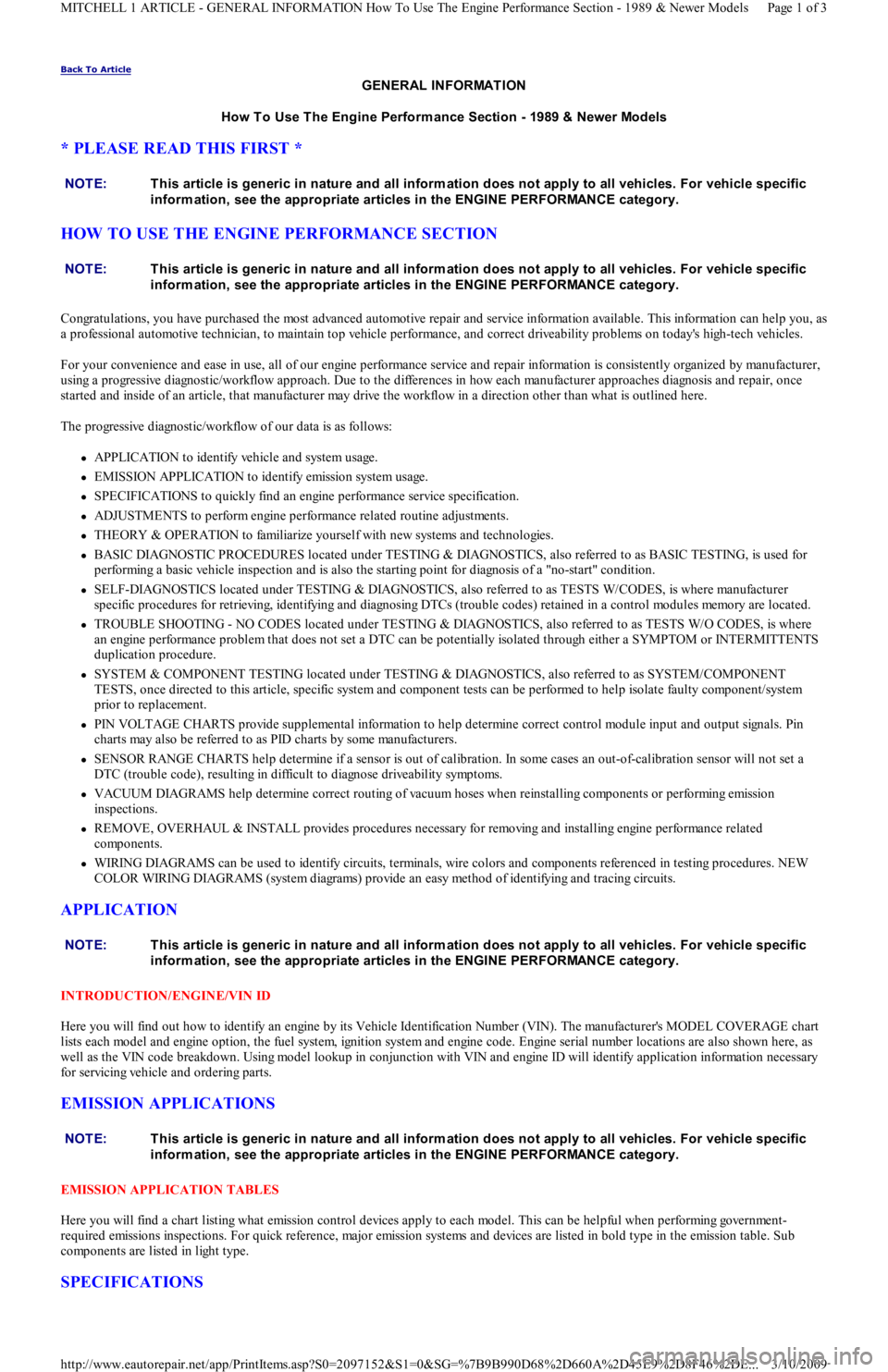
The progressive diagnostic/workflow of our data is as follows:
APPLICATION to identify vehicle and system usage.
EMISSION APPLICATION to identify emission system usage.
SPECIFICATIONS to quickly find an engine performance service specification.
ADJUSTMENTS to perform engine performance related routine adjustments.
THEORY & OPERATION to familiarize yourself with new systems and technologies.
BASIC DIAGNOSTIC PROCEDURES located under TESTING & DIAGNOSTICS, also referred to as BASIC TESTING, is used for
performing a basic vehicle inspection and is also the starting point for diagnosis of a "no-start" condition.
SELF-DIAGNOSTICS located under TESTING & DIAGNOSTICS, also referred to as TESTS W/CODES, is where manufacturer
specific procedures for retrieving, identifying and diagnosing DTCs (trouble codes) retained in a control modules memory are located.
TROUBLE SHOOTING - NO CODES located under TESTING & DIAGNOSTICS, also referred to as TESTS W/O CODES, is where
an engine performance problem that does not set a DTC can be potentially isolated through either a SYMPTOM or INTERMITTENTS
duplication procedure.
SYSTEM & COMPONENT TESTING located under TESTING & DIAGNOSTICS, also referred to as SYSTEM/COMPONENT
TESTS, once directed to this article, specific system and component tests can be performed to help isolate faulty component/system
prior to replacement.
PIN VOLTAGE CHARTS provide supplemental information to help determine correct control module input and output signals. Pin
charts may also be referred to as PID charts by some manufacturers.
SENSOR RANGE CHARTS help determine if a sensor is out of calibration. In some cases an out-of-calibration sensor will not set a
DTC (trouble code), resulting in difficult to diagnose driveability symptoms.
VACUUM DIAGRAMS help determine correct routing of vacuum hoses when reinstalling components or performing emission
inspections.
REMOVE, OVERHAUL & INSTALL provides procedures necessary for removing and installing engine performance related
components.
WIRING DIAGRAMS can be used to identify circuits, terminals, wire colors and components referenced in testing procedures. NEW
COLOR WIRING DIAGRAMS (system diagrams) provide an easy method of identifying and tracing circuits.
APPLICATION
INTRODUCTION/ENGINE/VIN ID
Here you will find out how to identify an engine by its Vehicle Identification Number (VIN). The manufacturer's MODEL COVERAGE chart
lists each model and engine option, the fuel system, ignition system and engine code. Engine serial number locations are also shown here, as
well as the VIN code breakdown. Using model lookup in conjunction with VIN and engine ID will identify application information necessary
for servicing vehicle and ordering parts.
EMISSION APPLICATIONS
EMISSION APPLICATION TABLES
Here you will find a chart listing what emission control devices apply to each model. This can be helpful when performing government-
required emissions inspections. For quick reference, major emission systems and devices are listed in bold type in the emission table. Sub
components are listed in light type.
SPECIFICATIONS
NOTE:T his article is generic in nature and all inform ation does not apply to all vehicles. For vehicle specific
inform ation, see the appropriate articles in the ENGINE PERFORMANCE category.
NOTE:T his article is generic in nature and all inform ation does not apply to all vehicles. For vehicle specific
inform ation, see the appropriate articles in the ENGINE PERFORMANCE category.
NOTE:T his article is generic in nature and all inform ation does not apply to all vehicles. For vehicle specific
inform ation, see the appropriate articles in the ENGINE PERFORMANCE category.
NOTE:T his article is generic in nature and all inform ation does not apply to all vehicles. For vehicle specific
inform ation, see the appropriate articles in the ENGINE PERFORMANCE category.
Page 1 of 3 MITCHELL 1 ARTICLE - GENERAL INFORMATION How To Use The Engine Performance Section - 1989 & Newer Models
3/10/2009 http://www.eautorepair.net/app/PrintItems.asp?S0=2097152&S1=0&SG=%7B9B990D68%2D660A%2D45E9%2D8F46%2DE
...
Page 277 of 454
Here we give you underhood views or schematics of vacuum-hose routing which can help you find incorrectly routed hoses. Remember, a
vacuum leak or incorrectly routed vacuum hose on computer-controlled vehicle can cause many driveability problems.
REMOVAL, OVERHAUL & INSTALLATION
After you've diagnosed the problem, this is where to go for the nuts-and-bolts of the job. Here you'll find procedures and specifications for
removing, overhauling (if available) and installing components.
WIRING DIAGRAMS - ENGINE PERFORMANCE
2002 & EARLIER
On 2002 and earlier models, once ENGINE PERFORMANCE is selected as the service category, the expanded menu will display a WIRING
DIAGRAMS - ENGINE PERFORMANCE heading. Once the wiring diagrams article is selected, select the engine performance wiring
diagrams for your lookup model.
2003 & LATER
On models newer than 2002, we have moved all wiring diagrams under a centralized first level model-specific lookup titled WIRING
DIAGRAMS-ALL. When selected, SYSTEM WIRING DIAGRAMS article will display in the center panel. This article contains all available
wiring diagrams related to the selected vehicle. These same wiring diagrams can also be found under the ELECTRICAL/WIRING DIAGRAMS
heading. NOTE:T his article is generic in nature and all inform ation does not apply to all vehicles. For vehicle specific
inform ation, see the appropriate articles in the ENGINE PERFORMANCE category.
NOTE:T his article is generic in nature and all inform ation does not apply to all vehicles. For vehicle specific
inform ation, see the appropriate articles in the ENGINE PERFORMANCE category.
NOTE:T his article is generic in nature and all inform ation does not apply to all vehicles. For vehicle specific
inform ation, see the appropriate articles in the ENGINE PERFORMANCE category.
NOTE:System Wiring diagram s for have been enhanced to include COLORS. T his will enable you to m ore
easily trace a circuit from its source to its destination, without losing your circuit due to parallel or
intersecting lines. Using these diagram s, you can easily identify and trace com ponent circuits, to help
locate shorts and opens in circuits. T hese diagram s can also help you understand how individual
circuits function within a system .
Copyr ight 2009 Mitchell Repair Information Company, LLC. All Rights Reserved.
Article GUID: A00002340
Page 3 of 3 MITCHELL 1 ARTICLE - GENERAL INFORMATION How To Use The Engine Performance Section - 1989 & Newer Models
3/10/2009 http://www.eautorepair.net/app/PrintItems.asp?S0=2097152&S1=0&SG=%7B9B990D68%2D660A%2D45E9%2D8F46%2DE
...
Page 311 of 454
Fig. 1: Exploded View of Chrysler, Ford & Nippondenso 6-Cyl Compressors
Courtesy of FORD MOTOR CO.
Installation
1. Place dowel pins in compressor. Lubricate inlet reed valve with refrigerant oil. Install inlet reed valve on compressor. Install front valve
plate assembly on compressor.
2. Lubricate shaft seal seat with refrigerant oil. Position Seat Installer (T81P-19623-C) on new seat so installer is placed on raised side of
seat. Install shaft seal seat.
3. Install shaft seal assembly in front head so sealing surface is toward en of compressor shaft. Ensure flat areas on shaft seal assembly
engage with flat areas on compressor shaft.
4. Lubricate front head "O" ring with refrigerant oil. Install front head and "O" ring. Tighten retaining bolts in a crisscross pattern to 19 ft.
lbs. (26 N.m). DO NOT use air tools to tighten retaining bolts.
5. Install clutch assembly. Add same amount new refrigerant oil to compressor as was drained. Install compressor. Evacuate and recharge
system. Perform leak test.
FORD FX-15 10-CYL CLUTCH ASSEMBLY
Removal
1. Discharge system using approved refrigerant recovery/recycling equipment. Remove compressor. Using Spanner (T70P-4067-A), remove
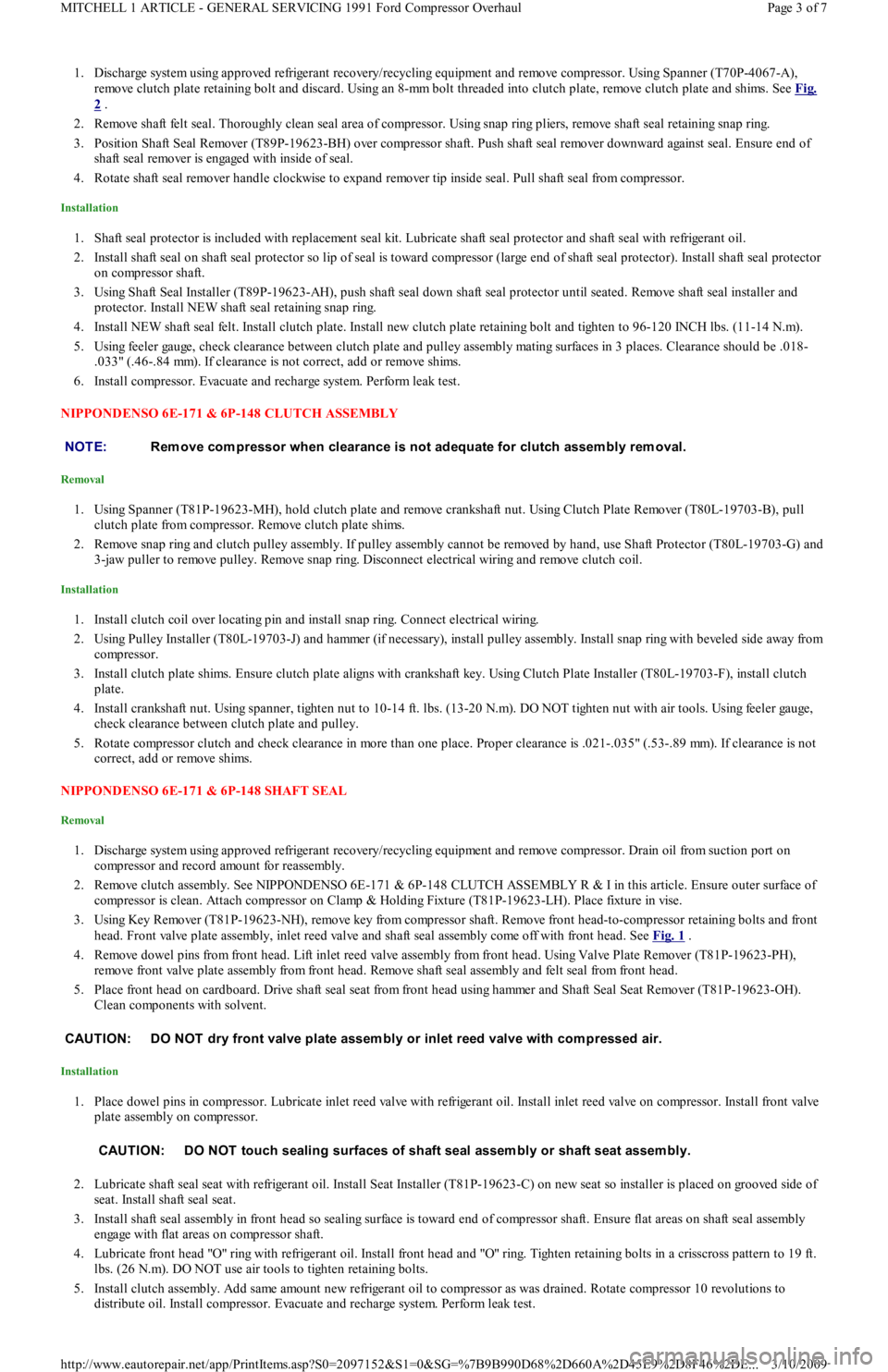
clutch plate retaining bolt and discard. Using an 8-mm bolt threaded into clutch plate, remove clutch plate and shims. See Fig. 2
.
2. Remove snap ring and remove pulley assembly. Disconnect electrical wiring to clutch coil. Install Shaft Protector (T89P-19623-FH) on
nose opening of compressor.
3. Install 2-jaw puller on compressor. Ensure puller screw is engaged in center of shaft protector. Tighten puller to remove clutch coil from
compressor. DO NOT use air tools when removing clutch coil.
Installation
1. Ensure clutch coil mounting surface is clean. Install clutch coil. Ensure electrical connection is correctly positioned. Install Coil
Installer (T89P-19623-EH) over compressor nose and inner diameter of clutch coil.
2. Install 2-jaw puller on compressor and coil installer. Jaws on puller should engage with compressor front mounts and pressure screw
centered on coil installer.
3. Tighten pressure screw and install clutch coil. DO NOT use air tools when installing clutch coil.
4. Install pulley and snap ring. Install snap ring with beveled side away from compressor. Install shims and clutch plate. Install NEW
clutch plate retaining bolt and tighten to 96-120 INCH lbs. (11-14 N.m).
5. Using a feeler gauge, check clearance between clutch plate and pulley assembly mating surfaces in 3 places. Clearance should be .018-
.033" (.46-.84 mm). If clearance is not correct, add or remove shims.
6. Install compressor. Evacuate and recharge system. Perform leak test.
Fig. 2: View of Ford FX
-15 10-Cyl Compressor Clutch Assembly
Courtesy of FORD MOTOR CO.
FORD FX-15 10-CYL SHAFT SEAL
Removal
CAUT ION: DO NOT dry front valve plate assem bly or inlet reed valve with com pressed air.
CAUT ION: DO NOT touch sealing surfaces of shaft seal or shaft seat assem bly.
NOTE:When new clutch assem bly is installed, cycle clutch assem bly 10 tim es with engine at idle to burnish
clutch and prevent slippage.
Page 2 of 7 MITCHELL 1 ARTICLE - GENERAL SERVICING 1991 Ford Compressor Overhaul
3/10/2009 http://www.eautorepair.net/app/PrintItems.asp?S0=2097152&S1=0&SG=%7B9B990D68%2D660A%2D45E9%2D8F46%2DE
...
Page 312 of 454
1. Discharge system using approved refrigerant recovery/recycling equipment and remove compressor. Using Spanner (T70P-4067-A),
remove clutch plate retaining bolt and discard. Using an 8-mm bolt threaded into clutch plate, remove clutch plate and shims. See Fig.
2 .
2. Remove shaft felt seal. Thoroughly clean seal area of compressor. Using snap ring pliers, remove shaft seal retaining snap ring.
3. Position Shaft Seal Remover (T89P-19623-BH) over compressor shaft. Push shaft seal remover downward against seal. Ensure end of
shaft seal remover is engaged with inside of seal.
4. Rotate shaft seal remover handle clockwise to expand remover tip inside seal. Pull shaft seal from compressor.
Installation
1. Shaft seal protector is included with replacement seal kit. Lubricate shaft seal protector and shaft seal with refrigerant oil.
2. Install shaft seal on shaft seal protector so lip of seal is toward compressor (large end of shaft seal protector). Install shaft seal protector
on compressor shaft.
3. Using Shaft Seal Installer (T89P-19623-AH), push shaft seal down shaft seal protector until seated. Remove shaft seal installer and
protector. Install NEW shaft seal retaining snap ring.
4. Install NEW shaft seal felt. Install clutch plate. Install new clutch plate retaining bolt and tighten to 96-120 INCH lbs. (11-14 N.m).
5. Using feeler gauge, check clearance between clutch plate and pulley assembly mating surfaces in 3 places. Clearance should be .018-
.033" (.46-.84 mm). If clearance is not correct, add or remove shims.
6. Install compressor. Evacuate and recharge system. Perform leak test.
NIPPONDENSO 6E-171 & 6P-148 CLUTCH ASSEMBLY
Removal
1. Using Spanner (T81P-19623-MH), hold clutch plate and remove crankshaft nut. Using Clutch Plate Remover (T80L-19703-B), pull
clutch plate from compressor. Remove clutch plate shims.
2. Remove snap ring and clutch pulley assembly. If pulley assembly cannot be removed by hand, use Shaft Protector (T80L-19703-G) and
3-jaw puller to remove pulley. Remove snap ring. Disconnect electrical wiring and remove clutch coil.
Installation
1. Install clutch coil over locating pin and install snap ring. Connect electrical wiring.
2. Using Pulley Installer (T80L-19703-J) and hammer (if necessary), install pulley assembly. Install snap ring with beveled side away from
compressor.
3. Install clutch plate shims. Ensure clutch plate aligns with crankshaft key. Using Clutch Plate Installer (T80L-19703-F), install clutch
plate.
4. Install crankshaft nut. Using spanner, tighten nut to 10-14 ft. lbs. (13-20 N.m). DO NOT tighten nut with air tools. Using feeler gauge,
check clearance between clutch plate and pulley.
5. Rotate compressor clutch and check clearance in more than one place. Proper clearance is .021-.035" (.53-.89 mm). If clearance is not
correct, add or remove shims.
NIPPONDENSO 6E-171 & 6P-148 SHAFT SEAL
Removal
1. Discharge system using approved refrigerant recovery/recycling equipment and remove compressor. Drain oil from suction port on
compressor and record amount for reassembly.
2. Remove clutch assembly. See NIPPONDENSO 6E-171 & 6P-148 CLUTCH ASSEMBLY R & I in this article. Ensure outer surface of
compressor is clean. Attach compressor on Clamp & Holding Fixture (T81P-19623-LH). Place fixture in vise.
3. Using Key Remover (T81P-19623-NH), remove key from compressor shaft. Remove front head-to-compressor retaining bolts and front
head. Front valve plate assembly, inlet reed valve and shaft seal assembly come off with front head. See Fig. 1
.
4. Remove dowel pins from front head. Lift inlet reed valve assembly from front head. Using Valve Plate Remover (T81P-19623-PH),
remove front valve plate assembly from front head. Remove shaft seal assembly and felt seal from front head.
5. Place front head on cardboard. Drive shaft seal seat from front head using hammer and Shaft Seal Seat Remover (T81P-19623-OH).
Clean components with solvent.
Installation
1. Place dowel pins in compressor. Lubricate inlet reed valve with refrigerant oil. Install inlet reed valve on compressor. Install front valve
plate assembly on compressor.
2. Lubricate shaft seal seat with refrigerant oil. Install Seat Installer (T81P-19623-C) on new seat so installer is placed on grooved side of
seat. Install shaft seal seat.
3. Install shaft seal assembly in front head so sealing surface is toward end of compressor shaft. Ensure flat areas on shaft seal assembly
engage with flat areas on compressor shaft.
4. Lubricate front head "O" ring with refrigerant oil. Install front head and "O" ring. Tighten retaining bolts in a crisscross pattern to 19 ft.
lbs. (26 N.m). DO NOT use air tools to tighten retaining bolts.
5. Install clutch assembly. Add same amount new refrigerant oil to compressor as was drained. Rotate compressor 10 revolutions to
distribute oil. Install compressor. Evacuate and recharge system. Perform leak test. NOTE:Rem ove com pressor when clearance is not adequate for clutch assem bly rem oval.
CAUT ION: DO NOT dry front valve plate assem bly or inlet reed valve with com pressed air.
CAUT ION: DO NOT touch sealing surfaces of shaft seal assem bly or shaft seat assem bly.
Page 3 of 7 MITCHELL 1 ARTICLE - GENERAL SERVICING 1991 Ford Compressor Overhaul
3/10/2009 http://www.eautorepair.net/app/PrintItems.asp?S0=2097152&S1=0&SG=%7B9B990D68%2D660A%2D45E9%2D8F46%2DE
...
Page 313 of 454
NIPPONDENSO 10P13 CLUTCH ASSEMBLY
Removal
1. Discharge system using approved refrigerant recovery/recycling equipment and remove compressor. Using Clutch Holder (1014), hold
clutch plate and remove crankshaft nut. Using Clutch Plate Remover (T80L-19703-B), pull clutch plate from compressor. Remove
clutch plate shims.
2. Remove snap ring and pulley assembly. If pulley assembly cannot be removed by hand, use Shaft Protector (T80L-19703-G) and 3-jaw
puller to remove pulley. Remove snap ring. Disconnect electrical wiring and remove clutch coil.
Installation
1. Install clutch coil over locating pin. Install snap ring with beveled side away from compressor.
2. Install pulley assembly using Pulley Installer (T80L-19703-J) and hammer (if necessary). Install snap ring with beveled side away from
compressor.
3. Install clutch plate shims. Ensure clutch plate aligns with crankshaft key. Install clutch plate using Clutch Plate Installer (T80L-19703-
F).
4. Install crankshaft nut. Using spanner, tighten nut to 10-14 ft. lbs. (13-20 N.m). DO NOT tighten nut with air tools. Using feeler gauge,
check clearance between clutch plate and pulley.
5. Rotate compressor clutch and check clearance in more than one place. Proper clearance is .021-.036" (.53-.91 mm). If clearance is not
correct, add or remove shims.
6. Add same amount new refrigerant oil to compressor as was drained. Rotate compressor 10 revolutions to distribute oil. Install
compressor. Evacuate and recharge system. Perform leak test.
NIPPONDENSO 10P13 SHAFT SEAL
Removal
1. Discharge system using approved refrigerant recovery/recycling equipment and remove compressor. Drain oil from compressor and
record amount for reassembly. Using Clutch Holder (1014), hold clutch plate and remove crankshaft nut.
2. Pull clutch plate from compressor using Clutch Plate Remover (T80L-19703-B). Remove clutch plate shims. Clean compressor area
around seal. Remove felt packing and dust seal retainer from nose of front cover. See Fig. 3
.
3. Using Key Remover (T81P-19623-NH), remove key from compressor shaft. Remove seal seat retaining snap ring. Remove seal seat from
compressor using Seal Seat Remover/Installer (T87P-19623-B).
4. Place Seal Remover/Installer (T87P-19623-C) on compressor. Rotate seal remover/installer clockwise until tangs engage in seal. Pull
seal from compressor.
Installation
1. Lubricate shaft seal, seal seat and inside of compressor nose with refrigerant oil. Install Seal Protector (T71P-19703-H) over compressor
shaft. Using seal remover/installer, install shaft seal in compressor.
2. Rotate seal on compressor shaft to align flat areas on seal with those on compressor shaft.
3. Using seal seat remover/installer, install seal seat until it contacts seal. Install snap ring. Install key in crankshaft with rounded edge
inward.
4. Install clutch plate shims. Ensure clutch plate is aligned with crankshaft key. Using Clutch Plate Installer (T80L-19703-F), install clutch
plate.
5. Install crankshaft nut. Using spanner, tighten nut to 10-14 ft. lbs. (13-20 N.m). DO NOT tighten nut with air tools. Using feeler gauge,
check clearance between clutch plate and pulley.
6. Rotate compressor clutch and check clearance in more than one place. Proper clearance is .021-.036" (.53-.91 mm). If clearance is not
correct, add or remove shims.
7. Add same amount new refrigerant oil to compressor as was drained. Rotate compressor 10 revolutions to distribute oil in compressor.
Install compressor. Evacuate and recharge system. Perform leak test. NOTE:After installing new clutch, cycle clutch 10 tim es with engine at idle speed to prevent clutch slippage.
Page 4 of 7 MITCHELL 1 ARTICLE - GENERAL SERVICING 1991 Ford Compressor Overhaul
3/10/2009 http://www.eautorepair.net/app/PrintItems.asp?S0=2097152&S1=0&SG=%7B9B990D68%2D660A%2D45E9%2D8F46%2DE
...
Page 314 of 454
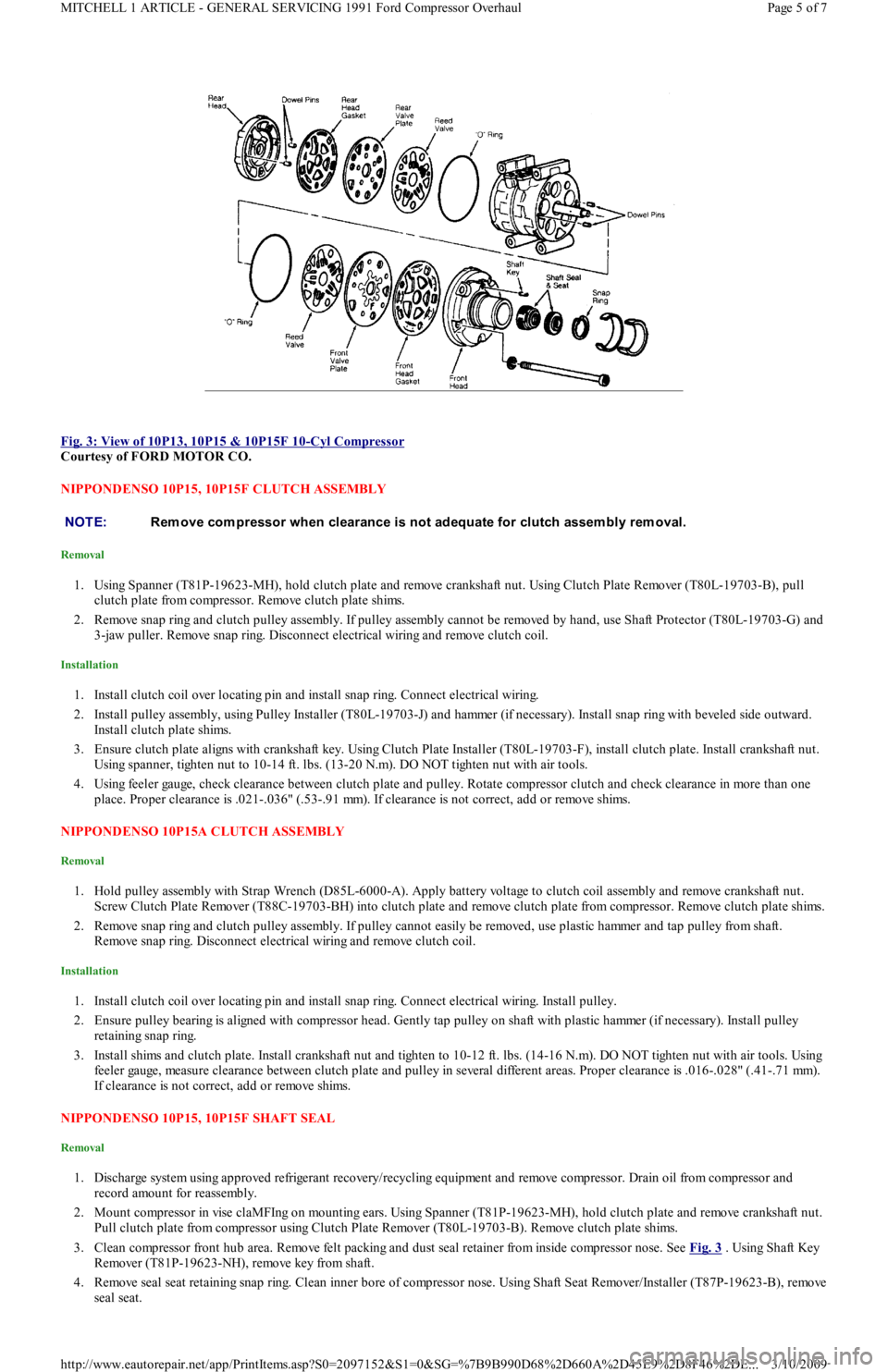
Fig. 3: View of 10P13, 10P15 & 10P15F 10
-Cyl Compressor
Courtesy of FORD MOTOR CO.
NIPPONDENSO 10P15, 10P15F CLUTCH ASSEMBLY
Removal
1. Using Spanner (T81P-19623-MH), hold clutch plate and remove crankshaft nut. Using Clutch Plate Remover (T80L-19703-B), pull
clutch plate from compressor. Remove clutch plate shims.
2. Remove snap ring and clutch pulley assembly. If pulley assembly cannot be removed by hand, use Shaft Protector (T80L-19703-G) and
3-jaw puller. Remove snap ring. Disconnect electrical wiring and remove clutch coil.
Installation
1. Install clutch coil over locating pin and install snap ring. Connect electrical wiring.
2. Install pulley assembly, using Pulley Installer (T80L-19703-J) and hammer (if necessary). Install snap ring with beveled side outward.
Install clutch plate shims.
3. Ensure clutch plate aligns with crankshaft key. Using Clutch Plate Installer (T80L-19703-F), install clutch plate. Install crankshaft nut.
Using spanner, tighten nut to 10-14 ft. lbs. (13-20 N.m). DO NOT tighten nut with air tools.
4. Using feeler gauge, check clearance between clutch plate and pulley. Rotate compressor clutch and check clearance in more than one
place. Proper clearance is .021-.036" (.53-.91 mm). If clearance is not correct, add or remove shims.
NIPPONDENSO 10P15A CLUTCH ASSEMBLY
Removal
1. Hold pulley assembly with Strap Wrench (D85L-6000-A). Apply battery voltage to clutch coil assembly and remove crankshaft nut.
Screw Clutch Plate Remover (T88C-19703-BH) into clutch plate and remove clutch plate from compressor. Remove clutch plate shims.
2. Remove snap ring and clutch pulley assembly. If pulley cannot easily be removed, use plastic hammer and tap pulley from shaft.
Remove snap ring. Disconnect electrical wiring and remove clutch coil.
Installation
1. Install clutch coil over locating pin and install snap ring. Connect electrical wiring. Install pulley.
2. Ensure pulley bearing is aligned with compressor head. Gently tap pulley on shaft with plastic hammer (if necessary). Install pulley
retaining snap ring.
3. Install shims and clutch plate. Install crankshaft nut and tighten to 10-12 ft. lbs. (14-16 N.m). DO NOT tighten nut with air tools. Using
feeler gauge, measure clearance between clutch plate and pulley in several different areas. Proper clearance is .016-.028" (.41-.71 mm).
If clearance is not correct, add or remove shims.
NIPPONDENSO 10P15, 10P15F SHAFT SEAL
Removal
1. Discharge system using approved refrigerant recovery/recycling equipment and remove compressor. Drain oil from compressor and
record amount for reassembly.
2. Mount compressor in vise claMFIng on mounting ears. Using Spanner (T81P-19623-MH), hold clutch plate and remove crankshaft nut.
Pull clutch plate from compressor using Clutch Plate Remover (T80L-19703-B). Remove clutch plate shims.
3. Clean compressor front hub area. Remove felt packing and dust seal retainer from inside compressor nose. See Fig. 3
. Using Shaft Key
Remover (T81P-19623-NH), remove key from shaft.
4. Remove seal seat retaining snap ring. Clean inner bore of compressor nose. Using Shaft Seat Remover/Installer (T87P-19623-B), remove
seal seat.
NOTE:Rem ove com pressor when clearance is not adequate for clutch assem bly rem oval.
Page 5 of 7 MITCHELL 1 ARTICLE - GENERAL SERVICING 1991 Ford Compressor Overhaul
3/10/2009 http://www.eautorepair.net/app/PrintItems.asp?S0=2097152&S1=0&SG=%7B9B990D68%2D660A%2D45E9%2D8F46%2DE
...
Page 315 of 454
5. Using Shaft Seal Remover/Installer (T87P-19623-C), remove seal by pushing downward on shaft seal remover/installer and rotating
clockwise to engage seal tangs. Pull seal from compressor.
Installation
1. Place Shaft Seal Protector (T71P-19703-H) over compressor shaft. Lubricate shaft seal and nose of compressor with new refrigerant oil.
DO NOT touch sealing surface of seal or shaft. Engage seal tangs on shaft seal remover/installer.
2. Align flats of seal with flats on crankshaft and push new seal on compressor shaft. Push downward on shaft seal remover/installer and
turn counterclockwise to disengage seal tangs.
3. Attach shaft seal seat to shaft seal seat remover/installer and lubricate with new refrigerant oil. Install seal seat and push inward against
seal. Install seal seat retaining snap ring.
4. Install dust seal retainer and felt packing. Install clutch plate shims. Ensure clutch plate aligns with crankshaft key. Using Clutch Plate
Installer (T80L-19703-F), install clutch plate.
5. Install crankshaft nut. Using spanner to hold clutch, tighten crankshaft nut to 10-14 ft. lbs. (13-20 N.m). DO NOT tighten nut with air
tools.
6. Using feeler gauge, check clearance between clutch plate and pulley. Rotate compressor clutch and check clearance in more than one
place. Proper clearance is .021-.036" (.53-.91 mm). If clearance is not correct, add or remove shims.
7. Add same amount new refrigerant oil to compressor as was drained. Rotate compressor 10 revolutions to distribute oil. Install
compressor. Evacuate and recharge system. Perform leak test.
NIPPONDENSO 10P15A SHAFT SEAL
Removal
1. Discharge system using approved refrigerant recovery/recycling equipment and remove compressor. Drain oil from compressor and
record amount for reassembly. Remove clutch assembly. See NIPPONDENSO 10P15A CLUTCH ASSEMBLY R & I in this article.
2. Remove manifold assembly from top of compressor. Clean compressor front hub area. Using Ring Remover (T71P-19703-C), remove
retaining ring from front of compressor shaft.
3. Remove felt seal from front of compressor. Remove front head retaining bolts and front head from compressor. Remove snap ring fro m
rear of front head. Remove seal from rear of front head.
Installation
1. Install seal and snap ring in front head. Install front head on compressor. Tighten bolts to 18-20 ft. lbs. (24-27 N.m). Install felt packing
and retaining ring.
2. Install manifold assembly and tighten bolts to 18-20 ft. lbs. (24-27 N.m). Add same amount of new refrigerant oil to compressor as that
drained from compressor. Rotate compressor 10 revolutions to distribute oil in compressor. Install compressor. Evacuate and recharge
system. Perform leak test.
NIPPONDENSO 10PA17 & 10PA17A CLUTCH ASSEMBLY
Removal
1. Remove compressor shaft bolt and discard. Remove clutch plate and shims. If clutch hub cannot be removed by hand, thread a 8-mm
bolt in center of clutch plate. Tighten bolt and remove clutch plate.
2. Remove pulley assembly retaining snap ring. Remove pulley assembly. Remove snap ring and disconnect clutch coil electrical wiring.
Remove clutch coil.
Installation
1. Install clutch coil so pin in back of coil aligns with hole in front housing. Install snap ring with beveled side away from compressor.
2. Install pulley assembly. Install snap ring with beveled side away from compressor. Coat splines of compressor shaft with White grease. I
f
reusing original clutch plate and pulley, old shims can be used.
3. If installing new components, install one thin shim. Install clutch plate. Tighten compressor shaft bolt to 10 ft. lbs. (14 N.m). DO NOT
air tools to tighten bolt.
4. Using feeler gauge, measure air gap between clutch plate and pulley surface in 3 areas. Proper clearance is .014-.026" (.35-.66 mm).
Adjust shim thickness to obtain correct clearance.
5. Once compressor shaft bolt is tightened, recheck clearance between clutch plate and pulley surface in 4 places. Readjust clearance if
necessary.
NIPPONDENSO 10PA17 & 10PA17A SHAFT SEAL
Removal
1. Discharge system using approved refrigerant recovery/recycling equipment and remove compressor. Drain oil from compressor and
record amount for reassembly. Install compressor in Holding Fixture (T89P-19623-D) and clamp fixture in a vise.
2. Remove clutch assembly. See NIPPONDENSO 10PA17 & 10PA17A CLUTCH ASSEMBLY R & I in this article. Remove front head
retaining bolts. Separate front head from compressor, using care not to scratch sealing surface. See Fig. 4
.
3. Using "O" Ring Remover (T71P-19703-C), remove felt dust seal and dust seal retainer from front head. Remove shaft seal retaining snap
ring. Position front head (nose up) on cardboard placed on a flat surface. Using Shaft Seal Remover (T89P-19623-E), push shaft seal
from front head. NOTE:After installing new clutch, ensure voltage is correct and cycle clutch with 5 seconds on and 5 seconds
off. Repeat cycle for approxim ately 20 tim es with A/C on, blower fan on high speed and engine RPM at
1500-2000. T his provides better clutch torque capability.
Page 6 of 7 MITCHELL 1 ARTICLE - GENERAL SERVICING 1991 Ford Compressor Overhaul
3/10/2009 http://www.eautorepair.net/app/PrintItems.asp?S0=2097152&S1=0&SG=%7B9B990D68%2D660A%2D45E9%2D8F46%2DE
...
Page 345 of 454
Back To Article
HEAT ER SYST EM
1990-92 HEAT ER SYST EMS Ford Motor Co.
DESCRIPTION
The heater system consists of control panel, blower case, heater case, air control doors and ducts. The control panel incorporates 3 control
levers and a 3-speed fan switch. The control panel is located in the center of the instrument panel. All air control doors are cable operated
from the control panel.
The blower case is mounted on the bulkhead, behind the instrument panel on passenger's side of vehicle. The blower case houses a blower
motor, blower motor resistor and the fresh/recirculation air door. The heater case contains mode select door, temperature air mix door and
heater core.
OPERATION
Three control levers, temperature mix, fresh/recirculation and mode select, mechanically operate their associated cables and doors. The
temperature control lever adjusts the mix of fresh or recirculated air with heated air. In full heat position, all airflow goes through the heater
core.
In full cool position, the mix air door closes, allowing airflow to by-pass the heater core. The mode select lever, directs airflow to selected
vents. The fresh/recirculation control lever allows selection of fresh (outside) air or recirculated compartment air.
AJUSTMENT
FRESH/RECIRCULATION CONTROL CABLE
Remove the glove box. Remove fresh/recirculation cable retaining clip. Move control lever to RECIRCULATION position, while holding the
lever door in RECIRCULATION position. Ensure control lever does not move. Install fresh/recirculation cable retaining clip.
MODE SELECT CABLE
Remove mode select cable retaining clip. Move mode select lever to VENT position. Hold mode select lever downward against its stop.
Ensure that mode select lever does not move. Install mode select cable retaining clip.
TEMPERATURE CONTROL CABLE
Set temperature control lever to maximum cold position. Remove temperature cable retaining clip. Hold temperature control lever upward and
against its stop. Ensure that temperature lever does not move. Install temperature cable retaining clip.
TROUBLE SHOOTING
BLOWER MOTOR INOPERATIVE
Check blown motor fuse. Check for defective blower motor and/or blower motor resistor. Check blower motor switch. Check for open in
ground wire. Check for loose electrical connectors or poor connections. See WIRING DIAGRAMS
in this article.
BLOWER DOES NOT CHANGE SPEED
Check for defective blower motor. Check blower motor wiring harness. Check blower motor resistor. Check for blower motor fan switch. See
WIRING DIAGRAMS
in this article.
BLOWER RUNS CONSTANTLY
Check for defective blower motor resistor. Check for short in blower switch or wiring. See WIRING DIAGRAMS
in this article.
HEATER TEMPERATURE INSUFFICIENT
Check for proper coolant level. Check water pump for noise, leaks or wear. Check heater hoses for leaks or restrictions. Check heater core for
leaks, plugs or restrictions. Check inlet and outlet heater hoses for hot water flow. Check thermostat condition and operation. Check air mix
door position and adjust cable if necessary.
IMPROPER WARM AIR DISTRIBUTION
Check air mix door position. Adjust cable as necessary. Check function control door position. Adjust cable as necessary. Check for restriction
in ventilation air duct assembly. Repair as necessary.
TESTING BLOWER MOTOR & RESISTOR
1. Ensure 15-amp blower motor fuse is okay. Using voltmeter, check for battery voltage at blower motor Blue/Yellow terminal. If battery
voltage is present, go to next step. If battery voltage is not present, repair open in Blue/Yellow wire between blower motor and fuse box.
2. Disconnect blower motor connector. Using a jumper wire, apply battery voltage to Blue/Yellow terminal and ground the Blue/Red
terminal. If blower motor does not run, replace blower motor. If blower motor runs, go to next step.
3. Reconnect blower motor connector. Turn ignition on. Turn blower motor off. Disconnect the blower motor resistor connector. Using a
voltmeter, measure voltage at Blue/Red terminal of resistor connector. If battery voltage is not present, repair open in Blue/Red wire
between resistor and blower motor. If voltage is present, go to next step.
4. Using a jumper wire, ground Blue/Black, Blue/Yellow and Blue/White terminals of the blower fan switch one at a time. If the motor
runs at 3 different speeds, go to next step. If not, repair open in wire that failed to operate blower motor.
Page 1 of 4 MITCHELL 1 ARTICLE - HEATER SYSTEM 1990-92 HEATER SYSTEMS Ford Motor Co.
3/10/2009 http://www.eautorepair.net/app/PrintItems.asp?S0=2097152&S1=0&SG=%7B9B990D68%2D660A%2D45E9%2D8F46%2DE
...