battery FORD FIESTA 2011 User Guide
[x] Cancel search | Manufacturer: FORD, Model Year: 2011, Model line: FIESTA, Model: FORD FIESTA 2011Pages: 356, PDF Size: 3.12 MB
Page 110 of 356
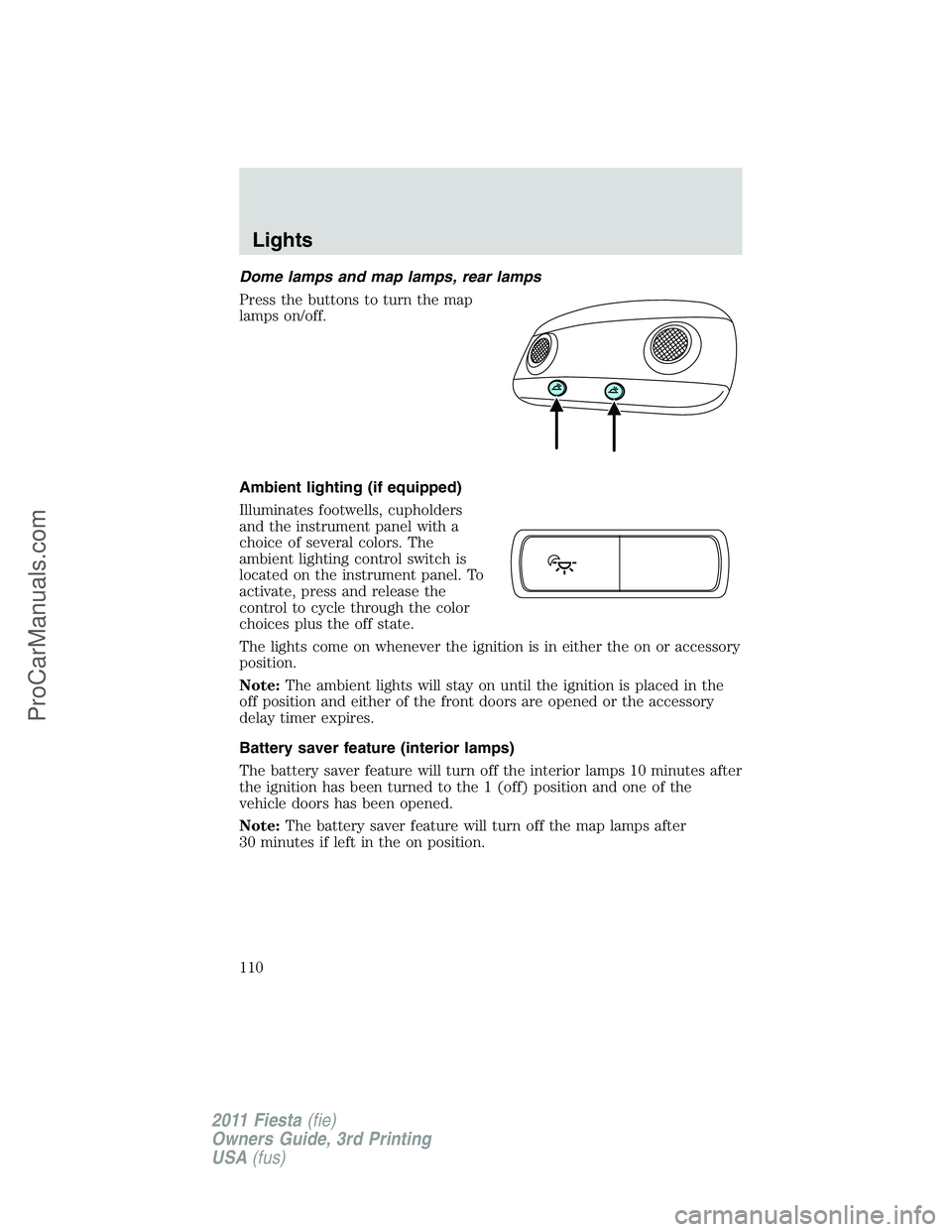
Dome lamps and map lamps, rear lamps
Press the buttons to turn the map
lamps on/off.
Ambient lighting (if equipped)
Illuminates footwells, cupholders
and the instrument panel with a
choice of several colors. The
ambient lighting control switch is
located on the instrument panel. To
activate, press and release the
control to cycle through the color
choices plus the off state.
The lights come on whenever the ignition is in either the on or accessory
position.
Note:The ambient lights will stay on until the ignition is placed in the
off position and either of the front doors are opened or the accessory
delay timer expires.
Battery saver feature (interior lamps)
The battery saver feature will turn off the interior lamps 10 minutes after
the ignition has been turned to the 1 (off) position and one of the
vehicle doors has been opened.
Note:The battery saver feature will turn off the map lamps after
30 minutes if left in the on position.
Lights
110
2011 Fiesta(fie)
Owners Guide, 3rd Printing
USA(fus)
ProCarManuals.com
Page 123 of 356
Note:Do not plug optional electrical accessories into the cigarette
lighter socket (if equipped). Improper use of the lighter can cause
damage not covered by your warranty, and can result in fire or serious
injury.
To prevent the fuse from being blown, do not use the power point(s)
over the vehicle capacity of 12V DC/180W. If the power point or cigar
lighter socket is not working, a fuse may have blown. Refer toFuses and
relaysin theRoadside Emergencieschapter for information on
checking and replacing fuses.
To have full capacity usage of your power point, the engine is required to
be running to avoid unintentional discharge of the battery. To prevent
the battery from being discharged:
•do not use the power point longer than necessary when the engine is
not running,
•do not leave battery chargers, video game adapters, computers and
other devices plugged in overnight or when the vehicle is parked for
extended periods.
Always keep the power point caps closed when not being used.
POWER WINDOWS (IF EQUIPPED)
WARNING:Do not leave children unattended in the vehicle and
do not let children play with the power windows. They may
seriously injure themselves.
WARNING:When closing the power windows, you should verify
they are free of obstructions and ensure that children and/or
pets are not in the proximity of the window openings.
Driver Controls
123
2011 Fiesta(fie)
Owners Guide, 3rd Printing
USA(fus)
ProCarManuals.com
Page 125 of 356
3. If the window does not close after the third attempt, contact your
authorized dealer as soon as possible.
Resetting the bounce-back feature
WARNING:The bounce-back function is deactivated until you
have reset the memory.
After the battery has been disconnected from the vehicle you must reset
the bounce-back memory:
1. Pull up the switch and hold until the window is fully closed then
release the switch.
2. Pull up the switch again for one more second.
3. Press and hold the switch until the window is fully open, then release
the switch.
4. Pull up the switch and hold until the window is fully closed.
5. Open the window and try to close it automatically.
6. Reset and repeat procedure if the window does not close
automatically.
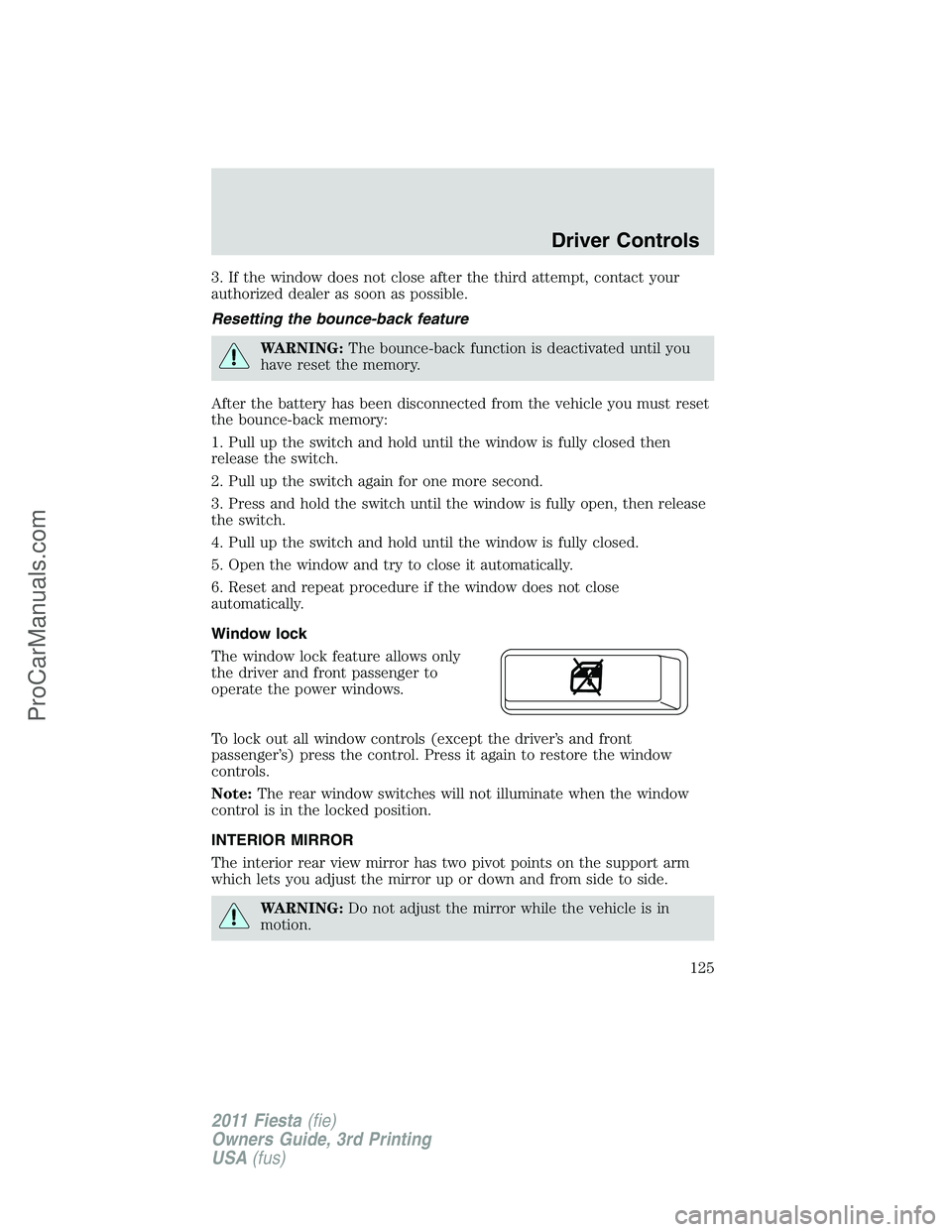
Window lock
The window lock feature allows only
the driver and front passenger to
operate the power windows.
To lock out all window controls (except the driver’s and front
passenger’s) press the control. Press it again to restore the window
controls.
Note:The rear window switches will not illuminate when the window
control is in the locked position.
INTERIOR MIRROR
The interior rear view mirror has two pivot points on the support arm
which lets you adjust the mirror up or down and from side to side.
WARNING:Do not adjust the mirror while the vehicle is in
motion.
Driver Controls
125
2011 Fiesta(fie)
Owners Guide, 3rd Printing
USA(fus)
ProCarManuals.com
Page 139 of 356
•arm and disarm the perimeter anti-theft system.
•operate the illuminated entry feature.
The remote entry lock/unlock feature operates in any ignition position
except when the engine is running and vehicle speed is more than 4 mph
(7 km/h).
If there are problems with the remote entry system, make sure to take
ALL integrated keyhead transmitters or intelligent access keys
with you to the authorized dealer in order to aid in troubleshooting the
problem.
Intelligent Access (if equipped)
Your vehicle will allow you to unlock and enter your vehicle without
actively using a key or transmitter. You can use the intelligent access
feature at the driver door, passenger front door or at the trunk. You can
activate the intelligent access feature as long as you have one of your
intelligent access keys within range of the driver door, passenger front
door or the trunk.
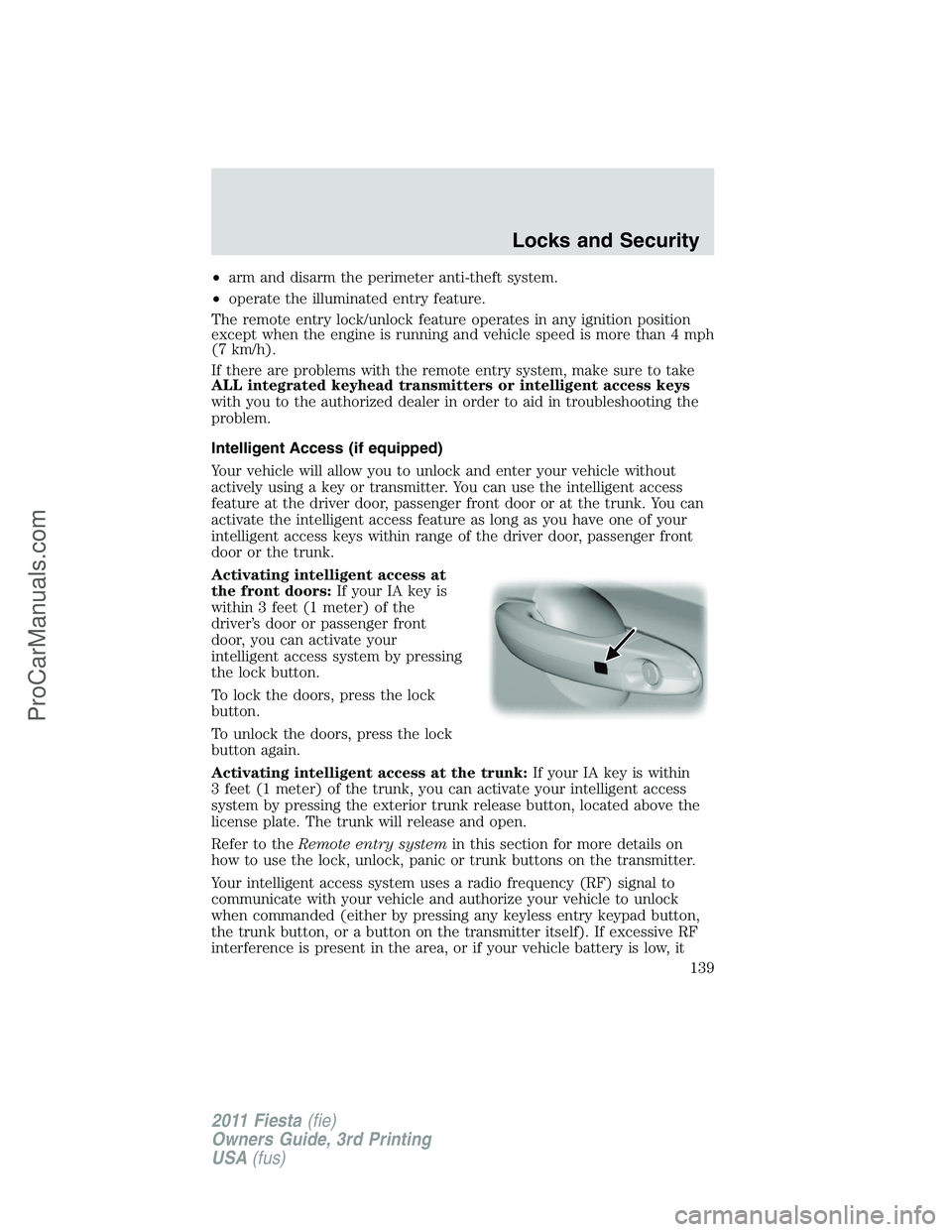
Activating intelligent access at
the front doors:If your IA key is
within 3 feet (1 meter) of the
driver’s door or passenger front
door, you can activate your
intelligent access system by pressing
the lock button.
To lock the doors, press the lock
button.
To unlock the doors, press the lock
button again.
Activating intelligent access at the trunk:If your IA key is within
3 feet (1 meter) of the trunk, you can activate your intelligent access
system by pressing the exterior trunk release button, located above the
license plate. The trunk will release and open.
Refer to theRemote entry systemin this section for more details on
how to use the lock, unlock, panic or trunk buttons on the transmitter.
Your intelligent access system uses a radio frequency (RF) signal to
communicate with your vehicle and authorize your vehicle to unlock
when commanded (either by pressing any keyless entry keypad button,
the trunk button, or a button on the transmitter itself). If excessive RF
interference is present in the area, or if your vehicle battery is low, it
Locks and Security
139
2011 Fiesta(fie)
Owners Guide, 3rd Printing
USA(fus)
ProCarManuals.com
Page 140 of 356
may be necessary to mechanically unlock your door. The mechanical key
blade in your IA key can be used to open the driver’s door in this
situation (refer toIntelligent access keyin this chapter for more
information on the location and use of the mechanical key blade).
A mechanical key is needed for access if the IA key battery or vehicle
battery is low.
Push button start:Your vehicle is equipped with a push button start
system, which allows you to start your vehicle without using a key. To
operate the push button start system and start your vehicle, your IA key
must be present inside the vehicle, either in the passenger compartment
or in the trunk. Refer toPush button start systemin theDriving
chapter.
Unlocking the doors/two-stage unlock
1. Press
and release to unlock the driver’s door.Note:The interior
lamps will illuminate and the parking lamps will flash.
2. Press
and release again within three seconds to unlock all the
doors.
Two-stage unlock disable
Disabling two-stage unlock allows all vehicle doors to unlock
simultaneously.
Two-stage unlocking may be disabled or re-enabled by simultaneously
pressing the
andcontrols on the transmitter for three seconds.
The park lamps will illuminate twice to indicate that two-stage unlock
was enabled or disabled.
Locking the doors
•Pressand release to lock all the doors. If all doors are closed the
turn signal lamps will flash twice.
Opening the luggage compartment
Press
twice (within 3 seconds) to open the luggage compartment.
Note:This feature will not operate when the engine is running and
vehicle speed is more than 4 mph (7 km/h).
•Ensure that the trunk is closed and latched before driving your
vehicle. Failure to properly latch the trunk may cause objects to fall
out or block the driver’s rear view.
Replacing the battery
The remote entry transmitter uses one coin type three-volt lithium
battery CR2032 or equivalent.
Locks and Security
140
2011 Fiesta(fie)
Owners Guide, 3rd Printing
USA(fus)
ProCarManuals.com
Page 141 of 356
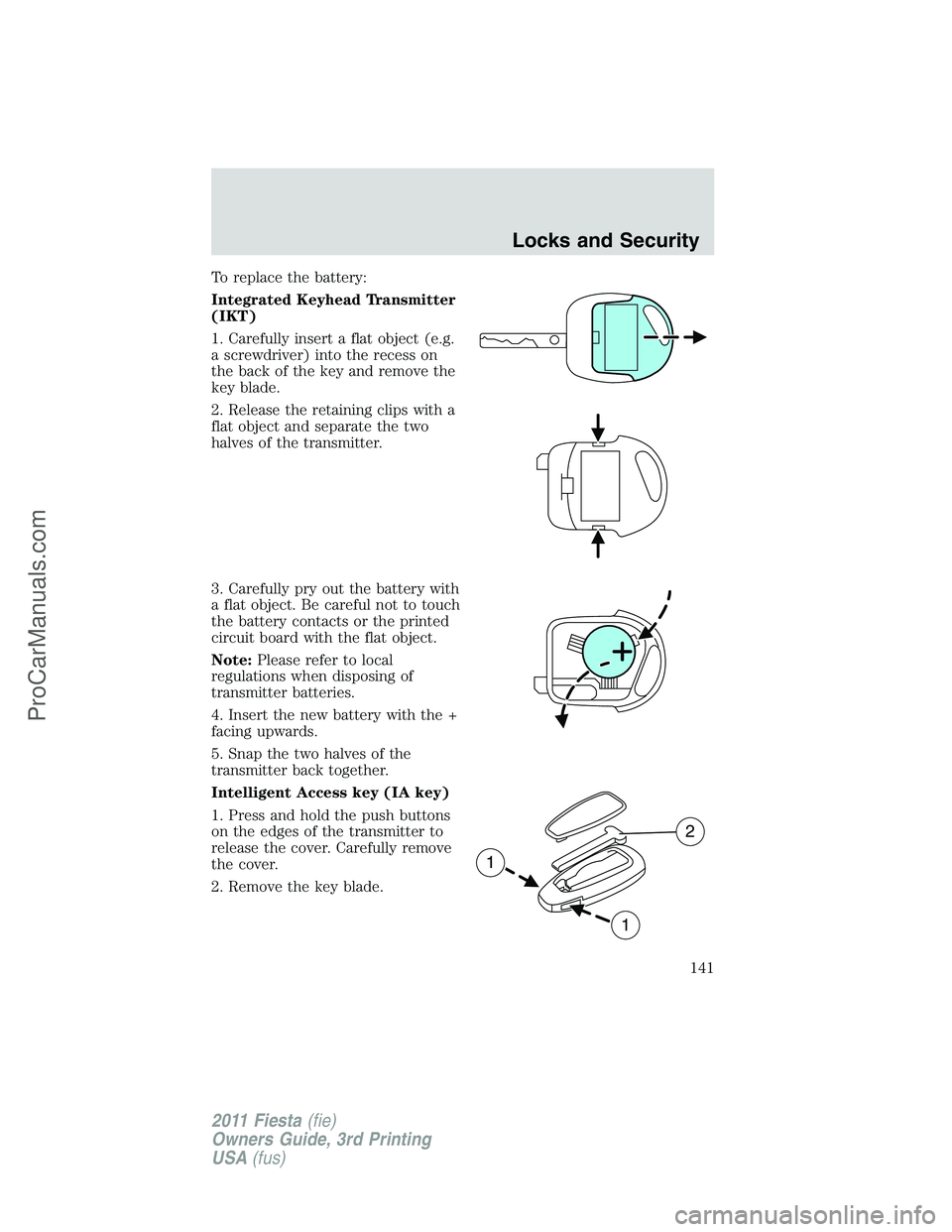
To replace the battery:
Integrated Keyhead Transmitter
(IKT)
1. Carefully insert a flat object (e.g.
a screwdriver) into the recess on
the back of the key and remove the
key blade.
2. Release the retaining clips with a
flat object and separate the two
halves of the transmitter.
3. Carefully pry out the battery with
a flat object. Be careful not to touch
the battery contacts or the printed
circuit board with the flat object.
Note:Please refer to local
regulations when disposing of
transmitter batteries.
4. Insert the new battery with the +
facing upwards.
5. Snap the two halves of the
transmitter back together.
Intelligent Access key (IA key)
1. Press and hold the push buttons
on the edges of the transmitter to
release the cover. Carefully remove
the cover.
2. Remove the key blade.
1
1
2
Locks and Security
141
2011 Fiesta(fie)
Owners Guide, 3rd Printing
USA(fus)
ProCarManuals.com
Page 142 of 356
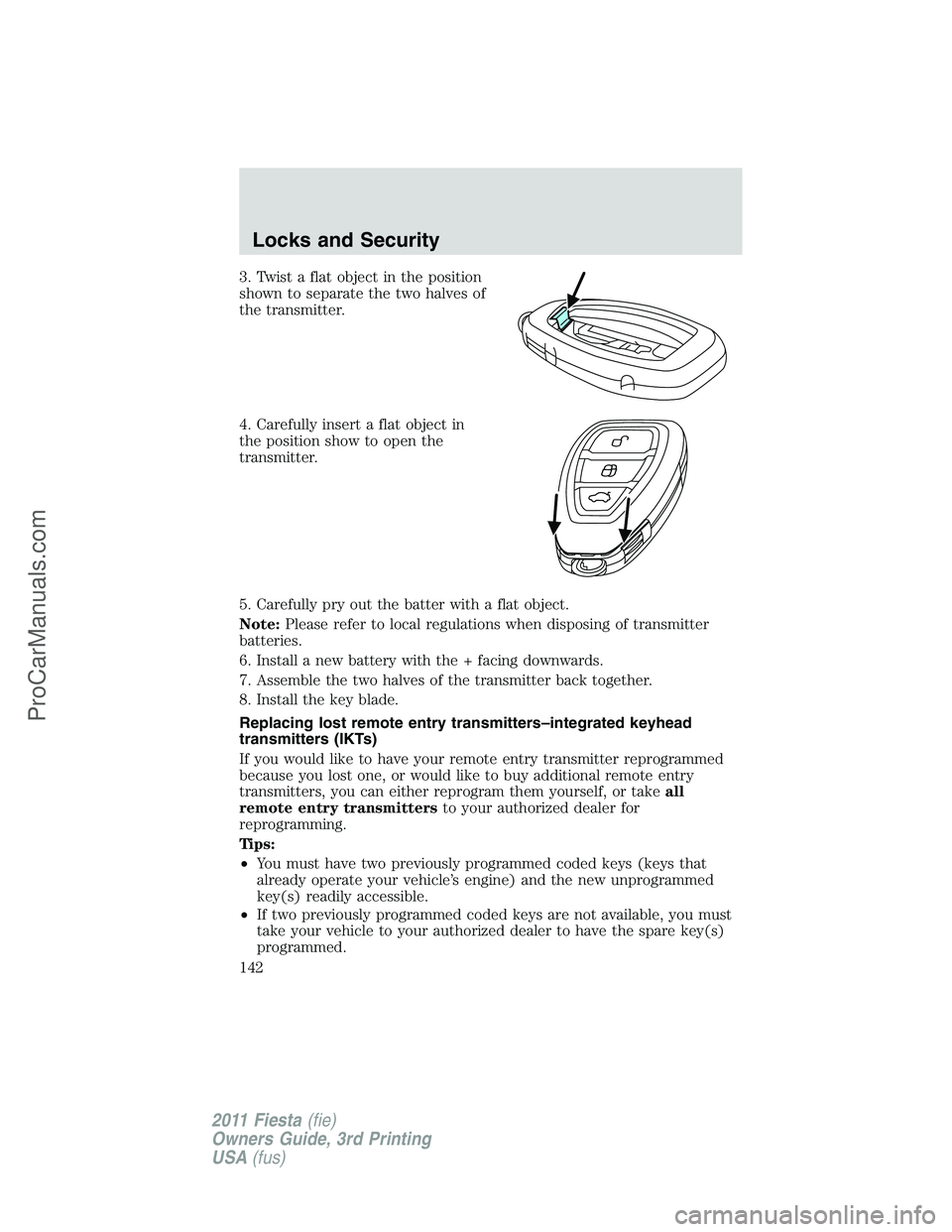
3. Twist a flat object in the position
shown to separate the two halves of
the transmitter.
4. Carefully insert a flat object in
the position show to open the
transmitter.
5. Carefully pry out the batter with a flat object.
Note:Please refer to local regulations when disposing of transmitter
batteries.
6. Install a new battery with the + facing downwards.
7. Assemble the two halves of the transmitter back together.
8. Install the key blade.
Replacing lost remote entry transmitters–integrated keyhead
transmitters (IKTs)
If you would like to have your remote entry transmitter reprogrammed
because you lost one, or would like to buy additional remote entry
transmitters, you can either reprogram them yourself, or takeall
remote entry transmittersto your authorized dealer for
reprogramming.
Tips:
•You must have two previously programmed coded keys (keys that
already operate your vehicle’s engine) and the new unprogrammed
key(s) readily accessible.
•If two previously programmed coded keys are not available, you must
take your vehicle to your authorized dealer to have the spare key(s)
programmed.
Locks and Security
142
2011 Fiesta(fie)
Owners Guide, 3rd Printing
USA(fus)
ProCarManuals.com
Page 228 of 356
Before you tow your vehicle, follow these directions for your specific
vehicle configuration after it is hooked-up to the RV or tow dolly:
Vehicles with a manual transmission:
1. Release the parking brake.
2. Move the gearshift to the neutral position.
3. The maximum towing speed is 70 mph (113 km/h).
4. There is no limitation on towing distance.
Note:The vehicle must be towed in the forward position to ensure no
damage is done to the internal transmission components. In addition, it is
recommended that you follow the instructions provided by the
aftermarket manufacturer of the towing equipment, if provided.
Vehicles with an automatic transmission but no push button start
system:
1. Release the parking brake.
2. Turn the ignition to the on (II) position.
3. Press the brake pedal, then move the gearshift to the N (Neutral)
position. Theremustbe battery power to properly move the
transmission’s internal components to N (Neutral). Also, moving the
gearshift to the N (Neutral) without first turning the ignition to the on
(II) position limits the towing capability to 35 mph (56 km/h) and
50 miles (80 km).
4. Turn the ignition key to the off (0) position.
5. Disconnect the negative (black) cable from the battery. (The anti-theft
system is disabled until the battery cable is reconnected.) Refer to
Batteryin theMaintenance and Specificationschapter when
disconnecting and reconnecting the battery cable.
6. The maximum towing speed is 70 mph (113 km/h).
7. There is no limitation on towing distance.
8. When done towing, start the engine within 15 minutes of reconnecting
the battery cable. When reconnecting that cable, tighten it until it’s snug
against the terminal; be careful not to overtighten.
Note:The vehicle must be towed in the forward position to ensure no
damage is done to the internal transmission components. In addition, it is
recommended that you follow the instructions provided by the
aftermarket manufacturer of the towing equipment, if provided.
Tires, Wheels and Loading
228
2011 Fiesta(fie)
Owners Guide, 3rd Printing
USA(fus)
ProCarManuals.com
Page 229 of 356
Vehicles with an automatic transmission and push button start
system:
1. Release the parking brake.
2. Activate the ignition by pressing the START/STOP button, butnot
applying the brake pedal.
3. Press the brake pedal, then move the gearshift to the N (Neutral)
position. Theremustbe battery power to properly move the
transmission’s internal components to N (Neutral). Also, moving the
gearshift to the N (Neutral) without first having the ignition on limits the
towing capability to 35 mph (56 km/h) and 50 miles (80 km).
4. Deactivate the ignition by pressing the START/STOP button, butnot
applying the brake pedal.
5. Disconnect the negative (black) cable from the battery. (The door key
[inside the Intelligent Access Key] is needed to lock/unlock doors when
the battery cable is disconnected. Also, the anti-theft system is disabled
until the battery cable is reconnected.) Refer toBatteryin the
Maintenance and Specificationschapter when disconnecting and
reconnecting the battery cable.
6. The maximum towing speed is 70 mph (113 km/h).
7. There is no limitation on towing distance.
8. When done towing, start the engine within 15 minutes of reconnecting
the battery cable. When reconnecting that cable, tighten it until it’s snug
against the terminal; be careful not to overtighten.
Note:The vehicle must be towed in the forward position to ensure no
damage is done to the internal transmission components. In addition, it is
recommended that you follow the instructions provided by the
aftermarket manufacturer of the towing equipment, if provided.
Tires, Wheels and Loading
229
2011 Fiesta(fie)
Owners Guide, 3rd Printing
USA(fus)
ProCarManuals.com
Page 234 of 356
2. On — press the START/STOP button without applying the brake pedal
(automatic transmission) or clutch pedal (manual transmission). This will
power your vehicle’s electrical system and the warning lights in the
instrument cluster will illuminate, but the engine will remain off.
3. Start — press the START/STOP button (for any length of time) while
applying the brake pedal (automatic transmission) or clutch pedal
(manual transmission).Note:The indicator light on the start button will
illuminate when the vehicle is in on mode and when the engine is
started.
There may be areas inside your vehicle where the IA key is not detected.
If the message KEY NOT DETECTED appears on your multifunction
display when you press the START/STOP button, it may be necessary to
move your IA key to another area within the vehicle. The IA key may not
be detected near the roof (between the driver or passenger sunvisor and
the roof, or in the overhead console area) or in the extreme corners of
the rear package tray, near your audio speakers. It is not recommended
that you stow the IA key in these locations. If you move the IA key to a
location where it has been detected before and you still see the KEY
NOT DETECTED message, your IA key’s battery may be low or you may
be in an area with excessive radio frequency interference. If this occurs,
you can use the backup method to start your vehicle (see below).
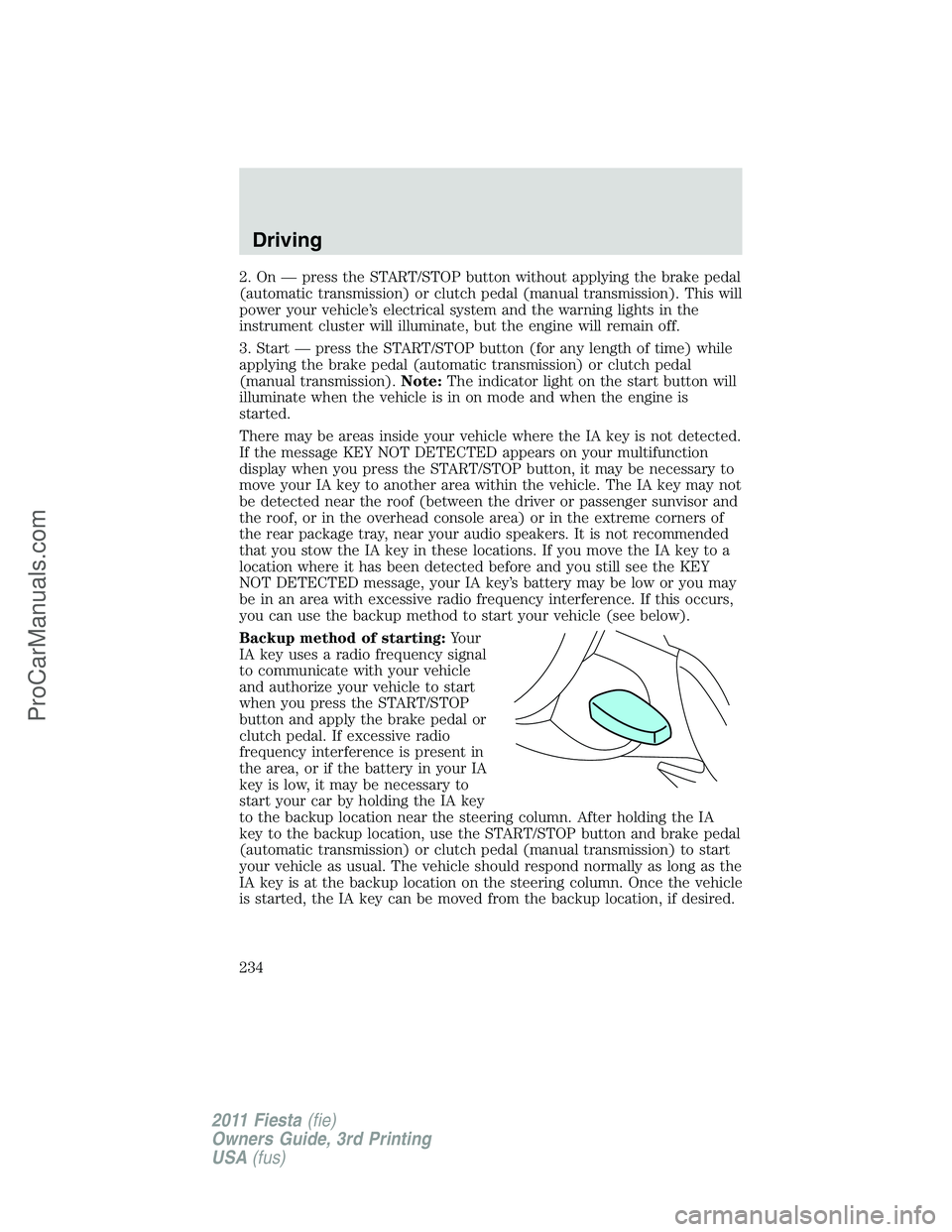
Backup method of starting:Your
IA key uses a radio frequency signal
to communicate with your vehicle
and authorize your vehicle to start
when you press the START/STOP
button and apply the brake pedal or
clutch pedal. If excessive radio
frequency interference is present in
the area, or if the battery in your IA
key is low, it may be necessary to
start your car by holding the IA key
to the backup location near the steering column. After holding the IA
key to the backup location, use the START/STOP button and brake pedal
(automatic transmission) or clutch pedal (manual transmission) to start
your vehicle as usual. The vehicle should respond normally as long as the
IA key is at the backup location on the steering column. Once the vehicle
is started, the IA key can be moved from the backup location, if desired.
Driving
234
2011 Fiesta(fie)
Owners Guide, 3rd Printing
USA(fus)
ProCarManuals.com