lock FORD FIESTA 2013 Owner's Manual
[x] Cancel search | Manufacturer: FORD, Model Year: 2013, Model line: FIESTA, Model: FORD FIESTA 2013Pages: 346, PDF Size: 5.27 MB
Page 65 of 346
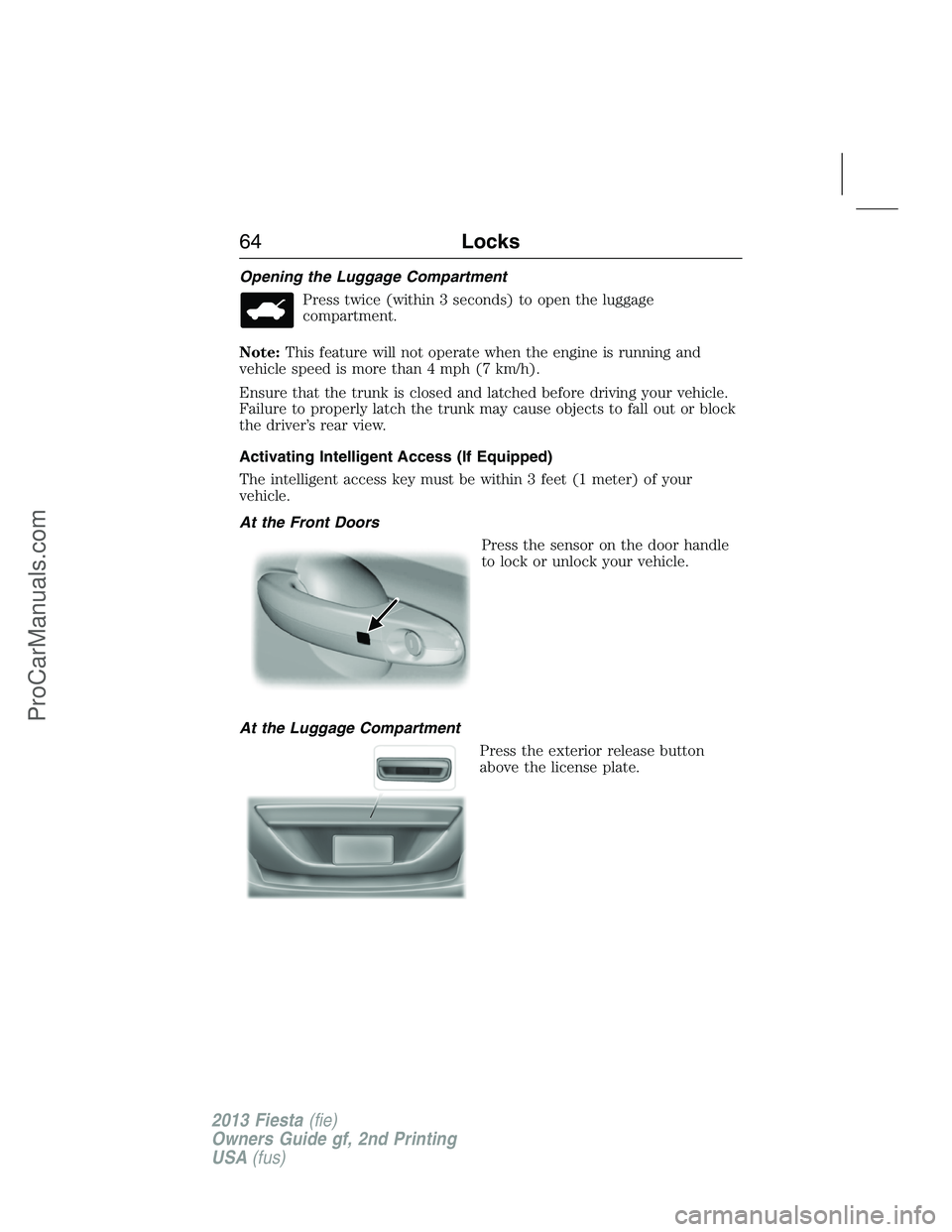
Opening the Luggage Compartment
Press twice (within 3 seconds) to open the luggage
compartment.
Note:This feature will not operate when the engine is running and
vehicle speed is more than 4 mph (7 km/h).
Ensure that the trunk is closed and latched before driving your vehicle.
Failure to properly latch the trunk may cause objects to fall out or block
the driver’s rear view.
Activating Intelligent Access (If Equipped)
The intelligent access key must be within 3 feet (1 meter) of your
vehicle.
At the Front Doors
Press the sensor on the door handle
to lock or unlock your vehicle.
At the Luggage Compartment
Press the exterior release button
above the license plate.
64Locks
2013 Fiesta(fie)
Owners Guide gf, 2nd Printing
USA(fus)
ProCarManuals.com
Page 66 of 346
Delayed Locking
If you try to electrically lock the doors while they are open, they will not
lock until the doors are closed. This feature only works when smart locks
are not active. SeeSmart locksin this section for more information
Smart Unlocks for Integrated Keyhead Transmitter
This feature helps to prevent you from locking yourself out of your
vehicle if your key is still in the ignition.
When you open one of the front doors and lock your vehicle with the
power door lock control, all the doors will lock then unlock if your key is
still in the ignition.
The vehicle can still be locked by pressing the lock button on the
transmitter even if the doors are not closed.
If both front doors are closed, your vehicle can be locked by any method,
regardless of whether the key is in the ignition or not.
Smart Unlocks for Intelligent Access Keys (If Equipped)
This feature helps to prevent you from unintentionally locking your
intelligent access key inside your vehicle’s passenger compartment or
rear cargo area.
When you lock your vehicle using the power door lock control (with the
door open, vehiclePand ignition off), after you close the door your
vehicle will search for an intelligent access key in the passenger
compartment. If an intelligent access key is found inside your vehicle, all
of the doors will immediately unlock and the horn will chirp, indicating
that the intelligent access key is inside.
In order to override the smart unlock feature and intentionally lock the
intelligent access key inside your vehicle, you can lock your vehicle after
all doors are closed by pressing the lock button on another intelligent
access key or touching the locking area on the handle with another
intelligent access key in your hand.
When you open one of the front doors and lock your vehicle using the
power door lock control, all doors will lock then unlock if:
•the ignition is on, or
•the ignition is off and the vehicle is not inP.
Locks65
2013 Fiesta(fie)
Owners Guide gf, 2nd Printing
USA(fus)
ProCarManuals.com
Page 67 of 346
Autolock (If Equipped)
The autolock feature will lock all the doors when:
•all doors are closed,
•the ignition is on,
•you shift into any gear putting your vehicle in motion, and
•your vehicle attains a speed greater than 5 mph (7 km/h).
If a door is unlocked, the autolock feature will repeat when:
•your vehicle slows below 5 mph (7 km/h) and then attains a speed
greater than 5 mph (7 km/h).
Autounlock (If Equipped)
If the doors have been autolocked, the doors will autounlock only when:
•the ignition is on,
•all doors are closed,
•your vehicle has been in motion at a speed greater than 12 mph
(20 km/h) for more than two seconds,
•your vehicle comes to a stop,
•the ignition is switched off or to accessory,
•the driver door is opened within 10 minutes of the ignition being
switched from on to off or accessory.
Note:If you use the power door lock button to lock the doors before an
autolock event, the doors will not autounlock.
Deactivating and Activating Autolock or Autounlock
Note:When programming the autolock feature, carry out the following
steps within 30 seconds or the procedure needs to be repeated. If the
procedure needs to be repeated, wait 30 seconds between programming
sessions.
1. Turn the ignition on.
2. Press the power door lock control three times.
3. Turn the ignition off.
4. Press the power door lock control three times.
5. Turn the ignition on. The module is now in programming mode.
Note:A tnne sounds as acknowledgement that the programming mode
has been entered. The safety belt must be engaged otherwise the
Belt-Minder® chime will take priority over other chimes.
66Locks
2013 Fiesta(fie)
Owners Guide gf, 2nd Printing
USA(fus)
ProCarManuals.com
Page 68 of 346
6. Once in programming mode, the autolock or autounlock feature can be
programmed independently of each other.
•To program the autolock feature, press the power door lock control
for greater than two seconds and release. Each long press of the
power door lock control toggles the state of the autolocking feature
between enabled and disabled. A chime sounds when the feature is
enabled or disabled.
•To program the autounlock feature, press the power door lock control
for less than 1 second and release. Each short press of the power
door lock control toggles the state of the autounlocking feature
between enabled and disabled. A chime sounds when the feature is
enabled or disabled.
7. Turn the ignition off to exit programming. If a setting was toggled, a
tone will sound.
Illuminated Entry
The interior lamps illuminate for 25 seconds when:
•you unlock your vehicle by any method other than the interior power
door lock control
•you open or close a door.
The lamps will turn off:
•if you switch the ignition on
•if you lock your vehicle by any method other than the interior power
door lock control
•after 25 seconds of illumination.
Illuminated Exit
The interior lamps and parking lamps will illuminate for 25 seconds
when:
•you switch the ignition off
•you remove or insert an integrated keyhead transmitter into the
ignition.
The lamps will turn off:
•if you switch the ignition off
•if you lock your vehicle by any method other than the power door lock
control
•after 25 seconds of illumination.
Locks67
2013 Fiesta(fie)
Owners Guide gf, 2nd Printing
USA(fus)
ProCarManuals.com
Page 69 of 346
Accessory Mode Battery Saver for Intelligent Access Keys
(If Equipped)
If you shut off the engine and leave the ignition in the on or accessory
mode, the ignition will shut off after 30 minutes.
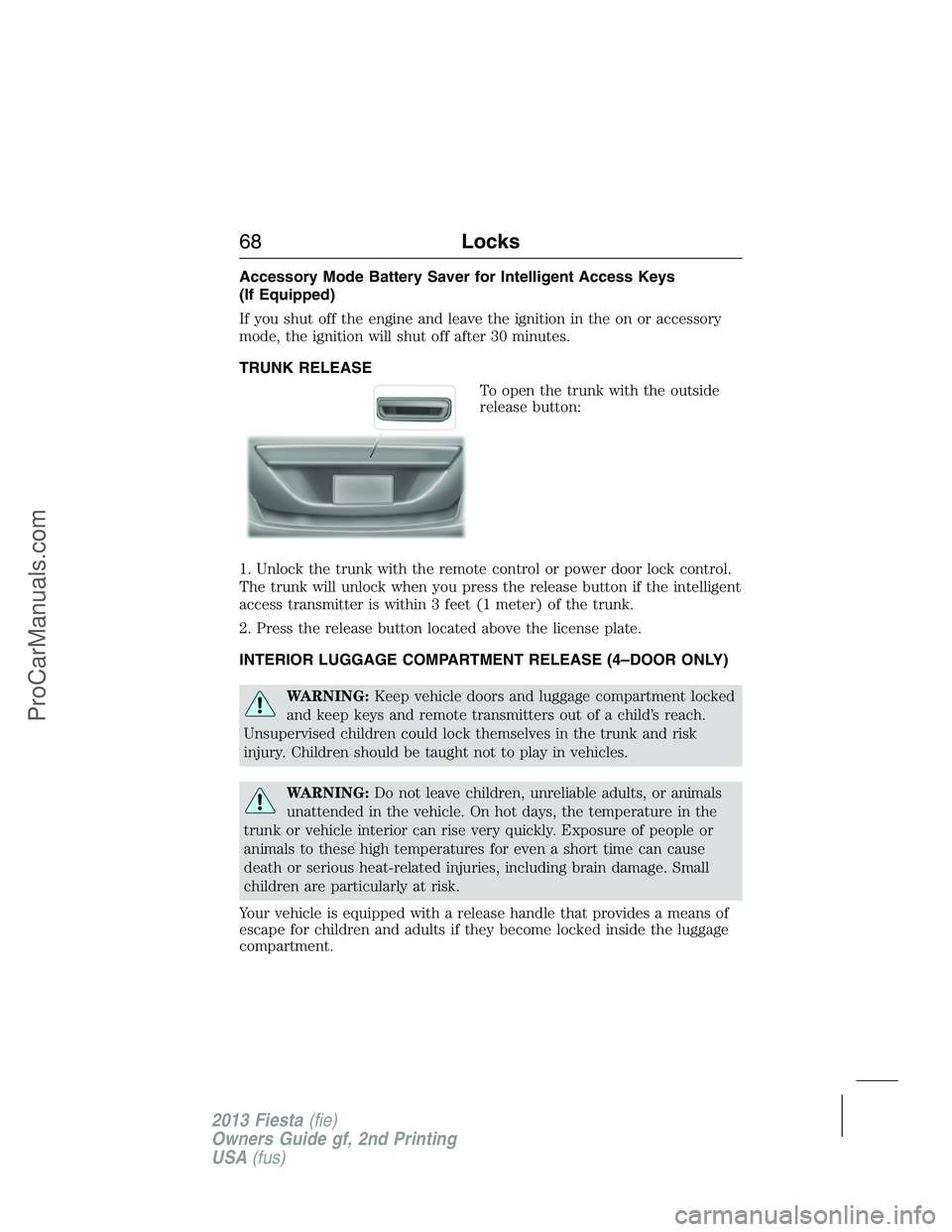
TRUNK RELEASE
To open the trunk with the outside
release button:
1. Unlock the trunk with the remote control or power door lock control.
The trunk will unlock when you press the release button if the intelligent
access transmitter is within 3 feet (1 meter) of the trunk.
2. Press the release button located above the license plate.
INTERIOR LUGGAGE COMPARTMENT RELEASE (4–DOOR ONLY)
WARNING:Keep vehicle doors and luggage compartment locked
and keep keys and remote transmitters out of a child’s reach.
Unsupervised children could lock themselves in the trunk and risk
injury. Children should be taught not to play in vehicles.
WARNING:Do not leave children, unreliable adults, or animals
unattended in the vehicle. On hot days, the temperature in the
trunk or vehicle interior can rise very quickly. Exposure of people or
animals to these high temperatures for even a short time can cause
death or serious heat-related injuries, including brain damage. Small
children are particularly at risk.
Your vehicle is equipped with a release handle that provides a means of
escape for children and adults if they become locked inside the luggage
compartment.
68Locks
2013 Fiesta(fie)
Owners Guide gf, 2nd Printing
USA(fus)
ProCarManuals.com
Page 70 of 346
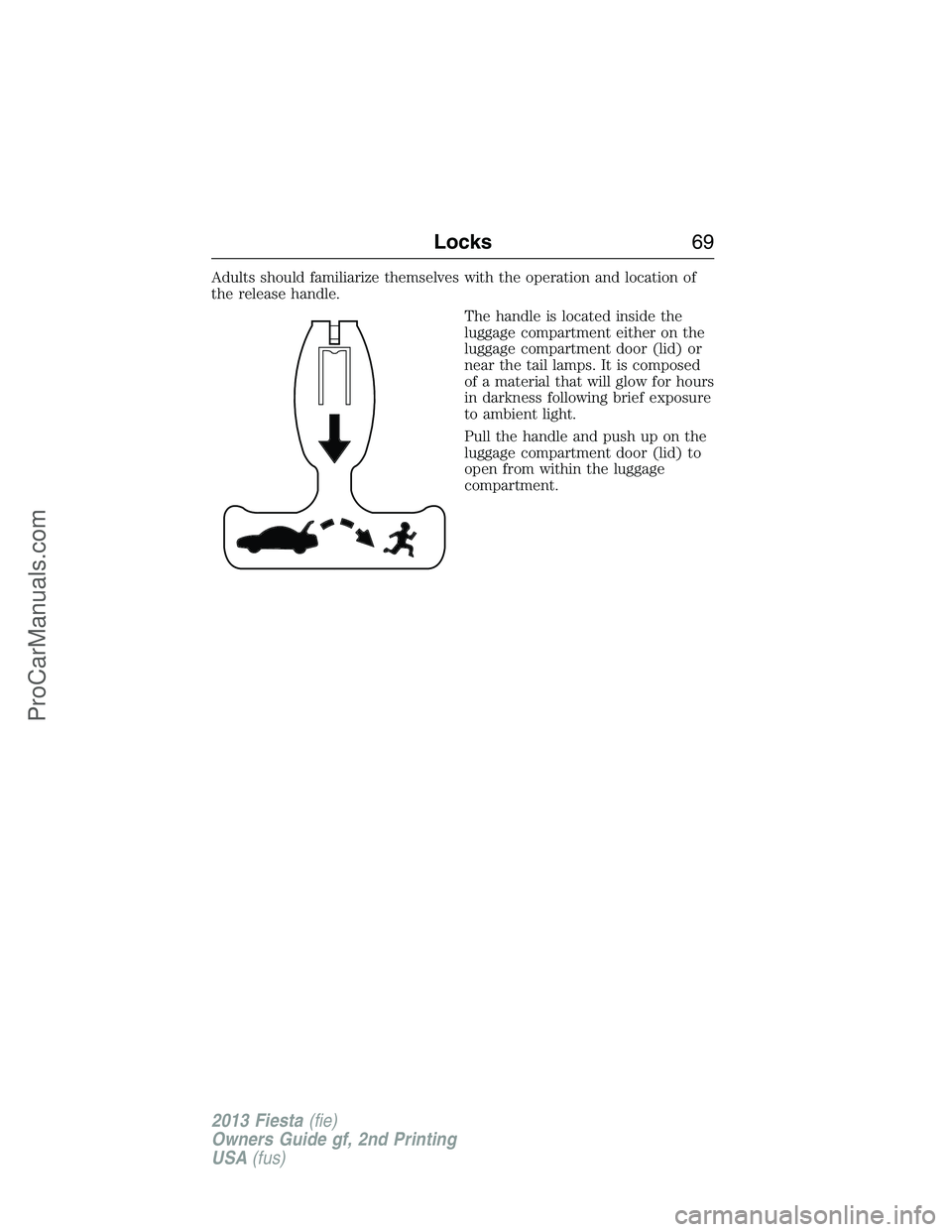
Adults should familiarize themselves with the operation and location of
the release handle.
The handle is located inside the
luggage compartment either on the
luggage compartment door (lid) or
near the tail lamps. It is composed
of a material that will glow for hours
in darkness following brief exposure
to ambient light.
Pull the handle and push up on the
luggage compartment door (lid) to
open from within the luggage
compartment.
Locks69
2013 Fiesta(fie)
Owners Guide gf, 2nd Printing
USA(fus)
ProCarManuals.com
Page 71 of 346
SECURILOCK® PASSIVE ANTI-THEFT SYSTEM
Note:The system is not compatible with non-Ford aftermarket remote
start systems. Use of these systems may result in vehicle starting
problems and a loss of security protection.
Note:Metallic objects, electronic devices or a second coded key on the
same key chain may cause vehicle starting issues if they are too close to
the key when starting the engine. Prevent these objects from touching
the coded key while starting the engine. Switch the ignition off, move all
objects on the key chain away from the coded key and restart the engine
if a problem occurs.
Note:Do not leave a duplicate coded key in the vehicle. Always take
your keys and lock all doors when leaving the vehicle.
The system is an engine immobilization system. It is designed to help
prevent the engine from being started unless a coded key programmed
to your vehicle is used. Using the wrong key may prevent the engine
from starting. A message may appear in the information display.
If you are unable to start the engine with a correctly coded key, a
malfunction has happened and a message may appear in the information
display.
Automatic Arming
Your vehicle arms immediately after you switch the ignition off.
Automatic Disarming
Your vehicle disarms when you switch the ignition on with a coded key.
Replacement Keys
The integrated keyhead transmitter functions as a programmed ignition
key that operates all the locks and starts the vehicle, as well as a remote
control.
The intelligent access key functions as a programmed key that operates
the driver door lock and activates the intelligent access with push button
start systems, as well as a remote control.
If your programmed transmitters or standard SecuriLock® coded keys
(integrated keyhead transmitters only) are lost or stolen and you don’t
have an extra coded key, you will need to have your vehicle towed to an
authorized dealer. The key codes need to be erased from your vehicle
and new coded keys will need to be programmed.
Store an extra programmed key away from the vehicle in a safe place to
help prevent any inconveniences. See your authorized dealer to purchase
additional spare or replacement keys.
70Security
2013 Fiesta(fie)
Owners Guide gf, 2nd Printing
USA(fus)
ProCarManuals.com
Page 72 of 346
Programming a Spare Integrated Keyhead Transmitter or
SecuriLock® Coded Key
Note:A maximum of eight coded keys can be programmed to your
vehicle; all eight can be integrated keyhead transmitters.
You can program your own integrated keyhead transmitter or standard
SecuriLock® coded keys to your vehicle. To program the remote control
functions, seeReplacing a Lost Key or Remote Controlin theKeys and
Remote Controlchapter.
Only use integrated keyhead transmitters or standard SecuriLock® keys.
You must have two previously programmed coded keys and the new
unprogrammed key readily accessible. See your authorized dealer to have
the spare key programmed if two previously programmed coded keys are
not available.
Read and understand the entire procedure before you begin.
1. Insert the first previously programmed coded key into the ignition.
2. Turn the ignition from off to on. Keep the ignition on for at least three
seconds, but no more than 10 seconds.
3. Turn the ignition off and remove the first coded key from the ignition.
4. After three seconds but within 10 seconds of turning the ignition off,
insert the second previously coded key into the ignition.
5. Turn the ignition from off to on. Keep the ignition on for at least three
seconds, but no more than 10 seconds.
6. Turn the ignition off and remove the second previously programmed
coded key from the ignition.
7. After three seconds but within 10 seconds of turning the ignition off
and removing the previously programmed coded key, insert the new
unprogrammed key into the ignition.
8. Turn the ignition from off to on. Keep the ignition on for at least six
seconds.
9. Remove the newly programmed coded key from the ignition.
If the key has been successfully programmed it will start the engine.
If it was not programmed successfully, wait 10 seconds and repeat
Steps 1 through 8. If you are still unsuccessful, bring your vehicle to
your authorized dealer.
Wait 20 seconds and then repeat this procedure from Step 1 to program
an additional key.
Security71
2013 Fiesta(fie)
Owners Guide gf, 2nd Printing
USA(fus)
ProCarManuals.com
Page 73 of 346
Programming a Spare Intelligent Access Key
See your authorized dealer to have additional keys programmed to your
vehicle.
ANTI-THEFT ALARM (IF EQUIPPED)
The system will warn you of an unauthorized entry to your vehicle. It
triggers if any door, the luggage compartment or the hood opens without
using the key or the remote control.
The park and turn lamps flash and the horn sounds if unauthorized entry
is attempted while the alarm is armed.
Take all remote controls to an authorized dealer if there is any potential
alarm problem with your vehicle.
Arming the Alarm
The alarm is ready to arm when there is not a key in the ignition. Lock
the vehicle to arm the alarm.
Disarming the system
You can disarm the system by any of the following actions:
•Unlock the doors or luggage compartment with the remote control.
•Unlock the doors with a key. Turn the key full travel (toward the front
of your vehicle) to make sure the alarm disarms.
•Turn the ignition to the on or start position with a programmed coded
ignition key.
Pressing the power door unlock control within the 20 second pre-armed
mode will return your vehicle to a disarmed state.
72Security
2013 Fiesta(fie)
Owners Guide gf, 2nd Printing
USA(fus)
ProCarManuals.com
Page 74 of 346
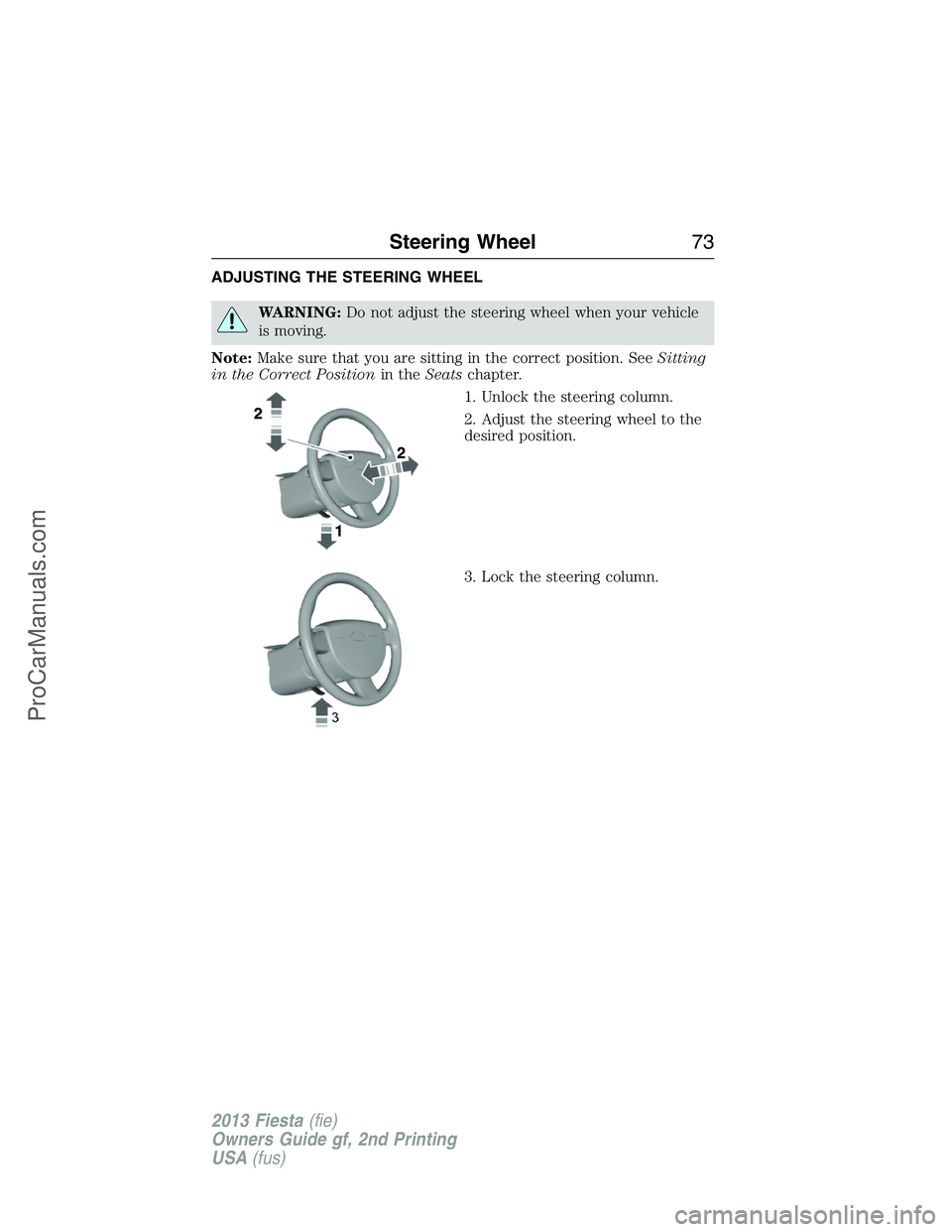
ADJUSTING THE STEERING WHEEL
WARNING:Do not adjust the steering wheel when your vehicle
is moving.
Note:Make sure that you are sitting in the correct position. SeeSitting
in the Correct Positionin theSeatschapter.
1. Unlock the steering column.
2. Adjust the steering wheel to the
desired position.
3. Lock the steering column.
Steering Wheel73
2013 Fiesta(fie)
Owners Guide gf, 2nd Printing
USA(fus)
ProCarManuals.com