lock FORD FIESTA 2013 Service Manual
[x] Cancel search | Manufacturer: FORD, Model Year: 2013, Model line: FIESTA, Model: FORD FIESTA 2013Pages: 346, PDF Size: 5.27 MB
Page 108 of 346
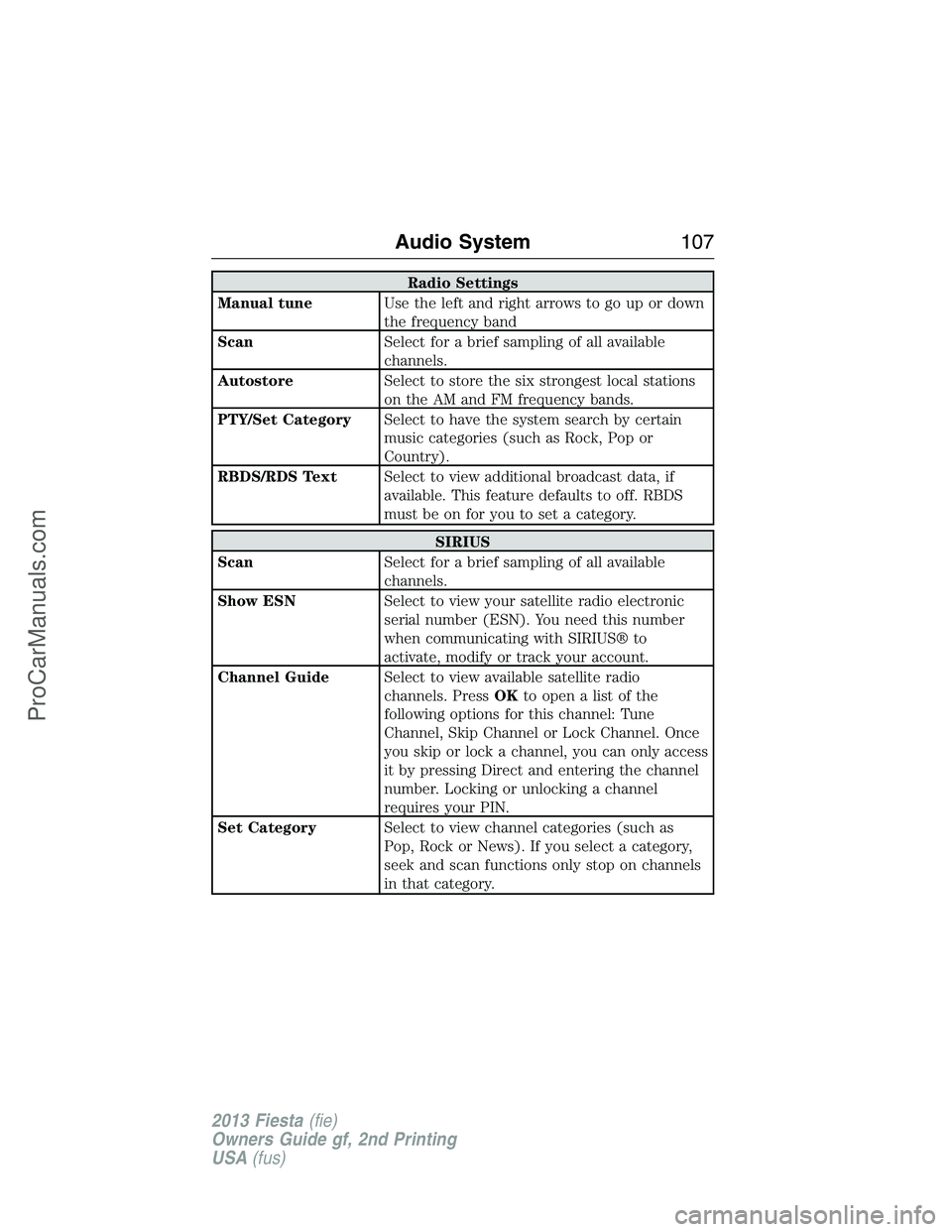
Radio Settings
Manual tuneUse the left and right arrows to go up or down
the frequency band
ScanSelect for a brief sampling of all available
channels.
AutostoreSelect to store the six strongest local stations
on the AM and FM frequency bands.
PTY/Set CategorySelect to have the system search by certain
music categories (such as Rock, Pop or
Country).
RBDS/RDS TextSelect to view additional broadcast data, if
available. This feature defaults to off. RBDS
must be on for you to set a category.
SIRIUS
ScanSelect for a brief sampling of all available
channels.
Show ESNSelect to view your satellite radio electronic
serial number (ESN). You need this number
when communicating with SIRIUS® to
activate, modify or track your account.
Channel GuideSelect to view available satellite radio
channels. PressOKtoopenalistofthe
following options for this channel: Tune
Channel, Skip Channel or Lock Channel. Once
you skip or lock a channel, you can only access
it by pressing Direct and entering the channel
number. Locking or unlocking a channel
requires your PIN.
Set CategorySelect to view channel categories (such as
Pop, Rock or News). If you select a category,
seek and scan functions only stop on channels
in that category.
Audio System107
2013 Fiesta(fie)
Owners Guide gf, 2nd Printing
USA(fus)
ProCarManuals.com
Page 109 of 346
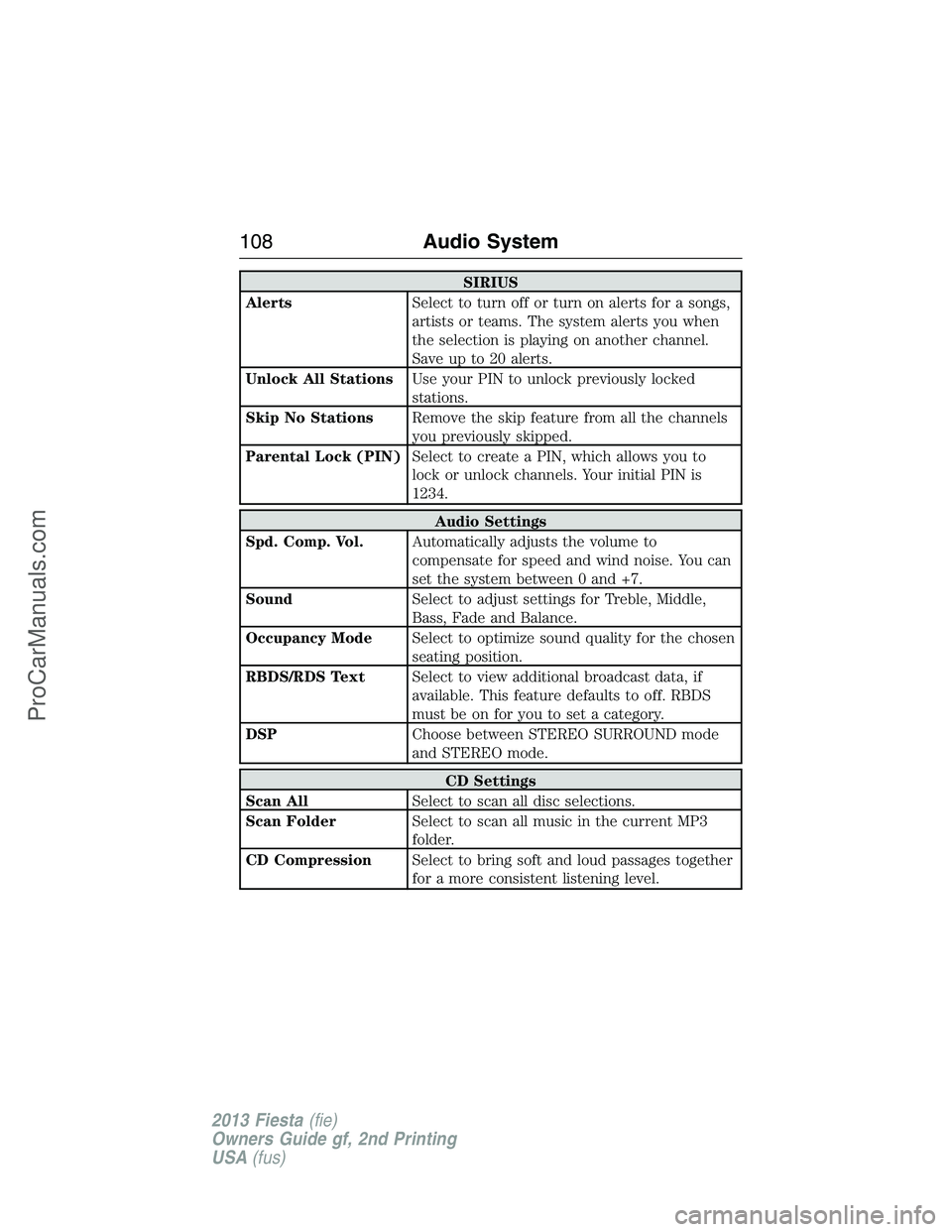
SIRIUS
AlertsSelect to turn off or turn on alerts for a songs,
artists or teams. The system alerts you when
the selection is playing on another channel.
Save up to 20 alerts.
Unlock All StationsUse your PIN to unlock previously locked
stations.
Skip No StationsRemove the skip feature from all the channels
you previously skipped.
Parental Lock (PIN)Select to create a PIN, which allows you to
lock or unlock channels. Your initial PIN is
1234.
Audio Settings
Spd. Comp. Vol.Automatically adjusts the volume to
compensate for speed and wind noise. You can
set the system between 0 and +7.
SoundSelect to adjust settings for Treble, Middle,
Bass, Fade and Balance.
Occupancy ModeSelect to optimize sound quality for the chosen
seating position.
RBDS/RDS TextSelect to view additional broadcast data, if
available. This feature defaults to off. RBDS
must be on for you to set a category.
DSPChoose between STEREO SURROUND mode
and STEREO mode.
CD Settings
Scan AllSelect to scan all disc selections.
Scan FolderSelect to scan all music in the current MP3
folder.
CD CompressionSelect to bring soft and loud passages together
for a more consistent listening level.
108Audio System
2013 Fiesta(fie)
Owners Guide gf, 2nd Printing
USA(fus)
ProCarManuals.com
Page 110 of 346
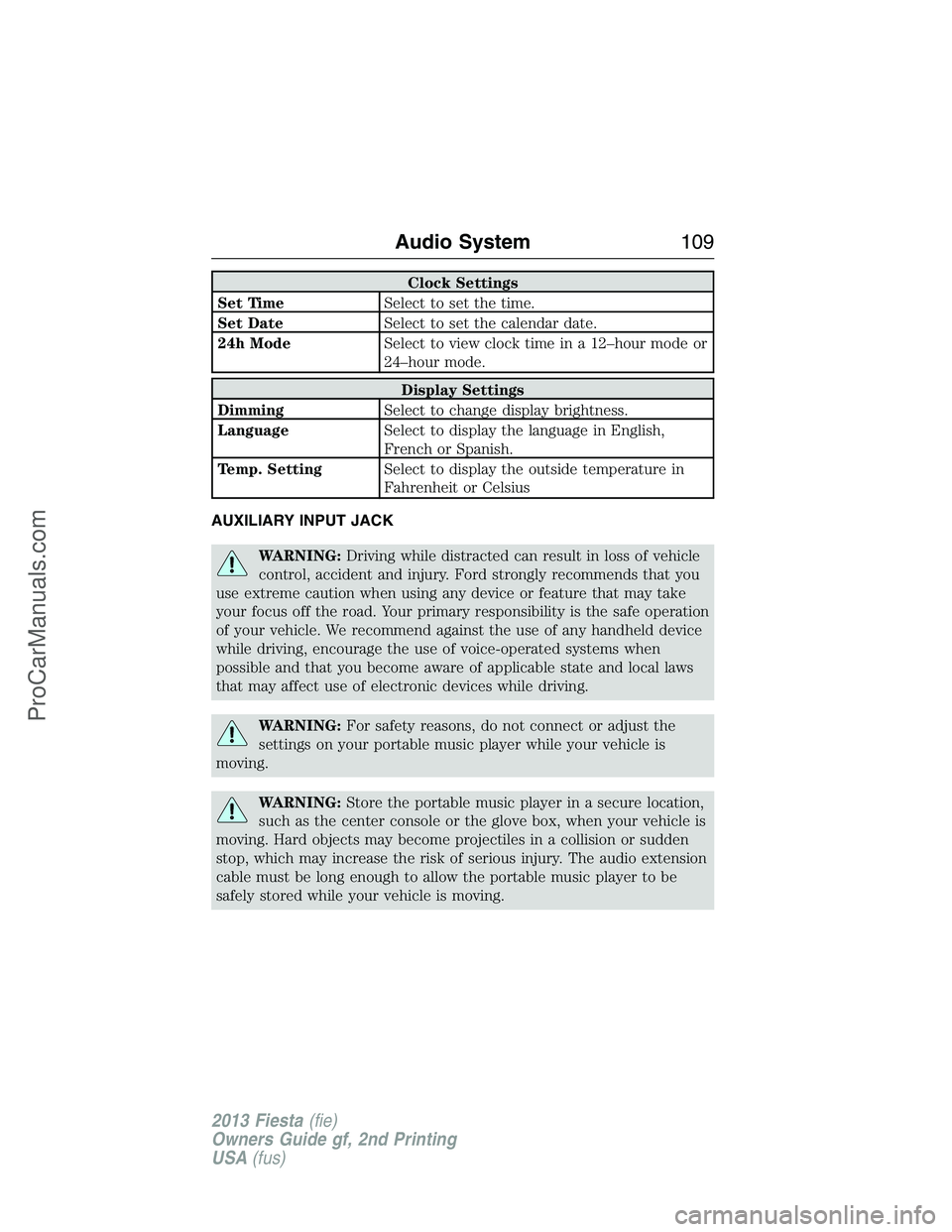
Clock Settings
Set TimeSelect to set the time.
Set DateSelect to set the calendar date.
24h ModeSelect to view clock time in a 12–hour mode or
24–hour mode.
Display Settings
DimmingSelect to change display brightness.
LanguageSelect to display the language in English,
French or Spanish.
Temp. SettingSelect to display the outside temperature in
Fahrenheit or Celsius
AUXILIARY INPUT JACK
WARNING:Driving while distracted can result in loss of vehicle
control, accident and injury. Ford strongly recommends that you
use extreme caution when using any device or feature that may take
your focus off the road. Your primary responsibility is the safe operation
of your vehicle. We recommend against the use of any handheld device
while driving, encourage the use of voice-operated systems when
possible and that you become aware of applicable state and local laws
that may affect use of electronic devices while driving.
WARNING:For safety reasons, do not connect or adjust the
settings on your portable music player while your vehicle is
moving.
WARNING:Store the portable music player in a secure location,
such as the center console or the glove box, when your vehicle is
moving. Hard objects may become projectiles in a collision or sudden
stop, which may increase the risk of serious injury. The audio extension
cable must be long enough to allow the portable music player to be
safely stored while your vehicle is moving.
Audio System109
2013 Fiesta(fie)
Owners Guide gf, 2nd Printing
USA(fus)
ProCarManuals.com
Page 114 of 346
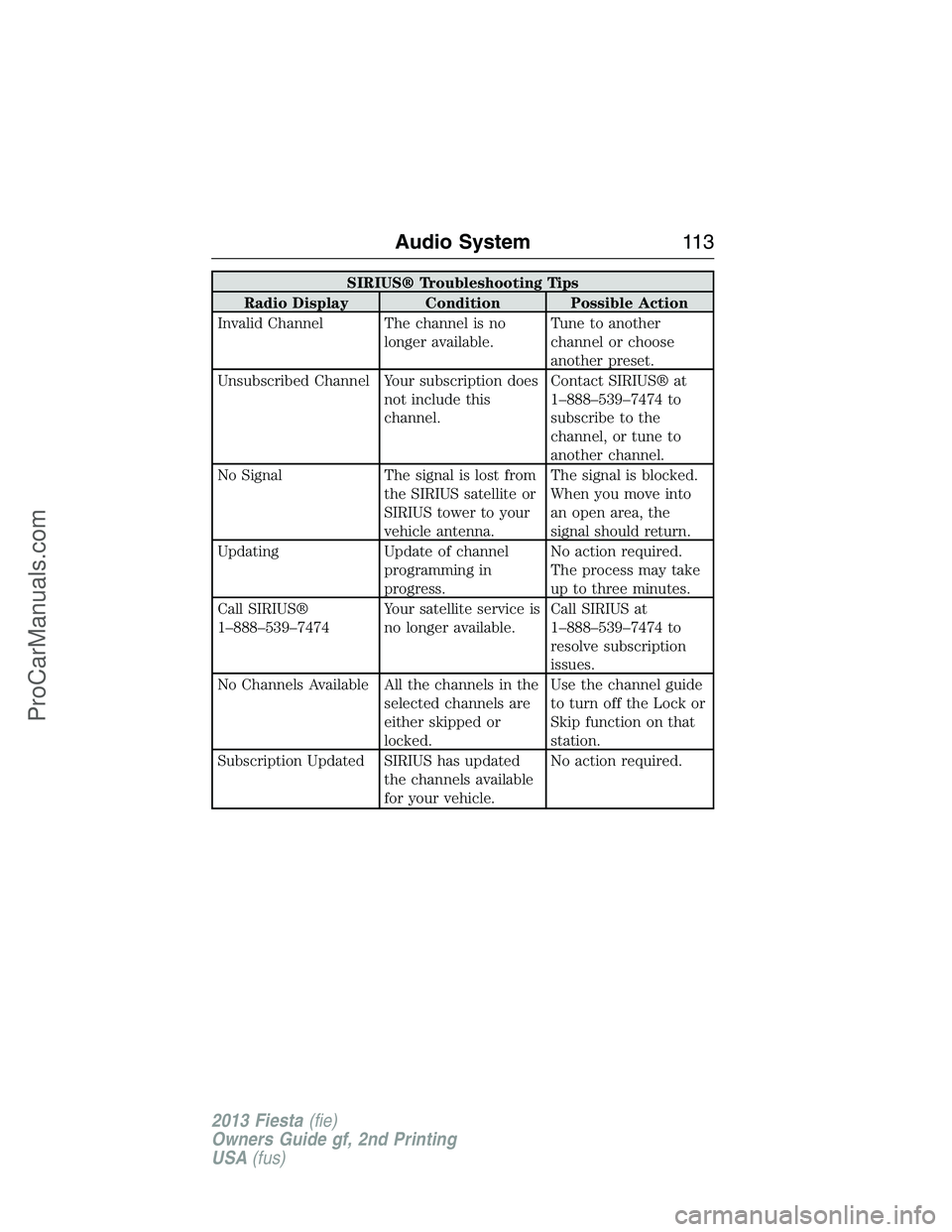
SIRIUS® Troubleshooting Tips
Radio Display Condition Possible Action
Invalid Channel The channel is no
longer available.Tune to another
channel or choose
another preset.
Unsubscribed Channel Your subscription does
not include this
channel.Contact SIRIUS® at
1–888–539–7474 to
subscribe to the
channel, or tune to
another channel.
No Signal The signal is lost from
the SIRIUS satellite or
SIRIUS tower to your
vehicle antenna.The signal is blocked.
When you move into
an open area, the
signal should return.
Updating Update of channel
programming in
progress.No action required.
The process may take
up to three minutes.
Call SIRIUS®
1–888–539–7474Your satellite service is
no longer available.Call SIRIUS at
1–888–539–7474 to
resolve subscription
issues.
No Channels Available All the channels in the
selected channels are
either skipped or
locked.Use the channel guide
to turn off the Lock or
Skip function on that
station.
Subscription Updated SIRIUS has updated
the channels available
for your vehicle.No action required.
Audio System11 3
2013 Fiesta(fie)
Owners Guide gf, 2nd Printing
USA(fus)
ProCarManuals.com
Page 122 of 346
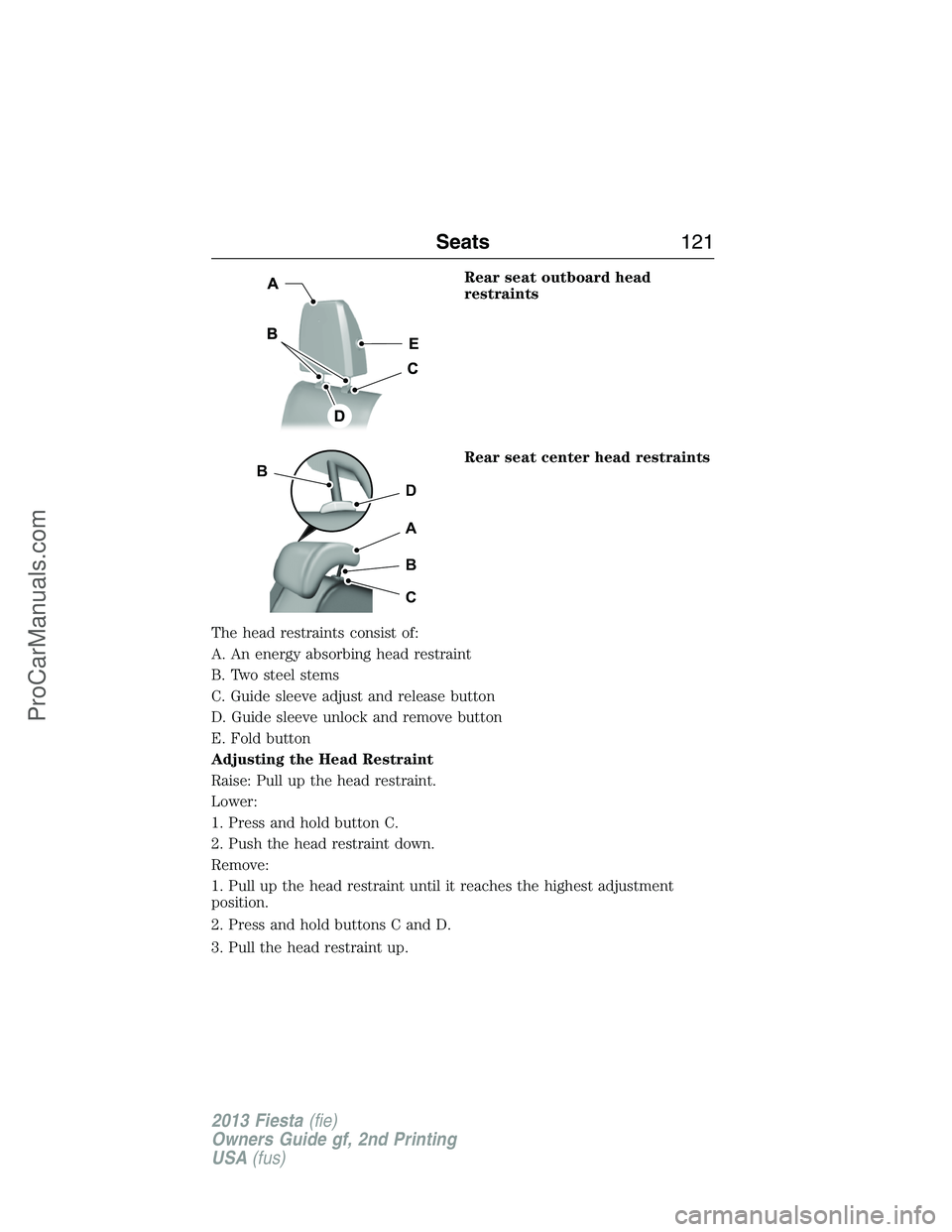
Rear seat outboard head
restraints
Rear seat center head restraints
The head restraints consist of:
A. An energy absorbing head restraint
B. Two steel stems
C. Guide sleeve adjust and release button
D. Guide sleeve unlock and remove button
E. Fold button
Adjusting the Head Restraint
Raise: Pull up the head restraint.
Lower:
1. Press and hold button C.
2. Push the head restraint down.
Remove:
1. Pull up the head restraint until it reaches the highest adjustment
position.
2. Press and hold buttons C and D.
3. Pull the head restraint up.
D
B
A
B
C
Seats121
2013 Fiesta(fie)
Owners Guide gf, 2nd Printing
USA(fus)
ProCarManuals.com
Page 123 of 346
Install: Align the steel stems into the guide sleeves and push the head
restraint down until it locks.
Fold (if equipped):
1. To fold, press and hold button E.
2. To unfold, rotate the head restraint rearward.
Tilting Head Restraints (If Equipped)
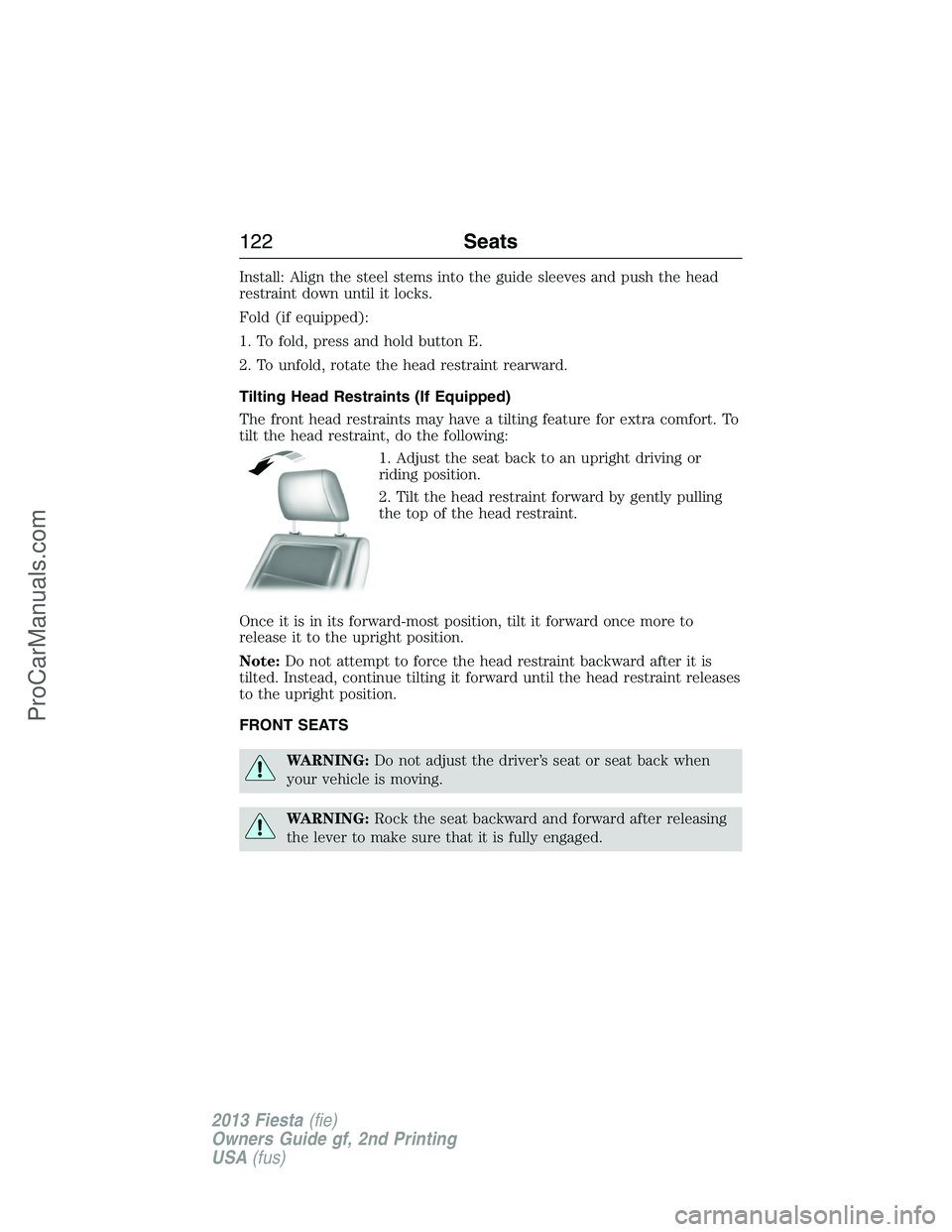
The front head restraints may have a tilting feature for extra comfort. To
tilt the head restraint, do the following:
1. Adjust the seat back to an upright driving or
riding position.
2. Tilt the head restraint forward by gently pulling
the top of the head restraint.
Once it is in its forward-most position, tilt it forward once more to
release it to the upright position.
Note:Do not attempt to force the head restraint backward after it is
tilted. Instead, continue tilting it forward until the head restraint releases
to the upright position.
FRONT SEATS
WARNING:Do not adjust the driver’s seat or seat back when
your vehicle is moving.
WARNING:Rock the seat backward and forward after releasing
the lever to make sure that it is fully engaged.
122Seats
2013 Fiesta(fie)
Owners Guide gf, 2nd Printing
USA(fus)
ProCarManuals.com
Page 128 of 346
Note:Before lowering the seat backs, lower or remove the outboard
head restraints to the lowest position.
One or both rear seat backs can be folded down to provide additional
cargo space.
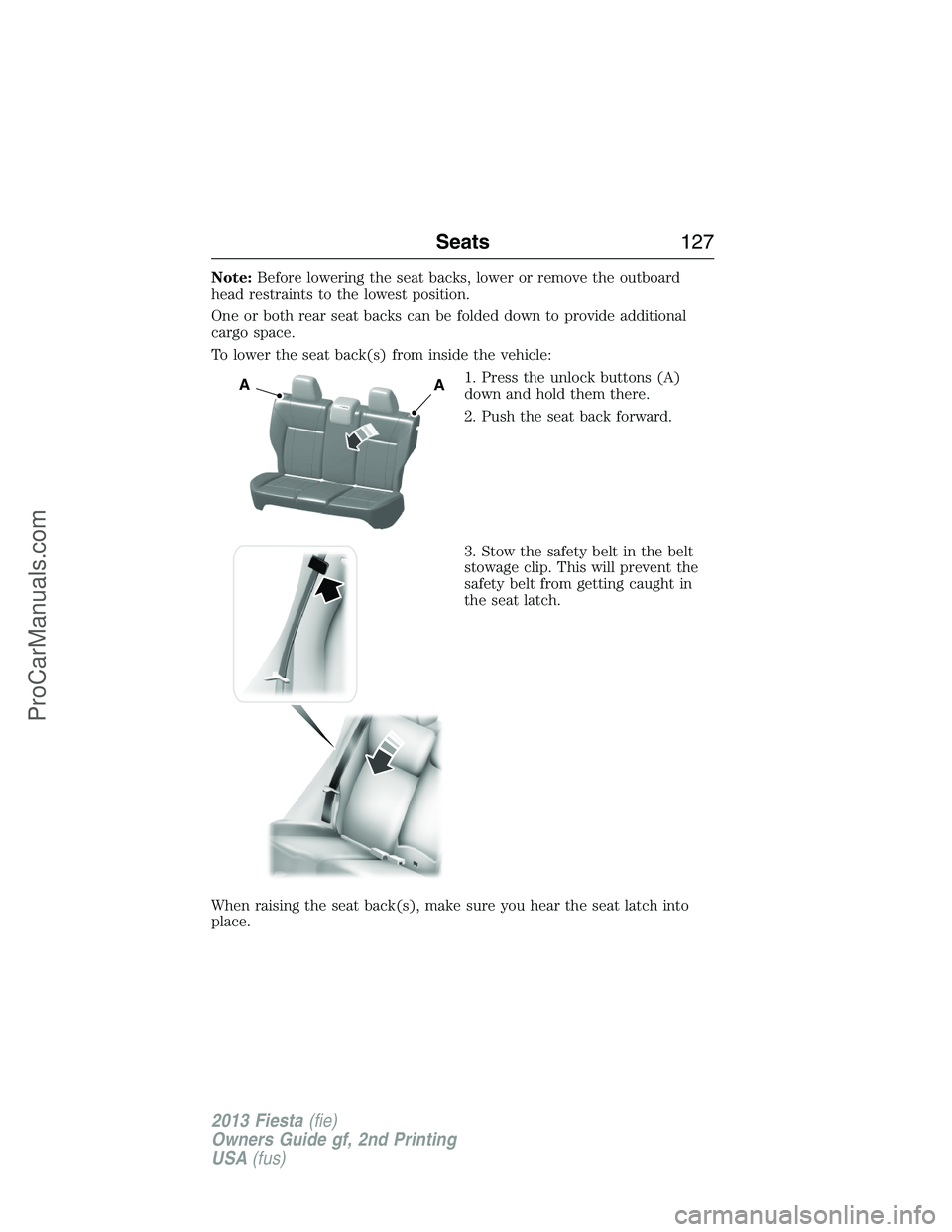
To lower the seat back(s) from inside the vehicle:
1. Press the unlock buttons (A)
down and hold them there.
2. Push the seat back forward.
3. Stow the safety belt in the belt
stowage clip. This will prevent the
safety belt from getting caught in
the seat latch.
When raising the seat back(s), make sure you hear the seat latch into
place.
AA
Seats127
2013 Fiesta(fie)
Owners Guide gf, 2nd Printing
USA(fus)
ProCarManuals.com
Page 132 of 346
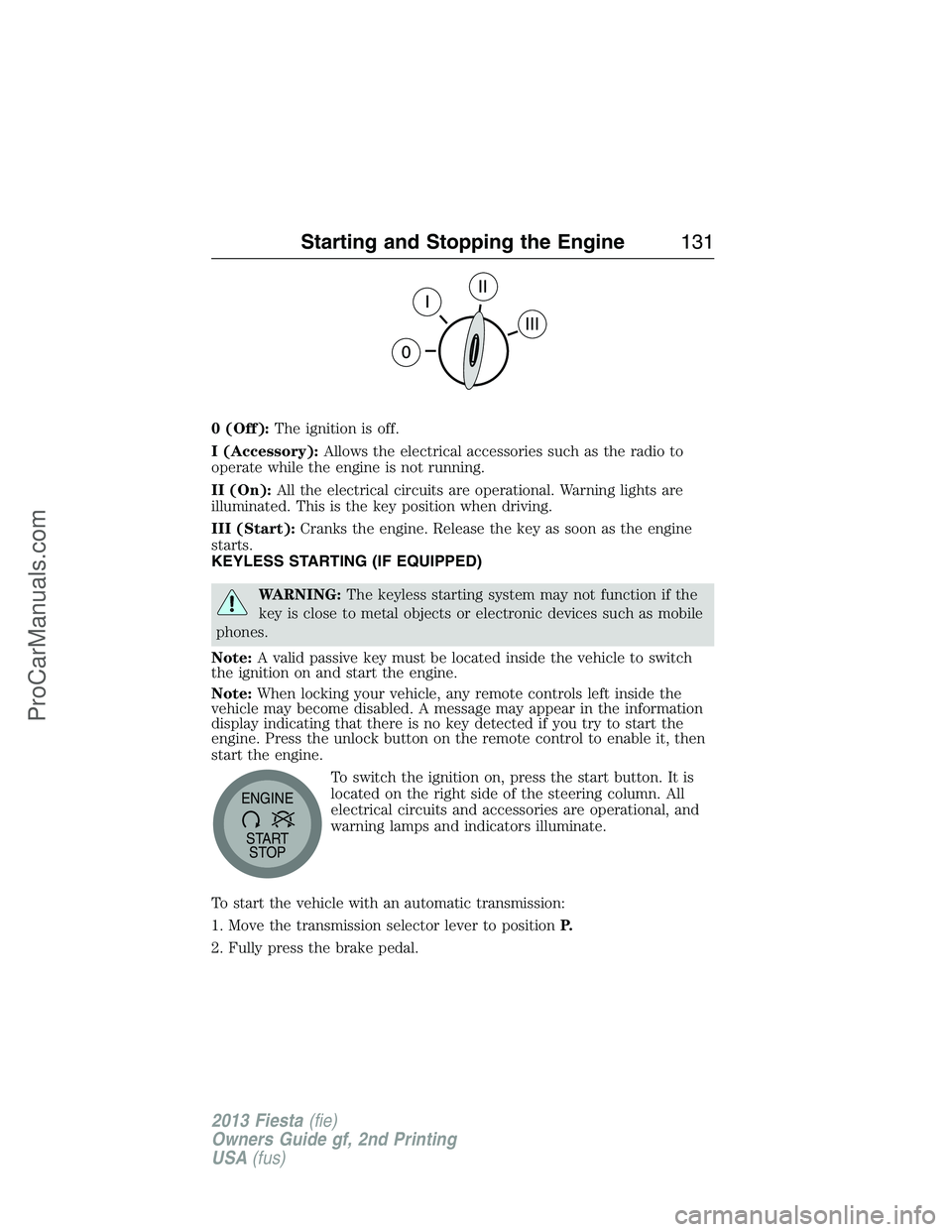
0 (Off):The ignition is off.
I (Accessory):Allows the electrical accessories such as the radio to
operate while the engine is not running.
II (On):All the electrical circuits are operational. Warning lights are
illuminated. This is the key position when driving.
III (Start):Cranks the engine. Release the key as soon as the engine
starts.
KEYLESS STARTING (IF EQUIPPED)
WARNING:The keyless starting system may not function if the
key is close to metal objects or electronic devices such as mobile
phones.
Note:A valid passive key must be located inside the vehicle to switch
the ignition on and start the engine.
Note:When locking your vehicle, any remote controls left inside the
vehicle may become disabled. A message may appear in the information
display indicating that there is no key detected if you try to start the
engine. Press the unlock button on the remote control to enable it, then
start the engine.
To switch the ignition on, press the start button. It is
located on the right side of the steering column. All
electrical circuits and accessories are operational, and
warning lamps and indicators illuminate.
To start the vehicle with an automatic transmission:
1. Move the transmission selector lever to positionP.
2. Fully press the brake pedal.
START
STOP ENGINE
Starting and Stopping the Engine131
2013 Fiesta(fie)
Owners Guide gf, 2nd Printing
USA(fus)
ProCarManuals.com
Page 133 of 346
3. Press the start button.
To start the vehicle with a manual transmission:
1. Move the transmission selector lever to the neutral position.
2. Fully press the clutch pedal.
3. Press the start button.
The system does not function if:
•the key frequencies are jammed.
•the key battery has no charge.
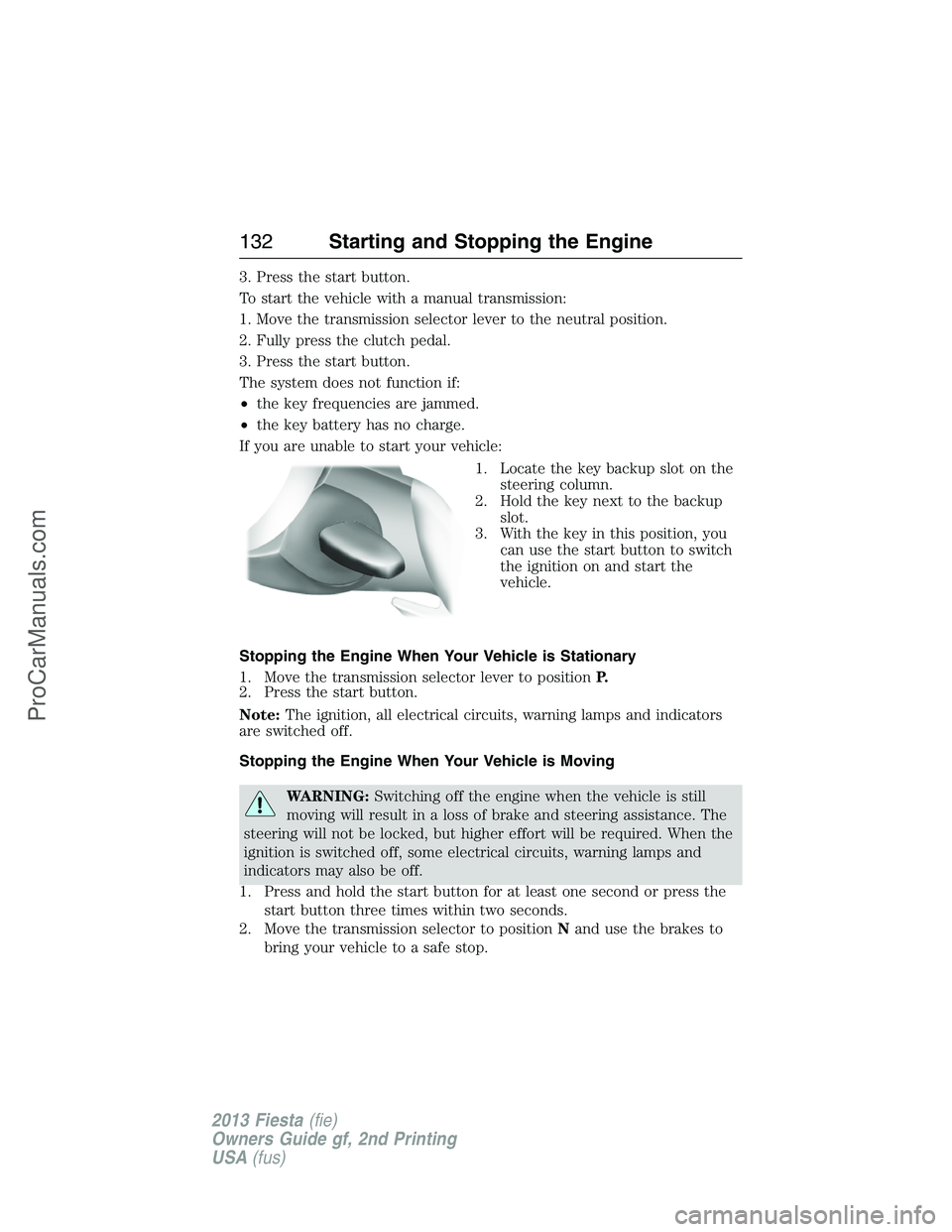
If you are unable to start your vehicle:
1. Locate the key backup slot on the
steering column.
2. Hold the key next to the backup
slot.
3. With the key in this position, you
can use the start button to switch
the ignition on and start the
vehicle.
Stopping the Engine When Your Vehicle is Stationary
1. Move the transmission selector lever to positionP.
2. Press the start button.
Note:The ignition, all electrical circuits, warning lamps and indicators
are switched off.
Stopping the Engine When Your Vehicle is Moving
WARNING:Switching off the engine when the vehicle is still
moving will result in a loss of brake and steering assistance. The
steering will not be locked, but higher effort will be required. When the
ignition is switched off, some electrical circuits, warning lamps and
indicators may also be off.
1. Press and hold the start button for at least one second or press the
start button three times within two seconds.
2. Move the transmission selector to positionNand use the brakes to
bring your vehicle to a safe stop.
132Starting and Stopping the Engine
2013 Fiesta(fie)
Owners Guide gf, 2nd Printing
USA(fus)
ProCarManuals.com
Page 135 of 346
Guarding Against Exhaust Fumes
WARNING:If you smell exhaust fumes inside your vehicle, have
this checked immediately. Do not drive your vehicle if you smell
exhaust fumes. Carbon monoxide is present in exhaust fumes. Take
precautions to avoid its dangerous effects.
Important Ventilating Information
If you stop your vehicle and leave the engine idling for long periods of
time, we recommend that you do one of the following:
•Open the windows at least 1 inch (2.5 centimeters).
•Set your climate control to outside air.
ENGINE BLOCK HEATER (IF EQUIPPED)
WARNING:Failure to follow engine block heater instructions
could result in property damage or physical injury.
WARNING:Do not use your heater with ungrounded electrical
systems or two-pronged (cheater) adapters. There is a risk of
electrical shock.
Note:The heater is most effective when outdoor temperatures are below
0°F (-18°C).
The heater acts as a starting aid by warming the engine coolant. This
allows the climate control system to respond quickly. The equipment
includes a heater element (installed in the engine block) and a wire
harness. You can connect the system to a grounded 120 volt A/C
electrical source.
We recommend that you do the following for safe and correct operation:
•Use a 16-gauge outdoor extension cord that is product certified by
Underwriter’s Laboratory or Canadian Standards Association. This
extension cord must be able to be used outdoors, in cold
temperatures, and be clearly markedSuitable for Use with Outdoor
Appliances.Never use an indoor extension cord outdoors; it could
result in an electric shock or become a fire hazard.
•Use as short an extension cord as possible.
•Do not use multiple extension cords.
134Starting and Stopping the Engine
2013 Fiesta(fie)
Owners Guide gf, 2nd Printing
USA(fus)
ProCarManuals.com