remote control FORD FIESTA 2014 6.G User Guide
[x] Cancel search | Manufacturer: FORD, Model Year: 2014, Model line: FIESTA, Model: FORD FIESTA 2014 6.GPages: 396, PDF Size: 5.58 MB
Page 61 of 396
KEYLESS ENTRY
General Information
WARNING
The system may not function if the
key is close to metal objects or
electronic devices such as cell
phones. The system will not function if:
•
Your vehicle battery has no charge.
• The passive key frequencies are
jammed.
• The passive key battery has no charge.
Note: If the system does not function, you
will need to use the key blade to lock and
unlock your vehicle.
The system allows you to operate your
vehicle without the use of a key or remote
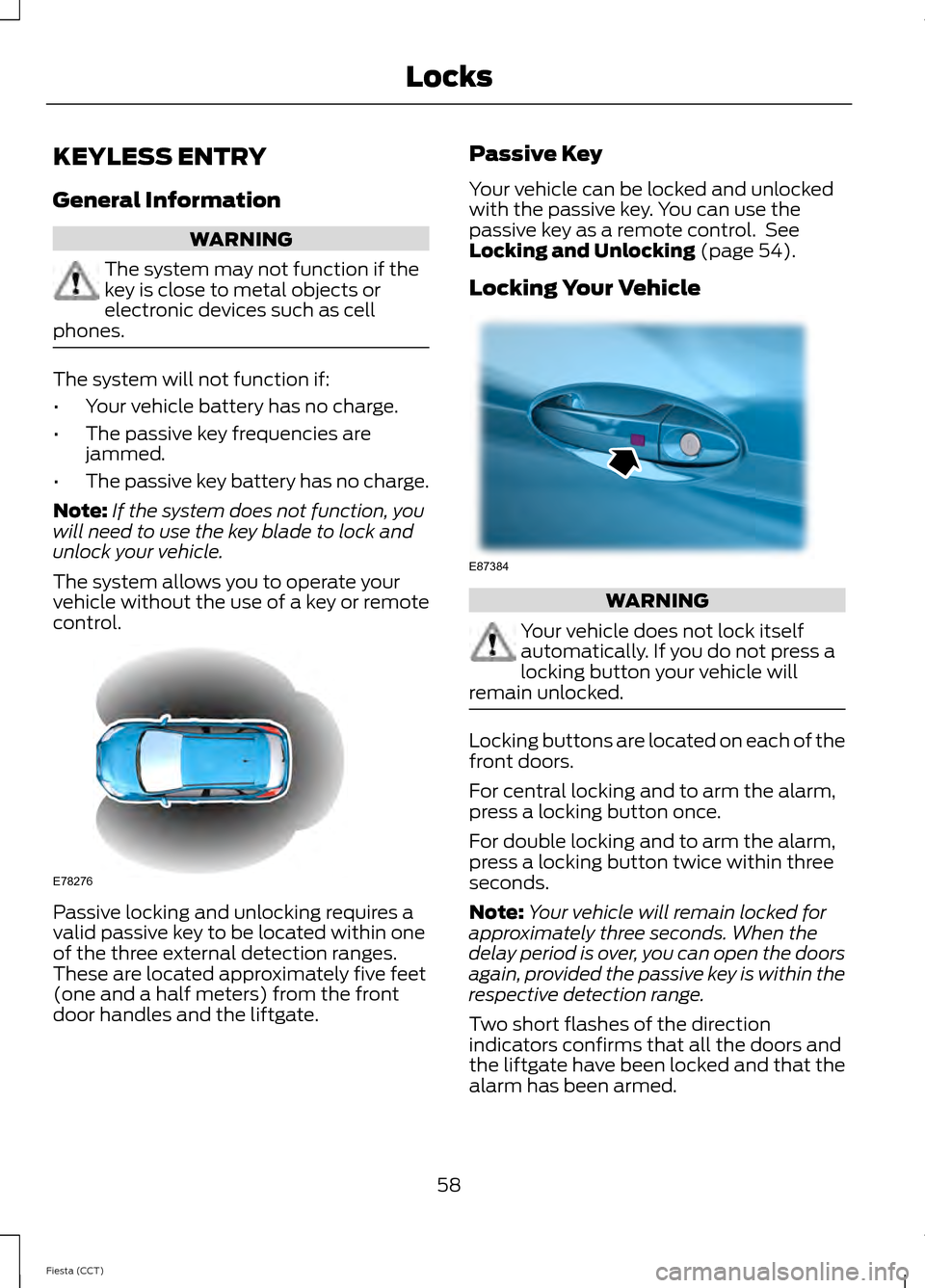
control. Passive locking and unlocking requires a
valid passive key to be located within one
of the three external detection ranges.
These are located approximately five feet
(one and a half meters) from the front
door handles and the liftgate. Passive Key
Your vehicle can be locked and unlocked
with the passive key. You can use the
passive key as a remote control. See
Locking and Unlocking (page 54).
Locking Your Vehicle WARNING
Your vehicle does not lock itself
automatically. If you do not press a
locking button your vehicle will
remain unlocked. Locking buttons are located on each of the
front doors.
For central locking and to arm the alarm,
press a locking button once.
For double locking and to arm the alarm,
press a locking button twice within three
seconds.
Note:
Your vehicle will remain locked for
approximately three seconds. When the
delay period is over, you can open the doors
again, provided the passive key is within the
respective detection range.
Two short flashes of the direction
indicators confirms that all the doors and
the liftgate have been locked and that the
alarm has been armed.
58
Fiesta (CCT) LocksE78276 E87384
Page 62 of 396
Liftgate
Note:
The liftgate cannot be closed and
will pop back up if the passive key is located
inside the luggage compartment with the
doors locked.
Note: If a second valid passive key is
located within the liftgate detection range,
the liftgate can be closed.
Unlocking Your Vehicle
Note: When your vehicle remains locked
for longer than three days, the system will
enter an energy-saving mode. This is to
prevent your vehicle battery running out of
charge. When your vehicle is unlocked while
in this mode, the reaction time of the system
may be a little longer than normal. To exit
the energy-saving mode, unlock your
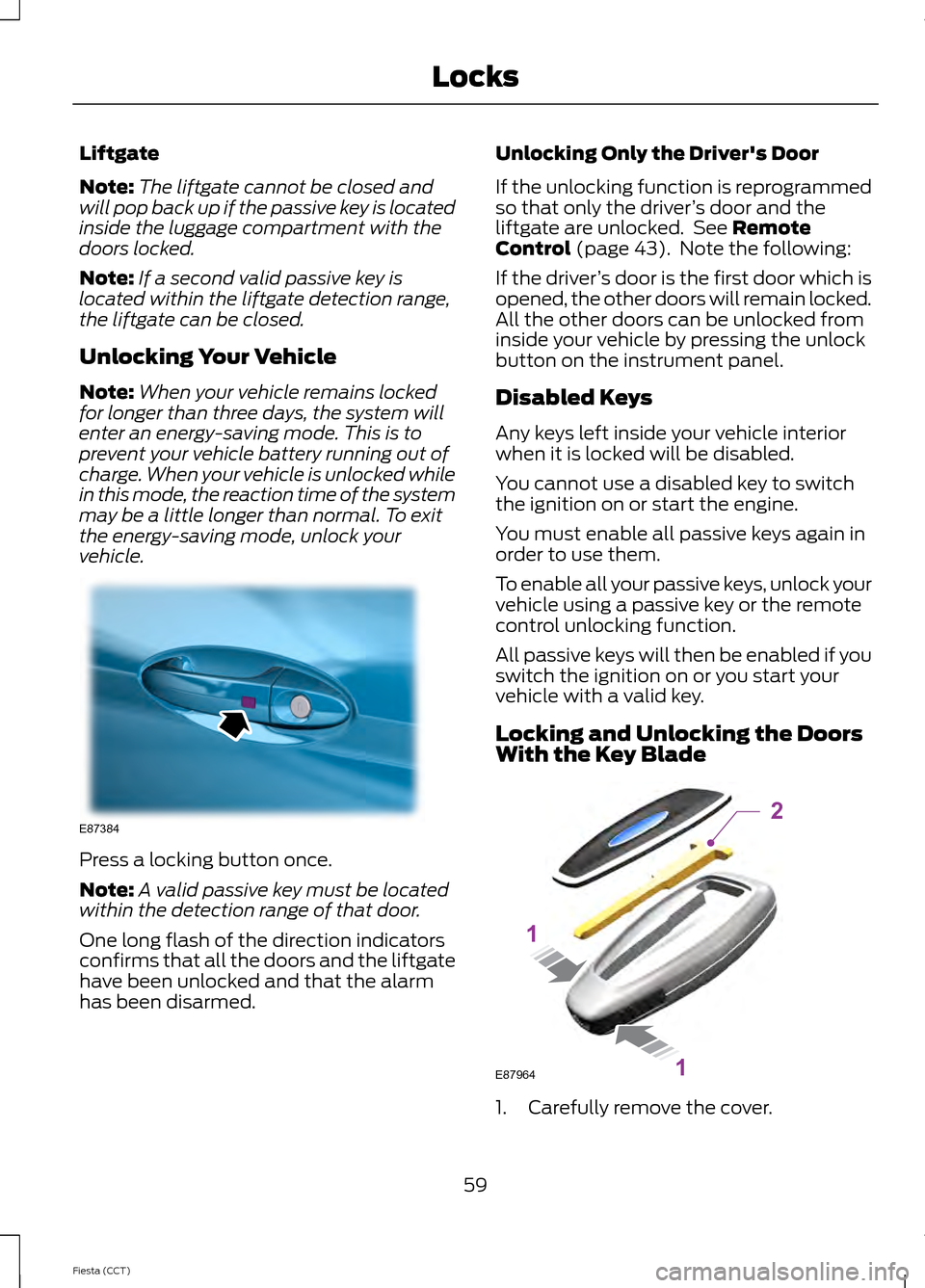
vehicle. Press a locking button once.
Note:
A valid passive key must be located
within the detection range of that door.
One long flash of the direction indicators
confirms that all the doors and the liftgate
have been unlocked and that the alarm
has been disarmed. Unlocking Only the Driver's Door
If the unlocking function is reprogrammed
so that only the driver
’s door and the
liftgate are unlocked. See Remote
Control (page 43). Note the following:
If the driver ’s door is the first door which is
opened, the other doors will remain locked.
All the other doors can be unlocked from
inside your vehicle by pressing the unlock
button on the instrument panel.
Disabled Keys
Any keys left inside your vehicle interior
when it is locked will be disabled.
You cannot use a disabled key to switch
the ignition on or start the engine.
You must enable all passive keys again in
order to use them.
To enable all your passive keys, unlock your
vehicle using a passive key or the remote
control unlocking function.
All passive keys will then be enabled if you
switch the ignition on or you start your
vehicle with a valid key.
Locking and Unlocking the Doors
With the Key Blade 1. Carefully remove the cover.
59
Fiesta (CCT) LocksE87384 E87964
2
1
1
Page 64 of 396
PASSIVE ANTI-THEFT
SYSTEM
Note:
The system is not compatible with
non-Ford aftermarket remote start systems.
Use of these systems may result in vehicle
starting problems and a loss of security
protection.
Note: Metallic objects, electronic devices
or a second coded key on the same key
chain may cause vehicle starting problems
if they are too close to the key when starting
the engine. Prevent these objects from
touching the coded key while starting the
engine. Switch the ignition off, move all
objects on the key chain away from the
coded key and restart the engine if a
problem occurs.
Note: Do not leave a duplicate coded key
in the vehicle. Always take your keys and
lock all doors when leaving the vehicle.
SecuriLock®
The system is an engine immobilization
system. It is designed to help prevent the
engine from being started unless a coded
key programmed to your vehicle is used.
Using the wrong key may prevent the
engine from starting. A message may
appear in the information display.
If you are unable to start the engine with a
correctly coded key, a malfunction has
happened and a message may appear in
the information display.
Automatic Arming
The vehicle arms immediately after you
switch the ignition off.
Automatic Disarming
Switching the ignition on with a coded key
disarms the vehicle. Replacement Keys
Note:
Your vehicle comes equipped with
two integrated keyhead transmitters or two
intelligent access keys.
The integrated keyhead transmitter
functions as a programmed ignition key
that operates all the locks and starts the
vehicle, as well as a remote control.
The intelligent access key functions as a
programmed key that operates the driver
door lock and activates the intelligent
access with push button start system, as
well as a remote control.
If your programmed transmitters or
standard SecuriLock coded keys
(integrated keyhead transmitters only) are
lost or stolen and you do not have an extra
coded key, you will need to have your
vehicle towed to an authorized dealer. You
need to erase the key codes from your
vehicle and program new coded keys.
Store an extra programmed key away from
the vehicle in a safe place to help prevent
any inconveniences. See your authorized
dealer to purchase additional spare or
replacement keys.
Programming a Spare Integrated
Keyhead Transmitter
Note: You can program a maximum of eight
coded keys to your vehicle. All eight can be
integrated keyhead transmitters.
You can program your own integrated
keyhead transmitter or standard
SecuriLock coded keys to your vehicle. This
procedure will program both the engine
immobilizer keycode and the remote entry
portion of the remote control to your
vehicle
Only use integrated keyhead transmitters
or standard SecuriLock keys.
61
Fiesta (CCT) Security
Page 65 of 396
You must have two previously
programmed coded keys and the new
unprogrammed key readily accessible. See
your authorized dealer to have the spare
key programmed if two previously
programmed coded keys are not available.
Read and understand the entire procedure
before you begin.
1.
Insert the first previously programmed
coded key into the ignition.
2. Switch the ignition from off to on. Keep
the ignition on for at least three
seconds, but no more than 10 seconds.
3. Switch the ignition off and remove the
first coded key from the ignition.
4. After three seconds but within 10 seconds of switching the ignition off,
insert the second previously coded key
into the ignition.
5. Switch the ignition from off to on. Keep
the ignition on for at least three
seconds, but no more than 10 seconds.
6. Switch the ignition off and remove the
second previously programmed coded
key from the ignition.
7. After three seconds but within 10 seconds of switching the ignition off
and removing the previously
programmed coded key, insert the new
unprogrammed key into the ignition.
8. Switch the ignition from off to on. Keep
the ignition on for at least six seconds.
9. Remove the newly programmed coded
key from the ignition.
If the key has been successfully
programmed it will start the engine and
operate the remote entry system (if the
new key is an integrated keyhead
transmitter).
If programming was not successful, wait
10 seconds and repeat Steps 1 through 8.
If you are still unsuccessful, take your
vehicle to your authorized dealer. Programming a Spare Intelligent
Access Key
See your authorized dealer to have
additional keys programmed to your
vehicle.
ANTI-THEFT ALARM
Alarm System
The perimeter alarm is a deterrent against
unauthorized access to your vehicle
through the doors and the hood. It also
protects the audio unit.
Triggering the Alarm
Once armed, the alarm is triggered in any
of the following ways:
•
If someone opens a door, the liftgate
or the hood without a valid key or
remote control.
• If someone removes the audio or
navigation system.
• If you switch the ignition on without a
valid key.
If the alarm is triggered, the alarm horn will
sound for 30 seconds and the hazard
warning flasher will flash for five minutes.
Any further attempts to perform one of the
above will trigger the alarm again.
Arming the Alarm
To arm the alarm, lock your vehicle. See
Locks (page 54).
Disarming the Alarm
Vehicles Without Keyless Entry
Disarm and silence the alarm by unlocking
the doors with the key and switching the
ignition on with a correctly coded key or
unlocking the doors with the remote
control.
62
Fiesta (CCT) Security
Page 66 of 396
Vehicles with Keyless Entry
Note:
A valid passive key must be located
within the detection range of that door for
keyless entry. See Keyless Entry (page 58).
Disarm and silence the alarm by unlocking
the doors and switching the ignition on or
unlocking the doors with the remote
control.
63
Fiesta (CCT) Security
Page 77 of 396
2. Close the window a third time to the
point of resistance. The bounce-back
feature is now disabled and you can
close the window manually. The
window will go past the point of
resistance and you can close it fully.
See an authorized dealer as soon as
possible if the window does not close after
the third attempt.
Resetting the Bounce-Back Feature WARNING
The bounce-back feature remains
turned off until you reset the
memory.
If you have disconnected the battery, you
must reset the bounce-back memory
separately for each window.
1. Lift and hold the switch until the
window is fully closed.
2. Release the switch.
3. Lift the switch again for one more second.
4. Press and hold the switch until the window is fully open.
5. Release the switch.
6. Lift and hold the switch until the window is fully closed.
7. Open the window and then try to close
it automatically.
8. Reset and repeat the procedure if the window does not close automatically.
Accessory Delay (If Equipped)
You can use the window switches for
several minutes after you have switched
the ignition off or until either front door is
opened. GLOBAL OPENING AND
CLOSING
(IF EQUIPPED)
You can also operate the power windows
with the ignition off using the global
opening and global closing function.
Note: Global opening will only operate for
a short period of time after you have
unlocked your vehicle using the remote
control.
Note: Global closing will only operate if you
have set the memory correctly for each
window. See
Power Windows (page 73).
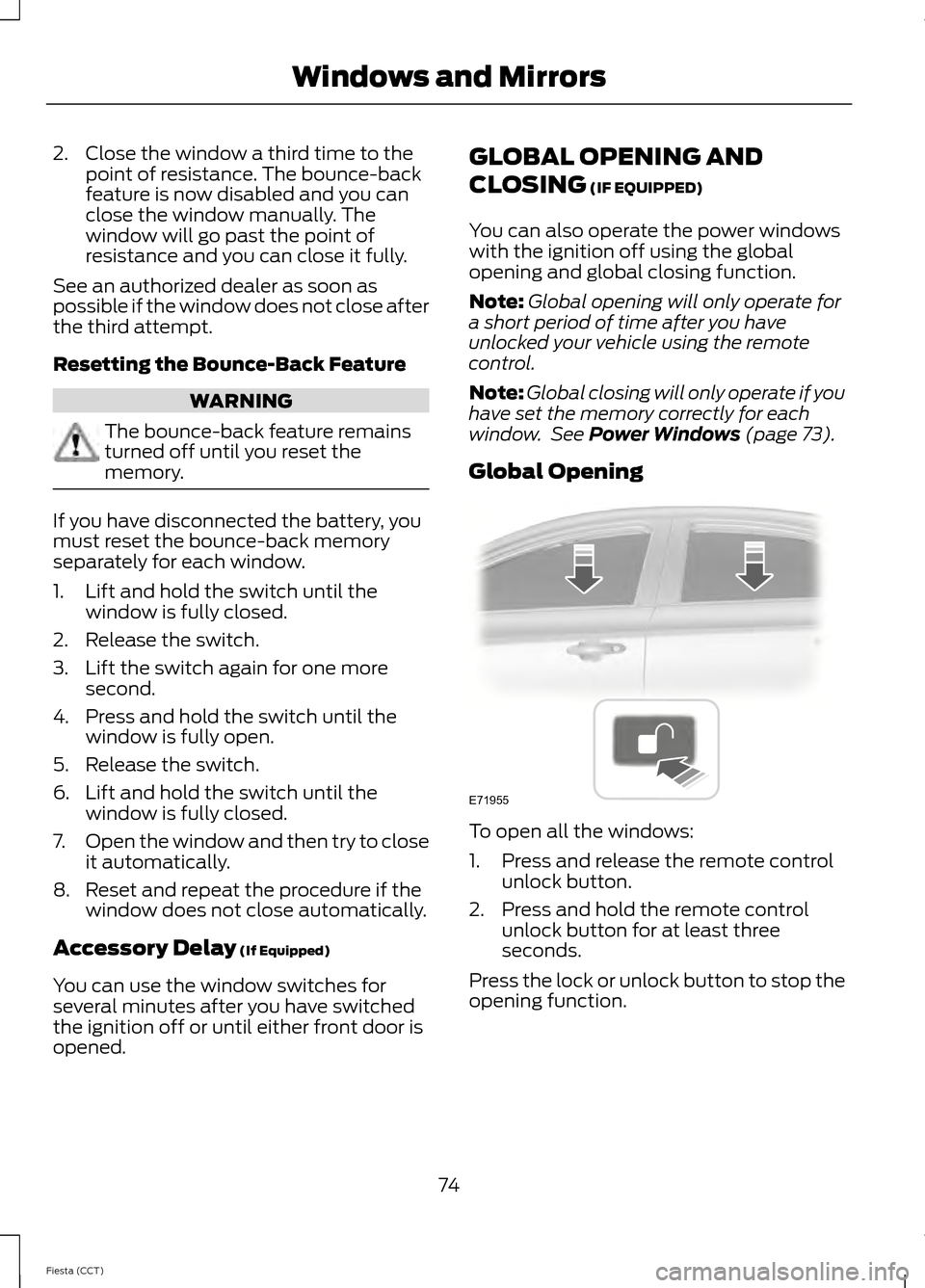
Global Opening To open all the windows:
1. Press and release the remote control
unlock button.
2. Press and hold the remote control unlock button for at least three
seconds.
Press the lock or unlock button to stop the
opening function.
74
Fiesta (CCT) Windows and MirrorsE71955
Page 78 of 396
Global Closing
Vehicles Without Keyless Entry
WARNING
Take care when using global closing.
In an emergency, press the lock or
unlock button immediately to stop.
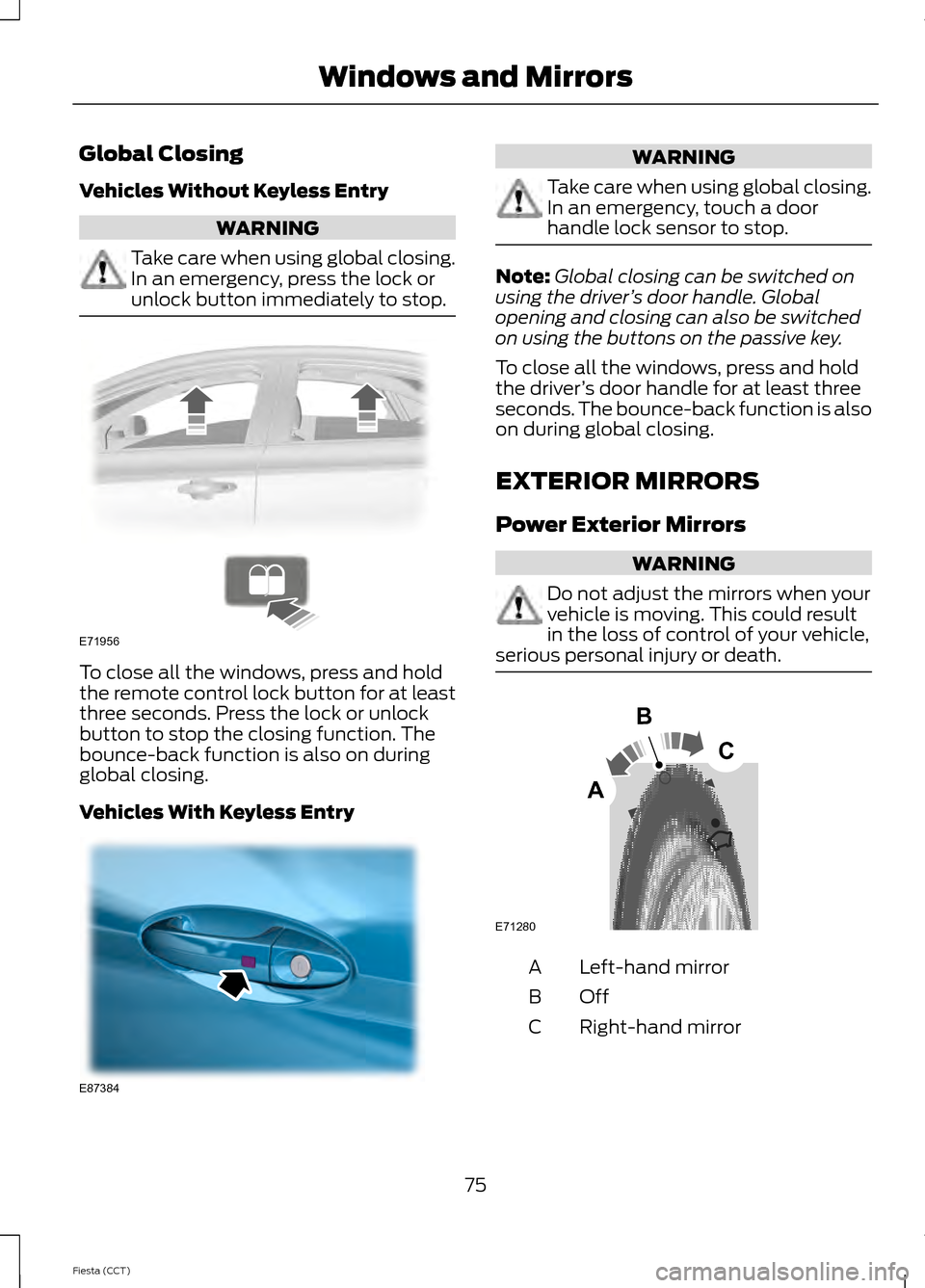
To close all the windows, press and hold
the remote control lock button for at least
three seconds. Press the lock or unlock
button to stop the closing function. The
bounce-back function is also on during
global closing.
Vehicles With Keyless Entry WARNING
Take care when using global closing.
In an emergency, touch a door
handle lock sensor to stop.
Note:
Global closing can be switched on
using the driver ’s door handle. Global
opening and closing can also be switched
on using the buttons on the passive key.
To close all the windows, press and hold
the driver ’s door handle for at least three
seconds. The bounce-back function is also
on during global closing.
EXTERIOR MIRRORS
Power Exterior Mirrors WARNING
Do not adjust the mirrors when your
vehicle is moving. This could result
in the loss of control of your vehicle,
serious personal injury or death. Left-hand mirror
A
OffB
Right-hand mirror
C
75
Fiesta (CCT) Windows and MirrorsE71956 E87384 E71280
B
C
A
Page 95 of 396
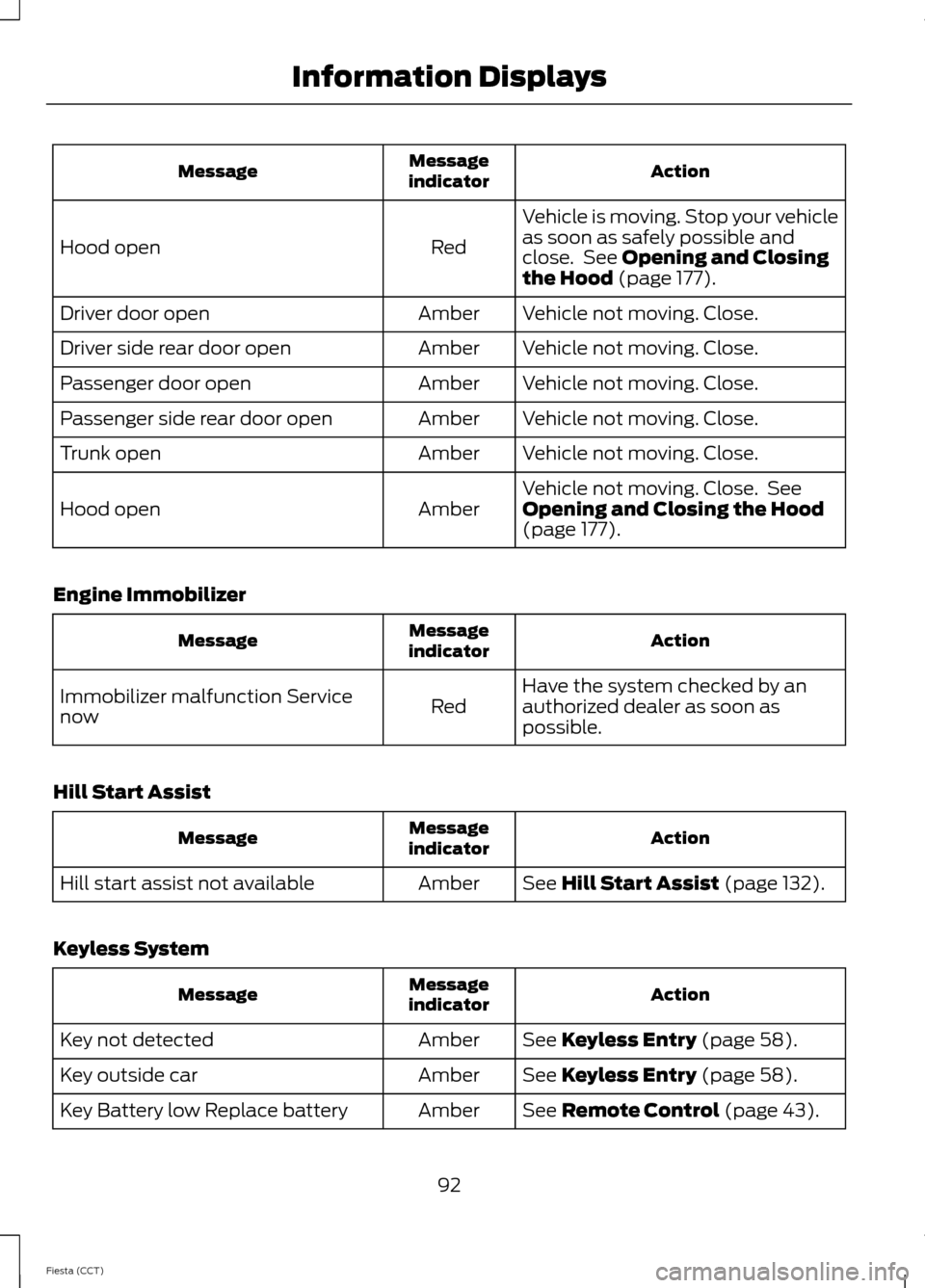
Action
Message
indicator
Message
Vehicle is moving. Stop your vehicle
as soon as safely possible and
close. See Opening and Closing
the Hood (page 177).
Red
Hood open
Vehicle not moving. Close.
Amber
Driver door open
Vehicle not moving. Close.
Amber
Driver side rear door open
Vehicle not moving. Close.
Amber
Passenger door open
Vehicle not moving. Close.
Amber
Passenger side rear door open
Vehicle not moving. Close.
Amber
Trunk open
Vehicle not moving. Close. See
Opening and Closing the Hood
(page
177).
Amber
Hood open
Engine Immobilizer Action
Message
indicator
Message
Have the system checked by an
authorized dealer as soon as
possible.
Red
Immobilizer malfunction Service
now
Hill Start Assist Action
Message
indicator
Message
See
Hill Start Assist (page 132).
Amber
Hill start assist not available
Keyless System Action
Message
indicator
Message
See
Keyless Entry (page 58).
Amber
Key not detected
See
Keyless Entry (page 58).
Amber
Key outside car
See
Remote Control (page 43).
Amber
Key Battery low Replace battery
92
Fiesta (CCT) Information Displays
Page 225 of 396
WARNINGS
possible. Use of any tire or wheel not
recommended by Ford can affect the
safety and performance of your vehicle,
which could result in an increased risk of
loss of vehicle control, vehicle rollover,
personal injury and death. Additionally the
use of non-recommended tires and wheels
could cause steering, suspension, axle,
transfer case or power transfer unit failure.
If you have questions regarding tire
replacement, contact your authorized
dealer as soon as possible. When mounting replacement tires
and wheels, you should not exceed
the maximum pressure indicated on
the sidewall of the tire to set the beads
without additional precautions listed
below. If the beads do not seat at the
maximum pressure indicated, re-lubricate
and try again
When inflating the tire for mounting
pressures up to 20 psi (1.38 bar) greater
than the maximum pressure on the tire
sidewall, the following precautions must
be taken to protect the person mounting
the tire:
1. Make sure that you have the correct tire
and wheel size.
2. Lubricate the tire bead and wheel bead
seat area again.
3. Stand at a minimum of 12 ft (3.66 m)
away from the wheel and tire assembly.
4. Use both eye and ear protection.
For a mounting pressure more than 20 psi
(1.38 bar) greater than the maximum
pressure, a Ford dealer or other tire service
professional should do the mounting. WARNINGS
Always inflate steel carcass tires with a
remote air fill with the person inflating
standing at a minimum of 12 ft (3.66 m)
away from the wheel and tire assembly Important: Remember to replace
the wheel valve stems when the
road tires are replaced on your
vehicle
It is recommended that the two
front tires or two rear tires
generally be replaced as a pair.
The tire pressure sensors mounted
in the wheels (originally installed
on your vehicle) are not designed
to be used in aftermarket wheels.
The use of wheels or tires not
recommended by Ford Motor
Company may affect the
operation of your tire pressure
monitoring system.
If the TPMS indicator is flashing,
your TPMS is malfunctioning. Your
replacement tire might be
incompatible with your TPMS, or
some component of the TPMS
may be damaged.
Safety Practices
WARNINGS
If your vehicle is stuck in snow, mud,
sand, etc., do not rapidly spin the
tires; spinning the tires can tear the
tire and cause an explosion. A tire can
explode in as little as three to five seconds.
222
Fiesta (CCT) Wheels and Tires
Page 389 of 396
Head Restraints............................................106
Adjusting the Head Restraint......................... 107
Heated Seats..................................................110
Heated Windows and Mirrors..................104 Heated Exterior Mirrors.................................... 104
Heated Windows................................................ 104
Hill Start Assist..............................................132 Switching the System On and Off................133
Using Hill Start Assist........................................ 132
Hints on Controlling the Interior Climate...........................................................101
Cooling the Interior Quickly............................ 103
General Hints........................................................ 101
Heating the Interior Quickly............................ 102
Maximum Cooling Performance in Instrument Panel or Instrument Panel
and Footwell Positions............................... 104
Recommended Settings for Cooling .........103
Recommended Settings for Heating..........102
Side Window Defogging in Cold Weather............................................................ 104
Vehicle Stationary for Extended Periods During Extreme High Ambient
Temperatures.................................................. 103
Hints on Driving With Anti-Lock Brakes............................................................134
I
Ignition Switch................................................114
In California (U.S. Only)..............................161
Information Displays
....................................86
General Information........................................... 86
Information....................................................334 911 Assist.............................................................. 340
Alerts...................................................................... 340
Calendar............................................................... 340
SIRIUS Travel Link............................................. 338
SYNC Services (If Equipped, United States Only).................................................................. 335
Vehicle Health Report...................................... 342
Information Messages
.................................90
Installing Child Seats.....................................15 Child Seats............................................................... 15
Using Lap and Shoulder Belts.......................... 16
Using Lower Anchors and Tethers for Children (LATCH)............................................. 18
Using Tether Straps............................................. 20Instrument Cluster.........................................78
Instrument Lighting Dimmer
.....................69
Interior Lamps...................................................71 Front Interior Lamps............................................. 71
Rear Interior Lamps.............................................. 71
Interior Luggage Compartment Release...........................................................60
Interior Mirror....................................................76 Auto-Dimming Mirror........................................... 77
Introduction.........................................................7
J
Jump-Starting the Vehicle
.........................167
To Connect the Booster Cables.................... 168
To Start the Engine............................................ 168
K
Keyless Entry
...................................................58
Disabled Keys........................................................ 59
General Information............................................ 58
Locking and Unlocking the Doors With the Key Blade........................................................... 59
Locking Your Vehicle........................................... 58
Passive Key............................................................. 58
Unlocking Your Vehicle...................................... 59
Keyless Starting.............................................114 Failure to Start...................................................... 115
Ignition On.............................................................. 115
Starting with Automatic Transmission.................................................... 115
Starting with Manual Transmission..............115
Stopping the Engine When Your Vehicle is Moving................................................................ 116
Stopping the Engine with Your Vehicle Stationary.......................................................... 116
Keys and Remote Controls.........................43
Knee Airbag.....................................................40
L
Lighting Control..............................................68 Headlamp Flasher............................................... 69
High Beams............................................................ 69
Lighting Control Positions................................ 68
Parking Lamps...................................................... 68
386
Fiesta (CCT) Index