steering FORD FIESTA 2014 6.G Owner's Guide
[x] Cancel search | Manufacturer: FORD, Model Year: 2014, Model line: FIESTA, Model: FORD FIESTA 2014 6.GPages: 396, PDF Size: 5.58 MB
Page 319 of 396
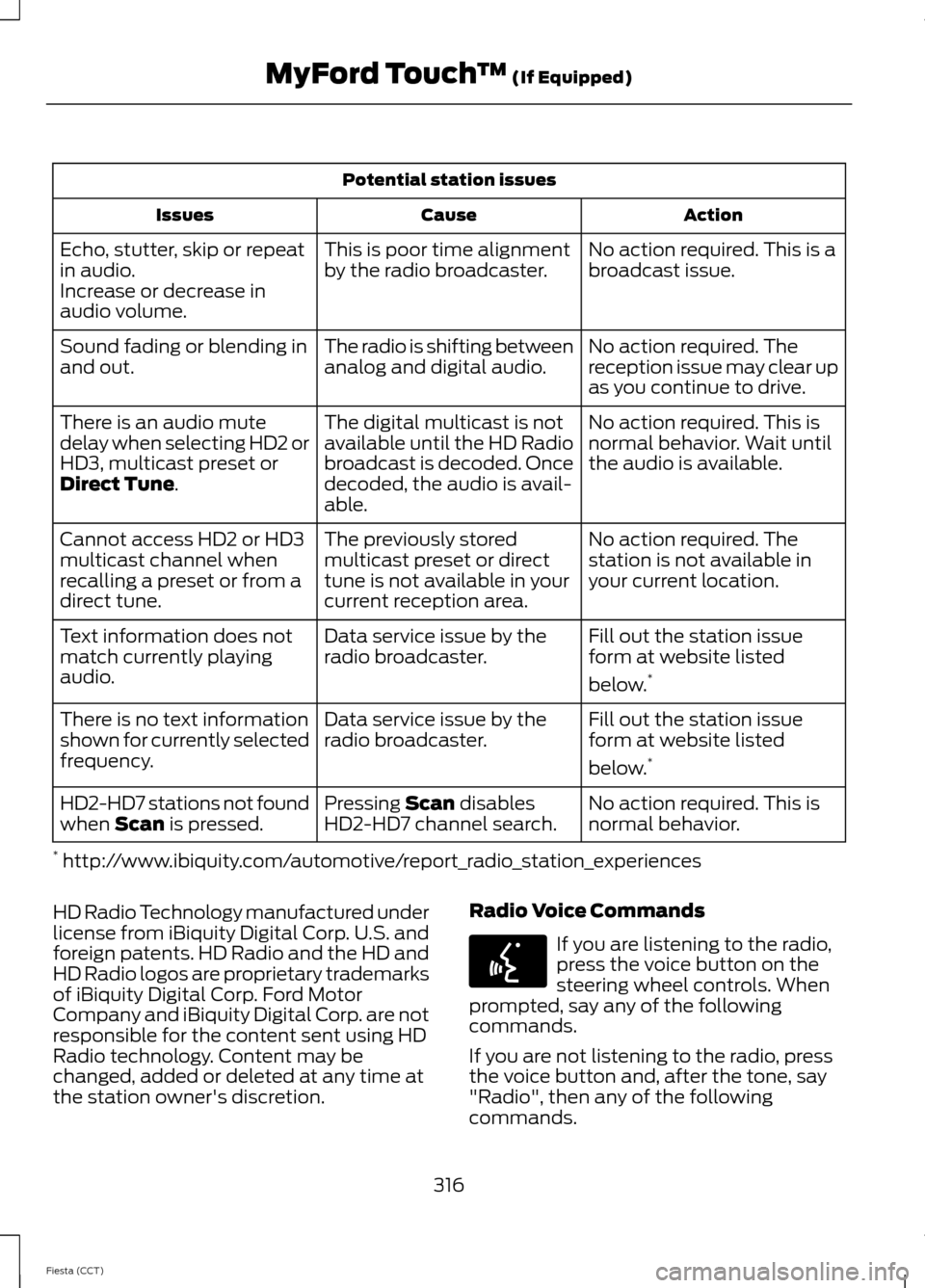
Potential station issues
Action
Cause
Issues
No action required. This is a
broadcast issue.
This is poor time alignment
by the radio broadcaster.
Echo, stutter, skip or repeat
in audio.
Increase or decrease in
audio volume.
No action required. The
reception issue may clear up
as you continue to drive.
The radio is shifting between
analog and digital audio.
Sound fading or blending in
and out.
No action required. This is
normal behavior. Wait until
the audio is available.
The digital multicast is not
available until the HD Radio
broadcast is decoded. Once
decoded, the audio is avail-
able.
There is an audio mute
delay when selecting HD2 or
HD3, multicast preset or
Direct Tune.
No action required. The
station is not available in
your current location.
The previously stored
multicast preset or direct
tune is not available in your
current reception area.
Cannot access HD2 or HD3
multicast channel when
recalling a preset or from a
direct tune.
Fill out the station issue
form at website listed
below.*
Data service issue by the
radio broadcaster.
Text information does not
match currently playing
audio.
Fill out the station issue
form at website listed
below.*
Data service issue by the
radio broadcaster.
There is no text information
shown for currently selected
frequency.
No action required. This is
normal behavior.
Pressing
Scan disables
HD2-HD7 channel search.
HD2-HD7 stations not found
when Scan is pressed.
* http://www.ibiquity.com/automotive/report_radio_station_experiences
HD Radio Technology manufactured under
license from iBiquity Digital Corp. U.S. and
foreign patents. HD Radio and the HD and
HD Radio logos are proprietary trademarks
of iBiquity Digital Corp. Ford Motor
Company and iBiquity Digital Corp. are not
responsible for the content sent using HD
Radio technology. Content may be
changed, added or deleted at any time at
the station owner's discretion. Radio Voice Commands If you are listening to the radio,
press the voice button on the
steering wheel controls. When
prompted, say any of the following
commands.
If you are not listening to the radio, press
the voice button and, after the tone, say
"Radio", then any of the following
commands.
316
Fiesta (CCT) MyFord Touch
™
(If Equipped)E142599
Page 324 of 396
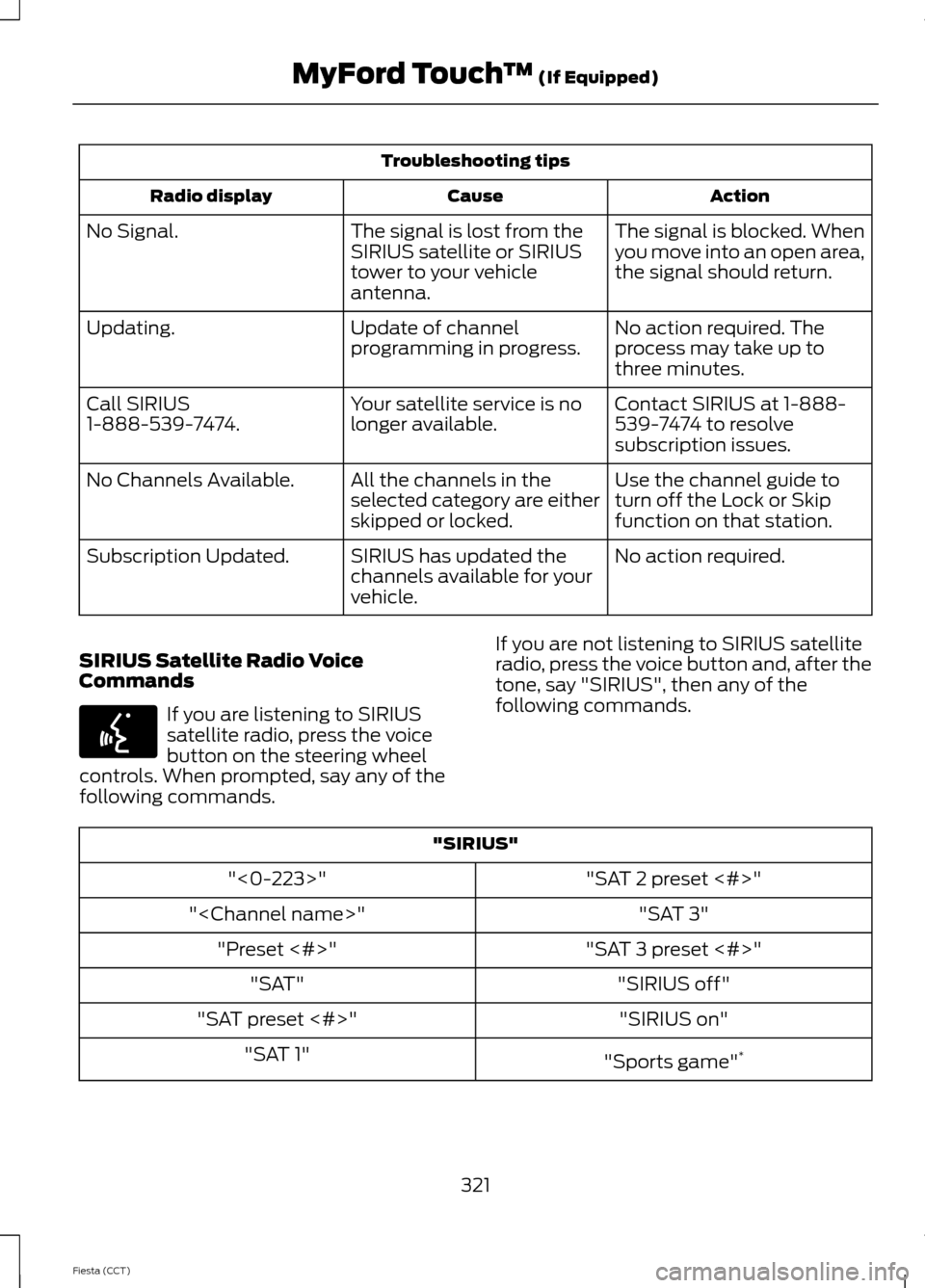
Troubleshooting tips
Action
Cause
Radio display
The signal is blocked. When
you move into an open area,
the signal should return.
The signal is lost from the
SIRIUS satellite or SIRIUS
tower to your vehicle
antenna.
No Signal.
No action required. The
process may take up to
three minutes.
Update of channel
programming in progress.
Updating.
Contact SIRIUS at 1-888-
539-7474 to resolve
subscription issues.
Your satellite service is no
longer available.
Call SIRIUS
1-888-539-7474.
Use the channel guide to
turn off the Lock or Skip
function on that station.
All the channels in the
selected category are either
skipped or locked.
No Channels Available.
No action required.
SIRIUS has updated the
channels available for your
vehicle.
Subscription Updated.
SIRIUS Satellite Radio Voice
Commands If you are listening to SIRIUS
satellite radio, press the voice
button on the steering wheel
controls. When prompted, say any of the
following commands. If you are not listening to SIRIUS satellite
radio, press the voice button and, after the
tone, say "SIRIUS", then any of the
following commands."SIRIUS"
"SAT 2 preset <#>"
"<0-223>"
"SAT 3"
"
"SAT 3 preset <#>"
"Preset <#>"
"SIRIUS off"
"SAT"
"SIRIUS on"
"SAT preset <#>"
"Sports game"*
"SAT 1"
321
Fiesta (CCT) MyFord Touch
™ (If Equipped)E142599
Page 326 of 396
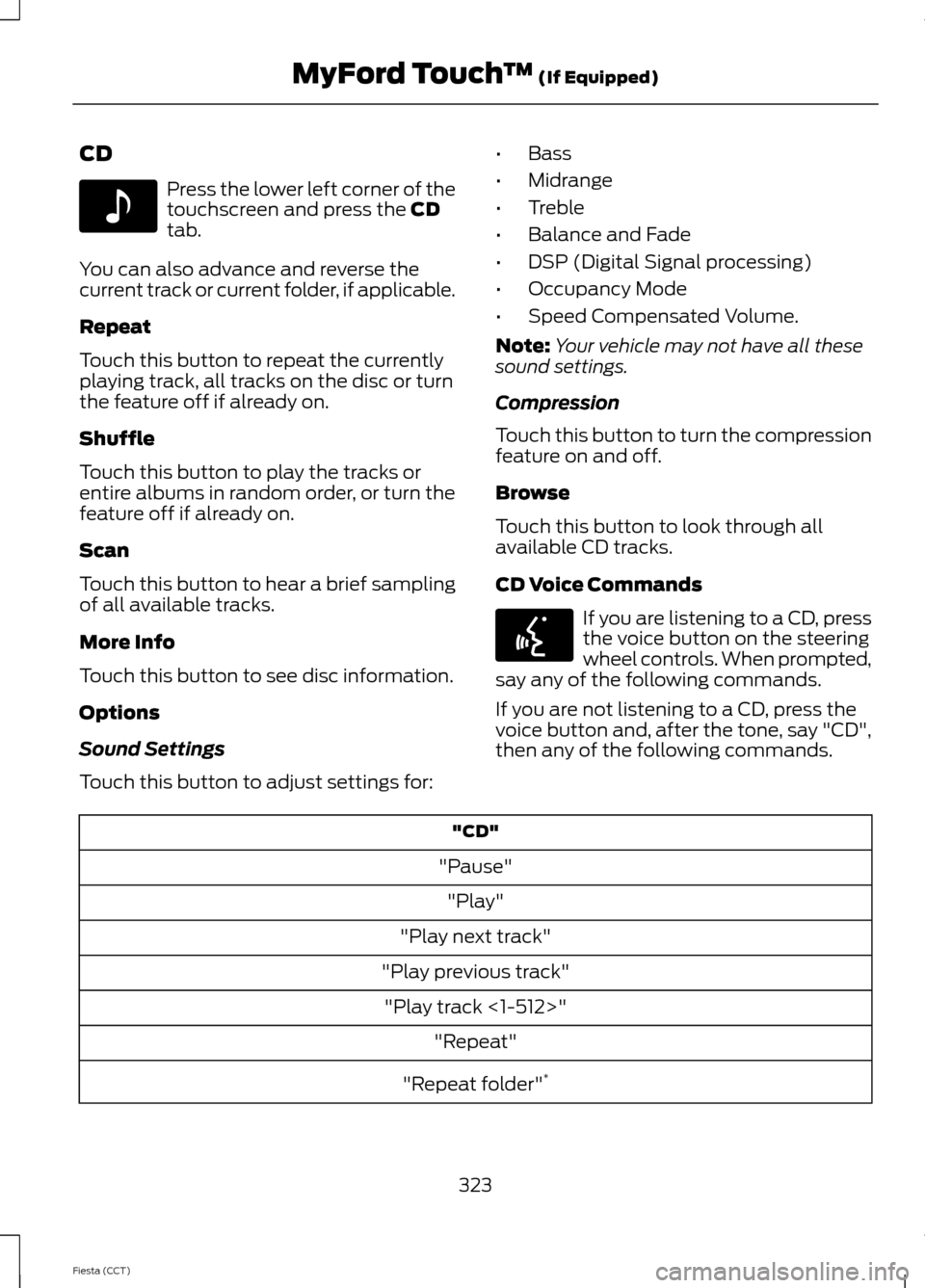
CD
Press the lower left corner of the
touchscreen and press the CD
tab.
You can also advance and reverse the
current track or current folder, if applicable.
Repeat
Touch this button to repeat the currently
playing track, all tracks on the disc or turn
the feature off if already on.
Shuffle
Touch this button to play the tracks or
entire albums in random order, or turn the
feature off if already on.
Scan
Touch this button to hear a brief sampling
of all available tracks.
More Info
Touch this button to see disc information.
Options
Sound Settings
Touch this button to adjust settings for: •
Bass
• Midrange
• Treble
• Balance and Fade
• DSP (Digital Signal processing)
• Occupancy Mode
• Speed Compensated Volume.
Note: Your vehicle may not have all these
sound settings.
Compression
Touch this button to turn the compression
feature on and off.
Browse
Touch this button to look through all
available CD tracks.
CD Voice Commands If you are listening to a CD, press
the voice button on the steering
wheel controls. When prompted,
say any of the following commands.
If you are not listening to a CD, press the
voice button and, after the tone, say "CD",
then any of the following commands. "CD"
"Pause" "Play"
"Play next track"
"Play previous track" "Play track <1-512>" "Repeat"
"Repeat folder" *
323
Fiesta (CCT) MyFord Touch
™
(If Equipped)E142611 E142599
Page 328 of 396
This feature allows you to plug in media
playing devices, memory sticks, flash drives
or thumb drives, and charge devices if they
support this feature.
In order to playback video from your iPod®
or iPhone®, you must have a special
combination USB/RCA composite video
cable (which you can buy from Apple®).
When the cable is connected to your iPod®
or iPhone®, plug the other end into both
the RCA jacks and the USB port.
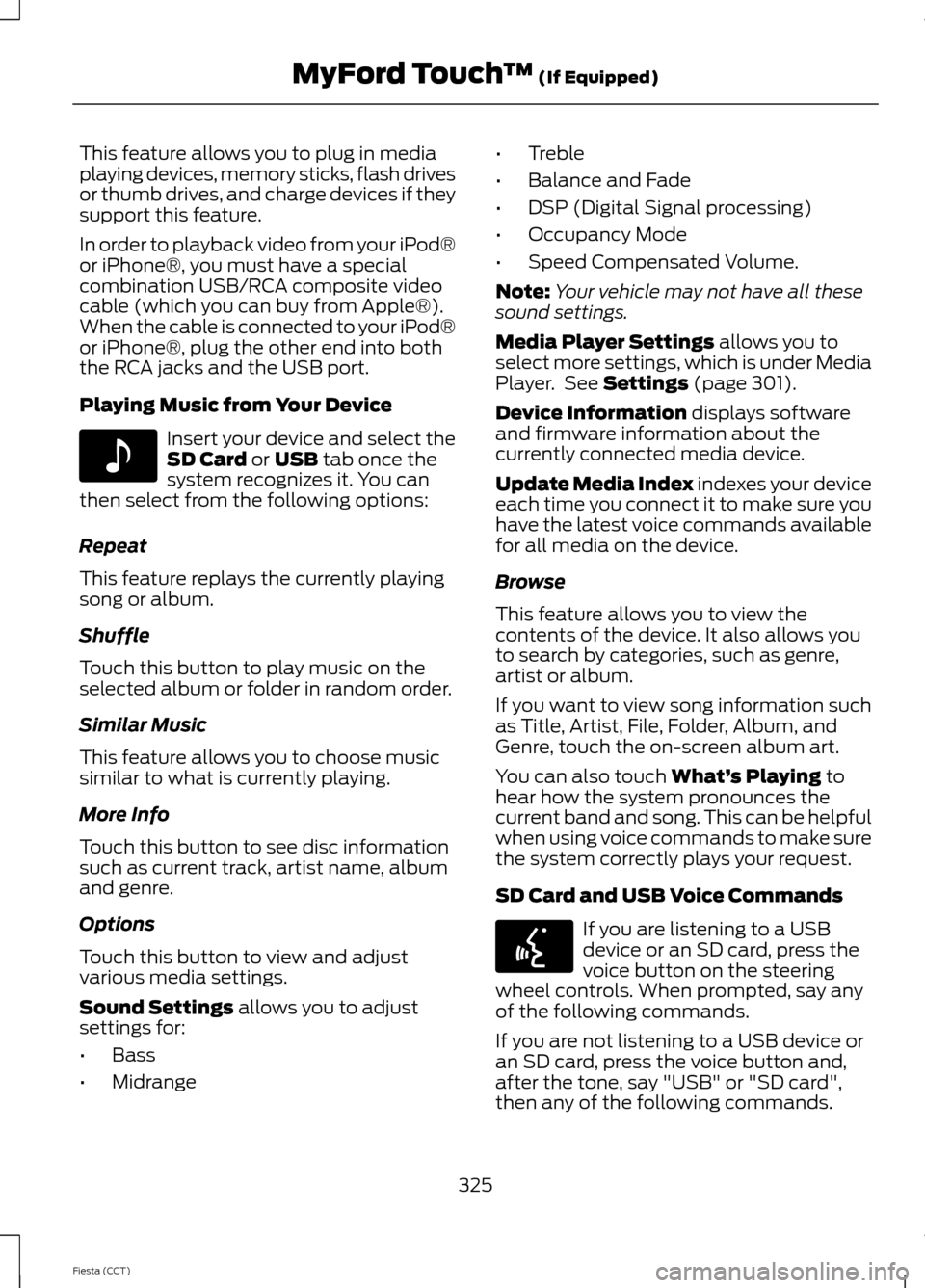
Playing Music from Your Device
Insert your device and select the
SD Card or USB tab once the
system recognizes it. You can
then select from the following options:
Repeat
This feature replays the currently playing
song or album.
Shuffle
Touch this button to play music on the
selected album or folder in random order.
Similar Music
This feature allows you to choose music
similar to what is currently playing.
More Info
Touch this button to see disc information
such as current track, artist name, album
and genre.
Options
Touch this button to view and adjust
various media settings.
Sound Settings
allows you to adjust
settings for:
• Bass
• Midrange •
Treble
• Balance and Fade
• DSP (Digital Signal processing)
• Occupancy Mode
• Speed Compensated Volume.
Note: Your vehicle may not have all these
sound settings.
Media Player Settings
allows you to
select more settings, which is under Media
Player. See
Settings (page 301).
Device Information
displays software
and firmware information about the
currently connected media device.
Update Media Index indexes your device
each time you connect it to make sure you
have the latest voice commands available
for all media on the device.
Browse
This feature allows you to view the
contents of the device. It also allows you
to search by categories, such as genre,
artist or album.
If you want to view song information such
as Title, Artist, File, Folder, Album, and
Genre, touch the on-screen album art.
You can also touch
What’ s Playing to
hear how the system pronounces the
current band and song. This can be helpful
when using voice commands to make sure
the system correctly plays your request.
SD Card and USB Voice Commands If you are listening to a USB
device or an SD card, press the
voice button on the steering
wheel controls. When prompted, say any
of the following commands.
If you are not listening to a USB device or
an SD card, press the voice button and,
after the tone, say "USB" or "SD card",
then any of the following commands.
325
Fiesta (CCT) MyFord Touch
™
(If Equipped)E142611 E142599
Page 331 of 396
Bluetooth Audio Voice Commands
If you are listening to a Bluetooth
audio device, press the voice
button on the steering wheel
control. When prompted, say "Next song", "Pause", "Play" or "Previous song".
If you are not listening to a Bluetooth audio
device, press the voice button and, after
the tone, say "Next song", "Pause", "Play"
or "Previous song".
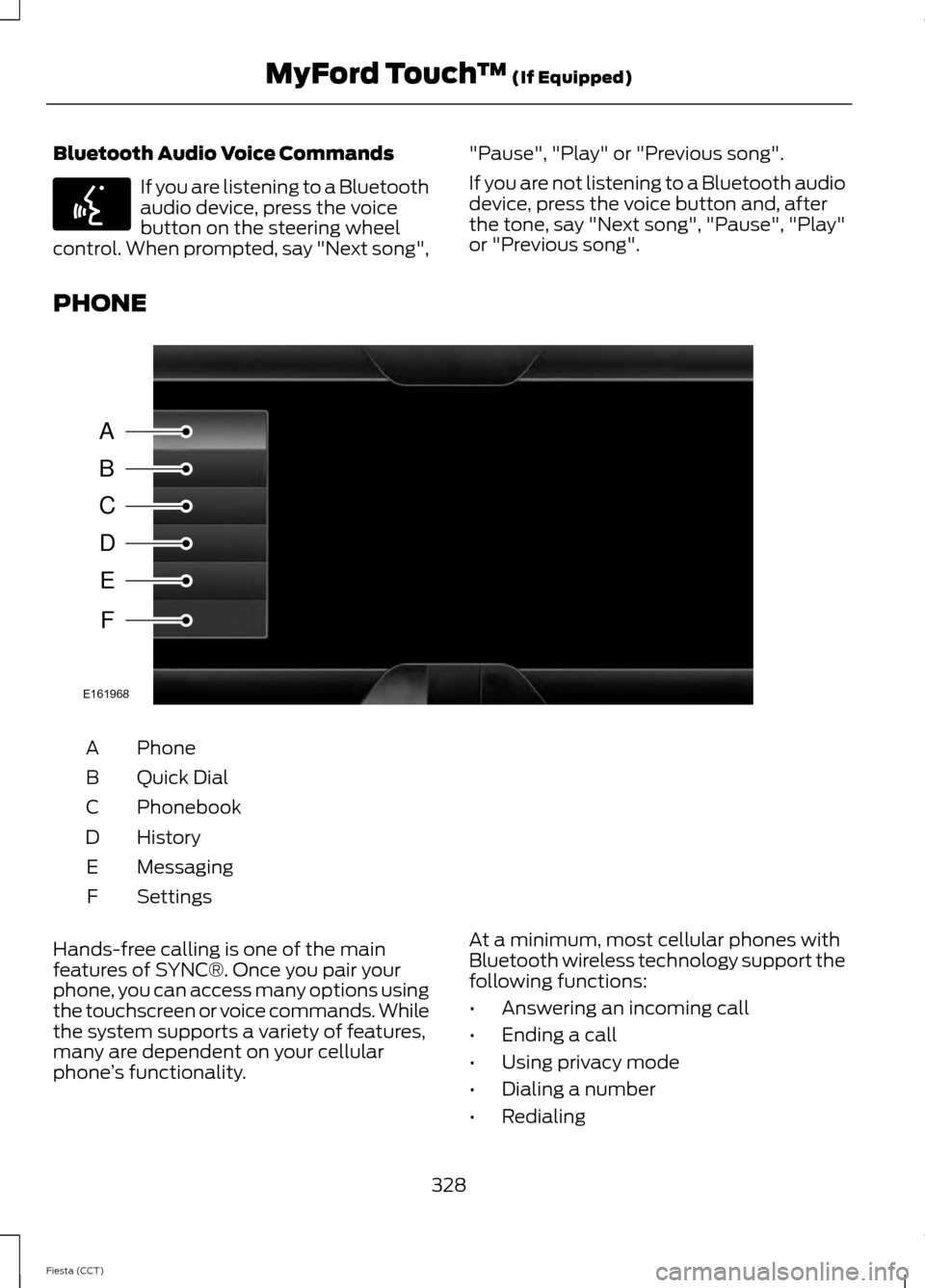
PHONE Phone
A
Quick Dial
B
Phonebook
C
History
D
Messaging
E
Settings
F
Hands-free calling is one of the main
features of SYNC®. Once you pair your
phone, you can access many options using
the touchscreen or voice commands. While
the system supports a variety of features,
many are dependent on your cellular
phone ’s functionality. At a minimum, most cellular phones with
Bluetooth wireless technology support the
following functions:
•
Answering an incoming call
• Ending a call
• Using privacy mode
• Dialing a number
• Redialing
328
Fiesta (CCT) MyFord Touch
™ (If Equipped)E142599 A
B
C
D
E
F
E161968
Page 333 of 396
Making Calls
Press the voice button on the
steering wheel controls. When
prompted, say, "Call
or say "Dial", then the desired number. To end the call or exit phone
mode, press and hold the phone
button.
Receiving Calls
During an incoming call, an audible tone
sounds. Call information appears in the
display if it is available. Accept the call by pressing
Accept on the touchscreen or
by pressing this phone button on
the steering wheel controls. Reject the call by pressing
Reject
on the touchscreen or by
pressing and holding this phone
button on the steering wheel controls.
Ignore the call by doing nothing. SYNC logs
it as a missed call.
Phone Menu Options
Press the top left corner on your
touchscreen to select from the following
options:
Phone
Touch this button to access the on-screen
numerical pad to enter a number and place
a call. During an active call, you can also
choose to:
• Mute the call
• Put the call on hold
• Turn on the privacy feature
• Join two calls
• End the call. Quick Dial
Select and call contacts stored in your
phonebook contacts and call history folder.
Phonebook
Touch this button to access and call any
contacts in your previously downloaded
phone book. The system places the entries
in alphabetical categories summarized at
the top of the screen.
To turn on contact picture settings, if your
device supports this feature, press:
1.
Phone
.
2. Settings
.
3. Manage Phonebook
.
4. Download photos from Phonebook.
5. On
.
Certain smartphones may support
transferring street addresses when listed
with phone book contact information. If
your phone supports this feature, you can
select and use these addresses as
destinations and save them as favorites.
History
After you connect your Bluetooth-enabled
phone to SYNC, you can access any
previously dialed, received or missed calls.
You can also choose to save these to your
Favorites or to Quick Dial.
Note: This is a phone-dependent feature.
If your phone does not support downloading
call history using Bluetooth, SYNC keeps
track of calls made with the SYNC system.
Messaging
Send text messages using your
touchscreen. See
Text messaging later
in this section.
330
Fiesta (CCT) MyFord Touch
™
(If Equipped)E142599
Page 336 of 396
Internet Data Connection
If your phone is compatible, use this screen
to adjust your internet data connection.
Select to make your connection profile
with the personal area network or to turn
off your connection. You can also choose
to adjust your settings or have the system
always connect, never connect when
roaming or query on connect. Press ? for
more information. Manage Phonebook
Touch this button to access features such
as automatic phonebook download,
re-download your phonebook, add
contacts from your phone as well as delete
or upload your phonebook.
Roaming Warning
Touch this button to have the system alert
you when your phone is in roaming mode.
Phone Voice Commands Press the voice button on the
steering wheel controls. When
prompted, say any of the
following commands: "PHONE"
"Join calls"1
"Call"
"Listen to text message <#>"
"Call
"Listen to text messages"
"Call
"Messages"2
"Call
"Mute call"1
"Call
"Pair phone"
"Call
"Privacy on"1
"Call voicemail"
"Read text message"
"Dial"
"Reply to text messages"
"Do not disturb off"
"Turn ringer off"
"Do not disturb on"
"Turn ringer on"
"Forward text messages"
"Unmute call"1
"Go to hands free" 1
333
Fiesta (CCT) MyFord Touch
™
(If Equipped)E142599
Page 340 of 396
If your vehicle is not equipped with
Navigation:
•
Turn-by-turn directions appear in the
information display, in the status bar
of your touchscreen system and on the
SYNC Services screen. You also receive
driving instructions from audible
prompts.
• When on an active route, you can
select Route Summary or Route
Status using the touchscreen controls
or voice commands to view the Route
Summary Turn List
or the Route
Status ETA. You can also turn voice
guidance on or off, cancel the route or
update the route. If you miss a turn, SYNC automatically asks
if you want the route updated. Just say,
"Yes" when prompted and the system
delivers a new route to your vehicle.
If your vehicle is equipped with Navigation,
SYNC Services downloads your requested
destination to the navigation system. The
navigation system then calculates the
route and provides driving instructions.
See
Navigation (page 343).
Disconnecting from SYNC Services
1. Press and hold the hang-up phone button on the steering wheel.
2. Say "Good-bye" from the SYNC Services main menu. SYNC Services quick tips
You can personalize your Services feature to provide
quicker access to your most used or favorite information.
You can save address points, such as work or home. You
can also save favorite information like sports teams, such
as Detroit Lions, or a news category. You can learn more
about personalization by logging onto
www.SYNCMyRide.com.
Personalizing
Press the voice button at any time (while connected to
SYNC Services) to interrupt a voice prompt or an audio
clip (such as a sports report) and say your voice command.
Push to interrupt
Your subscription is associated with your Bluetooth-
enabled cellular phone number, not your VIN (Vehicle
Identification Number). You can pair and connect your
phone to any vehicle equipped with SYNC Services and
continue enjoying your personalized services.
Portable
SYNC Services Voice Commands When a route has been
downloaded (non-navigation
systems), press the voice button
on the steering wheel controls. When
prompted, say any of the following
commands: "SERVICES"
"Cancel route"
"Navigation voice off" "Navigation voice on" "Next turn"
337
Fiesta (CCT) MyFord Touch
™
(If Equipped)E142599
Page 342 of 396
Ski Conditions
Touch this button to view ski conditions
for a specific area.
SIRIUS Travel Link Voice Commands
Press the voice button on the
steering wheel controls. When
prompted, say any of the
following commands: "SIRIUS TRAVEL LINK"
"5-day weather forecast" "Fuel prices"
"Movie listings"
"Sports headlines" *
"Sports schedules" *
"Sports scores" *
"Traffic"
"Weather"
"Weather map" "Help"
* If you say "Sports headlines", "Sports
schedules" or "Sports scores", you can
then say any of the commands in the
following chart. Sports-related commands
"Baseball"
"College basketball" "College football" "Golf"
"MLS" Sports-related commands
"My teams""NBA""NFL"
"NHL"
"WNBA" "Help" Additional sports-related voice
commands
"Baseball headlines" "Baseball schedule" "Baseball scores"
"College basketball headlines" "College basketball schedule" "College basketball scores"
"College football headlines" "College football schedule" "College football scores" "Golf headlines"
"Golf leaderboard" "Golf schedule"
"MLS headlines" "MLS schedule" "MLS scores"
"Motor sports headlines" "Motor sports order"
"Motor sports schedule" "My team headlines"
339
Fiesta (CCT) MyFord Touch
™ (If Equipped)E142599
Page 345 of 396
Before making the call:
•
SYNC provides a short window of time
(about 10 seconds) to cancel the call.
If you fail to cancel the call, SYNC
attempts to dial 911.
• SYNC says the following, or a similar
message: "SYNC will attempt to call
911, to cancel the call, press Cancel on
your screen or press and hold the
phone button on your steering wheel."
If you do not cancel the call, and SYNC
makes a successful call, a pre-recorded
message plays for the 911 operator, and
then the occupant(s) in your vehicle is able
to talk with the operator. Be prepared to
provide your name, phone number and
location immediately, because not all 911
systems are capable of receiving this
information electronically.
911 Assist May Not Work If
• Your cellular phone or 911 Assist
hardware sustains damage in a crash.
• The vehicle's battery or the SYNC
system has no power.
• The phone(s) thrown from your vehicle
are the ones paired and connected to
the system.
911 Assist Privacy Notice
When you turn on 911 Assist, it may
disclose to emergency services that your
vehicle has been in a crash involving the
deployment of an airbag or activation of
the fuel pump shut-off. Certain versions or
updates to 911 Assist may also be capable
of electronically or verbally disclosing to
911 operators your vehicle location or other
details about your vehicle or crash to assist
911 operators to provide the most
appropriate emergency services. If you do
not want to disclose this information, do
not turn the feature on. Vehicle Health Report (If Equipped) WARNING
Always follow scheduled
maintenance instructions, regularly
inspect your vehicle, and seek repair
for any damage or problem you suspect.
Vehicle Health Report supplements, but
cannot replace, normal maintenance and
vehicle inspection. Vehicle Health Report
only monitors certain systems
electronically monitored by your vehicle
and will not monitor or report the status
of any other system, (such as brake lining
wear). Failure to perform scheduled
maintenance and regularly inspect your
vehicle may result in vehicle damage and
serious injury. Note:
This feature is only available in the
United States.
Note: Your Vehicle Health Report feature
requires activation prior to use. Visit
www.SYNCMyRide.com to register. There
is no fee or subscription associated with
Vehicle Health Report, but you must register
to use this feature.
Note: This feature may not function
properly if you have enabled caller ID
blocking on your cellular phone. Before
running a report, review the Vehicle Health
Report Privacy Notice.
Note: In order to allow a break-in period for
your vehicle, you may not be able to create
a Vehicle Health Report until your vehicle
odometer has reached 200 miles.
Note: Cellular phone and SMS charges may
apply when making a report.
342
Fiesta (CCT) MyFord Touch
™
(If Equipped)