USB FORD FIESTA 2014 Owner's Manual
[x] Cancel search | Manufacturer: FORD, Model Year: 2014, Model line: FIESTA, Model: FORD FIESTA 2014Pages: 398, PDF Size: 6.09 MB
Page 331 of 398
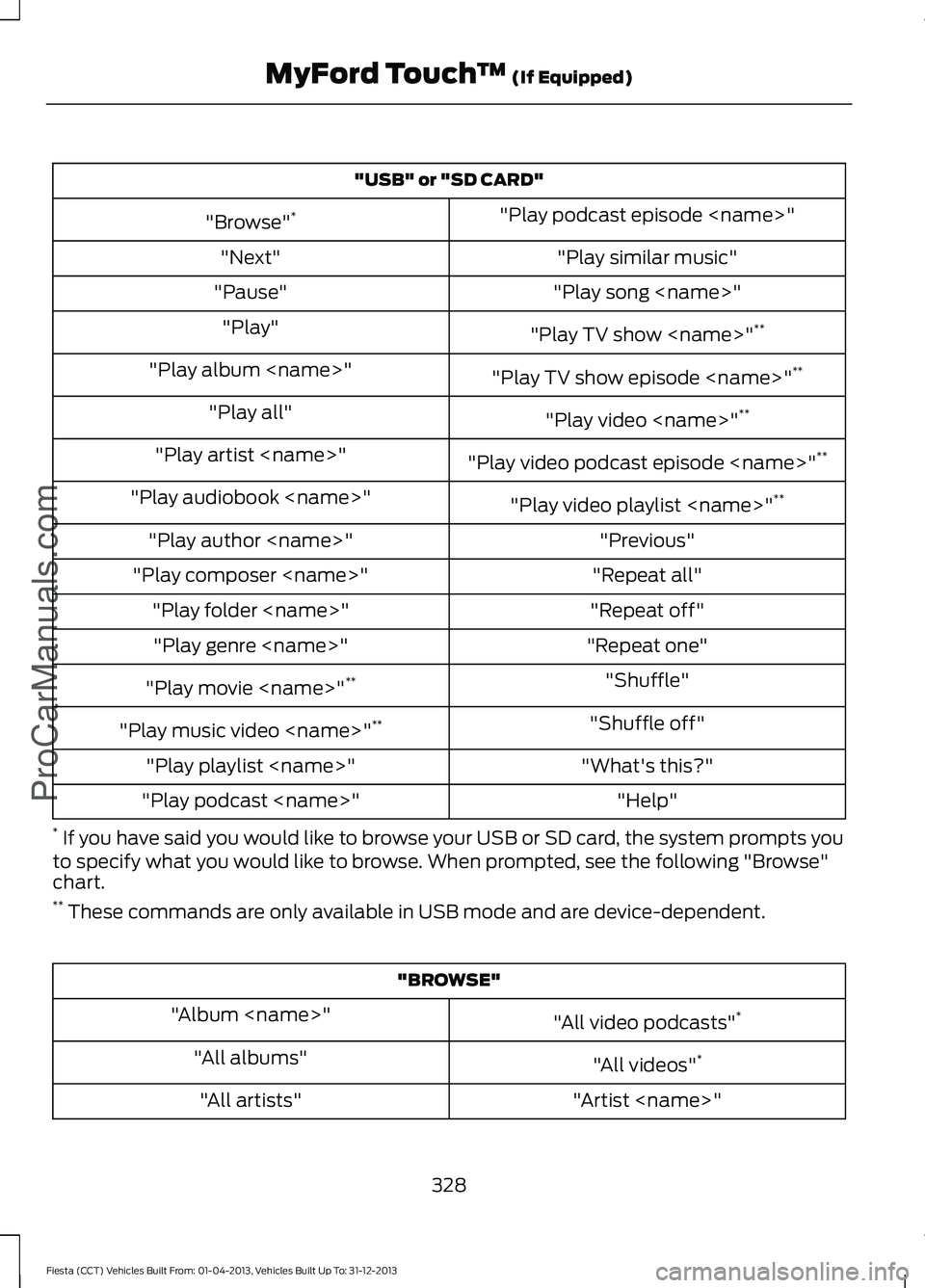
"USB" or "SD CARD"
"Play podcast episode
"Browse" *
"Play similar music"
"Next"
"Play song
"Pause"
"Play TV show
"Play"
"Play TV show episode
"Play album
"Play video
"Play all"
"Play video podcast episode
"Play artist
"Play video playlist
"Play audiobook
"Previous"
"Play author
"Repeat all"
"Play composer
"Repeat off"
"Play folder
"Repeat one"
"Play genre
"Shuffle"
"Play movie
"Shuffle off"
"Play music video
"What's this?"
"Play playlist
"Help"
"Play podcast
* If you have said you would like to browse your USB or SD card, the system prompts you
to specify what you would like to browse. When prompted, see the following "Browse"
chart.
** These commands are only available in USB mode and are device-dependent. "BROWSE"
"All video podcasts" *
"Album
"All videos"*
"All albums"
"Artist
"All artists"
328
Fiesta (CCT) Vehicles Built From: 01-04-2013, Vehicles Built Up To: 31-12-2013 MyFord Touch
™ (If Equipped)
ProCarManuals.com
Page 332 of 398
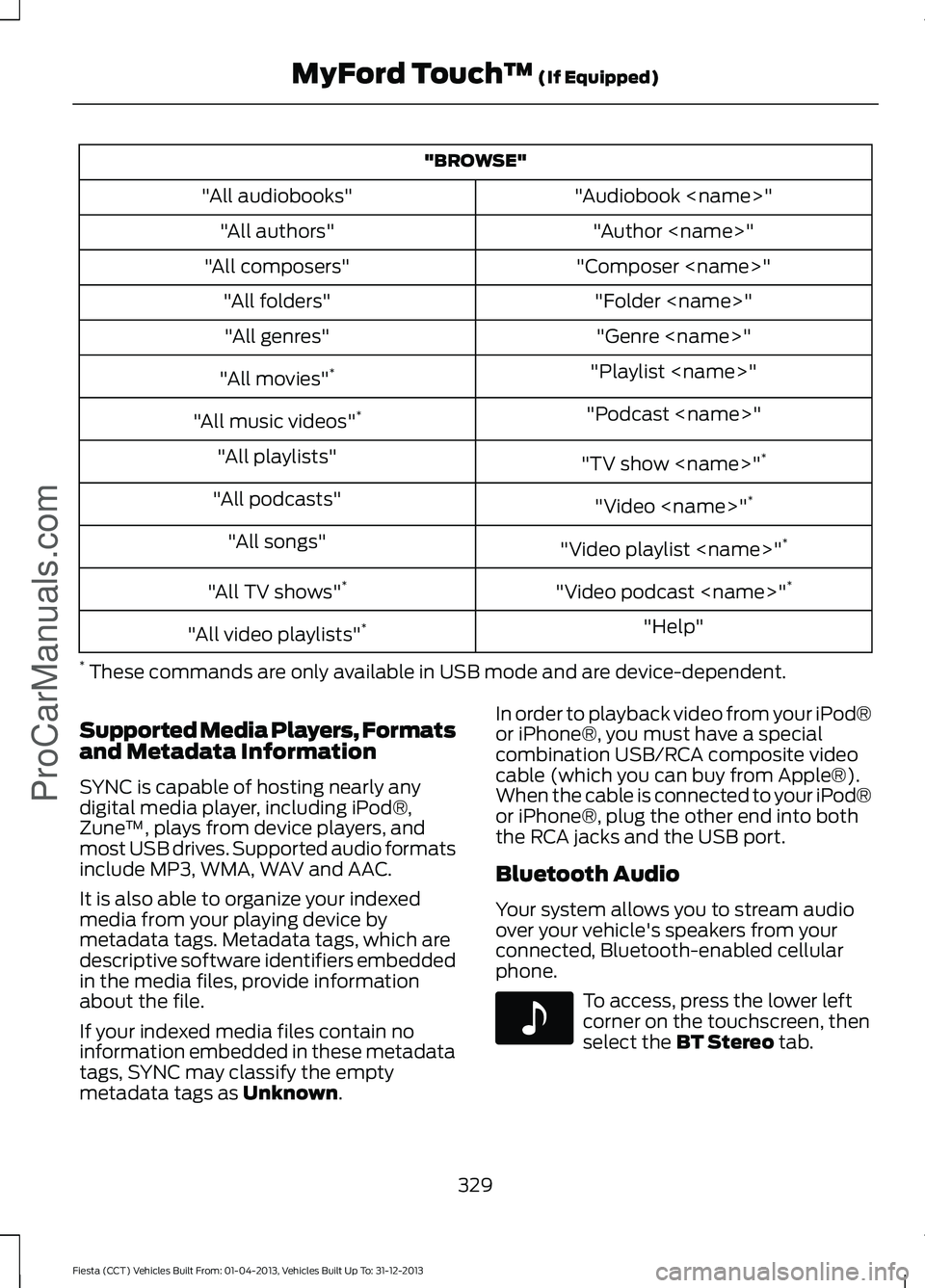
"BROWSE"
"Audiobook
"All audiobooks"
"Author
"All authors"
"Composer
"All composers"
"Folder
"All folders"
"Genre
"All genres"
"Playlist
"All movies" *
"Podcast
"All music videos" *
"TV show
"All playlists"
"Video
"All podcasts"
"Video playlist
"All songs"
"Video podcast
"All TV shows" *
"Help"
"All video playlists" *
* These commands are only available in USB mode and are device-dependent.
Supported Media Players, Formats
and Metadata Information
SYNC is capable of hosting nearly any
digital media player, including iPod®,
Zune ™, plays from device players, and
most USB drives. Supported audio formats
include MP3, WMA, WAV and AAC.
It is also able to organize your indexed
media from your playing device by
metadata tags. Metadata tags, which are
descriptive software identifiers embedded
in the media files, provide information
about the file.
If your indexed media files contain no
information embedded in these metadata
tags, SYNC may classify the empty
metadata tags as Unknown. In order to playback video from your iPod®
or iPhone®, you must have a special
combination USB/RCA composite video
cable (which you can buy from Apple®).
When the cable is connected to your iPod®
or iPhone®, plug the other end into both
the RCA jacks and the USB port.
Bluetooth Audio
Your system allows you to stream audio
over your vehicle's speakers from your
connected, Bluetooth-enabled cellular
phone.
To access, press the lower left
corner on the touchscreen, then
select the
BT Stereo tab.
329
Fiesta (CCT) Vehicles Built From: 01-04-2013, Vehicles Built Up To: 31-12-2013 MyFord Touch
™
(If Equipped)
ProCarManuals.comE142611
Page 336 of 398
Settings
Touch this button to access various phone
settings, such turning Bluetooth on and off,
managing your phonebook and more. See
Phone settings later in this section.
Text Messaging
Note: Downloading and sending text
messages using Bluetooth are
phone-dependent features.
Note: Certain features in text messaging
are speed-dependent and not available
when your vehicle is traveling at speeds over
3 mph (5 km/h).
Note: SYNC does not download read text
messages from your phone.
You can send and receive text messages
using Bluetooth, read them aloud and
translate text messaging acronyms, such
as LOL.
1. Touch the top left corner of the display
to access the
Phone menu.
2. Select
Messaging.
3. Choose from the following:
• Listen (speaker icon)
• Dial •
Send Text
• View
• Delete.
Composing a Text Message
Note: This is a speed-dependent feature.
It is unavailable when your vehicle is
traveling at speeds over 5 mph (8 km/h).
Note: Downloading and sending text
messages using Bluetooth are
phone-dependent features.
1. Press
Phone .
2. Messaging
.
3. Send Text
.
4. Enter a phone number or choose from
your phonebook.
You can select from the following options:
• Send
, which sends the message as it
is.
• Edit Text
, which allows you to
customize the pre-defined message or
create a message on your own.
You can then preview the message, verify
the recipient as well as update the
message list, and send it to a connected
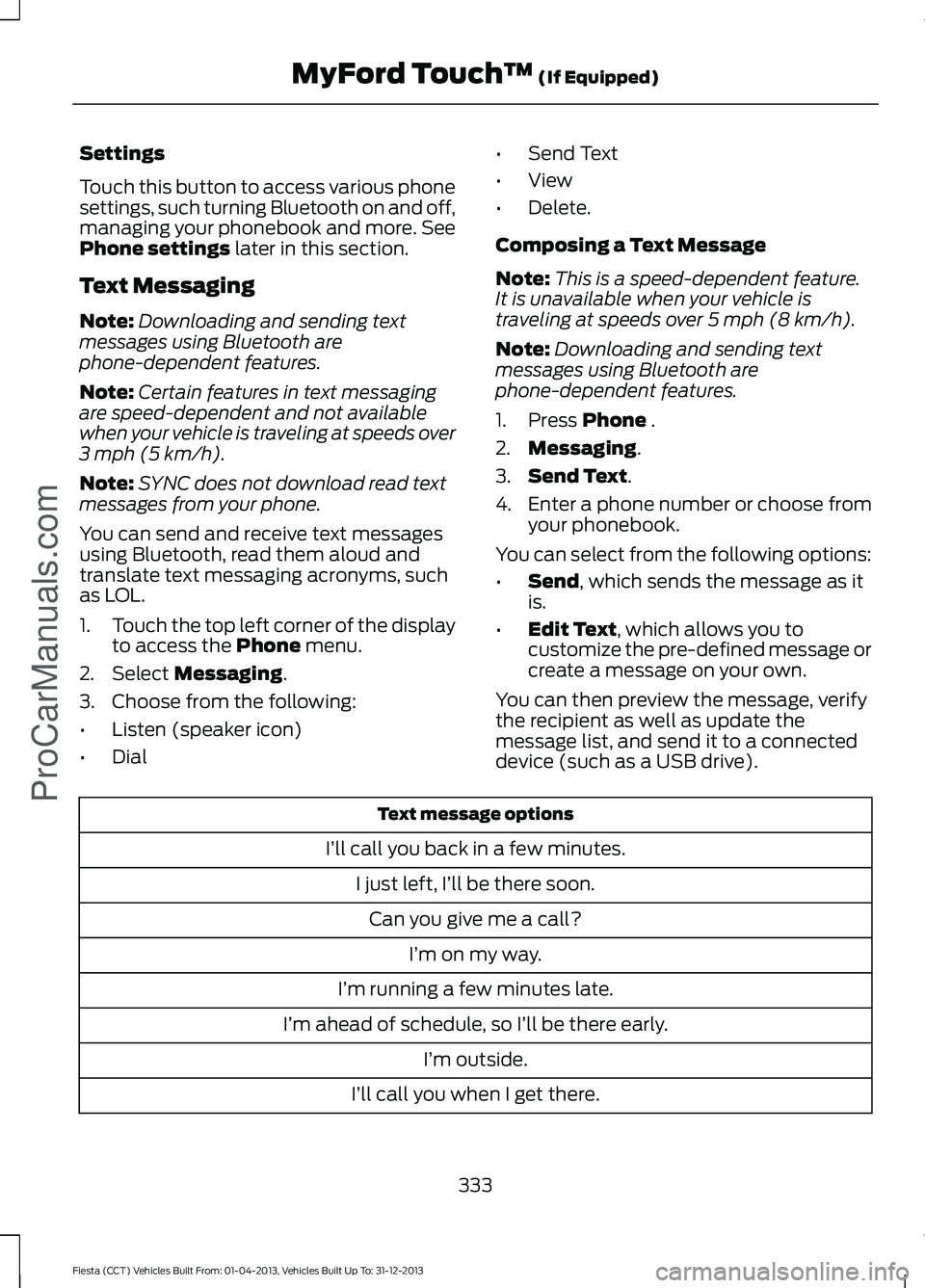
device (such as a USB drive). Text message options
I’ll call you back in a few minutes. I just left, I’ll be there soon.Can you give me a call? I’m on my way.
I’m running a few minutes late.
I’m ahead of schedule, so I’ll be there early. I’m outside.
I’ll call you when I get there.
333
Fiesta (CCT) Vehicles Built From: 01-04-2013, Vehicles Built Up To: 31-12-2013 MyFord Touch
™
(If Equipped)
ProCarManuals.com
Page 390 of 398
Creating a MyKey...........................................48
Programming or Changing Configurable
Settings............................................................... 49
Cruise Control.................................................64 Principle of Operation....................................... 142
Cruise control See: Using Cruise Control................................ 142
Cup Holders.....................................................112
Customer Assistance.................................160
D
Data Recording
................................................10
Event Data Recording.......................................... 10
Service Data Recording...................................... 10
Daytime Running Lamps............................69
Direction Indicators.......................................69
Driver and Passenger Airbags....................35 Children and Airbags........................................... 35
Proper Driver and Front Passenger Seating Adjustment........................................................ 35
Driver Knee Airbag.........................................39
Driving Aids
.....................................................144
Driving Hints....................................................157
Driving Through Water................................157
DRL See: Daytime Running Lamps......................... 69
E
Economical Driving
.......................................157
Emission Control System...........................123 On-Board Diagnostics (OBD-II).................... 124
Readiness for Inspection/Maintenance (I/M) Testing.................................................... 124
End User License Agreement..................355 SYNC® End User License Agreement
(EULA).............................................................. 355
Engine Block Heater.....................................116 Using the Engine Block Heater........................ 117
Engine Coolant Check................................183 Adding Engine Coolant.................................... 184
Checking the Engine Coolant......................... 183
Recycled Engine Coolant................................. 185
Severe Climates.................................................. 185
Engine Immobilizer See: Passive Anti-Theft System.................... 60Engine Oil Check...........................................182
Adding Engine Oil............................................... 182
Resetting the Oil Life Monitoring System............................................................... 183
Engine Oil Dipstick - 1.0L EcoBoost™..................................................182
Engine Oil Dipstick - 1.6L Duratec-16V Ti-VCT (88kW/120PS) - Sigma..........182
Engine Oil Dipstick - 1.6L EcoBoost™..................................................182
Engine Specifications.................................235 Drivebelt Routing............................................... 235
Entertainment................................................313 AM/FM Radio....................................................... 314
Bluetooth Audio................................................. 329
Browsing Device Content................................. 313
CD........................................................................\
.... 325
SD Card Slot and USB Port........................... 326
SIRIUS® Satellite Radio (If Activated)........................................................ 320
Supported Media Players, Formats and Metadata Information................................ 329
Event Data Recording See: Data Recording............................................ 10
Export Unique Options
..................................12
Exterior Mirrors.................................................74
Fold-Away Exterior Mirrors................................ 75
Integrated Blind Spot Mirrors........................... 75
Power Exterior Mirrors......................................... 74
F
Fastening the Safety Belts..........................27 Restraint of Pregnant Women......................... 27
Safety Belt Extension Assembly.................... 29
Safety Belt Locking Modes............................... 28
Floor Mats
.......................................................158
Fog Lamps - Front See: Front Fog Lamps........................................ 69
Ford Credit
.........................................................12
(U.S. Only)................................................................ 12
Ford Extended Service Plan (ESP)........241 SERVICE PLANS (CANADA ONLY).............243
SERVICE PLANS (U.S. Only).......................... 241
Front Fog Lamps............................................69
Front Passenger Sensing System............36
Fuel and Refueling........................................118
387
Fiesta (CCT) Vehicles Built From: 01-04-2013, Vehicles Built Up To: 31-12-2013 Index
ProCarManuals.com
Page 396 of 398

Using Stability Control................................137
........................................................................\
............ 137
Using SYNC™ With Your Media Player.............................................................281
Accessing Your Play Menu............................. 285
Connecting Your Digital Media Player to the USB Port........................................................... 281
Media Menu Features...................................... 283
Media Voice Commands.................................. 281
System Settings................................................. 287
What's Playing?.................................................. 281
Using SYNC™ With Your Phone............263 Accessing Features through the Phone
Menu.................................................................. 267
Accessing Your Phone Settings.................... 270
Making Calls........................................................ 266
Pairing a Phone for the First Time...............264
Pairing Subsequent Phones.......................... 264
Phone Options during an Active Call.........266
Phone Voice Commands................................ 264
Receiving Calls................................................... 266
System Settings................................................... 271
Text Messaging................................................... 269
Using Voice Recognition............................261
Initiating a Voice Session................................. 261
System Interaction and Feedback..............262
Using Winter Tires.......................................226
Utilizing the Mediation/Arbitration Program (Canada Only).........................162
V
Vehicle Care
..................................................204
Vehicle Certification Label........................237
Vehicle Identification Number
................237
Vehicle Storage............................................209 Battery................................................................... 209
Body....................................................................... 209
Brakes.................................................................... 209
Cooling system................................................... 209
Engine.................................................................... 209
Fuel system......................................................... 209
General.................................................................. 209
Miscellaneous...................................................... 210
Removing Vehicle From Storage.................. 210
Tires........................................................................\
209
Ventilation See: Climate Control........................................... 97Vents
See: Air Vents......................................................... 97
VIN See: Vehicle Identification Number.............237
Voice Control
...................................................64
W
Warning Lamps and Indicators - 1.6L EcoBoost™....................................................81
Anti-lock Braking System Warning Lamp..................................................................... 81
Brake System Warning Lamp........................... 81
Cruise Control Indicator...................................... 81
Direction Indicator................................................ 82
Door Ajar Warning Lamp................................... 82
Engine Coolant Temperature Warning Lamp.................................................................... 82
Engine Oil Warning Lamp................................. 82
Engine Warning Lamps...................................... 82
Front Airbag Warning Lamp............................. 83
Front Fog Lamps Indicator............................... 83
Headlamp Indicator............................................ 83
High Beam Indicator........................................... 83
Ignition Warning Lamp....................................... 83
Information Indicator.......................................... 83
Low Fuel Level Warning Lamp........................ 83
Low Tire Pressure Warning............................... 83
Safety Belt Minder Warning Lamp................83
Service Engine Soon........................................... 83
Shift Indicator........................................................ 84
393
Fiesta (CCT) Vehicles Built From: 01-04-2013, Vehicles Built Up To: 31-12-2013 Index
ProCarManuals.com