ECO mode FORD FIESTA 2014 Owners Manual
[x] Cancel search | Manufacturer: FORD, Model Year: 2014, Model line: FIESTA, Model: FORD FIESTA 2014Pages: 398, PDF Size: 6.09 MB
Page 10 of 398
ABOUT THIS MANUAL
Thank you for choosing Ford. We
recommend that you take some time to
get to know your vehicle by reading this
manual. The more that you know about it,
the greater the safety and pleasure you
will get from driving it.
WARNING
Driving while distracted can result in
loss of vehicle control, crash and
injury. We strongly recommend that
you use extreme caution when using any
device that may take your focus off the
road. Your primary responsibility is the safe
operation of your vehicle. We recommend
against the use of any handheld device
while driving and encourage the use of
voice-operated systems when possible.
Make sure you are aware of all applicable
local laws that may affect the use of
electronic devices while driving. Note:
This manual describes product
features and options available throughout
the range of available models, sometimes
even before they are generally available. It
may describe options not fitted to your
vehicle.
Note: Some of the illustrations in this
manual may be used for different models,
so may appear different to you on your
vehicle. However, the essential information
in the illustrations is always correct.
Note: Always use and operate your vehicle
in line with all applicable laws and
regulations.
Note: Pass on this manual when selling
your vehicle. It is an integral part of the
vehicle.
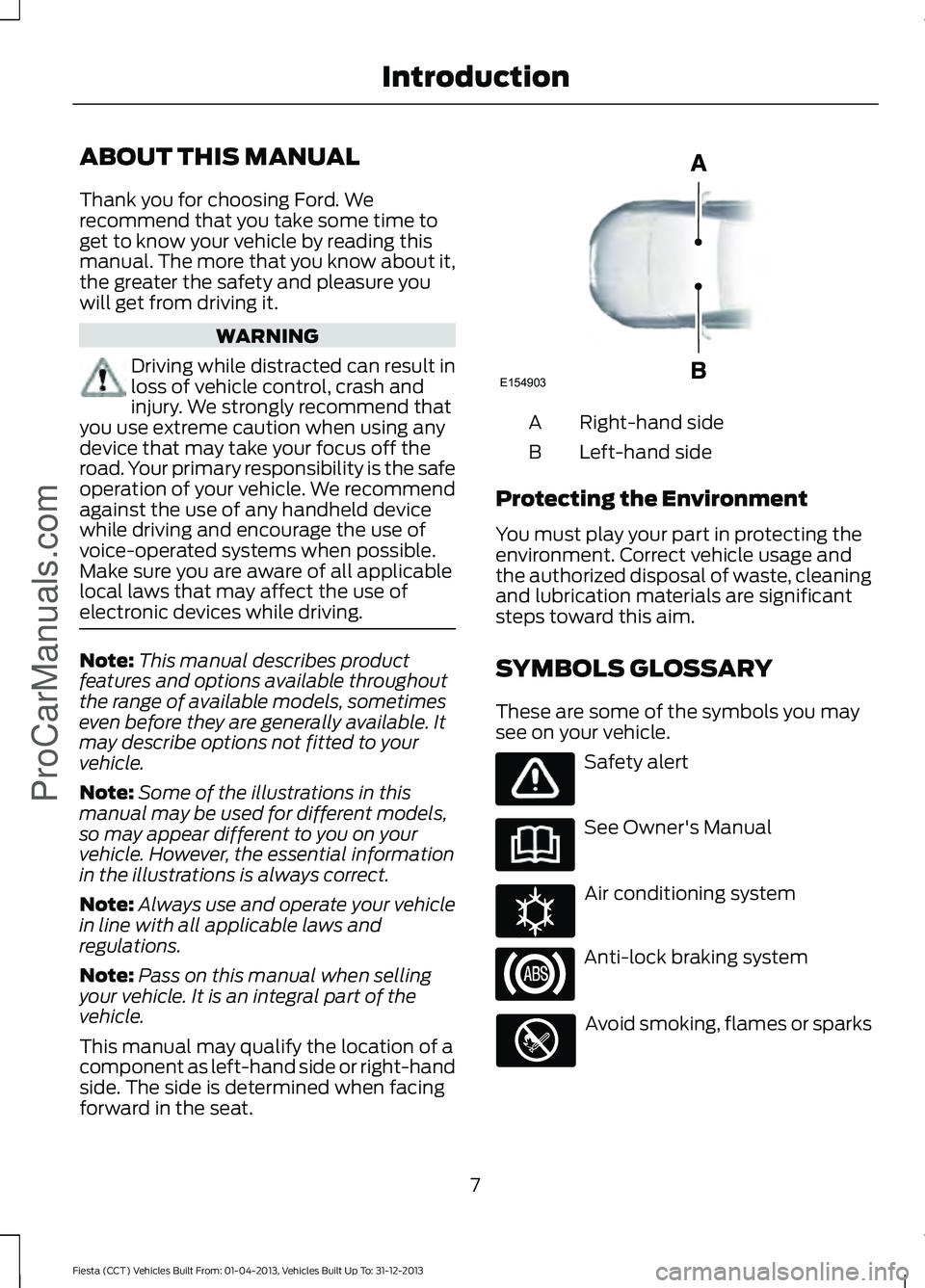
This manual may qualify the location of a
component as left-hand side or right-hand
side. The side is determined when facing
forward in the seat. Right-hand side
A
Left-hand side
B
Protecting the Environment
You must play your part in protecting the
environment. Correct vehicle usage and
the authorized disposal of waste, cleaning
and lubrication materials are significant
steps toward this aim.
SYMBOLS GLOSSARY
These are some of the symbols you may
see on your vehicle. Safety alert
See Owner's Manual
Air conditioning system
Anti-lock braking system
Avoid smoking, flames or sparks
7
Fiesta (CCT) Vehicles Built From: 01-04-2013, Vehicles Built Up To: 31-12-2013 IntroductionProCarManuals.comE154903 E162384
Page 29 of 398
PRINCIPLE OF OPERATION
WARNINGS
Always drive and ride with your seat
back upright and the lap belt snug
and low across the hips.
To reduce the risk of injury, make
sure children sit where they can be
properly restrained.
Never let a passenger hold a child on
his or her lap while your vehicle is
moving. The passenger cannot
protect the child from injury in a crash. All occupants of your vehicle,
including the driver, should always
properly wear their safety belts, even
when an airbag supplemental restraint
system is provided. Failure to properly wear
your safety belt could seriously increase
the risk of injury or death. It is extremely dangerous to ride in a
cargo area, inside or outside of a
vehicle. In a crash, people riding in
these areas are more likely to be seriously
injured or killed. Do not allow people to ride
in any area of your vehicle that is not
equipped with seats and safety belts. Be
sure everyone in your vehicle is in a seat
and using a safety belt properly. In a rollover crash, an unbelted
person is significantly more likely to
die than a person wearing a safety
belt. Each seating position in your vehicle
has a specific safety belt assembly
which is made up of one buckle and
one tongue that are designed to be used
as a pair. 1) Use the shoulder belt on the
outside shoulder only. Never wear the
shoulder belt under the arm. 2) Never
swing the safety belt around your neck over
the inside shoulder. 3) Never use a single
belt for more than one person. WARNINGS
When possible, all children 12 years
old and under should be properly
restrained in a rear seating position.
Failure to follow this could seriously
increase the risk of injury or death. Safety belts and seats can become
hot in a vehicle that has been closed
up in sunny weather; they could burn
a small child. Check seat covers and
buckles before you place a child anywhere
near them. Front and rear seat occupants,
including pregnant women, should
wear safety belts for optimum
protection in an accident. All seating positions in your vehicle have
lap and shoulder safety belts. All
occupants of the vehicle should always
properly wear their safety belts, even when
an airbag supplemental restraint system
is provided.
The safety belt system consists of:
•
lap and shoulder safety belts.
• shoulder safety belt with automatic
locking mode, (except driver safety
belt).
• height adjuster at the front outboard
seating positions.
• safety belt pretensioner at the front
outboard seating positions.
• belt tension sensor at the front
outboard passenger seating position. •
Safety belt warning light and chime. 26
Fiesta (CCT) Vehicles Built From: 01-04-2013, Vehicles Built Up To: 31-12-2013 Safety BeltsProCarManuals.com
Page 35 of 398
3.
For the seating position being disabled,
buckle then unbuckle the safety belt
three times at a moderate speed,
ending in the unbuckled state. After
Step 3, the safety belt warning light will
turn on.
4. While the safety belt warning light is on, buckle and then unbuckle the
safety belt. After Step 4, the safety belt
warning light will flash for confirmation.
• This will disable the feature for that
seating position if it is currently
enabled.
• This will enable the feature for that
seating position if it is currently
disabled.
CHILD RESTRAINT AND
SAFETY BELT MAINTENANCE
Inspect the vehicle safety belts and child
safety seat systems periodically to make
sure they work properly and are not
damaged. Inspect the vehicle and child
seat safety belts to make sure there are no
nicks, tears or cuts. Replace if necessary.
All vehicle safety belt assemblies, including
retractors, buckles, front safety belt buckle
assemblies, buckle support assemblies
(slide bar-if equipped), shoulder belt
height adjusters (if equipped), shoulder
belt guide on seat back (if equipped), child
safety seat LATCH and tether anchors, and
attaching hardware, should be inspected
after a crash. Read the child restraint
manufacturer's instructions for additional
inspection and maintenance information
specific to the child restraint. Ford Motor Company recommends that
all safety belt assemblies in use in vehicles
involved in a crash be replaced. However,
if the crash was minor and an authorized
dealer finds that the belts do not show
damage and continue to operate properly,
they do not need to be replaced. Safety
belt assemblies not in use during a crash
should also be inspected and replaced if
either damage or improper operation is
noted.
Properly care for safety belts.
32
Fiesta (CCT) Vehicles Built From: 01-04-2013, Vehicles Built Up To: 31-12-2013 Safety BeltsProCarManuals.com
Page 51 of 398
PRINCIPLE OF OPERATION
MyKey allows you to program keys with
restricted driving modes to promote good
driving habits. All but one of the keys
programmed to the vehicle can be
activated with these restricted modes.
Any keys that have not been programmed
are referred to as administrator keys or
admin keys. These can be used to:
•
Create a MyKey
• Program configurable MyKey settings
• Clear all MyKey features
When you have programmed a MyKey, you
can access the following information using
the information display:
• How many admin keys and MyKeys are
programmed to your vehicle.
• The total distance your vehicle has
traveled using any MyKey.
Note: All MyKeys are programmed to the
same settings. You cannot program them
individually.
If a MyKey and an admin key are present,
your vehicle will recognize the admin key
only.
Note: For vehicles with intelligent access
key (push button start) keyless start, when
both a MyKey and an admin intelligent
access key (fob) are present, the admin fob
will be recognized by the vehicle to start the
engine.
Non-configurable Settings
The following settings cannot be changed
by an admin key user:
• Belt-minder. You cannot disable this
feature. The audio system will mute
when the front seat occupants' safety
belts are not fastened.
• Early low fuel. The low-fuel warning
activates earlier, giving the MyKey user
more time to refuel. •
Driver assist features, if equipped on
your vehicle, are forced on: parking aid,
blind spot information system (BLIS)
with cross traffic alert, lane departure
warning and forward collision warning
system.
• Satellite radio adult content
restrictions.
Configurable Settings
With an admin key, you can configure
certain MyKey settings when you first
create a MyKey and before you recycle the
key or restart the vehicle. You can also
change the settings afterward with an
admin key:
• Vehicle speed limits can be set.
Warnings will be shown in the display
followed by an audible tone when your
vehicle reaches the set speed. You
cannot override the set speed by fully
depressing the accelerator pedal.
• Vehicle speed minders of 45, 55 or 65
mph (75, 90 or 105 km/h). Once you
select a speed it will be shown in the
display followed by an audible tone
when the set vehicle speed is
exceeded.
• Audio system maximum volume of
45%. A message will be shown in the
display when you attempt to exceed
the limited volume. Also, the speed
sensitive compensated volume
(automatic volume control) feature
will be disabled.
• Always on setting. When this is
selected you will not be able to disable
AdvanceTrac, 911 Assist or the do not
disturb feature (if your vehicle is
equipped with these features).
CREATING A MYKEY
Use the information display to create a
MyKey.
48
Fiesta (CCT) Vehicles Built From: 01-04-2013, Vehicles Built Up To: 31-12-2013 MyKey
™ (If Equipped)
ProCarManuals.com
Page 57 of 398
2.
Press the power door lock button three
times.
3. Switch the ignition off.
4. Press the power door lock button three
times.
5. Switch the ignition on. The horn will chirp indicating your vehicle is in
programming mode.
6. Press the power door lock button for less than one second and release.
The horn will chirp once if disabled or twice
(one short and one long chirp) if enabled.
After programming the feature, switch the
ignition off. The horn will chirp once
indicating programming is complete.
Auto Unlock Feature
The auto unlock feature will unlock all the
doors when all of the following conditions
have been met:
• The ignition is on, all doors are closed,
and your vehicle is moving at a speed
greater than 12 mph (20 km/h) for
more than two seconds.
• Your vehicle has come to a stop and
you switch the ignition off or to the
accessory position.
• The driver's door is opened within 10
minutes of you switching the ignition
off or to the accessory position.
Note: The doors will not auto unlock if your
vehicle has been electronically locked after
the ignition is turned off and before the
driver's door is opened.
Enabling or Disabling Auto Unlock
Note: See an authorized dealer to enable
or disable the auto unlock feature or carry
out the following procedure.
Note: You will have 30 seconds to
complete the procedure.
1. Switch the ignition on. 2.
Press the power door lock button three
times.
3. Switch the ignition off.
4. Press the power door lock button three
times.
5. Switch the ignition on. The horn will chirp indicating your vehicle is in
programming mode.
6. Press the power door lock button for longer than two seconds and release.
The horn will chirp once if disabled or twice
(one short and one long chirp) if enabled.
After programming the feature, switch the
ignition off. The horn will chirp once
indicating programming is complete.
Emergency Locking With the Key
Note: If the child safety locks are on and
you pull the interior handle, you will only
turn off the emergency locking, not the child
safety lock. You can only open the doors
using the external door handle.
Note: If the doors have been unlocked using
this method, the doors must be locked
individually until the central locking function
has been repaired.
Note: When the central locking function
fails to operate, lock the doors individually
using the key in the position shown.
54
Fiesta (CCT) Vehicles Built From: 01-04-2013, Vehicles Built Up To: 31-12-2013 LocksProCarManuals.com
Page 60 of 398
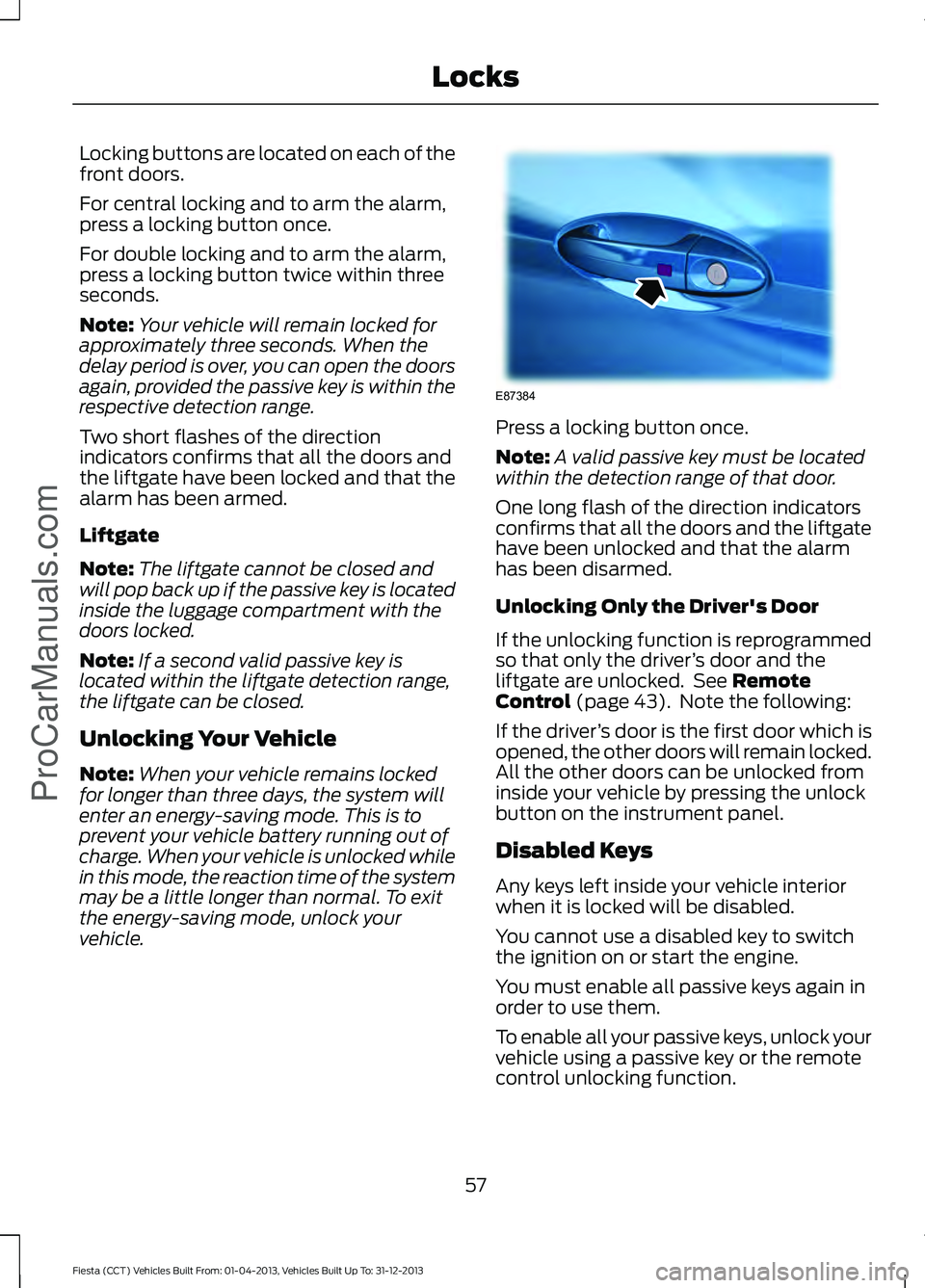
Locking buttons are located on each of the
front doors.
For central locking and to arm the alarm,
press a locking button once.
For double locking and to arm the alarm,
press a locking button twice within three
seconds.
Note:
Your vehicle will remain locked for
approximately three seconds. When the
delay period is over, you can open the doors
again, provided the passive key is within the
respective detection range.
Two short flashes of the direction
indicators confirms that all the doors and
the liftgate have been locked and that the
alarm has been armed.
Liftgate
Note: The liftgate cannot be closed and
will pop back up if the passive key is located
inside the luggage compartment with the
doors locked.
Note: If a second valid passive key is
located within the liftgate detection range,
the liftgate can be closed.
Unlocking Your Vehicle
Note: When your vehicle remains locked
for longer than three days, the system will
enter an energy-saving mode. This is to
prevent your vehicle battery running out of
charge. When your vehicle is unlocked while
in this mode, the reaction time of the system
may be a little longer than normal. To exit
the energy-saving mode, unlock your
vehicle. Press a locking button once.
Note:
A valid passive key must be located
within the detection range of that door.
One long flash of the direction indicators
confirms that all the doors and the liftgate
have been unlocked and that the alarm
has been disarmed.
Unlocking Only the Driver's Door
If the unlocking function is reprogrammed
so that only the driver ’s door and the
liftgate are unlocked. See Remote
Control (page 43). Note the following:
If the driver ’s door is the first door which is
opened, the other doors will remain locked.
All the other doors can be unlocked from
inside your vehicle by pressing the unlock
button on the instrument panel.
Disabled Keys
Any keys left inside your vehicle interior
when it is locked will be disabled.
You cannot use a disabled key to switch
the ignition on or start the engine.
You must enable all passive keys again in
order to use them.
To enable all your passive keys, unlock your
vehicle using a passive key or the remote
control unlocking function.
57
Fiesta (CCT) Vehicles Built From: 01-04-2013, Vehicles Built Up To: 31-12-2013 Locks
ProCarManuals.comE87384
Page 87 of 398
Normally, the lamp will remain on until the
engine is cranked, then turn itself off if a
malfunction is not present. However, if
after 15 seconds the lamp flashes eight
times, it means that your vehicle is not
ready for inspection maintenance testing.
See Emission Control System (page 123).
Shift Indicator
It will illuminate to inform you
that shifting to a higher gear may
give better fuel economy and
lower CO2 emissions. It will not illuminate
during periods of high acceleration, braking
or when the clutch pedal is pressed.
AUDIBLE WARNINGS AND
INDICATORS
Automatic Transmission
Sounds when you open the driver's door
and do not move the transmission selector
lever to position P.
Key Outside Car
Vehicles With Keyless System
Sounds when you close the door, the
engine is running and the system does not
detect a passive key inside your vehicle.
Headlamps On
Sounds when you remove the key from the
ignition and open the driver's door and you
have left the headlamps or parking lamps
on.
Low Fuel
A warning chime will sound when the
remaining fuel is less than approximately
1.3 gallons (6 liters). The distance to empty
displayed may vary depending on driving
style and road conditions. Safety Belt Minder WARNINGS
The safety belt minder remains in
stand-by mode when the front safety
belts have been fastened. It will
sound if either safety belt is unfastened. Do not sit on top of a fastened safety
belt to prevent the safety belt minder
from coming on. The occupant
protection system will only provide
optimum protection when you use the
safety belt properly. Sounds when your vehicle speed exceeds
the pre-determined limit and the front
safety belts are unfastened. The chime will
stop after a period of time.
84
Fiesta (CCT) Vehicles Built From: 01-04-2013, Vehicles Built Up To: 31-12-2013 Instrument Cluster
ProCarManuals.com
Page 89 of 398
SYNC-Phone
Dial a number
Redial
Phonebook
Call history
Speed Dial
Text messaging
BT Devices
Phone settings Menu
Ford EcoMode Bluetooth on
SYNC-Settings
Set defaults
Master reset
Install on SYNC
System info
Voice settings
SYNC-Apps Route options
Navigation
Map display
Assistance options
Personal data
Reset all settings
Adaptive volume
Audio settings
Sound
NAV audio mixing
86
Fiesta (CCT) Vehicles Built From: 01-04-2013, Vehicles Built Up To: 31-12-2013 Information DisplaysProCarManuals.com
Page 101 of 398
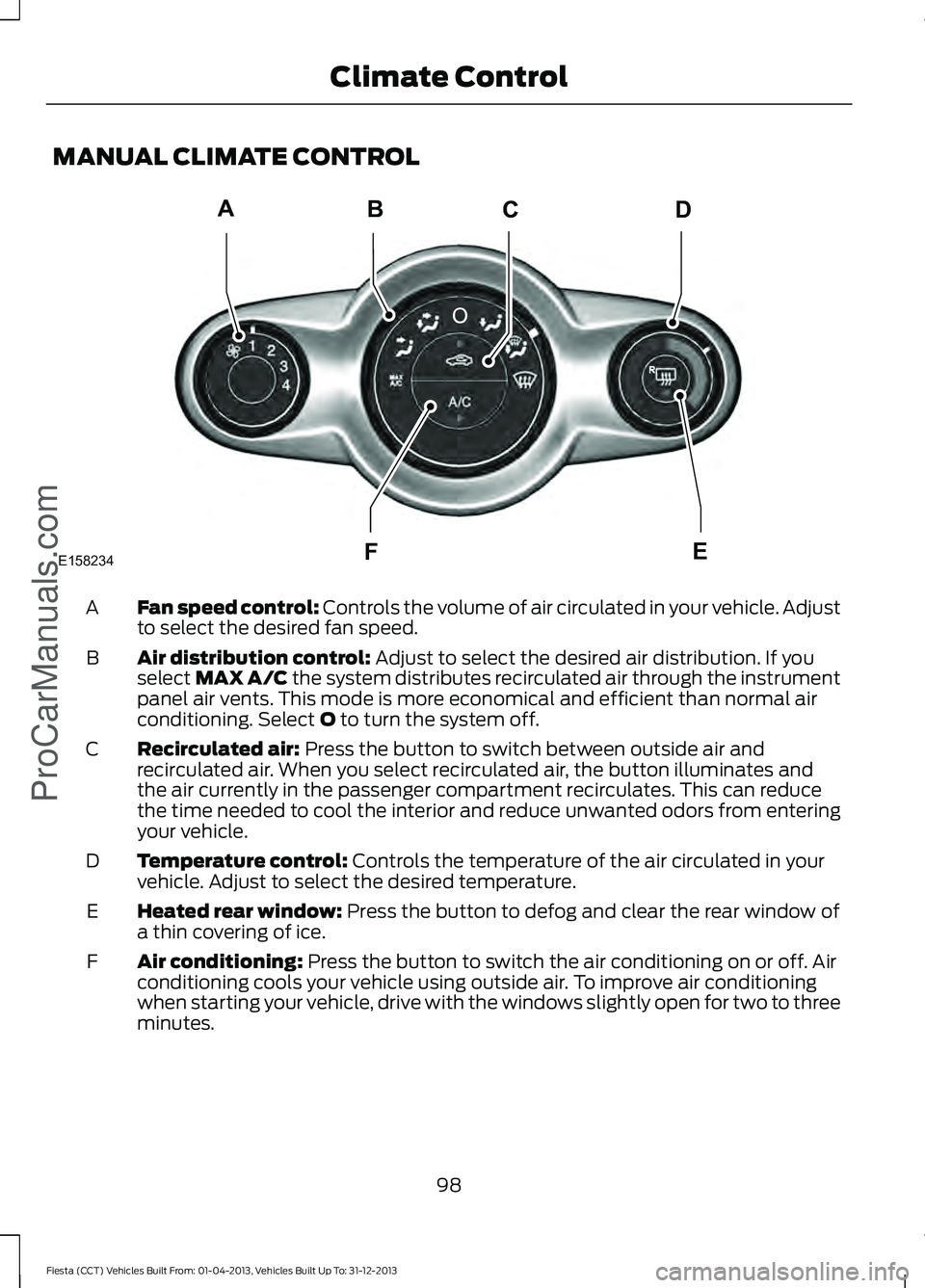
MANUAL CLIMATE CONTROL
Fan speed control: Controls the volume of air circulated in your vehicle. Adjust
to select the desired fan speed.
A
Air distribution control:
Adjust to select the desired air distribution. If you
select MAX A/C the system distributes recirculated air through the instrument
panel air vents. This mode is more economical and efficient than normal air
conditioning. Select
O to turn the system off.
B
Recirculated air:
Press the button to switch between outside air and
recirculated air. When you select recirculated air, the button illuminates and
the air currently in the passenger compartment recirculates. This can reduce
the time needed to cool the interior and reduce unwanted odors from entering
your vehicle.
C
Temperature control:
Controls the temperature of the air circulated in your
vehicle. Adjust to select the desired temperature.
D
Heated rear window:
Press the button to defog and clear the rear window of
a thin covering of ice.
E
Air conditioning:
Press the button to switch the air conditioning on or off. Air
conditioning cools your vehicle using outside air. To improve air conditioning
when starting your vehicle, drive with the windows slightly open for two to three
minutes.
F
98
Fiesta (CCT) Vehicles Built From: 01-04-2013, Vehicles Built Up To: 31-12-2013 Climate Control
ProCarManuals.comABCD
F
E
E158234
Page 102 of 398
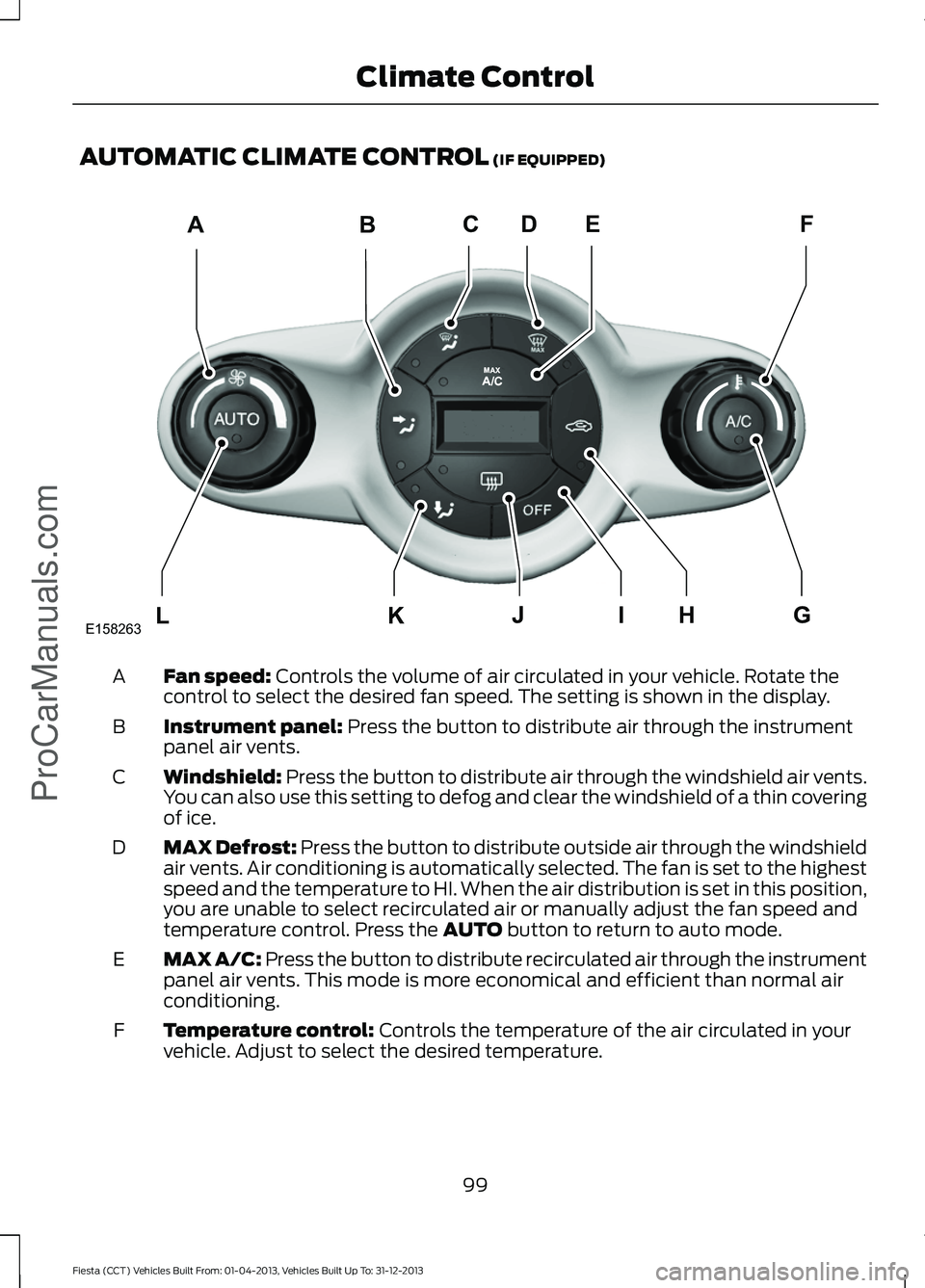
AUTOMATIC CLIMATE CONTROL (IF EQUIPPED)
Fan speed:
Controls the volume of air circulated in your vehicle. Rotate the
control to select the desired fan speed. The setting is shown in the display.
A
Instrument panel:
Press the button to distribute air through the instrument
panel air vents.
B
Windshield:
Press the button to distribute air through the windshield air vents.
You can also use this setting to defog and clear the windshield of a thin covering
of ice.
C
MAX Defrost:
Press the button to distribute outside air through the windshield
air vents. Air conditioning is automatically selected. The fan is set to the highest
speed and the temperature to HI. When the air distribution is set in this position,
you are unable to select recirculated air or manually adjust the fan speed and
temperature control. Press the
AUTO button to return to auto mode.
D
MAX A/C: Press the button to distribute recirculated air through the instrument
panel air vents. This mode is more economical and efficient than normal air
conditioning.
E
Temperature control:
Controls the temperature of the air circulated in your
vehicle. Adjust to select the desired temperature.
F
99
Fiesta (CCT) Vehicles Built From: 01-04-2013, Vehicles Built Up To: 31-12-2013 Climate Control
ProCarManuals.comABCFDE
L
KHIJG
E158263