engine FORD FIESTA 2014 Owners Manual
[x] Cancel search | Manufacturer: FORD, Model Year: 2014, Model line: FIESTA, Model: FORD FIESTA 2014Pages: 398, PDF Size: 6.09 MB
Page 5 of 398
Windshield Washers.....................................65
Rear Window Wiper and Washers..........66
Lighting
General Information......................................67
Lighting Control
..............................................67
Autolamps
........................................................68
Instrument Lighting Dimmer.....................68
Headlamp Exit Delay....................................69
Daytime Running Lamps
............................69
Front Fog Lamps............................................69
Direction Indicators
.......................................69
Interior Lamps.................................................70
Ambient Lighting
.............................................71
Windows and Mirrors
Power Windows..............................................72
Global Opening and Closing......................73
Exterior Mirrors
................................................74
Interior Mirror
....................................................75
Moonroof...........................................................76
Instrument Cluster
Gauges................................................................77
Warning Lamps and Indicators.................78
Warning Lamps and Indicators - 1.6L EcoBoost™
...................................................81
Audible Warnings and Indicators.............84
Information Displays
General Information
.....................................85
Clock...................................................................88
Trip Computer
.................................................88
Personalized Settings
..................................89
Information Messages
.................................89
Climate Control
Principle of Operation...................................97
Air Vents
.............................................................97 Manual Climate Control..............................98
Automatic Climate Control........................99
Hints on Controlling the Interior
Climate........................................................100
Heated Windows and Mirrors..................103
Cabin Air Filter...............................................103
Seats
Sitting in the Correct Position
..................105
Head Restraints............................................105
Manual Seats.................................................107
Rear Seats
......................................................108
Heated Seats.................................................109
Auxiliary Power Points
Auxiliary Power Points..................................111
Cigar Lighter
......................................................111
Storage Compartments
Cup Holders
.....................................................112
Starting and Stopping the Engine
General Information.....................................113
Ignition Switch................................................113
Keyless Starting
..............................................113
Starting a Gasoline Engine.........................115
Switching Off the Engine............................116
Engine Block Heater.....................................116
Fuel and Refueling
Safety Precautions.......................................118
Fuel Quality
......................................................119
Running Out of Fuel
.....................................119
Refueling..........................................................120
Fuel Consumption
........................................122
Emission Control System...........................123
Transmission
Manual Transmission
..................................126
2
Fiesta (CCT) Vehicles Built From: 01-04-2013, Vehicles Built Up To: 31-12-2013 Table of Contents
ProCarManuals.com
Page 7 of 398
Under Hood Overview - 1.6L
EcoBoost™..................................................181
Engine Oil Dipstick - 1.0L EcoBoost™.................................................182
Engine Oil Dipstick - 1.6L Duratec-16V Ti-VCT (88kW/120PS) - Sigma.........182
Engine Oil Dipstick - 1.6L EcoBoost™.................................................182
Engine Oil Check...........................................182
Engine Coolant Check................................183
Automatic Transmission Fluid Check............................................................185
Brake Fluid Check
.........................................185
Power Steering Fluid Check.....................185
Fuel Filter.........................................................186
Washer Fluid Check.....................................186
Changing the 12V Battery..........................186
Checking the Wiper Blades......................186
Changing the Wiper Blades
.....................186
Changing the Engine Air Filter
..................187
Adjusting the Headlamps.........................188
Removing a Headlamp..............................189
Changing a Bulb - Vehicles With: 4-Door..........................................................190
Changing a Bulb - Vehicles With: 5-Door..........................................................195
Bulb Specification Chart
...........................199
Technical Specifications - 1.0L EcoBoost™...............................................200
Technical Specifications - 1.6L EcoBoost™.................................................201
Technical Specifications - 1.6L Duratec-16V Ti-VCT (Sigma)
.............202
Vehicle Care
Cleaning Products
.......................................204
Cleaning the Exterior..................................204
Waxing.............................................................205
Cleaning the Engine...................................205
Cleaning the Windows and Wiper Blades.........................................................206
Cleaning the Interior...................................206 Repairing Minor Paint Damage
...............207
Cleaning the Instrument Panel and Instrument Cluster Lens
.......................207
Cleaning Leather Seats.............................208
Cleaning the Alloy Wheels.......................208
Vehicle Storage
............................................209
Wheels and Tires
General Information
.....................................211
Tire Care
............................................................211
Using Winter Tires.......................................226
Using Snow Chains.....................................226
Tire Pressure Monitoring System...........226
Changing a Road Wheel...........................230
Technical Specifications...........................234
Capacities and Specific- ations
Engine Specifications.................................235
Motorcraft Parts
...........................................236
Vehicle Identification Number
................237
Vehicle Certification Label........................237
Transmission Code Designation............238
Accessories
Accessories....................................................239
Ford Extended Service Plan (ESP)
Ford Extended Service Plan (ESP)........241
Audio System
General Information
...................................244
Audio unit - Vehicles With: AM/FM/CD.................................................245
Audio unit - Vehicles With: AM/FM/CD/SYNC..................................249
Audio unit - Vehicles With: Touchscreen Display.........................................................254
Audio unit - Vehicles With: Sony Audio System/Touchscreen Display.............255
4
Fiesta (CCT) Vehicles Built From: 01-04-2013, Vehicles Built Up To: 31-12-2013 Table of Contents
ProCarManuals.com
Page 11 of 398
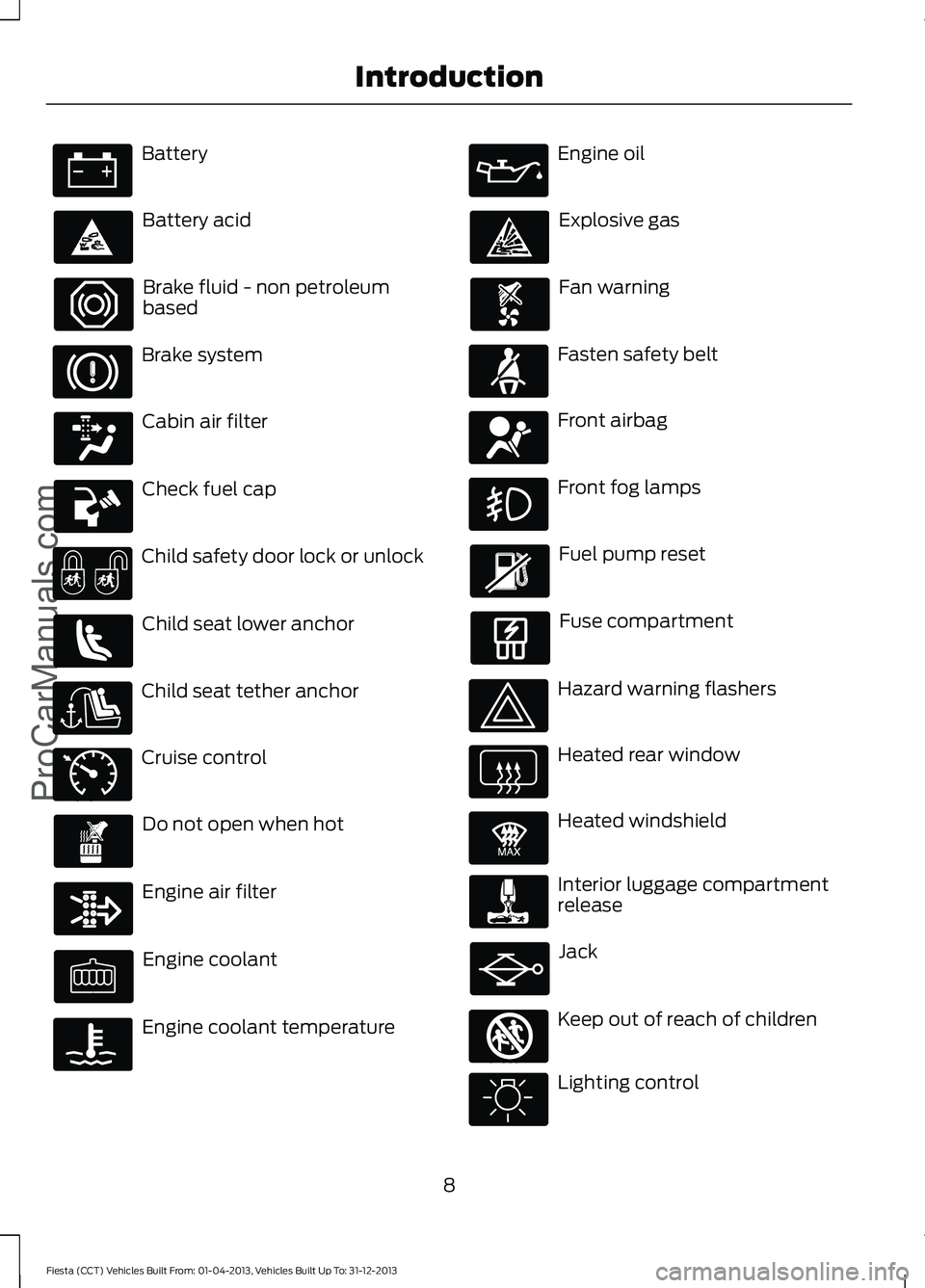
Battery
Battery acid
Brake fluid - non petroleum
based
Brake system
Cabin air filter
Check fuel cap
Child safety door lock or unlock
Child seat lower anchor
Child seat tether anchor
Cruise control
Do not open when hot
Engine air filter
Engine coolant
Engine coolant temperature Engine oil
Explosive gas
Fan warning
Fasten safety belt
Front airbag
Front fog lamps
Fuel pump reset
Fuse compartment
Hazard warning flashers
Heated rear window
Heated windshield
Interior luggage compartment
release
Jack
Keep out of reach of children
Lighting control
8
Fiesta (CCT) Vehicles Built From: 01-04-2013, Vehicles Built Up To: 31-12-2013 IntroductionProCarManuals.com E71340 E91392 E161353
Page 12 of 398
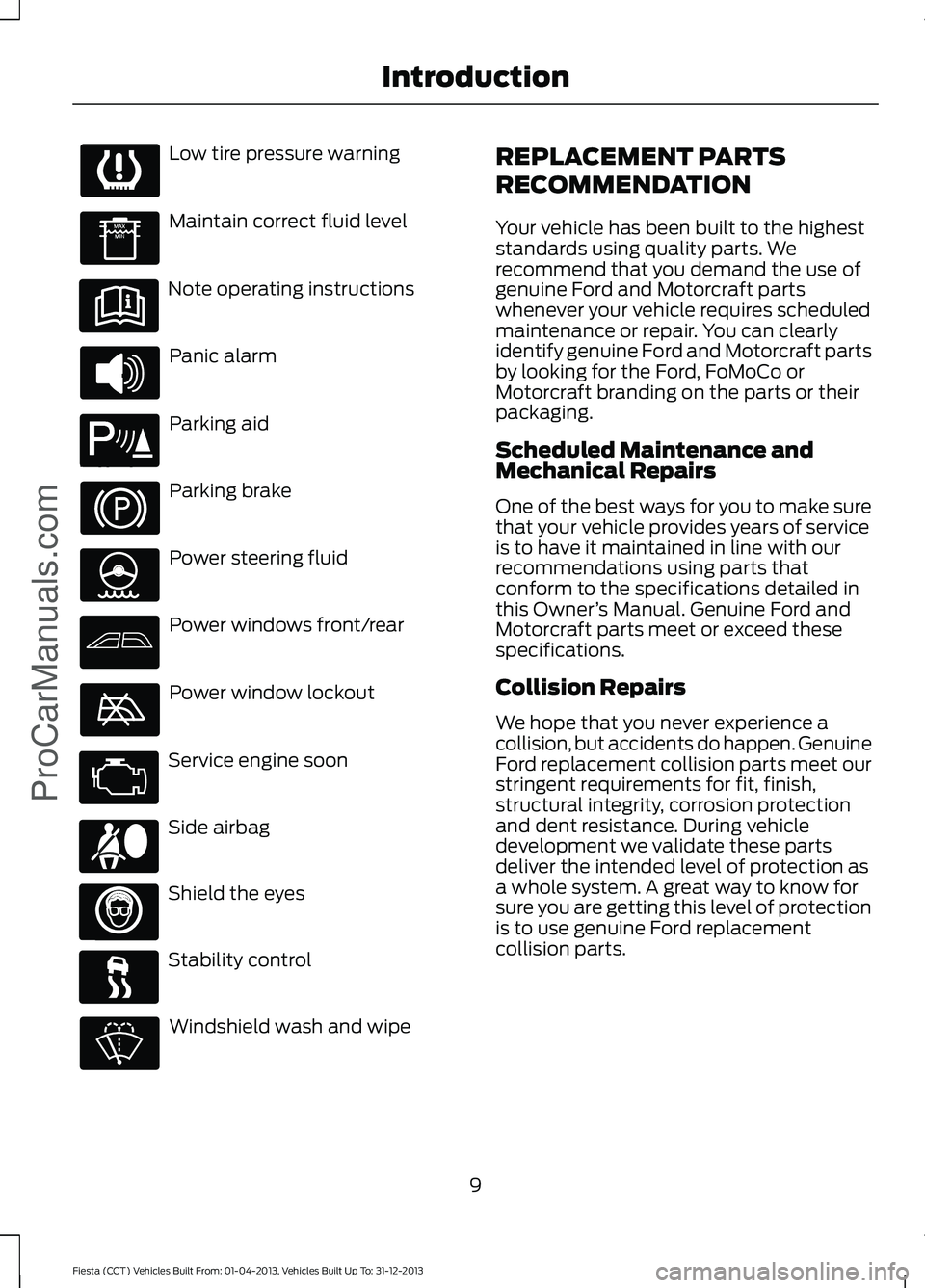
Low tire pressure warning
Maintain correct fluid level
Note operating instructions
Panic alarm
Parking aid
Parking brake
Power steering fluid
Power windows front/rear
Power window lockout
Service engine soon
Side airbag
Shield the eyes
Stability control
Windshield wash and wipe REPLACEMENT PARTS
RECOMMENDATION
Your vehicle has been built to the highest
standards using quality parts. We
recommend that you demand the use of
genuine Ford and Motorcraft parts
whenever your vehicle requires scheduled
maintenance or repair. You can clearly
identify genuine Ford and Motorcraft parts
by looking for the Ford, FoMoCo or
Motorcraft branding on the parts or their
packaging.
Scheduled Maintenance and
Mechanical Repairs
One of the best ways for you to make sure
that your vehicle provides years of service
is to have it maintained in line with our
recommendations using parts that
conform to the specifications detailed in
this Owner
’s Manual. Genuine Ford and
Motorcraft parts meet or exceed these
specifications.
Collision Repairs
We hope that you never experience a
collision, but accidents do happen. Genuine
Ford replacement collision parts meet our
stringent requirements for fit, finish,
structural integrity, corrosion protection
and dent resistance. During vehicle
development we validate these parts
deliver the intended level of protection as
a whole system. A great way to know for
sure you are getting this level of protection
is to use genuine Ford replacement
collision parts.
9
Fiesta (CCT) Vehicles Built From: 01-04-2013, Vehicles Built Up To: 31-12-2013 IntroductionProCarManuals.com E139213 E167012
Page 13 of 398
Warranty on Replacement Parts
Genuine Ford and Motorcraft replacement
parts are the only replacement parts that
benefit from a Ford Warranty. Damage
caused to your vehicle as a result of the
failure of non-Ford parts may not be
covered by the Ford Warranty. For
additional information, refer to the terms
and conditions of the Ford Warranty.
MOBILE COMMUNICATIONS
EQUIPMENT
Using mobile communications equipment
is becoming increasingly important in the
conduct of business and personal affairs.
However, you must not compromise your
own or others’
safety when using such
equipment. Mobile communications can
enhance personal safety and security when
appropriately used, particularly in
emergency situations. Safety must be
paramount when using mobile
communications equipment to avoid
negating these benefits. Mobile
communication equipment includes, but
is not limited to, cellular phones, pagers,
portable email devices, text messaging
devices and portable two-way radios. WARNING
Driving while distracted can result in
loss of vehicle control, crash and
injury. We strongly recommend that
you use extreme caution when using any
device that may take your focus off the
road. Your primary responsibility is the safe
operation of your vehicle. We recommend
against the use of any hand-held device
while driving and encourage the use of
voice-operated systems when possible.
Make sure you are aware of all applicable
local laws that may affect the use of
electronic devices while driving. DATA RECORDING
Service Data Recording
Service data recorders in your vehicle are
capable of collecting and storing
diagnostic information about your vehicle.
This potentially includes information about
the performance or status of various
systems and modules in the vehicle, such
as engine, throttle, steering or brake
systems. In order to properly diagnose and
service your vehicle, Ford Motor Company,
Ford of Canada, and service and repair
facilities may access or share among them
vehicle diagnostic information received
through a direct connection to your vehicle
when diagnosing or servicing your vehicle.
Additionally, when your vehicle is in for
service or repair, Ford Motor Company,
Ford of Canada, and service and repair
facilities may access or share among them
data for vehicle improvement purposes.
For U.S. only (if equipped), if you choose
to use the SYNC Vehicle Health Report,
you consent that certain diagnostic
information may also be accessed
electronically by Ford Motor Company and
Ford authorized service facilities, and that
the diagnostic information may be used
for any purpose. See SYNC™ (page 259).
Event Data Recording
This vehicle is equipped with an event
data recorder. The main purpose of an
event data recorder is to record, in
certain crash or near crash-like
situations, such as an airbag
deployment or hitting a road obstacle;
this data will assist in understanding
how a vehicle ’s systems performed.
The event data recorder is designed to
record data related to vehicle dynamics
and safety systems for a short period
of time, typically 30 seconds or less.
10
Fiesta (CCT) Vehicles Built From: 01-04-2013, Vehicles Built Up To: 31-12-2013 Introduction
ProCarManuals.com
Page 15 of 398
vendors it uses to provide you with this
information do not store your vehicle
travel information. For more
information, see Traffic, Directions and
Information, Terms and Conditions.
See SYNC™ (page 259).
CALIFORNIA PROPOSITION 65 WARNING
Some constituents of engine
exhaust, certain vehicle components,
certain fluids contained in vehicles
and certain products of component wear
contain or emit chemicals known to the
State of California to cause cancer and
birth defects or other reproductive harm. PERCHLORATE
Certain components in your vehicle such
as airbag modules, safety belt
pretensioners and remote control batteries
may contain perchlorate material. Special
handling may apply for service or vehicle
end of life disposal. For more information
visit:
Web Address
www.dtsc.ca.gov/hazardouswaste/ perchlorate
FORD CREDIT
(U.S. Only)
Ford Credit offers a full range of financing
and lease plans to help you acquire your
vehicle. If you have financed or leased your
vehicle through Ford Credit, thank you for
your business.
For your convenience we offer a number
of ways to contact us, as well as help
manage your account. Phone: 1-800-727-7000
For more information regarding Ford Credit,
as well as access Account Manager, please
go to www.fordcredit.com.
SPECIAL NOTICES
New Vehicle Limited Warranty
For a detailed description of what is
covered and what is not covered by your
vehicle
’s New Vehicle Limited Warranty,
refer to the Warranty Manual that is
provided to you along with your Owner ’s
Manual.
Special Instructions
For your added safety, your vehicle is fitted
with sophisticated electronic controls. WARNINGS
Failure to follow the specific
warnings and instructions could
result in personal injury.
Front seat mounted rear-facing child
or infant seats should
NEVER be
placed in front of an active
passenger airbag. EXPORT UNIQUE OPTIONS
For your particular global region, your
vehicle may be equipped with features and
options that are different from the features
and options that are described in this
Owner
’s Manual. A market unique
supplement may be supplied that
complements this book. By referring to the
market unique supplement, if provided,
you can properly identify those features,
recommendations and specifications that
are unique to your vehicle. This Owner ’s
12
Fiesta (CCT) Vehicles Built From: 01-04-2013, Vehicles Built Up To: 31-12-2013 Introduction
ProCarManuals.com
Page 51 of 398
PRINCIPLE OF OPERATION
MyKey allows you to program keys with
restricted driving modes to promote good
driving habits. All but one of the keys
programmed to the vehicle can be
activated with these restricted modes.
Any keys that have not been programmed
are referred to as administrator keys or
admin keys. These can be used to:
•
Create a MyKey
• Program configurable MyKey settings
• Clear all MyKey features
When you have programmed a MyKey, you
can access the following information using
the information display:
• How many admin keys and MyKeys are
programmed to your vehicle.
• The total distance your vehicle has
traveled using any MyKey.
Note: All MyKeys are programmed to the
same settings. You cannot program them
individually.
If a MyKey and an admin key are present,
your vehicle will recognize the admin key
only.
Note: For vehicles with intelligent access
key (push button start) keyless start, when
both a MyKey and an admin intelligent
access key (fob) are present, the admin fob
will be recognized by the vehicle to start the
engine.
Non-configurable Settings
The following settings cannot be changed
by an admin key user:
• Belt-minder. You cannot disable this
feature. The audio system will mute
when the front seat occupants' safety
belts are not fastened.
• Early low fuel. The low-fuel warning
activates earlier, giving the MyKey user
more time to refuel. •
Driver assist features, if equipped on
your vehicle, are forced on: parking aid,
blind spot information system (BLIS)
with cross traffic alert, lane departure
warning and forward collision warning
system.
• Satellite radio adult content
restrictions.
Configurable Settings
With an admin key, you can configure
certain MyKey settings when you first
create a MyKey and before you recycle the
key or restart the vehicle. You can also
change the settings afterward with an
admin key:
• Vehicle speed limits can be set.
Warnings will be shown in the display
followed by an audible tone when your
vehicle reaches the set speed. You
cannot override the set speed by fully
depressing the accelerator pedal.
• Vehicle speed minders of 45, 55 or 65
mph (75, 90 or 105 km/h). Once you
select a speed it will be shown in the
display followed by an audible tone
when the set vehicle speed is
exceeded.
• Audio system maximum volume of
45%. A message will be shown in the
display when you attempt to exceed
the limited volume. Also, the speed
sensitive compensated volume
(automatic volume control) feature
will be disabled.
• Always on setting. When this is
selected you will not be able to disable
AdvanceTrac, 911 Assist or the do not
disturb feature (if your vehicle is
equipped with these features).
CREATING A MYKEY
Use the information display to create a
MyKey.
48
Fiesta (CCT) Vehicles Built From: 01-04-2013, Vehicles Built Up To: 31-12-2013 MyKey
™ (If Equipped)
ProCarManuals.com
Page 53 of 398
Number of Admin Keys
Indicates how many admin keys are
programmed to your vehicle. Use this
feature to determine how many admin
keys you have for your vehicle, and detect
if an additional MyKey has been
programmed.
USING MYKEY WITH REMOTE
START SYSTEMS
MyKey is not compatible with
non-Ford-approved aftermarket remote
start systems. If you choose to install a
remote start system, please see an
authorized dealer for a Ford-approved
remote start system.
MYKEY TROUBLESHOOTING Potential causes
Condition
· The key or fob used to start the vehicle
does not have admin privileges.
I cannot create a MyKey.
· The key or fob used to start the vehicle is
the only admin key (there always has to be
at least one admin key).
· Vehicles with push-button start: The
intelligent access key is not in the correct
position. The position location is in another
chapter. See Keyless Starting (page 113).
· SecuriLock passive anti-theft system is
disabled or in unlimited mode.
· The key or fob used to start the vehicle
does not have admin privileges.
I cannot program the configurable settings.
· No MyKeys have been created. See
Creating a MyKey (page 48).
· The key or fob used to start the vehicle
does not have admin privileges.
I cannot clear the MyKeys.
· No MyKeys are programmed to the vehicle.
See
Creating a MyKey (page 48).
Purchase a new key from an authorized
dealer.
I lost the only admin key.
Program a spare key. See
Passive Anti-
Theft System (page 60).
I lost a key.
· An admin key is present at engine start-
up.
No MyKey functions with intelligent access
key (push-button start).
· No MyKeys are programmed to the vehicle.
See
Creating a MyKey (page 48).
· The MyKey user is not using a MyKey.
MyKey distances do not accumulate.
50
Fiesta (CCT) Vehicles Built From: 01-04-2013, Vehicles Built Up To: 31-12-2013 MyKey
™
(If Equipped)
ProCarManuals.com
Page 55 of 398
LOCKING AND UNLOCKING
Remote Control
The remote control can be used any time
your vehicle is not running.
Unlocking the Doors
Note:
You can unlock the driver's door with
the key. Use the key when the remote
control is not functioning.
Note: When you lock your vehicle for
several weeks, the remote control will be
switched off. Your vehicle must be unlocked
and the engine started using the key.
Unlocking and starting your vehicle once will
enable the remote control.
One-Stage Unlocking Press the button to unlock all the
doors.
The direction indicators will flash.
Two-Stage Unlocking Press the button to unlock the
driver
’s door.
Press the button again within three
seconds to unlock all doors.
The direction indicators will flash.
Reprogramming the Unlocking
Function
You can reprogram the unlocking function
using the remote control to change
between one-stage and two-stage
unlocking. See Remote Control (page
43).
Locking the Doors Press the button to lock all the
doors. The direction indicators
will flash twice. Press the button again within three
seconds to confirm that all the doors are
closed. The doors will lock again, and the
direction indicators will flash twice if all
the doors and the luggage compartment
are closed.
Note:
If any door or the luggage
compartment is not closed, or if the hood is
not closed on vehicles that have an
anti-theft alarm or remote start, the
direction indicators will not flash.
Automatic Re-locking
The doors will relock automatically if you
do not open a door within 45 seconds of
unlocking the doors with the remote
control. The door locks and the alarm will
return to their previous state.
Locking and Unlocking the Doors
From Inside
The power door lock control is located on
the instrument panel near the radio. Press the button to lock and
unlock all the doors. The lamp
illuminates with the doors
locked.
Locking and Unlocking the Doors
With the Key
Note: Do not leave your keys in your vehicle.
Locking With the Key
Turn the top of the key toward the front of
your vehicle.
Unlocking With the Key
Turn the top of the key toward the rear of
your vehicle.
52
Fiesta (CCT) Vehicles Built From: 01-04-2013, Vehicles Built Up To: 31-12-2013 Locks
ProCarManuals.com E102566
Page 60 of 398
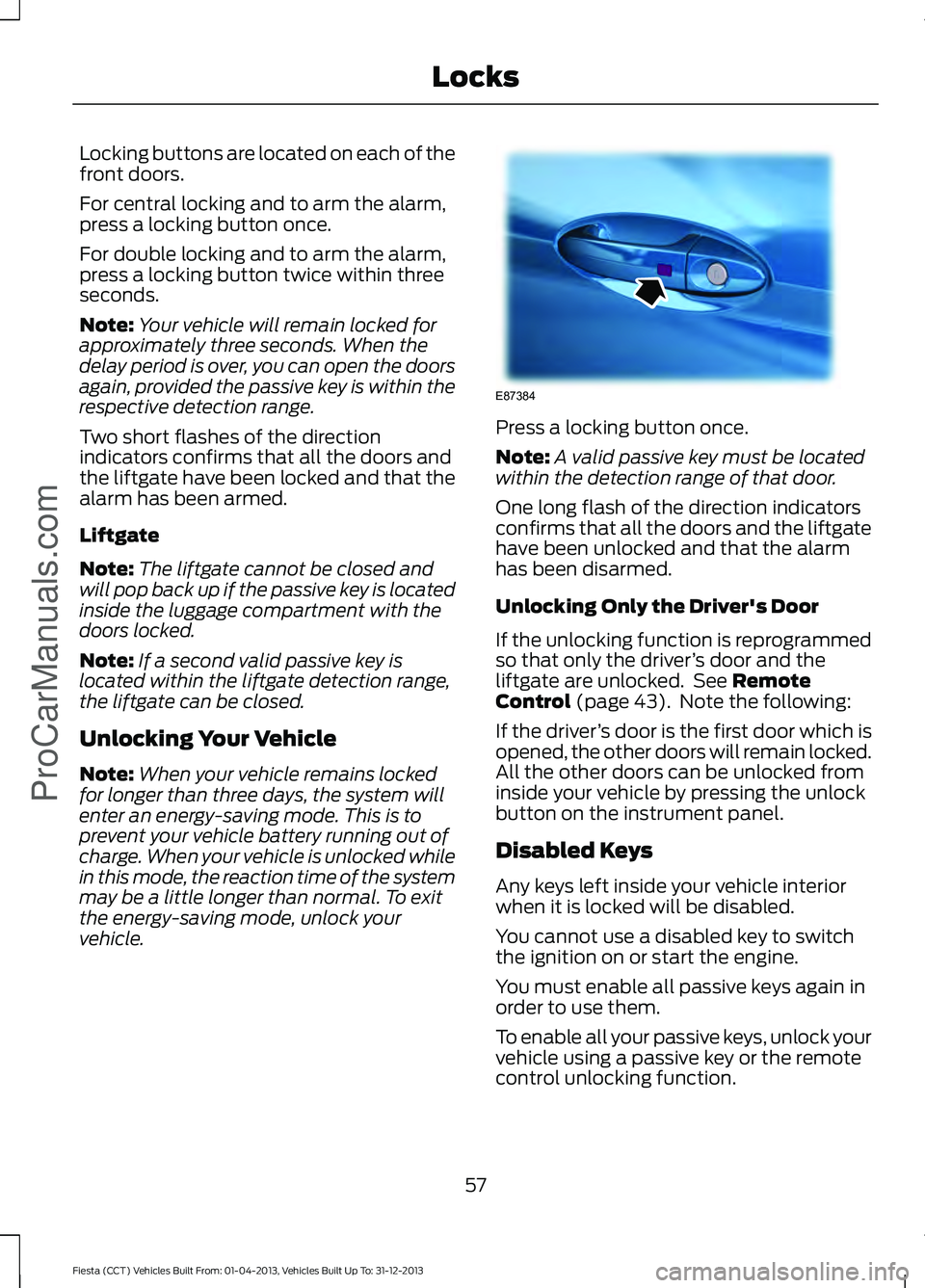
Locking buttons are located on each of the
front doors.
For central locking and to arm the alarm,
press a locking button once.
For double locking and to arm the alarm,
press a locking button twice within three
seconds.
Note:
Your vehicle will remain locked for
approximately three seconds. When the
delay period is over, you can open the doors
again, provided the passive key is within the
respective detection range.
Two short flashes of the direction
indicators confirms that all the doors and
the liftgate have been locked and that the
alarm has been armed.
Liftgate
Note: The liftgate cannot be closed and
will pop back up if the passive key is located
inside the luggage compartment with the
doors locked.
Note: If a second valid passive key is
located within the liftgate detection range,
the liftgate can be closed.
Unlocking Your Vehicle
Note: When your vehicle remains locked
for longer than three days, the system will
enter an energy-saving mode. This is to
prevent your vehicle battery running out of
charge. When your vehicle is unlocked while
in this mode, the reaction time of the system
may be a little longer than normal. To exit
the energy-saving mode, unlock your
vehicle. Press a locking button once.
Note:
A valid passive key must be located
within the detection range of that door.
One long flash of the direction indicators
confirms that all the doors and the liftgate
have been unlocked and that the alarm
has been disarmed.
Unlocking Only the Driver's Door
If the unlocking function is reprogrammed
so that only the driver ’s door and the
liftgate are unlocked. See Remote
Control (page 43). Note the following:
If the driver ’s door is the first door which is
opened, the other doors will remain locked.
All the other doors can be unlocked from
inside your vehicle by pressing the unlock
button on the instrument panel.
Disabled Keys
Any keys left inside your vehicle interior
when it is locked will be disabled.
You cannot use a disabled key to switch
the ignition on or start the engine.
You must enable all passive keys again in
order to use them.
To enable all your passive keys, unlock your
vehicle using a passive key or the remote
control unlocking function.
57
Fiesta (CCT) Vehicles Built From: 01-04-2013, Vehicles Built Up To: 31-12-2013 Locks
ProCarManuals.comE87384