AUX FORD FIESTA 2015 User Guide
[x] Cancel search | Manufacturer: FORD, Model Year: 2015, Model line: FIESTA, Model: FORD FIESTA 2015Pages: 423, PDF Size: 5.5 MB
Page 290 of 423
![FORD FIESTA 2015 User Guide Press the voice button and when prompted say:
Action and Description
Voice command
You can now play music by saying any of the appropriate
voice commands. See Media voice commands.
(USB [stick] | iPod](/img/11/57821/w960_57821-289.png "FORD FIESTA 2015 User Guide Press the voice button and when prompted say:
Action and Description
Voice command
You can now play music by saying any of the appropriate
voice commands. See Media voice commands.
(USB [stick] | iPod")
Press the voice button and when prompted say:
Action and Description
Voice command
You can now play music by saying any of the appropriate
voice commands. See Media voice commands.
(USB [stick] | iPod | MP3
[player])
You do not need to say words that appear within square brackets. For example, for where
(USB [stick] | iPOD | MP3 [player]) appears, you can say USB or USB stick.
To Connect Using the System Menu
Plug the device into the USB port. See
USB Port (page 263).
Press the
AUX button, then scroll to: Action and Description
Message
Press the
OK button to enter the media menu.
Menu
Press the
OK button.
Browse device
Press the
OK button.
USB
Depending on how many digital media files are on your
connected device, the following message may appear in the
radio display. When indexing is complete, the screen returns
to the Play menu.
Indexing…
Select one of the following:
Play all
Artist
Albums
Genres
Playlists
Tracks
Browse USB
Similar music Exit the current menu.
Return
287
Fiesta (CCT), enUSA, Second Printing SYNC™
ProCarManuals.com
Page 293 of 423
![FORD FIESTA 2015 User Guide Action and Description
Voice command
The system searches for specific track information from the
music indexed through the USB port.
play [song | track | title |
file]
The system searches for specific](/img/11/57821/w960_57821-292.png "FORD FIESTA 2015 User Guide Action and Description
Voice command
The system searches for specific track information from the
music indexed through the USB port.
play [song | track | title |
file]
The system searches for specific")
Action and Description
Voice command
The system searches for specific track information from the
music indexed through the USB port.
play [song | track | title |
file]
The system searches for specific album information from the
music indexed through the USB port.
play [album] [by [artist]]
This allows you to make your previous command more
specific. For example, if you asked to search and play all music
by a certain artist, you could then say, refine album and
choose a specific album from the list to view. If you then
select Play, the system only plays music from that specific
album.
Refine
* Indexing times can vary from device to device and with regard to the number of songs
the system needs to process.
Bluetooth Audio Command Guide
Press the voice button and when
prompted say any of the following: Voice command
[Phone] Connections | [Media] Connec-
tions | [Bluetooth] Connections
pause
play
[play] next track
[play] previous track Media Menu Features
The media menu allows you to select your
media source, how to play your music, for
example by artist, genre, shuffle or repeat,
and to add, connect or delete devices.
Press the AUX button, then scroll to: Action and Description
Message
Press the
OK button to enter the media menu.
Menu
Select one of the following:
Play your music by artist, album, genre, playlist, track, similar
music or play all music. You can also choose to Explore USB
to view the supported digital music files on your playing
device.
Menu
290
Fiesta (CCT), enUSA, Second Printing SYNC™
ProCarManuals.com
Page 294 of 423
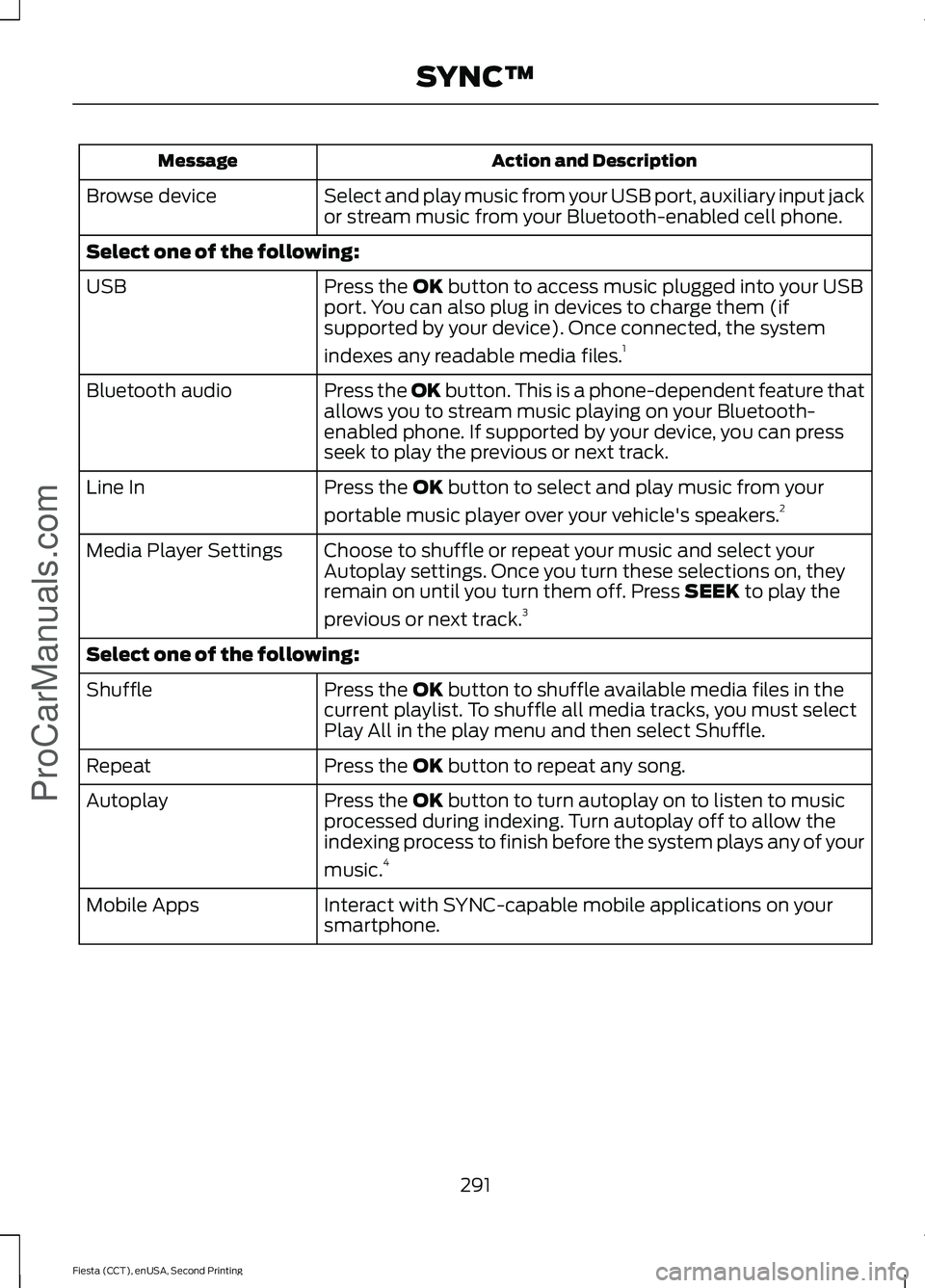
Action and Description
Message
Select and play music from your USB port, auxiliary input jack
or stream music from your Bluetooth-enabled cell phone.
Browse device
Select one of the following:
Press the OK button to access music plugged into your USB
port. You can also plug in devices to charge them (if
supported by your device). Once connected, the system
indexes any readable media files. 1
USB
Press the OK button. This is a phone-dependent feature that
allows you to stream music playing on your Bluetooth-
enabled phone. If supported by your device, you can press
seek to play the previous or next track.
Bluetooth audio
Press the
OK button to select and play music from your
portable music player over your vehicle's speakers. 2
Line In
Choose to shuffle or repeat your music and select your
Autoplay settings. Once you turn these selections on, they
remain on until you turn them off. Press
SEEK to play the
previous or next track. 3
Media Player Settings
Select one of the following:
Press the
OK button to shuffle available media files in the
current playlist. To shuffle all media tracks, you must select
Play All in the play menu and then select Shuffle.
Shuffle
Press the
OK button to repeat any song.
Repeat
Press the
OK button to turn autoplay on to listen to music
processed during indexing. Turn autoplay off to allow the
indexing process to finish before the system plays any of your
music. 4
Autoplay
Interact with SYNC-capable mobile applications on your
smartphone.
Mobile Apps
291
Fiesta (CCT), enUSA, Second Printing SYNC™
ProCarManuals.com
Page 295 of 423
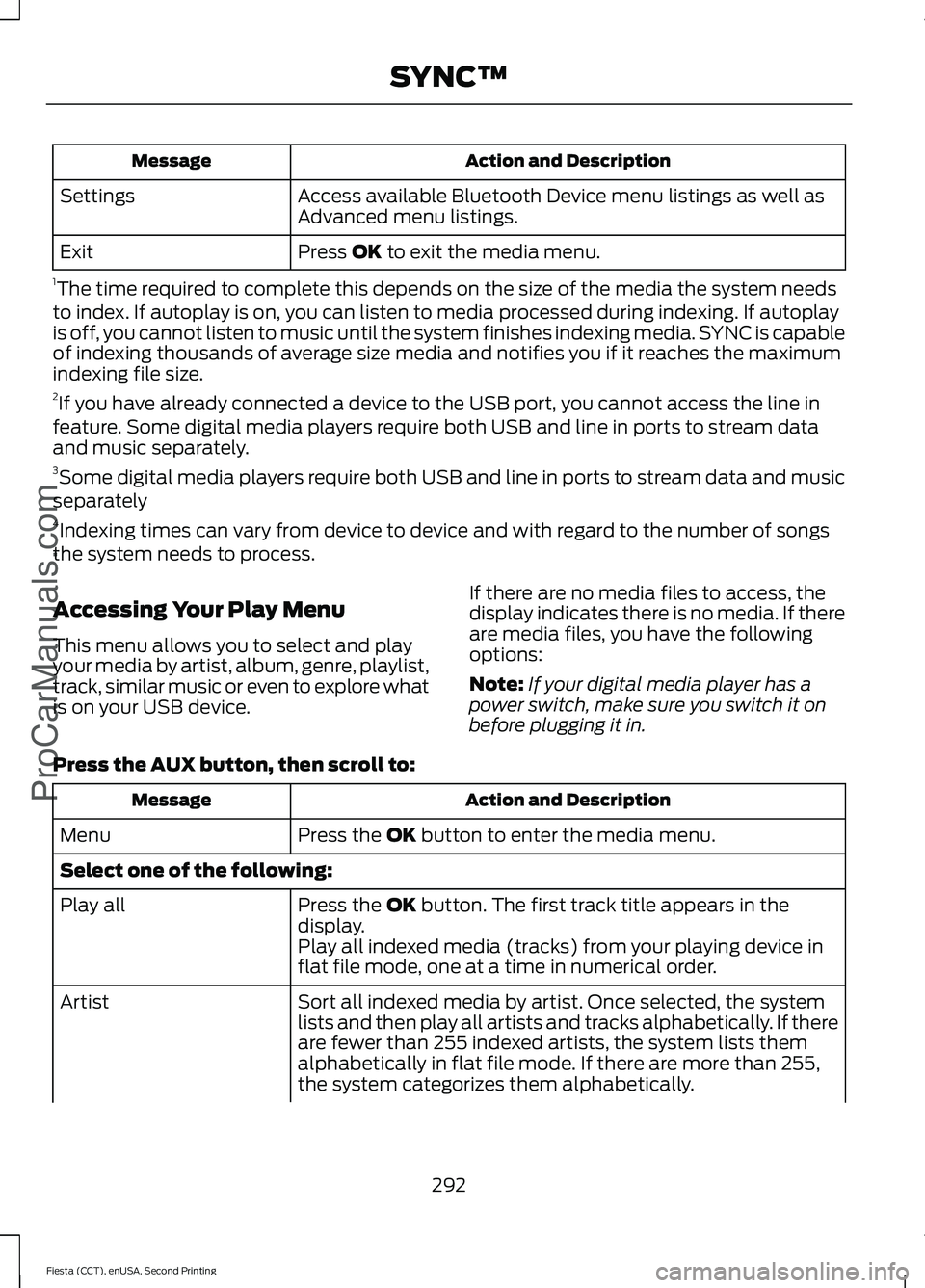
Action and Description
Message
Access available Bluetooth Device menu listings as well as
Advanced menu listings.
Settings
Press OK to exit the media menu.
Exit
1 The time required to complete this depends on the size of the media the system needs
to index. If autoplay is on, you can listen to media processed during indexing. If autoplay
is off, you cannot listen to music until the system finishes indexing media. SYNC is capable
of indexing thousands of average size media and notifies you if it reaches the maximum
indexing file size.
2 If you have already connected a device to the USB port, you cannot access the line in
feature. Some digital media players require both USB and line in ports to stream data
and music separately.
3 Some digital media players require both USB and line in ports to stream data and music
separately
4 Indexing times can vary from device to device and with regard to the number of songs
the system needs to process.
Accessing Your Play Menu
This menu allows you to select and play
your media by artist, album, genre, playlist,
track, similar music or even to explore what
is on your USB device. If there are no media files to access, the
display indicates there is no media. If there
are media files, you have the following
options:
Note:
If your digital media player has a
power switch, make sure you switch it on
before plugging it in.
Press the
AUX button, then scroll to: Action and Description
Message
Press the
OK button to enter the media menu.
Menu
Select one of the following:
Press the
OK button. The first track title appears in the
display.
Play all
Play all indexed media (tracks) from your playing device in
flat file mode, one at a time in numerical order.
Sort all indexed media by artist. Once selected, the system
lists and then play all artists and tracks alphabetically. If there
are fewer than 255 indexed artists, the system lists them
alphabetically in flat file mode. If there are more than 255,
the system categorizes them alphabetically.
Artist
292
Fiesta (CCT), enUSA, Second Printing SYNC™
ProCarManuals.com
Page 297 of 423
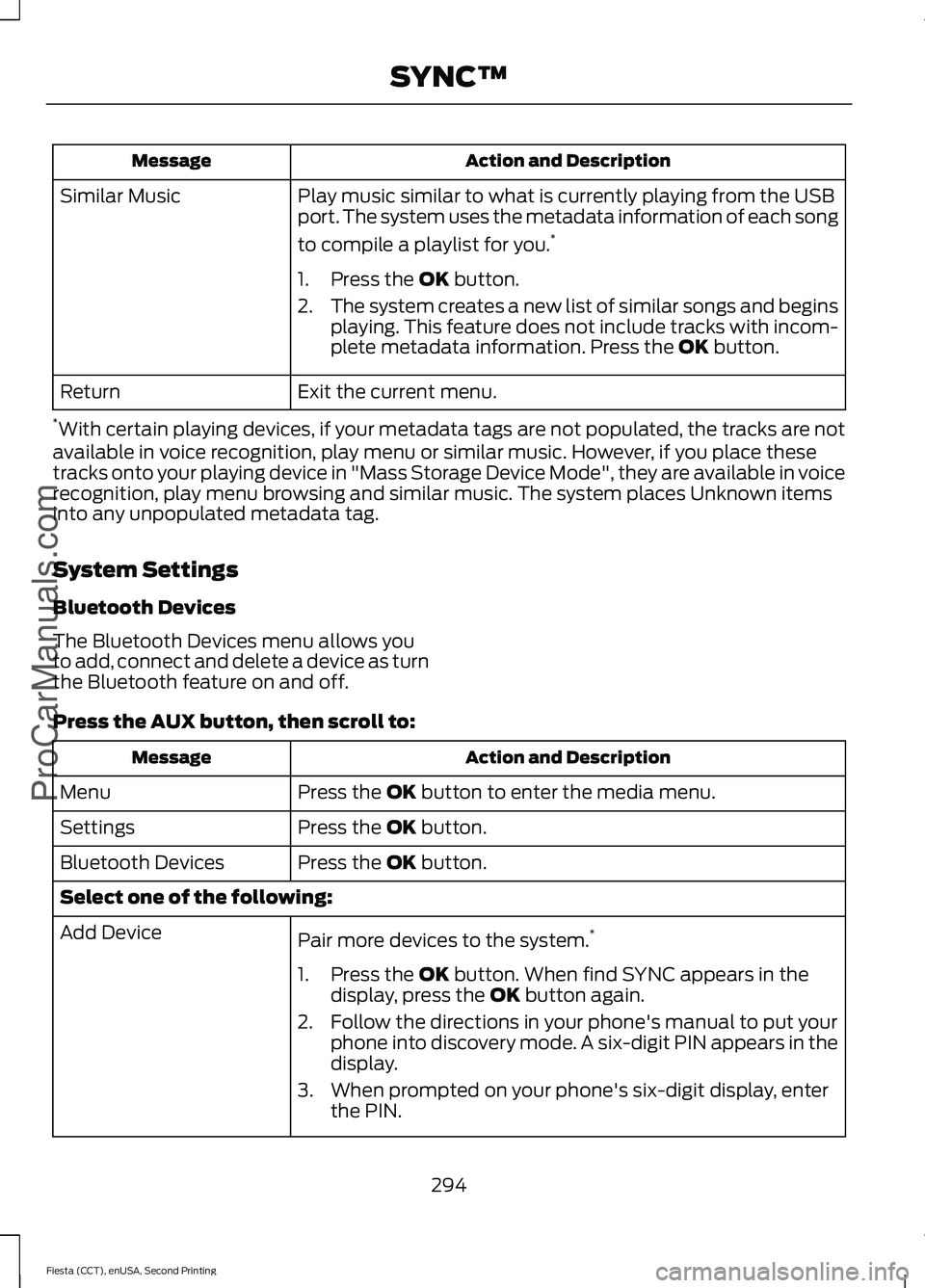
Action and Description
Message
Play music similar to what is currently playing from the USB
port. The system uses the metadata information of each song
to compile a playlist for you. *
Similar Music
1. Press the OK button.
2. The system creates a new list of similar songs and begins
playing. This feature does not include tracks with incom-
plete metadata information. Press the
OK button.
Exit the current menu.
Return
* With certain playing devices, if your metadata tags are not populated, the tracks are not
available in voice recognition, play menu or similar music. However, if you place these
tracks onto your playing device in "Mass Storage Device Mode", they are available in voice
recognition, play menu browsing and similar music. The system places Unknown items
into any unpopulated metadata tag.
System Settings
Bluetooth Devices
The Bluetooth Devices menu allows you
to add, connect and delete a device as turn
the Bluetooth feature on and off.
Press the
AUX button, then scroll to: Action and Description
Message
Press the
OK button to enter the media menu.
Menu
Press the
OK button.
Settings
Press the
OK button.
Bluetooth Devices
Select one of the following:
Pair more devices to the system. *
Add Device
1. Press the
OK button. When find SYNC appears in the
display, press the OK button again.
2. Follow the directions in your phone's manual to put your phone into discovery mode. A six-digit PIN appears in the
display.
3. When prompted on your phone's six-digit display, enter the PIN.
294
Fiesta (CCT), enUSA, Second Printing SYNC™
ProCarManuals.com
Page 414 of 423
A
A/C
See: Climate Control........................................... 95
About This Manual...........................................7
ABS See: Brakes........................................................... 130
ABS driving hints See: Hints on Driving With Anti-Lock
Brakes................................................................ 130
Accessories.....................................................377 Exterior style......................................................... 377
Interior style.......................................................... 377
Lifestyle.................................................................. 377
Peace of mind...................................................... 377
Accessories See: Replacement Parts
Recommendation............................................. 11
Adjusting the Headlamps..........................187 Horizontal Aim Adjustment........................... 188
Vertical Aim Adjustment.................................. 187
Adjusting the Steering Wheel....................61
Airbag Disposal................................................41
Air Conditioning See: Climate Control........................................... 95
Air Vents............................................................95 Center Air Vents.................................................... 95
Side Air Vent.......................................................... 95
Alarm See: Anti-Theft Alarm........................................ 59
Ambient Lighting...........................................69
Anti-Theft Alarm............................................59 Alarm System........................................................ 59
Arming the Alarm................................................. 59
Disarming the Alarm........................................... 59
Triggering the Alarm............................................ 59
Appendices....................................................379
Audible Warnings and Indicators.............82 Exterior Lamps On............................................... 82
Gearshift Lever Not in Park (P)....................... 82
Key in Ignition......................................................... 82
Key Outside Vehicle - Vehicles With Keyless System................................................................ 82
Low Fuel.................................................................. 82
Parking Brake On.................................................. 82
Safety Belt Minder............................................... 82
Audio Control....................................................61
Audio Input Jack...........................................262 Audio System................................................245
General Information......................................... 245
Audio Troubleshooting
..............................263
Audio Unit - Vehicles With: AM/FM/ CD...................................................................246
Alternative Frequencies.................................. 249
Automatic Volume Control............................ 249
Autostore Control.............................................. 249
Sound Button...................................................... 248
Station Preset Buttons.................................... 249
Station Tuning Control.................................... 248
Waveband Button............................................. 248
Audio Unit - Vehicles With: SYNC/AM/ FM/CD..........................................................250
Alternative Frequencies................................... 253
Automatic Volume Control............................ 253
Autostore Control.............................................. 253
Sound Button...................................................... 252
Station Preset Buttons.................................... 252
Station Tuning Control..................................... 252
Waveband Button.............................................. 252
Audio Unit - Vehicles With: Touchscreen Display/Sony Audio System
.................255
Audio Unit - Vehicles With: Touchscreen Display
..........................................................254
Autolamps........................................................66 Windshield Wiper Activated
Headlamps........................................................ 66
Automatic Climate Control........................97 Temperature Control.......................................... 98
Automatic Transmission
............................124
Emergency Park Position Release
Lever.................................................................... 127
Hints on Driving with an Automatic Transmission.................................................... 127
Selector Lever Positions................................... 125
Sport Mode and Manual Shifting.................126
Automatic Transmission Fluid Check.............................................................185
Auxiliary Power Points
...............................109
12 Volt DC Power Point..................................... 109
Location................................................................. 109
B
Bonnet Lock See: Opening and Closing the Hood............177
411
Fiesta (CCT), enUSA, Second Printing Index
ProCarManuals.com