AUX FORD FIESTA 2015 Owners Manual
[x] Cancel search | Manufacturer: FORD, Model Year: 2015, Model line: FIESTA, Model: FORD FIESTA 2015Pages: 423, PDF Size: 5.5 MB
Page 5 of 423
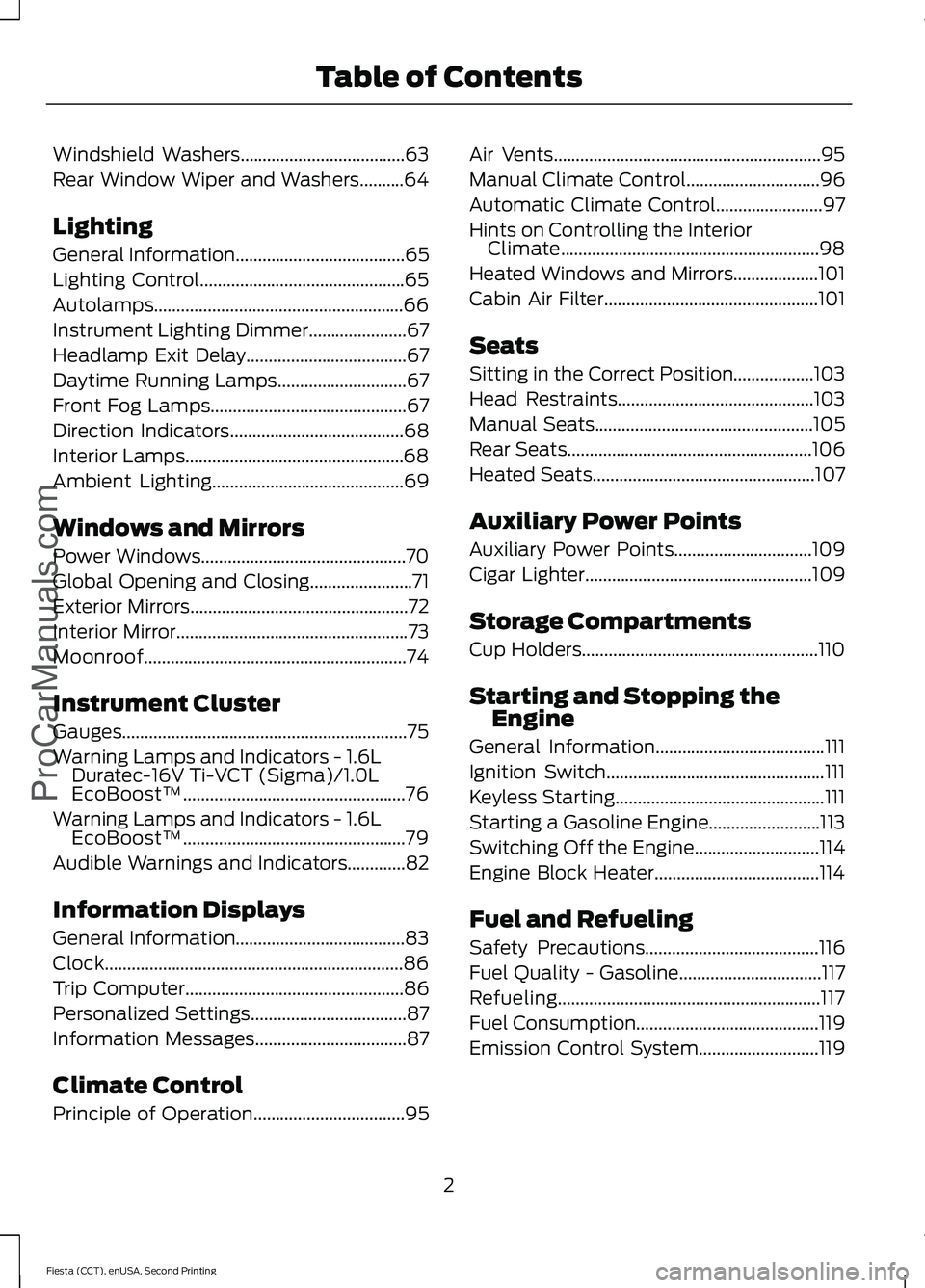
Windshield Washers.....................................63
Rear Window Wiper and Washers..........64
Lighting
General Information
......................................65
Lighting Control..............................................65
Autolamps........................................................66
Instrument Lighting Dimmer
......................67
Headlamp Exit Delay....................................67
Daytime Running Lamps
.............................67
Front Fog Lamps............................................67
Direction Indicators
.......................................68
Interior Lamps.................................................68
Ambient Lighting
...........................................69
Windows and Mirrors
Power Windows..............................................70
Global Opening and Closing
.......................71
Exterior Mirrors
.................................................72
Interior Mirror
....................................................73
Moonroof...........................................................74
Instrument Cluster
Gauges................................................................75
Warning Lamps and Indicators -
1.6L
Duratec-16V Ti-VCT (Sigma)/1.0L
EcoBoost™..................................................76
Warning Lamps and Indicators -
1.6L
EcoBoost™..................................................79
Audible Warnings and Indicators.............82
Information Displays
General Information
......................................83
Clock...................................................................86
Trip Computer
.................................................86
Personalized Settings
...................................87
Information Messages
..................................87
Climate Control
Principle of Operation
..................................95 Air Vents............................................................95
Manual Climate Control..............................96
Automatic Climate Control
........................97
Hints on Controlling the Interior Climate..........................................................98
Heated Windows and Mirrors...................101
Cabin Air Filter
................................................101
Seats
Sitting in the Correct Position..................103
Head Restraints............................................103
Manual Seats
.................................................105
Rear Seats.......................................................106
Heated Seats
..................................................107
Auxiliary Power Points
Auxiliary Power Points...............................109
Cigar Lighter
...................................................109
Storage Compartments
Cup Holders.....................................................110
Starting and Stopping the Engine
General Information
......................................111
Ignition Switch
.................................................111
Keyless Starting
...............................................111
Starting a Gasoline Engine.........................113
Switching Off the Engine
............................114
Engine Block Heater.....................................114
Fuel and Refueling
Safety Precautions
.......................................116
Fuel Quality - Gasoline................................117
Refueling...........................................................117
Fuel Consumption.........................................119
Emission Control System...........................119
2
Fiesta (CCT), enUSA, Second Printing Table of Contents
ProCarManuals.com
Page 86 of 423
GENERAL INFORMATION
WARNING
Driving while distracted can result in
loss of vehicle control, crash and
injury. We strongly recommend that
you use extreme caution when using any
device that may take your focus off the
road. Your primary responsibility is the safe
operation of your vehicle. We recommend
against the use of any hand-held device
while driving and encourage the use of
voice-operated systems when possible.
Make sure you are aware of all applicable
local laws that may affect the use of
electronic devices while driving. Note:
The information display will remain
on for several minutes after you switch the
ignition off.
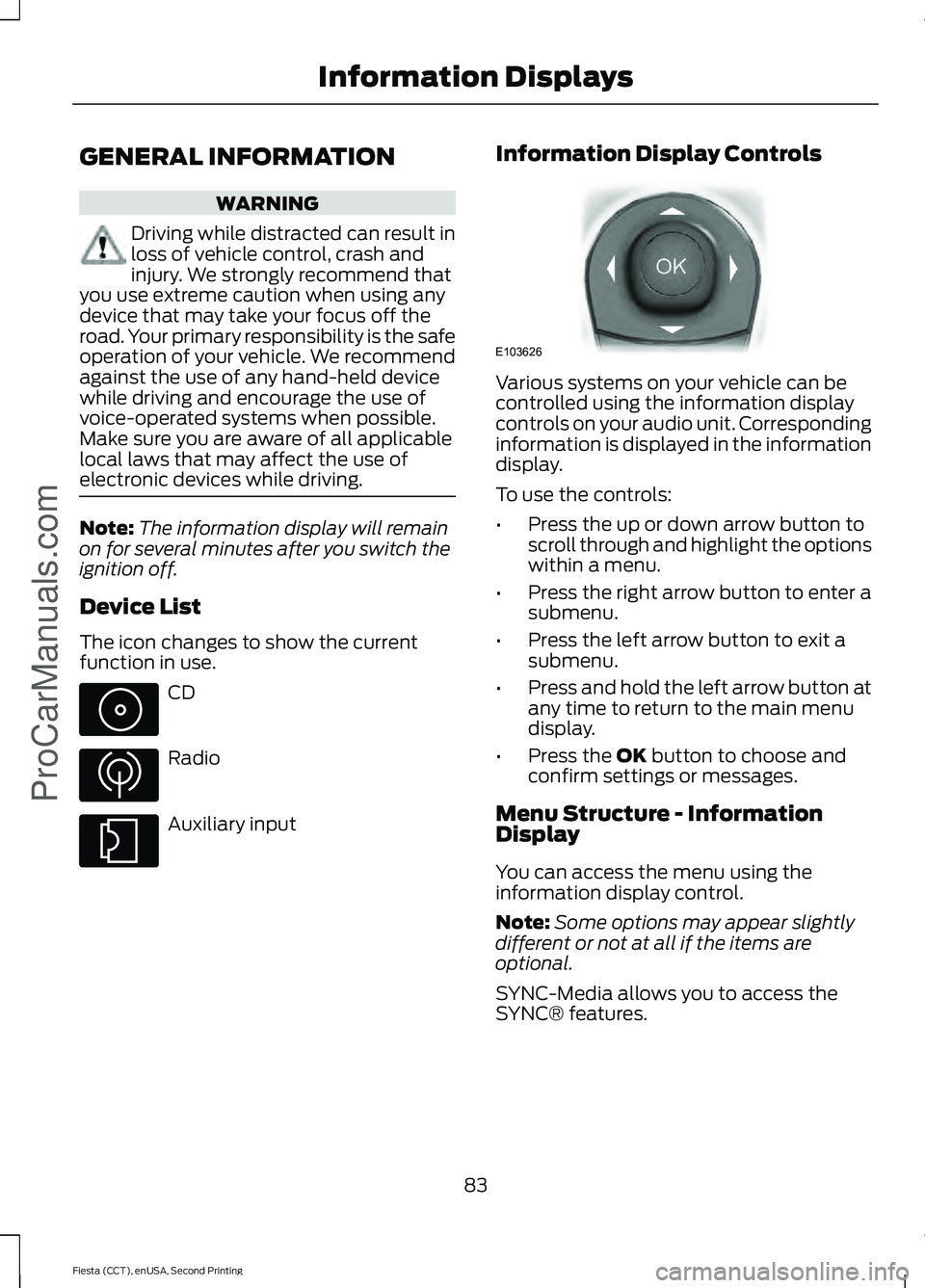
Device List
The icon changes to show the current
function in use. CD
Radio
Auxiliary input Information Display Controls Various systems on your vehicle can be
controlled using the information display
controls on your audio unit. Corresponding
information is displayed in the information
display.
To use the controls:
•
Press the up or down arrow button to
scroll through and highlight the options
within a menu.
• Press the right arrow button to enter a
submenu.
• Press the left arrow button to exit a
submenu.
• Press and hold the left arrow button at
any time to return to the main menu
display.
• Press the OK button to choose and
confirm settings or messages.
Menu Structure - Information
Display
You can access the menu using the
information display control.
Note: Some options may appear slightly
different or not at all if the items are
optional.
SYNC-Media allows you to access the
SYNC® features.
83
Fiesta (CCT), enUSA, Second Printing Information Displays
ProCarManuals.com E103626
Page 112 of 423
12 Volt DC Power Point
WARNING
Do not plug optional electrical
accessories into the cigar lighter
socket. Incorrect use of the lighter
can cause damage not covered by your
warranty, and can result in fire or serious
injury. Note:
When you switch the ignition on, you
can use the socket to power 12 volt
appliances with a maximum current rating
of 20 amps.
After you switch the ignition off the power
supply will only work for a maximum of 30
minutes.
Note: Do not insert objects other than an
accessory plug into the power point. This
will damage the outlet and blow the fuse.
Note: Do not hang any type of accessory or
accessory bracket from the plug.
Note: Do not use the power point over the
vehicle capacity of 12 volt DC 180 watt or a
fuse may blow.
Note: Do not use the power point for
operating a cigar lighter element.
Note: Incorrect use of the power point can
cause damage not covered by your
warranty.
Note: Always keep the power point caps
closed when not in use.
Run the engine for full capacity use of the
power point.
To prevent the battery from running out of
charge:
• Do not use the power point longer than
necessary when the engine is not
running.
• Do not leave devices plugged in
overnight or when your vehicle is
parked for extended periods. Location
Power points may be found:
•
on the center console
• on the rear of the center console.
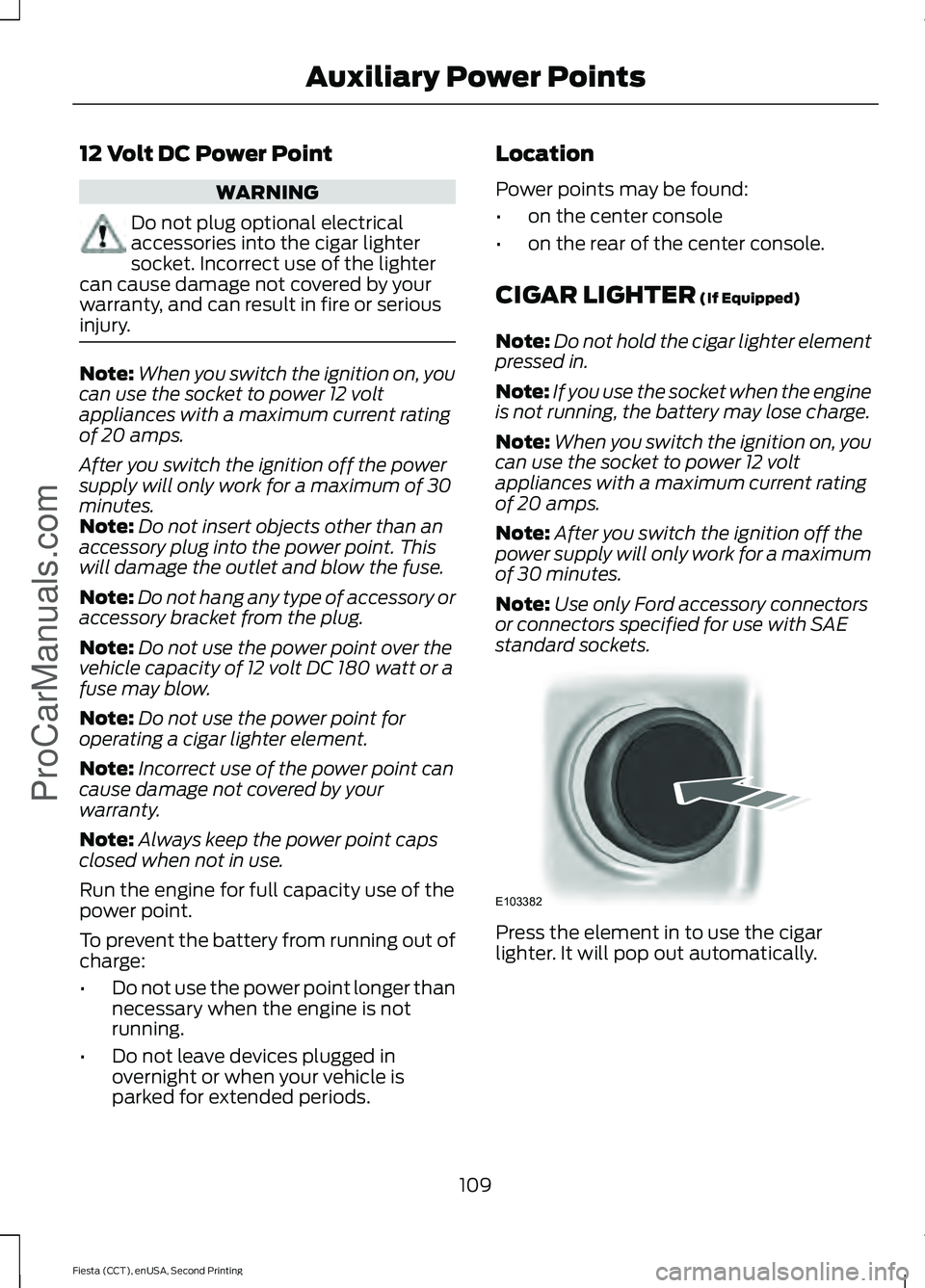
CIGAR LIGHTER (If Equipped)
Note: Do not hold the cigar lighter element
pressed in.
Note: If you use the socket when the engine
is not running, the battery may lose charge.
Note: When you switch the ignition on, you
can use the socket to power 12 volt
appliances with a maximum current rating
of 20 amps.
Note: After you switch the ignition off the
power supply will only work for a maximum
of 30 minutes.
Note: Use only Ford accessory connectors
or connectors specified for use with SAE
standard sockets. Press the element in to use the cigar
lighter. It will pop out automatically.
109
Fiesta (CCT), enUSA, Second Printing Auxiliary Power Points
ProCarManuals.comE103382
Page 178 of 423
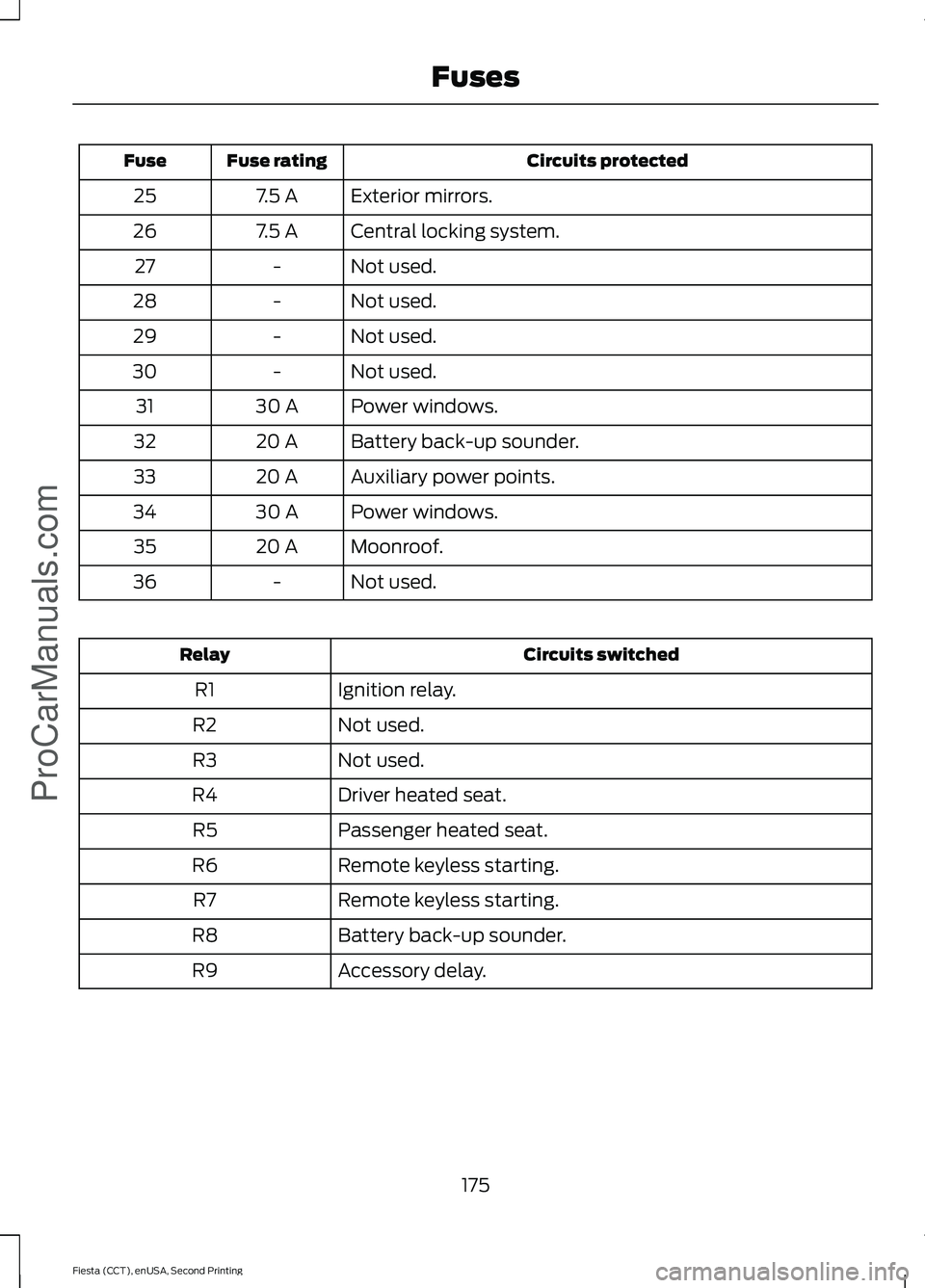
Circuits protected
Fuse rating
Fuse
Exterior mirrors.
7.5 A
25
Central locking system.
7.5 A
26
Not used.
-
27
Not used.
-
28
Not used.
-
29
Not used.
-
30
Power windows.
30 A
31
Battery back-up sounder.
20 A
32
Auxiliary power points.
20 A
33
Power windows.
30 A
34
Moonroof.
20 A
35
Not used.
-
36 Circuits switched
Relay
Ignition relay.
R1
Not used.
R2
Not used.
R3
Driver heated seat.
R4
Passenger heated seat.
R5
Remote keyless starting.
R6
Remote keyless starting.
R7
Battery back-up sounder.
R8
Accessory delay.
R9
175
Fiesta (CCT), enUSA, Second Printing FusesProCarManuals.com
Page 251 of 423
Seek down: Press the button to go to the next station down the radio frequency
band or the previous track on a CD.
J
MENU: Press the button to access different audio system features.
K
INFO:
Press the button to access radio or CD information.
L
SOUND:
Press the button to adjust the sound settings for bass, treble, middle,
balance and fade.
M
MEDIA:
Press the button to access the AUX and SYNC features, it will also
cancel the menu or list browsing.
N
RADIO:
Press the button to select different radio bands, it will also cancel the
menu or list browsing.
O
Sound Button
This will allow you to adjust the sound
settings (for example bass, middle and
treble).
1. Press the
SOUND button.
2. Use the up and down arrow buttons to
select the required setting.
3. Use the left and right arrow buttons to
make the necessary adjustment. The
display indicates the level selected.
4. Press the
OK button to confirm the
new settings.
Waveband Button
Press the
RADIO button to select from the
wavebands available.
You can use the selector to return to radio
reception when you have been listening to
another source.
Alternatively, press the left arrow button
to display the available wavebands. Scroll
to the required waveband and press
OK. Station Tuning Control
Seek Tuning
Select a waveband and briefly press one
of the seek buttons. The unit will stop at
the first station it finds in the direction you
have chosen.
Manual Tuning
1. Press the
MENU button.
2. Select RADIO mode and then Manual.
3. Use the left and right arrow buttons to
tune down or up the waveband in small
increments or press and hold to
increment quickly, until you find a
station you want to listen to.
4. Press
OK to continue listening to a
station.
Scan Tuning
Scan allows you to listen to a few seconds
of each station detected.
1. Press the
MENU button.
2. Select
RADIO mode and then Scan.
3. Use the seek buttons to scan up or down the selected waveband.
4. Press
OK to continue listening to a
station.
248
Fiesta (CCT), enUSA, Second Printing Audio System
ProCarManuals.com
Page 253 of 423
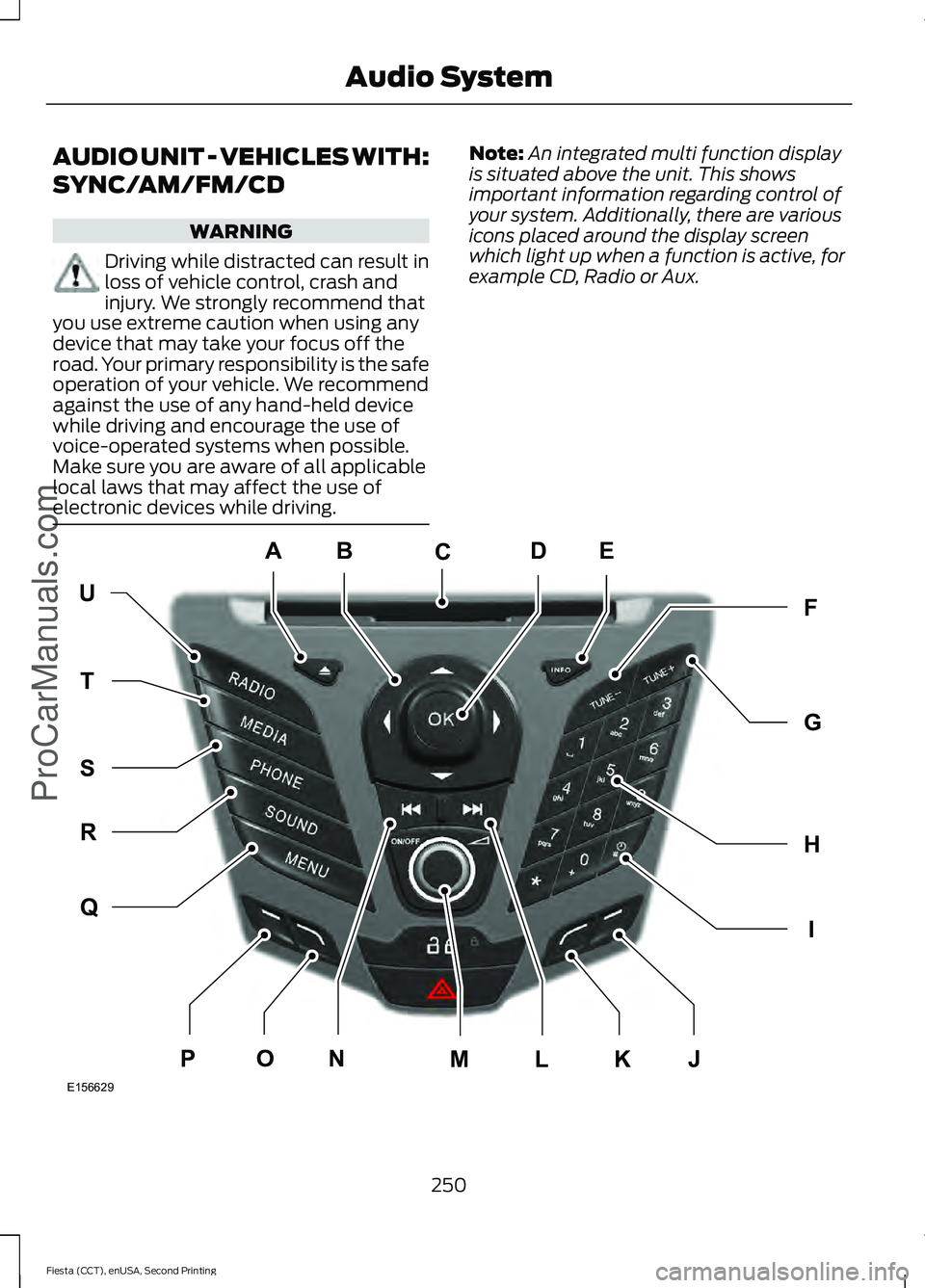
AUDIO UNIT - VEHICLES WITH:
SYNC/AM/FM/CD
WARNING
Driving while distracted can result in
loss of vehicle control, crash and
injury. We strongly recommend that
you use extreme caution when using any
device that may take your focus off the
road. Your primary responsibility is the safe
operation of your vehicle. We recommend
against the use of any hand-held device
while driving and encourage the use of
voice-operated systems when possible.
Make sure you are aware of all applicable
local laws that may affect the use of
electronic devices while driving. Note:
An integrated multi function display
is situated above the unit. This shows
important information regarding control of
your system. Additionally, there are various
icons placed around the display screen
which light up when a function is active, for
example CD, Radio or Aux. 250
Fiesta (CCT), enUSA, Second Printing Audio SystemProCarManuals.comE156629
KJ
ED
UF
H
I
G
Q
R
S
T
NOPLM
C
A
B
Page 254 of 423
Eject: Press the button to eject a CD.
A
Cursor arrows:
Press a button to scroll through on-screen choices.
B
CD slot:
Where you insert a CD.
C
OK:
Press the button to confirm on-screen selections.
D
INFO:
Press the button to access radio, CD, USB and IPod information.
E
TUNE -:
Press the button to manual tune down the waveband.
F
TUNE +:
Press the button to manual tune up the waveband.
G
Numeric keypad:
Press the button to recall a previously stored station. To
store a favorite station press and hold until the sound returns.
H
Clock:
Press the button to set the clock, except when in phone mode.
I
Function button 4:
Press the button to select different functions of the audio
system depending on which mode (i.e. radio or CD) you are in.
J
Function button 3:
Press the button to select different functions of the audio
system depending on which mode (i.e. radio or CD) you are in.
K
Seek up: Press the button to go to the next station up the radio frequency band
or the next track on a CD.
L
On, Off and Volume:
Press the button to switch the audio system on or off.
Turn the dial to adjust the volume.
M
Seek down: Press the button to go to the next station down the radio frequency
band or the previous track on a CD.
N
Function button 2:
Press the button to select different functions of the audio
system depending on which mode (i.e. radio or CD) you are in.
O
Function button 1:
Press the button to select different functions of the audio
system depending on which mode (i.e. radio or CD) you are in.
P
MENU:
Press the button to access different audio system features.
Q
SOUND:
Press the button to adjust the sound settings for bass, treble, middle,
balance and fade.
R
PHONE:
Press the button to access the phone feature of the SYNC system by
pressing PHONE then MENU. See separate manual.
S
MEDIA:
Press the button to access the AUX and SYNC features, it will also
cancel the menu or list browsing.
T
RADIO:
Press the button to select different radio bands, it will also cancel the
menu or list browsing.
U
251
Fiesta (CCT), enUSA, Second Printing Audio System
ProCarManuals.com
Page 265 of 423
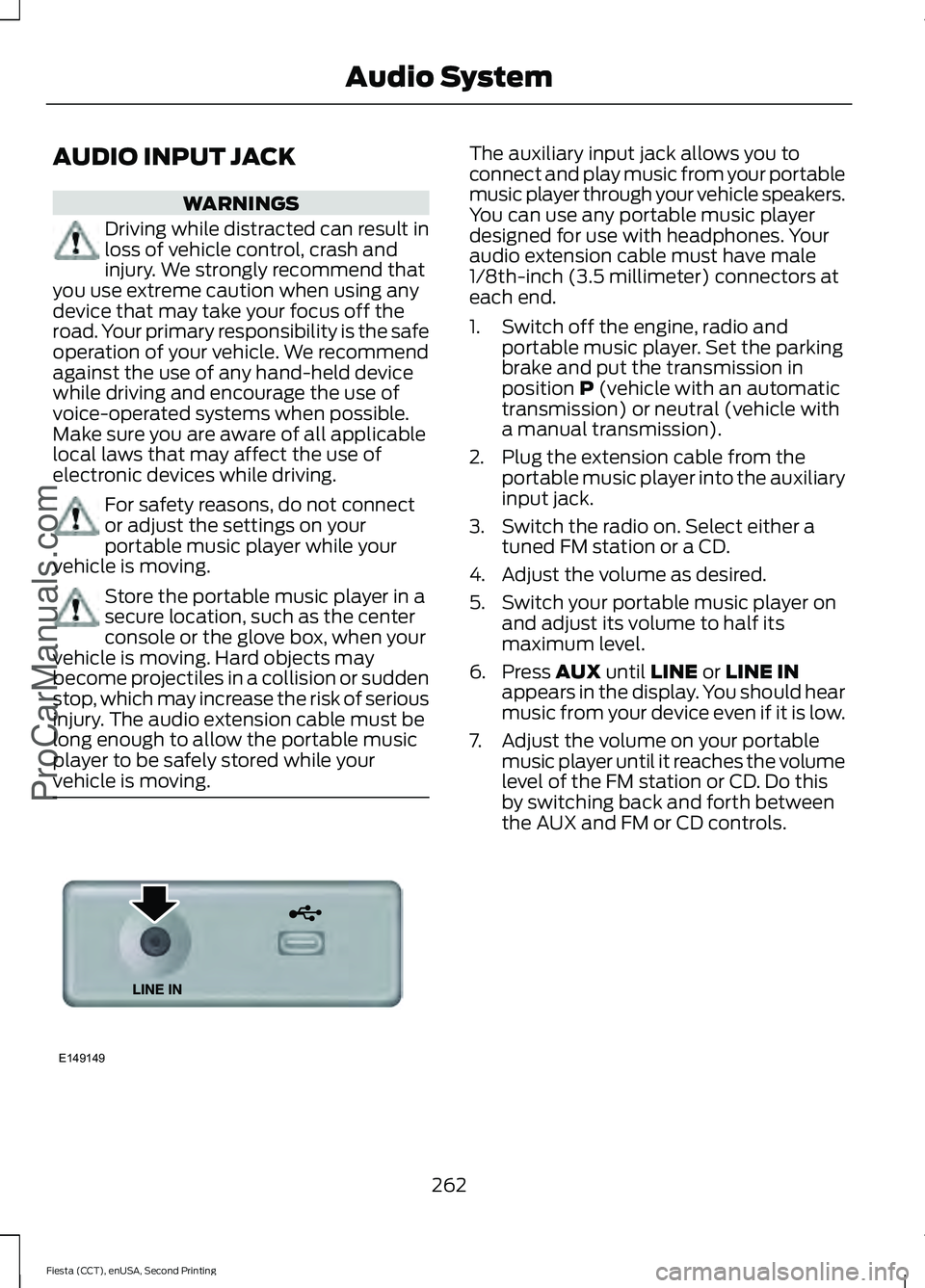
AUDIO INPUT JACK
WARNINGS
Driving while distracted can result in
loss of vehicle control, crash and
injury. We strongly recommend that
you use extreme caution when using any
device that may take your focus off the
road. Your primary responsibility is the safe
operation of your vehicle. We recommend
against the use of any hand-held device
while driving and encourage the use of
voice-operated systems when possible.
Make sure you are aware of all applicable
local laws that may affect the use of
electronic devices while driving. For safety reasons, do not connect
or adjust the settings on your
portable music player while your
vehicle is moving. Store the portable music player in a
secure location, such as the center
console or the glove box, when your
vehicle is moving. Hard objects may
become projectiles in a collision or sudden
stop, which may increase the risk of serious
injury. The audio extension cable must be
long enough to allow the portable music
player to be safely stored while your
vehicle is moving. The auxiliary input jack allows you to
connect and play music from your portable
music player through your vehicle speakers.
You can use any portable music player
designed for use with headphones. Your
audio extension cable must have male
1/8th-inch (3.5 millimeter) connectors at
each end.
1. Switch off the engine, radio and
portable music player. Set the parking
brake and put the transmission in
position P (vehicle with an automatic
transmission) or neutral (vehicle with
a manual transmission).
2. Plug the extension cable from the portable music player into the auxiliary
input jack.
3. Switch the radio on. Select either a tuned FM station or a CD.
4. Adjust the volume as desired.
5. Switch your portable music player on and adjust its volume to half its
maximum level.
6. Press
AUX until LINE or LINE IN
appears in the display. You should hear
music from your device even if it is low.
7. Adjust the volume on your portable music player until it reaches the volume
level of the FM station or CD. Do this
by switching back and forth between
the AUX and FM or CD controls.
262
Fiesta (CCT), enUSA, Second Printing Audio System
ProCarManuals.comE149149
Page 269 of 423
System data cannot be accessed without
special equipment and access to the
vehicle's SYNC module. Ford Motor
Company and Ford of Canada will not
access the system data for any purpose
other than as described absent consent, a
court order, or where required by law
enforcement, other government
authorities, or other third parties acting
with lawful authority. Other parties may
seek to access the information
independently of Ford Motor Company and
Ford of Canada. For further privacy
information, see the sections on 911 Assist,
Vehicle Health Report, and Traffic,
Directions and Information.
USING VOICE RECOGNITION
This system helps you control many
features using voice commands. This
allows you to keep your hands on the
wheel and focus on what is in front of you.
Helpful Hints
•
Make sure the interior of your vehicle is
as quiet as possible. Wind noise from
open windows and road vibrations may
prevent the system from correctly
recognizing spoken commands.
• After pressing the voice button, wait
until after the tone sounds and
Listening appears before saying a
command. Any command spoken
before this does not register with the
system.
• Speak naturally, without long pauses
between words.
• At any time, you can interrupt the
system while it is speaking by pressing
the voice button.
Initiating a Voice Session Initiate a voice session by
pressing the voice button on the
steering wheel controls. See
Voice Control (page 62).
You can say any of the following: If you want the system to carry out the following
Voice command
Stream audio from your phone.
Bluetooth audio
Cancel the requested action.
(cancel | stop | exit)
Access the device connected to the auxiliary input jack.
((line | AV | audio video)
in | AUX | audio video)
Access mobile applications.
mobile (apps | applica-
tions)
Make calls.
(phone | Blackberry |
iPhone | Mobile)
Access the device connected to your USB port.
(USB [stick] | iPod | MP3
[player])
Run a vehicle health report.
vehicle [health] report
266
Fiesta (CCT), enUSA, Second Printing SYNC™
ProCarManuals.comE142599
Page 289 of 423
To Access Using the Media Menu
1. Press the AUX button on the center
console.
2. Press
MENU to access the SYNC
menu.
3. Select "SYNC-Media" by pressing
OK.
4. Scroll to Mobile Apps and press OK to
access a list of available applications.
5. Scroll through the list of available applications and press
OK to select a
particular app.
6. Once an app is running through SYNC,
you can access an app ’s menu by
pressing the
MENU button to first
access the SYNC menu.
7. Select "SYNC-Media" by pressing
OK.
8. Scroll until "
then press
OK. From here, you can
access an application's features, such
as Thumbs up and Thumbs down. For
more information, please visit
www.SYNCMyRide.com.
To Access Using Voice Commands
1. Press the voice icon.
2. When prompted, say "Mobile Apps".
3. Say the name of the application after the tone.
4. The app should start. While an app is running through SYNC, you can press
the voice button and speak commands
specific to the app, such as "Play
Station Quickmix". Say "Help" to
discover available voice commands. USING SYNC™ WITH YOUR
MEDIA PLAYER
You can access and play music from your
digital music player over your vehicle's
speaker system using the system's media
menu or voice commands. You can also
sort and play your music by specific
categories, for example artist and album.
Note:
The system is capable of indexing up
to 6,000 songs.
SYNC is capable of hosting nearly any
digital media player including: iPod®,
Zune ™, plays from device players, and
most USB drives. SYNC also supports the
following audio formats MP3, WMA, WAV
and ACC.
Connecting Your Digital Media
Player to the USB Port
Note: If your digital media player has a
power switch, make sure you switch it on
before plugging it in.
To Connect Using Voice Commands
Plug the device into the USB port. See
USB Port
(page 263). 286
Fiesta (CCT), enUSA, Second Printing SYNC™
ProCarManuals.comE142599