indicators FORD FIESTA 2015 User Guide
[x] Cancel search | Manufacturer: FORD, Model Year: 2015, Model line: FIESTA, Model: FORD FIESTA 2015Pages: 423, PDF Size: 5.5 MB
Page 114 of 423
GENERAL INFORMATION
WARNINGS
Extended idling at high engine
speeds can produce very high
temperatures in the engine and
exhaust system, creating the risk of fire or
other damage. Do not park, idle or drive your vehicle
on dry grass or other dry ground
cover. The emission system heats up
the engine compartment and exhaust
system, creating the risk of fire. Do not start the engine in a closed
garage or in other enclosed areas.
Exhaust fumes can be toxic. Always
open the garage door before you start the
engine. If you smell exhaust fumes inside
your vehicle, have your vehicle
checked by an authorized dealer
immediately. Do not drive your vehicle if
you smell exhaust fumes. If you disconnect the battery, your vehicle
may exhibit some unusual driving
characteristics for approximately 5 miles
(8 kilometers) after you reconnect it. This
is because the engine management system
must realign itself with the engine. You can
disregard any unusual driving
characteristics during this period.
The powertrain control system meets all
Canadian interference-causing equipment
standard requirements regulating the
impulse electrical field or radio noise.
When you start the engine, avoid pressing
the accelerator pedal before and during
operation. Only use the accelerator pedal
when you have difficulty starting the
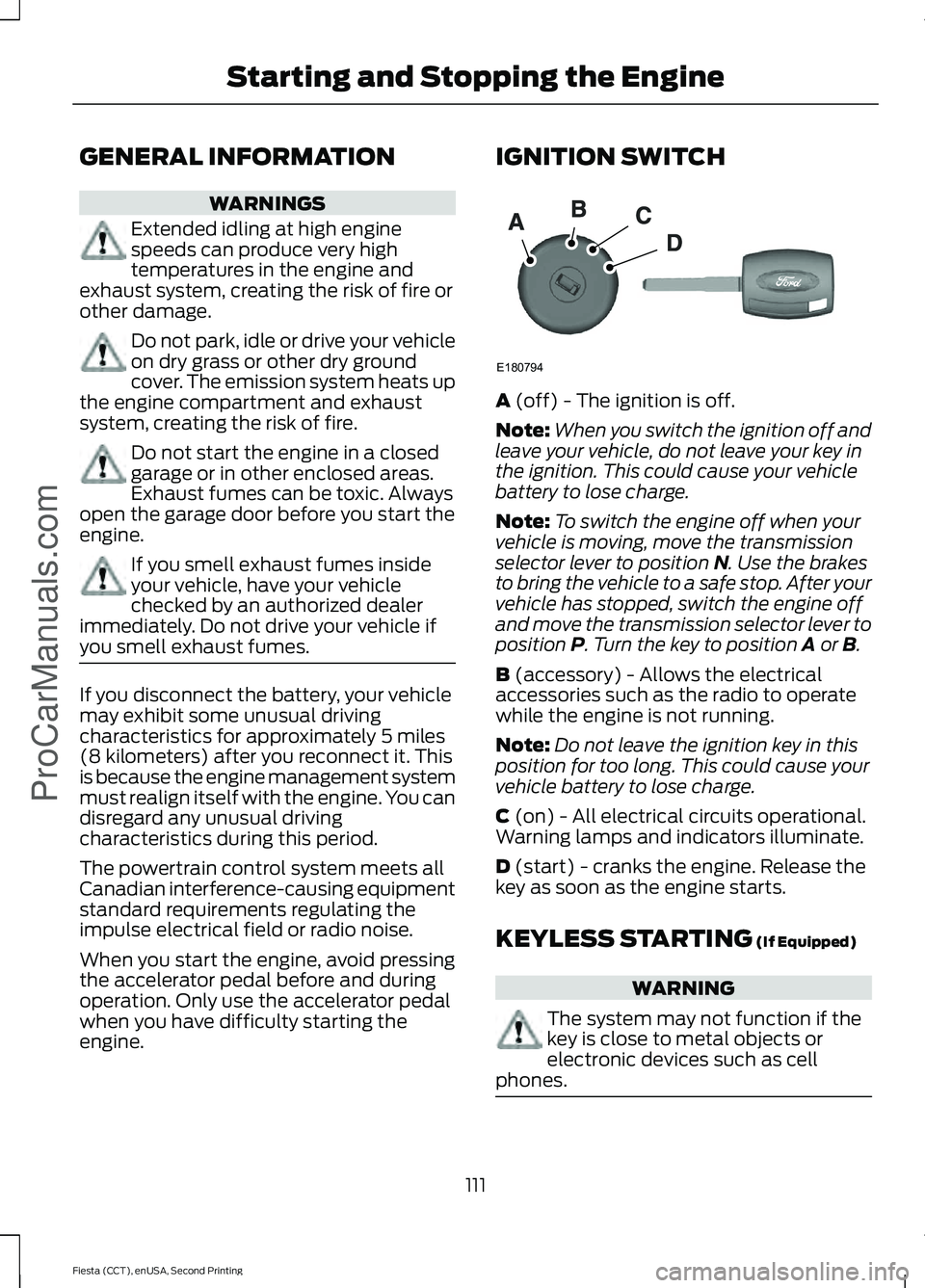
engine. IGNITION SWITCH
A (off) - The ignition is off.
Note: When you switch the ignition off and
leave your vehicle, do not leave your key in
the ignition. This could cause your vehicle
battery to lose charge.
Note: To switch the engine off when your
vehicle is moving, move the transmission
selector lever to position
N. Use the brakes
to bring the vehicle to a safe stop. After your
vehicle has stopped, switch the engine off
and move the transmission selector lever to
position
P. Turn the key to position A or B.
B
(accessory) - Allows the electrical
accessories such as the radio to operate
while the engine is not running.
Note: Do not leave the ignition key in this
position for too long. This could cause your
vehicle battery to lose charge.
C
(on) - All electrical circuits operational.
Warning lamps and indicators illuminate.
D
(start) - cranks the engine. Release the
key as soon as the engine starts.
KEYLESS STARTING
(If Equipped) WARNING
The system may not function if the
key is close to metal objects or
electronic devices such as cell
phones. 111
Fiesta (CCT), enUSA, Second Printing Starting and Stopping the Engine
ProCarManuals.comE180794
Page 115 of 423
Note:
The ignition will automatically switch
off when you leave your vehicle unattended.
This is to prevent your vehicle battery
running out of charge.
Note: A valid key must be located inside
your vehicle to switch the ignition on and
start the engine.
Ignition On
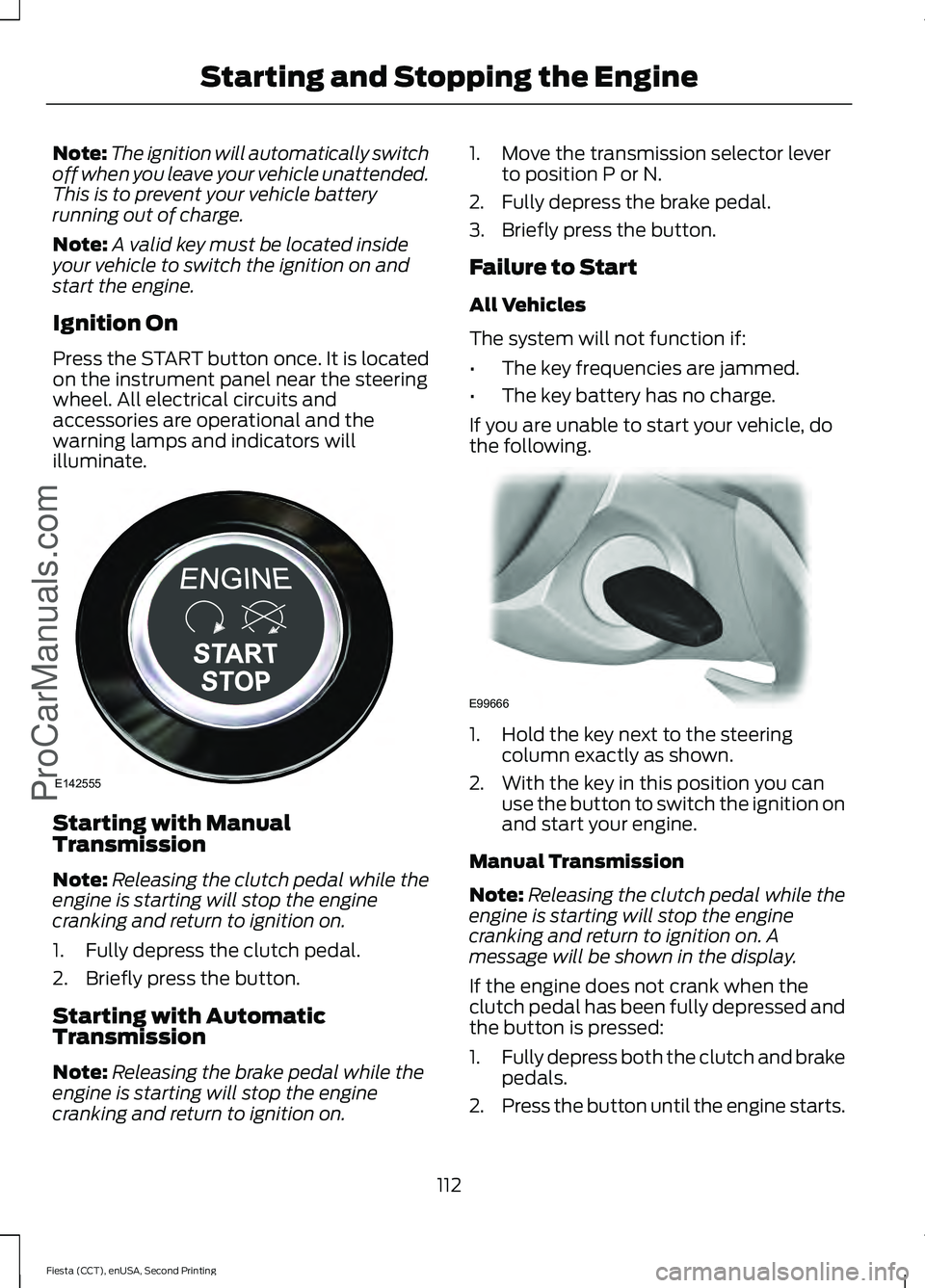
Press the START button once. It is located
on the instrument panel near the steering
wheel. All electrical circuits and
accessories are operational and the
warning lamps and indicators will
illuminate. Starting with Manual
Transmission
Note:
Releasing the clutch pedal while the
engine is starting will stop the engine
cranking and return to ignition on.
1. Fully depress the clutch pedal.
2. Briefly press the button.
Starting with Automatic
Transmission
Note: Releasing the brake pedal while the
engine is starting will stop the engine
cranking and return to ignition on. 1. Move the transmission selector lever
to position P or N.
2. Fully depress the brake pedal.
3. Briefly press the button.
Failure to Start
All Vehicles
The system will not function if:
• The key frequencies are jammed.
• The key battery has no charge.
If you are unable to start your vehicle, do
the following. 1. Hold the key next to the steering
column exactly as shown.
2. With the key in this position you can use the button to switch the ignition on
and start your engine.
Manual Transmission
Note: Releasing the clutch pedal while the
engine is starting will stop the engine
cranking and return to ignition on. A
message will be shown in the display.
If the engine does not crank when the
clutch pedal has been fully depressed and
the button is pressed:
1. Fully depress both the clutch and brake
pedals.
2. Press the button until the engine starts.
112
Fiesta (CCT), enUSA, Second Printing Starting and Stopping the EngineProCarManuals.comE142555 E99666
Page 116 of 423
Stopping the Engine with Your
Vehicle Stationary
Note:
The ignition, all electrical circuits
warning lamps and indicators will be
switched off.
Manual Transmission
Briefly press the button.
Automatic Transmission
1. Move the transmission selector lever to position P.
2. Press the button.
Stopping the Engine When Your
Vehicle is Moving WARNING
Switching off the engine when the
vehicle is still moving will result in a
loss of brake and steering assistance.
The steering will not lock, but higher effort
will be required. With the ignition switched
off some electrical circuits, warning lamps
and indicators may also be off. 1. Press and hold the button for at least
one second or press it three times
within two seconds.
2. Move the transmission selector lever to position N and use the brakes to
bring your vehicle to a safe stop.
3. When your vehicle has stopped, move the transmission selector lever to
position P or N and switch the ignition
off. STARTING A GASOLINE
ENGINE
Note:
You can only operate the starter for
a limited period, for example 10 seconds.
The number of start attempts is limited to
approximately six. If you exceed this limit,
the system does not allow you to try again
until some time has elapsed, for example
30 minutes.
When you start the engine, the idle speed
increases, this helps to warm up the
engine. If the engine idle speed does not
slow down automatically, have your
vehicle checked by an authorized dealer.
Before starting the engine, check the
following:
• Make sure all occupants have fastened
their safety belts.
• Make sure the headlamps and
electrical accessories are off.
• Make sure to set the parking brake.
• Move the transmission selector lever
to position P (automatic transmission)
or neutral (manual transmission).
• Turn the ignition key to position C. If
your vehicle is equipped with a keyless
ignition, see the following instructions.
Cold or Hot Engine
Vehicles with Manual Transmission
Note: Do not touch the accelerator pedal.
Note: Releasing the clutch pedal while the
engine is starting stops the engine cranking
and returns the ignition to on.
1. Fully depress the clutch pedal.
2. Start the engine.
Vehicles with Automatic Transmission
Note: Do not touch the accelerator pedal.
113
Fiesta (CCT), enUSA, Second Printing Starting and Stopping the Engine
ProCarManuals.com
Page 130 of 423
Hints on Driving with an Automatic
Transmission
WARNINGS
Do not apply the brake and
accelerator pedals simultaneously
for more than three seconds as this
limits engine rpm and labors the
transmission. This may make it difficult to
maintain speeds in traffic and lead to an
accident or injury. Do not idle the engine for long
periods of time in D with the brakes
applied. This could damage the
transmission and may lead to an accident
or injury. Note:
The system carries out a series of
checks when you switch the ignition on and
off. You may hear clicking sounds. This is
normal.
Moving off
1. Press the brake pedal to apply the brakes.
2. Move the transmission selector lever to
R,D or S.
3. Release the parking brake.
4. Release the brake pedal and press the
accelerator pedal.
Stopping
1. Release the accelerator pedal and press the brake pedal.
2. Apply the parking brake.
3. Move the transmission selector lever to
N or P. Downshift
Press the accelerator pedal fully with the
transmission selector lever in either
D,
S
mode or manual shifting position to select
a lower gear for optimum performance.
Release the accelerator pedal when you
no longer require downshift.
If Your Vehicle Gets Stuck In Mud or
Snow
If your vehicle gets stuck in mud or snow,
it may be rocked out by shifting between
D
and R, stopping between shifts in a
steady pattern. Press the accelerator
lightly in each gear.
Note: Do not rock your vehicle if the engine
is not at normal operating temperature as
this can damage the transmission.
Note: Do not rock your vehicle for more
than a minute as this can damage the
transmission or the tires and the engine may
overheat.
Emergency Park Position Release
Lever WARNINGS
Do not drive your vehicle until you
verify that the brake lamps are
working. Failure to adhere to warning
indicators may lead to an accident or injury. If you release the parking brake and
the brake warning lamp remains
illuminated the brakes may not be
working correctly. Have your vehicle
checked by an authorized dealer as soon
as possible. Failure to adhere to warning
lamps and indicators may lead to an
accident or injury. Use the emergency P position release lever
to move the transmission selector lever
from the
P position in the event of a
malfunction or if your vehicle battery has
no charge.
127
Fiesta (CCT), enUSA, Second Printing Transmission
ProCarManuals.com
Page 136 of 423
PRINCIPLE OF OPERATION
Electronic Stability Program
WARNINGS
The system does not relieve you of
your responsibility to drive with due
care and attention. Failure to drive
with due care and attention could lead to
loss of vehicle control. Vehicle modifications involving
braking system, aftermarket roof
racks, suspension, steering system,
tire construction and wheel and tire size
may change the handling characteristics
of the vehicle and may adversely affect
the performance of the AdvanceTrac
system. In addition, installing any stereo
loudspeakers may interfere with and
adversely affect the AdvanceTrac system.
Install any aftermarket stereo loudspeaker
as far as possible from the front center
console, the tunnel, and the front seats in
order to minimize the risk of interfering with
the AdvanceTrac sensors. Reducing the
effectiveness of the AdvanceTrac system
could lead to an increased risk of loss of
vehicle control, vehicle rollover, personal
injury and death. Remember that even advanced
technology cannot defy the laws of
physics. It’
s always possible to lose
control of a vehicle due to inappropriate
driver input for the conditions. Aggressive
driving on any road condition can cause
you to lose control of your vehicle
increasing the risk of personal injury or
property damage. Activation of the
AdvanceTrac system is an indication that
at least some of the tires have exceeded
their ability to grip the road; this could
reduce the operator ’s ability to control the
vehicle potentially resulting in a loss of
vehicle control, vehicle rollover, personal
injury and death. If your AdvanceTrac
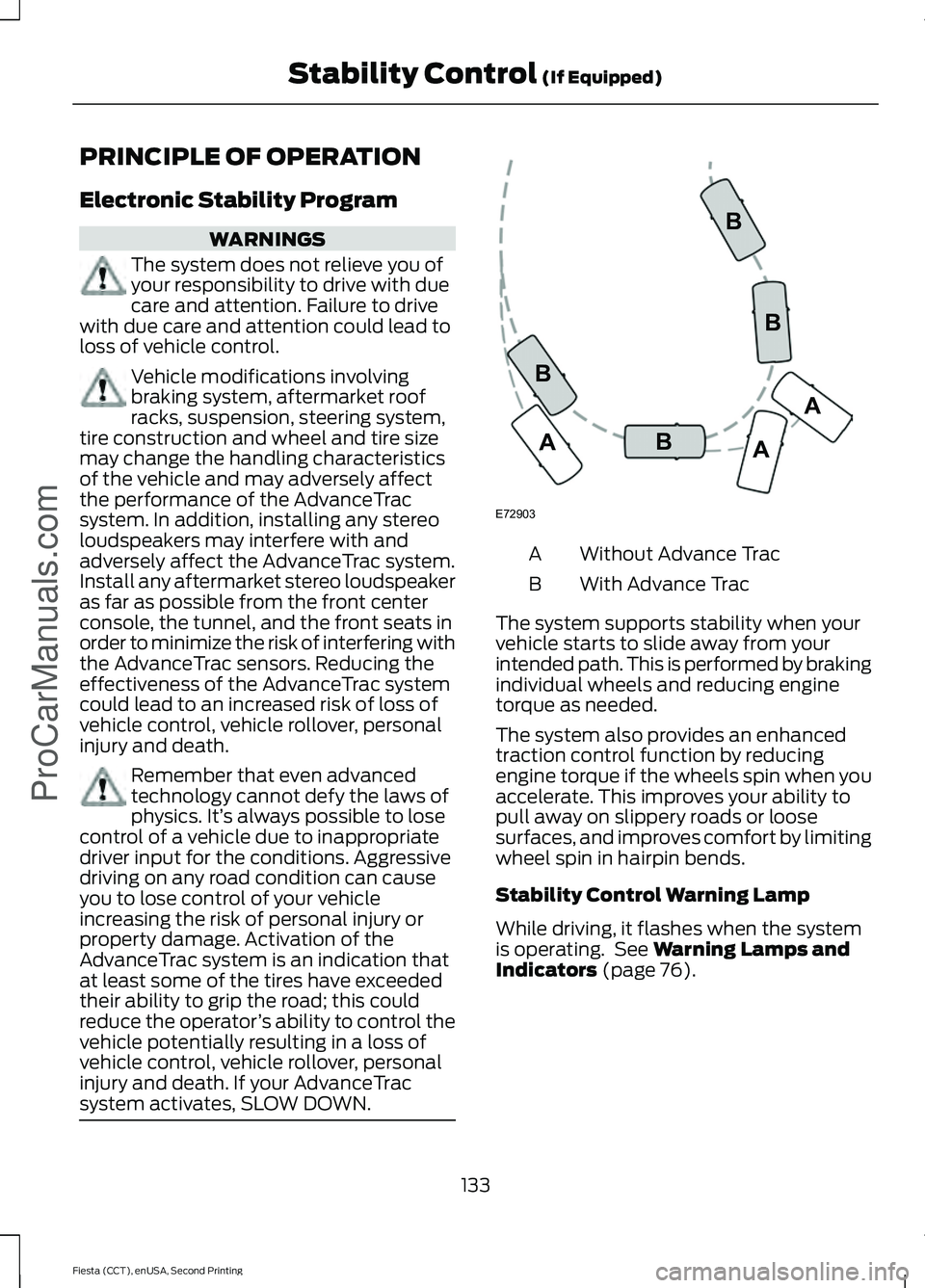
system activates, SLOW DOWN. Without Advance Trac
A
With Advance Trac
B
The system supports stability when your
vehicle starts to slide away from your
intended path. This is performed by braking
individual wheels and reducing engine
torque as needed.
The system also provides an enhanced
traction control function by reducing
engine torque if the wheels spin when you
accelerate. This improves your ability to
pull away on slippery roads or loose
surfaces, and improves comfort by limiting
wheel spin in hairpin bends.
Stability Control Warning Lamp
While driving, it flashes when the system
is operating. See Warning Lamps and
Indicators (page 76).
133
Fiesta (CCT), enUSA, Second Printing Stability Control
(If Equipped)
ProCarManuals.comE72903A
AA
B
BB
B
Page 161 of 423
Canadian roadside coverage and benefits
may differ from the U.S. coverage. If you
require more information, please refer to
the coverage section of your warranty
guide, call us in Canada at
1-800-665-2006, or visit our website at
www.ford.ca.
Sykes Assistance Services Corporation
administers the Roadside Assistance
program. You must receive covered
services in Canada or the continental
United States. Coverage extends to
vehicles that use public, non-seasonal,
annually traveled roadways. Roadside
Assistance coverage does not extend to
vehicles involved in cross-country driving,
logging, autocross and any other form of
off-road use. Well maintained roads and
surfaces help ensure safe travel for the
supplier, and allow their representatives
to perform service as per the standard
operating procedures.
In Remote Locations
If our supplier cannot take your vehicle by
road to the nearest authorized dealership,
transportation by rail or water may be
necessary. The program covers a tow to
the dock or rail terminal and also to the
dealership at the end of the trip.
For rail or water transportation, however,
contact your authorized dealer to confirm
if you are eligible for additional coverage
before you authorize or pay for the service.
Call the Ford Roadside Assistance at
1-800-665-2006 for additional
information.
HAZARD WARNING FLASHERS
Note:
If used when the vehicle is not
running, the battery will lose charge. There
may be insufficient power to restart your
vehicle. The hazard warning button is
located on the instrument panel.
Use it when your vehicle is
creating a safety hazard for other
motorists.
• Press the button to turn on the hazard
warning function, and the front and
rear direction indicators will flash.
• Press the button again to turn them
off.
FUEL SHUTOFF WARNING
Failure to inspect and, if necessary,
repair fuel leaks after a collision may
increase the risk of fire and serious
injury. Ford Motor Company recommends
that the fuel system be inspected by an
authorized dealer after any collision. In the event of a moderate to severe
collision, this vehicle includes a fuel pump
shutoff feature that stops the flow of fuel
to the engine. Not every impact will cause
a shutoff.
Should your vehicle shut off after a
collision, you may restart your vehicle. For
vehicles equipped with a key system:
1. Switch off the ignition.
2. Switch on the ignition.
3. Repeat Steps 1 and 2 to re-enable the
fuel pump.
For vehicles equipped with a push button
start system:
1. Press the START/STOP button to
switch off the ignition.
2. Press the brake pedal and press the START/STOP
button to start the
vehicle.
158
Fiesta (CCT), enUSA, Second Printing Roadside Emergencies
ProCarManuals.com
Page 173 of 423
Circuits protected
Fuse rating
Fuse
Right-hand exterior lamps.
15 A
23
Emissions system.
10 A
24
Left-hand exterior lamps.
15 A
25
Horn.
20 A
26 Battery back-up sounder.
Interior lamps.
Engine cold start system module. 4
7.5 A
27 Water pump.2
15 A Active grill shutter. 2
Direction indicators.
15 A
28
Compressed natural gas, fuel control module. 1
20 A
29
Air conditioning clutch.
10 A
30
Not used.
-
31
Powertrain control module.
7.5 A
32
Transmission control unit.
Fuel injectors.
10 A
33 Mass air flow sensor.3
7.5 A
Heated exterior mirrors.
30 A
34
Left-hand fog lamp.
10 A
35
Right-hand fog lamp.
10 A
36
Left-hand high beam.
10 A
37
Right-hand high beam.
10 A
38
Not used.
-
39
Not used.
-
40
Not used.
-
41
Not used.
-
42
Not used.
-
43
170
Fiesta (CCT), enUSA, Second Printing FusesProCarManuals.com
Page 230 of 423
Inspecting Your Tires and
Wheel Valve Stems
Periodically inspect the tire treads
for uneven or excessive wear and
remove objects such as stones,
nails or glass that may be wedged
in the tread grooves. Check the tire
and valve stems for holes, cracks,
or cuts that may permit air
leakage and repair or replace the
tire and replace the valve stem.
Inspect the tire sidewalls for
cracking, cuts, bruises and other
signs of damage or excessive
wear. If internal damage to the tire
is suspected, have the tire
demounted and inspected in case
it needs to be repaired or replaced.
For your safety, tires that are
damaged or show signs of
excessive wear should not be used
because they are more likely to
blow out or fail.
Improper or inadequate vehicle
maintenance can cause tires to
wear abnormally. Inspect all your
tires, including the spare,
frequently, and replace them if
one or more of the following
conditions exist:
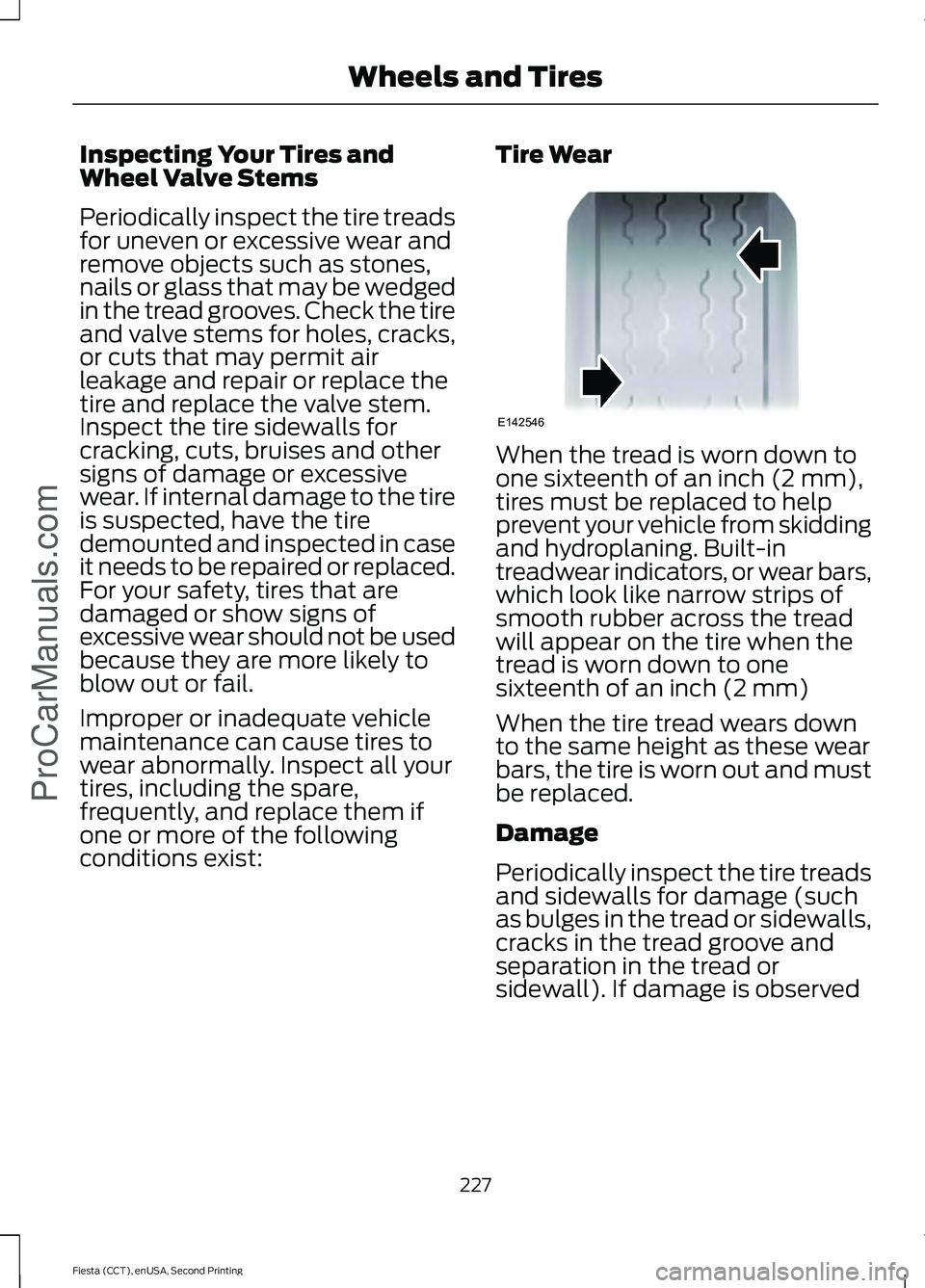
Tire Wear When the tread is worn down to
one sixteenth of an inch (2 mm),
tires must be replaced to help
prevent your vehicle from skidding
and hydroplaning. Built-in
treadwear indicators, or wear bars,
which look like narrow strips of
smooth rubber across the tread
will appear on the tire when the
tread is worn down to one
sixteenth of an inch (2 mm)
When the tire tread wears down
to the same height as these wear
bars, the tire is worn out and must
be replaced.
Damage
Periodically inspect the tire treads
and sidewalls for damage (such
as bulges in the tread or sidewalls,
cracks in the tread groove and
separation in the tread or
sidewall). If damage is observed
227
Fiesta (CCT), enUSA, Second Printing Wheels and TiresProCarManuals.comE142546
Page 332 of 423
Scan
Touch this button to go to the next strong
AM or FM radio station. The light on the
button illuminates when the feature is on.
Options
Sound Settings
Touch this button to adjust settings
for:
Message
Bass
Midrange
Treble
Set Balance and Fade
Occupancy Mode
Speed Compensated Volume
DSP
Note: Your vehicle may not have all these
sound settings.
Set PTY for Seek/Scan
This allows you to select a category of
music you would like to search for. You can
then choose to either seek or scan for the
stations playing that category.
RDS Text Display
This allows you to view the information
broadcast by FM stations.
AST
AST (Autostore) allows you to have the
system automatically store the six
strongest stations in your current location. TAG Button
This feature is available when HD Radio is
on, and allows you to tag a song to
download later. When you select On,
TAG
appears on-screen when HD Radio is
active. You can touch TAG to save the
information of the song that is playing.
When you plug in your portable music
player, the information transfers, if
supported by your device. When you are
connected to iTunes, the tags appear to
remind you of the songs you would like to
download. See HD Radio information later
in this chapter.
Direct Tune
Touch this button to manually enter the
desired station number. Touch Enter when
you are done.
HD Radio ™ Information (If Available)
Note: HD Radio broadcasts are not
available in all markets.
HD Radio technology is the digital
evolution of analog AM/FM radio. Your
system has a special receiver that allows
it to receive digital broadcasts (where
available) in addition to the analog
broadcasts, it already receives. Digital
broadcasts provide a better sound quality
than analog broadcasts with free,
crystal-clear audio and no static or
distortion. For more information, and a
guide to available stations and
programming, please visit
www.hdradio.com.
When HD Radio is on and you tune to a
station broadcasting HD Radio technology,
you may notice the following indicators on
your screen:
329
Fiesta (CCT), enUSA, Second Printing MyFord Touch
™
(If Equipped)
ProCarManuals.com
Page 414 of 423
A
A/C
See: Climate Control........................................... 95
About This Manual...........................................7
ABS See: Brakes........................................................... 130
ABS driving hints See: Hints on Driving With Anti-Lock
Brakes................................................................ 130
Accessories.....................................................377 Exterior style......................................................... 377
Interior style.......................................................... 377
Lifestyle.................................................................. 377
Peace of mind...................................................... 377
Accessories See: Replacement Parts
Recommendation............................................. 11
Adjusting the Headlamps..........................187 Horizontal Aim Adjustment........................... 188
Vertical Aim Adjustment.................................. 187
Adjusting the Steering Wheel....................61
Airbag Disposal................................................41
Air Conditioning See: Climate Control........................................... 95
Air Vents............................................................95 Center Air Vents.................................................... 95
Side Air Vent.......................................................... 95
Alarm See: Anti-Theft Alarm........................................ 59
Ambient Lighting...........................................69
Anti-Theft Alarm............................................59 Alarm System........................................................ 59
Arming the Alarm................................................. 59
Disarming the Alarm........................................... 59
Triggering the Alarm............................................ 59
Appendices....................................................379
Audible Warnings and Indicators.............82 Exterior Lamps On............................................... 82
Gearshift Lever Not in Park (P)....................... 82
Key in Ignition......................................................... 82
Key Outside Vehicle - Vehicles With Keyless System................................................................ 82
Low Fuel.................................................................. 82
Parking Brake On.................................................. 82
Safety Belt Minder............................................... 82
Audio Control....................................................61
Audio Input Jack...........................................262 Audio System................................................245
General Information......................................... 245
Audio Troubleshooting
..............................263
Audio Unit - Vehicles With: AM/FM/ CD...................................................................246
Alternative Frequencies.................................. 249
Automatic Volume Control............................ 249
Autostore Control.............................................. 249
Sound Button...................................................... 248
Station Preset Buttons.................................... 249
Station Tuning Control.................................... 248
Waveband Button............................................. 248
Audio Unit - Vehicles With: SYNC/AM/ FM/CD..........................................................250
Alternative Frequencies................................... 253
Automatic Volume Control............................ 253
Autostore Control.............................................. 253
Sound Button...................................................... 252
Station Preset Buttons.................................... 252
Station Tuning Control..................................... 252
Waveband Button.............................................. 252
Audio Unit - Vehicles With: Touchscreen Display/Sony Audio System
.................255
Audio Unit - Vehicles With: Touchscreen Display
..........................................................254
Autolamps........................................................66 Windshield Wiper Activated
Headlamps........................................................ 66
Automatic Climate Control........................97 Temperature Control.......................................... 98
Automatic Transmission
............................124
Emergency Park Position Release
Lever.................................................................... 127
Hints on Driving with an Automatic Transmission.................................................... 127
Selector Lever Positions................................... 125
Sport Mode and Manual Shifting.................126
Automatic Transmission Fluid Check.............................................................185
Auxiliary Power Points
...............................109
12 Volt DC Power Point..................................... 109
Location................................................................. 109
B
Bonnet Lock See: Opening and Closing the Hood............177
411
Fiesta (CCT), enUSA, Second Printing Index
ProCarManuals.com