steering FORD FIESTA 2015 User Guide
[x] Cancel search | Manufacturer: FORD, Model Year: 2015, Model line: FIESTA, Model: FORD FIESTA 2015Pages: 423, PDF Size: 5.5 MB
Page 115 of 423
Note:
The ignition will automatically switch
off when you leave your vehicle unattended.
This is to prevent your vehicle battery
running out of charge.
Note: A valid key must be located inside
your vehicle to switch the ignition on and
start the engine.
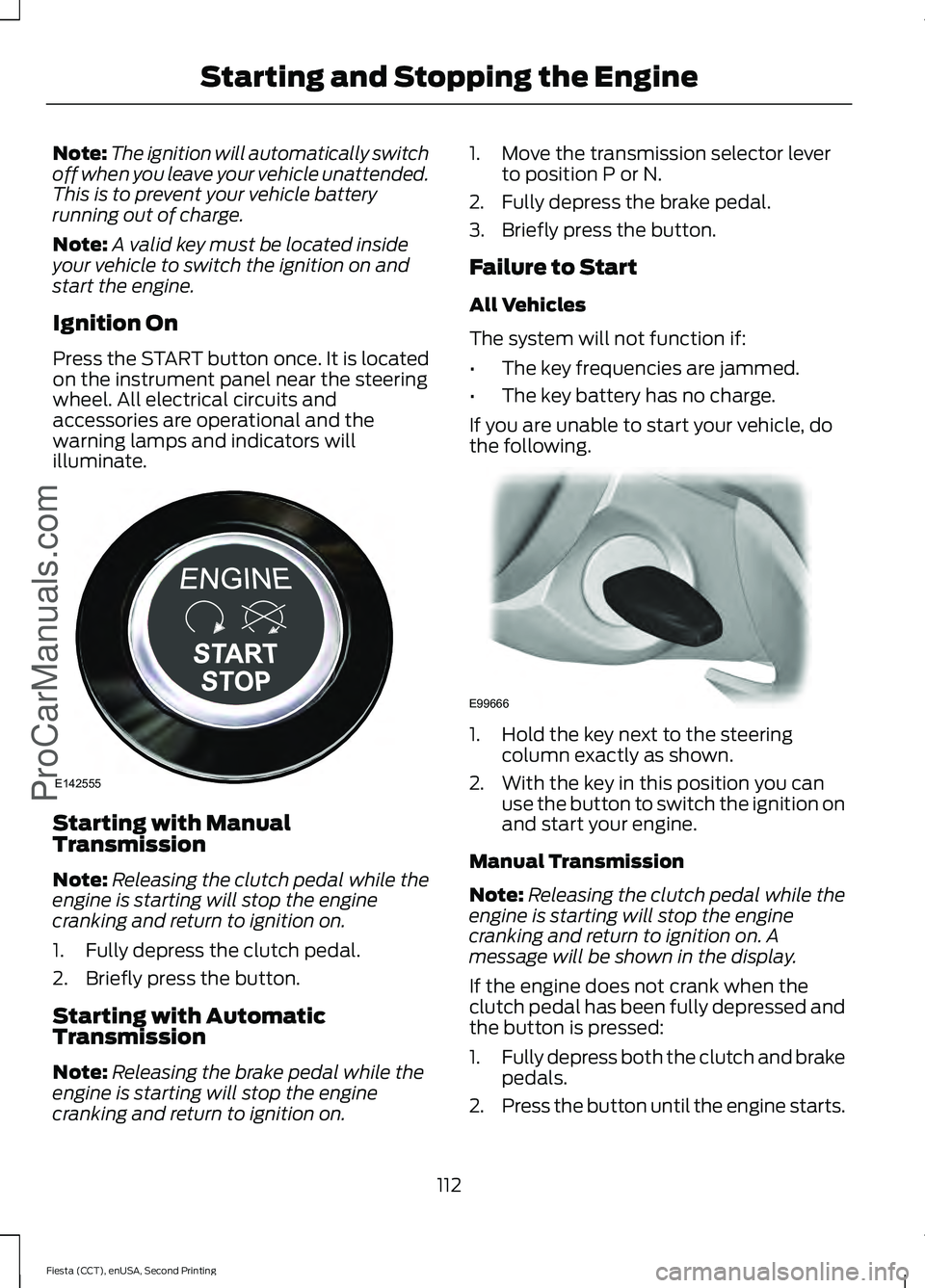
Ignition On
Press the START button once. It is located
on the instrument panel near the steering
wheel. All electrical circuits and
accessories are operational and the
warning lamps and indicators will
illuminate. Starting with Manual
Transmission
Note:
Releasing the clutch pedal while the
engine is starting will stop the engine
cranking and return to ignition on.
1. Fully depress the clutch pedal.
2. Briefly press the button.
Starting with Automatic
Transmission
Note: Releasing the brake pedal while the
engine is starting will stop the engine
cranking and return to ignition on. 1. Move the transmission selector lever
to position P or N.
2. Fully depress the brake pedal.
3. Briefly press the button.
Failure to Start
All Vehicles
The system will not function if:
• The key frequencies are jammed.
• The key battery has no charge.
If you are unable to start your vehicle, do
the following. 1. Hold the key next to the steering
column exactly as shown.
2. With the key in this position you can use the button to switch the ignition on
and start your engine.
Manual Transmission
Note: Releasing the clutch pedal while the
engine is starting will stop the engine
cranking and return to ignition on. A
message will be shown in the display.
If the engine does not crank when the
clutch pedal has been fully depressed and
the button is pressed:
1. Fully depress both the clutch and brake
pedals.
2. Press the button until the engine starts.
112
Fiesta (CCT), enUSA, Second Printing Starting and Stopping the EngineProCarManuals.comE142555 E99666
Page 116 of 423
Stopping the Engine with Your
Vehicle Stationary
Note:
The ignition, all electrical circuits
warning lamps and indicators will be
switched off.
Manual Transmission
Briefly press the button.
Automatic Transmission
1. Move the transmission selector lever to position P.
2. Press the button.
Stopping the Engine When Your
Vehicle is Moving WARNING
Switching off the engine when the
vehicle is still moving will result in a
loss of brake and steering assistance.
The steering will not lock, but higher effort
will be required. With the ignition switched
off some electrical circuits, warning lamps
and indicators may also be off. 1. Press and hold the button for at least
one second or press it three times
within two seconds.
2. Move the transmission selector lever to position N and use the brakes to
bring your vehicle to a safe stop.
3. When your vehicle has stopped, move the transmission selector lever to
position P or N and switch the ignition
off. STARTING A GASOLINE
ENGINE
Note:
You can only operate the starter for
a limited period, for example 10 seconds.
The number of start attempts is limited to
approximately six. If you exceed this limit,
the system does not allow you to try again
until some time has elapsed, for example
30 minutes.
When you start the engine, the idle speed
increases, this helps to warm up the
engine. If the engine idle speed does not
slow down automatically, have your
vehicle checked by an authorized dealer.
Before starting the engine, check the
following:
• Make sure all occupants have fastened
their safety belts.
• Make sure the headlamps and
electrical accessories are off.
• Make sure to set the parking brake.
• Move the transmission selector lever
to position P (automatic transmission)
or neutral (manual transmission).
• Turn the ignition key to position C. If
your vehicle is equipped with a keyless
ignition, see the following instructions.
Cold or Hot Engine
Vehicles with Manual Transmission
Note: Do not touch the accelerator pedal.
Note: Releasing the clutch pedal while the
engine is starting stops the engine cranking
and returns the ignition to on.
1. Fully depress the clutch pedal.
2. Start the engine.
Vehicles with Automatic Transmission
Note: Do not touch the accelerator pedal.
113
Fiesta (CCT), enUSA, Second Printing Starting and Stopping the Engine
ProCarManuals.com
Page 133 of 423
GENERAL INFORMATION
WARNING
The system does not relieve you of
your responsibility to drive with due
care and attention.
Note:
Occasional brake noise is normal. If
a metal-to-metal, continuous grinding or
continuous squeal sound is present, the
brake linings may be worn-out. If the vehicle
has continuous vibration or shudder in the
steering wheel while braking, have your
vehicle checked by an authorized dealer.
Note: Brake dust may accumulate on the
wheels, even under normal driving
conditions. Some dust is inevitable as the
brakes wear. See Cleaning the Alloy
Wheels (page 214).
Wet brakes result in reduced braking
efficiency. Gently press the brake pedal a
few times when driving from a car wash or
standing water to dry the brakes.
Brake Over Accelerator
In the event that the accelerator pedal
becomes stuck or entrapped, apply firm
pressure to the brake pedal to slow your
vehicle and reduce engine power. If you
experience this condition, apply the brakes
and bring your vehicle to a safe stop. Move
the transmission to park (P), switch the
engine off and apply the parking brake.
Inspect the accelerator pedal for any
interference. If none are found and the
condition persists, have your vehicle towed
to the nearest authorized dealer. Emergency Brake Assist
Brake assist detects when you rapidly
brake by measuring the rate at which you
press the brake pedal. It provides
maximum braking efficiency as long as you
press the pedal. Emergency brake assist
can reduce stopping distances in critical
situations.
Anti-lock Brake System
This system helps you maintain steering
control and vehicle stability during
emergency stops by keeping the brakes
from locking.
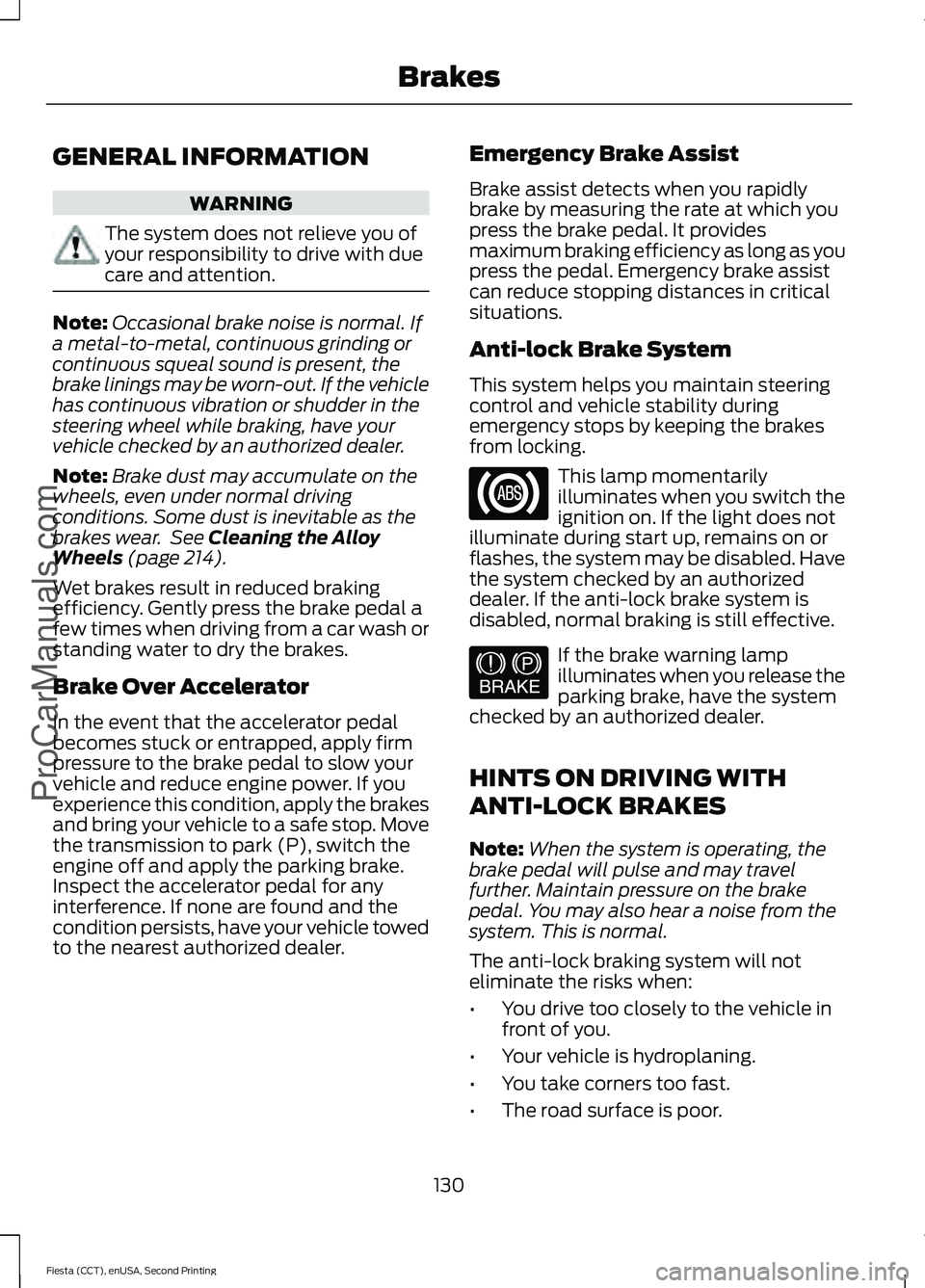
This lamp momentarily
illuminates when you switch the
ignition on. If the light does not
illuminate during start up, remains on or
flashes, the system may be disabled. Have
the system checked by an authorized
dealer. If the anti-lock brake system is
disabled, normal braking is still effective. If the brake warning lamp
illuminates when you release the
parking brake, have the system
checked by an authorized dealer.
HINTS ON DRIVING WITH
ANTI-LOCK BRAKES
Note: When the system is operating, the
brake pedal will pulse and may travel
further. Maintain pressure on the brake
pedal. You may also hear a noise from the
system. This is normal.
The anti-lock braking system will not
eliminate the risks when:
• You drive too closely to the vehicle in
front of you.
• Your vehicle is hydroplaning.
• You take corners too fast.
• The road surface is poor.
130
Fiesta (CCT), enUSA, Second Printing Brakes
ProCarManuals.com E144522
Page 134 of 423
PARKING BRAKE
Vehicles With Automatic
Transmission
WARNING
Always set the parking brake fully
and leave your vehicle with the
transmission selector lever in
position P. Note:
If you park your vehicle on a hill and
facing uphill move the transmission selector
lever to position P and turn the steering
wheel away from the curb.
Note: If you park your vehicle on a hill and
facing downhill move the transmission
selector lever to position P and turn the
steering wheel toward the curb.
Vehicles With Manual
Transmission WARNING
Always set the parking brake fully.
Note:
If you park your vehicle on a hill and
facing uphill select first gear and turn the
steering wheel away from the curb.
Note: If you park your vehicle on a hill and
facing downhill select reverse gear and turn
the steering wheel toward the curb.
All Vehicles
Note: Do not press the release button while
pulling the lever up.
To apply the parking brake:
1. Press the foot brake pedal firmly.
2. Pull the parking brake lever up to its fullest extent.
To release the parking brake: 1. Press the brake pedal firmly.
2. Pull the lever up slightly.
3. Press the release button and push the
lever down.
131
Fiesta (CCT), enUSA, Second Printing BrakesProCarManuals.com
Page 136 of 423
PRINCIPLE OF OPERATION
Electronic Stability Program
WARNINGS
The system does not relieve you of
your responsibility to drive with due
care and attention. Failure to drive
with due care and attention could lead to
loss of vehicle control. Vehicle modifications involving
braking system, aftermarket roof
racks, suspension, steering system,
tire construction and wheel and tire size
may change the handling characteristics
of the vehicle and may adversely affect
the performance of the AdvanceTrac
system. In addition, installing any stereo
loudspeakers may interfere with and
adversely affect the AdvanceTrac system.
Install any aftermarket stereo loudspeaker
as far as possible from the front center
console, the tunnel, and the front seats in
order to minimize the risk of interfering with
the AdvanceTrac sensors. Reducing the
effectiveness of the AdvanceTrac system
could lead to an increased risk of loss of
vehicle control, vehicle rollover, personal
injury and death. Remember that even advanced
technology cannot defy the laws of
physics. It’
s always possible to lose
control of a vehicle due to inappropriate
driver input for the conditions. Aggressive
driving on any road condition can cause
you to lose control of your vehicle
increasing the risk of personal injury or
property damage. Activation of the
AdvanceTrac system is an indication that
at least some of the tires have exceeded
their ability to grip the road; this could
reduce the operator ’s ability to control the
vehicle potentially resulting in a loss of
vehicle control, vehicle rollover, personal
injury and death. If your AdvanceTrac
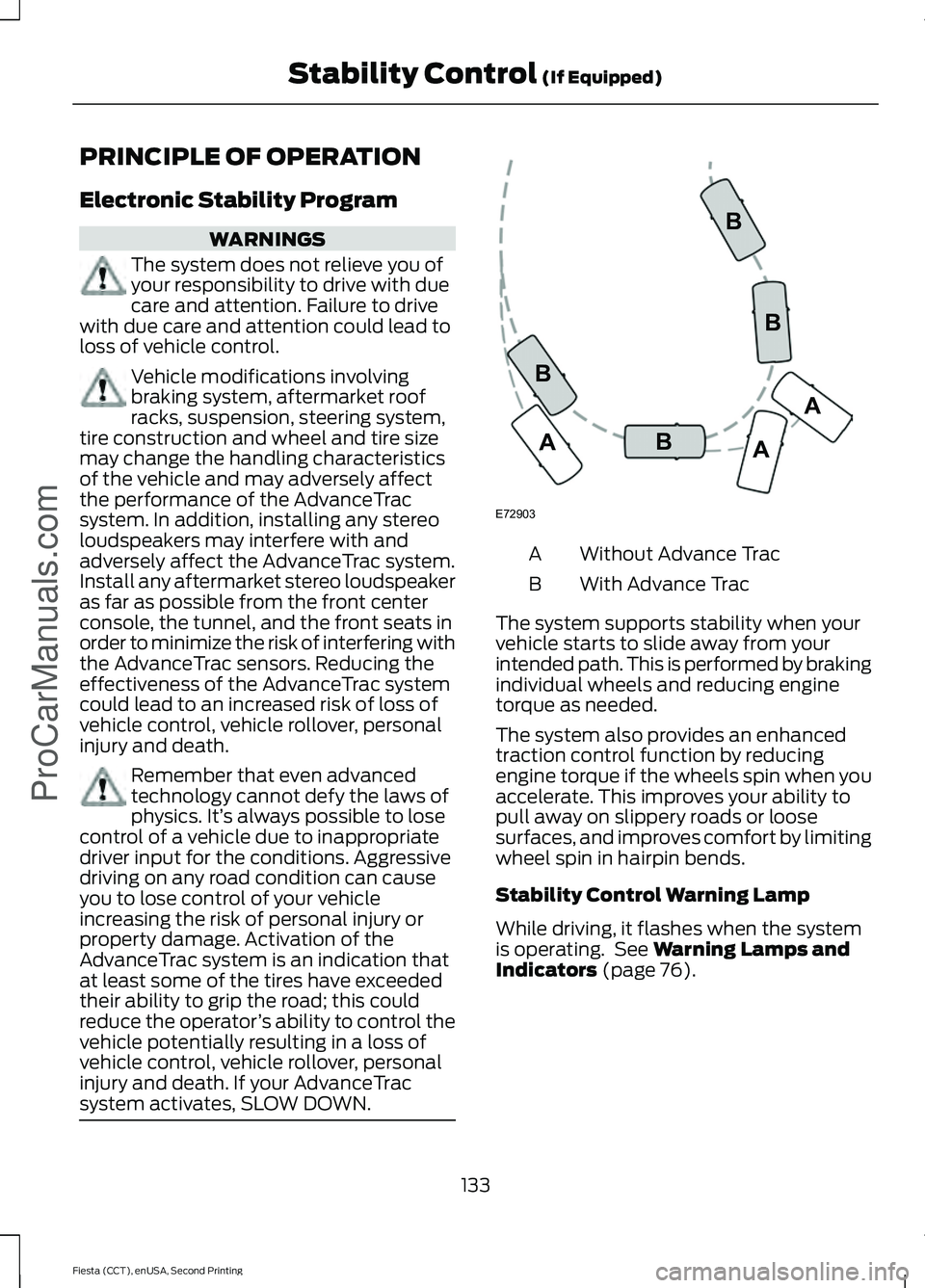
system activates, SLOW DOWN. Without Advance Trac
A
With Advance Trac
B
The system supports stability when your
vehicle starts to slide away from your
intended path. This is performed by braking
individual wheels and reducing engine
torque as needed.
The system also provides an enhanced
traction control function by reducing
engine torque if the wheels spin when you
accelerate. This improves your ability to
pull away on slippery roads or loose
surfaces, and improves comfort by limiting
wheel spin in hairpin bends.
Stability Control Warning Lamp
While driving, it flashes when the system
is operating. See Warning Lamps and
Indicators (page 76).
133
Fiesta (CCT), enUSA, Second Printing Stability Control
(If Equipped)
ProCarManuals.comE72903A
AA
B
BB
B
Page 142 of 423
PRINCIPLE OF OPERATION
WARNING
The system does not relieve you of
your responsibility to drive with due
care and attention.
Cruise control allows you to control your
speed using the switches on the steering
wheel. You can use cruise control when
you exceed approximately 20 mph (30
km/h).
USING CRUISE CONTROL
WARNINGS
Do not use cruise control on winding
roads, in heavy traffic or when the
road surface is slippery. This could
result in loss of vehicle control, serious
injury or death. When you are going downhill, your
speed may increase above the set
speed. The system will not apply the
brakes. Change down a gear to assist the
system in maintaining the set speed.
Failure to do so could result in loss of
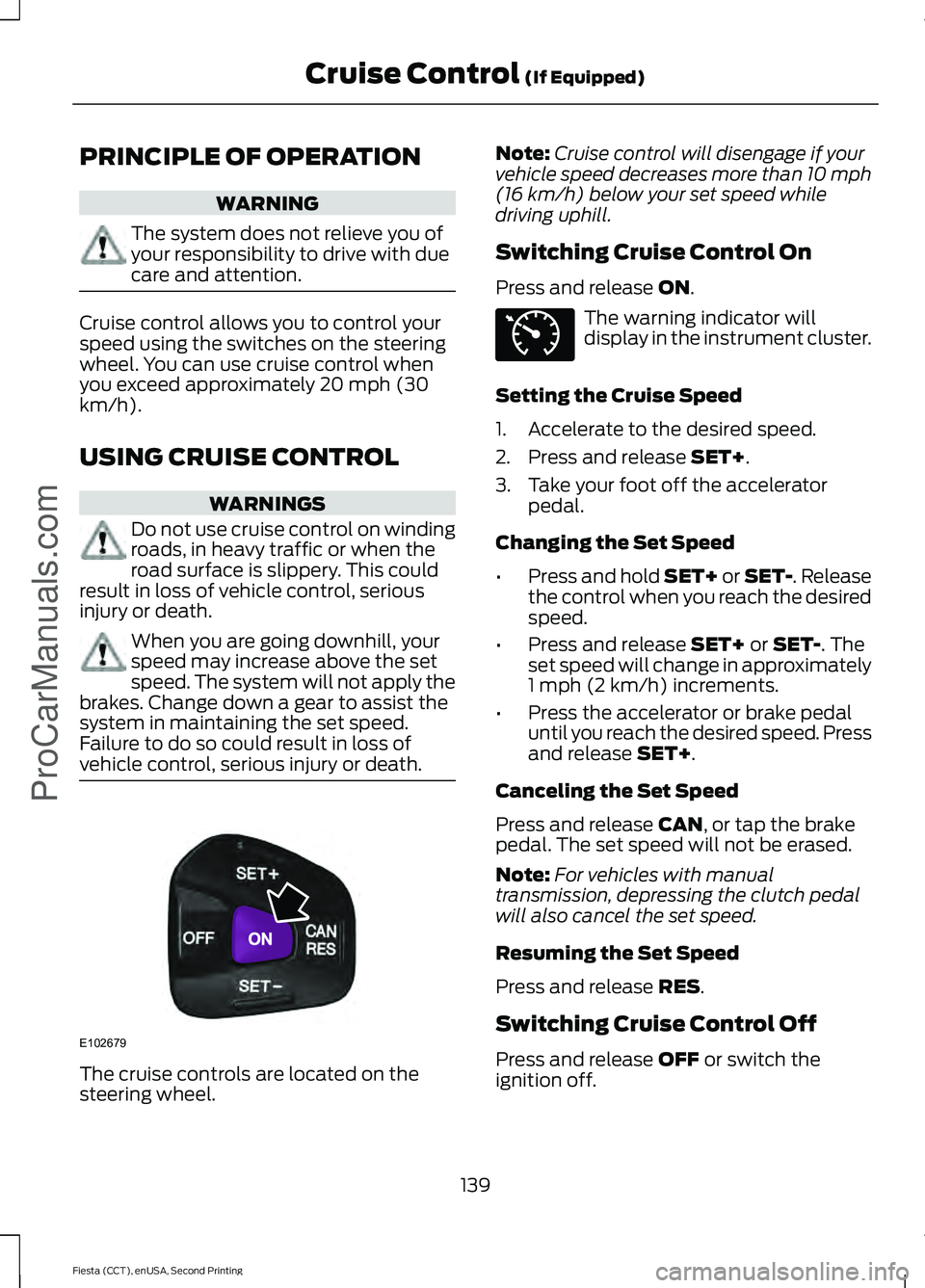
vehicle control, serious injury or death. The cruise controls are located on the
steering wheel. Note:
Cruise control will disengage if your
vehicle speed decreases more than 10 mph
(16 km/h) below your set speed while
driving uphill.
Switching Cruise Control On
Press and release
ON. The warning indicator will
display in the instrument cluster.
Setting the Cruise Speed
1. Accelerate to the desired speed.
2. Press and release
SET+.
3. Take your foot off the accelerator pedal.
Changing the Set Speed
• Press and hold SET+ or SET-. Release
the control when you reach the desired
speed.
• Press and release
SET+ or SET-. The
set speed will change in approximately
1 mph (2 km/h) increments.
• Press the accelerator or brake pedal
until you reach the desired speed. Press
and release
SET+.
Canceling the Set Speed
Press and release
CAN, or tap the brake
pedal. The set speed will not be erased.
Note: For vehicles with manual
transmission, depressing the clutch pedal
will also cancel the set speed.
Resuming the Set Speed
Press and release
RES.
Switching Cruise Control Off
Press and release
OFF or switch the
ignition off.
139
Fiesta (CCT), enUSA, Second Printing Cruise Control
(If Equipped)
ProCarManuals.comE102679 E71340
Page 144 of 423
STEERING
Electric Power Steering
WARNING
The electric power steering system
has diagnostic checks that
continuously monitor the system. If
a fault is detected, a message displays in
the information display. Stop your vehicle
as soon as it is safe to do so. Switch the
ignition off. After at least 10 seconds,
switch the ignition on and watch the
information display for a steering system
warning message. If a steering system
warning message returns, have the system
checked by an authorized dealer. Your vehicle has an electric power steering
system. There is no fluid reservoir. No
maintenance is required.
If your vehicle loses electrical power while
you are driving, electric power steering
assistance is lost. The steering system still
operates and you can steer your vehicle
manually. Manually steering your vehicle
requires more effort.
Extreme continuous steering may increase
the effort required for you to steer your
vehicle. This increased effort prevents
overheating and permanent damage to
the steering system. You do not lose the
ability to steer your vehicle manually.
Typical steering and driving maneuvers
allow the system to cool and return to
normal operation.
Steering Tips
If the steering wanders or pulls, check for:
•
Correct tire pressures.
• Uneven tire wear.
• Loose or worn suspension
components. •
Loose or worn steering components.
• Improper vehicle alignment.
Note: A high crown in the road or high
crosswinds may also make the steering
seem to wander or pull.
Adaptive Learning
The electronic power steering system
adaptive learning helps correct road
irregularities and improves overall handling
and steering feel. It communicates with
the brake system to help operate
advanced stability control and accident
avoidance systems. Additionally, whenever
the battery is disconnected or a new
battery installed, you must drive your
vehicle a short distance before the system
relearns the strategy and reactivates all
systems.
141
Fiesta (CCT), enUSA, Second Printing Driving AidsProCarManuals.com
Page 177 of 423
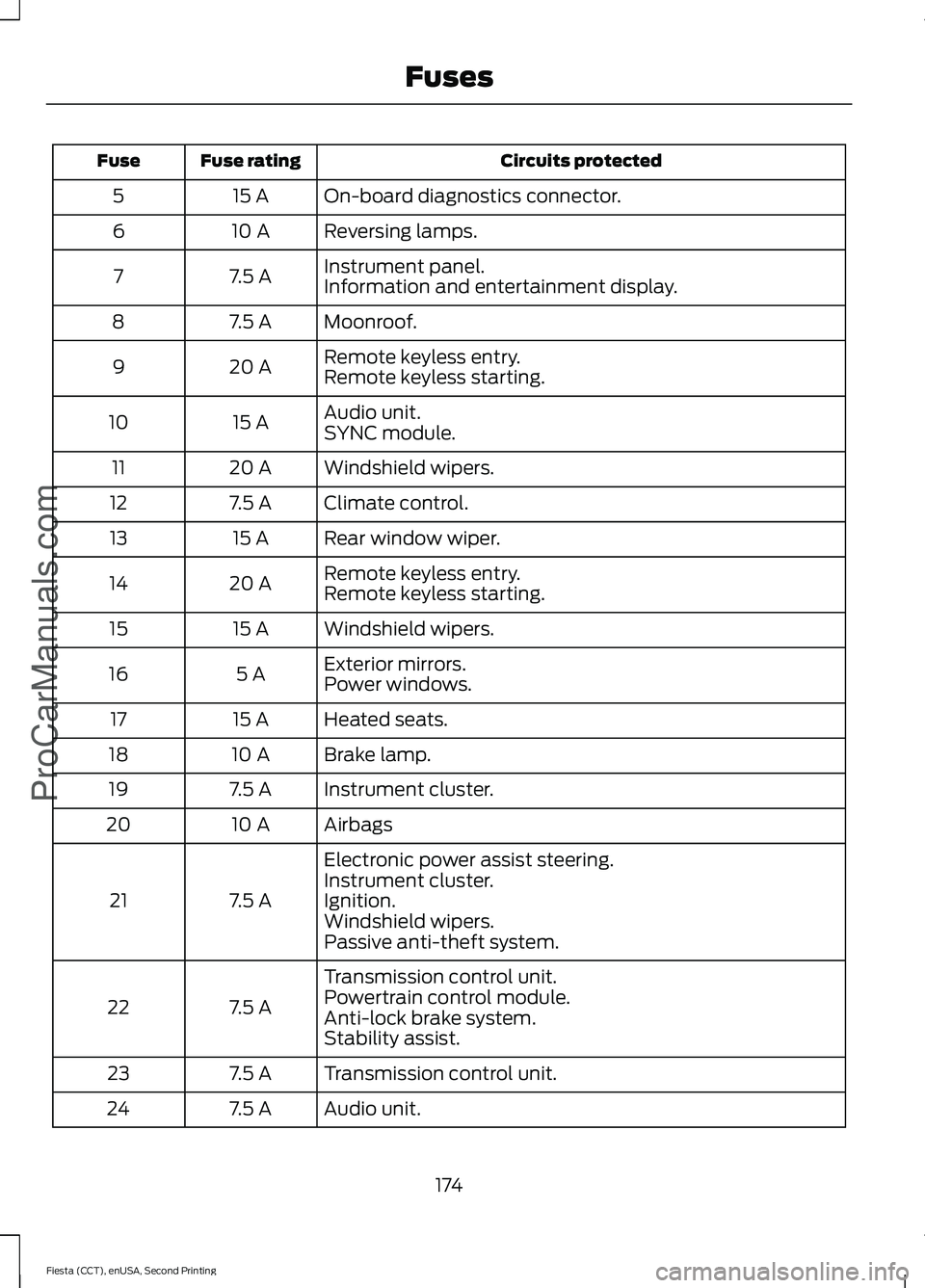
Circuits protected
Fuse rating
Fuse
On-board diagnostics connector.
15 A
5
Reversing lamps.
10 A
6
Instrument panel.
7.5 A
7
Information and entertainment display.
Moonroof.
7.5 A
8
Remote keyless entry.
20 A
9
Remote keyless starting.
Audio unit.
15 A
10
SYNC module.
Windshield wipers.
20 A
11
Climate control.
7.5 A
12
Rear window wiper.
15 A
13
Remote keyless entry.
20 A
14
Remote keyless starting.
Windshield wipers.
15 A
15
Exterior mirrors.
5 A
16
Power windows.
Heated seats.
15 A
17
Brake lamp.
10 A
18
Instrument cluster.
7.5 A
19
Airbags
10 A
20
Electronic power assist steering.
7.5 A
21 Instrument cluster.
Ignition.
Windshield wipers.
Passive anti-theft system.
Transmission control unit.
7.5 A
22 Powertrain control module.
Anti-lock brake system.
Stability assist.
Transmission control unit.
7.5 A
23
Audio unit.
7.5 A
24
174
Fiesta (CCT), enUSA, Second Printing FusesProCarManuals.com
Page 189 of 423
BRAKE FLUID CHECK
Fluid levels between the MIN and MAX
lines are within the normal operating range;
there is no need to add fluid. If the fluid
levels are outside of the normal operating
range, the performance of the system
could be compromised; seek service from
your authorized dealer immediately.
POWER STEERING FLUID
CHECK
Your vehicle is equipped with an electric
power steering (EPS) system. There is no
fluid reservoir to check or fill.
WASHER FLUID CHECK
Note:
The reservoir supplies the front and
rear washer systems.
When adding fluid, use a mixture of washer
fluid and water to help prevent freezing in
cold weather and improve the cleaning
capability. We recommend that you use
only high quality washer fluid.
For information on fluid dilution, refer to
the product instructions.
FUEL FILTER
Your vehicle is equipped with a lifetime
fuel filter that is integrated with the fuel
tank. Regular maintenance or replacement
is not needed.
CHANGING THE 12V BATTERY WARNING
For vehicles with start-stop the
battery requirement is different. You
must replace the battery with one of
exactly the same specification. Note:
Where applicable you must
reprogram the audio system using the
keycode.
The battery is located in the engine
compartment. See Maintenance (page
177).
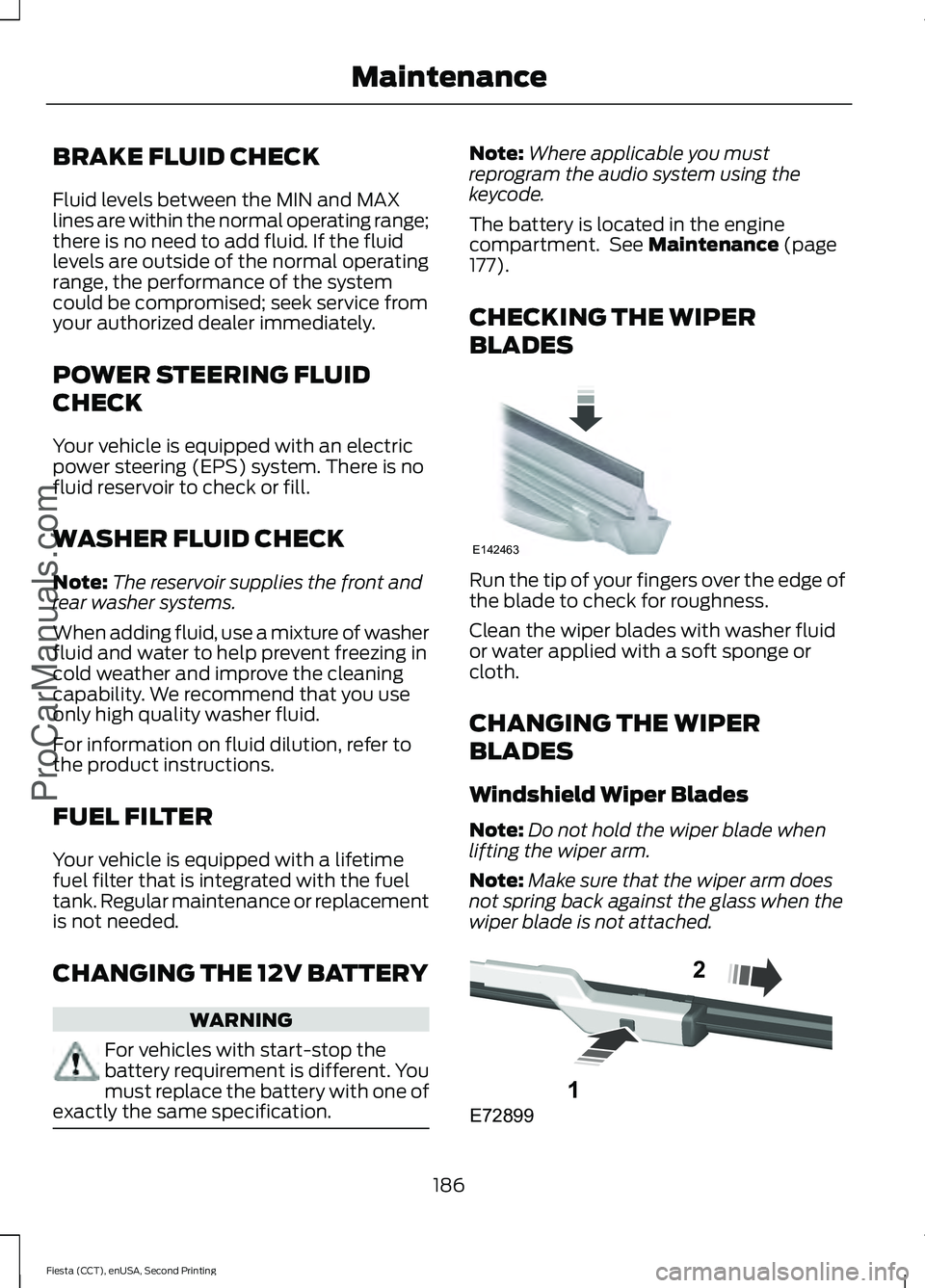
CHECKING THE WIPER
BLADES Run the tip of your fingers over the edge of
the blade to check for roughness.
Clean the wiper blades with washer fluid
or water applied with a soft sponge or
cloth.
CHANGING THE WIPER
BLADES
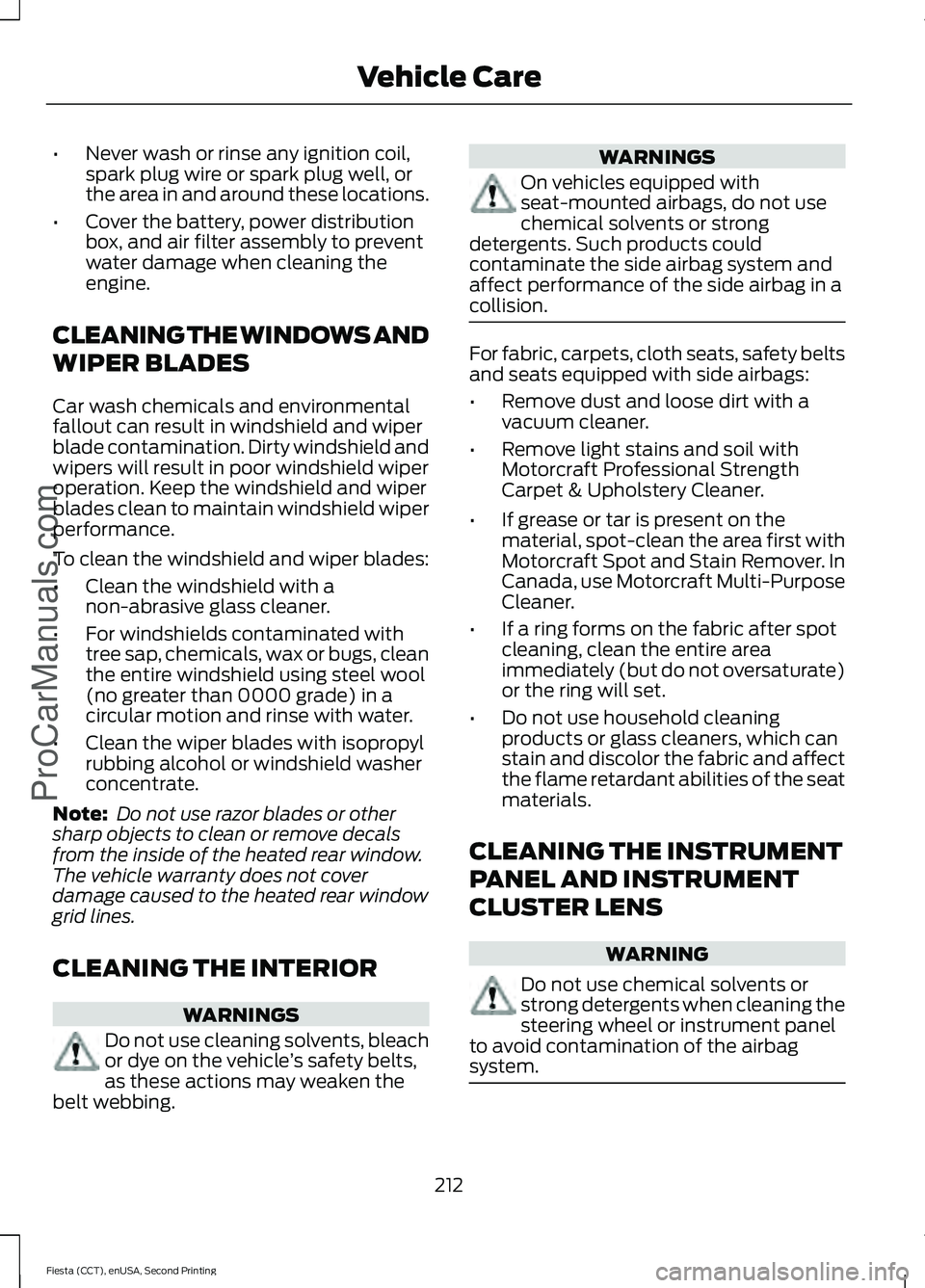
Windshield Wiper Blades
Note:
Do not hold the wiper blade when
lifting the wiper arm.
Note: Make sure that the wiper arm does
not spring back against the glass when the
wiper blade is not attached. 186
Fiesta (CCT), enUSA, Second Printing Maintenance
ProCarManuals.comE142463 E72899
1
2
Page 215 of 423
•
Never wash or rinse any ignition coil,
spark plug wire or spark plug well, or
the area in and around these locations.
• Cover the battery, power distribution
box, and air filter assembly to prevent
water damage when cleaning the
engine.
CLEANING THE WINDOWS AND
WIPER BLADES
Car wash chemicals and environmental
fallout can result in windshield and wiper
blade contamination. Dirty windshield and
wipers will result in poor windshield wiper
operation. Keep the windshield and wiper
blades clean to maintain windshield wiper
performance.
To clean the windshield and wiper blades:
• Clean the windshield with a
non-abrasive glass cleaner.
• For windshields contaminated with
tree sap, chemicals, wax or bugs, clean
the entire windshield using steel wool
(no greater than 0000 grade) in a
circular motion and rinse with water.
• Clean the wiper blades with isopropyl
rubbing alcohol or windshield washer
concentrate.
Note: Do not use razor blades or other
sharp objects to clean or remove decals
from the inside of the heated rear window.
The vehicle warranty does not cover
damage caused to the heated rear window
grid lines.
CLEANING THE INTERIOR WARNINGS
Do not use cleaning solvents, bleach
or dye on the vehicle
’s safety belts,
as these actions may weaken the
belt webbing. WARNINGS
On vehicles equipped with
seat-mounted airbags, do not use
chemical solvents or strong
detergents. Such products could
contaminate the side airbag system and
affect performance of the side airbag in a
collision. For fabric, carpets, cloth seats, safety belts
and seats equipped with side airbags:
•
Remove dust and loose dirt with a
vacuum cleaner.
• Remove light stains and soil with
Motorcraft Professional Strength
Carpet & Upholstery Cleaner.
• If grease or tar is present on the
material, spot-clean the area first with
Motorcraft Spot and Stain Remover. In
Canada, use Motorcraft Multi-Purpose
Cleaner.
• If a ring forms on the fabric after spot
cleaning, clean the entire area
immediately (but do not oversaturate)
or the ring will set.
• Do not use household cleaning
products or glass cleaners, which can
stain and discolor the fabric and affect
the flame retardant abilities of the seat
materials.
CLEANING THE INSTRUMENT
PANEL AND INSTRUMENT
CLUSTER LENS WARNING
Do not use chemical solvents or
strong detergents when cleaning the
steering wheel or instrument panel
to avoid contamination of the airbag
system. 212
Fiesta (CCT), enUSA, Second Printing Vehicle CareProCarManuals.com