ignition FORD FIESTA 2015 Workshop Manual
[x] Cancel search | Manufacturer: FORD, Model Year: 2015, Model line: FIESTA, Model: FORD FIESTA 2015Pages: 423, PDF Size: 5.5 MB
Page 162 of 423
3.
Remove your foot from the brake pedal
and press the START/STOP button
to switch off the ignition.
4. You can either attempt to start the engine by pressing the brake pedal and
the
START/STOP button, or switch
on the ignition only by pressing the
START/STOP
button without
pressing the brake pedal. Both ways
re-enable the fuel system.
Note: When you try to restart your vehicle
after a fuel shutoff, the vehicle makes sure
that various systems are safe to restart.
Once your vehicle determines that the
systems are safe, then the vehicle will allow
you to restart.
Note: In the event that your vehicle does
not restart after your third attempt, contact
an authorized dealer.
JUMP STARTING THE VEHICLE WARNINGS
The gases around the battery can
explode if exposed to flames, sparks,
or lit cigarettes. An explosion could
result in personal injury or vehicle damage. Batteries contain sulfuric acid which
can burn skin, eyes and clothing, if
contacted.
Use only an adequate-sized cable
with insulated clamps.
Preparing Your Vehicle
Note:
Do not attempt to push-start your
automatic transmission vehicle. Automatic
transmissions do not have push-start
capability. Attempting to push-start a
vehicle with an automatic transmission may
cause transmission damage.
Note: Use only a 12-volt supply to start your
vehicle. Note:
Do not disconnect the battery of the
disabled vehicle as this could damage the
vehicle's electrical system.
Park the booster vehicle close to the hood
of the disabled vehicle, making sure the
two vehicles do not touch. Turn all
accessories off.
Connecting the Jumper Cables WARNING
Do not attach the cables to fuel lines,
engine rocker covers, the intake
manifold or electrical components
as grounding points. Stay clear of moving
parts. To avoid reverse polarity
connections, make sure that you correctly
identify the positive (+) and negative (-)
terminals on both the disabled and booster
vehicles before connecting the cables. Note:
In the illustration, the bottom vehicle
represents the booster vehicle.
159
Fiesta (CCT), enUSA, Second Printing Roadside Emergencies
ProCarManuals.com
Page 172 of 423
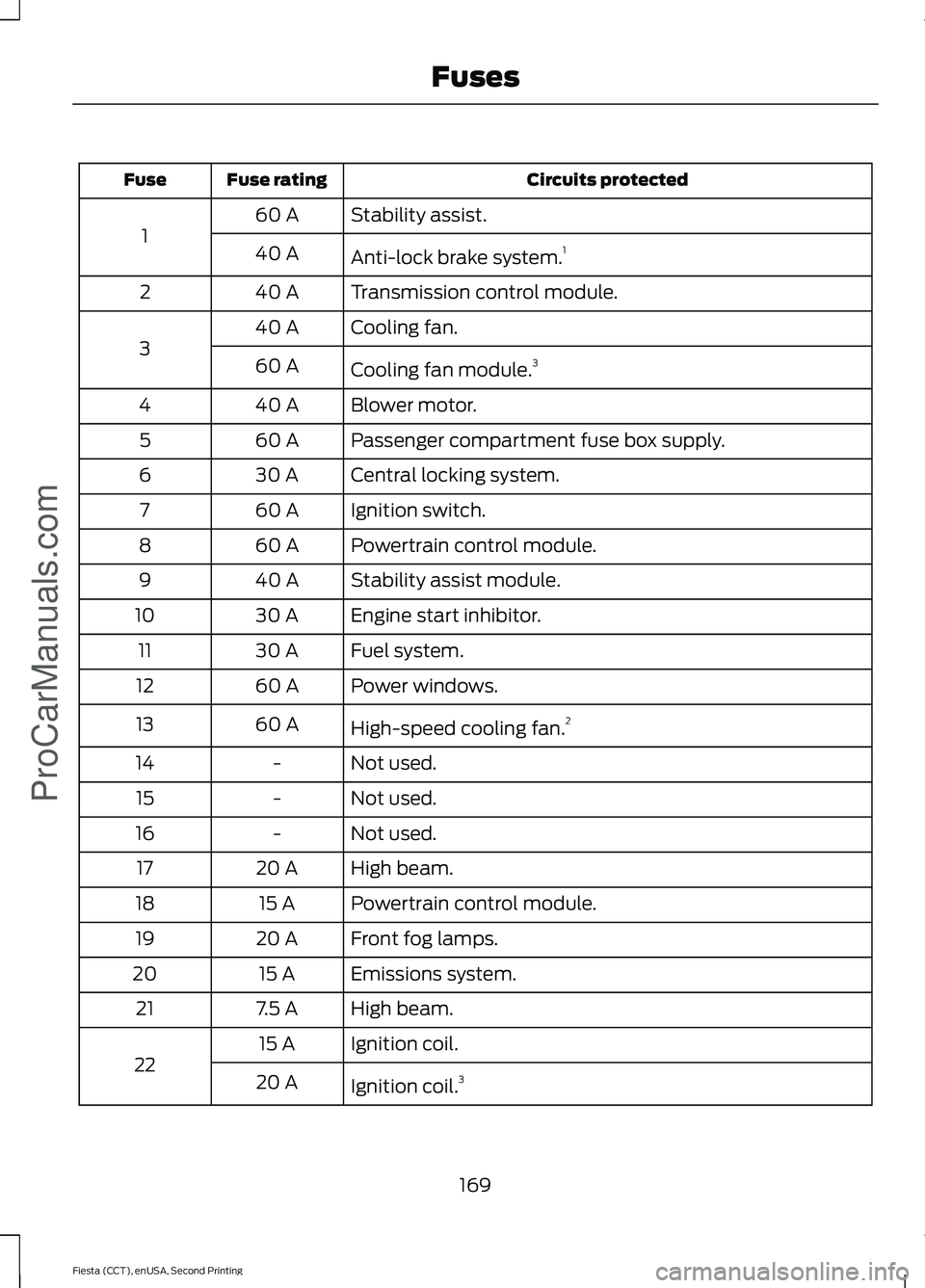
Circuits protected
Fuse rating
Fuse
Stability assist.
60 A
1 Anti-lock brake system. 1
40 A
Transmission control module.
40 A
2
Cooling fan.
40 A
3 Cooling fan module.3
60 A
Blower motor.
40 A
4
Passenger compartment fuse box supply.
60 A
5
Central locking system.
30 A
6
Ignition switch.
60 A
7
Powertrain control module.
60 A
8
Stability assist module.
40 A
9
Engine start inhibitor.
30 A
10
Fuel system.
30 A
11
Power windows.
60 A
12
High-speed cooling fan. 2
60 A
13
Not used.
-
14
Not used.
-
15
Not used.
-
16
High beam.
20 A
17
Powertrain control module.
15 A
18
Front fog lamps.
20 A
19
Emissions system.
15 A
20
High beam.
7.5 A
21
Ignition coil.
15 A
22 Ignition coil.3
20 A
169
Fiesta (CCT), enUSA, Second Printing FusesProCarManuals.com
Page 176 of 423
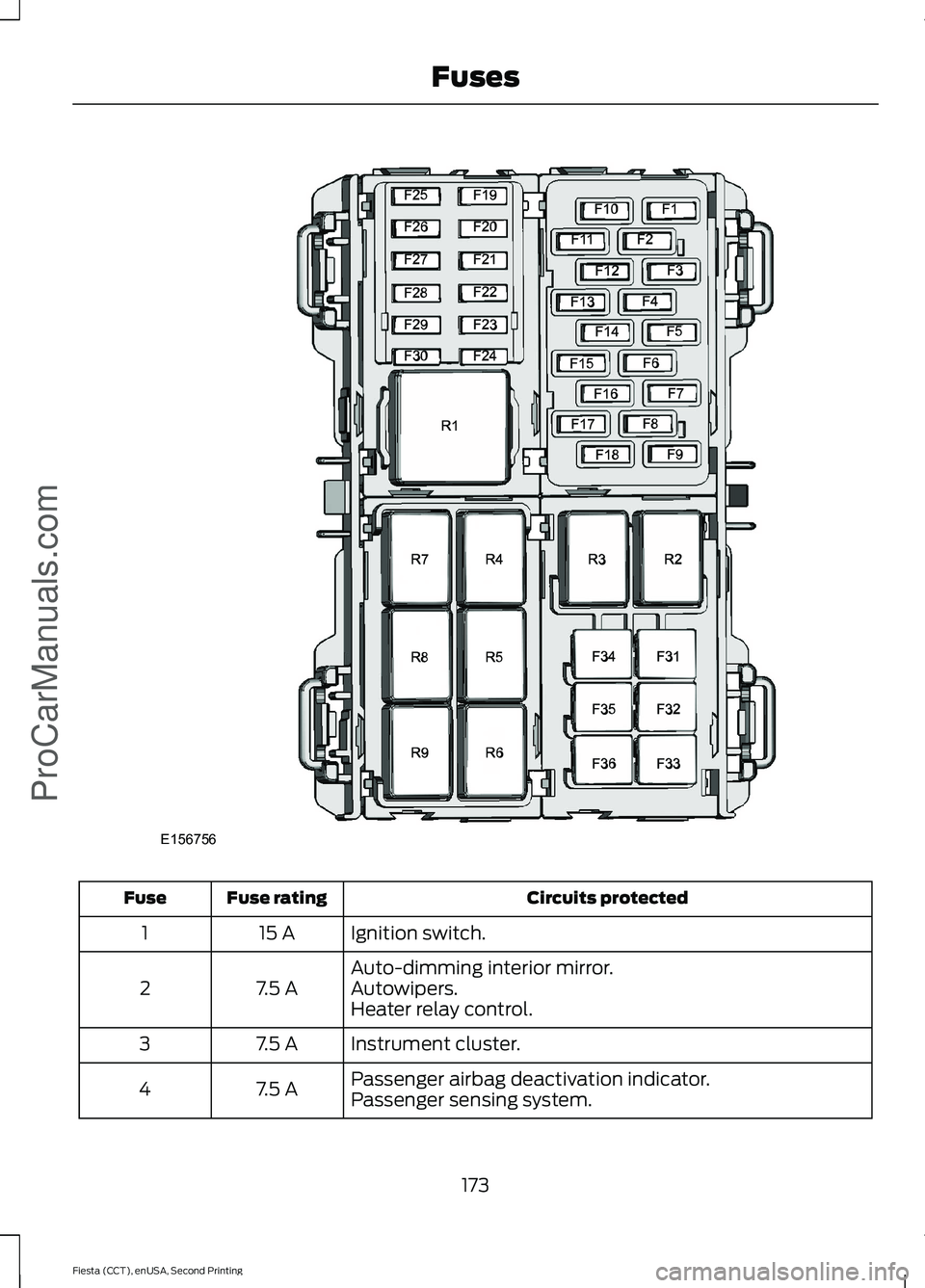
Circuits protected
Fuse rating
Fuse
Ignition switch.
15 A
1
Auto-dimming interior mirror.
7.5 A
2 Autowipers.
Heater relay control.
Instrument cluster.
7.5 A
3
Passenger airbag deactivation indicator.
7.5 A
4
Passenger sensing system.
173
Fiesta (CCT), enUSA, Second Printing FusesProCarManuals.comE156756
Page 177 of 423
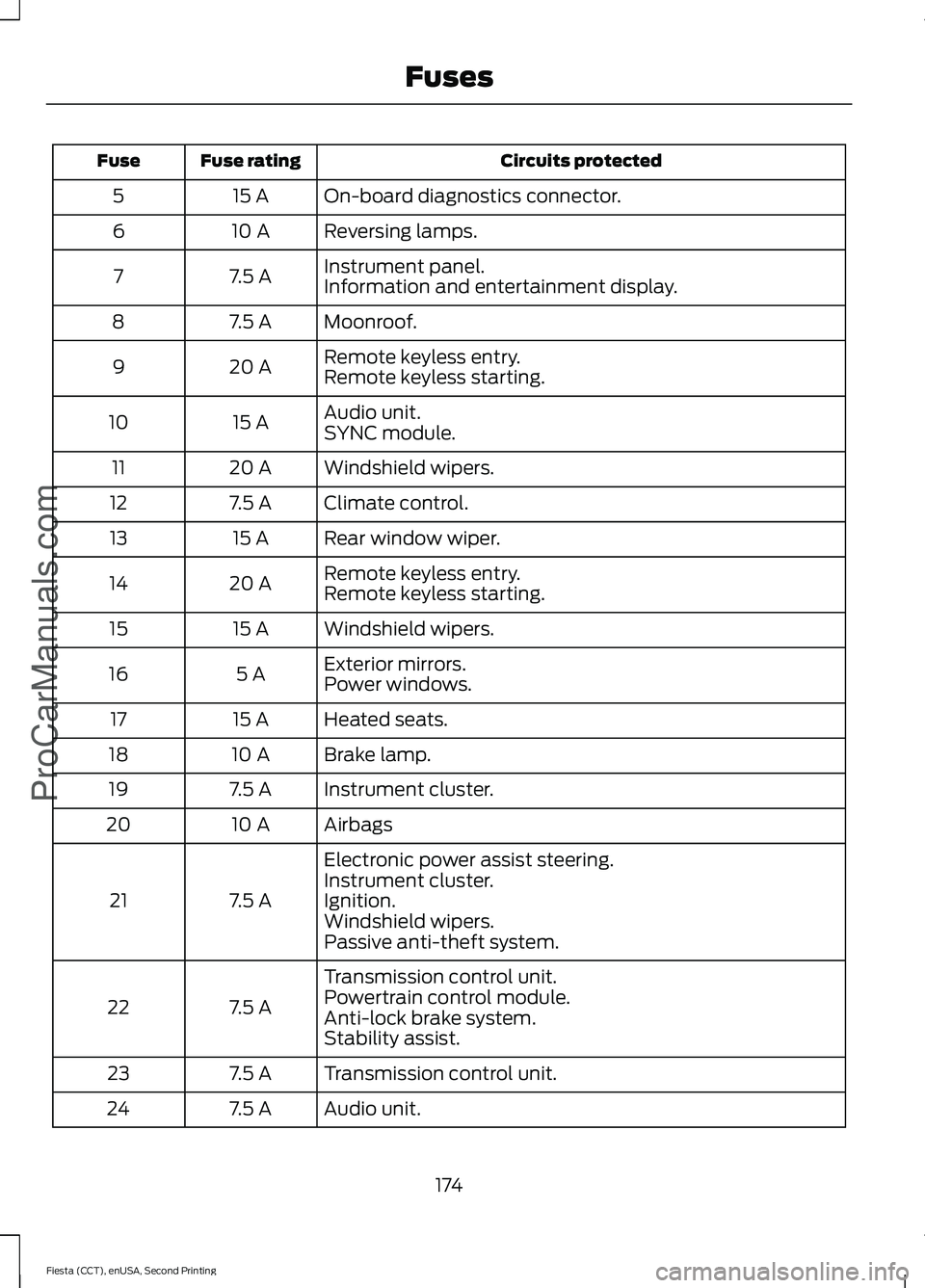
Circuits protected
Fuse rating
Fuse
On-board diagnostics connector.
15 A
5
Reversing lamps.
10 A
6
Instrument panel.
7.5 A
7
Information and entertainment display.
Moonroof.
7.5 A
8
Remote keyless entry.
20 A
9
Remote keyless starting.
Audio unit.
15 A
10
SYNC module.
Windshield wipers.
20 A
11
Climate control.
7.5 A
12
Rear window wiper.
15 A
13
Remote keyless entry.
20 A
14
Remote keyless starting.
Windshield wipers.
15 A
15
Exterior mirrors.
5 A
16
Power windows.
Heated seats.
15 A
17
Brake lamp.
10 A
18
Instrument cluster.
7.5 A
19
Airbags
10 A
20
Electronic power assist steering.
7.5 A
21 Instrument cluster.
Ignition.
Windshield wipers.
Passive anti-theft system.
Transmission control unit.
7.5 A
22 Powertrain control module.
Anti-lock brake system.
Stability assist.
Transmission control unit.
7.5 A
23
Audio unit.
7.5 A
24
174
Fiesta (CCT), enUSA, Second Printing FusesProCarManuals.com
Page 178 of 423
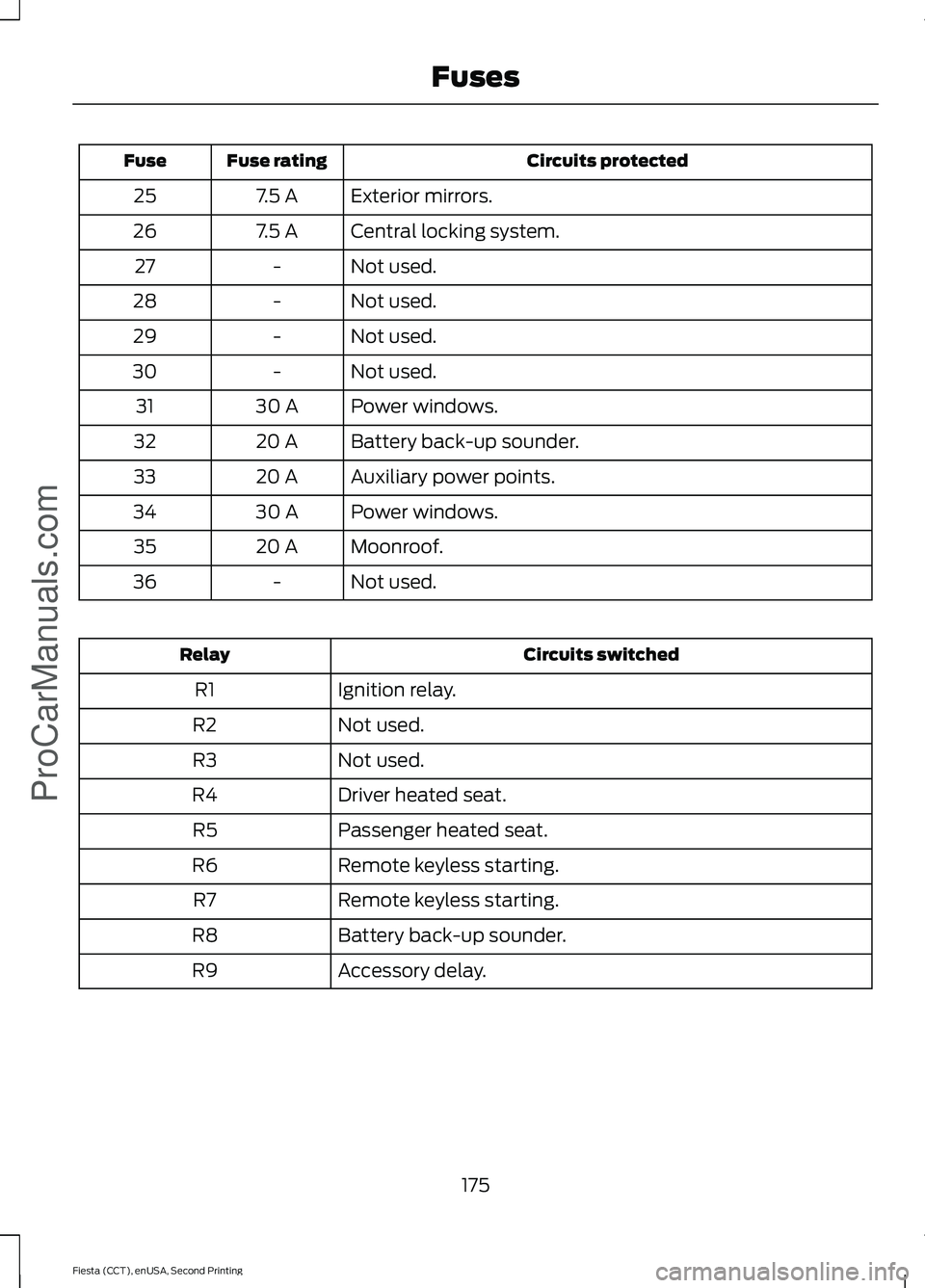
Circuits protected
Fuse rating
Fuse
Exterior mirrors.
7.5 A
25
Central locking system.
7.5 A
26
Not used.
-
27
Not used.
-
28
Not used.
-
29
Not used.
-
30
Power windows.
30 A
31
Battery back-up sounder.
20 A
32
Auxiliary power points.
20 A
33
Power windows.
30 A
34
Moonroof.
20 A
35
Not used.
-
36 Circuits switched
Relay
Ignition relay.
R1
Not used.
R2
Not used.
R3
Driver heated seat.
R4
Passenger heated seat.
R5
Remote keyless starting.
R6
Remote keyless starting.
R7
Battery back-up sounder.
R8
Accessory delay.
R9
175
Fiesta (CCT), enUSA, Second Printing FusesProCarManuals.com
Page 186 of 423
Adding Engine Oil
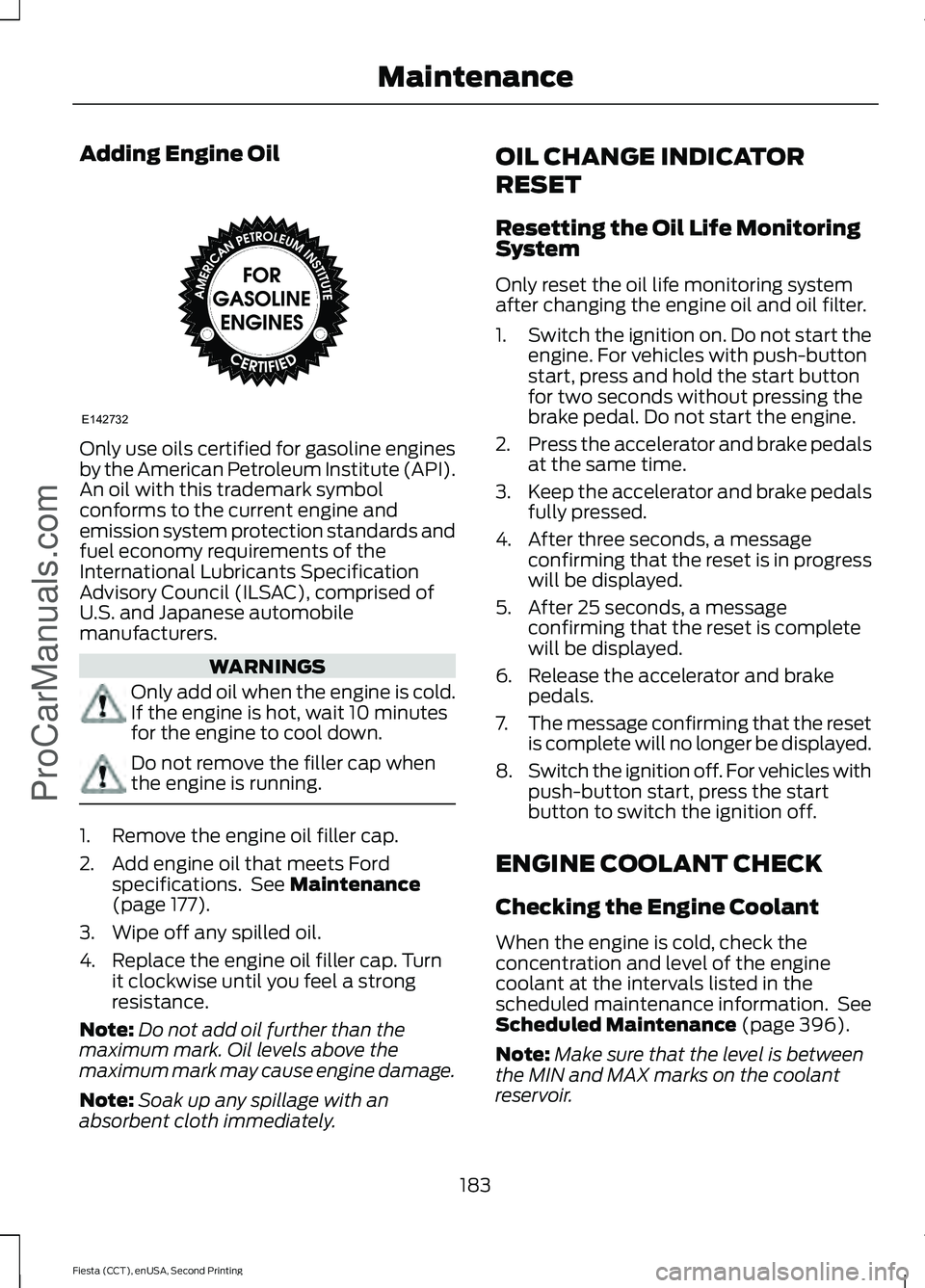
Only use oils certified for gasoline engines
by the American Petroleum Institute (API).
An oil with this trademark symbol
conforms to the current engine and
emission system protection standards and
fuel economy requirements of the
International Lubricants Specification
Advisory Council (ILSAC), comprised of
U.S. and Japanese automobile
manufacturers.
WARNINGS
Only add oil when the engine is cold.
If the engine is hot, wait 10 minutes
for the engine to cool down.
Do not remove the filler cap when
the engine is running.
1. Remove the engine oil filler cap.
2. Add engine oil that meets Ford
specifications. See Maintenance
(page 177).
3. Wipe off any spilled oil.
4. Replace the engine oil filler cap. Turn it clockwise until you feel a strong
resistance.
Note: Do not add oil further than the
maximum mark. Oil levels above the
maximum mark may cause engine damage.
Note: Soak up any spillage with an
absorbent cloth immediately. OIL CHANGE INDICATOR
RESET
Resetting the Oil Life Monitoring
System
Only reset the oil life monitoring system
after changing the engine oil and oil filter.
1.
Switch the ignition on. Do not start the
engine. For vehicles with push-button
start, press and hold the start button
for two seconds without pressing the
brake pedal. Do not start the engine.
2. Press the accelerator and brake pedals
at the same time.
3. Keep the accelerator and brake pedals
fully pressed.
4. After three seconds, a message confirming that the reset is in progress
will be displayed.
5. After 25 seconds, a message confirming that the reset is complete
will be displayed.
6. Release the accelerator and brake pedals.
7. The message confirming that the reset
is complete will no longer be displayed.
8. Switch the ignition off. For vehicles with
push-button start, press the start
button to switch the ignition off.
ENGINE COOLANT CHECK
Checking the Engine Coolant
When the engine is cold, check the
concentration and level of the engine
coolant at the intervals listed in the
scheduled maintenance information. See
Scheduled Maintenance
(page 396).
Note: Make sure that the level is between
the MIN and MAX marks on the coolant
reservoir.
183
Fiesta (CCT), enUSA, Second Printing Maintenance
ProCarManuals.comE142732
Page 192 of 423
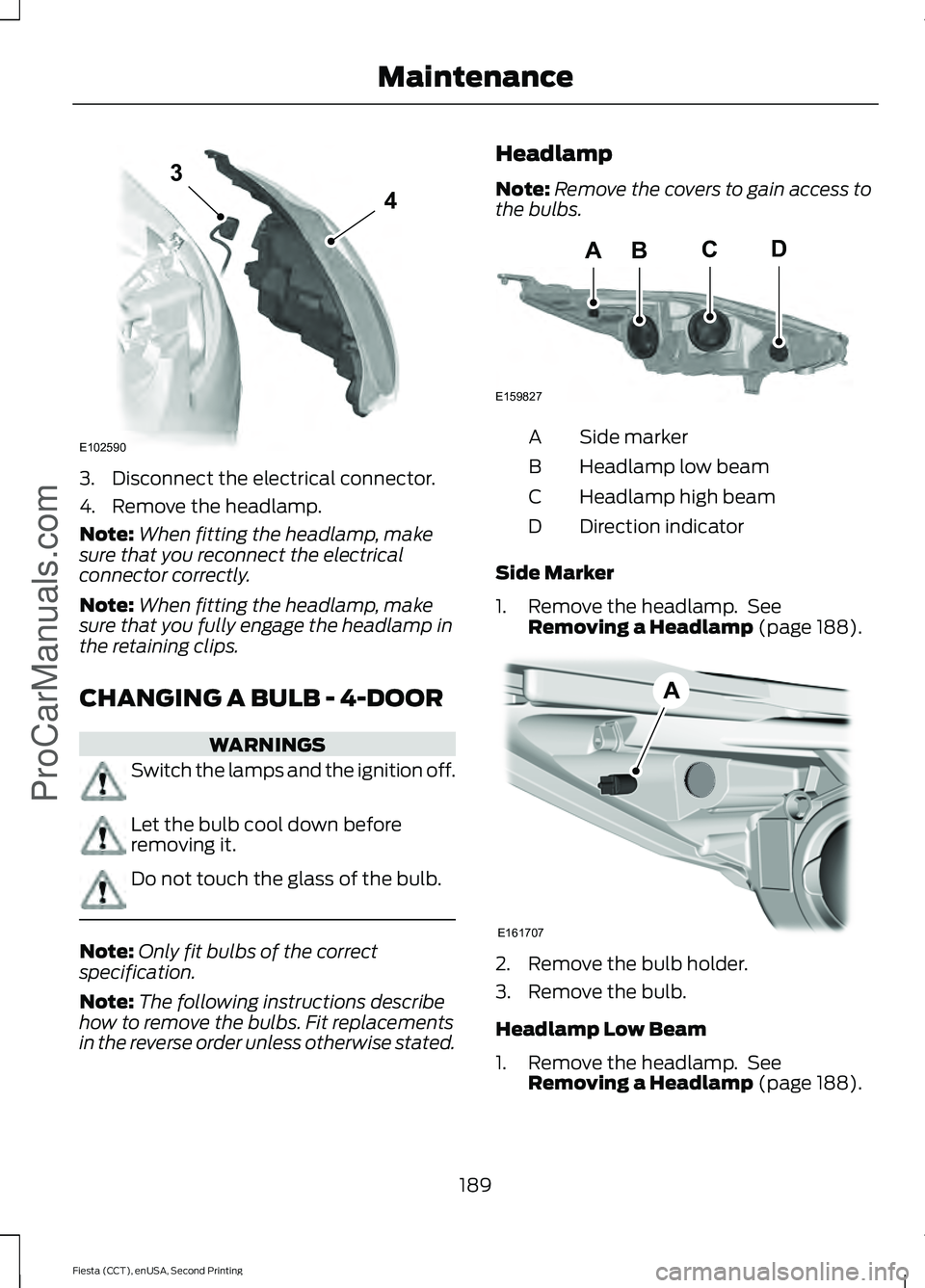
3. Disconnect the electrical connector.
4. Remove the headlamp.
Note:
When fitting the headlamp, make
sure that you reconnect the electrical
connector correctly.
Note: When fitting the headlamp, make
sure that you fully engage the headlamp in
the retaining clips.
CHANGING A BULB - 4-DOOR WARNINGS
Switch the lamps and the ignition off.
Let the bulb cool down before
removing it.
Do not touch the glass of the bulb.
Note:
Only fit bulbs of the correct
specification.
Note: The following instructions describe
how to remove the bulbs. Fit replacements
in the reverse order unless otherwise stated. Headlamp
Note:
Remove the covers to gain access to
the bulbs. Side marker
A
Headlamp low beam
B
Headlamp high beam
C
Direction indicator
D
Side Marker
1. Remove the headlamp. See Removing a Headlamp (page 188). 2. Remove the bulb holder.
3. Remove the bulb.
Headlamp Low Beam
1. Remove the headlamp. See
Removing a Headlamp
(page 188).
189
Fiesta (CCT), enUSA, Second Printing Maintenance
ProCarManuals.comE102590
3
4 BACD
E159827 E161707
A
Page 197 of 423
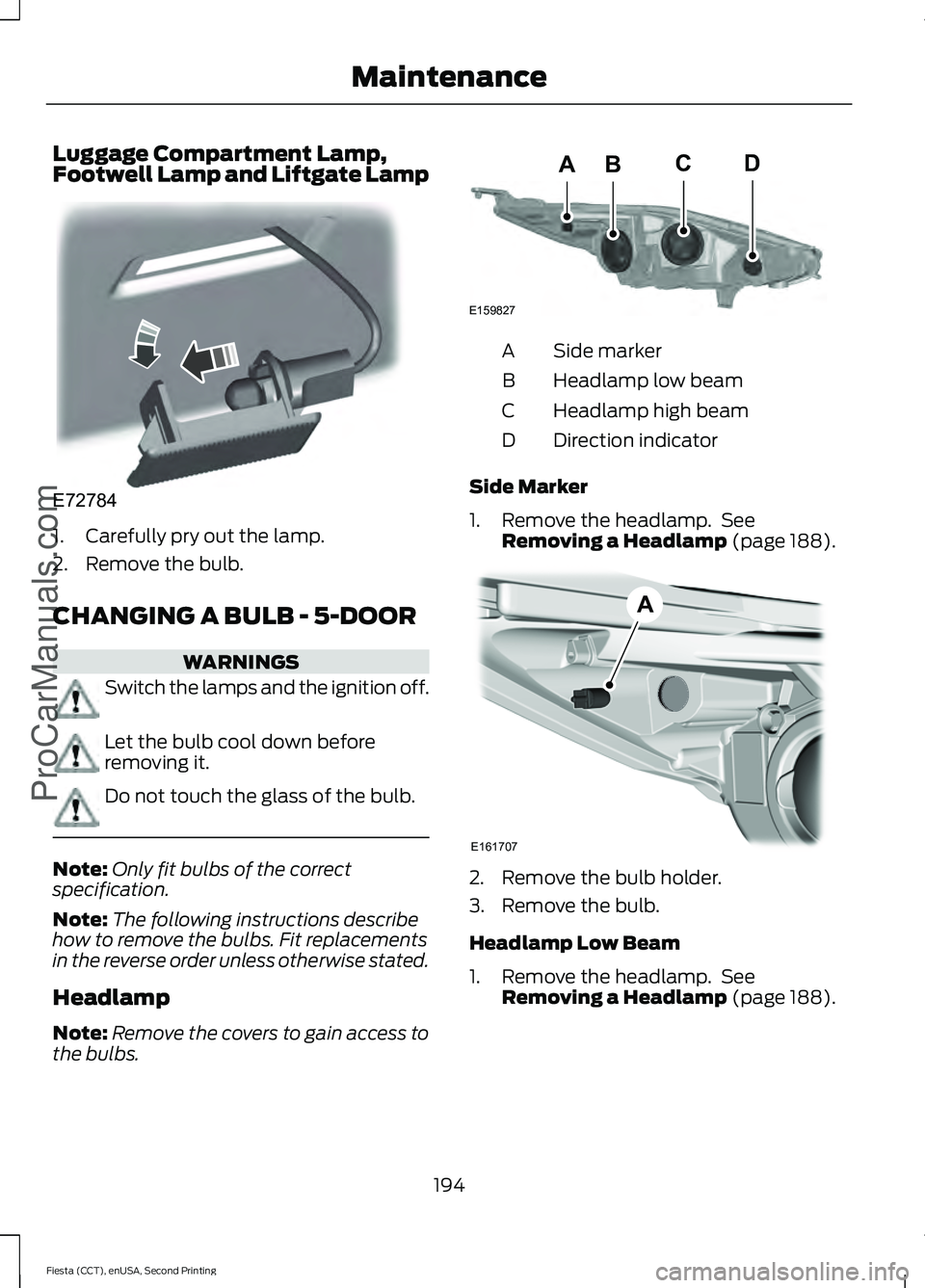
Luggage Compartment Lamp,
Footwell Lamp and Liftgate Lamp
1. Carefully pry out the lamp.
2. Remove the bulb.
CHANGING A BULB - 5-DOOR
WARNINGS
Switch the lamps and the ignition off.
Let the bulb cool down before
removing it.
Do not touch the glass of the bulb.
Note:
Only fit bulbs of the correct
specification.
Note: The following instructions describe
how to remove the bulbs. Fit replacements
in the reverse order unless otherwise stated.
Headlamp
Note: Remove the covers to gain access to
the bulbs. Side marker
A
Headlamp low beam
B
Headlamp high beam
C
Direction indicator
D
Side Marker
1. Remove the headlamp. See Removing a Headlamp (page 188). 2. Remove the bulb holder.
3. Remove the bulb.
Headlamp Low Beam
1. Remove the headlamp. See
Removing a Headlamp
(page 188).
194
Fiesta (CCT), enUSA, Second Printing Maintenance
ProCarManuals.comE72784 BACD
E159827 E161707
A
Page 215 of 423
•
Never wash or rinse any ignition coil,
spark plug wire or spark plug well, or
the area in and around these locations.
• Cover the battery, power distribution
box, and air filter assembly to prevent
water damage when cleaning the
engine.
CLEANING THE WINDOWS AND
WIPER BLADES
Car wash chemicals and environmental
fallout can result in windshield and wiper
blade contamination. Dirty windshield and
wipers will result in poor windshield wiper
operation. Keep the windshield and wiper
blades clean to maintain windshield wiper
performance.
To clean the windshield and wiper blades:
• Clean the windshield with a
non-abrasive glass cleaner.
• For windshields contaminated with
tree sap, chemicals, wax or bugs, clean
the entire windshield using steel wool
(no greater than 0000 grade) in a
circular motion and rinse with water.
• Clean the wiper blades with isopropyl
rubbing alcohol or windshield washer
concentrate.
Note: Do not use razor blades or other
sharp objects to clean or remove decals
from the inside of the heated rear window.
The vehicle warranty does not cover
damage caused to the heated rear window
grid lines.
CLEANING THE INTERIOR WARNINGS
Do not use cleaning solvents, bleach
or dye on the vehicle
’s safety belts,
as these actions may weaken the
belt webbing. WARNINGS
On vehicles equipped with
seat-mounted airbags, do not use
chemical solvents or strong
detergents. Such products could
contaminate the side airbag system and
affect performance of the side airbag in a
collision. For fabric, carpets, cloth seats, safety belts
and seats equipped with side airbags:
•
Remove dust and loose dirt with a
vacuum cleaner.
• Remove light stains and soil with
Motorcraft Professional Strength
Carpet & Upholstery Cleaner.
• If grease or tar is present on the
material, spot-clean the area first with
Motorcraft Spot and Stain Remover. In
Canada, use Motorcraft Multi-Purpose
Cleaner.
• If a ring forms on the fabric after spot
cleaning, clean the entire area
immediately (but do not oversaturate)
or the ring will set.
• Do not use household cleaning
products or glass cleaners, which can
stain and discolor the fabric and affect
the flame retardant abilities of the seat
materials.
CLEANING THE INSTRUMENT
PANEL AND INSTRUMENT
CLUSTER LENS WARNING
Do not use chemical solvents or
strong detergents when cleaning the
steering wheel or instrument panel
to avoid contamination of the airbag
system. 212
Fiesta (CCT), enUSA, Second Printing Vehicle CareProCarManuals.com
Page 272 of 423
Pairing a Phone for the First Time
Note:
SYNC can support downloading up
to approximately 1000 entries per
Bluetooth-enabled cellular phone.
Note: Make sure to switch on the ignition
and the radio. Put the transmission in
position P.
Note: To scroll through the menus, press
the up and down arrows on your audio
system.
Wirelessly pairing your phone with SYNC
allows you to make and receive hands-free
calls.
1. Press the phone button. When the display indicates there is no phone
paired, press
OK.
2. When
Find SYNC appears in the
display, press OK.
3. Put your phone into Bluetooth discovery mode. See your device's
manual if necessary.
4. When prompted on your phone's display, enter the six-digit PIN provided
by SYNC in the radio display. The
display indicates when the pairing is
successful.
Depending on your phone's capability and
your market, the system may prompt you
with questions, such as setting the current
phone as the primary phone (the phone
SYNC automatically tries to connect with
first upon vehicle start-up) and
downloading your phonebook.
Pairing Subsequent Phones
Note: Make sure to switch on the ignition
and the radio. Put the transmission in
position
P.
Note: To scroll through the menus, press
the up and down arrows on your audio
system. 1.
Press the phone button, and then scroll
to System Settings. Press
OK.
2. Scroll to Bluetooth Devices. Press
OK.
3. Scroll to Add Bluetooth Device. Press OK
.
4. When
Find SYNC appears in the
display, press OK.
5. Put your phone into Bluetooth discovery mode. See your phone's
manual if necessary.
6. When prompted on your phone's display, enter the six-digit PIN provided
by SYNC in the radio display. The
display indicates when the pairing is
successful.
The system then prompts with questions,
such as if you would like to set the current
phone as the primary phone (the phone
SYNC automatically tries to connect with
first upon vehicle start-up) and download
your phone book.
Phone Voice Commands
Press the voice icon and say "Phone". Say
any of the following: "PHONE"
"Call
"Call
"Call
"Call
"Call
"Call
"Call history incoming" 2
"Call history missed" 2
269
Fiesta (CCT), enUSA, Second Printing SYNC™
ProCarManuals.com